

10 mejores soluciones de software de gestión de ausencias para 2026

Lista de los mejores programas de gestión de ausencias


El software de gestión de ausencias ayuda a tu equipo a realizar el seguimiento, gestionar y elaborar informes sobre las bajas, los permisos y la asistencia de los empleados desde un solo lugar. Si buscas el mejor software de gestión de ausencias, probablemente estés intentando equilibrar el cumplimiento normativo, la complejidad de las políticas y la necesidad de obtener una visibilidad clara de toda tu plantilla.
La herramienta adecuada puede ayudarte a reducir el seguimiento manual, evitar errores y satisfacer tanto las necesidades de la empresa como las de los empleados. En esta lista encontrarás una variedad de soluciones para organizaciones de distintos tamaños, sectores y políticas de permisos, de modo que puedas comparar funciones y elegir la opción que mejor se adapte a tus objetivos de recursos humanos.
Por qué confiar en nuestras reseñas de software
Nuestro equipo lleva probando y evaluando software desde 2012. Como expertos en RR. HH., sabemos lo difícil —y lo importante— que es elegir el software adecuado.
Para esta guía, evaluamos las herramientas mediante pruebas prácticas e investigación independiente, puntuando las herramientas según nuestros criterios de selección. También nos basamos en la experiencia de líderes de opinión del sector y de profesionales de RR. HH. en activo.
Nuestras reseñas reflejan nuestro criterio editorial humano, no un discurso de ventas.
Revisores expertos:
Tabla comparativa de software de gestión de ausencias
Esta tabla comparativa resume los detalles de precios de mis principales selecciones de software de gestión de ausencias.
| Tool | Best For | Trial Info | Price | ||
|---|---|---|---|---|---|
| 1 | Mejor para registros centralizados de fuerza laboral global | Demostración gratuita disponible | Desde $5/empleado/mes | Website | |
| 2 | La mejor opción para la IA empresarial | Demostración gratuita disponible | Desde $8/usuario/mes | Website | |
| 3 | La mejor integración con sistemas de RR. HH. empresariales | Demo gratuita disponible | Precio bajo consulta | Website | |
| 4 | Mejor para el seguimiento de PTO en pequeñas empresas | Prueba gratuita disponible | Desde €2.99/usuario/mes | Website | |
| 5 | Ideal para vistas sencillas del calendario de equipo | Prueba gratuita de 30 días disponible | Desde $1.50/usuario/mes | Website | |
| 6 | El mejor con sincronización de nóminas en tiempo real | Demostración gratuita disponible | Precio bajo demanda | Website | |
| 7 | Ideal para la gestión de sustitutos en K-12 | Demo gratuita disponible | Precio bajo consulta | Website | |
| 8 | Ideal para programación de turnos en equipos por horas | Demo gratuita disponible | Desde $1,800/mes (facturación anual) | Website | |
| 9 | Mejor para personalización open source | Prueba gratuita de 30 días disponible | Desde $1/usuario/mes | Website | |
| 10 | La mejor opción para gestionar políticas de ausencia complejas | Demo gratuita disponible | Precio a consultar | Website |
Reseñas de los mejores programas de gestión de ausencias
A continuación se incluyen mis resúmenes detallados de los programas de gestión de ausencias que han entrado en mi lista de selección. Mis reseñas ofrecen un análisis detallado de las funciones, los casos de uso más adecuados y las integraciones de cada programa para ayudarte a encontrar la mejor opción para tu organización.

Deel HR
Mejor para registros centralizados de fuerza laboral global
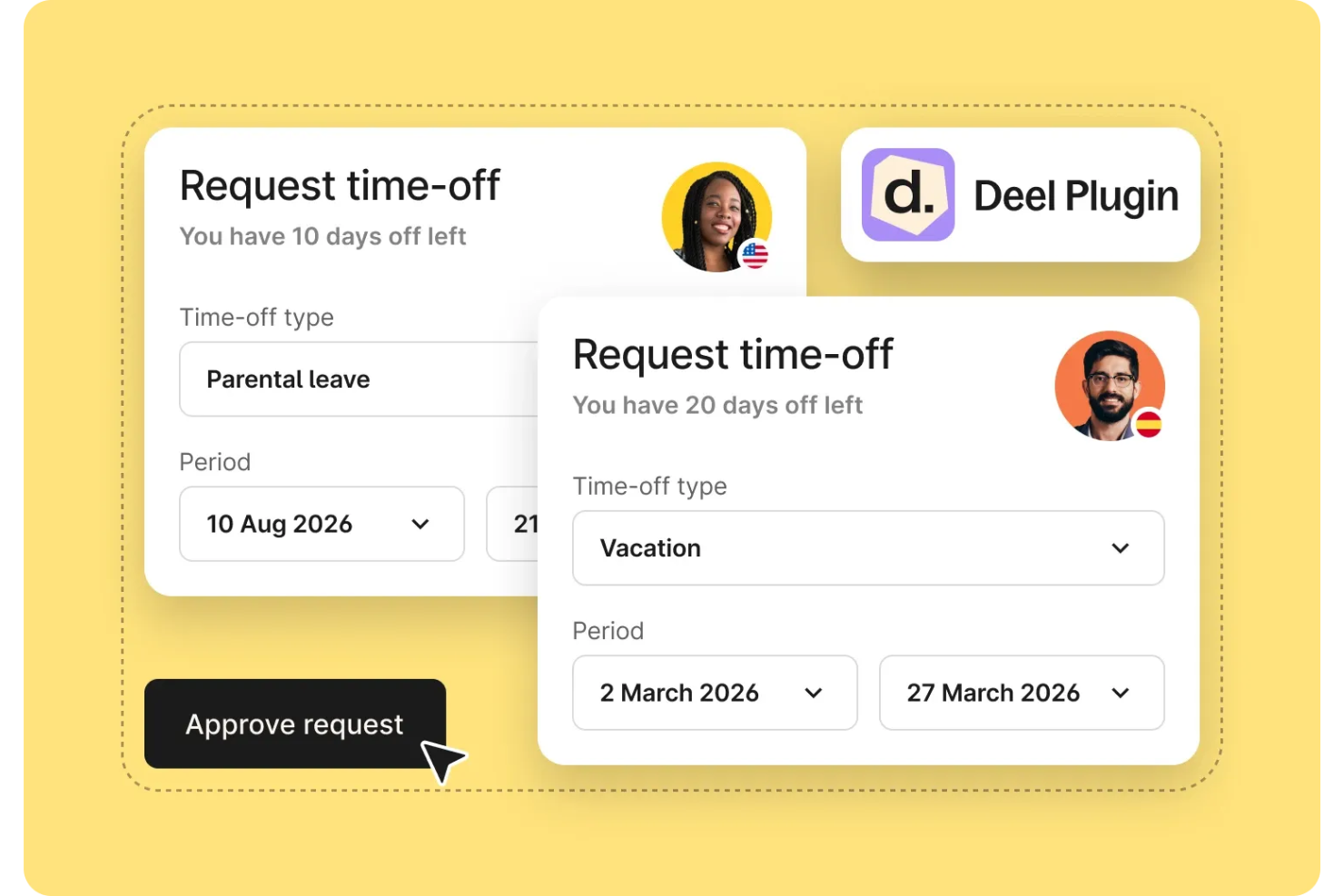
Deel HR es una plataforma de gestión de ausencias diseñada para equipos globales, que ofrece registros de empleados centralizados, seguimiento de tiempo libre, gestión de cumplimiento y funciones integradas de nómina.
¿Para quién es mejor Deel HR?
Equipos de recursos humanos globales y gerentes de operaciones en empresas multinacionales que necesitan gestionar registros de empleados, tiempo libre y cumplimiento en varios países.
Por qué elegí Deel HR
Elegí Deel HR como uno de los mejores porque puedo mantener todos los registros de la fuerza laboral global en un solo lugar, sin importar en cuántos países opere mi equipo. Me gusta poder rastrear los detalles de los empleados, contratos y datos de ausencias desde un solo panel. Mi equipo utiliza Deel HR para gestionar la documentación de cumplimiento y las solicitudes de tiempo libre de empleados y contratistas en todo el mundo.
Características clave de Deel HR
- Gestión de tiempo libre: Realiza el seguimiento, aprueba e informa sobre las ausencias y licencias de empleados en un solo sistema.
- Políticas de ausencia personalizadas: Configura reglas de permisos específicas por país o generales para toda la empresa y diferentes grupos de empleados.
- Calendarios de festivos automatizados: Aplica automáticamente los días festivos locales a los horarios de los empleados.
- Rastreo de auditorías: Accede a registros detallados de todos los cambios y aprobaciones relacionados con ausencias.
Integraciones de Deel HR
Las integraciones nativas no están claramente documentadas. Deel HR ofrece una API para integraciones personalizadas.
Pros and Cons
Pros:
- Actualizaciones en tiempo real para la nómina con ausencias
- Tipos de permisos personalizables para diferentes regiones
- Flujos de trabajo de aprobación masiva para solicitudes de tiempo libre
Cons:
- Integraciones nativas limitadas con plataformas de RR. HH.
- Las funciones de informes pueden carecer de filtros avanzados
New Product Updates from Deel HR

Deel Expands Stablecoin Wallet to 80+ Countries
Deel expands its Stablecoin Wallet to 80+ countries with dollar-backed balances and optional rewards. This gives eligible contractors more ways to hold and manage earnings inside Deel. For more information, visit Deel’s official site.
 .
.
La mejor opción para la IA empresarial
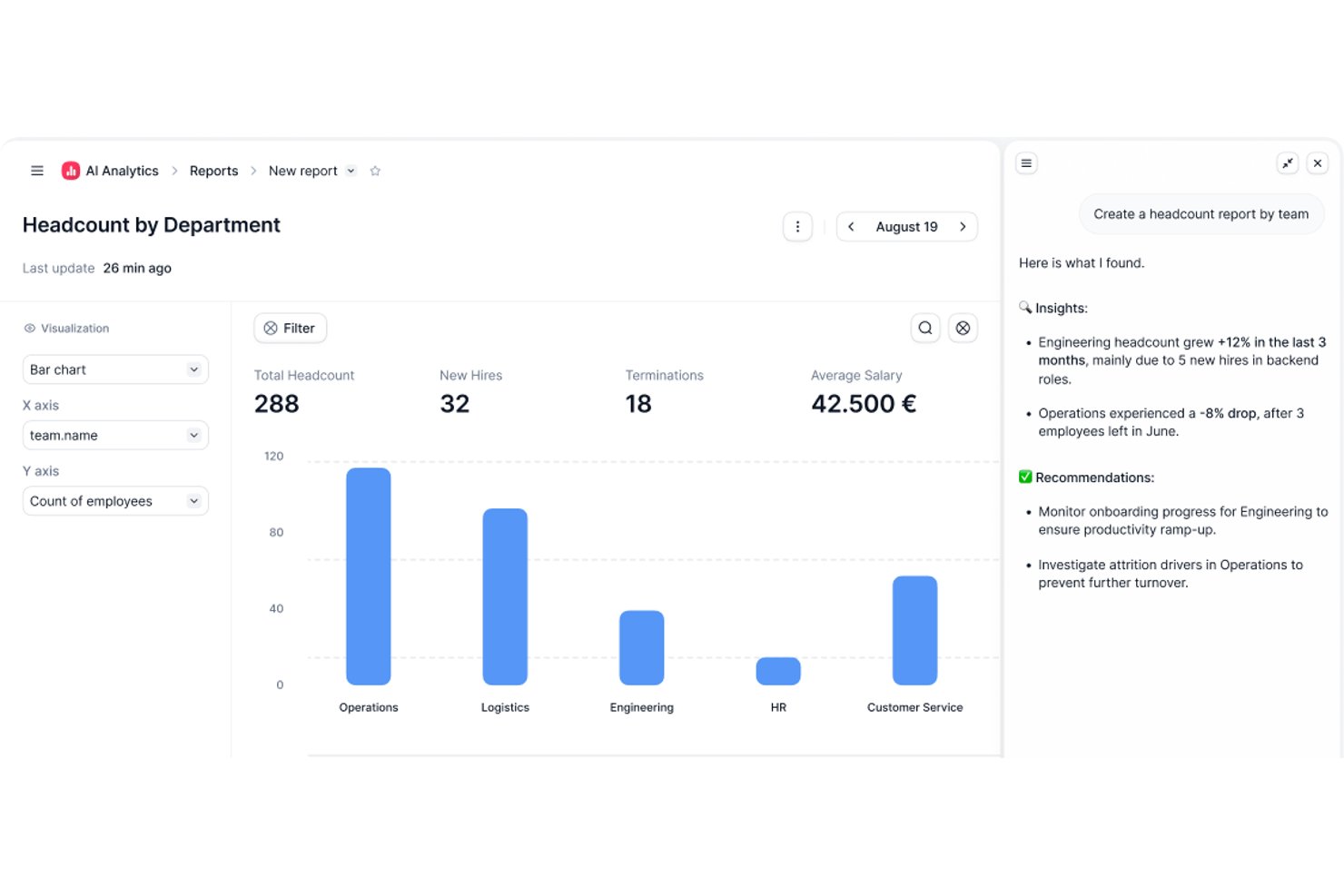
Factorial es una plataforma de RR. HH. impulsada por IA que gestiona las ausencias, además del seguimiento del tiempo, la programación de turnos y la configuración de políticas de permisos en la web y dispositivos móviles.
¿Para quién es más adecuado Factorial?
Factorial es ideal para equipos de RR. HH. que quieren operaciones diarias asistidas por IA, desde la aprobación de ausencias y la planificación de horarios hasta la respuesta a preguntas de los empleados sobre las políticas, todo dentro de una única plataforma.
Por qué elegí Factorial
He incluido Factorial entre mis principales opciones porque su enfoque de IA para empresas va más allá de una etiqueta llamativa: la plataforma ayuda activamente con tareas diarias de gestión de ausencias, como planificar horarios, generar informes y responder a las preguntas de los empleados sobre las políticas de permisos. Me gusta especialmente que los empleados puedan enviar solicitudes y consultar sus saldos desde un dispositivo móvil, mientras que los responsables disponen de una vista de calendario compartida para detectar solapamientos y planificar la cobertura antes de que las carencias se conviertan en problemas. Las políticas de ausencias personalizadas, con reglas de acumulación, límites de transferencia y fechas bloqueadas, pueden configurarse por ubicación o tipo de contrato, lo que mantiene todo organizado sin mucho trabajo administrativo manual.
Características principales de Factorial
- Solicitudes de permisos desde dispositivos móviles: Los empleados pueden enviar solicitudes de permisos, adjuntar archivos y consultar directamente los saldos restantes desde la aplicación de Factorial para iOS o Android.
- Flujos de aprobación configurables: Los administradores pueden asignar aprobadores específicos para cada equipo y configurar sistemas de aprobación personalizados para las solicitudes de permisos.
- Compatibilidad con políticas de múltiples asignaciones: Una única política de permisos puede incluir varias asignaciones, como una asignación estándar de vacaciones junto con una asignación de permisos acumulados por horas extra.
- Exportación de informes de permisos: Los responsables pueden exportar informes de permisos filtrados por equipo o entidad jurídica, en los que se muestran tanto los permisos disfrutados como los pendientes.
Integraciones de Factorial
Las integraciones del mercado incluyen a3innuva Nómina, DATEV LODAS, Sage 200, Silae, Microsoft Power BI, Slack y Zapier. Factorial también ofrece una API REST, webhooks y SDK para integraciones personalizadas.
Pros and Cons
Pros:
- La IA ayuda con las políticas, los informes y los horarios
- Solicitudes desde dispositivos móviles y saldos de permisos visibles
- El calendario compartido de ausencias ayuda a planificar la cobertura
Cons:
- No se documenta el seguimiento ni las alertas sobre permisos legales
- Análisis de ausencias y personalización de informes limitados

Workday
La mejor integración con sistemas de RR. HH. empresariales

El módulo de gestión de ausencias de Workday está diseñado para grandes organizaciones que necesitan conectar el seguimiento de ausencias con procesos más amplios de RR. HH. y nómina. Es una excelente opción para empresas que buscan gestionar políticas de licencia complejas, cumplimiento normativo e informes dentro de un solo sistema de RR. HH. La plataforma ayuda a los equipos de RR. HH. a automatizar los flujos de trabajo de ausencias y mantener visibilidad en toda la fuerza laboral global.
Por qué elegí Workday
Cuando se necesita una gestión de ausencias que se integre sin problemas en un ecosistema más amplio de RR. HH., Workday es una elección clara. Su módulo de ausencias se conecta directamente con nómina, beneficios y seguimiento de tiempo, por lo que puedes gestionar políticas de licencia y cumplimiento sin tener que manejar varios sistemas. Me gusta que puedes automatizar flujos de aprobación complejos y configurar reglas específicas por región para equipos globales. Las herramientas de informes de Workday también ayudan a los equipos de RR. HH. a monitorear tendencias y asegurar la alineación de políticas en toda la organización.
Funciones clave de Workday
Otras funciones de Workday ayudan a las organizaciones a gestionar ausencias de manera más eficiente:
- Autoservicio móvil: Los empleados y gerentes pueden solicitar y aprobar licencias directamente desde la app móvil de Workday.
- Integración con calendario: Sincroniza los datos de ausencias con calendarios compartidos para mantener informado al equipo sobre quién está ausente.
- Gestión de delegaciones: Asigna aprobadores suplentes o delegados para solicitudes de ausencia durante la ausencia de los gerentes.
- Rastro de auditoría: Mantén un registro detallado de todas las transacciones de ausencias para fines de cumplimiento y revisión.
Integraciones de Workday
Las integraciones incluyen Slack, Microsoft Teams, Salesforce, ServiceNow, ADP, SAP, Oracle, Okta y Cornerstone OnDemand.
Pros and Cons
Pros:
- Sincroniza los datos de ausencias con la nómina automáticamente
- Admite el cumplimiento global para políticas de licencia
- Permite delegar la autoridad de aprobación fácilmente
Cons:
- Requiere soporte de TI para la configuración inicial
- La creación de informes personalizados lleva mucho tiempo

Mejor para el seguimiento de PTO en pequeñas empresas
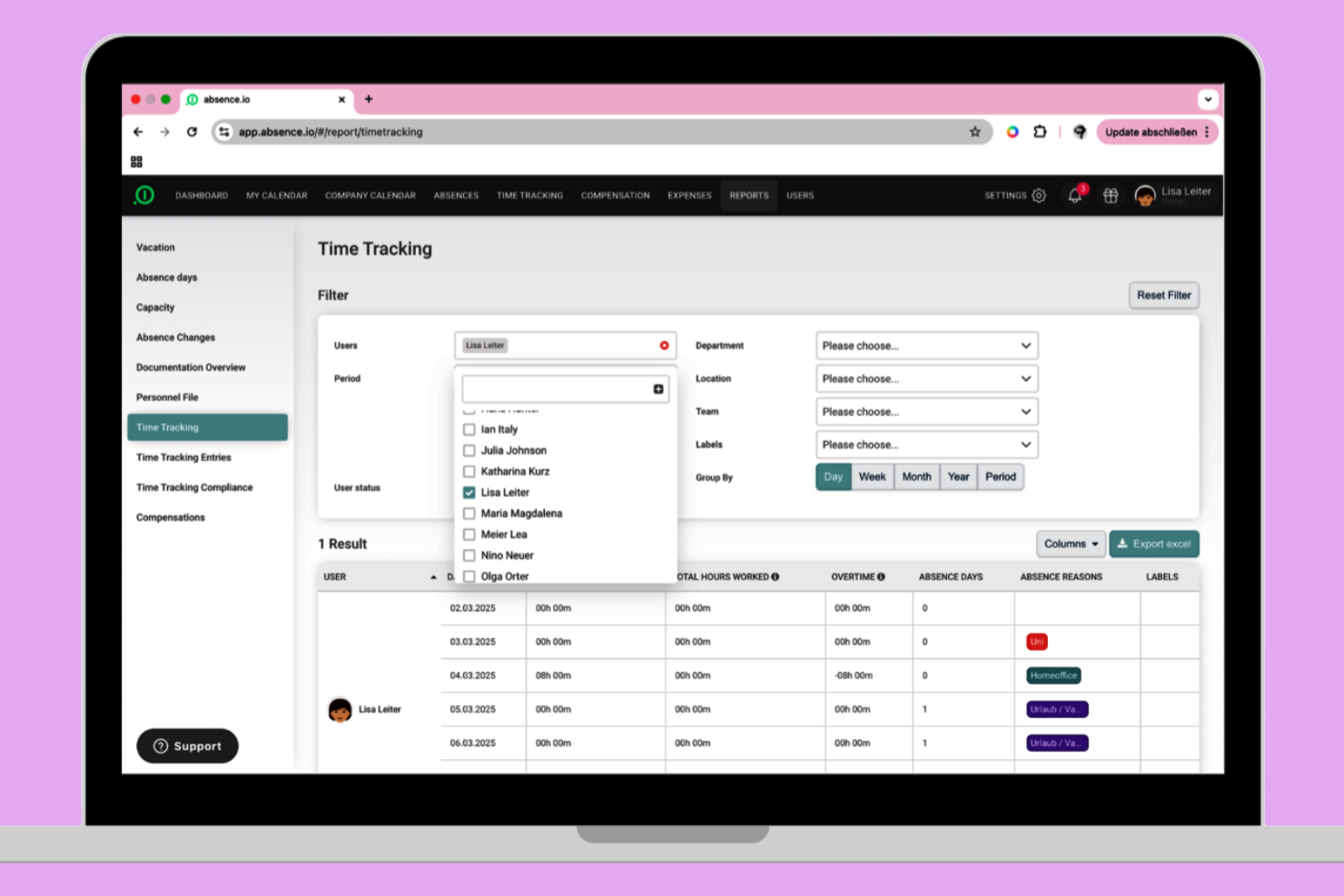
absence.io ofrece una solución sencilla para el seguimiento de PTO diseñada pensando en las pequeñas empresas. Es especialmente útil para equipos que desean automatizar las solicitudes, aprobaciones y saldos de ausencias sin añadir complejidad extra. La plataforma te ayuda a reducir el seguimiento manual y proporciona a los empleados una visión clara de su tiempo libre.
Por qué elegí absence.io
Para las pequeñas empresas que necesitan una forma sencilla de seguir el PTO, absence.io destaca por su enfoque especializado. La plataforma te permite automatizar las solicitudes y aprobaciones de ausencias, por lo que no tienes que depender de hojas de cálculo ni de procesos manuales. Me gusta que los empleados puedan ver sus saldos y enviar solicitudes directamente desde el sistema, lo que reduce la ida y vuelta de correos electrónicos. Su vista de calendario también ayuda a los gerentes a ver rápidamente quién está fuera y a planificar la cobertura.
Funciones clave de absence.io
Otras funciones de absence.io ayudan a las pequeñas empresas a gestionar el tiempo libre con mayor facilidad:
- Tipos de ausencias personalizados: Crea y gestiona diferentes categorías de ausencias, como días de enfermedad, permisos parentales o tiempo libre no remunerado.
- Carga de documentos: Los empleados pueden adjuntar certificados médicos u otros documentos directamente a sus solicitudes de ausencia.
- Compartir el calendario del equipo: Comparte los calendarios de equipo para que todos puedan ver las ausencias planificadas y evitar conflictos de programación.
- Panel de control de RRHH: Accede a un panel centralizado para seguir las estadísticas de ausencias y vigilar las tendencias generales de ausencia.
Integraciones de absence.io
Las integraciones incluyen Google Workspace, Microsoft Excel, Microsoft Azure, Outlook y Slack. También está disponible una API abierta para integraciones personalizadas.
Pros and Cons
Pros:
- Ofrece cálculos automáticos del acumulado de PTO
- Admite múltiples tipos de ausencias personalizados
- Incluye carga de documentos para solicitudes de ausencia
Cons:
- No cuenta con funciones integradas de procesamiento de nóminas
- Los flujos de aprobación tienen lógica condicional limitada

Ideal para vistas sencillas del calendario de equipo

Si tu equipo necesita una forma clara y visual de gestionar los días libres, Timetastic ofrece una solución sencilla. Es ideal para pequeñas empresas y para responsables que quieren un calendario compartido simple para registrar ausencias sin complicaciones adicionales. La plataforma te ayuda a evitar conflictos en la programación y mantiene visible el estado de los permisos de todos de un vistazo.
Por qué elegí Timetastic
Para equipos que quieren tener una visión clara de los días libres de todos, Timetastic ofrece un calendario simple y visual que es fácil de compartir. El calendario del equipo, con códigos de colores, te permite ver al instante quién está ausente y cuándo, lo que ayuda a evitar ausencias superpuestas. Me gusta que puedas filtrar las vistas por departamento o ubicación, algo práctico para responsables con equipos distribuidos. Si tu objetivo principal es mantener el seguimiento de ausencias transparente y accesible, el enfoque de Timetastic basado en el calendario es una excelente opción.
Funciones clave de Timetastic
Otras funciones que hacen de Timetastic una herramienta práctica para la gestión de ausencias incluyen:
- Aplicación móvil: Envía y aprueba solicitudes de permisos directamente desde tu teléfono.
- Tipos de permiso personalizados: Configura diferentes categorías para vacaciones, bajas por enfermedad y otras ausencias.
- Seguimiento automático de asignaciones: El sistema actualiza y registra automáticamente el saldo de días libres que le queda a cada empleado.
- Integraciones de calendario: Sincroniza Timetastic con Google Calendar, Outlook o iCal para una programación unificada.
Integraciones de Timetastic
Incluye integraciones con Outlook Calendar, Apple Calendar, Slack y Google Workspace.
Pros and Cons
Pros:
- Calendario codificado por colores para identificar ausencias rápidamente
- Cálculo automático de saldo de días libres para el personal
- Integración con Slack para notificaciones instantáneas de ausencias
Cons:
- No incluye soporte para el cumplimiento de FMLA o ADA
- No se pueden adjuntar documentos a las solicitudes de permiso

Dayforce
El mejor con sincronización de nóminas en tiempo real

Dayforce está diseñado para organizaciones que necesitan una gestión de ausencias estrechamente conectada con la nómina y el control de tiempo. Es especialmente útil para los equipos de RRHH y nómina en sectores donde los cálculos salariales en tiempo real y el cumplimiento normativo son críticos. La plataforma ayuda a reducir errores de nómina al sincronizar instantáneamente los datos de ausencias con el procesamiento de salarios.
Por qué elegí Dayforce
Lo que diferencia a Dayforce en la gestión de ausencias es su sincronización en tiempo real con la nómina, fundamental para organizaciones donde las ausencias impactan directamente en el salario. La plataforma actualiza automáticamente los cálculos de la nómina tan pronto como se registran las ausencias, reduciendo el riesgo de errores y problemas de cumplimiento. Valoro cómo Dayforce conecta las solicitudes de tiempo libre, los devengos y los pagos en un solo sistema, para que RRHH y nómina siempre tengan información actualizada. Esto lo convierte en una sólida opción para empresas que necesitan ajustes de nómina precisos e inmediatos ligados a las ausencias de los empleados.
Funciones clave de Dayforce
Otras funciones que hacen útil a Dayforce para la gestión de ausencias incluyen:
- Acceso desde aplicación móvil: Los empleados y gerentes pueden solicitar y aprobar ausencias desde sus dispositivos móviles.
- Cálculos automáticos de devengos: El sistema rastrea y actualiza los saldos de ausencias según las políticas de la empresa.
- Motor de reglas de cumplimiento: Las reglas integradas ayudan a asegurar que las políticas de ausencias cumplan con las regulaciones locales, estatales y federales.
- Tipos de ausencia personalizables: Los equipos de RRHH pueden definir y gestionar múltiples categorías de ausencia para adaptarse a las necesidades de la organización.
Integraciones de Dayforce
Actualmente no hay integraciones nativas listadas.
Pros and Cons
Pros:
- Los devengos se actualizan automáticamente tras cada solicitud
- Reglas de cumplimiento integradas para múltiples regiones
- Tipos de ausencia personalizados para diferentes políticas
Cons:
- Las herramientas de informes requieren una configuración avanzada
- El precio no es transparente en línea

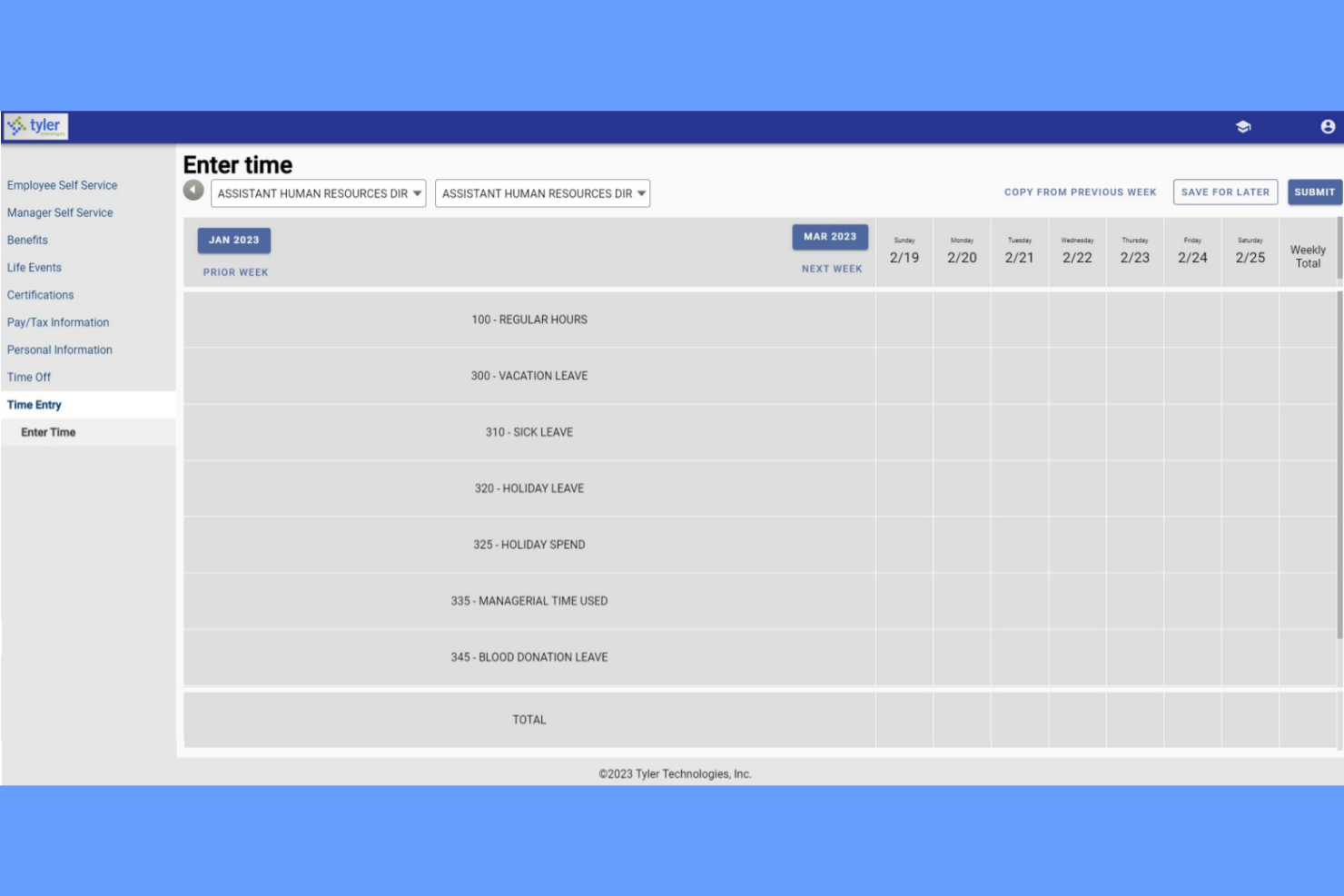
Tyler Technologies ofrece una solución especializada para la gestión de ausencias y sustituciones, diseñada específicamente para distritos escolares K-12. Está dirigida a administradores que necesitan coordinar las ausencias de docentes y encontrar rápidamente sustitutos calificados. La plataforma ayuda a las escuelas a automatizar las solicitudes de ausencia, asignar sustitutos basándose en sus credenciales y mantener las aulas cubiertas sin llamadas manuales ni hojas de cálculo.
Por qué elegí Tyler Technologies
Para las escuelas K-12 que necesitan gestionar tanto las ausencias de profesores como las asignaciones de sustitutos, Tyler Technologies ofrece una solución enfocada. La plataforma permite que los administradores automaticen las solicitudes de ausencia y notifiquen instantáneamente a los sustitutos calificados, lo que es esencial para mantener el personal en las aulas. Valoro cómo asigna sustitutos en función de sus credenciales y disponibilidad, reduciendo el riesgo de vacantes de último minuto. Tyler Technologies también rastrea tendencias de ausencias, ayudando a los líderes escolares a planificar necesidades recurrentes de cobertura.
Funcionalidades clave de Tyler Technologies
Otras funcionalidades de Tyler Technologies ayudan a las escuelas a gestionar las ausencias de forma más eficiente:
- Llamadas automáticas: El sistema puede llamar automáticamente a sustitutos para cubrir puestos vacantes.
- Tablero de ausencias en tiempo real: Los administradores pueden ver de un vistazo las ausencias actuales y próximas.
- Códigos de ausencia personalizables: Las escuelas pueden configurar códigos específicos para diferentes tipos de ausencia.
- Integración con sistemas de nómina: Los datos de ausencias pueden enviarse directamente a nómina para una compensación precisa.
Integraciones de Tyler Technologies
Las integraciones incluyen Tyler Time and Attendance y Tyler School ERP.
Pros and Cons
Pros:
- Muestra la cobertura diaria de ausencias en tiempo real
- Códigos de ausencia personalizados se adaptan a las políticas del distrito escolar
- Rastrea credenciales de sustitutos para verificar el cumplimiento
Cons:
- Opciones limitadas de informes analíticos sobre ausencias
- Las funciones de acceso móvil no están completamente desarrolladas

Ideal para programación de turnos en equipos por horas
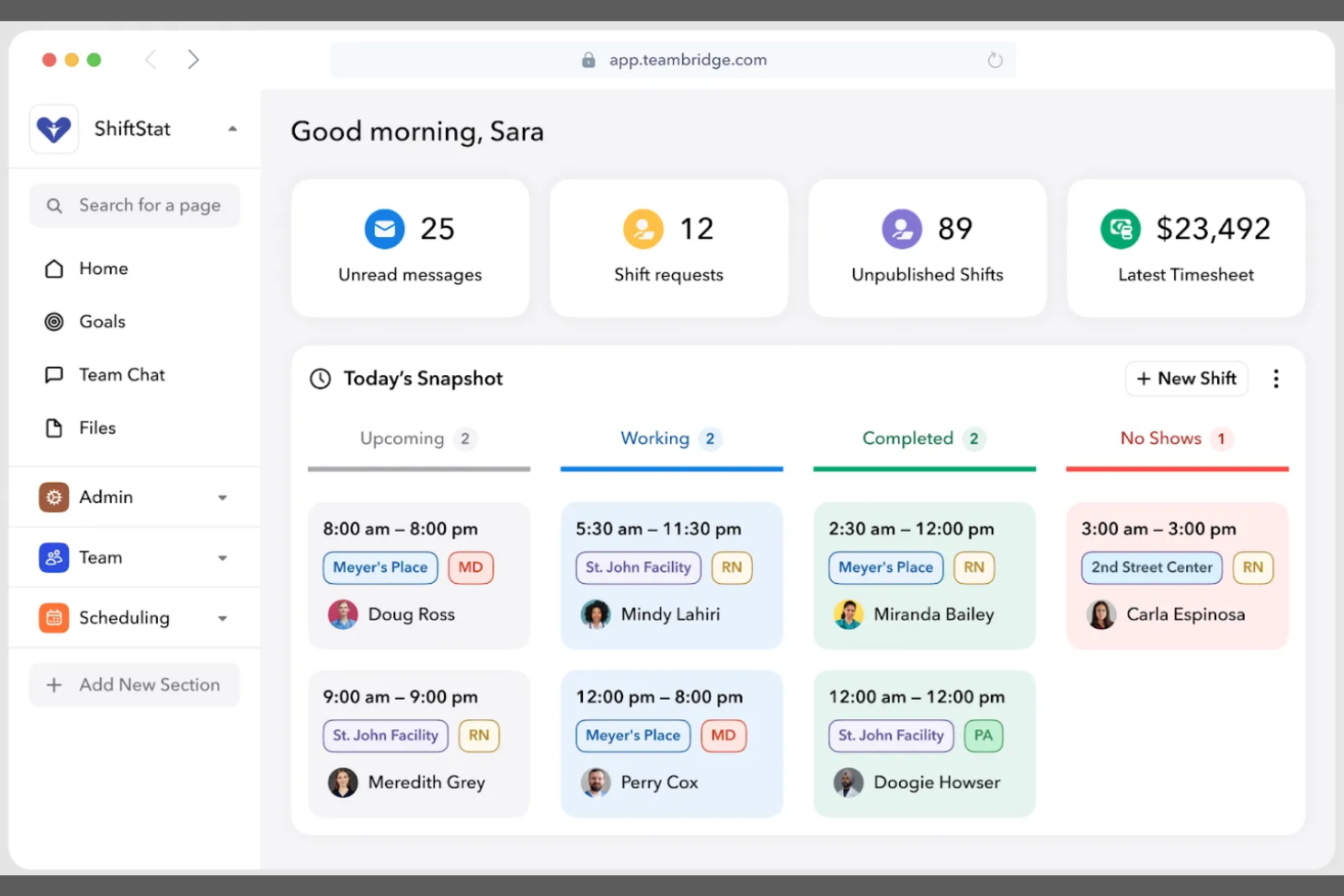
Teambridge destaca para las empresas que gestionan grandes equipos por horas o turnos. Está diseñado para gerentes de operaciones y equipos de RR. HH. que necesitan coordinar ausencias, vacaciones y programación de turnos en un solo lugar. La plataforma ayuda a reducir el ausentismo, los huecos de turno y los problemas de programación de último minuto al conectar directamente la gestión de ausencias con las herramientas de planificación de personal.
Por qué elegí Teambridge
Para organizaciones con empleados por horas, Teambridge ofrece una solución estrechamente vinculada a la gestión de la plantilla y la programación. La plataforma permite a los gerentes ver las solicitudes de tiempo libre junto con las asignaciones de turnos, facilitando cubrir huecos y evitar la falta de personal. Me gusta que Teambridge actualiza los horarios automáticamente cuando se aprueban los PTO, lo que permite identificar rápidamente los problemas de cobertura. Este enfoque es especialmente útil en sectores como el comercio minorista, la hostelería y otras industrias donde la cobertura de turnos es fundamental.
Funciones clave de Teambridge
Otras características que hacen que Teambridge sea útil para la gestión de ausencias incluyen:
- Portal de autoservicio para empleados: El personal puede enviar solicitudes de PTO y ver saldos directamente desde sus propias cuentas.
- Cómputo automático de PTO: El sistema calcula y actualiza los saldos de tiempo libre según las políticas de la empresa.
- Notificaciones para gerentes: Los gerentes reciben alertas instantáneas sobre nuevas solicitudes y aprobaciones de tiempo libre.
- Tipos de ausencia personalizables: Los equipos de recursos humanos pueden definir diferentes categorías de ausencia para adaptarlas a las políticas organizativas.
Integraciones de Teambridge
Las integraciones incluyen ADP, Paychex, Rippling, Greenshades, QuickBooks, Bullhorn, SmartRecruiters, Job Robotix y Salesforce.
Pros and Cons
Pros:
- Actualización automática de los turnos al registrar los PTO
- Portal de empleados muestra saldos de PTO en tiempo real
- Alertas para gerentes por solicitudes de tiempo libre pendientes
Cons:
- Analítica limitada para tendencias de ausencias
- Sin seguimiento de cumplimiento integrado para todas las regiones
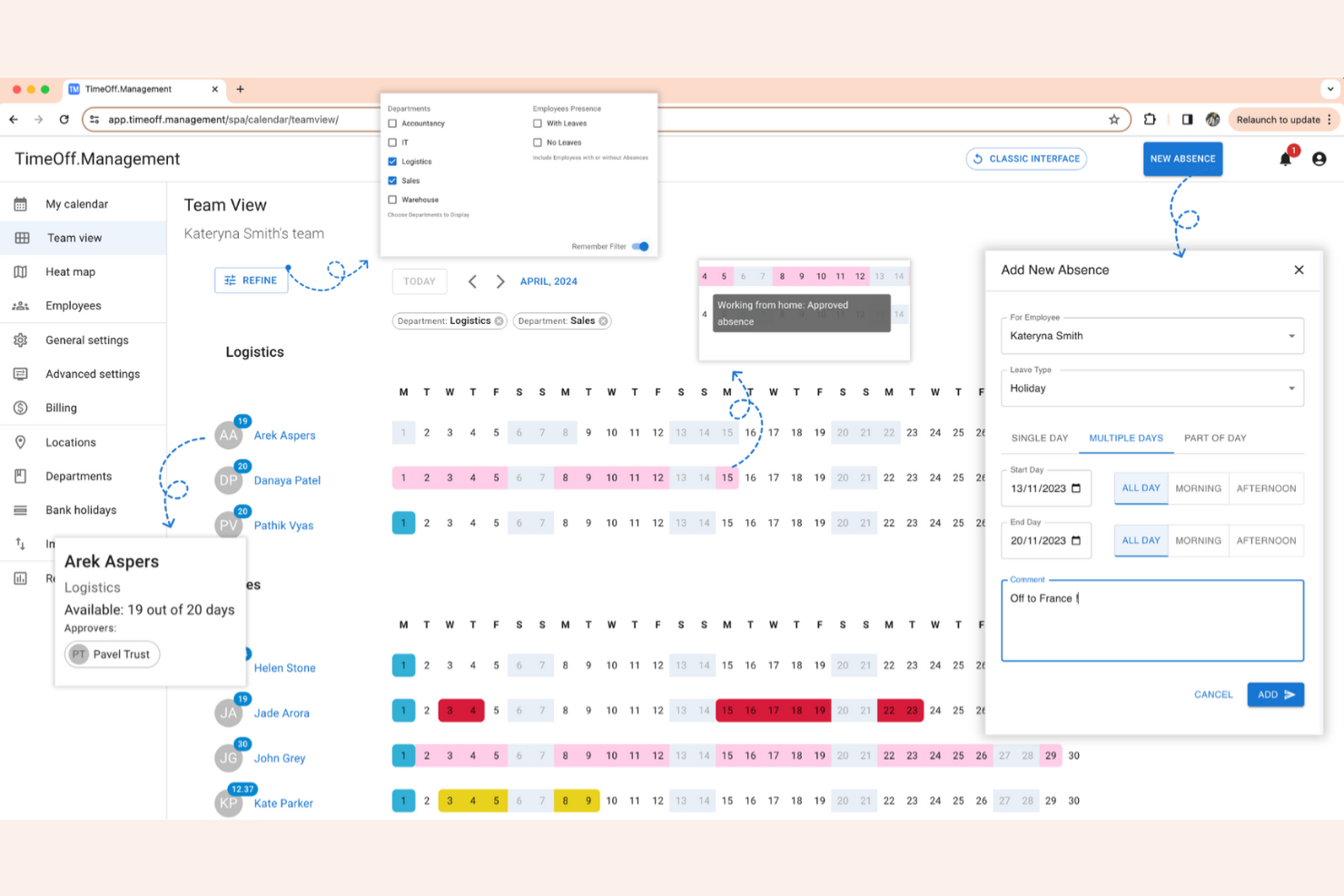
TimeOff destaca para los equipos que desean pleno control sobre su sistema de gestión de ausencias. Como plataforma de código abierto, resulta especialmente atractiva para equipos de TI, startups y organizaciones con políticas o necesidades de integración únicas. Puedes personalizar los flujos de trabajo, los tipos de ausencia e incluso la interfaz para adaptarlos exactamente a tus requisitos.
Por qué elegí TimeOff
Si buscas una solución realmente personalizable, TimeOff te brinda esa flexibilidad a través de la personalización open source. Puedes modificar el código fuente para adaptar las políticas de ausencias, los flujos de aprobación o incluso la imagen de la empresa. Me gusta que puedas añadir tipos de ausencia personalizados y automatizar reglas acordes a las necesidades específicas de tu organización. Para equipos con recursos técnicos, este nivel de control es difícil de encontrar en la mayoría de los softwares de gestión de ausencias.
Funciones clave de TimeOff
Otras funciones que hacen a TimeOff útil para el seguimiento de ausencias incluyen:
- Soporte multilingüe: Los usuarios pueden cambiar la interfaz a varios idiomas diferentes.
- Notificaciones por correo electrónico: El sistema envía correos electrónicos automáticos para solicitudes y aprobaciones de ausencias.
- Exportación a calendario: Exporta datos de ausencias a calendarios externos para mayor visibilidad.
- Acceso basado en roles: Asigna diferentes permisos a responsables, empleados y administradores.
Integraciones de TimeOff
Las integraciones incluyen Slack, Google Workspace, Microsoft Outlook, Google Calendar y una API REST para integraciones personalizadas.
Pros and Cons
Pros:
- El código open source permite modificar completamente el sistema
- Opción de autohospedaje para control de privacidad de datos
- Interfaz multilingüe para equipos globales
Cons:
- No dispone de conexiones preconfiguradas con sistemas de nómina
- Se requieren actualizaciones manuales en la versión autohospedada


AbsenceSoft está diseñado para equipos de RR. HH. que necesitan gestionar políticas de ausencia complejas y requisitos de cumplimiento. Es una opción ideal para organizaciones con necesidades intrincadas relacionadas con FMLA, ADA o ausencias específicas según el estado. La plataforma te ayuda a automatizar el seguimiento de ausencias, la documentación y la comunicación, reduciendo el trabajo manual y el riesgo.
Por qué elegí AbsenceSoft
Elegí AbsenceSoft porque aborda los desafíos de gestionar políticas de ausencia complejas que enfrentan muchos equipos de RR. HH. La plataforma ofrece motores de reglas configurables, lo que permite automatizar cálculos de elegibilidad y acumulación para FMLA, ADA y otros tipos de ausencia superpuestos. Me gusta que centraliza la documentación y la comunicación, facilitando mantenerse en cumplimiento con normativas cambiantes. Sus flujos de trabajo incorporados también ayudan a asegurar que cada paso en el proceso de gestión de ausencias sea rastreado y auditable.
Características clave de AbsenceSoft
Otras características de AbsenceSoft ayudan a los equipos de RR. HH. a gestionar las ausencias con mayor eficiencia:
- Portal de autoservicio para empleados: Los empleados pueden enviar solicitudes de ausencia, cargar documentación y consultar sus saldos de ausencias de forma directa.
- Notificaciones automatizadas: El sistema envía alertas a gerentes y empleados sobre cambios en el estado de la ausencia y acciones requeridas.
- Informes personalizables: Genera informes detallados sobre tendencias de ausencias, uso y cumplimiento para auditorías o revisiones directivas.
- Acceso móvil: Los usuarios pueden acceder a las herramientas e información de gestión de ausencias desde cualquier dispositivo gracias a la interfaz adaptada a móviles.
Integraciones de AbsenceSoft
Las integraciones incluyen Workday, UKG, ADP, SAP SuccessFactors, Oracle, Paycom, Ceridian Dayforce, Paylocity, BambooHR y Okta.
Pros and Cons
Pros:
- Gestiona reglas de ausencia FMLA, ADA y estatales
- Ofrece flujos de trabajo configurables para casos complejos
- Centraliza la documentación de ausencias y los registros de auditoría
Cons:
- Opciones de autoservicio limitadas para equipos pequeños
- No incluye control de tiempo integrado para empleados por hora
Otros programas de gestión de ausencias
Estas son algunas opciones adicionales de software de gestión de ausencias que no han entrado en mi lista de selección, pero que aun así merece la pena conocer:
- FINEOS Absence
Mejor para cumplimiento en seguros y reclamaciones
- J. J. Keller Leave Manager
Mejor para el seguimiento regulatorio de FMLA y ADA
- Stiira
Mejor para la coordinación de personal en múltiples ubicaciones
- TalentHR
Lo mejor con automatización de RRHH intuitiva impulsada por IA
- Replicon
Ideal para la configuración de políticas globales


Cómo Evalúo el Software de Gestión de Ausencias
Mi evaluación se desarrolla en dos capas: los aspectos innegociables—como las solicitudes de ausencia digitales, el seguimiento de acumulaciones y los calendarios de ausencias de equipo—y los diferenciadores que hacen destacar a una herramienta frente a otra.
Funcionalidad Principal (Requisitos Básicos para Esta Lista)
Al seleccionar herramientas para mi lista, califico cada una en una escala de 0 (no ofrece la funcionalidad) a 5 (destaca en esta área) para cada funcionalidad principal que se indica a continuación. Luego, calculo la puntuación total de la herramienta en porcentaje. Cada herramienta debe alcanzar una puntuación mínima total del 65% para ser considerada para su inclusión.
- Flujos de Trabajo para Solicitudes de Ausencia: Verifico si los empleados pueden enviar solicitudes de forma digital y si las aprobaciones se canalizan mediante cadenas configurables—como que un gerente regional apruebe primero y luego RRHH revise.
- Seguimiento de Acumulación de PTO: Cada herramienta debe gestionar acumulaciones automáticas para varios tipos de ausencia, incluyendo vacaciones, enfermedad y licencias parentales, con soporte para reglas como escalas según antigüedad y límites de traspaso.
- Calendario y Visibilidad de Ausencias: Busco calendarios de equipo compartidos que muestren quién está ausente y cuándo, para que los gerentes puedan detectar solapamientos antes de aprobar una solicitud que deje un turno sin cubrir.
- Configuración de Políticas y Cumplimiento: La plataforma debe permitir construir políticas de ausencia específicas de cada región—como normas FMLA o mínimos legales de descanso anual—sin necesidad de soluciones alternativas ni anulaciones manuales.
- Informes y Analíticas: Evalúo si la herramienta va más allá de simples exportaciones de saldos y ofrece informes de tendencias y métricas de patrones de ausencia para ayudar a RRHH a detectar reincidencias en ausencias de corta duración.
- Integraciones con HRIS y Nómina: Los datos de ausencia aprobada deben sincronizarse con los sistemas de nómina y HRIS para evitar conciliaciones manuales de horas al final de cada periodo de pago.
Una vez tengo una lista de herramientas que cumplen los criterios, analizo qué distingue a cada plataforma.
Factores Diferenciadores (Lo que Distingue a los Proveedores)
Así es como comparo y valoro diferentes proveedores:
Funciones Destacadas
Las plantillas de ausencia multipaís son importantes para equipos distribuidos. Busco reglas legales preconfiguradas que te eviten tener que investigar manualmente los derechos de ausencia en cada país nuevo. Otra característica diferenciadora es la puntuación del Factor Bradford; ayuda a RRHH a detectar patrones de ausencias cortas y frecuentes antes de que se conviertan en un problema mayor. También evalúo las integraciones con Slack o Teams, ya que las solicitudes dentro del chat y los resúmenes diarios de "quién está fuera" mantienen la gestión de ausencias en el mismo lugar donde ya se comunica el equipo.
Más Allá de las Funciones
La transparencia en los precios es fundamental; reviso si los proveedores publican tarifas claras por empleado y ofrecen pruebas gratuitas para que puedas evaluar la herramienta antes de decidirte. La velocidad de implementación es otro factor que considero, ya que una plataforma que tarde meses en configurar las políticas de ausencia retrasa el valor que tu equipo obtiene de ella. También tengo en cuenta cómo maneja cada proveedor la seguridad de datos, especialmente el acceso basado en roles a información sensible de ausencias como documentos médicos o parentales.
Cómo elegir un software de gestión de ausencias
Es fácil perderse entre largas listas de funciones y estructuras de precios complejas. Para ayudarte a mantener la concentración mientras avanzas en tu proceso de selección de software, aquí tienes una lista de factores que debes tener en cuenta:
| Factor | Qué debes considerar |
|---|---|
| Escalabilidad | ¿El software podrá gestionar tu número actual y futuro de empleados, tus ubicaciones y los cambios organizativos? |
| Integraciones | ¿Se conecta de forma nativa con tus sistemas de nóminas, HRIS, HCM o planificación de horarios, o necesitarás soluciones alternativas? |
| Personalización | ¿Puedes adaptar los tipos de permisos, los flujos de aprobación y las políticas a las necesidades de tu organización? |
| Facilidad de uso | ¿Los responsables y empleados lo adoptarán rápidamente o tendrás que invertir mucho en formación? |
| Implementación e incorporación | ¿Cuánto tiempo se tardará en ponerlo en marcha y qué recursos o asistencia necesitarás durante el despliegue? |
| Coste | ¿Todas las tarifas están claras desde el principio y el modelo de precios se adapta a tus patrones de uso y ciclos presupuestarios? |
| Medidas de seguridad | ¿El proveedor ofrece cifrado de datos, controles de acceso y cumplimiento de las leyes de privacidad pertinentes? |
| Disponibilidad del soporte | ¿Puedes contactar con el soporte cuando lo necesitas y existen acuerdos de nivel de servicio o contactos específicos para problemas urgentes? |
¿Qué es el software de gestión de ausencias?
El software de gestión de ausencias es una herramienta digital que ayuda a las organizaciones a realizar el seguimiento, gestionar y elaborar informes sobre las ausencias de los empleados, como las bajas por enfermedad, las vacaciones y otros permisos. Centraliza las solicitudes de permisos, automatiza los flujos de aprobación y mantiene registros precisos para facilitar el cumplimiento normativo y la planificación. Los equipos de recursos humanos lo utilizan para garantizar la cobertura, aplicar las políticas y obtener visibilidad sobre las tendencias de asistencia de la plantilla.
Funciones del software de gestión de ausencias
Al seleccionar un software de gestión de ausencias, presta atención a las siguientes funciones clave:
- Portal de solicitudes de permisos: Permite a los empleados enviar solicitudes de ausencia en línea, lo que agiliza el proceso y lo hace más transparente tanto para el personal como para los responsables.
- Flujos de aprobación automatizados: Dirige las solicitudes de permisos a los responsables correspondientes y notifica a todas las partes los cambios de estado, reduciendo el seguimiento manual.
- Tipos de permisos personalizados: Permite definir y gestionar distintas categorías de permisos, como bajas por enfermedad, vacaciones, permisos parentales o ausencias no remuneradas.
- Calendario de seguimiento de ausencias: Proporciona una vista de calendario visual de todas las ausencias programadas y disfrutadas, ayudando a los equipos a planificar la cobertura y evitar conflictos.
- Cálculos de saldos en tiempo real: Actualiza y muestra automáticamente el saldo de permisos disponible de cada empleado en función de las acumulaciones y el uso.
- Informes y análisis: Genera informes detallados sobre tendencias de ausencias, patrones de uso y cumplimiento de políticas para respaldar decisiones de RR. HH. basadas en datos.
- Herramientas de aplicación de políticas: Aplica las normas específicas de la empresa sobre elegibilidad, transferencia de días, fechas restringidas y requisitos de documentación para garantizar la coherencia.
- Notificaciones y recordatorios: Envía alertas automatizadas a empleados y responsables sobre próximas ausencias, aprobaciones pendientes o acciones necesarias.
- Registro de auditoría: Mantiene un registro seguro y fechado de todas las acciones relacionadas con los permisos para facilitar el cumplimiento normativo y la resolución de conflictos.
- Acceso móvil: Permite a empleados y responsables solicitar, aprobar o revisar ausencias desde teléfonos inteligentes o tabletas, facilitando entornos de trabajo flexibles.
Ventajas del software de gestión de ausencias
La implementación de un software de gestión de ausencias ofrece varias ventajas para tu equipo y tu empresa. Estas son algunas de las que puedes esperar:
- Mayor cumplimiento: La aplicación automatizada de políticas y los registros de auditoría ayudan a tu organización a cumplir la legislación laboral y las normas internas.
- Mayor visibilidad: Los calendarios en tiempo real y las herramientas de generación de informes ofrecen a RR. HH. y a los responsables una visión clara de las ausencias y las carencias de cobertura.
- Aprobaciones más rápidas: Los flujos de trabajo y las notificaciones automatizados agilizan el proceso de solicitud y aprobación de permisos para todas las personas implicadas.
- Saldos de permisos precisos: Los cálculos en tiempo real garantizan que empleados y responsables vean siempre los derechos de permiso actualizados.
- Menos trabajo manual: Los registros digitales centralizados y los portales de autoservicio minimizan el papeleo y la introducción repetitiva de datos.
- Mejor planificación: Las herramientas de programación visual y los análisis respaldan una planificación proactiva de la plantilla y reducen las interrupciones de última hora.
- Mejor experiencia del empleado: El acceso sencillo a la información sobre permisos y las herramientas adaptadas a dispositivos móviles optimizan la experiencia del empleado para gestionar y solicitar ausencias con confianza.
Costes y precios del software de gestión de ausencias
Para seleccionar un software de gestión de ausencias es necesario comprender los distintos modelos de precios y planes disponibles. Los costes varían en función de las funciones, el tamaño del equipo, los complementos y otros factores. La tabla siguiente resume los planes habituales, sus precios medios y las funciones que suelen incluir las soluciones de software de gestión de ausencias:
Tabla comparativa de planes de software de gestión de ausencias
| Tipo de plan | Precio medio | Funciones habituales |
|---|---|---|
| Plan gratuito | $0 | Seguimiento básico de permisos, número limitado de usuarios, informes sencillos y notificaciones por correo electrónico. |
| Plan personal | $5–$10/usuario/mes | Solicitudes de permisos, flujos de aprobación, vistas de calendario, seguimiento de hojas de horas y personalización básica de políticas. |
| Plan empresarial | $10–$25/usuario/mes | Informes avanzados, integraciones con sistemas de información de recursos humanos o nóminas, tipos de permisos personalizados y acceso móvil. |
| Plan corporativo | $25–$50/usuario/mes | Compatibilidad con varias ubicaciones, registros de auditoría, herramientas avanzadas de cumplimiento, asistencia exclusiva y configuración inicial personalizada. |
Preguntas frecuentes sobre el software de gestión de ausencias
Aquí encontrarás respuestas a preguntas frecuentes sobre el software de gestión de ausencias:
¿Cómo ayuda el software de gestión de ausencias a cumplir la normativa?
El software de gestión de ausencias ayuda a cumplir la normativa aplicando las políticas de permisos de la empresa, haciendo un seguimiento de la documentación y manteniendo registros de auditoría. También facilita el cumplimiento de la legislación laboral mediante la automatización de las acumulaciones, los traspasos y las normas de elegibilidad, lo que reduce el riesgo de errores manuales o de incumplir requisitos normativos.
¿Puede el software de gestión de ausencias integrarse con los sistemas de nóminas y recursos humanos?
Sí, la mayoría de los programas de gestión de ausencias pueden integrarse con los sistemas de nóminas y recursos humanos. Estas integraciones permiten actualizar automáticamente los saldos de permisos, calcular las nóminas con precisión y simplificar el intercambio de datos entre plataformas, lo que reduce la introducción manual de datos y el riesgo de discrepancias.
¿Qué debo tener en cuenta al pasar del seguimiento manual al uso de un software?
Al pasar del seguimiento manual de la asistencia a un software, debes tener en cuenta la exactitud de los datos, la importación de los registros históricos, la formación de los usuarios y la configuración de las políticas. Planifica un periodo de transición durante el que ambos sistemas puedan funcionar en paralelo y asegúrate de que tu equipo comprende los nuevos flujos de trabajo y dónde encontrar recursos de asistencia.
¿Es adecuado el software de gestión de ausencias para equipos remotos o distribuidos?
Sí, el software de gestión de ausencias es muy adecuado para equipos remotos o distribuidos. El acceso basado en la nube, las aplicaciones móviles y las notificaciones automatizadas facilitan que los empleados y responsables ubicados en distintos lugares soliciten, aprueben y realicen un seguimiento de las ausencias en tiempo real.
¿Hasta qué punto están protegidos los datos de los empleados en el software de gestión de ausencias?
Los datos de los empleados en el software de gestión de ausencias suelen estar protegidos mediante cifrado, controles de acceso y el cumplimiento de la normativa de privacidad. Revisa siempre las certificaciones de seguridad del proveedor y sus prácticas de gestión de datos para asegurarte de que cumplen los estándares de tu organización.