


Reseña de Paylocity: Ventajas, Desventajas, Funciones y Precios



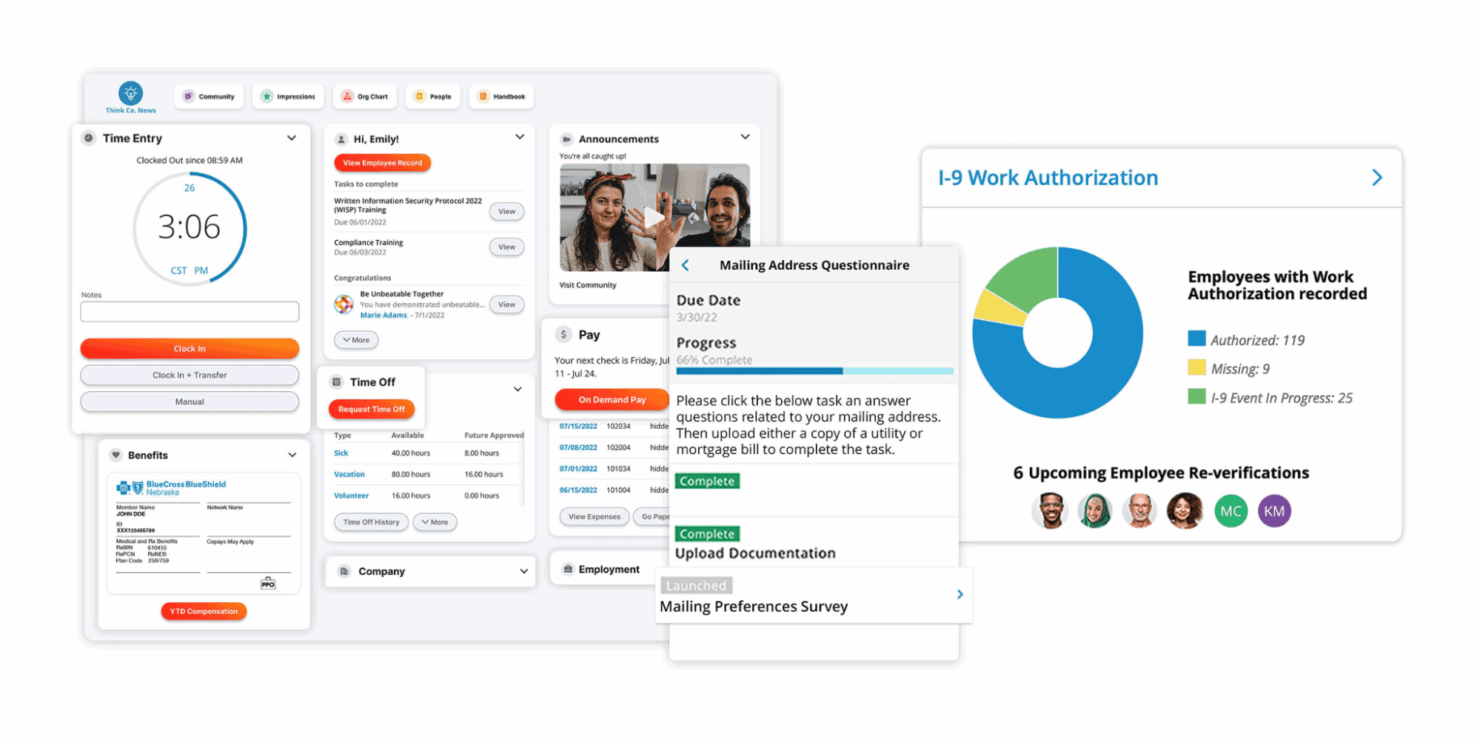
Paylocity is a payroll software built for mid-sized businesses that need payroll, HR, time tracking, and employee engagement tools all in one platform. I'd mainly consider it if you want more modern employee self-service and stronger engagement features than ADP Workforce Now, without the heavy implementation overhead that typically comes with enterprise-grade systems.
Paylocity Evaluation Summary
- Pricing upon request
- Free demo available
Por qué confiar en nuestras reseñas de software
Nuestro equipo lleva probando y evaluando software desde 2012. Como expertos en RR. HH., sabemos lo difícil —y lo importante— que es elegir el software adecuado.
Para esta guía, evaluamos las herramientas mediante pruebas prácticas e investigación independiente, puntuando las herramientas según nuestros criterios de selección. También nos basamos en la experiencia de líderes de opinión del sector y de profesionales de RR. HH. en activo.
Nuestras reseñas reflejan nuestro criterio editorial humano, no un discurso de ventas.
Paylocity Overview
pros
-
Paylocity automates payroll processes to save time and reduce manual work for HR and payroll teams.
-
Employees can access their payroll and benefits information, update personal details, and request time off in an employee self-service portal.
-
In addition to software, the company has a team of dedicated reps to support your payroll, tax, and garnishment processes.
cons
-
Some end users report that implementation can take longer than expected and require significant time and resources.
-
A few customers have experienced slower response times or difficulty reaching support when needed.
-
The platform offers many features that can take time to learn and adopt fully.
-

Paycom
Visit WebsiteThis rating combines scores from multiple user review sites to reflect overall customer sentiment about the product.4.3 -
Deel Payroll
Visit WebsiteThis rating combines scores from multiple user review sites to reflect overall customer sentiment about the product.4.9 -
Rippling
Visit WebsiteThis rating combines scores from multiple user review sites to reflect overall customer sentiment about the product.4.9



Cómo probamos y puntuamos nuestras herramientas
Hemos pasado años construyendo, refinando y mejorando nuestro sistema de pruebas y puntuación de software. La rúbrica está diseñada para capturar los matices de la selección de software y lo que hace que una herramienta sea efectiva, centrándose en los aspectos críticos del proceso de toma de decisiones. A continuación, puedes ver exactamente cómo funcionan nuestras pruebas y puntuaciones a través de siete criterios. Esto nos permite ofrecer una evaluación imparcial del software basada en la funcionalidad principal, características destacadas, facilidad de uso, incorporación, soporte al cliente, integraciones, reseñas de clientes y relación calidad-precio.
Funcionalidad principal (25% de la puntuación final)
El punto de partida de nuestra evaluación siempre es la funcionalidad principal de la herramienta. ¿Tiene las funciones básicas que se espera encontrar? ¿Alguna de esas funciones básicas está restringida a planes de precio superiores? En esencia, esperamos que una herramienta se compare favorablemente con las capacidades básicas de sus competidores.
Características destacadas (25% de la puntuación final)
Luego, evaluamos características poco comunes que van más allá de la funcionalidad principal que normalmente se encuentra en herramientas de su tipo. Una puntuación alta refleja funciones especializadas o únicas que hacen que el producto sea más rápido, eficiente o que ofrezca un valor adicional al usuario. También evaluamos lo fácil que es integrar con otras herramientas comúnmente usadas en el entorno tecnológico para ampliar la funcionalidad y utilidad del software. Las herramientas que ofrecen muchas integraciones nativas, conexiones de terceros y acceso a API para construir integraciones personalizadas obtienen las mejores puntuaciones.
Facilidad de uso (10% de la puntuación final)
Consideramos qué tan rápido y fácil es ejecutar las tareas definidas en la funcionalidad principal utilizando la herramienta. El software que obtiene una puntuación alta está bien diseñado, es intuitivo, ofrece aplicaciones móviles, proporciona plantillas y hace que tareas relativamente complejas parezcan simples.
Incorporación (10% de la puntuación final)
Sabemos lo importante que es la rápida adopción del equipo para una nueva plataforma, por eso evaluamos qué tan fácil es aprender y usar una herramienta con una capacitación mínima. Evaluamos cuán rápido un miembro del equipo puede configurarse y comenzar a usar la herramienta sin experiencia. Las soluciones con mejores puntuaciones requieren poco o ningún soporte.
Soporte al cliente (10% de la puntuación final)
Revisamos cuán rápido y fácil es obtener ayuda mediante teléfono, chat en vivo o base de conocimientos. Las herramientas y empresas que ofrecen soporte en tiempo real obtienen las mejores puntuaciones, mientras que los chatbots obtienen las peores.
Reseñas de clientes (10% de la puntuación final)
Además de nuestras propias pruebas y evaluaciones, consideramos el puntaje neto de promotores de clientes presentes y pasados. Revisamos su probabilidad, dada la opción, de elegir nuevamente la herramienta por su funcionalidad principal. El software con una puntuación alta refleja un alto puntaje neto de promotores por parte de clientes actuales o anteriores.
Relación calidad-precio (10% de la puntuación final)
Por último, considerando todos los demás criterios, revisamos el precio promedio de los planes de entrada frente a las funciones principales y valoramos el resto de los criterios de evaluación. El software que ofrece más por menos tendrá una mejor puntuación.
Core Features
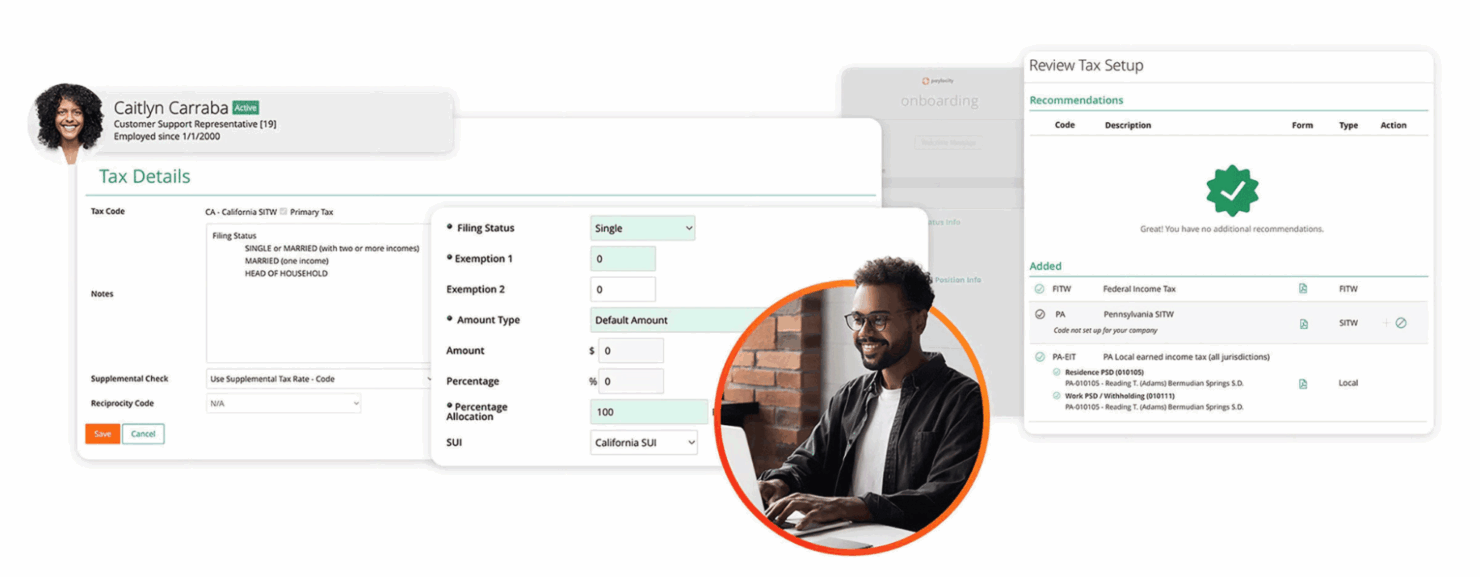
Tax filing and compliance: Paylocity automates tax calculations, withholdings, and filings at the federal, state, and local levels. It stays current with changing tax laws to ensure compliance.
Direct deposit: Paylocity allows employees’ paychecks to be deposited directly into their bank accounts. It supports multiple direct deposit accounts per employee for flexibility.
Payroll reporting: Paylocity’s standard and customizable payroll reports provide insights into labor costs and tax liabilities. Reports can be scheduled, exported, and shared with stakeholders.
Time and attendance: Paylocity's time tracking tools allow employees to clock in and out, request time off, and submit timesheets. Managers can review and approve timesheets before running payroll.
Garnishment management: Paylocity can handle wage garnishments such as child support and tax levies. It calculates applicable amounts and makes payments on the employer's behalf.
Employee self-service: Workers can view pay stubs, update direct deposit info, and access tax forms through the self-service portal. This reduces administrative tasks for HR.
Ease of Use
I find Paylocity to be intuitive and easy to navigate compared to many other payroll systems. The interface is modern and uncluttered and core functions like running payroll, adding new hires, and generating reports can be completed in just a few clicks.
Integrations
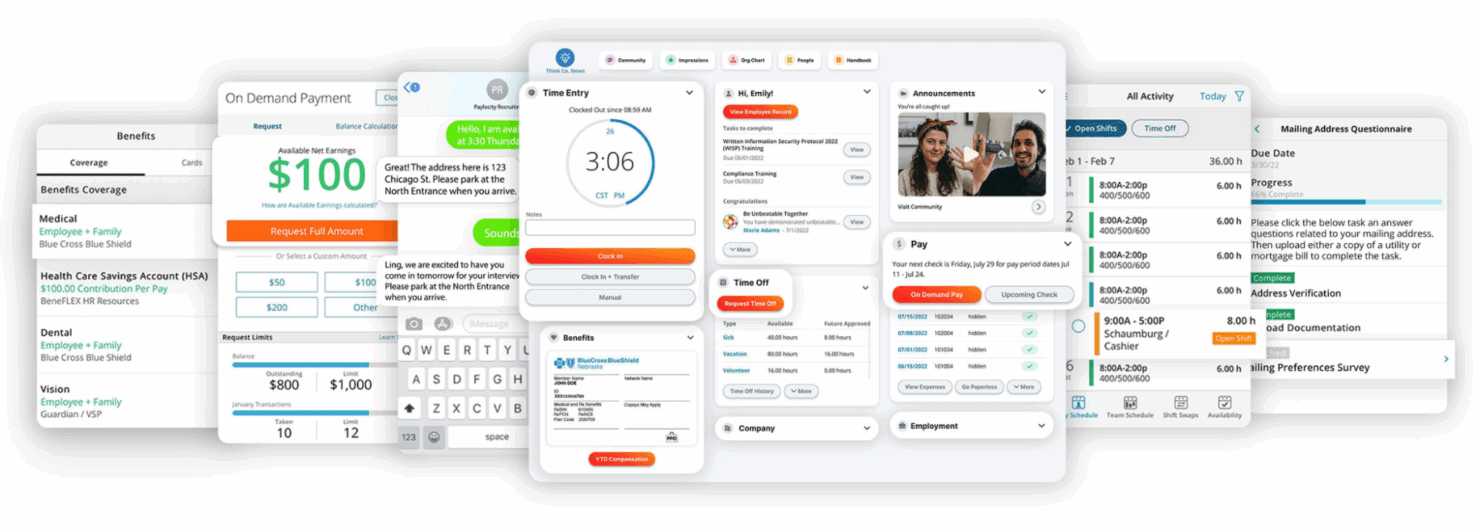
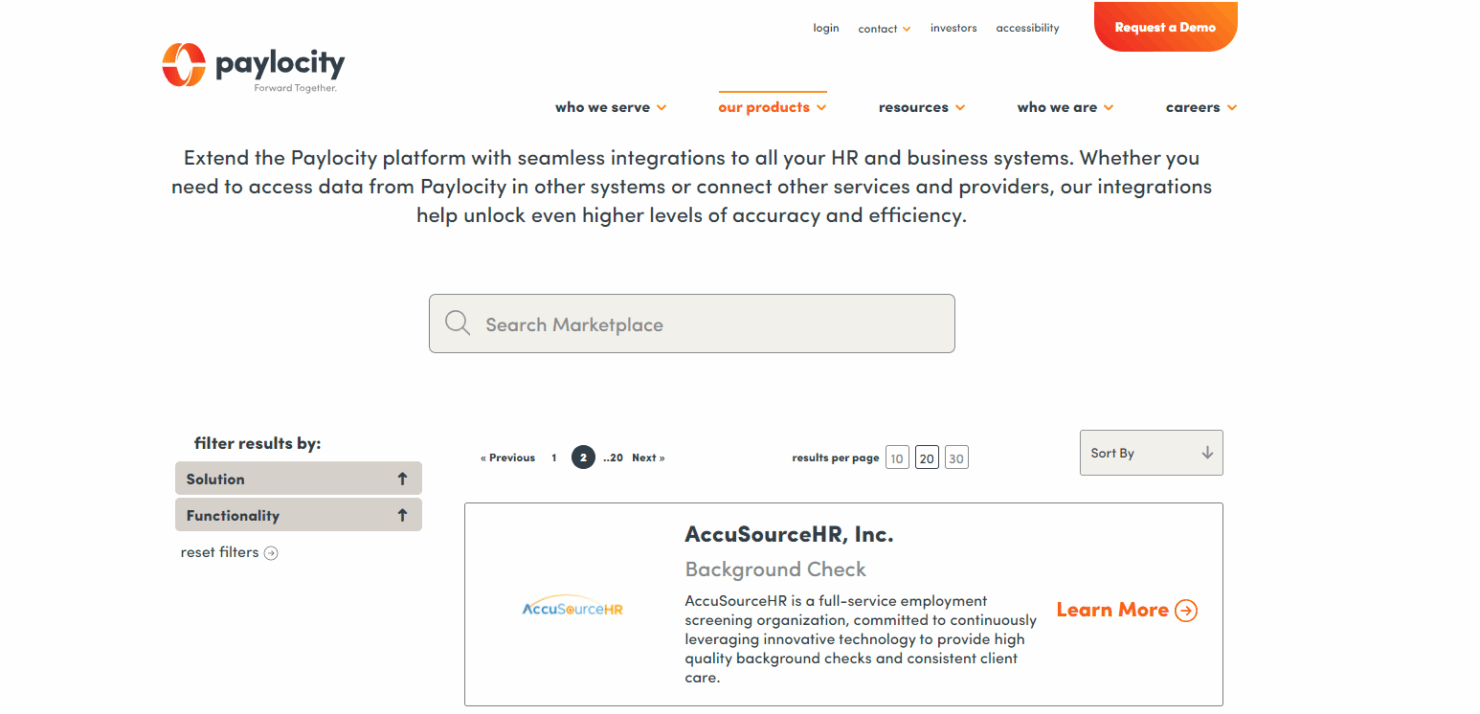
Paylocity integrates with: QuickBooks, Xero, Sage Intacct, Oracle NetSuite, SAP Concur, Salesforce, BambooHR, UltiPro, iCIMS, and Jobvite.
Paylocity also offers an API for custom integrations and data sharing. The Paylocity Marketplace has pre-built connectors to hundreds of third-party apps for HR, finance, and benefits.
New Product Updates from Paylocity

Paylocity Expands Expense and Purchase Request Tools
Paylocity lets employees import eligible card transactions and receipts into expense reports, with rules or AI assistance for categorization. It also simplifies purchase request setup and approval workflows. Highlights include:
- Connected Personal Cards: Imports eligible transactions into expense reports.
- Receipt Matching: Helps match receipts with imported transactions.
- Smart Categorization: Uses configured rules or AI assistance to categorize expenses.
- Purchase Request Setup: Simplifies how purchasing workflows are configured.
- Approval List: Makes pending purchase requests easier to review and manage.
Visit Paylocity’s official site for more details.
 for more details.
Paylocity Adds Calendar Widget to Home
Paylocity’s Home calendar widget consolidates key schedule and company dates in one place. Employees can quickly review upcoming shifts, time off, events, and anniversaries. Highlights include:
- Scheduled Shifts: Shows upcoming work schedules.
- Time Off: Displays approved and upcoming time off.
- Company Events: Brings workplace events into the same calendar.
- Anniversaries: Includes employee anniversary dates.
- Unified View: Combines schedule and event information in one place.
Visit Paylocity’s official site for more details.

Paylocity Adds Retirement Access and Benefits Renewal Tools
Paylocity Retirement gives employees access to key retirement information directly in Paylocity, while Benefits Guided Setup helps clients and brokers prepare and renew plans in-platform. These updates reduce fragmented workflows and manual coordination. Highlights include:
- Paylocity Retirement: Gives employees access to key retirement details directly in Paylocity.
- Payroll and Retirement Connection: Brings payroll and retirement information into one experience.
- Benefits Guided Setup: Provides a guided in-platform workflow for benefits renewals.
- Broker Collaboration: Helps clients and brokers prepare and renew plans with less back-and-forth.
- Self-Service Renewal: Creates a clearer path for preparing for upcoming enrollment periods.
Visit Paylocity’s official site for more details.

Paylocity Introduces Ignite AI Across Its Platform
Paylocity launched Ignite AI, an AI layer embedded across its platform to help teams automate repetitive work and get faster answers and analysis across HR, Finance, and IT. The release focuses on practical, purpose-built AI experiences that streamline common workflows while providing visibility and control. Highlights include:
- Ignite AI: Embeds AI across HR, Finance, and IT for answers, analysis, and workflow automation.
- Recruiting Automation: Supports candidate matching, resume screening, lead re-engagement, and interview scheduling.
- Pay and Time Automation: Identifies time, payroll, and employee data issues before they affect downstream processes.
- Finance Automation: Captures receipt, procurement, invoice, and purchase order data to reduce manual entry.
- Conversational Answers and Actions: Responds to business questions, generates reports, and starts workflows from chat.
- Ignite AI Hub: Manages agents, user access, adoption, usage, and automation opportunities from one place.
Visit Paylocity’s official site for more details.

Paylocity Expands Review, Survey, Expense, and Marketplace Tools
Paylocity introduced several updates across Performance, Employee Voice, Expense Management, and Marketplace. The enhancements give organizations more control over review approvals, encourage survey participation, capture more complete expense data, and simplify integration comparisons. Highlights include:
- Multiple Review Approvers: Add multiple approvers to performance review workflows to support company policies and strengthen oversight.
- Employee Voice Reminders: Use proactive reminders to encourage survey setup and launch, helping teams gather more employee feedback.
- Expense Report Custom Fields: Enter custom field values directly in physical card expense reports to improve accuracy and compliance.
- Marketplace Comparisons: Compare integration pricing, features, and ratings side by side before selecting a solution.
Visit Paylocity’s official site for more details.

Paylocity Adds Scheduling Templates, AI Summaries, and Dynamics 365 Integration
Paylocity adds enhanced scheduling templates, AI dashboard summaries, and Microsoft Dynamics 365 Business Central integration to streamline HR and business operations. These updates help teams create schedules faster, analyze workforce data, and sync general ledger information more efficiently. Highlights include:
- Enhanced Scheduling Templates: Create employee-assigned or open shift templates with automatic updates for labor costs and coverage.
- AI Dashboard Summaries: Generate AI-powered summaries in Data Insights to quickly understand workforce trends and key changes.
- Microsoft Dynamics 365 Business Central Integration: Sync general ledger data and manage accounting mappings directly with Paylocity.
Visit Paylocity’s official site for more details.
Paylocity Specs
- API
- Application Tracking
- Approval Workflows
- Attendance Tracking
- Budgeting
- Calendar Management
- Compliance Tracking
- Dashboard
- Data Export
- Data Import
- Data Visualization
- Employee Database
- Employee Incentive Management
- Employee Onboarding
- Expense Tracking
- External Integrations
- Feedback Management
- Forecasting
- Multi-Currency
- Multi-User
- Notifications
- Payroll
- Scheduling
- Tax Management
- Time Management
- Timesheets
- Travel Management
- Vacation & Absence Calendar
Alternatives to Paylocity

Paylocity FAQs
Is there a mobile app for Paylocity?
Is Paylocity HIPAA compliant?
Is Paylocity SOC 2 compliant?
Is Paylocity secure?
Is Paylocity FedRAMP certified?
Is Paylocity GDPR compliant?
How does Paylocity handle data backups?
¿Qué sigue?
Para mantenerte al día sobre todas las novedades en gestión de personas, suscríbete a nuestro boletín para líderes y gerentes. Recibirás directamente en tu bandeja de entrada conocimientos y recursos diseñados especialmente para líderes y profesionales de RRHH.