

10 migliori sistemi di conformità delle risorse umane per le piccole imprese nel 2026

Elenco dei sistemi di conformità HR per piccole imprese


Un sistema di conformità HR per piccole imprese è un software HR che ti aiuta a gestire le leggi sul lavoro, le normative e le politiche aziendali, in modo che il tuo team rimanga conforme ed eviti errori costosi.
Se stai cercando la soluzione giusta, sai quanto velocemente possono cambiare le normative e quanto sia facile per i piccoli team non considerare aggiornamenti o documentazione fondamentali.
Questo elenco ti aiuterà a confrontare i migliori sistemi di conformità HR per piccole imprese nel 2026, così potrai trovare una piattaforma adatta alle tue esigenze, che supporti il tuo personale e protegga la tua azienda.
Perché fidarsi delle nostre recensioni sui software
Il nostro team testa e recensisce software dal 2012. In quanto esperti HR noi stessi, sappiamo quanto sia difficile — e importante — scegliere il software giusto.
Per questa guida, abbiamo valutato gli strumenti attraverso test pratici e ricerche indipendenti, assegnando un punteggio agli strumenti in base ai nostri criteri di selezione. Ci basiamo inoltre sulle competenze di leader di pensiero del settore e di professionisti HR attivi.
Le nostre recensioni riflettono il nostro giudizio editoriale umano, non un discorso di vendita.
Revisori esperti:
Tabella comparativa dei sistemi di conformità HR per piccole imprese
Questa tabella comparativa riassume i dettagli dei prezzi dei migliori sistemi di conformità HR per piccole imprese
| Tool | Best For | Trial Info | Price | ||
|---|---|---|---|---|---|
| 1 | Ideale per supporto alla conformità HR delle piccole imprese | Demo gratuita disponibile | Prezzo su richiesta | Website | |
| 2 | Ideale per archiviare registri centralizzati della forza lavoro a livello globale | Demo gratuita disponibile | Da $5/dipendente/mese | Website | |
| 3 | Ideale per la conformità globale della forza lavoro | Demo gratuita disponibile | Da $5/dipendente/mese | Website | |
| 4 | Ideale per soluzioni di conformità scalabili | Non disponibile | Prezzo su richiesta | Website | |
| 5 | Ideale per avvisi di conformità automatizzati | Demo gratuita disponibile | Prezzo su richiesta | Website | |
| 6 | Ideale per la conformità dell'impiego internazionale | Demo gratuita disponibile | A partire da $599/utente/mese | Website | |
| 7 | Ideale per la conformità unificata tra sistemi | Demo gratuita disponibile | Prezzo su richiesta | Website | |
| 8 | Ideale per la consulenza sulla conformità specifica di settore | Demo gratuita disponibile | Prezzo su richiesta | Website | |
| 9 | Ideale per buste paga e benefit integrati | Demo gratuita disponibile | Da $49/mese + $6/mese/persona | Website | |
| 10 | Ideale per la gestione intuitiva delle politiche | Prova gratuita di 14 giorni + piano gratuito + demo gratuita disponibile | Da $2/utente/mese | Website |


Recensioni dei sistemi di conformità HR per piccole imprese
Di seguito trovi i miei riepiloghi dettagliati dei sistemi di conformità HR per piccole imprese inclusi nel mio elenco. Le mie recensioni offrono un’analisi approfondita delle funzionalità, dei casi d’uso ideali e dei prezzi di ciascun sistema, per aiutarti a trovare quello più adatto a te.
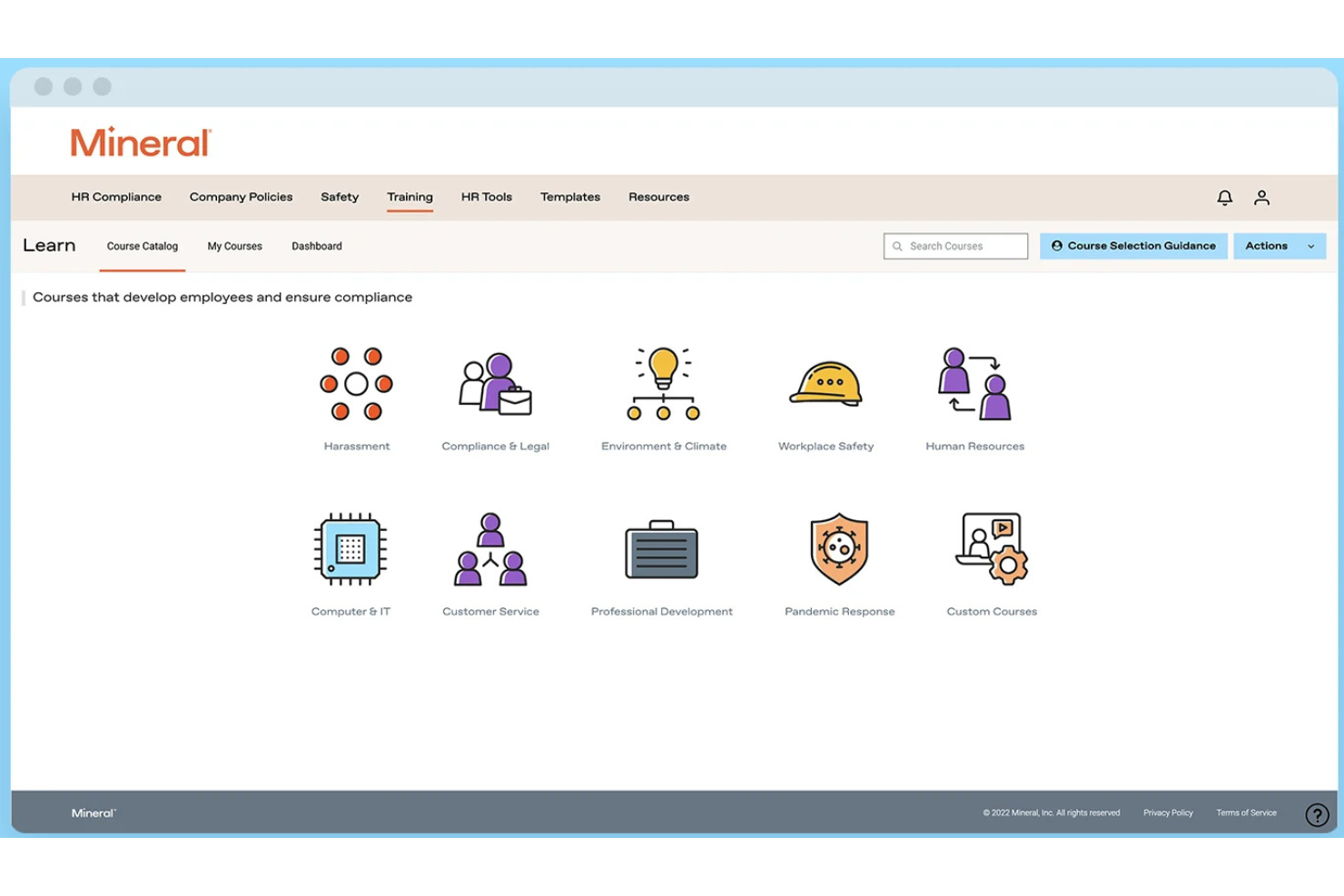
Mitratech Mineral è una piattaforma di conformità HR che aiuta le piccole e medie imprese a gestire i requisiti legali del lavoro tramite monitoraggio della conformità, strumenti per il manuale del dipendente, consulenza HR, risorse per le policy e formazione dei dipendenti.
Per chi è ideale Mitratech Mineral?
Mitratech Mineral è particolarmente adatto a titolari di piccole imprese e generalisti HR che necessitano di un supporto pratico alla conformità senza mantenere un team legale o di conformità interno.
Perché ho scelto Mitratech Mineral
Ho scelto Mitratech Mineral perché offre alle piccole imprese l'accesso sia a strumenti di conformità che a professionisti HR esperti su un'unica piattaforma. Invece di doversi informare autonomamente sulle leggi del lavoro o ingaggiare consulenti esterni, gli utenti ricevono avvisi di conformità personalizzati, risorse esaminate da avvocati e orientamento esperto quando si presentano situazioni lavorative complesse. Mi piace anche il fatto che la piattaforma combini la gestione del manuale del dipendente, la formazione dei dipendenti e la pianificazione della conformità, rendendo più semplice per piccoli team HR organizzarsi quando le normative cambiano.
Caratteristiche principali di Mitratech Mineral
- Mineral Intelligence™: Monitora l'evoluzione delle leggi sul lavoro e ricevi raccomandazioni personalizzate di conformità in base alla tua attività.
- Smart Employee Handbook Plus: Crea e mantieni manuali del dipendente conformi con aggiornamenti automatici delle policy e supporto multi-stato.
- Libreria di formazione per i dipendenti: Offri formazione sulla conformità e sviluppo dei dipendenti tramite corsi online integrati.
- Calendario di conformità: Tieni traccia delle scadenze federali e statali importanti per la conformità da un'unica dashboard centralizzata.
Integrazioni di Mitratech Mineral
Mitratech Mineral opera principalmente tramite partnership con fornitori di servizi paga, broker assicurativi, PEO e piattaforme HCM. È inoltre disponibile tramite il PrismHR Marketplace. La documentazione pubblica sulle integrazioni native resta limitata e il supporto a Zapier non è attualmente documentato.
Pros and Cons
Pros:
- Orientamento sulla conformità personalizzato
- Formazione HR integrata
- Supporto HR esperto
Cons:
- Gli strumenti per il manuale potrebbero comportare costi aggiuntivi
- Integrazioni native limitate

Deel HR
Ideale per archiviare registri centralizzati della forza lavoro a livello globale
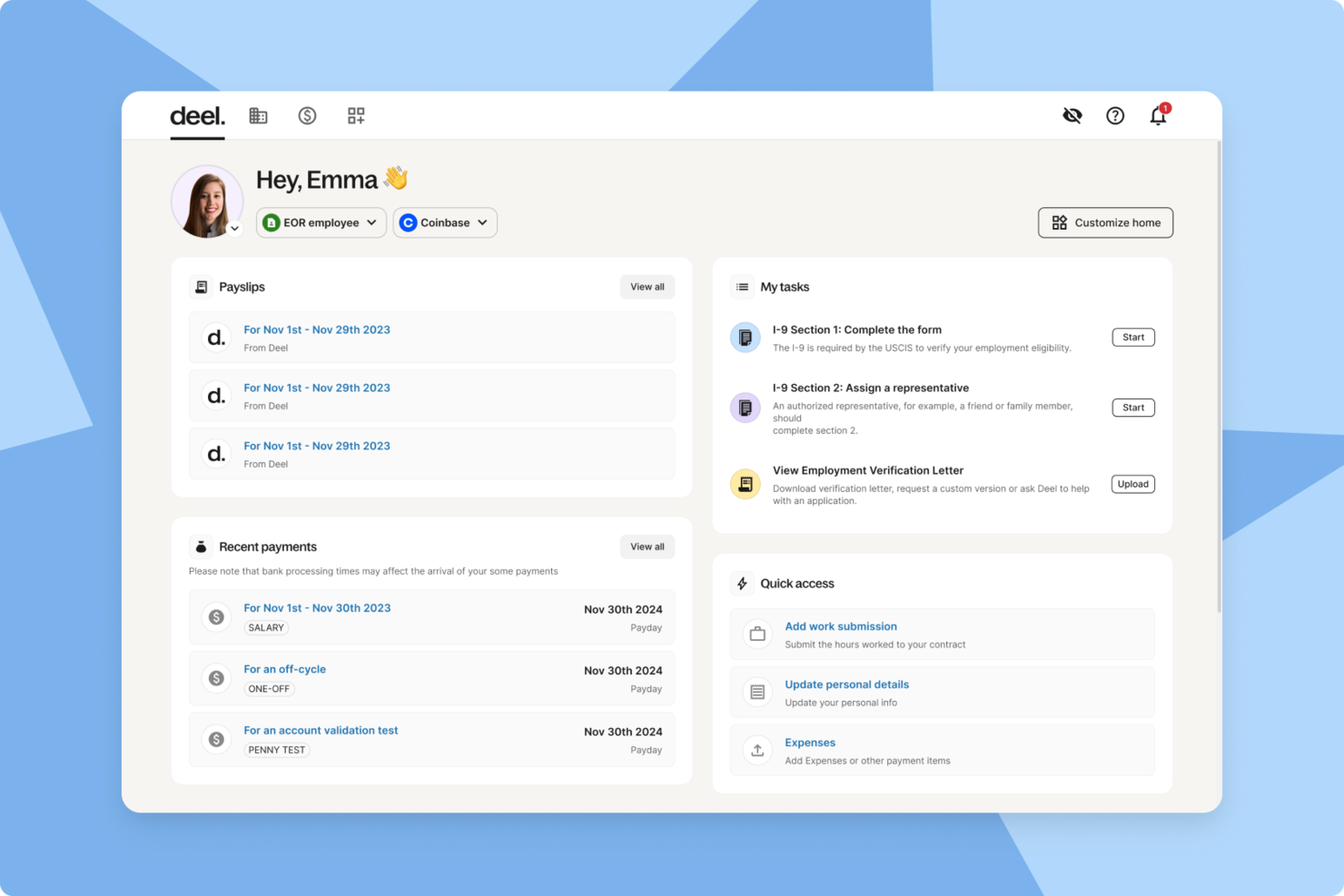
Deel HR è una piattaforma di conformità HR per piccole imprese che riunisce in un unico sistema i registri dei dipendenti a livello globale, strumenti di conformità automatizzati, flussi di lavoro di onboarding e gestione dei documenti.
Per chi è ideale Deel HR?
Deel HR è adatto a piccole imprese e team HR che gestiscono dipendenti globali, collaboratori e conformità in più paesi.
Perché ho scelto Deel HR
Ho scelto Deel HR tra i migliori perché posso tenere tutti i registri della forza lavoro globale in un unico posto, indipendentemente da dove si trovino i membri del mio team. Utilizzo Deel HR per archiviare contratti, documenti di conformità e dati personali di dipendenti e collaboratori in diversi paesi. La piattaforma mi permette di accedere rapidamente ai registri e aggiornarli, aiutando il mio team a rimanere organizzato e pronto per eventuali audit.
Caratteristiche principali di Deel HR
- Classificazione automatica dei lavoratori: Determina istantaneamente lo status di collaboratore o dipendente in base alle leggi locali.
- Flussi di lavoro di onboarding globali: Guida i nuovi assunti attraverso passaggi di onboarding specifici per paese e raccolta documenti.
- Supporto per firma elettronica: Permette di inviare, firmare e archiviare digitalmente contratti e documenti di conformità.
- Modelli di documenti personalizzati: Consente di creare e gestire modelli per contratti, NDA e politiche HR.
Integrazioni di Deel HR
Deel HR offre integrazioni native con BambooHR, Workday, Greenhouse, HiBob, QuickBooks, Xero, NetSuite, Expensify, Okta e Slack. È disponibile un'API per integrazioni personalizzate.
Pros and Cons
Pros:
- Strumenti integrati per la gestione di contratti e documenti
- Flussi di onboarding specifici per paese per i nuovi assunti
- Integrazioni native con i principali strumenti HR e paghe
Cons:
- Personalizzazione limitata dei flussi di onboarding
- Alcune integrazioni richiedono piani di livello superiore
New Product Updates from Deel HR

Deel Expands Stablecoin Wallet to 80+ Countries
Deel expands its Stablecoin Wallet to 80+ countries with dollar-backed balances and optional rewards. This gives eligible contractors more ways to hold and manage earnings inside Deel. For more information, visit Deel’s official site.
 .
.
Ideale per la conformità globale della forza lavoro

Deel è pensato per le piccole imprese che hanno bisogno di gestire la conformità delle risorse umane in diversi paesi. Se stai assumendo dipendenti o collaboratori internazionali, Deel ti aiuta a orientarti tra le normative locali sul lavoro, i contratti e i requisiti per il libro paga in oltre 150 paesi. Questa piattaforma è particolarmente utile per i team che si stanno espandendo a livello globale e desiderano ridurre i rischi di mancata conformità e l'onere amministrativo.
Perché ho scelto Deel
Per le piccole imprese che assumono a livello internazionale, Deel si distingue per la sua attenzione alla conformità della forza lavoro globale. Deel offre modelli di contratto localizzati e controlli automatici di conformità, aiutandoti a rimanere allineato alle leggi sul lavoro di ogni paese in cui operi.
Ho scelto Deel perché gestisce anche il libro paga internazionale e le dichiarazioni fiscali, riducendo il rischio di costosi errori di conformità. Queste funzionalità rendono Deel una scelta valida per le piccole imprese che vogliono espandere con sicurezza i propri team oltre confine senza restare impantanate in complessità legali.
Funzionalità principali di Deel
Altre funzionalità che rendono Deel utile per la conformità HR delle piccole imprese includono:
- Portale di gestione dei documenti: Archivia, organizza e accedi ai documenti di conformità per tutti i dipendenti e collaboratori.
- Flussi di lavoro di onboarding automatizzati: Guida i nuovi assunti attraverso le fasi di onboarding specifiche per paese e la documentazione richiesta.
- Strumenti di gestione delle spese: Invia, approva e monitora le spese dei membri del team globale all'interno della piattaforma.
- Permessi personalizzabili: Definisci ruoli degli utenti e livelli di accesso per controllare chi può visualizzare o modificare informazioni sensibili HR e di conformità.
Integrazioni Deel
Le integrazioni includono SAP SuccessFactors, NetSuite, Slack, Google Workspace, Rydoo, Humaans, OpenSesame, Ramp, Thatch e altri.
Pros and Cons
Pros:
- Archivio integrato per documenti di conformità
- Supporto in tempo reale per domande HR internazionali
- Strumenti per la valutazione del rischio di errata classificazione dei collaboratori
Cons:
- Nessuna funzionalità integrata di rilevazione ore
- Alcune integrazioni richiedono il piano enterprise
Paychex
Ideale per soluzioni di conformità scalabili

Paychex offre alle piccole imprese accesso a strumenti di conformità che possono essere ampliati man mano che le loro esigenze cambiano. Se cerchi una soluzione che combini paghe, risorse umane e gestione dei rischi con supporto di conformità integrato, questa piattaforma è progettata per adattarsi mentre la tua azienda cresce. Paychex si distingue per la sua capacità di gestire requisiti normativi complessi in più stati e settori.
Perché ho scelto Paychex
Ciò che mi ha colpito di Paychex è la possibilità di scalare il supporto alla conformità mano a mano che l’azienda cresce o che cambiano le normative. Paychex offre la gestione automatica delle dichiarazioni e dei versamenti fiscali, aiutando le piccole imprese a rimanere aggiornate con i requisiti federali, statali e locali.
Apprezzo inoltre la sua libreria integrata di conformità per le risorse umane, che offre risorse aggiornate e modelli per politiche e documentazione. Queste funzioni rendono Paychex particolarmente adatto alle piccole imprese che hanno bisogno di un sistema in grado di adattarsi a nuove sedi, variazioni di organico o regole settoriali.
Caratteristiche principali di Paychex
Altre caratteristiche che rendono Paychex utile per la conformità HR delle piccole imprese includono:
- Creatore di manuali per i dipendenti: Crea e aggiorna manuali aziendali personalizzati con linee guida conformi alle normative.
- Strumenti per l’onboarding: Raccogli digitalmente i moduli di assunzione e gestisci le checklist di onboarding.
- Monitoraggio di orari e presenze: Controlla le ore di lavoro e la presenza dei dipendenti con strumenti automatizzati.
- Gestione della conformità ACA: Traccia e segnala i requisiti dell’Affordable Care Act direttamente dalla piattaforma.
Integrazioni di Paychex
Le integrazioni includono QuickBooks, Sage Intacct, Xero, Jirav, 7shifts, Clover, BambooHR, goHappy e altri.
Pros and Cons
Pros:
- Gestione automatizzata di dichiarazioni fiscali federali e statali
- Specialisti dedicati per il supporto alla conformità
- Creatore di manuali per i dipendenti con aggiornamenti normativi
Cons:
- Personalizzazione limitata dei report di conformità
- Nessun sistema integrato di gestione dell'apprendimento

ADP
Ideale per avvisi di conformità automatizzati
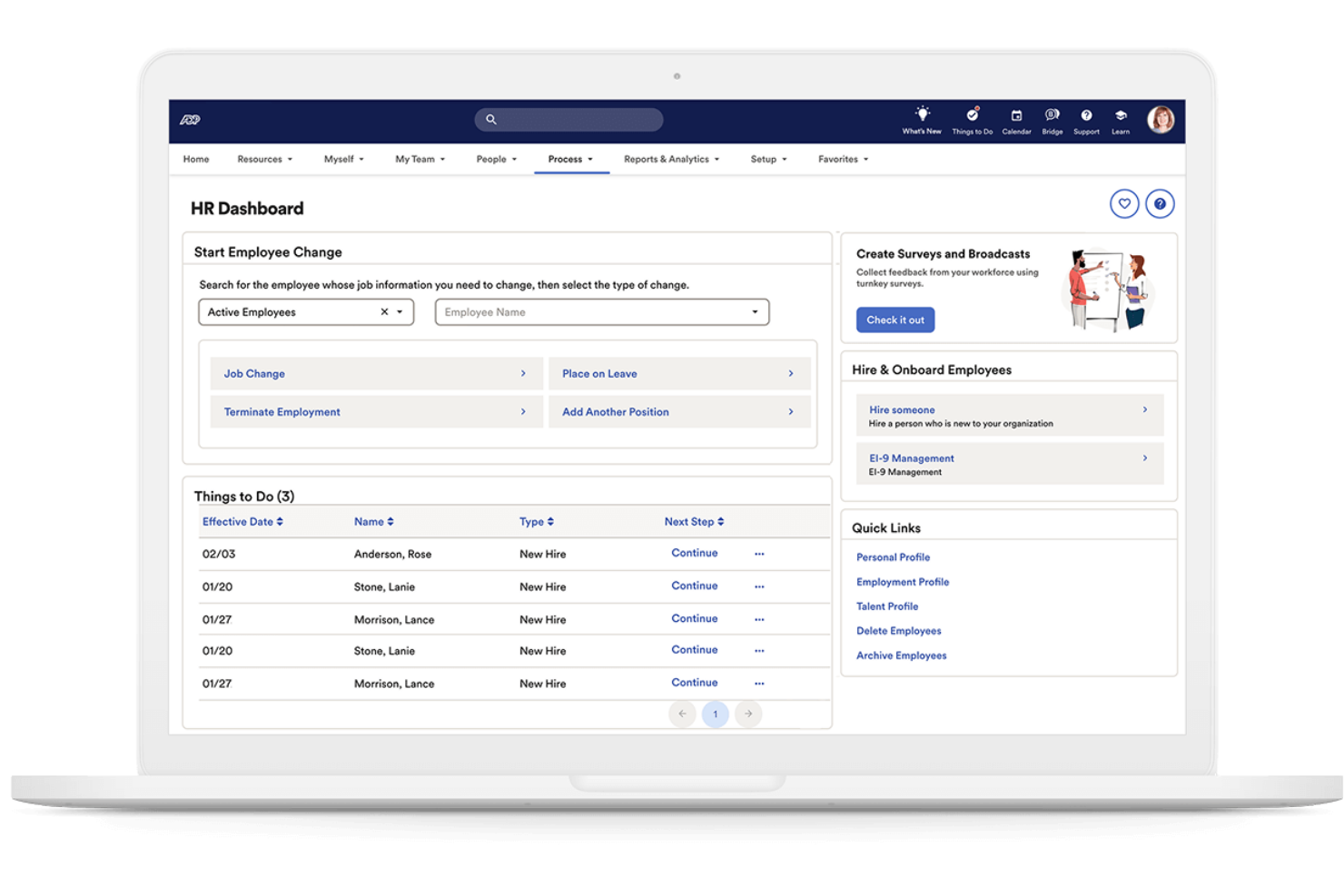
Se hai bisogno di un sistema che mantenga la tua azienda aggiornata sulle leggi in materia di lavoro in continuo cambiamento, ADP offre avvisi di conformità automatizzati pensati per piccoli team. Questa piattaforma è indicata per le aziende che desiderano notifiche proattive e indicazioni integrate per evitare errori di conformità. ADP può aiutarti a gestire regolamenti complessi senza la necessità di un esperto dedicato alla conformità nel tuo staff.
Perché ho scelto ADP
Ho scelto ADP perché i suoi avvisi di conformità automatizzati aiutano le piccole imprese a rimanere aggiornate sui cambiamenti normativi senza ulteriore lavoro manuale. Il sistema monitora le leggi sul lavoro a livello federale, statale e locale, inviando notifiche in tempo reale quando qualcosa cambia e può influire sulla tua azienda.
Apprezzo inoltre che ADP includa checklist di conformità e gestione documentale integrate, così puoi monitorare ciò che richiede attenzione e tenere i documenti organizzati. Queste funzionalità aiutano i piccoli team a evitare lacune nella conformità e a ridurre i rischi.
Caratteristiche principali di ADP
Altre funzionalità di ADP che possono risultare utili alle piccole imprese includono:
- Assistente per la creazione del manuale aziendale dei dipendenti: Crea e aggiorna un manuale del dipendente conforme, personalizzato in base alla tua azienda e alla tua sede.
- Libreria delle politiche HR: Accedi a una libreria di policy HR preconfigurate che puoi personalizzare per la tua organizzazione.
- Strumenti di onboarding: Integra digitalmente i nuovi assunti utilizzando moduli e checklist orientati alla conformità.
- Analisi della forza lavoro: Genera report sulle tendenze della forza lavoro, sul turnover e su metriche legate alla conformità.
Integrazioni con ADP
Le integrazioni includono QuickBooks, Xero, Sage, Workday, HealthEquity, ZipRecruiter, ClockShark, JazzHR, OrgChart e altri.
Pros and Cons
Pros:
- Avvisi automatizzati per variazioni federali e statali
- Checklist di conformità integrate per le attività HR
- Creazione e aggiornamento del manuale dei dipendenti inclusi
Cons:
- Personalizzazione limitata dei flussi di lavoro di conformità
- La configurazione delle integrazioni può essere lunga
Remote
Ideale per la conformità dell'impiego internazionale
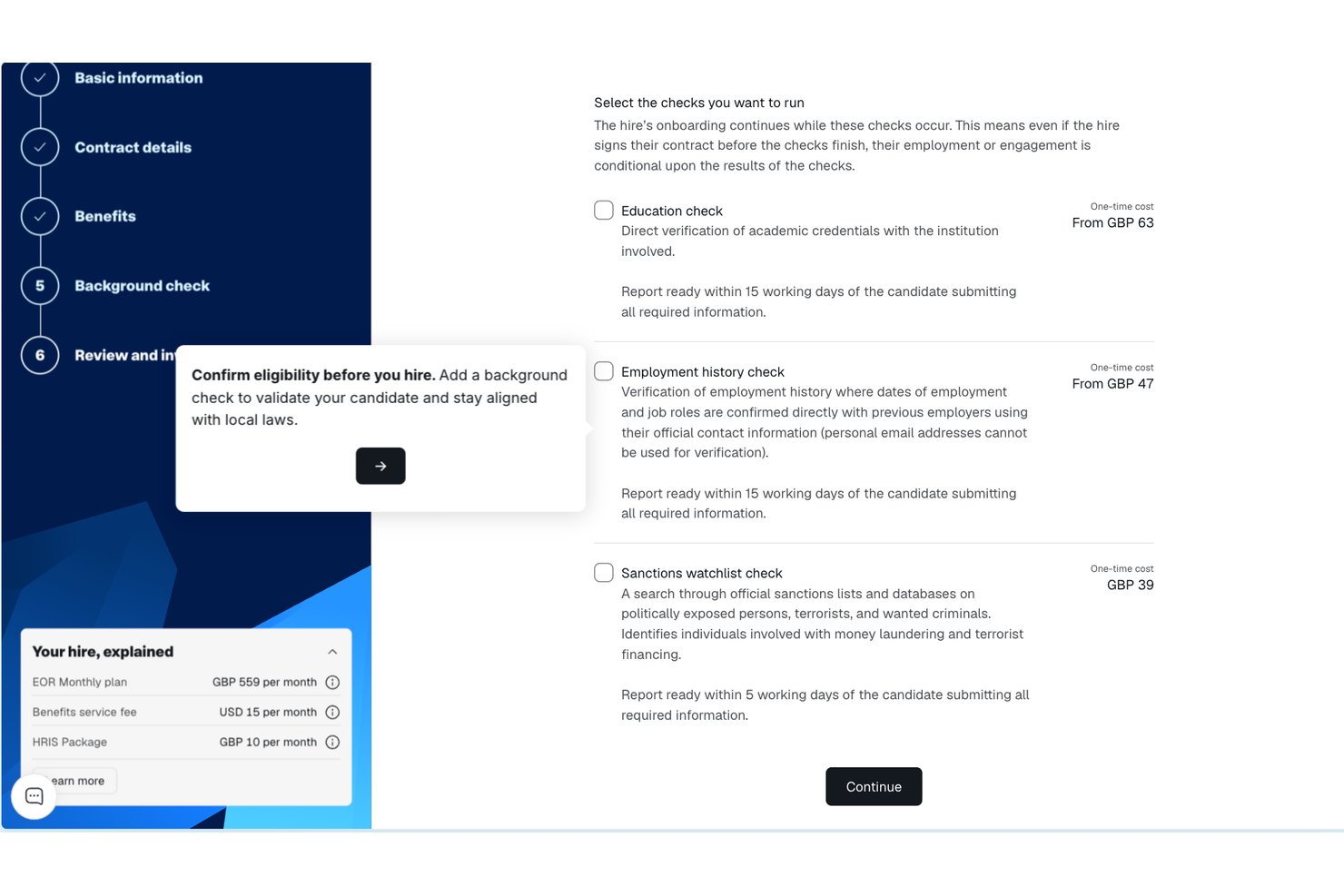
Remote offre alle piccole imprese un modo per assumere e gestire legalmente i dipendenti in altri Paesi senza costituire entità locali. Se stai espandendo il tuo team a livello internazionale, Remote gestisce i contratti di lavoro, le buste paga e i benefit in conformità alle leggi locali. Questa piattaforma è particolarmente utile per i team HR che desiderano ridurre i rischi legali e semplificare l'assunzione oltre confine.
Perché ho scelto Remote
A differenza di molte piattaforme HR, Remote è progettato appositamente per aiutare le piccole imprese a gestire la conformità dell'impiego internazionale senza dover costituire proprie entità legali all'estero. Ho scelto Remote perché agisce come datore di lavoro ufficiale, gestendo i contratti di lavoro, le buste paga e i benefit obbligatori in ogni Paese in cui assumi.
La piattaforma gestisce inoltre le ritenute fiscali locali e garantisce che le tue pratiche di impiego siano conformi alle leggi sul lavoro locali. Per le piccole imprese che desiderano espandersi a livello globale riducendo al minimo i rischi di non conformità, Remote offre una soluzione mirata che affronta le complessità dell'impiego oltre confine.
Funzionalità principali di Remote
Alcune altre funzionalità che rendono Remote utile per la conformità HR delle piccole imprese includono:
- Portale self-service per i dipendenti: I dipendenti possono accedere direttamente a buste paga, contratti e informazioni personali.
- Monitoraggio automatico delle assenze: Monitora e gestisci le richieste e le approvazioni dei permessi in un unico luogo.
- Accordi per la protezione della proprietà intellettuale: Crea e gestisci gli accordi sulla proprietà intellettuale per le assunzioni internazionali.
- Gestione localizzata dei benefit: Offri e gestisci pacchetti di benefit specifici per ciascun Paese attraverso la piattaforma.
Integrazioni di Remote
Le integrazioni includono QuickBooks, Zapier, HiBob, BambooHR, NetSuite, Xero, Zelt, Carta, Workday, Google Workspace e altro.
Pros and Cons
Pros:
- Protezione integrata della proprietà intellettuale e dei diritti sulle invenzioni
- Inserimento automatizzato dei dipendenti internazionali
- Gestione dei benefit localizzata per ciascun Paese
Cons:
- Nessuno strumento integrato per la gestione delle prestazioni
- L'elaborazione delle buste paga è limitata ai dipendenti, non ai collaboratori esterni
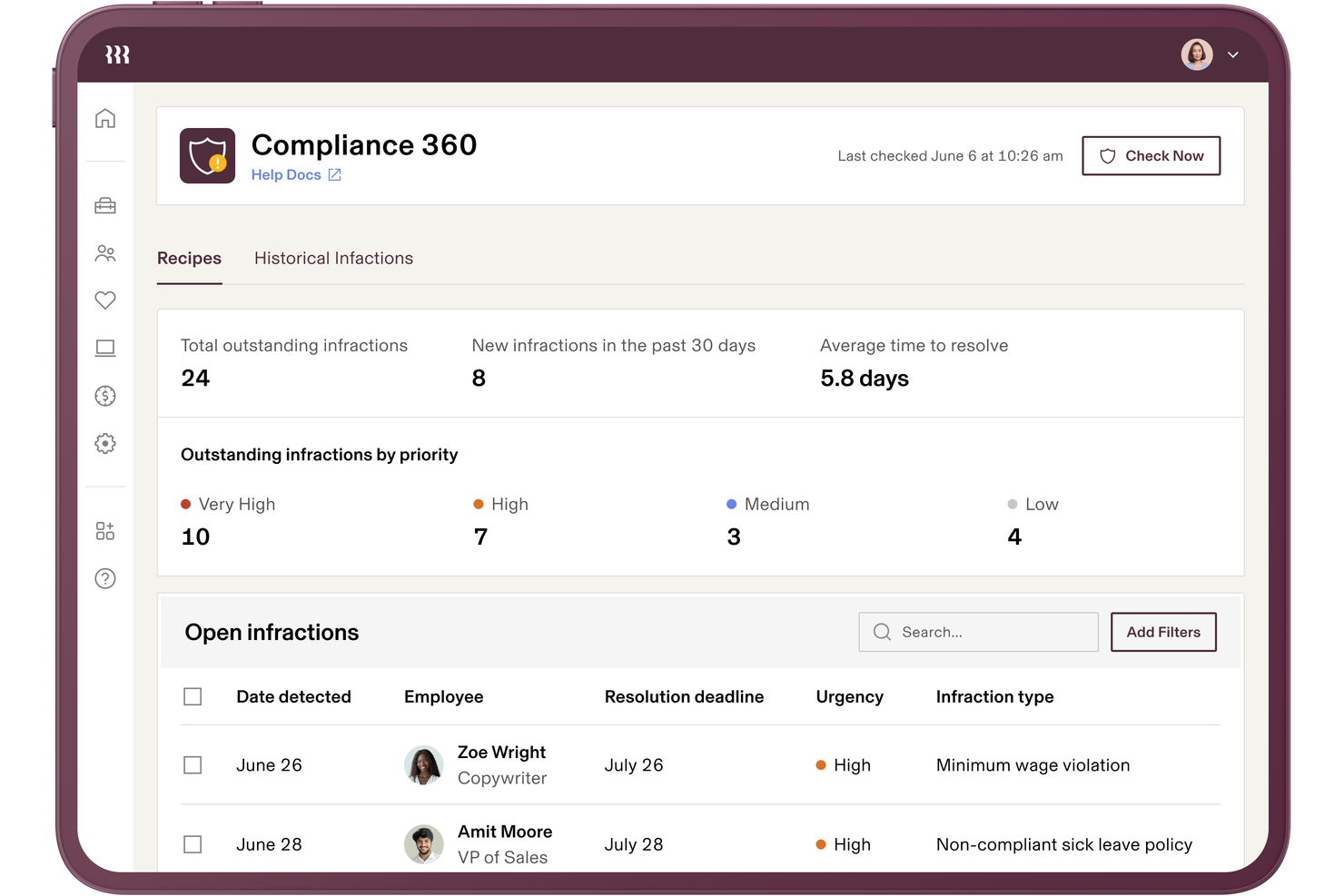
Rippling riunisce le funzioni HR, payroll e la conformità IT in un'unica piattaforma, semplificando alle piccole imprese la gestione dei requisiti attraverso diversi sistemi. Se devi destreggiarti tra dati dei dipendenti, sicurezza dei dispositivi e compliance della retribuzione, l'approccio unificato di Rippling ti aiuta a mantenere tutto allineato. È una soluzione ideale per i team che vogliono automatizzare i compiti relativi alla conformità, supportare una corretta gestione dei registri e persino esternalizzare alcune funzioni amministrative, riducendo al contempo il rischio di lacune dovute a strumenti HR scollegati tra loro.
Perché ho scelto Rippling
A differenza di molti strumenti HR che si concentrano su una sola area, Rippling collega HR, payroll e conformità IT in un unico posto, elemento particolarmente utile per le piccole imprese che gestiscono più sistemi. Ho scelto Rippling perché sincronizza automaticamente i dati dei dipendenti tra HR e IT, garantendo che gli aggiornamenti sulla conformità avvengano simultaneamente ovunque.
La piattaforma consente inoltre di impostare workflow automatizzati per l'onboarding, l'uscita dei dipendenti e la gestione delle policy, riducendo il rischio di lacune nella conformità. Per i team che vogliono evitare di gestire strumenti separati e aggiornamenti manuali, l'approccio unificato di Rippling alla conformità è una vera risorsa.
Funzionalità principali di Rippling
Altre caratteristiche che rendono Rippling utile per la conformità HR delle piccole imprese includono:
- Costruttore di policy personalizzate: Crea e gestisci politiche aziendali su misura per le esigenze della tua organizzazione.
- Raccolta automatizzata dei documenti: Richiedi, raccogli e archivia documenti di conformità dei dipendenti in un unico luogo.
- Monitoraggio delle assenze: Monitora e gestisci i saldi e le richieste di ferie dei dipendenti con controlli di conformità integrati.
- Raccolta di firme elettroniche: Raccogli firme legalmente vincolanti sui documenti di conformità direttamente all'interno della piattaforma.
Integrazioni di Rippling
Le integrazioni includono Slack, Google Workspace, Microsoft 365, Salesforce, Asana, Zoom, Jira, QuickBooks Online, Xero e molto altro.
Pros and Cons
Pros:
- Sincronizza i dati HR, payroll e conformità IT
- Avvisi automatici di conformità per più giurisdizioni
- Dashboard centralizzata per il monitoraggio dei compiti di conformità
Cons:
- Guida in-app limitata per questioni di conformità complesse
- L'esportazione dei report può essere lenta nei periodi di picco

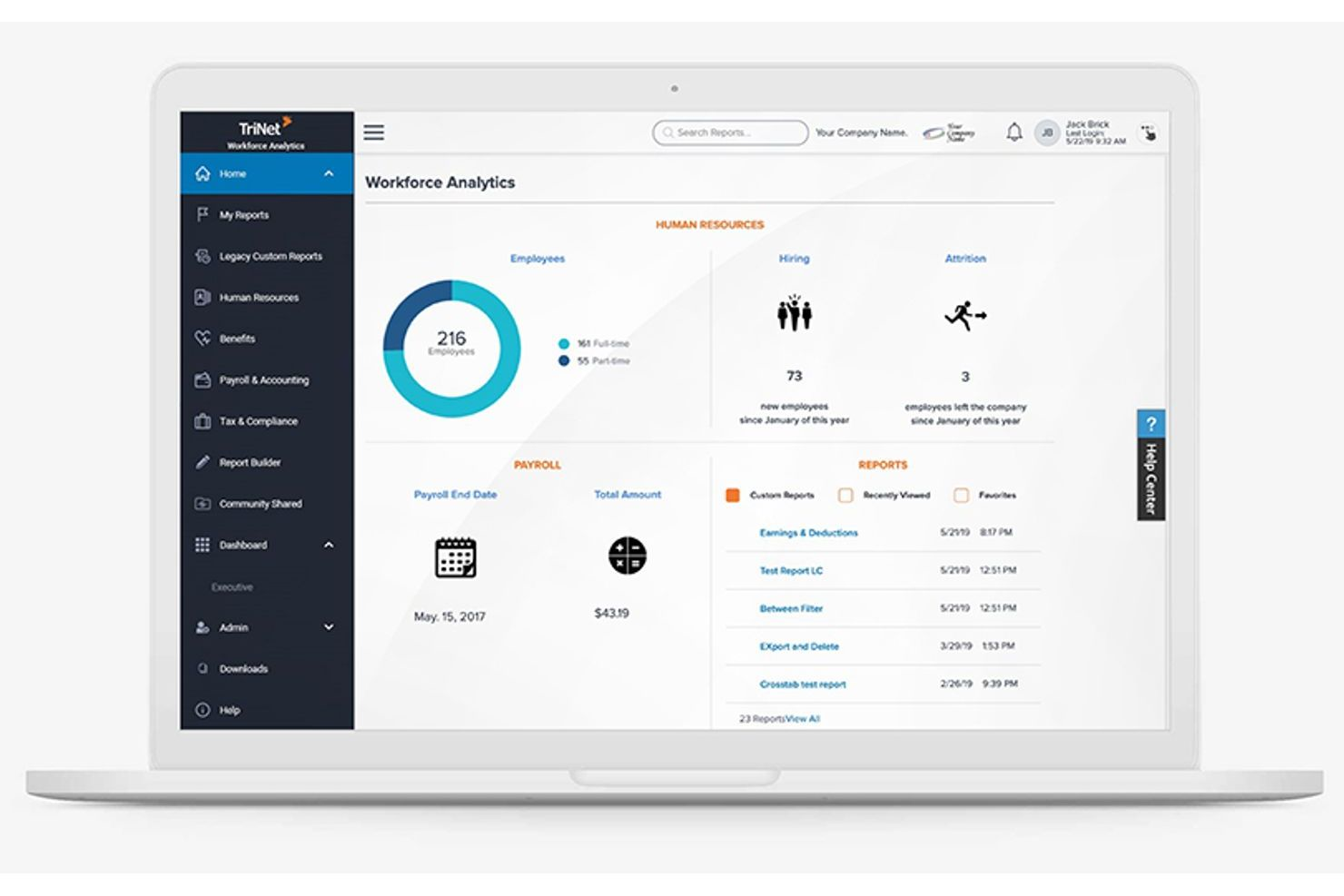
TriNet si specializza in soluzioni di conformità HR create su misura per le esigenze uniche dei diversi settori, rappresentando una scelta solida per le piccole imprese con specifici requisiti normativi. Se il tuo team opera nei settori sanitario, tecnologico, retail o in altri ambiti altamente regolamentati, TriNet offre strumenti e consulenza progettati per il tuo ambiente lavorativo. Questa piattaforma ti aiuta a gestire i rischi e a rispettare le normative e gli standard specifici del settore che i sistemi HR generici possono trascurare.
Perché ho scelto TriNet
A differenza di molte piattaforme HR che adottano un approccio universale, TriNet si distingue per il suo focus sulla consulenza in materia di conformità specifica per settore. Questo è particolarmente importante per le piccole imprese in settori come quello sanitario, finanziario o manifatturiero, dove le normative possono essere complesse e in continuo cambiamento.
Ho scelto TriNet perché offre risorse di conformità personalizzate, inclusi modelli di policy focalizzati sul settore e accesso a esperti HR che comprendono i requisiti tipici del tuo ambito. Con queste funzionalità, la tua azienda può affrontare i rischi di conformità che i sistemi HR generici potrebbero non rilevare.
Caratteristiche principali di TriNet
Tra le altre funzionalità che TriNet offre alle piccole imprese per la conformità HR troviamo:
- Gestione delle paghe: Gestisci pagamenti, dichiarazioni fiscali e calcolo delle retribuzioni direttamente dalla piattaforma.
- Gestione dei benefit per i dipendenti: Offri e gestisci piani di salute, dentistici, oculistici e pensionistici per il tuo team.
- Rilevazione presenze e orario: Tieni traccia delle ore lavorate, gestisci le ferie e monitora le tendenze delle presenze.
- Dashboard per l’analisi delle risorse umane: Accedi a report in tempo reale su metriche di forza lavoro, stato della conformità e attività HR.
Integrazioni di TriNet
Le integrazioni native attualmente non sono elencate.
Pros and Cons
Pros:
- Risorse di conformità specifiche per diversi settori
- Funzionalità di automatizzazione per dichiarazioni fiscali e report
- Modelli di manuali dei dipendenti personalizzati per settore
Cons:
- Gli aggiornamenti della piattaforma possono interrompere i flussi di lavoro in corso
- Alcune funzionalità richiedono il contatto con l'assistenza per essere abilitate

Gusto
Ideale per buste paga e benefit integrati
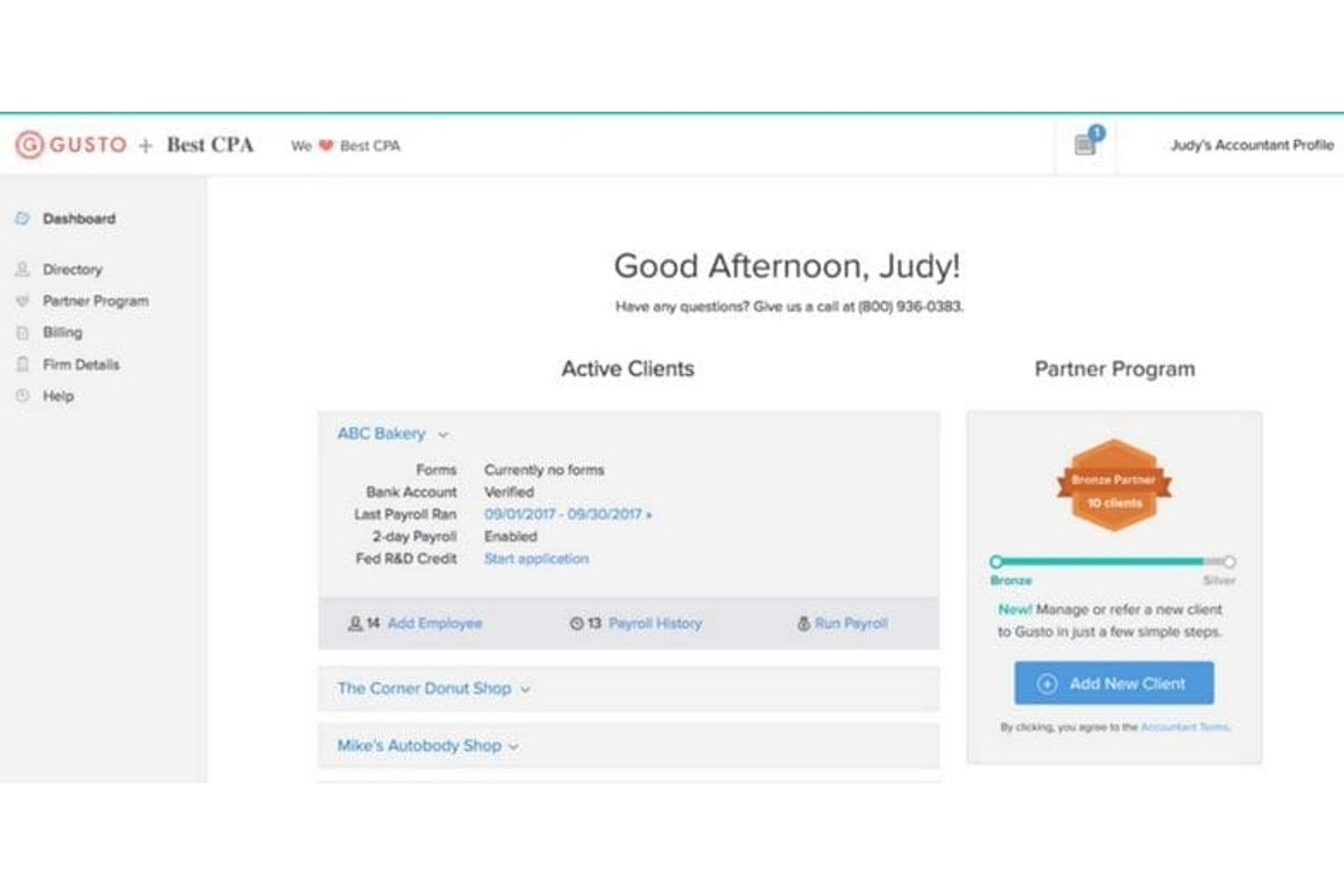
Gusto unisce buste paga, gestione dei benefit e conformità HR in un'unica piattaforma, risultando particolarmente adatto per le piccole imprese che desiderano gestire tutto in un solo posto. Se stai cercando un sistema che automatizza la presentazione delle dichiarazioni fiscali, l'iscrizione ai benefit e le attività di conformità,
Gusto è progettato per ridurre il lavoro manuale e aiutarti a evitare errori. È particolarmente utile per i team che desiderano buste paga e benefit integrati senza dover gestire più fornitori.
Perché ho scelto Gusto
Ciò che distingue Gusto è il modo in cui combina l'elaborazione delle buste paga e la gestione dei benefit in un'unica piattaforma, caratteristica particolarmente preziosa per le piccole imprese che vogliono semplificare la conformità. Il sistema calcola e invia in automatico le tasse sulle buste paga, gestisce l'iscrizione ai benefit e ti tiene aggiornato sulle normative in evoluzione.
Apprezzo anche il fatto che Gusto includa il supporto per la conformità su aspetti come la segnalazione delle nuove assunzioni e i moduli fiscali di fine anno. Queste funzionalità aiutano i piccoli team a rimanere conformi senza dover gestire sistemi separati o preoccuparsi di scadenze importanti.
Funzionalità principali di Gusto
Altre funzionalità che potrebbero essere utili alle piccole imprese includono:
- Gestione documentale: Archivia e organizza in modo sicuro i documenti dei dipendenti all'interno della piattaforma.
- Rilevamento delle presenze: Traccia le ore di lavoro dei dipendenti e sincronizzale direttamente con le buste paga.
- Lettere di offerta personalizzabili: Genera e invia lettere di assunzione personalizzate sulle esigenze della tua azienda.
- Creazione organigramma: Visualizza la struttura del team e le linee di riporto con uno strumento integrato per l'organigramma.
Integrazioni Gusto
Le integrazioni includono QuickBooks, Xero, FreshBooks, 15Five, 7Shifts, Asana, Bench, Box, ClickUp, Clover, Connecteam e altro ancora.
Pros and Cons
Pros:
- Invio automatico delle dichiarazioni fiscali statali e federali
- Segnalazione integrata delle nuove assunzioni per la conformità
- Conservazione digitale dei documenti per i registri HR
Cons:
- Capacità limitate per le buste paga internazionali
- Le politiche PTO mancano di opzioni di regole avanzate
New Product Updates from Gusto
Gusto Adds Solo Advisory Tools and Mobile Money Features
Gusto adds Solo S-Corp Advisory Tools and Gusto Money on Mobile for tax guidance, invoicing, and bill payments. These updates help accountants advise solopreneurs and let users manage business finances from their phones. For more information, visit Gusto’s official site.
TalentHR
Ideale per la gestione intuitiva delle politiche
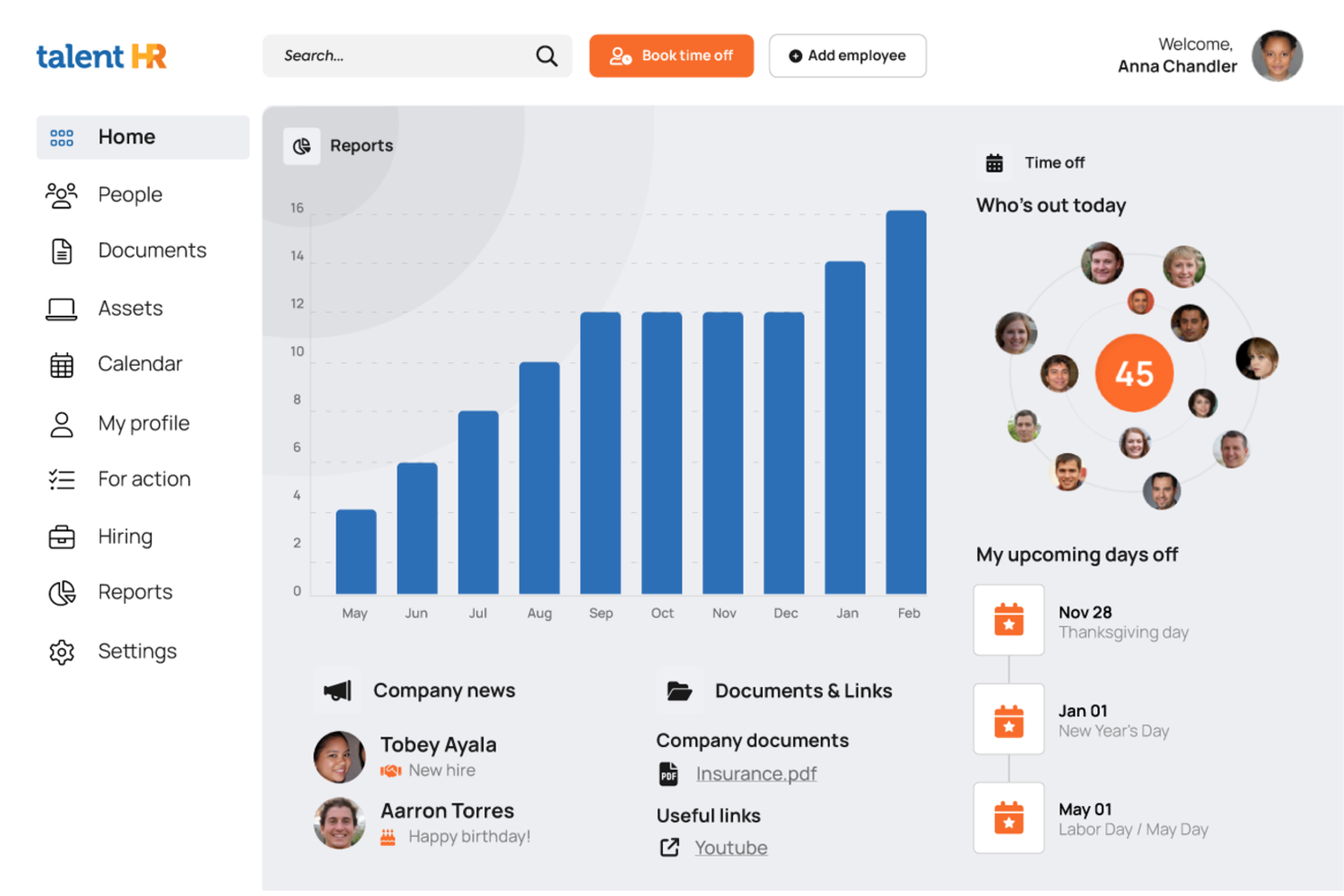
TalentHR offre alle piccole imprese un modo semplice per creare, aggiornare e condividere le politiche HR senza la consueta complessità. Se hai bisogno di un sistema che renda la gestione delle politiche accessibile anche a chi non è specialista e che mantenga il team allineato, questa piattaforma è pensata per te. L’attenzione sui flussi di lavoro intuitivi ti aiuta a mantenere conformità e chiarezza man mano che la tua azienda cresce.
Perché ho scelto TalentHR
Ciò che distingue TalentHR è il suo focus sul rendere la gestione delle politiche semplice e accessibile per le piccole imprese. Ho scelto TalentHR perché permette di creare, modificare e distribuire le politiche HR direttamente all’interno della piattaforma, così puoi mantenere tutti aggiornati senza passaggi extra.
La funzione della libreria delle politiche aiuta a organizzare documenti e aggiornamenti, mentre il tracciamento integrato delle conferme assicura che i dipendenti visionino e accettino le nuove regole. Questi strumenti facilitano la conformità e la comunicazione trasparente sulle regole aziendali anche nei piccoli team.
Caratteristiche principali di TalentHR
Oltre agli strumenti per la gestione delle politiche, TalentHR offre diverse altre funzionalità per la conformità HR delle piccole imprese:
- Gestione delle anagrafiche dipendenti: Archivia e aggiorna informazioni, documenti e contratti dei dipendenti in un luogo centralizzato.
- Monitoraggio ferie e permessi: Tieni traccia dei saldi ferie, approva le richieste e genera report sulle assenze.
- Flussi di lavoro personalizzabili: Crea processi di approvazione e notifiche su misura per le esigenze della tua organizzazione.
- Controlli di accesso basati sui ruoli: Assegna permessi agli utenti in base al loro ruolo per proteggere i dati HR sensibili.
Integrazioni TalentHR
Tra le integrazioni trovi Slack, Google Calendar, Zapier, TalentLMS, WordPress, Google Workspace e altre ancora. È disponibile anche un’API per integrazioni personalizzate.
Pros and Cons
Pros:
- Tracciamento delle conferme delle policy per audit di conformità
- Modelli di documenti integrati per le politiche HR
- Permessi basati sui ruoli per dati HR sensibili
Cons:
- Nessuna funzione integrata di gestione paghe
- Analisi limitate per i report di conformità
Altri sistemi di conformità HR per piccole imprese
Ecco alcune ulteriori opzioni di sistemi di conformità HR per piccole imprese che non sono state incluse nel mio elenco, ma che vale comunque la pena valutare:
- Keka HR
Ideale per il supporto all'implementazione e all'onboarding
- Homebase
Ideale per la conformità dei team di lavoratori a ore
- Paycom
Ideale per checklist di conformità personalizzabili
- HiBob
Ideale per il monitoraggio della conformità in tempo reale
- Bambee
Ideale per chi cerca il supporto di un responsabile HR dedicato
- Paycor
Ideale per risorse di formazione sulla conformità


Come Valuto i Sistemi di Conformità HR per le Piccole Imprese
Divido la mia valutazione in requisiti di base—come il monitoraggio delle leggi in più giurisdizioni e la gestione degli I-9—e fattori differenzianti che separano i migliori strumenti per team HR snelli.
Funzionalità di Base (Condizioni Necessarie per Questa Lista)
Quando seleziono gli strumenti per la mia lista, valuto ognuno su una scala da 0 (non offre la funzionalità) a 5 (eccelle in quest'area) per ciascuna delle funzionalità di base elencate di seguito. Poi calcolo il punteggio totale dello strumento in percentuale. Ogni strumento deve raggiungere un punteggio totale minimo del 65% per essere preso in considerazione per l'inclusione.
- Monitoraggio della Conformità alla Legislazione sul Lavoro: Controllo se la piattaforma monitora le modifiche alle leggi federali, statali e locali e invia avvisi—ad esempio, quando entra in vigore un nuovo obbligo di congedo retribuito in una giurisdizione dove hai dipendenti.
- Gestione dei Documenti dei Dipendenti: La sicurezza e l'organizzazione dei fascicoli del personale sono fondamentali, quindi valuto come ogni strumento gestisce l’archiviazione dei documenti, i tempi di conservazione e i permessi di accesso per elementi sensibili come lettere di offerta e cartellini disciplinari.
- Gestione di Politiche & Manuali: Cerco strumenti che permettano di creare e distribuire manuali aziendali con tracciamento delle firme elettroniche, in particolare quelli che offrono modelli di policy specifici per stato personalizzabili.
- Reportistica Obbligatoria & Invii: Ogni strumento deve supportare i principali moduli e invii governativi come I-9, W-4, report EEO-1 e invii ACA, con controlli di errore integrati per ridurre scarti o ritardi.
- Tracciamento della Formazione Obbligatoria: Valuto se la piattaforma assegna, eroga o traccia la formazione necessaria—come corsi contro le molestie o di sicurezza sul lavoro—e invia promemoria prima della scadenza delle certificazioni.
- Audit Trail & Reportistica: Qui cerco registri chiari e datati di ogni azione amministrativa e del dipendente, insieme alla capacità di generare report di conformità esportabili in preparazione ad un audit.
Una volta raccolta una lista di strumenti che soddisfano i criteri, considero ciò che distingue ogni piattaforma.
Fattori di Differenziazione (Cosa Distingue i Fornitori)
Ecco come confronto e metto a confronto diversi fornitori:
Funzionalità Distintive
L’accesso a consulenti HR certificati è un grande elemento differenziante, soprattutto quando un piccolo team ha bisogno di supporto su un licenziamento delicato o una richiesta di congedo. Cerco anche automazione della conformità multi-stato, importante appena assumi il primo dipendente da remoto in una nuova giurisdizione. Valuto anche le valutazioni integrate del rischio di conformità: strumenti che valutano la tua situazione attuale e segnalano le lacune offrono un piano d’azione chiaro prima che i problemi si aggravino.
Oltre le Funzionalità
Prezzi e struttura dei piani sono importanti qui—valuto se il prezzo per dipendente di un fornitore rimane realistico man mano che un piccolo team cresce da 10 a 50 persone. Anche le integrazioni sono essenziali; un sistema di conformità che si collega al provider di payroll e ai gestori dei benefit mantiene i dati coerenti senza reinserimenti manuali. Considero anche il supporto all’onboarding, poiché un office manager che svolge funzioni HR ha bisogno di una configurazione guidata e checklist di conformità già pronte, non solo di una knowledge base self-service.
Come scegliere un sistema di conformità HR per piccole imprese
È facile perdersi in lunghi elenchi di funzionalità e strutture tariffarie complesse. Per aiutarti a rimanere concentrato mentre porti avanti il tuo processo di selezione del software, ecco un elenco di fattori da tenere a mente:
| Fattore | Cosa considerare |
|---|---|
| Scalabilità | Il sistema supporterà la tua azienda mentre cresce, aggiungi sedi o aumenti il numero di dipendenti? Verifica i limiti degli utenti e le possibilità di aggiornamento. |
| Integrazioni | Lo strumento si collega ai tuoi sistemi paghe, HRIS o di gestione documentale? Verifica la disponibilità di integrazioni native per evitare il lavoro manuale. |
| Personalizzazione | Puoi adattare i flussi di lavoro, le assegnazioni della formazione e i report alle tue politiche e alle tue esigenze normative? Evita configurazioni rigide e uguali per tutti. |
| Semplicità d'uso | Il tuo team HR e i dipendenti troveranno l'interfaccia intuitiva? Verifica che la navigazione sia chiara e che i requisiti di formazione siano minimi. |
| Implementazione e inserimento | Quanto tempo ci vorrà per rendere il sistema operativo? Informati sul supporto alla migrazione, sulle risorse per l'inserimento e sui tempi medi per ottenere valore. |
| Costo | Le fasce di prezzo sono trasparenti e prevedibili? Fai attenzione ai costi nascosti, agli addebiti per utente o ai costi aggiuntivi per i moduli di conformità. |
| Misure di sicurezza | Il sistema offre crittografia, controlli degli accessi e registri di audit? Assicurati che soddisfi i tuoi standard di privacy dei dati e di conformità. |
| Disponibilità dell'assistenza | Quali canali di assistenza sono disponibili e in quali orari? Valuta se hai bisogno di supporto 24 ore su 24, 7 giorni su 7, o dell'accesso a specialisti della conformità. |
Che cos'è un sistema di conformità HR per piccole imprese?
Un sistema di conformità delle risorse umane per le piccole imprese è un software HR che aiuta le organizzazioni a gestire, monitorare e documentare la conformità nelle funzioni delle risorse umane. Queste piattaforme supportano le operazioni HR, le attività HR fondamentali e i processi HCM più ampi durante l'intero ciclo di vita dei dipendenti.
Vengono utilizzate dai professionisti HR e dai proprietari di piccole imprese per gestire attività come il monitoraggio dei candidati, la gestione dei talenti e la conformità a requisiti quali il COBRA e le normative sull'assicurazione sanitaria.
Molti strumenti si integrano inoltre con i software per le buste paga per semplificare i flussi di lavoro e migliorare il coinvolgimento e la fidelizzazione dei dipendenti. Grazie a un approccio intuitivo, questi sistemi centralizzano le attività di conformità, riducono i rischi e aiutano i team a rimanere organizzati e pronti per gli audit.
Funzionalità
Quando selezioni un sistema di conformità HR per una piccola impresa, presta attenzione alle seguenti funzionalità chiave:
- Gestione della formazione sulla conformità: Assegna, programma e monitora il completamento dei corsi di formazione obbligatori per i dipendenti, al fine di soddisfare gli standard normativi e aziendali.
- Archiviazione e gestione dei documenti: Archivia, organizza e recupera in modo sicuro i documenti relativi alla conformità, come policy, certificazioni e registri degli audit.
- Monitoraggio della presa visione delle policy: Distribuisci le policy ai dipendenti e monitora le prese visione digitali per assicurarti che tutti abbiano esaminato e accettato i documenti fondamentali.
- Promemoria e avvisi automatici: Configura notifiche per le scadenze imminenti della formazione, gli aggiornamenti delle policy o le certificazioni in scadenza, così da mantenere sotto controllo le attività di conformità.
- Monitoraggio degli incidenti e delle indagini: Registra gli incidenti sul luogo di lavoro, documenta le azioni successive e conserva i registri per gli audit o le verifiche legali.
- Reportistica della conformità personalizzabile: Genera ed esporta report sul completamento della formazione, sulle prese visione delle policy e su altri indicatori di conformità per audit o verifiche interne.
- Controlli degli accessi basati sui ruoli: Limita l'accesso ai dati sensibili sulla conformità in base ai ruoli degli utenti, assicurandoti che solo il personale autorizzato possa visualizzare o modificare determinate informazioni.
- Notifiche sugli aggiornamenti normativi: Ricevi avvisi sulle modifiche alle leggi o alle normative sul lavoro pertinenti che potrebbero influire sui tuoi requisiti di conformità.
- Automazione dei flussi di lavoro: Automatizza i processi di conformità ripetitivi, come le checklist di inserimento o le assegnazioni periodiche della formazione, per ridurre il lavoro manuale.
- Registrazione del percorso di audit: Mantieni un registro dettagliato di tutte le azioni e modifiche relative alla conformità all'interno del sistema, per favorire trasparenza e responsabilità.
Vantaggi
L'implementazione di un sistema di conformità HR per una piccola impresa offre diversi vantaggi al tuo team e alla tua attività. Ecco alcuni dei benefici che puoi aspettarti:
- Riduzione dei rischi di non conformità: Il monitoraggio centralizzato e i promemoria automatici aiutano a garantire che la tua attività soddisfi i requisiti normativi ed eviti sanzioni costose.
- Preparazione più rapida agli audit: L'archiviazione organizzata dei documenti e la registrazione del percorso di audit semplificano la raccolta e la presentazione dei registri di conformità durante gli audit.
- Maggiore responsabilizzazione dei dipendenti: Il monitoraggio della presa visione delle policy e la gestione della formazione assicurano che i dipendenti comprendano e completino le attività di conformità obbligatorie.
- Risparmio di tempo per le risorse umane: L'automazione dei flussi di lavoro e la reportistica personalizzabile riducono il lavoro manuale e consentono al personale HR di dedicarsi ad attività di maggior valore.
- Maggiore visibilità sullo stato della conformità: I cruscotti e la reportistica in tempo reale offrono una visione chiara del completamento della formazione, delle prese visione delle policy e delle attività in sospeso.
- Maggiore sicurezza dei dati: I controlli degli accessi basati sui ruoli e la gestione sicura dei documenti proteggono le informazioni sensibili sulla conformità dagli accessi non autorizzati.
- Adattabilità ai cambiamenti normativi: Le notifiche sugli aggiornamenti normativi e i flussi di lavoro personalizzabili aiutano la tua attività a rimanere aggiornata mentre le leggi e i requisiti evolvono.
Costi e Prezzi
La selezione di un sistema di conformità HR per una piccola impresa richiede la comprensione dei vari modelli e piani tariffari disponibili. I costi variano in base alle funzionalità, alle dimensioni del team, ai componenti aggiuntivi e ad altri fattori. La tabella seguente riassume i piani comuni, i relativi prezzi medi e le funzionalità tipicamente incluse nelle soluzioni di sistemi di conformità HR per piccole imprese:
Tabella comparativa dei piani per i sistemi di conformità HR per piccole imprese
| Tipo di piano | Prezzo medio | Funzionalità comuni |
|---|---|---|
| Piano gratuito | $0 | Archiviazione di base dei documenti di conformità, assegnazioni formative limitate e reportistica semplice. |
| Piano personale | $5-$15/utente/mese | Gestione della formazione sulla conformità, archiviazione dei documenti, promemoria automatici e monitoraggio di base delle policy. |
| Piano aziendale | $15-$30/utente/mese | Flussi di lavoro della conformità personalizzabili, reportistica avanzata, monitoraggio degli incidenti e controlli degli accessi basati sui ruoli. |
| Piano per grandi aziende | $30-$50/utente/mese | Notifiche sugli aggiornamenti normativi, registrazione dei log di audit, supporto dedicato e misure di sicurezza avanzate. |
Domande frequenti sul sistema di conformità delle risorse umane per le piccole imprese
Ecco alcune risposte alle domande più comuni sui sistemi di conformità delle risorse umane per le piccole imprese:
Come faccio a sapere se la mia piccola impresa ha bisogno di un sistema di conformità delle risorse umane?
Se gestisci manualmente la formazione dei dipendenti, le attestazioni di presa visione delle policy o la documentazione normativa, probabilmente hai bisogno di un sistema di conformità delle risorse umane. Questi strumenti aiutano a ridurre gli errori, risparmiare tempo e garantire il rispetto dei requisiti legali durante la crescita dell’azienda.
I sistemi di conformità delle risorse umane possono essere utili per i team distribuiti in più Stati o da remoto?
Sì, la maggior parte dei sistemi di conformità delle risorse umane supporta i team distribuiti in più Stati e da remoto monitorando i requisiti specifici di ciascuna sede e consentendo la distribuzione digitale delle policy e della formazione. Questo aiuta a mantenere la conformità in diverse giurisdizioni e modalità di lavoro.
Cosa devo cercare in un sistema di conformità se la mia azienda sta crescendo?
Cerca scalabilità, una gestione flessibile degli utenti e flussi di lavoro personalizzabili. Con la crescita dell’azienda, avrai bisogno di un sistema in grado di gestire più utenti, adattarsi alle nuove normative e integrarsi con altri strumenti per le risorse umane.
Quanto tempo occorre per implementare un sistema di conformità delle risorse umane?
I tempi di implementazione variano, ma la maggior parte delle piccole imprese può iniziare a utilizzare il sistema nel giro di pochi giorni o di qualche settimana. Tra i fattori da considerare rientrano la migrazione dei dati, la formazione degli utenti e la complessità delle esigenze di conformità.
I sistemi di conformità delle risorse umane sono abbastanza sicuri per i dati sensibili dei dipendenti?
Sì, i sistemi di conformità delle risorse umane affidabili utilizzano la crittografia, i controlli degli accessi e i log di audit per proteggere i dati sensibili. Prima dell’acquisto, verifica sempre che il sistema soddisfi gli standard di privacy e sicurezza dei dati del tuo settore.