

I 10 migliori software per la gestione della forza lavoro nel settore manifatturiero nel 2026

Elenco ristretto dei software per la gestione della forza lavoro nel settore manifatturiero


Il software per la gestione della forza lavoro nel settore manifatturiero aiuta la tua azienda a programmare i turni, monitorare il lavoro e gestire la conformità nei diversi team di produzione. Se stai cercando soluzioni per gestire il personale complesso, le regole sindacali o i dati sul lavoro in tempo reale, la piattaforma giusta può fare una differenza concreta. Questo elenco ti aiuterà a confrontare le migliori soluzioni, capire quali funzionalità sono più importanti negli ambienti manifatturieri e scegliere il software più adatto alle esigenze specifiche del tuo stabilimento.
Perché fidarsi delle nostre recensioni sui software
Il nostro team testa e recensisce software dal 2012. In quanto esperti HR noi stessi, sappiamo quanto sia difficile — e importante — scegliere il software giusto.
Per questa guida, abbiamo valutato gli strumenti attraverso test pratici e ricerche indipendenti, assegnando un punteggio agli strumenti in base ai nostri criteri di selezione. Ci basiamo inoltre sulle competenze di leader di pensiero del settore e di professionisti HR attivi.
Le nostre recensioni riflettono il nostro giudizio editoriale umano, non un discorso di vendita.
Revisori esperti:
Tabella di confronto dei software per la gestione della forza lavoro nel settore manifatturiero
Questa tabella di confronto riassume i dettagli dei prezzi delle mie migliori selezioni di software per la gestione della forza lavoro nel settore manifatturiero:
| Tool | Best For | Trial Info | Price | ||
|---|---|---|---|---|---|
| 1 | Ideale per dashboard di analisi della forza lavoro | Demo gratuita disponibile | Prezzo su richiesta | Website | |
| 2 | Ideale per installazione open source in sede | Prova gratuita di 30 giorni + demo gratuita disponibile | Da $50/mese | Website | |
| 3 | Ideale per la previsione avanzata delle esigenze di personale in grandi stabilimenti | Demo gratuita disponibile | Prezzo su richiesta | Website | |
| 4 | Ideale per il monitoraggio della conformità in tempo reale | Demo gratuita disponibile | Prezzi su richiesta | Website | |
| 5 | Ideale per l'integrazione di paghe e benefit | Demo gratuita disponibile | Prezzi su richiesta | Website | |
| 6 | Ideale per la rilevazione di tempo e presenze configurabile | Demo gratuita disponibile | Prezzo su richiesta | Website | |
| 7 | Ideale per necessità di programmazione turni complesse | Demo gratuita disponibile | Prezzo su richiesta | Website | |
| 8 | Ideale per approfondimenti sulla forza lavoro guidati dall'IA | Demo gratuita disponibile | Prezzo su richiesta | Website | |
| 9 | Ideale per il monitoraggio del tempo basato su progetto | Demo gratuita disponibile | Prezzo su richiesta | Website | |
| 10 | Ideale per la gestione automatizzata delle regole sindacali | Demo gratuita disponibile | Prezzi su richiesta | Website |
Recensioni dei software per la gestione della forza lavoro nel settore manifatturiero
Di seguito trovi le mie sintesi dettagliate dei migliori software per la gestione della forza lavoro nel settore manifatturiero inclusi nel mio elenco ristretto. Le mie recensioni offrono un’analisi approfondita delle funzionalità, dei casi d’uso migliori e delle integrazioni di ogni piattaforma, per aiutarti a trovare quella più adatta a te.

Ideale per dashboard di analisi della forza lavoro
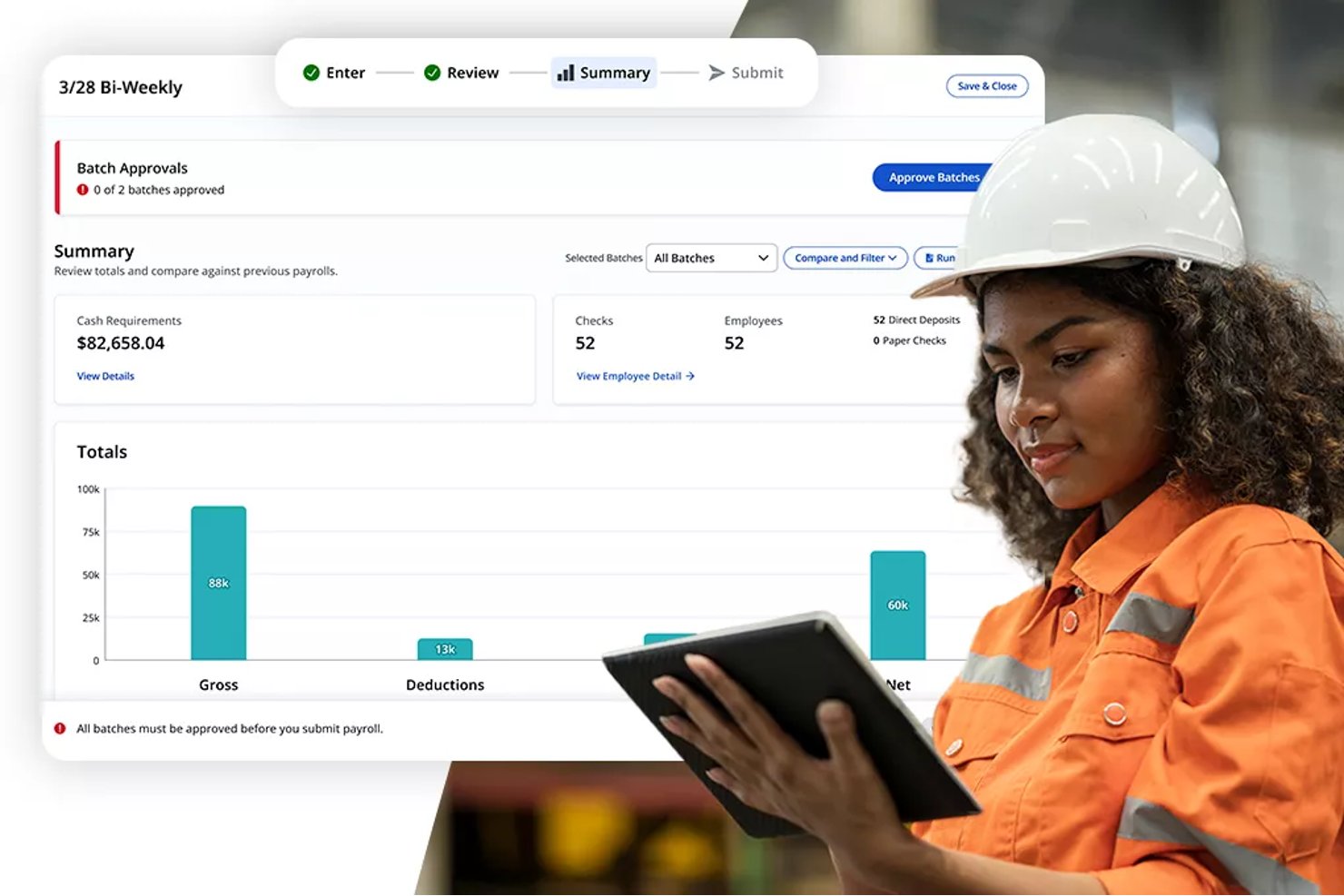
Paylocity è una piattaforma HCM basata su cloud che combina gestione delle paghe, rilevazione di presenze e assenze, pianificazione dei turni, analisi della forza lavoro e strumenti per l’esperienza dei dipendenti, ideale per organizzazioni con personale orario e sedi multiple.
Per chi è più indicato Paylocity?
Paylocity è particolarmente adatto per aziende manifatturiere di medie dimensioni (50–1.000+ dipendenti) dove i team HR necessitano di una piattaforma unica per paghe, pianificazione oraria e analisi della forza lavoro.
Perché ho scelto Paylocity
Paylocity si guadagna un posto nella mia shortlist grazie ai suoi dashboard di analisi della forza lavoro che unificano i dati HR e delle paghe in una sola vista in tempo reale. Apprezzo in particolare i dashboard ExecView, che mi permettono di monitorare costi del lavoro, tendenze sugli straordinari e modelli di presenza in più sedi produttive contemporaneamente. Spicca inoltre la funzionalità di analisi predittiva: posso usare dati attuali e storici sulla forza lavoro per simulare scenari futuri di organico prima che i calendari produttivi cambino.
Funzionalità principali di Paylocity
- Rilevamento orario tramite mobile: I dipendenti possono timbrare ingresso e uscita utilizzando un’app mobile, web, chiosco fisico o orologio timbratore.
- Funzionalità di richiesta e cambio turno: I lavoratori possono facilmente richiedere turni disponibili o scambiarli con colleghi tramite strumenti self-service.
- Geofencing per la timbratura: Controlli basati sulla posizione limitano la timbratura alle aree di lavoro approvate per prevenire timbrate fuori sede.
- Gestione integrata della formazione: La piattaforma include un LMS integrato che offre tracciamento delle competenze e gestione delle certificazioni per il personale di produzione.
Integrazioni di Paylocity
Le integrazioni native non sono chiaramente documentate. Paylocity offre una API per integrazioni personalizzate.
Pros and Cons
Pros:
- Le analisi della forza lavoro coprono più sedi produttive
- Tiene traccia automaticamente di certificazioni e scadenze delle competenze
- L’analisi predittiva supporta la pianificazione proattiva dei turni
Cons:
- L’installazione del chiosco in officina richiede ulteriore configurazione
- La personalizzazione dei report può essere limitata per le aziende manifatturiere
New Product Updates from Paylocity

Paylocity Expands Expense and Purchase Request Tools
Paylocity adds connected personal cards, smarter expense categorization, and a streamlined purchase request experience. This reduces manual entry and helps finance teams manage expenses and approvals more efficiently. For more information, visit Paylocity’s official site.
 .
.
TimeTrex
Ideale per installazione open source in sede
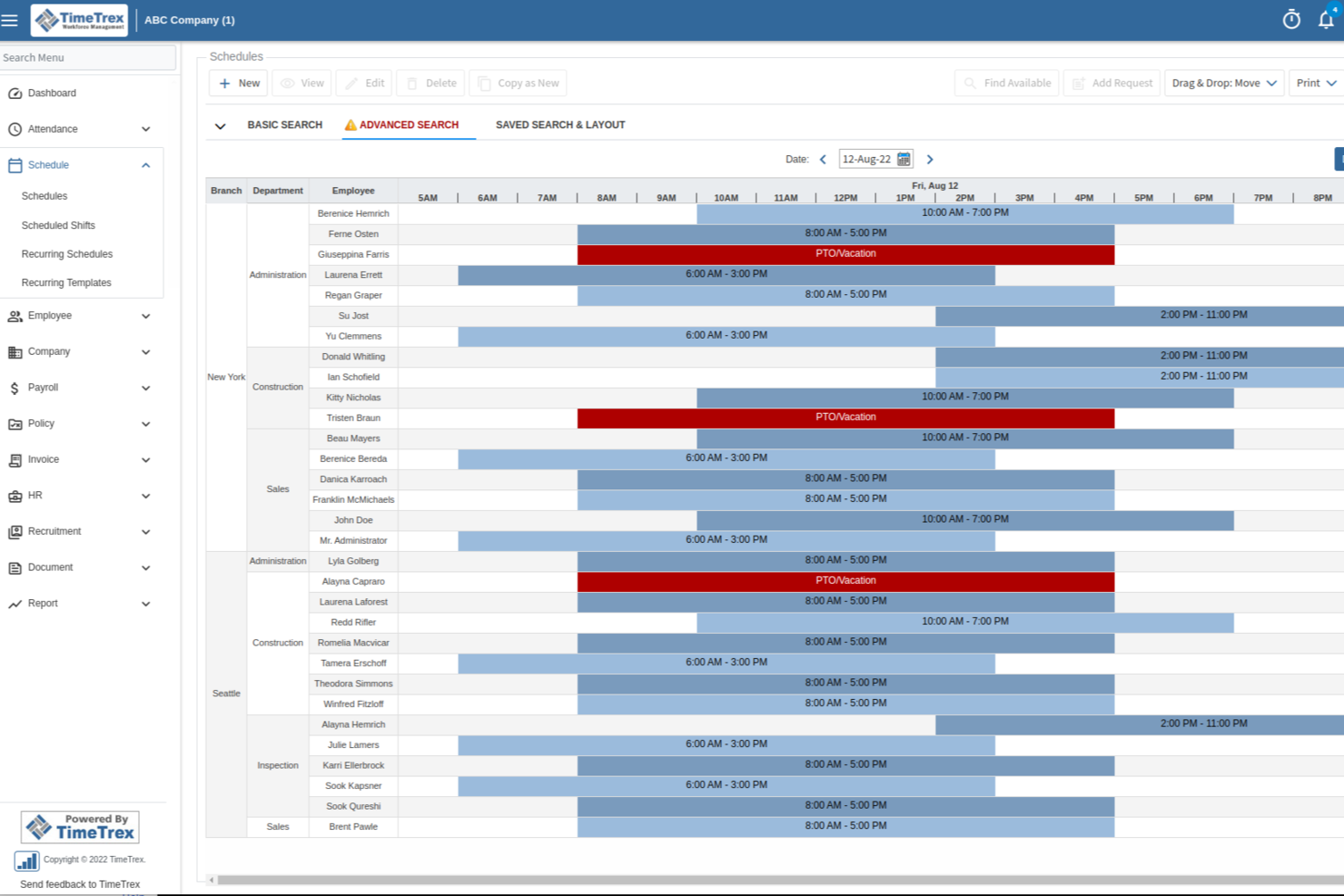
TimeTrex è una piattaforma di gestione della forza lavoro per team di produzione che riunisce in un unico sistema il rilevamento di presenze e orari, la pianificazione dei turni dei dipendenti, la gestione delle paghe, la contabilità dei lavori e strumenti per la conformità normativa.
Per chi è più indicato TimeTrex?
TimeTrex è adatto alle aziende manifatturiere che cercano un sistema unificato per gestire la pianificazione della forza lavoro, le paghe e la conformità su più sedi.
Perché ho scelto TimeTrex
Ho scelto TimeTrex tra i migliori perché posso installarlo in locale utilizzando la sua edizione open source, una caratteristica rara nei software di gestione della forza lavoro. Il mio team è in grado di personalizzare la piattaforma per adattarla ai nostri flussi di lavoro produttivi e integrarla con i nostri sistemi on-premise esistenti. Apprezzo il fatto che possiamo controllare i nostri dati e le policy di sicurezza senza dipendere da provider cloud di terze parti.
Caratteristiche principali di TimeTrex
- Rilevazione presenze e orari: Raccogli le ore lavorate dai dipendenti tramite opzioni di timbratura biometrica, web o da mobile.
- Pianificazione automatica dei turni: Crea e gestisci turni complessi per i team di produzione.
- Costificazione dei lavori: Monitora in tempo reale i costi di manodopera per lavoro, progetto o reparto.
- Elaborazione paghe: Calcola stipendi, detrazioni e tasse per personale orario e salariato.
Integrazioni di TimeTrex
TimeTrex offre integrazioni native con QuickBooks, ADP, Paychex, Ceridian e Sage per la gestione delle paghe. È disponibile un'API per integrazioni personalizzate con sistemi HR, paghe e contabilità.
Pros and Cons
Pros:
- Funzionalità per la conformità alle normative salariali in più paesi incluse
- Compatibilità con terminali biometrici di rilevazione presenze
- Calcolo automatico di straordinari e differenziali di turno
Cons:
- L'interfaccia sembra datata rispetto ai concorrenti
- Le opzioni di personalizzazione dei report sono piuttosto limitate
New Product Updates from TimeTrex
TimeTrex Adds Quick Punch App With Offline and QR Support
TimeTrex adds a new Quick Punch app, offline punching, QR code scanning, punch images, configurable messages, and punch warnings or lockouts to improve employee clock-ins across browsers and local computers. For more information, visit TimeTrex’s official site.
 .
.
UKG Pro
Ideale per la previsione avanzata delle esigenze di personale in grandi stabilimenti
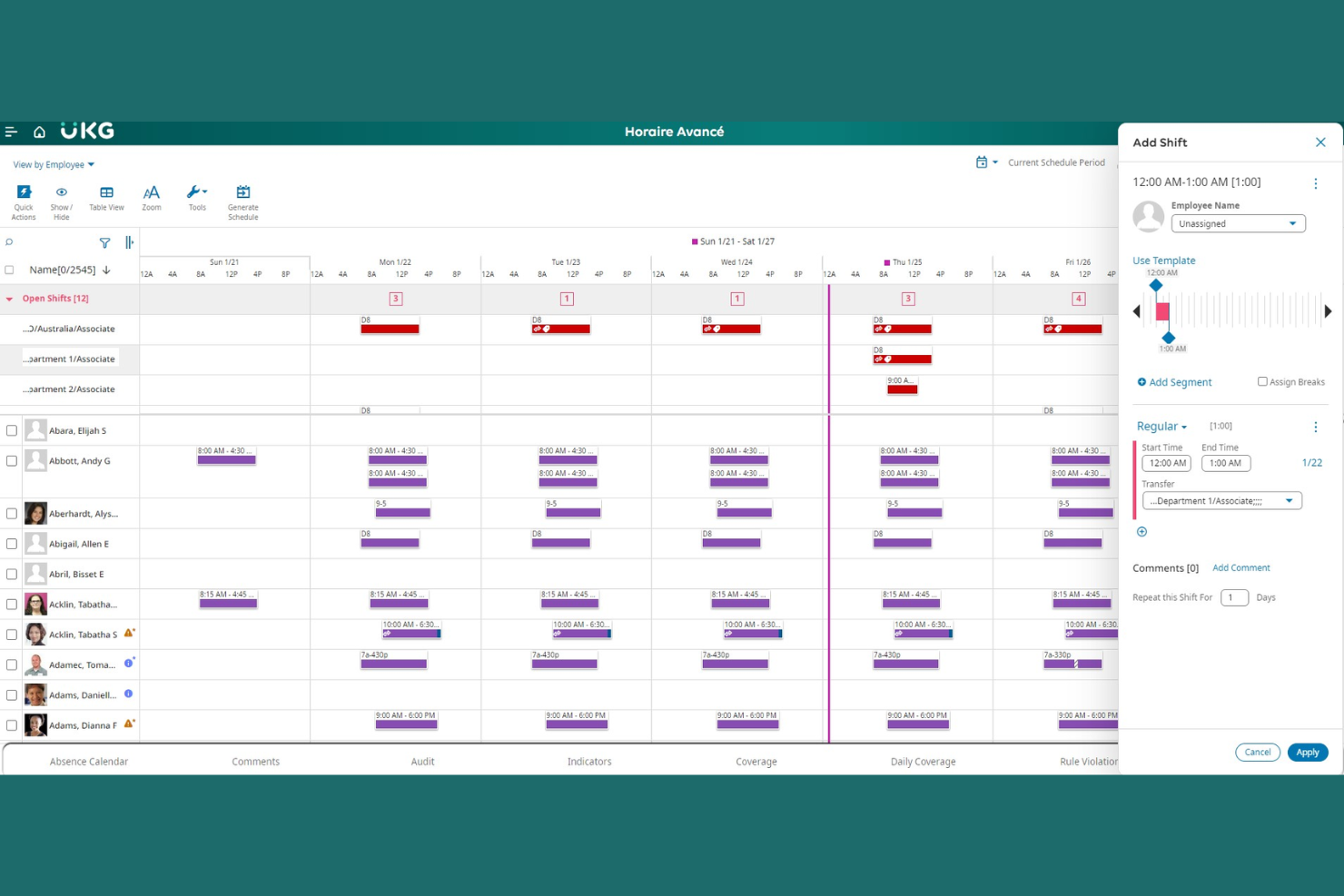
UKG Pro offre una piattaforma di gestione della forza lavoro progettata per i produttori con esigenze lavorative complesse. È particolarmente indicata per grandi stabilimenti o aziende che devono coordinare il personale, la conformità e i costi del lavoro in più sedi. Il software aiuta i team HR e operativi a gestire pianificazioni dinamiche, rilevamento delle presenze e analisi della forza lavoro in contesti produttivi impegnativi.
A Chi Si Rivolge UKG Pro?
UKG Pro è adatto a grandi aziende manifatturiere che devono gestire operazioni lavorative complesse in più strutture produttive.
Perché Ho Scelto UKG Pro
Ho scelto UKG Pro perché i suoi avanzati strumenti di previsione del fabbisogno di personale rispondono alle sfide specifiche degli ambienti manifatturieri su larga scala. La piattaforma utilizza l'analisi predittiva per aiutare i responsabili a prevedere le necessità di personale in base alla domanda di produzione, alla stagionalità e alle tendenze storiche. Apprezzo anche la sua capacità di automatizzare la pianificazione complessa e la gestione degli straordinari, fondamentale per gli impianti con carichi di lavoro variabili. Queste funzionalità facilitano il controllo dei costi del lavoro e il mantenimento della produttività su più turni e sedi.
Funzionalità Principali di UKG Pro
Altre funzionalità utili per i team produttivi includono:
- Gestione della forza lavoro mobile: Supervisori e dipendenti possono accedere ai turni, richiedere permessi e approvare modifiche da qualsiasi dispositivo.
- Monitoraggio automatico della conformità: Il sistema controlla le normative sul lavoro e gli accordi sindacali per ridurre i rischi di non conformità.
- Monitoraggio presenze in tempo reale: I responsabili possono visualizzare i dati di presenza in tempo reale, facilitando la gestione dell'assenteismo o dei ritardi.
- Portale self-service per i dipendenti: I lavoratori possono visualizzare le buste paga, aggiornare i dati personali e gestire i propri turni online.
Integrazioni di UKG Pro
Le integrazioni includono ADP, SAP SuccessFactors, Oracle, Workday, Microsoft Teams, Salesforce, QuickBooks, Ceridian, Infor e ServiceNow.
Pros and Cons
Pros:
- Offre avanzate funzionalità di previsione del fabbisogno di personale
- Strumenti per il monitoraggio in tempo reale di presenze e turni
- Conformità automatica alle normative lavorative e sindacali
Cons:
- L'implementazione può richiedere tempi lunghi per i grandi impianti
- Flessibilità limitata per piccole aziende manifatturiere

Dayforce
Ideale per il monitoraggio della conformità in tempo reale
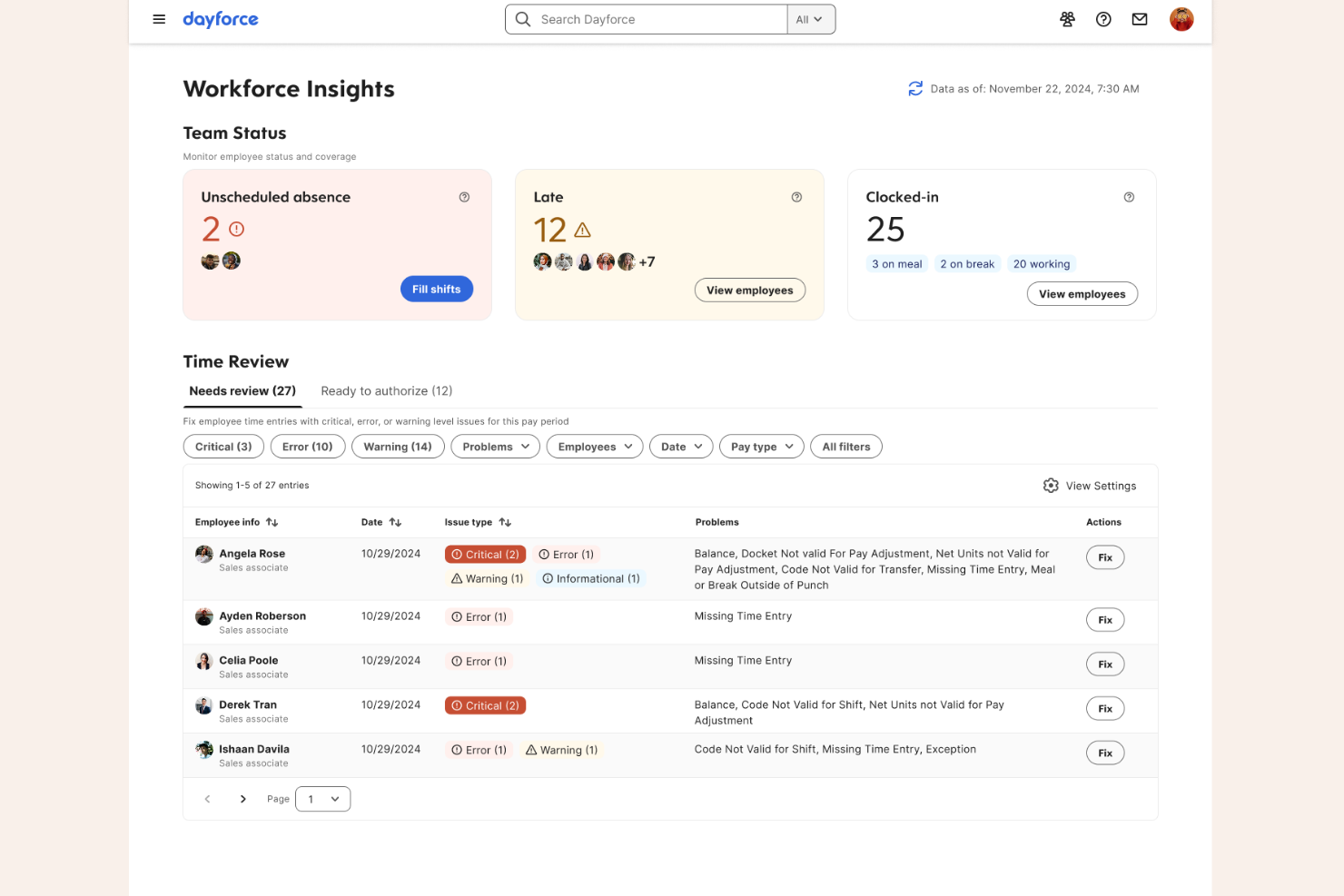
Dayforce è una piattaforma di gestione della forza lavoro progettata per i produttori che necessitano di gestire requisiti lavorativi complessi e conformità normativa. È particolarmente adatta ai responsabili HR e delle operazioni in ambienti produttivi di grandi dimensioni o multisito. La piattaforma aiuta ad affrontare sfide come il monitoraggio delle presenze, la pianificazione dei turni e i requisiti normativi in una forza lavoro eterogenea.
Per chi è ideale Dayforce?
Dayforce è una scelta valida per grandi realtà manifatturiere che devono gestire operazioni e conformità della forza lavoro su più sedi.
Perché ho scelto Dayforce
Ciò che mi ha colpito di Dayforce nella gestione della forza lavoro in ambito manifatturiero è il suo forte orientamento al monitoraggio della conformità in tempo reale. La piattaforma traccia costantemente le normative del lavoro, le regole sugli straordinari e i requisiti sulle pause durante la creazione dei turni e mentre vengono svolti, aiutando i produttori a evitare costosi errori di conformità. Apprezzo anche che Dayforce aggiorni automaticamente le regole di conformità in base ai cambiamenti delle leggi locali, statali o federali, aspetto particolarmente importante per le aziende che operano in più regioni. Queste caratteristiche la rendono una scelta affidabile per chi necessita di mantenersi sempre aggiornato sulle normative lavorative complesse in continua evoluzione.
Funzionalità principali di Dayforce
Oltre alle sue capacità di monitoraggio della conformità, Dayforce offre diverse altre funzioni che supportano la gestione della forza lavoro manifatturiera:
- Strumenti di pianificazione automatizzata: La piattaforma genera turni ottimizzati in base alla domanda di lavoro, alle competenze e alla disponibilità dei dipendenti.
- App mobile self-service: I dipendenti possono consultare i turni, richiedere permessi e scambiarsi i turni direttamente dai loro dispositivi mobili.
- Integrazione con l’elaborazione paghe: Le paghe vengono calcolate e processate automaticamente utilizzando i dati in tempo reale di presenze e pianificazione.
- Analisi dei costi del lavoro: I responsabili possono accedere a dashboard e report per monitorare i costi del lavoro e la produttività tra sedi o reparti diversi.
Integrazioni Dayforce
Le integrazioni includono Microsoft, SAP, Oracle, Workday, ADP, UKG, Salesforce, Docusign, Cornerstone OnDemand e ServiceNow.
Pros and Cons
Pros:
- Calcola le paghe in tempo reale in modo continuo
- Offre pagamento su richiesta tramite Dayforce
- La funzione Wallet consente simulazioni sui costi dei benefit
Cons:
- Manca la funzione di abbinamento candidati basata su intelligenza artificiale
- Le prestazioni del sistema rallentano durante i picchi di utilizzo

ADP
Ideale per l'integrazione di paghe e benefit
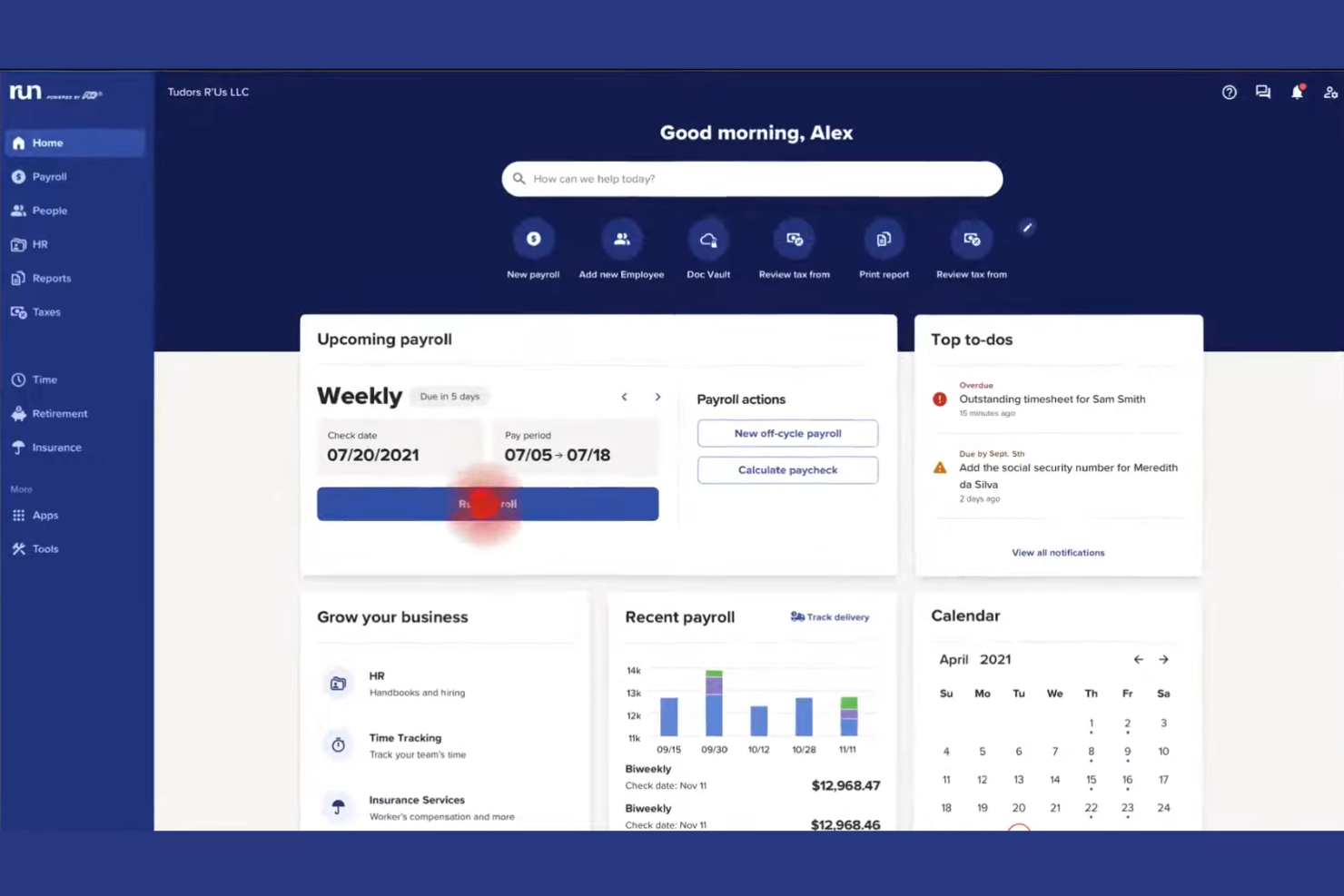
ADP offre soluzioni di gestione della forza lavoro su misura per i produttori che devono coordinare risorse umane, rilevazione delle presenze e conformità normativa su più sedi. La piattaforma è ideale per i team HR e i responsabili di stabilimento che desiderano centralizzare i dati dei dipendenti e automatizzare i processi di gestione della forza lavoro. I produttori spesso si affidano ad ADP per gestire esigenze complesse di pianificazione turni, conformità alle leggi sul lavoro e reportistica sul personale.
Per chi è più adatto ADP?
ADP è una scelta solida per aziende manifatturiere di medie e grandi dimensioni che necessitano di una gestione integrata di HR, paghe e forza lavoro su più siti.
Perché ho scelto ADP
Ho scelto ADP perché offre un'integrazione nativa tra gestione della forza lavoro, paghe e amministrazione dei benefit, che è una priorità per molti produttori. Questa integrazione consente di automatizzare il calcolo delle retribuzioni, le trattenute e l'iscrizione ai benefit direttamente dai dati di presenze e assenze, riducendo l'inserimento manuale e gli errori. Apprezzo anche il fatto che ADP supporta la conformità alle normative su salari e orari collegando la pianificazione dei turni alle paghe, un aspetto particolarmente importante per chi ha personale a ore e su turni. Queste funzionalità aiutano i team HR e i responsabili di stabilimento a mantenere paghe corrette e benefit aggiornati senza dover gestire più sistemi scollegati tra loro.
Caratteristiche principali di ADP
Altre funzionalità che rendono ADP utile per la gestione della forza lavoro in ambito manifatturiero includono:
- Pianificazione automatizzata dei turni: Crea, assegna e modifica i turni in base alle esigenze produttive e alla disponibilità del personale.
- Rilevazione presenze tramite mobile: Consente ai dipendenti di timbrare l'ingresso e l'uscita o richiedere permessi direttamente dai dispositivi mobili.
- Dashboard di analisi della forza lavoro: Accedi a informazioni in tempo reale su costi del lavoro, straordinari e tendenze del personale.
- Monitoraggio incidenti e sicurezza: Registra gli incidenti sul posto di lavoro e monitora la conformità alla sicurezza direttamente dalla piattaforma.
Integrazioni ADP
Le integrazioni includono QuickBooks, Xero, Sage, Workday, SAP, Oracle, ZipRecruiter, HealthEquity, WEX e ClockShark.
Pros and Cons
Pros:
- Integra paghe, HR e benefit
- Supporta regole per personale sindacalizzato e non sindacalizzato
- Fornisce strumenti di conformità alle normative sul lavoro
Cons:
- Le funzionalità HR avanzate richiedono componenti aggiuntivi a pagamento
- L'interfaccia può sembrare datata ad alcuni team

Infor
Ideale per la rilevazione di tempo e presenze configurabile
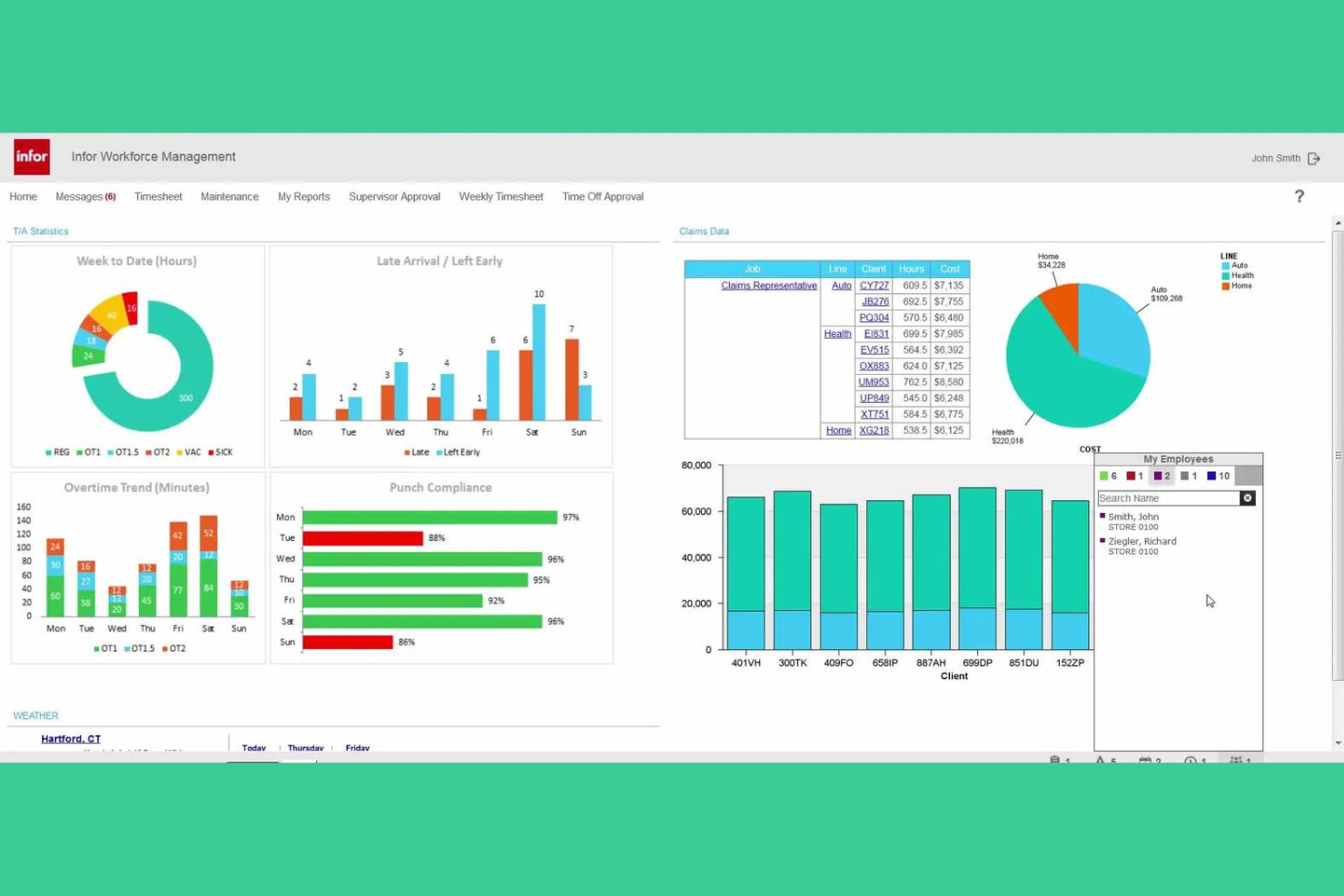
I produttori che cercano una piattaforma di gestione della forza lavoro altamente configurabile spesso considerano Infor. Il sistema è progettato per le organizzazioni che devono gestire requisiti complessi di rilevazione delle presenze, del tempo e del lavoro su più sedi. Si rivolge a responsabili delle risorse umane e delle operazioni che desiderano personalizzare i processi della forza lavoro per soddisfare esigenze specifiche di conformità e pianificazione.
Per chi è ideale Infor?
Infor è una scelta solida per grandi produttori e imprese multisede che necessitano di un monitoraggio altamente configurabile di tempo e presenze.
Perché ho scelto Infor
Ho scelto Infor perché offre un alto livello di configurabilità per la rilevazione di tempo e presenze, essenziale per i produttori con ambienti lavorativi complessi. La piattaforma consente di definire regole salariali personalizzate, politiche di presenza e schemi di turni per rispettare accordi sindacali o esigenze specifiche di ogni sede. Mi piace anche il fatto che Infor supporti il monitoraggio dettagliato delle eccezioni e la rilevazione automatica delle presenze da vari dispositivi, aiutando così a ridurre gli errori manuali. Queste funzionalità rendono Infor particolarmente adatto ai produttori che devono adattare i processi di gestione della forza lavoro alle proprie realtà operative.
Caratteristiche principali di Infor
Altre funzionalità che rendono Infor utile per la gestione della forza lavoro in ambito manifatturiero includono:
- Previsione e pianificazione dei turni: Genera orari basati sulla domanda utilizzando dati storici, necessità produttive e disponibilità del personale.
- Strumenti di gestione delle assenze: Monitora, approva e segnala le assenze dei dipendenti con flussi di lavoro configurabili.
- Accesso mobile per la forza lavoro: Permette a dipendenti e manager di visualizzare i turni, richiedere permessi e approvare modifiche da dispositivi mobili.
- Cruscotto di monitoraggio della conformità: Controlla la conformità alle normative sul lavoro e invia avvisi in tempo reale in caso di potenziali violazioni.
Integrazioni di Infor
Le integrazioni includono ADP, Oracle, SAP, Workday, Kronos, PeopleSoft, Infor CloudSuite, Microsoft Dynamics 365, Ceridian e UKG.
Pros and Cons
Pros:
- Prevede i volumi di produzione utilizzando il machine learning
- Automatizza la validazione delle regole salariali dallo zero al lordo
- Supporta configurazioni complesse delle normative sul lavoro a livello globale
Cons:
- Curva di apprendimento più ripida per gli amministratori di sistema
- Le funzionalità mobili non sono equivalenti a quelle desktop complete
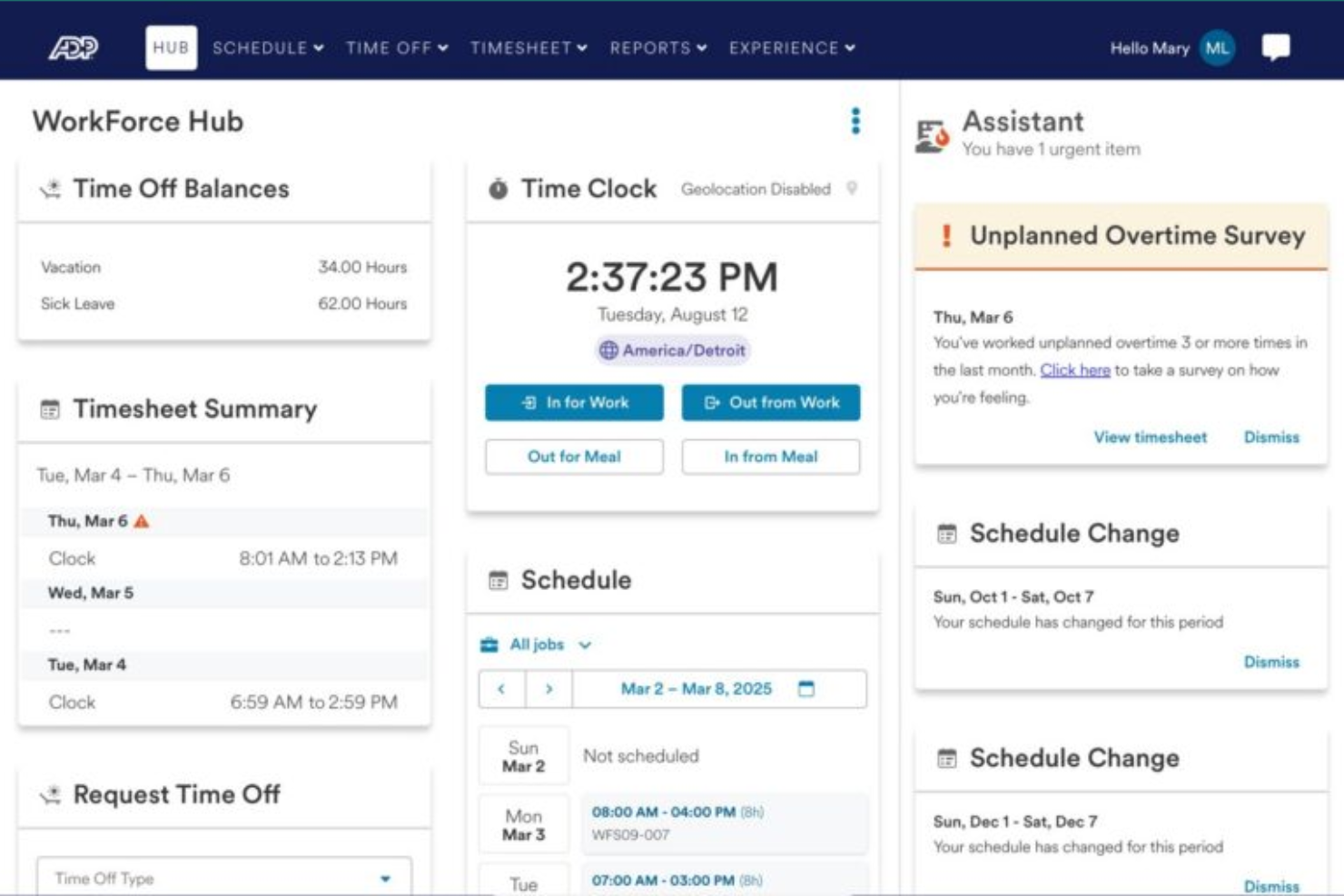
ADP WorkForce Suite offre una piattaforma di gestione della forza lavoro progettata per i produttori con esigenze impegnative in materia di programmazione e conformità. È una soluzione solida per i responsabili delle operazioni e i team HR in grandi stabilimenti o strutture multi-sede. Il software aiuta a risolvere sfide come la copertura dei turni, la conformità alle leggi sul lavoro e la visibilità in tempo reale della forza lavoro.
A chi è più adatto ADP WorkForce Suite?
ADP WorkForce Suite è ideale per le grandi organizzazioni manifatturiere che devono gestire programmazioni di turni complesse e multi-sede insieme alla conformità normativa.
Perché ho scelto ADP WorkForce Suite
Ciò che distingue ADP WorkForce Suite è la sua capacità di gestire scenari di programmazione dei turni altamente complessi, comuni negli ambienti manifatturieri. Ho scelto questo strumento perché supporta regole di programmazione dinamiche, inclusi turni rotativi, turni spezzati e accordi specifici per le unioni, che spesso sono difficili da gestire manualmente. La piattaforma offre anche una visibilità in tempo reale sulla copertura dei turni e l'allocazione delle risorse, aiutando i responsabili a rispondere rapidamente a cambiamenti improvvisi o a richieste produttive. Queste capacità lo rendono particolarmente prezioso per le aziende manifatturiere con un grande numero di dipendenti e requisiti di programmazione complessi.
Caratteristiche principali di ADP WorkForce Suite
Altre funzionalità utili per i team manifatturieri includono:
- Monitoraggio automatico delle presenze e degli orari: Il sistema rileva in tempo reale le ore lavorate e le presenze dei dipendenti per una gestione accurata di buste paga e conformità.
- Accesso mobile alla forza lavoro: Dipendenti e supervisori possono visualizzare i turni, richiedere modifiche e approvare ferie da qualsiasi dispositivo.
- Monitoraggio della conformità a leggi sul lavoro e accordi sindacali: Strumenti di conformità integrati aiutano a garantire che i turni e le pratiche retributive siano conformi alle normative locali e agli accordi sindacali.
- Dashboard di analisi e reportistica: I responsabili possono accedere ad analisi della forza lavoro e generare report a supporto delle decisioni operative.
Integrazioni ADP WorkForce Suite
Le integrazioni includono ADP, SAP, Oracle, Workday, Microsoft, Kronos, Infor, Ceridian, NGA Human Resources e Cornerstone OnDemand.
Pros and Cons
Pros:
- Gestisce regole di conformità sindacali e legali sul lavoro
- Supporta le operazioni manifatturiere multi-sede
- Automatizza la gestione della fatica
Cons:
- Richiede profili separati per datori di lavoro diversi
- Navigazione non intuitiva dell'organigramma
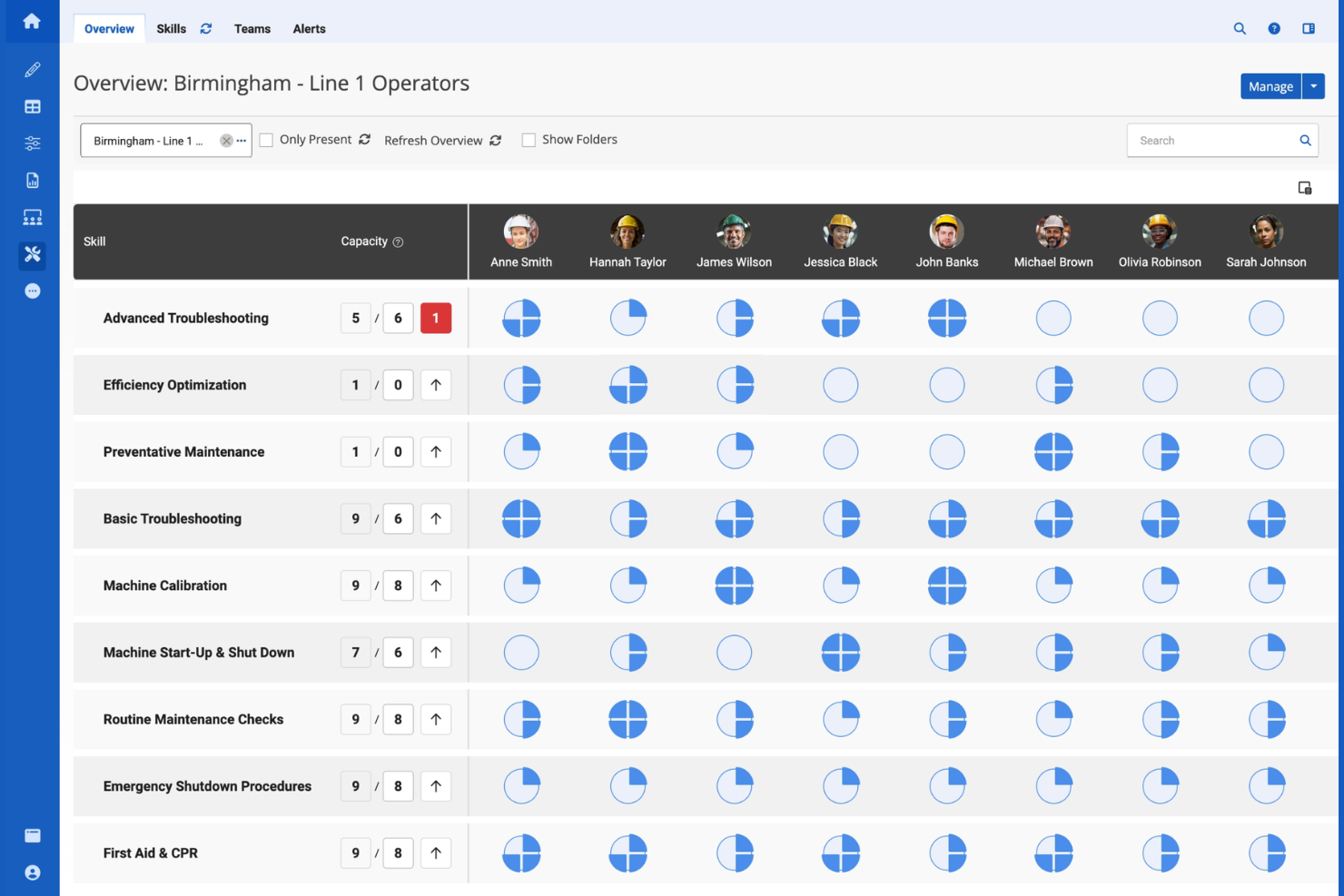
Augmentir offre ai team di produzione un approccio moderno alla gestione della forza lavoro combinando flussi di lavoro digitali con dati operativi in tempo reale. È progettato per i produttori che desiderano ottimizzare la produttività della prima linea e colmare le lacune di competenze utilizzando la tecnologia per lavoratori connessi. Questa piattaforma aiuta i responsabili a individuare i colli di bottiglia nei processi e a supportare il miglioramento continuo all'interno delle loro operazioni.
Per chi è Augmentir?
Augmentir è particolarmente adatto per le organizzazioni manifatturiere che desiderano sfruttare l'intelligenza artificiale per ottimizzare le prestazioni della forza lavoro in prima linea e lo sviluppo delle competenze.
Perché ho scelto Augmentir
Ciò che mi ha colpito di Augmentir per la gestione della forza lavoro in produzione è l'attenzione agli approfondimenti guidati dall'IA. La piattaforma utilizza l'intelligenza artificiale per analizzare le prestazioni dei lavoratori e consigliare formazione o supporto mirato, aiutando i produttori a colmare le lacune di competenze e migliorare la produttività in officina. Apprezzo anche il modo in cui gli strumenti per lavoratori connessi di Augmentir raccolgono dati in tempo reale dalle attività di prima linea, offrendo ai leader informazioni pratiche sui colli di bottiglia dei processi e sulle tendenze della forza lavoro. Questo approccio rende più semplice per i produttori prendere decisioni basate sui dati per lo sviluppo della forza lavoro e il miglioramento delle operazioni.
Caratteristiche principali di Augmentir
Altre funzionalità che i team di produzione possono trovare utili includono:
- Istruzioni di lavoro digitali: Crea e distribuisci guide digitali passo-passo ai lavoratori in prima linea per garantire l'esecuzione coerente delle attività.
- Strumenti di collaborazione da remoto: Permetti supporto e risoluzione dei problemi in tempo reale tramite videochiamate e chat con esperti di settore.
- Monitoraggio automatico delle competenze: Monitora e aggiorna i profili delle competenze dei lavoratori sulla base delle attività svolte e delle certificazioni.
- Integrazione con dispositivi IoT: Collegati a sensori e macchinari in officina per raccogliere dati operativi e avviare flussi di lavoro.
Integrazioni di Augmentir
Le integrazioni includono SAP, Oracle, IBM Maximo, Infor, Microsoft Dynamics 365, Salesforce, Cornerstone OnDemand, Saba, SuccessFactors e Workday.
Pros and Cons
Pros:
- L'IA raccomanda formazione mirata per i lavoratori
- Dati in tempo reale dagli strumenti per lavoratori connessi
- Monitoraggio automatico delle competenze per audit di conformità
Cons:
- Richiede notevole impegno per digitalizzare le SOP esistenti
- Sfide di integrazione con macchinari di impianto più datati

Replicon offre una piattaforma di rilevazione delle presenze progettata per le organizzazioni che necessitano di gestire con precisione i costi del lavoro e le ore di progetto. È particolarmente utile per produttori e team guidati da progetti che devono allocare tempo e risorse tra più commesse o linee di produzione. Il sistema aiuta i responsabili a ottenere visibilità sull'utilizzo della forza lavoro e sull'avanzamento dei progetti, supportando una migliore pianificazione e conformità normativa.
A chi è più indicato Replicon?
Replicon è particolarmente adatto per aziende manifatturiere e organizzazioni basate su progetti che necessitano di una rilevazione dettagliata del tempo e della gestione dei costi del personale su più commesse o linee di produzione.
Perché ho scelto Replicon
Ciò che rende Replicon ideale nella gestione della forza lavoro manifatturiera è il suo focus sulla rilevazione del tempo basata sui progetti. I produttori spesso devono monitorare ore lavorative e costi per commessa, turno o linea di produzione, e la piattaforma Replicon è costruita per soddisfare queste esigenze con un monitoraggio dettagliato a livello di progetto e attività. Apprezzo come consenta ai responsabili di allocare il tempo direttamente a specifici progetti, facilitando il monitoraggio dell'avanzamento e il controllo dei costi in tempo reale. Questo livello di dettaglio supporta una migliore pianificazione delle risorse e aiuta i produttori a rimanere conformi alla normativa e alla regolamentazione sul lavoro.
Funzionalità principali di Replicon
Altre funzionalità che possono risultare utili ai team manifatturieri includono:
- Inserimento delle ore tramite dispositivi mobili: I lavoratori possono inviare le ore lavorate e gli aggiornamenti di progetto direttamente dai loro dispositivi mobili in reparto.
- Calcolo automatico degli straordinari: Il sistema applica regole complesse sugli straordinari per garantire buste paga accurate e rispetto delle normative.
- Cruscotti di analisi in tempo reale: I responsabili possono visualizzare dati sulla forza lavoro e metriche di progetto in cruscotti personalizzabili.
- Gestione multi-sede: Replicon registra orari e forza lavoro in più stabilimenti o sedi tramite un'unica piattaforma.
Integrazioni di Replicon
Le integrazioni includono SAP, Oracle, ADP, QuickBooks, Xero, Sage, Microsoft Dynamics 365, Salesforce, Jira e Tableau.
Pros and Cons
Pros:
- Registra il tempo per progetto, commessa o turno
- Gestisce regole complesse su straordinari e forza lavoro
- Supporta chioschi touchless con riconoscimento facciale
Cons:
- Nessuna pianificazione o gestione dei turni integrata
- Le funzionalità sono suddivise in diversi moduli a pagamento

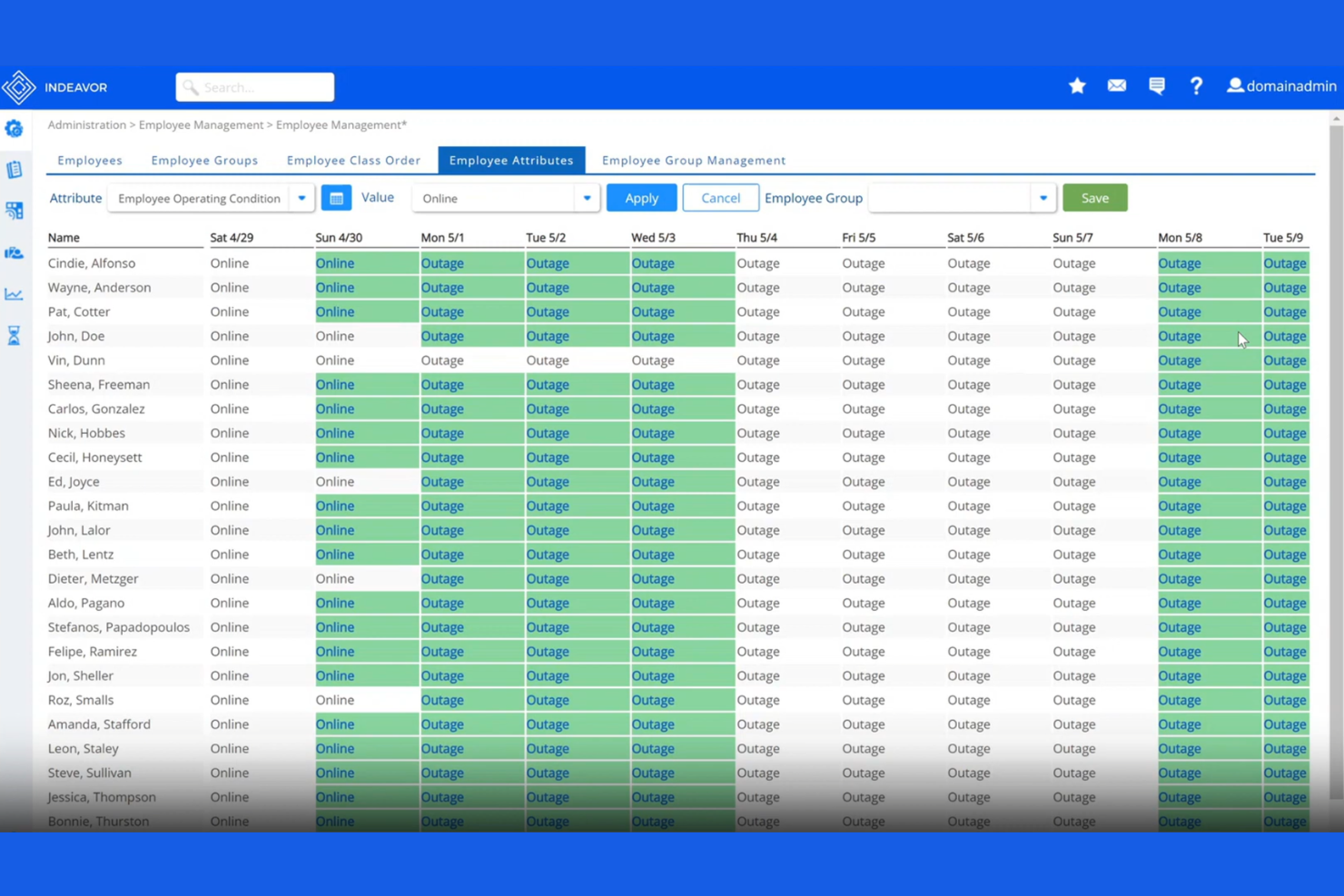
Indeavor è una piattaforma di gestione della forza lavoro progettata per produttori con esigenze complesse di pianificazione e conformità alle normative sul lavoro. È particolarmente utile per le organizzazioni che devono coordinare grandi squadre su turni, gestendo al contempo intricati accordi di lavoro. I responsabili della produzione scelgono Indeavor per ridurre gli errori di pianificazione manuale e migliorare la visibilità della forza lavoro su più siti.
Per chi è più indicato Indeavor?
Indeavor è particolarmente adatto a grandi aziende manifatturiere che necessitano di automatizzare la gestione di complesse regole sindacali su più stabilimenti.
Perché ho scelto Indeavor
Ciò che distingue Indeavor nella gestione della forza lavoro manifatturiera è l’automazione avanzata della gestione delle regole sindacali. La piattaforma consente di configurare accordi sindacali complessi, regole di anzianità e politiche sugli straordinari direttamente nel motore di pianificazione, eliminando la necessità di monitorare o interpretare manualmente questi requisiti. Apprezzo il fatto che Indeavor applichi automaticamente queste regole durante la generazione dei turni e l’assegnazione delle mansioni, riducendo i rischi di non conformità e i reclami. Questo livello di automazione è particolarmente prezioso per i produttori con più sindacati o accordi di lavoro che cambiano frequentemente.
Caratteristiche principali di Indeavor
Altre funzionalità che rendono Indeavor utile per la gestione della forza lavoro nel settore manifatturiero includono:
- Asta turni automatizzata: I dipendenti possono visualizzare e candidarsi per i turni disponibili direttamente tramite la piattaforma, supportando una pianificazione equa e trasparente.
- Portale self-service mobile: I lavoratori possono accedere ai turni, richiedere permessi e scambiare turni dal proprio dispositivo mobile.
- Strumenti per la gestione della fatica: Il sistema monitora ore lavorate e periodi di riposo per aiutare a prevenire modelli di pianificazione che potrebbero portare a affaticamento del personale.
- Analisi della forza lavoro in tempo reale: I responsabili possono monitorare metriche e tendenze della forza lavoro su più sedi tramite dashboard personalizzabili.
Integrazioni Indeavor
Le integrazioni includono SAP, Oracle, Workday, UKG, ADP, Kronos, Infor, Microsoft Dynamics, Ceridian e PeopleSoft.
Pros and Cons
Pros:
- Abbina la forza lavoro alla domanda produttiva in tempo reale
- Filtra i turni in base ai livelli di certificazione dei dipendenti
- Automatizza gli straordinari obbligatori e le regole di anzianità
Cons:
- Manca l'elaborazione nativa della busta paga completa
- Contratto minimo richiesto di tre anni
Altri software per la gestione della forza lavoro nel settore manifatturiero
Ecco alcune ulteriori opzioni di software per la gestione della forza lavoro nel settore manifatturiero che non sono state incluse nel mio elenco ristretto, ma che vale comunque la pena prendere in considerazione:
- Connecteam
Ideale per strumenti mobile-first per la forza lavoro in prima linea
- TimeClock Plus
Ideale per la raccolta presenze compatibile con dispositivi hardware
- Jibble
Ideale per timbrature tramite riconoscimento facciale
- SafetyCulture
Ideale per ispezioni di sicurezza integrate


Come valuto i software di gestione della forza lavoro nel settore manifatturiero
Valuto questi strumenti su due livelli: le funzionalità di base che qualificano un fornitore e i fattori differenzianti che mostrano se sono progettati per turni rotativi e regole sindacali, non solo per lavoratori d’ufficio.
Funzionalità principali (requisiti minimi per l'elenco)
Quando seleziono gli strumenti per la mia lista, valuto ciascuno su una scala da 0 (non offre la funzionalità) a 5 (eccelle in quest’area) per ogni funzionalità principale indicata qui sotto. Poi, trasformo il punteggio totale dello strumento in una percentuale. Ogni strumento deve raggiungere un punteggio totale minimo del 55% per essere preso in considerazione.
- Pianificazione dei turni: Valuto quanto bene ogni strumento gestisce schemi rotativi, assegnazioni multilivello e scambi di turno—la complessità tipica degli ambienti produttivi attivi 24/7.
- Rilevazione presenze e orari: Gli operatori in produzione raramente stanno a una scrivania, quindi cerco il supporto per lettori di badge, dispositivi biometrici e totem insieme alla visibilità in tempo reale di chi è timbrato.
- Previsione del fabbisogno di personale: Controllo se uno strumento può prevedere le esigenze di personale in base ai programmi di produzione e agli obiettivi di output, non soltanto ripetere il numero di risorse della settimana precedente.
- Conformità a normative e regole sindacali: I limiti sugli straordinari, i periodi di riposo obbligatori e le norme di contrattazione collettiva variano molto, quindi presto molta attenzione ai motori di regole e alle capacità di notifica di ciascuno strumento.
- Monitoraggio competenze e certificazioni: I ruoli in produzione spesso richiedono certificazioni specifiche su macchinari o credenziali di sicurezza, e ricerco avvisi di scadenza e la capacità di associare lavoratori qualificati alle posizioni idonee.
- Gestione assenze e permessi: Valuto se la piattaforma può gestire chiamate di assenza in tempo reale e suggerire sostituti qualificati prima che una linea resti sotto organico durante un turno.
Dopo aver individuato gli strumenti che soddisfano i criteri, considero ciò che distingue ogni piattaforma.
Fattori differenzianti (cosa distingue i fornitori)
Ecco come confronto i diversi fornitori:
Funzionalità distintive
Verifico se una piattaforma si collega direttamente a sistemi ERP e MES affinché i piani di produzione possano influenzare in tempo reale le decisioni sulla forza lavoro. Anche l’analisi dei costi del lavoro è importante: voglio vedere la spesa suddivisa per linea, turno o ordine di lavoro, non solo i totali. La gestione multi-stabilimento rappresenta un grande fattore distintivo per le aziende più grandi, dove ogni sito ha regole sindacali e strutture di turno proprie ma necessita comunque di controllo centralizzato. Anche un’app mobile appositamente progettata per il reparto produttivo è rilevante, perché i supervisori devono gestire scambi e assenze lontano dalla scrivania.
Oltre le funzionalità
L’esperienza di implementazione conta molto in questo ambito. Verifico che il fornitore offra risorse di onboarding pensate per lavoratori orari e non d’ufficio—non solo formazione amministrativa per le risorse umane. Il costo totale di proprietà è un altro aspetto che valuto in modo attento, poiché una piattaforma tariffata per dipendente può diventare rapidamente costosa con grandi numeri di lavoratori orari, specialmente aggiungendo totem e lettori di badge. Anche la flessibilità di implementazione è importante: alcuni stabilimenti hanno connettività limitata, quindi valuto se la piattaforma supporta funzionalità offline o hosting ibrido.
Come scegliere il software per la gestione della forza lavoro nel settore manifatturiero
È facile perdersi in lunghi elenchi di funzionalità e strutture di prezzo complesse. Per aiutarti a rimanere concentrato mentre affronti il tuo processo di selezione del software, ecco una checklist dei fattori da tenere presenti:
| Fattore | Cosa considerare |
|---|---|
| Scalabilità | Il software sarà in grado di gestire le dimensioni della tua forza lavoro man mano che cresci, incluse più sedi o stabilimenti? |
| Integrazioni | Si connette nativamente ai sistemi paghe, ERP o risorse umane per evitare l'inserimento manuale dei dati? |
| Personalizzazione | Puoi adattare flussi di lavoro, report e regole per rispecchiare i processi e le politiche specifici del tuo stabilimento? |
| Semplicità d'uso | I supervisori in prima linea e il personale di produzione lo adotteranno rapidamente oppure la formazione rappresenterà un ostacolo? |
| Implementazione e avviamento | Quanto tempo occorrerà per renderlo operativo e di quali risorse o supporto avrai bisogno internamente? |
| Costo | Tutti i costi sono chiari fin dall'inizio, inclusi configurazione, licenze e supporto, oppure ci sono costi nascosti? |
| Misure di sicurezza | Il fornitore offre una solida protezione dei dati, controlli sugli accessi degli utenti e conformità alle normative? |
| Requisiti di conformità | Il sistema può adattarsi all'evoluzione delle leggi sul lavoro, delle regole sindacali o dei requisiti specifici del settore? |
Che cos'è il software per la gestione della forza lavoro nel settore manifatturiero?
Il software per la gestione della forza lavoro nel settore manifatturiero è un sistema digitale che aiuta le aziende manifatturiere a monitorare, programmare e gestire il tempo, le presenze e i costi del lavoro dei dipendenti. Questi strumenti supportano la pianificazione dei turni, il calcolo degli straordinari, la conformità alle normative sul lavoro e la visibilità in tempo reale sulle attività della forza lavoro. Centralizzando i dati della forza lavoro, le aziende manifatturiere possono migliorare la produttività, ridurre gli errori manuali e garantire l'accuratezza delle buste paga e dei report nei diversi team o stabilimenti.
Funzionalità del software di gestione della forza lavoro manifatturiera
Quando selezioni un software di gestione della forza lavoro manifatturiera, presta attenzione alle seguenti funzionalità chiave:
- Monitoraggio di orari e presenze: Registra quando i dipendenti entrano ed escono, registra le pause e tiene traccia delle ore lavorate per garantire paghe accurate e conformità normativa.
- Pianificazione dei turni: Consente ai responsabili di assegnare i turni, gestire le rotazioni e coprire le lacune, contribuendo a garantire una copertura adeguata su tutte le linee di produzione.
- Automazione degli straordinari e delle regole del lavoro: Applica automaticamente regole complesse sugli straordinari, sindacali o locali in materia di lavoro, riducendo i calcoli manuali e i rischi di non conformità.
- Accesso da dispositivi mobili: Consente a lavoratori e supervisori di visualizzare i turni, inviare le registrazioni delle ore e approvare le richieste direttamente dai dispositivi mobili sul piano di produzione.
- Integrazione con le paghe: Collega direttamente i dati della forza lavoro ai sistemi paghe, riducendo gli errori e velocizzando l'elaborazione delle paghe.
- Analisi e report in tempo reale: Fornisce cruscotti e report sui costi del lavoro, sulle tendenze delle presenze e sulla produttività per supportare decisioni basate sui dati.
- Supporto per più sedi: Gestisce le operazioni della forza lavoro in diversi stabilimenti o sedi all'interno di un'unica piattaforma, centralizzando dati e supervisione.
- Gestione della conformità: Tiene traccia dei requisiti normativi, delle certificazioni e dei registri di audit per contribuire al rispetto degli standard di settore e legali.
- Autonomia dei dipendenti: Consente ai dipendenti di richiedere permessi, scambiare turni e visualizzare i programmi senza l'intervento dei supervisori, migliorando trasparenza e coinvolgimento.
Vantaggi del software di gestione della forza lavoro manifatturiera
L'implementazione di un software di gestione della forza lavoro manifatturiera offre diversi vantaggi alla tua squadra e alla tua azienda. Ecco alcuni dei vantaggi che puoi aspettarti:
- Monitoraggio accurato dei costi del lavoro: Il monitoraggio automatizzato di orari e presenze garantisce la registrazione dei costi effettivi del lavoro per mansione, turno o progetto.
- Conformità migliorata: L'automazione integrata delle regole del lavoro e i registri di audit aiutano a rispettare i requisiti normativi e sindacali.
- Elaborazione delle paghe più rapida: L'integrazione diretta con le paghe e la riduzione degli errori accelerano i cicli di elaborazione e riducono al minimo le correzioni manuali.
- Maggiore visibilità sulla forza lavoro: Le analisi e i report in tempo reale offrono ai responsabili una visione delle presenze, della produttività e delle tendenze relative al lavoro nelle diverse sedi.
- Pianificazione semplificata: Gli strumenti di pianificazione dei turni facilitano l'assegnazione, la modifica e la comunicazione dei turni, riducendo le lacune nella copertura e gli straordinari.
- Maggiore coinvolgimento dei dipendenti: Le funzionalità di autonomia consentono al personale di gestire i propri turni e le proprie richieste, aumentando trasparenza e soddisfazione.
- Operazioni scalabili: Il supporto per più sedi e i flussi di lavoro personalizzabili consentono ai processi di gestione della forza lavoro di crescere insieme all'azienda.
Costi e prezzi del software di gestione della forza lavoro manifatturiera
La scelta di un software di gestione della forza lavoro manifatturiera richiede la comprensione dei diversi modelli di prezzo e dei piani disponibili. I costi variano in base alle funzionalità, alle dimensioni della squadra, agli elementi aggiuntivi e ad altro ancora. La tabella seguente riassume i piani più comuni, i relativi prezzi medi e le funzionalità tipicamente incluse nelle soluzioni software di gestione della forza lavoro manifatturiera:
Tabella comparativa dei piani per il software di gestione della forza lavoro manifatturiera
| Tipo di piano | Prezzo medio | Funzionalità comuni |
|---|---|---|
| Piano gratuito | $0 | Monitoraggio di base delle ore, pianificazione limitata e report semplici. |
| Piano personale | $5-$15/utente/mese | Monitoraggio di orari e presenze, accesso da dispositivi mobili e pianificazione di base dei turni. |
| Piano aziendale | $15-$30/utente/mese | Pianificazione avanzata, automazione delle regole sugli straordinari, integrazione con le paghe, analisi e supporto per più sedi. |
| Piano aziendale avanzato | $30-$50/utente/mese | Flussi di lavoro personalizzati, gestione della conformità, supporto dedicato, integrazioni avanzate e registri di audit. |
Domande frequenti sul software per la gestione della forza lavoro nel settore manifatturiero
Ecco alcune risposte alle domande più comuni sul software per la gestione della forza lavoro nel settore manifatturiero:
In che modo il software per la gestione della forza lavoro nel settore manifatturiero aiuta a garantire la conformità?
Il software per la gestione della forza lavoro nel settore manifatturiero aiuta a garantire la conformità automatizzando l’applicazione delle norme sul lavoro, monitorando le certificazioni e mantenendo tracce di controllo. Nel complesso settore manifatturiero, ciò riduce il rischio di violazioni relative agli straordinari, agli accordi sindacali e alle normative di settore, facilitando il superamento delle verifiche ispettive ed evitando sanzioni costose.
Inoltre, abbandonando i fogli di calcolo manuali, le aziende garantiscono che ogni ora lavorata venga contabilizzata in conformità alle leggi locali e federali.
Il software per la gestione della forza lavoro nel settore manifatturiero può integrarsi con i sistemi paghe e gli ERP?
Sì, la maggior parte dei software per la gestione della forza lavoro nel settore manifatturiero può integrarsi con i sistemi paghe e gli ERP. Queste integrazioni riducono l’inserimento manuale dei dati, minimizzano gli errori e garantiscono il flusso dei dati relativi a ore, presenze e costi del lavoro tra le piattaforme. Se combinate con una strategia più ampia di gestione del capitale umano (o HCM), queste integrazioni forniscono una visione completa della catena di approvvigionamento e della forza lavoro necessaria per mantenerla operativa.
Cosa devo considerare quando scelgo una soluzione per più sedi?
Quando si gestiscono più sedi, è consigliabile scegliere una soluzione basata sul cloud con pannelli di controllo centralizzati, supporto per più sedi e regole personalizzabili per ciascuna sede. Ciò garantisce processi coerenti, report accurati e la flessibilità necessaria per rispondere alle esigenze specifiche di ogni struttura. Gli strumenti WFM (gestione della forza lavoro) consentono ai responsabili di mantenere livelli di personale ottimali in diverse regioni, individuando al contempo le inefficienze operative in tempo reale.
L'accesso da dispositivi mobili è importante per la gestione della forza lavoro nel settore manifatturiero?
Sì, l’accesso da dispositivi mobili è importante perché consente a supervisori e dipendenti di registrare l’ingresso, visualizzare i turni e gestire le richieste di ferie direttamente dal reparto produttivo. I moderni software per la pianificazione dei turni che offrono funzionalità per dispositivi mobili migliorano l’esperienza dei dipendenti, consentendo di ricevere notifiche istantanee sulle modifiche ai turni o sugli scambi di turno disponibili. Questo livello di trasparenza e flessibilità è un fattore chiave per la fidelizzazione dei dipendenti in un mercato del lavoro competitivo.
Quanto tempo occorre per implementare il software per la gestione della forza lavoro nel settore manifatturiero?
I tempi di implementazione variano, ma la maggior parte delle soluzioni può essere configurata in un periodo che va da alcune settimane a pochi mesi. Tra i fattori rilevanti rientrano la complessità dei flussi di lavoro, il numero di integrazioni e il livello di assistenza fornito dal fornitore. Un’efficace pianificazione della forza lavoro durante la fase di implementazione, inclusa la formazione sulla pianificazione dei turni dei dipendenti, e un’attenta migrazione dei dati possono contribuire ad accelerare il processo e garantire il successo a lungo termine.