

10 alternative a OfficeSpace per la pianificazione degli spazi nel 2026

Elenco delle migliori alternative a OfficeSpace


Una valida alternativa a OfficeSpace dovrebbe aiutare il tuo team a prenotare, gestire e ottimizzare gli spazi di lavoro senza i problemi legati ai contratti di locazione per uffici rigidi. Se stai cercando le migliori opzioni di software per la prenotazione delle scrivanie disponibili, probabilmente stai valutando flessibilità, prenotazioni digitali, analisi o strumenti di gestione migliori per migliorare il modo in cui le persone lavorano nei tuoi spazi e interagiscono con essi.
Con il lavoro ibrido, il variare del numero di dipendenti e le nuove esigenze di conformità, la piattaforma giusta può rendere più fluida la vita quotidiana in ufficio e permetterti di adattarti rapidamente. Questa guida evidenzia le migliori alternative a OfficeSpace, consentendoti di confrontare le opzioni principali e trovare una configurazione adatta al flusso di lavoro, alla cultura e ai piani futuri del tuo team.
Che cos'è OfficeSpace?
OfficeSpace è una piattaforma software per la gestione degli spazi e degli ambienti di lavoro che aiuta le organizzazioni a organizzare, assegnare e monitorare le risorse lavorative in più sedi. I team possono utilizzarla per prenotare scrivanie e sale riunioni, pianificare l'utilizzo delle sale e analizzare l'utilizzo degli spazi, supportando il lavoro ibrido e quello in ufficio.
Progettato per le aziende che necessitano di maggiore visibilità sul proprio ambiente di lavoro, OfficeSpace combina le funzionalità dei software per la gestione degli spazi con strumenti di pianificazione degli ambienti di lavoro per ottimizzare l'utilizzo degli uffici, ridurre i conflitti di pianificazione come le doppie prenotazioni e supportare le esigenze in continua evoluzione della forza lavoro. La piattaforma fornisce inoltre informazioni sull'occupazione degli uffici, sulle tendenze dell'ambiente di lavoro e sull'assegnazione delle risorse, aiutando le organizzazioni a prendere decisioni informate sulla pianificazione degli spazi.
Tabella comparativa delle alternative a OfficeSpace
Questa tabella comparativa riassume i dettagli sui prezzi delle mie principali alternative a OfficeSpace:
| Tool | Best For | Trial Info | Price | ||
|---|---|---|---|---|---|
| 1 | Ideale per la conformità integrata alla sicurezza sul luogo di lavoro | Piano gratuito + demo gratuita disponibile | A partire da $500/mese | Website | |
| 2 | Ideale per una migrazione semplice dalle piattaforme precedenti | Demo gratuita disponibile | Prezzi su richiesta | Website | |
| 3 | Ideale per planimetrie interattive degli uffici | Dimostrazione gratuita disponibile | Prezzo su richiesta | Website | |
| 4 | Ideale per le funzionalità di monitoraggio della sostenibilità | Demo gratuita disponibile | A partire da $99/mese | Website | |
| 5 | Ideale per l'integrazione della gestione dei visitatori | Piano gratuito + demo gratuita disponibile | A partire da $362/sede/mese (fatturato annualmente) | Website | |
| 6 | Ideale per flussi di lavoro di prenotazione automatizzati | Demo gratuita disponibile | Prezzo su richiesta | Website | |
| 7 | Ideale per rapporti analitici avanzati | Demo gratuita disponibile | A partire da £99/mese | Website | |
| 8 | Ideale per operatori di spazi di coworking | Demo gratuita disponibile | Prezzo su richiesta | Website | |
| 9 | Ideale per il controllo del portafoglio immobiliare | Demo gratuita disponibile | Prezzi su richiesta | Website | |
| 10 | Ideale per l'integrazione con Microsoft Outlook | Prova gratuita di 30 giorni + dimostrazione gratuita disponibile | Prezzi su richiesta | Website |

Perché fidarsi delle nostre recensioni sui software
Il nostro team testa e recensisce software dal 2012. In quanto esperti HR noi stessi, sappiamo quanto sia difficile — e importante — scegliere il software giusto.
Per questa guida, abbiamo valutato gli strumenti attraverso test pratici e ricerche indipendenti, assegnando un punteggio agli strumenti in base ai nostri criteri di selezione. Ci basiamo inoltre sulle competenze di leader di pensiero del settore e di professionisti HR attivi.
Le nostre recensioni riflettono il nostro giudizio editoriale umano, non un discorso di vendita.
Revisori esperti:
Recensioni delle migliori alternative a OfficeSpace
Di seguito trovi i miei riepiloghi dettagliati delle migliori alternative a OfficeSpace incluse nella mia selezione. Le mie recensioni offrono un’analisi approfondita delle funzionalità, dei casi d’uso migliori e delle integrazioni di ciascuna piattaforma, per aiutarti a trovare quella più adatta a te.

elia
Ideale per la conformità integrata alla sicurezza sul luogo di lavoro
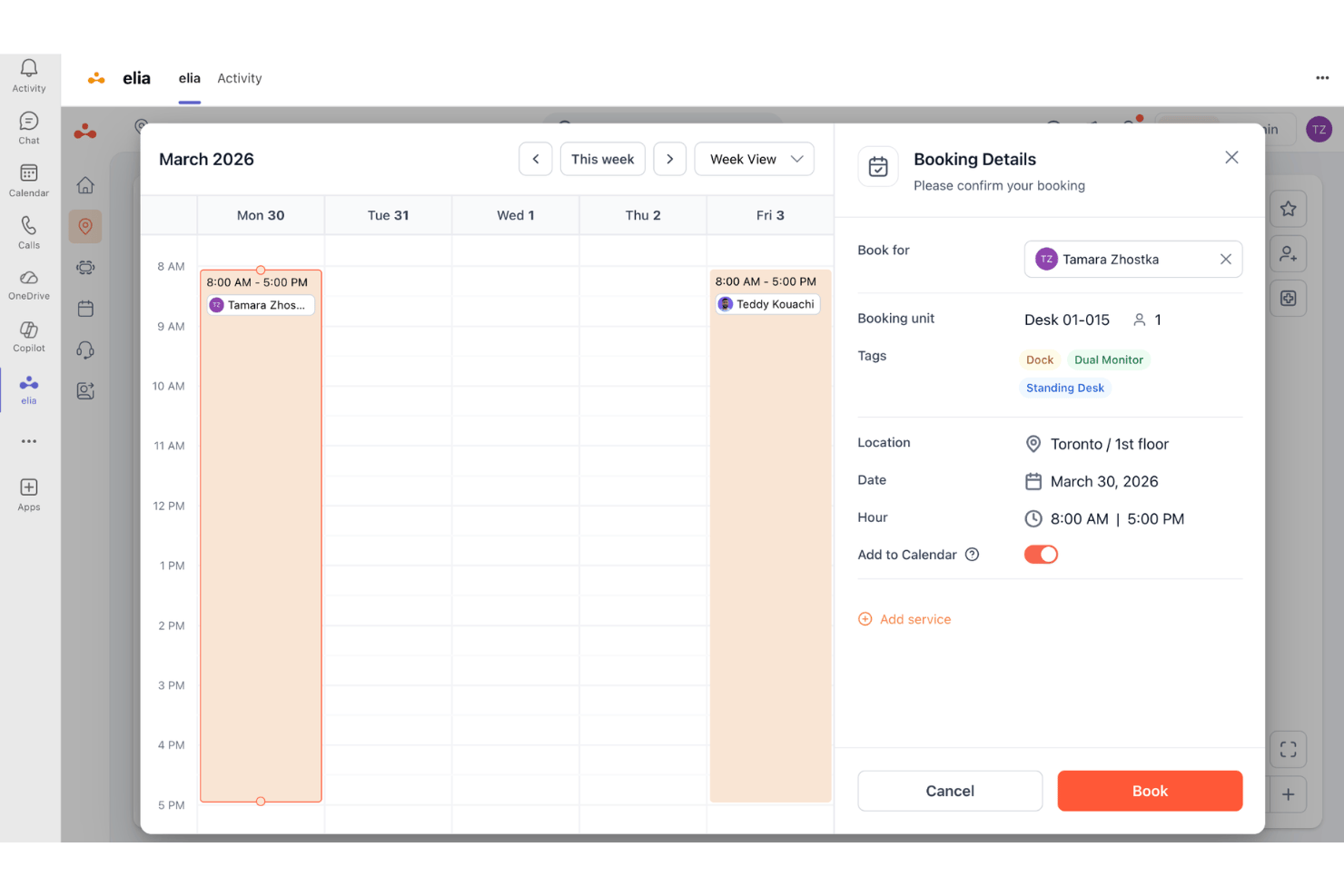
elia è una piattaforma di gestione del luogo di lavoro per team ibridi che combina la prenotazione di scrivanie e sale, l'analisi dell'occupazione e strumenti integrati per la salute e la sicurezza, risultando particolarmente adatta alle organizzazioni che devono gestire spazi e conformità in un unico luogo.
Per chi è più adatta elia?
elia è adatta ai team responsabili delle strutture e dell'esperienza sul luogo di lavoro presso organizzazioni di medie e grandi dimensioni che gestiscono uffici ibridi in più sedi.
Perché elia è una buona alternativa a OfficeSpace
Ho incluso elia tra le mie migliori scelte perché nessun altro strumento di questo elenco combina nativamente la prenotazione degli spazi di lavoro con un modulo dedicato alla gestione della salute e della sicurezza. Apprezzo particolarmente il modo in cui gestisce il monitoraggio dei primi soccorritori e il controllo automatizzato della conformità, mantenendo aggiornati i registri degli audit senza interventi manuali. Quando si verifica un incidente, il mio team può registrarlo direttamente in elia, sapendo che il relativo percorso di conformità è già stato gestito.
Funzionalità principali di elia
- Strumento interattivo per la creazione di planimetrie: Crea e personalizza planimetrie digitali per rappresentare la disposizione degli spazi di lavoro e facilitare la navigazione e la prenotazione.
- Sensori per l'occupazione di scrivanie e sale: Utilizza hardware integrato per monitorare in tempo reale l'utilizzo delle scrivanie e degli spazi per riunioni.
- Richieste automatizzate sul luogo di lavoro: Consente ai dipendenti di inviare richieste di manutenzione, catering o assistenza IT direttamente dalla piattaforma.
- Sistema di gestione dei visitatori: Registra i visitatori, informa gli host e conserva registri sicuri dei visitatori tramite un'interfaccia integrata.
Integrazioni di elia
elia offre integrazioni native con Microsoft 365, Google Workspace, Slack e strumenti specifici all'interno di questi ecosistemi, tra cui Google Calendar, Microsoft Teams e Microsoft Outlook.
Pros and Cons
Pros:
- Strumenti integrati per la conformità in materia di salute e sicurezza
- Offre la gestione dei visitatori e il check-in automatizzato
- Forte supporto per la gestione del luogo di lavoro in più sedi
Cons:
- La configurazione delle planimetrie può richiedere molto tempo
- Personalizzazione limitata delle analisi per la reportistica aziendale

Ideale per una migrazione semplice dalle piattaforme precedenti
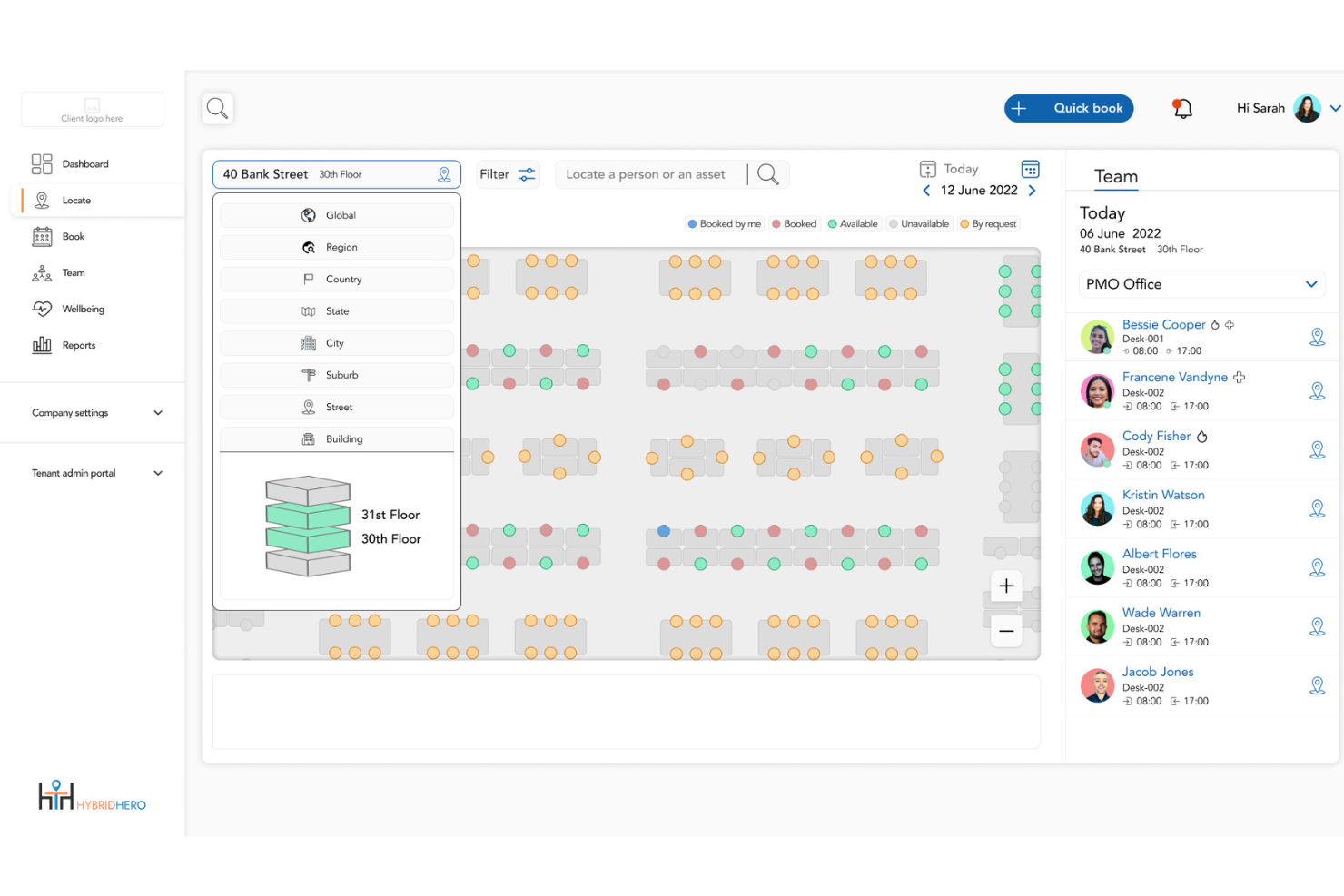
Hybrid Hero è una piattaforma per la gestione del luogo di lavoro che aiuta i team delle risorse umane e delle strutture a gestire uffici ibridi in più sedi, con strumenti per la prenotazione delle scrivanie, la programmazione delle sale, la gestione dei visitatori e l'analisi dell'utilizzo degli spazi integrati in un'unica piattaforma.
Per chi è più adatto Hybrid Hero?
È una soluzione ideale per organizzazioni di medie e grandi dimensioni che gestiscono squadre di lavoro ibride distribuite in più sedi o strutture.
Perché Hybrid Hero è una valida alternativa a OfficeSpace
Ho scelto Hybrid Hero come una delle migliori soluzioni perché il suo Programma di migrazione è il percorso di migrazione più strutturato che abbia visto in questa categoria. Offre un piano di migrazione di una pagina, indicazioni per la disdetta del contratto e un referente dedicato alla migrazione entro 48 ore da una valutazione gratuita di 15 minuti. L'esecuzione parallela significa che non si pagano due piattaforme contemporaneamente, mentre la garanzia operativa di 30 giorni elimina completamente il rischio del passaggio.
Caratteristiche principali di Hybrid Hero
- Creazione di planimetrie con trascinamento: Mappa rapidamente la disposizione degli uffici e aggiorna le assegnazioni delle scrivanie con uno strumento visivo.
- Ricerca delle scrivanie in base ai servizi: Trova le scrivanie disponibili in base a servizi specifici, come monitor, scrivanie regolabili in altezza o zone silenziose.
- Chiosco per la gestione dei visitatori: Consente la registrazione senza contatto degli ospiti, la stampa dei tesserini e le notifiche agli ospitanti tramite uno schermo tattile o un tablet dedicato.
- Rilascio automatico delle scrivanie: Rende automaticamente disponibili per altri utenti le scrivanie prenotate ma non utilizzate quando non viene effettuata la registrazione.
Integrazioni di Hybrid Hero
Hybrid Hero offre integrazioni native con Microsoft 365, Google Workspace, Microsoft Teams e Slack. L'accesso SSO è supportato tramite Okta, Microsoft Entra ID e Google, ed è disponibile un'API per le integrazioni personalizzate.
Pros and Cons
Pros:
- La migrazione guidata elimina i rischi del passaggio da una piattaforma all'altra
- Supporta squadre distribuite in più sedi e fusi orari
- Il rilascio automatico delle scrivanie recupera rapidamente le prenotazioni inutilizzate
Cons:
- Meno funzionalità di analisi pronte all'uso rispetto ai concorrenti più grandi
- Fornitore più piccolo con un numero limitato di recensioni di terze parti disponibili

Robin
Ideale per planimetrie interattive degli uffici

Robin offre ai team e ai responsabili degli spazi di lavoro un modo flessibile per supervisionare la disposizione degli uffici, coordinare l'utilizzo delle scrivanie e gestire gli spazi per riunioni. Se desideri una pianificazione personalizzabile degli spazi di lavoro e una visibilità in tempo reale su come viene effettivamente utilizzato il tuo ufficio, Robin si distinguerà.
Per chi è più adatto Robin?
Robin è adatto agli ambienti di lavoro ibridi e ai responsabili degli uffici che hanno bisogno di un modo dinamico per supervisionare scrivanie, sale e assegnazioni dei posti in diverse sedi.
Perché Robin è una buona alternativa a OfficeSpace
Ho scelto Robin soprattutto per le sue planimetrie interattive, che permettono di vedere esattamente chi è seduto dove in tempo reale. Quando il mio team sta pianificando una giornata intensa in ufficio, posso aprire la planimetria aggiornata e individuare immediatamente le scrivanie o le sale disponibili.
Apprezzo anche la funzionalità 'quartiere' di Robin, che consente di raggruppare i team in zone designate sulla mappa. Questo rende molto più semplice coordinare le giornate in ufficio per reparti specifici rispetto alla gestione manuale di un foglio di calcolo o di un calendario di prenotazione.
Funzionalità principali di Robin
- Prenotazione delle scrivanie: Riserva le scrivanie direttamente tramite strumenti come Slack, Microsoft Teams o Outlook senza cambiare piattaforma.
- Gestione dei visitatori: Pre-registra gli ospiti, gestisci la registrazione degli ingressi e conserva i registri delle visite da un unico luogo.
- Servizi per le riunioni: Configura flussi di lavoro personalizzabili per le richieste di preparazione delle sale, come catering, configurazione audiovisiva e disposizione della sala.
- Analisi dell'ambiente di lavoro: Crea report personalizzati sull'utilizzo degli spazi e sull'occupazione per orientare le decisioni di pianificazione dell'ufficio.
Integrazioni di Robin
Robin offre integrazioni native con Slack, Microsoft Teams, Google Workspace, Microsoft 365, Okta e Zoom. È disponibile un'API per le integrazioni personalizzate.
Pros and Cons
Pros:
- Le mappe interattive mostrano in tempo reale la disponibilità delle scrivanie
- Zone di quartiere personalizzate per i posti dei team
- Ampie opzioni per la gestione e la registrazione dei visitatori
Cons:
- Alcuni utenti segnalano occasionali problemi di sincronizzazione del calendario
- La configurazione della planimetria richiede un impegno iniziale
YAROOMS
Ideale per le funzionalità di monitoraggio della sostenibilità
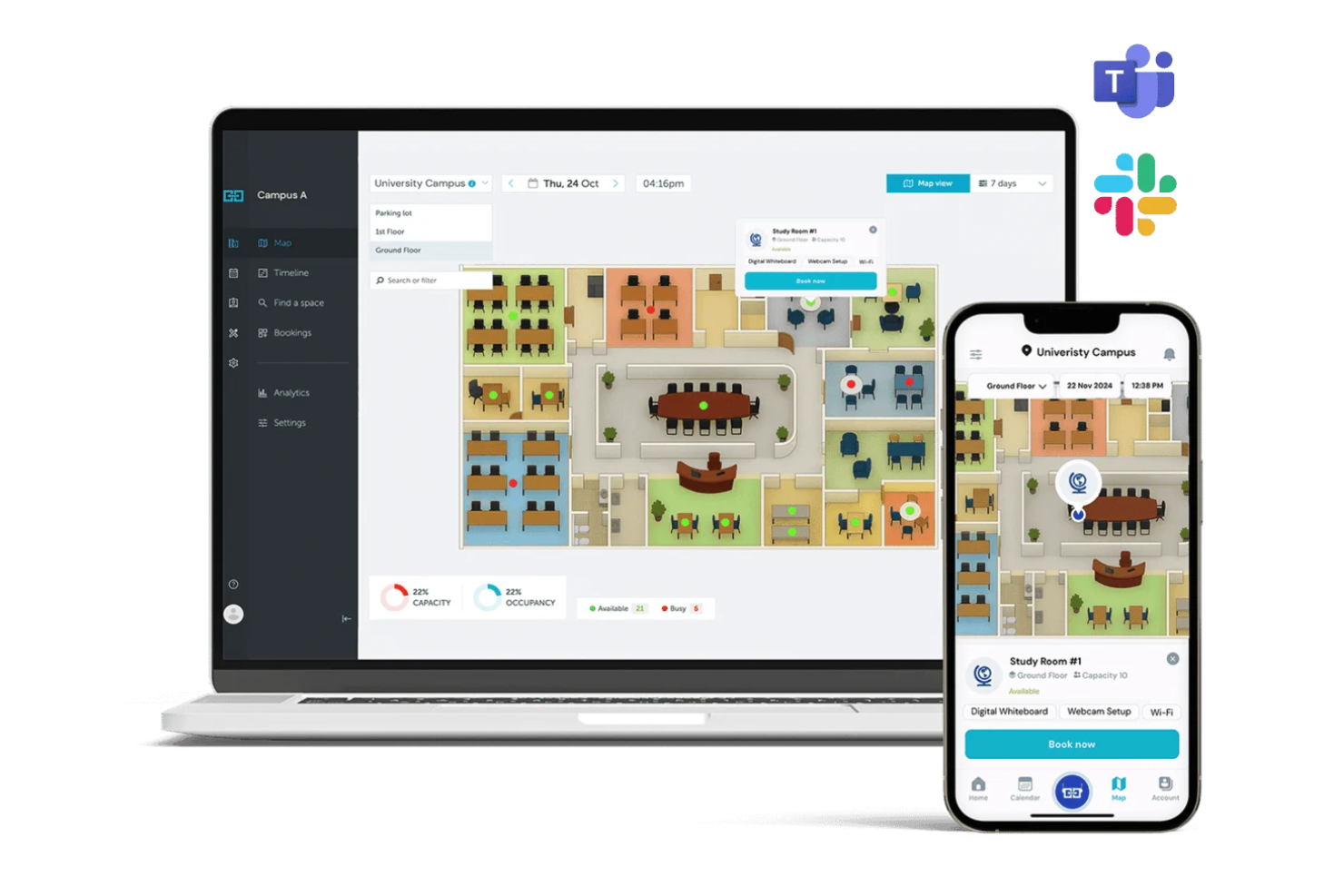
YAROOMS è una piattaforma per la gestione degli ambienti di lavoro progettata per le organizzazioni che puntano sul lavoro flessibile e sull'uso responsabile degli spazi. Ritengo che i team responsabili delle strutture e degli ambienti di lavoro che necessitano di prenotazioni configurabili, analisi e policy sugli spazi per uffici moderni troveranno YAROOMS una scelta pratica.
Per chi è più adatto YAROOMS?
YAROOMS è particolarmente adatto ai responsabili delle strutture, attenti alla sostenibilità, di organizzazioni di medie e grandi dimensioni che cercano informazioni dettagliate sull'utilizzo degli ambienti di lavoro.
Perché YAROOMS è una buona alternativa a OfficeSpace?
Il monitoraggio della sostenibilità è ciò che distingue YAROOMS dalla maggior parte degli strumenti di gestione degli spazi di lavoro che ho utilizzato. L'ho scelto appositamente perché monitora le emissioni di CO2 di ambito 2 derivanti dall'utilizzo delle apparecchiature d'ufficio e le emissioni di ambito 3 derivanti dagli spostamenti dei dipendenti: una funzionalità che non ho visto integrata direttamente nelle piattaforme concorrenti.
Mi piace anche il fatto che sia possibile stimare il consumo futuro di risorse per utenze come elettricità, acqua e gas, e monitorare nel tempo i progressi rispetto agli obiettivi di riduzione. Per le organizzazioni soggette a obblighi di rendicontazione ESG, questo livello di visibilità integrata sulle emissioni di carbonio rende YAROOMS un'opzione davvero diversa in questa categoria.
Funzionalità principali di YAROOMS
- Mappa interattiva dell'ufficio: Consulta e prenota le scrivanie disponibili direttamente su una planimetria visiva, con indicazioni per orientarti e muoverti all'interno dell'ufficio.
- Pianificazione del lavoro ibrido: Consente ai dipendenti di impostare ogni giorno il proprio stato in ufficio o da remoto, offrendo ai responsabili visibilità su chi si trova in sede e quando.
- Gestione dei visitatori: Pre-registra gli ospiti, raccoglie firme digitali e stampa i badge dei visitatori tramite un flusso centralizzato per la reception.
- Prenotazione dei posti auto: Prenota in anticipo i posti auto insieme alle scrivanie e alle sale, riducendo le difficoltà degli spostamenti nei giorni in ufficio.
Integrazioni di YAROOMS
YAROOMS offre integrazioni native con Microsoft Teams, Microsoft 365, Google Workspace, Okta, Azure Active Directory e Zapier. È disponibile un'API per le integrazioni personalizzate.
Pros and Cons
Pros:
- Dashboard sulla sostenibilità con dati sulle emissioni in tempo reale
- Prenotazione degli spazi di lavoro collegata alla presenza dei dipendenti
- Consente agli utenti di trovare e prenotare posti accanto ai colleghi
Cons:
- Personalizzazione limitata dei report di analisi sull'utilizzo
- L'app mobile è meno intuitiva per le prenotazioni complesse

Envoy
Ideale per l'integrazione della gestione dei visitatori
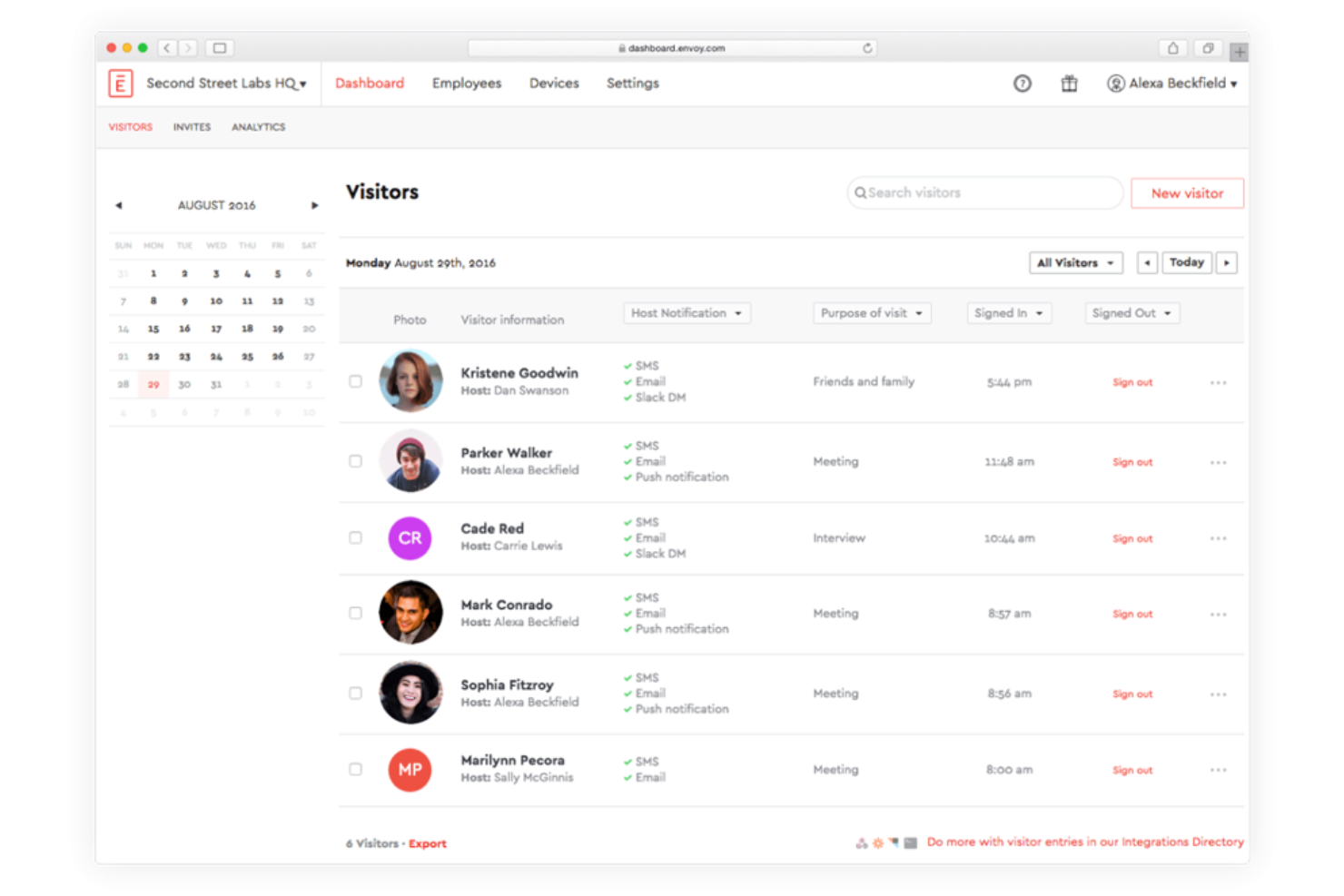
Envoy è una piattaforma di gestione del luogo di lavoro progettata per le aziende che necessitano di procedure di check-in sicure e automatizzate, prenotazione degli spazi e gestione fluida dei visitatori. È una soluzione ideale per i team delle risorse umane o i responsabili operativi che desiderano gestire ambienti di lavoro ibridi e accogliere gli ospiti in tutta sicurezza.
Per chi è più indicato Envoy?
Envoy è un'opzione eccellente per i team delle risorse umane e della gestione delle strutture di aziende di medie e grandi dimensioni che necessitano di procedure per i visitatori sicure e semplificate.
Perché Envoy è una buona alternativa a OfficeSpace?
Ho scelto Envoy principalmente per il modo in cui gestisce i visitatori all'interno di una configurazione più ampia del luogo di lavoro. Quando arriva un ospite, Envoy avvisa automaticamente il responsabile, avvia la firma di documenti personalizzati di riservatezza o sicurezza e registra la visita, il tutto senza alcun follow-up manuale da parte del mio team.
Apprezzo inoltre il fatto che i flussi dei visitatori siano completamente personalizzabili, così che diversi tipi di ospiti, come collaboratori esterni, candidati a colloqui o clienti, seguano esperienze di check-in differenti. Questo livello di separazione tra i tipi di visitatori è qualcosa che non ho trovato implementato in modo altrettanto chiaro nella maggior parte degli altri strumenti per il luogo di lavoro.
Funzionalità principali di Envoy
- Prenotazione delle postazioni: Prenota postazioni flessibili o spazi assegnati direttamente da Slack, Microsoft Teams o dall'app mobile di Envoy.
- Analisi degli spazi: Monitora i dati sull'occupazione in tempo reale e storici per vedere quali aree vengono utilizzate nel tuo ufficio.
- Gestione delle consegne: Registra i pacchi in arrivo e avvisa automaticamente i dipendenti quando le consegne arrivano alla reception.
- Pianificazione dei dipendenti: Coordina le giornate in ufficio tra i team, così i dipendenti possono vedere quando i colleghi prevedono di essere in sede.
Integrazioni di Envoy
Envoy offre integrazioni native con Slack, Google Workspace, Microsoft Teams, Okta, Box, Cisco Meraki, Zoom, Salesforce, Azure Active Directory e Kisi. È disponibile un'API per le integrazioni personalizzate.
Pros and Cons
Pros:
- Monitoraggio in tempo reale dei check-in dei visitatori e delle postazioni
- Flussi dei visitatori personalizzati per diversi tipi di ospiti
- Interfaccia dell'app mobile eccezionalmente pulita e intuitiva
Cons:
- L'interfaccia di prenotazione degli spazi è lenta negli uffici di grandi dimensioni
- La stampa dei badge per i visitatori occasionalmente non funziona

Ideale per flussi di lavoro di prenotazione automatizzati

Smartway2 è una piattaforma per la prenotazione degli spazi di lavoro che aiuta le organizzazioni ad automatizzare le prenotazioni di sale riunioni, scrivanie e risorse per uffici flessibili. È una soluzione ideale per le aziende che necessitano di un controllo preciso sulla disponibilità degli spazi di lavoro, sulle regole e sull'utilizzo in tempo reale.
Per chi è più adatto Smartway2?
Smartway2 è adatto ai responsabili delle strutture e degli ambienti di lavoro di organizzazioni medio-grandi che necessitano di una pianificazione avanzata delle risorse, dell'ottimizzazione degli spazi e di regole di prenotazione personalizzabili.
Perché Smartway2 è una valida alternativa a OfficeSpace?
Ho scelto Smartway2 per l'ampiezza delle sue funzionalità di automazione delle prenotazioni. È possibile impostare regole che rilasciano automaticamente le prenotazioni non confermate, bloccano le prenotazioni consecutive o limitano determinati spazi in base al team o al ruolo, senza alcun intervento manuale.
Apprezzo in particolare la logica di prenotazione condizionale, grazie alla quale una sala può essere approvata automaticamente o segnalata per una revisione in base a criteri quali le dimensioni del gruppo o la durata della prenotazione. Per i team responsabili degli ambienti di lavoro che gestiscono decine di spazi in un ufficio ibrido, questo tipo di controllo basato sulle regole riduce notevolmente gli scambi amministrativi.
Funzionalità principali di Smartway2
- Prenotazione di catering e servizi: Aggiungi ordini di catering, apparecchiature audiovisive o preferenze relative alla disposizione della sala direttamente a una prenotazione al momento della prenotazione.
- Concierge digitale: Consiglia scrivanie, sale e risorse in base alle persone con cui lavori e al tipo di attività che devi svolgere quel giorno.
- Pannelli per la visualizzazione delle sale conferenze: I pannelli LED con codifica a colori all'esterno delle sale mostrano la disponibilità in tempo reale e consentono di creare, modificare o annullare le prenotazioni sul posto.
- Analisi degli ambienti di lavoro: Visualizza i dati sull'utilizzo di scrivanie, sale, piani e edifici, comprese le percentuali di mancata presentazione e gli ordini di servizi, con esportazioni di report personalizzate.
Integrazioni di Smartway2
Smartway2 offre integrazioni native con Microsoft 365, Outlook, Google Workspace, Microsoft Teams, Cisco Webex, Zoom, Crestron e HID, oltre a un'API per integrazioni personalizzate.
Pros and Cons
Pros:
- Regole e flussi di lavoro di prenotazione completamente automatizzati
- Disponibilità in tempo reale di scrivanie e sale riunioni
- Supporta impostazioni complesse di approvazione e sicurezza
Cons:
- La configurazione iniziale può richiedere molto tempo
- Occasionali ritardi nell'aggiornamento della disponibilità degli spazi


Cloudbooking è una piattaforma di gestione degli spazi di lavoro pensata per le organizzazioni che necessitano di precisione e visibilità nella gestione degli uffici condivisi. È ideale per le aziende che desiderano una visibilità più approfondita sull'utilizzo di scrivanie, sale e visitatori in più sedi.
Per chi è più adatto Cloudbooking?
Cloudbooking è ideale per i team responsabili delle strutture nelle grandi aziende che necessitano di un controllo centralizzato sulle prenotazioni degli spazi di lavoro e di informazioni approfondite sul loro utilizzo.
Perché Cloudbooking è una buona alternativa a OfficeSpace?
Ho scelto Cloudbooking soprattutto per il livello di dettaglio dei suoi rapporti analitici. È possibile generare mappe di calore dell'occupazione, tendenze dei periodi di maggiore utilizzo e tassi di mancata presentazione per ogni scrivania, sala e piano del proprio portafoglio, filtrando per data, reparto o sede.
Trovo particolarmente utile il generatore di rapporti personalizzati quando devo presentare i dati sull'utilizzo alla dirigenza o motivare decisioni immobiliari. Per qualsiasi team che cerchi di dimensionare correttamente gli spazi d'ufficio sulla base del comportamento effettivo, è difficile trovare un livello di approfondimento dei rapporti paragonabile.
Funzionalità principali di Cloudbooking
- Planimetrie interattive in 3D: Visualizza la disponibilità in tempo reale di scrivanie e sale in tutto l'ufficio tramite planimetrie digitali personalizzate su dispositivi mobili, web e chioschi.
- Gestione dei visitatori: Pre-registra i visitatori, esegui i controlli di sicurezza obbligatori e rilascia tessere identificative con foto da un chiosco automatico.
- Prenotazione del parcheggio: Prenota gli spazi di parcheggio insieme alle scrivanie e alle sale tramite la stessa piattaforma.
- Registrazione e uscita tramite codice QR: Consenti ai dipendenti di effettuare la registrazione e l'uscita dalle scrivanie e dalle sale scansionando un codice QR, abilitando il monitoraggio dell'occupazione in tempo reale.
Integrazioni di Cloudbooking
Cloudbooking offre integrazioni native con Microsoft 365, Microsoft Outlook, Google Workspace, Okta e Azure Active Directory, oltre a un'API per integrazioni personalizzate.
Pros and Cons
Pros:
- Analisi dettagliate dell'utilizzo di scrivanie e sale
- Il generatore di rapporti personalizzati supporta esigenze specifiche in materia di dati
- Scalabile per implementazioni globali su più sedi
Cons:
- Controllo limitato sulle impostazioni delle notifiche in tempo reale
- Il processo iniziale di configurazione può essere lungo


OfficeRnD è progettato per gli operatori che devono gestire, ottimizzare e far crescere gli spazi di lavoro flessibili. Se desideri semplificare le prenotazioni, la fatturazione e il coinvolgimento dei membri in più sedi di coworking, OfficeRnD riunisce questi flussi di lavoro in un'unica piattaforma facile da amministrare.
Per chi è più adatto OfficeRnD?
OfficeRnD è un'ottima soluzione per i responsabili della community e gli operatori di spazi di lavoro che gestiscono più sedi di coworking e desiderano un controllo centralizzato su abbonamenti e risorse.
Perché OfficeRnD è una buona alternativa a OfficeSpace?
Ho scelto OfficeRnD in particolare per la sua capacità di gestire bene la complessità operativa della gestione degli spazi di coworking. Il portale per i membri consente di prenotare scrivanie, sale riunioni e uffici privati, gestire autonomamente i propri piani e occuparsi delle fatture senza dover contattare il personale.
Apprezzo anche il motore di fatturazione integrato, che automatizza gli addebiti ricorrenti per gli abbonamenti, i pass giornalieri e le tariffe per le risorse in più sedi. Per gli operatori di coworking che devono gestire un elevato ricambio dei membri e diversi tipi di piani, questa combinazione di autonomia e fatturazione automatizzata elimina una quantità significativa di attività amministrative manuali.
Funzionalità principali di OfficeRnD
- Centro della crescita: Gestisci un motore di commercio elettronico integrato per il tuo spazio di coworking, inclusi l'acquisto online dei piani, la vendita di pass giornalieri e la generazione automatizzata dei contratti.
- Centro dell'intelligenza artificiale: Utilizza un agente di vendita basato sull'intelligenza artificiale per acquisire e rispondere alle richieste di informazioni sugli abbonamenti e convertire i potenziali clienti in prenotazioni senza necessità di azioni successive manuali.
- Centro dei dati: Accedi a report e analisi avanzati basati su Looker, che includono le tendenze dell'occupazione, i ricavi per scrivania e il comportamento di prenotazione nelle varie sedi.
- Centro dei visitatori: Gestisci l'accoglienza degli ospiti, la preregistrazione e il monitoraggio delle consegne direttamente all'interno della stessa piattaforma che il tuo team utilizza per le operazioni quotidiane.
Integrazioni di OfficeRnD
OfficeRnD offre oltre 40 integrazioni native, tra cui Xero, QuickBooks, Stripe, Google Workspace, Microsoft 365, Docusign, Slack, Kisi, Salto e Zapier. È disponibile un'API per creare integrazioni personalizzate.
Pros and Cons
Pros:
- Prenotazione autonoma e gestione dei piani da parte dei membri
- Allocazione automatizzata delle risorse in più sedi
- Cicli di fatturazione personalizzabili per abbonamenti diversi
Cons:
- I modelli di report richiedono una personalizzazione manuale
- Opzioni limitate per personalizzare il branding

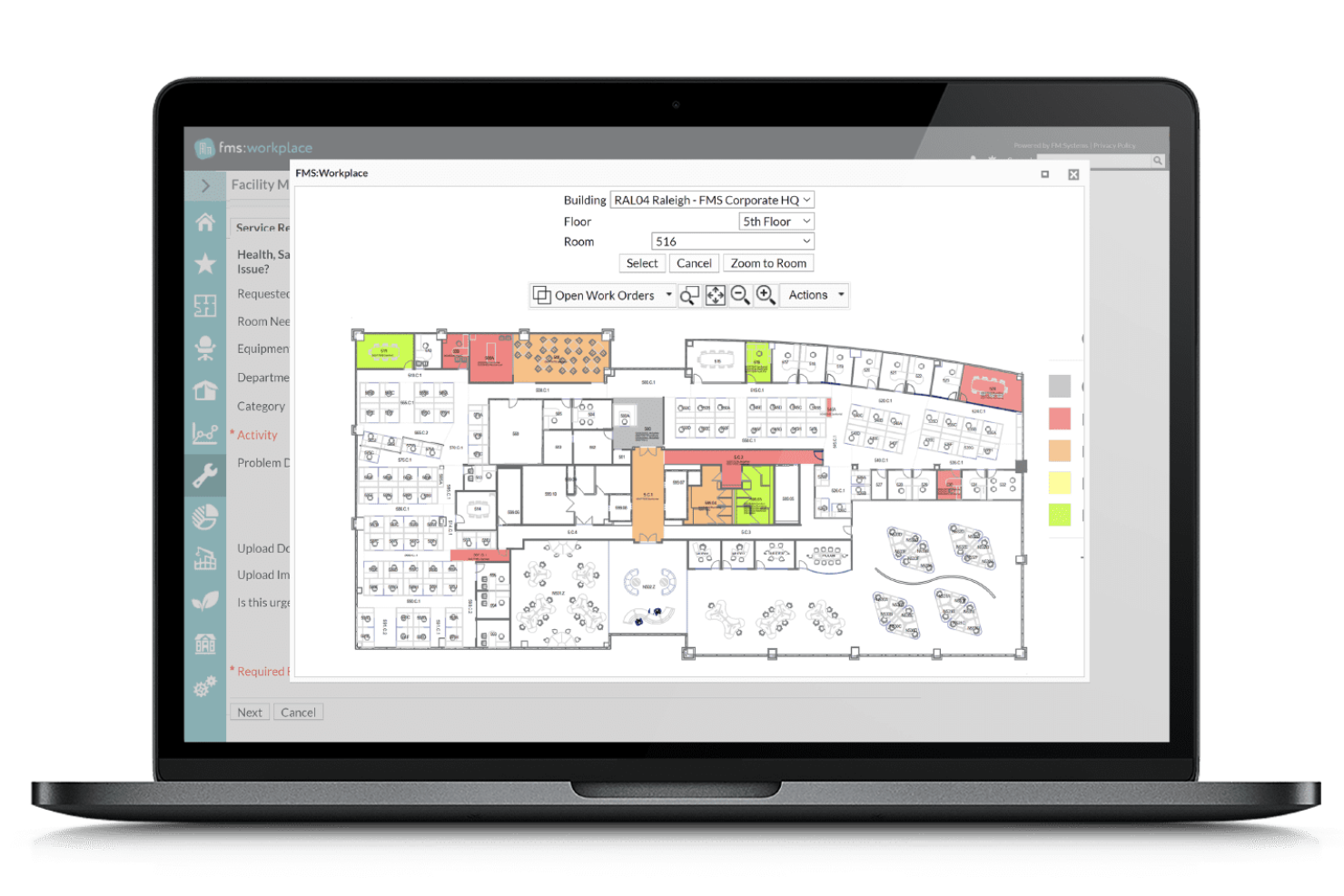
FM:Systems è una piattaforma per la gestione degli ambienti di lavoro progettata per le organizzazioni che devono ottimizzare i beni immobiliari in più proprietà.
A chi è più adatto FM:Systems?
FM:Systems è una buona scelta per i team immobiliari aziendali che devono gestire e analizzare dati relativi agli spazi di lavoro e alle proprietà su larga scala.
Perché FM:Systems è una buona alternativa a OfficeSpace?
Ho scelto FM:Systems per le sue funzionalità di gestione del portafoglio immobiliare, che sono più approfondite rispetto a quelle della maggior parte degli strumenti per gli ambienti di lavoro. Il modulo di amministrazione dei contratti di locazione consente di monitorare le date fondamentali dei contratti, gli aumenti dei canoni e gli obblighi relativi all'intero portafoglio immobiliare da un unico pannello.
Apprezzo anche le analisi sull'utilizzo degli spazi, che integrano i dati dei sensori e dei tesserini per mostrare come vengono effettivamente utilizzati i diversi piani e gli edifici, non solo come sono stati progettati. Per i team aziendali che gestiscono decine di proprietà, questa visibilità rende molto più semplice decidere dove consolidare, espandere o rinegoziare.
Funzionalità principali di FM:Systems
- Pianificazione strategica degli scenari: Modella scenari ipotetici relativi agli spazi per visualizzare in che modo le modifiche al portafoglio siano in linea con le future esigenze aziendali prima di impegnarsi.
- Gestione dei trasferimenti: Automatizza la pianificazione e l'esecuzione del trasferimento dei dipendenti tra le strutture, riducendo le interruzioni e il coordinamento manuale.
- Sensori IoT per gli ambienti di lavoro: Installa sensori per acquisire dati in tempo reale su occupazione, qualità dell'aria, rumore e temperatura nei tuoi edifici.
- Gestione automatizzata delle richieste di lavoro: Registra, assegna e monitora le richieste di manutenzione tramite un sistema centralizzato per prevenire l'inattività delle strutture.
Integrazioni di FM:Systems
FM:Systems offre integrazioni native con AutoCAD, Revit, Okta, Microsoft Power BI, Microsoft Teams e Microsoft 365, oltre a fornire un'API per integrazioni personalizzate.
Pros and Cons
Pros:
- Pannelli personalizzabili per l'analisi dell'occupazione
- Monitoraggio efficace dei contratti di locazione e del ciclo di vita dei beni
- Modifica visiva delle planimetrie con integrazione CAD
Cons:
- La configurazione dei report può essere complessa
- Gli aggiornamenti delle planimetrie richiedono talvolta il supporto di specialisti

DeskFlex
Ideale per l'integrazione con Microsoft Outlook

DeskFlex è un sistema flessibile di prenotazione degli spazi di lavoro, progettato per aziende e organizzazioni che desiderano ottimizzare i propri ambienti d'ufficio. Ritengo che sia particolarmente adatto alle aziende che mirano a gestire scrivanie condivise, sale riunioni e posti auto da un'unica piattaforma.
Per chi è più adatto DeskFlex?
Responsabili delle strutture e team IT di aziende di medie e grandi dimensioni che necessitano di una pianificazione centralizzata delle risorse dell'ufficio.
Perché DeskFlex è una buona alternativa a OfficeSpace?
L'integrazione con Microsoft Outlook è il motivo principale per cui consiglierei DeskFlex ai team che utilizzano già Microsoft 365. Apprezzo il fatto che i dipendenti possano prenotare scrivanie, sale riunioni e attrezzature direttamente dall'interfaccia di Outlook, senza dover passare a un'app o a un portale separato.
La sincronizzazione con MS Exchange mantiene automaticamente aggiornati i calendari su tutti i dispositivi, quindi quando qualcuno prenota una sala in Outlook, la prenotazione viene aggiornata immediatamente in tutta l'organizzazione. Per le aziende in cui Outlook è il punto centrale della pianificazione quotidiana, DeskFlex si integra perfettamente nel flusso di lavoro esistente, invece di richiedere alle persone di adottare uno strumento separato.
Funzionalità principali di DeskFlex
- Mappe della planimetria con selezione tramite clic: Consulta una mappa visiva del tuo ufficio per trovare e prenotare una scrivania o una sala disponibile facendo clic direttamente sulla planimetria.
- Gestione dei visitatori: Registra gli ospiti prima del loro arrivo e gestisci gli accessi dalla stessa piattaforma utilizzata per prenotare scrivanie e sale.
- Registrazione con codice QR: Consenti ai dipendenti di registrare la propria presenza presso la scrivania o la sala prenotata scansionando un codice QR, che aiuta anche a segnalare e liberare le prenotazioni di chi non si presenta.
- Approvazioni delle prenotazioni: Inoltra le richieste di prenotazione a un responsabile per l'approvazione quando determinate sale o attrezzature richiedono un accesso controllato.
Integrazioni di DeskFlex
DeskFlex offre integrazioni native nell'ecosistema Microsoft, tra cui Microsoft Outlook, Exchange e Microsoft 365. È disponibile un'API per le integrazioni personalizzate.
Pros and Cons
Pros:
- Le prenotazioni del calendario di Outlook vengono sincronizzate istantaneamente
- Flussi di lavoro personalizzabili per la prenotazione di scrivanie e sale
- Resoconti sulle strutture per l'analisi dell'utilizzo degli spazi
Cons:
- La navigazione nell'applicazione mobile può essere incoerente
- La configurazione della planimetria richiede l'assistenza del fornitore
Altre alternative a OfficeSpace
Ecco alcune ulteriori alternative a OfficeSpace che non sono state incluse nella mia selezione, ma che vale comunque la pena prendere in considerazione:
- Joan Desk Booking
Ideale per dispositivi senza fili per la prenotazione delle scrivanie
- Skedda
Ideale per le prenotazioni autonome delle scrivanie
- Eden
Ideale per la gestione dei servizi sul posto di lavoro


Hoe ik alternatieven voor OfficeSpace beoordeel
Ik splits mijn beoordeling op in basiscriteria—bureaureservering, plattegronden en hybride planning—en onderscheidende factoren die tools voor grote portfolio's met meerdere locaties onderscheiden van implementaties voor kleinere teams.
Kernfunctionaliteit (basisvereisten voor deze lijst)
Bij het selecteren van tools voor mijn lijst beoordeel ik elke tool op een schaal van 0 (biedt de functionaliteit niet) tot 5 (blink uit op dit gebied) voor elke hieronder vermelde kernfunctionaliteit. Vervolgens zet ik de totaalscore van de tool om in een percentage. Elke tool moet een minimale totaalscore van 65% behalen om in aanmerking te komen voor opname.
- Reserveren van bureaus en ruimtes: Ik beoordeel of werknemers zelfstandig reserveringen kunnen maken voor bureaus, ruimtes en gedeelde middelen via web en mobiel, zonder tussenkomst van een beheerder.
- Interactieve plattegronden: Elke tool moet visuele kaarten met realtimebeschikbaarheid bieden, zodat werknemers beschikbare bureaus kunnen vinden en hun weg kunnen vinden in onbekende kantoren tijdens bezoeken aan andere locaties.
- Analyses van ruimtegebruik: Ik zoek naar bezettingsdashboards en gebruiksrapporten die facilitair managers en HR-leiders helpen om weloverwogen beslissingen te nemen over het samenvoegen van verdiepingen of het uitbreiden van de capaciteit.
- Planning van hybride werk: Teams die kantoordagen coördineren hebben inzicht in collega's en teamplanning nodig. Daarom controleer ik hoe elk platform omgaat met wekelijkse planning en aanwezigheidsregistratie.
- Integratie met HRIS en adresboek: Het synchroniseren van werknemersgegevens uit platforms zoals Workday, BambooHR of ADP is belangrijk. Daarom beoordeel ik ingebouwde connectoren naast SSO- en agenda-integraties.
- Beheer van bezoekers en werknemers: Ik kijk hoe elke tool omgaat met vooraf registreren van gasten, het afdrukken van badges en het inchecken van werknemers ter ondersteuning van receptiewerkstromen en nalevingsvereisten.
Nadat ik een lijst heb samengesteld van tools die aan deze criteria voldoen, kijk ik naar wat elk platform onderscheidt.
Onderscheidende factoren (wat leveranciers van elkaar onderscheidt)
Zo vergelijk ik verschillende leveranciers:
Opvallende functies
Gebieden en zonebeheer zijn belangrijk wanneer teams toegewezen zones binnen een gedeelde verdieping nodig hebben—denk aan techniek die bij QA is gegroepeerd, terwijl verkoop een eigen zone heeft. Ik beoordeel ook tools voor verhuisbeheer, omdat kantoorherinrichtingen zonder stapelplannen met slepen en neerzetten al snel uitmonden in nachtmerries met spreadsheets. Integratie met IoT-sensoren is een andere factor die ik meeweeg, omdat alleen reserveringsgegevens zelden het volledige verhaal vertellen over hoe ruimte daadwerkelijk wordt gebruikt.
Meer dan functies
De snelheid van implementatie is hier belangrijk—ik controleer of leveranciers CAD-import en diensten voor het digitaliseren van plattegronden aanbieden, omdat een tool pas nuttig is zodra je kaarten live zijn. Ook prijsmodellen lopen binnen deze categorie sterk uiteen. Sommige leveranciers rekenen per bureau, andere per gebruiker of per locatie. Daarom beoordeel ik of modulaire prijzen het mogelijk maken om alleen te betalen voor reserveringen, analyses of bezoekersbeheer wanneer dat nodig is. Privacywaarborgen rond het volgen van bezetting en locatiegegevens van werknemers zijn een ander aandachtspunt, vooral voor organisaties die in meerdere regio's actief zijn.
Perché cercare un'alternativa a OfficeSpace?
Sebbene OfficeSpace sia una buona scelta tra le alternative a OfficeSpace, ci sono diversi motivi per cui alcuni utenti cercano soluzioni alternative. Potresti cercare un'alternativa a OfficeSpace perché…
- Hai bisogno di supporto per team altamente distribuiti o globali
- Vuoi funzionalità di analisi e reportistica più avanzate
- Hai bisogno di ulteriori integrazioni con strumenti per le risorse umane o la gestione delle strutture
- Preferisci una maggiore personalizzazione dei flussi di lavoro per le prenotazioni
- Devi rispettare requisiti di conformità in regioni specifiche
Se ti riconosci in una di queste situazioni, sei nel posto giusto. Il mio elenco contiene diverse alternative a OfficeSpace più adatte ai team che affrontano queste difficoltà con OfficeSpace e cercano soluzioni alternative.
Funzionalità principali di OfficeSpace
Ecco alcune delle funzionalità principali di OfficeSpace, per aiutarti a confrontare ciò che offrono le soluzioni alternative:
- Prenotazione delle scrivanie: Riserva scrivanie condivise o postazioni di lavoro su richiesta o in anticipo, con visibilità sulla disponibilità in tempo reale per scenari di lavoro in sede, ibridi o con postazioni non assegnate.
- Pianificazione delle sale: Prenota sale riunioni con filtri per capienza, preferenze relative alle attrezzature e gestione dei conflitti, per assicurarti di avere sempre lo spazio giusto per le sessioni della tua squadra.
- Planimetrie interattive: Esplora e seleziona gli spazi utilizzando una mappa digitale del luogo di lavoro, rendendo più semplice vedere cosa è disponibile e dove si trovano le squadre.
- Gestione dei visitatori: Registra gli ospiti, automatizza le procedure di accesso, stampa i badge e monitora i flussi dei visitatori per garantire un ambiente di lavoro sicuro e accogliente.
- Analisi dell'utilizzo degli spazi: Monitora i modelli di utilizzo e i tassi di occupazione con pannelli di controllo e rapporti che orientano le future decisioni immobiliari e migliorano l'allocazione delle risorse.
- Gestione dei trasferimenti: Pianifica, coordina ed esegui i trasferimenti dei dipendenti o le modifiche agli spazi di lavoro, con notifiche automatiche e un monitoraggio dettagliato dei progressi.
- Richieste di manutenzione: Invia, monitora e gestisci le richieste di assistenza alle strutture per risolvere rapidamente i problemi e mantenere il luogo di lavoro operativo senza intoppi.
- Applicazione delle politiche: Imposta regole di prenotazione, limiti di capienza e programmi di pulizia per rispettare le politiche organizzative e supportare le esigenze di salute e sicurezza.
- Accesso tramite dispositivi mobili: Gestisci prenotazioni, procedure di accesso e dettagli degli spazi tramite un'app per dispositivi mobili, per i dipendenti in movimento o che lavorano in più sedi.