

I 10 Migliori Software di Gestione d’Ufficio del 2026

10 Migliori software per la gestione degli uffici: la shortlist


Il miglior software per la gestione degli spazi ufficio ti aiuterà a semplificare le operazioni quotidiane, ottimizzare l’utilizzo degli spazi e supportare un ambiente di lavoro più efficiente e flessibile—offrendo differenti punti di forza in termini di facilità d’uso, automazione e scalabilità, così da adattarsi alle esigenze della tua azienda.
Con così tanti strumenti disponibili, scegliere la piattaforma giusta può essere difficile. In base alla configurazione del tuo ufficio, alla presenza di lavoro ibrido o al livello di visibilità e coordinamento necessario, alcune soluzioni potrebbero offrire una migliore gestione delle risorse, informazioni più chiare o flussi di lavoro più intuitivi.
Sulla base della mia esperienza diretta nella gestione delle attività d’ufficio e nell’analisi degli strumenti per gli spazi di lavoro, ho recensito e confrontato i migliori software per la gestione degli uffici. In questa guida troverai piattaforme d’eccellenza con funzionalità essenziali, esempi pratici e prezzi trasparenti—così da scegliere con sicurezza il software ideale per mantenere il tuo ambiente lavorativo sempre operativo.
Cos’è un software di gestione ufficio?
Il software di gestione ufficio si riferisce ad una suite di strumenti progettati per semplificare e organizzare le attività amministrative e operative all’interno di un luogo di lavoro. Questo termine comprende una vasta gamma di soluzioni software che gestiscono tutto, dai beni aziendali ai documenti, dagli orari ai progetti, ai flussi di lavoro e agli spazi ufficio.
Puoi utilizzarli per centralizzare le informazioni chiave e ottimizzare le procedure amministrative che tradizionalmente venivano svolte manualmente.
L’adozione di un software per la gestione dell’ufficio offre numerosi vantaggi, tra cui l’aumento di efficienza e produttività, la comunicazione e collaborazione potenziate, una migliore gestione del tempo, la raccolta e la reportistica dei dati semplificata, e risparmi sui costi grazie a un utilizzo più efficace delle risorse dello staff già presente in azienda.
Perché fidarsi delle nostre recensioni sui software
Il nostro team testa e recensisce software dal 2012. In quanto esperti HR noi stessi, sappiamo quanto sia difficile — e importante — scegliere il software giusto.
Per questa guida, abbiamo valutato gli strumenti attraverso test pratici e ricerche indipendenti, assegnando un punteggio agli strumenti in base ai nostri criteri di selezione. Ci basiamo inoltre sulle competenze di leader di pensiero del settore e di professionisti HR attivi.
Le nostre recensioni riflettono il nostro giudizio editoriale umano, non un discorso di vendita.
Revisori esperti:
Migliori software per la gestione degli uffici: tabella comparativa dei prezzi
Questa tabella comparativa riassume i dettagli sui prezzi delle mie selezioni di software per la gestione ufficio, per aiutarti a trovare la soluzione più adatta a budget ed esigenze della tua azienda.
| Tool | Best For | Trial Info | Price | ||
|---|---|---|---|---|---|
| 1 | Ideale per la prenotazione interattiva degli spazi | Prova gratuita di 14 giorni + demo gratuita disponibile | Da $249/spazio/mese (fatturazione annuale) | Website | |
| 2 | Ideale per dati azionabili sull’occupazione degli spazi di lavoro | Demo gratuita disponibile | Prezzi su richiesta | Website | |
| 3 | Ideale per l'analisi dell'utilizzo degli spazi di lavoro | Demo gratuita disponibile | Prezzo su richiesta | Website | |
| 4 | Ideale per insight predittivi sulla pianificazione degli spazi | Demo gratuita disponibile | Prezzo su richiesta | Website | |
| 5 | Ideale per le integrazioni con i calendari | Piano gratuito + demo gratuita disponibile | Da $500/mese | Website | |
| 6 | Ideale per le operazioni di ambienti di lavoro aziendali | Demo gratuita disponibile | Prezzo su richiesta | Website | |
| 7 | Ideale per la programmazione mobile e il coordinamento del team | Prova gratuita di 14 giorni + demo gratuita disponibile | A partire da $29/mese (fatturato annualmente) | Website | |
| 8 | Ideale per ambienti coworking e ibridi | Demo gratuita + prova gratuita di 14 giorni disponibile | Da $2,8/scrivania/mese | Website | |
| 9 | Ideale per la flessibilità degli ambienti di lavoro ibridi | Prova gratuita di 14 giorni | Da $3/postazione/mese | Website | |
| 10 | Ideale per piccoli spazi di lavoro condivisi | Prova gratuita di 14 giorni + piano gratuito + demo disponibile | A partire da $22/mese (fatturazione annuale) | Website |

Recensioni dei migliori software per la gestione degli uffici
Qui troverai le mie recensioni sui migliori software per la gestione degli uffici disponibili oggi, incluse le principali caratteristiche, i motivi per cui li ho inseriti nella lista, screenshot e informazioni su prove gratuite e prezzi (riassunti in una tabella comparativa).
Ecco la mia valutazione dei migliori strumenti per la gestione dell’ufficio:

Skedda
Ideale per la prenotazione interattiva degli spazi
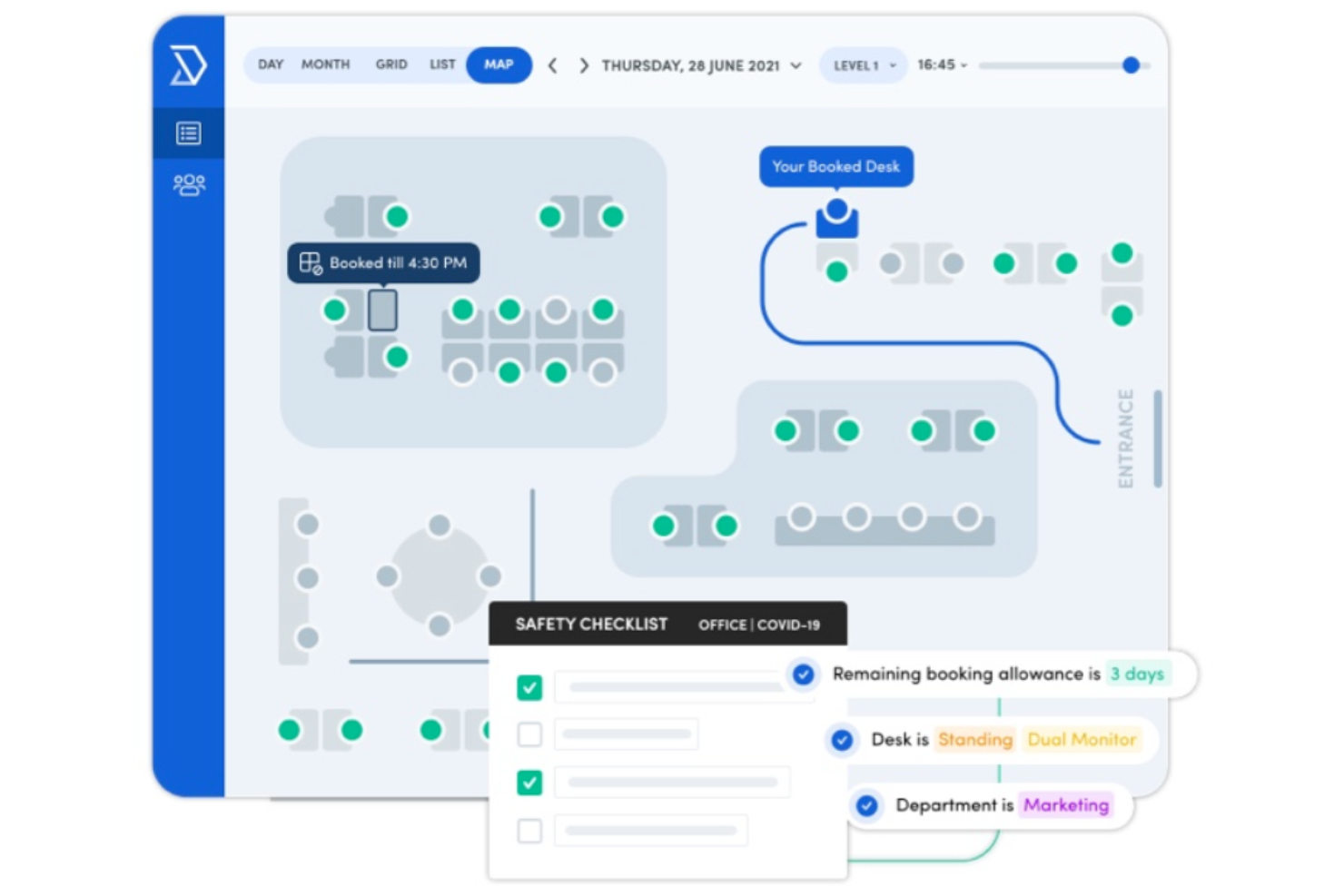
Skedda è ideale per i team che hanno bisogno di un modo chiaro e interattivo per prenotare scrivanie, sale e spazi condivisi all'interno del luogo di lavoro. È particolarmente utile per le organizzazioni ibride che desiderano che il personale gestisca autonomamente le prenotazioni mantenendo l'utilizzo degli spazi organizzato e trasparente.
Perché ho scelto Skedda
Ho scelto Skedda perché offre al tuo team un modo visivo e interattivo per prenotare spazi senza il coinvolgimento dell'amministrazione. La prenotazione tramite planimetria permette ai dipendenti di scegliere esattamente dove vogliono lavorare, aiutandoti a gestire l'occupazione in modo più mirato. Puoi anche automatizzare l'accesso dei visitatori e le regole di prenotazione, riducendo la supervisione manuale e mantenendo l'ufficio efficiente. Apprezzo inoltre che Skedda offra analisi sull'utilizzo, così puoi capire quanto spesso vengono prenotate sale o scrivanie e prendere decisioni basate sui dati. Queste funzionalità lo rendono particolarmente adatto alle aziende che cercano un sistema di pianificazione spazi semplice, flessibile e guidato dagli utenti.
Funzionalità principali di Skedda
Ecco alcune funzionalità da evidenziare:
- Planimetrie interattive: I dipendenti selezionano visivamente scrivanie o sale, aiutandoli a prenotare rapidamente lo spazio giusto.
- Regole e automazione prenotazioni: Imposta limiti, controlli di accesso e fasi di approvazione per mantenere l'uso degli spazi equo e coerente.
- Self-service da mobile: Gli utenti possono verificare la disponibilità e gestire le prenotazioni da qualsiasi dispositivo.
- Reportistica sull'utilizzo: Monitora la frequenza delle prenotazioni e i modelli di occupazione per guidare la pianificazione degli spazi.
Integrazioni Skedda
Le integrazioni includono Google Workspace, Microsoft Teams, Slack, MailChimp, Xero, Stripe, Zoho e FreshBooks.
Pros and Cons
Pros:
- Le planimetrie visive aiutano gli utenti a scegliere rapidamente la scrivania o la sala giusta
- Le regole di automazione riducono la supervisione manuale per gli amministratori
- Le prenotazioni da mobile rendono i team ibridi flessibili e autonomi
Cons:
- Nessuna funzione drag-and-drop sui calendari
- C'è una certa curva di apprendimento
New Product Updates from Skedda

Skedda Expands Visit Exports With Custom Field Data
Skedda adds Summary and Breakdown visit exports with custom field data, filter support, and XLSX or CSV formats. These updates give teams more flexibility when exporting visit- and visitor-level information for reporting and analysis. For more information, visit Skedda’s official site.
 .
.
Kadence
Ideale per dati azionabili sull’occupazione degli spazi di lavoro

Kadence è una piattaforma di gestione degli ambienti di lavoro progettata per le organizzazioni che gestiscono team ibridi, aiutando i responsabili d’ufficio e le risorse umane a coordinare le prenotazioni delle scrivanie, gli spazi riunione e la presenza sul posto di lavoro.
Per chi è ideale Kadence?
Kadence è particolarmente adatto ad aziende di medie e grandi dimensioni che adottano modelli di lavoro ibrido e che necessitano di visibilità su come vengono utilizzati gli spazi d’ufficio.
Perché ho scelto Kadence
Ho scelto Kadence tra i migliori perché trasforma i dati grezzi delle prenotazioni in informazioni utili e attuabili sull’occupazione degli spazi. La funzionalità Insights Plus permette di creare dashboard analitiche personalizzate in collaborazione con il team di data science di Kadence, quindi non sono vincolato a report generici: posso monitorare le tendenze di occupazione, i tassi di check-in rispetto alle prenotazioni e le aree sottoutilizzate tra varie sedi. Apprezzo anche Kadence Sense, che fornisce dati di occupazione precisi senza dover installare sensori fisici. Questa combinazione di monitoraggio dell’occupazione basato solo su software e reportistica personalizzata lo rende estremamente utile per giustificare rinnovi di affitti o pianificare riorganizzazioni immobiliari.
Funzionalità principali di Kadence
- Prenotazione delle scrivanie: Prenota scrivanie singole o interi quartieri in anticipo, con disponibilità in tempo reale visibile sulle mappe delle planimetrie.
- Pianificazione del team: Visualizza quando i colleghi hanno intenzione di essere in ufficio, così i dipendenti possono coordinare le giornate di presenza insieme.
- Prenotazione delle sale riunioni: Cerca, filtra e prenota sale riunioni in base a capienza, attrezzature e ubicazione.
- Gestione dei visitatori: Pre-registrazione degli ospiti, invio di istruzioni per l’arrivo e monitoraggio dei check-in dei visitatori da una dashboard unica.
Integrazioni di Kadence
Le integrazioni includono Microsoft Teams, Slack, Google Workspace, BambooHR, Gusto, Okta, Workday, Zendesk, Jira e ServiceNow.
Pros and Cons
Pros:
- Analizza i modelli di utilizzo per ottimizzare l’efficienza di scrivanie, sale e aree condivise
- Funzionalità automatizzate per migliorare la gestione degli spazi di lavoro
- Aiuta a gestire e coordinare gli orari dei dipendenti
Cons:
- Alcuni utenti segnalano difficoltà nella navigazione dell’interfaccia
- La prenotazione multipla di utenti può risultare complessa
New Product Updates from Kadence
Kadence MCP Comes to Popular AI Assistants
Kadence launches MCP support for Claude, ChatGPT, and Microsoft Copilot to manage workplace tasks and access space insights. This brings booking, scheduling, and reporting into the AI assistants teams already use. For more information, visit Kadence’s official site.
 .
.
Ideale per l'analisi dell'utilizzo degli spazi di lavoro
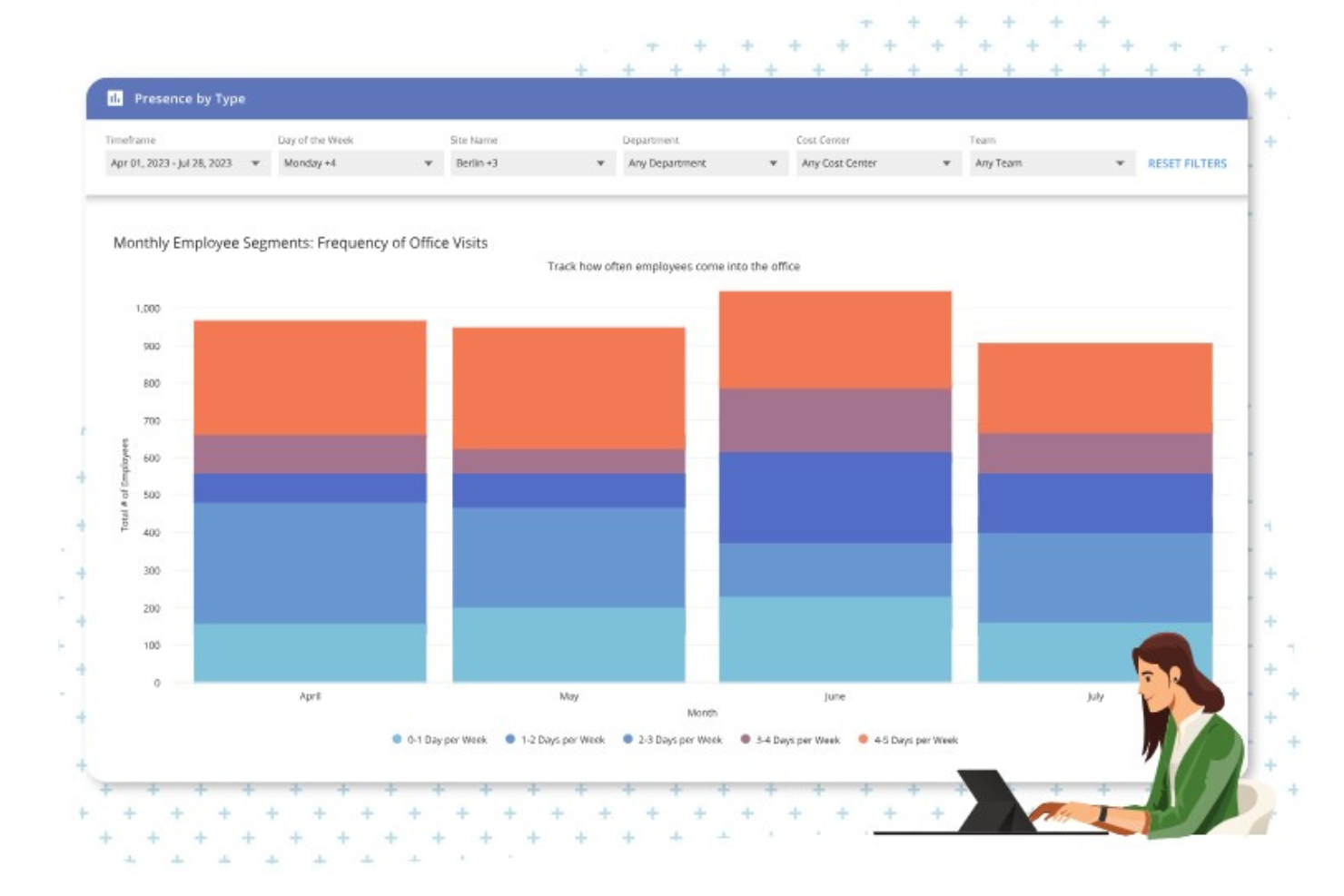
OfficeSpace è una piattaforma di gestione degli ambienti di lavoro per le organizzazioni che ottimizza la disposizione degli uffici, gestisce la prenotazione di scrivanie e sale riunioni e supporta modalità di lavoro ibride con informazioni in tempo reale sull'uso degli spazi.
Per chi è pensato OfficeSpace?
OfficeSpace è adatto ai team di gestione delle strutture e degli ambienti di lavoro di aziende di medie e grandi dimensioni che gestiscono il lavoro ibrido su più sedi.
Perché ho scelto OfficeSpace
OfficeSpace si è guadagnato un posto nella mia shortlist per la sua capacità di trasformare i dati grezzi degli spazi in decisioni operative. Apprezzo in particolare il pannello di analisi dell'utilizzo, che mostra esattamente come vengono occupate in tempo reale scrivanie, sale e zone dell'ufficio. Il mio team può estrarre report sulle tendenze di occupazione per identificare aree sottoutilizzate e adeguare di conseguenza gli spazi. Le sovrapposizioni visive sulle planimetrie rendono facile individuare i modelli a colpo d'occhio, senza dover esaminare fogli di calcolo.
Funzionalità principali di OfficeSpace
- Prenotazione delle sale con rilascio automatico: Prenota le sale riunioni direttamente da Outlook, Google, Slack o Microsoft Teams, con rilascio automatico della sala in caso di mancato check-in.
- Gestione di spostamenti, aggiunte e cambi: Trascina e rilascia le assegnazioni dei posti dei dipendenti sulle planimetrie digitali per coordinare sia cambiamenti ad hoc che trasferimenti su larga scala.
- Gestione delle richieste di manutenzione: Crea, approva e gestisci richieste di manutenzione con un sistema configurabile che ne traccia avanzamento e priorità.
- Gestione dei visitatori: Prenota scrivanie per ospiti e ricevi notifiche all'arrivo di clienti o consegne, con permessi di prenotazione delegati ai team della reception.
Integrazioni di OfficeSpace
Le integrazioni includono Microsoft Teams, Slack, Google Workspace, Office365, Zoom, Okta, Workday, Active Directory, Greetly e sistemi SSO.
Pros and Cons
Pros:
- Ampie capacità di reportistica e analisi
- Interfaccia intuitiva
- Include funzionalità di registrazione dei visitatori
Cons:
- Occorre un po' di tempo per padroneggiare tutte le funzioni
- I dettagli sui prezzi non sono trasparenti
New Product Updates from OfficeSpace

OfficeSpace Adds Work Order Status and Cost Reports
OfficeSpace adds Work Order Status and Work Order Cost reports for built-in maintenance reporting. These reports help facilities teams track work order activity and costs without relying on manual spreadsheets. For more information, visit OfficeSpace’s official site.
 .
.
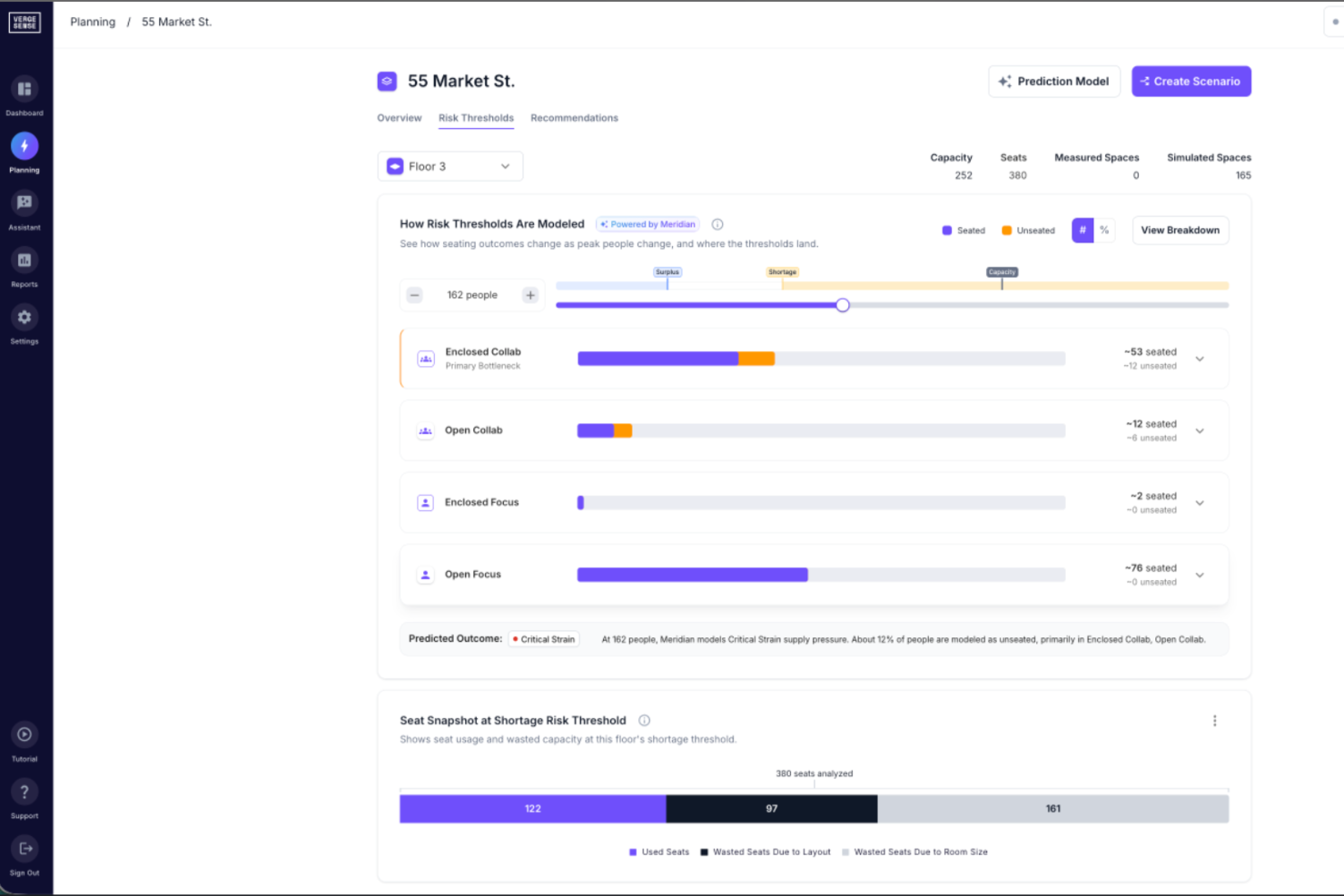
VergeSense è una piattaforma di intelligenza artificiale per la gestione dell'occupazione, che offre ai team immobiliari aziendali e agli specialisti degli ambienti di lavoro strumenti per pianificare gli spazi, dimensionare correttamente il portafoglio, prevedere la capacità e prendere decisioni sulla disposizione degli uffici utilizzando dati reali di utilizzo raccolti da sensori fisici.
Per chi è ideale VergeSense?
VergeSense è particolarmente adatto per team immobiliari aziendali e strategisti degli ambienti di lavoro in aziende di medie e grandi dimensioni che gestiscono portafogli di uffici complessi e su più sedi.
Perché ho scelto VergeSense
Ho selezionato VergeSense tra le migliori soluzioni perché adoro come il suo strumento di Pianificazione Predittiva trasforma vaghe domande 'cosa succede se' in decisioni concrete sugli spazi, supportate dai dati. Posso caricare una planimetria e simulare scenari confrontando dati reali di utilizzo in pochi minuti, testando la crescita del personale, i cambiamenti negli accessi ibridi o le fusioni prima di prendere impegni concreti. Il Large Spatial Model è allenato su oltre 200 milioni di piedi quadrati di comportamenti reali negli ambienti di lavoro, quindi le previsioni di capacità non si basano su medie di settore—riflettono come gli uffici vengono effettivamente utilizzati.
Caratteristiche principali di VergeSense
- Monitoraggio dell’occupazione in tempo reale: I sensori rilevano l'uso degli spazi in tempo reale su piani e zone, indicando quali aree sono occupate in ogni momento.
- Dashboard di utilizzo degli spazi: Analisi visive mostrano i modelli di utilizzo storico per tipologia di spazio, piano o edificio in periodi di tempo personalizzabili.
- Reportistica a livello di portafoglio: Dati aggregati su occupazione e utilizzo provenienti da più sedi di uffici in una vista unica e centralizzata.
- Fornitura di hardware per sensori: VergeSense offre propri sensori progettati appositamente per gli ambienti di lavoro, raccogliendo dati passivi sull'occupazione senza necessità di check-in da parte dei dipendenti o inserimenti manuali.
Integrazioni di VergeSense
VergeSense offre oltre 50 integrazioni native nel proprio ecosistema tecnologico, tra cui Accruent EMS, Archibus by Eptura, Aruba, Cisco Meraki, Cloudbooking, Comfy, Condeco by Eptura e Crestron, oltre a Microsoft 365, Google Workspace, ServiceNow e le principali piattaforme di prenotazione spazi. È disponibile un'API aperta per integrazioni personalizzate.
Pros and Cons
Pros:
- Accuratezza dei sensori superiore al 95% per l'occupazione
- Benchmarking multi-sito sull'intero portafoglio
- Supporta sensori sia cablati che wireless
Cons:
- I sensori basati su telecamera richiedono verifiche sulla privacy
- Richiede installazione fisica dell'hardware in loco

elia
Ideale per le integrazioni con i calendari
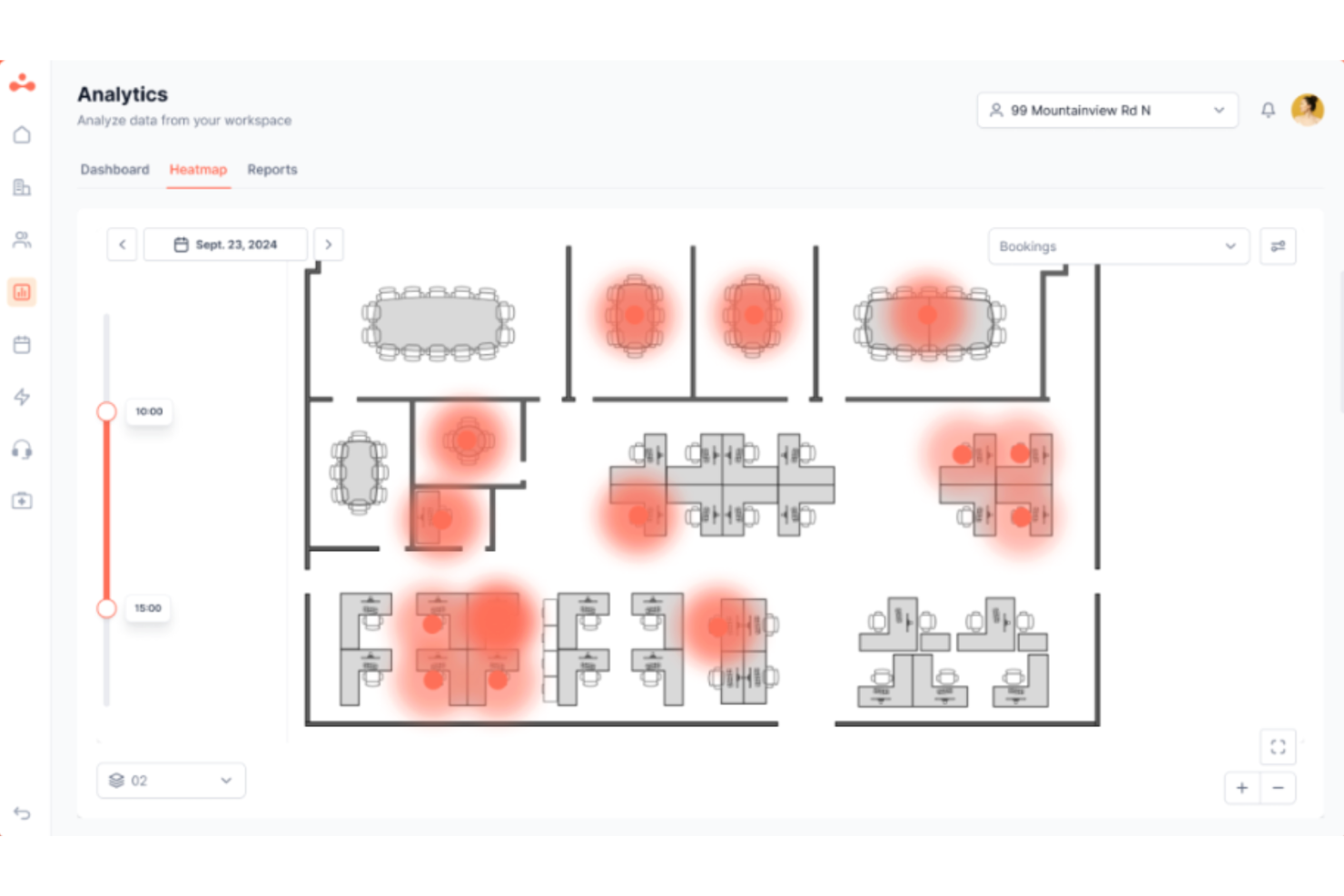
elia è una piattaforma per la gestione delle operazioni in ufficio che copre la prenotazione di scrivanie e sale riunioni, la gestione dei visitatori, il monitoraggio delle richieste di servizio, la gestione dell'occupazione degli spazi, il coordinamento dell'ufficio ibrido e la gestione della salute e sicurezza.
Per chi è più adatto elia?
elia è particolarmente indicato per i team di facility e workplace di organizzazioni di medie e grandi dimensioni che gestiscono il lavoro ibrido su più sedi.
Perché ho scelto elia
Ho scelto elia come una delle migliori soluzioni per il modo in cui le sue integrazioni con i calendari funzionano concretamente. Si tratta di una vera sincronizzazione bidirezionale: quando qualcuno prenota una sala su elia, la prenotazione si sincronizza automaticamente con Google Calendar o Outlook, e viceversa. Questo significa niente doppie prenotazioni e nessun dato obsoleto sulle sale. Apprezzo anche che elia invii le conferme di prenotazione e i promemoria di check-in direttamente tramite Outlook, così i dipendenti non devono mai abbandonare gli strumenti che già usano per gestire la loro giornata.
Funzionalità chiave di elia
- Planimetrie interattive: Esplora una mappa visiva dell’ufficio per trovare e prenotare una scrivania o uno spazio disponibile in base alla posizione.
- Gestione dei visitatori: Registra gli ospiti in anticipo, invia notifiche all’host all’arrivo e gestisci i check-in tramite un chiosco self-service.
- Gestione delle richieste di servizio: Invia e traccia richieste per catering, supporto IT o manutenzione degli impianti direttamente dalla piattaforma.
- Analisi dell’occupazione: Visualizza dati in tempo reale e storici sull’utilizzo degli spazi per monitorare come scrivanie, sale e aree vengono usate in tutto l’ufficio.
Integrazioni di elia
elia offre integrazioni native con Microsoft 365, Google Workspace, Slack e strumenti specifici all’interno di questi ecosistemi, tra cui Google Calendar, Microsoft Teams e Microsoft Outlook.
Pros and Cons
Pros:
- Monitoraggio dell’occupazione tramite sensori IoT integrati
- Supporta la pianificazione del lavoro ibrido
- Configurazione modulare con minimo impegno IT
Cons:
- Analisi limitate sui piani di fascia inferiore
- Le statistiche sull’occupazione potrebbero essere più dettagliate

Ideale per le operazioni di ambienti di lavoro aziendali

Hybrid Hero aiuta le aziende a gestire ambienti di lavoro ibridi offrendo strumenti per la prenotazione delle scrivanie, la pianificazione delle sale riunioni e l'analisi degli spazi, facilitando così per i responsabili d'ufficio e i team delle strutture l'ottimizzazione degli spazi e il supporto a modalità di lavoro flessibili.
Per chi è più indicato Hybrid Hero?
Hybrid Hero è particolarmente adatto a organizzazioni di medie e grandi dimensioni che gestiscono una forza lavoro ibrida in più sedi aziendali. Viene comunemente utilizzato da team operativi, delle strutture e delle risorse umane che necessitano di una gestione centralizzata degli ambienti di lavoro, visibilità dell'occupazione, prenotazione delle scrivanie, gestione dei visitatori e degli ospiti, oltre a report intersede.
Perché ho scelto Hybrid Hero
Hybrid Hero merita un posto in questa lista perché unisce strumenti per la gestione dell'ambiente di lavoro che molte organizzazioni gestiscono separatamente. La piattaforma include prenotazione delle scrivanie, pianificazione delle sale riunioni, gestione di visitatori e appaltatori, gestione dei parcheggi, gestione HR e reportistica di conformità in un sistema centralizzato. Questo fornisce ai team aziendali un unico punto da cui gestire le operazioni, la visibilità dell'occupazione e la reportistica in più sedi.
Caratteristiche principali di Hybrid Hero
- Gestione multisede dell'ambiente di lavoro: Gestisci prenotazioni delle scrivanie, sale riunioni e report sull'occupazione in diverse sedi da un'unica dashboard centralizzata.
- Gestione di visitatori e appaltatori: Registra ospiti e appaltatori con workflow di check-in, notifiche ai responsabili e registrazione degli accessi in tutte le sedi.
- Dashboard di analisi dell'ambiente di lavoro: Visualizza trend di occupazione, approfondimenti dai report e dati sull'utilizzo degli spazi per supportare la pianificazione operativa e la visibilità della conformità.
- Piantine interattive: Visualizza in tempo reale la disponibilità di scrivanie e sale con mappatura live dell'occupazione e filtri per area di lavoro.
Integrazioni di Hybrid Hero
Le integrazioni includono Microsoft 365, Outlook, Teams, Azure Active Directory, Google Workspace, SSO e Slack.
Pros and Cons
Pros:
- Strumenti di reportistica per più sedi
- Gestione centralizzata degli spazi di lavoro
- Certificazione ISO 27001
Cons:
- Richiede onboarding per l'adozione
- App mobile ancora in fase di sviluppo

Ideale per la programmazione mobile e il coordinamento del team
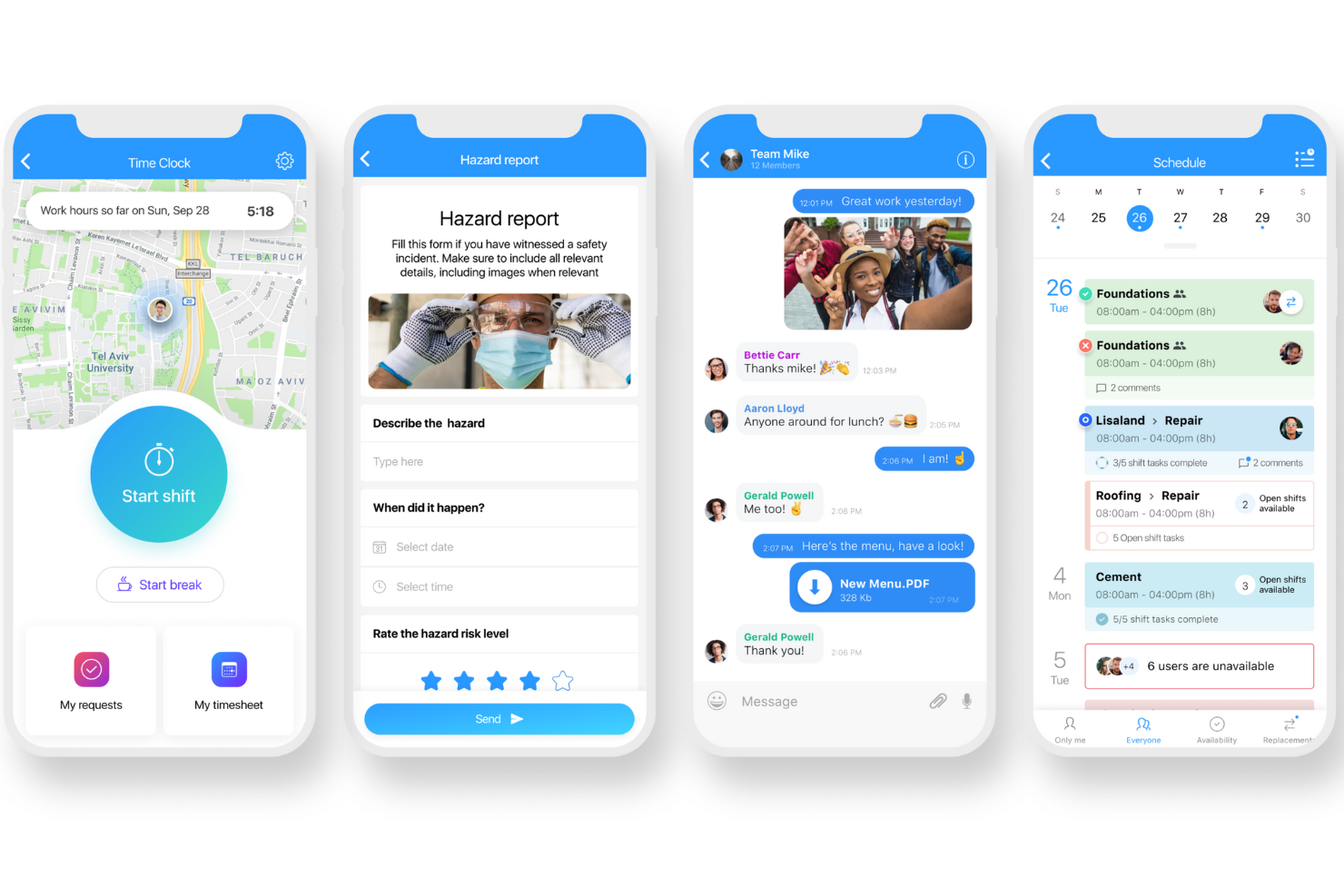
Connecteam è una piattaforma di gestione aziendale mobile-first pensata per imprese con team senza postazione fissa o distribuiti, che aiuta i manager a coordinare i turni, monitorare le presenze, assegnare compiti e semplificare la comunicazione da un'unica app.
Per chi è ideale Connecteam?
Connecteam è perfetta per piccole e medie imprese nei settori come vendita al dettaglio, ospitalità e servizi esterni che gestiscono lavoratori a ore o a turni.
Perché ho scelto Connecteam
Connecteam merita un posto nella mia lista per come gestisce alla perfezione la programmazione mobile dei dipendenti che non sono quasi mai in ufficio. Apprezzo che i manager possano creare e pubblicare i turni direttamente dal telefono, mentre i dipendenti ricevono notifiche immediate quando il loro orario viene aggiornato o si libera un turno. Il pianificatore drag-and-drop permette anche di impostare turni ricorrenti, gestire la disponibilità ed effettuare cambi turno senza scambi interminabili di email o messaggi. Per le imprese con più sedi o turni, la possibilità di vedere in una sola schermata chi è disponibile e chi è già programmato è davvero utile.
Funzionalità principali di Connecteam
- Timbro orario: I dipendenti possono timbrare entrata e uscita direttamente dal dispositivo mobile, con rilevamento GPS per verificare la posizione al momento della timbratura.
- Chat in-app: Invia messaggi diretti o annunci di gruppo a team specifici, reparti o a tutta la forza lavoro direttamente dall'app.
- Gestione delle attività: Crea e assegna attività con scadenze, checklist e allegati di immagini affinché i dipendenti sappiano esattamente cosa fare.
- Moduli digitali e checklist: Crea moduli personalizzati per rapporti di incidente, ispezioni o registri giornalieri che i dipendenti possono completare dal telefono.
Integrazioni di Connecteam
Le integrazioni includono QuickBooks, Gusto, Xero, ADP, Zapier, Wix, Lightspeed POS, PrismHR, Square e BambooHR.
Pros and Cons
Pros:
- Strumenti di programmazione mobile-first adatti a team sul campo
- Il monitoraggio delle presenze si integra direttamente con la gestione delle buste paga
- Comunicazione centralizzata che riduce la dipendenza da app esterne
Cons:
- Configurazione iniziale e personalizzazioni possono richiedere tempo
- Integrazioni native limitate
New Product Updates from Connecteam

Connecteam Expands Break and Timesheet Controls
Connecteam adds flexible break thresholds, personalized policies, auto-end options, a centralized exceptions report, and improved timesheet issue visibility to help teams manage breaks and timesheets more effectively. For more information, visit Connecteam’s official site.
 .
.
Archie
Ideale per ambienti coworking e ibridi
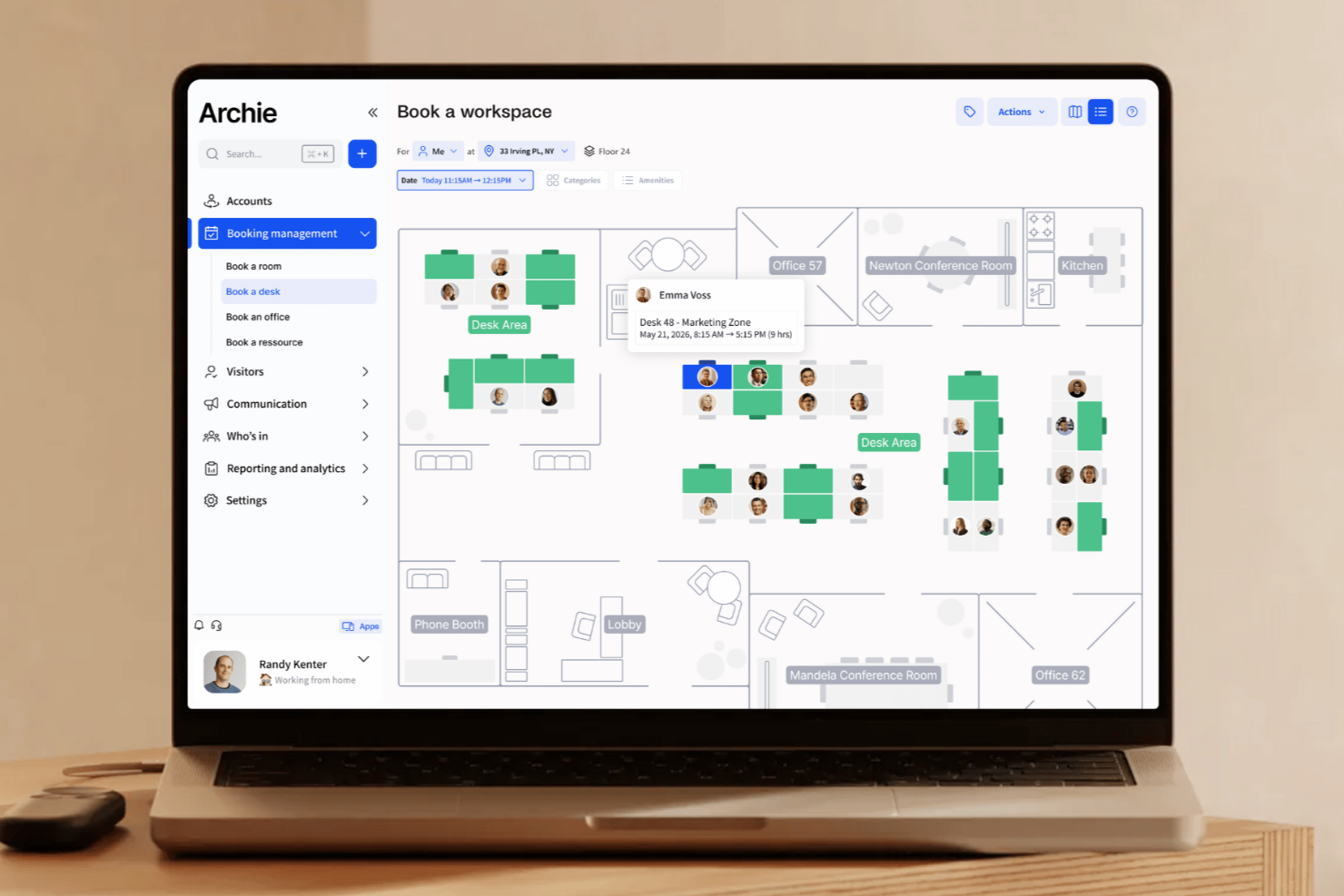
Archie è una piattaforma di gestione degli spazi di lavoro progettata per aziende e property manager che necessitano di organizzare prenotazioni, gestire visitatori e ottimizzare le risorse di uffici condivisi in ambienti di lavoro flessibili.
Per Chi è Ideale Archie?
Archie è particolarmente indicato per gli operatori di spazi coworking e le aziende che adottano un modello di lavoro ibrido e hanno bisogno di una piattaforma dedicata per gestire scrivanie, sale riunioni e visitatori in ambienti di ufficio flessibili.
Perché Ho Scelto Archie
Archie si guadagna un posto nella mia lista perché è una delle poche piattaforme di gestione degli uffici creata per gestire sia le operazioni di coworking che gli ambienti di ufficio ibridi in un'unica soluzione. Il sistema di prenotazione basato su crediti permette agli operatori di coworking di assegnare crediti ai membri e controllare esattamente come vengono utilizzati su scrivanie, sale riunioni e uffici privati. Il CRM per coworking gestisce lead, organizza visite e si occupa di contratti e preventivi senza necessità di strumenti separati. Per i team ibridi, le planimetrie interattive con disponibilità delle scrivanie in tempo reale aiutano a coordinare chi sarà presente e quando.
Caratteristiche Principali di Archie
- Gestione visitatori: Registra check-in dei visitatori, invia notifiche agli ospiti e acquisisce firme digitali per NDA o liberatorie alla reception.
- Prenotazione sale riunioni: Prenota sale direttamente dalla piantina o dalla vista calendario, con disponibilità in tempo reale e prevenzione automatica dei conflitti.
- Integrazione con sistemi di controllo accessi: Connettiti ai sistemi di controllo accessi per concedere o revocare automaticamente l’accesso a edifici e sale in base alle prenotazioni.
- Fatturazione e gestione pagamenti: Genera fatture, traccia i pagamenti e gestisci i piani di abbonamento direttamente all’interno della piattaforma per i membri del coworking.
Integrazioni di Archie
Le integrazioni includono Microsoft Teams, Slack, Google Calendar, Microsoft Outlook, Zoom, Kisi, Stripe, GoCardless, QuickBooks e Xero.
Pros and Cons
Pros:
- Opzioni per app con brand personalizzato disponibili
- Prenotazione tramite web o app mobile
- Strumenti completi per la gestione degli spazi di lavoro
Cons:
- Non offre visibilità sugli orari dei team
- Poche opzioni di personalizzazione per i report

Tactic
Ideale per la flessibilità degli ambienti di lavoro ibridi

Tactic è una piattaforma di gestione degli spazi di lavoro progettata per le organizzazioni che gestiscono team ibridi, aiutando gli office manager e i professionisti delle risorse umane a coordinare la prenotazione delle scrivanie, le sale riunioni e le risorse del luogo di lavoro in ambienti d’ufficio flessibili e moderni.
Per chi è più adatto Tactic?
Tactic è particolarmente indicato per aziende di medie e grandi dimensioni che hanno adottato modelli di lavoro ibrido e necessitano di strumenti strutturati per gestire spazi di lavoro condivisi e orari dei dipendenti.
Perché ho scelto Tactic
Tactic merita un posto nella mia shortlist per la capacità di gestire efficacemente le sfide quotidiane di coordinamento tipiche del lavoro ibrido. Apprezzo particolarmente la funzione di visibilità del team, che consente ai dipendenti di vedere chi sarà in ufficio e quando, prima di prenotare, così da pianificare le giornate in ufficio intorno alle persone con cui necessitano davvero di collaborare. Utilizzo anche la funzionalità di suddivisione in zone dei team (“team neighborhoods”) per assegnare ai dipartimenti aree dedicate, eliminando l’incertezza su dove sedersi. Tessa, l’assistente AI di Tactic, permette ai dipendenti di saltare la piantina e inviare un messaggio per trovare una scrivania vicino a un collega specifico.
Funzionalità principali di Tactic
- Gestione dei parcheggi: I dipendenti possono prenotare uno stallo auto contemporaneamente alla scrivania, oppure gli amministratori possono assegnare posti fissi a specifici membri del personale.
- Armadi intelligenti: I dipendenti prenotano armadietti giornalieri per oggetti personali o attrezzature direttamente dall’app durante la prenotazione dello spazio di lavoro.
- Prenotazione prioritaria: Gli amministratori possono bloccare determinate scrivanie per i dirigenti o per dipendenti con necessità specifiche, lasciando libere le altre postazioni per la prenotazione generale.
- Analisi in tempo reale: Monitoraggio da un unico pannello dell’utilizzo delle scrivanie, delle presenze e delle tendenze di prenotazione per piani e dipartimenti.
Integrazioni di Tactic
Le integrazioni includono Microsoft Teams, Slack, Google Calendar, Outlook, Zoom, Microsoft Entra ID e Avigilon.
Pros and Cons
Pros:
- Mappe interattive facilitano la localizzazione di spazi e colleghi
- Il check-in dei visitatori si integra con i flussi di lavoro dello spazio
- Offre disponibilità in tempo reale
Cons:
- Potrebbe non scalare bene per aziende molto grandi
- Potrebbe non offrire una personalizzazione profonda per layout d’ufficio complessi

Whatspot
Ideale per piccoli spazi di lavoro condivisi
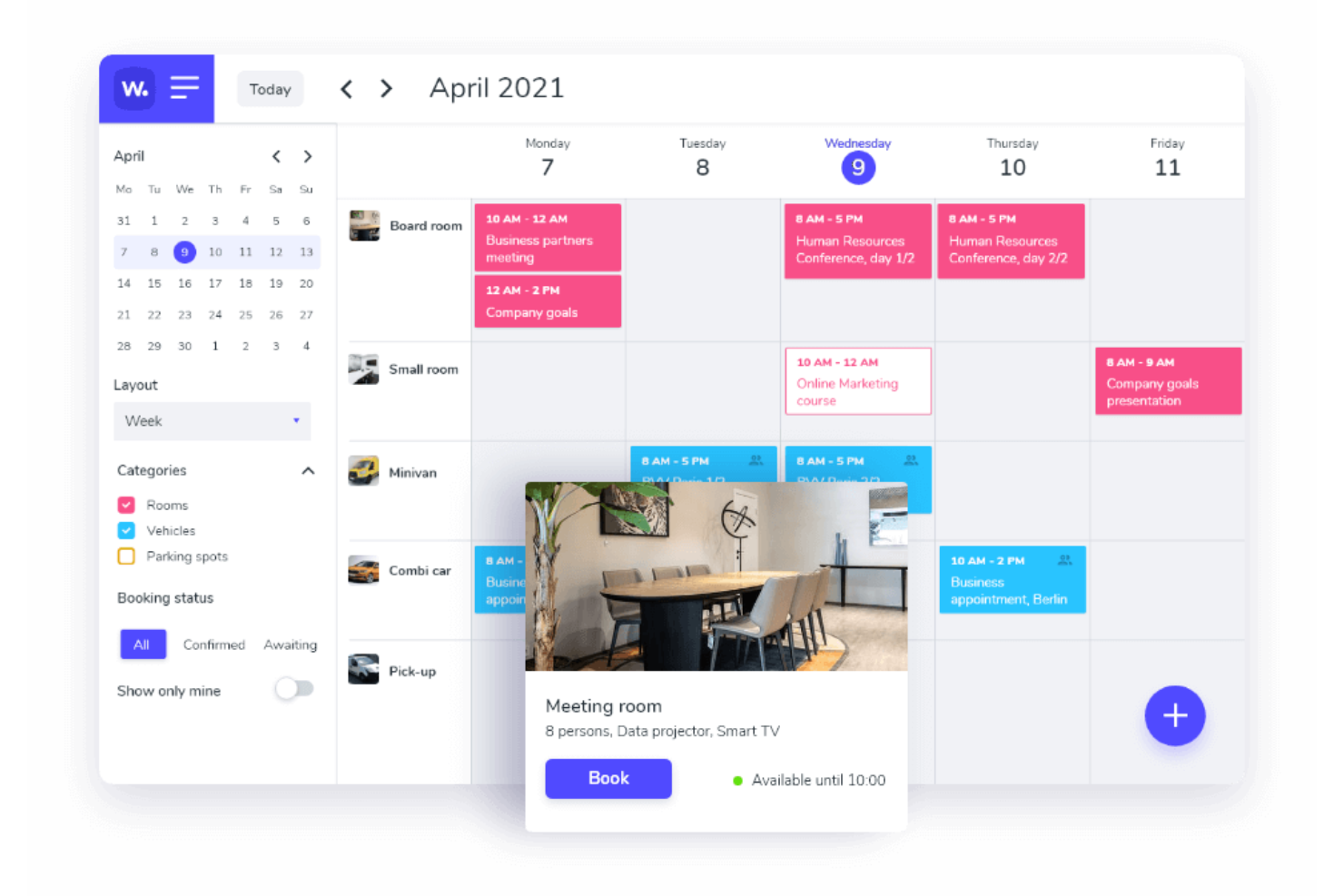
Whatspot è una piattaforma di prenotazione e gestione delle risorse progettata per uffici e organizzazioni che necessitano di coordinare spazi condivisi, scrivanie ed attrezzature, aiutando i team a semplificare la programmazione ed evitare conflitti in ambienti di lavoro affollati.
Per chi è ideale Whatspot?
Whatspot è adatto a piccole imprese, spazi di coworking e team ibridi che hanno bisogno di un modo semplice per gestire scrivanie, stanze e risorse condivise.
Perché ho scelto Whatspot
Whatspot è una delle mie scelte preferite perché adoro il modo in cui gestisce il caos quotidiano degli spazi ufficio condivisi senza complicare le cose. Uso la funzione di planimetria interattiva per vedere esattamente quali scrivanie sono libere e dove si trovano i colleghi—senza messaggi avanti e indietro. Anche la prenotazione tramite QR code è utile; posso avvicinarmi a una stanza, scansionare il codice e confermare la prenotazione in due tap. Il rilascio automatico del check-in impedisce che i no-show occupino inutilmente scrivanie o stanze e mantiene aggiornata la disponibilità per tutti.
Funzionalità principali di Whatspot
- Flussi di approvazione: Imposta richieste di prenotazione che richiedono l'approvazione di un responsabile prima di confermare una scrivania, una stanza o una risorsa.
- Gestione dei visitatori: Registra e traccia i visitatori che arrivano nei tuoi uffici, mantenendo un registro chiaro di chi è presente in sede.
- Report e analisi d'utilizzo: Visualizza i dati sulle prenotazioni e le tendenze di occupazione per capire come viene utilizzato lo spazio dell’ufficio.
- Supporto multi-sede: Gestisci prenotazioni e risorse in diverse sedi aziendali da un unico account.
Integrazioni di Whatspot
Le integrazioni includono Microsoft Outlook, Microsoft Teams e Google Calendar.
Pros and Cons
Pros:
- Planimetrie interattive per una gestione efficiente delle scrivanie
- Supporto multilingua, rendendolo accessibile a team diversificati
- Funzionalità QR code per prenotazioni rapide e semplici
Cons:
- Nessuna integrazione attualmente disponibile
- Opzioni di personalizzazione limitate per esigenze specifiche
New Product Updates from Whatspot

Whatspot Adds Booking Modes for Different Space Types
Whatspot introduces Booking Modes to support different reservation rules for different space types. Admins can choose flexible bookings, fixed durations, or fixed intervals based on how each space is used. For more information, visit Whatspot's official site.
 .
.Altri software per la gestione degli uffici
Ecco altri validi strumenti di gestione ufficio che non sono entrati nella mia shortlist, ma potrebbero essere perfetti per le tue esigenze specifiche:
- Airtable
Ideale per creare app senza codice
- Othership
Ideale per ottimizzare il tempo di collaborazione
- Dropbox
Ideale per archiviazione documenti su cloud
- ProofHub
Ideale per la gestione di progetti di team
- deskbird
Ideale per modalità di lavoro flessibili
- YAROOMS
Ideale per prenotazioni di sale riunioni potenziate dall'intelligenza artificiale
- Clearooms
Ideale per la prenotazione da remoto user-friendly
- Dibsido
Ideale per la gestione completa del luogo di lavoro
- Smartway2
Ideale per la prenotazione di scrivanie in ambienti di lavoro ibridi
- PandaDoc
Il miglior software amministrativo per la gestione dei contratti
- HubStar
Ideale per la gestione degli ambienti di lavoro supportata dai dati
- Expensify
Ideale per la gestione delle spese
- Waldo by MOFFI
Il migliore con pianificazione degli spazi guidata dall’AI
- Tango Analytics
Ideale per la gestione degli spazi ufficio
- 1Password
Ideale per la protezione e il monitoraggio delle password
- anny
Ideale per la prenotazione centralizzata degli spazi di lavoro
- Floor Plan Mapper
Ideale per mappe interattive dei posti a sedere


Recensioni correlate di software HR
Se non hai ancora trovato quello che cerchi qui, dai un’occhiata ad altri strumenti correlati che abbiamo testato e valutato:
- Software HR
- Software per le paghe
- Software di recruiting
- Servizi Employer of Record
- Applicant Tracking Systems
- Software per la gestione della forza lavoro
Come Valuto il Software di Gestione dell'Ufficio
Quando un team People Ops deve gestire prenotazioni delle scrivanie, richieste di ferie e registrazioni dei visitatori in tre uffici diversi, valuto gli strumenti su due livelli: funzionalità indispensabili e ciò che realmente distingue una soluzione dall'altra.
Funzionalità Principali (Requisiti Fondamentali per Questa Lista)
Quando seleziono gli strumenti per la mia lista, valuto ciascuno su una scala da 0 (non offre la funzionalità) a 5 (eccelle in quest'area) per ognuna delle funzionalità principali elencate di seguito. Poi, calcolo il punteggio totale dello strumento come percentuale. Ciascuno deve raggiungere un punteggio totale minimo del 75% per essere incluso.
- Directory & Dati dei Dipendenti: Verifico se la directory va oltre la semplice lista contatti, includendo campi personalizzati, organigrammi e accessi basati sul ruolo, così che le risorse umane possano trovare e aggiornare i profili senza doversi immergere nei fogli di calcolo.
- Flussi di Lavoro di Onboarding e Offboarding: Un buon strumento permette di costruire sequenze di attività a più step per i nuovi assunti—come inviare i pacchetti di benvenuto, raccogliere i moduli fiscali e fornire l'accesso ai badge—senza dover sollecitare le persone via email.
- Gestione di Orario, Presenze e Ferie: Valuto come ogni piattaforma gestisce le richieste di permesso, le catene di approvazione e le regole di accumulo, specialmente per i team con più politiche di ferie in sedi diverse.
- Prenotazione di Scrivanie, Sale e Risorse: Che il team debba prenotare scrivanie flessibili o sale riunioni, cerco planimetrie visuali, sincronizzazione con il calendario e rilevamento dei conflitti che evitino doppie prenotazioni nei giorni affollati.
- Gestione di Visitatori e Fornitori: Cerco flussi digitali di check-in che notificano gli ospitanti, raccolgono firme su NDA e registrano i dati dei visitatori—eliminando i fogli cartacei di registrazione che molte reception ancora usano.
- Gestione di Documenti e Policy: Ogni strumento dovrebbe supportare un archivio organizzato con gestione delle versioni e tracciamento delle conferme di lettura, così puoi distribuire un manuale aggiornato e assicurarti che ogni dipendente l'abbia visionato.
Una volta ottenuta una lista di strumenti che soddisfano i criteri, considero ciò che distingue ciascuna piattaforma.
Fattori Differenzianti (Cosa Distingue i Fornitori)
Ecco come confronto e metto a confronto i diversi fornitori:
Funzionalità Distintive
La pianificazione ibrida è fondamentale—cerco strumenti che permettano ai team di coordinare i giorni in ufficio e visualizzare chi sarà presente, così i responsabili della sede possono pianificare senza continui scambi di messaggi. Anche le dashboard analitiche sono importanti, perché sapere quali piani sono vuoti il venerdì aiuta a prendere decisioni immobiliari più intelligenti. Una app mobile nativa completa il quadro, offrendo ai dipendenti la possibilità di prenotare una scrivania o richiedere un permesso direttamente dal cellulare anziché attendere di essere al PC.
Oltre le Funzionalità
La profondità delle integrazioni è rilevante—controllo se una piattaforma si connette in modo nativo con il tuo HRIS, payroll e strumenti di collaborazione come Slack o Microsoft Teams, perché un tool non connesso crea solo altro lavoro manuale. La sicurezza è altrettanto importante nella gestione dei dati dei dipendenti, quindi verifico la presenza della certificazione SOC 2, del supporto SSO e dei permessi basati sui ruoli. Anche la trasparenza dei prezzi guida la mia valutazione. Preferisco fornitori che pubblichino tariffe per dipendente o prezzi modulari, così puoi stimare i costi prima di fissare un incontro commerciale.
Funzionalità degli strumenti di gestione ufficio
I software per la gestione dell’ufficio possono aiutare a snellire una vasta gamma di funzioni, tra cui il monitoraggio dei progetti, la gestione efficiente di documenti, spazi e beni aziendali. Ecco alcune caratteristiche chiave che distinguono le migliori piattaforme di gestione per ufficio dagli altri prodotti sul mercato:
- Analisi dell’utilizzo degli spazi: Tieni traccia di come vengono utilizzate le diverse aree dell’ufficio per ottimizzare la disposizione, ridurre sprechi di spazio e pianificare futuri ampliamenti. Questa funzione offre cruscotti visuali o report, rendendo semplice individuare tendenze e prendere decisioni per il risparmio sui costi.
- Sistema di prenotazione delle sale: Permetti ai membri del team di prenotare facilmente sale riunioni o spazi condivisi. Un calendario di prenotazione intuitivo evita le doppie prenotazioni, riduce i conflitti e aiuta tutti a coordinare i propri impegni.
- Tracciamento degli asset: Monitora la posizione, l’utilizzo e lo stato di manutenzione dell’attrezzatura d’ufficio. Con questa funzione, non perderai dispositivi o strumenti costosi e saprai sempre quando è il momento di effettuare riparazioni o aggiornamenti.
- Gestione dei trasferimenti: Semplifica il processo di ricollocazione dei team o riorganizzazione degli spazi. Puoi coordinare risorse, tracciare l’avanzamento e comunicare le modifiche rapidamente, rendendo meno traumatici anche gli spostamenti su larga scala.
- Gestione dell’occupazione: Visualizza aggiornamenti in tempo reale su chi si trova in ufficio, dove sono seduti e quali scrivanie o sale sono disponibili. Questo consente un migliore controllo delle presenze e un uso efficiente degli spazi, soprattutto durante i regimi di lavoro ibrido.
- Gestione dei visitatori: Accogli e monitora i visitatori con check-in digitali e badge automatizzati. Oltre a mantenere l’ufficio sicuro, questa funzione offre un’esperienza fluida e accogliente agli ospiti.
- Pianificazione della manutenzione: Organizza e automatizza la manutenzione ordinaria per spazi ed equipaggiamenti. Eviterai imprevisti dell’ultimo minuto e garantirai il regolare funzionamento dell’ufficio grazie a promemoria operativi e una facile tracciatura delle richieste.
Funzionalità AI comuni nei software di gestione spazi ufficio
Oltre alle classiche funzionalità dei software per la gestione degli spazi d’ufficio elencate sopra, molte soluzioni integrano strumenti AI con funzionalità come:
- Pianificazione predittiva degli spazi: Analizza le tendenze di utilizzo e prevedi le future necessità di spazio, consentendoti di adattare proattivamente le disposizioni e prevenire il sovraffollamento.
- Assegnazione automatica delle scrivanie: Utilizza l’AI per associare collaboratori a scrivanie o stanze in base a ruolo, preferenze e orari, eliminando la gestione manuale della postazione flessibile (hot desking).
- Assegnazione intelligente delle risorse: Assegna sale riunioni, attrezzature o posti auto tramite AI per bilanciare la domanda e ridurre i conflitti.
- Previsioni sull’occupazione: Prevedi le presenze e il traffico negli uffici grazie all’AI, così puoi ottimizzare i consumi, pianificare le pulizie ed evitare congestioni.
- Avvisi di manutenzione basati su AI: Rileva schemi nei dati sulle prestazioni delle attrezzature o degli ambienti per prevedere eventuali interventi, aiutandoti a risolvere i problemi prima che interrompano il lavoro.
Costi e prezzi per software di gestione ufficio
Quando scegli un software di gestione ufficio, è importante comprendere i diversi livelli di prezzo e quali funzionalità sono incluse in ognuno. I fornitori di software offrono spesso più piani per adattarsi ad aziende di diversa dimensione ed esigenza, dalle startup alle grandi imprese.
Qui di seguito ho descritto le opzioni di prezzo più diffuse e cosa aspettarsi da ciascun piano. Questa tabella ti aiuterà a confrontare le alternative disponibili e a scegliere il piano più adatto alle tue esigenze specifiche.
Tabella di confronto dei piani per i software di gestione ufficio
| Piano | Prezzo Medio (Mensile) | Caratteristiche Comuni Incluse |
|---|---|---|
| Piano Gratuito | $0 | Gestione base delle attività, archiviazione documenti limitata, monitoraggio base dei progetti e strumenti di collaborazione per il team fino a 5 utenti |
| Piano Base | $10 - $15 per utente | Tutte le funzionalità del Piano Gratuito, archiviazione documenti estesa, integrazione del calendario, automazione delle attività, monitoraggio delle risorse e supporto fino a 10 utenti |
| Piano Standard | $20 - $30 per utente | Tutte le funzionalità del Piano Base, strumenti avanzati per la gestione dei progetti, prenotazione delle risorse, dashboard personalizzabili, controlli di accesso basati sui ruoli e supporto prioritario fino a 50 utenti |
| Piano Premium | $40 - $50 per utente | Tutte le funzionalità del Piano Standard, utenti illimitati, reportistica e analisi avanzate, automazione dei flussi di lavoro, funzionalità di sicurezza avanzate, integrazione con app di terze parti e supporto clienti 24/7 |
| Piano Enterprise | Prezzo personalizzato | Tutte le funzionalità del Piano Premium, account manager dedicato, integrazioni personalizzate, governance avanzata dei dati, onboarding e formazione prioritari e supporto su misura per grandi organizzazioni |
Quando scegli un piano, considera la dimensione del tuo team, le funzionalità di cui hai bisogno e il livello di supporto che richiedi. Ogni piano si basa sul precedente, offrendo funzionalità più avanzate e flessibilità man mano che crescono le tue esigenze di gestione dell’ufficio.
Man mano che restringi la scelta sul software più adatto alle tue esigenze, ti consiglio di tenere a mente i seguenti fattori relativi al prezzo:
- Piani gratuiti disponibili: Avere un'opzione gratuita permette ai piccoli team di provare i prodotti senza impegno
- Prezzo per utente vs. tariffa fissa: Il prezzo per utente è vantaggioso per i team più numerosi, mentre le tariffe fisse sono più adatte a gruppi piccoli
- Piani a livelli: Più livelli di prezzo ti consentono di trovare il giusto equilibrio tra funzionalità e costo
- Sconto per piani annuali: I contratti annuali possono offrire sconti significativi rispetto alla fatturazione mensile
- Prezzi Enterprise o personalizzati: Le organizzazioni più grandi possono richiedere preventivi custom per adattare il software alle proprie esigenze
- Prove gratuite: Le prove permettono di valutare adeguatamente se un prodotto soddisfa o meno le tue necessità
- rn t
- rn
- rn t
- Modalità semplice per creare workflow senza programmare grazie a interfacce visive drag-and-drop rn
rn
Altre Recensioni di Software per le Operazioni Aziendali
Gli strumenti software avanzati di oggi possono aiutarti a migliorare l'efficienza aziendale su tutta la linea. Ecco alcuni altri articoli che potrebbero interessarti nella tua ricerca di una migliore gestione aziendale:
- Software per la gestione delle risorse
- Software per la gestione delle riunioni per team remoti
- Software per riunioni del consiglio d'amministrazione
- Sistemi di gestione dei documenti
Cosa succede adesso?
Se sei in procinto di valutare un software per la gestione dell’ufficio, collegati gratuitamente con un consulente SoftwareSelect per ricevere raccomandazioni.
Compili un modulo e fai una breve chiacchierata in cui ti vengono chieste le specifiche delle tue esigenze. Poi riceverai una lista di software selezionati da valutare. Ti supporteranno anche durante tutto il processo di acquisto, comprese le trattative sul prezzo.
rn- rn t
- rn
- rn t
- Trigger condizionali che avviano automaticamente azioni come notifiche o approvazioni in base a regole impostate rn
rn
- rn t
- rn
- rn t
- Catene di approvazione personalizzabili che instradano i contenuti alle persone giuste rn
rn
- rn t
- rn
- rn t
- Azioni pianificate e ricorrenti per attività come promemoria o controlli di stato rn
rn
- rn t
- rn
- rn t
- Possibilità di creare processi multi-step con logiche come approvazioni, revisioni e modifiche rn
rn
- rn t
- rn
- rn t
- Modalità semplice per creare workflow senza programmare grazie a interfacce visive drag-and-drop rn
rn
Altre Recensioni di Software per le Operazioni Aziendali
Gli strumenti software avanzati di oggi possono aiutarti a migliorare l'efficienza aziendale su tutta la linea. Ecco alcuni altri articoli che potrebbero interessarti nella tua ricerca di una migliore gestione aziendale:
- Software per la gestione delle risorse
- Software per la gestione delle riunioni per team remoti
- Software per riunioni del consiglio d'amministrazione
- Sistemi di gestione dei documenti
Cosa succede adesso?
Se sei in procinto di valutare un software per la gestione dell’ufficio, collegati gratuitamente con un consulente SoftwareSelect per ricevere raccomandazioni.
Compili un modulo e fai una breve chiacchierata in cui ti vengono chieste le specifiche delle tue esigenze. Poi riceverai una lista di software selezionati da valutare. Ti supporteranno anche durante tutto il processo di acquisto, comprese le trattative sul prezzo.