

I 10 migliori software per la prenotazione delle sale riunioni del 2026

10 La migliore selezione di software per la prenotazione delle sale riunioni


Trovare il software giusto per la prenotazione delle sale riunioni può sembrare un'impresa ardua, vista la grande quantità di opzioni disponibili. Hai bisogno di uno strumento che semplifichi la pianificazione ed elimini i conflitti, ma restringere il campo delle possibilità richiede molto tempo.
Questa guida ti accompagnerà alla scoperta dei migliori software per la prenotazione delle sale riunioni, aiutandoti a creare uno spazio di lavoro più organizzato ed efficiente. Grazie alla mia esperienza come esperto di software per le risorse umane, ti aiuterò a valutare le opzioni migliori con sicurezza.
Perché fidarsi delle nostre recensioni sui software
Il nostro team testa e recensisce software dal 2012. In quanto esperti HR noi stessi, sappiamo quanto sia difficile — e importante — scegliere il software giusto.
Per questa guida, abbiamo valutato gli strumenti attraverso test pratici e ricerche indipendenti, assegnando un punteggio agli strumenti in base ai nostri criteri di selezione. Ci basiamo inoltre sulle competenze di leader di pensiero del settore e di professionisti HR attivi.
Le nostre recensioni riflettono il nostro giudizio editoriale umano, non un discorso di vendita.
Revisori esperti:
Migliori software per la prenotazione delle sale riunioni: tabella comparativa dei prezzi
Questa tabella comparativa riassume i dettagli dei prezzi delle mie migliori selezioni di software per la prenotazione delle sale riunioni, aiutandoti a trovare il software più adatto al tuo budget e alle esigenze della tua azienda.
| Tool | Best For | Trial Info | Price | ||
|---|---|---|---|---|---|
| 1 | Ideale per sistemi di prenotazione personalizzabili | Prova gratuita di 14 giorni + demo gratuita disponibile | Da $249/spazio/mese (fatturato annualmente) | Website | |
| 2 | Il miglior software per la gestione degli spazi riunione per team ibridi | Prova gratuita di 14 giorni | Da $3/postazione/mese | Website | |
| 3 | Ideale per la prenotazione e la gestione delle sale in tempo reale | Demo gratuita disponibile | Prezzo su richiesta | Website | |
| 4 | Ideale per la prenotazione di sale su più piattaforme | Demo gratuita + prova gratuita di 14 giorni disponibile | A partire da $2.8/postazione/mese | Website | |
| 5 | Ideale per la visualizzazione di planimetrie 3D | Piano gratuito + prova gratuita + demo gratuita disponibili | A partire da 4 $/risorsa/mese (con fatturazione annuale) | Website | |
| 6 | Ideale per la pianificazione a livello aziendale | Piano gratuito + demo gratuita disponibile | Da $500/mese | Website | |
| 7 | Ideale per piccoli uffici e spazi condivisi | Prova gratuita di 14 giorni + piano gratuito + demo gratuita disponibile | Da $22/mese (fatturazione annuale) | Website | |
| 8 | Ideale per planimetrie interattive | Demo gratuita disponibile | Prezzo su richiesta | Website | |
| 9 | Ideale per integrazioni con Microsoft e Google | Versione gratuita disponibile | Da $32.47/utente/mese (fatturazione annuale) | Website | |
| 10 | Migliore strumento di prenotazione sale riunioni per sincronizzazione con Outlook e Google Calendar | Prova gratuita + demo gratuita disponibili | A partire da $3,75/utente attivo/mese (fatturazione annuale) | Website |


Recensioni dei migliori software per la prenotazione delle sale riunioni
Di seguito trovi le mie sintesi dettagliate dei migliori software per la pianificazione delle sale riunioni inclusi nella mia lista dei 20 migliori, con note sul motivo per cui li ho scelti. Ogni recensione offre uno sguardo approfondito alle funzionalità principali, ai pro e contro, alle integrazioni e ai casi d’uso ideali, per aiutarti a trovare lo strumento più adatto a te.

Skedda
Ideale per sistemi di prenotazione personalizzabili
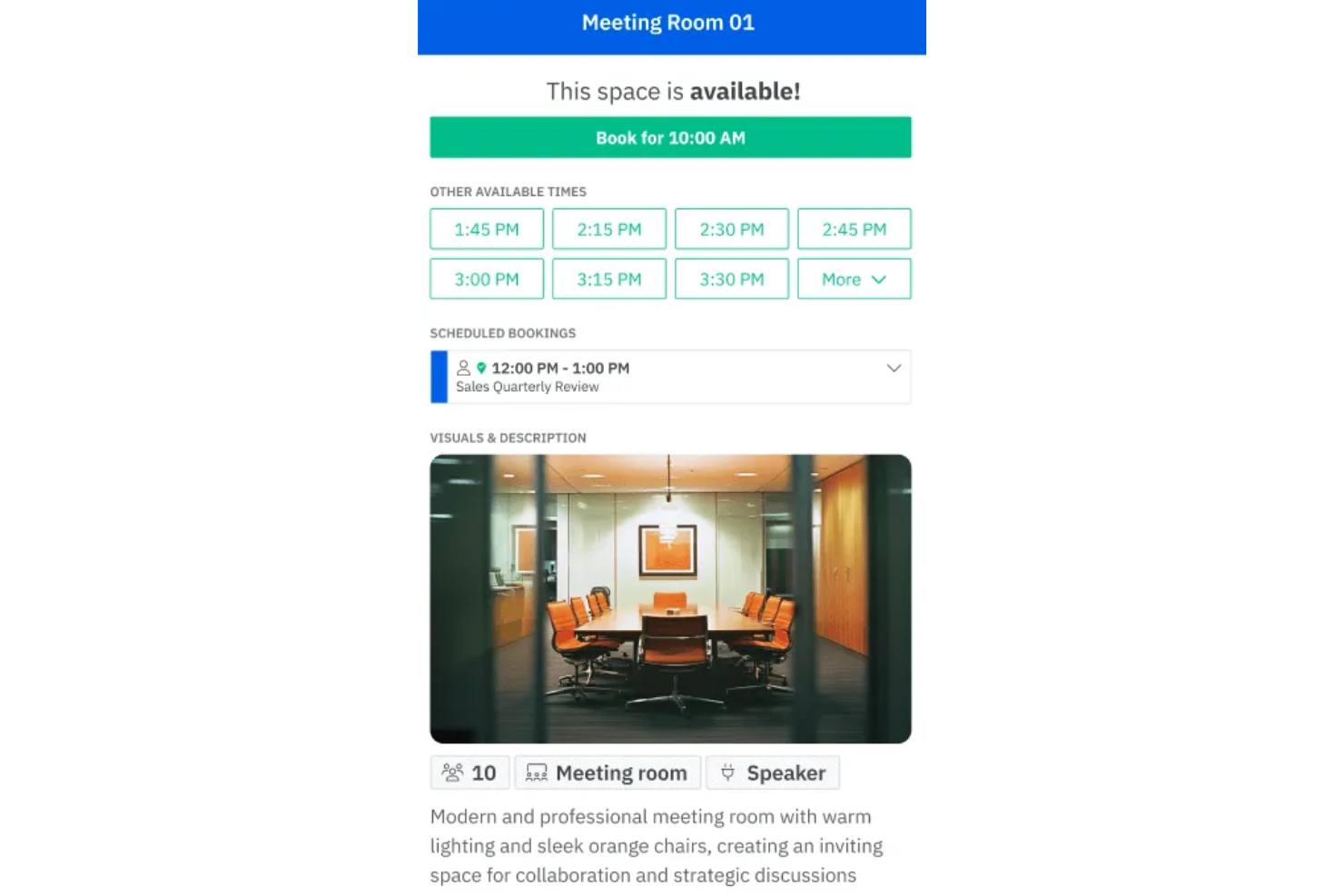
Skedda è una piattaforma di prenotazione progettata per luoghi di lavoro, spazi di coworking e organizzazioni che devono gestire sale riunioni e spazi condivisi con una pianificazione flessibile e controlli di accesso per gli utenti.
Per Chi È Più Indicato Skedda?
Skedda è particolarmente adatto a responsabili di strutture e team aziendali di organizzazioni di medie e grandi dimensioni che necessitano di un controllo dettagliato su come vengono prenotati e utilizzati gli spazi condivisi.
Perché Ho Scelto Skedda
Ho inserito Skedda tra le mie scelte perché permette una personalizzazione molto avanzata delle prenotazioni senza bisogno del supporto di uno sviluppatore. Apprezzo la possibilità di impostare regole di prenotazione condizionali—come limitare l’uso di determinate sale a specifici team o richiedere approvazione per prenotazioni superiori a una certa durata. Trovo particolarmente utile la funzione della mappa interattiva degli spazi: consente al mio team di visualizzare la disponibilità degli ambienti e prenotare direttamente da una mappa dell’ufficio invece che da un semplice elenco. I controlli di accesso degli utenti mi permettono di definire esattamente chi può prenotare cosa, mantenendo l'organizzazione tra i vari reparti.
Funzionalità Principali di Skedda
- Pianificazione automatizzata: Imposta prenotazioni ricorrenti e finestre di disponibilità automatizzate affinché le sale siano sempre prenotabili senza bisogno di aggiornamenti manuali.
- Sincronizzazione del calendario: Collega Skedda con Google Calendar o Microsoft Outlook per visualizzare le prenotazioni delle sale accanto agli altri impegni.
- Portale di prenotazione self-service: Gli utenti possono cercare, visualizzare e riservare spazi disponibili direttamente tramite una pagina brandizzata senza coinvolgimento dell’amministratore.
- Reportistica sulle prenotazioni: Monitora i dati di utilizzo delle sale nel tempo per individuare abitudini di prenotazione e spazi poco sfruttati.
Integrazioni di Skedda
Le integrazioni includono Microsoft 365, Google Workspace, Slack, Zoom, Stripe, Xero, QuickBooks, Trello, ServiceNow e Logitech Tap Scheduler.
Pros and Cons
Pros:
- Visualizzazione degli spazi che facilita la consultazione e la prenotazione delle sale
- Regole di prenotazione personalizzabili per favorire un uso equo ed efficiente degli spazi
- Disponibile pianificazione automatizzata
Cons:
- I piani più economici potrebbero non offrire sufficiente analisi dei dati
- La configurazione delle regole di prenotazione richiede tempo
New Product Updates from Skedda

Skedda Expands Visit Exports With Custom Field Data
Skedda adds Summary and Breakdown visit exports with custom field data, filter support, and XLSX or CSV formats. These updates give teams more flexibility when exporting visit- and visitor-level information for reporting and analysis. For more information, visit Skedda’s official site.
 .
.
Tactic
Il miglior software per la gestione degli spazi riunione per team ibridi

Tactic offre alle organizzazioni un'unica interfaccia per gestire le prenotazioni di sale riunioni e postazioni, aiutando gli office manager e i team ibridi a coordinare spazi, orari e risorse in ambienti di lavoro dinamici.
Per chi è più indicato Tactic?
Tactic è particolarmente adatto ad aziende di medie dimensioni che gestiscono orari di lavoro ibridi e hanno bisogno di un unico luogo dove coordinare gli spazi d'ufficio per team flessibili e a rotazione.
Perché ho scelto Tactic
Tactic è una delle mie scelte principali perché adoro il modo in cui gestisce l'intera organizzazione degli orari di lavoro ibrido, e non solo la prenotazione delle sale in modo isolato. Quando il mio team prenota una sala riunioni, può contemporaneamente vedere quali colleghi saranno in ufficio quel giorno, verificare eventuali sovrapposizioni di orari e riservare uno spazio che risponda effettivamente alle esigenze della riunione—filtrando per capienza, disponibilità di attrezzature AV o lavagne in pochi secondi. La funzione di rilascio automatico libera una sala se qualcuno la prenota ma non effettua il check-in tramite Slack o Microsoft Teams, rendendola disponibile per altri. L'assistente Tessa AI va oltre, permettendo di descrivere le necessità in linguaggio naturale e mostrando le sale disponibili che corrispondono ai requisiti indicati.
Caratteristiche principali di Tactic
- Planimetrie interattive: Visualizza e prenota postazioni o sale direttamente su una mappa dell'ufficio.
- Visibilità nella pianificazione dei team: Vedi quali colleghi prevedono di essere in ufficio in un determinato giorno prima di prenotare uno spazio.
- Analisi dell'utilizzo: Monitora i dati di occupazione di sale e postazioni nel tempo per individuare spazi sottoutilizzati e periodi di massima richiesta.
- Gestione dei visitatori: Registra e gestisci le visite degli ospiti insieme alle prenotazioni interne per coordinare la logistica della reception.
Integrazioni di Tactic
Le integrazioni includono Microsoft Teams, Slack, Google Calendar, Outlook, Zoom, Microsoft Entra ID e Avigilon.
Pros and Cons
Pros:
- Visibilità in tempo reale sulla disponibilità di postazioni e sale
- App mobile per prenotare ovunque ti trovi
- Mappe dettagliate e interattive degli uffici
Cons:
- Potrebbe non essere l'ideale per grandi organizzazioni con strutture complesse
- Potrebbe offrire più opzioni di personalizzazione

Ideale per la prenotazione e la gestione delle sale in tempo reale
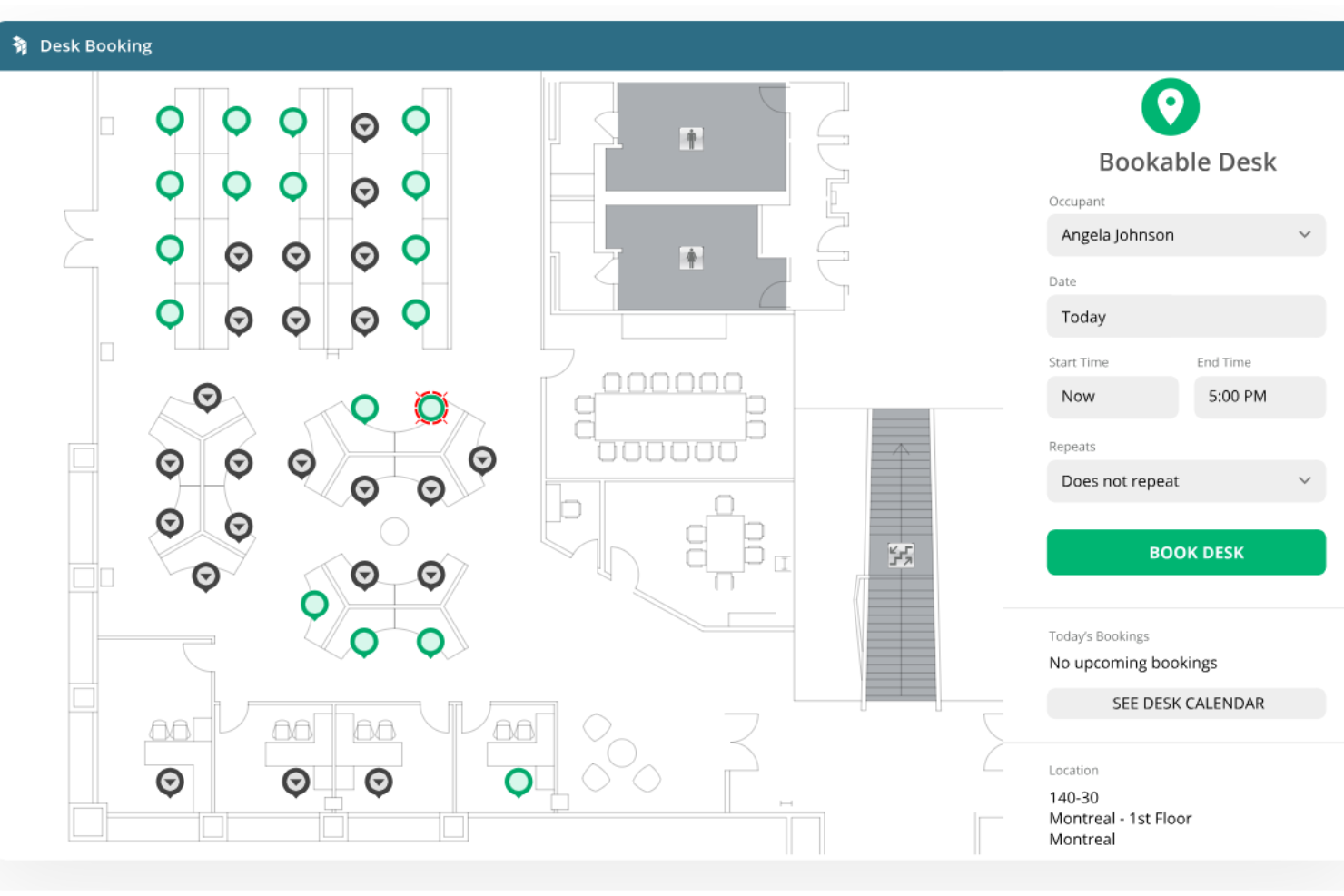
OfficeSpace semplifica la prenotazione delle sale riunioni, gestisce l'utilizzo degli spazi e mantiene fluido il funzionamento degli uffici ibridi grazie a planimetrie interattive e strumenti di pianificazione in tempo reale.
Per chi è più indicato OfficeSpace?
OfficeSpace è particolarmente adatto per aziende di medie e grandi dimensioni che gestiscono ambienti di lavoro ibridi con più sale riunioni distribuite in una o più sedi.
Perché ho scelto OfficeSpace
Ho scelto OfficeSpace tra i migliori per la sua eccellente gestione delle prenotazioni delle sale in tempo reale su larga scala. Quello che apprezzo di più è la funzione di disponibilità in tempo reale: il mio team può verificare quali sale sono libere da qualsiasi dispositivo e prenotarle istantaneamente, senza gli scambi tipici dei calendari condivisi. La politica di rilascio automatico è un'altra funzione su cui faccio affidamento: se qualcuno prenota una sala e non si presenta, OfficeSpace la libera automaticamente, riducendo così riunioni fantasma e sprechi di spazio. I suggerimenti di pianificazione basati sull’intelligenza artificiale propongono la sala più adatta secondo i modelli di utilizzo, evitando che vengano prenotate sempre le stesse due stanze lasciando le altre vuote.
Funzionalità principali di OfficeSpace
- Controlli sulla privacy: Imposta linee guida per le prenotazioni e nascondi l'organizzatore o i nomi delle riunioni per proteggere incontri sensibili o riservati.
- Check-in tramite chiosco e tablet: Usa iPad o tablet Android in sede per controllare la disponibilità delle sale, prenotare spazi e registrarsi sul posto.
- Personalizzazione dei profili delle sale: Aggiungi dettagli su capienza, attrezzatura e dotazioni ai profili delle sale affinché i dipendenti possano filtrare e trovare lo spazio giusto per le loro esigenze.
- Allegati per richieste di setup e A/V: Inserisci richieste di catering, supporto tecnico o altri servizi direttamente nel flusso di prenotazione delle sale.
Integrazioni OfficeSpace
Le integrazioni includono Microsoft Teams, Slack, Google Workspace, Office 365, Zoom, Okta, Workday, Active Directory, Greetly e sistemi Single Sign-On (SSO).
Pros and Cons
Pros:
- Sincronizzazione dati in tempo reale
- Capacità di pianificazione di scenari
- Buone funzionalità di reportistica
Cons:
- Le dashboard potrebbero essere più personalizzabili
- La maggior parte delle funzionalità di prenotazione non è disponibile nella versione Lite
New Product Updates from OfficeSpace

OfficeSpace Adds Work Order Status and Cost Reports
OfficeSpace adds Work Order Status and Work Order Cost reports for built-in maintenance reporting. These reports help facilities teams track work order activity and costs without relying on manual spreadsheets. For more information, visit OfficeSpace’s official site.
 .
.
Archie
Ideale per la prenotazione di sale su più piattaforme

Archie è una piattaforma per la prenotazione di sale riunioni progettata per ambienti di lavoro moderni e spazi di coworking che necessitano di gestire spazi condivisi, automatizzare le prenotazioni e offrire ai team una visibilità in tempo reale sulla disponibilità delle sale.
A Chi Si Rivolge Archie?
Archie è particolarmente indicato per team ibridi e operatori di spazi di coworking che hanno bisogno di un sistema di prenotazione delle sale flessibile e facile da gestire su più sedi.
Perché Ho Scelto Archie
Archie si guadagna un posto tra i migliori della mia lista perché permette ai team di prenotare sale riunioni da dove lavorano già. Mi piace il fatto che sia possibile riservare una sala direttamente da Microsoft Teams o Outlook senza dover passare a un altro strumento, e la sincronizzazione bidirezionale del calendario fa sì che la prenotazione appaia subito su entrambe le piattaforme. L'app dedicata Archie Rooms per iOS e Android aggiunge un ulteriore livello di flessibilità: i team possono verificare la disponibilità in tempo reale, prenotare all'istante e fare il check-in tramite QR code dal proprio telefono. Per i team ibridi che usano diversi canali, la coerenza tra le piattaforme è utile.
Caratteristiche Principali di Archie
- Planimetrie interattive: Visualizza una mappa della disposizione degli uffici per vedere quali sale e scrivanie sono disponibili prima di prenotare.
- Tablet per la visualizzazione delle sale: Collega Archie a un tablet all'esterno di qualsiasi sala riunioni per mostrare la disponibilità in tempo reale e consentire prenotazioni istantanee.
- Regole di prenotazione automatizzate: Imposta limiti di capienza, finestre di prenotazione e requisiti di approvazione per controllare come vengono riservate le sale.
- Report sull'utilizzo degli spazi: Accedi a dati di utilizzo e trend di occupazione per capire come vengono usate le tue sale riunioni.
Integrazioni di Archie
Le integrazioni includono Microsoft Teams, Slack, Google Calendar, Microsoft Outlook, Zoom, QuickBooks, Xero, Stripe, GoCardless e HubSpot.
Pros and Cons
Pros:
- Strumenti completi per la gestione degli spazi di lavoro
- Prenotazione tramite web o app mobile
- Opzioni di app personalizzate disponibili
Cons:
- Potrebbero essere offerte più opzioni di personalizzazione dei report
- Potrebbe non supportare tutti i modelli di tablet per sale riunioni

anny
Ideale per la visualizzazione di planimetrie 3D
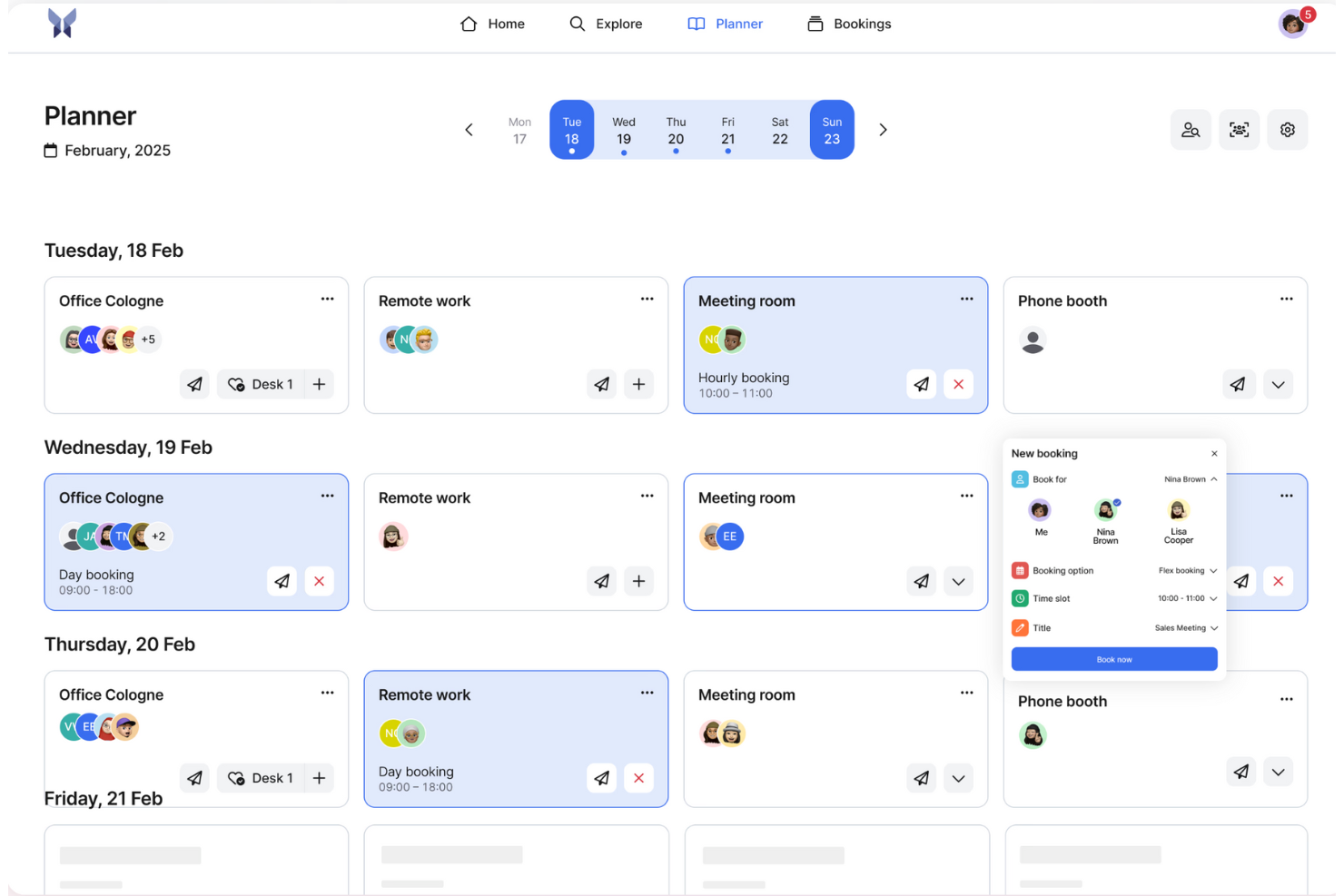
anny è un sistema di prenotazione di sale basato su una mappa interattiva 3D dell'ufficio. Una singola prenotazione può organizzare il catering, sincronizzarsi con il calendario e sbloccare la porta; la stessa piattaforma si estende anche a scrivanie, parcheggi, attrezzature e altro.
Per chi è più adatto anny?
anny è ideale per organizzazioni ibride e con più sedi, dalle aziende agli spazi di coworking e alle istituzioni pubbliche, che desiderano gestire le prenotazioni interne e gli affitti esterni in un unico sistema conforme al GDPR e certificato ISO 27001.
Perché ho scelto anny
Ho scelto anny perché eccelle nel fornire un'esperienza di prenotazione semplificata grazie alla sua esclusiva funzionalità di planimetria 3D. Questa consente al tuo team di visualizzare e selezionare facilmente gli spazi per riunioni disponibili, migliorando l'intero processo di prenotazione. Inoltre, le funzionalità di check-in automatizzato di anny garantiscono che le prenotazioni non utilizzate vengano rilasciate, ottimizzando l'utilizzo delle sale. Queste funzioni affrontano direttamente i problemi comuni di gestione e coordinamento degli spazi, rendendo anny uno strumento prezioso per qualsiasi organizzazione.
Funzionalità principali di anny
- Mappa interattiva 3D dell'ufficio: Naviga tra sale, scrivanie e parcheggi con una vista 3D reale di ogni piano, molto più chiara di un semplice elenco o di una planimetria 2D.
- Prenotazioni con controllo degli accessi: L'ingresso può essere associato alla prenotazione, con accesso temporaneo alla porta concesso automaticamente, senza bisogno di chiavi o registrazioni manuali.
- Assistente AI per le prenotazioni di anny: Il personale può prenotare una sala 24 ore su 24, 7 giorni su 7, per telefono o tramite chat su Teams, Slack o un widget web; anny AI abbina uno spazio disponibile.
- Display delle sale & rilascio automatico: La disponibilità in tempo reale viene mostrata sui display delle porte per effettuare il check-in e prenotare con un tocco, mentre le sale non utilizzate si liberano automaticamente quando nessuno si presenta.
Integrazioni di anny
Le integrazioni includono Microsoft 365, Outlook, Google Workspace, Google Calendar, Microsoft Teams, Slack, Stripe, PayPal, SSO/SAML e un'ampia gamma di sistemi di serrature intelligenti e controllo degli accessi, tra cui Salto, Nuki, dormakaba, Tapkey, iLOQ, KleverKey, Comydo, UniFi e Shelly.
Pros and Cons
Pros:
- La disponibilità delle sale in tempo reale previene le doppie prenotazioni
- Supporta le prenotazioni da dispositivi mobili per la gestione in mobilità
- I check-in tramite codice QR migliorano la sicurezza e la praticità
Cons:
- Alcuni utenti segnalano occasionali rallentamenti nelle prestazioni
- L'interfaccia di amministrazione può risultare complessa

elia
Ideale per la pianificazione a livello aziendale

Progettata come una piattaforma operativa all-in-one per la gestione degli ambienti di lavoro, elia copre la prenotazione delle sale riunioni, la prenotazione delle scrivanie, il monitoraggio dell'occupazione, la gestione dei visitatori e le richieste di servizi attraverso un'unica interfaccia.
Per chi è più adatta elia?
elia è adatta per aziende di medie e grandi dimensioni che gestiscono ambienti di lavoro ibridi in diverse sedi o team.
Perché ho scelto elia
Ho incluso elia tra le mie scelte principali perché consente di gestire la pianificazione dell'intera organizzazione da un'unica dashboard amministrativa, evitando che ogni ufficio o dipartimento debba gestire le prenotazioni separatamente. Il mio team riesce a monitorare la disponibilità delle sale, la prenotazione delle scrivanie e la programmazione dei visitatori in più sedi contemporaneamente. I permessi basati sui ruoli di elia permettono agli amministratori di definire chi può prenotare cosa, in quale edificio e secondo quali condizioni; una funzione che trovo veramente utile su larga scala.
Funzionalità chiave di elia
- Display digitali delle sale: Collega schermi compatibili all'esterno delle sale riunioni per mostrare la disponibilità in tempo reale e permettere prenotazioni immediate direttamente dal display.
- Sincronizzazione calendario: L'integrazione bidirezionale con Microsoft 365 e Google Workspace mantiene le prenotazioni delle sale allineate agli eventi di calendario già presenti dei dipendenti.
- Rilascio automatico delle sale: Le sale vengono liberate automaticamente quando una riunione viene annullata o se nessuno effettua il check-in, evitando prenotazioni fantasma.
- Analisi sull'utilizzo delle sale: Tieni traccia della frequenza con cui le sale riunioni vengono prenotate, per quanto tempo sono usate e quali sale risultano sottoutilizzate nelle tue sedi aziendali.
Integrazioni di elia
elia offre integrazioni native con Microsoft 365, Google Workspace, Slack e strumenti specifici di questi ecosistemi, inclusi Google Calendar, Microsoft Teams e Microsoft Outlook.
Pros and Cons
Pros:
- Mappe dei piani integrate per una prenotazione visiva
- Supporta la gestione di sedi aziendali multiple
- Visibilità in tempo reale della presenza dei colleghi
Cons:
- Statistiche di occupazione e reportistica limitate
- Il chiosco in reception richiede solo iPad

Whatspot
Ideale per piccoli uffici e spazi condivisi
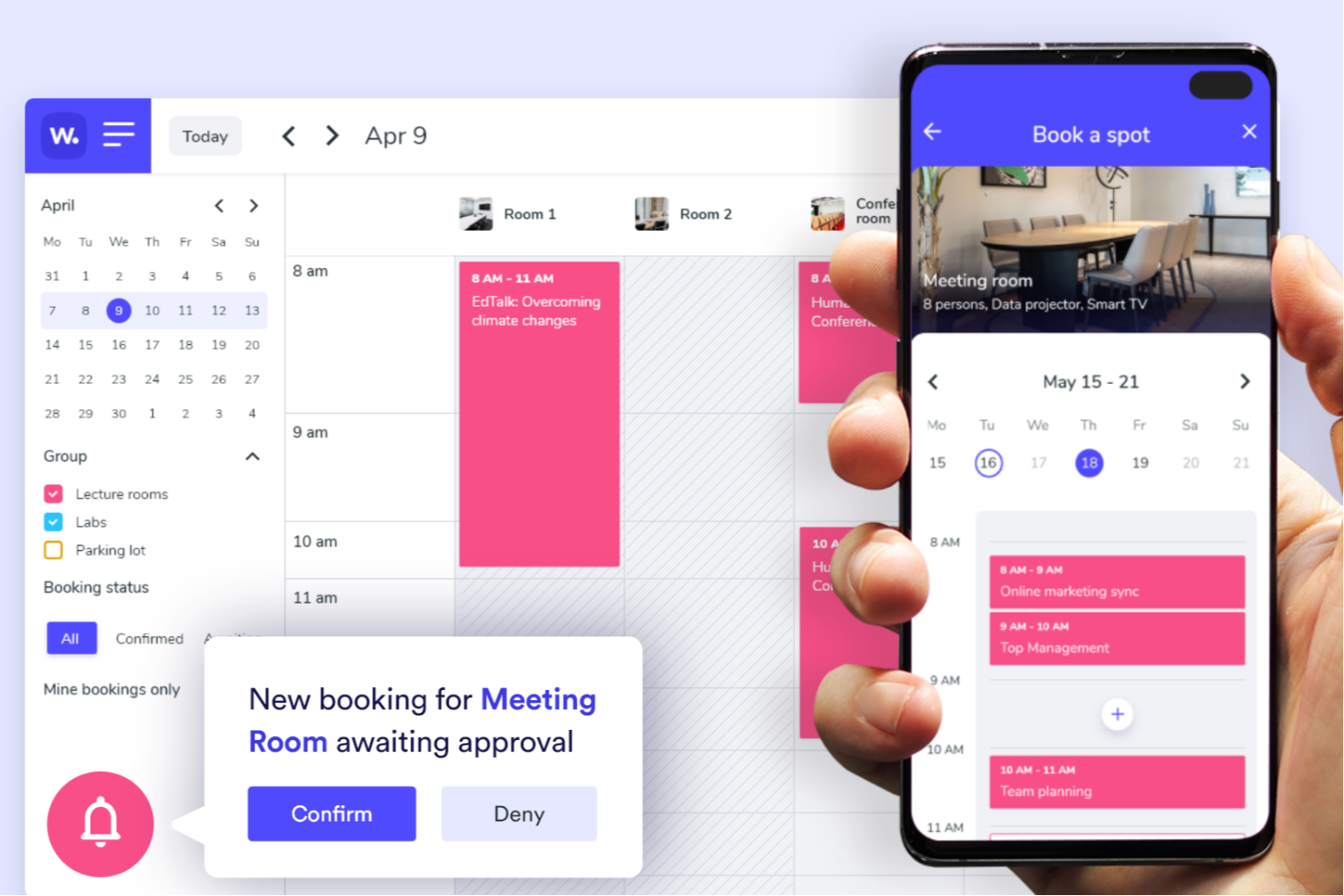
Whatspot è una piattaforma di prenotazione progettata per aziende e organizzazioni che necessitano di un modo semplice per gestire sale riunioni e spazi condivisi, aiutando i team a evitare doppie prenotazioni e semplificando le prenotazioni con una programmazione rapida e istantanea.
Per chi è ideale Whatspot?
Whatspot è adatto a piccole imprese, spazi di coworking e ambienti d'ufficio condivisi che necessitano di un sistema leggero e senza complicazioni per gestire le prenotazioni di stanze e risorse.
Perché ho scelto Whatspot
Whatspot merita un posto nella mia lista perché è costruito appositamente per ambienti di prenotazione a bassa complessità e ad alto ricambio, che le piattaforme più grandi tendono a complicare. Mi piace il funzionamento della prenotazione tramite QR code: si posiziona un codice sulla porta della sala riunioni, e chiunque può scansionarlo per vedere la disponibilità e confermare la prenotazione con due tocchi. Per gli spazi condivisi dove spesso serve una stanza al volo, è davvero utile. Uso anche la funzione di check-in per ridurre i mancati arrivi: se qualcuno non conferma la prenotazione all'arrivo, Whatspot libera automaticamente lo spazio per evitare che resti inutilizzato.
Caratteristiche principali di Whatspot
- Flussi di approvazione delle prenotazioni: Imposta regole che richiedono l'approvazione del responsabile prima che una prenotazione venga confermata, dando agli amministratori il controllo su chi prenota cosa e quando.
- Planimetrie interattive: Carica una mappa del tuo spazio così gli utenti possono selezionare visivamente una stanza o una scrivania direttamente dalla disposizione.
- Prenotazioni ricorrenti: Pianifica prenotazioni ripetute per riunioni regolari o sessioni fisse del team senza reinserire ogni volta i dettagli.
- Panoramica calendario delle prenotazioni: Visualizza tutte le prenotazioni future di stanze e risorse in un calendario condiviso per monitorare l'uso degli spazi a colpo d'occhio.
Integrazioni di Whatspot
Le integrazioni includono Microsoft Outlook, Microsoft Teams e Google Calendar.
Pros and Cons
Pros:
- Funzionalità QR code per prenotazioni rapide e semplici
- Supporto multilingue, che lo rende accessibile a team eterogenei
- Planimetrie interattive per una gestione efficiente delle scrivanie
Cons:
- Opzioni di personalizzazione limitate per esigenze specifiche
- Al momento nessuna integrazione elencata
New Product Updates from Whatspot

Whatspot Adds Booking Modes for Different Space Types
Whatspot introduces Booking Modes to support different reservation rules for different space types. Admins can choose flexible bookings, fixed durations, or fixed intervals based on how each space is used. For more information, visit Whatspot's official site.
 .
.
Ideale per planimetrie interattive

Hybrid Hero aiuta le organizzazioni a gestire le prenotazioni delle sale riunioni e la riserva degli spazi di lavoro, offrendo ai responsabili degli uffici e ai team delle strutture una chiara visibilità per ottimizzare gli spazi, ridurre i conflitti di programmazione e migliorare l'esperienza sul posto di lavoro.
Per chi è ideale Hybrid Hero?
Hybrid Hero è particolarmente adatto per organizzazioni di medie e grandi dimensioni che gestiscono sale riunioni, postazioni, visitatori e parcheggi su più sedi aziendali.
Perché ho scelto Hybrid Hero
Hybrid Hero si distingue perché la prenotazione delle sale riunioni fa parte di una piattaforma più ampia di gestione delle operazioni sul luogo di lavoro, piuttosto che essere un semplice strumento autonomo di pianificazione. Le prenotazioni delle sale si integrano con la gestione delle postazioni, dei visitatori, dei parcheggi e la visualizzazione delle planimetrie all'interno dello stesso sistema, aiutando le organizzazioni a gestire molteplici risorse aziendali in ambiente centralizzato.
Funzionalità principali di Hybrid Hero
- Prenotazione sale riunioni con planimetrie interattive: Visualizza la disponibilità delle sale in tempo reale sulle mappe dinamiche degli uffici con filtri per servizi e capienza, e prenota direttamente dall'interfaccia della planimetria.
- Rilascio automatico in caso di assenza: Le sale che non vengono registrate entro una finestra temporale configurata possono tornare automaticamente disponibili.
- Gestione multi-sede: Amministra la prenotazione delle sale, la reportistica e la disponibilità su più sedi aziendali da una dashboard centralizzata.
- Gestione visitatori e parcheggi: Coordina il check-in dei visitatori, gli ospiti esterni e le prenotazioni dei parcheggi insieme alle prenotazioni delle postazioni e delle sale riunioni, tutto sulla stessa piattaforma aziendale.
Integrazioni di Hybrid Hero
Le integrazioni includono Microsoft 365, Outlook, Teams, Azure Active Directory, Google Workspace e un'API personalizzata per flussi di lavoro aggiuntivi.
Pros and Cons
Pros:
- Rilascio automatico delle prenotazioni non utilizzate
- Adatto alle esigenze dei team ibridi
- Interfaccia visiva delle planimetrie altamente intuitiva
Cons:
- Capacità di prenotazione offline limitate
- La navigazione dell'app mobile è leggermente complessa

Ideale per integrazioni con Microsoft e Google

Othership è una piattaforma per la prenotazione di spazi di lavoro e sale riunioni progettata per i team che si muovono tra uffici, hub di coworking e ambienti da remoto. Se la tua organizzazione utilizza spazi on-demand, scrivanie condivise o sedi di lavoro ibride, Othership ti offre un modo per gestire prenotazioni e flussi di lavoro in un unico luogo.
Perché ho scelto Othership
Ho scelto Othership perché supporta configurazioni di lavoro flessibili in stile coworking, non solo uffici fissi. Puoi prenotare sale riunioni, postazioni hot desk o spazi di lavoro on-demand per l’ora o per il giorno, così il tuo team non è legato a una singola sede.
Troverai supporto integrato per l’uso in luoghi misti—sedi proprie e spazi coworking—così puoi coordinarti su più location senza utilizzare strumenti separati. Mi piace anche che la piattaforma offra prenotazioni tramite telefono, browser, calendario o tablet di accesso, consentendo al tuo team di usare ciò che già conosce. Infine, le sue analisi aiutano a capire come vengono utilizzati gli spazi—perfetto per ottimizzare la disponibilità flessibile.
Caratteristiche principali di Othership
Ecco alcune funzionalità da evidenziare:
- Prenotazione di spazi di lavoro on-demand: Prenota scrivanie, sale riunioni o aree coworking per il tempo necessario.
- Planimetrie visive & supporto multi-sede: Mappa uffici, sedi coworking e disposizioni hot-desking per gestire tutte le location in un unico sistema.
- Automazione integrata delle policy di prenotazione: Imposta regole come tempi di buffer, rilascio automatico in caso di mancata presentazione e flussi di approvazione adatti ad ambienti flessibili.
- Analisi dell’utilizzo degli spazi flessibili: Dashboard mostrano con quale frequenza vengano utilizzate le sedi e le postazioni per adeguare la strategia di spazi o membership.
Integrazioni Othership
Le integrazioni includono Microsoft Outlook, Microsoft Teams, Google Calendar, Slack, Workday HCM, Auth0 (SSO) e altro ancora.
Pros and Cons
Pros:
- Procedura di prenotazione facile grazie all'interfaccia intuitiva
- Analisi sulle prenotazioni di sale riunioni e postazioni
- Possibilità di prenotare stanze su diversi dispositivi
Cons:
- Disponibilità limitata per lingue aggiuntive
- Le inclusioni dei piani possono essere difficili da comprendere senza una consulenza esperta

deskbird
Migliore strumento di prenotazione sale riunioni per sincronizzazione con Outlook e Google Calendar
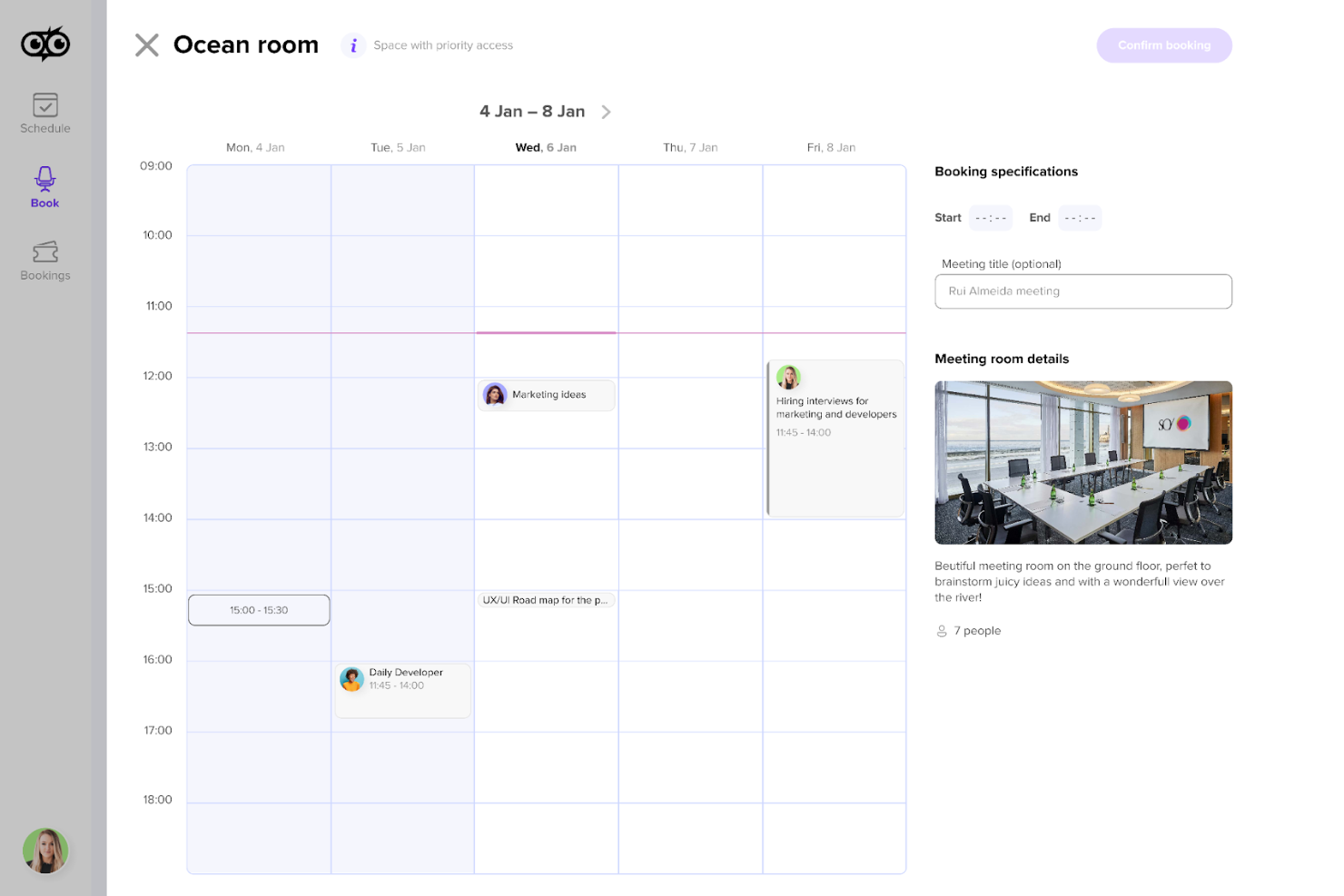
Deskbird è una piattaforma di gestione degli spazi di lavoro ibridi progettata per semplificare la prenotazione di scrivanie e sale riunioni, la pianificazione settimanale e l'amministrazione dell'ufficio.
Perché ho scelto Deskbird: Ho scelto Deskbird per la sua integrazione con Outlook e Google Calendar, che garantisce che prenotare una sala riunioni sia un processo fluido e intuitivo. Deskbird consente agli utenti di programmare le sale con pochi clic, e la sincronizzazione con i sistemi di calendario più diffusi assicura che tutte le prenotazioni siano automaticamente aggiornate e visibili su tutte le piattaforme. Questa funzionalità è ulteriormente migliorata dalla compatibilità con MS Teams e Slack, che aumenta l'usabilità all'interno dei flussi di lavoro esistenti.
Funzionalità e integrazioni principali:
Le funzionalità principali includono la prenotazione di hot desk, di cabine telefoniche, di posti auto, la pianificazione settimanale, aggiornamenti in tempo reale sulla presenza in ufficio, integrazione con la planimetria, analisi sull'utilizzo dell'ufficio, assegnazione di ruoli per la sicurezza e la conformità, e codici QR per prenotazioni immediate.
Le integrazioni includono MS Teams, Slack, Office 365, Google Calendar, Outlook e varie piattaforme HRIS.
Pros and Cons
Pros:
- Ottime funzionalità di dashboard per analisi sull'utilizzo dell'ufficio
- Integrazioni mobili e web
- Processo di prenotazione semplice
Cons:
- Opzioni di personalizzazione limitate
- Potrebbe beneficiare di una funzione di conferma prenotazione
Altri software per la prenotazione delle sale riunioni
Di seguito trovi un elenco di altri sistemi per la prenotazione delle sale riunioni che non sono entrati nella mia lista dei 20 migliori, ma che vale comunque la pena prendere in considerazione:
- WorkInSync
Ideale per check-in tramite QR
- YAROOMS
Ideale per coordinare la pianificazione di riunioni ibride
- OfficeRnD Workplace
Il miglior software per la gestione degli spazi riunione nelle operazioni di spazi flessibili
- Clearooms
Ideale per piantine visive degli spazi
- Dibsido
Ideale per monitorare l'utilizzo degli spazi dell'ufficio
- CalendarHero
Miglior sistema di prenotazione per la pianificazione automatizzata delle riunioni
- Meetio
La migliore app per prenotare sale riunioni per la semplicità di utilizzo
- Officely
Ideale per integrazione tra team e Slack
- Smartway2
Il miglior software per sale riunioni per raccomandazioni di prenotazione su misura
- HubStar
Ideale per l'assistenza alla prenotazione tramite AI
- Envoy Workplace
Ideale per sistemi di gestione dei visitatori
- Nexudus
Ideale per la crescita di spazi di coworking
- anny
Ideale per l'uso di sistemi di visualizzazione integrati
- Optix
Miglior strumento per la prenotazione di sale riunioni per luoghi di lavoro mobile-first
- Condeco
Ideale per la programmazione degli spazi di lavoro
- AskCody
Ideale per utenti di Microsoft Office
- DeskFlex
Ideale per il monitoraggio in tempo reale dell'occupazione e la sicurezza
- MOFFI
Ideale per gestione intelligente dell’occupazione delle sale
- Meeting Rooms by Officely
Ideale per integrazioni con Slack e Teams
- Wayleadr
Ideale per l'ottimizzazione degli spazi di parcheggio
- GemEx App
Ideale per la prenotazione di sale guidata dall’occupazione
- Roomzilla
Ideale per la funzionalità di visualizzazione delle sale


Recensioni correlate sui software per le risorse umane
Se non hai ancora trovato quello che cerchi, dai un'occhiata a questi altri strumenti correlati che abbiamo testato e valutato:
- Software per le risorse umane
- Software per la gestione delle buste paga
- Software per la selezione del personale
- Servizi di datore di lavoro ufficiale
- Sistemi di tracciamento dei candidati
- Software per la gestione della forza lavoro
Come Valuto i Software di Prenotazione delle Sale Riunioni
Scompondo la mia valutazione in due livelli: le fondamenta essenziali che ogni strumento deve avere e i fattori differenzianti—come le integrazioni HRIS e la gestione delle scrivanie ibride—che distinguono il buono dall'eccellente.
Funzionalità Chiave (Requisiti Minimi per Questa Lista)
Quando seleziono gli strumenti per la mia lista, do un punteggio a ciascuno su una scala da 0 (non offre la funzionalità) a 5 (eccelle in questa area) per ogni funzionalità chiave elencata di seguito. Poi, calcolo il punteggio totale dello strumento come percentuale. Ogni strumento deve raggiungere un punteggio totale minimo del 65% per essere considerato incluso.
- Disponibilità in Tempo Reale delle Sale: Controllo se lo strumento mostra lo stato della prenotazione in tempo reale e previene le doppie prenotazioni—ad esempio quando due colloquiatori prenotano la stessa sala per diversi panel consecutivi senza saperlo.
- Integrazione con il Calendario: È importante la sincronizzazione bidirezionale con Google Calendar e Outlook, così i team HR possono programmare riunioni di review o sessioni di formazione senza dover cambiare piattaforma.
- Piantine Interattive: Cerco mappe visive che permettano agli utenti di navigare tra le sale per piano o edificio, filtrare per capacità e individuare gli spazi disponibili—particolarmente utile per uffici su più piani.
- Gestione delle Risorse della Sala: Ogni sala dovrebbe avere attributi dettagliati come attrezzatura AV, capacità di posti a sedere e accessibilità per sedie a rotelle, così gli organizzatori possono abbinare l'allestimento della sala alle esigenze delle riunioni.
- Check-in e Gestione No-Show: Valuto se lo strumento supporta il check-in tramite app o pannello e il rilascio automatico delle prenotazioni fantasma, liberando così le sale riservate ma mai usate.
- Analisi d'Uso & Reportistica: Le dashboard dovrebbero mostrare le tendenze di occupazione e i picchi di utilizzo, così i team possono prendere decisioni informate sulla distribuzione degli spazi nelle varie sedi.
Una volta che ho una lista di strumenti che soddisfano i criteri, considero cosa distingue ciascuna piattaforma.
Fattori Differenzianti (Cosa Distingue i Fornitori)
Ecco come confronto i vari fornitori:
Funzionalità Distintive
L'integrazione con la gestione dei visitatori è fondamentale—cerco strumenti che registrano automaticamente gli ospiti esterni quando si prenota una sala, così i recruiter non devono registrare manualmente i candidati alla reception. La prenotazione delle scrivanie e delle hot-desk è importante per i team HR che gestiscono il lavoro ibrido, perché consente ai dipendenti di riservare sia uno spazio di lavoro sia una sala riunioni in un unico flusso. Una buona app mobile completa il tutto, offrendo al personale HR la possibilità di riprenotare o cancellare sale tra un colloquio e l'altro senza dover tornare alla scrivania.
Oltre le Funzionalità
Le integrazioni contano molto qui. Controllo se lo strumento si collega con le piattaforme HRIS e i sistemi di tracciamento dei candidati, poiché i team HR hanno bisogno che le prenotazioni delle sale per i colloqui fluiscano automaticamente dall’ATS senza passaggi manuali. La sicurezza è un altro fattore chiave—il supporto SSO e la conformità SOC 2 sono aspetti da verificare, soprattutto se il sistema gestisce dati di dipendenti e candidati. Valuto anche il supporto multi-sede, perché le organizzazioni con uffici in diverse regioni necessitano di controlli amministrativi centralizzati e di una pianificazione consapevole dei fusi orari da un'unica dashboard.
Come scegliere un software per la prenotazione delle sale riunioni
Mentre affronti il tuo personale e specifico processo di selezione del software, tieni presenti i seguenti aspetti:
- Esperienza utente: Il software dovrebbe essere intuitivo e facile da usare per tutti i dipendenti. Un sistema complicato può portare a un utilizzo insufficiente e alla frustrazione. Ad esempio, se i dipendenti trovano difficile navigare nell'interfaccia di prenotazione, potrebbero ricorrere a metodi manuali, vanificando lo scopo del software.
- Capacità di integrazione: Assicurati che il software possa integrarsi con i sistemi di calendario e posta elettronica già in uso. Questo è fondamentale per le organizzazioni che si affidano a Microsoft Outlook o Google Calendar per la pianificazione. L'integrazione consente aggiornamenti in tempo reale ed evita le doppie prenotazioni.
- Scalabilità: Il software deve poter crescere insieme alla tua azienda. Per le imprese in espansione, è essenziale poter aggiungere altre sale e risorse senza una riduzione delle prestazioni. In questo modo, il software rimane utile anche quando aumenta il numero degli spazi per le riunioni.
- Funzionalità di reportistica: L'accesso a dati e analisi è importante per comprendere i modelli di utilizzo delle sale. Questo è particolarmente rilevante per le aziende che desiderano ottimizzare l'utilizzo degli spazi. Report dettagliati possono evidenziare le sale sottoutilizzate o gli orari di punta, fornendo indicazioni per la futura pianificazione degli spazi dell'ufficio.
- Supporto e formazione: La disponibilità di assistenza clienti e materiali formativi può influenzare notevolmente il successo dell'adozione del software. Soprattutto per le organizzazioni con una forza lavoro meno esperta di tecnologia, disporre di un supporto accessibile può aiutare a superare gli ostacoli iniziali e incoraggiare l'utilizzo.
Tendenze dei software per la prenotazione delle sale riunioni
I software per la prenotazione delle sale riunioni continuano a evolversi per soddisfare le esigenze della gestione degli ambienti di lavoro ibridi. Ecco alcune delle principali tendenze che ne stanno plasmando il futuro:
- Integrazione con la realtà virtuale e aumentata: La realtà virtuale e aumentata viene integrata nei sistemi di prenotazione delle sale riunioni. Ciò consente agli utenti di visualizzare e interagire con gli spazi per le riunioni prima di effettuare una prenotazione. Si tratta di un passo significativo verso software più interattivi e facili da usare.
- Utilizzo dell'intelligenza artificiale per la pianificazione: L'intelligenza artificiale può aiutare i team a semplificare il processo di pianificazione. L'IA può suggerire gli orari ottimali per le riunioni e assistere nell'assegnazione delle sale sulla base dei dati dei partecipanti. Questa tendenza rende la pianificazione più efficiente e basata sui dati.
- Accessibilità mobile migliorata: L'accessibilità mobile dei software di prenotazione sta diventando sempre più sofisticata. Ora gli utenti possono prenotare, modificare o annullare le prenotazioni in mobilità con maggiore facilità. Questa mobilità è fondamentale per una forza lavoro sempre più flessibile e dinamica.
- Funzionalità per la sostenibilità: La sostenibilità è sempre più al centro dei software per la pianificazione delle sale e delle risorse. Vengono implementate funzionalità come il monitoraggio del consumo energetico e l'ottimizzazione dell'utilizzo delle sale. Questa tendenza riflette la crescente importanza delle pratiche aziendali ecocompatibili.
- Analisi e reportistica in tempo reale: Le analisi in tempo reale vengono integrate nei sistemi di prenotazione. Ciò fornisce informazioni immediate sull'utilizzo delle sale e aiuta nella pianificazione futura. L'importanza dei dati nella gestione degli spazi di lavoro sta trainando questa tendenza.
Queste tendenze aiutano gli sviluppatori di software a offrire esperienze di prenotazione delle sale riunioni più interattive, efficienti e responsabili, adatte alle diverse esigenze aziendali.
Che cos'è un software per la prenotazione delle sale riunioni?
Il software per la prenotazione delle sale riunioni è uno strumento digitale progettato per gestire la prenotazione e la pianificazione delle sale conferenze e di altri spazi per le riunioni. Viene utilizzato da organizzazioni di tutte le dimensioni per allocare in modo efficiente gli spazi per le riunioni, monitorando al contempo altri importanti indicatori di utilizzo. Il software funge da piattaforma centralizzata in cui i dipendenti possono visualizzare la disponibilità delle sale, prenotare gli spazi e gestire le prenotazioni per evitare conflitti e garantire lo svolgimento delle riunioni senza interruzioni.
Il software per la prenotazione delle sale riunioni comprende generalmente un'interfaccia di calendario per la pianificazione, funzionalità per la gestione dei servizi e delle apparecchiature delle sale e capacità di integrazione con altri sistemi di gestione dell'ambiente di lavoro. Offre visibilità sull'utilizzo delle sale e può supportare il processo decisionale relativo all'utilizzo degli spazi.
Funzionalità dei software per la prenotazione delle sale riunioni
Il software per la prenotazione delle sale riunioni è uno strumento fondamentale per gestire le risorse dell'ufficio e garantire che le riunioni possano essere programmate senza conflitti. Semplifica il processo di prenotazione degli spazi per la collaborazione e aiuta a mantenere un calendario organizzato per tutti i membri del team. Ecco alcune delle funzionalità più importanti da cercare nella scelta di un sistema di prenotazione delle sale riunioni:
- Disponibilità in tempo reale: Questa funzione consente agli utenti di vedere quali sale sono disponibili in tempo reale. È essenziale per prevenire le doppie prenotazioni e garantire che tutti possano trovare uno spazio per la propria riunione quando ne hanno bisogno.
- Integrazione con i calendari: Sincronizzandosi con le applicazioni di calendario più diffuse, questa funzione garantisce che le prenotazioni delle sale siano allineate con gli impegni personali. Aiuta a evitare conflitti di programmazione e facilita la pianificazione.
- Compatibilità mobile: Un'interfaccia ottimizzata per i dispositivi mobili o un'app mobile dedicata consente agli utenti di prenotare le sale ovunque si trovino. Questo è importante per gestire le modifiche dell'ultimo minuto e per il personale che si trova spesso lontano dalla propria scrivania.
- Interfaccia intuitiva: Un design intuitivo facilita l'utilizzo del software da parte di tutti i dipendenti senza richiedere una formazione approfondita. Questo è importante per incoraggiare un'ampia adozione e un uso efficiente del sistema di prenotazione.
- Prenotazione anticipata: La possibilità di programmare le sale con largo anticipo aiuta a pianificare riunioni ed eventi futuri. Questa funzione è fondamentale per le organizzazioni che hanno una domanda elevata di spazi per riunioni.
- Supporto per più sedi: Per le aziende con diversi uffici, questa funzione consente agli utenti di prenotare sale presso sedi differenti. È importante per coordinare le riunioni tra varie sedi.
- Notifiche automatiche: L'invio di promemoria e aggiornamenti sulle prenotazioni contribuisce a ridurre le assenze e garantisce che le sale vengano utilizzate come previsto. Questa funzione è fondamentale per mantenere una programmazione efficiente delle riunioni.
- Report e analisi: Questa funzione fornisce informazioni sui modelli di utilizzo delle sale e può aiutare a prendere decisioni informate sulla gestione degli spazi. È importante per ottimizzare l'utilizzo delle sale riunioni.
- Impostazioni personalizzabili: La possibilità di adattare il software alle esigenze specifiche di un'organizzazione è fondamentale. Questa funzione consente di gestire regole e preferenze di prenotazione personalizzate.
- Assistenza e formazione: Offrire supporto per la risoluzione dei problemi e la formazione degli utenti garantisce che eventuali difficoltà possano essere risolte rapidamente. Questo è importante per mantenere la funzionalità del sistema di prenotazione.
La scelta dello strumento giusto per la prenotazione delle sale riunioni può fare una differenza significativa nel modo in cui opera un'organizzazione. Può contribuire a garantire che gli spazi per le riunioni siano utilizzati in modo efficiente e che i dipendenti possano collaborare efficacemente. Quando valuti le opzioni, considera attentamente queste funzioni per trovare la soluzione più adatta alle esigenze del tuo ambiente di lavoro.
Vantaggi del software per la prenotazione delle sale riunioni
Il software per la prenotazione delle sale riunioni è uno strumento progettato per gestire la prenotazione e la programmazione degli spazi per riunioni all'interno di un'organizzazione. Offre una serie di funzioni che possono aiutare aziende di tutte le dimensioni a gestire in modo efficiente le sale riunioni e le relative risorse. Ecco alcuni vantaggi che puoi aspettarti implementando un sistema di prenotazione delle sale riunioni nella tua organizzazione:
- Migliore gestione delle risorse: Il software per la programmazione delle sale e delle risorse consente agli utenti di visualizzare in tempo reale la disponibilità delle sale e di altre risorse, prevenendo le doppie prenotazioni e garantendo un utilizzo ottimale degli spazi.
- Risparmio di tempo: Il software automatizza il processo di programmazione, riducendo il tempo che il personale dedica alla gestione delle prenotazioni e lasciandogli più tempo da concentrarsi su altre attività produttive.
- Maggiore accessibilità: Gli utenti possono prenotare le sale riunioni da qualsiasi dispositivo con accesso a Internet, offrendo ai dipendenti flessibilità e praticità nella gestione dei propri impegni.
- Processo decisionale basato sui dati: Il software raccoglie dati sull'utilizzo che possono essere analizzati per prendere decisioni informate sull'utilizzo degli spazi e sulla futura allocazione delle risorse.
- Riduzione del carico amministrativo: Semplificando il processo di prenotazione, il software riduce al minimo il lavoro amministrativo associato alla gestione manuale degli spazi per riunioni.
Il software per la prenotazione delle sale riunioni può rappresentare una risorsa preziosa per le organizzazioni che desiderano migliorare l'efficienza e l'efficacia della gestione degli spazi per riunioni. Sfruttando le funzionalità di questo tipo di software, le aziende possono garantire che le sale riunioni siano utilizzate al massimo delle loro potenzialità, offrendo al contempo un'esperienza intuitiva ai dipendenti.
Costi & prezzi del software per la prenotazione delle sale riunioni
Il software per la prenotazione delle sale riunioni offre una serie di funzionalità, tra cui la possibilità di verificare la disponibilità delle sale in tempo reale, l'integrazione con i sistemi di calendario esistenti e funzioni amministrative per gestire le prenotazioni.
Il costo di questi sistemi può variare notevolmente in base a fattori quali il numero di sale da gestire, la complessità delle funzioni necessarie e la scelta tra servizi basati sul cloud o soluzioni locali. Di seguito viene presentata un'analisi dettagliata delle opzioni dei piani e dei relativi prezzi per le soluzioni di prenotazione delle sale riunioni.
Tabella di confronto dei piani per il software di prenotazione delle sale riunioni
| Tipo di piano | Prezzo medio | Funzionalità comuni |
| Opzione gratuita | $0 | Funzionalità limitate rispetto ai piani a pagamento, che generalmente includono capacità di base per la prenotazione e la pianificazione |
| Basato sul cloud | $5 a $17 per sala/mese | Prenotazione ad hoc, agenda giornaliera, indicatori di disponibilità, cancellazione di eventi, modalità a schermo intero, salvaschermo, sincronizzazione con i sistemi dell'ufficio, protezione tramite PIN, notifiche, impostazioni da remoto, oggetto della riunione, invito da un tablet, problemi di pulizia, catering o attrezzature, design aziendale |
| In sede | Preventivo personalizzato | Numero illimitato di sale riunioni, tariffa una tantum e manutenzione annuale, oltre a tutte le funzionalità incluse nel piano basato sul cloud |
Nella scelta di un software per la prenotazione delle sale riunioni, è fondamentale che gli acquirenti considerino la capacità del piano di crescere insieme alla propria organizzazione e il livello di assistenza clienti disponibile. Anche la compatibilità del software con i sistemi dell'ufficio attualmente in uso e la facilità d'uso complessiva sono fattori importanti da tenere presenti.
E adesso?
Per rimanere aggiornati su tutte le ultime novità nella gestione delle persone, iscrivetevi alla nostra newsletter per leader e manager. Riceverete direttamente nella vostra casella di posta informazioni e offerte personalizzate per leader e professionisti delle risorse umane.