

I 10 migliori software per la gestione degli spazi ufficio del 2026

10 Elenco dei migliori software per la gestione degli spazi d'ufficio


Il miglior software per la gestione degli spazi d'ufficio ti aiuta a eliminare gli spazi inutilizzati, semplificare le prenotazioni e ottimizzare gli ambienti di lavoro ibridi, senza fogli di calcolo o continui scambi di e-mail.
Questi strumenti rendono molto più semplice monitorare l'utilizzo degli spazi, supportare orari flessibili e mantenere i tuoi team produttivi e a proprio agio, sia che tu gestisca un solo ufficio o diversi.
Avendo recensito centinaia di strumenti per il luogo di lavoro e lavorato all'interno di un team HR alle prese con le transizioni al lavoro ibrido, ti illustrerò le migliori soluzioni disponibili oggi per aiutarti a scegliere con sicurezza uno strumento adatto alla configurazione del tuo luogo di lavoro e in grado di semplificare le operazioni quotidiane.
Perché fidarsi delle nostre recensioni sui software
Il nostro team testa e recensisce software dal 2012. In quanto esperti HR noi stessi, sappiamo quanto sia difficile — e importante — scegliere il software giusto.
Per questa guida, abbiamo valutato gli strumenti attraverso test pratici e ricerche indipendenti, assegnando un punteggio agli strumenti in base ai nostri criteri di selezione. Ci basiamo inoltre sulle competenze di leader di pensiero del settore e di professionisti HR attivi.
Le nostre recensioni riflettono il nostro giudizio editoriale umano, non un discorso di vendita.
Revisori esperti:
Tabella comparativa dei software per la gestione degli spazi d'ufficio
La tabella seguente confronta i prezzi, i periodi di prova e i dettagli delle demo delle mie migliori selezioni di software per la gestione degli spazi d’ufficio.
| Tool | Best For | Trial Info | Price | ||
|---|---|---|---|---|---|
| 1 | Il miglior software di gestione degli spazi di lavoro per la pianificazione di scenari | Demo gratuita disponibile | Prezzo su richiesta | Website | |
| 2 | Ideale per coordinare progetti, persone e spazi | Demo gratuita disponibile | Prezzi su richiesta | Website | |
| 3 | Ideale per la pianificazione di portafogli aziendali | Demo gratuita disponibile | Prezzo su richiesta | Website | |
| 4 | Ideale per analisi dell’occupazione in tempo reale | Piano gratuito + demo gratuita disponibile | Da $500/mese | Website | |
| 5 | Ideale per disponibilità di prenotazione in tempo reale | Demo gratuita disponibile | Prezzo su richiesta | Website | |
| 6 | Ideale per mappe ufficio personalizzabili | Demo gratuita + prova gratuita di 14 giorni disponibile | Da $2.8/postazione/mese | Website | |
| 7 | Ideale per la collaborazione tra i membri di team ibridi | Prova gratuita di 14 giorni | Da $3/scrivania/mese | Website | |
| 8 | Ideale per spazi di lavoro piccoli e condivisi | Prova gratuita di 14 giorni + piano gratuito + demo gratuita disponibile | Da $22/mese (fatturazione annuale) | Website | |
| 9 | Ideale per mappe interattive con utenti illimitati | Prova gratuita disponibile | Da $28/utenti illimitati/mese | Website | |
| 10 | Ideale per dashboard unificate degli spazi | Piano gratuito + demo gratuita disponibile | Da $5/ripartizione prenotabile/anno (fatturazione annuale) | Website |

Recensioni dei migliori software per la gestione degli spazi d'ufficio
Ecco una breve descrizione di ciascun software per la gestione degli spazi d’ufficio, che illustra il caso d’uso migliore di ogni strumento, le sue funzionalità più interessanti e alcuni pro e & contro. Ho incluso anche schermate per offrirti una panoramica della loro interfaccia utente.

Il miglior software di gestione degli spazi di lavoro per la pianificazione di scenari

OfficeSpace offre ai team aziendali e ai responsabili delle strutture una piattaforma flessibile per gestire scrivanie, sale e planimetrie, aiutando le organizzazioni ad adattare la disposizione degli uffici e le risorse alle esigenze in evoluzione e ai modelli di lavoro ibrido.
Per chi è ideale OfficeSpace?
OfficeSpace è particolarmente indicato per aziende di medie e grandi dimensioni che gestiscono ambienti di lavoro ibridi e complessi, dove la pianificazione degli spazi e l'ottimizzazione delle risorse sono priorità costanti.
Perché ho scelto OfficeSpace
Ho scelto OfficeSpace perché gestisce bene la pianificazione di scenari per la disposizione degli uffici. Apprezzo in particolare gli strumenti di trascinamento per le planimetrie, che permettono al mio team di modellare diverse disposizioni dei posti e configurazioni dei reparti prima di apportare modifiche. I dati sull'utilizzo degli spazi vengono integrati in queste visualizzazioni di pianificazione, così posso vedere come gli schemi di occupazione attuali influenzano le future disposizioni. I dati in tempo reale abbinati alla pianificazione visiva sono utili quando si prepara una riorganizzazione o una variazione degli organici.
Funzionalità principali di OfficeSpace
- Prenotazione sale: Ricerca sale riunioni per capienza, dotazioni e posizione dei partecipanti, con disponibilità in tempo reale mostrata direttamente sulla planimetria per evitare prenotazioni multiple.
- Gestione delle richieste di manutenzione: Invia, assegna e monitora le segnalazioni relative alle strutture in una coda prioritaria, con assegnazioni automatiche degli ordini di lavoro e aggiornamenti sullo stato in tempo reale.
- Gestione visitatori: Accoglienza di visitatori e consegne tramite tablet iPad o Android dedicati, con workflow personalizzabili, raccolta NDA, stampa badge e notifiche immediate ai dipendenti.
- Analisi dell'ambiente di lavoro: Collega badge, sensori o dati Wi-Fi per generare dashboard di occupazione in tempo reale e mappe di calore, utili per monitorare le tendenze di presenza nelle varie sedi.
Integrazioni di OfficeSpace
Le integrazioni includono Microsoft Teams, Slack, Google Workspace, Office 365, Zoom, Okta, Workday, Active Directory, Greetly e provider SSO.
Pros and Cons
Pros:
- Consente di modellare diversi scenari di layout prima di decidere
- Mappe visive e directory aiutano la navigazione nei grandi uffici
- Le analisi mettono in luce gli spazi sottoutilizzati e le tendenze d’uso
Cons:
- Richiede formazione per sfruttare tutte le funzionalità
- Base di conoscenza online limitata
New Product Updates from OfficeSpace

OfficeSpace Adds Work Order Status and Cost Reports
OfficeSpace adds Work Order Status and Work Order Cost reports for built-in maintenance reporting. These reports help facilities teams track work order activity and costs without relying on manual spreadsheets. For more information, visit OfficeSpace’s official site.
 .
.
Kadence
Ideale per coordinare progetti, persone e spazi
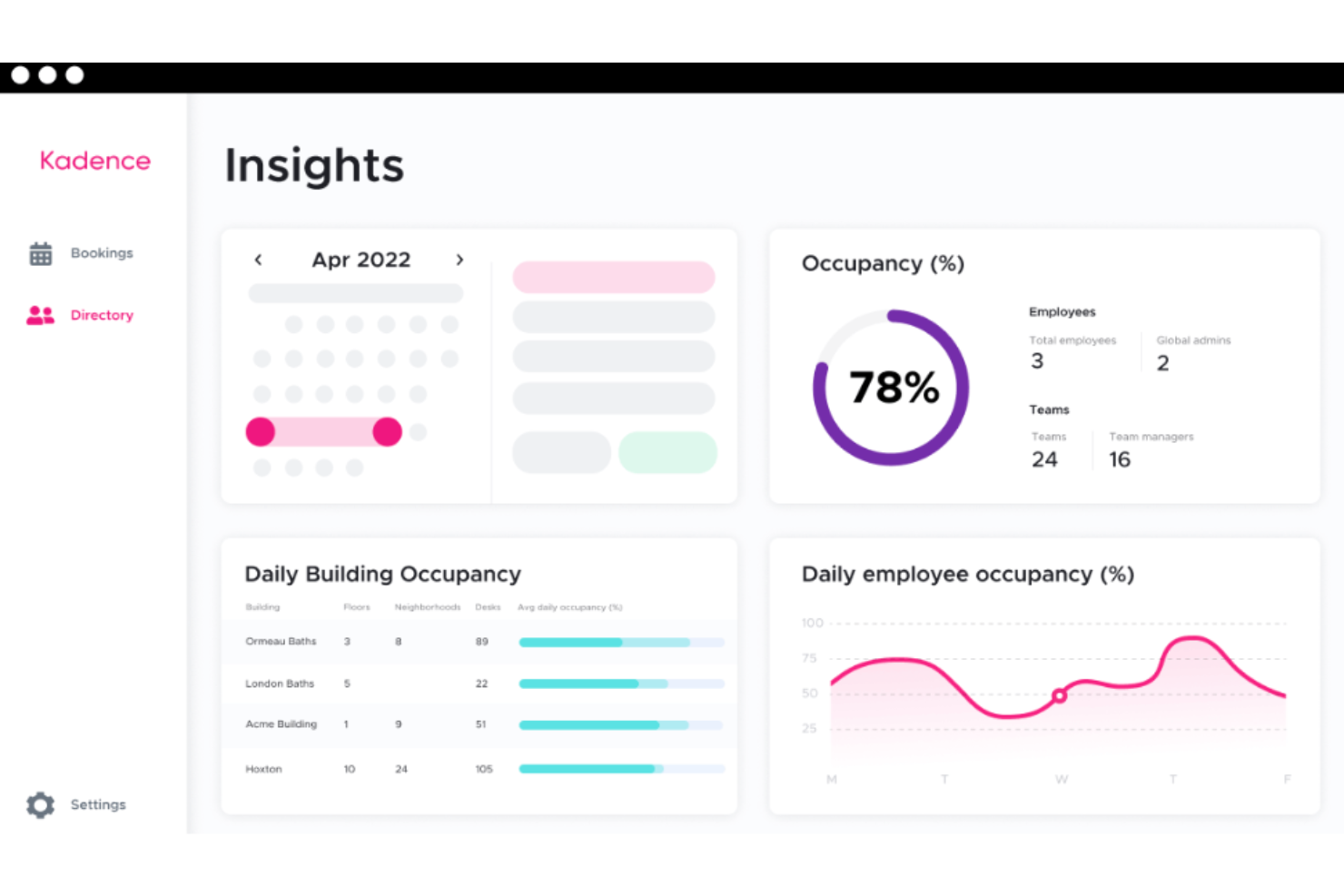
Kadence aiuta le organizzazioni a gestire spazi di lavoro ibridi semplificando la prenotazione delle scrivanie, coordinando i programmi dei team e ottimizzando l'utilizzo degli uffici per le aziende che si adattano ad ambienti di lavoro flessibili.
Per chi è più adatto Kadence?
Kadence è particolarmente indicato per aziende di medie e grandi dimensioni che gestiscono team ibridi e necessitano di coordinare la presenza in ufficio, la disponibilità delle scrivanie e i programmi dei team in un'unica piattaforma.
Perché ho scelto Kadence
Ho scelto Kadence come uno dei migliori perché collega davvero i tre elementi che rendono difficile la gestione degli uffici ibridi: progetti, persone e spazi. Trovo particolarmente utile la funzionalità Team Kadences, che permette ai manager di suggerire giornate in ufficio in base ai programmi dei team e alle esigenze aziendali, così la presenza effettiva si allinea con la collaborazione, evitando che avvenga casualmente. Mi piace anche l'assistente AI, che consente di prenotare scrivanie, riservare sale riunioni e verificare la disponibilità dei colleghi tramite un solo comando in Slack o Microsoft Teams. Gli strumenti di pianificazione di scenario permettono di simulare situazioni 'what-if'—come una crescita dell'organico o cambiamenti nelle politiche—prima di prendere decisioni su variazioni degli spazi.
Caratteristiche principali di Kadence
- Gestione dei visitatori: Automatizza gli inviti agli ospiti, le notifiche agli host e la firma di documenti prima dell'arrivo direttamente sulla piattaforma.
- Piantine interattive: Visualizza e prevede la disponibilità di scrivanie e sale su diversi piani per pianificare l'utilizzo dell'ufficio in anticipo.
- Analisi degli spazi di lavoro: Monitora l'utilizzo degli spazi per edificio, piano, scrivania o sala per seguire le tendenze di occupazione nel tempo.
- Rilascio automatico delle prenotazioni: Libera automaticamente le scrivanie e le sale prenotate ma non occupate per mantenere accurata la disponibilità degli spazi in tempo reale.
Integrazioni Kadence
Le integrazioni includono Microsoft Teams, Slack, Google Workspace, BambooHR, Gusto, Okta, Workday, Zendesk, Jira e ServiceNow.
Pros and Cons
Pros:
- Visibilità in tempo reale su prenotazioni di scrivanie e sale tra i team
- Monitoraggio dell'occupazione senza necessità di sensori
- Strumenti di prenotazione integrati in piattaforme familiari come Teams/Slack
Cons:
- I manager di team non possono cancellare le prenotazioni per conto di altri membri del team
- Le opzioni di personalizzazione per alcuni flussi di lavoro possono essere limitate
New Product Updates from Kadence
Kadence MCP Comes to Popular AI Assistants
Kadence launches MCP support for Claude, ChatGPT, and Microsoft Copilot to manage workplace tasks and access space insights. This brings booking, scheduling, and reporting into the AI assistants teams already use. For more information, visit Kadence’s official site.
 .
.
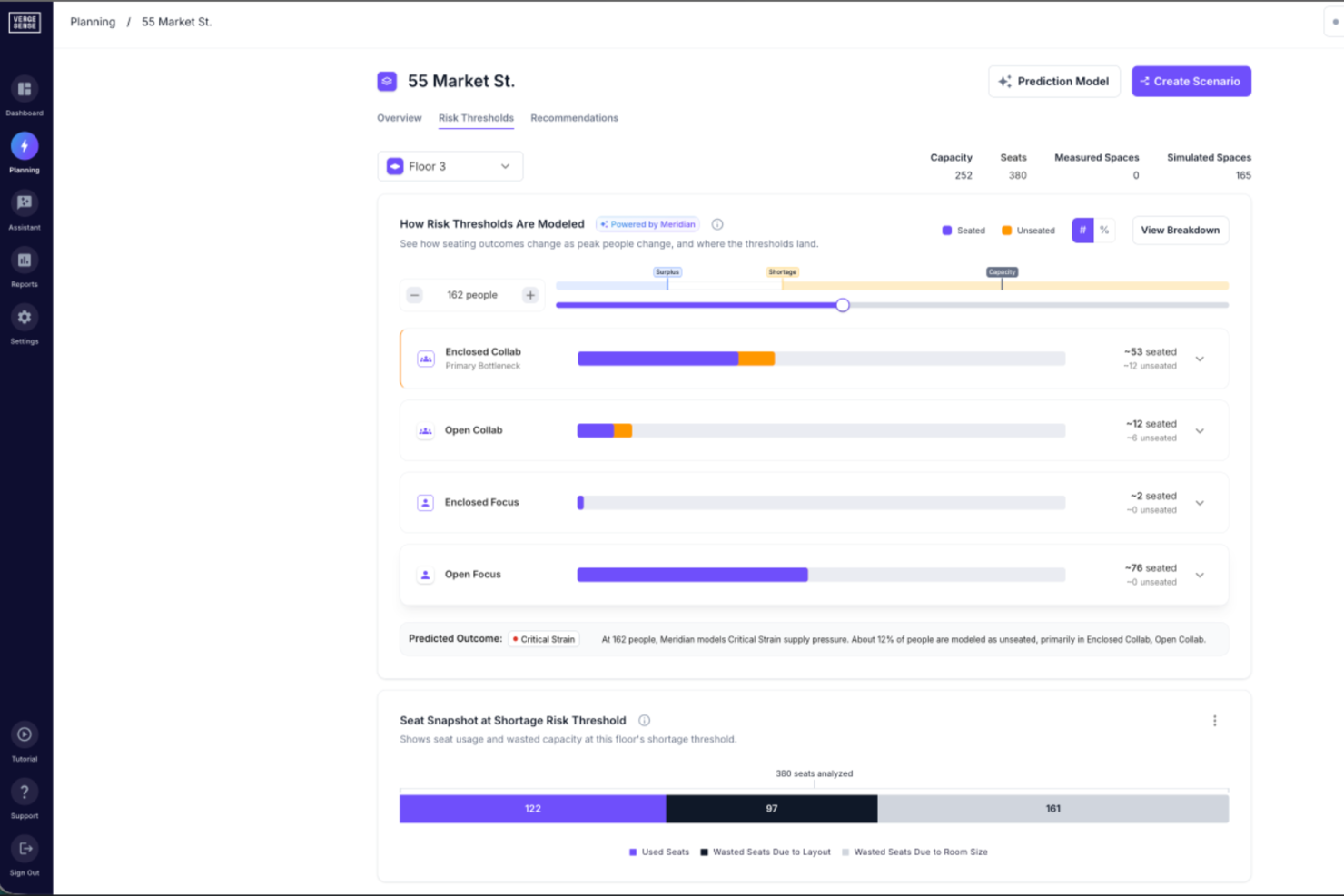
VergeSense è una piattaforma di intelligenza sull'occupazione basata su AI che combina tecnologia di sensori per l'ambiente di lavoro, analisi di utilizzo e pianificazione predittiva degli spazi per aiutare le organizzazioni a gestire e ottimizzare i propri portafogli di uffici.
Per chi è meglio VergeSense?
VergeSense è particolarmente indicato per i team aziendali che si occupano di immobili e ambienti lavorativi e che gestiscono ampi portafogli di uffici multisede, e che necessitano di informazioni basate sui dati su come gli spazi vengono effettivamente utilizzati.
Perché ho scelto VergeSense
Ho inserito VergeSense tra le mie scelte preferite perché adoro come il suo strumento Predictive Planning trasformi vaghi quesiti sugli spazi come 'cosa succederebbe se' in risposte concrete basate sui dati. Posso caricare una planimetria e modellare la crescita dell'organico o spostamenti di presenze ibride confrontandoli direttamente con il comportamento reale di occupazione—senza alcuna supposizione. Il suo modello spaziale Large Spatial Model è addestrato su oltre 200 milioni di piedi quadrati di dati effettivi sul luogo di lavoro, quindi le previsioni di domanda riflettono come davvero vengono utilizzati gli uffici nelle grandi aziende, e non medie generiche di settore.
Caratteristiche principali di VergeSense
- Sensori di occupazione: Sensori wireless e cablati rilevano in tempo reale il numero di persone e i dati di utilizzo degli spazi su piani, aree e singole stanze.
- Cruscotto di analisi di utilizzo: Visualizzazione delle tendenze di occupazione suddivise per edificio, piano o zona su intervalli giornalieri, settimanali e mensili.
- Assistente AI per l'ambiente di lavoro: Ricevi raccomandazioni generate dall'intelligenza artificiale sugli spazi in base ai reali schemi di utilizzo del tuo portafoglio e agli obiettivi di pianificazione dichiarati.
- Benchmarking del portafoglio: Confronta l'utilizzo degli spazi tra più sedi per individuare aree meno performanti all'interno del tuo portafoglio di uffici.
Integrazioni VergeSense
VergeSense offre decine di integrazioni native tra cui categorie di prenotazione, IWMS e gestione degli edifici, come Accruent EMS, Archibus by Eptura, Aruba, CBRE Host, Cisco Meraki, Cloudbooking, Comfy, Condeco by Eptura, Crestron, Microsoft Places e ServiceNow. È disponibile un'API aperta per integrazioni personalizzate.
Pros and Cons
Pros:
- La precisione dei sensori supera il 95% per l'occupazione
- Si adatta con coerenza a portafogli multisede
- Integra dati da WiFi, badge e prenotazioni
Cons:
- I sensori con telecamera comportano tempi di implementazione più lunghi
- L'installazione dell'hardware richiede costi e coordinamento iniziali

elia
Ideale per analisi dell’occupazione in tempo reale
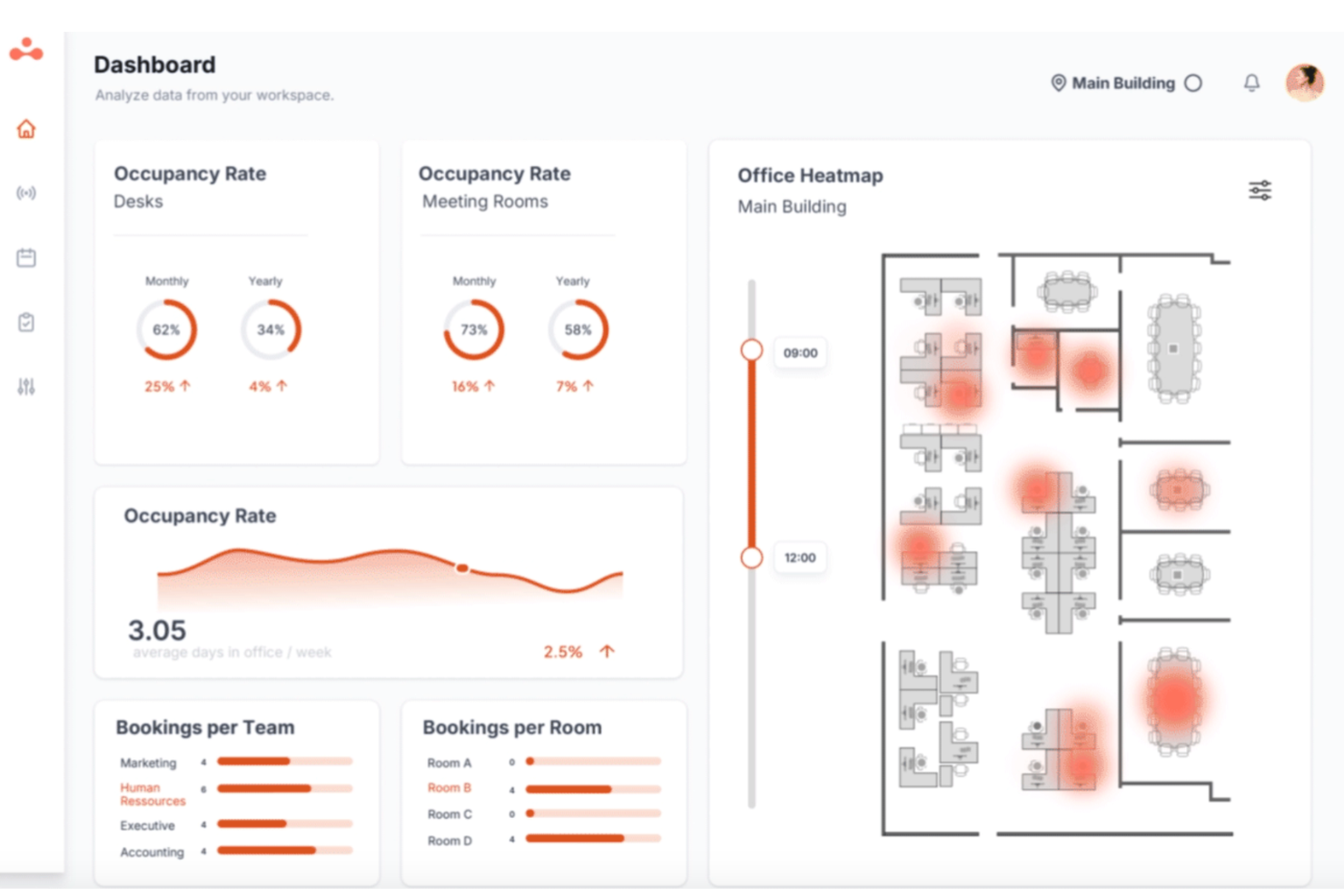
Una piattaforma di gestione degli spazi ufficio, elia unisce prenotazione delle scrivanie, programmazione delle sale, monitoraggio dell’occupazione, gestione dei visitatori e analisi degli spazi in un unico luogo.
Per chi è elia?
elia è adatto ai team di gestione delle sedi e delle strutture di aziende di medie e grandi dimensioni che gestiscono orari di lavoro ibridi in più sedi aziendali.
Perché ho scelto elia
elia entra nella mia lista perché il suo monitoraggio dell’occupazione basato su sensori IoT offre una visione dettagliata e in tempo reale di quali spazi in ufficio sono utilizzati in ogni momento. Mi piace che questi dati alimentino dashboard di utilizzo e mappe di calore, così puoi vedere i pattern tra scrivanie, sale e piani. Questo livello di visibilità aiuta i team a prendere decisioni più informate su come vengono utilizzati gli spazi dell’ufficio.
Funzionalità principali di elia
- Prenotazione scrivanie: Prenota scrivanie singole o assegnale ai team utilizzando mappe interattive con disponibilità in tempo reale.
- Pianificazione sale riunioni: Prenota le sale direttamente dalla piattaforma con sincronizzazione del calendario su Outlook e Google Calendar.
- Gestione visitatori: Registra ospiti, invia notifiche agli host e gestisci i check-in da un’unica vista workspace.
- Automazione del luogo di lavoro: Crea flussi di lavoro personalizzati per automatizzare regole di prenotazione, approvazioni e politiche di accesso agli spazi.
Integrazioni elia
elia copre le basi come Microsoft, Google e Slack, collegandosi con Microsoft 365, Google Workspace, Slack e SSO. Il piano Enterprise include accesso API per integrazioni personalizzate. elia offre un numero inferiore di integrazioni native rispetto ad alcune piattaforme legacy più grandi e il supporto a Zapier non è chiaramente documentato.
Pros and Cons
Pros:
- Viste di mappa del piano interattive integrate
- Offre dati sull’occupazione in tempo reale tramite sensori
- Il piano gratuito include utenti illimitati
Cons:
- Disponibilità limitata di integrazioni native
- Le statistiche di occupazione potrebbero essere più dettagliate

Ideale per disponibilità di prenotazione in tempo reale
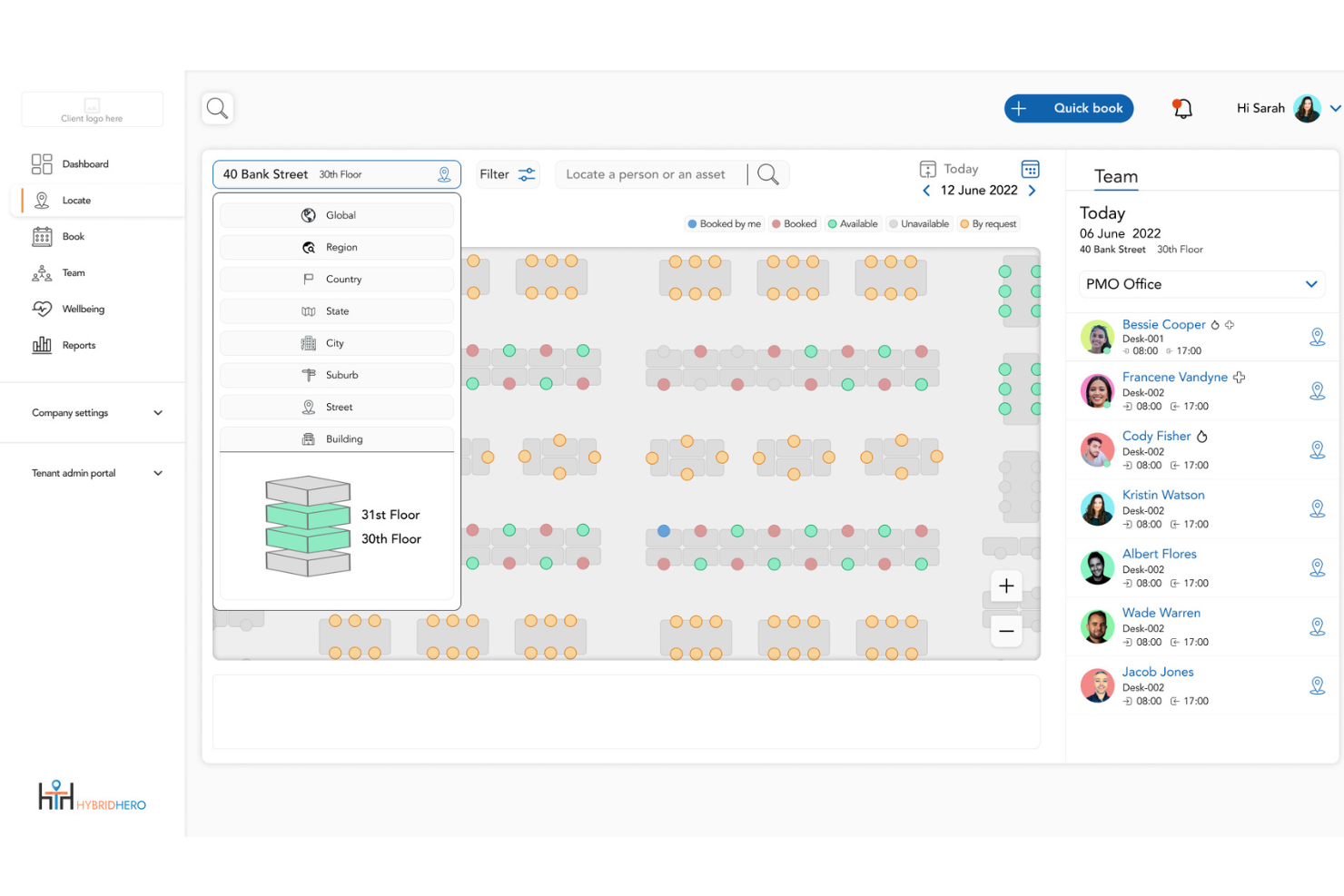
Hybrid Hero aiuta le aziende e i team delle strutture a gestire gli spazi di lavoro offrendo strumenti digitali per la prenotazione di scrivanie, sale riunioni e risorse condivise, facilitando l'ottimizzazione dell'utilizzo degli spazi e l'adattamento a modalità di lavoro flessibili.
Per chi è ideale Hybrid Hero?
Hybrid Hero è progettato per organizzazioni di medie e grandi dimensioni che gestiscono una forza lavoro ibrida su più sedi.
Perché ho scelto Hybrid Hero
HybridHero si guadagna un posto in questa lista perché combina strumenti operativi per l'ambiente di lavoro all'interno di un'unica piattaforma. Prenotazione delle scrivanie, pianificazione delle sale riunioni, gestione di visitatori e appaltatori, gestione dei parcheggi, gestione HR e reportistica di conformità vengono gestiti insieme anziché tramite sistemi separati. Per i team aziendali che necessitano di report sull'occupazione, storici delle attività e visibilità su più sedi, questo approccio centralizzato sostiene la governance e il controllo operativo dell'ambiente di lavoro.
Funzionalità principali di Hybrid Hero
- Gestione di spazi multi-sede: Prenotazione centralizzata di scrivanie, pianificazione delle sale e report sull'occupazione attraverso molteplici sedi da una sola dashboard amministrativa.
- Gestione di visitatori e appaltatori: Flussi di check-in nativi che includono pre-registrazione, notifiche agli ospitanti e tracciamento degli accessi.
- Reportistica audit-ready: Registrazione delle azioni e controlli di accesso basati sui ruoli a supporto di governance e report di conformità.
- Mappe interattive dei piani: Mappe di occupazione in tempo reale che mostrano la disponibilità live di scrivanie e sale riunioni tra le varie sedi.
Integrazioni di Hybrid Hero
Le integrazioni includono Microsoft 365, Microsoft Teams, Google Workspace, Slack, Okta, Azure Active Directory, SSO, Microsoft Outlook, Google Calendar, Microsoft Office 365 e Zoom (su richiesta).
Pros and Cons
Pros:
- Report analitici dettagliati sul personale
- Prenotazione automatizzata di scrivanie e parcheggi
- Mappe interattive degli uffici in tempo reale
Cons:
- Nessuna modalità di gestione offline
- Personalizzazione avanzata del brand limitata

Archie
Ideale per mappe ufficio personalizzabili
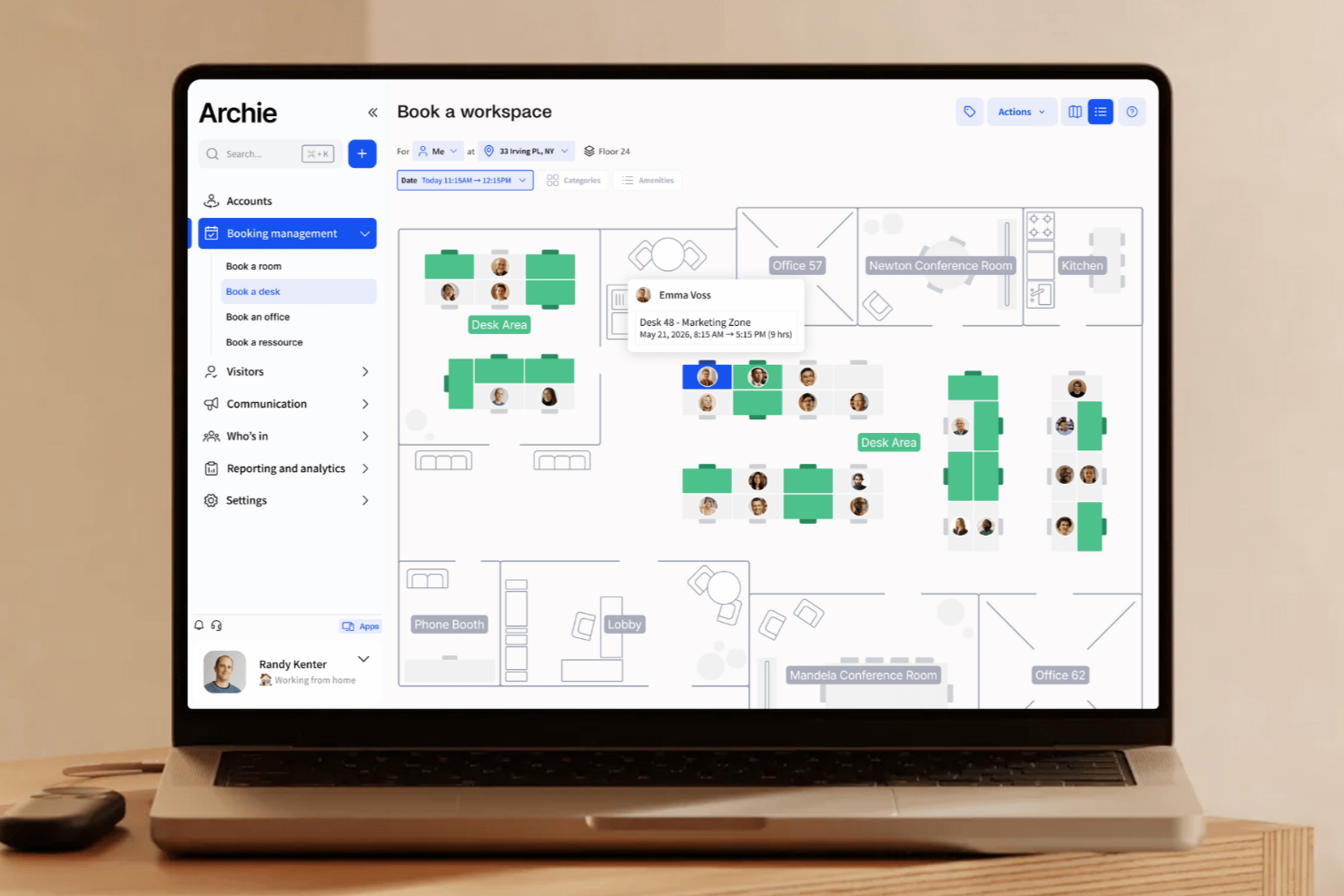
Archie aiuta le aziende e i team di lavoro a gestire uffici ibridi con planimetrie interattive, prenotazione di scrivanie e sale riunioni, e strumenti di gestione dei visitatori che semplificano l'allocazione degli spazi e la pianificazione.
Per Chi è Ideale Archie?
Archie è particolarmente indicato per aziende di medie dimensioni e realtà in crescita che gestiscono team ibridi e necessitano di strumenti flessibili e visivi per coordinare gli spazi di lavoro su più sedi.
Perché Ho Scelto Archie
Archie merita un posto nella mia lista perché offre un controllo totale sulle mappe degli uffici. Si può caricare una planimetria esistente in formato PNG o JPG e Archie la trasforma in una mappa completamente interattiva e modificabile—senza bisogno di un team di design. Da lì, si possono trascinare e posizionare scrivanie, creare aree per team che limitano la prenotazione a gruppi specifici, e aggiungere dettagli come foto, servizi e policy di prenotazione a ciascuna postazione. La mappa è aggiornata in tempo reale: quando un collega prenota una scrivania, il cambiamento appare subito e tutti possono coordinare le giornate in ufficio ibrido.
Caratteristiche Principali di Archie
- Gestione visitatori: Registra il check-in dei visitatori, invia notifiche agli ospitanti e acquisisce firme digitali per NDA o liberatorie di sicurezza alla reception.
- Prenotazione sale riunioni: Prenota sale conferenze direttamente dalla mappa interattiva o dalla vista calendario, con disponibilità in tempo reale e dettagli sulla capienza.
- Analisi degli spazi: Monitora nel tempo i tassi di utilizzo di scrivanie e sale per individuare aree poco sfruttate e orientare le scelte nella disposizione dell’ufficio.
- Pianificazione lavoro ibrido: I membri del team possono pubblicare i propri giorni in sede, così i colleghi possono coordinarsi e prenotare le scrivanie negli stessi giorni.
Integrazioni di Archie
Le integrazioni includono Microsoft Teams, Slack, Google Calendar, Microsoft Outlook, Zoom, Kisi, Stripe, QuickBooks, Xero e HubSpot.
Pros and Cons
Pros:
- Opzioni per applicazioni brandizzate disponibili
- Strumenti completi per la gestione degli spazi di lavoro
- Prenotazione possibile via web o app mobile
Cons:
- Non fornisce visibilità sugli orari dei team
- Pochi strumenti di personalizzazione per i report

Tactic
Ideale per la collaborazione tra i membri di team ibridi
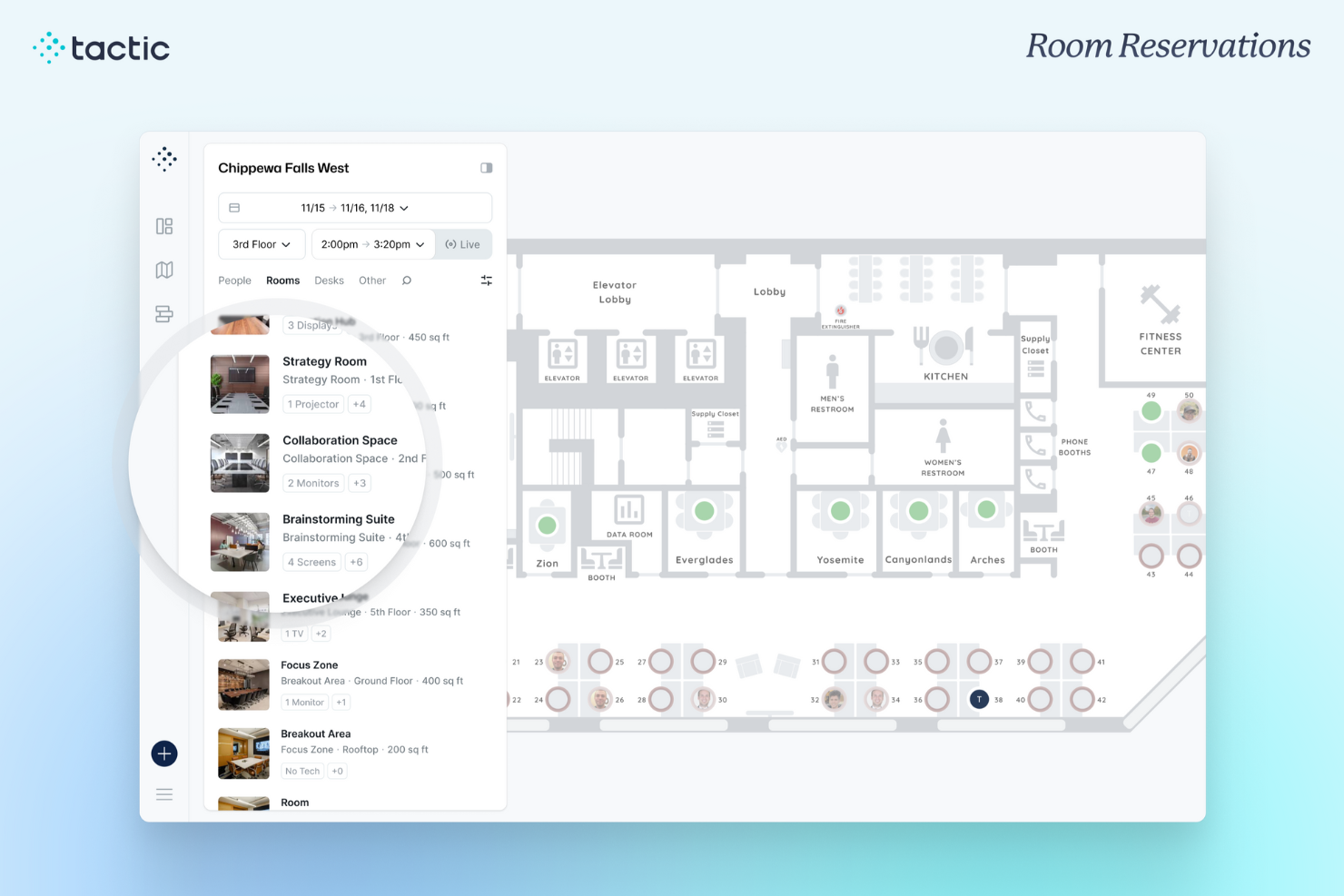
Tactic è una piattaforma di gestione degli spazi lavorativi pensata per team ibridi che necessitano di prenotazione flessibile delle scrivanie, planimetrie interattive e strumenti per coordinare la collaborazione in presenza e ottimizzare le risorse condivise dell’ufficio.
Per chi è più indicato Tactic?
Tactic è particolarmente adatto alle aziende di medie dimensioni che gestiscono orari di lavoro ibridi e cercano un modo semplice per coordinare la presenza in ufficio e la disponibilità delle scrivanie tra i vari team.
Perché ho scelto Tactic
Tactic si guadagna un posto nella mia lista grazie alle sue efficaci funzionalità di coordinamento per il lavoro ibrido, non solo per la semplice prenotazione. Apprezzo il fatto che la visibilità dei membri del team sia integrata nel flusso di prenotazione della scrivania: il mio team può vedere chi sarà in ufficio in un determinato giorno e prenotare una scrivania vicina con un solo clic, rendendo la pianificazione della collaborazione in presenza più intenzionale che casuale. La suddivisione per zone di Tactic permette inoltre di assegnare aree specifiche del piano ai vari reparti, cosicché i team si raggruppano naturalmente senza bisogno di coordinamenti manuali. L’assistente AI, Tessa, offre un ulteriore livello di aiuto consentendo ai dipendenti di trovare facilmente un posto vicino a uno specifico collega semplicemente chiedendo.
Caratteristiche Principali di Tactic
- Planimetrie interattive: Visualizza e interagisci con una mappa visiva in tempo reale per conoscere la disponibilità delle scrivanie e la disposizione delle sale.
- Prenotazione di sale e risorse: Prenota sale riunioni, posti auto e risorse condivise insieme alle scrivanie da un’unica interfaccia.
- Gestione dei visitatori: Registra e monitora i visitatori, invia notifiche di arrivo e gestisci l’accesso degli ospiti direttamente dalla piattaforma.
- Analisi del luogo di lavoro: Accedi a report sull’occupazione e dati di presenza per capire come viene realmente utilizzato lo spazio dell’ufficio.
Integrazioni di Tactic
Le integrazioni includono Microsoft Teams, Slack, Google Calendar, Outlook, Zoom, Microsoft Entra ID e Avigilon.
Pros and Cons
Pros:
- Dati di prenotazione in tempo reale
- Ottima integrazione con Microsoft 365
- Mappe interattive dettagliate
Cons:
- Disponibile solo in inglese
- Alcune funzionalità avanzate sono riservate al livello enterprise

Whatspot
Ideale per spazi di lavoro piccoli e condivisi
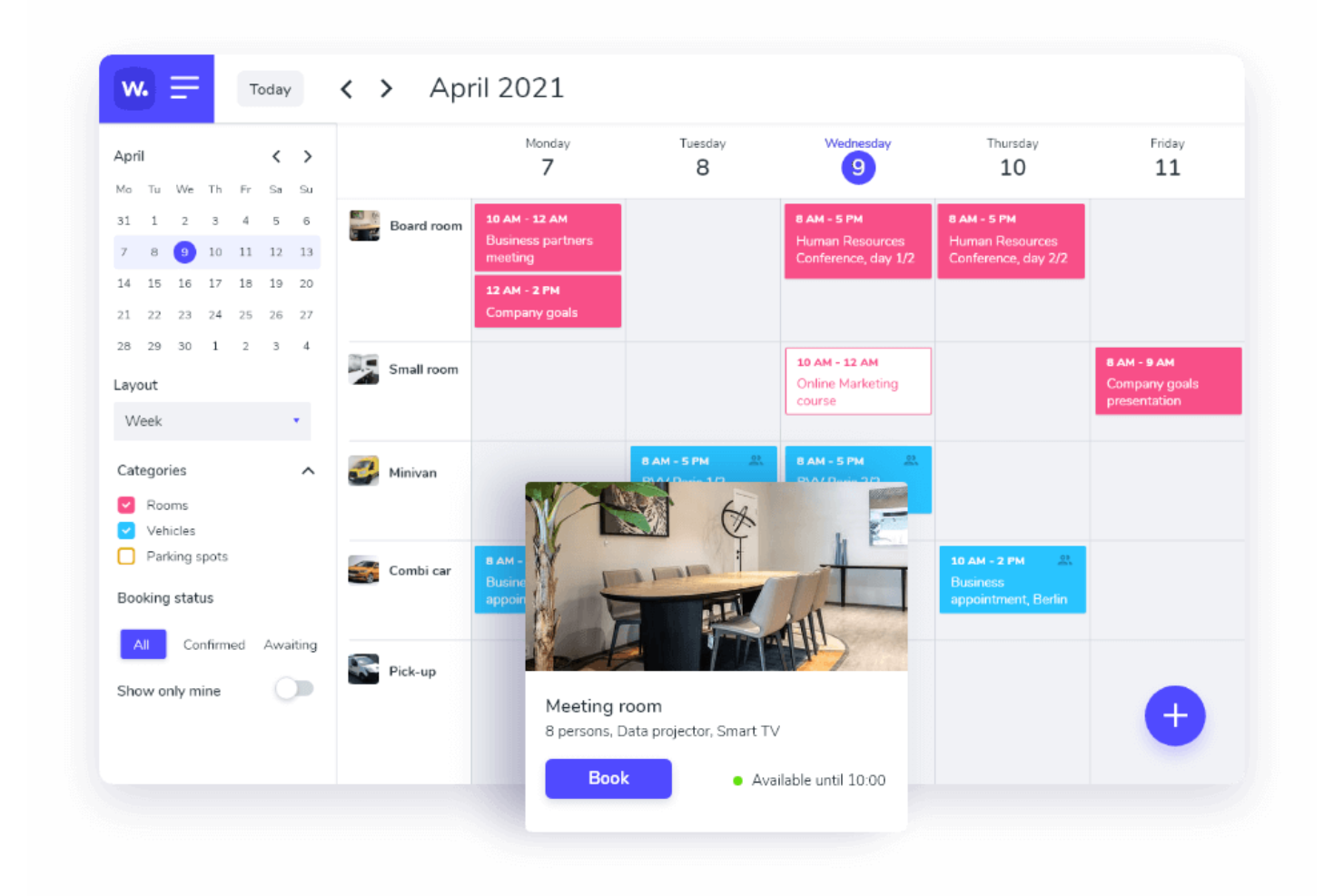
Whatspot è una piattaforma di prenotazione progettata per aziende e organizzazioni che hanno bisogno di un modo semplice per gestire sale riunioni, postazioni e risorse condivise, aiutando i team a evitare conflitti di programmazione e a semplificare le prenotazioni degli spazi di lavoro.
Per chi è ideale Whatspot?
Whatspot è perfetto per piccole imprese, spazi di coworking e team che gestiscono uffici condivisi e necessitano di un sistema di prenotazione leggero senza configurazioni complesse.
Perché ho scelto Whatspot
Whatspot è una delle mie scelte migliori perché adoro il modo in cui gestisce il caos specifico degli ambienti di lavoro piccoli e condivisi. Utilizzo la vista dell'interactive floorplan per vedere esattamente quali postazioni sono libere e dove sono seduti i colleghi in tempo reale, eliminando così ogni incertezza dalla prenotazione delle postazioni flessibili. La funzione di codice QR è un'altra funzionalità su cui faccio molto affidamento: scannerizzare un codice posto su una stanza o una scrivania e confermare una prenotazione in due tocchi è davvero più veloce rispetto a qualsiasi altro metodo che abbia mai provato. Inoltre, il sistema di check-in rilascia automaticamente le prenotazioni non utilizzate, così gli spazi non restano occupati per chi si dimentica di annullare.
Caratteristiche principali di Whatspot
- Approvazioni delle prenotazioni: Gli amministratori possono richiedere un'approvazione prima che una prenotazione venga confermata, dando al team il controllo sugli spazi più richiesti.
- Prenotazioni ricorrenti: Imposta prenotazioni ripetute per riunioni regolari o assegnazioni settimanali delle scrivanie senza dover prenotare ogni volta.
- Gestione di sedi multiple: Gestisci le prenotazioni di più uffici o edifici da un unico account.
- Regole e restrizioni di prenotazione: Definisci limiti di tempo, finestre di prenotazione anticipata e permessi di accesso per luogo o risorsa.
Integrazioni di Whatspot
Le integrazioni includono Microsoft Outlook, Microsoft Teams e Google Calendar.
Pros and Cons
Pros:
- Planimetrie interattive per una gestione efficiente delle scrivanie
- Supporto multilingue per team internazionali
- Funzionalità QR code per prenotazioni rapide e facili
Cons:
- Nessuna integrazione attualmente elencata
- Opzioni di personalizzazione limitate per esigenze specifiche
New Product Updates from Whatspot

Whatspot Adds Booking Modes for Different Space Types
Whatspot introduces Booking Modes to support different reservation rules for different space types. Admins can choose flexible bookings, fixed durations, or fixed intervals based on how each space is used. For more information, visit Whatspot's official site.
 .
.
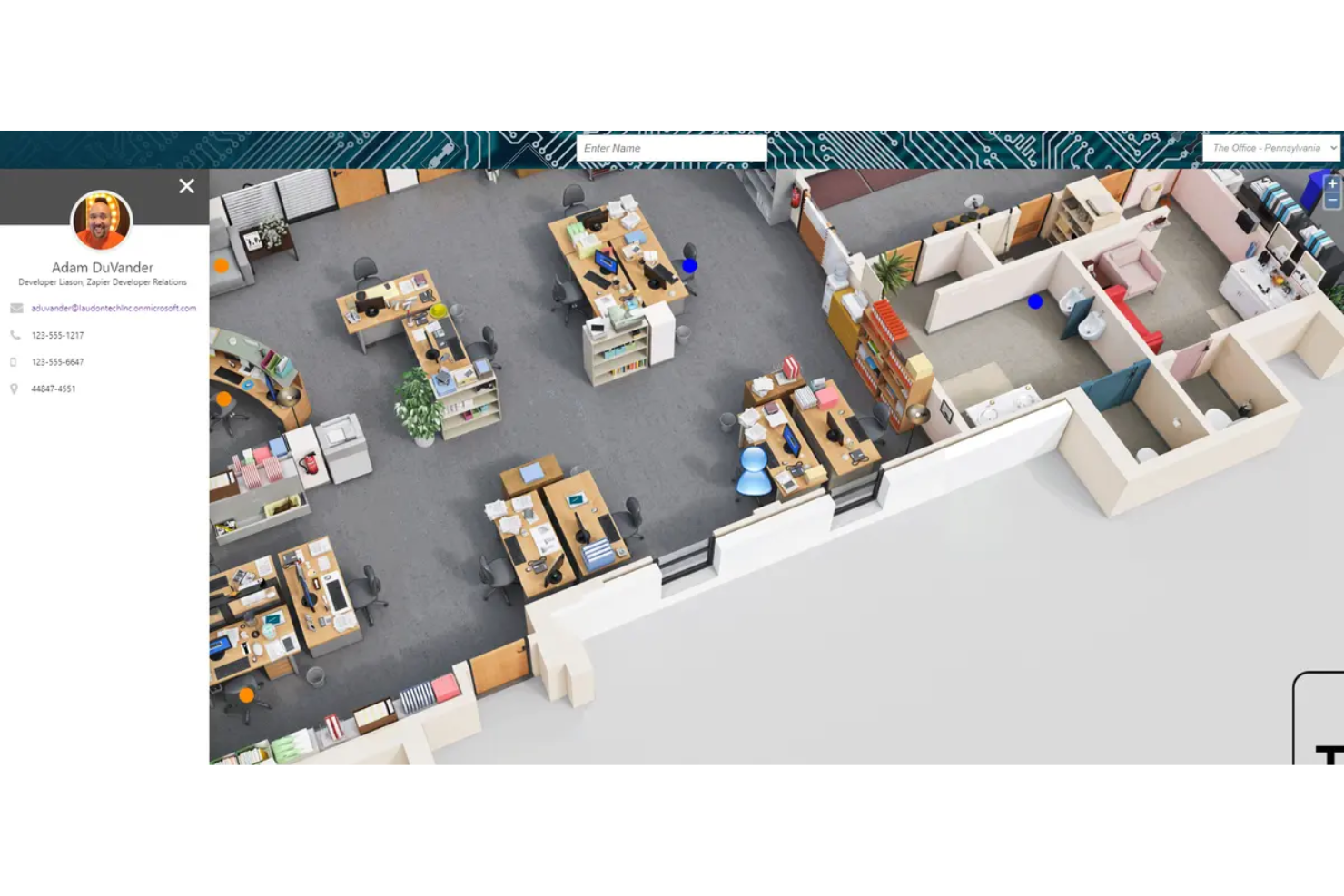
Floor Plan Mapper aiuta le aziende di tutte le dimensioni a visualizzare, gestire e ottimizzare la disposizione degli uffici con planimetrie interattive, rendendo più semplice per i team delle strutture e i responsabili dell'ufficio gestire l'assegnazione delle scrivanie, l'utilizzo degli spazi e la disposizione dei posti per i dipendenti.
Per chi è ideale Floor Plan Mapper?
Floor Plan Mapper è particolarmente adatto ai responsabili delle strutture e agli amministratori d'ufficio nelle piccole e medie imprese che necessitano di un approccio visivo e basato su mappe per la gestione delle disposizioni degli spazi di lavoro e delle prenotazioni delle postazioni.
Perché ho scelto Floor Plan Mapper
Ho scelto Floor Plan Mapper tra i migliori perché il suo modello di prezzi a tariffa fissa include utenti illimitati e postazioni illimitate in ogni piano—una caratteristica per cui la maggior parte degli strumenti per la gestione degli spazi addebita costi aggiuntivi man mano che aumenta il personale. Mi piace il fatto che si possa caricare qualsiasi formato di planimetria (PDF, CAD, JPG) e iniziare subito ad assegnare scrivanie, etichettare asset e mappare i reparti senza dover attendere giorni per la configurazione da parte del fornitore. Il filtro 'Trova scrivanie disponibili' è molto utile: il mio team può visualizzare in tempo reale la mappa filtrata mostrando solo le postazioni libere per un determinato intervallo di date, accelerando la coordinazione degli orari ibridi rispetto all'utilizzo di un foglio di calcolo. La funzione di mappatura dell'area di interesse consente anche di disegnare forme direttamente sulla planimetria per evidenziare reparti o zone, il che è d'aiuto sia per l'inserimento dei nuovi dipendenti sia per pianificare la riallocazione dei posti.
Funzionalità principali di Floor Plan Mapper
- Integrazione con l'elenco dei dipendenti: Collega i profili dei dipendenti all'assegnazione delle scrivanie per cercare una persona per nome e vedere dove si trova sulla pianta.
- Sistema di prenotazione delle scrivanie: Permette ai dipendenti di prenotare anticipatamente le postazioni tramite un'interfaccia self-service integrata direttamente nella mappa interattiva.
- Reportistica sull'occupazione: Genera report sull'utilizzo delle scrivanie e sull'occupazione degli spazi per individuare aree sotto-utilizzate nella pianta dei tuoi uffici.
- Check-in tramite codice QR: Associa codici QR alle scrivanie o alle sale affinché i dipendenti possano effettuare il check-in in sede tramite scansione con un dispositivo mobile.
Integrazioni di Floor Plan Mapper
Le integrazioni includono Microsoft Office 365, Microsoft Outlook, Microsoft Teams, OKTA, Google Calendar, Windows Active Directory, Microsoft Entra ID e Microsoft SharePoint.
Pros and Cons
Pros:
- Offre la possibilità di visualizzare e ottimizzare gli spazi
- Funziona su vari dispositivi, inclusi desktop e portatili
- Funzionalità integrate di prenotazione delle scrivanie
Cons:
- Curva di apprendimento iniziale nella configurazione
- Potrebbe offrire funzionalità di prenotazione delle scrivanie più avanzate

Envoy
Ideale per dashboard unificate degli spazi
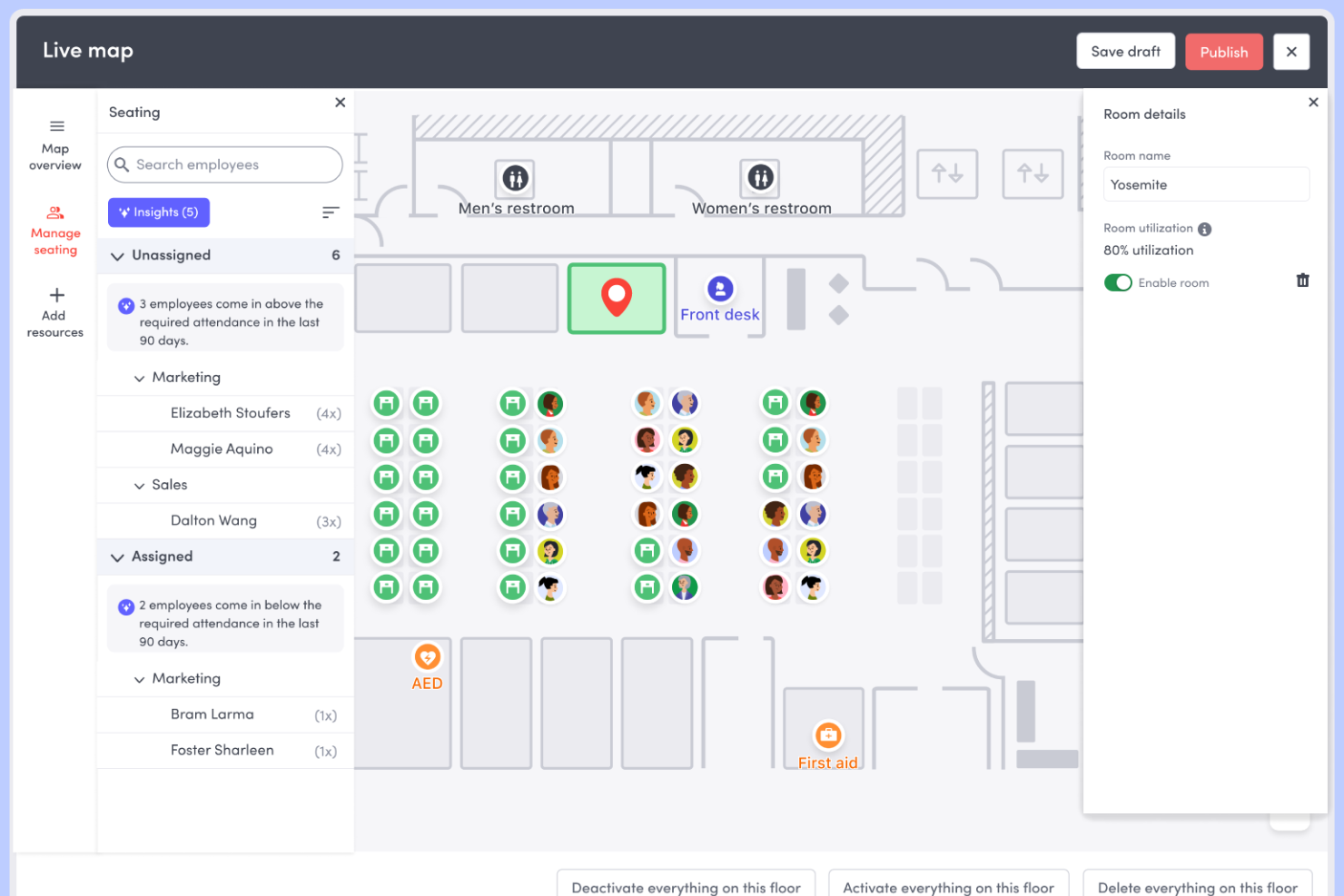
Envoy offre ai team aziendali un'unica piattaforma per gestire scrivanie, sale riunioni, visitatori e analisi del luogo di lavoro, aiutando aziende di tutte le dimensioni a creare ambienti di ufficio flessibili, efficienti e sicuri.
Per chi è ideale Envoy?
Envoy è particolarmente indicato per i team di gestione degli spazi e delle strutture di aziende di medie e grandi dimensioni che gestiscono il lavoro ibrido in uno o più sedi.
Perché ho scelto Envoy
Envoy si guadagna il suo posto tra i migliori della mia lista grazie all'efficacia con cui il suo dashboard unificato di analisi raccoglie i dati da ogni angolo dell'ambiente di lavoro. Mi piace il fatto che puoi visualizzare occupazione, utilizzo delle scrivanie, prenotazioni delle sale e traffico di visitatori tutto da un unico pannello, suddiviso per piano, zona, team o sede. In pratica, questo significa che il mio team può individuare quali aree sono costantemente sottoutilizzate e prendere decisioni immobiliari basate su dati reali, non su ipotesi. Anche la funzione di report programmati è per me un punto di forza: puoi inviare automaticamente report personalizzati via email a specifici stakeholder secondo una cadenza impostata, con grafici e tabelle già incorporati.
Caratteristiche principali di Envoy
- Prenotazione delle scrivanie: I dipendenti possono prenotare una scrivania in anticipo o all’ultimo momento usando una mappa interattiva dei piani che mostra la disponibilità in tempo reale.
- Pianificazione delle sale: Prenota direttamente le sale riunioni da Envoy, con rilascio automatico delle prenotazioni non usufruite per liberare spazio.
- Gestione dei visitatori: Registra, effettua il check-in e assegna badge ai visitatori in modalità digitale, con notifiche al referente e flussi di check-in personalizzati.
- Quartieri lavorativi: Assegna i team a determinate zone sulla piantina per coordinare la disposizione dei posti e gestire l'allocazione degli spazi per gruppo.
Integrazioni di Envoy
Le integrazioni includono Microsoft Teams, Slack, Google Calendar, Okta, DocuSign, Greenhouse, Brivo Access, Box, ServiceNow e Zoom.
Pros and Cons
Pros:
- Fornisce dati di utilizzo che supportano decisioni immobiliari
- La mappatura interattiva della planimetria accelera le modifiche di layout
- Gli strumenti di notifica di emergenza migliorano la sicurezza sul luogo di lavoro
Cons:
- Le funzionalità di analisi potrebbero essere limitate nei livelli inferiori
- Può diventare costoso man mano che si aggiungono sedi o utenti.
Quando utilizzare un software per la gestione degli spazi d'ufficio
Il software per la gestione degli spazi d'ufficio ti offre una visibilità in tempo reale sul modo in cui viene utilizzato il tuo ambiente di lavoro, così puoi smettere di fare supposizioni e iniziare a prendere decisioni più intelligenti su scrivanie, sale e costi immobiliari. Se una delle situazioni seguenti ti è familiare, probabilmente è arrivato il momento di aggiungerne uno al tuo insieme di strumenti.
- Il tuo team gioca alla roulette delle scrivanie ogni mattina: i dipendenti arrivano e si affrettano a trovare un posto perché non esiste un sistema per prenotare le scrivanie in anticipo. Il software per la gestione degli spazi consente alle persone di prenotare un posto prima di uscire di casa, eliminando le difficoltà quotidiane.
- Stai pagando per spazi che nessuno utilizza: hai in affitto tre piani, ma le analisi mostrano che nella maggior parte dei giorni due di essi sono utilizzati al 40%. I dati sull'utilizzo ti aiutano a dimensionare correttamente la tua presenza, rinegoziare i contratti di locazione e ridurre i costi immobiliari senza creare disagi al tuo team.
- Coordinare gli orari ibridi è un lavoro a tempo pieno: l'amministratore del tuo ufficio tiene manualmente traccia di chi è presente e quando, tra Slack, e-mail e fogli di calcolo, e la situazione rimane comunque caotica. Uno strumento per la gestione degli spazi centralizza la pianificazione, così le persone giuste si trovano in ufficio negli stessi giorni.
- Gestire un trasferimento o una modifica della disposizione richiede mesi: riorganizzare i team tra i diversi piani significa destreggiarsi tra planimetrie, schemi dei posti a sedere e infinite approvazioni da parte degli interessati. Gli strumenti di pianificazione degli scenari ti consentono di testare visivamente le modifiche alla disposizione prima di spostare anche una sola scrivania.
- Stai crescendo rapidamente e aprendo nuovi uffici: aggiungere una seconda o una terza sede in città come Austin o Amsterdam significa coordinare gli spazi tra più sedi senza un'unica fonte di informazioni affidabile. Il software per la gestione degli spazi d'ufficio offre al tuo team responsabile delle strutture un unico luogo da cui gestire tutto.
Altre recensioni di software per la gestione degli spazi d'ufficio
Ecco alcune altre opzioni che non sono entrate nell'elenco dei migliori software per la gestione degli spazi d'ufficio:
- Othership
Ideale per ottimizzare l'uso degli uffici e il tempo di collaborazione
- deskbird
Ideale per integrazione con MS Teams & Outlook
- WorkInSync
Ideale per il coordinamento dei team con postazioni flessibili
- Robin
Ideale per prendere decisioni strategiche sugli spazi
- YAROOMS
Ideale per la gestione di orari ibridi e dell'utilizzo degli spazi
- Dibsido
Il miglior strumento per gestire prenotazioni di scrivanie e posti auto
- Officely
Ideale per la prenotazione semplice delle scrivanie in Slack e MS Teams
- Smartway2
Ideale per il monitoraggio dell'occupazione
- HubStar
Ideale per analizzare l'utilizzo pianificato rispetto a quello reale degli spazi in ufficio
- Cloudbooking
Ideale per aziende globali con necessità multilingue
- OfficeRnD
Il miglior software di gestione degli spazi ufficio per la prenotazione autonoma dei dipendenti OfficeRnD
- Condeco
Miglior software per la gestione degli spazi d'ufficio per prenotazioni flessibili
- Waldo by MOFFI
Migliore per la pianificazione delle riunioni con intelligenza artificiale
- Tango Space
Ideale per visualizzare e massimizzare l'utilizzo degli spazi in ufficio
- Accruent EMS
Miglior software per la gestione degli spazi ufficio per le aziende enterprise
- Zynq
Miglior gestione degli spazi ufficio con funzioni di check-in per ospiti/fornitori
- Ronspot
Ideale per la gestione flessibile di spazi ufficio tutto-in-uno
- Skedda
La miglior gestione degli spazi ufficio per velocità d'implementazione
- Eden
Il miglior software di gestione degli spazi ufficio per piccoli team e startup
- anny
Ideale per mappe ufficio 3D interattive


Recensioni correlate di software HR
Se non hai ancora trovato quello che cerchi, dai un'occhiata a questi altri strumenti correlati che abbiamo testato e valutato:
- Software per le risorse umane
- Software per la gestione delle buste paga
- Software per il reclutamento
- Servizi di datore di lavoro ufficiale
- Sistemi di gestione dei candidati
- Software per la gestione della forza lavoro
Come valuto i software per la gestione degli spazi ufficio
Quando gestisco scrivanie, sale e personale ibrido, valuto gli strumenti su due livelli: le funzionalità di base necessarie per essere inclusi nell'elenco e i fattori differenzianti che separano i migliori dal resto.
Funzionalità di base (Requisiti indispensabili per questa lista)
Queste capacità fondamentali servono come criteri di accettazione per l'inclusione nel mio elenco:
- Piantine interattive: Valuto se la piattaforma supporta mappe visive modificabili e multilocalizzazione in cui gli amministratori possono trascinare e posizionare scrivanie, sale e aree, non solo caricare un'immagine statica.
- Prenotazione scrivanie & hoteling: Ogni strumento deve permettere ai dipendenti di prenotare autonomamente le scrivanie via web e mobile, inclusa la possibilità di hot desking, posti assegnati e prenotazioni ricorrenti.
- Prenotazione sale & risorse: Verifico la programmazione delle sale riunioni con sincronizzazione nativa con Google Calendar o Outlook, oltre alla possibilità di prenotare elementi aggiuntivi come attrezzatura audiovisiva o catering.
- Analisi dell’utilizzo degli spazi: Dashboard che evidenziano i tassi di occupazione, le tendenze di presenza e i dati delle prenotazioni aiutano i team a dimensionare correttamente il proprio portafoglio immobiliare.
- Wayfinding & ricerca dipendenti: Cerco la ricerca delle persone collegata alla piantina, così i dipendenti possono trovare la scrivania di un collega o individuare uno spazio libero senza dover scrivere messaggi in giro.
- Supporto sensori/integrazioni: La connessione a sensori di occupazione, sistemi di badge, provider SSO e piattaforme HRIS come Workday o BambooHR mantiene i dati dei dipendenti accurati e aggiornati.
Valuto ogni fornitore su una scala da 0 (non offre la funzionalità) a 5 (eccelle in questo campo) per ciascun criterio.
I fornitori devono raggiungere un punteggio medio minimo per essere considerati per l'inclusione nella mia lista. Da lì, considero ciò che distingue ciascuna piattaforma.
Fattori differenzianti (Cosa distingue i fornitori)
Dopo aver selezionato i candidati, ecco come confronto i diversi fornitori:
Caratteristiche distintive
Cerco una gestione dei visitatori solida che semplifichi il check-in, le NDA e le notifiche agli host—questo è particolarmente prezioso per le reception molto frequentate. Gli strumenti che supportano quartieri e aree zonate fanno la differenza per i team più grandi che desiderano spazi dedicati ma anche flessibilità. Gli strumenti per la programmazione del lavoro ibrido si distinguono, permettendo ai dipendenti di vedere chi sarà presente e pianificare giornate di collaborazione di conseguenza. Quando le piattaforme offrono segnaletica digitale o chioschi di wayfinding nativi, migliorano ulteriormente l’esperienza di presenza sia per il personale sia per i visitatori.
Oltre alle funzionalità
L'implementazione è molto importante in questo settore. Valuto se i fornitori aiutano nella digitalizzazione delle piantine e la rapidità con cui vengono avviati i rollout multisede. Sicurezza e conformità sono sempre in primo piano, in particolare la preparazione a SOC 2 Type II e GDPR, poiché queste piattaforme trattano dati sensibili sulla presenza dei dipendenti. La struttura dei prezzi è un altro fattore chiave: verifico se i fornitori fanno pagare per utente, per scrivania o per sede e se moduli come la gestione dei visitatori o l’analisi sono inclusi o venduti separatamente.
Come scegliere il software per la gestione degli spazi d'ufficio
Il software per la gestione degli spazi d'ufficio può aiutarti a gestire il tuo spazio in modo più efficace, offrendo un'esperienza più semplice e soddisfacente ai tuoi dipendenti che lavorano in modalità ibrida. Per individuare la piattaforma di gestione degli spazi d'ufficio più adatta alle tue esigenze, tieni presenti i seguenti aspetti:
- Quali problemi relativi agli spazi d'ufficio stai cercando di risolvere? Identificare le difficoltà attuali ti aiuterà a comprendere le caratteristiche e le funzionalità che desideri nel tuo nuovo software per la gestione degli spazi d'ufficio.
- Quali risultati sono importanti e come misurerai il successo? Definire chiaramente in anticipo i risultati desiderati è fondamentale per evitare di sprecare tempo prezioso. Ad esempio, potresti voler incentivare i dipendenti che lavorano in modalità ibrida a tornare in ufficio più frequentemente, sostituire l'attuale sistema macchinoso di prenotazione delle scrivanie o utilizzare meglio lo spazio disponibile, così da ridurre (o subaffittare) gli spazi fisici inutilizzati.
- Chi sono i tuoi principali utenti? Considera i diversi gruppi di utenti — utenti avanzati, amministratori, manager, dipendenti, ecc. — e le loro esigenze specifiche, per assicurarti che siano tutte soddisfatte. Per il software di gestione degli spazi d'ufficio, probabilmente vorrai garantire l'accesso all'intera forza lavoro, con autorizzazioni speciali per gli amministratori delle risorse umane e per gli altri membri del personale di supporto.
- Qual è il tuo budget? Stabilire in anticipo un budget realistico per il nuovo software di pianificazione degli spazi d'ufficio è fondamentale, per non perdere tempo a valutare software troppo costosi.
- Hai bisogno di integrazioni specifiche con altri software? Chiarisci se la nuova soluzione per la gestione degli spazi sostituirà strumenti esistenti o dovrà integrarsi con essi, come calendari digitali, strumenti di comunicazione interna come Slack o Microsoft Teams oppure il tuo sistema di gestione delle risorse umane.
- Il software soddisfa i tuoi requisiti tecnici? Valuta la scelta del software in relazione ai flussi di lavoro e ai sistemi d'ufficio esistenti. Analizza ciò che funziona bene e gli eventuali problemi da risolvere.
Ricorda che ogni azienda è diversa: non dare per scontato che un sistema di gestione degli spazi d'ufficio funzionerà per la tua organizzazione solo perché è popolare.
Tendenze nel software per la gestione degli spazi d'ufficio
Mentre le organizzazioni continuano ad adattarsi ai modelli di lavoro ibrido e cercano di ottimizzare i propri spazi di lavoro fisici, la tecnologia alla base dei software per la gestione degli spazi d'ufficio si è evoluta per rispondere a queste esigenze.
Ecco alcune delle principali tendenze che stanno plasmando il futuro del software per la gestione degli spazi d'ufficio:
- Analisi avanzate dell'utilizzo: si osserva una chiara tendenza verso funzionalità di analisi avanzate, con software che forniscono ora informazioni più approfondite sull'utilizzo degli spazi e sui modelli di occupazione. Questa funzionalità aiuta le organizzazioni a prendere decisioni basate sui dati in merito alla pianificazione e all'ottimizzazione degli spazi, garantendo loro la possibilità di adattarsi in modo efficiente alle dinamiche mutevoli del luogo di lavoro.
- AI e apprendimento automatico per l'ottimizzazione degli spazi: tra le funzionalità nuove e insolite rientra l'uso di algoritmi di AI e apprendimento automatico per prevedere le esigenze di spazio e suggerire strategie di ottimizzazione. Questa funzionalità all'avanguardia consente un'allocazione dinamica degli spazi, migliorando l'efficienza complessiva del loro utilizzo in ufficio.
- Monitoraggio ambientale e sanitario: un'altra funzionalità molto richiesta è l'integrazione di strumenti di monitoraggio ambientale e sanitario nei software per la gestione degli spazi d'ufficio. Include sensori per la qualità dell'aria, sensori di occupazione per garantire il distanziamento sociale e funzionalità di tracciamento dei contatti, riflettendo la persistente attenzione alla salute e alla sicurezza sul luogo di lavoro.
Queste tendenze dimostrano un chiaro passaggio verso luoghi di lavoro più adattabili, efficienti e incentrati sui dipendenti. Mentre restringi la scelta del software più adatto alle tue esigenze, cerca queste funzionalità per assicurarti di prendere una decisione valida.
Che cos'è il software per la gestione degli spazi d'ufficio?
Il software per la gestione degli spazi d'ufficio è uno strumento digitale che aiuta le aziende a organizzare, monitorare e ottimizzare l'utilizzo dei propri spazi fisici. Viene comunemente utilizzato dai team delle risorse umane, dai responsabili dell'ufficio e dai professionisti dell'esperienza sul luogo di lavoro per gestire le prenotazioni delle scrivanie, le prenotazioni delle sale riunioni e l'utilizzo degli spazi in ambienti di lavoro ibridi o flessibili.
Il software risolve problemi come le aree sottoutilizzate, i conflitti di pianificazione e i sistemi di prenotazione manuali, aiutando le organizzazioni a ridurre i costi e a migliorare l'esperienza dei dipendenti.
Funzionalità del software di gestione degli spazi d'ufficio
Quando scegli un software di gestione degli spazi d'ufficio, presta attenzione alle seguenti funzionalità principali:
- Visualizzazione degli spazi: Visualizza planimetrie interattive e layout dettagliati per vedere facilmente come viene utilizzato ogni spazio di lavoro. Questo ti aiuta a pianificare gli spostamenti, assegnare le scrivanie ed evitare il temuto ingorgo nelle sale conferenze.
- Prenotazione delle scrivanie: Consenti ai dipendenti di prenotare scrivanie, stanze o zone tramite un'interfaccia semplice. Questo aiuta a gestire gli orari di lavoro ibrido, riduce la confusione e dà a tutti un maggiore senso di controllo sulla propria giornata lavorativa.
- Monitoraggio dell'occupazione: Monitora in tempo reale i livelli e le tendenze di occupazione delle diverse aree dell'ufficio. Questo ti aiuta ad adattare i layout, individuare gli spazi sottoutilizzati e prendere decisioni più consapevoli sulle tue esigenze immobiliari.
- Gestione degli spostamenti: Gestisci gli spostamenti di dipendenti o team con pratici strumenti di pianificazione e monitoraggio. Semplificando la logistica, puoi ridurre al minimo i tempi di inattività e mantenere tutti produttivi.
- Assegnazione delle risorse: Assegna risorse condivise come attrezzature, posti auto e sale riunioni, in modo che tutti possano accedervi quando ne hanno bisogno. Questo evita le doppie prenotazioni e garantisce il regolare svolgimento della vita in ufficio.
- Report e analisi: Accedi a informazioni dettagliate e report sull'utilizzo degli spazi, sulle tendenze delle prenotazioni e sull'occupazione. Queste statistiche pratiche ti permettono di motivare facilmente le decisioni, individuare schemi ricorrenti e perfezionare la strategia per il tuo ufficio.
- Gestione degli utenti: Imposta autorizzazioni, ruoli e accessi per team o singoli individui. Questo garantisce che ognuno veda e prenoti solo gli spazi di cui ha effettivamente bisogno, evitando confusione o prenotazioni eccessive accidentali.
- Funzionalità di integrazione: Collega il software ai sistemi di posta elettronica, calendario, risorse umane e controllo degli accessi. Le integrazioni fanno risparmiare tempo e riducono il rischio di errori manuali, mantenendo tutti gli strumenti essenziali in comunicazione tra loro.
- Accessibilità da dispositivi mobili: Utilizza il software su smartphone e tablet, così tu e il tuo team potete prenotare spazi, verificare la disponibilità o gestire gli spostamenti da qualsiasi punto dell'ufficio.
Funzionalità comuni dell'intelligenza artificiale nei software di gestione degli spazi d'ufficio
Oltre alle funzionalità standard elencate sopra, una gamma sempre più ampia di strumenti di gestione degli spazi d'ufficio basati sull'intelligenza artificiale offre funzionalità come:
- Assegnazione intelligente delle risorse: Consenti all'intelligenza artificiale di assegnare automaticamente le risorse, come attrezzature o sale riunioni, in base alla domanda, all'utilizzo e agli impegni futuri, rendendo la vita in ufficio più semplice per tutti.
- Analisi predittiva dell'occupazione: Utilizza l'intelligenza artificiale per prevedere l'utilizzo degli spazi in base alle tendenze e ai dati storici. Questo ti consente di modificare proattivamente i layout e le politiche prima che i colli di bottiglia o le zone vuote diventino un problema.
- Suggerimenti automatici per le prenotazioni: Ricevi consigli intelligenti su quali scrivanie o stanze prenotare, tenendo conto di preferenze, impegni e disponibilità. Questo fa risparmiare tempo a tutti e riduce le difficoltà legate alle prenotazioni.
- Rilevamento delle anomalie: Permetti al software di segnalare schemi insoliti nelle prenotazioni o nell'utilizzo, come sale conferenze improvvisamente affollate o zone inutilizzate, così puoi analizzare e risolvere rapidamente i potenziali problemi.
- Consigli per l'ottimizzazione degli spazi: Ricevi suggerimenti basati sull'intelligenza artificiale per riconfigurare i layout o riassegnare gli spazi in base ai modelli comportamentali, aiutandoti a sfruttare al meglio ogni metro quadrato.
Vantaggi del software di gestione degli spazi d'ufficio
Il software di gestione degli spazi d'ufficio è uno strumento moderno che aiuta le organizzazioni a ottimizzare il proprio ambiente di lavoro fisico e a migliorare la soddisfazione dei dipendenti. Ecco alcuni dei vantaggi che puoi ottenere investendo nel miglior software di gestione degli spazi d'ufficio per le tue esigenze:
- Maggiore soddisfazione dei dipendenti: Consentendo ai dipendenti di prenotare in anticipo le proprie scrivanie, sale riunioni o aree di lavoro, il software garantisce che tutti dispongano dello spazio di cui hanno bisogno quando ne hanno bisogno, aumentando la soddisfazione lavorativa complessiva.
- Migliore gestione delle risorse: Il software di gestione degli spazi d'ufficio aiuta a monitorare e gestire risorse come sale riunioni, proiettori e altri beni, garantendo che siano utilizzati in modo efficiente e sempre disponibili quando necessario.
- Risparmio sui costi: Ottimizzando l'utilizzo degli spazi, le aziende possono ridurre i costi operativi legati a immobili, consumo energetico e manutenzione, contribuendo a migliorare la redditività.
- Dati e analisi in tempo reale: L'accesso ai dati e alle analisi sull'utilizzo in tempo reale aiuta le aziende a comprendere i modelli di utilizzo degli spazi, orientando le future decisioni relative alla disposizione dell'ufficio e agli investimenti.
- Miglioramento della salute & sicurezza: Durante la pandemia, è diventato importante che i visitatori riducessero al minimo i contatti con il personale dell'ufficio. La prenotazione senza contatto riduce il numero di contatti che un visitatore deve avere al momento del check-in.
Come puoi vedere, il software per la gestione degli spazi d'ufficio può aiutarti a offrire un ambiente di lavoro più flessibile, incidendo positivamente anche sui tuoi profitti grazie a un uso più efficiente delle risorse.
Costi e prezzi del software per la gestione degli spazi d'ufficio
Queste piattaforme offrono una serie di funzionalità progettate per ottimizzare l'utilizzo e la gestione degli spazi fisici dell'ufficio, dalla prenotazione delle scrivanie all'analisi dell'utilizzo degli spazi. I prezzi e i piani variano notevolmente, in base alle funzionalità, alla scalabilità e al livello di assistenza richiesti.
Per aiutarti a comprendere il panorama dei prezzi, ho raccolto in una tabella comparativa le fasce di prezzo medie per ciascun livello di piano.
Tabella comparativa dei piani per il software di gestione degli spazi d'ufficio
| Tipo di piano | Prezzo medio | Funzionalità comuni |
|---|---|---|
| Gratuito | $0 | Prenotazione base delle scrivanie, analisi limitate degli spazi e assistenza della comunità |
| Base | $5-10 per utente/mese | Prenotazione delle scrivanie, prenotazione delle sale, analisi di base e assistenza via e-mail |
| Professionale | $10-25 per utente/mese | Prenotazioni avanzate, analisi, funzionalità di integrazione e assistenza prioritaria |
| Aziendale | Prezzo personalizzato | Funzionalità personalizzabili, serie completa di analisi, responsabile dell'account dedicato e assistenza 24/7 |
Quando valuti quale piano scegliere, dovresti considerare sia le tue esigenze immediate sia i potenziali requisiti futuri. Optare per un piano scalabile che offra margini di crescita può evitare la necessità di cambiare piattaforma in modo complesso e destabilizzante con l'espansione della tua organizzazione.
Domande frequenti
Ti stai ancora chiedendo come il software per la gestione degli spazi d’ufficio possa aiutarti a creare una migliore esperienza sul posto di lavoro? Queste risposte alle domande frequenti dovrebbero chiarire ogni dubbio:
Perché la gestione degli spazi d'ufficio è importante per i team ibridi?
Una gestione efficiente degli spazi d’ufficio è essenziale per i team ibridi perché garantisce a tutti la possibilità di trovare postazioni di lavoro adatte quando sono in sede. Poiché il personale lavora in ufficio in giorni diversi, è possibile evitare il sovraffollamento e la carenza di scrivanie consentendo prenotazioni semplici e una visibilità completa. Una buona gestione aiuta inoltre gli amministratori a monitorare le tendenze di occupazione, adattare gli spazi flessibili secondo necessità e garantire salute e sicurezza.
In definitiva, avere un controllo chiaro degli spazi migliora l’esperienza dei dipendenti e massimizza il valore dei tuoi immobili, rendendo il lavoro ibrido più semplice per tutti.
Quanto sono personalizzabili queste soluzioni software per adattarsi a configurazioni d'ufficio uniche?
La maggior parte dei software per la gestione degli spazi d’ufficio offre solide funzionalità di personalizzazione che consentono di adattare la piattaforma alla configurazione effettiva dell’ufficio. In genere è possibile creare planimetrie digitali, assegnare zone o “quartieri”, definire regole di prenotazione per scrivanie o sale e persino impostare aree speciali per i team con esigenze specifiche. Molti strumenti consentono di aggiornare le configurazioni al variare delle esigenze e offrono opzioni di progettazione tramite trascinamento.
Questo livello di flessibilità permette di rispecchiare accuratamente l’ambiente fisico, indipendentemente dalla sua complessità.
È possibile gestire più sedi d'ufficio da un'unica piattaforma?
Sì, molti strumenti per la gestione degli spazi d’ufficio sono progettati per le organizzazioni con più di una sede. È possibile creare profili o dashboard separati per ogni sede e impostare regole di prenotazione, amministratori e tipi di risorse specifici per ciascuna di esse.
I report centralizzati consentono di confrontare occupazione, utilizzo e tendenze di tutte le proprietà da un unico accesso. Questo semplifica la gestione per i team delle risorse umane e amministrativi che supervisionano uffici regionali o internazionali, facendo risparmiare tempo e offrendo una visione completa delle esigenze di spazio di lavoro dell’azienda.
Cosa comportano l'inserimento e l'introduzione del software per la gestione degli spazi d'ufficio al personale?
L’inserimento inizia generalmente con il caricamento delle planimetrie dell’ufficio e la configurazione delle autorizzazioni degli utenti. La maggior parte dei fornitori mette a disposizione risorse formative, video e assistenza da parte dei team di supporto per guidare l’utente nella configurazione.
L’introduzione può essere graduale, iniziando da un reparto o da un ufficio, oppure può essere completata tutta in una volta. Un’adozione efficace richiede una comunicazione chiara: informa il personale su come prenotare gli spazi e fornisci guide rapide di riferimento.
Il supporto continuativo del fornitore è spesso disponibile in caso di problemi, rendendo la transizione meno invasiva e più facile da usare.
Questi strumenti software possono monitorare e comunicare l'utilizzo degli spazi nel tempo?
Sì, quasi tutte le piattaforme affidabili per la gestione degli spazi d’ufficio includono dashboard di analisi dell’utilizzo degli spazi. È possibile monitorare quali scrivanie, sale o piani vengono utilizzati maggiormente, individuare le aree sottoutilizzate e generare report dettagliati sull’utilizzo nell’arco di settimane o mesi. Alcuni strumenti si integrano con i sistemi di badge o con i sensori per acquisire dati sull’occupazione in tempo reale.
Queste informazioni aiutano a prendere decisioni consapevoli sulla riconfigurazione delle planimetrie, sulla riduzione dei costi o sulla pianificazione della crescita. Report accurati sono preziosi per la pianificazione degli spazi a lungo termine e per giustificare il budget.
Quanto sono sicuri i dati nei software per la gestione degli spazi d'ufficio?
La maggior parte delle principali piattaforme per la gestione degli spazi d’ufficio prende sul serio la sicurezza dei dati, utilizzando la crittografia per i dati in transito e a riposo. Gli amministratori possono impostare rigidi controlli di accesso, in modo che solo gli utenti autorizzati possano visualizzare planimetrie sensibili o informazioni sulle prenotazioni dei dipendenti. Molti fornitori effettuano regolari audit di sicurezza e mantengono certificazioni di settore come SOC 2 o ISO 27001.
È buona prassi esaminare l’informativa sulla privacy di ogni fornitore e chiedere informazioni sugli standard di conformità, per essere certi che i dati dell’organizzazione, in particolare quelli personali e relativi alla posizione, rimangano protetti.
In che modo queste soluzioni gestiscono i conflitti nella prenotazione di risorse come le sale riunioni?
Per evitare doppie prenotazioni, il software per la gestione degli spazi aggiorna la disponibilità in tempo reale e blocca le fasce orarie non appena qualcuno conferma. Se due persone desiderano lo stesso spazio nello stesso momento, il sistema avvisa automaticamente il secondo utente affinché selezioni un altro orario o un’altra sala.
Alcune piattaforme offrono opzioni per la risoluzione dei conflitti, come liste d’attesa, prenotazioni prioritarie per determinati team o approvazioni dei responsabili per le risorse molto richieste. Le soluzioni avanzate si sincronizzano persino con il software di calendario, evitando sovrapposizioni e garantendo un processo di prenotazione fluido ed equo per tutti.
In che modo questi strumenti supportano la conformità alle normative sanitarie, di sicurezza e di occupazione?
Queste soluzioni software facilitano il rispetto delle norme sanitarie, di sicurezza e di occupazione consentendo di impostare la capienza massima per ogni area e monitorare chi si trova in ufficio in qualsiasi momento. Molte permettono il tracciamento dei contatti, avvisi in tempo reale se le aree superano la capienza stabilita e promemoria automatici per la pulizia o la manutenzione. Questo non solo aiuta a rispettare le linee guida locali sulla sicurezza, ma rassicura anche i dipendenti sul fatto che il loro luogo di lavoro sia ben gestito e sicuro, supportando le responsabilità di tutela dei dipendenti da parte delle risorse umane.
Qual è la differenza tra software per la gestione dell'ufficio e software per la gestione degli spazi d'ufficio?
La differenza principale tra il software per la gestione degli spazi d’ufficio e il software per la gestione dell’ufficio riguarda le loro funzioni principali:
Software per la gestione degli spazi d’ufficio: è specializzato nella gestione dello spazio fisico all’interno di un ufficio. Include funzionalità per l’assegnazione degli spazi, la prenotazione delle scrivanie, la programmazione delle sale riunioni, il monitoraggio dell’utilizzo degli spazi e la pianificazione delle configurazioni dell’ufficio. Viene utilizzato per ottimizzare l’utilizzo dello spazio d’ufficio.
Software per la gestione dell’ufficio: si concentra sulle operazioni complessive dell’ufficio, comprese attività come la programmazione del personale, la comunicazione, la delega delle attività, la gestione dei documenti e i flussi di lavoro dell’ufficio. È progettato per aiutare a gestire le attività amministrative quotidiane di un ufficio.
Il software per la gestione dell’ufficio è destinato ai flussi di lavoro operativi, mentre il software per la gestione degli spazi d’ufficio gestisce l’ambiente fisico dell’ufficio.
Altre risorse
Sei curioso di conoscere la differenza tra il sistema di prenotazione delle postazioni e la condivisione flessibile delle postazioni? Oppure desideri saperne di più sui migliori software per la prenotazione delle postazioni flessibili? Non cercare oltre, perché anche in questo caso People Managing People ti offre ciò di cui hai bisogno. Questo elenco delle migliori soluzioni per la prenotazione delle postazioni flessibili è ricco di valide opzioni per alleviare le difficoltà legate alla prenotazione di spazi di lavoro condivisibili.