

10 migliori app gratuite per la gestione delle buste paga nel 2026

Elenco delle migliori app gratuite per le paghe


Un’app gratuita per la gestione delle paghe è un software per le paghe che offre un piano o una prova senza costi, consentendo alle aziende di gestire le paghe senza investimenti iniziali. Questi strumenti sono progettati per semplificare le attività relative alle paghe, facilitando il calcolo degli stipendi, la gestione delle detrazioni e il rispetto degli obblighi normativi. Molte soluzioni puntano su un’interfaccia intuitiva e una configurazione senza complicazioni, aiutando le piccole imprese a pagare i dipendenti con precisione e a ridurre il lavoro amministrativo. Questa guida fa chiarezza, aiutandoti a confrontare le migliori app gratuite per le paghe, così potrai trovare una soluzione adatta alla tua azienda e gestire le paghe senza stress.
Perché fidarsi delle nostre recensioni sui software
Il nostro team testa e recensisce software dal 2012. In quanto esperti HR noi stessi, sappiamo quanto sia difficile — e importante — scegliere il software giusto.
Per questa guida, abbiamo valutato gli strumenti attraverso test pratici e ricerche indipendenti, assegnando un punteggio agli strumenti in base ai nostri criteri di selezione. Ci basiamo inoltre sulle competenze di leader di pensiero del settore e di professionisti HR attivi.
Le nostre recensioni riflettono il nostro giudizio editoriale umano, non un discorso di vendita.
Revisori esperti:
Tabella di confronto delle app gratuite per le paghe
Confronta nella tabella seguente i dettagli sui prezzi delle mie migliori app gratuite per le paghe.
| Tool | Best For | Trial Info | Price | ||
|---|---|---|---|---|---|
| 1 | Ideale per servizi paghe flessibili | Non disponibile | Prezzo su richiesta | Website | |
| 2 | Ideale per la conformità delle buste paga su larga scala | Demo gratuita disponibile | Prezzo su richiesta | Website | |
| 3 | Ideale per gestione unificata di paghe e risorse umane | Demo gratuita disponibile | Prezzo su richiesta | Website | |
| 4 | Ideale per elaborazione paghe e dichiarazione fiscale semplificate | Demo gratuita + piano gratuito disponibile | Da $49/mese + $6/utente/mese | Website | |
| 5 | Ideale per la gestione delle buste paga di team globali | Demo gratuita disponibile | Da $49/collaboratore/mese o $29/dipendente/mese | Website | |
| 6 | Ideale per la gestione delle buste paga con coinvolgimento dei dipendenti | Demo gratuita disponibile | Prezzo su richiesta | Website | |
| 7 | Ideale per soluzioni open source nelle buste paga | Prova gratuita di 30 giorni + demo gratuita disponibile | Da $50/mese | Website | |
| 8 | Ideale per la gestione paghe con integrazione contabile | Prova gratuita di 30 giorni | Da $44/mese + $6.50/dipendente/mese | Website | |
| 9 | Ideale per la gestione paghe di piccoli team | Piano gratuito + prova gratuita di 14 giorni disponibile | Da $24/sede/mese (fatturato annualmente) | Website | |
| 10 | Ideale per la gestione delle paghe e della forza lavoro | Demo gratuita disponibile | Prezzi su richiesta | Website |

Recensioni delle migliori app gratuite per le paghe
Di seguito trovi i miei riepiloghi dettagliati delle app gratuite per le paghe che sono entrate nel mio elenco. Le mie recensioni offrono una panoramica approfondita delle funzionalità, dei prezzi e degli scenari di utilizzo più adatti di ciascun software, per aiutarti a trovare quello migliore per te.
Paychex
Ideale per servizi paghe flessibili
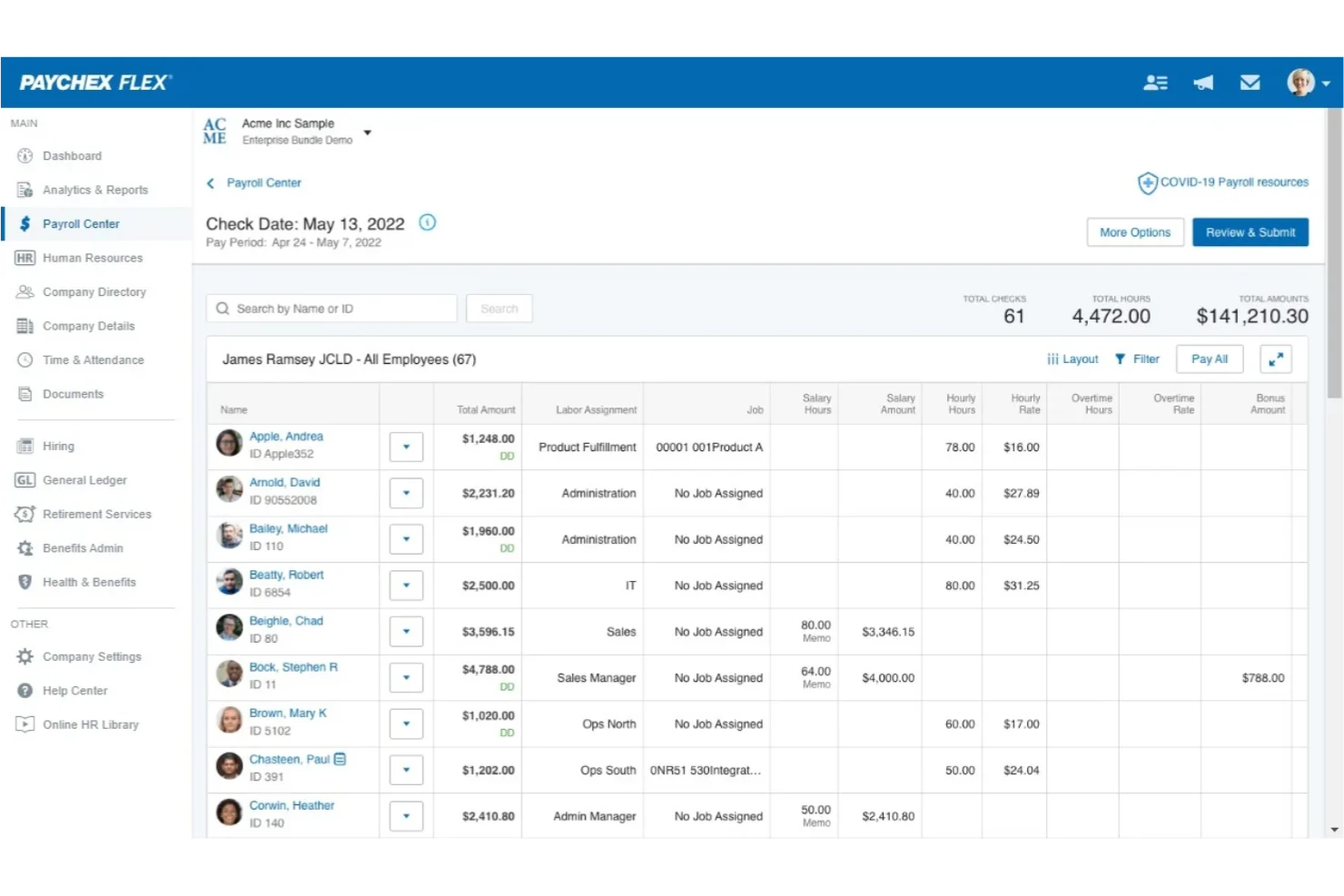
Paychex è una piattaforma software per la gestione delle paghe e delle risorse umane che consente di elaborare le buste paga, gestire i dati dei dipendenti, occuparsi dell'amministrazione fiscale e accedere agli strumenti HR da un unico sistema.
A chi è più adatto Paychex?
Paychex è ideale per le piccole e medie imprese che desiderano un'unica piattaforma per una gestione flessibile di paghe e risorse umane.
Perché ho scelto Paychex
Ho scelto Paychex tra i migliori perché permette di gestire insieme paghe e attività HR, cosa rara tra le app di payroll gratuite. Mi piace che Paychex permette di personalizzare i calendari pagamenti e automatizzare i calcoli fiscali per diverse tipologie di dipendenti. Il mio team utilizza le funzionalità self-service della piattaforma per consentire al personale di accedere alle buste paga e aggiornare i propri dati personali senza lavoro amministrativo aggiuntivo.
Caratteristiche principali di Paychex
- Elaborazione paghe da mobile: Elabora le paghe e gestisci i dati dei dipendenti tramite l'app mobile di Paychex.
- Gestione del bonifico diretto: Imposta e gestisci il bonifico diretto ai dipendenti all'interno della piattaforma.
- Servizi di pagamento pignoramenti: Gestisci automaticamente dal sistema i pignoramenti salariali disposti dal tribunale.
- Avvisi di conformità fiscale sulle paghe: Ricevi notifiche sulle prossime scadenze fiscali e sugli adempimenti relativi alle paghe.
Integrazioni di Paychex
Paychex offre integrazioni nativamente con QuickBooks, Sage Intacct, Xero, Oracle NetSuite, Jirav, Connecteam, SwyftOps, e altri ancora. È disponibile una API per integrazioni personalizzate.
Cosa è gratuito?
Paychex non offre un piano gratuito o una prova gratuita limitata nel tempo. Gli utenti possono richiedere una demo gratuita per vedere la piattaforma in azione, ma tutte le funzionalità per l'elaborazione delle paghe richiedono un abbonamento a pagamento.
Pros and Cons
Pros:
- Supporta il bonifico diretto automatico ai dipendenti
- Offre calcolo fiscale e generazione dei moduli W-2
- Include self-service per i dipendenti per l’accesso alle retribuzioni
Cons:
- Alcune funzionalità di payroll prevedono costi aggiuntivi
- La dichiarazione dei redditi di fine anno richiede un upgrade a pagamento

ADP
Ideale per la conformità delle buste paga su larga scala

ADP è una piattaforma per la gestione delle buste paga e delle risorse umane che offre elaborazione automatica delle buste paga, dichiarazione dei tributi, self-service per i dipendenti e strumenti di conformità per aziende di tutte le dimensioni.
A chi è più adatto ADP?
ADP è ideale per aziende di medie e grandi dimensioni negli Stati Uniti che necessitano di soluzioni scalabili per la gestione di buste paga e HR.
Perché ho scelto ADP
Ho scelto ADP tra i migliori perché è il fornitore di servizi paghe più utilizzato negli Stati Uniti, il che significa che posso contare sulla sua competenza in materia di conformità e sugli strumenti di dichiarazione dei tributi sempre aggiornati. Mi piace il fatto che ADP gestisca buste paga in più stati e automatizzi le trattenute complesse, cosa essenziale per i team più numerosi. Il mio team può accedere alle funzionalità self-service per i dipendenti e a report dettagliati, rendendo la gestione delle paghe molto più efficiente.
Caratteristiche principali di ADP
- App per le buste paga su dispositivi mobili: Elabora stipendi e gestisci i dati dei dipendenti direttamente dal telefono.
- Servizi di pagamento per pignoramenti: Automatizza pagamenti per pignoramenti salariali e verso le agenzie.
- Programmazione pagamenti personalizzabile: Imposta più frequenze di pagamento per diversi gruppi di dipendenti.
- Gestione della conformità ACA: Monitora e genera report sui requisiti dell'Affordable Care Act direttamente sulla piattaforma.
Integrazioni di ADP
ADP offre integrazioni native con QuickBooks, Xero, Wave, Sage, Oracle, SAP SuccessFactors, Workday e molte altre. È disponibile un'API per integrazioni personalizzate.
Cosa è gratuito?
ADP non offre un piano gratuito per sempre. Puoi richiedere una demo gratuita, ma non sono previsti né una prova gratuita a tempo limitato né l'elaborazione gratuita delle buste paga.
Pros and Cons
Pros:
- Gestisce esigenze di buste paga multi-stato e complesse
- Si integra con le principali piattaforme contabili
- Fornisce report dettagliati su buste paga e conformità
Cons:
- Il processo di configurazione può richiedere tempo
- I tempi di risposta dell'assistenza clienti possono variare


Rippling è una piattaforma cloud per la gestione delle paghe e delle risorse umane che consente di amministrare le buste paga, automatizzare le dichiarazioni fiscali e gestire la conformità per dipendenti e collaboratori in diversi paesi.
Per chi è più indicato Rippling?
Aziende internazionali e team HR che devono gestire le buste paga e la conformità per una forza lavoro distribuita in più paesi.
Perché ho scelto Rippling
Ho scelto Rippling tra i migliori perché posso gestire buste paga e risorse umane per team globali in un unico posto. Apprezzo la possibilità di automatizzare dichiarazioni fiscali e conformità sia per dipendenti che per collaboratori in diversi paesi. Il mio team utilizza Rippling per sincronizzare le buste paga con i dati delle risorse umane, evitandoci inserimenti manuali e riducendo gli errori.
Funzionalità principali di Rippling
- Tipi di retribuzione personalizzati: Configura tipi di paga unici per bonus, provvigioni o rimborsi.
- Cedolini paga automatici: Genera e distribuisci automaticamente cedolini digitali ai dipendenti.
- Integrazione con rilevazione delle presenze: Sincronizza le ore lavorate dei dipendenti direttamente dagli strumenti di rilevazione presenze.
- Permessi basati sul ruolo: Controlla l'accesso alle buste paga assegnando ruoli e permessi specifici.
Integrazioni di Rippling
Rippling offre integrazioni native con QuickBooks Online, Xero, NetSuite, Slack, Google Workspace, Okta e altri ancora. È disponibile un'API per integrazioni personalizzate.
Cosa è gratuito?
Rippling non offre un piano gratuito illimitato né una prova gratuita limitata nel tempo. L’accesso alle funzionalità di gestione delle buste paga richiede un abbonamento a pagamento e tutti i dettagli sui prezzi sono disponibili su richiesta.
Pros and Cons
Pros:
- Sincronizza le paghe con i dati HR e dei benefit
- Offre tipi di paga e detrazioni personalizzate
- Si integra nativamente con i principali strumenti HR
Cons:
- Funzionalità limitate per lavoratori a ore
- I moduli aggiuntivi aumentano rapidamente il costo complessivo


Gusto è una piattaforma di software per le paghe progettata per le piccole imprese che necessitano di elaborazione paghe automatizzata, dichiarazione delle tasse e gestione integrata dei benefit.
Per Chi è Più Indicato Gusto?
Proprietari di piccole imprese e team HR negli Stati Uniti che desiderano paghe e dichiarazione fiscale automatizzate.
Perché Ho Scelto Gusto
Ho scelto Gusto tra i migliori perché posso automatizzare l’elaborazione delle paghe e la dichiarazione delle tasse senza ulteriori interventi manuali. Mi piace che Gusto gestisca automaticamente le imposte federali, statali e locali sui salari. Il mio team può generare ed inviare buste paga digitali e gestire l’iscrizione ai benefit tutto in un unico posto.
Caratteristiche Principali di Gusto
- Portale self-service per dipendenti: I dipendenti possono accedere online a buste paga, moduli fiscali e aggiornare i propri dati personali.
- Configurazione del deposito diretto: Paga i dipendenti direttamente sui loro conti bancari con orari di deposito personalizzabili.
- Pagamenti a collaboratori: Paga i collaboratori insieme ai dipendenti e genera automaticamente i moduli 1099.
- Monitoraggio delle assenze: Tieni traccia e gestisci i permessi retribuiti (PTO), le assenze per malattia e la maturazione delle ferie all'interno della piattaforma.
Integrazioni di Gusto
Gusto offre integrazioni native con 7Shifts, 15Five, Accelo, Asana, Box, Carta, ClickUp, Clover e altri ancora. È disponibile un’API per integrazioni personalizzate.
Cosa è Gratuito?
Gusto non offre un piano gratuito per sempre. Puoi richiedere una demo gratuita, ma tutte le funzionalità relative alle paghe richiedono un abbonamento a pagamento, senza periodo di prova gratuito disponibile.
Pros and Cons
Pros:
- Dichiarazione fiscale automatizzata per tutti gli stati
- Opzioni integrate di gestione dei benefit
- Auto-onboarding dei dipendenti e archiviazione documenti
Cons:
- Supporto limitato per paghe internazionali
- Il monitoraggio delle presenze richiede piani di livello superiore

Ideale per la gestione delle buste paga di team globali

Deel Payroll è una piattaforma software per la gestione delle buste paga a livello globale che consente di gestire pagamenti, compensi ai collaboratori e servizi di employer of record per team distribuiti in oltre 100 paesi.
A chi è rivolto Deel Payroll?
Team HR e finanziari globali che gestiscono buste paga e conformità per dipendenti e collaboratori remoti in diversi paesi.
Perché ho scelto Deel Payroll
Ho scelto Deel Payroll tra i migliori perché posso gestire le buste paga per dipendenti e collaboratori in oltre 100 paesi da un'unica dashboard. Apprezzo il fatto che Deel offra supporto integrato per collaboratori e servizi di employer of record (EOR), così il mio team può assumere e pagare talenti globali senza sistemi separati. Deel automatizza anche la conformità fiscale locale e genera cedolini specifici per ogni paese, risparmiando tempo nella gestione degli adempimenti internazionali.
Funzionalità principali di Deel Payroll
- Pagamenti multipli: Invia pagamenti a più dipendenti o collaboratori contemporaneamente.
- Gestione delle spese: Monitora, approva e rimborsa le spese dei dipendenti all'interno della piattaforma.
- Report personalizzati sulle buste paga: Genera report scaricabili sulle buste paga e sulle tasse per qualsiasi ciclo di pagamento.
- Modelli di documenti localizzati: Accedi a modelli di documenti per l'occupazione e la conformità specifici per ogni paese.
Integrazioni Deel Payroll
Deel Payroll offre integrazioni native con SAP SuccessFactors, NetSuite, Google Workspace, Slack e altri. È disponibile un'API per integrazioni personalizzate.
Cosa è gratuito?
Deel Payroll non offre un piano gratuito permanente né una prova gratuita a tempo limitato. Tutte le funzionalità per le buste paga richiedono un abbonamento a pagamento; non sono previsti piani gratuiti.
Pros and Cons
Pros:
- Supporta buste paga in oltre 100 paesi
- Gestione integrata di collaboratori ed EOR
- Funzioni automatiche di conformità fiscale locale
Cons:
- Occasionali ritardi nei pagamenti internazionali
- Alcune integrazioni richiedono configurazione manuale

Ideale per la gestione delle buste paga con coinvolgimento dei dipendenti

Paylocity è una piattaforma cloud per la gestione di buste paga e risorse umane che unisce l’elaborazione automatizzata delle paghe, la gestione delle imposte, i servizi self-service per i dipendenti e la gestione della conformità per le aziende che cercano una soluzione unificata per le paghe.
Per chi è ideale Paylocity?
Paylocity è indicato per aziende di medie e grandi dimensioni che vogliono gestire paghe e processi HR su un’unica piattaforma.
Perché ho scelto Paylocity
Ho scelto Paylocity tra le migliori soluzioni perché permette di gestire buste paga e attività HR in un’unica piattaforma. Apprezzo la possibilità di automatizzare l’elaborazione paghe, la gestione delle imposte e i servizi self-service per i dipendenti da un unico cruscotto. Il mio team può monitorare la conformità e gestire l’onboarding senza cambiare strumenti: un vantaggio ideale per la piattaforma unificata di paghe e HR pensata per la forza lavoro moderna.
Funzionalità chiave di Paylocity
- Gestione del bonifico diretto: Imposta e gestisci i conti di bonifico diretto dei dipendenti all’interno della piattaforma.
- Gestione dei pignoramenti: Calcola e gestisci automaticamente i pignoramenti salariali dei dipendenti.
- Generazione dei moduli fiscali di fine anno: Crea e distribuisci i moduli W-2 e 1099 per dipendenti e collaboratori.
- Accesso mobile alle buste paga: Elabora le paghe e accedi ai dati payroll dall’app mobile Paylocity.
Integrazioni di Paylocity
Paylocity offre integrazioni native con QuickBooks, NetSuite, ADP, SAP SuccessFactors e integra nativamente anche all’interno dell’ecosistema Microsoft. Un’API è disponibile per integrazioni personalizzate.
Cosa è gratuito?
Paylocity non offre un piano gratuito permanente né una prova gratuita a tempo limitato. Per accedere alla piattaforma è necessario contattare il reparto vendite per una demo e un preventivo personalizzato.
Pros and Cons
Pros:
- Reportistica e analisi delle paghe personalizzabili
- Approvazione delle paghe da mobile per i responsabili
- Gestione dei pignoramenti inclusa in tutti i piani
Cons:
- Costi aggiuntivi per la gestione documentale
- Pagamento di una quota di attivazione per i nuovi clienti
New Product Updates from Paylocity

Paylocity Expands Expense and Purchase Request Tools
Paylocity adds connected personal cards, smarter expense categorization, and a streamlined purchase request experience. This reduces manual entry and helps finance teams manage expenses and approvals more efficiently. For more information, visit Paylocity’s official site.
 .
.
TimeTrex
Ideale per soluzioni open source nelle buste paga

TimeTrex è una piattaforma open source per buste paga e rilevazione delle presenze che combina programmazione dei turni dei dipendenti, gestione delle presenze, elaborazione delle buste paga e calcolo delle imposte in un unico sistema.
Per chi è ideale TimeTrex?
TimeTrex è adatto a piccole e medie imprese e organizzazioni no profit che necessitano di soluzioni open source per buste paga e rilevazione delle presenze con flussi di lavoro personalizzabili.
Perché ho scelto TimeTrex
Ho scelto TimeTrex come uno dei migliori perché è l'unica piattaforma gratuita e open source per buste paga e rilevazione delle presenze che ho trovato in grado di coprire tutto, dalla pianificazione dei turni al calcolo delle tasse sui salari. Mi piace poter automatizzare le elaborazioni delle buste paga, gestire la presenza dei dipendenti e occuparmi della conformità normativa senza dover pagare una licenza. Il mio team riesce a personalizzare i flussi di lavoro e la reportistica, cosa rara tra le app gratuite per la gestione delle buste paga.
Funzionalità principali di TimeTrex
- App mobile: Rileva le presenze e gestisci le buste paga da dispositivi iOS o Android.
- Geofencing: Limita le timbrature di entrata e uscita a posizioni specifiche.
- Politiche di retribuzione personalizzate: Imposta regole specifiche per straordinari, festività e pause.
- Gestione documentale: Archivia e organizza in modo sicuro i documenti dei dipendenti all'interno della piattaforma.
Integrazioni TimeTrex
TimeTrex offre integrazioni native con ADP, Sage, QuickBooks, Paychex, Meditech, Insync e altri. TimeTrex offre un'API per integrazioni personalizzate.
Cosa è gratuito?
TimeTrex offre una Community Edition gratuita per sempre senza limiti di utenti. Alcune funzionalità avanzate, integrazioni e opzioni di supporto sono disponibili solo con i piani a pagamento.
Pros and Cons
Pros:
- Open source senza limiti di utenti
- Include strumenti per il calcolo delle imposte sui salari
- Supporta hardware per orologio biometrico
Cons:
- Interfaccia dall'aspetto datato e disordinato
- Manca il supporto integrato per il bonifico diretto
New Product Updates from TimeTrex
TimeTrex Adds Quick Punch App With Offline and QR Support
TimeTrex adds a new Quick Punch app, offline punching, QR code scanning, punch images, configurable messages, and punch warnings or lockouts to improve employee clock-ins across browsers and local computers. For more information, visit TimeTrex’s official site.
 .
.
Ideale per la gestione paghe con integrazione contabile
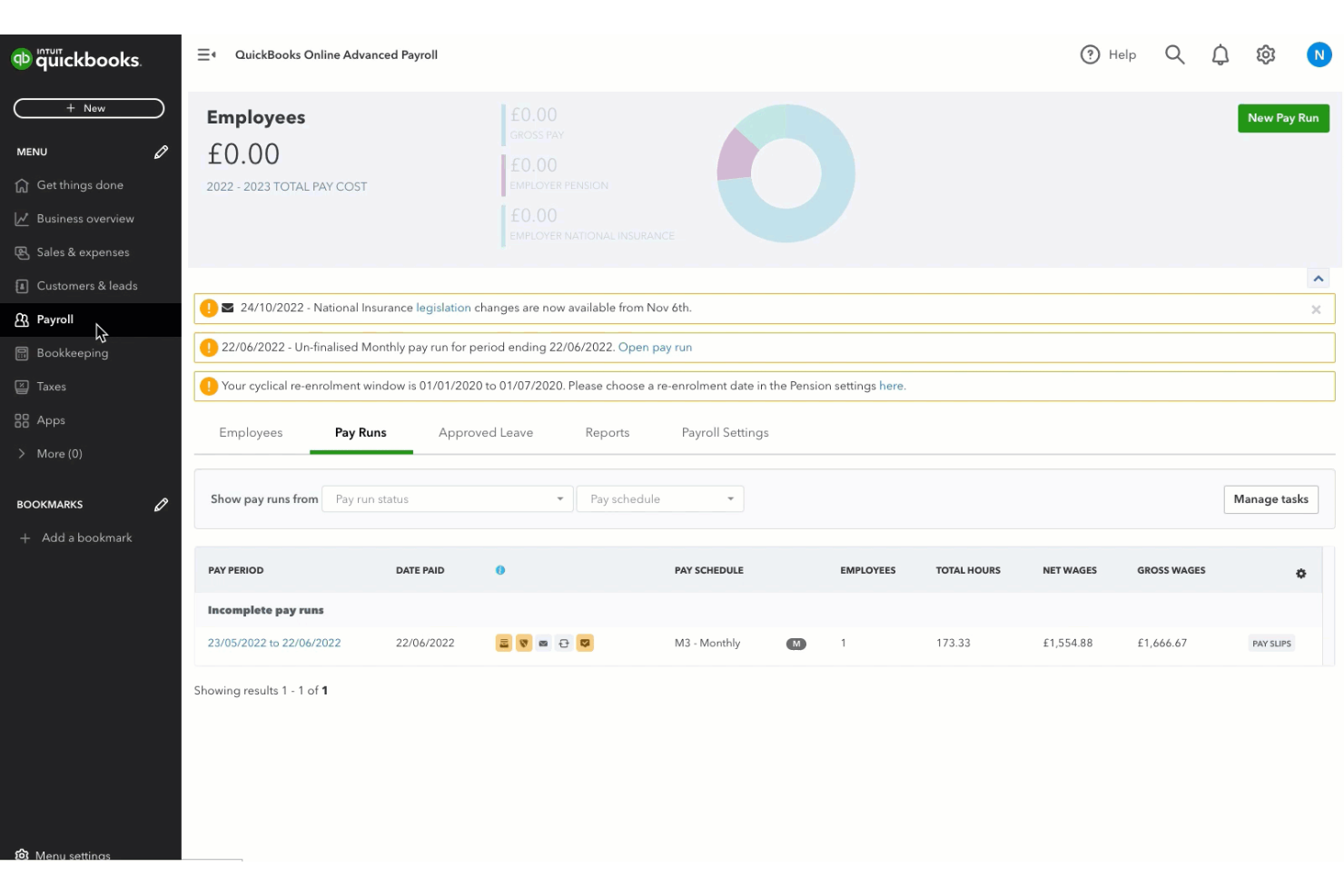
QuickBooks Workforce (precedentemente conosciuto come QuickBooks Payroll) è un software di gestione paghe basato su cloud che consente di elaborare le buste paga, gestire le dichiarazioni fiscali e gestire il deposito diretto sincronizzando i dati delle paghe con la contabilità di QuickBooks.
A chi è destinato QuickBooks Workforce?
QuickBooks Workforce è l'ideale per piccole imprese e contabili che desiderano una piattaforma unica per gestione paghe e contabilità integrata.
Perché ho scelto QuickBooks Workforce
Ho scelto QuickBooks Workforce tra i migliori perché posso elaborare le buste paga e sincronizzare tutti i dati delle paghe direttamente con la contabilità di QuickBooks, mantenendo tutto in un unico posto. Mi piace poter automatizzare le dichiarazioni e i pagamenti fiscali, e gestire il deposito diretto senza dover cambiare piattaforma. Il mio team riesce a gestire paghe, conformità fiscale e contabilità da un'unica dashboard, evitando così di dover usare più sistemi diversi.
Funzionalità principali di QuickBooks Workforce
- Pagamenti automatici: Pianifica il pagamento delle buste paga in automatico a ogni ciclo.
- Portale self-service per i dipendenti: Consente ai dipendenti di accedere online a cedolini e documenti fiscali.
- Gestione pignoramenti e trattenute: Imposta e gestisci pignoramenti salariali e trattenute.
- Generazione modelli fiscali di fine anno: Genera e distribuisci W-2 e 1099 per dipendenti e collaboratori.
Integrazioni di QuickBooks Workforce
QuickBooks Workforce offre integrazioni native con QuickBooks Online, PayPal, Etsy, Square, eBay e altri ancora. È disponibile una API per integrazioni personalizzate.
Cosa è gratuito?
QuickBooks Workforce non offre un piano gratuito per sempre, ma mette a disposizione una prova gratuita a tempo limitato. Tuttavia, la maggior parte delle funzionalità richiede un abbonamento a pagamento.
Pros and Cons
Pros:
- Sincronizza i dati delle paghe con la contabilità QuickBooks
- Automatizza dichiarazioni fiscali federali e statali
- Offre deposito diretto in giornata e giorno successivo
Cons:
- Prevede costi aggiuntivi per l’elaborazione paghe multi-stato
- L’app mobile non offre tutte le funzionalità paghe

Homebase
Ideale per la gestione paghe di piccoli team

Homebase è una piattaforma di gestione paghe e team per piccole imprese che combina l'elaborazione automatizzata delle buste paga, la rilevazione delle presenze, la pianificazione dei turni e strumenti di conformità in un unico sistema.
Per chi è più indicato Homebase?
Homebase è ideale per piccole imprese nel commercio al dettaglio, nella ristorazione o nell’accoglienza che hanno bisogno di una gestione semplice delle paghe e dei team orari.
Perché ho scelto Homebase
Ho scelto Homebase come uno dei migliori perché mi permette di gestire le paghe dei team orari e registrare le ore lavorative in un unico posto. Mi piace poter sincronizzare le schede orarie direttamente con le paghe, evitando inserimenti manuali. Il mio team usa Homebase per calcolare automaticamente gli stipendi e per la dichiarazione delle tasse, soluzione particolarmente utile per le piccole imprese con personale orario.
Caratteristiche principali di Homebase
- Pagamenti tramite bonifico diretto: Paga i dipendenti in modo veloce tramite bonifico sul loro conto bancario.
- Preparazione W-2 e 1099: Genera e invia i moduli W-2 e 1099 per dipendenti e collaboratori.
- Gestione delle trattenute sul salario: Gestisci direttamente in busta paga trattenute e pignoramenti salariali.
- Supporto multi-sede: Gestisci la busta paga di più sedi aziendali da un'unica dashboard.
Integrazioni di Homebase
Homebase offre integrazioni native con QuickBooks, Square, Toast, Shopify, Clover, ADP, Gusto, Paychex e altri. È disponibile un'API per integrazioni personalizzate.
Cosa è gratuito?
Homebase offre un piano gratuito per sempre che include rilevazione delle presenze, pianificazione dei turni e gestione base del team per un numero illimitato di dipendenti in una sola sede. Le funzionalità di gestione paghe non sono incluse nel piano gratuito e richiedono un upgrade a pagamento.
Pros and Cons
Pros:
- Paghe gratuite fino a 20 dipendenti
- Si integra con i principali sistemi POS
- Supporta aziende con più sedi
Cons:
- Non supporta la gestione paghe per dipendenti con stipendio fisso
- Manca di funzionalità avanzate di gestione risorse umane

Paycor
Ideale per la gestione delle paghe e della forza lavoro
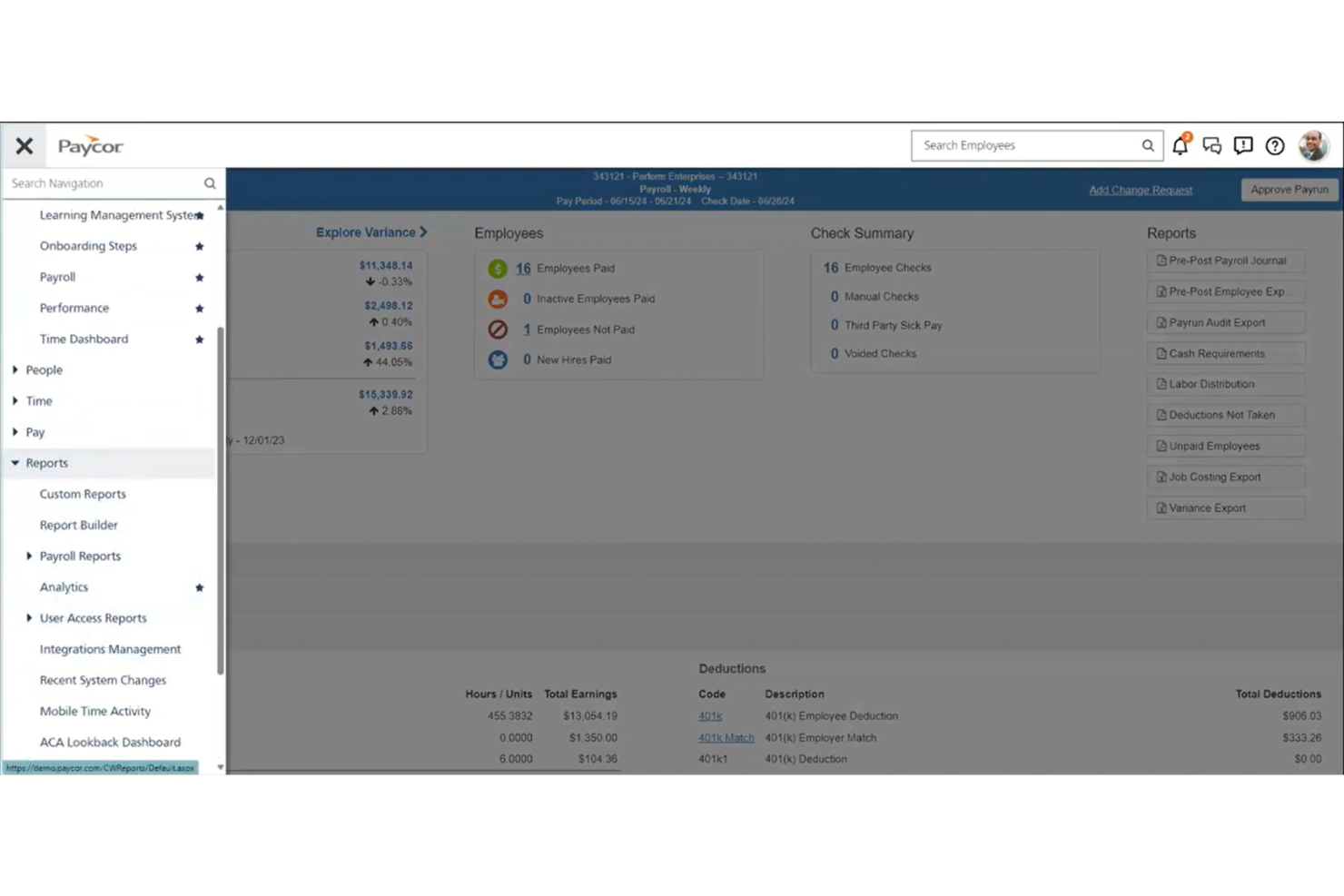
Paycor è una piattaforma cloud per la gestione di buste paga e risorse umane che combina elaborazione delle paghe, gestione fiscale, self-service per i dipendenti e analisi della forza lavoro per le aziende che cercano una soluzione gratuita per la gestione delle paghe.
A chi è più adatto Paycor?
Paycor è ideale per aziende di medie dimensioni e in crescita che hanno bisogno di una gestione delle paghe e delle risorse umane scalabile su più sedi.
Perché ho scelto Paycor
Ho scelto Paycor tra i migliori perché la sua piattaforma flessibile per le paghe e le risorse umane mi permette di gestire paghe, conformità fiscale e registri dei dipendenti in un unico posto. Mi piace che posso automatizzare i processi di pagamento e accedere ad analisi sulla forza lavoro per prendere decisioni migliori. Il mio team utilizza Paycor per gestire paghe su più sedi e monitorare i dati dei dipendenti mentre cresciamo.
Caratteristiche principali di Paycor
- Portale self-service per i dipendenti: I dipendenti possono visualizzare le buste paga, i moduli fiscali e aggiornare online le proprie informazioni personali.
- Pagamento su richiesta: I dipendenti possono accedere alla retribuzione maturata prima del giorno di paga tramite la piattaforma.
- Gestione delle pignoramenti: Il sistema gestisce automaticamente i pignoramenti salariali e le detrazioni.
- Strumenti per la conformità ACA: Paycor monitora e gestisce i requisiti di rendicontazione previsti dall'Affordable Care Act.
Integrazioni di Paycor
Paycor offre centinaia di integrazioni native tramite il suo marketplace, tra cui AssureHire, Sterling, Clearstar e altre. È disponibile un'API per integrazioni personalizzate.
Cosa è gratuito?
Paycor non offre un piano gratuito permanente né una prova gratuita limitata nel tempo. Gli utenti possono richiedere una demo gratuita, ma per accedere alle funzionalità di paghe è necessario un abbonamento a pagamento.
Pros and Cons
Pros:
- Gestisce bene la conformità delle paghe multi-stato
- Strumenti integrati per la gestione dei benefit e della conformità ACA
- Il marketplace offre numerose integrazioni HR
Cons:
- Le dichiarazioni di fine anno possono comportare costi aggiuntivi
- La configurazione delle integrazioni può richiedere il supporto IT
Altre app gratuite per le paghe
Ecco alcune altre opzioni di app gratuite per le paghe che non sono entrate nel mio elenco, ma che vale comunque la pena valutare:
- OnPay
Ideale per paghe semplici con strumenti di HR
- Patriot Payroll
Ideale per configurare paghe a basso costo
- Payment Evolution
Ideale per i servizi di gestione stipendi canadesi


Come Valuto le App Payroll Gratuite
Divido la mia valutazione in due livelli: requisiti di base—come un piano davvero gratuito e calcoli fiscali automatici—e fattori differenzianti che distinguono le migliori opzioni.
Funzionalità di Base (Criteri Fondamentali per Questa Lista)
Quando seleziono gli strumenti per la mia lista, valuto ciascuno su una scala da 0 (non offre la funzionalità) a 5 (eccelle in quest'area) per ogni funzionalità di base elencata qui sotto. Poi, calcolo il punteggio totale dello strumento in percentuale. Ogni strumento deve raggiungere un punteggio totale minimo del 65% per essere preso in considerazione per l'inclusione.
- Motore di Calcolo Payroll: Verifico se lo strumento gestisce automaticamente i calcoli dal lordo al netto per diversi tipi di retribuzione, come orari, salariati, straordinari e bonus.
- Trattenuta Fiscale e Dichiarazione: Ogni strumento dovrebbe calcolare le tasse sul payroll e generare i moduli di fine anno—alcuni strumenti come Gusto e Wave effettuano la trasmissione automatica, mentre altri forniscono i moduli per la trasmissione manuale.
- Disponibilità di un Piano Gratuito: Cerco un piano davvero gratuito che permetta di gestire il payroll reale in modo continuativo, non una prova gratuita di 14 o 30 giorni travestita da prodotto gratuito.
- Deposito Diretto e Distribuzione del Pagamento: L'app dovrebbe offrire almeno un metodo per pagare i dipendenti, che sia deposito diretto, assegni cartacei o carte prepagate.
- Emissione di Cedolini e Generazione di Registri: Valuto se la piattaforma produce cedolini digitali dettagliati e mantiene una cronologia del payroll ricercabile a cui puoi fare riferimento per le tasse o durante gli audit.
- Accesso Self-Service per i Dipendenti: I membri del tuo team dovrebbero poter accedere autonomamente e scaricare i propri cedolini, documenti fiscali e informazioni personali senza dover contattare l'HR a ogni ciclo di pagamento.
Una volta che ho una lista di strumenti che soddisfano questi criteri, considero ciò che distingue ogni piattaforma.
Fattori Differenzianti (Cosa Distingue i Fornitori)
Ecco come confronto e metto a confronto i diversi fornitori:
Funzionalità Distintive
Il payroll multi-statale è importante se il tuo team è distribuito—cerco strumenti che gestiscano le regole fiscali specifiche per giurisdizione senza costringerti a ricerche manuali. I pagamenti ai collaboratori sono un altro punto essenziale, soprattutto per le piccole imprese che si affidano a una combinazione di lavoratori W-2 e 1099 e necessitano della generazione dei moduli di fine anno per entrambi. Valuto anche se il monitoraggio delle ore è integrato o collegato, poiché l'integrazione automatica delle ore nel payroll riduce gli errori di inserimento dati manuale a ogni ciclo.
Oltre le Funzionalità
La vera trasparenza dei costi è la prima cosa che controllo—alcuni strumenti "gratuiti" nascondono commissioni nell'elaborazione del deposito diretto o nella generazione dei moduli fiscali di fine anno. Valuto anche quanto bene ogni app si collega alle principali piattaforme contabili come QuickBooks o Xero, poiché una sincronizzazione payroll-contabilità pulita previene problemi di riconciliazione. Anche la sicurezza dei dati merita molta attenzione. Le app payroll memorizzano informazioni sensibili come dati bancari e ID governativi, quindi cerco la conformità SOC 2, standard di crittografia e controlli di accesso basati sui ruoli.
Come scegliere un’app gratuita per le paghe
È facile perdersi in lunghi elenchi di funzionalità e strutture tariffarie complesse. Per aiutarti a rimanere concentrato mentre affronti il tuo particolare processo di selezione del software, ecco un elenco dei fattori da tenere a mente:
| Fattore | Cosa considerare |
| Scalabilità | L’app supporterà il tuo team man mano che cresce? Controlla i limiti relativi agli utenti o ai dipendenti e le possibilità di passaggio a un piano superiore. |
| Integrazioni | Si collega agli strumenti di contabilità, risorse umane o rilevazione delle ore? Verifica la presenza di integrazioni native, non solo di esportazioni CSV. |
| Possibilità di personalizzazione | Puoi modificare i calendari dei pagamenti, i tipi di detrazione o i formati dei report per adattarli ai tuoi processi? |
| Semplicità d’uso | L’interfaccia è chiara e semplice sia per gli amministratori sia per i dipendenti? Fai una prova con scenari reali di gestione delle paghe. |
| Implementazione e configurazione iniziale | Quanto velocemente puoi iniziare a utilizzare il sistema? Cerca una configurazione guidata, opzioni per importare i dati e assistenza per la configurazione iniziale. |
| Costo | Ci sono costi nascosti per l’invio delle dichiarazioni fiscali, i depositi diretti o l’assistenza? Esamina il dettaglio completo dei prezzi. |
| Misure di sicurezza | L’app offre crittografia, autorizzazioni per gli utenti e registri di controllo per proteggere i dati sensibili relativi alle paghe? |
| Requisiti di conformità | L’app ti manterrà aggiornato sulle normative locali, statali e federali relative alle paghe? |
Che cos’è un’app gratuita per le paghe?
Un’app gratuita per le paghe è un software che consente di calcolare gli stipendi dei dipendenti, gestire le ritenute fiscali e generare report sulle paghe senza un canone di abbonamento. Questi strumenti aiutano le piccole imprese o i team ad automatizzare le attività relative alle paghe, a rispettare le normative fiscali e a fornire cedolini o depositi diretti, tutto senza costi.
Funzionalità delle app gratuite per le paghe
Vediamo le funzionalità comunemente presenti nelle soluzioni per la gestione delle paghe e quali sono generalmente incluse nei piani gratuiti rispetto a quelli a pagamento.
Funzionalità tipiche delle applicazioni gratuite per buste paga
- Calcoli delle buste paga: Calcola automaticamente la retribuzione lorda, le detrazioni e la retribuzione netta per ogni dipendente in base alle ore lavorate o allo stipendio.
- Generazione dei cedolini: Crea cedolini digitali o stampabili che consentono ai dipendenti di verificare i propri guadagni e le detrazioni.
- Calcoli fiscali di base: Calcola le imposte standard federali, statali e locali sui salari per ogni periodo di paga.
- Supporto per il deposito diretto: Consente di pagare i dipendenti direttamente sui loro conti bancari senza stampare assegni.
- Servizi autonomi per i dipendenti: Consente ai dipendenti di visualizzare cedolini, moduli fiscali e informazioni personali tramite un portale sicuro.
- Reportistica di base: Fornisce report standard sulle buste paga, come riepiloghi delle retribuzioni e report sulle passività fiscali, per la conservazione dei registri e la conformità.
- Stampa manuale degli assegni: Consente di stampare assegni fisici per i dipendenti che non utilizzano il deposito diretto.
- Gestione dei dipendenti: Memorizza le informazioni di base sui dipendenti, come dati di contatto, qualifiche professionali e tariffe retributive.
Funzionalità tipiche delle applicazioni a pagamento per buste paga
- Presentazione automatizzata delle dichiarazioni fiscali: Gestisce per conto dell'utente la presentazione delle dichiarazioni relative alle imposte federali, statali e locali sui salari, riducendo il lavoro manuale e il rischio di errori.
- Moduli fiscali di fine anno: Genera e presenta i moduli W-2, 1099 e altri documenti fiscali obbligatori di fine anno per dipendenti e collaboratori.
- Supporto per le buste paga multi-statali: Gestisce le buste paga e la conformità fiscale per i dipendenti che lavorano in più stati o giurisdizioni.
- Calendari di pagamento personalizzabili: Consente di impostare più frequenze di pagamento e periodi di paga personalizzati in base alle esigenze dell'azienda.
- Integrazioni avanzate: Collega i dati delle buste paga ai sistemi di contabilità, risorse umane e rilevazione delle ore per semplificare i flussi di lavoro.
- Gestione dei pignoramenti: Calcola e gestisce automaticamente i pignoramenti dello stipendio, come quelli per il mantenimento dei figli o i prelievi fiscali.
- Reportistica e analisi avanzate: Offre report e analisi personalizzabili per monitorare tendenze, costi e indicatori di conformità relativi alle buste paga.
- Assistenza clienti dedicata: Fornisce accesso a canali di assistenza prioritari o in tempo reale, tra cui telefono, chat o responsabili dedicati.
- Elaborazione delle buste paga da dispositivi mobili: Consente di elaborare le buste paga e gestire i dati dei dipendenti da un'applicazione o un dispositivo mobile.
- Aggiornamenti sulla conformità: Aggiorna automaticamente le tabelle fiscali e le regole di conformità per riflettere le normative federali, statali e locali più recenti.
Vantaggi di un'applicazione gratuita per buste paga
L'implementazione di un'applicazione gratuita per buste paga offre diversi vantaggi alla squadra e all'azienda. Eccone alcuni:
- Risparmio sui costi: Elimina i costi di abbonamento, consentendo di gestire le buste paga senza aumentare i costi generali.
- Calcoli automatizzati: Riduce gli errori manuali calcolando automaticamente retribuzioni, detrazioni e imposte a ogni periodo di paga.
- Elaborazione più rapida delle buste paga: Accelera l'elaborazione dei pagamenti con funzionalità come il deposito diretto e l'elaborazione in serie.
- Maggiore autonomia dei dipendenti: Offre ai dipendenti accesso a cedolini e moduli fiscali tramite portali a uso autonomo.
- Conformità normativa: Aiuta a rispettare i requisiti di calcolo e reportistica fiscale di base.
- Facile configurazione iniziale: Offre una configurazione guidata e modelli che consentono di iniziare rapidamente, anche con un'esperienza limitata nella gestione delle buste paga.
- Scalabilità per le piccole squadre: Supporta le piccole imprese o le squadre in crescita senza richiedere aggiornamenti immediati o piani a pagamento.
Costi e prezzi delle applicazioni per buste paga
Capisco che hai cercato questo articolo per trovare le migliori applicazioni per buste paga disponibili gratuitamente. Tuttavia, poiché i piani gratuiti offrono solo funzionalità limitate, è molto probabile che in futuro dovrai passare a un piano superiore.
La tabella seguente riassume i piani più comuni, i relativi prezzi medi e le funzionalità tipicamente incluse nelle soluzioni per la gestione delle buste paga:
Tabella comparativa dei piani per le applicazioni per buste paga
| Tipo di piano | Prezzo medio | Funzionalità comuni |
| Piano gratuito | $0 | Calcoli di base delle paghe, generazione dei cedolini, supporto per l'accredito diretto, calcoli fiscali di base e gestione autonoma per i dipendenti. |
| Piano personale | $5-$15/utente/mese | Tutte le funzionalità gratuite, oltre alla presentazione automatizzata delle dichiarazioni fiscali, ai moduli fiscali di fine anno e alle integrazioni limitate. |
| Piano aziendale | $20-$40/utente/mese | Tutte le funzionalità del piano personale, oltre alla gestione delle paghe in più stati, ai report avanzati, ai calendari di pagamento personalizzati e al supporto prioritario. |
| Piano aziendale avanzato | $40-$70/utente/mese | Tutte le funzionalità del piano aziendale, oltre alla gestione dedicata dell'account, agli strumenti avanzati per la conformità, alle integrazioni personalizzate e alla sicurezza avanzata. |
Domande frequenti sull'app gratuita per la gestione delle paghe
Ecco alcune risposte alle domande comuni sull’app gratuita per la gestione delle paghe:
Le app gratuite per la gestione delle paghe sono sicure?
Sì, la maggior parte delle app gratuite per la gestione delle paghe utilizza sistemi di crittografia e protocolli di sicurezza per proteggere i dati relativi alle paghe. Consulta sempre l’informativa sulla privacy e le certificazioni di sicurezza del fornitore prima di inserire informazioni sensibili.
Posso elaborare le paghe di più dipendenti con un'app gratuita per la gestione delle paghe?
Sì, molte app gratuite per la gestione delle paghe consentono di elaborare le paghe di più dipendenti, ma alcune possono limitare il numero di utenti o dipendenti che è possibile aggiungere. Consulta i termini di ciascuna app per verificare eventuali restrizioni.
Le app gratuite per la gestione delle paghe gestiscono automaticamente la presentazione delle dichiarazioni fiscali?
No, la maggior parte delle app gratuite per la gestione delle paghe calcola soltanto le imposte, ma non presenta automaticamente le dichiarazioni. Di solito dovrai occuparti personalmente della presentazione delle dichiarazioni fiscali oppure passare a un piano a pagamento che offra la presentazione automatizzata.
Cosa succede se un'app gratuita per la gestione delle paghe non è più sufficiente per le mie esigenze?
Se il tuo team cresce o le tue esigenze diventano più complesse, di solito puoi passare a un piano a pagamento per accedere a funzionalità avanzate come la gestione delle paghe in più stati, la presentazione automatizzata delle dichiarazioni fiscali o le integrazioni.
Posso integrare un'app gratuita per la gestione delle paghe con il mio software di contabilità?
Alcune app gratuite per la gestione delle paghe offrono integrazioni di base o esportazioni CSV, ma le integrazioni complete con i software di contabilità sono spesso riservate ai piani a pagamento. Esamina le opzioni di integrazione prima di scegliere una soluzione.