

I 10 migliori software di IA per l’apprendimento e lo sviluppo nel 2026

Selezione dei migliori software per l'apprendimento e lo sviluppo basati sull'IA


I software per l'apprendimento e lo sviluppo basati sull'IA utilizzano l'intelligenza artificiale per personalizzare, automatizzare e migliorare la formazione, la valutazione delle competenze e il miglioramento delle competenze della tua forza lavoro. Se stai cercando questi strumenti, vuoi trovare modi più intelligenti e veloci per colmare le lacune nelle competenze, adattarti ai cambiamenti e mantenere i team coinvolti nel 2026. So che devi soddisfare aspettative elevate e ottenere risultati con tempo e personale limitati: è proprio per questo che scegliere la piattaforma giusta è importante.
In questa guida troverai consigli affidabili, informazioni utili e suggerimenti diretti che ti aiuteranno a scegliere la migliore piattaforma di apprendimento basata sull'IA per le tue esigenze.
Perché fidarsi delle nostre recensioni sui software
Il nostro team testa e recensisce software dal 2012. In quanto esperti HR noi stessi, sappiamo quanto sia difficile — e importante — scegliere il software giusto.
Per questa guida, abbiamo valutato gli strumenti attraverso test pratici e ricerche indipendenti, assegnando un punteggio agli strumenti in base ai nostri criteri di selezione. Ci basiamo inoltre sulle competenze di leader di pensiero del settore e di professionisti HR attivi.
Le nostre recensioni riflettono il nostro giudizio editoriale umano, non un discorso di vendita.
Revisori esperti:
Tabella comparativa dei software per l'apprendimento e lo sviluppo basati sull'IA
Questa tabella comparativa evidenzia i prezzi delle migliori soluzioni software per l’apprendimento e lo sviluppo basati sull’IA:
| Tool | Best For | Trial Info | Price | ||
|---|---|---|---|---|---|
| 1 | Ideale per lanci rapidi di corsi assistiti dall'IA | Piano gratuito + demo gratuita disponibile | Da $119/mese (fatturato annualmente) | Website | |
| 2 | Ideale per integrazioni HR e CRM preconfigurate | Demo gratuita + prova gratuita disponibile | Prezzo su richiesta | Website | |
| 3 | Ideale per la creazione integrata di corsi in PowerPoint | Prova gratuita di 30 giorni + demo gratuita disponibile | A partire da $3.97/utente/mese | Website | |
| 4 | Ideale per la creazione collaborativa e tra pari di corsi | Prova gratuita di 30 giorni + demo gratuita disponibile | Da $8/utente/mese | Website | |
| 5 | Ideale per la formazione centralizzata su più pubblici | Demo gratuita disponibile | Prezzo su richiesta | Website | |
| 6 | Ideale per formazione aziendale rapida grazie all’IA | Prova gratuita di 30 giorni disponibile | Da $1,449/utente (fatturazione annuale) | Website | |
| 7 | Ideale per mappare e colmare i gap di competenze in azienda | Demo gratuita disponibile | Prezzi su richiesta | Website | |
| 8 | Ideale per connettere i dati della forza lavoro con i talenti | Demo gratuita disponibile | Prezzo su richiesta | Website | |
| 9 | Ideale per il microlearning su larga scala del personale di prima linea | Demo gratuita disponibile | Prezzo su richiesta | Website | |
| 10 | Ideale per roleplay con intelligenza artificiale | Piano gratuito disponibile | Da $20/utente/mese (fatturazione annuale) | Website |


Recensioni dei migliori software per l'apprendimento e lo sviluppo basati sull'IA
Di seguito trovi i miei riepiloghi dettagliati dei migliori software per l’apprendimento e lo sviluppo basati sull’IA inclusi nella mia selezione. Le mie recensioni offrono un’analisi approfondita delle funzionalità, dei casi d’uso migliori e delle integrazioni di ciascuna piattaforma, per aiutarti a trovare quella più adatta a te.

Ideale per lanci rapidi di corsi assistiti dall'IA
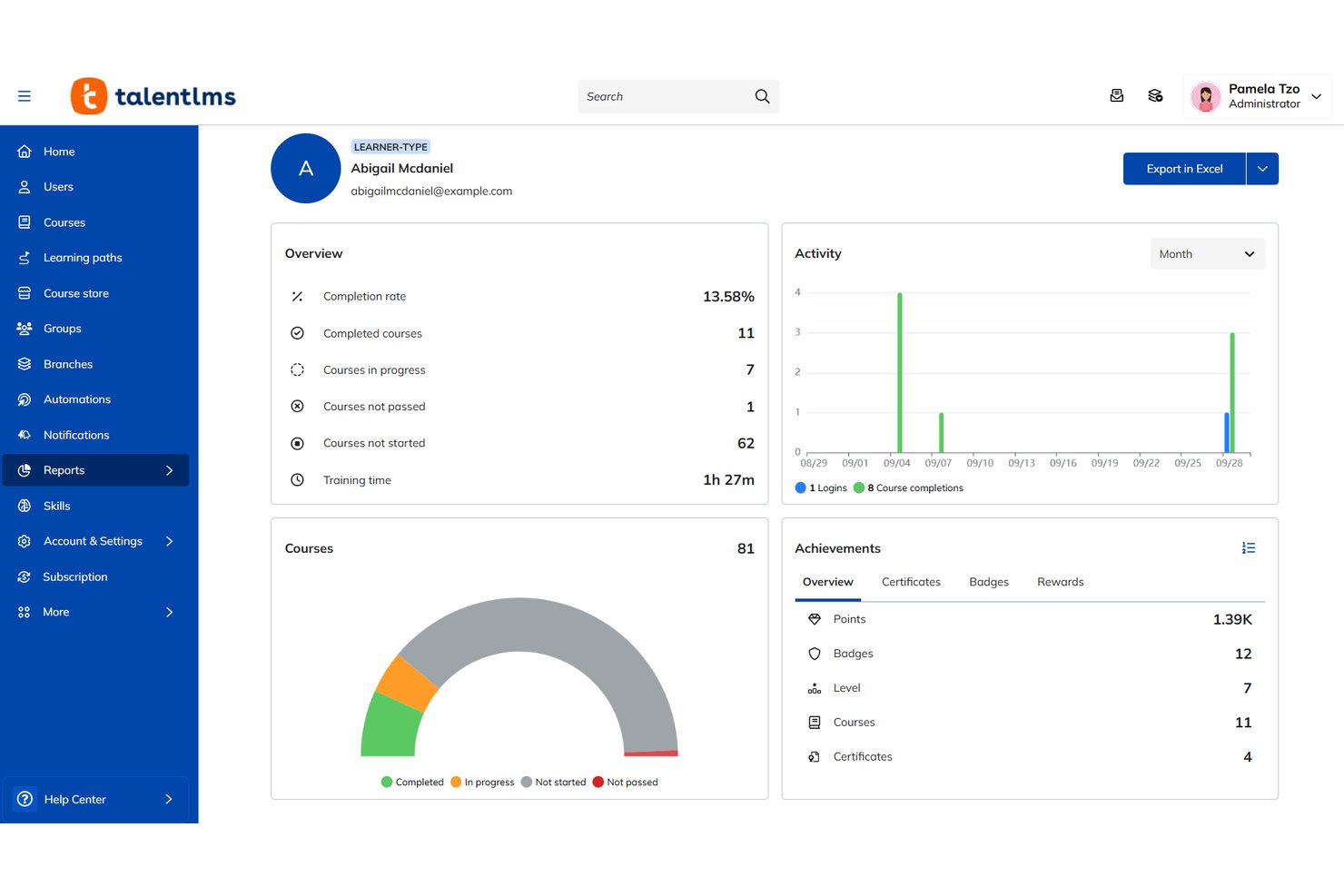
TalentLMS è un sistema di gestione dell'apprendimento assistito dall'IA che combina la creazione generativa di corsi, percorsi di apprendimento adattivi, tracciamento delle competenze e una libreria di contenuti integrata per la formazione di dipendenti, partner e clienti.
Per chi è più indicato TalentLMS?
TalentLMS è particolarmente adatto a piccole e medie imprese che devono avviare rapidamente programmi di formazione strutturati senza dover contare su un ampio team L&D.
Perché ho scelto TalentLMS
TalentLMS si è guadagnato un posto nella mia selezione grazie a TalentCraft, il suo strumento AI integrato per la creazione di corsi, che genera contenuti completi, quiz e immagini a partire da un semplice prompt. Apprezzo in particolare la funzionalità di traduzione automatica dei corsi tramite IA, che consente di convertire i contenuti in oltre 40 lingue senza necessità di un flusso di lavoro di localizzazione separato. Lo strumento per la creazione di test tramite IA trasforma inoltre i materiali di formazione esistenti in valutazioni con pochi clic.
Caratteristiche principali di TalentLMS
- AI Coach: Un chatbot interattivo che offre agli utenti orientamento e risposte personalizzate e immediate sui materiali formativi.
- Gestione delle filiali: Abilita portali formativi separati per diversi team, clienti o brand all'interno di un unico account.
- Traduzione multilingue dei corsi: Traduci istantaneamente corsi completi in oltre 40 lingue per servire i team globali.
- Reportistica personalizzata: Crea, esporta e programma report personalizzati su completamento, coinvolgimento e sviluppo delle competenze.
Integrazioni TalentLMS
TalentLMS offre integrazioni native con BambooHR, ADP Workforce Now, Sage People, Zoom, Salesforce, Slack e GoToMeeting. È disponibile un'API per integrazioni personalizzate.
Pros and Cons
Pros:
- TalentCraft genera corsi completi da prompt
- Tracciamento integrato delle lacune di competenze in tutti i team
- Supporta la formazione di dipendenti, partner e clienti
Cons:
- La personalizzazione tramite IA è meno avanzata
- Le possibilità di personalizzazione dei report sono limitate
New Product Updates from TalentLMS
TalentLMS Adds Learning Paths, AI Video, and Learner Experience Updates
TalentLMS introduced updates across learning management, content creation, and learner experience, including Learning Paths for Groups, AI video generation in TalentCraft, video bookmarking, and expanded administration tools. For more information, visit TalentLMS’s official site.

Absorb
Ideale per integrazioni HR e CRM preconfigurate
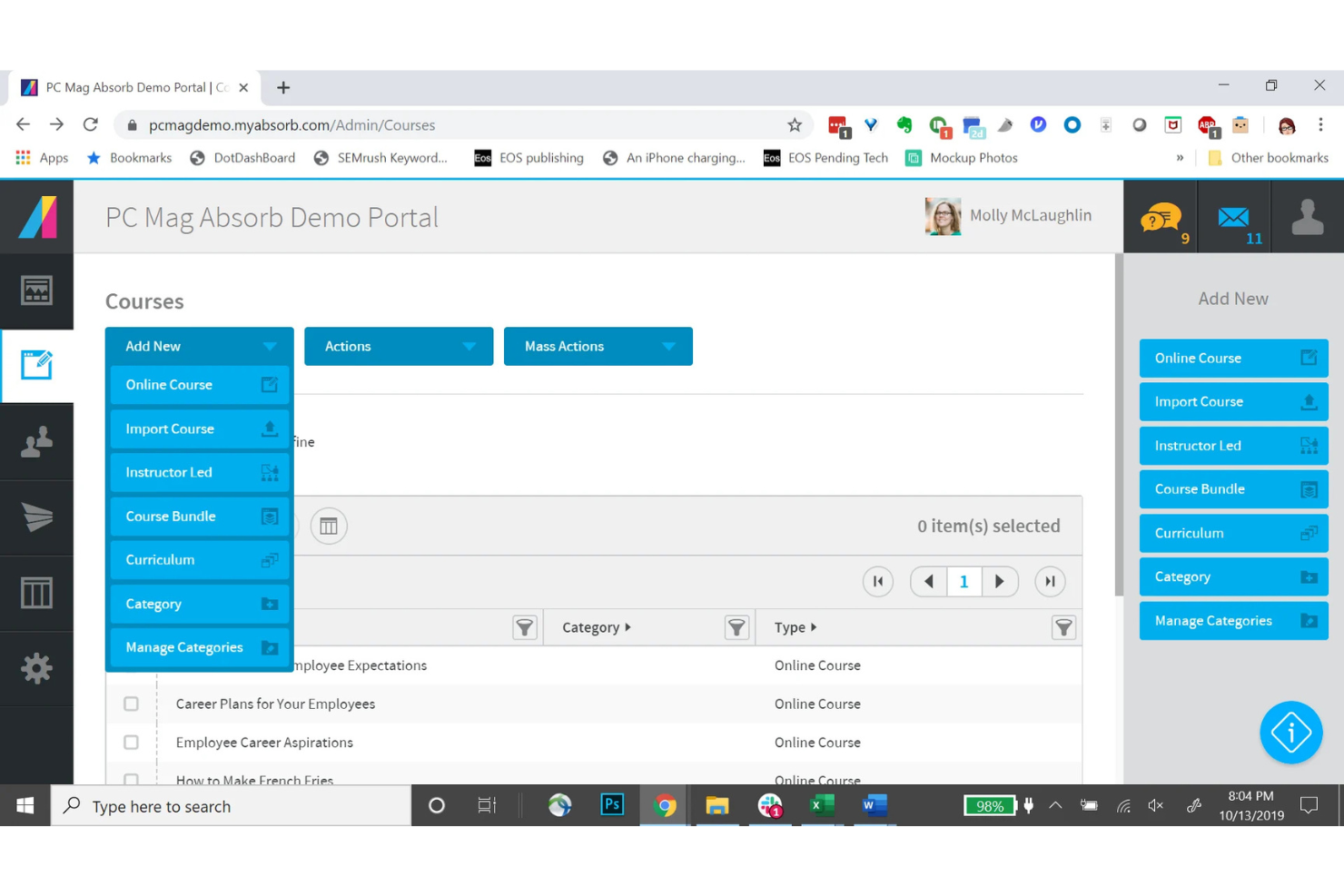
Absorb è un sistema di gestione dell'apprendimento alimentato dall'intelligenza artificiale, pensato per team aziendali che devono gestire onboarding, conformità, aggiornamento delle competenze, formazione dei clienti e dei partner da un'unica piattaforma.
Per chi è ideale Absorb?
Absorb è particolarmente adatto per organizzazioni di medie e grandi dimensioni che dispongono già di sistemi HR e CRM consolidati e necessitano di un LMS che si colleghi direttamente a questi sistemi.
Perché ho scelto Absorb
Ho incluso Absorb tra le mie migliori scelte per la facilità con cui collega l'apprendimento ai sistemi aziendali esistenti. I connettori preconfigurati per piattaforme HCM come ADP, Workday, SAP SuccessFactors, UKG Pro e Dayforce permettono la sincronizzazione automatica dei profili degli utenti, senza la necessità di inserimento manuale dei dati.
Dal lato CRM, i connettori Salesforce e HubSpot consentono di fornire contenuti formativi direttamente all'interno di questi strumenti e di collegare le attività formative ai dati sul ciclo di vita del cliente.
Funzionalità principali di Absorb
- Absorb Aura: Un livello di intelligenza artificiale che suggerisce corsi personalizzati e segnala le lacune di competenze in base all'attività individuale dell'utente.
- Checklist osservazionali: Permette ai manager di verificare e registrare le dimostrazioni pratiche di competenze direttamente sulla piattaforma, accanto ai registri di formazione online.
- Absorb Pinpoint: Uno strumento di ricerca alimentato dall'AI che consente agli utenti di passare direttamente al punto esatto di un video in cui viene trattato un argomento.
- Portale eCommerce: Un modulo integrato per la vendita di corsi all'esterno, che include codici sconto, prezzi a livelli e configurazione tasse.
Integrazioni di Absorb
Absorb offre dozzine di connettori preconfigurati, inclusi ADP, Workday, SAP SuccessFactors, UKG Pro, Dayforce, BambooHR, Salesforce, HubSpot, Zoom e Google Workspace, oltre a connettori aggiuntivi per strumenti come Zendesk Sell, ServiceNow, Marketo e Intercom. Sono disponibili API RESTful e webhooks per integrazioni personalizzate.
Pros and Cons
Pros:
- Creatore di contenuti AI costruisce corsi da PDF
- Branding multi-portale per diversi pubblici
- App mobile supporta l'apprendimento offline
Cons:
- La reportistica richiede strumenti extra per maggiore flessibilità
- I contenuti PowerPoint importati spesso si rompono
New Product Updates from Absorb
Absorb Expands Instructor-Led Course Session Management
Absorb adds multi-class sessions, recurring classes, conflict indicators, and learner enrollment during setup for instructor-led courses. These updates give admins more control over scheduling and session management. For more information, visit Absorb’s official site.
 .
.
Ideale per la creazione integrata di corsi in PowerPoint

iSpring LMS è un sistema di gestione dell'apprendimento basato sull'intelligenza artificiale che copre l'intero ciclo di sviluppo dei dipendenti, dall'onboarding e dalla formazione sulla conformità alla valutazione delle prestazioni e alla pianificazione dello sviluppo individuale.
Per chi è più adatto iSpring LMS?
iSpring LMS è particolarmente adatto alle organizzazioni di medie dimensioni con team L&D dedicati che necessitano di una piattaforma strutturata e scalabile per i programmi di formazione dei dipendenti.
Perché ho scelto iSpring LMS
iSpring LMS è una delle mie scelte principali perché apprezzo il modo in cui si integra con PowerPoint tramite il componente aggiuntivo iSpring Suite. Posso creare corsi completi, quiz e simulazioni di dialoghi ramificati senza mai uscire dall'interfaccia di PowerPoint, per poi pubblicare tutto direttamente nel sistema LMS con un solo clic. L'assistente AI integrato mi consente inoltre di generare testi per i corsi e domande per i quiz direttamente nello stesso ambiente di creazione, mantenendo l'intero processo di sviluppo in un unico luogo.
Funzionalità principali di iSpring LMS
- Creazione di corsi con l'AI: Carica documenti esistenti o descrivi un argomento e l'AI genererà una struttura completa del corso con una bozza e verifiche delle conoscenze.
- Percorsi di apprendimento: Assegna programmi di formazione sequenziali o specifici per ruolo che sbloccano automaticamente il corso successivo al completamento di quello precedente.
- Gamification: Motiva i discenti con punti, badge e classifiche legati al completamento dei corsi e ai risultati dei quiz.
- App per l'apprendimento mobile: I discenti possono accedere ai corsi e completarli su dispositivi iOS e Android, anche offline.
Integrazioni di iSpring LMS
iSpring LMS offre integrazioni native con Zoom, Microsoft Teams, Google Meet, BambooHR, OrangeHRM, Salesforce, Microsoft Outlook, Microsoft Entra ID, Shopify, Udemy, Go1, LinkedIn Learning e GoodHabitz. Si collega inoltre ad Albato per l'automazione dei flussi di lavoro e fornisce un'API REST per le integrazioni personalizzate.
Pros and Cons
Pros:
- Creazione integrata di corsi PowerPoint tramite iSpring Suite
- Apprendimento mobile offline su iOS e Android
- Checklist per l'osservazione della formazione sul posto di lavoro incluse
Cons:
- Libreria ridotta di corsi di formazione predefiniti
- Flessibilità limitata nella progettazione e nel branding del portale
New Product Updates from iSpring LMS

iSpring LMS Adds Multiple Observations to OJT Sessions
iSpring LMS now lets managers log multiple observations within one OJT session, grouping visits and auto-generating summary stats like averages, criterion results, and comparisons. For more information, visit iSpring LMS's official site.
Ideale per la creazione collaborativa e tra pari di corsi

360Learning è un LMS potenziato dall'IA che combina la creazione di corsi, strumenti di coinvolgimento degli studenti e funzionalità di collaborazione all'interno della piattaforma, permettendo agli esperti interni di costruire e offrire formazione direttamente dalla piattaforma.
Per chi è più indicato 360Learning?
360Learning è ideale per organizzazioni di medie e grandi dimensioni che si affidano a esperti interni e all'apprendimento collaborativo per produrre e mantenere contenuti formativi su larga scala.
Perché ho scelto 360Learning
Ho incluso 360Learning tra le mie scelte principali perché il suo approccio alla creazione dei corsi è davvero diverso rispetto ad altre piattaforme LMS. Invece di lasciare la creazione dei contenuti esclusivamente al team L&D, qualunque esperto interno può creare e pubblicare un corso di formazione aziendale direttamente, con reazioni dei colleghi e discussioni integrate in ogni lezione.
Mi piace anche la funzionalità relativa ai bisogni di apprendimento: i dipendenti segnalano le lacune di conoscenze e gli esperti interni rispondono creando corsi mirati, mantenendo così la formazione legata a necessità reali e dichiarate.
Funzionalità principali di 360Learning
- Raccomandazione di corsi tramite IA: Propone contenuti rilevanti ad ogni studente sulla base del suo ruolo, delle attività svolte e delle competenze da sviluppare.
- Regole di iscrizione automatica: Attiva l’assegnazione dei corsi e l’iscrizione ai programmi in base ad attributi come dipartimento o posizione lavorativa.
- Monitoraggio delle competenze: Associa i corsi a specifiche competenze e monitora i progressi in tutta la forza lavoro nel tempo.
- Dashboard di report personalizzati: Crea e filtra report su tassi di completamento, punteggi e coinvolgimento degli studenti nei diversi programmi.
Integrazioni di 360Learning
360Learning offre oltre 85 integrazioni tramite il proprio partner marketplace, compresi collegamenti nativi con BambooHR, Workday, SAP SuccessFactors, Personio, HiBob, Salesforce, Slack, Microsoft Teams, Zoom e Google Drive. Le integrazioni con le librerie di contenuti includono LinkedIn Learning, Coursera, Udemy Business e Pluralsight. È disponibile una API per integrazioni personalizzate, e la piattaforma si collega anche a Snowflake per BI e analisi dei dati.
Pros and Cons
Pros:
- Gli esperti interni creano corsi senza esperienza pregressa in eLearning
- Forum di discussione integrati in ogni lezione
- L'IA suggerisce automaticamente quiz dal contenuto caricato
Cons:
- Personalizzazione avanzata di branding e reportistica limitata
- Il timeout per inattività azzera i progressi dello studente durante il corso
Ideale per la formazione centralizzata su più pubblici
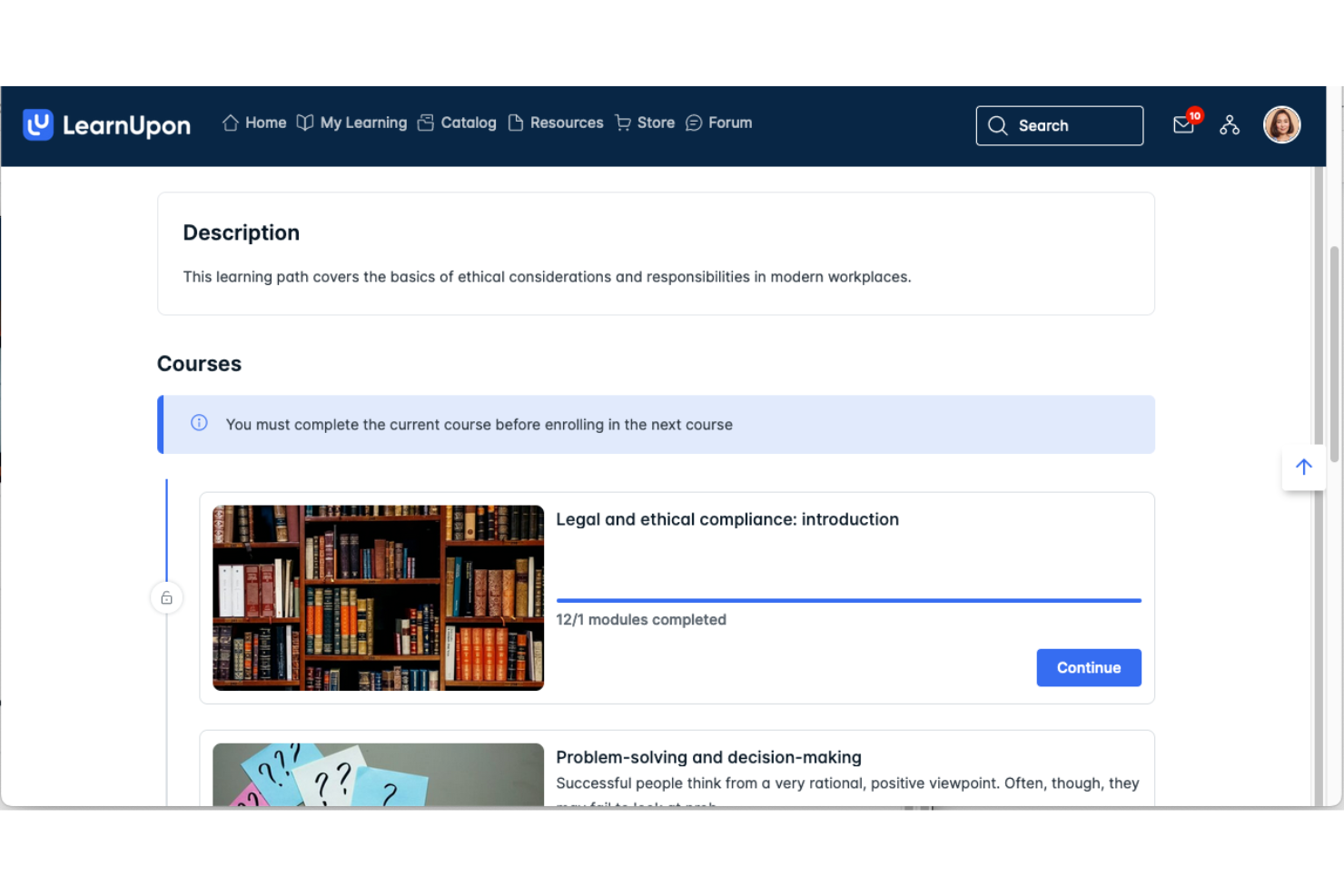
LearnUpon è un LMS basato su cloud che consente alle organizzazioni di creare, erogare e gestire programmi di formazione strutturati per dipendenti, partner e clienti da una singola piattaforma.
Per chi è ideale LearnUpon?
LearnUpon è particolarmente adatto per organizzazioni di medie e grandi dimensioni che necessitano di gestire separatamente programmi formativi personalizzati e con marchio per team interni, partner di canale e clienti, in modo simultaneo.
Perché ho scelto LearnUpon
Ho scelto LearnUpon come uno dei migliori perché la funzione 'Portali' è davvero unica nel suo genere. È possibile creare ambienti formativi separati e completamente personalizzati per dipendenti, partner e clienti, tutti gestiti da un unico account amministratore. Ogni portale dispone di un proprio URL, schema colori e libreria di contenuti, così ad esempio un rivenditore vive un'esperienza completamente diversa rispetto a un nuovo assunto interno.
Apprezzo anche la possibilità di condividere o concedere in licenza i corsi tra i vari portali, evitando di dover ricreare i contenuti da zero ogni volta che si aggiunge un nuovo pubblico.
Funzionalità chiave di LearnUpon
- Percorsi di apprendimento: Automatizza l'iscrizione ai corsi tramite logiche if/then e dati utente, indirizzando i partecipanti a contenuti specifici per ruolo o competenza senza intervento manuale degli amministratori
- Libreria delle competenze: Crea un catalogo centralizzato delle competenze collegato a ruoli, livelli di abilità e corsi, con aggiornamenti automatici quando gli utenti completano la formazione correlata
- Create+: Uno strumento di authoring AI che genera contenuti dei corsi a partire da materiali esistenti, riducendo notevolmente i tempi di creazione della formazione
- Report programmati: Esporta e invia automaticamente report su completamenti dei corsi, risultati degli esami e storici delle formazioni tramite Excel o PDF secondo una pianificazione prestabilita
Integrazioni di LearnUpon
LearnUpon offre integrazioni native con Salesforce, HubSpot, BambooHR, ADP Workforce Now, SAP SuccessFactors, Dayforce, Slack, Zoom, Microsoft Teams e LinkedIn Learning, fra gli altri, coprendo le categorie HRIS, CRM, contenuti, ecommerce e gestione degli accessi. Si collega anche con Zapier e fornisce una REST API con webhook per integrazioni personalizzate.
Pros and Cons
Pros:
- Configurazione multi-portale personalizzata per pubblici distinti
- Includa un responsabile del successo del cliente dedicato
- Supporta più di 20 lingue per team globali
Cons:
- Il sistema di authoring nativo dei contenuti è poco interattivo
- I filtri dei report necessitano di maggiore flessibilità

Ideale per formazione aziendale rapida grazie all’IA
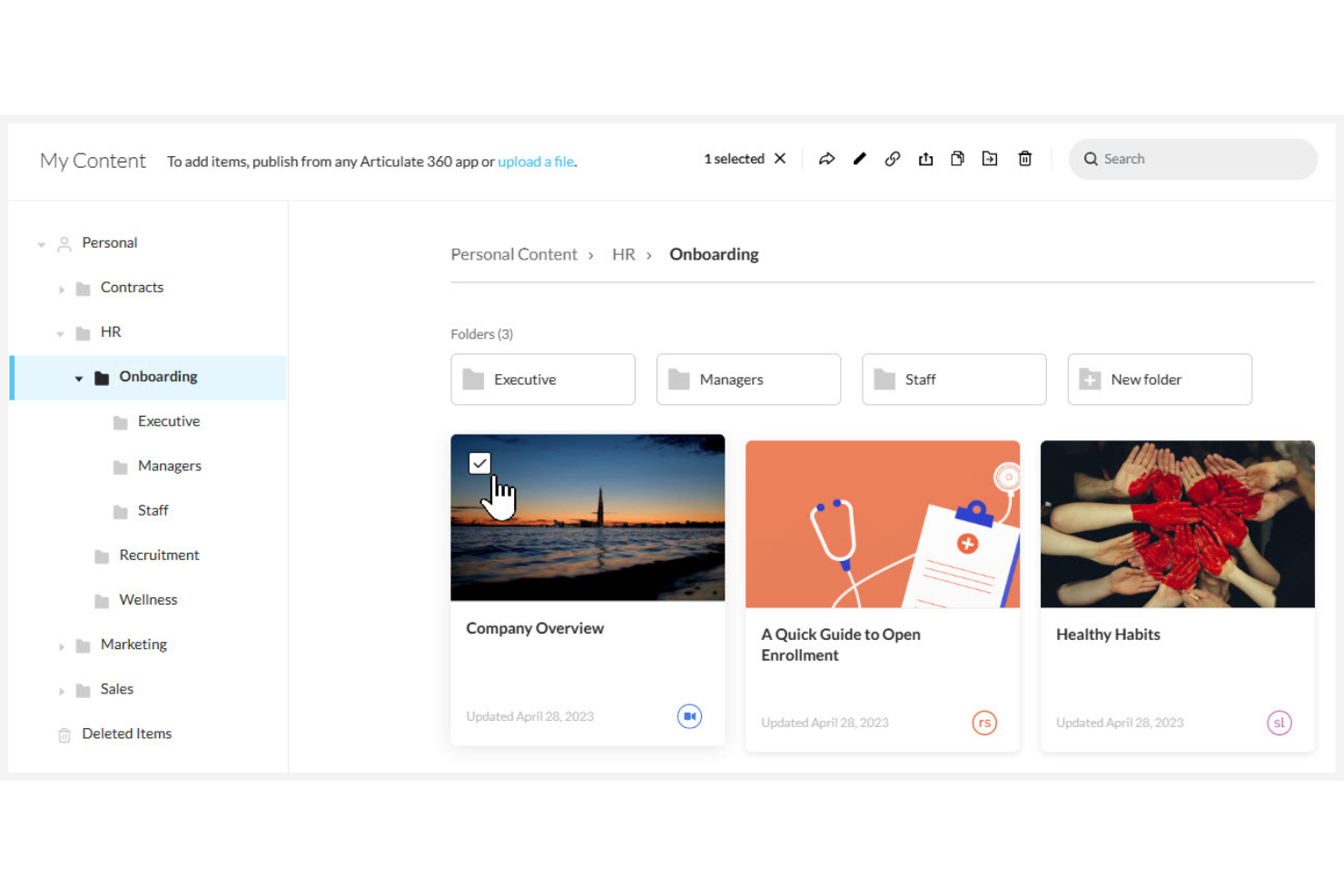
Articulate 360 è una suite per l'autore di corsi che include creazione di contenuti assistita dall'IA, microlearning interattivo, revisione da parte degli stakeholder, delivery LMS integrata e localizzazione potenziata dall'IA per programmi di formazione globale.
Per chi è ideale Articulate 360?
Articulate 360 è particolarmente indicato per instructional designer e team L&D di organizzazioni di medie e grandi dimensioni che devono produrre corsi e-learning interattivi e raffinati su larga scala.
Perché ho scelto Articulate 360
Articulate 360 merita un posto nella mia shortlist perché nessun altro strumento che abbia usato trasforma contenuto grezzo in formazione interattiva e professionale così rapidamente. L'Assistente IA può convertire documenti, PDF e presentazioni esistenti in bozze di corsi completi con valutazioni in pochi minuti.
Mi piace anche la generazione di blocchi tramite IA di Rise, che crea lezioni formattate e interattive a partire da un prompt. Combinando la traduzione automatica in oltre 80 lingue, il mio team può andare dalla bozza al corso localizzato e pubblicato senza uscire dalla piattaforma.
Funzionalità principali di Articulate 360
- Storyline 360: Uno strumento di authoring basato su diapositive per creare scenari ramificati e simulazioni interattive con trigger e variabili.
- Review 360: Uno strumento di feedback che consente agli stakeholder di commentare direttamente sulle diapositive del corso senza bisogno di un account Articulate.
- Content Library 360: Una libreria integrata di risorse con milioni di foto, video, icone e illustrazioni di personaggi per la progettazione dei corsi.
- Reach 360: Un LMS integrato per distribuire corsi, monitorare i completamenti degli utenti e generare report sui progressi.
Integrazioni di Articulate 360
Articulate 360 offre integrazioni native con Slack, Microsoft Teams e Zapier tramite LMS Reach integrato, oltre a integrazioni API personalizzate per automatizzare l’erogazione della formazione, la gestione degli utenti e l’analitica. Supporta anche SSO con Microsoft Entra ID per una gestione centralizzata degli accessi.
Pros and Cons
Pros:
- L’IA genera rapidamente bozze complete di corsi dai documenti
- I corsi possono essere tradotti rapidamente in altre lingue
- Fantastica community che condivide esempi e risponde alle domande
Cons:
- Storyline è ancora disponibile solo per Windows
- Le voci AI possono essere difficili da gestire
Docebo
Ideale per mappare e colmare i gap di competenze in azienda
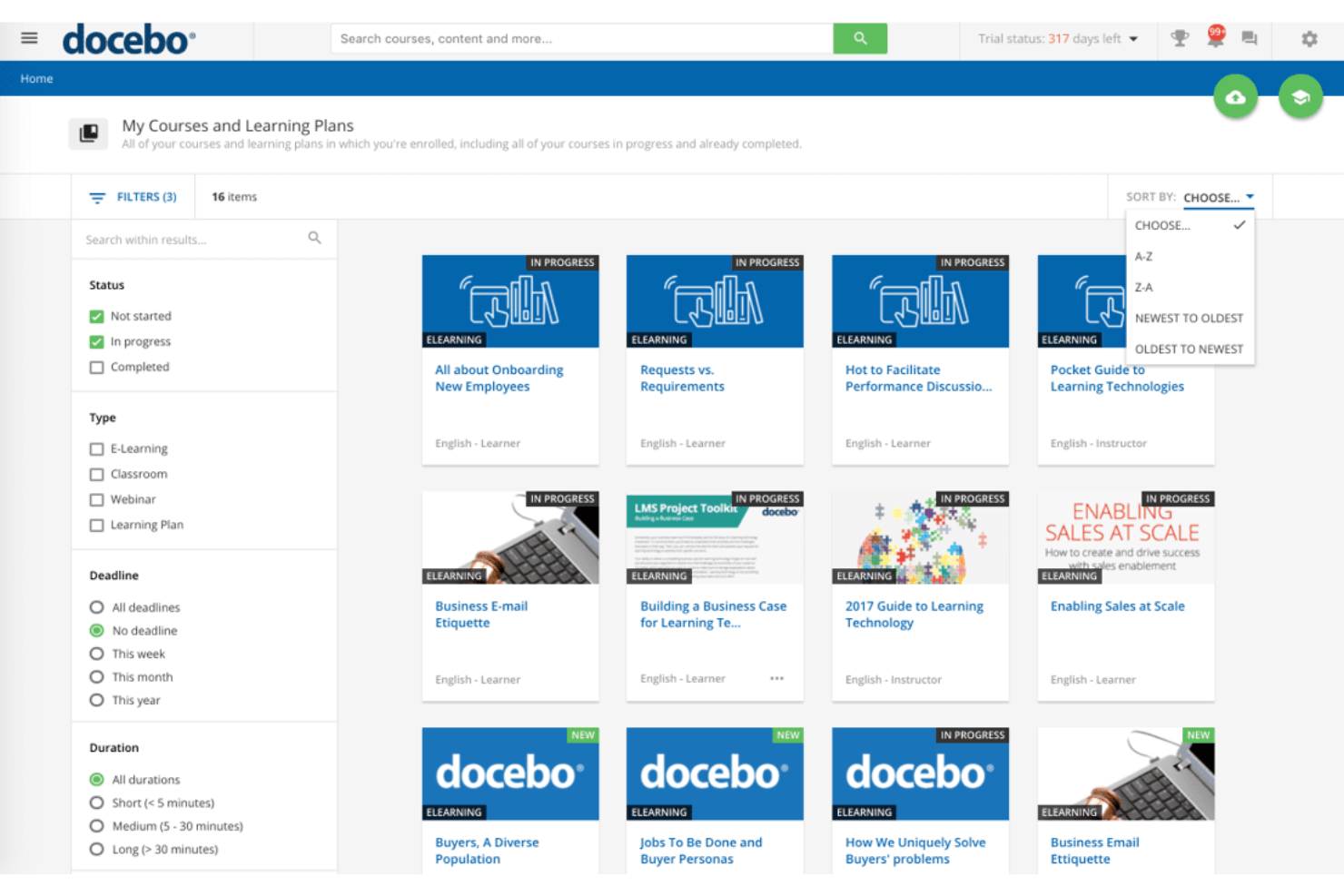
Docebo è una piattaforma di preparazione della forza lavoro alimentata da intelligenza artificiale che combina un LMS, un LXP, l'intelligenza delle competenze, la creazione di contenuti con IA e l'automazione basata su agenti per programmi di apprendimento aziendali.
Per chi è più indicato Docebo?
Docebo è particolarmente adatto a medie e grandi imprese che necessitano di gestire programmi di formazione strutturati per migliorare la fidelizzazione dei dipendenti in vari team, ruoli oppure business unit.
Perché ho scelto Docebo
Ho incluso Docebo tra le mie scelte principali perché il suo modulo Skills Intelligence, alimentato da 365Talents, è molto più approfondito della maggior parte delle piattaforme nell'identificazione dei gap di competenze. Utilizza l'IA per dedurre e validare le competenze da ruoli, progetti, attività formative e storico professionale, fornendo un profilo delle competenze dinamico per ogni dipendente invece di una semplice istantanea statica.
Apprezzo in particolare gli agenti AI, come Job Architect e Career Coach, che costruiscono automaticamente quadri di ruolo e indirizzano i dipendenti verso percorsi di sviluppo mirati. Questa combinazione di mappatura automatizzata delle competenze e direzione formativa personalizzata è davvero rara in un'unica piattaforma.
Funzionalità chiave di Docebo
- Creazione di contenuti con IA: genera corsi, quiz e materiali formativi direttamente dalla piattaforma tramite intelligenza artificiale generativa.
- Misurazione dell'impatto dell'apprendimento: monitora come l'attività di formazione si collega ai risultati di business tramite dashboard analitiche integrate.
- Portali enterprise estesi: consente di offrire ambienti di apprendimento separati e brandizzati a diversi pubblici, come partner, clienti o fornitori.
- Regole di automazione: attiva iscrizioni, notifiche e certificazioni in base all'attività del discente o ai cambi di ruolo.
Integrazioni di Docebo
Docebo offre oltre 400 integrazioni tramite il suo marketplace, incluse opzioni pronte all'uso, personalizzate e senza codice. Le integrazioni native includono Salesforce, Microsoft Teams, HubSpot, BambooHR, ADP Workforce Now, Dropbox, Adobe Connect e fornitori di contenuti come OpenSesame e Go1. Docebo Connect, alimentato da Workato, ti consente di creare flussi di lavoro automatizzati con oltre 400 sistemi SaaS di terze parti. È disponibile anche un'API per integrazioni personalizzate.
Pros and Cons
Pros:
- Supporta la formazione di clienti, partner e dipendenti
- Branding, pagine ed esperienza utente altamente personalizzabili
- Raccomandazioni di contenuti tramite IA in base a ruolo e attività
Cons:
- Lo strumento di authoring dei contenuti integrato è basilare
- Le opzioni di reportistica a volte possono sembrare limitate


Cornerstone è una piattaforma di intelligenza artificiale per la forza lavoro che unifica la gestione dell'apprendimento, l'ottimizzazione delle competenze, lo sviluppo dei talenti e i dati della forza lavoro attraverso un grafico contestuale, un motore delle competenze e l'orchestrazione di agenti AI.
Per chi è più adatto Cornerstone?
Cornerstone è ideale per grandi aziende che gestiscono ecosistemi di talenti complessi attraverso diverse unità aziendali, geografie o segmenti della forza lavoro.
Perché ho scelto Cornerstone
Ho incluso Cornerstone tra le mie migliori scelte perché collega i segnali della forza lavoro alle competenze e all'intelligenza dei talenti in modo che la maggior parte delle piattaforme non riesce a eguagliare. Il People Graph di Cornerstone raccoglie continuamente dati dai sistemi aziendali, HRIS, ATS, project management e altro ancora, traducendoli poi in profili di competenze validati e verificabili.
Trovo particolarmente impressionanti gli agenti AI: non si limitano a fornire insight, ma avviano azioni come percorsi di apprendimento mirati e raccomandazioni di mobilità basate su dati in tempo reale della forza lavoro.
Funzionalità chiave di Cornerstone
- Talent Marketplace: Abbina i dipendenti a progetti interni, ruoli e opportunità in base alle competenze attuali e alle aspirazioni di carriera.
- Pianificazione della successione: Identifica i dipendenti ad alto potenziale, valuta la preparazione del pipeline e monitora i divari di competenze per ruoli critici.
- Content Studio: Crea collezioni di contenuti curate utilizzando raccomandazioni guidate dall'AI che allineano i materiali formativi a specifici obiettivi di competenza.
- Skill Passport: Fornisce ai dipendenti un registro portatile e aggiornato delle competenze verificate nel tempo e nei diversi ruoli.
Integrazioni Cornerstone
Cornerstone si collega a HRIS, ATS, CRM, ERP e strumenti di produttività tramite Extend Marketplace, connettori preconfigurati e API. Si integra con Salesforce, Microsoft Teams, Microsoft Copilot, Slack, LinkedIn, AWS, Skillsoft e fornitori di contenuti come OpenSesame e Go1. Cornerstone supporta anche MCP, protocolli agent-to-agent, e offre una API per integrazioni personalizzate.
Pros and Cons
Pros:
- Mappatura delle competenze tramite intelligenza artificiale su tutti i dati della forza lavoro
- Monitoraggio approfondito di compliance e certificazioni
- Percorsi di apprendimento altamente configurabili per ruolo
Cons:
- La creazione di report richiede un notevole lavoro di configurazione
- L'interfaccia di amministrazione può risultare inizialmente impegnativa

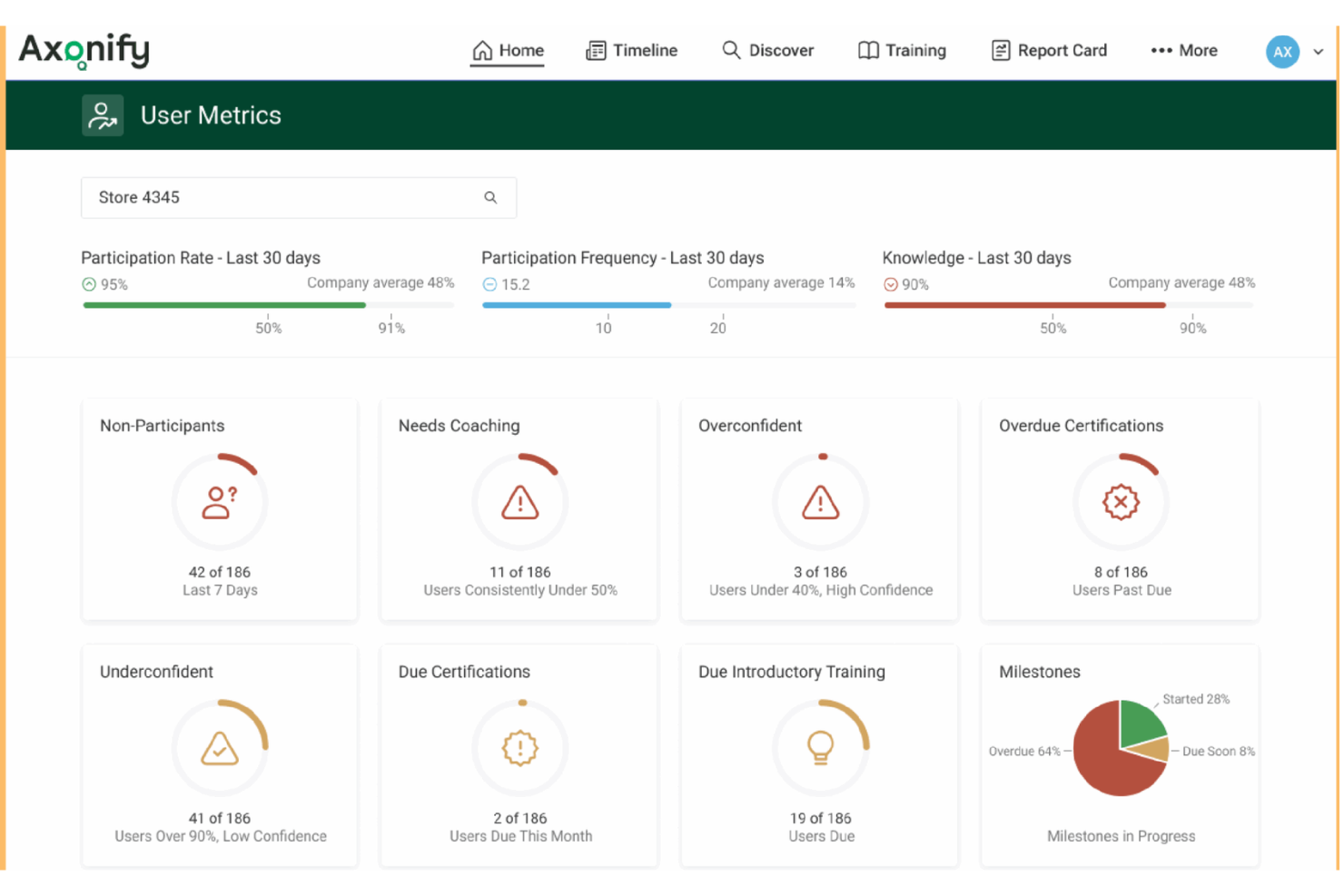
Axonify è una piattaforma di apprendimento per il personale operativo che offre microlearning guidato dall’IA attraverso brevi sessioni quotidiane di domande, ripetizione dilazionata e gamification, progettata appositamente per la formazione di forza lavoro senza postazione fissa e turnista su larga scala.
Per chi è Axonify?
Axonify è perfetta per le aziende del settore retail, logistica e sanitario che hanno bisogno di formare grandi numeri di lavoratori a turni o orari che non lavorano in ufficio.
Perché ho scelto Axonify
Ho scelto Axonify tra le migliori perché nessun'altra piattaforma che abbia visto è progettata in modo altrettanto mirato per la formazione su larga scala della forza lavoro in prima linea. Il motore di rinforzo adattivo fornisce a ciascun lavoratore brevi sessioni quotidiane di domande che si adattano alle lacune di conoscenza individuali, quindi un nuovo addetto di magazzino e un commesso esperto di negozio non studiano gli stessi contenuti.
Apprezzo anche Max, l’assistente AI di Axonify, che fornisce risposte on-demand in oltre 60 lingue direttamente durante il turno di lavoro, senza costringere il personale a lasciare la postazione.
Funzionalità principali di Axonify
- Co-Creator: Uno strumento AI che trasforma procedure, corsi e documenti sorgente esistenti in contenuti a rinforzo adattivo.
- Task e checklist: Assegna elenchi di compiti giornalieri e procedure a ruoli, sedi o singoli utenti, con tracciamento in tempo reale del completamento e gestione automatica delle eccezioni.
- Audit e ispezioni: Sostituisci i controlli cartacei con audit digitali strutturati che includono acquisizione foto, check-point temporizzati e follow-up automatici in caso di non conformità.
- Punteggi di conoscenza e sicurezza: Punteggi di preparazione in tempo reale che mostrano se i lavoratori sono realmente pronti, e non solo segnati come 'completato' su un modulo formativo.
Integrazioni Axonify
Axonify si integra con i principali strumenti HCM, LMS e WFM come Workday, UKG, Cornerstone, Ceridian, ADP e SAP SuccessFactors, oltre a Microsoft Teams, dispositivi Zebra Technologies e OpenSesame. Sono disponibili API aperte per integrazioni personalizzate.
Pros and Cons
Pros:
- Ripetizione dilazionata che si adatta alle lacune individuali
- Sessioni giornaliere gamificate che incentivano la partecipazione
- Gestione attività integrata per le operazioni di prima linea
Cons:
- Configurazione di gruppi amministrativi complessa
- Supporto limitato per la formazione tecnica avanzata

Exec
Ideale per roleplay con intelligenza artificiale
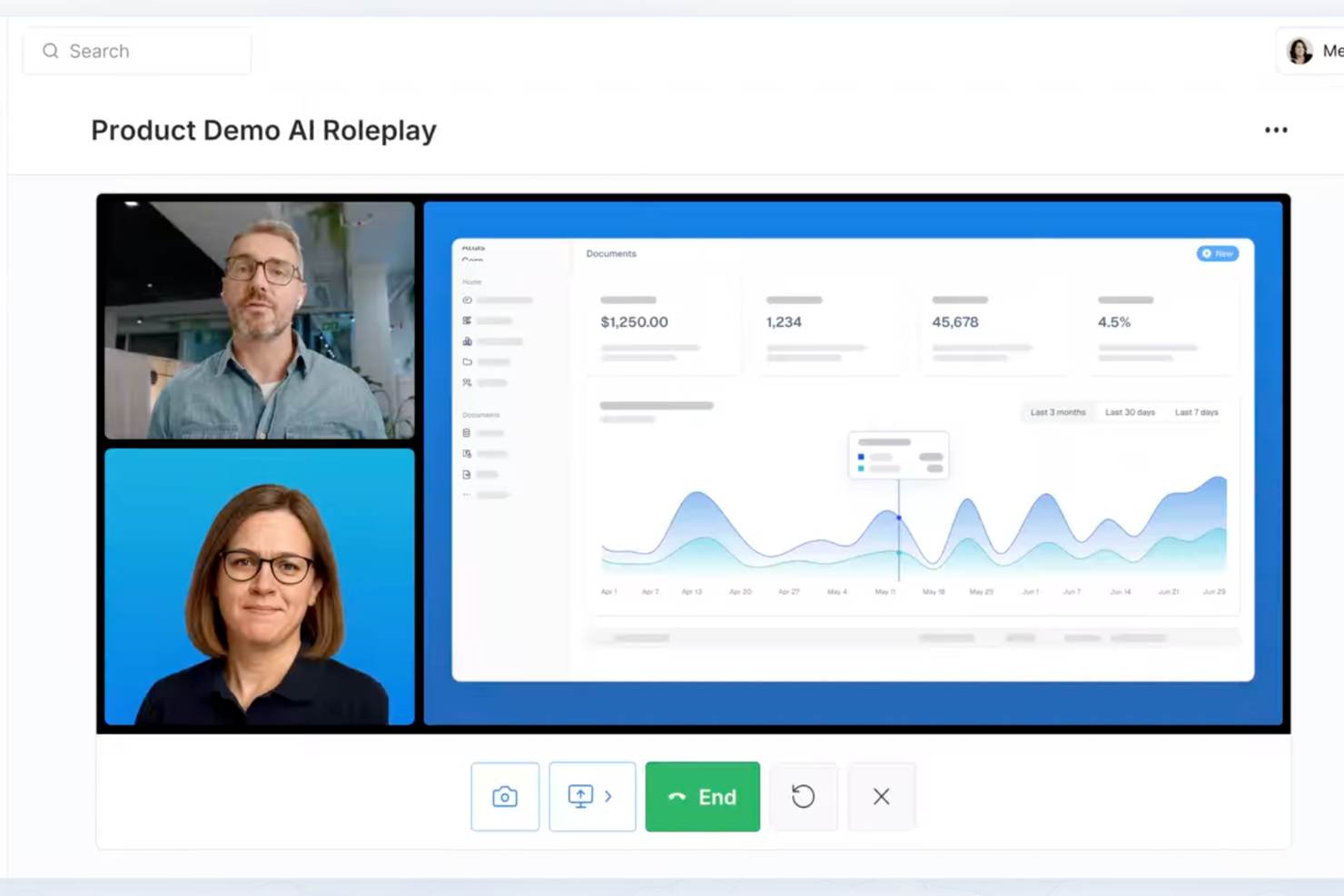
Exec è una piattaforma di sviluppo delle competenze basata sull'intelligenza artificiale che combina simulazioni vocali di roleplay, valutazione delle chiamate, programmi strutturati di apprendimento e coaching dal vivo per aiutare i team a contatto con i clienti a esercitarsi nelle conversazioni ad alta posta in gioco.
Per chi è Exec?
Exec è particolarmente indicato per i responsabili dell’abilitazione alle vendite e i leader dei team di revenue che devono formare i rappresentanti che interagiscono con i clienti su conversazioni ad alto impatto su larga scala.
Perché ho scelto Exec
Exec merita un posto nella mia shortlist per il realismo delle sue simulazioni AI di roleplay. Apprezzo che l’intelligenza artificiale si adatti dinamicamente a input imprevisti, così i rappresentanti non possono semplicemente memorizzare uno script e superare la sessione senza impegno. Ciò che lo distingue davvero è l’AI Feedback Coach: dopo ogni roleplay, fornisce una scheda di valutazione con feedback per ciascun criterio, suggerimenti per formulazioni più incisive e un livello di conversazione dal vivo che permette ai rappresentanti di interagire direttamente per approfondire i risultati.
Caratteristiche principali di Exec
- Valutazione delle chiamate e analytics: Valutazioni basate su AI delle chiamate di vendita o assistenza registrate, con rubriche personalizzate e dashboard di squadra dettagliati.
- Scenario studio multilingue: Crea e gestisci conversazioni di pratica in più di otto lingue per team globali.
- Knowledge hub API: Centralizza playbook, guide e risorse in una libreria ricercabile integrabile tramite API REST.
- Programmi di coaching strutturati: Assegna percorsi di coaching e monitora i progressi con controlli avanzati e reportistica per i manager.
Integrazioni Exec
Le integrazioni native includono Fireflies, Gong, Notion, Sybill, Microsoft Teams, Zoom, Google Drive e Fathom. Exec si collega alle piattaforme di apprendimento aziendale tramite standard LTI 1.3 (supportando sia la registrazione dinamica che la configurazione manuale). Offre SSO tramite SAML e provisioning SCIM sui piani superiori. È disponibile un’API per integrazioni personalizzate.
Pros and Cons
Pros:
- Si adatta dinamicamente a risposte inaspettate
- Offre schede di valutazione per singolo criterio
- Supporta la pratica multilingue per team globali
Cons:
- Focalizzazione ristretta su formazione delle abilità conversazionali
- Creazione corsi generativi limitata
Altri software per l'apprendimento e lo sviluppo basati sull'IA
Ecco alcune opzioni aggiuntive di software per l’apprendimento e lo sviluppo basati sull’IA che non sono entrate nella mia selezione, ma che vale comunque la pena considerare:
- Easygenerator
Ideale per la creazione di contenuti facile da usare
- Fuel50
Ideale per percorsi di carriera personalizzati
- iMocha
Ideale per valutazioni tecniche delle competenze basate sull'intelligenza artificiale
- CYPHER Learning
Ideale per gli strumenti di traduzione automatica dei corsi
- Gloat
Ideale per l'automazione del mercato interno dei talenti


How I Evaluate AI Learning and Development Software
Every tool here needs to show that its AI does real work—like building a course from a product doc or surfacing skill gaps across teams. I evaluate each platform across core functionality it must have to qualify and differentiating factors that set the best options apart.
Core Functionality (Table Stakes For This List)
When I'm selecting tools for my list, I rank each one on a scale from 0 (does not offer the functionality) to 5 (excels in this area) for each core functionality listed below. Then, I calculate the tool's total score into a percentage. Each tool needs to achieve a minimum total score of 65% to be considered for inclusion.
- AI Content Generation: I look for platforms that can turn a product doc or policy PDF into a full lesson with quiz questions, not just suggest an outline.
- Personalized Learning Paths: Each tool should use AI to adapt learning journeys based on role, skills, and behavior—not just assign static tracks per department.
- Skills Intelligence & Gap Analysis: I evaluate whether the platform maps competencies across teams and flags gaps, like spotting a leadership skills deficit before a reorg.
- Adaptive Assessments: Assessments should adjust based on learner responses, scoring proficiency and routing employees to the right next step in their path.
- Learning Analytics & Insights: I check whether AI surfaces actionable data—like connecting course completion trends to retention rates—beyond basic progress dashboards.
- HRIS/Talent System Integrations: The platform should sync with systems like Workday, BambooHR, or SAP SuccessFactors to pull employee data into learning workflows.
Once I have a list of tools that meet this criteria, I consider what sets each platform apart.
Differentiating Factors (What Sets Vendors Apart)
Here's how I compare and contrast different vendors:
Standout Features
Conversational AI coaching matters a lot to me. Platforms where employees can role-play scenarios like handling a tough performance review with an AI tutor offering real-time feedback add genuine value. Predictive learning analytics also carries weight—I look for tools where AI forecasts outcomes like attrition risk or training ROI so L&D leaders can act before problems surface. AI content authoring that turns a policy doc into a deployable microlearning series in minutes further separates contenders.
Beyond Features
Data privacy and AI governance deserve close attention here. I evaluate whether platforms hold SOC 2 Type II or ISO 27001 certifications and are transparent about how learner data trains their AI models. Integration ecosystem matters just as much—a tool that connects with your HRIS, Slack, and content libraries like LinkedIn Learning keeps learning embedded in daily workflows. I also consider primary use case fit, since a platform built for compliance training won't serve a team focused on leadership development the same way.
Come scegliere un software per l'apprendimento e lo sviluppo basato sull'IA
È facile perdersi in lunghi elenchi di funzionalità e strutture tariffarie complesse. Per aiutarti a rimanere concentrato mentre affronti il tuo processo specifico di selezione del software, ecco una lista di fattori da tenere presenti:
| Fattore | Cosa considerare |
|---|---|
| Scalabilità | Il software supporterà la crescita del tuo organico, più unità aziendali e le variazioni nell'utilizzo senza compromettere l'esperienza? |
| Integrazioni | Si connette senza problemi al tuo sistema HRIS, agli strumenti di collaborazione e alle librerie di contenuti, oppure dovrai ricorrere a soluzioni alternative per i flussi di lavoro critici? |
| Personalizzazione | Puoi adattare il branding, i ruoli, i percorsi e i report dell'apprendimento alle esigenze precise della tua organizzazione, oppure la soluzione è uguale per tutti? |
| Facilità d'uso | Il tuo team delle risorse umane e i dipendenti lo utilizzeranno davvero? E quanto è ripida la curva di apprendimento per gli amministratori e gli utenti quotidiani? |
| Implementazione e onboarding | Come sarà l'avvio operativo? Sono inclusi modelli per iniziare rapidamente, formazione e assistenza? |
| Costo | In che modo i livelli tariffari si adattano al numero di utenti attuale e previsto, e quali costi aggiuntivi dovresti aspettarti con l'aumento dell'utilizzo? |
| Misure di sicurezza | Il fornitore divulga le pratiche di gestione dei dati, la conformità in materia di privacy e le certificazioni? Come gestisce gli accessi e i controlli? |
| Funzionalità internazionali | La piattaforma supporterà fin dal primo giorno le lingue, i fusi orari, le valute e i requisiti di conformità locali del tuo team globale? |
Che cos'è un software per l'apprendimento e lo sviluppo basato sull'IA?
I software per l'apprendimento e lo sviluppo basati sull'IA utilizzano l'intelligenza artificiale per personalizzare, automatizzare e misurare la formazione e il miglioramento delle competenze della forza lavoro. Queste piattaforme offrono percorsi di apprendimento personalizzati, analizzano le lacune nelle competenze, generano contenuti e forniscono valutazioni adattive basate sulle esigenze e sulle prestazioni di ciascun dipendente.
I team li utilizzano per ampliare i programmi di sviluppo, affrontare la conformità e collegare direttamente i risultati dell'apprendimento agli obiettivi aziendali.
Funzionalità del software basato sull'IA per l'apprendimento e lo sviluppo
Quando selezioni un software basato sull'IA per l'apprendimento e lo sviluppo, presta attenzione alle seguenti funzionalità chiave:
- Generazione di contenuti con l'IA: automatizza la creazione di corsi personalizzati, quiz e moduli di microapprendimento a partire da richieste, documenti esistenti o video, riducendo il tempo di creazione manuale per i team L&D.
- Percorsi di apprendimento personalizzati: utilizza l'IA per consigliare e aggiornare i percorsi di apprendimento individuali in base ai livelli di competenza, ai ruoli e ai dati sulle prestazioni correnti, garantendo che lo sviluppo sia in linea con le esigenze aziendali.
- Analisi delle lacune nelle competenze: identifica i punti di forza e di debolezza all'interno dei team o dell'organizzazione, consentendo attività mirate di aggiornamento e riqualificazione delle competenze sulla base di dati in tempo reale sulla forza lavoro.
- Valutazioni adattive: modifica la difficoltà dei quiz e i suggerimenti in risposta alle prestazioni del discente, creando un'esperienza di apprendimento più stimolante e di supporto per ogni utente.
- Dashboard di analisi dell'apprendimento: presentano dati utilizzabili sull'interazione, sul completamento dei corsi, sull'evoluzione delle competenze e sul ROI, aiutando i team L&D a misurare l'impatto dei programmi di apprendimento.
- Integrazione con HRIS e sistemi di gestione dei talenti: si collega alle piattaforme HR per sincronizzare i dati dei dipendenti e i progressi nell'apprendimento, integrando la formazione nei flussi di lavoro esistenti per la gestione dei talenti.
- Coaching conversazionale con l'IA: offre chatbot o simulazioni su richiesta per esercitare le competenze trasversali con un feedback immediato, supportando l'applicazione nel mondo reale e lo sviluppo della fiducia.
- Accesso alla libreria di contenuti: mette a disposizione un'ampia gamma di corsi e risorse pronti all'uso, consentendo di implementare rapidamente la formazione in materia di conformità, inserimento e sviluppo professionale.
- Localizzazione e supporto linguistico: fornisce materiali didattici in più lingue e formati, rispondendo alle esigenze delle forze di lavoro globali e migliorando l'accessibilità.
- Controlli di conformità e sicurezza: garantisce la gestione sicura dei dati dei dipendenti, supporta le normative di settore e offre strumenti per la privacy, la moderazione dei contenuti e la governance.
Vantaggi del software basato sull'IA per l'apprendimento e lo sviluppo
L'implementazione di un software basato sull'IA per l'apprendimento e lo sviluppo offre diversi vantaggi per il tuo team e la tua azienda. Eccone alcuni:
- Esperienze di apprendimento personalizzate: l'IA adatta contenuti, ritmo e suggerimenti alle competenze e agli obiettivi di ciascun dipendente, aumentando pertinenza e coinvolgimento.
- Aggiornamento e riqualificazione delle competenze più rapidi: la creazione automatizzata dei corsi e i percorsi di apprendimento adattivi accelerano il raggiungimento della competenza nei diversi ruoli e reparti.
- Informazioni più approfondite sui talenti: l'analisi delle lacune nelle competenze e l'analisi predittiva offrono una visibilità chiara sulle capacità della forza lavoro, orientando la pianificazione strategica e gli investimenti nell'L&D.
- Migliore ROI della formazione: l'analisi e la reportistica in tempo reale collegano direttamente i risultati dell'apprendimento alle prestazioni aziendali e al monitoraggio degli obiettivi.
- Amministrazione semplificata: le integrazioni HRIS e la creazione automatizzata dei contenuti fanno risparmiare tempo ai team L&D, eliminando la sincronizzazione manuale dei dati e le attività ripetitive.
- Conformità e sicurezza uniformi: i controlli e il monitoraggio integrati aiutano a gestire i dati sensibili dei dipendenti e a soddisfare i requisiti normativi.
- Supporto per i team globali: i contenuti multilingue e le funzionalità di localizzazione facilitano l'implementazione di iniziative di apprendimento scalabili in regioni e lingue diverse.
Costi e prezzi del software basato sull'IA per l'apprendimento e lo sviluppo
La scelta di un software basato sull'IA per l'apprendimento e lo sviluppo richiede la comprensione dei vari modelli e piani tariffari disponibili. I costi variano in base alle funzionalità, alle dimensioni del team, agli add-on e ad altri fattori. La tabella seguente riassume i piani più comuni, i relativi prezzi medi e le funzionalità generalmente incluse nelle soluzioni software basate sull'IA per l'apprendimento e lo sviluppo:
Tabella comparativa dei piani per il software basato sull'IA per l'apprendimento e lo sviluppo
| Tipo di piano | Prezzo medio | Caratteristiche comuni |
|---|---|---|
| Piano gratuito | $0 | Accesso a contenuti limitati, percorsi di apprendimento di base, valutazioni semplici e supporto della community. |
| Piano personale | $5–$25/utente/mese | Creazione di corsi individuali, monitoraggio delle competenze, quiz adattivi, analisi limitate e supporto via e-mail. |
| Piano aziendale | $20–$50/utente/mese | Report basati sui team, integrazione con HRIS, opzioni di personalizzazione, librerie di contenuti e supporto in tempo reale. |
| Piano per grandi aziende | $40–$100/utente/mese | Analisi avanzate, analisi del divario di competenze tramite IA, integrazioni personalizzate, supporto multilingue e onboarding dedicato. |
Domande frequenti sul software di apprendimento e sviluppo basato sull'IA
Ecco alcune risposte alle domande frequenti sul software di apprendimento e sviluppo basato sull’IA:
In che modo l'IA personalizza l'apprendimento dei dipendenti?
L’IA analizza i dati sulle competenze, le abitudini di apprendimento e i ruoli professionali per adattare contenuti, ritmo e valutazioni a ogni persona. Questo rende i programmi di apprendimento più pertinenti, coinvolgenti ed efficaci per team e singoli individui diversi.
Queste piattaforme possono integrarsi con i nostri sistemi esistenti per le risorse umane e le paghe?
Sì, la maggior parte delle piattaforme software di apprendimento e sviluppo basate sull’IA offre integrazioni con i più diffusi strumenti HRIS e per la gestione delle paghe. In questo modo, i dati dei dipendenti, le attività di apprendimento e le analisi della forza lavoro rimangono sincronizzati all’interno dell’organizzazione.
Cosa dovrei sapere sulla privacy dei dati e sull'uso dell'IA?
I fornitori devono essere trasparenti riguardo al modo in cui i dati dei dipendenti vengono utilizzati e archiviati e devono chiarire se vengono impiegati per addestrare i loro modelli di IA. Cerca soluzioni che offrano policy chiare, certificazioni di sicurezza e opzioni per la localizzazione dei dati o la condivisione limitata dei dati.
Con quale rapidità possiamo avviare il sistema e ottenere l'adozione da parte degli utenti?
Molte soluzioni dispongono di librerie di contenuti predefinite e modelli per l’onboarding, consentendo ai piccoli team di iniziare entro pochi giorni, mentre le implementazioni su larga scala o globali possono richiedere diverse settimane, tenendo conto dell’integrazione e della gestione del cambiamento.
I contenuti generati dall'IA vengono verificati per accuratezza e parzialità?
La maggior parte delle piattaforme combina la creazione di contenuti tramite IA con la supervisione umana, consentendo ai team L&D di modificare, moderare o approvare i materiali didattici prima che i dipendenti li utilizzino, riducendo il rischio di inesattezze o parzialità nei contenuti formativi.