

I 10 migliori strumenti di pianificazione della forza lavoro con IA recensiti nel 2026

I migliori strumenti di pianificazione della forza lavoro basati sull'IA


I migliori strumenti di pianificazione della forza lavoro basati sull'IA aiutano i team HR a prevedere il fabbisogno di talenti, ottimizzare l'allocazione delle risorse e adattarsi alle mutevoli esigenze aziendali, così puoi mantenere la tua agilità in un mercato del lavoro competitivo.
La pianificazione tradizionale della forza lavoro si basa spesso su fogli di calcolo e supposizioni, rendendo difficile prevedere le esigenze di assunzione, gestire i costi o prepararsi alle future lacune di competenze.
Le piattaforme basate sull'IA eliminano l'incertezza dal processo analizzando i dati della forza lavoro, elaborando scenari e fornendo informazioni predittive che guidano decisioni più efficaci.
Basandomi sulla mia esperienza nel testare tecnologie HR, ho esaminato le migliori soluzioni di pianificazione della forza lavoro basate sull'IA, intuitive, scalabili e progettate per supportare sia la pianificazione strategica sia quella quotidiana.
In questa guida troverai strumenti che ti aiutano ad anticipare le tendenze, migliorare l'efficienza e allineare la strategia della forza lavoro agli obiettivi aziendali.
Perché fidarsi delle nostre recensioni sui software
Il nostro team testa e recensisce software dal 2012. In quanto esperti HR noi stessi, sappiamo quanto sia difficile — e importante — scegliere il software giusto.
Per questa guida, abbiamo valutato gli strumenti attraverso test pratici e ricerche indipendenti, assegnando un punteggio agli strumenti in base ai nostri criteri di selezione. Ci basiamo inoltre sulle competenze di leader di pensiero del settore e di professionisti HR attivi.
Le nostre recensioni riflettono il nostro giudizio editoriale umano, non un discorso di vendita.
Revisori esperti:
Tabella comparativa degli strumenti di pianificazione della forza lavoro basati sull'IA
Questa tabella comparativa riassume i dettagli sui prezzi della mia selezione dei migliori strumenti di pianificazione della forza lavoro basati sull’IA:
| Tool | Best For | Trial Info | Price | ||
|---|---|---|---|---|---|
| 1 | Ideale per calcoli paghe automatizzati | Prova gratuita di 30 giorni | Da $44/mese + $6.50/dipendente/mese | Website | |
| 2 | Ideale come IA per le aziende | Demo gratuita disponibile | Da $8/utente/mese | Website | |
| 3 | Ideale per analisi avanzate | Demo gratuita disponibile | Prezzi su richiesta | Website | |
| 4 | Ideale per insight azionabili sulla produttività della forza lavoro | Prova gratuita di 14 giorni + piano gratuito + demo gratuita disponibile | Da $10/utente/mese (fatturato annualmente) | Website | |
| 5 | Ideale per grandi imprese | Demo gratuita disponibile | Prezzo su richiesta | Website | |
| 6 | Ideale per insight guidati dai dati | Prova gratuita di 30 giorni disponibile | Prezzo su richiesta | Website | |
| 7 | Ideale per l'integrazione HR | Demo gratuita disponibile | Prezzi su richiesta | Website | |
| 8 | Ideale per l'engagement omnicanale | Demo gratuita disponibile | Da $75/utente/mese (fatturato annualmente) | Website | |
| 9 | Ideale per i settori basati sui turni | Demo gratuita disponibile | Prezzo su richiesta | Website | |
| 10 | Ideale per l’analisi dei dati guidata dall’IA | Demo gratuita disponibile | Prezzo su richiesta | Website |


Recensioni dei migliori strumenti di pianificazione della forza lavoro basati sull'IA
Di seguito sono riportati i miei riepiloghi dettagliati dei migliori strumenti di pianificazione della forza lavoro basati sull’IA inclusi nella mia selezione. Le mie recensioni offrono uno sguardo approfondito sulle funzionalità principali, i pro e i contro, le integrazioni e i casi d’uso ideali di ciascuno strumento, per aiutarti a trovare quello più adatto a te.
Ideale per calcoli paghe automatizzati
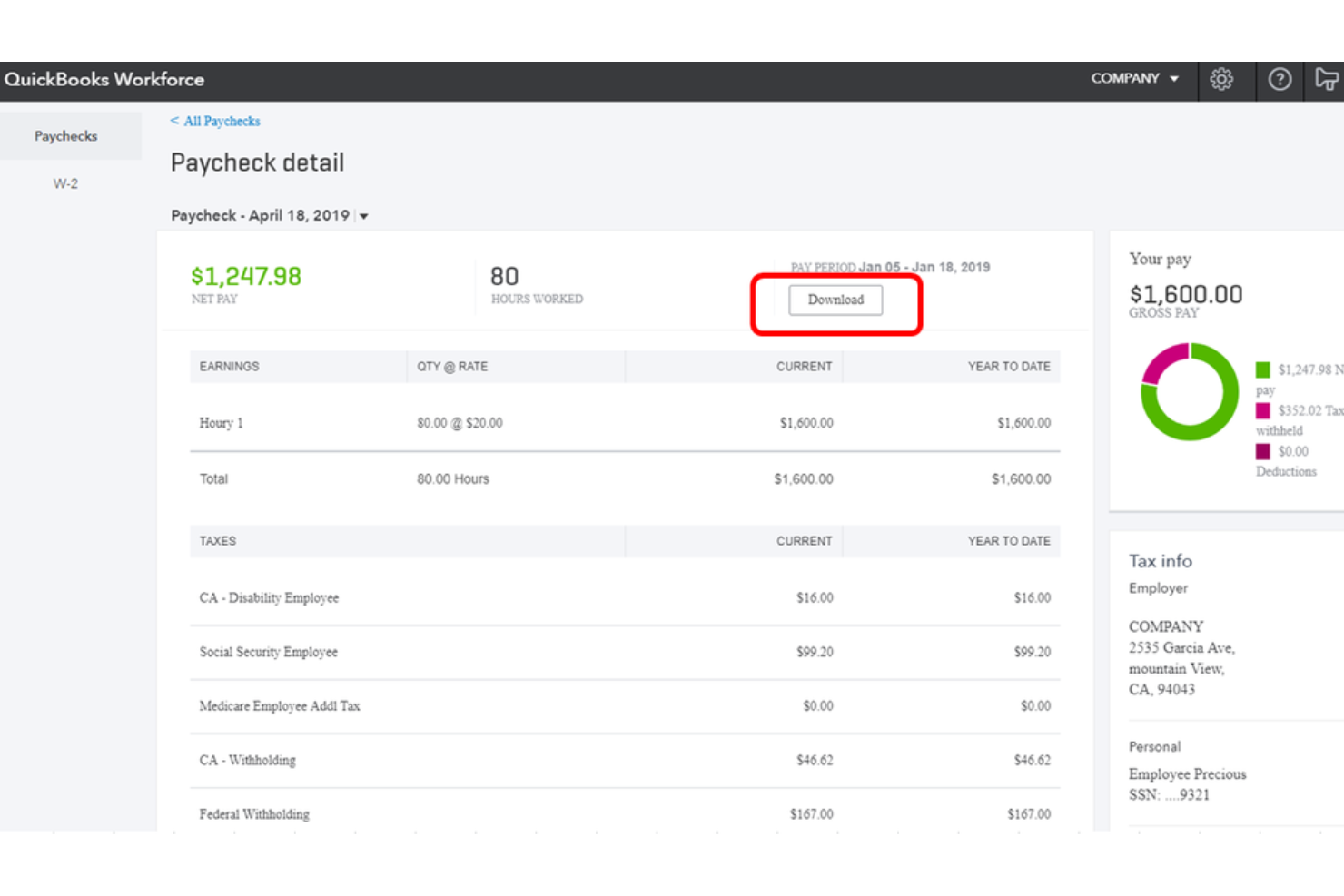
QuickBooks Workforce è una piattaforma per la gestione delle paghe e della forza lavoro alimentata dall'IA che gestisce elaborazione delle paghe, rilevazione delle presenze, self-service per i dipendenti, flussi di lavoro HR e pianificazione turni per piccole e medie imprese.
Per Chi è Ideale QuickBooks Workforce?
QuickBooks Workforce è la soluzione naturale per le piccole e medie imprese che già utilizzano QuickBooks per la contabilità e che necessitano di una gestione integrata di paghe e forza lavoro.
Perché Ho Scelto QuickBooks Workforce
Ho incluso QuickBooks Workforce tra le mie migliori scelte perché la sua IA per le paghe è davvero notevole nelle elaborazioni automatizzate. Acquisisce in modo proattivo dati su presenze e orari, scansiona le anomalie e prepara una busta paga pronta all’esecuzione prima ancora che tu apra l’app. Apprezzo anche che gestisca calcoli fiscali completi, inclusi pignoramenti e detrazioni, senza bisogno di input manuali da parte del tuo team.
Funzionalità Principali di QuickBooks Workforce
- Rilevazione presenze: I dipendenti possono timbrare entrata e uscita tramite dispositivi mobili o web, con tracciamento GPS e approvazione dei timesheet incorporata.
- Pianificazione dei turni: I responsabili possono creare e pubblicare i turni dei dipendenti, con strumenti per assegnare i turni in base alla disponibilità.
- Gestione PTO: Traccia e gestisci le richieste di permessi, i saldi e gli accumuli direttamente sulla piattaforma.
- Reportistica sulla forza lavoro: Genera report dettagliati su ore lavorate, costi del lavoro e numero di dipendenti in tutta l’organizzazione.
Integrazioni di QuickBooks Workforce
QuickBooks si integra con oltre 800 delle app aziendali più diffuse tramite il suo marketplace, inclusi strumenti come Shopify, PayPal, Square, Mailchimp, Gusto, QuickBooks Time, Amazon Business e Housecall Pro. È anche disponibile su Zapier ed è disponibile un’API per integrazioni personalizzate.
Pros and Cons
Pros:
- Le paghe si sincronizzano direttamente al libro contabile
- GPS e geofencing per squadre sul campo
- Combina paghe, presenze e HR in un’unica soluzione
Cons:
- Nessun supporto per l’automatizzazione dei versamenti fiscali locali
- Meno strumenti di onboarding rispetto ai concorrenti

Ideale come IA per le aziende
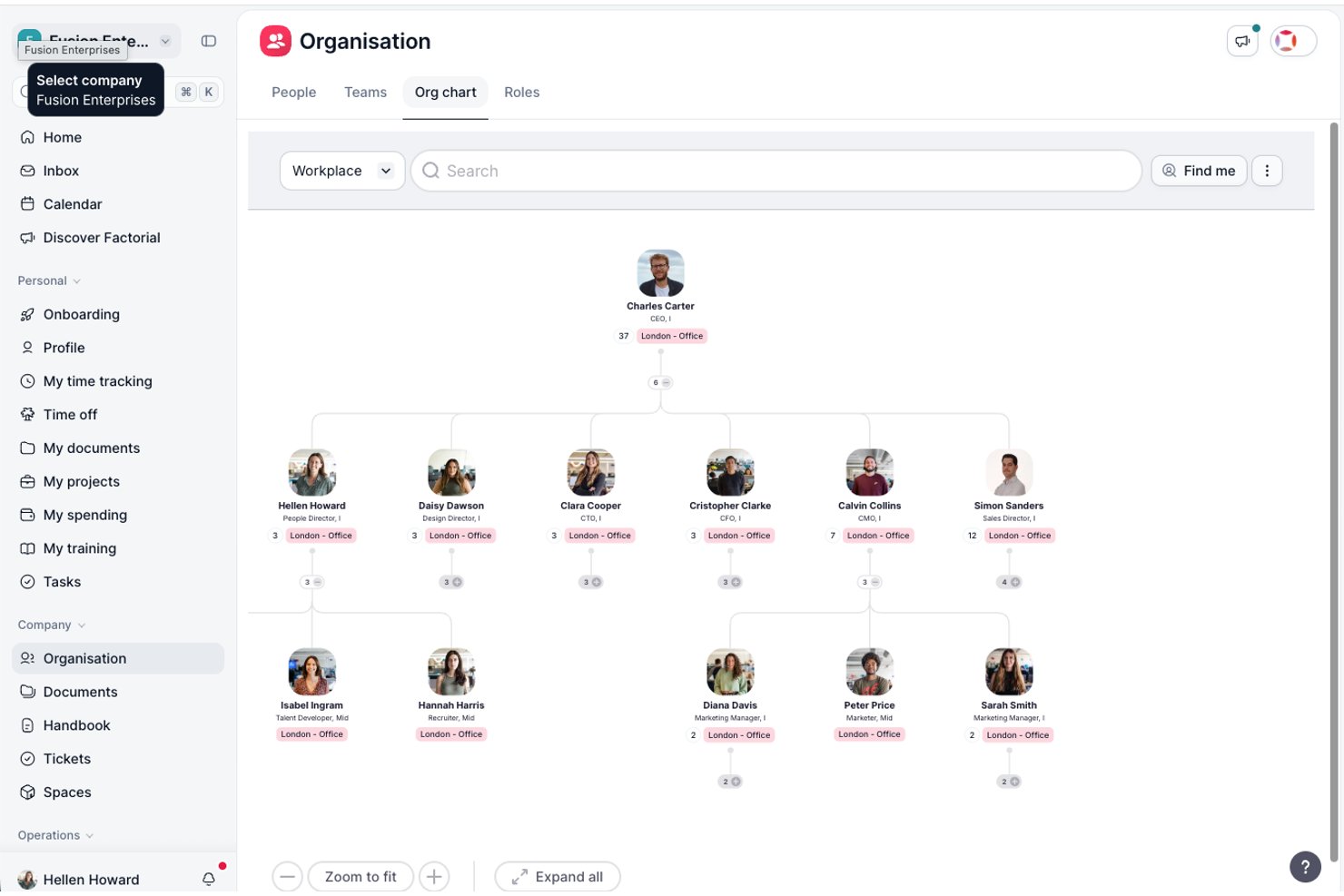
Factorial è una piattaforma di IA per le aziende che centralizza i flussi di lavoro delle risorse umane, finanziari e informatici, coprendo la pianificazione dell'organico, la programmazione dei turni, la selezione del personale, il monitoraggio delle ore lavorate e la reportistica basata sull'IA nelle attività quotidiane.
Per chi è più indicato Factorial?
Factorial è adatto ai team delle risorse umane di aziende piccole e medie che desiderano un'unica piattaforma per gestire le operazioni relative al personale, la programmazione e la reportistica assistita dall'IA senza dover utilizzare diversi strumenti.
Perché ho scelto Factorial
Ho incluso Factorial tra le mie scelte principali perché si presenta come una soluzione di IA per le aziende che copre l'intero ambito delle attività quotidiane, dalla pianificazione degli orari e la generazione di report alla risposta alle domande dei dipendenti sulle politiche aziendali. Apprezzo in particolare il modo in cui Factorial One utilizza i dati aziendali in tempo reale per evidenziare le tendenze e segnalare i rischi, offrendo ai team delle risorse umane e finanziari una visione condivisa durante la pianificazione dell'organico e dei budget per le assunzioni. Quando una richiesta di organico approvata crea automaticamente una posizione vacante nella selezione del personale, il processo di pianificazione si collega direttamente all'azione.
Funzionalità principali di Factorial
- Programmazione dei turni: uno strumento di programmazione con funzionalità di trascinamento consente ai responsabili di pianificare, modificare e comunicare i turni, con rilevamento integrato dei conflitti e accesso mobile per il team.
- Analisi dei CV tramite IA: il modulo di selezione del personale di Factorial estrae automaticamente i dati dei candidati dai curriculum caricati per velocizzare la valutazione preliminare e ridurre l'inserimento manuale dei dati.
- Sondaggi eNPS e sul clima aziendale: gli strumenti integrati per il coinvolgimento consentono ai team delle risorse umane di raccogliere i riscontri dei dipendenti tramite sondaggi Net Promoter Score e verifiche periodiche.
- Catalogo delle posizioni: definisce ruoli aziendali, gerarchie, requisiti di competenza e fasce salariali in un unico riferimento strutturato per supportare la pianificazione della forza lavoro e la selezione del personale.
Integrazioni di Factorial
Factorial offre integrazioni tramite il mercato delle integrazioni con Microsoft Power BI, Microsoft Business Central, SAP Business One, Recruitee, LinkedIn, Slack e Zapier. La sua API pubblica supporta chiavi API, OAuth 2.0, notifiche tramite webhook, SDK e un server MCP per integrazioni personalizzate.
Pros and Cons
Pros:
- I piani approvati confluiscono direttamente nella selezione del personale
- I report basati sull'IA evidenziano le tendenze a partire dai dati aziendali
- L'organigramma visibile chiarisce le linee gerarchiche
Cons:
- Nessuna modellazione di scenari o previsione dell'organico
- Nessuna analisi delle lacune di competenze o dei rischi di successione

Ideale per analisi avanzate
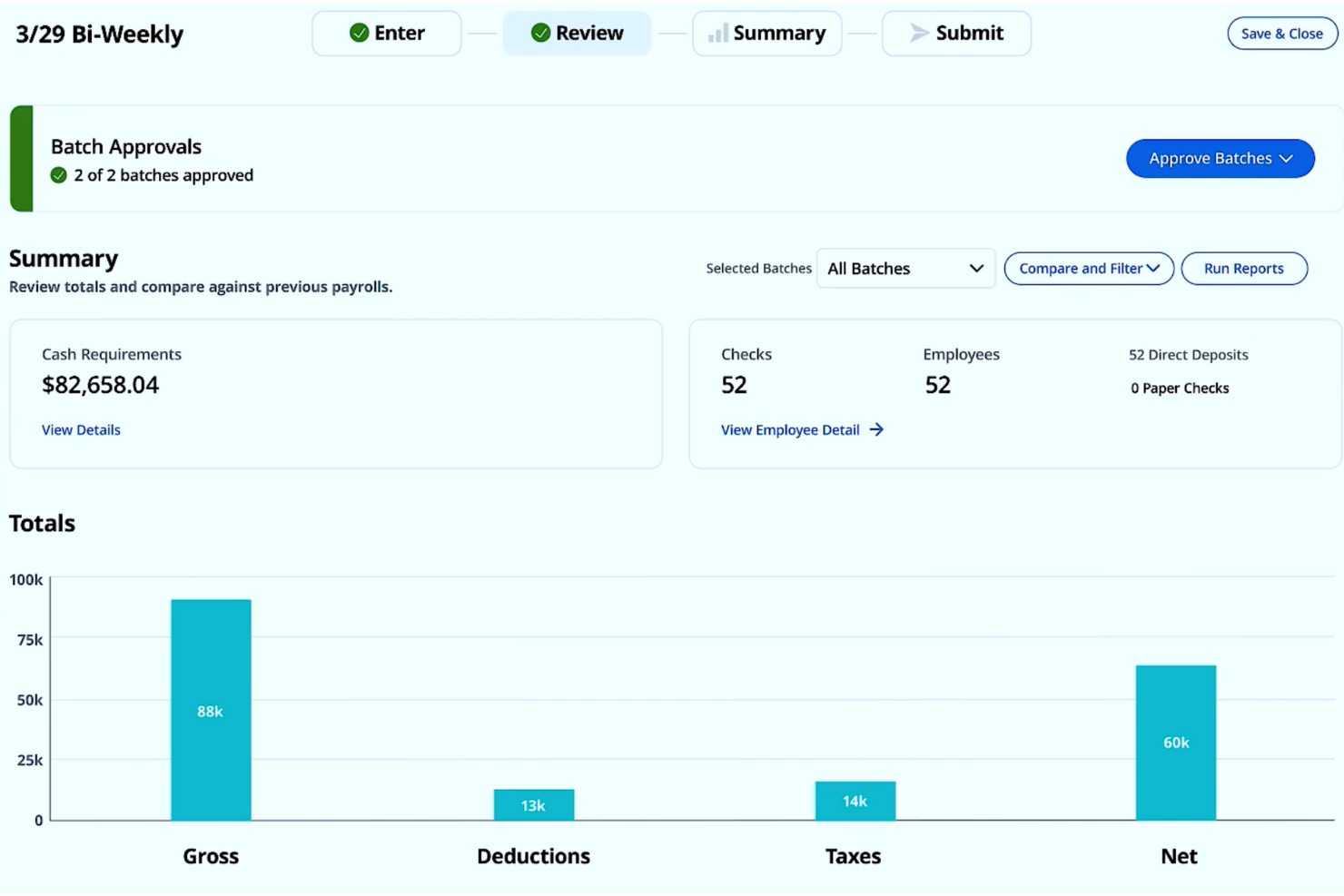
Gestire i dati della forza lavoro può essere complesso, ma gli strumenti di intelligenza artificiale di Paylocity aiutano a collegare i processi HR, paghe e IT in un unico sistema. La piattaforma supporta aziende di diverse dimensioni utilizzando approfondimenti sui dati per migliorare la precisione delle paghe e la pianificazione della forza lavoro. Questi strumenti aiutano i team a individuare tendenze, ridurre il lavoro manuale e prendere decisioni più informate sul personale e sulle retribuzioni.
Perché ho scelto Paylocity
Ho scelto Paylocity per la sua capacità unica di integrare analisi avanzate e modelli predittivi nella pianificazione della forza lavoro, rendendolo un'ottima soluzione per chi desidera strumenti basati sull'AI. Queste funzionalità permettono di anticipare le necessità di personale e prendere decisioni informate, affrontando le comuni sfide nella gestione delle risorse umane. Inoltre, l'integrazione di Paylocity con i sistemi esistenti garantisce che il tuo team possa mantenere l'efficienza operativa senza interruzioni. Questa combinazione di analisi, capacità predittive e integrazione rende Paylocity un'opzione convincente per ottimizzare le strategie relative alla forza lavoro.
Funzionalità principali di Paylocity
Oltre alle sue potenti analisi, Paylocity offre:
- Servizi di elaborazione paghe: Automatizza i processi di payroll per garantire precisione e conformità, riducendo l'onere amministrativo per il tuo team HR.
- Gestione delle spese: Semplifica il tracciamento e la rendicontazione delle spese, offrendo una visione chiara delle allocazioni finanziarie in tutta l'organizzazione.
- Pianificazione dell'organico: Offre strumenti per prevedere le esigenze di personale e gestire il numero dei dipendenti in linea con gli obiettivi aziendali.
- Gestione delle risorse IT: Aiuta a gestire e tracciare le risorse IT, assicurando che l'infrastruttura tecnologica supporti la produttività della forza lavoro.
Integrazioni di Paylocity
Le integrazioni includono Microsoft Teams, Slack, Salesforce, ADP, QuickBooks, NetSuite, SAP SuccessFactors, Workday, BambooHR e Oracle.
Pros and Cons
Pros:
- Accesso mobile per i dipendenti che aumenta la flessibilità
- Integrazione con altri strumenti HR per operatività senza interruzioni
- Offre supporto integrato per la conformità alle normative sul lavoro
Cons:
- Alcuni utenti segnalano incoerenze nel servizio clienti
- Alcuni utenti trovano l'interfaccia meno intuitiva rispetto ai concorrenti
New Product Updates from Paylocity

Paylocity Expands Expense and Purchase Request Tools
Paylocity adds connected personal cards, smarter expense categorization, and a streamlined purchase request experience. This reduces manual entry and helps finance teams manage expenses and approvals more efficiently. For more information, visit Paylocity’s official site.
 .
.
Ideale per insight azionabili sulla produttività della forza lavoro

ActivTrak è una piattaforma di work intelligence che traccia l’attività comportamentale della forza lavoro, analizza le tendenze di produttività, monitora l’adozione degli strumenti di IA e fornisce approfondimenti sulla capacità e il carico di lavoro per supportare una pianificazione della forza lavoro basata sui dati.
Per chi è ideale ActivTrak?
ActivTrak si adatta particolarmente ai team HR e operativi di aziende di medie dimensioni che gestiscono forza lavoro ibrida o remota e hanno bisogno di visibilità su come viene svolto realmente il lavoro.
Perché ho scelto ActivTrak
ActivTrak è tra le mie scelte migliori perché apprezzo come trasforma i dati grezzi delle attività in informazioni sulla produttività che guidano davvero le decisioni. La funzione di benchmarking della produttività consente al mio team di confrontare i risultati individuali e di gruppo rispetto a parametri di riferimento stabiliti, così possiamo individuare i pattern di sotto-performance prima che diventino problemi di organico. Mi affido anche alla funzione AI Insights, che evidenzia le tendenze nell’uso delle app e nelle abitudini di lavoro e segnala dove si sta guadagnando o perdendo produttività nell’organizzazione.
Funzionalità principali di ActivTrak
- Dashboard per la pianificazione delle capacità: Visualizza i dati sull’utilizzo della forza lavoro per aiutare a identificare se l’attuale organico può soddisfare la domanda prevista.
- Monitoraggio dell’adesione agli orari: Traccia se i dipendenti lavorano negli orari previsti, segnalando eventuali deviazioni ai manager per la revisione.
- Analisi dell’uso della tecnologia: Mostra quali app e strumenti vengono utilizzati maggiormente dai dipendenti, aiutando i team a identificare le licenze software sottoutilizzate.
- Report di produttività basato sulla posizione: Suddivide i dati di produttività per luogo di lavoro per supportare le decisioni di pianificazione della forza lavoro ibrida.
Integrazioni di ActivTrak
ActivTrak offre integrazioni native con Microsoft Outlook, Google Calendar e Microsoft Entra ID per la sincronizzazione dei calendari e la gestione degli utenti senza necessità di API. Tramite la sua API ActivConnect, si collega a strumenti come Salesforce, Jira, ServiceNow, Zendesk, Slack, Microsoft Teams e Power BI, e supporta piattaforme HRIS tra cui Workday, ADP, BambooHR e UKG Pro. È anche disponibile l’accesso SQL per reportistica personalizzata e analisi dei dati.
Pros and Cons
Pros:
- Approccio orientato alla privacy senza registrare i tasti premuti
- Traccia adozione e impatto degli strumenti di IA
- Evidenzia squilibri di carico di lavoro prima del burnout dei dipendenti
Cons:
- Non rileva il lavoro offline come chiamate e riunioni
- Non disponibile monitoraggio su dispositivi mobili

Anaplan
Ideale per grandi imprese
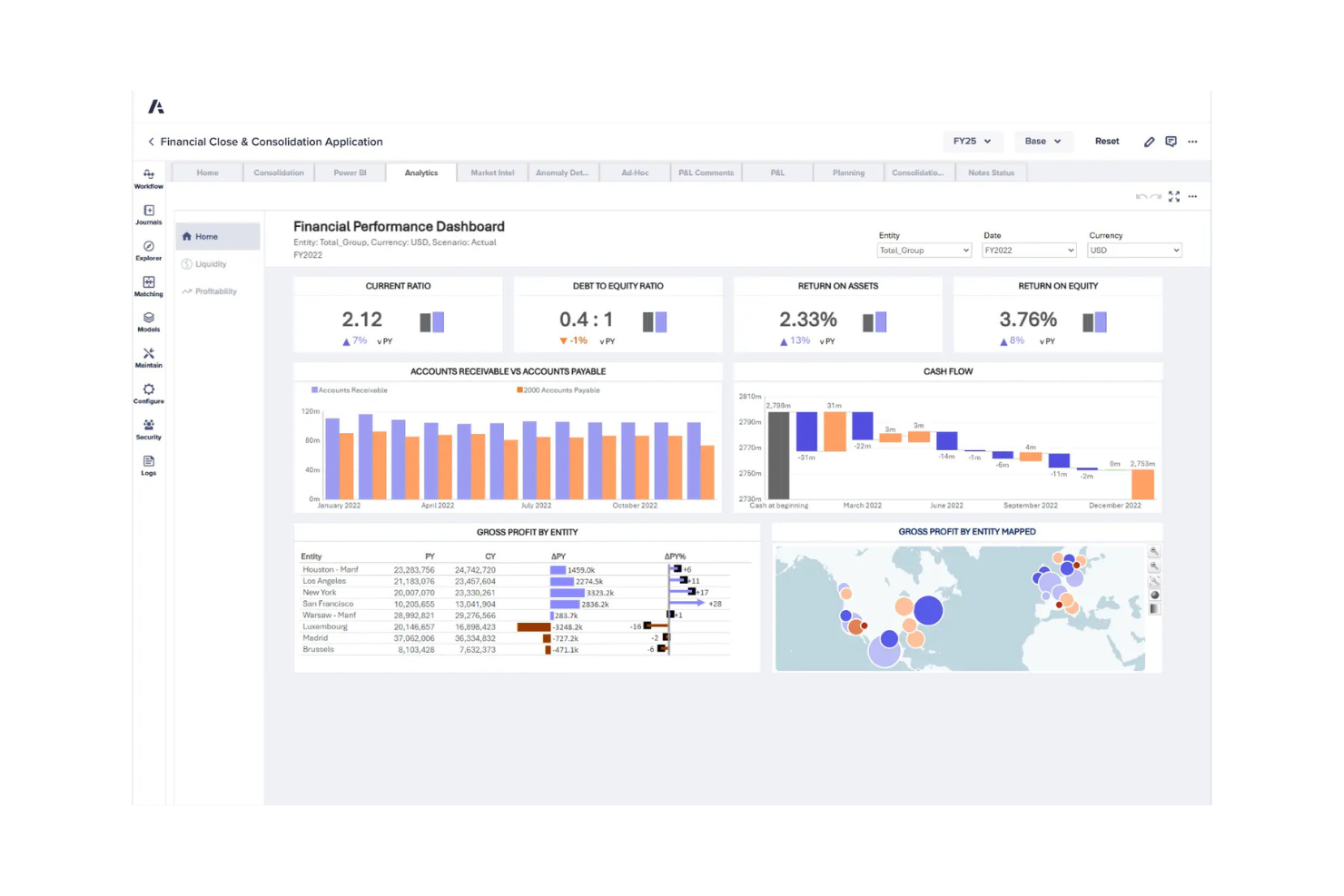
Anaplan è una piattaforma cloud per la pianificazione e la gestione delle prestazioni progettata per le grandi imprese. Supporta la pianificazione e l’analisi della forza lavoro in modo completo, aiutando le aziende ad allineare le strategie relative al personale con gli obiettivi organizzativi.
Perché ho scelto Anaplan: Anaplan è pensato per le grandi aziende che necessitano di una pianificazione del personale altamente scalabile e connessa. Il suo punto di forza sono le capacità di modellizzazione avanzata e l’approccio di pianificazione connessa, che unifica i dati tra risorse umane, finanza e operazioni per prendere decisioni più accurate.
Ciò che rende Anaplan unico è la sua pianificazione degli scenari alimentata da AI e machine learning, che consente alle organizzazioni di prevedere, mettere alla prova le ipotesi e prepararsi in tempo reale a molteplici condizioni di business. Unita a un’interfaccia intuitiva, trasforma la pianificazione complessa in un processo più collaborativo e concretamente attuabile.
Funzionalità e integrazioni distintive:
Funzionalità includono aggiornamenti dati in tempo reale in tutto l’ecosistema di pianificazione, garantendo che le decisioni si basino sempre sulle informazioni più recenti. Gli strumenti di modellizzazione degli scenari ti permettono di simulare risultati, confrontare scenari e individuare le strategie migliori in condizioni mutevoli. Le capacità di AI offrono insight e previsioni predittive, migliorando accuratezza e agilità. La piattaforma si integra con sistemi HRIS, ERP e finanziari, abilitando una pianificazione e un allineamento della forza lavoro end-to-end in tutta l’azienda.
Integrazioni comprendono Salesforce, Workday, SAP, Oracle, Microsoft Dynamics, Tableau, Google Cloud, AWS, Slack e DocuSign.
Pros and Cons
Pros:
- Capacità di modellizzazione avanzate
- Aggiornamenti dati in tempo reale
- Interfaccia utente intuitiva
Cons:
- Richiede competenze tecniche
- Ripida curva di apprendimento

Visier
Ideale per insight guidati dai dati
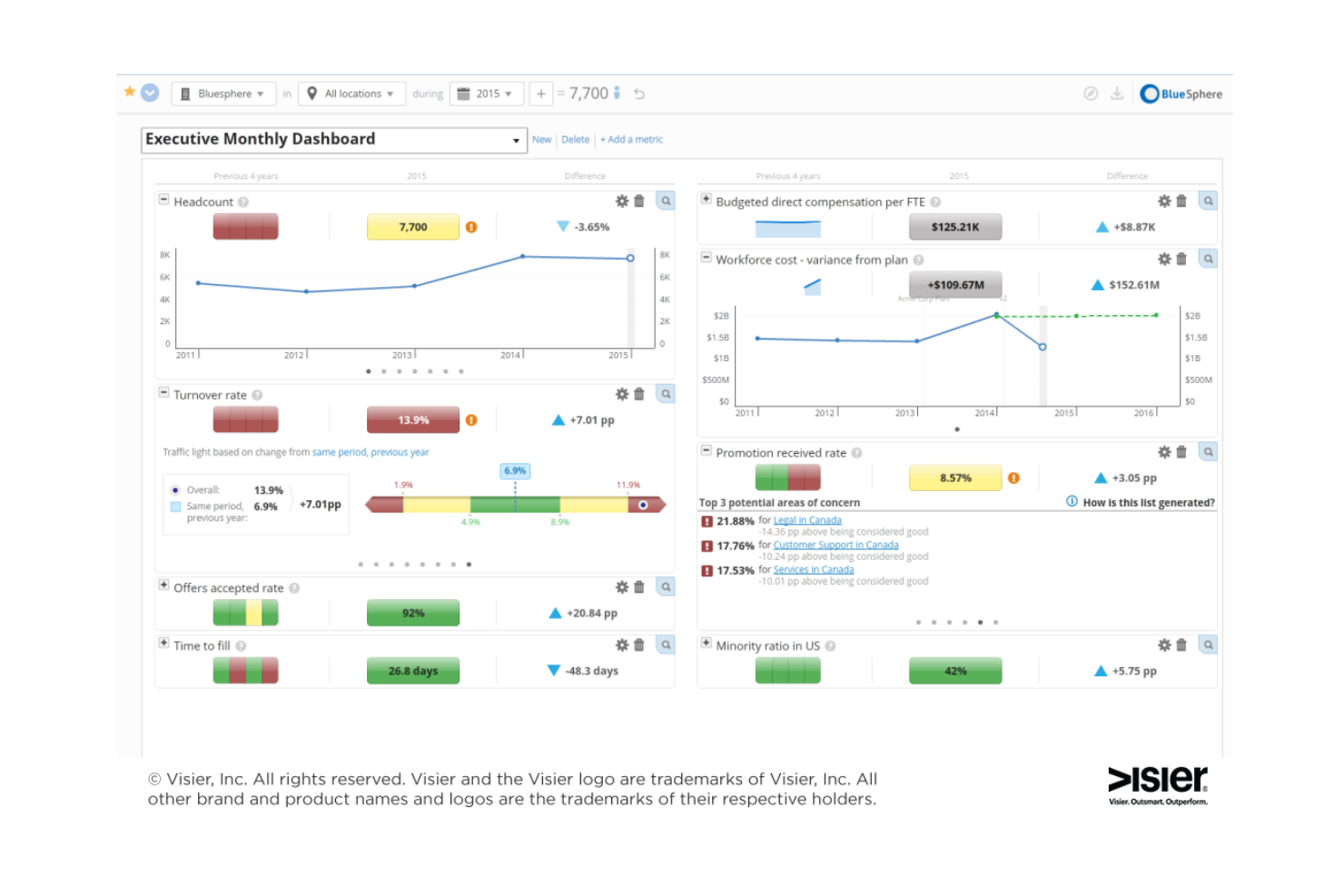
Visier è uno strumento di people analytics e pianificazione della forza lavoro pensato per leader HR, IT e sviluppo prodotto. Si focalizza nel fornire insight basati sull’intelligenza artificiale per migliorare l’acquisizione dei talenti, la fidelizzazione e la mobilità interna.
Perché ho scelto Visier: Visier si distingue nell’offrire insight guidati dai dati grazie al suo modello dati completo e alle metriche preconfigurate. L’assistente AI Manager Agent e l’agente di analytics AI Vee aiutano a unificare efficacemente i dati HR e aziendali. Ciò lo rende una scelta di riferimento per chi cerca una pianificazione della forza lavoro basata sui dati. I suoi strumenti di automazione migliorano ulteriormente l’analisi, offrendo insight pronti all’uso per orientare decisioni strategiche.
Funzionalità e integrazioni principali:
Funzionalità includono un modello dati completo che integra diverse fonti di dati, metriche e dashboard preimpostate per analisi immediate, e strumenti di automazione per semplificare l’analisi. Gli agenti AI di Visier offrono insight che aiutano il tuo team a prendere decisioni fondate sui dati e migliorare la pianificazione della forza lavoro.
Integrazioni includono SAP SuccessFactors, Workday, Oracle, ADP, Ceridian, UKG, Cornerstone, Microsoft Power BI, Tableau e Salesforce.
Pros and Cons
Pros:
- Potenti capacità di integrazione dei dati
- Metriche e dashboard preimpostate
- Insight basati sull’IA
Cons:
- Dettagli sui prezzi non trasparenti
- Richiede competenze nella gestione dei dati

Workday
Ideale per l'integrazione HR

Workday è una piattaforma cloud per la gestione della forza lavoro progettata per professionisti HR e grandi aziende. Offre soluzioni per la gestione del capitale umano, la gestione finanziaria e l'analisi dei dati, aiutando le organizzazioni a gestire il personale in modo più efficace.
Perché ho scelto Workday: Workday offre una piattaforma unificata che integra le funzioni HR fondamentali con la pianificazione avanzata della forza lavoro e l'analisi dei dati. I suoi approfondimenti in tempo reale facilitano ai leader HR la risposta rapida ai cambiamenti nelle esigenze aziendali e l'allineamento delle strategie di talent management agli obiettivi organizzativi.
Ciò che distingue Workday è la capacità di unire la gestione HR quotidiana a potenti analisi predittive, offrendo ai decisori gli strumenti per pianificare in anticipo e ottimizzare le prestazioni della forza lavoro.
Funzionalità e integrazioni di rilievo:
Funzionalità includono approfondimenti sulla forza lavoro in tempo reale che aiutano i team HR e i manager a prendere decisioni più rapide e basate sui dati. I suoi strumenti di reportistica personalizzabili consentono di adattare dashboard e visualizzazioni dei dati alle proprie esigenze specifiche. Grazie alla pianificazione della forza lavoro e all'analisi dei dati, è possibile prevedere le esigenze di assunzione, individuare i gap di talenti e allineare le strategie HR agli obiettivi aziendali. Workday si integra perfettamente con i moduli finanziari, di gestione stipendi e di talent management, mentre le sue analisi basate sull'intelligenza artificiale rivelano modelli nel comportamento della forza lavoro e offrono raccomandazioni predittive per supportare scelte strategiche.
Integrazioni includono Salesforce, Microsoft Azure, Slack, Google Workspace, SAP, Oracle, ADP, ServiceNow, Okta e Box.
Pros and Cons
Pros:
- Forti capacità di integrazione HR
- Approfondimenti sui dati in tempo reale
- Funzionalità di reportistica personalizzabili
Cons:
- Curva di apprendimento elevata
- Richiede competenze tecniche
Genesys
Ideale per l'engagement omnicanale
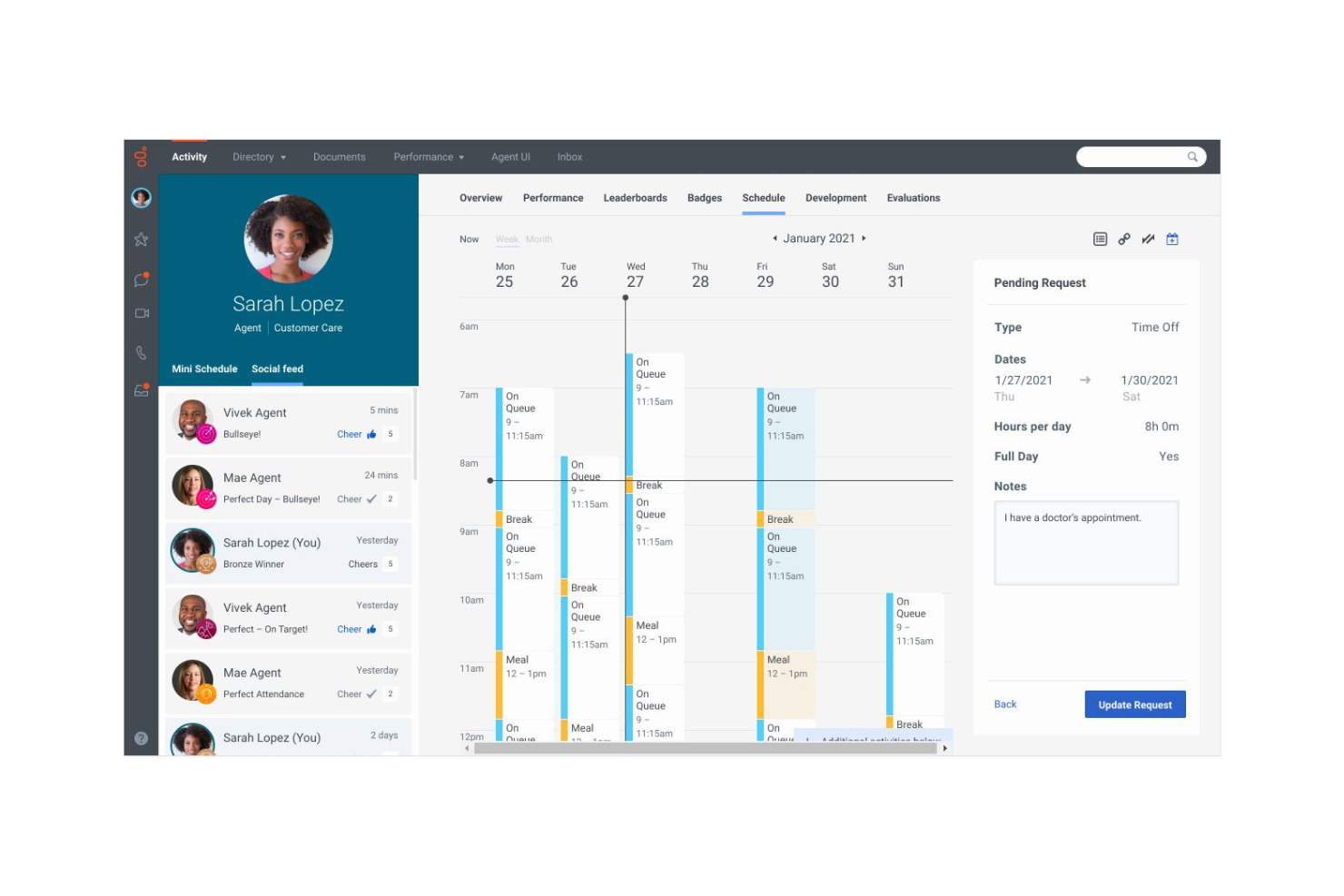
Genesys è una piattaforma di gestione dell'engagement della forza lavoro progettata per le aziende che desiderano migliorare le interazioni con i clienti su più canali. Serve centri di contatto e team di assistenza clienti fornendo strumenti per la gestione dell'engagement della forza lavoro e l'ottimizzazione dell'esperienza cliente.
Perché ho scelto Genesys: Ho scelto Genesys perché offre una potente suite di strumenti per la gestione e la pianificazione della forza lavoro che aiutano le organizzazioni a ottimizzare l'organico, la programmazione e l'allocazione delle risorse. Le sue analisi in tempo reale forniscono visibilità sulle prestazioni della forza lavoro, consentendo ai manager di prendere decisioni basate sui dati che allineano i livelli di personale alla domanda. Ciò che distingue Genesys sono le sue capacità di previsione basate su intelligenza artificiale e le opzioni di implementazione flessibili, che facilitano la previsione dei fabbisogni di forza lavoro e l'adattamento a condizioni di business in evoluzione.
Funzionalità e integrazioni distintive:
Funzionalità includono funzionalità di ottimizzazione della forza lavoro come la previsione, la programmazione e il monitoraggio delle prestazioni per assicurare che le persone giuste siano nei ruoli giusti al momento giusto. Le sue analisi in tempo reale evidenziano tendenze nella produttività dei dipendenti e nell'utilizzo delle risorse, permettendo ai manager di intervenire in modo proattivo. Con la pianificazione della forza lavoro guidata dall'IA, la piattaforma prevede le esigenze di personale future, individua lacune di efficienza e suggerisce aggiustamenti per migliorare le operazioni. Genesys si integra inoltre con gli attuali strumenti HR e di gestione della forza lavoro, creando un ecosistema senza soluzione di continuità per la pianificazione e l'esecuzione della forza lavoro.
Integrazioni includono Salesforce, Microsoft Dynamics, Zendesk, Oracle, SAP, Slack, Zoom, Google Cloud, AWS e Twilio.
Pros and Cons
Pros:
- Potenti capacità di engagement omnicanale
- Analisi del cliente in tempo reale
- Opzioni di implementazione flessibili
Cons:
- Configurazione iniziale complessa
- Richiede manutenzione continua

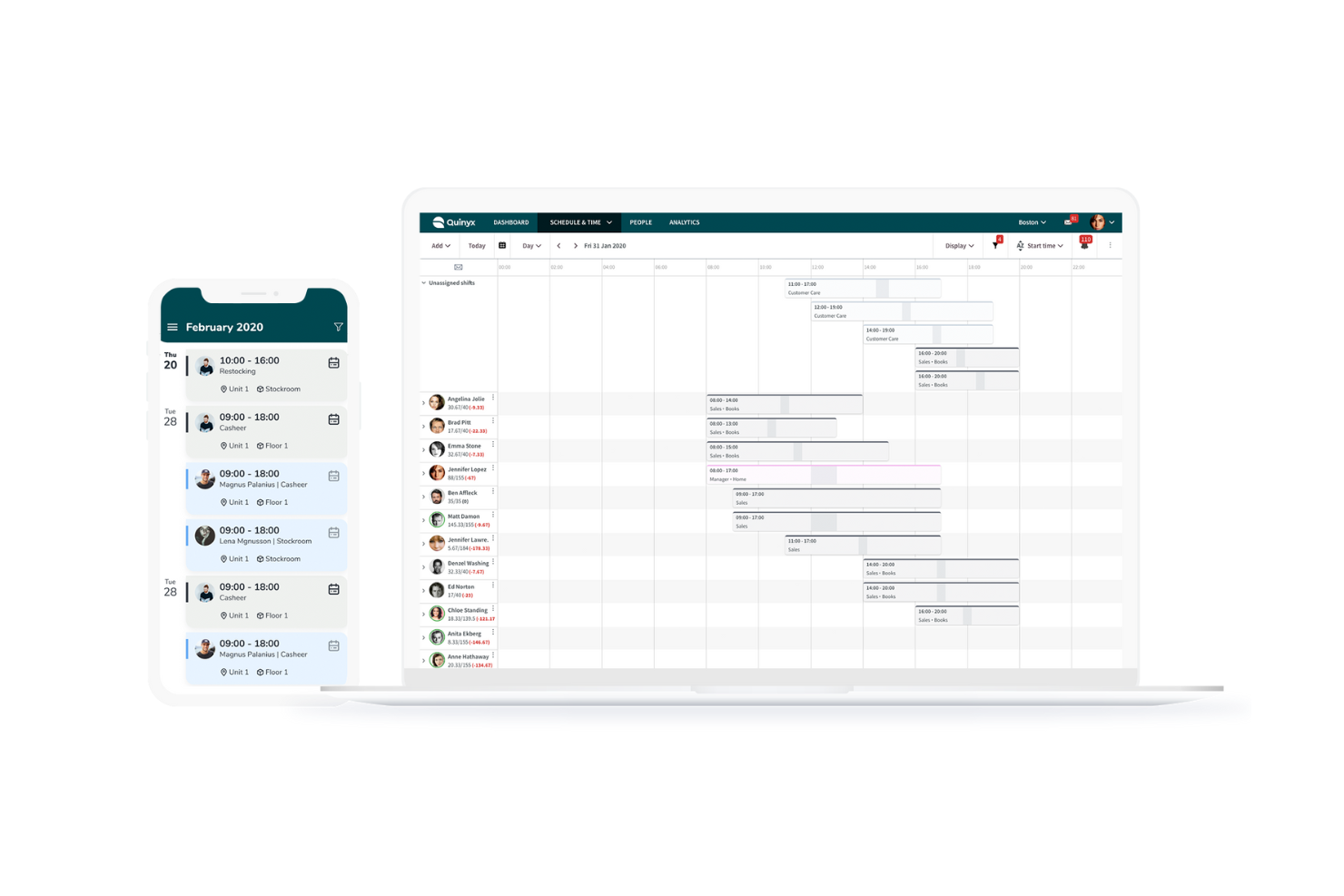
Quinyx è una piattaforma di gestione della forza lavoro basata sull’intelligenza artificiale, progettata per i settori in cui si lavora a turni. Si rivolge principalmente ad aziende nei settori del commercio al dettaglio, dell’ospitalità e della logistica, con un focus sulla pianificazione e sull’ottimizzazione del personale.
Perché ho scelto Quinyx: Ho scelto Quinyx perché offre una potente soluzione di gestione della forza lavoro progettata specificamente per settori basati sui turni come retail, ospitalità, logistica e sanità. Il suo punto di forza è la previsione intelligente della domanda e l’ottimizzazione della forza lavoro, che assicurano la programmazione del personale giusto nei momenti opportuni. Oltre alla pianificazione, Quinyx dà importanza al coinvolgimento dei dipendenti, con strumenti di comunicazione e feedback integrati che migliorano la flessibilità e il morale in ambienti dove i turni cambiano spesso. Le sue funzionalità di previsione e pianificazione alimentate dall’IA lo rendono una scelta eccellente per organizzazioni che gestiscono una forza lavoro ampia e dinamica.
Funzionalità e integrazioni principali:
Funzionalità includono pianificazione automatizzata, rilevazione delle presenze e self-service per i dipendenti per la gestione dei turni. Il sistema di previsione della domanda alimentato dall’IA aiuta a prevedere con precisione le necessità di personale, mentre l’ottimizzazione del personale bilancia efficienza aziendale e preferenze dei dipendenti. Gli strumenti di coinvolgimento, come chat, scambio turni e sistemi di feedback, favoriscono una migliore interazione nel team. Quinyx si integra anche con sistemi di gestione salari, piattaforme HR e soluzioni ERP, facilitando la connessione dei dati della forza lavoro in tutta l’azienda.
Integrazioni includono SAP, Workday, ADP, Microsoft Teams, Oracle, Google Calendar, Slack, Kronos, BambooHR e Salesforce.
Pros and Cons
Pros:
- Pianificazione dei turni efficiente
- Previsione della domanda accurata
- Ottimi strumenti di coinvolgimento dei dipendenti
Cons:
- Struttura dei prezzi complessa
- Sfide nell’implementazione

LotusOne è uno strumento di gestione della forza lavoro progettato per le aziende che desiderano migliorare il processo decisionale grazie ad analisi basate sull’intelligenza artificiale. I principali utenti sono i team HR e i manager che devono ottimizzare le operazioni della forza lavoro e aumentare l’efficienza.
Perché ho scelto LotusOne: LotusOne è pensato appositamente per i team HR e i manager che vogliono migliorare la pianificazione del personale grazie a informazioni guidate dall’IA. Le sue analisi predittive vanno oltre la semplice reportistica, prevedendo le tendenze della forza lavoro e consentendo una pianificazione, un’organizzazione dei turni e un’allocazione delle risorse più intelligenti.
Ciò che rende LotusOne particolarmente prezioso è la sua capacità di trasformare dati complessi relativi alla forza lavoro in visualizzazioni chiare e attuabili, che supportano decisioni rapide fondate sui dati.
Funzionalità e integrazioni di rilievo:
Funzionalità che includono potenti strumenti di visualizzazione dei dati, utili per semplificare le metriche della forza lavoro e rendere facilmente interpretabili le tendenze. Le analisi predittive aiutano ad anticipare esigenze di personale, rischi di turnover e schemi di produttività prima che diventino problematici.
Grazie a dashboard personalizzabili, i team possono adattare le informazioni alle proprie priorità specifiche, dalla conformità all’ottimizzazione delle prestazioni. La piattaforma integra anche l’IA nel proprio livello analitico, individuando schemi nascosti e fornendo raccomandazioni che portano a una gestione della forza lavoro più efficiente e strategica.
Integrazioni disponibili: Microsoft Teams, Slack, Google Workspace, Salesforce, SAP, Oracle, Workday, ADP, QuickBooks e HubSpot.
Pros and Cons
Pros:
- Analisi predittiva per la forza lavoro
- Solida analisi guidata dall’IA
- Dashboard di analisi personalizzabili
Cons:
- Richiede competenze nell’inserimento dei dati
- Configurazione iniziale complessa
Altri strumenti di pianificazione della forza lavoro basati sull'IA
Ecco alcune altre opzioni di strumenti di pianificazione della forza lavoro basati sull’IA che non sono entrate nella mia selezione, ma che vale comunque la pena prendere in considerazione:


Come Valuto gli Strumenti di Pianificazione della Forza Lavoro con l’AI
Cerco strumenti in cui l’AI vada oltre il semplice marketing—dove effettivamente alimenta le previsioni, evidenzia i rischi di abbandono o modella scenari di assunzione che richiederebbero settimane per essere elaborati manualmente. La mia valutazione si suddivide in due livelli: la funzionalità di base che uno strumento deve offrire per entrare nell’elenco e i fattori differenzianti che separano una buona opzione da un’ottima.
Funzionalità di Base (Requisiti Fondamentali per questo Elenco)
Quando seleziono gli strumenti per il mio elenco, assegno a ciascuno un punteggio da 0 (funzionalità assente) a 5 (eccelle in quest’area) per ogni funzionalità di base elencata di seguito. Poi, trasformo il punteggio totale dello strumento in una percentuale. Ogni strumento deve raggiungere un punteggio minimo totale del 65% per essere preso in considerazione.
- Previsioni della Domanda Guidate dall’AI: Valuto se lo strumento utilizza modelli ML per proiettare le esigenze future di organico—come prevedere picchi stagionali di assunzioni basandosi sui dati storici di fatturato e sui modelli di abbandono.
- Analisi del Gap di Competenze: Ogni strumento dovrebbe mappare le competenze attuali della forza lavoro rispetto a quelle future, segnalando le lacune, ad esempio identificando una carenza di talenti in cloud engineering in vista di una migrazione programmata.
- Modellazione di Scenari & Simulazione: Cerco pianificazioni "what-if" su più variabili, come modellare il costo e l’impatto sui talenti dell’apertura di una nuova sede rispetto all’assunzione da remoto in più regioni.
- Integrazione dei Dati della Forza Lavoro: Lo strumento deve prelevare dati dai principali sistemi HR come Workday, SAP SuccessFactors o ADP, così i pianificatori non devono assemblare manualmente i fogli di calcolo.
- Analisi Predittiva di Abbandono & Fidelizzazione: Verifico se lo strumento individua i rischi di abbandono a livello di team o di individuo, aiutando i responsabili HR a intervenire prima che una partenza critica interrompa le tempistiche dei progetti.
- Ottimizzazione dei Costi del Lavoro & della Capacità: Lo strumento deve collegare i piani di organico ai vincoli di budget, aiutando HR e finanza ad allinearsi su quali ruoli coprire, come ridistribuire la capacità o regolare i rapporti con i collaboratori esterni.
Una volta ottenuto l’elenco degli strumenti che soddisfano i criteri, considero cosa distingue ogni piattaforma.
Fattori Differenzianti (Cosa Distingue i Fornitori)
Ecco come confronto i diversi fornitori:
Funzionalità Distintive
L’intelligence sul mercato del lavoro esterno è una grande discriminante—cerco strumenti che integrino benchmark salariali in tempo reale e dati sull’offerta di talenti, così i pianificatori non lavorano nel vuoto. Anche il matching di mobilità interna si distingue, soprattutto quando l’AI individua i dipendenti pronti per cambi orizzontali o incarichi di responsabilità ancora prima della pubblicazione di un ruolo. Inoltre valuto se uno strumento offre uno spazio di pianificazione condiviso tra finanza e HR, poiché i piani che restano separati dai budget tendono ad arenarsi in fase di approvazione.
Oltre le Funzionalità
La trasparenza dei modelli AI conta molto in questo ambito—verifico se i fornitori spiegano come i loro modelli di abbandono o di domanda arrivano alle loro conclusioni, poiché i responsabili HR devono giustificare le raccomandazioni generate dall’AI ai dirigenti. La conformità è un’altra considerazione chiave, in particolare riguardo alle normative sulla privacy dei dati e alle nuove leggi specifiche sull’AI che disciplinano le decisioni di assunzione automatizzate. Valuto anche i tempi di implementazione e se i fornitori offrono template predefiniti oppure un supporto dedicato al deployment, perché strumenti di workforce planning che richiedono più di sei mesi per essere operativi spesso perdono l’appoggio dei principali stakeholder.
Come scegliere gli strumenti di pianificazione della forza lavoro basati sull'IA
È facile perdersi in lunghi elenchi di funzionalità e strutture di prezzo complesse. Per aiutarti a rimanere concentrato mentre affronti il tuo processo di selezione del software, unico per le tue esigenze, ecco una lista di fattori da tenere a mente:
| Fattore | Cosa considerare |
|---|---|
| Scalabilità | Lo strumento può crescere insieme alla tua organizzazione? Verifica se supporta il numero di utenti di cui prevedi di aver bisogno in futuro. Considera se è in grado di gestire l'aumento del volume e della complessità dei dati man mano che il tuo team si espande. |
| Integrazioni | Lo strumento si integra con i sistemi esistenti? Cerca la compatibilità con le applicazioni HR, per le buste paga e con le altre applicazioni aziendali. Considera la facilità di integrazione e gli eventuali costi aggiuntivi associati ai connettori. |
| Personalizzazione | Puoi adattare lo strumento ai tuoi flussi di lavoro specifici? Valuta la possibilità di personalizzare report, pannelli di controllo e interfacce utente. Evita gli strumenti con strutture rigide che potrebbero non adattarsi ai tuoi processi. |
| Facilità d'uso | Lo strumento è intuitivo per il tuo team? Valuta l'interfaccia utente e la navigazione. Una curva di apprendimento ripida può comportare una scarsa adozione. Considera il livello di formazione necessario affinché il tuo team acquisisca dimestichezza con lo strumento. |
| Implementazione e inserimento | Quanto tempo occorre per configurare lo strumento? Verifica il supporto del fornitore durante l'implementazione. Cerca guide per un avvio rapido, sessioni di inserimento e una documentazione chiara per agevolare la transizione. |
| Costo | Il prezzo rientra nel tuo budget? Analizza il costo totale di possesso, comprese eventuali commissioni nascoste. Confronta il prezzo dello strumento con il valore che offre. Considera se il costo varia in base all'utilizzo o al numero di utenti. |
| Misure di sicurezza | I tuoi dati e le tue operazioni sono protetti? Assicurati che lo strumento sia conforme agli standard di settore per la protezione dei dati. Cerca funzionalità di crittografia, controlli degli accessi e verifiche di sicurezza periodiche. |
| Disponibilità dell'assistenza | Puoi accedere all'assistenza quando ne hai bisogno? Verifica la disponibilità dell'assistenza clienti, inclusi orari e canali. Cerca recensioni sui tempi di risposta e sull'efficacia del team di assistenza. |
Cosa sono gli strumenti di pianificazione della forza lavoro basati sull'IA?
Gli strumenti di pianificazione della forza lavoro basati sull'IA sono soluzioni software progettate per aiutare le organizzazioni a gestire e ottimizzare la propria forza lavoro attraverso informazioni basate sui dati e l'automazione. I professionisti delle risorse umane, i responsabili e i team leader utilizzano generalmente questi strumenti per migliorare la pianificazione dei turni, l'allocazione delle risorse e l'efficienza complessiva della forza lavoro.
Le funzionalità di previsione della domanda, pianificazione dei turni dei dipendenti e analisi in tempo reale aiutano nella pianificazione e nel processo decisionale. In definitiva, questi strumenti offrono valore aumentando la produttività e garantendo la disponibilità delle risorse giuste per soddisfare le esigenze aziendali.
Funzionalità
Ecco le funzionalità fondamentali che qualsiasi ottimo software per la pianificazione della forza lavoro basato sull'IA dovrebbe avere:
- Previsione della domanda: Prevede le future esigenze di personale sulla base dei dati storici per garantire un'allocazione ottimale delle risorse.
- Pianificazione dei turni dei dipendenti: Automatizza la creazione dei turni di lavoro per aumentare l'efficienza e ridurre i conflitti.
- Analisi in tempo reale: Fornisce informazioni sulle prestazioni e sull'utilizzo della forza lavoro per favorire decisioni consapevoli.
- Pannelli di controllo personalizzabili: Permette di adattare le visualizzazioni dei dati e i report alle esigenze specifiche dell'organizzazione.
- Funzionalità di integrazione: Si collega perfettamente ai sistemi HR, per le buste paga e aziendali esistenti, garantendo una gestione coerente dei dati.
- Analisi predittiva: Anticipa tendenze e modelli per contribuire alla pianificazione strategica della forza lavoro.
- Allocazione delle risorse: Garantisce che le persone giuste siano assegnate alle attività giuste per migliorare la produttività.
- Misure di sicurezza: Protegge i dati sensibili con crittografia e controlli degli accessi per preservare l'integrità dei dati.
- Interfaccia intuitiva: Offre un design intuitivo che facilita la navigazione e una rapida adozione da parte dei team.
Vantaggi
L'implementazione di strumenti di pianificazione della forza lavoro basati sull'IA offre diversi vantaggi al tuo team e alla tua azienda. Eccone alcuni:
- Maggiore efficienza: Automatizza la pianificazione dei turni e l'allocazione delle risorse, riducendo il carico di lavoro amministrativo e liberando tempo per le attività strategiche.
- Migliore processo decisionale: Fornisce analisi in tempo reale e informazioni predittive per supportare decisioni consapevoli e tempestive.
- Utilizzo ottimale delle risorse: Garantisce che i dipendenti giusti siano assegnati alle attività giuste, migliorando la produttività e riducendo gli sprechi.
- Risparmio sui costi: Aiuta a prevedere con precisione le esigenze di personale, evitando un eccesso o una carenza di personale e controllando così i costi del lavoro.
- Maggiore flessibilità: Offre pannelli di controllo e report personalizzabili, consentendo di adattarsi rapidamente alle mutevoli esigenze aziendali.
- Sicurezza dei dati: Protegge i dati sensibili della forza lavoro con solide misure di sicurezza, mantenendo la conformità e la fiducia.
- Maggiore soddisfazione dei dipendenti: Facilita una pianificazione dei turni e una distribuzione del carico di lavoro eque, contribuendo a una forza lavoro più coinvolta e motivata.
Costi e prezzi
La selezione degli strumenti di pianificazione della forza lavoro tramite IA richiede la comprensione dei vari modelli e piani tariffari disponibili. I costi variano in base alle funzionalità, alle dimensioni del team, ai componenti aggiuntivi e ad altro ancora.
La tabella seguente riassume i piani più comuni, i relativi prezzi medi e le funzionalità tipicamente incluse nelle soluzioni di strumenti di pianificazione della forza lavoro tramite IA:
Tabella comparativa dei piani per gli strumenti di pianificazione della forza lavoro tramite IA
| Tipo di piano | Prezzo medio | Funzionalità comuni |
|---|---|---|
| Piano gratuito | $0/utente/mese | Pianificazione di base, reportistica limitata e supporto di base |
| Piano personale | $5-$25/utente/mese | Pianificazione avanzata, monitoraggio del tempo, dashboard personalizzate e supporto via e-mail. |
| Piano aziendale | $30-$60/utente/mese | Previsione della domanda, allocazione delle risorse, analisi avanzate e supporto telefonico. |
| Piano per grandi aziende | $70-$120/utente/mese | Integrazioni personalizzate, analisi predittive, account manager dedicato e supporto premium 24/7. |
Domande frequenti
Ecco alcune risposte alle domande comuni sugli strumenti di pianificazione della forza lavoro tramite IA:
Come utilizzare l'IA nella pianificazione della forza lavoro?
L’IA nella pianificazione della forza lavoro aiuta a migliorare l’accuratezza e l’efficienza fornendo informazioni basate sui dati. È possibile utilizzare l’IA per la pianificazione degli scenari al fine di prevedere le esigenze future, integrare la pianificazione nelle operazioni quotidiane e gestire le strategie a lungo termine per la forza lavoro. Ciò consente di prendere decisioni consapevoli e ottimizzare l’allocazione delle risorse.
In che modo l'IA può migliorare la pianificazione strategica della forza lavoro?
L’IA migliora la pianificazione strategica della forza lavoro fornendo analisi predittive e automazione. Aiuta a prevedere le tendenze e a ottimizzare il personale, portando a decisioni migliori. Con l’IA è possibile semplificare i processi e ottenere risultati di pianificazione più accurati, allineando le strategie per la forza lavoro agli obiettivi aziendali.
In che modo l'IA può migliorare la pianificazione dei turni dei dipendenti?
L’IA migliora la pianificazione dei turni dei dipendenti analizzando i dati per prevedere la domanda e ottimizzare l’assegnazione dei turni. Tiene conto di fattori quali la disponibilità, le competenze e le preferenze dei dipendenti. Ne risultano turni più efficienti, una riduzione dei conflitti e una maggiore soddisfazione dei dipendenti, con vantaggi finali per la produttività del team.
Quale ruolo svolgono i dati negli strumenti di pianificazione della forza lavoro tramite IA?
I dati sono fondamentali nella pianificazione della forza lavoro tramite IA, poiché alimentano le informazioni e le analisi fornite da questi strumenti. Raccogliendo e analizzando i dati, gli strumenti di IA possono identificare gli schemi, prevedere le esigenze future e ottimizzare l’allocazione delle risorse. Questo approccio basato sui dati aiuta a prendere decisioni consapevoli e a migliorare la gestione della forza lavoro.