

10 beste KI-programvarer for kunnskapsstyring gjennomgått i 2026

10 Utvalg av den beste programvaren for AI-kunnskapsstyring


Organisasjoner produserer mer informasjon enn noen gang, og det er en utfordring for team i alle størrelser å holde den organisert, tilgjengelig og nyttig. Når dokumenter er spredt rundt omkring, søk går sakte eller kunnskap finnes i siloer, går produktiviteten ned. Programvare for AI-kunnskapsstyring bidrar til å løse dette ved å organisere informasjon, forbedre søkenøyaktigheten og gjøre det enklere for team å finne det de trenger, når de trenger det.
Etter å ha testet et bredt utvalg av plattformer har jeg satt sammen en upartisk gjennomgang av verktøyene som skiller seg ut. Hvert av dem bruker AI til å støtte oppgaver som innholdsoppdagelse, intelligent søk, automatisk tagging og kunnskapsinnhenting, slik at team kan arbeide mer effektivt med informasjonen de er avhengige av.
I denne artikkelen finner du detaljerte innblikk i hvert verktøys funksjoner, styrker og mulige begrensninger, slik at du kan velge den riktige løsningen for arbeidsflyten din. La oss se nærmere på AI-verktøyene som kan forbedre hvordan teamet ditt samler inn, deler og bruker kunnskap.
Hvorfor du kan stole på våre programvareanbefalinger
Teamet vårt har testet og anmeldt programvare siden 2012. Vi er selv HR-eksperter, så vi vet hvor vanskelig og hvor viktig det er å velge riktig programvare.
I denne guiden har vi vurdert verktøyene gjennom praktisk testing og uavhengig research og gitt dem poeng ut fra våre utvelgelseskriterier. Vi bygger også på innsikt fra ledende eksperter i bransjen og erfarne HR-eksperter.
Anmeldelsene våre bygger på vår egen redaksjonelle vurdering. De er ikke et salgsargument.
Ekspertanmeldere:
Sammenligningstabell for programvare for AI-kunnskapsstyring
Denne sammenligningstabellen oppsummerer prisopplysninger for mine beste utvalgte programmer for AI-kunnskapsstyring:
| Tool | Best For | Trial Info | Price | ||
|---|---|---|---|---|---|
| 1 | Best for global HR knowledge centralization | Free demo available | From $5/employee/month | Website | |
| 2 | Best for AI-driven search capabilities | Free trial available | Pricing upon request | Website | |
| 3 | Best with customizable AI-powered workflows | Free plan available | From $9/user/month (billed annually) | Website | |
| 4 | Best for employee onboarding | Free demo available | Pricing upon request | Website | |
| 5 | Best for capturing and sharing meeting knowledge | Free demo + 14-day free trial available | From $10/user/month (billed annually) | Website | |
| 6 | Best for team-based document collaboration | Free plan available | From $5.78/user/month | Website | |
| 7 | Best for customer support AI | Free demo available | Pricing upon request | Website | |
| 8 | Best for organized internal Q&A management | 30-day free trial | From $8/user/month (billed annually) | Website | |
| 9 | Best for AI-powered search | Free demo available | Pricing upon request | Website | |
| 10 | Best for task management AI | Free plan + 14-day free trial + free demo available | From $7/user/month (billed annually) | Website |

Gjennomgang av den beste programvaren for AI-kunnskapsstyring
Nedenfor finner du mine detaljerte sammendrag av den beste programvaren for AI-kunnskapsstyring som kom med på utvalgslisten min. Gjennomgangene mine gir en detaljert oversikt over de viktigste funksjonene, fordeler & ulemper, integrasjoner og ideelle bruksområder for hvert verktøy, slik at du kan finne det beste alternativet for deg.

Deel HR
Best for global HR knowledge centralization
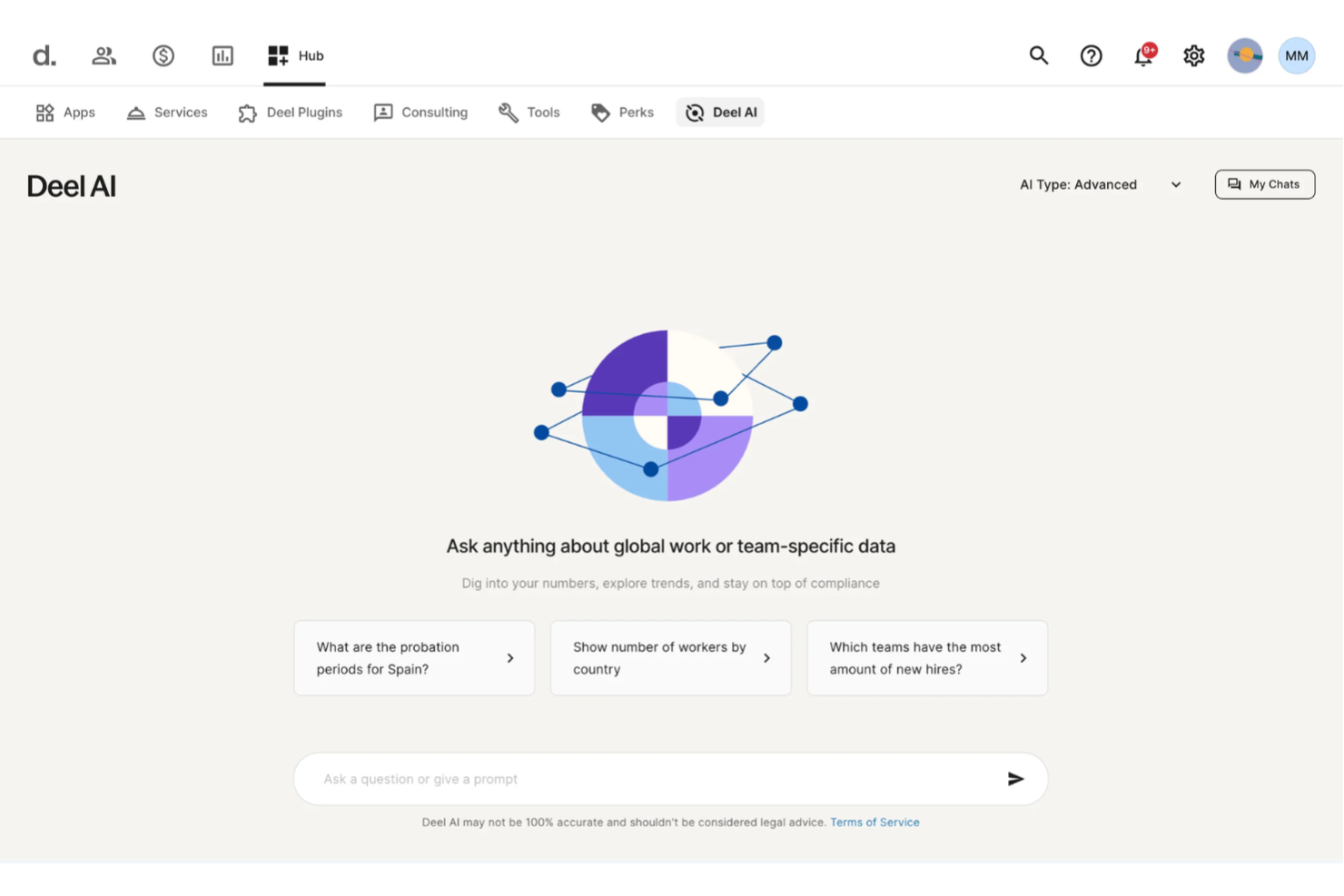
You get a centralized way to access HR and legal knowledge with Deel AI, which blends expert guidance with your team’s real-time data so you can move through complex questions without searching multiple sources. If you manage distributed teams or oversee HR operations across different regions, you can quickly surface the information you need—whether it’s compliance rules, policy details, or org insights—right when you need it.
Why I Picked Deel
I picked Deel because it functions as an always-available knowledge layer built directly into your HR ecosystem, giving you precise answers sourced from expert-verified content across 150+ countries. You get contextual insights that adapt to whatever part of the platform you’re working in, so you can pull up summaries, data points, or compliance details without digging through documentation. I also appreciate how Deel AI leverages your internal people data to generate organization-specific insights, turning scattered HR information into actionable knowledge. For teams needing an AI knowledge management system that evolves with their workforce, this approach offers a distinct advantage.
Deel Key Features
In addition to the contextual, expert-backed knowledge capabilities mentioned earlier, Deel offers:
- Unified Payroll Processing: This feature allows you to manage payroll for employees and contractors in over 150 countries, ensuring compliance with local regulations.
- Localized Contract Generation: Generate contracts tailored to local laws and languages, simplifying the onboarding process.
- Employee Self-Service Access: Provides employees with access to their payment and contract information, enhancing transparency and reducing HR workload.
- Reporting and Analytics: Offers insights into payroll and workforce data, helping you make informed decisions about your global team.
Deel Integrations
Integrations include SAP SuccessFactors, NetSuite, Slack, Google Workspace, QuickBooks, Xero, Workday, BambooHR, Greenhouse, and Carta.
Pros and Cons
Pros:
- AI answers talent and workforce questions using expert-sourced data
- Surfaces org insights and summaries directly from your team data
- Delivers guidance across 150+ country employment contexts
Cons:
- Heavy dependence on proprietary Knowledge Hub for accuracy
- AI guidance may require human review for complex legal scenarios
New Product Updates from Deel HR

Deel Expands Stablecoin Wallet to 80+ Countries
Deel expands its Stablecoin Wallet to 80+ countries with dollar-backed balances and optional rewards. This gives eligible contractors more ways to hold and manage earnings inside Deel. For more information, visit Deel’s official site.
 .
.
Best for AI-driven search capabilities
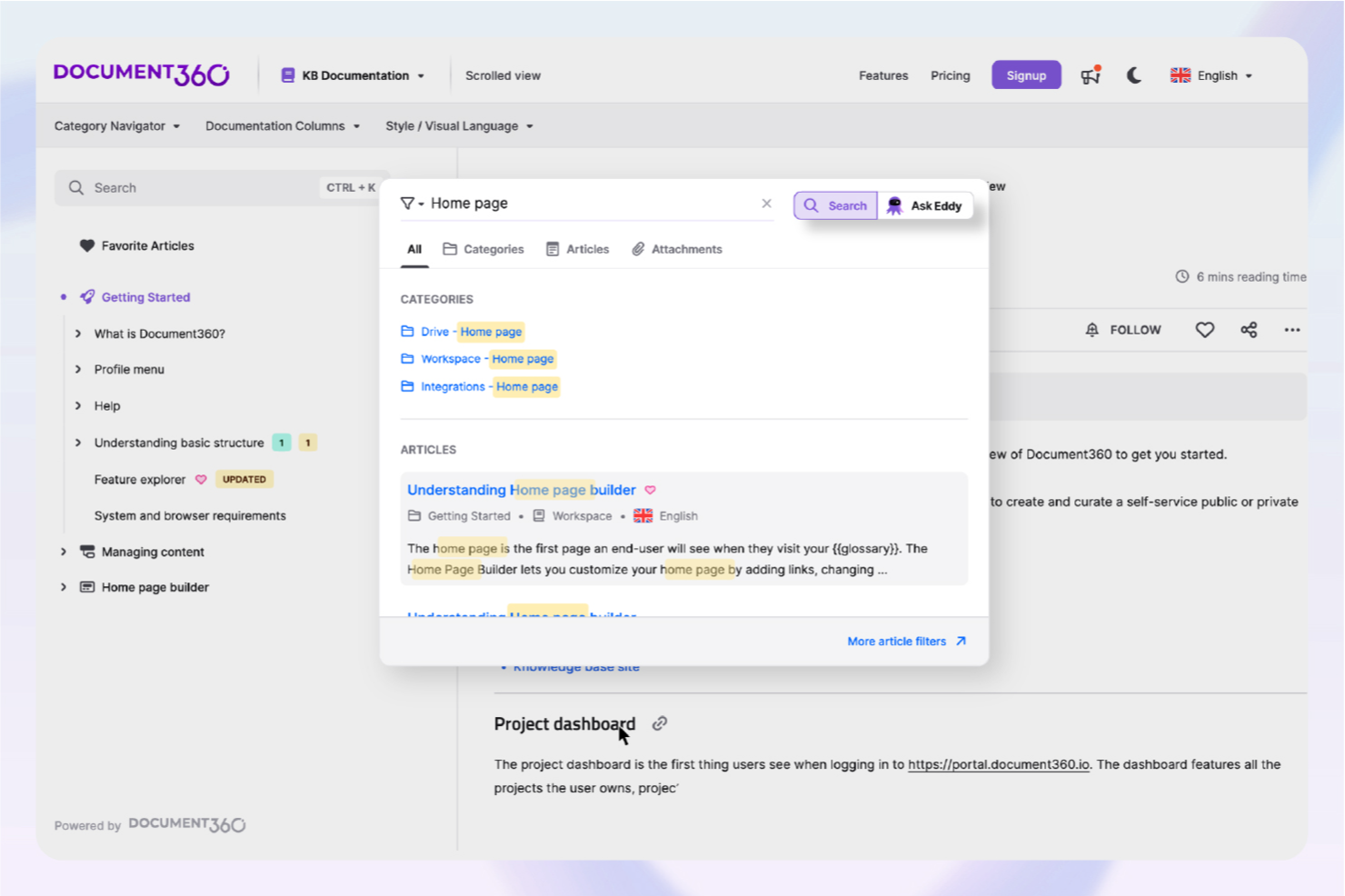
For businesses looking to revolutionize their documentation processes, Document360 offers an advanced AI knowledge management solution that is particularly beneficial for industries like SaaS, IT, and healthcare. By centralizing your documentation, it helps enhance self-service capabilities and lighten the load on support teams. Whether you're in customer support or product management, Document360 addresses the challenges of organizing and accessing critical information, making it an invaluable tool for professionals aiming to refine their knowledge management systems.
Why I Picked Document360
I picked Document360 for its exceptional AI-driven features that distinguish it in the realm of knowledge management software. The AI Search function instantly retrieves relevant information, saving your team time and boosting productivity. Additionally, the AI Writing Agent simplifies content creation, ensuring your documentation is both comprehensive and consistently updated. These features directly address the needs of organizations striving to optimize their knowledge management without overburdening their teams with manual updates.
Document360 Key Features
In addition to these standout features, I also found other functionalities that make Document360 a compelling choice:
- Pro Analytics: Provides in-depth insights into user engagement and article performance, enabling data-driven decision-making.
- Custom Workflow Builder: Allows you to create tailored workflows that align with your specific business processes, enhancing operational efficiency.
- Support Ticket Deflector: Reduces the number of incoming support tickets by providing users with instant access to relevant information.
- AI Chatbot: Offers round-the-clock support, ensuring users receive immediate assistance without requiring human intervention.
Document360 Integrations
Integrations include Freshdesk, Salesforce, Zendesk, Intercom, Microsoft Teams, Slack, Google Analytics, Olark, Disqus, and Segment.
Pros and Cons
Pros:
- Built-in AI chatbot support
- Article summarization can save time
- Custom documentation workflow builder
Cons:
- Advanced features require learning
- Native integrations somewhat limited
New Product Updates from Document360

Document360 Adds Bulk Mirroring, Eddy AI Citations, and Unified SSO
Document360 adds bulk article mirroring, citations in Eddy AI chatbot responses, and a unified Enterprise SSO setup. These updates improve content reuse, answer verification, and access management. For more information, visit Document360’s official site.
 .
.
Best with customizable AI-powered workflows
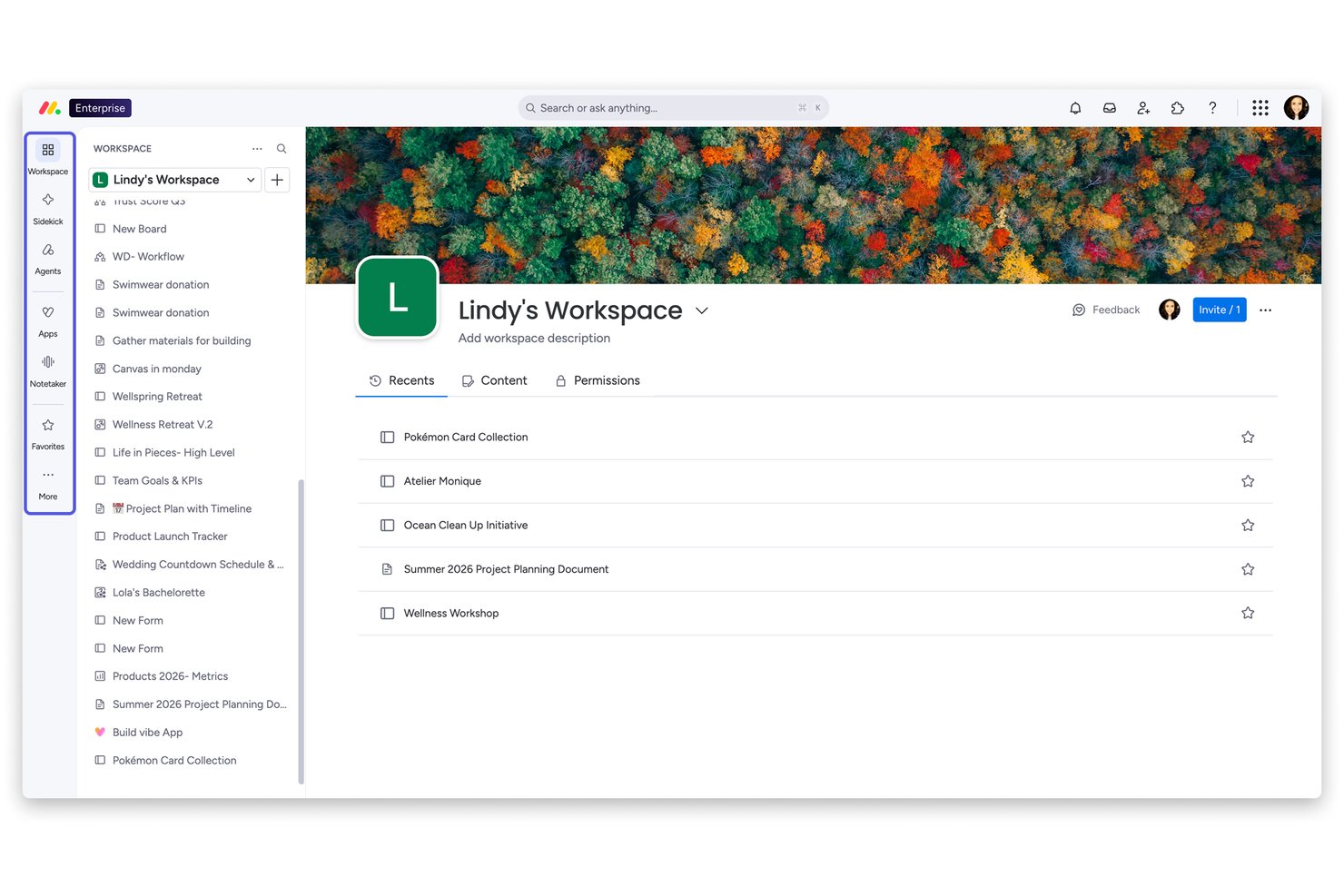
monday AI Workspace is a horizontal AI work platform that embeds knowledge creation and management—through connected Workdocs, an AI assistant (Sidekick), and customizable automated workflows—directly into the operational layer where teams plan and execute work.
Who Is monday AI Workspace Best For?
It's a strong fit for cross-functional teams at mid-size to enterprise companies that want AI-assisted knowledge and documentation built into the same platform where work actually happens.
Why I Picked monday AI Workspace
I picked monday AI Workspace because no other tool lets me build a fully functional knowledge workflow from a single natural language prompt. monday magic generates boards, dashboards, and AI columns in minutes, and the AI Workflow Builder connects those structures to automated triggers so documentation actively routes, updates, and escalates rather than sitting idle. I also like how Workdocs embed live board data directly, keeping knowledge tied to active work instead of stored in a disconnected folder.
monday AI Workspace Key Features
- Live board data in workdocs: Embed up-to-date project and task details from boards directly within documentation pages.
- Granular permissions and roles: Set custom access levels for boards, workdocs, and workspaces to secure sensitive HR content.
- Native SSO and directory sync: Connect SSO providers and enable user provisioning for enterprise-level identity management.
- Audit logs and activity tracking: Monitor changes, track user activity, and maintain compliance records across all content and workflows.
monday AI Workspace Integrations
monday.com offers hundreds of integrations through its built-in integrations and marketplace, including tools like Slack, Salesforce, HubSpot, Google Workspace, Microsoft Teams, Zoom, and Dropbox. It also supports Zapier and provides an API for custom integrations.
Pros and Cons
Pros:
- Customizable AI workflow automation for content routing
- Workdocs connect live to operational board data
- AI Sidekick drafts docs from simple prompts
Cons:
- AI features locked behind higher-tier plans
- Not purpose-built for HR knowledge management
New Product Updates from monday AI Workspace
monday AI Workspace Adds Human Approval Routing
monday AI Workspace adds a human-in-the-loop approval block to AI Workflows, sending approval requests and routing workflow paths based on responses. For more information, visit monday AI Workspace's official site.

Trainual
Best for employee onboarding

Trainual simplifies employee onboarding and process documentation. It serves as a structured knowledge management solution for documenting workflows, policies, and training materials. Teams use it to maintain consistent onboarding and operational guidelines.
Why I picked Trainual: Trainual offers AI-driven content suggestions that help teams build onboarding and SOP materials faster. Its step-by-step guides and checklists help standardize recurring procedures, reducing confusion and improving team alignment. AI analytics help measure completion rates and engagement so you can adjust training based on real usage. These functions make Trainual effective for teams that rely on repeatable, well-documented processes.
Standout features & integrations:
Features include customizable templates, step-by-step process creation, and role-based access controls to ensure the right employees have access to the right information. These features support organized, consistent onboarding workflows.
Integrations include Slack, Google Workspace, Zapier, QuickBooks, BambooHR, Gusto, Asana, monday.com, Box, and Microsoft Teams.
Pros and Cons
Pros:
- Keeps procedures consistent
- Tracks team training progress
- Centralizes onboarding materials
Cons:
- Needs planned content structure
- Lacks offline functionality

Slite
Best for capturing and sharing meeting knowledge

Slite is an AI-powered knowledge base designed to improve team collaboration and documentation management. It’s useful for teams that need a centralized knowledge management system to organize company knowledge and improve access to information.
Why I picked Slite: Slite excels in collaborative editing because it enables real-time co-editing across shared docs, supporting teams that work heavily in shared documentation apps. Its Ask feature uses AI to surface the right information quickly, reducing repeated questions and improving operational efficiency. The template library and simple editor help teams maintain consistent documentation practices, making Slite suitable for collaborative, day-to-day knowledge work.
Standout features & integrations:
Features include real-time collaborative editing, a template library for structuring docs, and AI-driven intelligent search through the Ask feature. These help teams create, update, and retrieve internal docs efficiently.
Integrations include Slack, Google Drive, Dropbox, Trello, Asana, Microsoft Teams, GitHub, Jira, Notion, and Zapier.
Pros and Cons
Pros:
- Easy for quick collaboration
- Finds info through AI search
- Enables real-time co-editing
Cons:
- Struggles with long documents
- Limited offline access for remote work

Best for team-based document collaboration


Knowmax
Best for customer support AI

Knowmax boosts customer support with faster information access. It serves as an AI-guided knowledge management system designed to help contact center and customer support teams access accurate information quickly across channels. Its tools support structured workflows and a consistent customer experience.
Why I picked Knowmax: Knowmax excels in customer support because its AI-powered decision trees guide agents through complex troubleshooting steps with clear next-best actions. The platform’s centralized content management helps maintain consistent, up-to-date knowledge across touchpoints, reducing errors and knowledge gaps. AI-driven analytics also highlight patterns in customer issues, helping teams refine self-service and support processes.
Standout features & integrations:
Features include AI-powered decision trees, a content management system for structured knowledge, and analytics that surface trends from customer interactions. These support consistent answers and improved agent performance.
Integrations include Salesforce, Zendesk, Freshdesk, Zoho Desk, Microsoft Dynamics, Genesys, NICE inContact, ServiceNow, Avaya, and Cisco.
Pros and Cons
Pros:
- Improves support accuracy
- Keeps answers consistent
- Guides agents step by step
Cons:
- Interface feels dated sometimes
- Workflow setup needs tuning
Tettra
Best for organized internal Q&A management

Tettra helps teams organize and update internal knowledge. It functions as a knowledge management system built for structured internal wikis and company knowledge documentation. Its AI features support better navigation and maintenance of internal content.
Why I picked Tettra: Tettra excels in managing internal wikis by providing AI-driven content suggestions that help your team keep information accurate and up-to-date. Its AI-driven content suggestions help identify knowledge gaps and prompt updates without relying on manual tracking. The built-in Q&A system uses artificial intelligence to surface existing answers, reducing repetitive questions and improving user experience. These AI functionalities make Tettra a top choice for teams focused on maintaining a full-scope internal knowledge base.
Standout features & integrations:
Features include a Q&A system with AI suggestions, content verification workflows, and an AI-driven search to help employees find the right information quickly. These support teams maintain structured internal wikis.
Integrations include Slack, Google Drive, Microsoft Teams, GitHub, Asana, Trello, Jira, Zapier, Confluence, and Notion.
Pros and Cons
Pros:
- Cuts repeated team questions
- Suggests content updates fast
- Keeps internal wikis clean
Cons:
- Onboarding takes early effort
- Needs regular content review

Glean
Best for AI-powered search

Glean boosts workplace productivity through smarter search. It functions as an AI-driven knowledge management platform designed to help teams find information across apps, documents, and unstructured data. It’s suited for enterprises that need intelligent search and analysis across company knowledge.
Why I picked Glean: Glean stands out for its AI-powered intelligent search, which helps teams retrieve the right information from multiple tools quickly. Its personal AI assistants provide context-aware summaries, suggestions, and insights that support complex use cases, including research, onboarding, and data-heavy workflows. Its focus on secure data handling makes it suitable for organizations with strict compliance needs. Glean's ability to integrate with over 100 applications makes it a versatile tool for enterprises aiming to optimize their data management strategies.
Standout features & integrations:
Features include personal AI assistants, enterprise-level intelligent search, and AI-driven data analysis that summarizes content from various sources. These capabilities help teams organize, retrieve, and understand large volumes of company knowledge more efficiently.
Integrations include Slack, Microsoft Teams, Zoom, Google Drive, Dropbox, Salesforce, Jira, Confluence, GitHub, and Asana.
Pros and Cons
Pros:
- Improves data discovery speed
- Delivers context-aware results
- Finds info across tools
Cons:
- Reindexing slows after updates
- AI sometimes misses context


ClickUp helps teams automate and manage tasks efficiently. It’s a project and task management platform that uses generative AI to support task creation, summaries, and operational workflows. It suits teams handling varied project types and documentation apps.
Why I picked ClickUp: ClickUp’s AI capabilities support task management by automating routine work, generating summaries, and helping teams categorize tasks more quickly. Its custom dashboards and task dependencies provide flexibility for complex projects or multi-team coordination. Because it adapts to different workflows, it works well for teams managing both simple and multi-layered projects.
Standout features & integrations:
Features include custom dashboards, task dependencies, and time tracking, which support organized project execution. ClickUp AI can draft task descriptions, summarize docs, and speed up planning workflows across use cases.
Integrations include Slack, Google Drive, Dropbox, GitHub, Microsoft Teams, Zoom, Trello, Asana, Salesforce, and Zapier.
Pros and Cons
Pros:
- Tracks progress efficiently
- Custom dashboards fit goals
- Automates daily team tasks
Cons:
- Takes time to configure
- Features overwhelm new users
Annen programvare for AI-kunnskapsstyring
Her er noen flere alternativer for programvare for AI-kunnskapsstyring som ikke kom med på utvalgslisten min, men som likevel er verdt å ta en titt på:
- Bit.ai
For document collaboration
- Lucidworks Fusion
For AI-driven insights
- Sinequa
For enterprise search AI
- Kipwise
For team knowledge sharing
- Zoho Learn
For integrated learning management
- Stonly
For interactive guides


How I Evaluate AI Knowledge Management Software
Every tool on this list needs to do more than slap an AI label on basic search—it should actually synthesize answers from scattered project docs, Slack threads, and tickets so teams stop digging. I split my evaluation into core functionality a tool must have to qualify, and differentiating factors that separate the best fits from the rest.
Core Functionality (Table Stakes For This List)
When I'm selecting tools for my list, I rank each one on a scale from 0 (does not offer the functionality) to 5 (excels in this area) for each core functionality listed below. Then, I calculate the tool's total score into a percentage. Each tool needs to achieve a minimum total score of 65% to be considered for inclusion.
- AI-Powered Search: I check whether a team member can ask "what was the rollback plan for the Q3 migration?" and get a direct, sourced answer—not a list of links.
- Generative Q&A: The tool should synthesize answers from multiple artifacts at once and cite each source, so a PMO lead can trust the output without digging.
- Knowledge Source Integrations: I look for native connectors to tools like Jira, Confluence, Slack, Google Drive, and Notion so the AI layer covers where teams actually work.
- Automated Knowledge Capture: Strong tools pull knowledge from meeting transcripts, ticket resolutions, and chat threads automatically rather than relying on someone to log it.
- Permissions & Access Controls: I evaluate whether the AI respects source-level permissions—like keeping a restricted project's retrospective notes invisible to unrelated teams.
- Content Freshness Management: I look for stale content detection that flags outdated runbooks or deprecated process docs before the AI serves them as current answers.
Once I have a list of tools that meet this criteria, I consider what sets each platform apart.
Differentiating Factors (What Sets Vendors Apart)
Here's how I compare and contrast different vendors:
Standout Features
Auto-generated knowledge articles are a big differentiator—I look for tools that draft new docs from resolved tickets or meeting transcripts so project teams aren't stuck writing everything from scratch. Analytics and knowledge gap detection matter just as much, especially when a PMO lead needs to see which onboarding questions go unanswered or which runbooks haven't been updated in months. I also evaluate conversational AI depth, like whether follow-up questions retain context from the previous answer.
Beyond Features
Use case alignment is the first thing I consider—a tool built for IT helpdesk deflection won't serve a PMO team trying to centralize lessons learned across a project portfolio. Security and data governance also weigh heavily, especially whether a vendor offers zero data retention with LLM providers and lets admins control exactly which repositories get indexed. I also evaluate time-to-value: how quickly a platform ingests content from existing sources like Confluence or Google Drive and starts returning accurate answers without requiring major content restructuring first.
Slik velger du programvare for AI-kunnskapsstyring
Det er lett å gå seg vill i lange funksjonslister og kompliserte prismodeller. For å hjelpe deg med å holde fokus mens du arbeider deg gjennom den unike prosessen med å velge programvare, får du her en sjekkliste over faktorer du bør ha i tankene:
| Faktor | Hva du bør vurdere |
| Skalerbarhet | Kan programvaren vokse med teamet ditt? Sjekk om den støtter økende datamengder og antall brukere uten at det går ut over ytelsen. Ta hensyn til fremtidige behov, som utvidelse til nye avdelinger eller regioner. |
| Integrasjoner | Kan den kobles til verktøyene du bruker i dag? Sørg for at den kan integreres med eksisterende systemer som CRM, ERP eller kommunikasjonsplattformer for å effektivisere arbeidsflyter. Se etter støtte for API-er for tilpassede integrasjoner ved behov. |
| Tilpasningsmuligheter | Kan du tilpasse programvaren etter behovene dine? Vurder om det er mulig å justere arbeidsflyter, dashbord og brukerroller. Ta hensyn til om du kan legge til egendefinerte felt eller endre maler slik at de passer til prosessene dine. |
| Brukervennlighet | Er grensesnittet intuitivt? Vurder om teamet ditt kan navigere i og bruke programvaren med minimal opplæring. Se etter et ryddig design, enkel navigering og nyttige verktøytips eller veiledninger. |
| Implementering og innføring | Hvor raskt kan du komme i gang? Se etter løsninger med tydelige prosesser for innføring, opplæringsressurser og dedikert brukerstøtte. Ta hensyn til tiden og ressursene som kreves for å migrere eksisterende data og lære opp brukerne. |
| Kostnad | Passer den inn i budsjettet ditt? Sammenlign prisplaner og vurder de totale eierkostnadene, inkludert etableringsgebyrer, brukerstøttekostnader og eventuelle skjulte kostnader. Se etter fleksible planer som samsvarer med bruksnivået og vekstprognosene dine. |
| Sikkerhetstiltak | Er dataene dine beskyttet? Kontroller om programvaren overholder bransjestandarder som GDPR eller HIPAA. Se etter kryptering, sikkerhetskopiering av data og kontroller for brukertilgang. Ta hensyn til leverandørens historikk når det gjelder datainnbrudd. |
| Tilgjengelig brukerstøtte | Kan du få hjelp når du trenger det? Vurder om leverandøren tilbyr brukerstøtte døgnet rundt, flere kontaktmetoder og raske svartider. Ta hensyn til kvaliteten på hjelpressursene, for eksempel vanlige spørsmål, fora og brukerfellesskap. |
Hva er programvare for kunnskapsforvaltning med kunstig intelligens?
Programvare for kunnskapsforvaltning med kunstig intelligens er et verktøy som bruker kunstig intelligens til å organisere, hente frem og administrere informasjon i en organisasjon. Fagpersoner som HR-ledere, kundestøtteteam og prosjektledere bruker disse verktøyene for å forbedre samarbeid og beslutningstaking. Funksjoner som AI-drevet søk, naturlig språkbehandling og analyse støtter effektiv informasjonsinnhenting og gir verdifull innsikt. Samlet sett hjelper disse verktøyene team med å få rask tilgang til riktig informasjon, noe som forbedrer produktiviteten og kommunikasjonen.
Funksjoner i programvare for kunnskapsforvaltning med kunstig intelligens
Når du velger programvare for kunnskapsforvaltning med kunstig intelligens, bør du se etter følgende nøkkelfunksjoner:
- AI-drevet søk: Henter raskt frem relevant informasjon ved hjelp av avanserte algoritmer som forstår og behandler brukernes søk.
- Naturlig språkbehandling: Gjør det mulig for brukere å samhandle med programvaren ved hjelp av et samtalebasert språk, noe som gjør datauthenting mer intuitiv.
- Maskinlæringsmodeller: Tilpasser innhold og søkeresultater ved å lære av brukeratferd og preferanser.
- Analyse: Gir innsikt i innholdsbruk og brukerinteraksjoner, slik at team kan forbedre strategiene sine og øke effektiviteten.
- Innholdsforvaltning: Organiserer og vedlikeholder et sentralisert kunnskapslager, der enkelte plattformer fungerer som wikiprogramvare for å bidra til at informasjonen holdes oppdatert og er lett tilgjengelig.
- Samarbeidsverktøy: Legger til rette for teamarbeid ved at flere brukere kan redigere, dele og diskutere dokumenter i sanntid.
- Tilpassbare arbeidsflyter: Gjør det mulig for team å tilpasse prosesser og godkjenninger etter sine spesifikke behov, noe som øker produktiviteten.
- Datasikkerhet: Beskytter sensitiv informasjon gjennom kryptering og tilgangskontroller, og sikrer samsvar med bransjereguleringer.
- Integrasjonsmuligheter: Kobler seg til eksisterende verktøy og plattformer, slik at data kan utveksles sømløst og arbeidsflyten opprettholdes.
- Interaktive veiledninger: Gir trinnvis hjelp og opplæring for å hjelpe brukere med å navigere i programvaren og fullføre oppgaver effektivt.
Fordeler med programvare for kunnskapsforvaltning med kunstig intelligens
Implementering av programvare for kunnskapsforvaltning med kunstig intelligens gir flere fordeler for teamet og virksomheten din. Her er noen av fordelene du kan se frem til:
- Forbedret tilgang til informasjon: AI-drevne søkefunksjoner gjør det mulig for teamet ditt å raskt finne relevant informasjon, noe som reduserer tiden som brukes på manuelle søk.
- Optimalisert beslutningstaking: Analyse- og maskinlæringsmodeller gir innsikt i databruk og hjelper teamet ditt med å ta informerte beslutninger basert på sanntidsinformasjon.
- Økt samarbeid: Samarbeidsverktøy og tilpassbare arbeidsflyter gjør det mulig for team å jobbe effektivt sammen, noe som styrker produktiviteten og kommunikasjonen.
- Personlig tilpasset innholdslevering: Maskinlæring tilpasser innholdsanbefalinger slik at brukerne får den mest relevante informasjonen for sine behov.
- Effektiv opplæring: Interaktive veiledninger og opplæringsprogrammer gir trinnvis hjelp og gjør det enklere for nye brukere å lære programvaren raskt og effektivt.
- Bedre datasikkerhet: Avanserte sikkerhetsfunksjoner beskytter sensitiv informasjon, sikrer samsvar med bransjestandarder og ivaretar virksomhetens data.
Kostnader og priser for AI-programvare for kunnskapsforvaltning
Ved valg av AI-programvare for kunnskapsforvaltning er det nødvendig å forstå de ulike prismodellene og tilgjengelige abonnementene. Kostnadene varierer basert på funksjoner, teamstørrelse, tillegg og mer. Tabellen nedenfor oppsummerer vanlige abonnementer, gjennomsnittsprisene deres og typiske funksjoner som er inkludert i løsninger for AI-programvare for kunnskapsforvaltning:
Sammenligningstabell for AI-programvare for kunnskapsforvaltning
| Abonnementstype | Gjennomsnittspris | Vanlige funksjoner |
| Gratisabonnement | $0 | Grunnleggende søk, begrenset lagringsplass og grunnleggende samarbeidsverktøy. |
| Personlig abonnement | $5-$249/bruker/måned | Avansert søk, personlig tilpasset innhold og grunnleggende analysefunksjoner. |
| Bedriftsabonnement | $25-$600/bruker/måned | Tilpassbare arbeidsflyter, integrasjonsmuligheter og forbedrede sikkerhetsfunksjoner. |
| Storbedriftsabonnement | $50+/bruker/måned | Komplett analysepakke, AI-drevet innsikt og dedikert kundestøtte. |
Vanlige spørsmål om AI-programvare for kunnskapsforvaltning
Her er noen svar på vanlige spørsmål om AI-programvare for kunnskapsforvaltning:
Hvordan kan jeg vurdere hvor godt kunnskapsbasen min faktisk blir brukt?
Du bør se lenger enn bare brukerinnlogginger. Se på måltall som hvor mange søk som ikke ga resultater, hvilke artikler som redigeres mest, og hvor ofte brukerne ber om den samme informasjonen på nytt. Dette gir deg et tydeligere bilde av om systemet aktivt hjelper teamet ditt.
Hva skjer hvis AI-en begynner å vise utdatert eller feil informasjon?
Selv AI-verktøy kan hente frem informasjon som er utdatert eller feil. Sørg for at teamet ditt oppretter arbeidsflyter for gjennomgang, der fageksperter merker utdatert innhold og AI-en lærer av disse korrigeringene. På den måten unngår du å villede brukerne.
Kan jeg bruke AI-programvare for kunnskapsforvaltning både til intern teamkunnskap og innhold rettet mot kunder?
Ja – men det skjer ikke alltid automatisk. Du må angi tillatelser, tagger og kontekster slik at riktig målgruppe får riktig innhold. Ellers risikerer du å eksponere interne prosedyrer for kunder eller å holde brukervendt informasjon låst inne i det private systemet ditt.
Hvilken styring bør jeg etablere rundt kunnskapsforvaltningssystemet?
Du trenger regler for hvem som oppretter, redigerer og godkjenner innhold, hvordan metadata håndteres, og hvordan utdatert informasjon arkiveres. Uten styring blir kunnskapsbasen rotete, og tilliten synker. Etabler tydelige roller og regelmessige revisjoner.
Vil teamet mitt faktisk ta i bruk det nye systemet, eller ignorere det og holde fast ved gamle vaner?
Innføring skjer ikke automatisk. Lag en lanseringsplan som inkluderer opplæring, pådrivere i teamene og insentiver for å bruke det nye systemet – for eksempel redusert tid til «første svar» eller færre gjentatte spørsmål. Følg med på bruken og følg opp for å fremme endring.