

10 beste programvarer for ansattplanlegging i virksomheter, gjennomgått i 2026

Beste programvare for skiftplanlegging av ansatte i større virksomheter


Det kan være utfordrende å administrere arbeidsplaner for ansatte, spesielt i store virksomheter. Du kan oppleve at du må holde styr på endeløse regneark, håndtere endringer i siste liten og prøve å holde alle fornøyde. Det er her programvare for skiftplanlegging av ansatte kommer inn i bildet, slik at du kan spare tid og redusere stress.
Jeg har jobbet i HR-administrasjonsbransjen i mange år og har testet og vurdert programvare på uavhengig basis. I denne artikkelen deler jeg mine beste anbefalinger for de beste planleggingsverktøyene på markedet. Noen av alternativene her er dedikerte planleggingsverktøy, mens andre er komplette løsninger for arbeidsstyring som inkluderer prognoser, bemanningsanalyse og funksjoner for overholdelse av regelverk.
Du får en objektiv og grundig gjennomgang av hvordan disse løsningene kan være til nytte for teamet ditt. Når du er ferdig med artikkelen, vil du ha en tydelig forståelse av hvilken programvare som passer behovene dine, slik at planleggingen blir enklere for alle involverte.
Why Trust Our Software Recommendations
Our team has been testing and reviewing software since 2012. As HR experts ourselves, we know how difficult—and important—it is to choose the right software.
For this guide, we evaluated tools using hands-on testing and independent research, scoring tools using our selection criteria. We also draw on insights from industry thought leaders and practicing HR experts.
Our reviews reflect our human editorial judgment, not a sales pitch.
Expert reviewers:
Sammenligningstabell for programvare for skiftplanlegging av ansatte i større virksomheter
Tabellen nedenfor sammenligner prisdetaljene for mine beste anbefalinger innen programvare for skiftplanlegging av ansatte i større virksomheter.
| Tool | Best For | Trial Info | Price | ||
|---|---|---|---|---|---|
| 1 | Best for AI-driven demand forecasting scheduling | Free demo available | From $500/month | Website | |
| 2 | Best with customizable workflow automation | Free demo available | Pricing upon request | Website | |
| 3 | Best for payroll integration | 30-day free trial + free demo available | From $50/user/month | Website | |
| 4 | Best for shift swapping | 14-day free trial + free demo available | From $5/user/month | Website | |
| 5 | Best for HR integration | Free demo available | Pricing upon request | Website | |
| 6 | Best for predictive modeling | Free demo available | Pricing upon request | Website | |
| 7 | Best for large companies | Free demo available | Pricing upon request | Website | |
| 8 | Best for compliance tracking | Free demo available | Pricing upon request | Website | |
| 9 | Best for healthcare professionals | Free plan + free demo available | Pricing upon request | Website | |
| 10 | Best for quick onboarding | 14-day free trial + free plan available | From $379/month | Website |
Anmeldelser av den beste programvaren for skiftplanlegging av ansatte i større virksomheter
Nedenfor finner du mine detaljerte sammendrag av den beste programvaren for skiftplanlegging av ansatte i større virksomheter som kom med på listen min. Anmeldelsene mine gir en detaljert gjennomgang av de viktigste funksjonene, fordelene og ulempene, integrasjonene og ideelle bruksområdene for hvert verktøy, slik at du kan finne det beste alternativet for deg.

Rotageek
Best for AI-driven demand forecasting scheduling
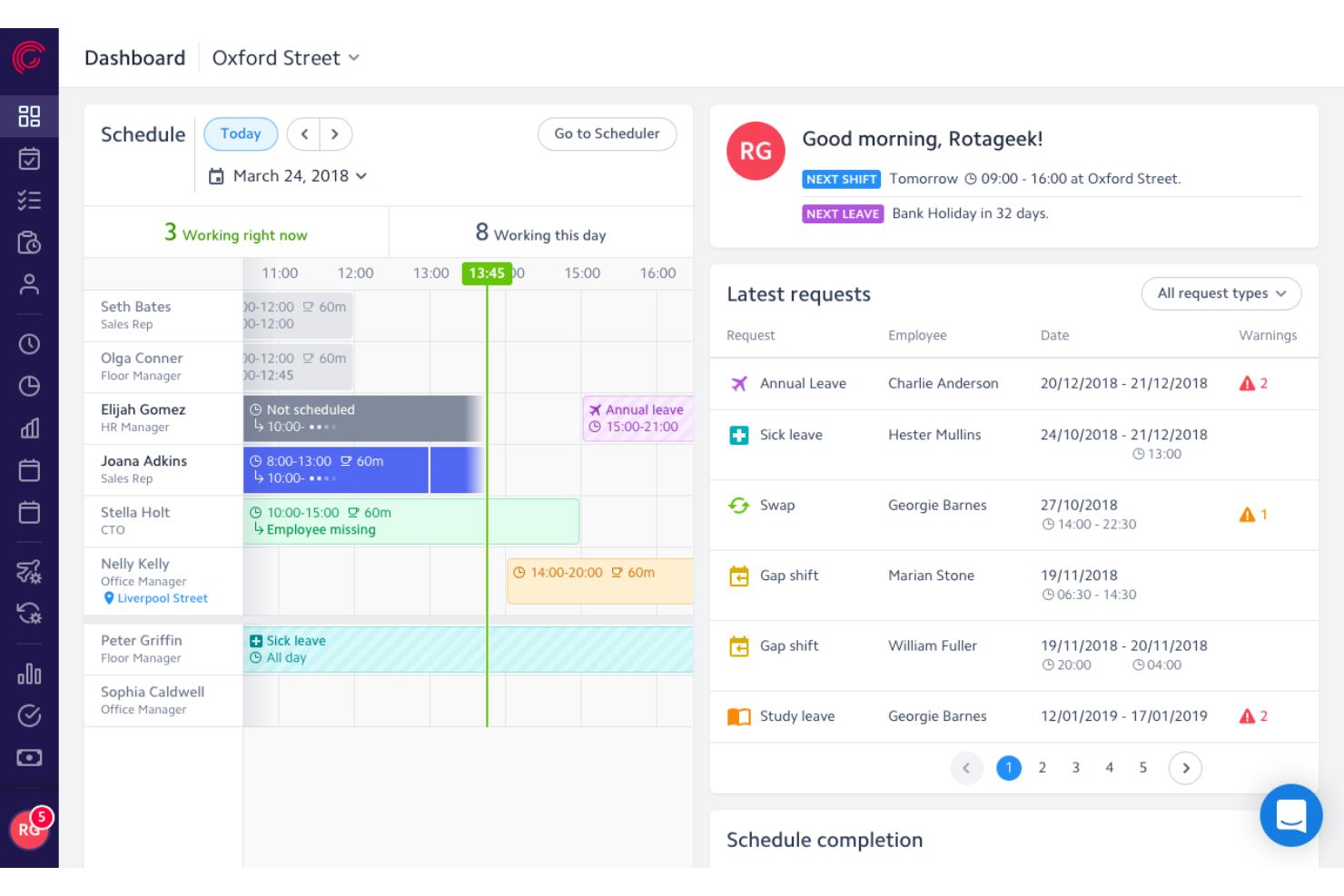
Rotageek is an AI-powered enterprise employee scheduling platform that combines demand forecasting, auto-scheduling, shift management, compliance rule enforcement, and employee self-service into a single workforce management solution.
Who Is Rotageek Best For?
Rotageek is a strong fit for multi-site retail, hospitality, and healthcare organizations that need AI-driven demand forecasting to align staffing with real operational data.
Why I Picked Rotageek
Rotageek earns its spot on my list because its AI-driven demand forecasting operates at a level of precision I rarely see: 15-minute increment predictions trained on sales, footfall, weather, and live event data. I love that the Auto Scheduling engine takes that forecast and generates a fully optimized, compliant schedule in roughly 30 seconds, testing millions of shift combinations before surfacing a fit-to-demand score so managers can see exactly how close staffing aligns to real need before publishing.
Rotageek Key Features
- Shift broadcasting: Open shifts are pushed to eligible employees across multiple locations based on their skills and availability.
- Skills and certification tracking: Employee skills and credentials are linked directly to shift activities, so only qualified staff get assigned to roles requiring specific competencies.
- Fatigue and fairness analyzer: Built-in rules monitor consecutive shifts, rest periods, and distribution of unpopular shifts like weekends and late nights to flag imbalances before publishing.
- Native time and attendance: Employees clock in and out via mobile or web with geo-fencing, photo capture, and auto-populated timesheets ready for payroll export.
Rotageek Integrations
Documented integrations include ADP, Oracle, SAP, Sage, IRIS, Zellis, ESR, and Locum's Nest. Rotageek also supports REST APIs, webhooks, SFTP, and SSO for custom or legacy connectivity.
Pros and Cons
Pros:
- Fatigue and fairness tools help prevent burnout
- Shift marketplace enables internal gig-style shift pickup
- AI auto-scheduling predicts demand in 15-minute increments
Cons:
- No self-service free trial available
- No HIPAA compliance for US healthcare

Best with customizable workflow automation
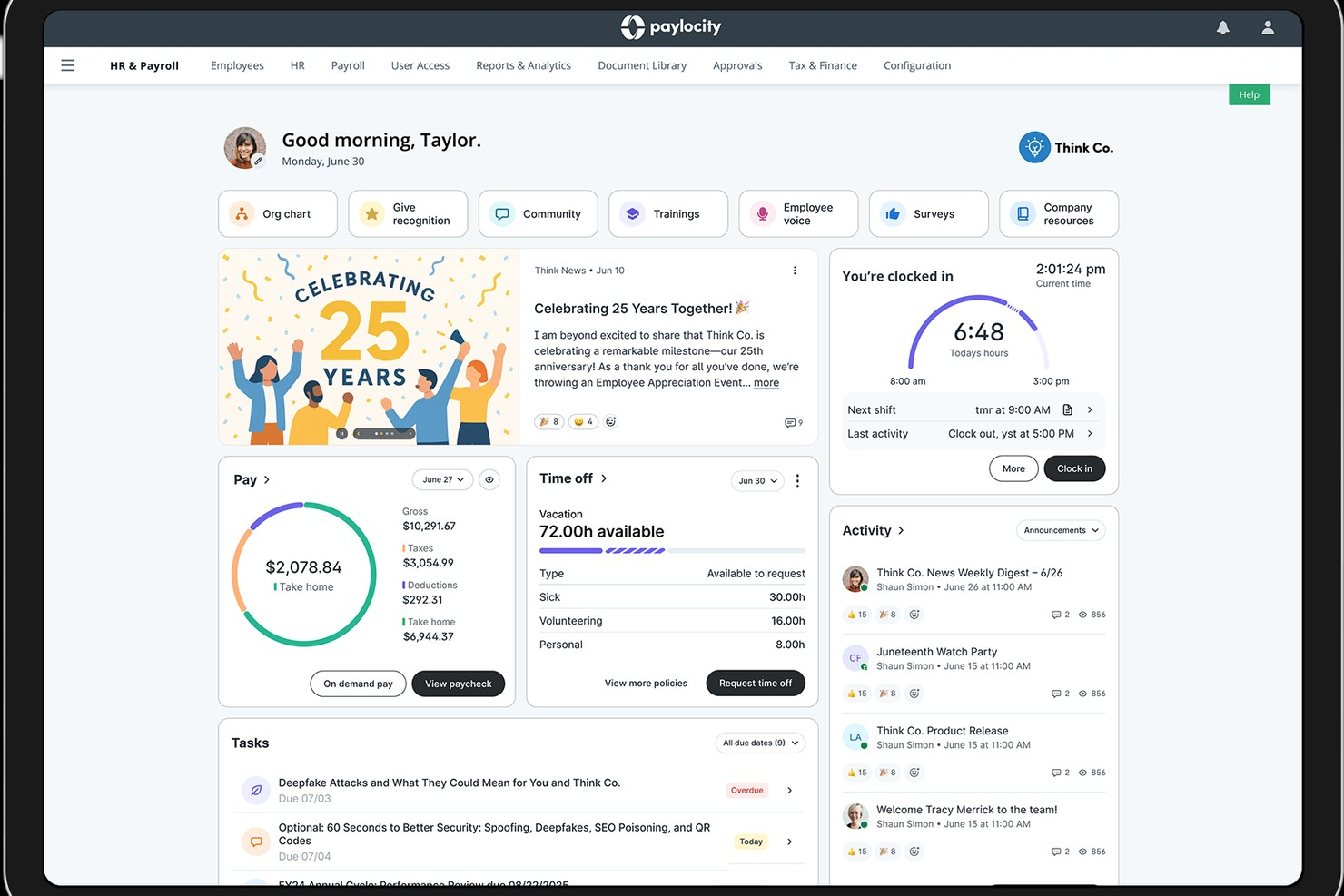
Paylocity offers a unified platform for managing complex employee scheduling needs in large organizations. It’s designed for HR teams and operations leaders who need to coordinate shifts, track time, and ensure compliance across multiple locations or departments. With features that address workforce management challenges at scale, Paylocity helps enterprises streamline scheduling and adapt to changing labor demands.
Who Is Paylocity Best For?
Paylocity suits large organizations and HR teams that need to automate complex, multi-step scheduling and approval workflows.
Why I Picked Paylocity
I picked Paylocity because its workflow automation tools let you design and automate complex scheduling processes that many enterprise organizations require. You can set up custom approval chains, automate notifications for shift changes, and trigger compliance checks based on your own rules. I appreciate how these automation features reduce manual work for HR and operations teams managing large, distributed workforces. This level of customization is especially valuable for companies with unique scheduling policies or multi-location operations.
Paylocity Key Features
Some other features that make Paylocity useful for enterprise scheduling include:
- Mobile self-service tools: Employees can view schedules, request time off, and swap shifts directly from their mobile devices.
- Advanced analytics dashboards: HR and managers can access real-time data on attendance, overtime, and scheduling trends.
- Built-in compliance management: The platform monitors scheduling rules and labor law requirements to help reduce compliance risks.
- Time and attendance tracking: Paylocity captures clock-in and clock-out data and syncs it with scheduling and payroll modules.
Paylocity Integrations
Integrations include Microsoft Entra, Google Workspace, Okta, various applicant tracking systems, job boards, benefits providers, 401(k) and retirement providers, point of sale systems, background check services, and ERP platforms. Paylocity also offers an API for custom integrations.
Pros and Cons
Pros:
- Built-in compliance tracking for labor laws
- Mobile app allows shift swaps and approvals
- Customizable scheduling workflows for complex organizations
Cons:
- Fewer industry-specific scheduling templates available
- No free plan for ongoing use
New Product Updates from Paylocity

Paylocity Expands Expense and Purchase Request Tools
Paylocity adds connected personal cards, smarter expense categorization, and a streamlined purchase request experience. This reduces manual entry and helps finance teams manage expenses and approvals more efficiently. For more information, visit Paylocity’s official site.
 .
.
TimeTrex
Best for payroll integration
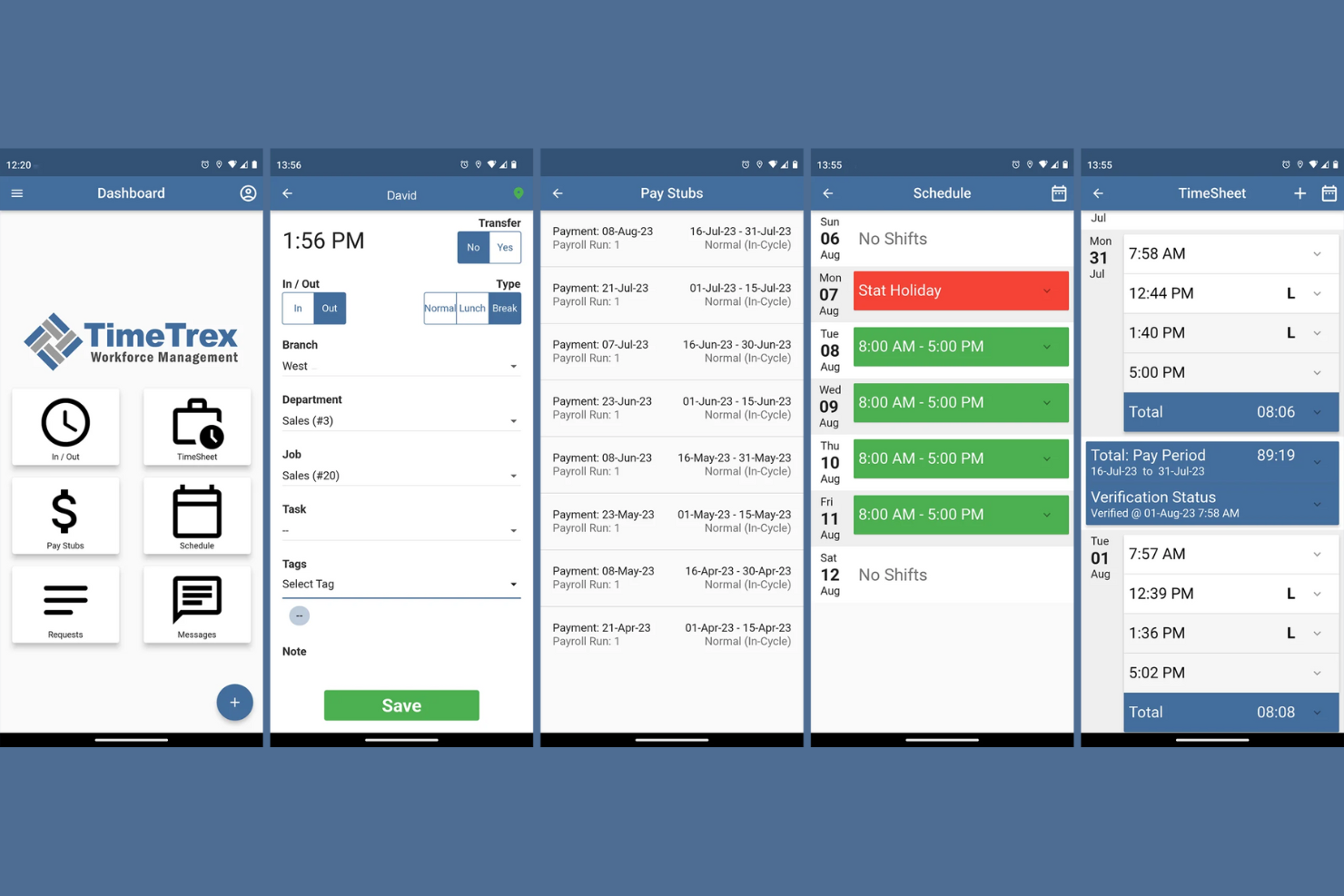
TimeTrex is a workforce management tool that caters to businesses that need integrated scheduling, time tracking, and payroll processing. It's suitable for companies looking to streamline these functions into one platform.
Why I picked TimeTrex: TimeTrex offers payroll integration, allowing you to manage employee scheduling and payroll in one place. You can track employee hours accurately and ensure that payroll is processed without errors. This makes it ideal for businesses aiming to simplify workforce management.
Standout features and integrations:
Features include automated timesheet calculations that reduce manual entry, customizable reporting tools to gain insights into workforce data, and a mobile app for managing schedules on the go.
Integrations include QuickBooks, ADP, Paychex, Sage, and more.
Pros and Cons
Pros:
- Customizable reporting tools
- Steeper learning curve
- Reporting tools lack ease of use
Cons:
- Payroll integration
- Automated timesheet calculations
New Product Updates from TimeTrex
TimeTrex Adds Quick Punch App With Offline and QR Support
TimeTrex adds a new Quick Punch app, offline punching, QR code scanning, punch images, configurable messages, and punch warnings or lockouts to improve employee clock-ins across browsers and local computers. For more information, visit TimeTrex’s official site.
 .
.
Deputy
Best for shift swapping
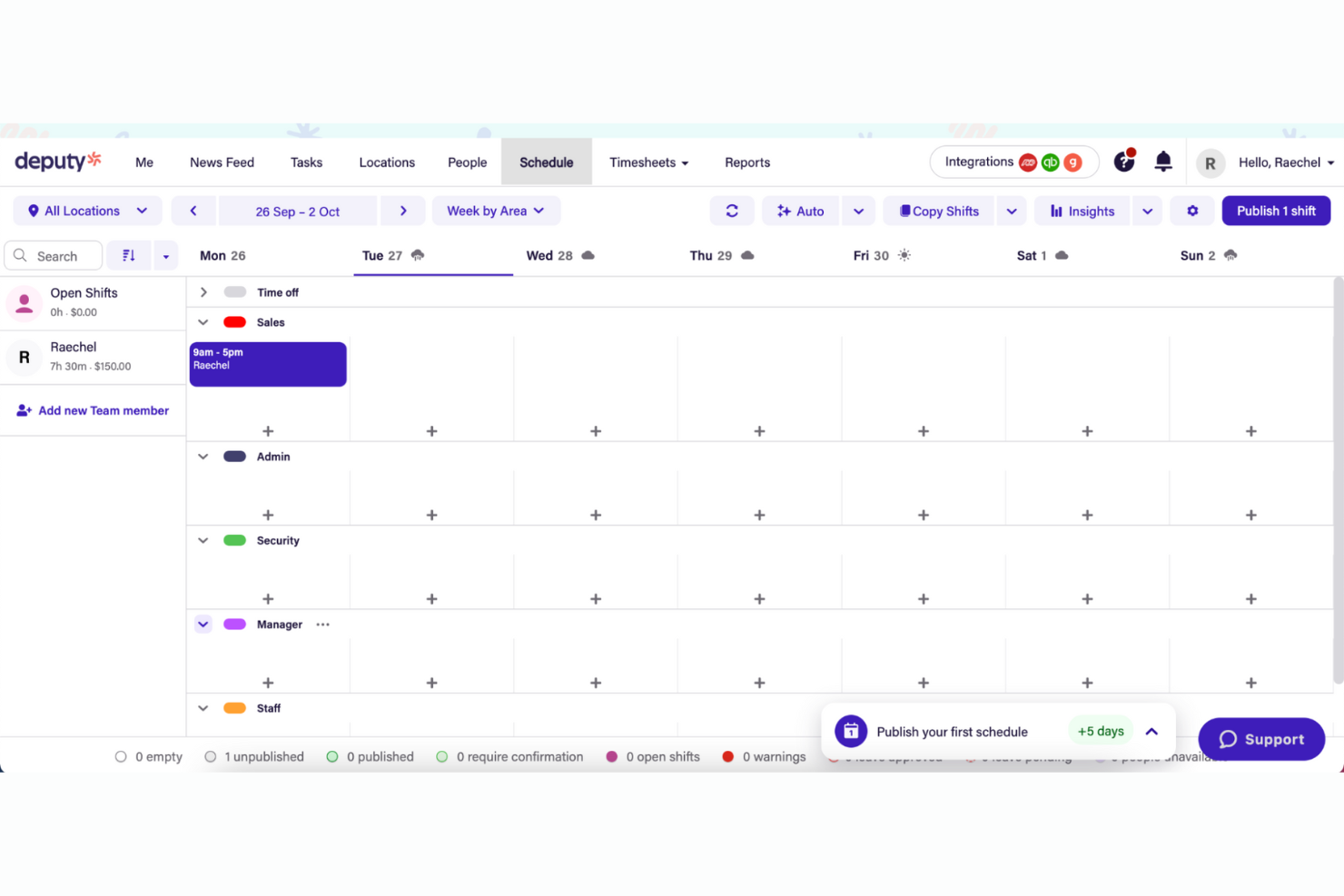
Deputy is a workforce management tool designed for businesses that need flexible scheduling and time tracking. It's ideal for industries such as retail and hospitality where shift swapping is common.
Why I picked Deputy: Deputy offers features that let employees easily trade shifts with each other. You can manage schedules and track time with minimal hassle. The tool's flexibility supports businesses with fluctuating staffing needs. It simplifies communication between managers and staff, keeping everyone informed.
Standout features and integrations:
Features include task management to assign and track tasks, compliance tools to ensure labor law adherence, and a mobile app for managing schedules and timesheets on the go.
Integrations include Xero, ADP, QuickBooks, Square, Gusto, Zapier, BambooHR, NetSuite, and more.
Pros and Cons
Pros:
- Task management included
- Simplifies staff communication
- Supports fluctuating staffing needs
Cons:
- Costs rise with team size
- Limited customization

Workday
Best for HR integration
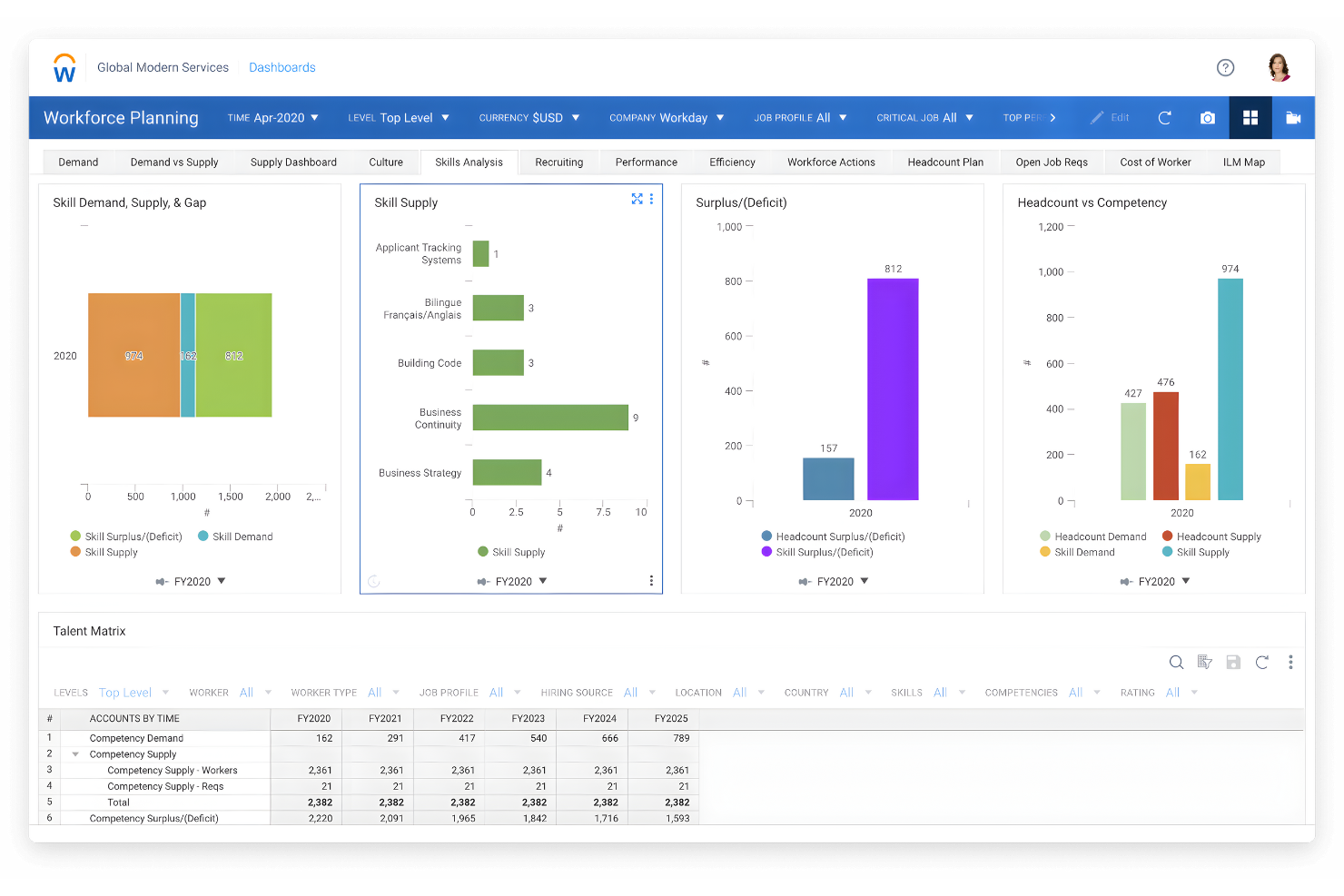
Workday is an enterprise-level software solution designed for human capital management and financial management. It serves large businesses looking to integrate HR processes with their scheduling and workforce management.
Why I picked Workday: Workday excels in HR integration, offering features that connect scheduling with payroll and talent management. You can manage employee data, payroll, and scheduling from one platform. This integration helps streamline HR operations and improve data accuracy. The tool also provides insights into workforce performance and costs.
Standout features and integrations:
Features include workforce planning that helps you optimize staffing levels, performance management to track employee progress, and real-time analytics for informed decision-making.
Integrations include Salesforce, Slack, ServiceNow, Okta, SAP, Oracle, ADP, and more.
Pros and Cons
Pros:
- Enhances data accuracy
- Supports performance management
- HR integration capabilities
Cons:
- Requires technical expertise
- Lengthy implementation process

Verint
Best for predictive modeling
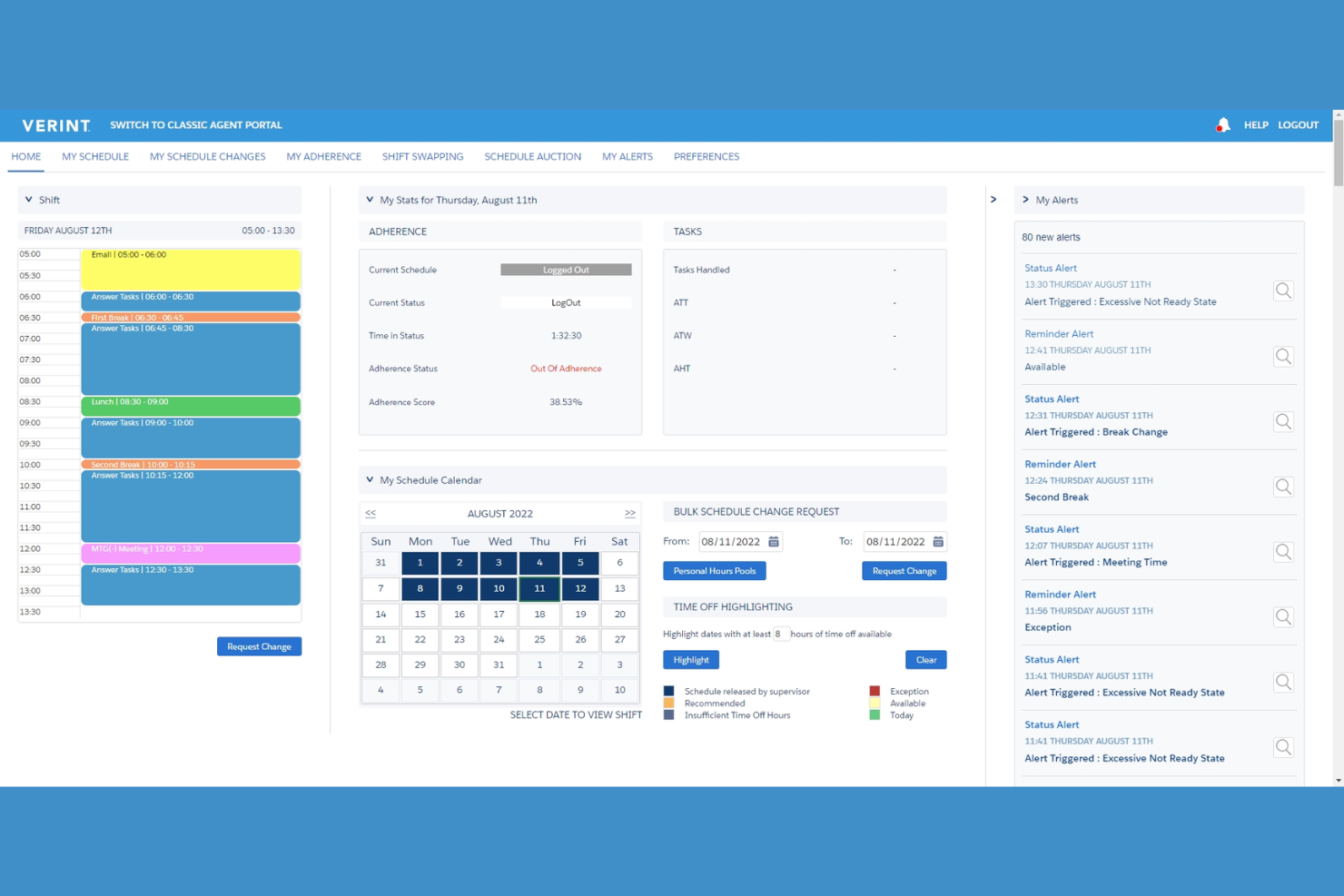
Verint is a workforce management tool that specializes in predictive modeling and analytics, targeting large enterprises that need to optimize their workforce. It helps businesses forecast staffing needs and improve operational performance.
Why I picked Verint: Verint offers advanced predictive modeling capabilities, allowing you to anticipate staffing requirements and adjust schedules proactively. The tool's analytics provide insights into workforce trends and productivity. You can use these insights to make informed decisions about staffing levels and resource allocation. This is particularly valuable for enterprises looking to optimize labor costs and efficiency.
Standout features and integrations:
Features include advanced analytics that help you understand workforce trends, real-time monitoring to track performance, and customizable dashboards for easy data visualization.
Integrations include Salesforce, Microsoft Dynamics, SAP, Oracle, Workday, Kronos, and more.
Pros and Cons
Pros:
- Helps optimize labor costs
- Real-time performance monitoring
- Advanced predictive modeling
Cons:
- Limited customization for small teams
- May require technical expertise
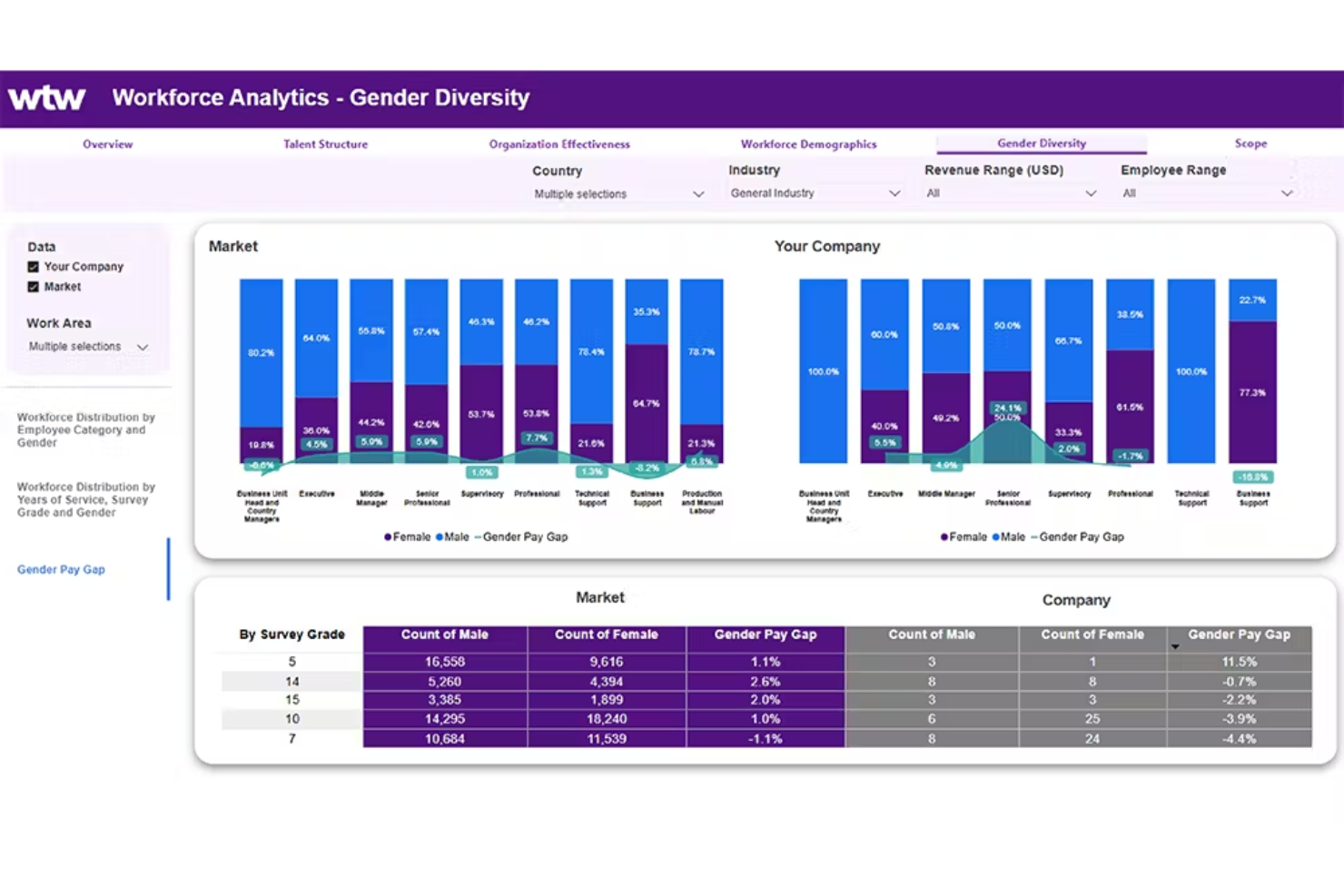
ADP WorkForce Suite provides tools for workforce management and caters primarily to large enterprises. It focuses on scheduling, time tracking, and labor analytics to help businesses optimize their workforce.
Why I picked ADP WorkForce Suite: ADP WorkForce Suite is designed for large-scale operations, offering extensive scheduling options and analytics. It can handle complex scheduling needs, ensuring your workforce is used efficiently. The tool's analytics provide insights into labor costs and productivity. It supports compliance with labor regulations, making it a great fit for large enterprises.
Standout features and integrations:
Features include labor analytics that offer insights into workforce efficiency, compliance management to adhere to labor laws, and mobile-friendly access for managing schedules on the go.
Integrations include SAP, Oracle, QuickBooks, Sage, Xero, and more.
Pros and Cons
Pros:
- Mobile-friendly access
- Supports compliance management
- Strong labor analytics
Cons:
- Requires user training
- Initial setup time-consuming

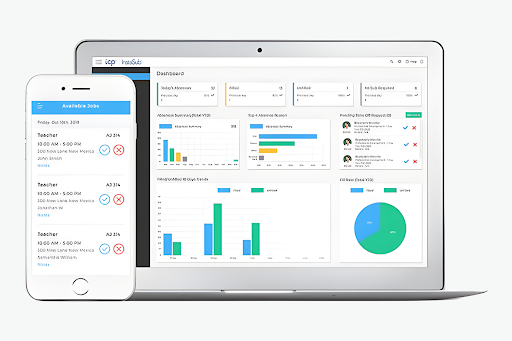
TCP Software is an enterprise solution focused on employee scheduling and time tracking. The company has products designed for industries such as education, healthcare, and public safety, helping manage complex pay rules and compliance.
Why I picked TCP Software: TCP Software excels in compliance tracking and managing complex pay rules, with features like dynamic scheduling and automated time tracking. It integrates with ERP, HCM, and payroll systems to ensure your scheduling and payroll processes are aligned.
Standout features and integrations:
Features include dynamic scheduling that adjusts to your team's needs, automated time tracking to reduce errors, and compliance management to keep your business aligned with regulations.
Integrations include Oracle, ADP, Workday, QuickBooks, Sage, BambooHR, Paychex, and more.
Pros and Cons
Pros:
- Enhances payroll accuracy
- Strong compliance management
- Dynamic scheduling capabilities
Cons:
- Lack of pricing transparency
- Complexity for new users
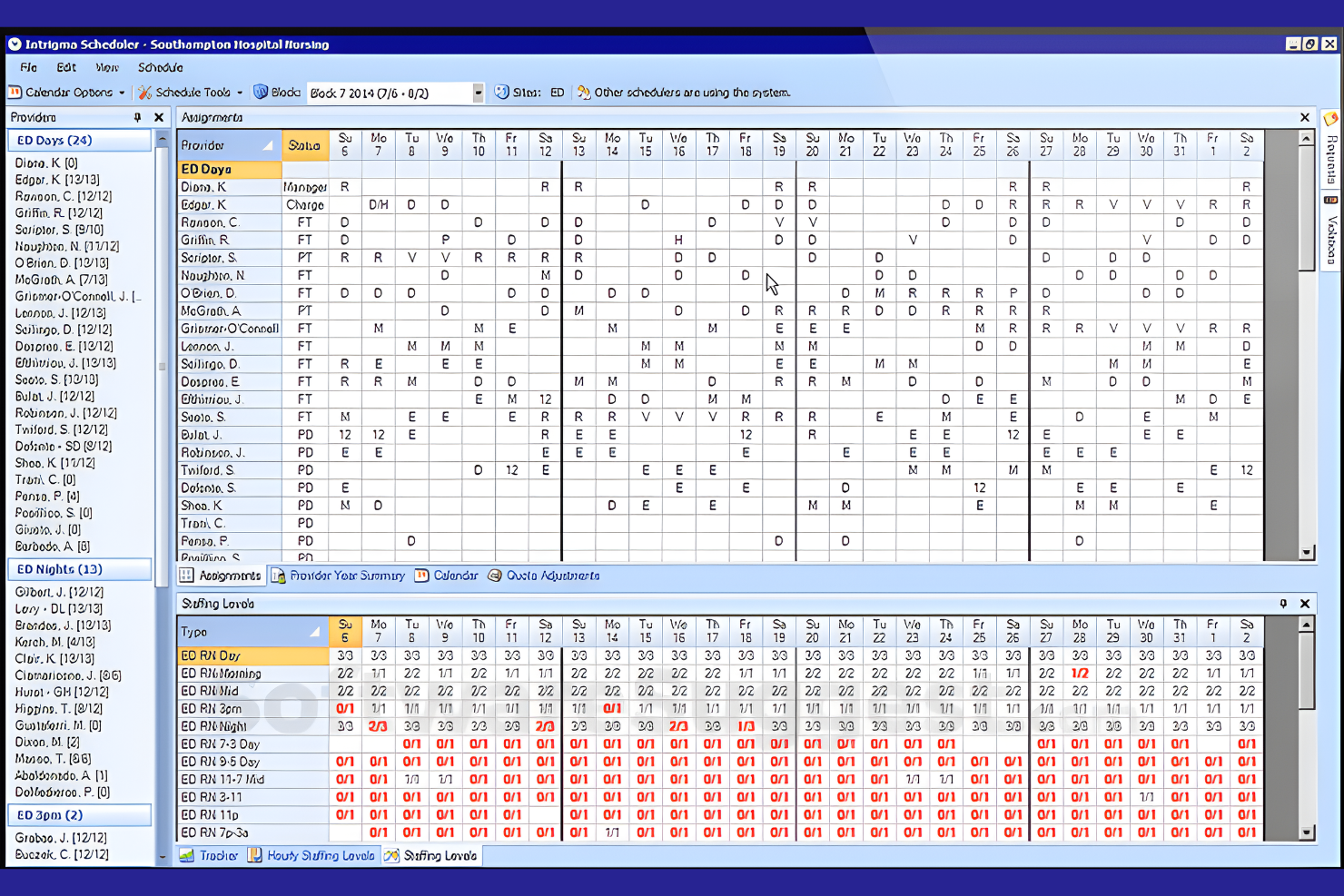
Intrigma is a scheduling solution tailored for the healthcare industry, focusing on shift planning and workforce management. It helps healthcare providers manage staff schedules efficiently.
Why I picked Intrigma: Intrigma is designed specifically for healthcare, offering features such as automatic shift assignments and compliance tracking. The software can handle complex scheduling requirements, ensuring shifts align with skill levels and certifications. The tool's focus on healthcare means it understands the intricacies of medical staff scheduling. It allows you to optimize staffing levels while maintaining compliance with industry regulations.
Standout features and integrations:
Features include automatic shift assignments that consider staff availability, compliance tracking to meet healthcare standards, and secure electronic data exchange through the system's API.
Integrations include Google Calendar, Epic, Outlook, Allscripts, McKesson, Kronos, ADP, and more.
Pros and Cons
Pros:
- Supports complex schedules
- Compliance tracking
- Tailored for healthcare needs
Cons:
- Setup can be time-consuming
- Limited to the healthcare industry
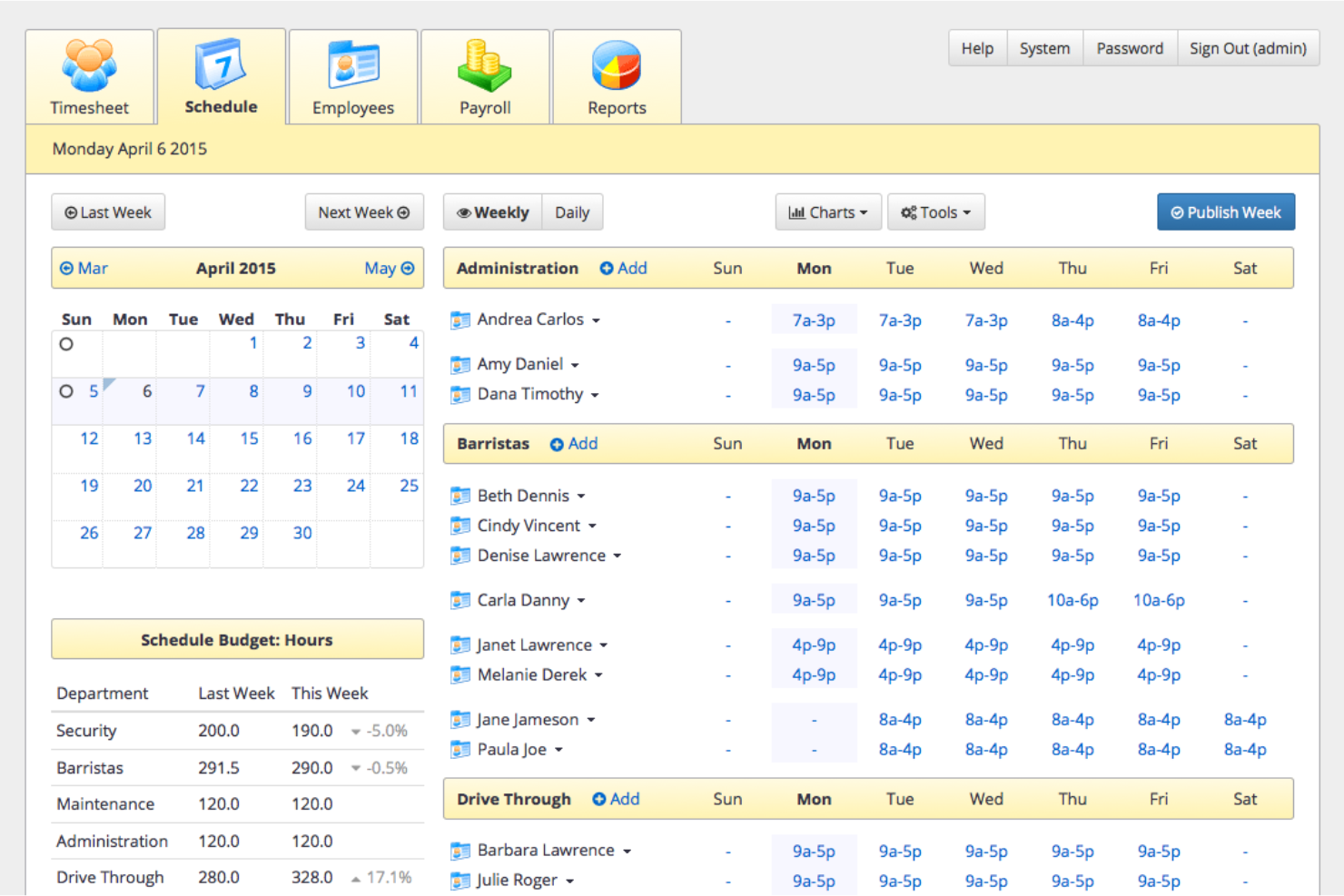
TixTime is an employee scheduling platform designed for organizations with distributed teams that operate across multiple regions. It focuses on reducing scheduling errors caused by time zone differences and improving coordination for large, geographically dispersed workforces.
Why I picked TixTime: TixTime stands out for its automatic time zone conversion, which helps prevent scheduling conflicts for global teams. Managers can coordinate availability across regions without manual adjustments, reducing miscommunication and missed shifts. This makes TixTime a good fit for organizations that need fast, reliable scheduling without complex workforce management requirements.
Standout features and integrations:
Features include automatic time zone conversion to eliminate cross-region scheduling errors, push notifications to keep employees informed of schedule changes, employee self-service access for availability updates, and mobile access so teams can view schedules from anywhere.
Integrations include Google Calendar, Microsoft Outlook, Slack, Zoom, QuickBooks, ADP, Paychex, Xero, BambooHR, and Salesforce.
Pros and Cons
Pros:
- Simple, quick setup
- Employee self-service for availability and schedule access
- Automatic time zone conversions for global teams
Cons:
- Fewer customization options than enterprise WFM platforms
- Limited advanced workforce management features
Annen programvare for skiftplanlegging av ansatte i større virksomheter
Her er noen flere alternativer innen programvare for skiftplanlegging av ansatte i større virksomheter som ikke kom med på listen min, men som likevel er verdt å undersøke:
- Connecteam
For distributed frontline orgs
- UKG
For a global workforce
- Homebase
For hourly teams
- When I Work
For small enterprises
- Zendesk
For customer support teams
- Apploye
For remote workforce management
- Workforce.com
For call center scheduling
- Zoho Shifts
For budget-friendly scheduling
- Agendrix
For employee engagement


How I Evaluate Enterprise Employee Scheduling Software
I split my evaluation into core requirements—like multi-location scheduling and a labor rules engine—and differentiators that matter when you're managing thousands of employees across shifts.
Core Functionality (Table Stakes For This List)
When I'm selecting tools for my list, I rank each one on a scale from 0 (does not offer the functionality) to 5 (excels in this area) for each core functionality listed below. Then, I calculate the tool's total score into a percentage. Each tool needs to achieve a minimum total score of 65% to be considered for inclusion.
- Enterprise Shift Scheduling: I evaluate whether a platform can handle multi-location, multi-department scheduling with templates, auto-scheduling, and bulk actions for thousands of employees.
- Labor Forecasting & Optimization: Predicting staffing demand matters, so I check for forecasting tools that use historical data or business drivers to align coverage with labor budgets.
- Compliance & Labor Rules Engine: I look for a configurable rules engine that enforces overtime limits, break requirements, and predictive scheduling laws across multiple jurisdictions.
- Employee Self-Service Mobile Access: Frontline workers need to swap shifts, set availability, and request time off from their phones, so I evaluate the depth of native mobile functionality.
- Time & Attendance Integration: Tracking actual hours against scheduled shifts is essential. I check for native time tracking or certified integrations with major time clock systems.
- HRIS & Payroll Integrations: Scheduling data needs to flow into payroll and HR systems, so I look for pre-built connectors to platforms like Workday, ADP, UKG, or SAP.
Once I have a list of tools that meet this criteria, I consider what sets each platform apart.
Differentiating Factors (What Sets Vendors Apart)
Here's how I compare and contrast different vendors:
Standout Features
AI-powered auto-scheduling is a major differentiator. Platforms that generate optimized schedules using demand forecasts, employee preferences, and compliance rules save schedulers hours of manual work each week. I also evaluate skills and certification tracking, which matters for teams in healthcare or manufacturing where an expired credential can create real liability. Advanced labor analytics round things out by giving HR leaders visibility into overtime trends, schedule adherence, and labor cost variance across the organization.
Beyond Features
Implementation and change management are big ones for enterprise buyers. Rolling out a scheduling platform to thousands of frontline workers requires phased deployment plans, dedicated support teams, and training resources for both managers and employees. I also look at industry vertical fit, since a platform built for retail with POS-driven demand forecasting won't serve a hospital system the same way one with EMR integrations will. Compliance and data governance matter too, especially for organizations operating across multiple regions with different labor laws and data residency requirements.
Slik velger du programvare for skiftplanlegging av ansatte i større virksomheter
Det er lett å gå seg vill i lange funksjonslister og kompliserte prisstrukturer. For å hjelpe deg med å holde fokus mens du går gjennom den unike prosessen med å velge programvare, får du her en sjekkliste over faktorer du bør ha i bakhodet:
| Faktor | Hva bør du vurdere? |
|---|---|
| Skalerbarhet | Kan programvaren vokse sammen med teamet ditt? Vurder om den kan håndtere flere ansatte eller lokasjoner etter hvert som virksomheten utvides, uten problemer. |
| Integrasjoner | Kan den kobles til de eksisterende systemene dine, for eksempel lønns- eller HR-programvare? Sørg for at den passer inn i den nåværende teknologiplattformen din, slik at du unngår forstyrrelser. |
| Tilpasningsmuligheter | Kan du tilpasse programvaren til arbeidsflyten din? Se etter verktøy som lar deg skreddersy funksjonene uten at du trenger en utvikler. |
| Brukervennlighet | Er grensesnittet intuitivt for alle på teamet ditt? Unngå programvare som krever omfattende opplæring eller er tungvint å navigere i. |
| Implementering og introduksjon | Hvor lang tid tar det å komme i gang? Vær oppmerksom på tidkrevende oppsett som kan forsinke driften. Sjekk også om det finnes opplæringsressurser. |
| Kostnad | Passer prisen inn i budsjettet ditt? Vær oppmerksom på skjulte gebyrer eller abonnementer som ikke gir god verdi for pengene. Vurder årlig kontra månedlig fakturering. |
| Sikkerhetstiltak | Hvordan beskytter programvaren dataene dine? Kontroller kryptering, overholdelse av personvernlover og hvor ofte sikkerhetsprotokollene oppdateres. |
| Tilgjengelig kundestøtte | Hva slags støtte tilbyr leverandøren? Se etter døgnåpen kundestøtte hvis driften din pågår døgnet rundt, og sjekk om de tilbyr flere supportkanaler. |
Hva er programvare for skiftplanlegging av ansatte i større virksomheter?
Programvare for skiftplanlegging av ansatte i store virksomheter er et verktøy som brukes til å administrere og automatisere planlegging for store team på tvers av ulike bransjer. HR-ledere, driftsledere og teamledere bruker vanligvis disse verktøyene til å planlegge skift og håndtere bemanningsbehov. Funksjoner for automatisert planlegging, tidsregistrering og etterlevelsesstyring bidrar til å redusere planleggingskonflikter, sikre overholdelse av arbeidslovgivningen og forbedre den samlede produktiviteten. Disse verktøyene gir verdifull innsikt og kontroll, noe som gjør personaladministrasjonen mer oversiktlig og effektiv.
Funksjoner
Når du velger programvare for skiftplanlegging av ansatte i store virksomheter, bør du se etter følgende viktige funksjoner:
- Automatisert planlegging: Opprett og juster arbeidsplaner automatisk for å spare tid og redusere feil.
- Tidsregistrering: Registrer de ansattes arbeidstid nøyaktig for å sikre korrekt lønnsbehandling og overholdelse av arbeidslovgivningen.
- Bytte av skift: La ansatte enkelt bytte skift, noe som reduserer planleggingskonflikter og gir større fleksibilitet.
- Etterlevelsesstyring: Sørg for at virksomheten overholder arbeidsregler og standarder, og reduser juridisk risiko.
- Mobil tilgang: Gjør det mulig for ansatte å se arbeidsplaner og stemple inn og ut fra smarttelefonene sine for enkelhet og fleksibilitet.
- Oppdateringer i sanntid: Gi umiddelbare endringer i arbeidsplanen og push-varsler slik at teamet holdes informert og samkjørt.
- Integrasjon med lønnssystem: Koble planlegging sømløst sammen med lønnssystemer for å effektivisere lønnsbehandlingen og redusere det administrative arbeidet.
- Tilpassbar rapportering: Generer skreddersydde rapporter for å få innsikt i arbeidsstyrkens produktivitet og effektiviteten til planleggingsfunksjonene.
- Selvbetjening for ansatte: La teammedlemmer administrere tilgjengeligheten sin og forespørsler, slik at de får større innflytelse og det administrative arbeidet reduseres.
- Oppgavehåndtering: Tildel og følg opp oppgaver samtidig med planleggingen for å sikre effektiv drift og ansvarlighet.
Fordeler
Implementering av programvare for skiftplanlegging av ansatte i store virksomheter gir flere fordeler for teamet og virksomheten din. Her er noen av fordelene du kan se frem til:
- Økt effektivitet: Funksjoner for automatisert planlegging og tidsregistrering sparer tid og reduserer manuelle feil, slik at teamet kan konsentrere seg om viktigere oppgaver.
- Bedre etterlevelse: Etterlevelsesstyring sikrer at virksomheten oppfyller arbeidsreglene, og reduserer risikoen for juridiske problemer.
- Større fleksibilitet: Bytte av skift og mobile enheter gir ansatte mer kontroll over arbeidsplanene sine, noe som styrker arbeidsmoralen og reduserer fravær.
- Kostnadsbesparelser: Integrasjon med lønnssystemer og nøyaktig tidsregistrering bidrar til å forhindre overbetalinger og optimalisere arbeidskostnadene.
- Økt åpenhet: Oppdateringer og rapportering i sanntid gir tydelig oversikt over planlegging og arbeidsstyrkens dynamikk, noe som gir bedre beslutningsgrunnlag.
- Større innflytelse for ansatte: Selvbetjeningsfunksjoner lar teammedlemmer administrere arbeidstid og forespørsler, noe som fremmer en følelse av eierskap og ansvar.
- Bedre kommunikasjon: Oppgavehåndtering og varsler holder alle informert og samkjørt, noe som legger til rette for smidigere drift.
Kostnader og priser
Valg av programvare for skiftplanlegging av ansatte i store virksomheter krever en forståelse av de ulike prismodellene og abonnementene som er tilgjengelige. Kostnadene varierer basert på funksjoner, teamstørrelse, tillegg og mer. Tabellen nedenfor oppsummerer vanlige abonnementer, gjennomsnittsprisene deres og typiske funksjoner som er inkludert i programvareløsninger for skiftplanlegging av ansatte i store virksomheter:
Sammenligningstabell for programvare for skiftplanlegging av ansatte i store virksomheter
| Abonnementstype | Gjennomsnittspris | Vanlige funksjoner |
|---|---|---|
| Gratisabonnement | $0 | Grunnleggende planlegging, tidsregistrering og begrenset rapportering. |
| Personlig abonnement | $5-$25/bruker/måned | Avansert planlegging, mobil tilgang og bytte av skift. |
| Bedriftsabonnement | $25-$50/bruker/måned | Etterlevelsesstyring, integrasjon med lønnssystem og tilpassbar rapportering. |
| Virksomhetsabonnement | $50+/bruker/måned | Full tilpasning, dedikert kundestøtte og avansert analyse. |
Vanlige spørsmål om programvare for planlegging av ansatte i virksomheter
Her er noen svar på vanlige spørsmål om programvare for planlegging av ansatte i virksomheter:
Hva bør jeg se etter i kundestøtten til en leverandør?
Se etter leverandører som tilbyr støtte døgnet rundt, flere kanaler som chat og telefon, samt et responsivt kundestøtteteam. Sjekk om de har en omfattende kunnskapsbase og tilbyr personlig tilpassede supportalternativer. Disse faktorene sørger for at du får hjelp når du trenger det, og minimerer nedetid for teamet ditt. Et brukervennlig grensesnitt og støtte for mobile enheter kan også forbedre tilgjengeligheten og brukervennligheten for de ansatte.
Trenger jeg tekniske ferdigheter for å implementere programvaren?
Nei, det meste av programvaren for planlegging av ansatte i virksomheter er utviklet for å være enkel å bruke, men noe teknisk oppsett kan være nødvendig. Leverandører tilbyr ofte implementeringsstøtte, inkludert oppsettveiledninger og opplæringsressurser. Hvis du ikke er teknisk kyndig, bør du velge en leverandør med god støtte ved oppstart og tydelig dokumentasjon.
Hvordan sikrer jeg datasikkerheten med planleggingsprogramvare?
Sørg for at programvaren bruker kryptering og overholder personvernforordninger som GDPR. Spør leverandørene om sikkerhetsprotokollene deres og hvor ofte de oppdateres. Det er viktig å vite hvem som har tilgang til dataene dine, og hvordan de beskyttes, for å sikre informasjonen til teamet ditt. Avanserte funksjoner som geogjerder kan også gi ekstra sikkerhet ved sporing av ansattes oppmøte.
Kan planleggingsprogramvare integreres med de eksisterende systemene mine?
Ja, mange planleggingsverktøy tilbyr integrasjoner med lønns-, HR- og kommunikasjonssystemer. Sjekk programvarens integrasjonsmuligheter og sørg for at den kan kobles til verktøyene du bruker i dag. Integrasjoner som er innebygd, reduserer behovet for manuell dataregistrering og sikrer konsekvent informasjon på tvers av plattformer, slik at du sparer tid og arbeid. Sørg for at den støtter ledige vakter og oppmøtesporing med de eksisterende løsningene dine.
Hvordan kan planleggingsprogramvare forbedre medarbeiderengasjementet?
Planleggingsprogramvare kan øke medarbeiderengasjementet ved å gi ansatte mer kontroll over vaktene sine, for eksempel muligheten til enkelt å be om fri eller bytte vakter. Denne fleksibiliteten viser de ansatte at du verdsetter innspillene deres, og bidrar til å redusere frustrasjon over rigide arbeidsplaner. Den hjelper også ledere med å sikre en rettferdig fordeling av arbeidstimer, noe som kan forbedre arbeidsmoralen og bidra til at ansatte blir værende. Funksjoner som registrering av ansattes tilgjengelighet og varsler for planlegging på riktig tidspunkt kan også styrke engasjementet og kommunikasjonen.
Hva bør jeg ta hensyn til når jeg skalerer planleggingsprogramvaren for et voksende team?
Etter hvert som teamet ditt vokser, bør du se etter programvare som kan håndtere økt kompleksitet, for eksempel administrasjon av flere lokasjoner, avdelinger eller roller. Sørg for at den kan skaleres uten at funksjonalitet eller ytelse svekkes. Du bør også vurdere programvarens rapporteringsmuligheter for å følge med på viktige måltall som arbeidskraftkostnader, oppmøte og vaktmønstre etter hvert som arbeidsstyrken vokser. Sørg for at den enkelt kan integreres med annen programvare for arbeidsstyring, slik at den dekker behovene dine etter hvert som de utvikler seg.