

10 Kortliste over den beste programvaren for produktivitetssporing


Å følge med på produktiviteten er en vanlig utfordring for HR-medarbeidere. Det kan føles overveldende å holde teamet på rett spor samtidig som du håndterer utallige oppgaver. Programvare for produktivitetssporing gir en måte å håndtere dette kaoset på, slik at du kan fokusere på det som virkelig betyr noe.
Jeg har fordypet meg i verdenen av verktøy for produktivitetssporing for å gi deg en objektiv gjennomgang av de beste alternativene som finnes. Etter min erfaring kan valg av riktig programvare endre måten teamet ditt arbeider på, og gjøre jobben din enklere.
I denne artikkelen veileder jeg deg gjennom mine beste anbefalinger og fremhever funksjoner og fordeler som samsvarer med behovene dine. Du får innsikt som hjelper deg med å ta en informert beslutning, slik at teamet ditt forblir effektivt og produktivt.
Hvorfor du kan stole på våre programvareanbefalinger
Teamet vårt har testet og anmeldt programvare siden 2012. Vi er selv HR-eksperter, så vi vet hvor vanskelig og hvor viktig det er å velge riktig programvare.
I denne guiden har vi vurdert verktøyene gjennom praktisk testing og uavhengig research og gitt dem poeng ut fra våre utvelgelseskriterier. Vi bygger også på innsikt fra ledende eksperter i bransjen og erfarne HR-eksperter.
Anmeldelsene våre bygger på vår egen redaksjonelle vurdering. De er ikke et salgsargument.
Ekspertanmeldere:
Sammenligningstabell for programvare for produktivitetssporing
Denne sammenligningstabellen oppsummerer prisopplysningene for mine beste anbefalinger innen programvare for produktivitetssporing:
| Tool | Best For | Trial Info | Price | ||
|---|---|---|---|---|---|
| 1 | Best productivity tracking software for automated and simple time mapping | Free trial available | From $10/user/month | Website | |
| 2 | Best for refocusing teams on high-impact work | Free plan available | From $10/user/month (billed annually) | Website | |
| 3 | Best for tracking mobile workforce activity | Free trial available | From $6.42/user/month (billed annually) | Website | |
| 4 | Best for advanced user behavior analytics | Free demo available | Pricing upon request | Website | |
| 5 | Best for detailed reporting | Free plan + 30-day free trial + free demo available | From $5/user/month (billed annually) | Website | |
| 6 | Best for real-time activity monitoring | Free demo + 14-day free trial availbale | From $6.67per user/month (billed annually) | Website | |
| 7 | Best productivity tracking software for comprehensive insights on employee efficiency levels | Free 21-day trial + free plan for up to 3 users | From $7/seat/month | Website | |
| 8 | Best productivity tracking software for automating sales processes and managing accounts | Free plan + free trial + free demo available | From $12/user/month | Website | |
| 9 | Best productivity tracking software for garnering real-time productivity analytics | Free demo + 7-day free trial available | From $5/user/month (billed annually) | Website | |
| 10 | Best for enterprise AI knowledge search | Free demo available | Pricing upon request | Website |


Beste programvare for produktivitetssporing
Her er en kort beskrivelse av hver programvare for produktivitetssporing som viser hvert systems beste bruksområde, bemerkelsesverdige funksjoner og noen fordeler & ulemper. Jeg har også inkludert skjermbilder for å gi deg et innblikk i brukergrensesnittet.

Best productivity tracking software for automated and simple time mapping

Insightful lives up to its name, with the tool promising to deliver several project-related insights and employee productivity attributes. Many small businesses rely on Insightful for spiking productivity and tracking employee efficiency.
Why I picked Insightful: I like Insightful primarily because of the automated time mapping feature. By implementing automatic time data mapping, insightful delivers accurate project insights that eliminate human error. Insightful provides you with a comprehensive view of the time spent by your employees at distinct stages of a project. The tool also offers precise statistics to help you better justify your projects' budgets and billable hours.
Proof of work is another challenge for employers hiring freelancers or contractors who invoice against billable hours. Insightful implements a real-time monitoring method that gives a snapshot of employees' website and app usage. Additionally, you can personally label apps and websites that are productive for your project or organization.
Insightful Standout Features and Integrations
Features include automated screenshots, verified attendance, automated time entries mapping, attendance tracking, historical timekeeping, productivity labeling, and different logins for clients, managers, and employees.
Integrations include 5+ tools like Data Studio, IBM Cognos Analytics, Looker, Power BI, Slack, Tableau, and others.
Pros and Cons
Pros:
- User-friendly user interface
- Screenshots depicting window changes
- Includes a REST-based API for custom integrations
Cons:
- Occasional automation bugs
- Can't delete users in some cases
New Product Updates from Insightful
Insightful Expands MCP and HRIS Integrations
Insightful adds OAuth connections for ChatGPT and Microsoft Copilot Studio through its MCP Server, while HRIS integrations gain manager scope syncing in Beta. These updates expand AI access and automate permission management. For more information, visit Insightful’s official site.
 .
.
Best for refocusing teams on high-impact work

ActivTrak is a productivity tracking platform that helps you understand how work happens across your organization. It captures digital activity data to show where time goes, how teams perform, and where efficiency can improve.
Why I picked ActivTrak: I picked ActivTrak because it helps you see what’s driving performance without crossing privacy boundaries. It tracks productive, unproductive, and offline work so you can spot gaps and improvement opportunities. You can benchmark individual and team productivity against organizational averages to see where focus or coaching is needed.
The platform also highlights low-value activities so teams can refocus on tasks that deliver results. With its performance insights and burnout prevention tools, you can balance workloads and keep your team’s energy steady.
Standout features & integrations:
Features include productivity performance tracking that breaks down time spent on different activity types, helping you pinpoint inefficiencies and improvement areas. Another useful tool is schedule optimization, which uses attendance data to ensure consistent coverage and prevent missed shifts, keeping operations running smoothly.
Integrations include Microsoft Outlook, Google Calendar, Salesforce, Microsoft Teams, Slack, ServiceNow, Zendesk, Zoom, Microsoft Viva, Lattice, Qualtrics, and Jira Software.
Pros and Cons
Pros:
- Detailed breakdown of productive vs. unproductive time
- Helps detect burnout before it impacts output
- Benchmarking makes performance comparisons easier
Cons:
- Limited customization of dashboard layouts
- No built-in payroll or HR tools

DeskTime
Best for tracking mobile workforce activity
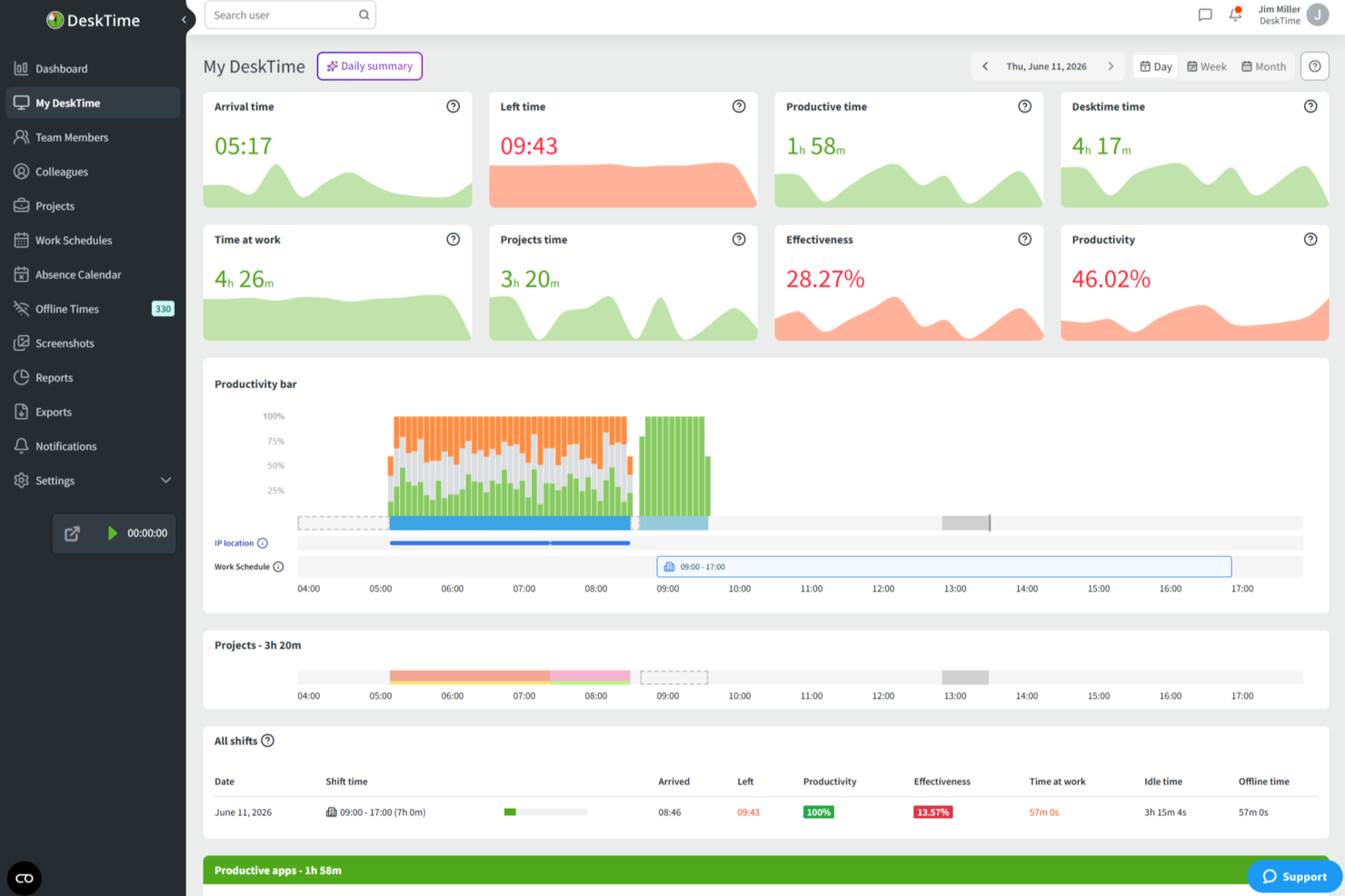
DeskTime is an automatic time and productivity tracking tool that monitors app, URL, and document usage across desktop and mobile devices, giving managers and employees visibility into how work hours are spent.
Built around automatic time tracking, DeskTime is a productivity monitoring platform that captures app and URL activity, project time, and team attendance data across desktop and mobile.
DeskTime is a productivity tracking platform that automatically logs app usage, website activity, and project time across devices, combining time tracking with scheduling and absence management in one place.
Who Is DeskTime Best For?
DeskTime is a good fit for managers and team leads in small to mid-sized businesses who need automatic, hands-off visibility into how their teams spend work time.
Why I Picked DeskTime
I picked DeskTime as one of the best for tracking mobile workforce activity because the mobile app doesn't strip out core functionality the way many desktop-first tools do. Whether your team is traveling to client sites, working from a job location, or clocking time away from a computer, the app supports both manual and automatic time tracking on iOS and Android, including offline time logging. That offline capability is key: hours recorded without a connection sync back automatically, so there are no gaps in your data. The mobile dashboard also gives managers real-time access to team member productivity levels, project progress, and offline time assignments, all from their phone.
DeskTime Key Features
- URL and app tracking: Automatically logs every website visited and application used during work hours, categorized as productive, unproductive, or neutral.
- Document title tracking: Captures the specific file or document names employees work on, giving you granular visibility beyond just which app is open.
- Productivity reports: Generates daily, weekly, and custom-range reports on individual and team productivity scores based on tracked activity data.
- Shift scheduling: Lets managers build and assign work schedules so that tracked time can be measured against expected hours worked.
DeskTime Integrations
DeskTime offers a small set of native integrations, including Google Calendar, Outlook Calendar, Trello, GitLab, Asana, and Jira, and it connects with Zapier. An API is also available for custom integrations.
Pros and Cons
Pros:
- Supports mobile tracking for remote workers
- Classifies app and URL productivity per team
- Tracks time automatically without manual input
Cons:
- Auto-start on desktop occasionally fails to trigger
- Mobile app lacks automatic URL tracking

Teramind
Best for advanced user behavior analytics

Teramind is a user behavior analytics software platform designed for businesses across various industries, with features focusing on cybersecurity, compliance management, and employee productivity.
Why I picked Teramind: Teramind's productivity tracking software gives you detailed insights into how your team spends their time at work. With behavior analysis, you can see patterns in user actions, helping to spot inefficiencies and refine workflows. The data telemetry feature collects user activity information without being intrusive, showing where time is well-spent or wasted.
Another useful feature is AI-driven predictive analytics, which spots potential productivity bottlenecks before they become serious issues. The software also helps with insider threat monitoring, alerting you to any suspicious activities to manage risks and keep your work environment secure. For hybrid teams, Teramind supports compliance management, ensuring all activities align with company policies.
Teramind Standout Features and Integrations
Features include keystroke logging, screen recording, file transfer tracking, email monitoring, instant message tracking, social media activity monitoring, print job tracking, clipboard monitoring, network activity monitoring, application usage tracking, and website usage tracking.
Integrations include Google Cloud BigQuery, Splunk Cloud Platform, Jira, Zendesk, Redmine, Microsoft Power BI, IBM Security QRadar, LogRhythm, ArcSight, McAfee Business Protection, Microsoft Entra ID, and ServiceNow.
Pros and Cons
Pros:
- Detailed user behavior analytics to detect anomalies
- Real-time alerts and automated responses to policy violations
- Supports both cloud-based and on-premises deployments
Cons:
- Minimum of 5 seats
- Limited support for mobile device monitoring

actiTIME
Best for detailed reporting
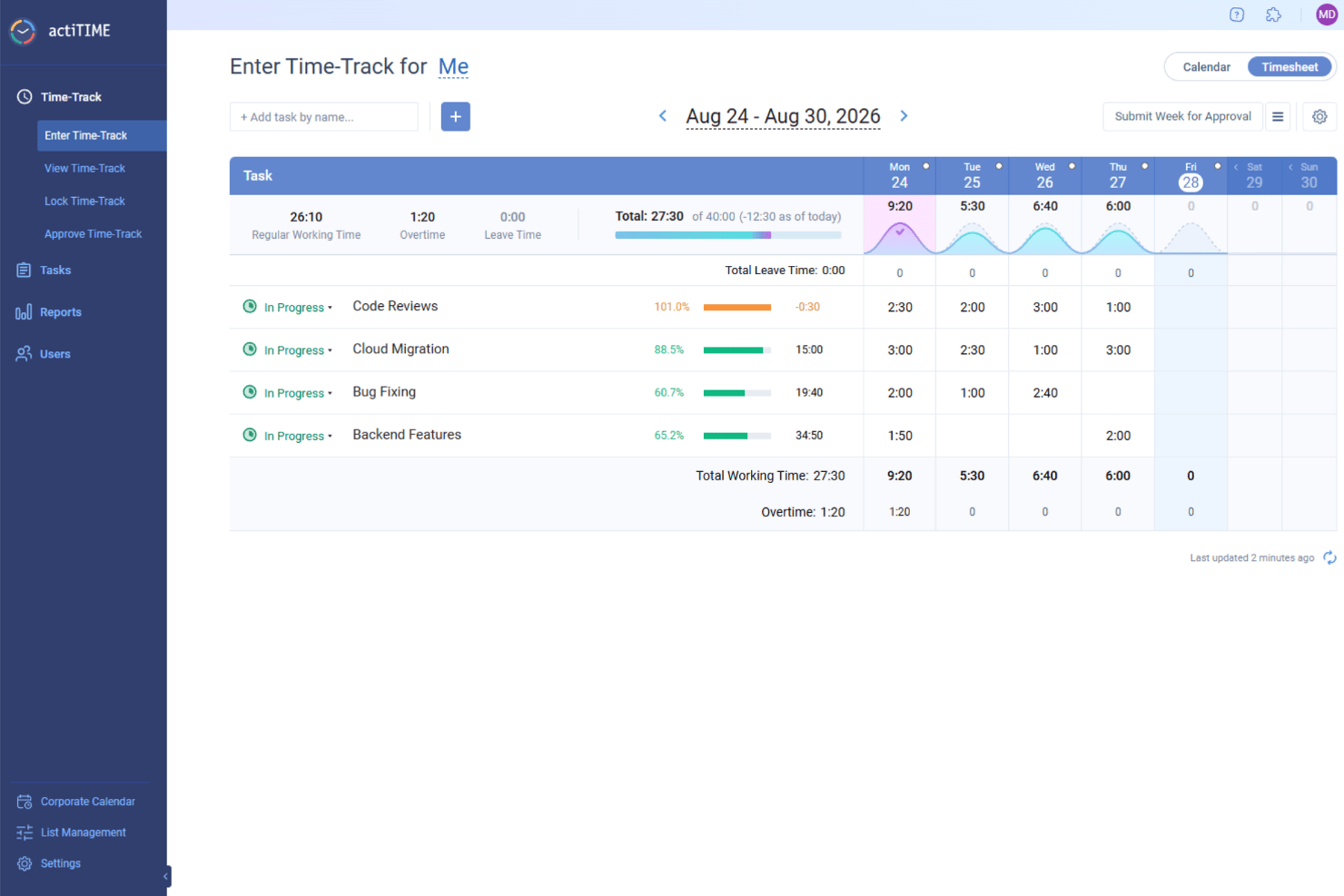
actiTIME is a time-tracking software that helps businesses manage projects, teams, and clients in one place. It enables your team to log work hours, track leave time, and monitor project progress.
Why I picked actiTIME: One reason I chose actiTIME is its comprehensive reporting capabilities. You can generate detailed reports on time distribution across clients and assignments, monitor individual and team productivity trends, and assess project costs. These insights allow you to identify profitable projects and make data-driven decisions to enhance efficiency.
Another notable feature is actiTIME's task and project management tools. You can set task estimates, deadlines, and statuses to keep your projects on track. The Kanban board view provides a clear picture of work progress, helping your team stay organized and focused. This structured approach to task management contributes to improved productivity and timely project completion.
actiTIME Standout Features and Integrations
Features include weekly timesheet, calendar view, overtime calculation, timesheet locking, timesheet approval, email notifications, custom workflows, data export, user permissions, workload management, task assignments, and custom fields.
Integrations include actiPLANS, QuickBooks, Zapier, GitHub, Salesforce, Jira, Trello, Outlook, Evernote, Todoist, Bamboo HR, and Google Calendar.
Pros and Cons
Pros:
- Mobile app facilitates time tracking on the go
- Detailed reporting capabilities for productivity analysis
- Comprehensive time and project tracking features
Cons:
- Initial setup and customization can be time-consuming
- Limited integration options compared to competitors
New Product Updates from actiTIME

actiTIME Visual Hour Indicator and Time-Track Report Redesign
actiTIME adds a wave-style hour indicator to the Timesheet and Calendar views and refreshes the Time-Track report for smoother navigation and clearer visuals. For more information, visit actiTIME's official site.

Controlio is a cloud-based productivity tracking and employee monitoring tool designed to help organizations measure, analyze, and improve workforce performance. It captures activity data from desktops to provide detailed insights into productivity levels, app and web usage, and work habits across in-office, remote, and hybrid teams.
Why I picked Controlio: I picked Controlio because it provides real-time visibility into employee activities, helping you identify which tasks and applications contribute most to productivity. Its productivity scoring system automatically categorizes time spent on different apps and websites, allowing you to spot both productive and distracting behaviors. I also like that Controlio supports continuous screen recording and live session viewing, which makes it easier to verify work progress and maintain accountability.
For distributed teams, this combination of tracking, scoring, and surveillance offers a complete picture of how work happens day-to-day.
Controlio standout features and integrations:
Features include productivity scoring that rates users and departments based on time spent on productive and distracting activities, real-time surveillance for monitoring desktops live, and continuous screen recording that captures user screens for later review. The software also supports detailed behavior analytics, time distribution insights, and compliance with data protection standards like GDPR and HIPAA, ensuring responsible monitoring practices.
Integrations are not currently listed by Controllo.
Pros and Cons
Pros:
- Tracks productive and distracting activities
- Offers continuous screen recording
- Complies with GDPR and HIPAA
Cons:
- Limited search in recorded data
- Continuous video may raise privacy concerns

Traqq
Best productivity tracking software for comprehensive insights on employee efficiency levels

Traqq enables businesses to retrospect and analyze internal processes. With Traqq, your teams unlock a new dimension in understanding various aspects of work productivity. As a result, you can conduct root cause analysis of low productivity times and quickly implement a workaround to boost efficiency.
Why I picked Traqq: I love how the developers at Traqq have created a simple yet comprehensive productivity tracking software. The activity levels generated on the Traqq dashboard have an interesting algorithm. The tool tracks your employees’ keyboard clicks and mouse movements. Consequently, the activity page populates your employees’ daily activity in different coloured blocks depicting sessions of low, average, and high activity levels.
Traqq detects and reports websites and apps on which your employees spend over 10 seconds. As a result, you can get a quick overview of what distracts your employees. Traqq also takes random screenshots at 10-minute intervals and uploads them to a secure online storage space.
Traqq Standout Features and Integrations
Features include application and URL tracking, activity level generation, desktop screenshots, desktop screen recording, idle time and attendance tracking, team management, analysis and reporting, and others.
Integration details are currently not available.
Pros and Cons
Pros:
- Accurate employee tracking
- Screenshot-taking can be paused
- Automation of email reports (daily/weekly)
Cons:
- No support for foreign languages
- No support for third-party integrations

ClickUp
Best productivity tracking software for automating sales processes and managing accounts

ClickUp firmly believes in simplifying the world of productivity. Many tools are increasingly becoming available for the tiniest of services, and ClickUp wants to reduce time spent switching between apps to boost productivity. Interestingly, ClickUp’s motto is “Save one day every week.”
Why I picked ClickUp: I like the fact that ClickUp is so versatile and has a lot to offer to diverse stakeholders, be it sales, marketing, product, or engineering. ClickUp allows sales account managers to automate manual sales processes. Sales folks can keep deals flowing through their pipelines with automated follow-ups for leads.
ClickUp also adds an extra dimension to sales teams by helping them track prospects, deals, and clients on a shared list or board. Additionally, the real-time reporting features help senior sales management stakeholders to visualize how productive the sales teams are: who’s closing more deals and how the overall sales performance for a quarter or year is panning out.
ClickUp Standout Features and Integrations
Features include multiple views, custom dashboards, team collaboration, a whiteboard, real-time reporting, goal and milestone setting, useful templates, and others.
Integrations include 10+ tools such as Dropbox, Everhour, Figma, GitHub, Google Calendar, Google Drive, HubSpot, Loom, Outlook, Sentry, Slack, Toggl, Vimeo, Webhooks, Zoom, and others.
Pros and Cons
Pros:
- Customizable automation builder
- Great collaboration tools
- Generous free plan with unlimited projects
Cons:
- Steep learning curve
- Limited time tracker capabilities
New Product Updates from ClickUp
ClickUp Adds Meetings Hub, Super Agent Templates, and ZoomInfo Integration
ClickUp adds a searchable Meetings Hub, new ways to clone and template Super Agents, and a ZoomInfo integration through the App Center. These updates improve meeting retrieval, agent reuse, and access to sales intelligence. For more information, visit ClickUp’s official site.

We360.ai
Best productivity tracking software for garnering real-time productivity analytics

We360.ai started in Q4 of 2020 and has made significant strides in productivity-tracking software. The software offers many tools, including project management, tracking productivity logs, and real-time analytics.
Why I picked We360.ai: I'm particularly interested in the real-time productivity analytics that We360.ai offers. We360.ai gives you live statistics about your employees' activities: what applications they use, their usage duration, and their availability status. It's like a live stream of your employees' online activities.
Additionally, We360.ai has a nifty leave management system that tracks employee leaves, aiding with payroll processing. As a result, you can easily track, approve, or reject leave requests. The Health360 segment of We360.ai helps you manage your employees' well-being. You can swiftly analyze which employees are overworking or underworking and then intelligently shift workloads.
We360.ai Standout Features and Integrations
Features include real-time analytics, desktop screenshots, a time tracking app, leave management, user data import, CSV report export, cross-OS compatibility, automated attendance, domain blocking, a mobile application for admins, and task & project management tools.
Integrations include 10+ tools like Asana, ClickUp, GitHub, Google Calendar, Insightly, Jira, PayPal, Slack, Trello, Zapier, Zendesk, and others.
Pros and Cons
Pros:
- There is an option for a Lifetime Deal (LTD)
- Free and detailed live training
- Dedicated account manager
Cons:
- Issues with bulk downloading screenshots
- The monthly plan requires a minimum of 10 users
Guru
Best for enterprise AI knowledge search

Guru is a knowledge management platform that leverages artificial intelligence to provide enterprise-level search capabilities.
Why I picked Guru: I selected Guru after evaluating its extensive features, which cater to the needs of complex workflows and its compatibility with a range of existing tools. Its standout attributes include a user-friendly interface and advanced search capabilities, which are essential for managing digital projects efficiently. I believe Guru is particularly suited for enterprise AI knowledge search because it enables comprehensive searches across various platforms, delivering instant and accurate answers, which is crucial for large-scale operations where timely access to information is key to maintaining productivity.
Guru Standout Features & Integrations
Features include enterprise AI search, an employee intranet, a company wiki, AI suggest and assist, custom branding tools, collaboration and feedback tools, mobile accessibility, and access controls and permissions.
Integrations include Trello, Cognito Forms, Jira Software Cloud, Confluence Cloud, HubSpot, Google Chat, Confluence Server, and GitHub.
Pros and Cons
Pros:
- Improves communication with clients
- Robust search feature
- Convenient for customer-facing content
Cons:
- Potential for it to reference outdated content within the system
- Limited integrations
Annen programvare for produktivitetssporing
Her er noen andre alternativer som er verdt å nevne, men som ikke kom med på listen over den beste programvaren for produktivitetssporing:
- EmailAnalytics
Productivity tracking software for charting email trends and improving email response rates
- DeskTrack
Productivity tracking software for setting time-bound restrictions to applications
- Height
Productivity tracking for project, task, and workflow management
- monday AI Workspace
Productivity tracking software for codeless automation of manual and repetitive tasks
- Monitask
Productivity tracking software with activity monitoring
- WebWork Time Tracker
For AI-powered productivity reports
- Peoplebox.ai
Productivity tracking software for implementing automated engagement surveys
- Hubstaff
For visual work verification
- Wrike
Productivity tracking software for monitoring team progress and identifying potential roadblocks
- Prodoscore
For presenting work patterns
- Intelogos
For AI-based employee insights
- Time Doctor
Productivity tracking software for business process outsourcing and organizations with offshore functions
- Keepactive
Productivity tracking software with keystroke logging features
- Profit.co
Productivity tracking software for aligning with organization-wide objectives and key results (OKRs)
- Hive
Productivity tracking software for visualizing progress made towards pre-defined goals
- Veriato
Productivity tracking software for tracking idle time of work-from-home employees and remote teams
- Qbserve
Productivity tracking software for organizations using macOS


How I Evaluate Productivity Tracking Software
I split my evaluation into must-have capabilities—like automated activity capture and privacy controls—and the differentiators that separate a genuinely HR-ready tool from a basic time tracker.
Core Functionality (Table Stakes For This List)
When I'm selecting tools for my list, I rank each one on a scale from 0 (does not offer the functionality) to 5 (excels in this area) for each core functionality listed below. Then, I calculate the tool's total score into a percentage. Each tool needs to achieve a minimum total score of 65% to be considered for inclusion.
- Activity Tracking: I look for automated capture of app usage, website visits, and active versus idle time rather than tools that rely solely on manual employee input.
- Productivity Analytics & Dashboards: Each tool should surface visual trend data at the individual, team, and org level so HR leaders can spot workload shifts across pay periods.
- Time & Task Monitoring: I evaluate whether a tool can map hours to specific tasks or projects, which matters when HR needs to validate resource allocation during headcount planning.
- Workforce Insights & Benchmarking: Tools like ActivTrak and Teramind approach this differently, so I check whether insights go beyond raw numbers to flag burnout risk, collaboration gaps, or focus time trends.
- Privacy & Compliance Controls: I look for configurable anonymization, consent workflows, and audit trails that let HR teams adapt monitoring policies to regional data protection requirements.
- HR & Workflow Integrations: The tool should connect with HRIS, payroll, or project management platforms your team already uses rather than operating as a standalone data silo.
Once I have a list of tools that meet the criteria, I consider what sets each platform apart.
Differentiating Factors (What Sets Vendors Apart)
Here's how I compare and contrast different vendors:
Standout Features
Wellbeing detection matters a lot here. I check whether a tool can flag patterns like excessive overtime or shrinking focus time—signals that help HR step in before burnout hits. AI-powered recommendations add another layer, surfacing coaching prompts or workload rebalancing suggestions managers can act on. I also evaluate goal and OKR alignment, since tying tracked activity back to team objectives shifts the conversation from "hours logged" to outcomes delivered during performance reviews.
Beyond Features
Employee trust is a major consideration. I look at whether a vendor offers employee-facing dashboards so workers can view their own data—this shifts the tool from surveillance to shared accountability. Compliance and data residency also matter, especially for teams operating across multiple regions where data hosting location and certifications like SOC 2 or ISO 27001 affect rollout timelines. I also evaluate how well a platform fits into an existing HR tech stack, checking for native connections to tools like BambooHR, Workday, or Slack.
Slik velger du programvare for produktivitetssporing
Det er lett å gå seg vill i lange funksjonslister og kompliserte prisstrukturer. For å hjelpe deg med å holde fokus når du arbeider deg gjennom din unike prosess for valg av programvare, får du her en sjekkliste over faktorer du bør ha i bakhodet:
| Faktor | Hva du bør vurdere |
|---|---|
| Skalerbarhet | Kan programvaren vokse med teamet ditt? Ta hensyn til fremtidige behov og om verktøyet kan håndtere flere brukere eller mer data uten problemer. |
| Integrasjoner | Kan den kobles til verktøyene du allerede bruker? Se etter sømløs integrasjon med de eksisterende systemene dine for å unngå forstyrrelser i arbeidsflyten. |
| Tilpasningsmuligheter | Kan du tilpasse programvaren til prosessene dine? Se etter alternativer for å justere innstillinger, visninger og rapporter etter dine unike behov. |
| Brukervennlighet | Vil teamet ditt ta den i bruk raskt? Ta hensyn til læringskurven og hvor intuitivt grensesnittet er for daglige brukere. |
| Implementering og innføring | Hvor smidig er oppsettsprosessen? Vurder tiden og ressursene som kreves for utrulling, opplæring og for å få teamet ditt oppdatert. |
| Kostnad | Er den innenfor budsjettet ditt? Sammenlign prisplaner og skjulte gebyrer, og vurder om funksjonene samsvarer med prisen. Ta hensyn til langsiktige kostnader etter hvert som teamet vokser. |
| Sikkerhetstiltak | Hvordan beskytter den dataene dine? Sørg for at verktøyet oppfyller sikkerhetsstandarder som kryptering og tilgangskontroller, slik at informasjonen holdes trygg. |
| Tilgjengelig brukerstøtte | Kan du få hjelp når du trenger det? Sjekk om det finnes brukerstøtte døgnet rundt, livechat eller dedikerte kundeansvarlige som kan hjelpe teamet ditt. |
Hva er programvare for produktivitetssporing?
Programvare for produktivitetssporing er et verktøy som bidrar til å overvåke og administrere tiden som brukes på oppgaver og prosjekter. Fagpersoner som ledere, fjernarbeidere og frilansere bruker disse verktøyene for å øke effektiviteten og følge fremdriften. Funksjoner for tidsregistrering, oppgavehåndtering og rapportering gjør det enklere å holde orden og identifisere produktivitetsmønstre. Alt i alt gir disse verktøyene verdifull innsikt i arbeidsvaner og bidrar til å optimalisere de daglige rutinene.
Funksjoner
Når du velger programvare for produktivitetssporing, bør du se etter følgende viktige funksjoner:
- Tidsregistrering: Gjør det mulig for brukere å registrere hvor mange timer de bruker på oppgaver, slik at de kan analysere produktiviteten og administrere tiden effektivt.
- Oppgavehåndtering: Organiserer oppgaver og prosjekter på ett sted, slik at det blir enklere å prioritere og følge fremdriften.
- Rapportering og analyse: Gir innsikt i arbeidsmønstre og produktivitetstrender, noe som bidrar til datadrevet beslutningstaking.
- Integrasjoner: Kobler seg til andre verktøy og plattformer for å sikre en sømløs arbeidsflyt på tvers av ulike systemer.
- Tilpassbare dashbord: Tilbyr tilpassede visninger og rapporter som samsvarer med individuelle eller teambaserte preferanser og behov.
- Tilgjengelig mobilapp: Gjør det mulig for brukere å registrere og administrere oppgaver mens de er på farten, noe som gir større fleksibilitet og tilgjengelighet.
- Automatiske varsler og påminnelser: Holder brukerne informert om tidsfrister og viktige oppgaver, og reduserer risikoen for at noe blir oversett.
- Brukeradministrasjon: Gjør det mulig for administratorer å kontrollere tilgang og overvåke aktivitet, slik at driften blir sikker og effektiv.
- KI-drevet innsikt: Bruker kunstig intelligens til å gi personlige anbefalinger og produktivitetstips.
- Sikkerhetstiltak: Sørger for at data beskyttes med kryptering og tilgangskontroller, slik at personvern og sikkerhet ivaretas.
Fordeler
Implementering av programvare for produktivitetssporing gir flere fordeler for teamet og virksomheten din. Her er noen av fordelene du kan se frem til:
- Bedre tidsstyring: Ved å registrere hvor mange timer som brukes på oppgaver, kan team identifisere tidstyver og optimalisere timeplaner.
- Bedre fokus: Funksjoner for oppgavehåndtering bidrar til å prioritere arbeidet, redusere distraksjoner og øke konsentrasjonen.
- Datadrevne beslutninger: Rapportering og analyse gir innsikt som støtter velinformerte beslutninger og strategisk planlegging.
- Større ansvarlighet: Automatiske varsler og påminnelser sørger for at tidsfrister overholdes, og holder teammedlemmene ansvarlige.
- Bedre samarbeid: Integrasjoner med andre verktøy legger til rette for en sammenkoblet arbeidsflyt, noe som styrker koordineringen og kommunikasjonen i teamet.
- Fleksibilitet og tilgjengelighet: Tilgang til mobilapp gjør det mulig for teammedlemmer å administrere oppgaver hvor som helst, og støtter oppsett for fjernarbeid eller hybridarbeid.
- Sikker drift: Sikkerhetstiltak beskytter sensitiv informasjon og sørger for personvern og overholdelse av personvernregler.
Kostnader og priser
Valg av programvare for produktivitetssporing krever en forståelse av de ulike prismodellene og planene som er tilgjengelige. Kostnadene varierer basert på funksjoner, teamstørrelse, tillegg og mer. Tabellen nedenfor oppsummerer vanlige planer, gjennomsnittsprisene deres og typiske funksjoner som er inkludert i programvareløsninger for produktivitetssporing:
Sammenligningstabell for planer for programvare for produktivitetssporing
| Plantype | Gjennomsnittspris | Vanlige funksjoner |
|---|---|---|
| Gratisplan | $0 | Grunnleggende tidsregistrering, oppgavehåndtering og begrenset rapportering. |
| Personlig plan | $5-$15/bruker/måned | Avansert tidsregistrering, tilpassbare oversikter og tilgang til mobilapp. |
| Forretningsplan | $20-$50/bruker/måned | Verktøy for teamsamarbeid, integrasjoner med annen programvare og forbedret sikkerhet. |
| Enterprise-plan | $60+/bruker/måned | Tilpassbare funksjoner, dedikert brukerstøtte og omfattende analyseverktøy. |
Vanlige spørsmål
Kan programvare for produktivitetssporing krenke personvernet?
Ja, programvare for produktivitetssporing kan føre til personvernproblemer hvis den ikke brukes på en ansvarlig måte. Det er viktig å velge verktøy som gjør det mulig å tilpasse personverninnstillingene, og å kommunisere tydelig med teamet om hvilke data som spores. Se etter programvare som tilbyr åpne retningslinjer for databruk, og som gir brukerne mulighet til å kontrollere sine egne data. Hvis du sørger for at teamet forstår og samtykker til sporingsprosessen, kan det bidra til å redusere personvernproblemer.
Er programvare for produktivitetssporing egnet for fjernteam?
Ja, programvare for produktivitetssporing er spesielt nyttig for fjernteam. Den hjelper med å håndtere oppgaver og registrere tid uten at man må være fysisk til stede, noe som gir bedre koordinering og ansvarlighet. Med funksjoner som tidsregistrering og oppgavehåndtering kan fjernteam holde seg organiserte og tilkoblede. Mange verktøy tilbyr mobilapper og skybasert tilgang, noe som gjør det enkelt for fjernarbeidere å loggføre aktivitetene sine og samarbeide med teammedlemmer fra hvor som helst.