

10 beste programvarer for selvbetjening for ansatte – vurdert i 2026

Beste programvare for ansattes selvbetjening – kortliste


Det kan være utmattende å håndtere det daglige HR-arbeidet, spesielt når teamet ditt blir trukket i ulike retninger. Oppgaver som å oppdatere ansattopplysninger, svare på de samme spørsmålene og håndtere rutineforespørsler kan lett ta over hele dagen. Derfor kan verktøy som lar ansatte administrere sine egne opplysninger, gjøre en stor forskjell – de frigjør tid og bidrar til at ting fungerer smidigere.
Som uavhengig programvareanmelder har jeg sett hvordan disse verktøyene kan endre måten du håndterer daglige HR-oppgaver på. De gir ansatte mulighet til å få tilgang til og administrere sine egne opplysninger, noe som reduserer arbeidsmengden for HR-ansvarlige.
I denne artikkelen deler jeg mine beste anbefalinger for den beste programvaren for ansattes selvbetjening på markedet. Du finner objektive, grundig undersøkte anmeldelser som kan hjelpe deg med å avgjøre hvilken løsning som passer teamets unike behov. La oss se nærmere på alternativene og finne det rette verktøyet for å forenkle HR-prosessene dine.
Why Trust Our Software Recommendations
Our team has been testing and reviewing software since 2012. As HR experts ourselves, we know how difficult—and important—it is to choose the right software.
For this guide, we evaluated tools using hands-on testing and independent research, scoring tools using our selection criteria. We also draw on insights from industry thought leaders and practicing HR experts.
Our reviews reflect our human editorial judgment, not a sales pitch.
Expert reviewers:
Sammenligningstabell for programvare for ansattes selvbetjening
Denne sammenligningstabellen oppsummerer prisopplysningene for mine beste anbefalinger innen programvare for ansattes selvbetjening:
| Tool | Best For | Trial Info | Price | ||
|---|---|---|---|---|---|
| 1 | Best for payroll integration | Not available | Pricing upon request | Website | |
| 2 | Best for global workforce onboarding | Free demo available | From $5/user/month | Website | |
| 3 | Best for ICHRA health benefits self-service | Free demo available | From $45/user/month | Website | |
| 4 | Best for unified time and payroll accuracy | 30-day free trial + free demo available | From $50/user/month | Website | |
| 5 | Best for team collaboration | Free demo available | Pricing upon request | Website | |
| 6 | Best for small businesses | Free trial + free demo available | Pricing upon request | Website | |
| 7 | Best for AI-driven helpdesk | Free demo | Pricing upon request | Website | |
| 8 | Best for simple HR task handling | 30-day free trial | From $1.25/user/month (billed annually) | Website | |
| 9 | Best for payroll-focused employee self service | Free demo available | Pricing upon request | Website | |
| 10 | Best for workflow customization | 14-day free trial | From $2.8/user/month (billed annually) | Website |

Anmeldelse av den beste programvaren for ansattes selvbetjening
Nedenfor finner du mine detaljerte sammendrag av den beste programvaren for ansattes selvbetjening som kom med på kortlisten. Anmeldelsene mine gir et detaljert innblikk i de viktigste funksjonene, fordelene og ulempene, integrasjonene og ideelle bruksområdene for hvert verktøy, slik at du kan finne det beste alternativet for deg.

Paycom
Best for payroll integration

Paycom is an all-inclusive HR management tool designed for businesses of all sizes, focusing on payroll and employee self-service functions. It serves HR teams and finance executives by simplifying payroll processes and enhancing data accessibility. Its tools emphasize employee-managed payroll, time tracking, and benefits administration.
Why I picked Paycom: Paycom excels in payroll integration, offering an automated payroll system called Beti® that empowers employees to manage their own payroll. The single database design eliminates multiple logins, making data flow smoothly between functions. Its AI-powered IWant® engine also supports quick navigation and data retrieval inside the platform. The dedicated support team ensures personalized assistance whenever needed.
Standout Features & Integrations:
Features include automated time-off decisions through GONE®, real-time ROI tracking via Direct Data Exchange®, and robust data security measures. Paycom also offers mobile self-service tools, benefits administration, time and attendance, and secure document management.
Integrations are primarily delivered through Paycom's native HR and payroll suite, which includes built-in tools for talent management, time tracking, benefits administration, and employee self-service within a single database.
Pros and Cons
Pros:
- Quick data access with AI
- Employee managed payroll management
- Single database system
Cons:
- Cumbersome interface and unintuitive navigation
- Limited third-party integration options

Deel HR
Best for global workforce onboarding
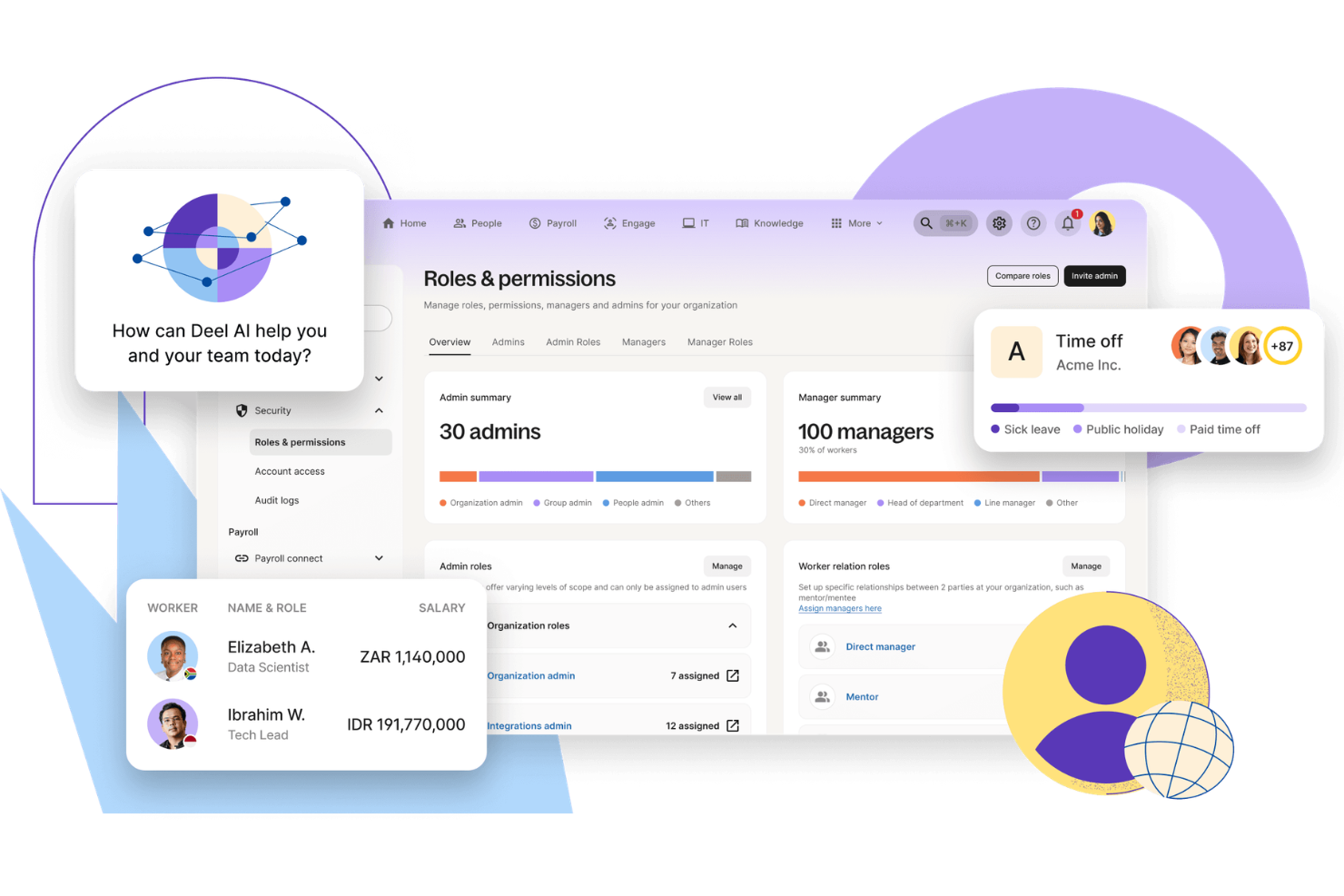
Deel is built for companies managing global teams that need a reliable way to hire, onboard, and pay employees and contractors across borders. It supports organizations with remote or international workforces by helping them navigate local labor laws, contracts, and payroll requirements. With built-in compliance tools and localized payment capabilities, Deel can reduce the administrative complexity of global employment.
Why I Picked Deel
I picked Deel for its ability to simplify global onboarding and payroll while keeping compliance front and center. If you are hiring across multiple countries, Deel allows you to bring on new team members in over 150 jurisdictions with locally compliant contracts and guided workflows. I also like that it supports multi-currency payroll and flexible payment methods, which can make managing international compensation more practical. For companies building distributed teams, these features help you stay compliant without adding unnecessary operational overhead.
Deel Key Features
In addition to its onboarding and payroll management capabilities, I also found several other features that enhance Deel's functionality:
- Built-in Compliance Tools: Deel provides automatic compliance checks to ensure all employment contracts adhere to local labor laws.
- Global Contractor Management: Manage your international contractors with ease, including contract generation and payment processing.
- Employer of Record Services: Deel acts as the legal employer, handling all HR responsibilities for your global team.
- Multi-Currency Support: Pay your employees in their local currency, reducing the complexities of international payroll.
Deel Integrations
Integrations include Stripe, QuickBooks, Xero, NetSuite, BambooHR, Greenhouse, Workable, Lever, Gusto, and Deel API for custom integrations.
Pros and Cons
Pros:
- Integrates with major HR systems
- Built-in compliance and contract management
- Global payroll across 150 countries
Cons:
- Limited directory customization options
- Reporting features lack advanced filtering
New Product Updates from Deel HR

Deel Expands Stablecoin Wallet to 80+ Countries
Deel expands its Stablecoin Wallet to 80+ countries with dollar-backed balances and optional rewards. This gives eligible contractors more ways to hold and manage earnings inside Deel. For more information, visit Deel’s official site.
 .
.
Thatch
Best for ICHRA health benefits self-service
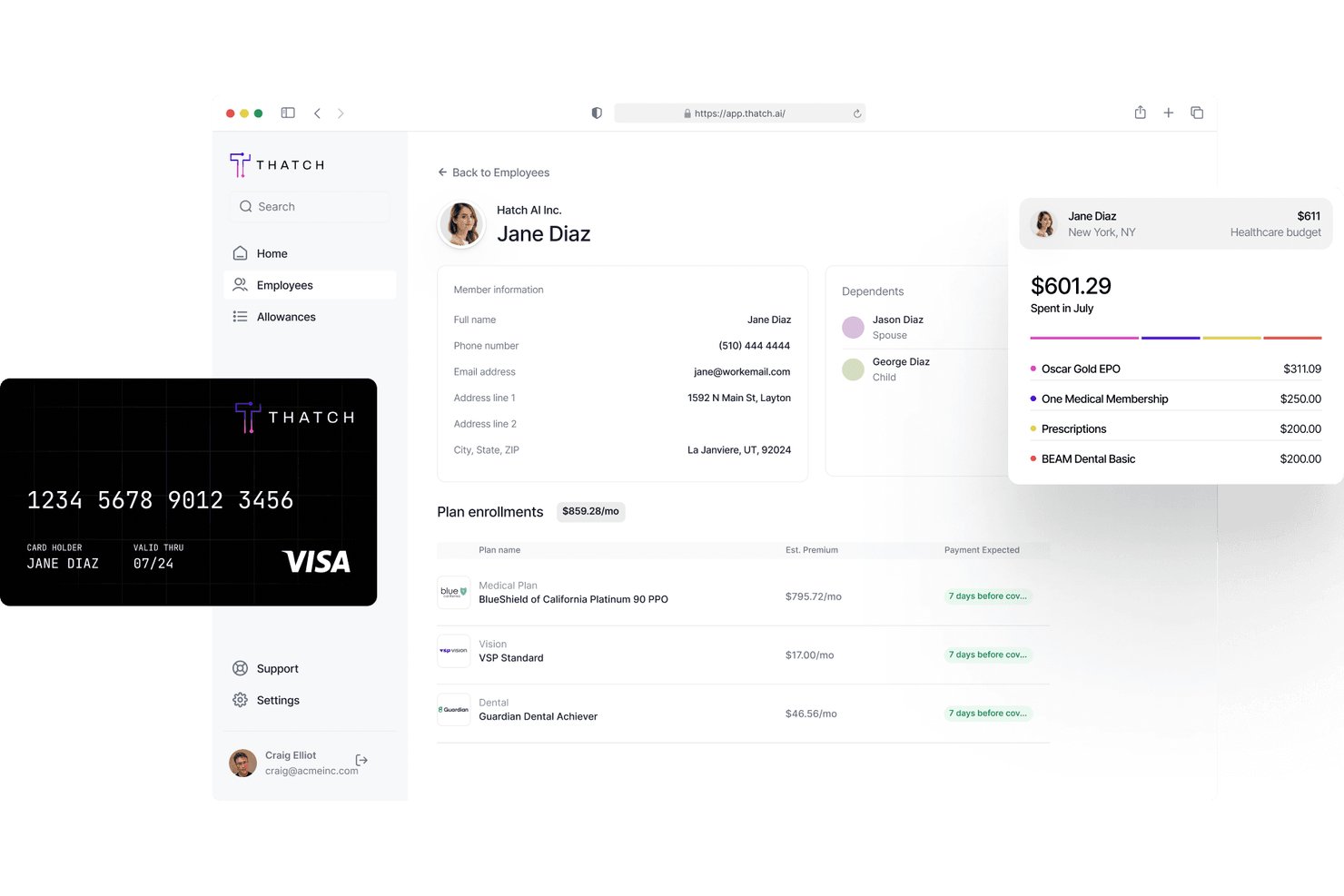
Thatch is an ICHRA administration platform that lets employees shop for and manage their own individual health insurance plans using employer-allocated allowances.
Who Is Thatch Best For?
Thatch is a strong fit for small to mid-sized employers who want to offer health benefits through an ICHRA model without managing individual plan enrollment on behalf of employees.
Why I Picked Thatch
Thatch earns its spot on my shortlist because it's purpose-built for ICHRA administration, which is a niche that most general ESS platforms don't handle well. I love how employees can browse and select their own individual health insurance plans directly through the platform, using their employer-set allowance without HR involvement. Thatch also handles reimbursement tracking automatically, so there's no manual reconciliation on the back end.
Thatch Key Features
- Allowance balance dashboard: Employees can view their remaining ICHRA allowance in real time, without contacting HR.
- Plan comparison tool: Employees can compare individual health insurance plans side by side based on premiums, deductibles, and coverage details.
- Eligibility verification: The platform automatically checks and confirms employee eligibility for ICHRA participation before enrollment begins.
- Reimbursement request submission: Employees can submit out-of-pocket expense claims directly through the platform for review and processing.
Thatch Integrations
Thatch offers native integrations with ADP RUN, QuickBooks Payroll, and Deel, and it's designed to work with all major payroll providers and insurance carriers out of the box. An API is also available for partners to embed ICHRA quoting, onboarding, and payroll deductions into their own platforms.
Pros and Cons
Pros:
- Real-time ICHRA allowance balance dashboard
- Reimbursement tracking is fully automated
- Employees can pick plans using allowance
Cons:
- Requires ICHRA-specific health benefits structure
- No free trial available to test

TimeTrex
Best for unified time and payroll accuracy

TimeTrex gives you a unified workforce management experience where your team can handle time tracking, scheduling, payroll, and HR tasks from one place, making it easier to manage daily operations without bouncing between systems. If you’re responsible for HR or payroll and want employees to take ownership of their information—from viewing pay stubs to submitting leave requests—TimeTrex lets them do that through a self-service portal that ties directly into core administrative functions.
Why I Picked TimeTrex
I picked TimeTrex because its native link between employee self-service and payroll ensures that hours tracked and verified by your team flow directly into pay calculations without manual exports or synchronization issues. You can let employees submit and review their own timesheets and access pay stubs or tax forms through the portal, which helps reduce follow-ups and administrative queries. The integration of scheduling and leave requests into the same system also means less work reconciling who’s working when before payroll runs.
TimeTrex Key Features
Aside from the self-service and payroll connection, TimeTrex offers:
- Biometric Time Clocks: Enhance security and accuracy in time tracking by using biometric data for employee clock-ins and clock-outs.
- Mobile Access: Your workforce can view schedules, track time, and request time off from iOS and Android devices.
- Expense Tracking: Keep track of business expenses with an integrated tracking system that simplifies reimbursement processes.
- Job Costing: Allocate time with clear views of costs to maximize efficiency.
TimeTrex Integrations
TimeTrex offers a custom API integration for connecting with other systems.
Pros and Cons
Pros:
- Includes detailed time tracking with GPS and mobile support.
- Centralized employee data simplifies HR tasks.
- Supports biometric clock-ins to reduce time fraud.
Cons:
- User interface may feel dated or cluttered.
- Limited native integrations may require custom API solutions.
New Product Updates from TimeTrex
TimeTrex Adds Quick Punch App With Offline and QR Support
TimeTrex adds a new Quick Punch app, offline punching, QR code scanning, punch images, configurable messages, and punch warnings or lockouts to improve employee clock-ins across browsers and local computers. For more information, visit TimeTrex’s official site.
 .
.
HR Cloud
Best for team collaboration

HR Cloud is a human resources software designed for businesses seeking to improve team collaboration and employee engagement. It serves HR teams by offering features like onboarding, employee recognition, and internal communication tools.
Why I picked HR Cloud: HR Cloud excels in facilitating team collaboration through its social intranet feature, Workmates, which enhances communication and engagement. This tool includes employee recognition features that boost morale and encourage a positive work environment. The onboarding module helps new hires integrate quickly, while customizable workflows allow HR teams to adapt processes to their organization. These capabilities make HR Cloud especially useful for teams that rely on ongoing communication and cultural engagement.
Standout Features & Integrations:
Features include an employee directory that makes it easy to find and connect with colleagues. HR Cloud also includes recognition programs, task assignments for onboarding, and communication feeds to support daily team interaction. Additionally, HR Cloud provides a mobile app, ensuring access to HR tools on the go.
Integrations include G Suite, Microsoft Office 365, Slack, Zoom, ADP, QuickBooks, BambooHR, Salesforce, Okta, and Xero.
Pros and Cons
Pros:
- Mobile app availability
- Customizable workflows
- Offers employee recognition tools
Cons:
- The onboarding process is somewhat disorganized and time-consuming
- Timesheets and Recognition require an add-on


BambooHR is an HR management software designed primarily for small to medium-sized businesses, focusing on simplifying HR tasks and improving employee experience. It offers functionalities like employee data management, time tracking, and performance evaluations.
Why I picked BambooHR: BambooHR is tailored for small businesses, providing an intuitive interface that makes HR tasks manageable without needing extensive technical knowledge. It features customizable workflows that let you tailor processes to fit your team's needs, enhancing efficiency. The software's performance management tools facilitate employee growth by tracking goals and feedback. Reporting dashboards provide visibility into workforce trends, allowing small teams to make informed decisions without complex setup.
Standout Features & Integrations:
Features include customizable employee self-service portals, which empower your team to manage their information. The applicant tracking system simplifies recruitment processes, allowing you to quickly identify top talent. BambooHR also includes onboarding tools, document storage, and optional payroll capabilities (U.S. only).
Integrations include QuickBooks, Xero, Slack, G Suite, Microsoft Office 365, Okta, Zapier, Expensify, Greenhouse, and Indeed.
Pros and Cons
Pros:
- E-signature functionality
- Insightful reporting features
- Strong performance management tools
Cons:
- Limited scalability for large enterprises
- Payroll tools are limited without upgrades


Moveworks is an AI-driven HR helpdesk solution tailored for businesses aiming to enhance employee engagement and operational efficiency. It serves HR teams by automating routine tasks and providing multilingual support to simplify processes.
Why I picked Moveworks: Moveworks excels in providing AI-driven assistance, which automates HR processes and supports employees in over 100 languages. Its AI Assistant facilitates quick onboarding and self-service tasks like PTO requests, making it a valuable tool for global teams. Moveworks also provides workflow automation for HR and IT, helping teams standardize processes while maintaining security and compliance controls.
Standout Features & Integrations:
Features include employee engagement tools for booking time off and joining Employee Resource Groups, compliance automation for routine HR tasks, and enterprise security to protect sensitive data. The platform also supports knowledge retrieval and automated ticket resolution across HR and IT systems. The platform also supports knowledge retrieval and automated ticket resolution across HR and IT systems.
Integrations include Microsoft Teams, Slack, ServiceNow, Workday, Microsoft Office 365, Okta, Salesforce, Zoom, Google Workspace, and SAP.
Pros and Cons
Pros:
- Strong compliance features
- Automates routine HR processes
- Multilingual support available
Cons:
- Dependence on integration platforms
- Requires system configuration before deployment


Zoho People is a cloud-based HR platform built for small and mid-sized organisations, helping HR teams manage employee data, time-off, and attendance tracking in one place. It serves HR professionals by providing essential tools for onboarding, leave management, and basic performance tracking.
Why I picked Zoho People: You can set up employee profiles, run automatic leave approvals, and track time and attendance with minimal training. It offers mobile apps so your team can access records and submit requests on the go. Custom workflows allow teams to automate routine processes, while Zia, Zoho’s AI assistant, supports employees with quick answers and simple task handling.
Standout Features & Integrations:
Features include employee self-service portals where your staff update their own details and request time off, attendance recording using web or mobile check-in, and basic performance review templates you can tailor. The platform also provides onboarding tasks, document management, and built-in shift scheduling.
Integrations include Zoho CRM, Zoho Books, QuickBooks, Slack, Zapier, G Suite, Microsoft Office 365, Adobe Sign, Docusign, and Mailchimp.
Pros and Cons
Pros:
- Strong performance evaluation tools
- Centralized employee database
- Extensive integration options
Cons:
- Setup requires a complex data import process
- Extra features require add-ons


AAB Payroll’s employee self service offering is part of a broader payroll and workforce platform that allows employees to access and manage work-related data on their own devices including viewing pay details and checking schedules from a phone or computer which helps reduce routine questions for the team
Why I picked AAB Payroll: AAB Payroll provides a self service tool that sits within its payroll and attendance system, so teams handle pay and time tasks in one place. Employees can view pay stubs, access W-2s, check schedules, and update personal records without switching tools, which cuts down routine requests. The same portal supports punch in and punch out and time off tracking, keeping daily tasks in one workflow. Mobile access allows employees to use it on their own devices wherever they work.
Standout Features & Integrations:
Features include detailed payroll reports that provide insights into your financial operations. The software offers customizable payslip templates, allowing you to tailor them to your company's branding. AAB Payroll also provides support for multiple pay schedules, catering to diverse workforce needs.
Integrations include Xero, QuickBooks, Sage, Microsoft Dynamics, Oracle, SAP, NetSuite, Workday, BambooHR, and Salesforce.
Pros and Cons
Pros:
- Real-time payroll updates
- Automated tax calculations
- Strong UK compliance focus
Cons:
- Limited flexibility for specific or atypical business payroll functions
- Reduced manual control over sensitive data and precise timing of payroll runs


Tixio HR is a human resource management platform designed for modern teams, focusing on automating HR tasks and enhancing workflow customization. It serves HR professionals by providing tools for employee data management, attendance tracking, and contract management.
Why I picked Tixio HR: Tixio HR offers extensive workflow customization, allowing your team to tailor processes to fit specific needs. The Employee Self Service (ESS) portal empowers employees to manage their own information, significantly reducing administrative burdens. Features like attendance tracking and leave management are designed to manage operations efficiently. Tixio’s incorporation of AI-driven automation further improves process efficiency and adaptability.
Standout Features & Integrations:
Features include tools for visual collaboration and project management, which help your team stay organized and productive. Tixio HR also offers a knowledge base feature, allowing for easy documentation and information sharing. The platform also includes contract storage and customizable approval flows to streamline HR tasks.
Integrations include other Tixio products, AI automation, and additional resources for various teams and industries.
Pros and Cons
Pros:
- Supports global compliance
- Visual collaboration tools
- AI-driven workflow automation
Cons:
- Limited advanced HR features
- API access limited to Enterprise-tier
Annen programvare for ansattes selvbetjening
Her er noen flere alternativer for programvare for ansattes selvbetjening som ikke kom med på kortlisten min, men som likevel er verdt å undersøke:
- Gusto
For small businesses
- HiBob
For growing companies
- ADP Workforce Now
For payroll expertise
- Rippling
For IT and HR automation
- TriNet HR Plus
For benefits management
- Paylocity
For mid-sized companies
- SysAid
For IT service management
- Workday
For enterprise solutions
- BerniePortal
For benefits enrollment
- factoHR
For Indian payroll compliance
- GoCo
For document management
- Workvivo
For employee communication
- ManageEngine ServiceDesk Plus
For IT helpdesk features
- Rise
For Canadian businesses
- Workforce.com
For shift scheduling
- Day Off
For leave management
- Cezanne HR
For mid-sized European businesses
- Criterion HCM
For customizable HR solutions
- APS
For payroll and tax compliance
- SP Employee Hub
For SharePoint integration


How I Evaluate Employee Self-Service Software
I evaluate tools across two layers: the core self-service capabilities every platform must cover—PTO, pay docs, benefits enrollment—and the differentiators that set the best options apart.
Core Functionality (Table Stakes For This List)
When I'm selecting tools for my list, I rank each one on a scale from 0 (does not offer the functionality) to 5 (excels in this area) for each core functionality listed below. Then, I calculate the tool's total score into a percentage. Each tool needs to achieve a minimum total score of 75% to be considered for inclusion.
- Personal Data Management: I check whether employees can update their own address, banking details, emergency contacts, and tax withholdings—or if those changes still require an HR admin to step in.
- Pay & Tax Document Access: Employees expect to pull up a pay stub or download a tax form on their own schedule, so I look for platforms with searchable pay history and secure document downloads.
- Time-Off & PTO Self-Service: I evaluate how well each tool handles the full leave request cycle—submitting, tracking, viewing balances, and syncing approvals—without forcing managers into email threads.
- Benefits Self-Enrollment: Open enrollment is the real stress test, so I look at whether employees can compare plans, add dependents, and handle qualifying life events directly in the platform.
- Document & Policy Repository: A solid tool gives employees one place to find the handbook, sign off on updated policies, and access onboarding forms—with tracking so HR knows who's acknowledged what.
- Mobile Self-Service Access: I evaluate whether the mobile experience covers real tasks like approving a PTO request or updating direct deposit, not just a stripped-down view of the desktop version.
Once I have a list of tools that meet this criteria, I consider what sets each platform apart.
Differentiating Factors (What Sets Vendors Apart)
Here's how I compare and contrast different vendors:
Standout Features
Manager self-service is a major differentiator. I look for platforms where managers can approve leave requests, view team headcount, and pull reports from their own dashboard without looping in HR. An AI HR assistant also matters when it can answer routine questions like "how much PTO do I have left?" and point employees to the right policy without generating a ticket. I pay close attention to personalized notifications, too—automated reminders for open enrollment deadlines or unsigned documents directly drive adoption and keep compliance tasks on track.
Beyond Features
Integration depth matters a lot here—I check whether a platform connects natively to your existing payroll provider and benefits carriers, or if you'll need middleware to keep data in sync. Security is another area I evaluate closely, especially role-based access controls that limit who can view sensitive fields like salary or banking details. I also consider how well a tool fits your company size, since a platform built for enterprise-scale organizations can overwhelm a 50-person team with unnecessary complexity and cost.
Slik velger du programvare for ansattes selvbetjening
Det er lett å gå seg vill i lange funksjonslister og kompliserte prismodeller. For å hjelpe deg med å holde fokus mens du går gjennom den unike prosessen med å velge programvare, har jeg laget en sjekkliste over faktorer du bør ha i tankene:
| Faktor | Hva du bør vurdere |
|---|---|
| Skalerbarhet | Kan programvaren vokse med virksomheten din? Vurder om den kan håndtere et økt antall brukere eller flere funksjoner etter hvert som teamet ditt vokser. |
| Integrasjoner | Kontroller om programvaren integreres med de eksisterende systemene dine, for eksempel lønns- eller HR-verktøy. Kompatibilitet med verktøyene du allerede bruker, kan spare tid og redusere feil. |
| Tilpasningsmuligheter | Kan du tilpasse programvaren slik at den passer til de spesifikke arbeidsflytene dine? Se etter alternativer som lar deg justere innstillingene slik at de samsvarer med prosessene og preferansene dine. |
| Brukervennlighet | Hvor intuitiv er programvaren for teamet ditt? Evaluer brukergrensesnittet, og vurder hvor raskt teamet ditt kan lære å navigere i systemet uten omfattende opplæring. |
| Kostnad | Forstå de totale kostnadene, inkludert oppstartsgebyrer, månedlige priser og eventuelle ekstrakostnader for flere funksjoner eller brukerstøtte. Sørg for at det passer innenfor budsjettbegrensningene dine. |
| Sikkerhetstiltak | Kontroller at programvaren oppfyller bransjens sikkerhetsstandarder. Se etter datakryptering og tilgangskontroller for å beskytte sensitive opplysninger om ansatte. |
| Overholdelseskrav | Støtter programvaren overholdelse av lokale forskrifter og bransjestandarder? Sørg for at den hjelper deg med å oppfylle juridiske forpliktelser og reduserer risikoen for manglende etterlevelse. |
Hva er programvare for selvbetjening for ansatte?
Programvare for selvbetjening for ansatte er et verktøy som lar ansatte håndtere egne HR-relaterte oppgaver, for eksempel å oppdatere personopplysninger og få tilgang til lønnsinformasjon. HR-fagfolk og ledere bruker vanligvis disse verktøyene for å redusere administrative byrder og forbedre datanøyaktigheten.
Funksjoner som tidsregistrering, administrasjon av personalgoder og tilgang til dokumenter bidrar til effektivitet, nøyaktighet og økt selvstendighet for ansatte. Samlet sett forbedrer disse verktøyene produktiviteten og medarbeidertilfredsheten ved å forenkle HR-prosessene.
Funksjoner
Når du velger programvare for selvbetjening for ansatte, bør du se etter følgende viktige funksjoner:
- Administrasjon av personalopplysninger: Lar ansatte oppdatere personopplysningene sine, slik at registrene er korrekte og oppdaterte.
- Lønnsbehandling: Automatiserer lønnsberegninger og skatteinnrapportering, noe som reduserer feil og sparer tid.
- Tidsregistrering: Overvåker arbeidstimer og oppmøte, noe som bidrar til nøyaktig lønnsbehandling og bemanningsstyring.
- Administrasjon av personalgoder: Forenkler administrasjon og påmelding til personalgoder, noe som forbedrer tilfredshet og overholdelse av krav.
- Dokumenttilgang: Gir et sentralisert sted der ansatte kan få tilgang til viktige dokumenter, for eksempel lønnsslipper og skatteskjemaer.
- Tilpassbare arbeidsflyter: Gjør det mulig å tilpasse HR-prosesser til virksomhetens spesifikke behov, noe som øker effektiviteten.
- Mobiltilgang: Gjør det mulig for ansatte å håndtere HR-oppgaver fra mobile enheter, noe som gir bekvemmelighet og fleksibilitet.
- Overvåking av overholdelse: Bidrar til å sikre at lover, forskrifter og standarder følges, og minimerer risikoen for manglende etterlevelse.
- Selvbetjeningsportaler: Gir ansatte mulighet til å håndtere HR-relaterte oppgaver selvstendig, noe som reduserer den administrative arbeidsmengden.
Fordeler
Implementering av programvare for selvbetjening for ansatte gir flere fordeler for teamet og virksomheten din. Her er noen av fordelene du kan se frem til:
- Redusert administrativ arbeidsmengde: Når ansatte kan håndtere sine egne HR-oppgaver, kan teamet ditt fokusere på mer strategiske aktiviteter.
- Bedre datanøyaktighet: Når ansatte oppdaterer sine egne opplysninger, sikrer det at registrene er oppdaterte og reduserer feil.
- Økt medarbeidertilfredshet: Enkel tilgang til lønns- og personalgodeinformasjon gir ansatte større kontroll og styrker arbeidsmoralen.
- Økt effektivitet: Automatiserte prosesser som lønnsbehandling og tidsregistrering sparer tid og reduserer manuelt arbeid.
- Bedre overholdelse: Funksjoner som overvåker lover og forskrifter, hjelper virksomheten med å følge bransjestandardene.
- Større fleksibilitet: Mobiltilgang gjør det mulig for ansatte å håndtere HR-oppgavene sine når som helst og hvor som helst.
- Kostnadsbesparelser: Effektiviserte HR-operasjoner kan føre til lavere faste kostnader og driftskostnader.
Kostnader og priser
Valg av programvare for selvbetjening for ansatte krever en forståelse av de ulike prismodellene og planene som er tilgjengelige. Kostnadene varierer basert på funksjoner, teamstørrelse, tillegg og mer. Tabellen nedenfor oppsummerer vanlige planer, gjennomsnittsprisene deres og typiske funksjoner som er inkludert i programvareløsninger for selvbetjening for ansatte:
Sammenligningstabell for planer for programvare for selvbetjening for ansatte
| Plantype | Gjennomsnittspris | Vanlige funksjoner |
|---|---|---|
| Gratisplan | $0 | Grunnleggende administrasjon av medarbeiderdata, begrenset selvbetjeningstilgang og enkel rapportering. |
| Personlig plan | $1-$6/bruker/måned | Selvbetjeningsportaler for medarbeidere, grunnleggende lønnsbehandling og tidsregistrering. |
| Forretningsplan | $3-$12/bruker/måned | Avansert administrasjon av personalgoder, overvåking av samsvar og mobiltilgang. |
| Storbedriftsplan | $4.50-$22/bruker/måned | Tilpassbare arbeidsflyter, grundig analyse, dedikert kundestøtte og integrasjon med andre verktøy. |
Vanlige spørsmål om selvbetjeningsprogramvare for medarbeidere
Her er noen svar på vanlige spørsmål om selvbetjeningsprogramvare for medarbeidere:
Hvor godt fungerer systemet når medarbeiderne har ulik teknologisk erfaring?
De fleste verktøy er utformet med enkel navigering, slik at selv medarbeidere som ikke er teknisk kyndige, kan bruke dem. En kort gjennomgang er vanligvis nok til at alle blir fortrolige med systemet.
Kan selvbetjeningsprogramvare for medarbeidere integreres med eksisterende systemer?
Ja, de fleste selvbetjeningsprogrammer for medarbeidere kan integreres med eksisterende systemer som lønns-, HR- og regnskapsverktøy. Integrasjoner bidrar til å forenkle dataflyten mellom systemene, noe som reduserer manuell registrering og feil. Når du velger programvare, bør du kontrollere at den er kompatibel med systemene teamet allerede bruker, slik at overgangen blir smidig og funksjonaliteten forbedres.
Hvor sikker er selvbetjeningsprogramvare for medarbeidere?
Sikkerheten varierer fra leverandør til leverandør, men de fleste selvbetjeningsprogrammer for medarbeidere har funksjoner som datakryptering, tilgangskontroller og regelmessige sikkerhetsoppdateringer. Når du vurderer alternativer, bør du se etter programvare som overholder bransjens sikkerhetsstandarder og tilbyr funksjoner som beskytter sensitive medarbeiderdata. Sørg for at leverandøren har et godt omdømme når det gjelder å ivareta personvern og datasikkerhet.
Passer selvbetjeningsprogramvare for medarbeidere for små bedrifter?
Ja, selvbetjeningsprogramvare for medarbeidere kan være svært nyttig for små bedrifter. Den bidrar til å automatisere rutinemessige HR-oppgaver, slik at små team kan fokusere på vekst og strategiske initiativer. Se etter programvare med skalerbare prisplaner og funksjoner som samsvarer med bedriftens størrelse og behov. Mange leverandører tilbyr pakker som er tilpasset små bedrifter, noe som gjør løsningen rimelig og tilgjengelig.