

10 beste regnskapsprogrammer med lønnsfunksjoner i 2026

Beste regnskapsprogramvare med lønnsfunksjoner – kortliste


Regnskapsprogramvare med lønnsfunksjoner kombinerer sentrale verktøy for økonomistyring med integrert behandling av ansattutbetalinger. Dermed kan du administrere regnskapet, kjøre lønn og registrere lønnskostnader og -forpliktelser i ett system. Hvis du ser etter måter å holde tallene korrekte, spare tid og overholde regelverket på, er det viktig å finne den riktige løsningen.
I denne veiledningen sammenligner jeg regnskapsprogramvare med lønnsfunksjoner for virksomheter fra små team til komplekse selskaper. Du får se hvilke alternativer som fungerer best for integrert lønn og regnskap, automatisering fra lønn til hovedbok, skattehåndtering og ulike virksomhetsstørrelser.
Why Trust Our Software Recommendations
Our team has been testing and reviewing software since 2012. As HR experts ourselves, we know how difficult—and important—it is to choose the right software.
For this guide, we evaluated tools using hands-on testing and independent research, scoring tools using our selection criteria. We also draw on insights from industry thought leaders and practicing HR experts.
Our reviews reflect our human editorial judgment, not a sales pitch.
Expert reviewers:
Sammenligningstabell for regnskapsprogramvare med lønnsfunksjoner
| Tool | Best For | Trial Info | Price | ||
|---|---|---|---|---|---|
| 1 | Best for project-based payroll cost tracking | Free demo available | Pricing upon request | Website | |
| 2 | Best for enterprise finance and global payroll | Free demo available | Pricing upon request | Website | |
| 3 | Best for open-source accounting and payroll | Free trial available | Pricing upon request | Website | |
| 4 | Best for modular accounting and payroll apps | Free plan available | From $8.95/user/month (billed annually) | Website | |
| 5 | Best for payroll postings to enterprise ledgers | Free demo available | Pricing upon request | Website | |
| 6 | Best for payroll data in real-time financials | Free demo available | Pricing upon request | Website | |
| 7 | Best for automatic payroll journal entries | 30-day free trial | From $40/month | Website | |
| 8 | Best for accounting and payroll under one login | 30-day free trial | From $17/month | Website | |
| 9 | Best for desktop accounting with payroll | 30-day free trial | From $124.42/month | Website | |
| 10 | Best for desktop payroll with tax tables | 30-day free trial | From $40/month with payroll | Website |
Anmeldelser av regnskapsprogramvare med lønnsfunksjoner
Nedenfor finner du mine detaljerte sammendrag av den beste regnskapsprogramvaren med lønnsfunksjoner som kom med på kortlisten min. Anmeldelsene mine gir en detaljert oversikt over funksjonene, prisene og de beste bruksområdene for hver programvare, slik at du kan finne det beste alternativet for deg.
Best for project-based payroll cost tracking
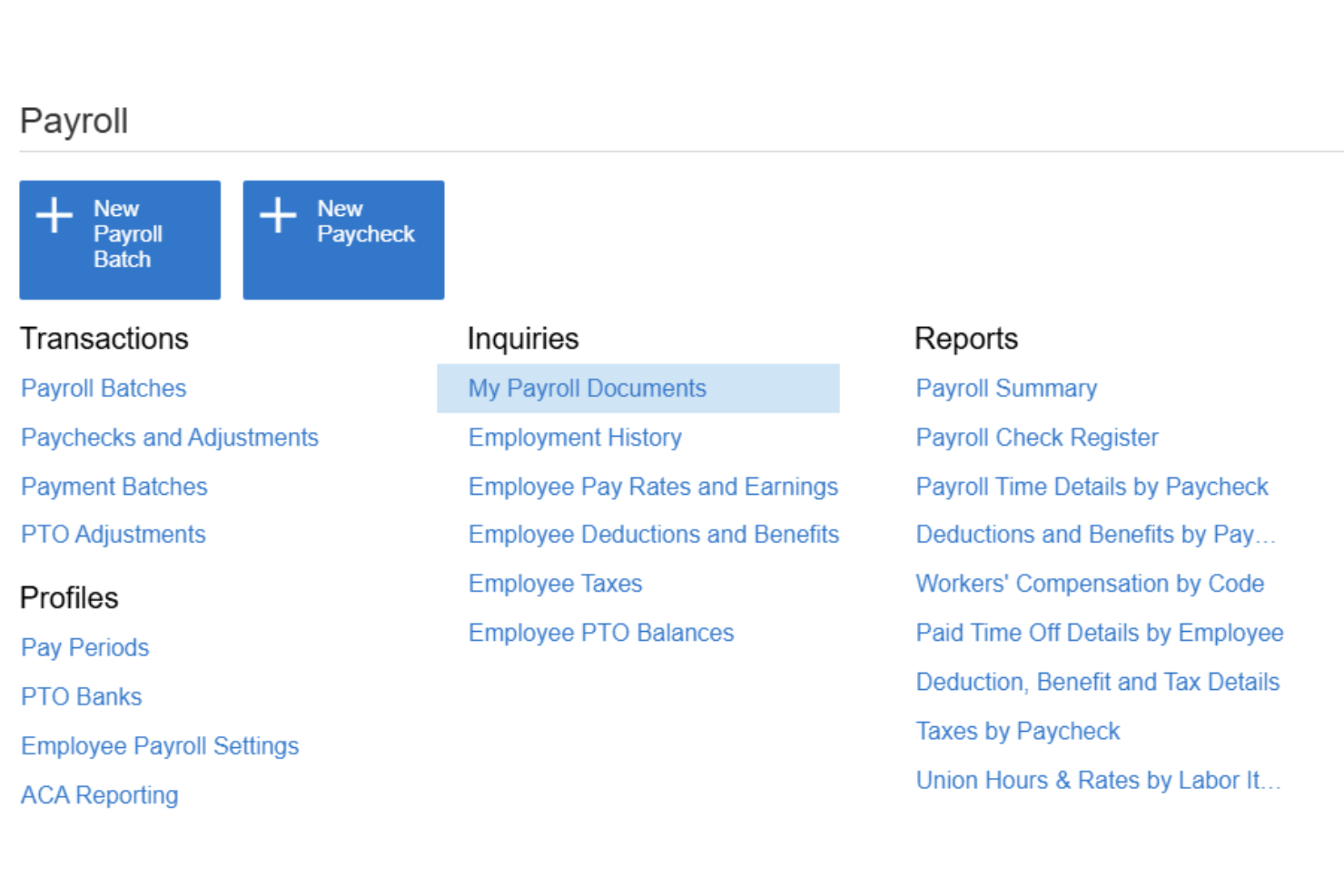
Acumatica is a cloud ERP platform for mid-market businesses that integrates full-cycle payroll processing, general ledger accounting, project cost tracking, and time management in a single system.
Who Is Acumatica Best For?
Acumatica is a strong fit for mid-market construction, manufacturing, and professional services companies that need payroll costs tied directly to projects and job codes.
Why I Picked Acumatica
I picked Acumatica as one of the best because no other accounting platform I've used lets you slice payroll costs by project, task, cost code, union, and shift simultaneously. When my team runs payroll, those costs post automatically to the GL with mapping that mirrors how the project is structured, not just a generic wage account. I also rely on the certified payroll reporting, which is a must-have for construction jobs with prevailing wage requirements.
Acumatica Key Features
- Employee self-service portal: Employees can access pay stubs, tax forms, direct deposit details, and PTO requests online or from a mobile device.
- Payroll tax and compliance: Supports current federal, FICA, state, and local tax information, electronic payroll filings, compliance dashboards, and payroll audit trails.
- Multi-entity accounting: Manage payroll and accounting across multiple companies or locations from one central platform.
- Native time entry integration: Time data imports directly into payroll runs with approval workflows and missing-time reminders.
Acumatica Integrations
Acumatica offers native integrations with Microsoft 365, DocuSign, Avalara, ADP, and Tableau. An API is available for custom integrations.
Pros and Cons
Pros:
- Certified payroll reporting for prevailing wage jobs
- Supports payroll across multiple entities simultaneously
- Project-level payroll cost allocation built in
Cons:
- No self-serve implementation without a partner
- Complex configuration for smaller payroll teams

Workday
Best for enterprise finance and global payroll
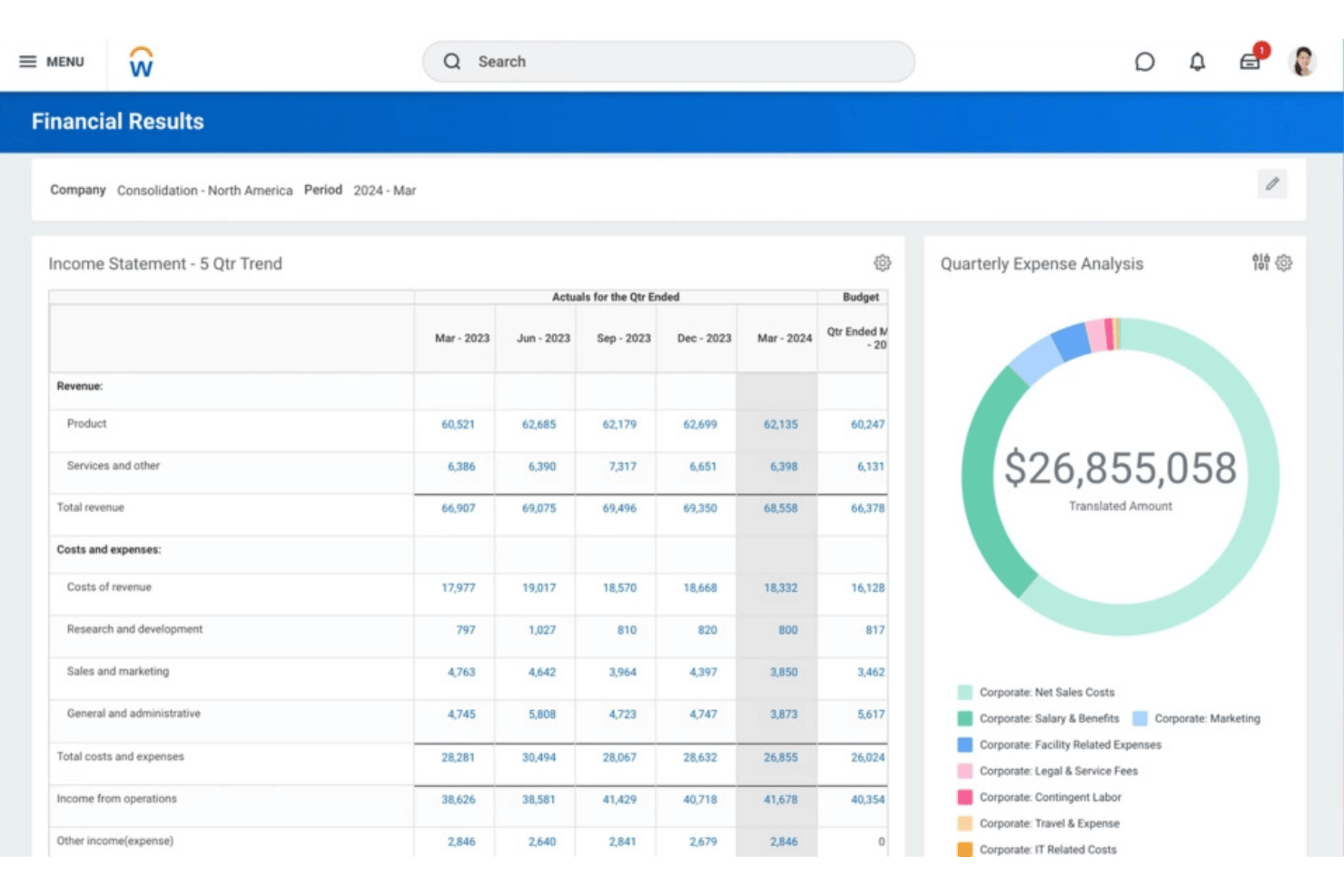
Workday is an enterprise-grade platform that unifies payroll processing, financial management, and HCM in a single system, with a native general ledger, continuous payroll calculation, and global payroll capabilities supported by Workday and its partner ecosystem.
Who Is Workday Best For?
Workday is built for large and enterprise organizations that need to manage complex, multi-entity finance and payroll operations across multiple countries from one platform.
Why I Picked Workday
I picked Workday because it connects enterprise payroll directly with financial management. Payroll results can generate accounting entries and feed labor costs into the general ledger, while Workday Financial Management handles core accounting functions such as the general ledger, accounts payable and receivable, fixed assets, and consolidation.
Workday Key Features
- Payroll accounting: Workday automatically generates accounting entries based on payroll results and supports labor-cost allocation.
- General ledger integration: Payroll results can flow into Workday Financial Management using account posting rules, fiscal schedules, ledger types, and other accounting configurations.
- Continuous payroll: Workday supports continuous payroll processing rather than treating payroll solely as a discrete end-of-period process.
- Global payroll: Native/direct payroll coverage is supplemented by Workday's global partner ecosystem and bidirectional integrations.
- Employee self-service: Employees can access payroll information through Workday's mobile-first experience; Workday documentation specifically supports employee access to payslips on mobile.
- Time-to-payroll: Approved time can feed payroll calculations by associating time calculation tags with earnings or deductions.
Workday Integrations
Workday offers native integrations with ADP, Kronos, Salesforce, Microsoft 365, SAP, ServiceNow, and Oracle, and provides an API for custom integrations.
Pros and Cons
Pros:
- Employee self-service reduces HR admin workload
- Native payroll coverage across 180+ countries
- Payroll and finance live in one system
Cons:
- Requires significant IT involvement during setup
- Overkill for businesses under 500 employees

ERPNext
Best for open-source accounting and payroll
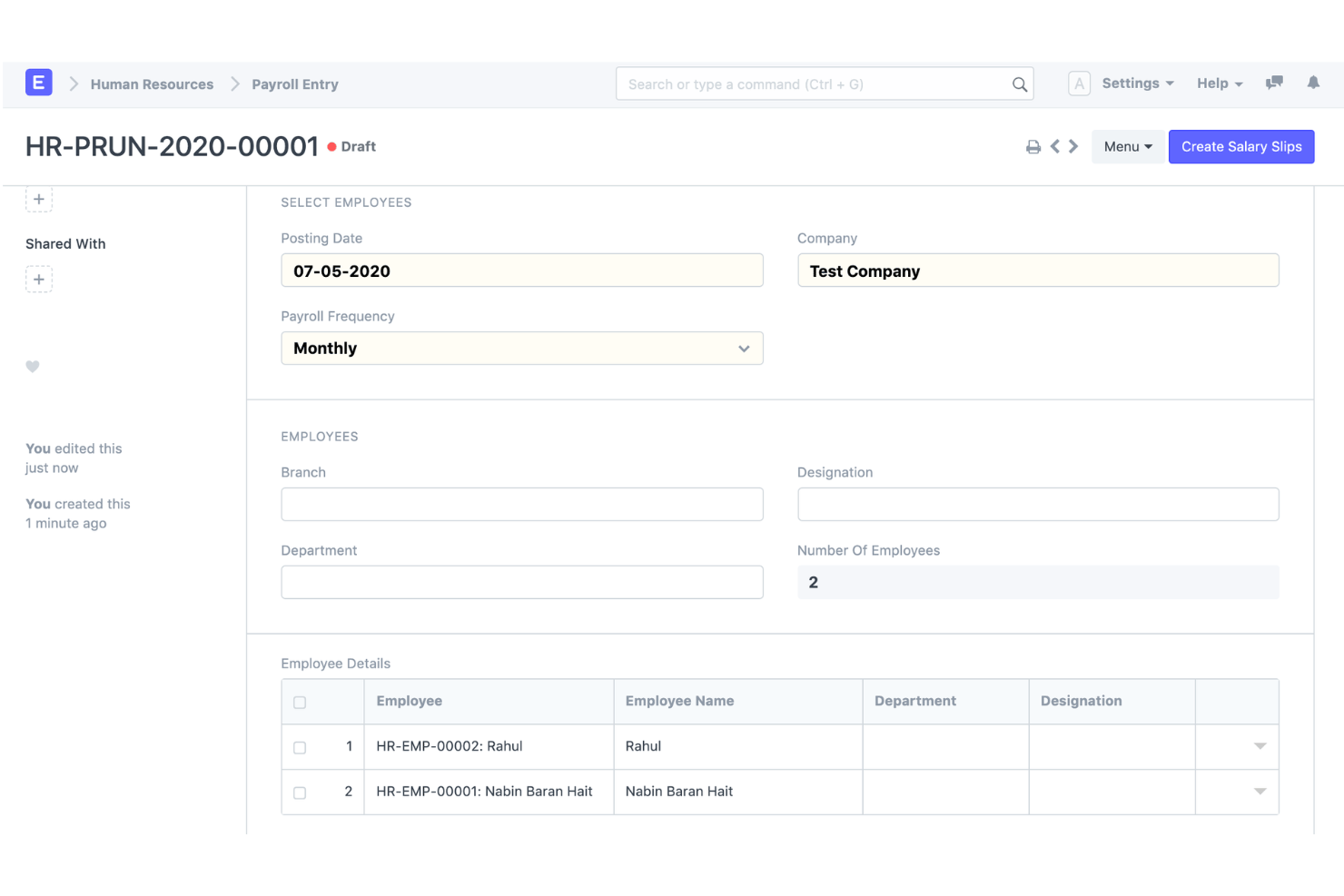
ERPNext is an open-source ERP platform that combines double-entry accounting, native payroll processing, HR management, and inventory tracking in a single self-hosted or cloud-deployed system.
Who Is ERPNext Best For?
ERPNext suits technically resourceful SMBs and growing mid-market companies that need a full-featured ERP without per-user licensing costs.
Why I Picked ERPNext
ERPNext earns its spot on my shortlist because the payroll module posts directly to the general ledger using the same chart of accounts and cost centers you configure for the rest of your books. I like that because you're working from a single codebase, there's no middleware syncing payroll data to a separate accounting system. The open-source license also means I can modify salary components or GL account mappings to match a specific structure, without waiting on a vendor roadmap.
ERPNext Key Features
- Integrated payroll: Salary structures, earnings and deductions, payroll periods, salary slips, and bulk payroll processing.
- Payroll accounting: Payroll expenses/payments can be connected to the accounting system rather than maintained in a completely separate payroll product.
- General ledger: ERPNext provides a full double-entry GL and automatically generates ledger entries from submitted accounting transactions.
- Cost centers and projects: Payroll can be associated with projects, while ERPNext accounting supports cost centers, projects and other accounting dimensions.
- Multi-company/multi-currency accounting: ERPNext supports multiple companies, subsidiaries, branches and currencies with consolidated reporting.
- Customization: ERPNext is open source and built on the Frappe framework, with low-code/no-code customization capabilities.
ERPNext Integrations
ERPNext offers native integrations with PayPal, Razorpay, Amazon S3, Slack, Dropbox, Shopify, and WooCommerce. An API is available for custom integrations.
Pros and Cons
Pros:
- Strong payroll-to-accounting connection
- Open-source accounting and payroll
- Broad ERP functionality beyond finance
Cons:
- Payroll compliance/localization varies by country
- More setup and configuration than turnkey SMB accounting/payroll products

Odoo
Best for modular accounting and payroll apps
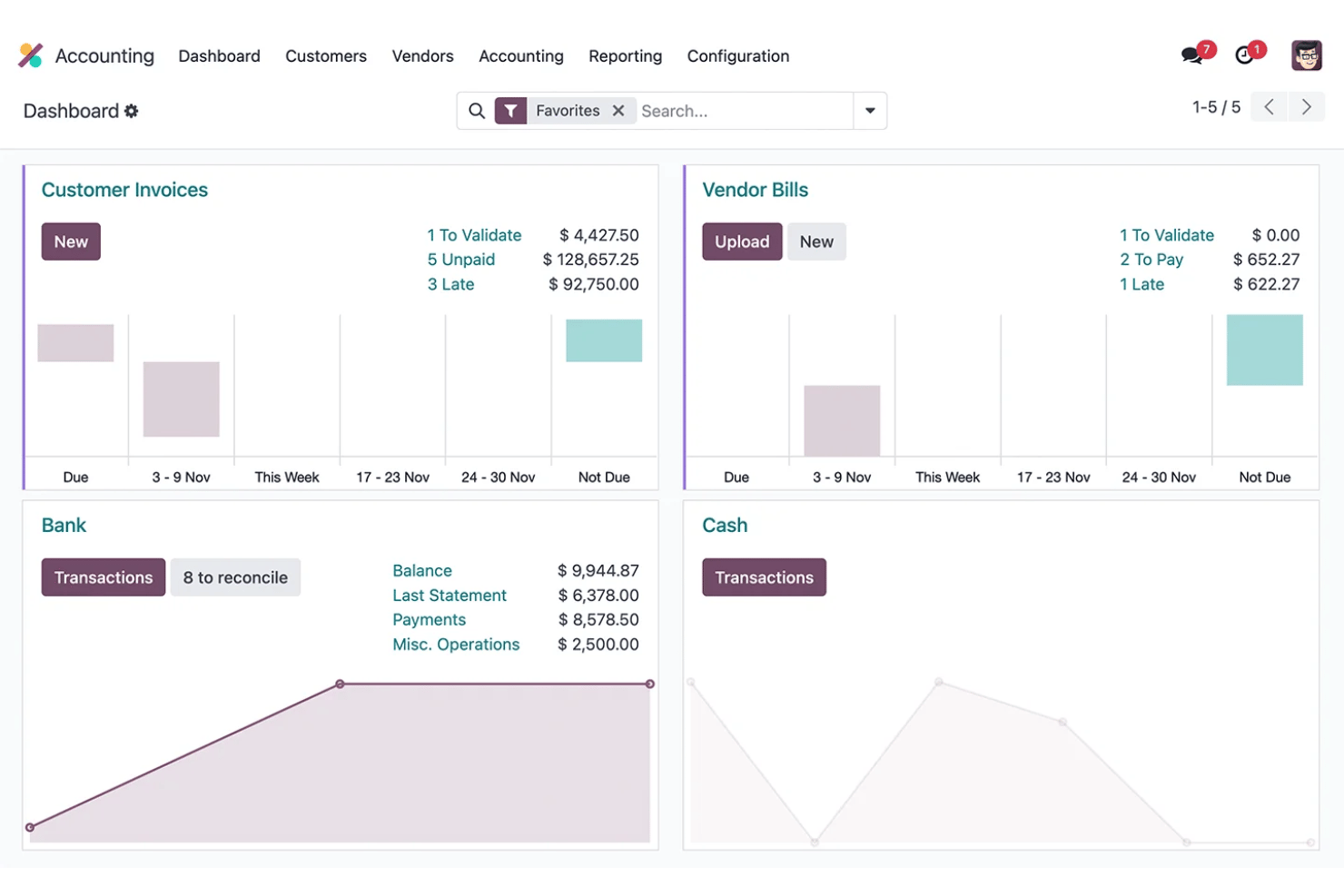
Odoo is an open-source ERP platform that combines modular accounting, payroll, HR, and expense management in a single shared database.
Who Is Odoo Best For?
Odoo is a strong fit for growing SMBs with 6–250 employees that want to consolidate accounting, payroll, and HR into one platform without managing multiple disconnected tools.
Why I Picked Odoo
I picked Odoo because businesses can combine its full accounting application with payroll and other business apps in one modular platform. When Accounting and Payroll are used together, payroll salary rules can be mapped to debit and credit accounts, helping connect employee pay with the general ledger without relying on a completely separate accounting system.
Odoo Key Features
- Accounting: Full double-entry accounting with AP/AR, reconciliation, financial reporting, assets and budgets.
- Payroll accounting: Salary rules can be mapped to debit and credit accounts, connecting payroll calculations with accounting journals.
- Pay runs: Businesses can generate and process multiple payslips together, including grouping payroll by salary structure, department or job position.
- Time-to-payroll: Payroll uses employee work entries to calculate worked time before applying salary structures and rules.
- Payroll localization: Country-specific payroll configurations account for local taxes, fees, allowances and regulatory requirements where supported.
- Multi-company accounting: Odoo supports multiple companies, with different fiscal localizations where appropriate.
Odoo Integrations
Odoo offers native integrations with Stripe, Plaid, PayPal, Authorize.Net, and Shopify, with an API available for custom integrations.
Pros and Cons
Pros:
- Open-source codebase allows deep customization
- Payroll posts automatically to the general ledger
- Modular apps scale with your business needs
Cons:
- Initial setup demands significant technical configuration
- Payroll tax filing requires third-party support
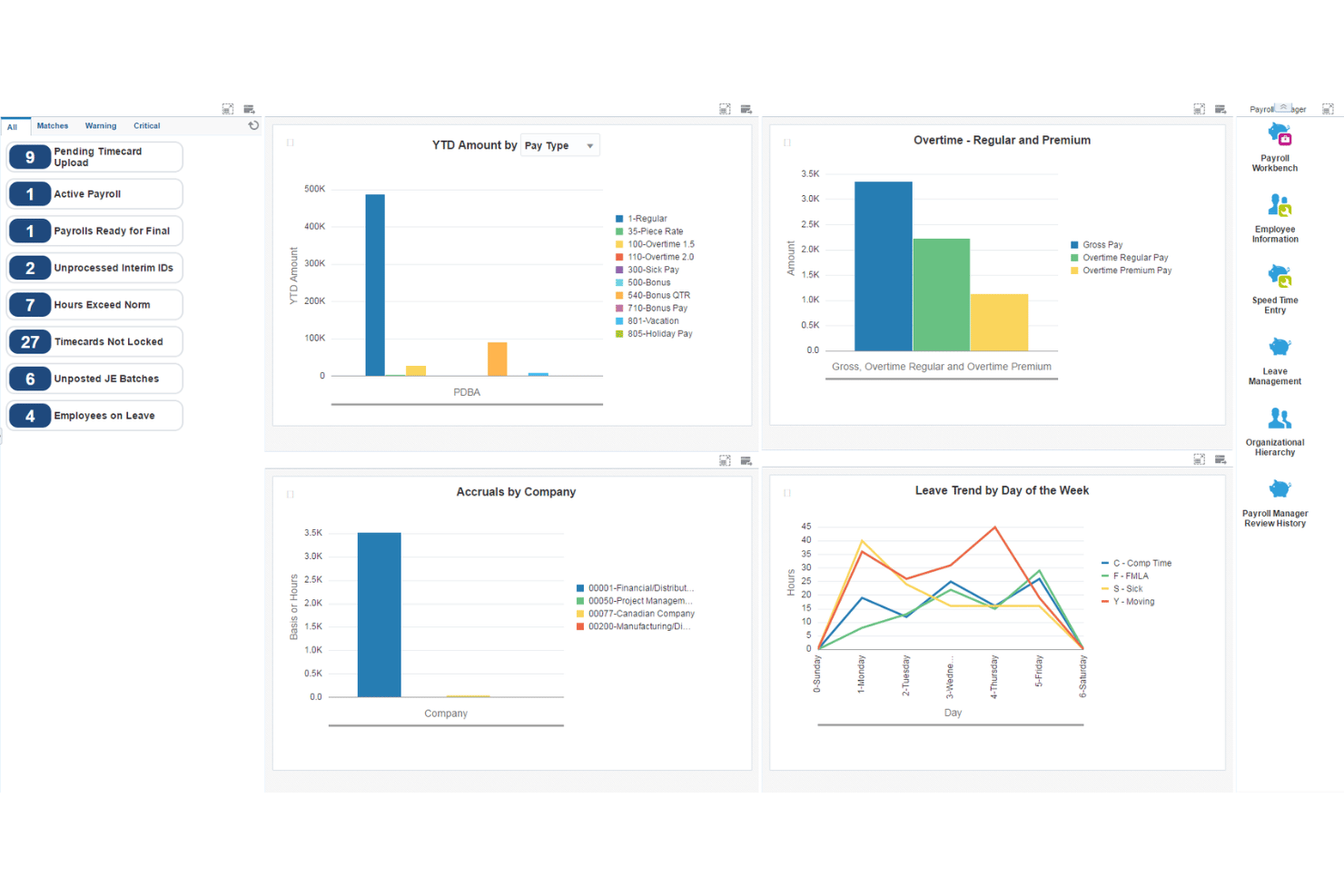
JD Edwards EnterpriseOne is an enterprise ERP suite from Oracle that combines full-cycle payroll, general ledger accounting, AP/AR, fixed assets, and human capital management across on-premises, cloud, and hybrid deployments.
Who Is JD Edwards EnterpriseOne Best For?
JD Edwards EnterpriseOne is built for large enterprises in manufacturing, distribution, and asset-heavy industries that need integrated payroll and financial management at scale.
Why I Picked JD Edwards EnterpriseOne
I picked JD Edwards EnterpriseOne because its payroll system connects deeply with enterprise financial management. Payroll can generate and post journal entries to the general ledger using configurable Automatic Accounting Instructions, while payroll liabilities such as taxes and insurance can flow into Accounts Payable.
JD Edwards EnterpriseOne Key Features
- Payroll-to-GL integration: Payroll can generate journal entries and update the EnterpriseOne general ledger, with automatic or manual posting options.
- Automatic Accounting Instructions: AAIs determine how generated accounting entries are distributed across GL accounts, giving larger organizations considerable control over payroll accounting.
- Payroll liabilities and AP: EnterpriseOne can automatically create vouchers for payroll taxes, insurance premiums, and other third-party payroll liabilities through its Accounts Payable integration.
- Labor costing: Payroll supports labor and labor-burden distributions, including wages, taxes, insurance, hours, and account information. Those transactions can flow into the Account Ledger.
- US payroll: EnterpriseOne supports federal, state, and local withholding/reporting requirements, with Vertex used for tax-withholding calculations.
- Canadian payroll: There's also dedicated Canadian payroll functionality covering earnings, deductions, taxes, gross-to-net/net-to-gross calculations, leave accruals, and government-regulated tax information.
JD Edwards EnterpriseOne Integrations
JD Edwards EnterpriseOne offers native integrations with Oracle Cloud Infrastructure, Oracle Analytics Cloud, Oracle Database, and has an API for custom integrations.
Pros and Cons
Pros:
- Configurable GL account mapping for payroll runs
- Handles multi-entity payroll and accounting natively
- Granular labor cost posting by department
Cons:
- Not suited to small or mid-sized businesses
- Implementation requires significant IT and consulting resources
NetSuite
Best for payroll data in real-time financials
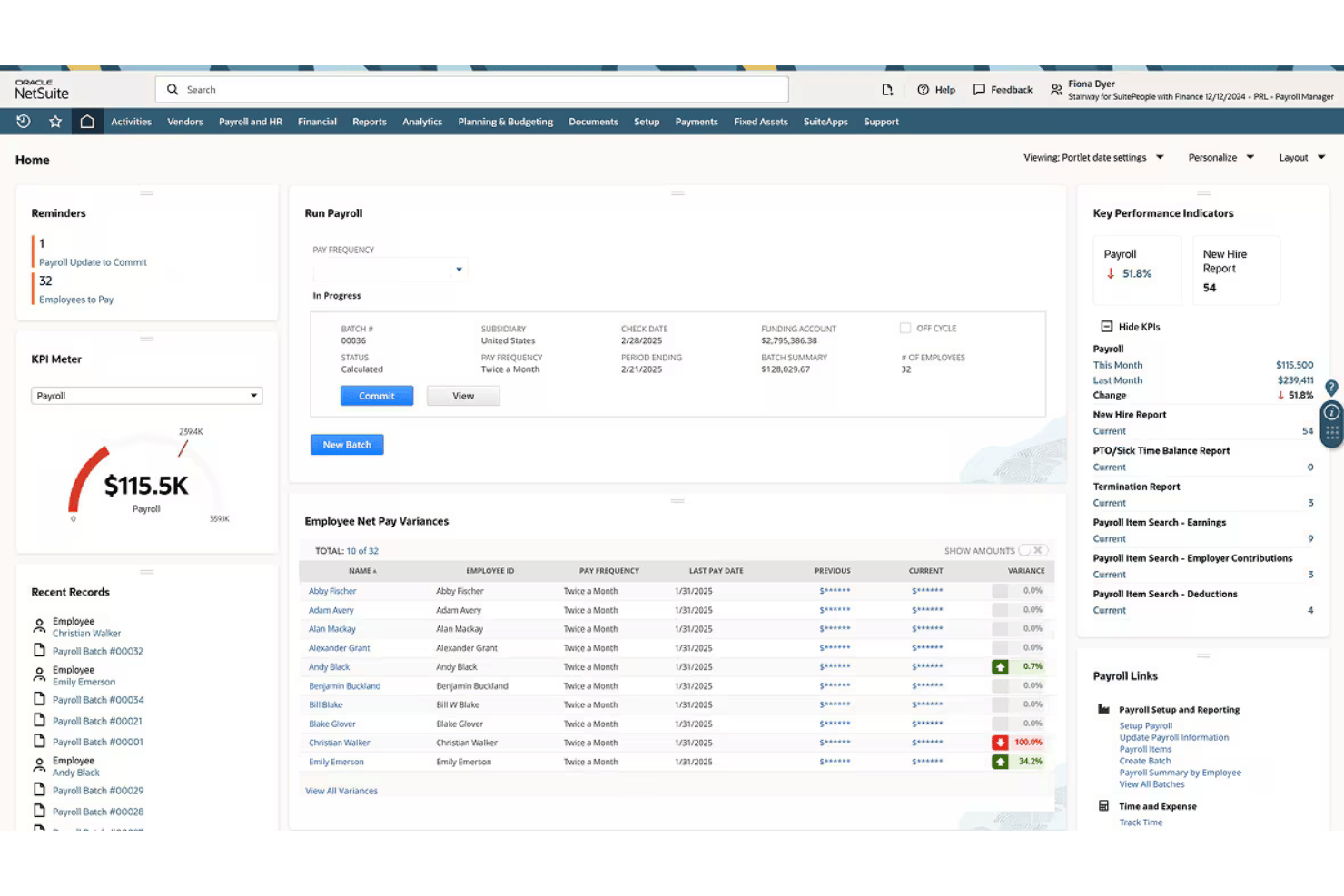
NetSuite is a cloud-based ERP platform that combines full-cycle US payroll processing with a complete general ledger, where every payroll run posts directly to financial accounts in real time.
Who Is NetSuite Best For?
NetSuite is a strong fit for mid-market companies that need payroll, accounting, and HR managed within a single ERP rather than across disconnected tools.
Why I Picked NetSuite
I picked NetSuite as one of the best because the moment a payroll run completes, every wage, tax, and deduction posts to the general ledger automatically. I love that I can drill down from a trial balance directly to an individual paycheck, which makes payroll audits far less painful. The dashboards also break down payroll expenses by department, location, or subsidiary, giving finance and HR a shared view of labor costs without manual reconciliation.
NetSuite Key Features
- Multi-subsidiary payroll: Run payroll across multiple business entities with consolidated or subsidiary-specific reporting.
- Employee self-service portal: Let employees view pay stubs, tax forms, and update their own personal and banking details.
- Automated ACA compliance: Prepare, file, and manage Affordable Care Act (1095-C/1094-C) forms within the platform.
- Custom payroll dashboards: Access over 100 standard payroll reports and interactive dashboards for payroll analytics.
NetSuite Integrations
NetSuite offers native integrations with SuitePeople HR, SuiteTime, and other NetSuite business management modules. An API is available for custom integrations.
Pros and Cons
Pros:
- Built-in HR, time tracking, and payroll
- Supports multi-entity and multi-subsidiary payroll
- Payroll posts directly to the GL
Cons:
- US-only payroll limits global workforce management
- Implementation takes months for most businesses
Wave
Best for automatic payroll journal entries
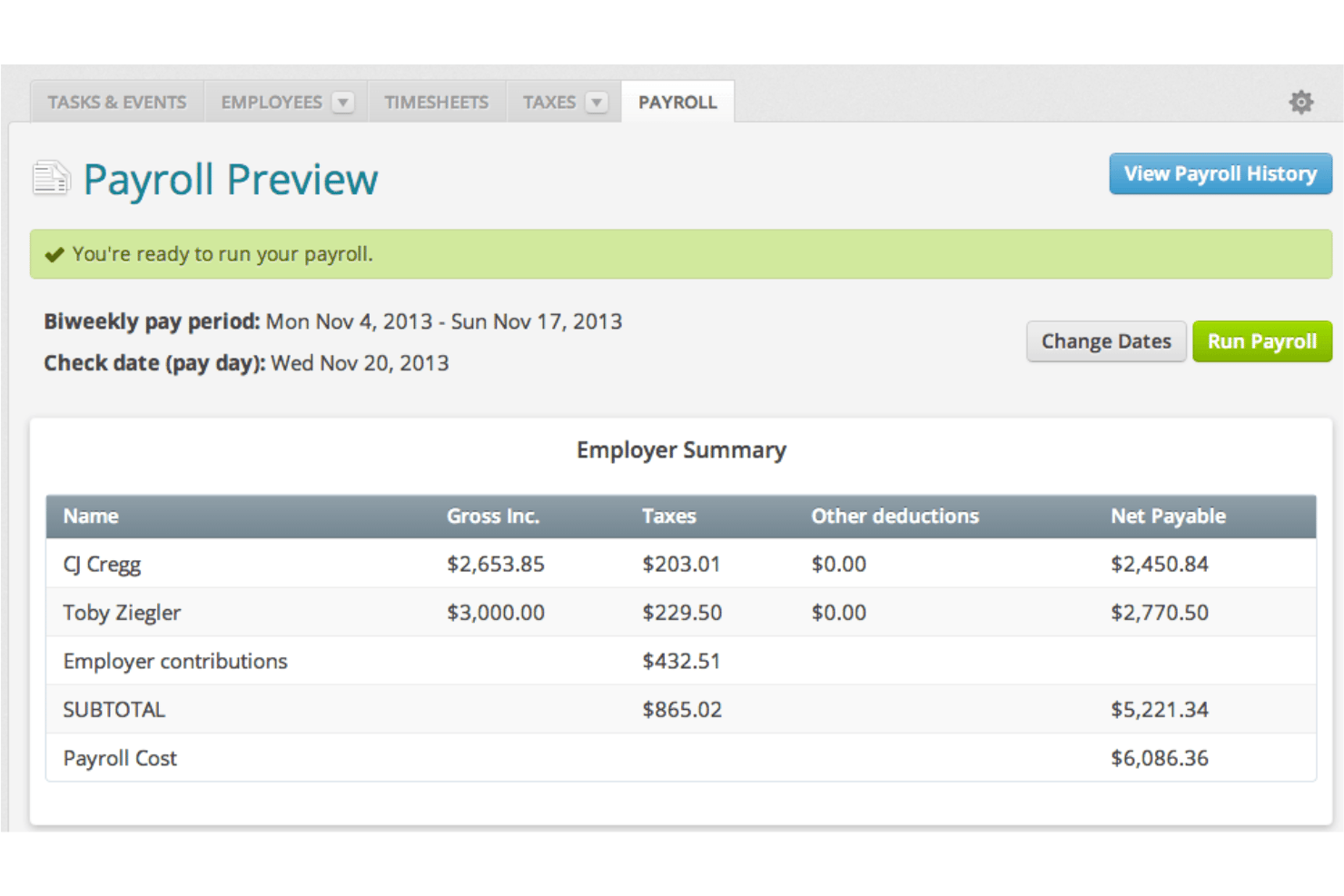
Wave is a small business accounting and payroll platform that combines double-entry bookkeeping, invoicing, and full-cycle payroll processing in a single system.
Who Is Wave Best For?
Wave is built for owner-operators and small businesses that need payroll and accounting in one place without paying for features they won't use.
Why I Picked Wave
I picked Wave as one of the best because each payroll run automatically posts as journal entries into the accounting ledger, with wages, taxes, and deductions mapped to the correct accounts in real time. Because payroll and accounting share one data model, there's no manual export or reconciliation. I also like that W-2s, 1099-NECs, and wage reports are all generated from within that same system.
Wave Key Features
- Direct deposit payments: Send paychecks straight to employee and contractor bank accounts at no additional cost.
- Employee self-service portal: Let team members securely view pay stubs and manage personal information online.
- Automatic payroll tax filing: Calculate, withhold, and file federal and state payroll taxes for US-based businesses.
- Year-end tax form generation: Create and deliver W-2 and 1099-NEC forms for employees and contractors within the system.
Wave Integrations
Native integrations are not clearly documented. An API is available for custom integrations.
Pros and Cons
Pros:
- W-2 and 1099-NEC forms generated in-platform
- Automatic journal entries after every payroll run
- Payroll and accounting share one data model
Cons:
- Limited support for growing teams beyond 10 employees
- Payroll only available in the US and Canada, excluding Quebec

Best for accounting and payroll under one login
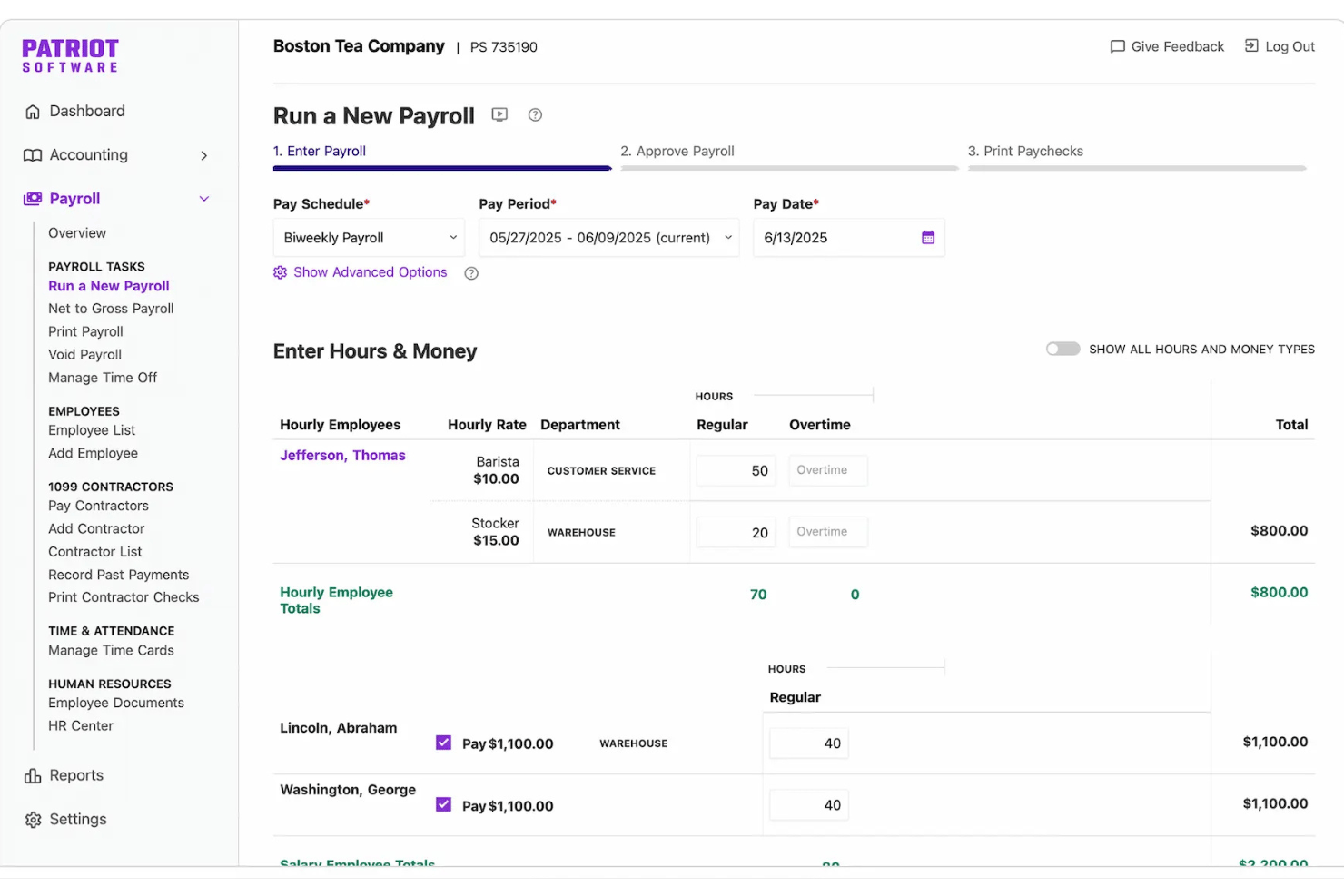
Patriot Software is a small business accounting and payroll platform that combines double-entry bookkeeping, invoicing, direct deposit, and payroll processing in a single login, with payroll tax filing available through its Full Service Payroll plan.
Who Is Patriot Software Best For?
Patriot Software is a strong fit for small business owner-operators and payroll administrators who need to manage books and run payroll without juggling two separate systems.
Why I Picked Patriot Software
I picked Patriot Software as one of the best because both payroll and accounting live under a single login, and the connection between them is automatic. Every time I run payroll, Patriot posts a journal entry directly to the general ledger, mapping wages, tax withholdings, and deductions to the correct accounts without any manual work. I also like the dual-ledger system, which lets me toggle between cash and accrual accounting without switching tools or duplicating records.
Patriot Software Key Features
- Multi-state payroll tax filing: Full Service Payroll calculates, files, and deposits federal, state, and local payroll taxes on your behalf.
- Employee self-service portal: Employees can access pay stubs, tax documents, and update their direct deposit information online.
- Time and attendance add-on: Track employee hours and time-off accruals that sync directly to payroll with a dedicated module.
- Contractor and 1099 processing: Issue payments to contractors and generate 1099 forms within the same platform as employee payroll.
Patriot Software Integrations
Patriot Software offers native integrations with Vestwell for 401(k) plans, SimplyInsured for health insurance, and ERGO NEXT for workers' compensation. An API is available for custom integrations. Native integrations with other accounting or payroll tools are not clearly documented.
Pros and Cons
Pros:
- Full Service Payroll automates payroll tax filing
- Supports both cash and accrual accounting
- Payroll auto-posts to the general ledger
Cons:
- No native HR or benefits administration features
- Reporting tools lack depth for advanced users
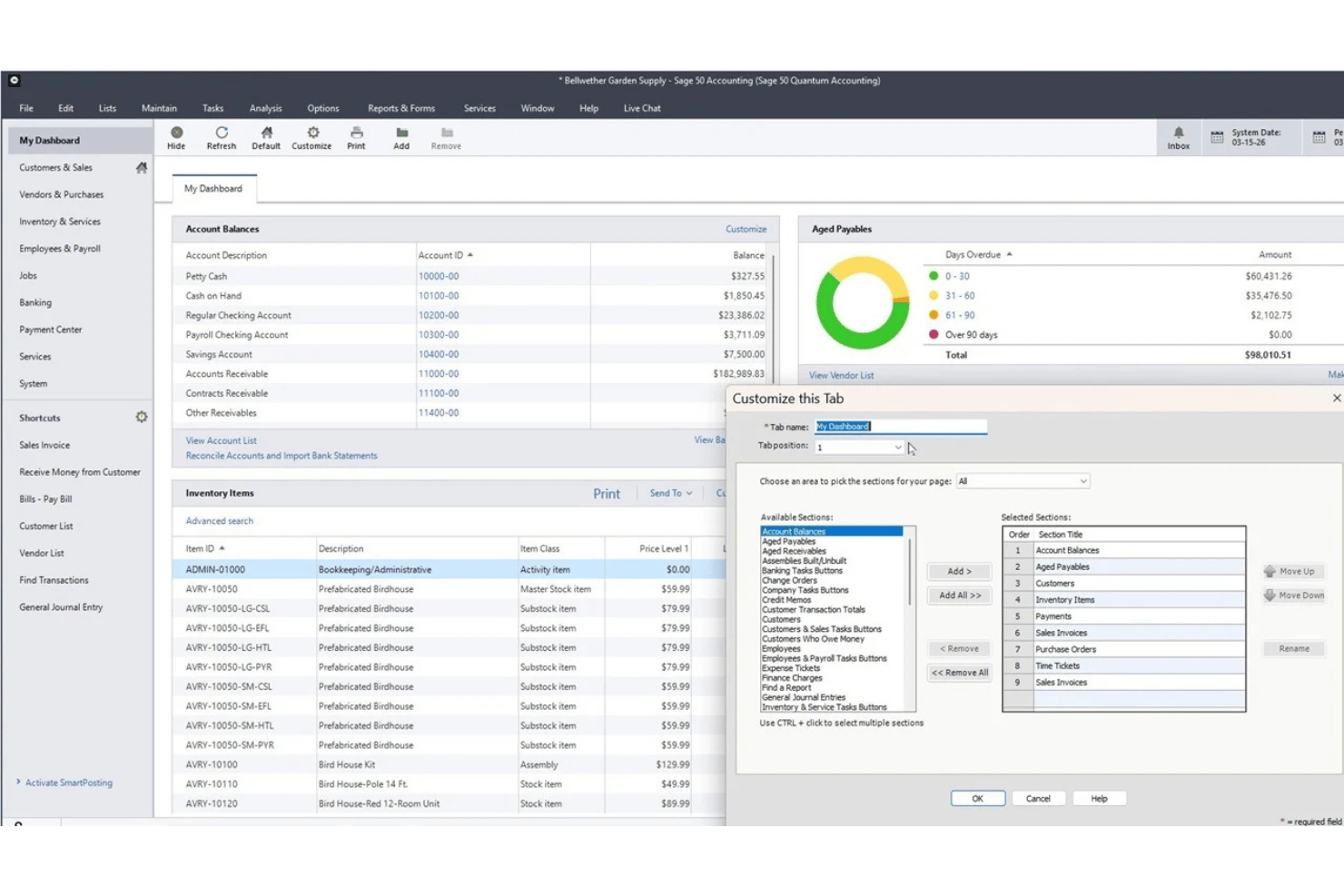
Sage 50 Accounting is a small business accounting platform available in cloud and desktop editions, combining financial management, inventory, job costing, and an integrated payroll module.
Who Is Sage 50 Accounting Best For?
Sage 50 is a strong fit for small businesses and in-house bookkeepers that need detailed accounting, job costing, and payroll functionality in one system.
Why I Picked Sage 50 Accounting
I've included Sage 50 Accounting in my top picks because the payroll module is built directly into the accounting system, not bolted on as a third-party integration. I like that payroll runs automatically post as journal entries to the general ledger, mapping wages, taxes, and deductions without any manual reconciliation. The combination of job costing and payroll in one desktop environment is where Sage 50 really stands apart, letting you see whether a project turned a profit after labor costs are fully accounted for.
Sage 50 Accounting Key Features
- Job costing module: Track labor, materials, and overhead by job or project for full job profitability.
- Multi-company management: Manage transactions and reporting across multiple business entities in a single system.
- Inventory management: Monitor stock levels, serial numbers, vendors, and assemblies directly within the accounting platform.
- Advanced reporting tools: Access over 150 reports covering areas such as payables, receivables, expenses, profits, inventory, payroll, and jobs, with options to customize and drill down into transactions.
Sage 50 Accounting Integrations
Sage 50 Accounting offers native integrations with Microsoft 365, AutoEntry, and Sage Payroll. An API is available for custom integrations.
Pros and Cons
Pros:
- Strong audit trail for payroll transactions
- Deep job costing built into accounting
- Payroll posts directly to the general ledger
Cons:
- Payroll and e-filing require separate subscriptions
- Payroll requires an additional subscription

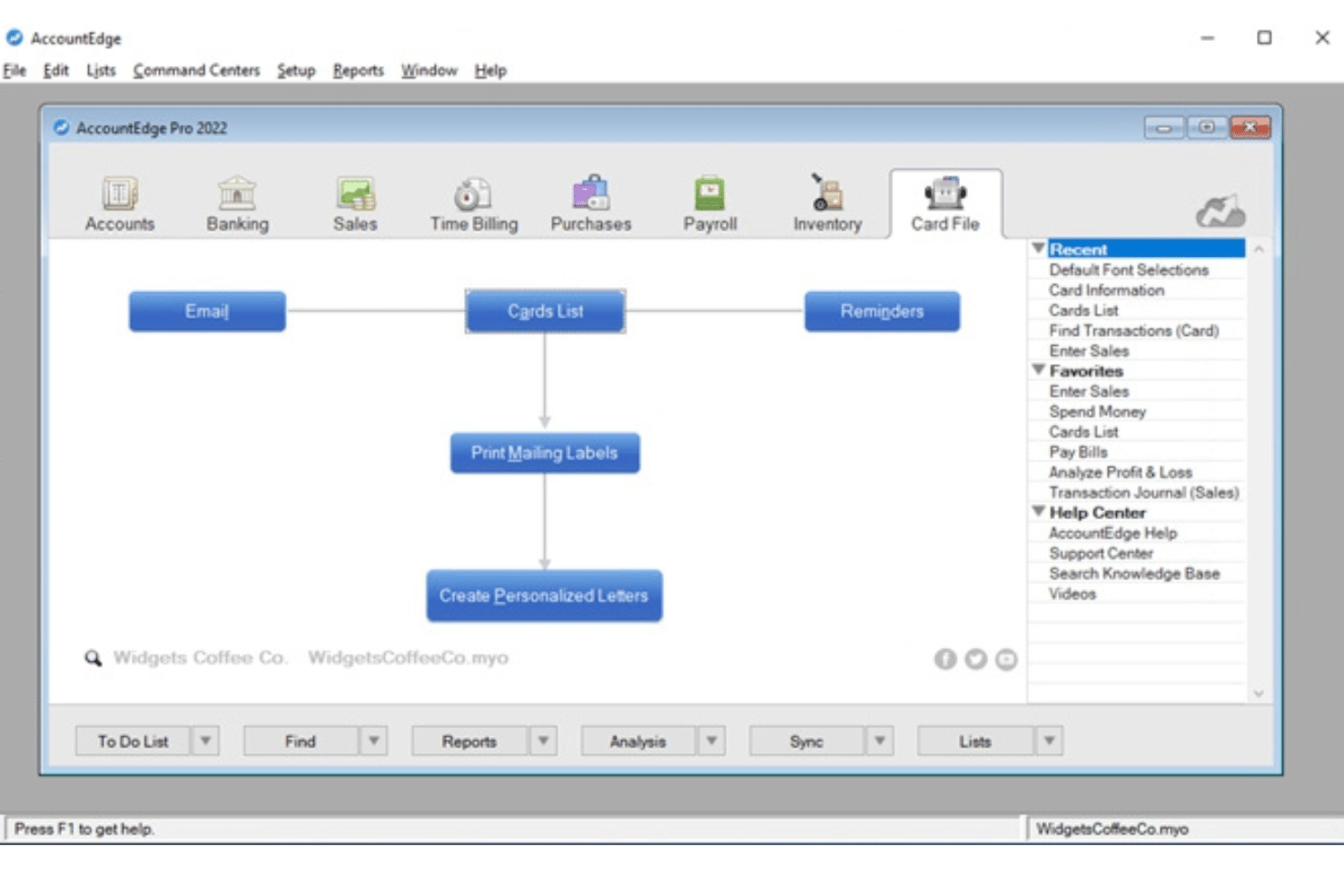
AccountEdge is a desktop-based accounting platform for small businesses that combines double-entry bookkeeping, inventory, and invoicing with an optional payroll add-on for unlimited employees and access to current federal, state/provincial, and local payroll tax rates.
Who Is AccountEdge Best For?
It's a strong fit for owner-operators and small business payroll admins who prefer desktop accounting software and want to process payroll for unlimited employees without per-employee fees.
Why I Picked AccountEdge
AccountEdge earns its spot on my shortlist because of how it handles payroll tax tables. Rather than relying on a cloud service for tax updates, AccountEdge lets you download and apply federal, state, and local tax tables directly in the desktop software. I also like that payroll runs post automatically as journal entries to the GL. Wages, taxes, and deductions map to the correct accounts with no manual re-entry.
AccountEdge Key Features
- Double-entry general ledger: Provides a full accounting suite with chart of accounts, journal entries, AP/AR, and financial reports.
- Inventory and item tracking: Monitors inventoried and non-inventoried items, assemblies, and manages multiple locations and custom variations.
- Customizable reporting: Offers hundreds of standard financial, payroll, and compliance reports, plus advanced analytics via Power BI exports.
- Integrated time billing: Enables entry of timesheets, applies custom billing rates by employee or project, and links hours directly to payroll.
AccountEdge Integrations
AccountEdge offers add-ons for bank feeds, direct deposit, payroll forms and e-filing, AccountEdge Connect, Web Pay, and payment processing. AccountEdge Connect adds browser-based access for sales, purchases, time billing, and employee timesheets that sync back to the desktop software.
Pros and Cons
Pros:
- Handles unlimited employee payroll runs
- Payroll entries post automatically to GL
- Downloadable tax tables update payroll calculations
Cons:
- Tax filing not automated by vendor
- Direct deposit and payroll e-filing cost extra
Annen regnskapsprogramvare med lønnsfunksjoner
Her er noen flere alternativer for regnskapsprogramvare med lønnsfunksjoner som ikke kom med på kortlisten min, men som likevel er verdt å sjekke ut:
- Striven
For payroll in operational workflows
- QuickBooks Workforce
For connected payroll, HR, and books
- Microsoft Dynamics GP
For advanced payroll deductions and benefits
- SAP S/4HANA
For global payroll with SAP finance


How I Evaluate Accounting Software With Payroll Features
When payroll data doesn't flow cleanly into the general ledger, I know the tool is missing one of the biggest benefits of combining payroll and accounting. So, I separate must-haves from the features that truly set platforms apart.
Core Functionality (Table Stakes for This List)
When I'm selecting tools for my list, I rank each one on a scale from 0 (does not offer the functionality) to 5 (excels in this area) for each core functionality listed below. I then calculate the tool's total score into a percentage, using 65% as a benchmark to help assess its overall fit for the list.
- Integrated Payroll Processing: I look for built-in or tightly integrated pay runs with direct deposit and flexible schedules, so businesses can process employee and contractor payments without manually moving payroll data between systems.
- General Ledger Accounting: I evaluate whether the GL supports AP/AR, journal entries, and customizable reports—like pulling a P&L broken out by department.
- Payroll Tax Automation: Tax requirements change often, so I evaluate how the tool calculates withholdings, supports tax payments and filings, and generates year-end forms like W-2s, where available.
- Employee Records & Deductions: Each profile should store wage rates, withholdings, benefits, and garnishments—details you'd otherwise track in a separate system.
- Payroll-to-GL Sync: After every pay run, wages and tax liabilities should post to the correct GL accounts automatically, with an audit trail for quarter-end review.
- Time & PTO Tracking: Built-in timesheets and PTO accrual policies that feed directly into payroll save you from re-keying hours every pay period.
Once I have a list of tools that meet the criteria, I consider what sets each platform apart.
Differentiating Factors (What Sets Vendors Apart)
Here's how I compare and contrast different vendors:
Standout Features
An employee self-service portal cuts down on HR requests—staff can pull their own pay stubs, update direct deposit details, and submit time-off requests without a back-and-forth. I also evaluate contractor and 1099 management, especially if your team mixes W-2 employees with freelancers who need 1099-NEC forms at year end. Multi-state tax filing matters too, particularly for distributed teams where each new hire may trigger additional jurisdiction requirements.
Beyond Features
Pricing transparency is a big one—I check whether payroll fees are bundled with the accounting subscription or charged as a per-employee add-on, since those costs add up fast as your team grows. Migration support also matters, especially if you're switching mid-year and need to import YTD wages and tax withholdings accurately. I look at accountant collaboration features too, like role-based permissions that let your bookkeeper access the ledger without touching payroll approvals.
Slik velger du regnskapsprogramvare med lønnsfunksjoner
Den riktige regnskapsprogramvaren med lønnsfunksjoner avhenger av hvordan hver plattform håndterer din unike kombinasjon av regelverksetterlevelse, automatisering og HR-oppgaver. Før du velger en plattform, bør du avgjøre hvor tett du trenger at lønn og regnskap skal være koblet sammen. Et alt-i-ett-system kan redusere arbeidet med avstemming, mens regnskapsprogramvare med et lønnstillegg kan gi større fleksibilitet. Hvis du allerede har en lønnsleverandør, kan en pålitelig integrasjon være tilstrekkelig – så lenge lønnskostnader og -forpliktelser overføres korrekt til hovedboken.
| Hvis prioriteten din er … | Se etter … |
|---|---|
| Korrekte innrapporteringer av arbeidsgiveravgift og lønnsskatt | Automatiske skatteberegninger, støtte for innrapportering og oppdateringer for å overholde regelverket |
| Sømløs synkronisering mellom lønn og regnskap | Innebygd, automatisk kobling av posteringer i hovedboken |
| Håndtering av timelønnede og fastlønnede ansatte | Fleksibel tidsregistrering og kombinerte lønnskjøringer |
| Håndtering av lønn på tvers av flere jurisdiksjoner | Skattestøtte for alle stater og lokale områder der du har ansatte |
| Enkel overgang fra det gamle systemet | Assistert migrering av lønnsdata og import av hittil i år-data |
Slik vurderer du kandidatlisten
- Bekreft støtte for årsavslutning og skatt: Bekreft hvilke W-2- og 1099-skjemaer programvaren genererer eller sender inn. Sjekk også hvilke jurisdiksjoner den støtter, og om innsending ved årets slutt koster ekstra.
- Gjennomfør en prøvekjøring av en simulert lønnskjøring: Sett opp en testkjøring med de vanlige lønnsplanene, inntektene, fradragene og oppdragstakerne dine. Sjekk deretter hvordan de resulterende kostnadene og forpliktelsene bokføres i hovedboken.
- Send inn en supportsak for et migreringsscenario: Beskriv at du trenger å importere lønnsdata hittil i året midt i året, og vurder hvor grundig og raskt du får svar.
- Avklar ansvaret for skatteinnrapportering: Bekreft om leverandøren beregner, rapporterer og betaler arbeidsgiveravgifter og andre lønnsskatter på dine vegne. Sjekk også hvilke jurisdiksjoner leverandøren dekker, og hvem som håndterer feil eller forsinkede innrapporteringer.
- Vurder kontroll opp mot bekvemmelighet: Bestem om du ønsker svært tilpasningsbare regnskapsverktøy med integrert lønn, eller et lønnsfokusert system med grunnleggende bokføring.
Hva er regnskapsprogramvare med lønnsfunksjoner?
Regnskapsprogramvare med lønnsfunksjoner kombinerer grunnleggende økonomiverktøy med innebygd eller integrert lønnsbehandling. Slike verktøy kan for eksempel omfatte hovedbokføring, leverandør- og kundereskontro, fakturering og økonomirapportering. Disse plattformene lar deg beregne ansattes lønn, håndtere fradrag og skatter samt registrere lønnskostnader og -forpliktelser i regnskapssystemet uten å overføre data manuelt mellom separate verktøy.
I motsetning til frittstående lønnsprogramvare kobler disse plattformene lønnsaktiviteten direkte til økonomiregnskapet ditt. Avhengig av programvaren kan fullførte lønnskjøringer automatisk generere posteringer, oppdatere kostnads- og forpliktelseskontoer, fordele arbeidskostnader på avdelinger eller prosjekter og overføre lønnsdata til økonomirapporter.
Funksjoner
Når du velger regnskapsprogramvare med lønnsfunksjoner, bør du se etter følgende viktige funksjoner:
- Integrert lønnsbehandling: Kjør lønn, beregn bruttolønn til nettolønn, og koble ansattes lønn, fradrag og lønnsforpliktelser til regnskapet.
- Håndtering av lønnsskatt: Beregn og trekk gjeldende lønnsskatter, med alternativer for skattebetalinger, innrapporteringer og skjemaer ved årets slutt, som W-2 og 1099, avhengig av plattform og abonnement.
- Synkronisering med hovedboken: Knytt lønnstransaksjoner automatisk til riktig kontoplan, slik at lønnskostnader og skatteforpliktelser alltid er oppdaterte.
- Håndtering av ansattregistre: Lagre lønnssatser, skattetrekk, fradrag for ytelser og ansettelsesopplysninger i individuelle ansattprofiler.
- Betalinger til oppdragstakere og 1099: Betal oppdragstakere sammen med ansatte, og forenkle innrapporteringen av 1099-NEC ved årets slutt i samme system.
- Registrering av arbeidstid og betalt permisjon: Registrer arbeidede timer og betalt fri, og overfør dataene direkte til lønnskjøringene for korrekte lønnsutbetalinger.
- Direkte innskudd og betalingsalternativer: Tilby ansatte og oppdragstakere fleksible betalingsalternativer, som direkte innskudd, betalingskort eller trykte sjekker.
- Selvbetjeningsportaler for ansatte: La ansatte få tilgang til lønnsslipper, se skatteskjemaer, be om fri og administrere personopplysninger uten bistand fra HR.
- Tilpasset rapportering og analyse: Lag lønns- og økonomirapporter som fremhever arbeidskostnader, overtid og utnyttelse av personalgoder for bedre forretningsbeslutninger.
- Sikkerhets- og tilgangskontroller: Angi tilgangsnivåer for brukere, krev godkjenninger og opprett revisjonsspor for å beskytte lønns- og økonomidata.
Fordeler
Implementering av regnskapsprogramvare med lønnsfunksjoner gir flere fordeler for teamet og virksomheten din. Her er noen av fordelene du kan se frem til:
- Mindre manuell dataregistrering: Automatisk synkronisering mellom lønn og hovedbok eliminerer dobbeltregistrering og bidrar til å forhindre kostbare feil.
- Bedre overholdelse av lønnsskattekrav: Automatiserte beregninger og verktøy for regelverksetterlevelse kan bidra til å holde lønnsskatter og rapportering ved årets slutt i samsvar med gjeldende føderale, delstatlige og lokale krav.
- Raskere lønnskjøringer: Integrerte funksjoner for tidsregistrering og direkte innskudd gjør hver lønnskjøring raskere, fra lønnsberegning til utbetaling.
- Større åpenhet for ansatte: Selvbetjeningsportaler lar ansatte se lønnsslipper, skatteskjemaer og saldoer for fravær uten flaskehalser hos HR.
- Mer nøyaktig økonomirapportering: Sanntidspostering av lønn til GL sikrer at lønns-, skatte- og ytelsesdata alltid gjenspeiles i virksomhetens rapporter.
- Enklere lønn for oppdragstakere og på tvers av delstater: Plattformer som støtter oppdragstakere og flere skattejurisdiksjoner, kan redusere det manuelle arbeidet som kreves for å betale ulike typer arbeidstakere på tvers av lokasjoner. Virksomheter som ekspanderer internasjonalt, kan også se nærmere på veiledningen vår om global lønn i Mexico.
- Forbedret sikkerhet og kontroll: Rollebaserte tilganger og revisjonsspor beskytter sensitive lønns- og økonomidata mot uautorisert tilgang.
Kostnader & priser
Å velge regnskapsprogramvare med lønnsfunksjoner krever en forståelse av de ulike prismodellene og abonnementene som er tilgjengelige. Kostnadene varierer mye avhengig av om lønn er inkludert, selges som et tillegg eller kjøpes som en del av en større ERP-pakke. Produkter for små virksomheter kombinerer ofte et månedlig regnskapsabonnement med en grunnavgift for lønnskjøring og avgifter per arbeidstaker, mens bedriftsplattformer vanligvis bruker tilpasset prissetting basert på moduler, brukere, virksomhetens størrelse og implementeringsbehov. Tabellen nedenfor oppsummerer de vanligste prismodellene:
Vanlige prismodeller for regnskapsprogramvare med lønnsfunksjoner
| Plantype | Gjennomsnittlig pris | Vanlige funksjoner |
|---|---|---|
| Gratis regnskap | $0 grunnabonnement; lønn koster vanligvis ekstra | Grunnleggende bokføring, fakturering, økonomirapporter og valgfri betalt lønn |
| Regnskap + tillegg for lønn | Månedlig regnskapsavgift + grunnavgift for lønn og/eller avgift per arbeidstaker | Integrert regnskap, lønnskjøring, direkte innskudd og postering av lønn til GL |
| Programvare per bruker eller modulbasert programvare | Månedlige eller årlige avgifter basert på antall brukere og valgte moduler | Regnskaps- og lønnsmoduler med ekstra verktøy for HR, lager, prosjekter eller drift |
| ERP for større virksomheter | Tilpasset pristilbud | Avansert økonomistyring, lønn, støtte for flere selskaper, tilgangsrettigheter, integrasjoner og implementeringstjenester |
Vanlige spørsmål om regnskapsprogramvare med lønnsfunksjoner
\u003cspan data-slate-fragment=\u0022JTVCJTdCJTIyY2hpbGRyZW4lMjIlM0ElNUIlN0IlMjJ0ZXh0JTIyJTNBJTIySGVyZSUyMGFyZSUyMHNvbWUlMjBhbnN3ZXJzJTIwdG8lMjBjb21tb24lMjBxdWVzdGlvbnMlMjBhYm91dCUyMGFjY291bnRpbmclMjBzb2Z0d2FyZSUyMHdpdGglMjBwYXlyb2xsJTIwZmVhdHVyZXMlM0ElMjIlN0QlNUQlMkMlMjJ0eXBlJTIyJTNBJTIycCUyMiUyQyUyMmlkJTIyJTNBJTIyWW1nR2g2Y05uZyUyMiU3RCU1RA==\u0022\u003eHer er noen svar på vanlige spørsmål om regnskapsprogramvare med lønnsfunksjoner:\u003c/span\u003e
Kan jeg betale både ansatte og oppdragstakere med regnskapsprogramvare som inkluderer lønn?
Mange regnskapsplattformer med lønnsfunksjoner støtter både W-2-ansatte og 1099-oppdragstakere, men funksjonene for betaling av oppdragstakere og skatteskjemaer varierer etter produkt og abonnement. Hvis du bruker begge arbeidstypene, bør du kontrollere om programvaren støtter betalinger til oppdragstakere og genererer eller sender inn de nødvendige W-2- og 1099-NEC-skjemaene.
Hvordan fungerer innsending av lønnsskatt i disse systemene?
Støtten for lønnsskatt varierer etter plattform og abonnement. Noen systemer beregner skattetrekk, men overlater innsending og betaling til deg, mens komplette lønnstjenester kan beregne, sende inn og betale føderal, delstatlig og lokal lønnsskatt på dine vegne. Kontroller hvilke jurisdiksjoner og årsoppgaver som støttes, før du velger et system.
Hvilken type støtte er tilgjengelig når lønnsdata flyttes fra en tidligere leverandør?
\u003cspan data-slate-fragment=\u0022JTVCJTdCJTIyY2hpbGRyZW4lMjIlM0ElNUIlN0IlMjJ0ZXh0JTIyJTNBJTIyTW9zdCUyMHZlbmRvcnMlMjBvZmZlciUyMG9uYm9hcmRpbmclMjBhc3Npc3RhbmNlJTJDJTIwd2l0aCUyMHNvbWUlMjBwcm92aWRpbmclMjBkZWRpY2F0ZWQlMjBtaWdyYXRpb24lMjBzcGVjaWFsaXN0cyUyMHRvJTIwaGVscCUyMGltcG9ydCUyMHllYXItdG8tZGF0ZSUyMHBheXJvbGwlMjBpbmZvcm1hdGlvbiUyMGFuZCUyMGVuc3VyZSUyMGElMjBzbW9vdGglMjB0cmFuc2l0aW9uLiUyMiU3RCU1RCUyQyUyMnR5cGUlMjIlM0ElMjJwJTIyJTJDJTIyaWQlMjIlM0ElMjJvdlhfWmozRG1GJTIyJTdEJTVE\u0022\u003eDe fleste leverandører tilbyr hjelp med oppstart, og noen tilbyr egne migrasjonsspesialister som kan hjelpe med å importere lønnsinformasjon hittil i året og sørge for en smidig overgang.\u003c/span\u003e
Kan ansatte selv få tilgang til lønnsslipper og skatteskjemaer?
\u003cspan data-slate-fragment=\u0022JTVCJTdCJTIyY2hpbGRyZW4lMjIlM0ElNUIlN0IlMjJ0ZXh0JTIyJTNBJTIyWWVzJTJDJTIwZW1wbG95ZWUlMjBzZWxmLXNlcnZpY2UlMjBwb3J0YWxzJTIwYXJlJTIwY29tbW9uJTJDJTIwbGV0dGluZyUyMHN0YWZmJTIwcmV0cmlldmUlMjBwYXklMjBzdHVicyUyQyUyMHZpZXclMjB0YXglMjBkb2N1bWVudHMlMkMlMjBhbmQlMjB1cGRhdGUlMjBwZXJzb25hbCUyMGRldGFpbHMlMjB3aXRob3V0JTIwaW52b2x2aW5nJTIwSFIuJTIyJTdEJTVEJTJDJTIydHlwZSUyMiUzQSUyMnAlMjIlMkMlMjJpZCUyMiUzQSUyMmV5ZUdrUTd5eTclMjIlN0QlNUQ=\u0022\u003eJa, selvbetjeningsportaler for ansatte er vanlige. De lar medarbeidere hente lønnsslipper, se skattedokumenter og oppdatere personopplysninger uten å involvere HR.\u003c/span\u003e
Er avansert tidsregistrering inkludert, eller trenger jeg tredjepartsverktøy?
\u003cspan data-slate-fragment=\u0022JTVCJTdCJTIyY2hpbGRyZW4lMjIlM0ElNUIlN0IlMjJ0ZXh0JTIyJTNBJTIyU29tZSUyMHNvbHV0aW9ucyUyMGZlYXR1cmUlMjBidWlsdC1pbiUyMHRpbWUlMjB0cmFja2luZyUyQyUyMHdoaWxlJTIwb3RoZXJzJTIwb2ZmZXIlMjBzZWFtbGVzcyUyMGludGVncmF0aW9ucyUyMHdpdGglMjB0aW1lLWNsb2NrJTIwYXBwbGljYXRpb25zJUUyJTgwJTk0ZWl0aGVyJTIwd2F5JTJDJTIwdGhlc2UlMjBrZWVwJTIwaG91cnMlMjBhY2N1cmF0ZSUyMGZvciUyMHBheXJvbGwlMjBydW5zLiUyMiU3RCU1RCUyQyUyMnR5cGUlMjIlM0ElMjJwJTIyJTJDJTIyaWQlMjIlM0ElMjJ6QlJrcHU0aERJJTIyJTdEJTVE\u0022\u003eNoen løsninger har innebygd tidsregistrering, mens andre tilbyr sømløse integrasjoner med stemplingsapper – uansett sørger disse for at timetallet blir riktig ved lønnskjøringer.\u003c/span\u003e