

10 beste TriNet-konkurrenter for HR og lønn i 2026

10 Kortliste over de beste TriNet-konkurrentene


De beste TriNet-alternativene hjelper deg med å administrere HR, lønn og etterlevelse like effektivt, samtidig som de tilbyr større fleksibilitet når det gjelder priser, tilpasning eller funksjoner for å dekke organisasjonens behov.
TriNet er en anerkjent PEO- og HR-tjenesteleverandør, særlig for bedrifter i vekst som ønsker å sette ut komplekse HR-oppgaver. Men avhengig av virksomhetens størrelse, bransje eller ønskede kontrollnivå kan en annen leverandør tilby bedre skalerbarhet, mer personlig oppfølging eller verktøy som passer bedre med de interne prosessene deres.
Med utgangspunkt i min erfaring med å bruke og vurdere HR-løsninger har jeg satt sammen en liste over de beste TriNet-konkurrentene, som leverer gode resultater, transparente priser og en rekke funksjoner som passer ulike virksomhetstyper. I denne veiledningen finner du pålitelige alternativer som hjelper deg med å ta et trygt og velinformert valg for teamet ditt.
Hva er TriNet?
Først en kort oppsummering. TriNet er en kombinert HR-programvareløsning og konsulenttjeneste som skal hjelpe bedrifter med å håndtere HR-oppgaver mer effektivt.
Målgruppen deres er små og mellomstore bedrifter (SMBs) i ulike bransjer, spesielt de som trenger ekstern HR-støtte.
Funksjoner som lønnsbehandling, administrasjon av frynsegoder og selvbetjening for ansatte bidrar til å forenkle HR-oppgaver og forbedre teamets produktivitet.
Hvorfor du kan stole på våre programvareanbefalinger
Teamet vårt har testet og anmeldt programvare siden 2012. Vi er selv HR-eksperter, så vi vet hvor vanskelig og hvor viktig det er å velge riktig programvare.
I denne guiden har vi vurdert verktøyene gjennom praktisk testing og uavhengig research og gitt dem poeng ut fra våre utvelgelseskriterier. Vi bygger også på innsikt fra ledende eksperter i bransjen og erfarne HR-eksperter.
Anmeldelsene våre bygger på vår egen redaksjonelle vurdering. De er ikke et salgsargument.
Ekspertanmeldere:
Sammenligningstabell for TriNet-alternativer
Denne sammenligningstabellen oppsummerer prisdetaljer for mine beste utvalgte TriNet-alternativer:
| Tool | Best For | Trial Info | Price | ||
|---|---|---|---|---|---|
| 1 | Best for integration-friendly PEO workflows | Not available | From $8/user/month + $50/month base fee | Website | |
| 2 | Best for global coverage beyond US PEO | Free plan available | From $49/user/month | Website | |
| 3 | Best for easy payroll processing | Free demo available | From $49/month + $6/person/month | Website | |
| 4 | Best for user-friendly HR management | Free demo available | From $9/user/month | Website | |
| 5 | Best for scalable HR solutions | Free demo available | Pricing upon request | Website | |
| 6 | Best for simplifying HR processes | Free demo available | Pricing upon request | Website | |
| 7 | Best for scalable payroll solutions | Free demo available | Pricing upon request | Website | |
| 8 | Best for full-service HR | Not available | Pricing upon request | Website | |
| 9 | Best for multistate payroll compliance | Not available | Pricing upon request | Website | |
| 10 | Best for global compliance support | Not available | Pricing upon request | Website |


Anmeldelser av de beste TriNet-konkurrentene & alternativene
Nedenfor finner du mine detaljerte sammendrag av de beste TriNet-konkurrentene som kom med på kortlisten min. Anmeldelsene mine gir en grundig gjennomgang av de viktigste funksjonene, fordelene & ulempene, integrasjonene og ideelle bruksområdene for hvert verktøy, slik at du kan finne det som passer best for deg.

Best for integration-friendly PEO workflows
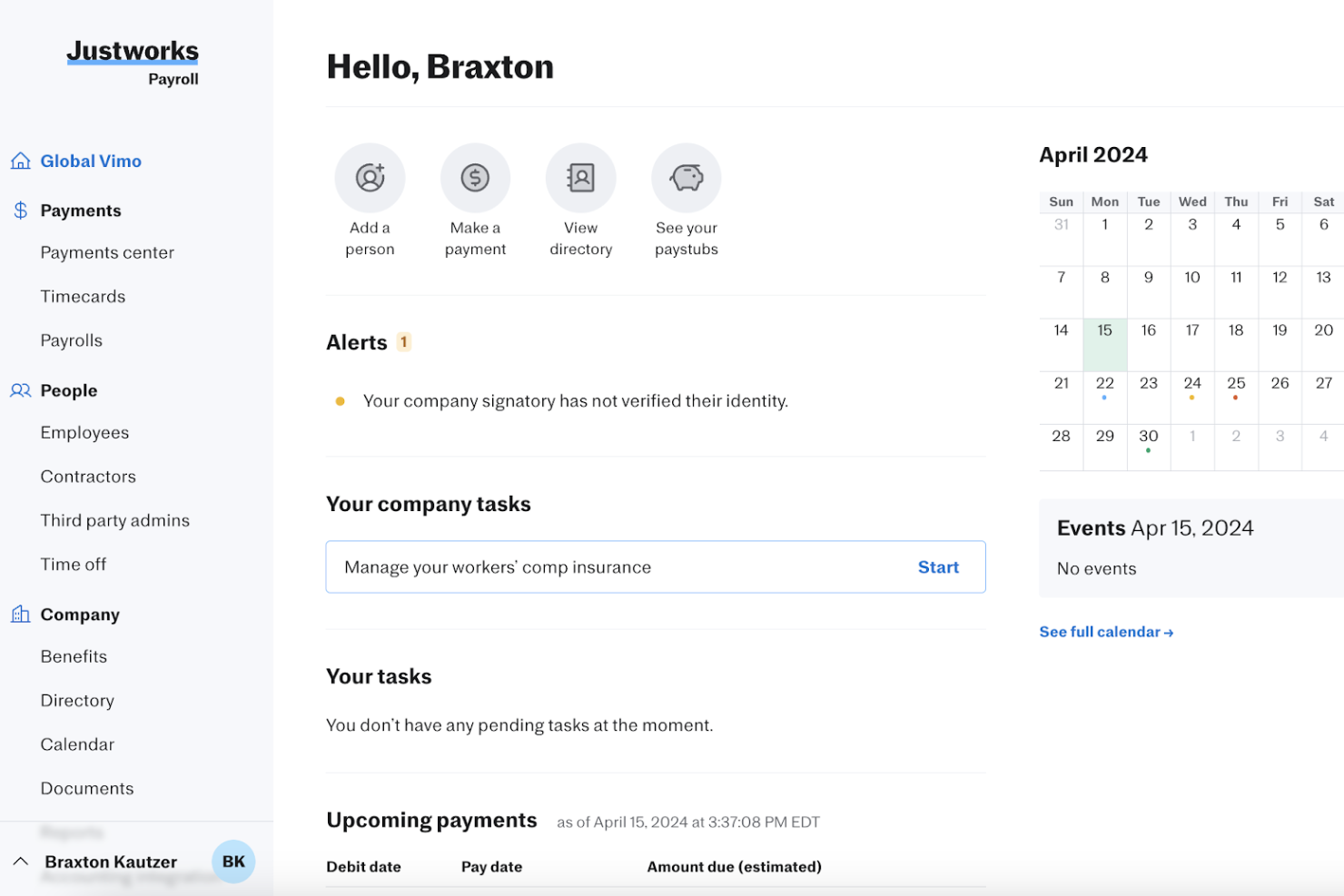
Justworks is a professional employer organization (PEO) platform for growing businesses that need help managing payroll, employee benefits, and HR compliance without adding administrative work for their people teams.
Who Is Justworks Best For?
Justworks suits HR teams at growing companies that want a PEO that connects with their existing business tools.
Why I Picked Justworks
I picked Justworks as a TriNet alternative because it fits “Best for integration-friendly PEO workflows”: its ATS integrations include Greenhouse, Lever, and JazzHR, while its accounting integrations include QuickBooks and Xero. I like that teams can move candidates from the ATS into Justworks onboarding, reducing handoffs as they hire.
Justworks Key Features
- Multi-state payroll: Run payroll and manage tax filings for employees across states.
- Benefits administration: Manage health insurance, retirement plans, and related employee benefits.
- Time tracking: Record employee hours and review timecards.
- PTO management: Set time-off policies and track employee leave.
Justworks Integrations
Justworks integrations include Greenhouse, Lever, and JazzHR for applicant tracking, plus QuickBooks and Xero for accounting. These connections can help move candidates into onboarding and connect HR workflows with accounting tools.
Pros and Cons
Pros:
- PEO plans include HR guidance and compliance support
- Employee self-service simplifies enrollment and PTO
- Payroll and benefits share one employee portal
Cons:
- Smaller teams may lack a dedicated HR contact
- Workforce reporting and dashboards are limited
Best for global coverage beyond US PEO
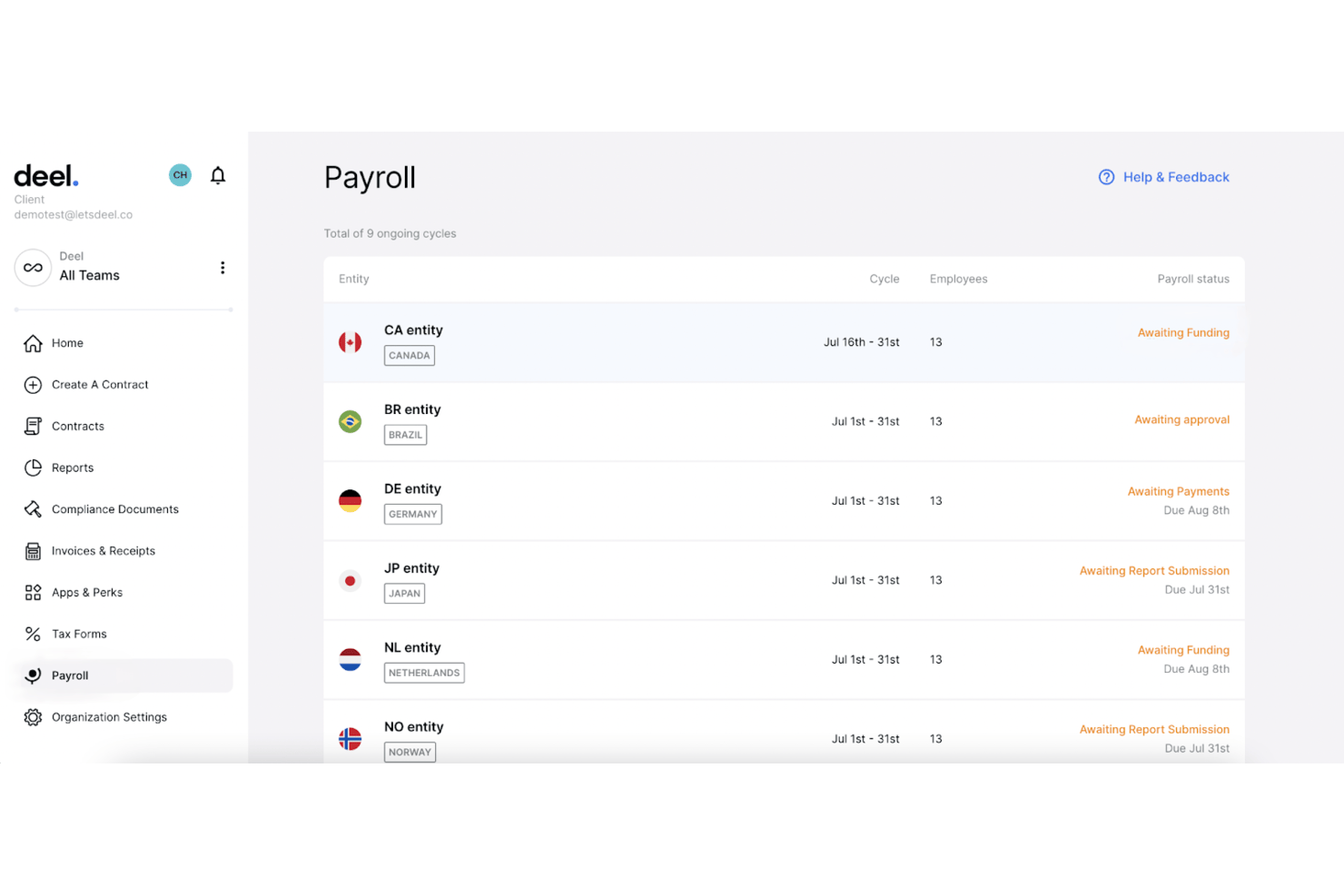
Deel Hire is an applicant tracking and recruiting platform for HR teams at growing, distributed businesses, helping them organize candidate pipelines and connect hiring with broader workforce operations.
Who Is Deel Hire Best For?
Recruiters and HR teams at distributed businesses can use Deel Hire to manage candidate pipelines across international hiring markets.
Why I Picked Deel Hire
I rate Deel Hire for “Best for global coverage beyond US PEO” because it connects candidate pipelines with Deel’s international hiring workflow. Teams can classify hires as employees or contractors, arrange locally compliant contracts, and coordinate onboarding documents and tasks. I see that as a practical fit when recruiting needs extend beyond US PEO coverage.
Deel Hire Key Features
- Job posting: Publish roles to 1,000+ connected job boards in one click.
- AI job creation: Generate job descriptions and compensation ranges with AI assistance.
- AI interview assistant: Record interviews with candidate consent, then create transcripts and summaries.
- Hiring analytics: Track configurable recruiting metrics and sourcing performance.
Deel Hire Integrations
Deel supports six native ATS integrations with Ashby, Greenhouse, Lever, Personio, Workday, and Workable to sync candidate details into Deel for onboarding. Its ATS API is also available for custom integrations.
Pros and Cons
Pros:
- AI screening and interview summaries cut admin
- Connects candidate records directly to onboarding
- Coordinates compliant hiring across 130+ countries
Cons:
- Reviewers request clearer reporting and setup guidance
- ATS requires Deel HRIS as its foundation

Gusto
Best for easy payroll processing
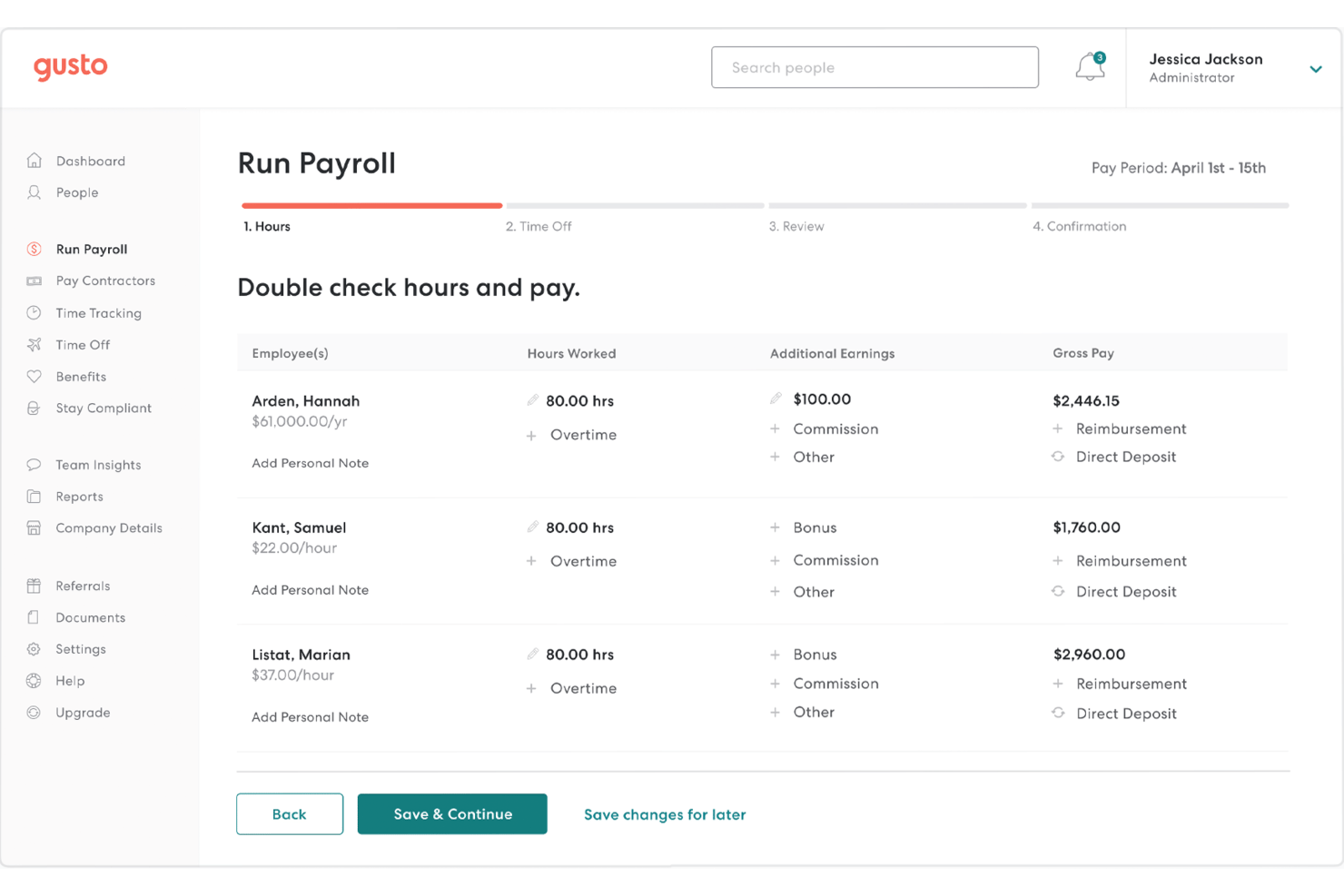
Gusto is an HR platform for small businesses that brings payroll, benefits, and employee administration together to reduce the time spent managing routine people operations.
Who Is Gusto Best For?
Gusto suits small-business owners and HR teams that want to run payroll and manage employee administration in one platform.
Why I Picked Gusto
I picked Gusto as a TriNet alternative for its “Best for easy payroll processing” focus. It calculates wages and deductions, automates payroll tax filings, and supports direct deposit, helping HR handle routine pay runs with fewer manual steps.
Gusto Key Features
- Benefits administration: Manage health insurance, retirement plans, and other employee benefits.
- Employee onboarding: Send offer letters and collect new-hire forms online.
- Time tracking: Record employee hours and review timesheets.
- Employee self-service: Let employees view pay stubs and update personal details.
Gusto Integrations
Gusto’s app directory lists 153 integrations, including QuickBooks Online, QuickBooks Desktop, Xero, Homebase, Deputy, QuickBooks Time, 15Five, Teamtailor, Google Workspace, and Slack. Gusto provides an API for software partners to build integrations, but customers can’t use it to connect their own systems directly.
Pros and Cons
Pros:
- Onboarding, benefits, and payroll share one platform
- Employees access pay stubs through self-service
- Payroll runs and tax filings are automated
Cons:
- Advanced reporting offers limited customization
- Support can drag out tax corrections
New Product Updates from Gusto
Gusto Adds Solo Advisory Tools and Mobile Money Features
Gusto adds Solo S-Corp Advisory Tools and Gusto Money on Mobile for tax guidance, invoicing, and bill payments. These updates help accountants advise solopreneurs and let users manage business finances from their phones. For more information, visit Gusto’s official site.
Namely
Best for user-friendly HR management
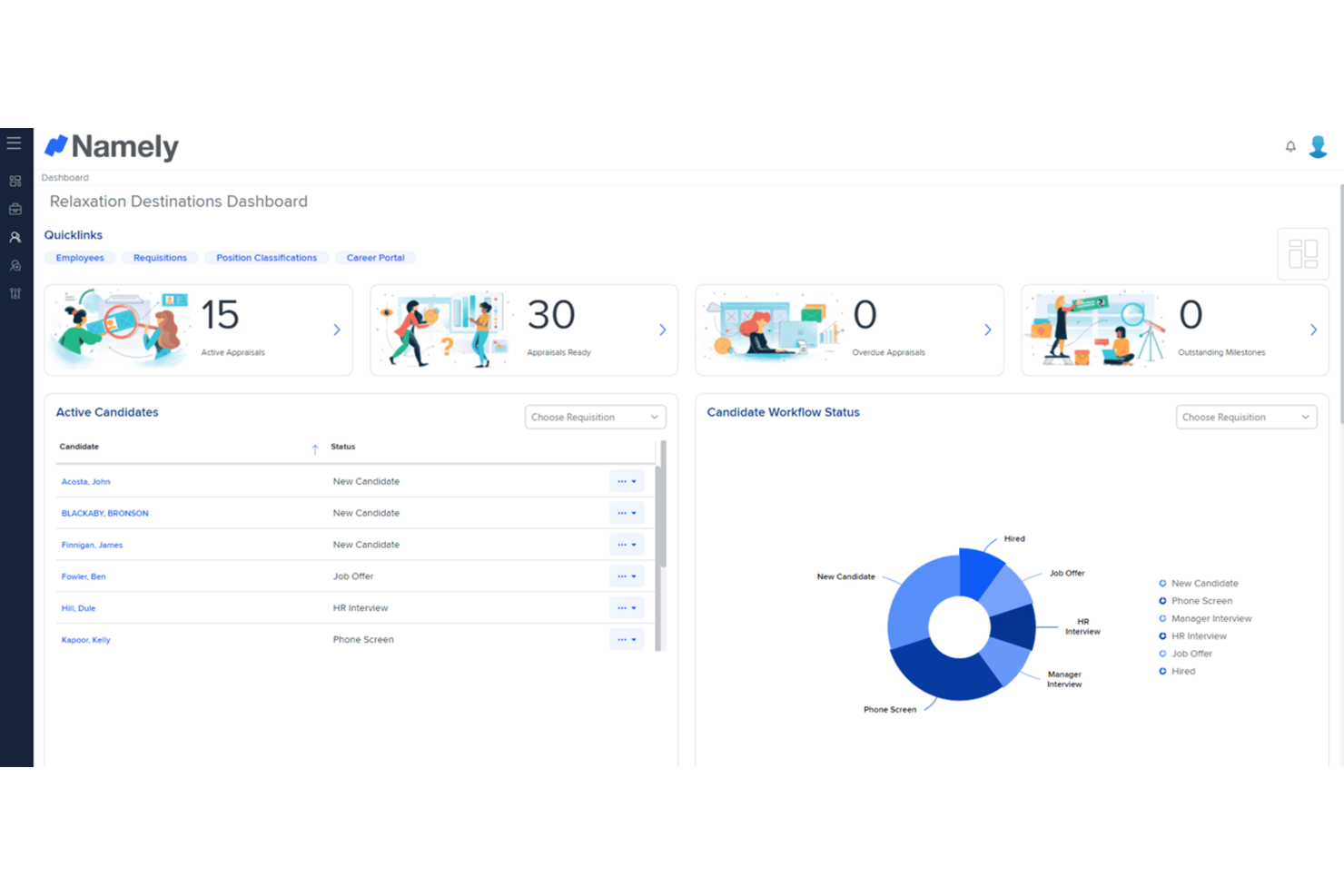
Namely is an HR platform for growing businesses that brings employee records, payroll, benefits, and talent processes together to reduce administrative work across the employee lifecycle.
Who Is Namely Best For?
Namely fits HR teams at growing businesses that want an intuitive platform employees and managers can use for everyday people tasks.
Why I Picked Namely
I picked Namely as a TriNet competitor for user-friendly HR management that connects employee records, payroll, benefits, and talent processes. I like that HR can manage a new hire’s information alongside ongoing people tasks in one platform, while employees and managers can handle everyday HR needs directly.
Namely Key Features
- Time and attendance: Track clock-ins, breaks, overtime, and attendance across web, mobile, or physical clocks.
- Shift scheduling: View team schedules and manage shift swaps, drops, and coverage.
- HR analytics: Build custom reports and view dashboards for metrics like attrition and time off.
- Document e-signatures: Store documents digitally and collect electronic signatures.
Namely Integrations
Namely lists partner integrations with Greenhouse, Lever, JazzHR, Jobvite, Okta, OneLogin, Adobe, Slack, Litmos, and Human Interest. It also offers an open API for custom integrations.
Pros and Cons
Pros:
- Onboarding e-signatures reduce paperwork
- Custom employee profiles support tailored HR records
- Paystubs, PTO, and benefits share one portal
Cons:
- Performance reviews offer limited depth
- Namely Time reports can be cumbersome
Paychex
Best for scalable HR solutions
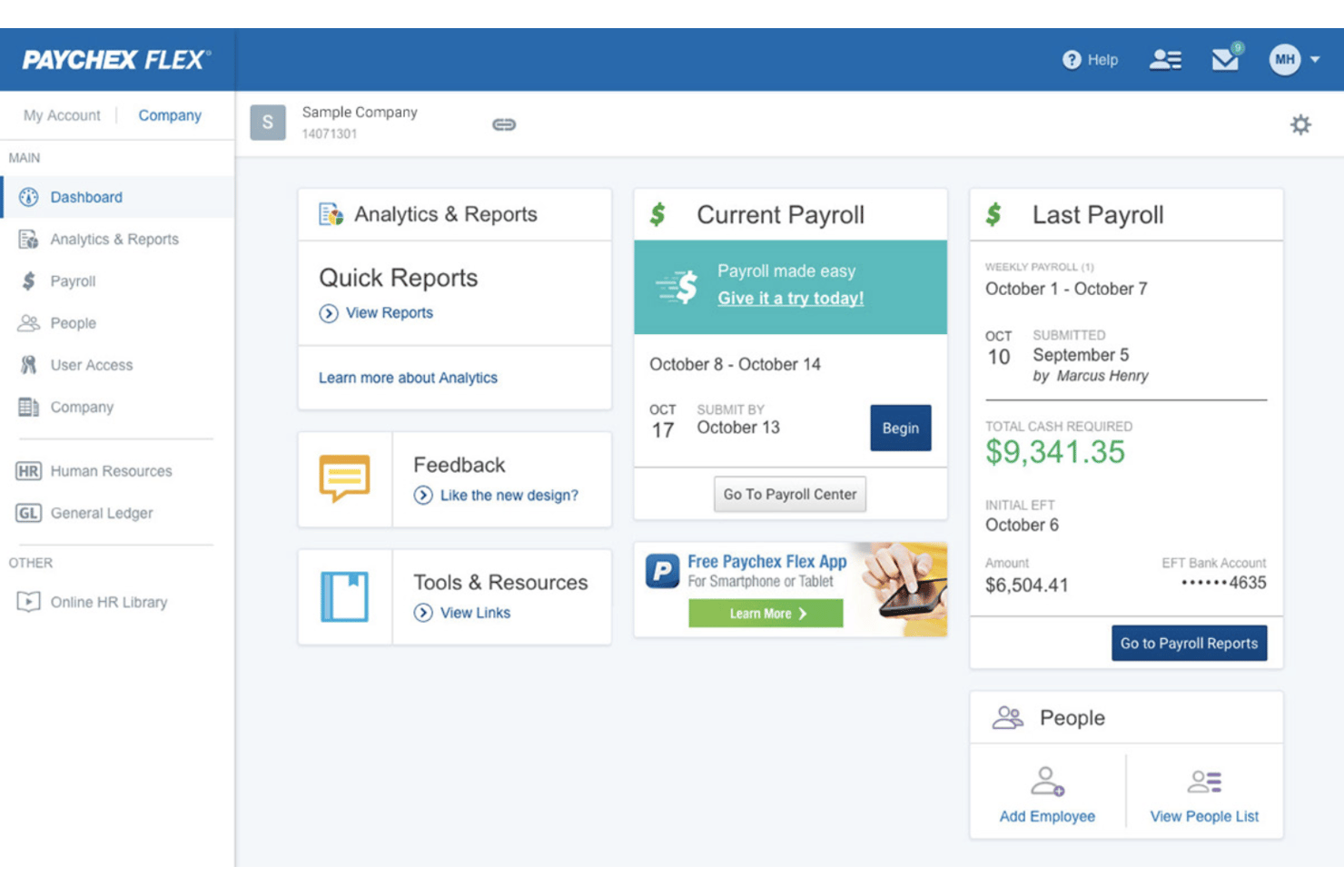
Paychex combines payroll, benefits, and HR services for employers that need help managing employee administration, hiring, and compliance as their teams grow.
Who Is Paychex Best For?
Paychex suits business owners and lean HR teams that want outside support for routine people operations.
Why I Picked Paychex
I picked Paychex as a TriNet alternative because it fits “Best for scalable HR solutions.” I like that it combines payroll, benefits, hiring support, and compliance services, giving HR teams a way to manage employee administration as headcount grows.
Paychex Key Features
- Time and attendance: Record employee hours and manage timekeeping.
- Learning management: Assign and track employee training courses.
- Performance reviews: Set goals and manage review cycles.
- Employee self-service: Let employees access and update HR information.
Paychex Integrations
Paychex Flex lists integrations with QuickBooks Online, Sage Intacct, Xero, Oracle NetSuite, Connecteam, When I Work, 7shifts, Employee Navigator, BambooHR, and Clover, with options available through the Paychex Marketplace. Paychex also provides APIs for custom integrations.
Pros and Cons
Pros:
- Employee self-service covers pay, benefits, and records
- Tax filing supports multiple state jurisdictions
- Payroll and HR functions share one platform
Cons:
- Reporting navigation can complicate routine analysis
- Account representative changes disrupt continuity

Best for simplifying HR processes
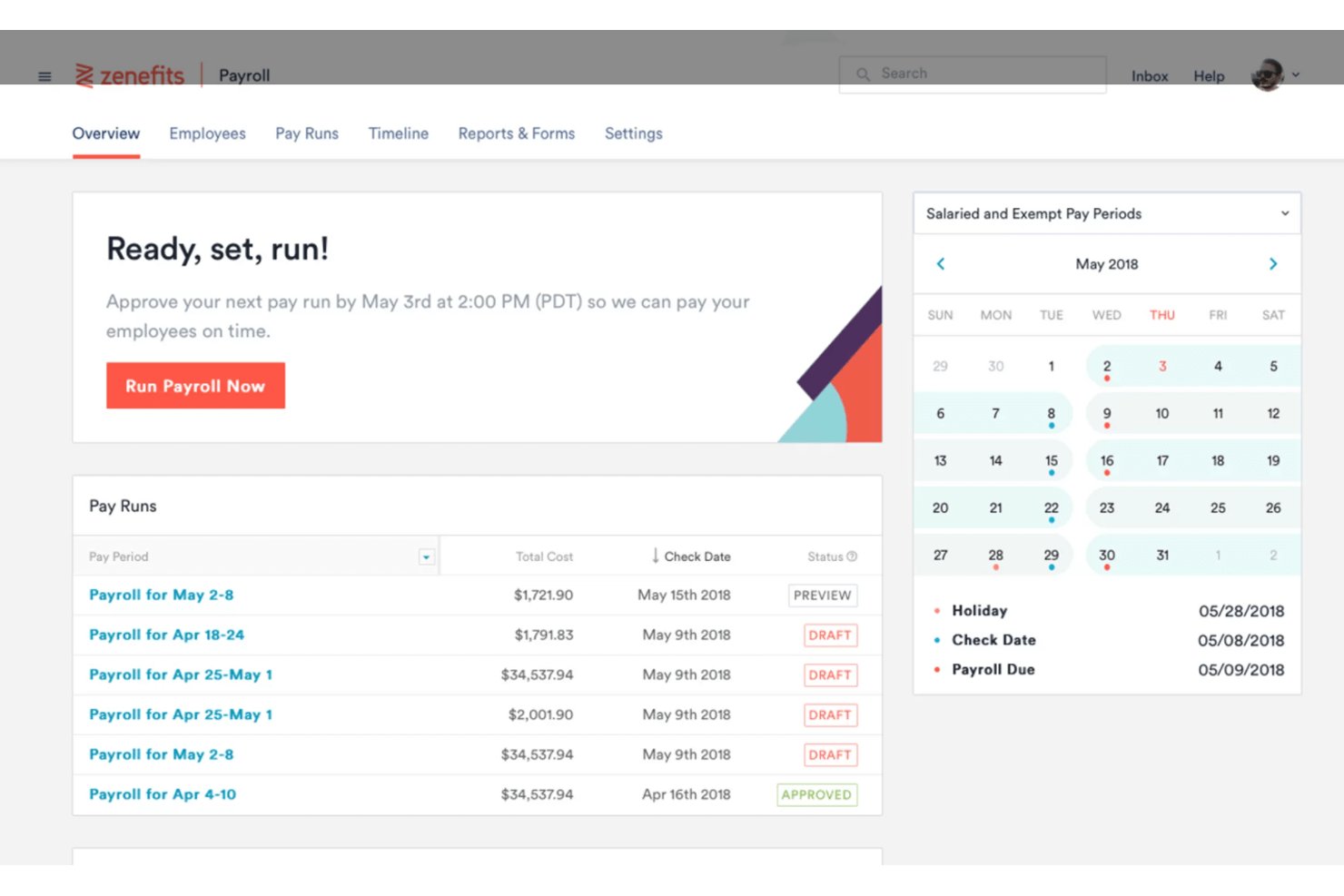
TriNet HR Plus is an HR platform for small and midsize businesses that need support managing payroll, benefits, employee records, and compliance tasks.
Who Is TriNet HR Plus Best For?
TriNet HR Plus suits HR generalists at small and midsize businesses who need a central place to manage routine people operations.
Why I Picked TriNet HR Plus
I picked TriNet HR Plus as a TriNet competitor because it brings payroll, benefits, employee records, and compliance tasks into one HR platform. I like how an HR generalist can manage these routine responsibilities in a central place instead of tracking them across separate systems.
TriNet HR Plus Key Features
- Recruiting: Manage recruiting activity within the HR platform.
- Onboarding: Handle onboarding through the platform.
- Time tracking: Record employee time in the platform.
- Performance management: Manage performance processes through the platform.
TriNet HR Plus Integrations
TriNet HR Plus offers prebuilt marketplace integrations with Salesforce, Slack, Zoom, Vestwell, Voya, Lattice, and Ramp, plus an integration with Employee Navigator for benefits administration. TriNet also provides APIs for custom integrations.
Pros and Cons
Pros:
- HR advisors add guidance beyond software
- Onboarding and PTO tools simplify routine administration
- Payroll, benefits, and HR share one system
Cons:
- Customer support response times vary
- Advanced reporting options are limited
ADP
Best for scalable payroll solutions
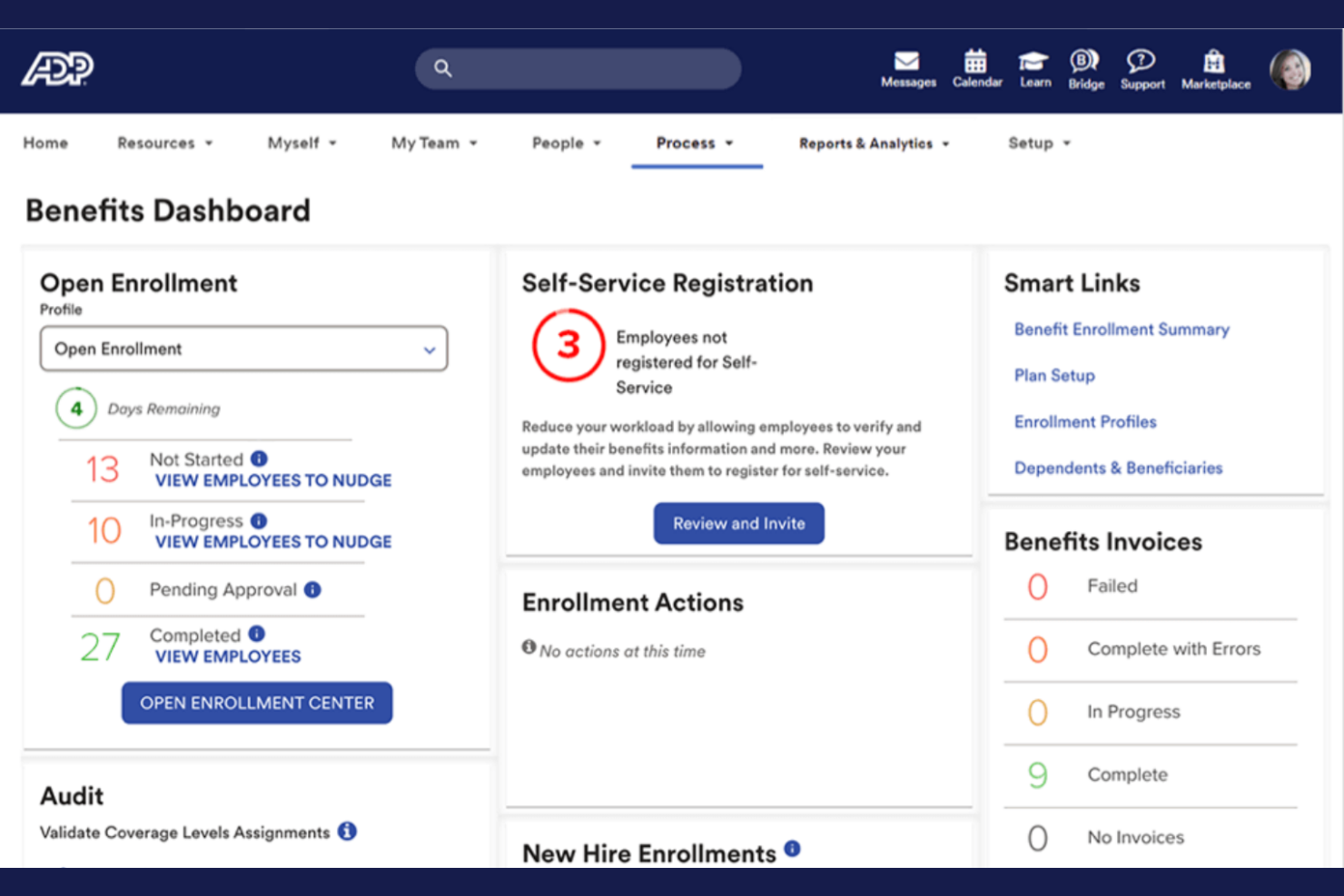
ADP combines recruiting and hiring tools with broader HR and payroll capabilities, helping growing organizations coordinate candidate workflows and people operations.
Who Is ADP Best For?
ADP suits HR teams at expanding organizations that need recruiting workflows within a broader payroll and workforce-management setup.
Why I Picked ADP
I picked ADP as a Best TriNet Competitor because it brings recruiting and hiring workflows into a broader HR and payroll setup. Its “Best for scalable payroll solutions” fit matters when growing organizations need candidate workflows coordinated with ongoing people operations.
ADP Key Features
- Custom career sites: Create branded career sites with a tailored application experience.
- Job posting automation: Automate job descriptions, job postings, and candidate communications.
- Applicant tracking: Track applicants with documentation designed for Canadian compliance requirements.
- Digital onboarding: Provide structured onboarding and share company culture before a new hire’s first day.
ADP Integrations
ADP Marketplace offers recruiting-related integrations, including ClearCo Recruiting and the VidCruiter New Hire Connector for ADP Workforce Now. ADP Recruiting Management APIs support job requisitions, job applications, and recruiting document uploads; custom integrations require a developer agreement and middleware.
Pros and Cons
Pros:
- Digital onboarding reduces prehire paperwork
- Automated job postings and candidate communications
- Recruiting connects with broader payroll workflows
Cons:
- Support responses can be slow or inconsistent
- Recruitment tools feel basic beside dedicated ATSs
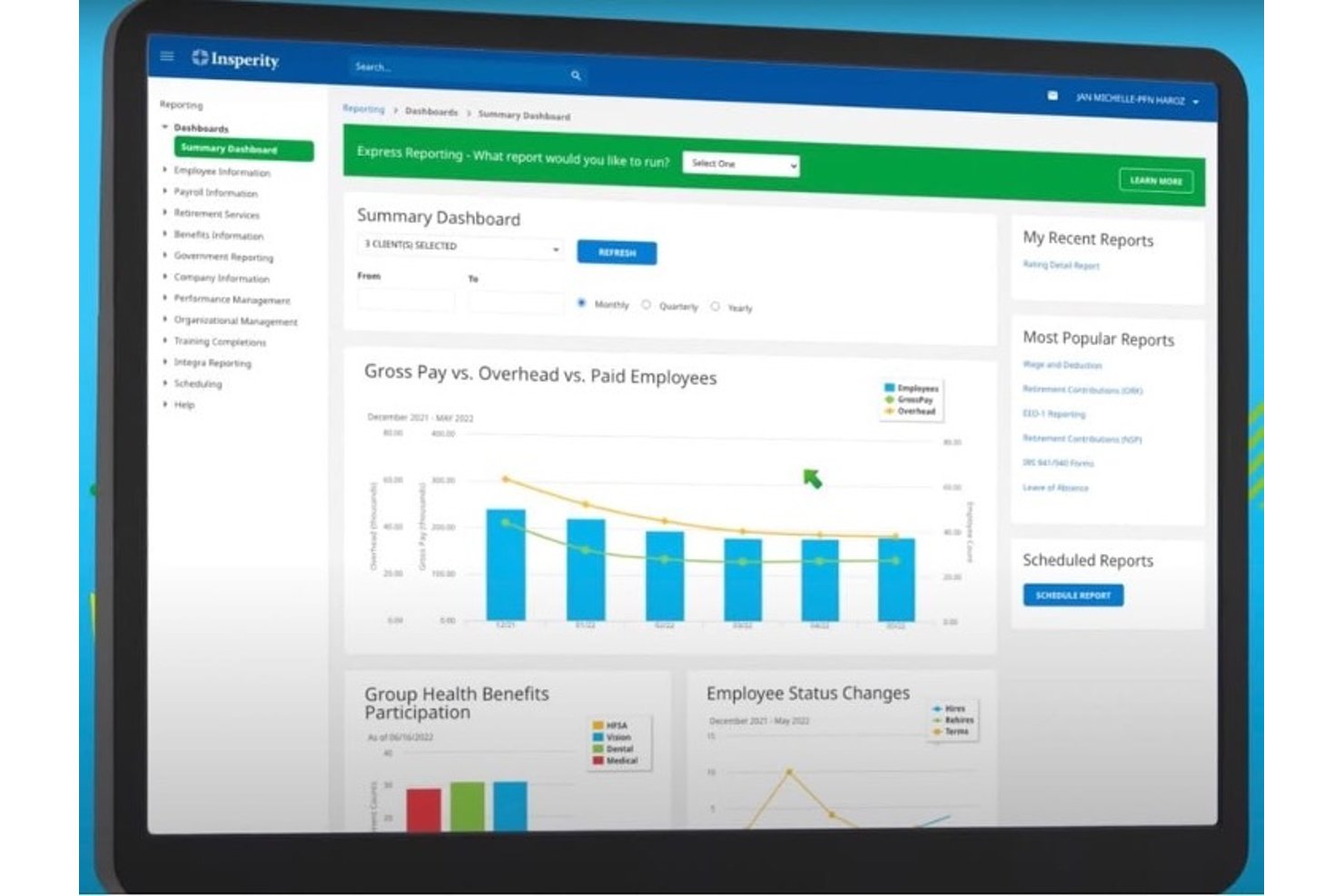
Insperity HCM brings payroll, benefits administration, and HR tools together for businesses that need help managing employee records, workforce processes, and day-to-day people operations.
Who Is Insperity HCM Best For?
Insperity HCM suits businesses that want hands-on HR support alongside payroll and employee administration.
Why I Picked Insperity HCM
I picked Insperity HCM as a TriNet competitor for its “Best for full-service HR” fit. It brings payroll, benefits administration, and HR tools together, with hands-on support for employee records and day-to-day workforce processes.
Insperity HCM Key Features
- Time tracking: Tracks employee time and attendance.
- HR compliance tools: Monitor employment requirements and regulatory changes.
- Workforce reporting: Provides workforce reports and performance analytics.
- Employee self-service: Lets employees view paystubs, benefits information, and time details.
Insperity HCM Integrations
Insperity HCM’s native third-party integrations aren’t clearly documented. Insperity offers REST APIs for custom connections, including onboarding, payroll and tax, and HRIS data exchange.
Pros and Cons
Pros:
- Payroll and benefits managed under one provider
- Helpful guidance on local employment requirements
- Knowledgeable specialists answer payroll and HR questions
Cons:
- Support response times vary by representative
- Payroll and benefits enrollment can run slowly

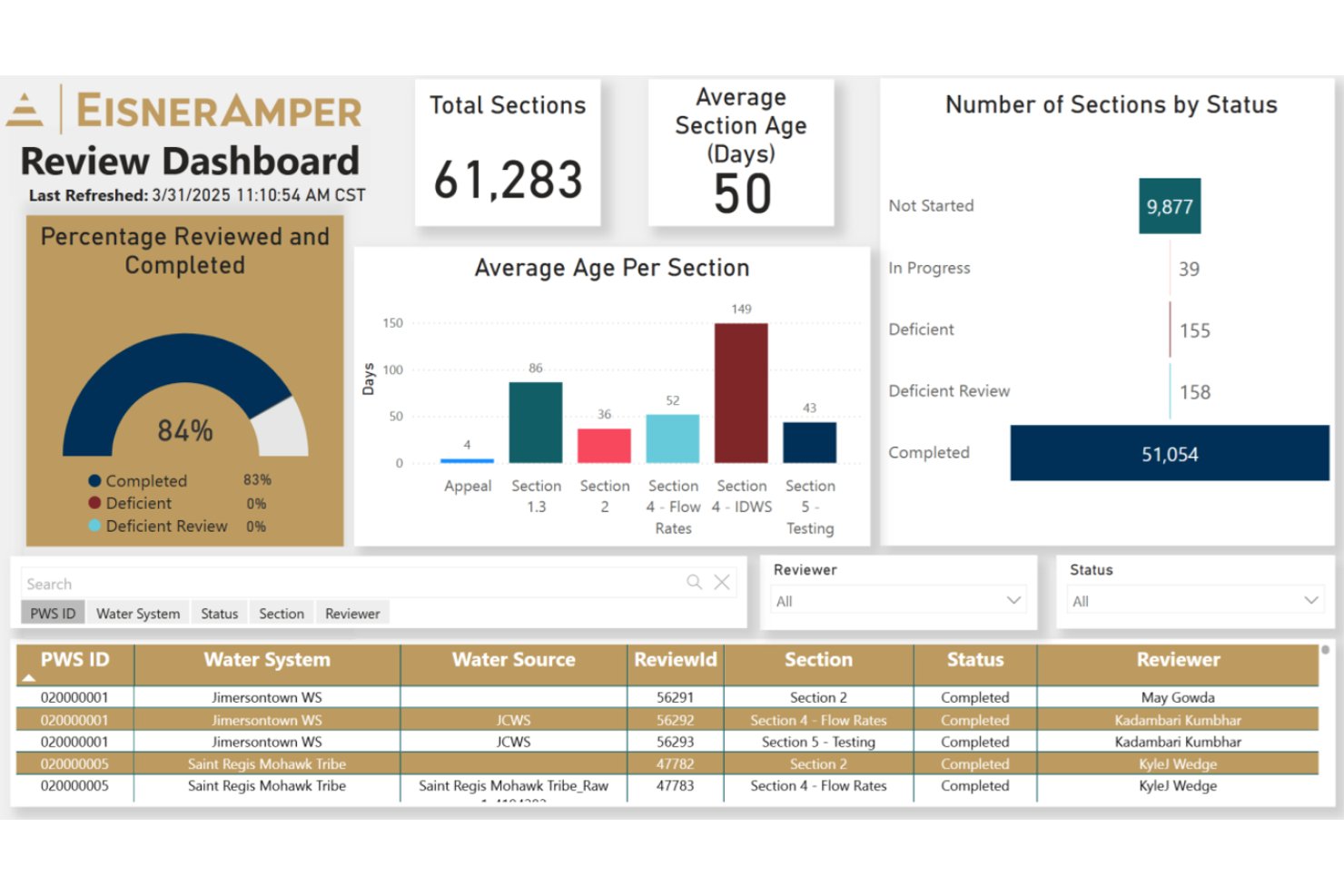
EisnerAmper provides outsourced HR support for organizations that need help managing payroll, benefits, and employee administration without building every HR capability in-house.
Who Is EisnerAmper Best For?
EisnerAmper is a good fit for HR teams at organizations operating across multiple states that need support with payroll compliance.
Why I Picked EisnerAmper
I picked EisnerAmper as a TriNet competitor because it combines multistate payroll execution with ongoing employment-law guidance. It earns the label Best for multistate payroll compliance through services such as policy alignment, handbook creation, labor-law audits, and policy updates. These services can help your team address compliance needs as you hire across state lines.
EisnerAmper Key Features
- Workforce planning: Supports workforce design and organizational restructuring.
- HR technology assessments: Reviews HR processes, systems data, and costs.
- Leadership development: Provides leadership training and culture-focused learning.
- Benefits benchmarking: Uses benchmark data to inform employee benefits.
EisnerAmper Integrations
EisnerAmper’s HR services page doesn’t clearly document native integrations or API access.
Pros and Cons
Pros:
- Clients praise professional, thorough advisory support
- Audits and policy updates support changing requirements
- Combines multistate payroll with employment-law guidance
Cons:
- HR service workflows aren’t outlined in detail
- Less suited to teams needing a PEO
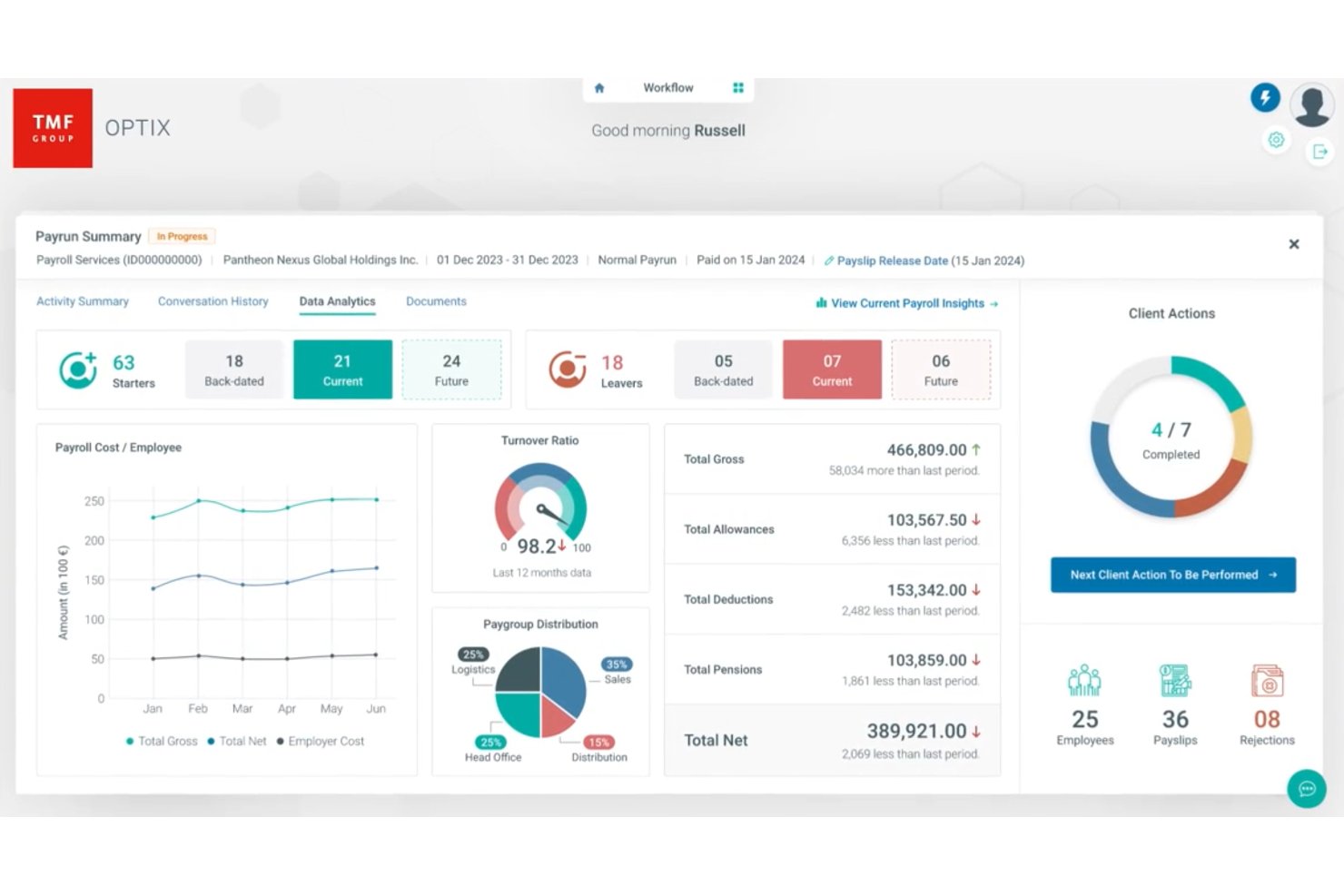
TMF Group provides outsourced HR, payroll, and employment administration for businesses with international teams, helping HR leaders manage local requirements and cross-border workforce operations.
Who Is TMF Group Best For?
TMF Group suits HR and finance teams at multinational businesses that need local expertise to manage employment obligations across jurisdictions.
Why I Picked TMF Group
I picked TMF Group as a TriNet competitor because it’s best for global compliance support. I like its local HR administration, which covers employee registrations, statutory documents, and required reporting, alongside multi-country payroll processing with local experts. That combination helps manage employment obligations and payroll across jurisdictions.
TMF Group Key Features
- Benefit scheme administration: TMF Group manages employee registrations, changes, and provider coordination for non-statutory benefit schemes.
- HRIS data management: Teams can request employee data entry, updates, cleansing, and quality checks in supported HRIS platforms.
- Digital employee files: TMF Group creates and maintains digital employee files with documents for supported HR processes.
- Tier II help desk: The service handles HR queries that a client’s Tier I support team hasn’t resolved.
TMF Group Integrations
TMF Group offers a Workday Global Payroll Connector through Workday Marketplace, with preconfigured, country-specific connectors that transfer worker payroll data to TMF. TMF Optix also supports payroll data submission through API and file transfer.
Pros and Cons
Pros:
- Payroll visibility across jurisdictions
- Handles complex multinational payroll structures
- Strong local payroll and compliance expertise
Cons:
- Interface controls can frustrate routine updates
- Onboarding can lag modern EOR platforms
Andre TriNet-alternativer
Her er noen flere TriNet-alternativer som ikke kom med på kortlisten min, men som likevel er verdt å undersøke:
- Group Management Services
For personalized HR support
- BPion
For CEE market expertise
- The Human Resource Consulting Group
For industry-specific HR services
- Rippling
For integrated workforce management
- RemotePeople
For flexible global hiring
- Multiplier
For localized HR solutions
- BambooHR
For user-friendly HR software
- Papaya Global
For international workforce management
- RemoFirst
For global workforce expansion
- UKG
For HR process automation
- Bambee
For affordable HR management
- Paycor
For integrated HR solutions
- Workday
For enterprise HR solutions
- Homebase
For hourly workforce management
- Employment Hero
For employee benefits management
- factoHR
For payroll and attendance tracking
- Remote
For hiring international talent
- Plane
For remote team operations
- OnPay
For small business payroll


How I Evaluate TriNet Competitors
I split my evaluation into two layers: the baseline every PEO must offer to legally co-employ your staff and run payroll, and the differentiators that separate the right fit from a costly mismatch.
Core Functionality (Table Stakes For This List)
When I'm selecting tools for my list, I rank each one on a scale from 0 (does not offer the functionality) to 5 (excels in this area) for each core functionality listed below. Then, I calculate the tool's total score into a percentage. Each tool needs to achieve a minimum total score of 65% to be considered for inclusion.
- PEO Co-Employment Model: I check whether the vendor actually enters a co-employment relationship with your employees or simply resells HR software without assuming employer responsibilities.
- Full-Service Payroll Processing: Multi-state tax filing, garnishment handling, and year-end reporting all matter here, especially for teams hiring across multiple jurisdictions.
- Group Benefits Administration: I evaluate the breadth and quality of available health plans, retirement options, and ancillary coverage, plus how enrollment and plan changes work day-to-day.
- HR Compliance & Risk Support: From workers' comp and employment practices liability to ACA reporting, I look for active compliance guidance rather than a static document library.
- Employee Onboarding & Records: A solid digital onboarding flow with e-forms, document storage, and a central employee database keeps HR teams from juggling spreadsheets and email chains.
- Time & Workforce Management: I look at how well the platform handles time tracking, PTO requests, and workforce reporting, since these feed directly into payroll accuracy and compliance.
Once I have a list of tools that meet this criteria, I consider what sets each platform apart.
Differentiating Factors (What Sets Vendors Apart)
Here's how I compare and contrast different vendors:
Standout Features
A dedicated HR advisor makes a real difference when you're navigating tricky employee relations issues or building out a handbook from scratch. I also evaluate whether a vendor brings industry-specific expertise, since a tech startup and a nonprofit face very different compliance and benefits priorities. An employee self-service app matters too—your team should be able to pull up pay stubs, swap benefits, or request PTO without pinging HR every time.
Beyond Features
CPEO certification is one of the first things I check—it tells you the vendor meets IRS standards for financial stability and tax liability protection. Pricing structure matters just as much, since a percentage-of-payroll model can quietly balloon costs as salaries rise compared to a flat per-employee fee. I also look at how well the platform connects to your existing accounting and ATS tools, because a PEO that forces manual data re-entry between systems creates exactly the kind of busywork you're paying to eliminate.
Hvorfor se etter et TriNet-alternativ?
Selv om TriNet er et godt valg av HR-programvare, finnes det flere grunner til at enkelte brukere ser etter alternative løsninger. Det kan hende du ser etter et TriNet-alternativ fordi …
- Du trenger mer fleksible prismodeller
- Teamet ditt trenger bransjespesifikke funksjoner
- Du ønsker støtte for internasjonal virksomhet
- Virksomheten din vokser raskt
- Du trenger avanserte analyseverktøy
Hvis noe av dette høres kjent ut, har du kommet til rett sted. Listen min inneholder flere HR-programvarealternativer som passer bedre for team som møter disse utfordringene med TriNet og ser etter alternative løsninger.
Viktige funksjoner i TriNet
Her er noen av de viktigste funksjonene i TriNet, slik at du kan sammenligne hva alternative løsninger tilbyr:
- Lønnsbehandling: Automatiserer lønnsoppgaver for å sikre punktlige og korrekte utbetalinger til teamet ditt.
- Administrasjon av personalgoder: Administrerer programmer for personalgoder, slik at det blir enklere for deg å tilby konkurransedyktige pakker.
- Etterlevelse: Hjelper teamet ditt med å overholde arbeidsrettslige lover og forskrifter, slik at risikoen reduseres.
- Tidsregistrering: Overvåker de ansattes arbeidstid og oppmøte for å effektivisere lønnsbehandlingen og forbedre nøyaktigheten.
- Introduksjon av nyansatte: Forenkler introduksjonsprosessen med automatiserte arbeidsflyter og dokumenthåndtering.
- Analyse og rapportering: Gir innsikt i HR-måledata, slik at du kan ta informerte beslutninger.
- Dokumenthåndtering: Organiserer og lagrer personalopplysninger på en sikker måte, slik at de er lett tilgjengelige og i samsvar med regelverket.
- Mobil tilgang: Få tilgang til HR-funksjoner på farten med apper for Apple og Android.
- Prestasjonsstyring: Følger opp og evaluerer de ansattes prestasjoner for å støtte vekst og utvikling.
- Rådgivningstjenester: Tilbyr ekspertråd innen HR for å hjelpe deg med å håndtere komplekse HR-utfordringer.