

Com tantos softwares de comunicação diferentes disponíveis, é difícil perceber qual é o mais adequado para a sua empresa. Sabe que pretende uma ferramenta que faça a ponte entre as equipas e facilite a comunicação em grupo, mas precisa de descobrir qual é a melhor opção. Nesta publicação, vou ajudá-lo a fazer uma escolha simples, partilhando a minha perspetiva sobre os melhores softwares e aplicações de comunicação para enviar mensagens, partilhar ficheiros e realizar reuniões virtuais com colegas que trabalham remotamente, a partir de qualquer lugar.
Why Trust Our Software Recommendations
6,700+
Reviews
20
Industry experts
16+
Evaluation factors
14
Years
Our team has been testing and reviewing software since 2012. As HR experts ourselves, we know how difficult—and important—it is to choose the right software.
For this guide, we evaluated tools using hands-on testing and independent research, scoring tools using our selection criteria. We also draw on insights from industry thought leaders and practicing HR experts.
Our reviews reflect our human editorial judgment, not a sales pitch.
Expert reviewers:
- Phil GrayCOO
 Kim BehnkeHR Tech Editor & Analyst
 Josh BarkerPeople Ops Manager

Tabela comparativa: software de comunicação
Esta tabela comparativa resume os principais detalhes de cada uma das minhas principais escolhas de software de comunicação.
| Tool | Best For | Trial Info | Price | ||
|---|---|---|---|---|---|
| 1 | Best for overseeing field-based operations | Free plan available | From $29/month (billed annually) | Website | |
| 2 | Best for enterprise-wide intranet communications | Free demo available | Pricing upon request | Website | |
| 3 | Best for remote teams | Free plan available | From $7.25/user/month (billed annually) | Website | |
| 4 | Best for recognition-led internal communications | Not available | Pricing upon request | Website | |
| 5 | Best for connecting growing teams and SMEs | Free demo available | Pricing upon request | Website | |
| 6 | Best video conferencing communication software | Free plan available | From $13.33/user/month (billed annually) | Website | |
| 7 | Best for fostering employee engagement | Free demo available | Pricing upon request | Website | |
| 8 | Best for instant messaging | 30-day free trial + free demo available | From $2.50/user/month | Website | |
| 9 | Best emergency communication software | Free demo available | Pricing upon request | Website | |
| 10 | Best for assessing employee sentiment | Free demo available | Pricing upon request | Website |


Visão geral dos 10 melhores softwares de comunicação
Nesta secção, apresentarei uma visão geral detalhada das 10 principais soluções de software de comunicação. Destacarei as suas principais funcionalidades e vantagens e explicarei como podem melhorar a comunicação interna e o envolvimento dos colaboradores.
 Best for overseeing field-based operations
- Free plan available
- From $29/month (billed annually)
Visit WebsiteCustomer Rating:4.6/5
Using Connecteam, you can communicate with your non-desk workforce through 1:1 chats, team chats, or company-wide broadcasts. Connecteam is an all-in-one employee management application designed to streamline operations, enhance communication, and address HR needs for mobile-first businesses. It includes a personalized company news feed, secure instant messaging, employee surveys, and an employee-facing knowledge base.
Why I picked Connecteam: I selected Connecteam due to its comprehensive features that facilitate real-time oversight of operations, a characteristic that sets it apart from other tools in the market. Connecteam offers a unique blend of communication, operation, and training tools all in one place, which is not commonly found in other software.
In addition to communicating directly with your employees or teams, you can also use Connecteam for time tracking, shift management, and task monitoring, making it an ideal solution for businesses seeking greater oversight of mobile or field-based operations.
Connecteam Standout Features & Integrations
Standout features for Connecteam include their communication and task management tools. Managers can communicate directly with employees through their secure instant messaging, then assign them follow-up tasks directly within the app, including additional comments and attachments. Employees can mark them as complete as they work, giving their managers an up-to-date progress report as they go about their tasks.
Other useful features include a dedicated employee communication channel with targeted updates, team engagement features, a digital suggestion box to collect employee feedback, a searchable company directory, and an organizational chart.
Integrations include Paychex, Xero, Gusto, QuickBooks Payroll (online + desktop), Google Calendar and others.
Pros and Cons
Pros:
- Task management features help improve productivity and accountability
- All features are mobile-accessible
- Intuitive and user-friendly interface
Cons:
- Primarily designed for mobile devices, which may be a limitation for users who prefer desktop-based solutions
- Limited offline functionalities
Learn more about Connecteam: Best for enterprise-wide intranet communications
- Free demo available
- Pricing upon request
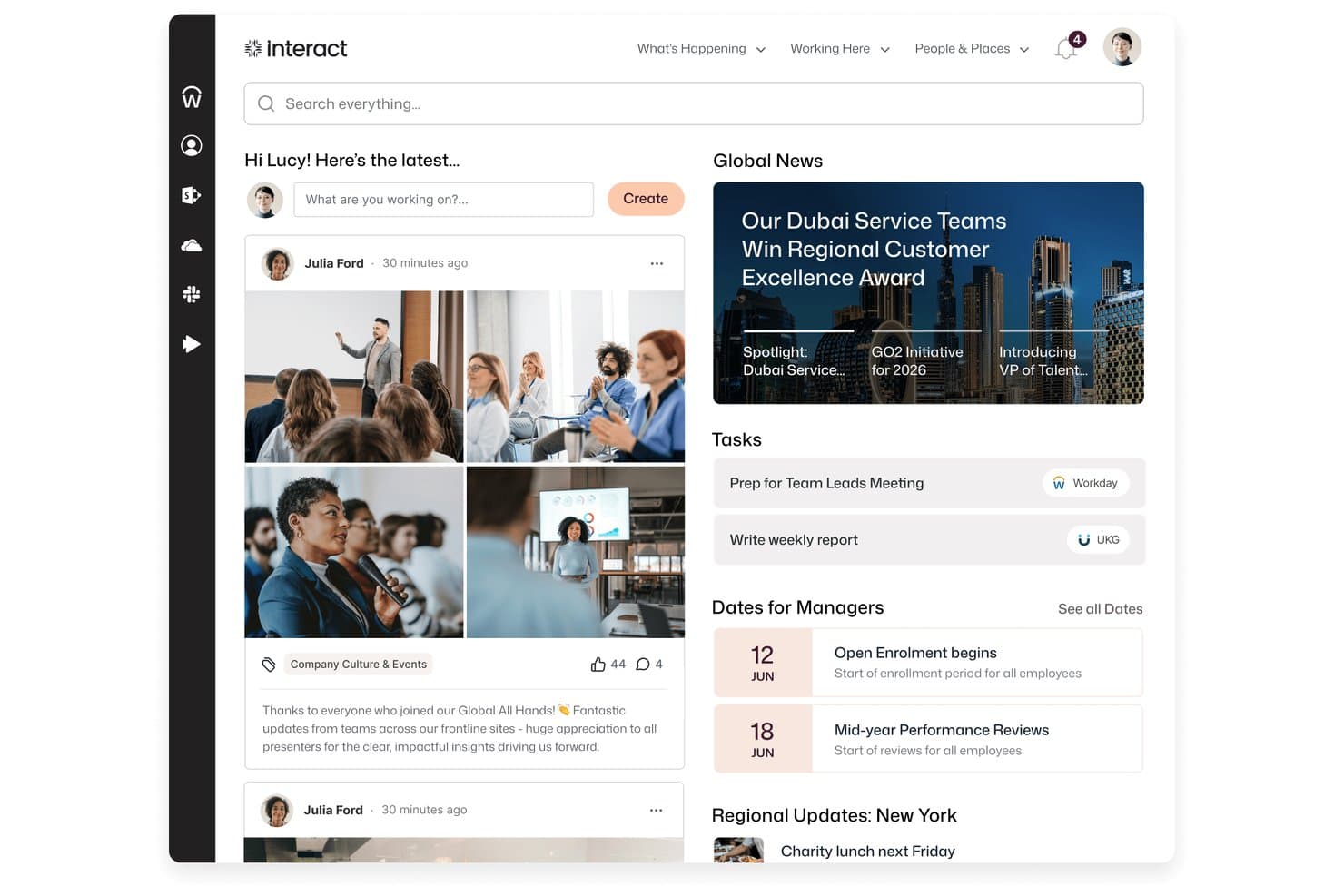
Interact Software centralizes news, tasks, and social updates in one intranet home screen. Interact Software is an enterprise intranet and employee communications platform that brings together internal news, targeted broadcasts, knowledge management, mobile messaging, and AI-assisted content tools in one hub.
Who Is Interact Software Best For?
Interact Software is a strong fit for large enterprises that need to reach a dispersed or frontline workforce through a centralized, branded intranet hub.
Why I Picked Interact Software
I picked Interact Software as one of the best because it's built specifically for organizations that need to reach every employee, including deskless and frontline workers, through a single branded hub. I particularly like how its Broadcasts feature lets you push one urgent message across SMS, email, an intranet-blocking notification, and digital signage simultaneously, with acknowledgement tracking so you know exactly who's read it. Cue AI adds another layer by handling tasks like approvals and ticket creation directly through connected systems.
Interact Software Key Features
- Personalized homepages: Tailors each employee's intranet homepage based on their role, location, and permissions.
- Pulse surveys and polls: Lets teams collect employee feedback and measure sentiment directly within the platform.
- AI-powered auto-translation: Automatically translates pages, comments, and notifications so communications reach employees in their preferred language.
- Digital signage publishing: Pushes targeted content and alerts to shared workplace screens for employees without desk access.
Interact Software Integrations
Interact Software supports over 100 integrations, including Microsoft 365, Microsoft Teams, Slack, Google Workspace, ServiceNow, Workday, UKG, and SuccessFactors. Its open REST API and webhooks support custom connections and workflow automation.
Pros and Cons
Pros:
- Mobile intranet access serves frontline employees
- Reviewers praise responsive setup and ongoing support
- Targeted broadcasts reach dispersed employee groups
Cons:
- Reviewers report clunky page editing and administration
- No built-in voice or video calling
Learn more about Interact Software: Best for remote teams
- Free plan available
- From $7.25/user/month (billed annually)
Visit WebsiteCustomer Rating:4.6/5
You can create custom teams and channels on Slack to organize conversations. Slack is an all-in-one platform that facilitates communication and collaboration among team members.
Why I picked Slack: I included Slack because I really like its channels feature. It helps me stay on top of all my work-related tasks and activities in an organized way. With channels, I can easily communicate with others in different departments, offices, and even other companies.
I also appreciate how customizable channels are, as they allow relevant people and information to be grouped together in one place. Whether I need to link two organizations through a shared channel or separate teams and projects, channels make communication clear, efficient, and organized. I also love how channels act as a dynamic archive, making accessing past discussions and identifying important messages incredibly easy.
Slack Standout Features and Integrations:
Some of the standout features of this platform include group messaging, allowing for discussions between multiple team members simultaneously. Additionally, the file-sharing function makes it simple for team members to share important docs and files with instant notifications. When face-to-face communication is necessary, the video conferencing feature allows teams to hold online meetings and collaborate in real-time.
Integrations include Google Drive, Trello, Asana, Zoom, Salesforce, Jira, GitHub, Dropbox, and Microsoft Teams. You can also connect Slack to a paid Zapier account to build additional integrations.
Pros and Cons
Pros:
- Mobile app
- Includes video conferencing
- Easy to use
Cons:
- Can be expensive for large teams
- Limited features on the free plan
Learn more about Slack: Best for recognition-led internal communications
- Not available
- Pricing upon request
Visit WebsiteCustomer Rating:4.7/5
Nectar tracks email open rates and channel distribution in one view. Nectar is an internal communications platform that combines multi-channel messaging, employee recognition, surveys, and engagement analytics into one unified workspace.
Who Is Nectar Best For?
Nectar suits employee experience leads and internal comms teams who want recognition and company-wide messaging on one platform.
Why I Picked Nectar
I picked Nectar as one of the best because recognition and internal comms live on the same platform, which means a manager shoutout and a company-wide announcement share one employee record. I love how Comms lets you send across email, SMS, WhatsApp, Slack, and Teams from a single workflow, with automatic fallback from SMS to WhatsApp for international workers. Nectar Signals then scores each team's engagement health based on that messaging and recognition activity, so you can see where communication is actually landing.
Nectar Key Features
- Dynamic audience lists: HRIS-synced lists update automatically as employees join, move, or leave, so your segments stay accurate without manual upkeep.
- Digital signage builder: A drag-and-drop editor lets you create 16:9 slides, group them into location-based collections, and display them on existing signage players at no extra cost.
- Flows automation: Pre-built drip sequences with delays and branches trigger from HRIS events, hire dates, or third-party tools like HubSpot, Salesforce, and Zapier.
- SafeTalk anonymous chat: A confidential two-way messaging channel lets HR follow up privately with survey respondents without exposing their identity.
Nectar Integrations
Nectar offers integrations with ADP, BambooHR, Workday, UKG, Slack, Microsoft Teams, HubSpot, Salesforce, Google Sheets, and Zapier. It also supports SFTP, Merge, and Open API connections for HRIS data and custom integrations.
Pros and Cons
Pros:
- Combines announcements with recognition insights
- Targets auto-updating employee segments
- Reaches deskless workers beyond email
Cons:
- Analytics remain shallow for enterprises
- Announcement replies lack threaded discussions
Learn more about Nectar: 5Best for connecting growing teams and SMEs
Hub
- Free demo available
- Pricing upon request
Visit WebsiteCustomer Rating:4.5/5
Hub's intranet software keeps your team connected, engaged, and informed across various devices. Hub is an advanced, employee communication software designed for growing teams and SMEs to enhance connectivity, internal communication, and employee engagement.
Why I picked Hub: Hub supports two-way communication and collaboration through feedback and group forums. You can target your communication for various audiences through intelligent tagging and tailored emails. I also like that it includes tools for communication and insights around employee well-being through forms, surveys, and polls. Additionally, Hub facilitates resource sharing and collaboration across multiple locations in a secure workspace and includes features such as likes, comments, and usage reports.
Hub is fully mobile responsive, allowing remote access to all features, and includes continuous upgrades based on customer feedback to ensure it remains a cutting-edge solution for internal corporate communications.
Another thing that stands out to me is the fact that Hub champions sustainability and will plant 50 trees for each new HUB sold, with a focus on community-based reforestation projects that support communities affected by climate change. They also offer SME and nonprofit discounts and don't charge setup fees, making it a good solution for smaller to medium-sized businesses.
Hub Standout Features & Integrations
Standout features include access to all areas with no hidden costs or add-ons, free upgrades ensuring users always have the latest version, and a user-friendly interface designed for simplicity and ease of navigation.
Hub can be set up rapidly, often within 48 hours, providing a fully branded intranet experience.
Integrations include Single Sign-On, Gmail and Microsoft Outlook email and calendar accounts, Google Drive, Microsoft OneDrive, SharePoint, third-party feeds and HTML widgets, and Enabler email marketing software.
Pros and Cons
Pros:
- Advanced AI analytics
- Customizable micro-applications
- Comprehensive communication suite
Cons:
- May not be cost effective for small biz
- Slight learning curve
Learn more about Hub: 6Best video conferencing communication software
Zoom
- Free plan available
- From $13.33/user/month (billed annually)
Visit WebsiteCustomer Rating:5/5
Zoom’s video and audio conferencing experience makes it feel like you're in the same room as the other person. Zoom is a video conferencing platform for online video conferences, webinars, and live chats through their desktop or mobile app.
Why I picked Zoom: I chose Zoom because of features that help me in a meeting. The virtual background that lets me place an image or video behind me helps keep my real location hidden while still looking professional. Another cool thing about Zoom is its translated captions feature, which makes it easy for employees who speak different languages to communicate without the need for an interpreter or translation services.
Zoom Standout Features and Integrations:
Zoom stands out for its high-quality video and audio calling, ensuring clear communication in every interaction. Users can interact more with features like screen sharing and hand-raising reactions. Breakout rooms facilitate focused small group discussions, while the polling and Q&A feature enhances participant engagement. Additionally, its phone call capabilities, complete with voicemail, call forwarding, and recording, make it a comprehensive communication tool.
Integrations include Salesforce, HubSpot, Slack, Microsoft Teams, Google Drive, Dropbox Box, Trello, Asana, and Fireflies.ai.
Pros and Cons
Pros:
- Wide range of integrations
- User-friendly interface
- High-quality video
Cons:
- Call quality is sometimes low
- Meeting time is limited in the free version
Learn more about Zoom: Best for fostering employee engagement
- Free demo available
- Pricing upon request
Visit WebsiteCustomer Rating:4.8/5
The search feature in Workvivo enables employees to find information in articles, messages, QAs, and anywhere else their query shows up. Workvivo is an employee experience platform that combines communication features and employee engagement tools within a social intranet-style platform. The platform offers features that support information sharing, collaboration, and recognition to give every employee a voice.
Why I picked Workvivo: I included Workvivo because it emphasizes employee communication and engagement through its social intranet capabilities. What makes Workvivo stand out to me is its ability to gather and monitor workplace insights in dashboards and its versatility in uniting and engaging employees across various industries. The platform supports employee engagement with its comprehensive approach to communication, culture amplification, and support for remote working, which are essential for nurturing a connected and engaged workforce.
Workvivo Standout Features & Integrations:
Some of Workvivo's standout features include community groups for collaboration and knowledge-sharing, a social intranet to centralize messaging, a documents portal, and inclusive communication channels for leadership and team member interactions.
Additionally, the platform provides workplace insights through analytics and ensures security for data and communication while allowing users to personalize their experience through preferences and cookie consent management.
Integrations include Google Drive, Microsoft Teams, Salesforce, Slack, Workday, Zoom, and others.
Pros and Cons
Pros:
- Platform offers multiple features to support employee engagement
- Helpful customer support resources
- Supports multiple spaces for departments and topics
Cons:
- Has a bit of a learning curve to master
- Mobile app has limited functionality
 Best for instant messaging
- 30-day free trial + free demo available
- From $2.50/user/month
Visit WebsiteCustomer Rating:4.8/5
With Troop Messenger's One-on-One Messaging, co-workers can have direct and concise chats, making sharing work details easy. Troop Messenger is a real-time messenger application that helps businesses manage team collaboration and communication.
Why I picked Troop Messenger: I selected Troop Messenger because of its burnout function, which provides an exclusive method for private chatting. You can set a timer, and once the time is up the message disappears. This is a clever way to have a discussion without any evidence left behind. Another exceptional feature is forkout, which lets you send a single message or attachment to numerous people without creating a group.
Troop Messenger Standout Features and Integrations:
One standout feature of Troop Messenger is the "info" function, which provides information on each message sent and received, such as the time it was read and delivered. The "recall" feature allows users to delete a message on both the sender and receiver's end, but only within ten minutes of sending it.
Additionally, messages can be marked as important, and the "Respond Later" option allows users to set a reminder to reply when they have more available time.
Integrations through Zapier include Asana, GitHub, Gmail, Zoom, Google Calendar, Freshdesk, HubSpot, ClickUp, and Microsoft Outlook.
Pros and Cons
Pros:
- Supports multiple languages
- Includes self-message
- Secure
Cons:
- Chat filters hidden
- No built-in meeting recording
Learn more about Troop Messenger: Best emergency communication software
- Free demo available
- Pricing upon request
Visit WebsiteCustomer Rating:4.7/5
AlertMedia’s two-way communication system allows your people to confirm their safety or provide details of critical events in progress. AlertMedia is an emergency communication and mass notification software that helps companies notify employees of emergencies and ensures the right people receive critical information when needed.
Why I picked AlertMedia: I chose AlertMedia because of its unwavering dedication to keeping employees safe. This all-inclusive solution offers mass notifications and a 24/7 monitoring team for added assurance. The Employee Safety Monitoring App sets AlertMedia apart because it turns a standard mobile phone into a powerful safety device with one-touch access to law enforcement. Another important factor for me was the app's capability to read and respond to urgent organizational messages.
AlertMedia Standout Features and Integrations:
AlertMedia provides standout features that improve communication in both directions, enabling individuals to confirm their well-being or share information about current events. Users can effortlessly send notifications through various channels. AlertMedia also offers pre-made message templates that ensure consistent responses during emergencies, saving valuable time.
Integrations are available with the Fusion Framework System.
Pros and Cons
Pros:
- Responsive customer support
- GDPR and CCPA-compliant system
- Real-time notifications
Cons:
- Pricing not transparent
- No free trial
Learn more about AlertMedia: 10Best for assessing employee sentiment
Simpplr
- Free demo available
- Pricing upon request
Visit WebsiteCustomer Rating:4.8/5
With Simpplr's prescriptive analytics feature, you can visualize data insights and monitor employee engagement metrics. Simpplr is an employee communication and engagement platform designed to streamline internal communications within organizations.
Why I picked Simpplr: I chose Simmplr for its prescriptive analytics feature, which uses AI-driven data to provide useful insights into employee engagement. It combines usage data, sentiment analysis, behavioral signals, and feedback to offer organizations tailored recommendations for future actions. Additionally, Simpplr includes a change management tool that assists leaders in understanding employee sentiment toward organizational changes.
Simpplr Standout Features and Integrations:
Simpplr has a smart search function powered by AI that assists users in finding the most suitable results. The platform has a simple and intuitive interface that even non-technical people can easily manage, allowing them to organize properties throughout their organization. With content delivery customization, each employee can receive information that is relevant to their needs.
Integrations include BambooHR, Dropbox, Google Drive, Microsoft 365, Microsoft Teams, Okta, Salesforce, SharePoint/OneDrive, Slack, and Confluence.
Pros and Cons
Pros:
- Mobile app
- Supportive implementation team
- Intuitive interface
Cons:
- Cannot create hidden pages
- Custom quote required for precise cost
Outras opções
Eis algumas outras ferramentas de comunicação que não entraram nas minhas 10 principais, mas que ainda vale a pena considerar:
- 11FlockBest for communicating with clients
- 12GoToConnectBest virtual phone communication system
- 13MyHubBest for mobile intranet access
- 14Microsoft Teams - Frontline WorkforceBest for frontline workers
- 15AtlasBest for cohesive project communication
- 16MattermostBest secure communication software
- 17HubEngageBest multi-channel communications software
- 18AsanaBest asynchronous team communication tool
- 19HomebaseBest for communicating with hourly employees
- 20WorkmatesBest for sending employees notifications
How I Evaluate Communications Software
I split my evaluation into baseline capabilities—like multi-channel reach and HRIS sync—and differentiators that matter when you're communicating with a global, deskless workforce.
Core Functionality (Table Stakes For This List)
When I'm selecting tools for my list, I rank each one on a scale from 0 (does not offer the functionality) to 5 (excels in this area) for each core functionality listed below. Then, I calculate the tool's total score into a percentage. Each tool needs to achieve a minimum total score of 65% to be considered for inclusion.
- Multi-Channel Messaging: I look at how many delivery channels a platform supports—email, SMS, push notifications, in-app, and desktop—and whether they're managed from one send flow.
- Audience Segmentation: The ability to target messages by department, location, or role matters, especially when HR needs to reach warehouse staff separately from office teams.
- Two-Way Communication: I evaluate whether employees can respond through comments, polls, or surveys, since one-way broadcasts don't give HR teams the feedback loop they need.
- Engagement Analytics: Dashboards that show open rates, read receipts, and click-throughs at the segment level help me gauge whether a tool gives communicators real visibility into reach.
- HRIS Integration: Connecting with systems like Workday, BambooHR, or ADP to auto-sync employee data and org structures saves HR teams from manually maintaining distribution lists.
- Mobile Accessibility: I check for a dedicated mobile app with push notifications, since reaching frontline and deskless workers who lack corporate email depends entirely on mobile access.
Once I have a list of tools that meet the criteria, I consider what sets each platform apart.
Differentiating Factors (What Sets Vendors Apart)
Here's how I compare and contrast different vendors:
Standout Features
Multilingual support is a big deal for organizations with a global workforce—I look for platforms that auto-translate messages so HR doesn't need to manually create versions for each region. Crisis communication mode is another feature I evaluate closely, since urgent situations like safety incidents require mandatory-read acknowledgments and rapid delivery. Campaign scheduling with time-zone-aware sends also matters when you're coordinating an open enrollment rollout across multiple offices.
Beyond Features
Compliance and security matter a lot when employee data flows between systems—I check for SOC 2 Type II certification, SSO/SAML support, and role-based access controls, especially for organizations in regulated industries like healthcare. Implementation support is another factor I evaluate, since rolling out a new communications platform to thousands of employees requires adoption playbooks and change management guidance. Pricing transparency also counts—I look at whether per-employee costs are clear and whether premium channels like SMS are included or billed separately.
Como escolher o melhor software de comunicação
É fácil perder-se em listas extensas de funcionalidades e estruturas de preços complexas. Para o ajudar a manter o foco enquanto percorre o seu processo específico de seleção de software, eis uma lista de fatores a ter em conta:
| Fator | O que deve considerar |
|---|---|
| FatorEscalabilidade | O que deve considerar A ferramenta consegue acompanhar o crescimento do número de colaboradores e da estrutura da sua empresa? Procure níveis de utilizadores e funções de administrador flexíveis. Evite limites rígidos de lugares que obriguem a fazer atualizações antecipadas. |
| FatorIntegrações | O que deve considerarIntegra-se com o seu HRIS, calendário ou ferramentas de gestão de projetos? Integrações deficientes criam trabalho duplicado e fazem perder mensagens. Verifique se existem APIs nativas ou personalizadas. |
| FatorPersonalização | O que deve considerarPode adaptar a marca, as notificações e os fluxos de trabalho? As equipas de RH precisam frequentemente de fluxos de aprovação específicos ou modelos de mensagens. Evite ferramentas com limitações rígidas que não têm em conta as necessidades específicas de cada organização. |
| FatorFacilidade de utilização | O que deve considerarOs colaboradores sem conhecimentos técnicos conseguirão adotá-la rapidamente? Teste a existência de interfaces intuitivas e a necessidade de formação mínima. Os painéis de controlo pouco práticos atrasam frequentemente a implementação. |
| FatorImplementação e integração inicial | O que deve considerarQuanto tempo e esforço interno serão necessários para a configuração? Informe-se sobre o apoio à integração inicial, as estimativas de prazos e a ajuda na migração de dados. Planeie pelo menos 2–6 semanas para a implementação. |
| FatorCusto | O que deve considerarExistem taxas por utilizador, contratos anuais ou custos administrativos ocultos? Compare-os com a utilização prevista e as necessidades de suporte. Reserve um orçamento de ~10–20% acima do preço base. |
| FatorMedidas de segurança | O que deve considerarÉ compatível com SSO, acesso baseado em funções e encriptação de dados? As comunicações de RH contêm frequentemente informações sensíveis — confirme a conformidade com as normas de TI da sua organização. |
| FatorDisponibilidade do suporte | O que deve considerarQuando algo avaria, com que rapidez pode obter ajuda? Procure chat em direto ou representantes dedicados. Filas longas de pedidos de suporte podem interromper fluxos de trabalho urgentes de RH. |
O que é um software de comunicação?
O software de comunicação é um conjunto de ferramentas e aplicações que ajudam a tornar a comunicação interna de uma organização mais fácil e eficiente. Estas ferramentas permitem que líderes, gestores e colaboradores de RH estabeleçam ligação imediata com os colaboradores através de mensagens diretas ou chamadas de voz e vídeo, ajudando-os a partilhar informações e a colaborar em tarefas com maior facilidade. O software de comunicação também é compatível com dispositivos móveis, mantendo as equipas ligadas independentemente do local a partir do qual iniciam sessão.
Investir num software de comunicação robusto pode melhorar a produtividade da sua organização e aumentar o envolvimento, reforçando a colaboração e a conectividade entre os membros da equipa. Estas soluções também ajudam as organizações a comunicar em grande escala, incluindo a possibilidade de segmentar facilmente as mensagens por equipas, departamentos ou locais de trabalho, para uma disseminação de informações mais relevante.
Funcionalidades das ferramentas de comunicação online
Ao selecionar software de comunicação, esteja atento às seguintes funcionalidades essenciais:
- Mensagens instantâneas: Permitem que os membros da equipa comuniquem internamente em tempo real, o que é importante para tomar decisões rápidas.
- Confirmações de leitura: Mostram quem visualizou as suas mensagens, para que possa acompanhar o alcance da comunicação.
- Segmentação do público: Permite enviar atualizações a grupos ou departamentos específicos, para manter a comunicação relevante.
- Mensagens bidirecionais: Permitem que os funcionários respondam ou coloquem questões diretamente na plataforma.
- Acesso móvel: Garante que os membros da equipa podem receber e enviar mensagens a partir de qualquer lugar através de aplicações móveis.
- Suporte multimédia: Permite incluir imagens, ficheiros, vídeos ou documentos para tornar as mensagens mais apelativas.
- Videoconferência: Permite uma comunicação cara a cara em tempo real, ajudando a criar relações mais fortes.
- Fixação de anúncios: Mantém as mensagens importantes visíveis no topo de um fluxo ou canal.
- Suporte linguístico: Disponibiliza traduções ou localização para que as equipas globais compreendam as mensagens.
- Arquivos pesquisáveis: Permitem encontrar rapidamente comunicações anteriores quando necessário.
- Notificações e alertas: Permitem personalizar as notificações para garantir que os membros da equipa têm conhecimento das atualizações importantes.
- Controlos de administrador: Permitem aos responsáveis pelos recursos humanos e pela comunicação gerir permissões e monitorizar a utilização.
- Segurança e conformidade: Funcionalidades de segurança robustas e conformidade com as normas do setor para proteger informações sensíveis e garantir o cumprimento dos requisitos regulamentares.
Escolher as ferramentas certas para a comunicação online com estas funcionalidades pode ajudar a melhorar a produtividade geral e a colaboração da sua equipa. Ao concentrar-se nos aspetos essenciais que fazem mais sentido para a sua empresa específica, pode garantir que a sua equipa toma decisões de forma mais eficaz.
Vantagens do software de comunicação
Implementar ferramentas de comunicação, quer para a gestão de projetos, a gestão de recursos humanos ou as operações gerais da empresa, proporciona várias vantagens para a sua equipa e o seu negócio. Eis algumas das vantagens que pode esperar:
- Melhores hábitos de comunicação: Os lembretes e as análises integrados ajudam as equipas a enviar mensagens de forma mais clara e consistente.
- Atualizações mais rápidas: Pode enviar mensagens rapidamente, para que todos recebam sem demora as informações de que precisam.
- Menos mensagens não lidas: As ferramentas que contactam as pessoas através de vários canais ajudam a garantir que a sua equipa não ignora nada de importante.
- Menos tempo a aguardar respostas: As ferramentas de feedback, como sondagens e acompanhamento das leituras, ajudam a perceber quem está envolvido sem intermináveis contactos de seguimento.
- Melhor alinhamento da equipa: Quando todos veem as mesmas atualizações num único local, é mais fácil manter todos alinhados.
- Planeamento mais fácil das mensagens: O agendamento e os modelos simplificam a preparação e o envio antecipado de anúncios.
- Informação mais acessível: Com o acesso móvel e as funcionalidades de pesquisa, as pessoas podem encontrar mensagens anteriores quando precisam delas.
Investir em plataformas de comunicação pode melhorar a forma como a sua equipa interage e colabora, conduzindo a melhores resultados organizacionais e a um ambiente de trabalho mais alinhado.
Custos e preços do software de comunicação
Selecionar software de comunicação interna requer uma compreensão dos vários modelos de preços e planos disponíveis. Os custos variam consoante as funcionalidades, a dimensão da equipa, os complementos, entre outros fatores. A tabela abaixo resume os planos mais comuns, os seus preços médios e as funcionalidades habitualmente incluídas nas soluções de software de comunicação interna:
Tabela de comparação de planos para ferramentas de comunicação
| Tipo de plano | Preço médio | Funcionalidades comuns |
|---|---|---|
| Tipo de planoPlano gratuito | Preço médio$0 | Funcionalidades comunsMensagens básicas, número limitado de utilizadores, armazenamento mínimo e apoio da comunidade. |
| Tipo de planoPlano pessoal | Preço médio$5–$10/utilizador/mês | Funcionalidades comunsMensagens individuais, histórico de mensagens, modelos básicos e análises simples. |
| Tipo de planoPlano empresarial | Preço médio$12–$25/utilizador/mês | Funcionalidades comunsCanais de grupo, agendamento, integrações, acompanhamento de mensagens e permissões de utilizador. |
| Tipo de planoPlano empresarial avançado | Preço médio$30–$60/utilizador/mês | Funcionalidades comunsMarca personalizada, segurança avançada, controlos de administrador, apoio dedicado e auditorias. |
Outras avaliações de software de comunicação
Também realizei avaliações abrangentes de outro software de comunicação. Consulte-as se tiver interesse: