

O software de gestão de documentos de RH ajuda a sua equipa a organizar, armazenar e proteger os registos dos colaboradores, as políticas e os documentos de conformidade num único sistema digital. Se está à procura de formas de reduzir o trabalho administrativo manual, melhorar a preparação para auditorias ou manter os ficheiros confidenciais acessíveis, mas protegidos, a plataforma certa pode fazer uma grande diferença.
Esta lista vai ajudá-lo a comparar as principais soluções de gestão de documentos de RH para 2026, para que possa encontrar ferramentas adequadas às suas necessidades de conformidade, preferências de fluxo de trabalho e dimensão da empresa.
Porque pode confiar nas nossas recomendações de software
6,700+
Reviews
20
Industry experts
16+
Evaluation factors
14
Years reviewing software
A nossa equipa testa e analisa software desde 2012. Como especialistas em RH, sabemos o quão difícil — e importante — é escolher o software certo.
Para este guia, avaliámos as ferramentas através de testes práticos e pesquisa independente, pontuando-as de acordo com os nossos critérios de seleção. Recorremos também a contributos de líderes de opinião do setor e de especialistas em RH no ativo.
As nossas análises refletem o juízo da nossa equipa editorial, e não um discurso de vendas.
Revisores especialistas:
- Phil GrayCOO
 Kim BehnkeHR Tech Editor & Analyst
 Josh BarkerPeople Ops Manager

Tabela Comparativa de Avaliações de Software de Gestão de Documentos de RH
Esta tabela comparativa resume os detalhes de preços das minhas principais escolhas de software de gestão de documentos de RH.
Sorted by: Default
| Tool | Starting Price | Website | |
|---|---|---|---|
Best for benefits document centralization | 4.6 out of 5 | $79/user/month Free demo available | Website |
Best for global workforce onboarding | 4.8 out of 5 | $5/user/month Free demo available | Website |
Best as AI for business | 4.4 out of 5 | $8/user/month Up to 15-day free trial + demo available | Website |
Best for multi-entity HR file compliance | 4.8 out of 5 | Pricing upon request Free demo available | Website |
Best for real-time collaboration | 4.5 out of 5 | $7/user/month Free plan + trial available | Website |
Best for small business onboarding | 4.7 out of 5 | $6/user/month Free trial + free demo available | Website |
Best for secure cloud-based archiving | 4.5 out of 5 | Pricing upon request Free demo available | Website |
Best with enterprise collaboration tools | 4.3 out of 5 | $7/user/month Free plan + trial + demo available | Website |
Best for advanced search capabilities | 4.4 out of 5 | Pricing upon request 14-day free trial + free demo available | Website |
Best with integrated payroll management | 4.2 out of 5 | Pricing upon request Free demo available | Website |


Avaliações de Software de Gestão de Documentos de RH
Seguem-se os meus resumos detalhados do software de gestão de documentos de RH que entrou na minha seleção. As minhas avaliações apresentam uma análise detalhada das funcionalidades, dos melhores casos de utilização e das integrações de cada plataforma, para ajudá-lo a encontrar a melhor opção para si.
 Best for benefits document centralization
- Free demo available
- From $79/user/month
Customer Rating:4.6/5
Justworks manages HR documents alongside payroll and compliance tools. If your HR team needs a single place to manage all benefits-related documents, Justworks is designed for you. The platform centralizes benefits enrollment forms, plan details, and compliance notices so nothing gets lost or overlooked. It’s especially useful for small and midsize businesses that want to simplify benefits administration and document access for employees.
Why I Picked Justworks
Centralizing benefits documents is a challenge for many HR teams, and Justworks addresses this need directly. I picked Justworks because it stores all benefits-related forms, plan summaries, and compliance notices in one secure location, making it easy for both HR and employees to find what they need. The platform also lets you manage enrollment documents and distribute required notices electronically, reducing paperwork and manual tracking. For organizations that want to keep benefits documentation organized and accessible, Justworks offers a focused solution.
Justworks Key Features
In addition to benefits document centralization, Justworks offers several other features for HR teams:
- Automated onboarding checklists: Assign and track required onboarding tasks and documents for new hires.
- E-signature support: Collect digital signatures on HR forms and agreements directly within the platform.
- Document expiration alerts: Receive notifications when important HR documents are nearing expiration or require updates.
- Employee self-service portal: Allow employees to access, download, and upload HR documents securely on their own.
Justworks Integrations
Integrations include Greenhouse, Ramp, Vouch, Lever, Brex, Electric, JazzHR, Trainual, Leapsome, and Vanta.
Pros and Cons
Pros:
- 24/7 expert HR consultant access
- Automated payroll tax filing storage
- PEO-integrated compliance document management
Cons:
- No built-in document editing capability
- Lacks granular document permission settings
Learn more about Justworks: Best for global workforce onboarding
- Free demo available
- From $5/user/month
Visit WebsiteCustomer Rating:4.8/5
Deel HR offers a centralized Documents hub where HR teams can track worker completion of compliance, identity verification, I-9, and other Deel-requested documents across the workforce. Deel HR is a global HR document management platform that centralizes employee records, automates compliance workflows, and supports international onboarding, contracts, and document storage for distributed teams.
Who Is Deel HR Best For?
Deel HR suits HR teams at multinational companies managing employee documents, onboarding, and compliance across multiple countries and regions.
Why I Picked Deel HR
I picked Deel HR as one of the best because my team can onboard employees in over 100 countries with localized document templates and compliance checks built in. I like that Deel HR automates document collection and e-signatures for new hires, so we never miss a required form. My team is able to track onboarding progress and store all employment agreements securely in one place.
Deel HR Key Features
- Role-based access controls: Set permissions for document visibility and editing by user role.
- Audit trails: Track every document action with time-stamped logs for compliance.
- Bulk document upload: Upload and organize multiple HR files at once for faster management.
- Custom document fields: Add and manage unique data fields to tailor records to your organization’s needs.
Deel HR Integrations
Deel HR offers native integrations with platforms like Workday, BambooHR, Greenhouse, HiBob, and QuickBooks. An API is available for custom integrations.
Pros and Cons
Pros:
- Provides audit trails for document activity
- Centralizes contractor and employee document storage
- Includes digital signature collection for HR files
Cons:
- Limited customization for document templates
- Bulk document upload can be slow
 Best as AI for business
- Up to 15-day free trial + demo available
- From $8/user/month
Visit WebsiteCustomer Rating:4.4/5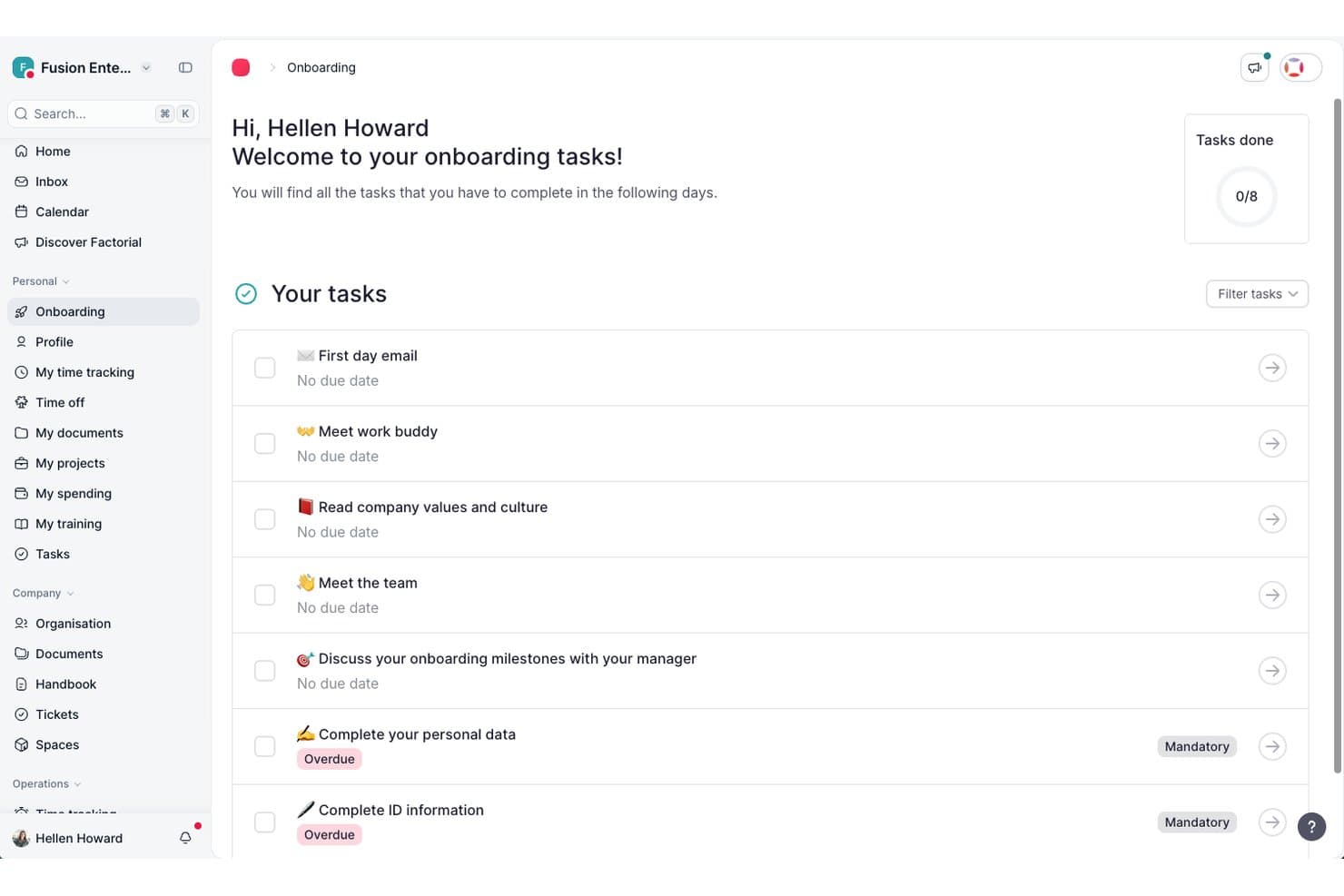
Factorial guides new hires through onboarding tasks in one place. Factorial is an AI-powered HR platform that brings employee document storage, e-signatures, fillable PDFs, workflow automation, and role-based access controls together in one place.
Who Is Factorial Best For?
Factorial is a strong fit for small to mid-sized businesses that want a single AI-powered platform to manage HR, finance, and IT operations together rather than juggling separate tools.
Why I Picked Factorial
I've included Factorial in my top picks because its AI for business positioning goes beyond standard HR document tools, using AI to handle day-to-day operations like planning timetables, generating reports, and answering employee policy questions on demand. I particularly like how document generation pulls from existing HR data to auto-populate fillable PDFs, cutting out manual entry when creating offer letters or onboarding paperwork. Granular, folder-level access controls also let you restrict exactly who sees what, down to individual document types per role.
Factorial Key Features
- Legal e-signature: Send bulk e-signature requests via PDF upload, with support for multiple signature marks per document and email notifications to signers.
- Employee self-service document hub: Employees can upload, download, edit, share, and delete files directly from their personal document space on web or mobile.
- Onboarding and offboarding workflows: Ready-to-use workflow templates guide document collection and process steps for new hires and departing employees.
- Granular document deletion permissions: Administrators can configure deletion rights separately for different document types and folder locations, independent of broader edit permissions.
Factorial Integrations
Factorial offers marketplace integrations with Okta, Slack, LinkedIn, Recruitee, Google Workspace, Microsoft Azure, Microsoft Power BI, and DATEV LODAS. It also supports a public REST API, webhooks, SDKs, and Zapier.
Pros and Cons
Pros:
- AI answers employee policy questions
- Folder-level permissions protect sensitive records
- Employee self-service reduces routine HR requests
Cons:
- Complex workflows may require workarounds
- No documented retention schedules or alerts
 Best for multi-entity HR file compliance
- Free demo available
- Pricing upon request
Visit WebsiteCustomer Rating:4.8/5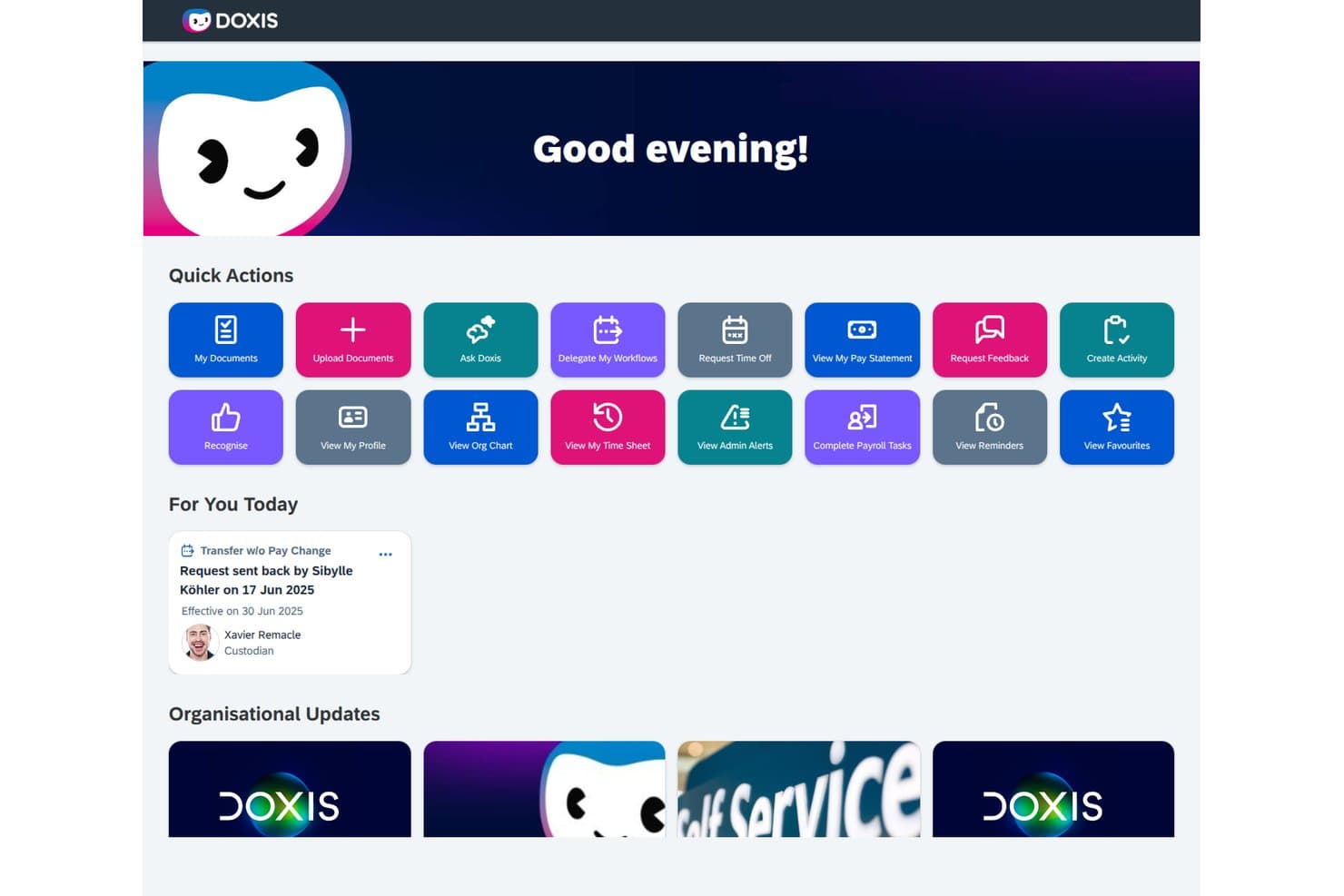
Doxis lets HR users take quick actions like managing documents and workflows. Doxis is an AI-first HR document management platform that centralizes digital personnel files, automates document workflows, and enforces retention and compliance rules across multiple entities and locations.
Who Is Doxis Best For?
Doxis is a strong fit for enterprise HR teams managing personnel files across multiple legal entities or countries, especially those already running SAP SuccessFactors or Workday.
Why I Picked Doxis
I picked Doxis as one of the best because it's built specifically for the complexity that comes with running HR across multiple legal entities or countries. Where most tools treat personnel files as a single structure, Doxis lets you configure document types, retention rules, and folder structures by country or legal entity, so a team in Germany and one in the Netherlands each get the right compliance rules applied automatically. I also like how its AI completeness checker flags missing or expiring documents per file, which matters when you're auditing dozens of entity-specific records at once.
Doxis Key Features
- HR eFile: Each employee gets a structured digital personnel file with a preset folder layout that holds contracts, payroll documents, training records, and performance reviews across the full employee lifecycle.
- BPMN 2.0 workflow builder: HR workflows for onboarding, approvals, and offboarding are built using low-code tools with conditional logic, multi-step approvals, and automated email or SMS notifications.
- Employee self-service portal: Employees can view their own file within an HR-defined time window, upload documents like sick notes, request certificates, and submit personal data changes with effective dates.
- Automated retention scheduling: Retention periods are set per document type and enforced automatically, with each deletion logged in the audit trail to support GDPR and GoBD compliance.
Doxis Integrations
Doxis offers documented integrations with SAP SuccessFactors, Workday, SAP HCM, ADP, Oracle PeopleSoft, and Microsoft Dynamics. Marketplace integrations include DocuSign, Adobe Acrobat Sign, FP Sign, MOXIS, and e-Sign Agent.
Pros and Cons
Pros:
- Teams can expand from department pilots
- Automated retention supports entity-specific compliance rules
- Reviewers praise adaptable electronic personnel records
Cons:
- HR signing often depends on external services
- Enterprise scope can overwhelm smaller HR teams
Learn more about Doxis: Best for real-time collaboration
- Free plan + trial available
- From $7/user/month (billed annually)
Visit WebsiteCustomer Rating:4.5/5
Google Docs' collaboration feature allows real-time co-creation. Google Docs is a cloud-based document management platform that lets HR teams create, organize, and collaborate on employee files and HR documents in real time.
Who Is Google Docs Best For?
HR teams at small to midsize companies who need a simple, cloud-based solution for document collaboration and sharing.
Why I Picked Google Docs
I picked Google Docs as one of the best because my team can collaborate on HR files in real time, making updates and comments instantly visible. I like that we can control sharing permissions for sensitive documents and organize folders for onboarding, compliance, and employee records. In practice, that means HR staff can work together on policies or contracts without version confusion.
Google Docs Key Features
- Template gallery: Access pre-built templates for HR policies, onboarding checklists, and employee forms.
- Version history: Track document changes and restore previous versions as needed.
- Commenting and suggestions: Add comments or suggest edits without altering the original text.
- Mobile editing: Create and update HR documents from any mobile device.
Google Docs Integrations
Google Docs offers native integrations across the Google Workspace ecosystem, including Google Drive, Google Sheets, Google Slides, and Gmail. An API is available for custom integrations.
Pros and Cons
Pros:
- Cloud-based storage with automatic saving
- Simple permission settings for document access
- Easy sharing with internal and external users
Cons:
- Not designed for sensitive HR data security needs
- No built-in HR compliance or retention tools
Learn more about Google Docs: 6Best for small business onboarding
Eddy
- Free trial + free demo available
- From $6/user/month
Visit WebsiteCustomer Rating:4.7/5
Eddy simplifies HR document handling for small teams with minimal setup. Eddy offers small businesses a way to centralize HR documents and onboarding tasks in one dashboard. It’s especially useful for teams that want to digitize paperwork, manage employee files, and automate onboarding without a complex setup. If you’re looking for a solution that simplifies document collection and compliance for new hires, Eddy is built with those needs in mind.
Why I Picked Eddy
For small businesses that want to simplify onboarding and document management, Eddy offers a focused set of tools. Its employee onboarding checklists let you assign, track, and store required documents for each new hire, making it easy to stay organized. I picked Eddy because it gives HR teams a way to manage employee files, collect digital signatures, and ensure compliance without extra complexity. If you need a straightforward platform to optimize onboarding paperwork and document storage, Eddy is designed with those priorities in mind.
Eddy Key Features
Some other features in Eddy that HR teams may find helpful include:
- Role-based document permissions: Control who can view, edit, or upload specific HR documents within the platform.
- Document expiration tracking: Set and monitor expiration dates for certifications, licenses, or other time-sensitive documents.
- Custom document templates: Create and reuse templates for recurring HR forms and agreements.
- Employee document request tool: Send requests for missing documents directly to employees and track responses.
Eddy Integrations
Integrations include SimplyInsured, Checkr, LinkedIn, Next, QuickBooks Online, SmartPay, 401GO, Indeed, Employee Navigator, and Express Evaluations.
Pros and Cons
Pros:
- Custom templates for recurring HR documents
- Digital signatures are included for HR forms
- Onboarding checklists automate document collection
Cons:
- Limited reporting on document activity history
- No bulk upload for employee documents
Learn more about Eddy: Best for secure cloud-based archiving
- Free demo available
- Pricing upon request
Visit WebsiteCustomer Rating:4.5/5
DocuWare stores HR documents securely in the cloud with automated workflows. DocuWare offers HR teams a secure way to archive and manage sensitive employee documents in the cloud. It’s especially useful for organizations that need to meet strict compliance standards or handle confidential records across multiple locations. With advanced encryption and automated retention policies, DocuWare helps you keep HR files protected and organized.
Why I Picked DocuWare
When secure, cloud-based archiving is a top priority for HR, DocuWare offers a focused solution. I picked DocuWare because it uses advanced encryption and access controls to keep sensitive HR documents protected at every stage. Automated retention and deletion policies help HR teams stay compliant with regulations and internal policies. These features make DocuWare a strong choice for organizations that need to safeguard confidential employee records in the cloud.
DocuWare Key Features
Some other features in DocuWare that HR teams may find valuable include:
- Automated document workflows: Route HR documents for approvals, signatures, or reviews based on custom rules.
- Mobile access: View, upload, and manage HR files securely from mobile devices.
- Full-text search: Locate employee records and documents quickly using keyword searches.
- Template-based document creation: Generate standard HR forms and letters using pre-built templates.
DocuWare Integrations
Integrations include SAP, Microsoft Outlook, Sage, QuickBooks, SharePoint, Infor, Oracle, JD Edwards, Microsoft Dynamics, and Microsoft Teams.
Pros and Cons
Pros:
- Pre-filled W-4 and I-9 forms
- Full-text search across all uploaded documents
- Offers intelligent document indexing data
Cons:
- No built-in payroll system integration
- Limited offline access to documents
Learn more about DocuWare: 8Best with enterprise collaboration tools
Box
- Free plan + trial + demo available
- From $7/user/month
Visit WebsiteCustomer Rating:4.3/5
Box enables collaborative HR document storage with permission controls. For HR teams that need to collaborate across departments or locations, Box offers a secure platform for managing and sharing sensitive employee documents. Its integration with popular enterprise tools makes it a strong fit for larger organizations with complex workflows. Box helps HR professionals centralize files, control access, and simplify document collaboration without sacrificing compliance.
Why I Picked Box
When HR teams need to collaborate with other departments or external partners, Box stands out for its enterprise-grade collaboration features. I picked Box because it allows multiple users to securely co-edit, comment on, and manage sensitive HR documents in real time. Its granular permission controls let you set access levels for different stakeholders, which is especially important for protecting confidential employee information. For organizations that rely on cross-functional teamwork and need to maintain strict document security, Box offers a flexible and scalable solution.
Box Key Features
Some other features that make Box useful for HR document management include:
- Automated workflow templates: Build and deploy repeatable document processes for tasks across the employee lifecycle like onboarding.
- Document version history: Track and restore previous versions of files as needed.
- Legal e-signature integration: Collect signatures directly within Box using Box Sign.
- Advanced search with metadata tagging: Locate documents quickly using custom tags and filters.
Box Integrations
Integrations include Microsoft 365, Google Workspace, Salesforce, Workday, Slack, Oracle NetSuite, Okta, Broadcom, Splunk, Adobe, and Palo Alto Networks.
Pros and Cons
Pros:
- Built-in e-signature tool for approvals
- Native 120+ file type preview support
- Granular AES 256-bit encryption controls
Cons:
- Bulk upload speeds can be inconsistent
- Complex external folder permission architecture
Learn more about Box: Best for advanced search capabilities
- 14-day free trial + free demo available
- Pricing upon request
Visit WebsiteCustomer Rating:4.4/5
Revver secures HR document sharing with access controls and audits. When you need to quickly locate HR documents across a large or complex repository, Revver offers advanced search tools that stand out. The platform is built for HR teams and organizations that manage high volumes of files and require precise, fast retrieval. Its search capabilities help reduce time spent hunting for policies, employee records, or compliance documents, making it a strong fit for teams with demanding document access needs.
Why I Picked Revver
Finding the right document quickly can be a challenge for HR operations, especially when managing thousands of files. I picked Revver because its advanced search capabilities let you filter by metadata, keywords, and document types, making it much easier to pinpoint exactly what you need. The platform also supports full-text search within documents, so you can locate specific information even if you don’t remember the file name. For HR professionals who need reliable, granular search tools to manage complex document libraries, Revver offers a clear advantage.
Revver Key Features
Some other features that make Revver useful for HR document management include:
- Automated document retention policies: Set rules for how long documents are stored and when they should be deleted.
- Role-based access controls: Assign permissions to users based on their role to protect sensitive HR files.
- Version history tracking: View and restore previous versions of documents as needed.
- Bulk upload and tagging: Upload multiple files at once and apply tags for easier organization.
Revver Integrations
Integrations include Microsoft 365, Google Drive, Microsoft Teams, Microsoft Outlook, Microsoft OneDrive, Google Docs, Google Sheets, Microsoft Word, and Microsoft PowerPoint.
Pros and Cons
Pros:
- 20TB top-tier storage capacity
- Dual-screen document version comparison tool
- Advanced search filters for complex queries
Cons:
- Limited workflow automation for HR approvals
- Lacks collaborative real-time document editing
Learn more about Revver: 10Best with integrated payroll management
Dayforce
- Free demo available
- Pricing upon request
Visit WebsiteCustomer Rating:4.2/5
Dayforce manages enterprise HR documents within a unified workforce platform. Dayforce stands out for HR teams that want document management tightly connected to payroll and workforce data. This all-in-one platform is a strong fit for organizations that need to manage sensitive employee files alongside payroll, benefits, and compliance records in one place. If you’re looking to reduce manual data entry and ensure payroll accuracy through integrated document workflows, Dayforce brings these capabilities together.
Why I Picked Dayforce
What sets Dayforce apart is its ability to connect HR document management directly with payroll processing. This integration means you can store, update, and access employee documents—like tax forms, contracts, and compliance records—right alongside payroll data, reducing the risk of errors and duplicate entries. I picked Dayforce because it automatically syncs document changes with payroll updates, which helps HR teams maintain accurate records for audits and reporting. For organizations where payroll accuracy and compliance are closely linked to document workflows, Dayforce offers a unified solution.
Dayforce Key Features
Some other features in Dayforce that HR teams may find valuable include:
- Automated document expiration alerts: Get notified when important HR documents are nearing expiration or require renewal.
- Role-based document access controls: Assign permissions so only authorized users can view or edit specific files.
- Bulk document upload and tagging: Upload multiple documents at once and tag them for easier organization and retrieval.
- Audit trail tracking: Monitor all document actions and changes for compliance and accountability.
Dayforce Integrations
Integrations include Salesforce, Microsoft Dynamics, Workday, SAP, Oracle, ADP, Kronos, QuickBooks, Ceridian, and Infor.
Pros and Cons
Pros:
- Document audit trails for all user actions
- AI-powered employee document self-service
- Global multi-currency payroll compliance storage
Cons:
- Frequent updates cause system instability
- Complex custom report creation interface
Learn more about Dayforce:
Outro Software de Gestão de Documentos de RH
Eis algumas opções adicionais de software de gestão de documentos de RH (DMS) que não entraram na minha seleção, mas que ainda assim vale a pena conhecer:
- 11PandaDocBest for e-signature document workflows
- 12Document Locator Best with Microsoft Office integration
- 13DynaFileBest for scanning paper records to digital
- 14WorkDocsBest for automated compliance tracking
- 15PaycomBest for employee self-service access
- 16Zoho PeopleBest for employee file organization
- 17OpenTextBest with large-scale document automation
- 18HylandBest for configurable retention policies
How I Evaluate HR Document Management Software
I split my evaluation into two layers: baseline capabilities a tool must have—like structured employee filing and compliant e-signatures—and the differentiators that separate the best from the rest.
Core Functionality (Table Stakes For This List)
When I'm selecting tools for my list, I rank each one on a scale from 0 (does not offer the functionality) to 5 (excels in this area) for each core functionality listed below. Then, I calculate the tool's total score into a percentage. Each tool needs to achieve a minimum total score of 65% to be considered for inclusion.
- Employee File Management: I look for a structured, employee-centric file system where documents are organized by profile—not just dumped into generic folders you have to sort through manually.
- Access Controls & Permissions: Sensitive files like disciplinary records or medical documentation need granular, role-based restrictions so only authorized personnel can view them.
- E-Signature & Document Workflows: I evaluate whether a tool supports native e-signatures and automated routing, like sending an offer letter for approval and then to the candidate for signing.
- Compliance & Retention Policies: I check for built-in retention schedules, audit trails, and regulatory support so your team can track I-9 expiration dates or honor GDPR erasure requests.
- Document Templates & Generation: Pre-built and customizable templates with merge fields matter—things like auto-populating an employment contract with a new hire's details from their profile.
- HRIS & Payroll Integration: The tool should connect with your existing HRIS or payroll platform so employee data flows between systems without duplicate entry or manual uploads.
Once I have a list of tools that meet the criteria, I consider what sets each platform apart.
Differentiating Factors (What Sets Vendors Apart)
Here's how I compare and contrast different vendors:
Standout Features
Automated onboarding packets are a big differentiator—I look for tools that bundle new-hire forms into sequenced kits with reminders so nothing slips through during someone's first week. A self-service employee portal also adds real value, giving staff direct access to pay stubs, policies, and personal documents without submitting an HR request. I also evaluate whether a platform uses AI or OCR to auto-classify uploaded files, which saves hours of manual tagging when you're migrating legacy records.
Beyond Features
Security certifications matter when you're storing sensitive employee data. I check for SOC 2 Type II or ISO 27001 compliance, plus encryption standards and SSO/MFA support. Integration depth is equally important—your document management tool should sync with your existing HRIS and payroll stack so employee records stay current without manual re-entry. I also evaluate implementation and migration support, especially bulk import options for teams transitioning from paper files or shared drives with thousands of legacy documents to organize.
Como Escolher um Software de Gestão de Documentos de RH
É fácil ficar perdido entre listas extensas de funcionalidades e estruturas de preços complexas. Para o ajudar a manter o foco enquanto analisa o seu processo específico de seleção de software, eis uma lista de fatores a ter em conta:
| Fator | O que deve considerar |
|---|---|
| FatorEscalabilidade | O que deve considerarO software conseguirá lidar com o volume dos seus documentos à medida que a sua força de trabalho cresce ou muda ao longo do tempo? |
| FatorIntegrações | O que deve considerarA ferramenta liga-se nativamente ao seu sistema de informação de recursos humanos, sistema de processamento salarial ou outros sistemas essenciais que já utiliza? |
| FatorPersonalização | O que deve considerarPode adaptar os fluxos de trabalho dos documentos, as permissões e os modelos às necessidades da sua organização? |
| FatorFacilidade de utilização | O que deve considerarOs funcionários de RH e os colaboradores conseguirão navegar e utilizar o sistema com um mínimo de formação? |
| FatorImplementação e integração inicial | O que deve considerarQuanto tempo será necessário para migrar os documentos e formar os utilizadores? São disponibilizados recursos para a integração inicial? |
| FatorCusto | O que deve considerarOs níveis de preços são claros e previsíveis? Esteja atento às taxas por utilizador, aos limites de armazenamento ou aos custos adicionais. |
| FatorMedidas de segurança | O que deve considerarO software disponibiliza encriptação, controlos de acesso e registos de auditoria para proteger dados confidenciais? |
| FatorRequisitos de conformidade | O que deve considerarO sistema consegue cumprir as normas do seu setor relativas à retenção de documentos, privacidade e auditoria? |
O Que é um Software de Gestão de Documentos de RH?
O software de gestão de documentos de RH é um sistema digital que armazena, organiza e protege os registos dos colaboradores e os documentos de RH num único local centralizado. Estas plataformas ajudam as equipas de RH a gerir permissões de acesso, acompanhar versões de documentos e garantir a conformidade com as políticas legais e da empresa.
Ao digitalizar os fluxos de trabalho dos documentos, as equipas de RH reduzem o trabalho administrativo manual, melhoram a segurança dos dados e facilitam a localização e gestão de ficheiros importantes por parte dos colaboradores e gestores.
Funcionalidades
Ao selecionar software de gestão de documentos de RH, tenha em atenção as seguintes funcionalidades essenciais:
- Armazenamento de documentos: Centraliza todos os ficheiros e registos de RH num repositório digital seguro, facilitando a organização e a recuperação dos documentos conforme necessário.
- Controlos de acesso: Permitem definir quem pode consultar, editar ou partilhar documentos específicos, protegendo as informações sensíveis dos colaboradores.
- Rastreio de versões: Mantém um histórico das alterações aos documentos, permitindo ver quem efetuou atualizações e repor versões anteriores, se necessário.
- Distribuição de documentos: Permite ao departamento de RH enviar documentos a indivíduos ou grupos, acompanhar a entrega e confirmar a receção ou tomada de conhecimento.
- Suporte para assinatura eletrónica: Permite que colaboradores e gestores forneçam uma assinatura eletrónica, acelerando as aprovações e reduzindo o uso de papel.
- Registos de auditoria: Registam toda a atividade relacionada com os documentos, incluindo consultas, edições e transferências, para apoiar a conformidade e as auditorias internas.
- Funcionalidade de pesquisa: Disponibiliza ferramentas de pesquisa para localizar rapidamente documentos por palavra-chave, data ou nome do colaborador.
- Gestão de políticas de retenção: Automatiza o arquivo e a eliminação de documentos com base em requisitos legais ou da empresa, reduzindo os riscos de incumprimento.
- Criação de formulários personalizados: Permite às equipas de RH criar e distribuir formulários digitais para integração de novos colaboradores, atualizações de políticas ou outros processos de RH.
- Acesso móvel: Disponibiliza acesso seguro aos documentos a partir de smartphones ou tablets, apoiando o trabalho de RH à distância e em mobilidade.
Benefícios
A implementação de software de gestão de documentos de RH proporciona vários benefícios à sua equipa e à sua empresa. Eis alguns dos benefícios que pode esperar:
- Maior conformidade: Os registos de auditoria automatizados, as políticas de retenção e o acompanhamento das tomadas de conhecimento ajudam a cumprir os requisitos legais e da empresa com menos esforço manual.
- Recuperação mais rápida de documentos: O armazenamento centralizado e as ferramentas de pesquisa avançada proporcionam um acesso fácil aos registos dos colaboradores e aos ficheiros de RH quando deles necessita.
- Maior segurança dos dados: Os controlos de acesso e a encriptação protegem as informações sensíveis dos colaboradores contra acessos não autorizados ou partilhas acidentais.
- Redução da burocracia: Os formulários digitais, as assinaturas eletrónicas e os fluxos de trabalho automatizados minimizam o trabalho manual em papel e as necessidades de armazenamento físico.
- Melhor experiência dos colaboradores: O acesso autónomo aos documentos permite aos colaboradores encontrar e gerir os seus próprios registos sem terem de esperar pelo departamento de RH.
- Integração e saída simplificadas: A distribuição automatizada de documentos e os formulários personalizados simplificam o processo de integração de novos colaboradores ou de gestão de saídas.
- Escalabilidade para equipas em crescimento: O armazenamento na nuvem e as permissões flexíveis permitem que o seu sistema de gestão de documentos cresça com a sua organização.
Custos e preços
A seleção de software de gestão de documentos de RH exige uma compreensão dos vários modelos de preços e planos disponíveis. Os custos variam consoante as funcionalidades, a dimensão da equipa, os complementos e outros fatores. A tabela abaixo resume os planos comuns, os respetivos preços médios e as funcionalidades normalmente incluídas nas soluções de software de gestão de documentos de RH:
Tabela de comparação de planos de software de gestão de documentos de RH
| Tipo de plano | Preço médio | Funcionalidades comuns |
|---|---|---|
| Tipo de planoPlano gratuito | Preço médio$0 | Funcionalidades comunsArmazenamento básico de documentos, acesso limitado dos utilizadores, pesquisa simples e suporte básico. |
| Tipo de planoPlano pessoal | Preço médio$5-$15/utilizador/mês | Funcionalidades comunsGestão individual de documentos, suporte para assinatura eletrónica, controlos de acesso básicos e armazenamento limitado. |
| Tipo de planoPlano empresarial | Preço médio$15-$30/utilizador/mês | Funcionalidades comunsPartilha de documentos em equipa, permissões avançadas, registos de auditoria, formulários personalizados e opções de integração. |
| Tipo de planoPlano empresarial avançado | Preço médio$30-$60/utilizador/mês | Funcionalidades comunsArmazenamento ilimitado, ferramentas avançadas de conformidade, fluxos de trabalho personalizados, suporte dedicado e opções de SSO. |
Perguntas frequentes sobre software de gestão de documentos de RH
Eis algumas respostas a perguntas comuns sobre software de gestão de documentos de RH:
Como é que os sistemas de gestão de documentos de RH ajudam no cumprimento das normas?
Os sistemas de gestão de documentos de RH ajudam no cumprimento das normas ao automatizarem os calendários de retenção, acompanharem as confirmações de leitura dos documentos e manterem registos de auditoria. Estas funcionalidades facilitam o cumprimento dos requisitos legais, a preparação para auditorias e garantem que os dados sensíveis dos colaboradores são tratados de acordo com os regulamentos.
O software de gestão de documentos de RH pode integrar-se com outras ferramentas de RH?
Sim, a maioria dos softwares de gestão de documentos de RH pode integrar-se com plataformas de HRIS, processamento salarial e integração de novos colaboradores. As integrações reduzem a introdução manual de dados, mantêm a consistência dos registos dos colaboradores e permitem às equipas de RH gerir documentos nos seus fluxos de trabalho existentes.
O que devo procurar ao avaliar a segurança de um software de gestão de documentos de RH?
Procure funcionalidades como encriptação, controlos de acesso baseados em funções e registos de auditoria detalhados. Estas medidas de proteção salvaguardam as informações sensíveis dos colaboradores contra acessos não autorizados e ajudam a monitorizar quem consulta ou edita os documentos.
Quanto tempo demora a implementação de um software de gestão de documentos de RH?
O tempo de implementação varia, mas a maioria das soluções baseadas na nuvem pode ser configurada entre alguns dias e algumas semanas. Os fatores incluem a dimensão da sua biblioteca de documentos, as necessidades de integração e a disponibilidade de recursos de integração, como formação e apoio à migração.
É possível migrar ficheiros em papel existentes para um sistema digital de gestão de documentos de RH?
Sim, pode digitalizar ficheiros em papel através da sua digitalização e carregamento para o sistema. Muitos fornecedores oferecem apoio à migração ou trabalham com serviços de digitalização para ajudar a converter e organizar os seus registos existentes.