

As melhores plataformas de SIRH com tecnologia de IA combinam funções tradicionais de gestão de recursos humanos — como processamento salarial, recrutamento e envolvimento dos colaboradores — com automatização inteligente e análise preditiva, ajudando-o a poupar tempo e a tomar decisões mais inteligentes.
Os processos manuais e os sistemas fragmentados podem atrasar as equipas de RH e criar erros dispendiosos. Um SIRH baseado em IA simplifica estas tarefas ao automatizar fluxos de trabalho, analisar tendências da força de trabalho e até prever necessidades futuras — para que possa passar de uma administração reativa para uma estratégia de gestão de pessoas proativa.
Com base em anos de testes e avaliações de software de RH, selecionei as melhores soluções de SIRH com IA, intuitivas, escaláveis e concebidas para aumentar tanto a eficiência como a experiência dos colaboradores.
Neste guia, encontrará plataformas que reduzem o trabalho administrativo, melhoram a tomada de decisões e lhe fornecem informações práticas sobre a saúde e o desempenho da sua força de trabalho.
Why Trust Our Software Recommendations
6,700+
Reviews
20
Industry experts
16+
Evaluation factors
14
Years
Our team has been testing and reviewing software since 2012. As HR experts ourselves, we know how difficult—and important—it is to choose the right software.
For this guide, we evaluated tools using hands-on testing and independent research, scoring tools using our selection criteria. We also draw on insights from industry thought leaders and practicing HR experts.
Our reviews reflect our human editorial judgment, not a sales pitch.
Expert reviewers:
- Phil GrayCOO
 Kim BehnkeHR Tech Editor & Analyst
 Josh BarkerPeople Ops Manager

Tabela comparativa de SIRH com IA
Esta tabela comparativa resume os detalhes de preços das minhas principais escolhas de SIRH com IA:
| Tool | Best For | Trial Info | Price | ||
|---|---|---|---|---|---|
| 1 | Best for complex, multi-country scenarios | Free demo available | From $5/user/month | Website | |
| 2 | Best for integrated time tracking | Free demo available | From $8/user/month | Website | |
| 3 | Best for customizable employee workflows | Free demo available | From $99/month | Website | |
| 4 | Best as AI for business | Free trial + Free demo available | From $8/user/month | Website | |
| 5 | Best for performance reviews | Free demo available | From $7/employee/month | Website | |
| 6 | Best for AI-powered HR automation | Free demo available | Pricing upon request | Website | |
| 7 | Best with AI-powered in-platform assistants | Free demo available | Pricing upon request | Website | |
| 8 | Best with custom people analytics dashboards | Free plan + free demo available | From $2/user/month (billed annually) | Website | |
| 9 | Best for AI-driven performance management | 14-day free trial | Pricing upon request | Website | |
| 10 | Best for AI-driven workforce planning | Free demo + free plan available | From $5/employee/month (billed annually) | Website |


Avaliação dos melhores SIRH com IA
Apresentamos abaixo os meus resumos detalhados dos melhores SIRH com IA que entraram na minha seleção. As minhas avaliações oferecem uma análise detalhada das principais funcionalidades, vantagens & desvantagens, integrações e casos de utilização ideais de cada ferramenta, para o ajudar a encontrar a melhor opção para si.
 Best for complex, multi-country scenarios
- Free demo available
- From $5/user/month
Visit WebsiteCustomer Rating:4.8/5
Deel's centralized HRIS dashboard lets you view, filter, and manage global employees and their payroll status in one place. Deel HR is an AI-powered HRIS platform designed for managing global teams, offering features like multi-country compliance, payroll, onboarding, and document management.
Who Is Deel HR Best For?
Deel HR is a strong fit for HR teams at mid-size to enterprise companies managing employees and contractors across multiple countries.
Why I Picked Deel HR
I've included Deel HR in my top picks because it's one of the few HRIS platforms genuinely built for global complexity from the ground up. Where most HRIS tools treat international compliance as an add-on, Deel HR bakes country-specific employment rules, localized contracts, and local law alerts directly into every workflow across 150+ countries. I particularly like Deel AI, which is trained by HR and compliance experts across those same 150+ countries and gives my team instant answers on local labor laws, payslips, and policy questions without filing a support ticket. The platform also handles multiple worker types—employees, contractors, and EOR workers—all within a single system, so when my team is managing headcount across six different countries with different employment structures, everything stays in one place.
Deel HR Key Features
- Workforce planning: Forecast roles, costs, and headcount growth using live workforce and hiring data instead of disconnected spreadsheets.
- Performance management: Run review cycles, set goals, and build learning and development paths for employees across your global team.
- Automated workflow builder: Create onboarding, offboarding, and compliance workflows without coding, including country-specific notifications for local policy changes.
- Anonymous reporting: Built-in whistleblowing tools let employees report concerns securely, supporting compliant and people-centered HR practices.
Deel HR Integrations
Integrations include Google Workspace, QuickBooks, NetSuite, FaceUp, Zoom, Assembly, and more.
Pros and Cons
Pros:
- Centralized data makes auditing simple
- Strong global compliance and labor law coverage
- Automates complex HR workflows efficiently
Cons:
- Limited customization for smaller teams
- Pricing can rise with added modules
 Best for integrated time tracking
- Free demo available
- From $8/user/month
Visit WebsiteCustomer Rating:4.6/5
Combined payroll, benefits, PTO requests, company directory, and employee self-service features displayed across desktop and mobile app interfaces. Justworks is an HRIS platform that combines payroll, benefits administration, compliance management, time tracking, and employee self-service tools for businesses managing HR processes in one system.
Who Is Justworks Best For?
Justworks is a good fit for small to midsize businesses that need a unified HRIS for payroll, benefits, and compliance across multiple states.
Why I Picked Justworks
I picked Justworks as one of the best because I can manage time tracking directly within the HRIS, which keeps payroll and attendance data in sync. My team uses the built-in time tracking to monitor hours, approve timesheets, and ensure accurate pay runs. I like that I don’t have to rely on third-party tools for tracking employee hours—everything is handled in one place.
Justworks Key Services
- Automated payroll processing: Run payroll for salaried and hourly employees with automated tax filings.
- Benefits administration: Manage health insurance, 401(k), and other employee benefits from one dashboard.
- Multi-state compliance tools: Access resources and support for handling HR compliance across different states.
- HR document management: Store, organize, and share HR documents securely within the platform.
Justworks Integrations
Native integrations are not clearly documented. Justworks offers an API for custom integrations.
Pros and Cons
Pros:
- Built-in HR document management and e-signatures
- Access to large-group health insurance plans
- Integrated time tracking for hourly employees
Cons:
- No built-in performance management features
- Benefits administration restricted to U.S. employees
Learn more about Justworks: Best for customizable employee workflows
- Free demo available
- From $99/month
Visit WebsiteCustomer Rating:4.3/5
Paycor performance management dashboard displaying employee objectives, reviews, recognition tools, and mobile team member feedback features. Paycor is an AI-driven HR and payroll platform that covers the full employee lifecycle, from recruiting and onboarding through performance management, scheduling, and people analytics.
Who Is Paycor Best For?
Paycor is a strong fit for midsize to enterprise HR teams that need a unified platform to manage payroll, compliance, and the full employee lifecycle without juggling multiple disconnected systems.
Why I Picked Paycor
I've included Paycor in my top picks because I love how far its configurable workflow tools go across the entire employee lifecycle. The system automation layer lets you set up automated workflows, reminders, and notifications for everyday HR tasks, so nothing falls through the cracks when a new hire joins or an employee changes roles. I also really like the Customer Sandbox, which lets you test workflow configurations and security setups without touching live data—that's a genuinely useful feature when you're rolling out process changes across a large team.
Paycor Key Features
- Paycor Assistant: An AI-powered tool that uses generative AI to summarize HR documents and surface admin insights directly within the platform.
- AI Smart Sourcing: Automatically identifies and surfaces active, passive, and diverse candidates using AI-driven candidate matching.
- Workforce analytics dashboards: Pre-built dashboards that track turnover, headcount, gender pay equity, and D&I metrics in real time.
- Performance review tools: Structured review cycles with AI-assisted sentiment analysis built into the feedback workflow.
Paycor Integrations
Paycor offers 320+ marketplace integrations through its Paycor Marketplace, including connectors to Microsoft Entra ID, Okta, Google Workspace, Greenhouse, iCIMS, Jira, ServiceNow, NetSuite, and Oracle. Zapier is not currently available as a native integration, but Paycor provides 140+ APIs through its Developer Tools for custom integrations.
Pros and Cons
Pros:
- Multi-state payroll tax auto-filing
- License and certification expiration tracking
- Recruiting through payroll in one platform
Cons:
- Modules feel disjointed across platform sections
- Reporting tools are limited and outdated
 Best as AI for business
- Free trial + Free demo available
- From $8/user/month
Visit WebsiteCustomer Rating:4.4/5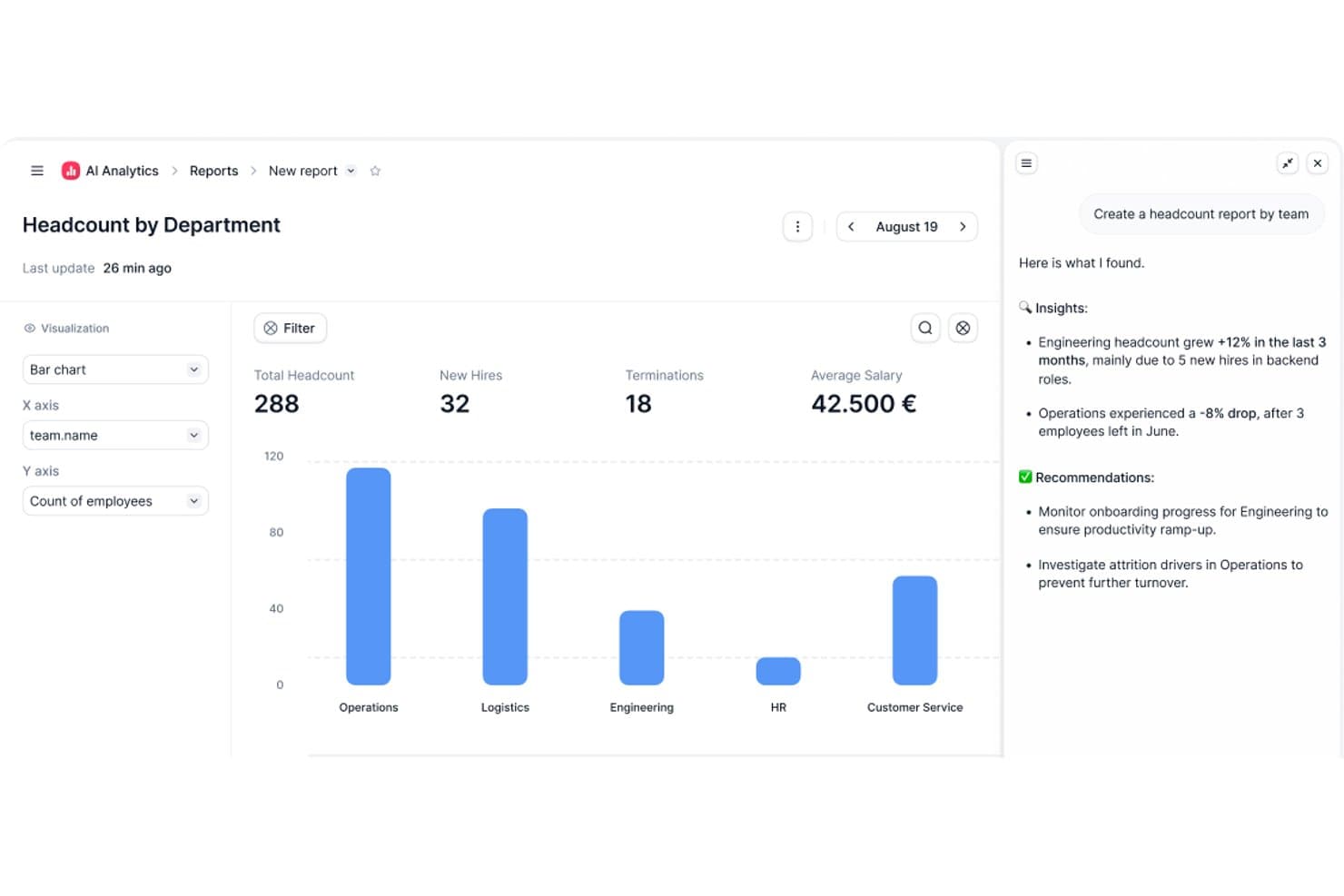
Factorial's AI Analytics generates headcount reports with insights. Factorial is an AI-powered HRIS that connects HR, finance, and IT operations, covering employee records, workflow automation, time tracking, recruitment, and performance management in one platform.
Who Is Factorial Best For?
Factorial suits growing SMBs and mid-market teams that want a single platform connecting HR, finance, and IT operations without managing multiple disconnected tools.
Why I Picked Factorial
I picked Factorial as one of the best because its AI for business positioning isn't just marketing language—One, its AI agent, actively works across HR, finance, and IT data to do things like answer employee questions about leave policies, flag payroll anomalies, and draft onboarding plans. I especially like that One respects each user's access permissions before responding or acting, so sensitive data stays appropriately gated. It's a genuinely cross-functional AI layer, not just a chatbot bolted onto an HR tool.
Factorial Key Features
- AI-assisted recruitment: Factorial uses AI to generate job descriptions, screen candidates, and summarize resumes within its built-in applicant tracking system.
- 360-degree performance reviews: The platform supports multi-rater feedback, review timelines, automatic participation reminders, and goal and competency tracking.
- Shift scheduling and time tracking: Factorial handles automated and rotating shift management alongside geolocation and QR-code-based time tracking.
- SaaS and IT inventory management: Factorial tracks your software licenses, flags unused ones, and manages device assignments and provisioning from a single dashboard.
Factorial Integrations
Factorial offers marketplace integrations with Microsoft Business Central, SAP Business One, Sage 100, Microsoft Power BI, Okta, Slack, LinkedIn, and Recruitee. It also supports an Open API and Zapier.
Pros and Cons
Pros:
- One answers policy questions with role-based access
- Automates leave, onboarding, and offboarding workflows
- Centralizes employee records and self-service documents
Cons:
- No documented predictive attrition-risk insights
- Workforce reporting offers limited customization
 Best for performance reviews
- Free demo available
- From $7/employee/month
Visit WebsiteCustomer Rating:4.8/5
Leapsome boosts performance, engagement, and learning in growing teams. Leapsome is a people enablement platform designed for organizations focused on enhancing employee performance and engagement. It delivers solutions for performance management, employee engagement, and learning, making it suitable for companies aiming to foster a culture of continuous improvement.
Why I picked Leapsome: Leapsome integrates AI across performance management, learning, and engagement to create a continuous cycle of improvement.
Its AI-powered feedback and review tools surface patterns in employee performance, helping leaders spot strengths and growth opportunities. With personalized learning paths and intelligent goal alignment, Leapsome ensures teams stay productive, engaged, and future-ready.
Standout features & integrations:
Features include AI-driven performance reviews with customizable cycles and 360-degree feedback, making evaluations more data-informed and fair. Its intelligent goal-setting and tracking tools align employee efforts with company objectives, while AI-powered engagement surveys reveal morale trends and recommend focus areas. The learning module uses AI to create personalized development plans, addressing skill gaps and fostering continuous growth.
Integrations include Slack, Microsoft Teams, Google Workspace, BambooHR, Personio, Okta, Workday, Greenhouse, LinkedIn, and Microsoft Outlook.
Pros and Cons
Pros:
- Flexible feedback options
- Effective goal tracking
- Customizable review cycles
Cons:
- Requires ongoing user training
- Initial setup complexity
 Best for AI-powered HR automation
- Free demo available
- Pricing upon request
Visit WebsiteCustomer Rating:4.3/5
Paylocity’s AI-powered HRIS dashboard centralizes employee data, payroll, and analytics in one intuitive interface. Paylocity is an AI-powered HRIS platform that brings together payroll, benefits administration, time tracking, talent management, and analytics in one system.
Who Is Paylocity Best For?
Paylocity is a strong fit for mid-sized to large organizations looking for a unified HR and payroll platform with built-in AI capabilities.
Why I Picked Paylocity
Paylocity earns its spot as one of the best on my shortlist because of how deeply AI is woven into the day-to-day HR workflow rather than bolted on as a separate module. I particularly like the AI-powered retention playbook, which surfaces at-risk employees, flags the top risk factors, and generates research-backed action plans—so my team isn't just looking at turnover data after the fact, we're acting on it proactively. I also find the AI Assistant genuinely useful: it handles context-aware, self-service queries from employees using company-specific data, which cuts down on the volume of repetitive HR tickets my team fields. The intelligent scheduling feature, which predicts staffing needs based on historical data and sales goals, is another area where Paylocity's AI does real work rather than just surfacing dashboards.
Paylocity Key Features
- Payroll readiness dashboard: Highlights critical tasks before processing and runs 40+ automated audits to flag potential errors like unexpected pay spikes before you submit payroll.
- Benefits decision support: Gives employees personalized plan recommendations based on their individual preferences and situation, reducing costly elections and open enrollment questions to HR.
- 360-degree performance reviews: Collects multi-source feedback from peers, managers, and direct reports, with built-in sentiment analysis and compensation benchmarks to support data-driven evaluations.
- Automated onboarding checklists: Assigns role-, team-, or location-specific onboarding tasks automatically, with real-time tracking and integrated data flow across recruiting, HR, and payroll.
Paylocity Integrations
Paylocity offers hundreds of native integrations, including Microsoft Entra, Google Workspace, Okta, Indeed, Checkr, Toast, Relias, Aeqium, Branch, Crunchtime, and Blissbook. An API is available for custom integrations.
Pros and Cons
Pros:
- Easy-to-use, mobile-friendly interface
- Delivers predictive analytics and insights
- Automates payroll and HR workflows
Cons:
- Pricing may stretch small budgets
- Advanced setup can take time
 Best with AI-powered in-platform assistants
- Free demo available
- Pricing upon request
Visit WebsiteCustomer Rating:4.5/5
HiBob offers an AI-powered job catalog generator that suggests job profiles, roles, families, and levels based on existing titles and departments. HiBob is an AI-native HRIS that brings together employee records, payroll, performance, compensation, and workforce planning in one platform, with embedded agentic AI and a conversational assistant built across every module.
Who Is HiBob Best For?
HiBob is a strong fit for mid-market companies scaling across multiple geographies who need a single people platform that connects HR, payroll, and workforce planning.
Why I Picked HiBob
HiBob earns its spot as one of the best on my shortlist because the AI isn't a single bolt-on feature. I love that Bob Companion runs as a central conversational interface across the entire platform, and behind it sits a network of 12 specialized agents. In practice, that means I can use the Compensation Agent to surface pay insights, the Performance Agent to draft review content, and the Payroll Agent to flag discrepancies, all without switching tools or screens.
HiBob Key Features
- Skills intelligence engine: AI auto-maps employee skills from resumes, projects, and reviews to support workforce planning.
- Sentiment and engagement analytics: Surveys and feedback are analyzed in real time to surface morale trends and turnover risk.
- Global compliance certifications: Holds ISO 27001, SOC 2, ISO 42001, and ensures GDPR/HIPAA alignment for secure, global HR data.
- Configurable sandbox environment: Lets admins test workflows, settings, and integrations before rolling changes out to employees.
HiBob Integrations
HiBob offers native integrations with Greenhouse, Okta, Slack, Microsoft 365, Google Workspace, BambooHR, ADP, and more. An API is available for custom integrations.
Pros and Cons
Pros:
- Sentiment AI surfaces flight risk in real time
- Skills intelligence auto-maps workforce capabilities from data
- Bob Companion spans every HR module natively
Cons:
- Payroll features vary significantly by region
- Reporting customization limited without admin configuration
 Best with custom people analytics dashboards
- Free plan + free demo available
- From $2/user/month (billed annually)
Visit WebsiteCustomer Rating:4.8/5
TalentHR offers an AI HR assistant chat panel that provides step-by-step guidance on setting up time off policies with automated accruals and carryover. TalentHR is a cloud-based HRIS for organizations seeking AI-powered tools to manage core HR functions, automate onboarding, track time off, and build custom people analytics dashboards.
Who Is TalentHR Best For?
HR teams at small to midsize businesses that want an intuitive AI-driven platform for managing people data and processes.
Why I Picked TalentHR
I picked TalentHR as one of the best because I rely on its custom people analytics dashboards to break down workforce metrics at-a-glance. I use its configurable reports and data visualizations to track department trends, diversity, and salary distributions in detail.
TalentHR Key Features
- Automated onboarding workflows: Set up step-by-step processes for new hires with automated document collection and training.
- Time off and attendance tracking: Track employee absences, approval flows, and PTO balances with custom policies.
- Digital contract and document management: Store, track, and update employee contracts and signed documents securely.
- Multi-language support: Switch interfaces and communications between several languages to support global teams.
TalentHR Integrations
TalentHR offers native integrations with Google Workspace, Microsoft 365, Slack, Greenhouse, and PayFit. It connects with Zapier and provides an API for custom integrations.
Pros and Cons
Pros:
- AI-powered job description and survey tools
- Automated onboarding workflows with clear steps
- Custom analytics dashboards for people data
Cons:
- Minimal public documentation on native integrations
- Lacks advanced predictive analytics features
Learn more about TalentHR: Best for AI-driven performance management
- 14-day free trial
- Pricing upon request
Visit WebsiteCustomer Rating:4.7/5
Sloneek’s employee profile dashboard displays key details like roles, evaluations, and performance metrics—all centralized for efficient HR management. Sloneek is an AI-powered HRIS platform that covers employee records, attendance tracking, document management, performance management, and workflow automation for HR teams looking for advanced digital tools.
Who Is Sloneek Best For?
Sloneek is a good fit for small to mid-sized companies that want a modern, AI-powered HRIS without the complexity of enterprise-grade systems.
Why I Picked Sloneek
I picked Sloneek as one of the best because I love how deeply AI is woven into its performance management tools. When a new role opens up, I can use the AI to generate skill sets, OKR sub-goals, and evaluation questionnaires for that position in seconds. The 360° feedback module also uses AI to generate questionnaires and automate evaluation recommendations, covering everything from soft skills to leadership across 90°, 180°, and full 360° configurations. I also rely on the competency evaluation dashboard to track how individual skill sets evolve over time, which makes development conversations much more grounded in actual data.
Sloneek Key Features
- People analytics dashboard: View pre-built charts covering headcount, turnover, absenteeism, and skills distribution across your organization.
- AI-powered ATS: Automatically import and parse CVs in bulk, rank candidates by fit, and generate job offers and interview questions using AI.
- Absence and attendance management: Configure working hours, absence types, approval workflows, and attendance terminals for each employee.
- Onboarding checklists: Build and assign customizable onboarding task lists to ensure every new hire completes the right steps in the right order.
Sloneek Integrations
Sloneek offers native integrations with Google Workspace, Microsoft 365, Slack, and Zapier. An API is available for custom integrations.
Pros and Cons
Pros:
- Strong employee engagement features
- AI-powered analytics and automation
- Comprehensive performance management tools
Cons:
- Limited public user review data
- Pricing available upon request
Learn more about Sloneek: 10Best for AI-driven workforce planning
ChartHop
- Free demo + free plan available
- From $5/employee/month (billed annually)
Visit WebsiteCustomer Rating:4.4/5
ChartHop’s AI analyzes your dashboard and surfaces clear, data-driven hiring insights in seconds. ChartHop is an AI-powered HRIS platform that brings together org charting, people analytics, workforce planning, and employee data management in one system.
Who Is ChartHop Best For?
ChartHop is a good fit for mid-size to enterprise HR teams that need a centralized platform for headcount planning, org design, and people analytics.
Why I Picked ChartHop
ChartHop earns its spot as one of the best on my shortlist because of how deeply AI is woven into its workforce planning workflows—not just as a reporting layer, but as an active part of how decisions get made. I particularly like the visual scenario modeling in the Headcount Planning module, where you can drag and drop roles on an org chart and get instant AI analysis of budget impact and team dynamics before a single hire is approved. The AI Pro module takes this further, letting my team describe a workforce action in plain language and have ChartHop execute it—building dashboards, sending notifications, or updating records—without any manual back-and-forth. What makes this genuinely useful is that the AI reasons across people data, compensation, performance, and even business data from tools like Salesforce, so headcount decisions aren't made in a vacuum.
ChartHop Key Features
- Time off management: Employees request time off directly in ChartHop, managers approve from ChartHop or Slack, and admins configure custom approval workflows for different policies.
- Onboarding and offboarding workflows: Build custom forms, tasks, emails, and automated survey triggers to manage the new hire and exit experience end-to-end.
- Compensation cycle configuration: Set up comp cycles with flexible budgets, compensation bands, approval workflows, and manager-facing dashboards that display real-time budget impact.
- 360-degree performance reviews: Configure review cycles with 15 question types, peer feedback, 1:1 notes, and goal tracking, with completion monitoring at the manager level.
ChartHop Integrations
ChartHop offers native integrations with ADP Workforce Now, BambooHR, Greenhouse, Gusto, Workday, SAP SuccessFactors, Paylocity, Lever, QuickBooks, and UKG. An API is available for custom integrations.
Pros and Cons
Pros:
- Strong integration capabilities with various HRIS systems.
- Advanced planning tools for headcount and restructuring flexibility.
- Dynamic org charting supports real-time structural visualization.
Cons:
- The breadth of configurable options can result in complexity and a steeper learning curve for admins.
- Lengthy implementation process requiring significant resources.
Learn more about ChartHop:
Outros SIRH com IA
Eis algumas opções adicionais de SIRH com IA que não entraram na minha seleção, mas que ainda vale a pena conhecer:
- 11WorkdayBest for finance integration
- 12PersonioBest for startups
- 13ADPBest for payroll processing
- 14SAP SuccessFactorsBest for talent management
- 15UKGBest for workforce management
- 16Oracle Cloud HCMBest for global enterprises
- 17BambooHRBest for user-friendly interface
- 18GustoBest for small businesses
- 19Lattice AIBest for employee engagement
- 20SenseBest for recruitment automation
- 21Keka HRBest for real-time AI-driven HR data sync
- 22CezanneBest for mid-sized businesses
- 23HumaansBest for rapid HR setup
How I Evaluate AI HRIS Solutions
Every tool on this list needs to go beyond slapping an AI label on basic automation—I look for platforms where AI actually reduces admin load, surfaces actionable workforce insights, or handles employee queries without human intervention. I split my evaluation into core functionality every AI HRIS must cover and the differentiating factors that separate good options from great ones.
Core Functionality (Table Stakes For This List)
When I'm selecting tools for my list, I rank each one on a scale from 0 (does not offer the functionality) to 5 (excels in this area) for each core functionality listed below. Then, I calculate the tool's total score into a percentage. Each tool needs to achieve a minimum total score of 65% to be considered for inclusion.
- Centralized Employee Database: I check whether the platform serves as a true single source of truth—storing profiles, org charts, employment history, and documents with a full audit trail.
- AI-Powered Workflow Automation: The AI should handle tasks like auto-routing approval chains, generating onboarding checklists, or pre-filling forms—not just basic if/then triggers.
- Conversational AI Assistant: I evaluate whether employees can ask questions about PTO balances or benefits eligibility through a chatbot and get accurate, policy-grounded answers.
- Predictive People Analytics: Dashboards with AI-generated attrition forecasts or engagement trend alerts matter here, not just static headcount reports that any legacy HRIS offers.
- Core HR Module Coverage: A platform should cover onboarding, time-off, benefits, and payroll—whether natively or through tight integrations, like Rippling's unified approach or BambooHR's partner ecosystem.
- Compliance & Document Intelligence: I look for AI that can parse uploaded tax forms or contracts, flag missing fields, and alert admins to regulatory deadlines across different jurisdictions.
Once I have a list of tools that meet the criteria, I consider what sets each platform apart.
Differentiating Factors (What Sets Vendors Apart)
Here's how I compare and contrast different vendors:
Standout Features
A skills intelligence engine is a major differentiator—platforms that auto-tag and map employee competencies from performance data and project history make internal mobility and succession planning far easier to manage. I also evaluate anomaly and bias detection, where AI flags pay equity gaps or hiring pattern imbalances before they become real compliance risks. Generative HR content stands out too, especially when HR teams can draft role-specific job descriptions or personalized offer letters in seconds instead of hours.
Beyond Features
AI governance matters a lot in this space—I check whether vendors offer clear model explainability, human-in-the-loop controls, and data residency options, since HR data is some of the most sensitive in any organization. Integration depth is another big factor. A platform that connects natively with your ATS, payroll provider, and collaboration tools like Slack or Teams reduces manual data transfers that create errors. I also evaluate implementation timelines and whether vendors provide guided migration tooling, because a slow rollout can stall AI adoption across your HR team.
Como escolher um SIRH com IA
É fácil perder-se em longas listas de funcionalidades e estruturas de preços complexas. Para o ajudar a manter-se focado enquanto analisa o seu processo específico de seleção de software, apresentamos uma lista de fatores a ter em conta:
| Fator | O que considerar |
|---|---|
| FatorEscalabilidade | O que considerarO software consegue acompanhar o crescimento da sua empresa? Considere se consegue gerir mais colaboradores à medida que a sua equipa cresce. Procure opções que suportem empresas de diferentes dimensões. |
| FatorIntegrações | O que considerarFunciona bem com as suas ferramentas atuais? Verifique a compatibilidade com software essencial, como plataformas de processamento salarial, contabilidade e comunicação. |
| FatorPersonalização | O que considerarPode adaptá-lo aos seus processos? Avalie se pode ajustar fluxos de trabalho e relatórios para corresponder às suas necessidades de RH sem complexidade excessiva. |
| FatorFacilidade de utilização | O que considerarÉ fácil de utilizar pela sua equipa? Certifique-se de que a interface é intuitiva e requer formação mínima para começar. |
| FatorImplementação e integração inicial | O que considerarCom que rapidez pode começar a utilizá-lo? Considere o tempo de configuração, os recursos disponíveis para formação e qualquer apoio durante a transição. |
| FatorCusto | O que considerarO preço está de acordo com o seu orçamento? Compare o custo com as funcionalidades oferecidas e verifique se existem taxas ocultas ou contratos de longa duração. |
| FatorMedidas de segurança | O que considerarProtege os dados dos colaboradores? Certifique-se de que inclui encriptação, controlos de acesso e conformidade com os regulamentos de proteção de dados. |
| FatorDisponibilidade do suporte | O que considerarTem ajuda disponível quando é necessária? Procure opções de suporte 24 horas por dia, 7 dias por semana, e avalie a qualidade do serviço de apoio ao cliente prestado. |
O que é um SIRH com IA?
Um SIRH com IA é uma ferramenta digital que utiliza inteligência artificial para gerir sistemas de informação de recursos humanos. Os profissionais de RH, gestores e recrutadores utilizam geralmente estas ferramentas para melhorar a eficiência e a tomada de decisões.
As funcionalidades de controlo de tempo, processamento salarial e envolvimento dos colaboradores ajudam a gerir os dados da força de trabalho e a apoiar as tarefas de RH. De um modo geral, estas ferramentas simplificam os processos de RH e aumentam a produtividade.
Funcionalidades do AI HRIS
Ao selecionar um AI HRIS, esteja atento às seguintes funcionalidades essenciais:
- Registo de horas: Automatiza o registo das horas dos funcionários, tornando o processamento salarial mais preciso e eficiente.
- Processamento salarial: Simplifica os cálculos salariais e as declarações fiscais, garantindo pagamentos atempados e precisos.
- Envolvimento dos funcionários: Disponibiliza ferramentas de feedback e comunicação para melhorar o moral e a produtividade.
- Gestão do recrutamento: Agiliza os processos de contratação através do acompanhamento de candidatos e da comunicação automatizada.
- Gestão do desempenho: Acompanha e avalia o desempenho dos funcionários para apoiar o desenvolvimento e a definição de objetivos.
- Fluxos de trabalho personalizáveis: Permitem adaptar os processos de RH às necessidades e preferências específicas da empresa.
- Análise avançada: Fornece informações sobre os dados da força de trabalho para apoiar decisões estratégicas de RH.
- Gestão da conformidade: Garante o cumprimento dos requisitos legais através de ferramentas regulamentares integradas.
- Gestão de benefícios: Gere os benefícios dos funcionários, tornando simples a adesão e o acompanhamento.
- Autoatendimento dos funcionários: Permite aos funcionários gerir as suas próprias informações e tarefas, reduzindo a carga de trabalho dos RH.
Benefícios do AI HRIS
A implementação de um AI HRIS proporciona vários benefícios à sua equipa e à sua empresa. Eis alguns dos benefícios que pode esperar:
- Maior eficiência: Automatiza tarefas repetitivas, como o processamento salarial e o registo de horas, libertando a sua equipa para atividades mais estratégicas.
- Tomada de decisões melhorada: A análise avançada fornece informações sobre as tendências da força de trabalho, ajudando-o a tomar decisões de RH fundamentadas.
- Melhor conformidade: As ferramentas de conformidade integradas garantem que a sua empresa cumpre os requisitos legais, reduzindo o risco de penalizações.
- Maior envolvimento dos funcionários: As funcionalidades de feedback e comunicação aumentam o moral e a produtividade da sua equipa.
- Recrutamento simplificado: As ferramentas de gestão do recrutamento simplificam os processos de contratação, facilitando a atração e a retenção de talentos.
- Redução de custos: Reduz a necessidade de processos manuais, poupando tempo e recursos nas operações de RH.
- Flexibilidade e escalabilidade: Os fluxos de trabalho personalizáveis adaptam-se às necessidades da sua empresa, apoiando o crescimento e a mudança.
Custos e preços
A seleção de um AI HRIS requer uma compreensão dos vários modelos de preços e planos disponíveis. Os custos variam consoante as funcionalidades, a dimensão da equipa, os complementos e outros fatores. A tabela abaixo resume os planos comuns, os seus preços médios e as funcionalidades normalmente incluídas nas soluções AI HRIS:
Tabela de comparação de planos
| Tipo de plano | Preço médio | Funcionalidades comuns |
|---|---|---|
| Tipo de planoPlano gratuito | Preço médio$0 | Funcionalidades comunsRegisto básico de horas, relatórios básicos e suporte limitado aos utilizadores. |
| Tipo de planoPlano pessoal | Preço médio$5-$25/utilizador/mês | Funcionalidades comunsRegisto avançado de horas, processamento salarial e autoatendimento dos funcionários. |
| Tipo de planoPlano empresarial | Preço médio$30-$50/utilizador/mês | Funcionalidades comunsGestão do recrutamento, gestão do desempenho e gestão de benefícios. |
| Tipo de planoPlano empresarial de grande dimensão | Preço médio$55-$100/utilizador/mês | Funcionalidades comunsFluxos de trabalho personalizáveis, análise avançada e ferramentas de gestão da conformidade. |
Perguntas frequentes sobre AI HRIS
Eis algumas respostas a perguntas frequentes sobre AI HRIS:
Qual é o papel da IA no HRIS?
A IA no HRIS ajuda a analisar grandes volumes de dados de forma rápida e precisa. Permite aos profissionais de RH obter informações a partir dos registos dos colaboradores, das métricas de desempenho e dos inquéritos de feedback. Esta capacidade apoia a tomada de decisões informadas e o planeamento estratégico, tornando os processos de RH mais eficientes.
Quais são as limitações da IA nos RH?
A IA nos RH pode enfrentar problemas como o enviesamento dos algoritmos, uma vez que as ferramentas de IA aprendem com dados históricos que podem conter preconceitos humanos. Isto pode conduzir a resultados enviesados, afetando o recrutamento e as avaliações. É fundamental monitorizar e ajustar os sistemas de IA para minimizar estes riscos e garantir a equidade.
Como pode o AI HRIS melhorar os processos de recrutamento?
O AI HRIS pode automatizar tarefas repetitivas do recrutamento, como a triagem de CV e o agendamento de entrevistas. Pode também fornecer análises preditivas para identificar os melhores candidatos com base em dados de recrutamentos anteriores. Isto acelera o processo de recrutamento e melhora a qualidade das contratações.
Como pode o AI HRIS melhorar o envolvimento dos colaboradores?
O AI HRIS utiliza informações baseadas em dados para personalizar as experiências dos colaboradores, oferecendo oportunidades de desenvolvimento e feedback direcionados. Pode também automatizar tarefas de rotina, libertando tempo para que os RH se concentrem em iniciativas de envolvimento. Isto conduz a uma força de trabalho mais motivada e satisfeita.
O AI HRIS pode ajudar na gestão da conformidade?
Sim, o AI HRIS pode ajudar na conformidade através da automatização das tarefas de monitorização e elaboração de relatórios. Acompanha as alterações regulamentares e garante que a sua empresa cumpre os requisitos legais. Isto reduz o risco de sanções por incumprimento e mantém as suas práticas de RH atualizadas.
O que devo ter em consideração ao implementar o AI HRIS?
Ao implementar o AI HRIS, avalie os seus processos atuais de RH e identifique áreas a melhorar. Tenha em consideração a escalabilidade da solução, as suas capacidades de integração com os sistemas existentes e o nível de suporte disponibilizado. Avalie também a formação necessária para garantir uma transição tranquila.