

O software de envolvimento dos colaboradores para pequenas empresas ajuda as equipas de RH reduzidas a recolher opiniões dos colaboradores, incentivar o reconhecimento e orientar o acompanhamento por parte dos gestores. Os inquéritos, por si só, não melhoram a experiência dos colaboradores; as equipas também precisam de um calendário gerível, práticas de confidencialidade claras e ações visíveis com base nos resultados. Este guia compara ferramentas para inquéritos, reconhecimento, acompanhamento por parte dos gestores e fluxos de trabalho de RH interligados, para ajudar a encontrar uma opção que a sua equipa consiga manter e utilizar eficazmente.
Why Trust Our Software Recommendations
6,700+
Reviews
20
Industry experts
16+
Evaluation factors
14
Years
Our team has been testing and reviewing software since 2012. As HR experts ourselves, we know how difficult—and important—it is to choose the right software.
For this guide, we evaluated tools using hands-on testing and independent research, scoring tools using our selection criteria. We also draw on insights from industry thought leaders and practicing HR experts.
Our reviews reflect our human editorial judgment, not a sales pitch.
Expert reviewers:
- Phil GrayCOO
 Kim BehnkeHR Tech Editor & Analyst
 Josh BarkerPeople Ops Manager

Tabela comparativa: software de envolvimento dos colaboradores para pequenas empresas
Compare preços e especificações lado a lado do software de envolvimento dos colaboradores para pequenas empresas que entrou na minha lista restrita.
Score legend (out of 5)
- Excellent4.5–5
- Good4–4.4
- Average3–3.9
- Below average2–2.9
- Poor1–1.9
Sorted by: Default
| Tool | Starting Price | Website | ||||||
|---|---|---|---|---|---|---|---|---|
Best for turning feedback into manager action | 3.0 out of 5 | 2 | 2 | 3 | 4 | 4 | $4,999/year Free demo available | Website |
Best for connecting surveys to talent workflows | 3.8 out of 5 | 2 | 3 | 5 | 4 | 5 | $4/employee/month 14-day free trial + demo available | Website |
Best for making recognition part of work | 3.4 out of 5 | 5 | 3 | 2 | 4 | 3 | Pricing upon request Free demo available | Book Demo |
Best for anonymous feedback with follow-up | 3.2 out of 5 | 2 | 2 | 4 | 4 | 4 | Pricing upon request Free demo available | Book Demo |
Best for weekly pulses with manager follow-up | 3.4 out of 5 | 4 | 2 | 3 | 4 | 4 | $2/user/month Free demo available | Website |
Best for linking feedback to recognition | 3.0 out of 5 | 2 | 2 | 3 | 4 | 4 | Pricing upon request Free demo available | Website |
Best for daily, values-linked peer recognition | 3.4 out of 5 | 5 | 4 | 1 | 4 | 3 | $3/user/month Free plan + 30-day free trial available | Website |
Best for linking sentiment to workforce data | 3.0 out of 5 | 2 | 2 | 3 | 4 | 4 | Pricing upon request Free demo available | Website |
Best for engagement alongside everyday HR | 3.6 out of 5 | 4 | 4 | 3 | 4 | 3 | $10.25/user/month 7-day free trial + demo available | Website |
Best for linking feedback to retention risk | 3.2 out of 5 | 2 | 1 | 3 | 5 | 5 | Pricing upon request Not available | Website |


Avaliações do software de envolvimento dos colaboradores para pequenas empresas
Apresentamos abaixo os meus resumos detalhados do melhor software de envolvimento dos colaboradores para pequenas empresas que entrou na minha lista restrita. As minhas avaliações abrangem as funcionalidades, as ferramentas de inquérito e as capacidades de acompanhamento por parte dos gestores de cada opção de software, para ajudar a encontrar a solução mais adequada.
 Best for turning feedback into manager action
- Free demo available
- From $4,999/year (billed annually)
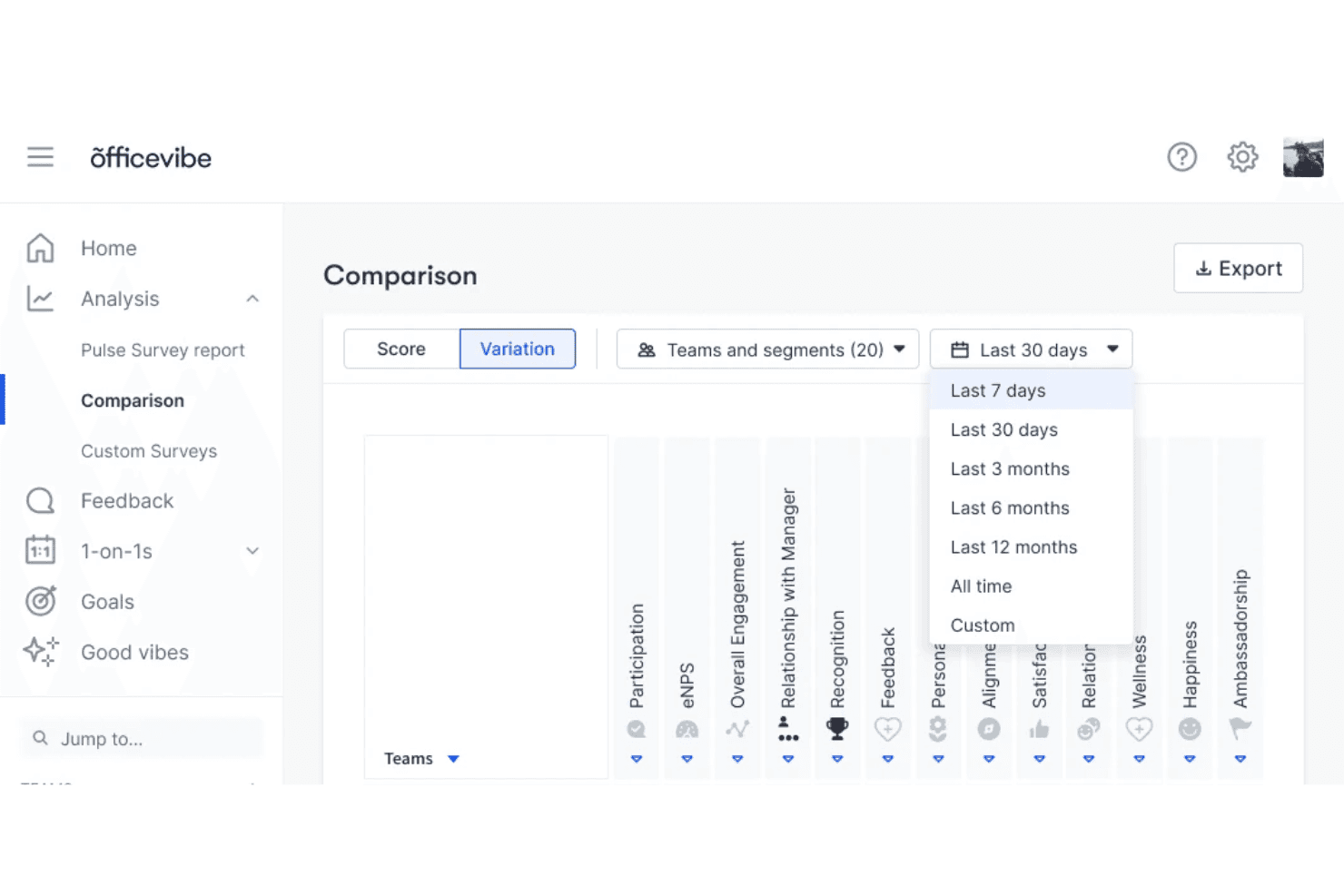
Workleap Officevibe lets users compare team engagement metrics over time. Workleap Officevibe is an employee engagement platform that runs pulse surveys, collects anonymous feedback, tracks engagement scores and eNPS, and provides AI-generated insights and recommended actions for managers.
Who Is Workleap Officevibe Best For?
Workleap Officevibe is a strong fit for HR managers who need a structured way to collect employee feedback and help managers turn survey results into follow-up actions.
Why I Picked Workleap Officevibe
I picked Workleap Officevibe for its ability to turn survey results into practical guidance for managers. Its AI-recommended actions draw on pulse survey results and the organization's HR playbook, giving managers suggestions based on employee feedback. I also like its Good Vibes recognition feature, which allows employees to recognize colleagues through shout-outs linked to company values. This provides another channel for acknowledging employee contributions alongside formal engagement surveys.
Workleap Officevibe Key Features
- Anonymous feedback channel: Employees can submit anonymous feedback at any time, either independently or in response to a manager's request.
- Multilingual survey delivery: Deliver surveys in eight languages, including Spanish, German, and Korean, through email, SMS, Slack, or Microsoft Teams.
- DEIB assessments: Run monthly diversity, equity, inclusion, and belonging surveys on a recurring schedule to monitor sentiment over time.
- Engagement heatmap: Compare engagement drivers across teams using a color-coded heatmap that highlights strengths and areas requiring attention.
Workleap Officevibe Integrations
Workleap Officevibe supports more than 100 integrations, including BambooHR, Workday, ADP Workforce Now, Slack, Microsoft Teams, and Google Workspace. Its Pro offering includes API access for custom integrations.
Pros and Cons
Pros:
- Multilingual surveys support employees across locations
- Good Vibes connects peer recognition to company values
- AI recommends manager actions based on survey results
Cons:
- Survey invitation links expire after fourteen days
- Anonymous feedback requires five team members
Learn more about Workleap Officevibe: Best for connecting surveys to talent workflows
- 14-day free trial + demo available
- From $4/employee/month
Visit WebsiteCustomer Rating:4.8/5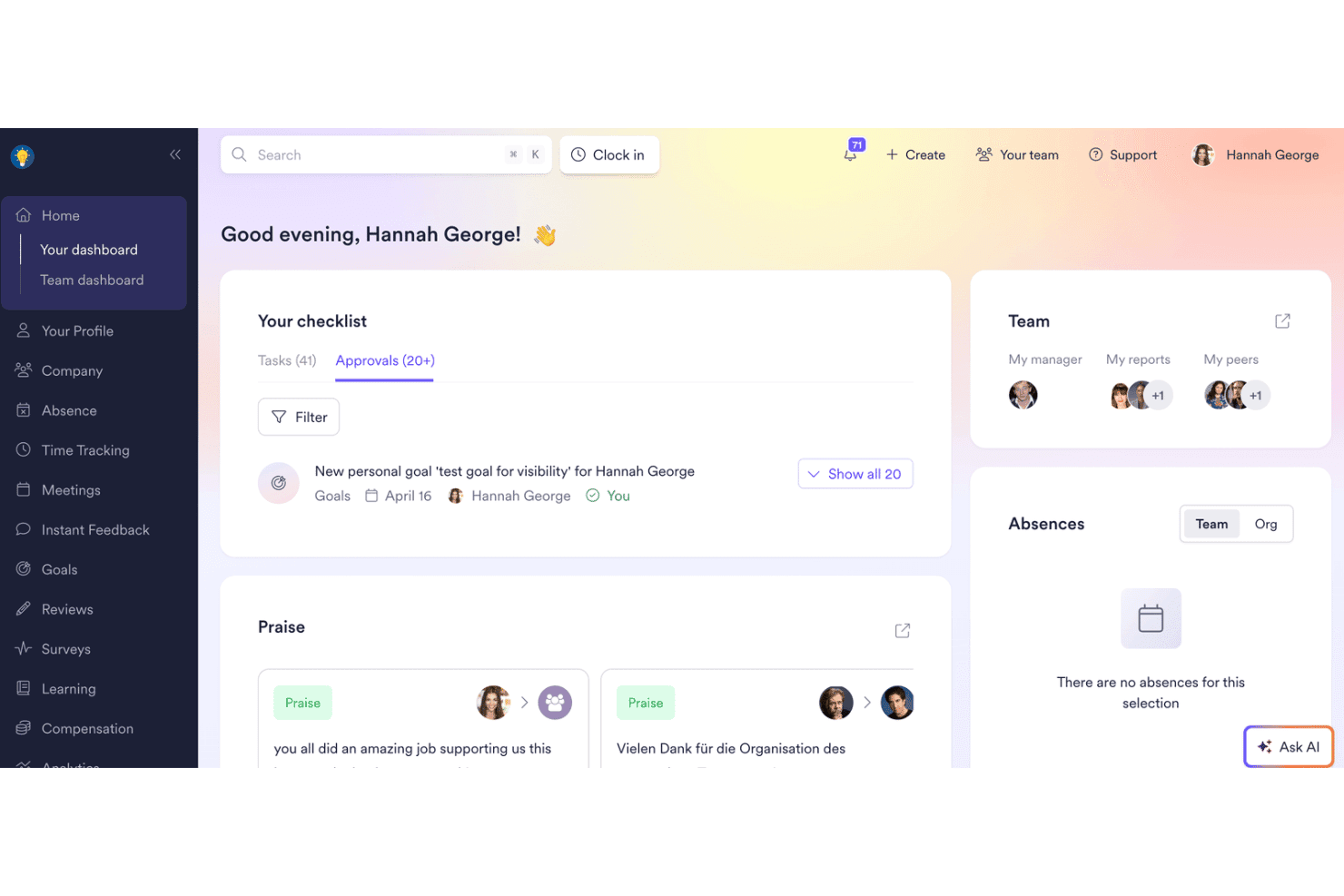
Leapsome's dashboard centralizes tasks, approvals, praise, and team absences. Leapsome is an employee engagement and performance management platform that brings together engagement surveys, pulse checks, goal tracking, performance reviews, and learning tools in one talent management suite.
Who Is Leapsome Best For?
Leapsome is a strong fit for people operations teams that want to connect engagement surveys, performance reviews, and goal tracking rather than manage these activities across separate tools.
Why I Picked Leapsome
I picked Leapsome for its ability to connect engagement surveys with performance reviews, goal tracking, and compensation processes through a shared employee record. When survey results become available, Leapsome can generate prioritized action plans based on specific question scores, helping managers identify areas that need attention. I also like its anonymous conversation feature, which allows managers to follow up with individual respondents without revealing their identities. This provides additional context behind low eNPS scores while maintaining respondent confidentiality.
Leapsome Key Features
- Science-backed survey templates: Choose from a library of expert-verified templates covering engagement, onboarding, project, and pulse surveys, with open-text, scale, and multiple-choice question formats.
- Recurring survey scheduling: Schedule surveys automatically at defined intervals, with configurable survey duration, frequency, and reminder settings.
- Demographic segmentation and heatmaps: Filter survey analytics by team, gender, employee level, or custom attributes, and view results in heatmaps to identify patterns across groups.
- Peer praise feed: Give colleagues private or public recognition through the Leapsome praise feed, a dedicated Slack channel, or a Praise Wall.
Leapsome Integrations
Leapsome offers more than 100 native integrations, including BambooHR, Gusto, Rippling, Slack, and Microsoft Teams. It also supports custom API integrations and MCP connectivity.
Pros and Cons
Pros:
- Action plans assign owners and track progress
- Anonymous conversations support confidential follow-up
- Survey results connect with performance and talent workflows
Cons:
- Question translations cannot change mid-survey
- Survey anonymity settings lock after activation
 Best for making recognition part of work
- Free demo available
- Pricing upon request
Visit WebsiteCustomer Rating:4.7/5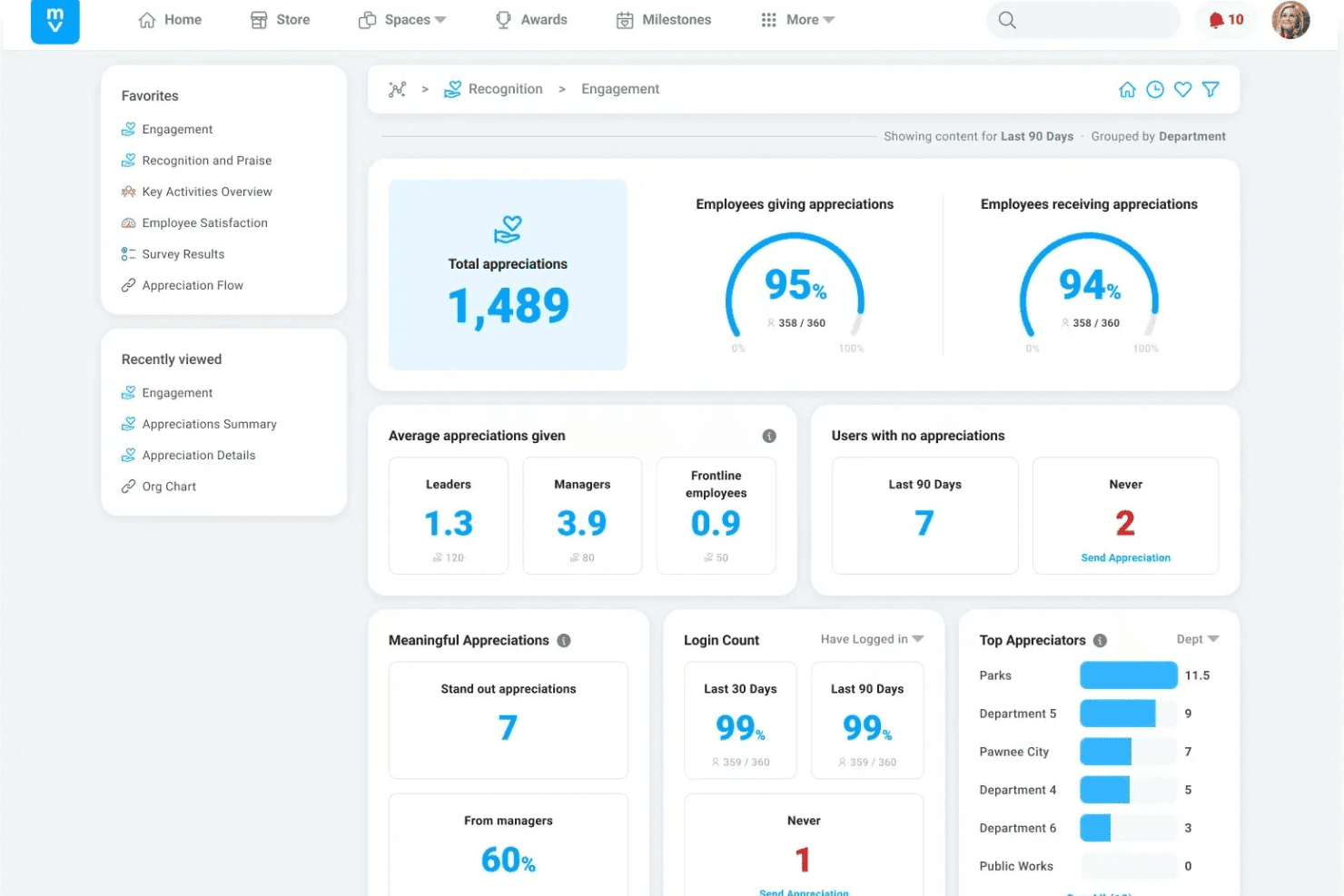
Motivosity tracks employee recognition and engagement metrics in one dashboard. Motivosity is an employee engagement platform focused on peer-to-peer recognition, rewards, milestone celebrations, and pulse surveys. Its social feed makes employee appreciation visible across the organization.
Who Is Motivosity Best For?
Motivosity is a strong fit for HR managers at small and midsize companies that want to incorporate recognition into daily workflows rather than treat it as a separate program.
Why I Picked Motivosity
I picked Motivosity for its approach to making recognition part of everyday work. Its social feed displays peer recognition, milestone celebrations, and award nominations across the organization, helping employees see how their colleagues are contributing. I also like its Achievements and Challenges feature, which allows businesses to connect recognition with specific company or culture goals. Managers can use badges and rewards to acknowledge contributions tied to these objectives, giving recognition more structure than general employee shout-outs.
Motivosity Key Features
- MV6 satisfaction survey: Measure employee sentiment and eNPS using six standardized questions, with dashboards that can be filtered by team or location and compared against industry benchmarks.
- Employee Spaces: Create private or company-wide spaces for employee groups, shared interests, and programs, with resources, events, and announcements.
- Spot bonuses: Give managers dedicated budgets to recognize accomplishments through dollar-based or points-based awards.
- Wellness challenges: Run prebuilt wellness challenges, connect wearables and fitness apps, and reward employee participation with badges or monetary incentives.
Motivosity Integrations
Motivosity offers native integrations with BambooHR, Gusto, ADP, Dayforce, 7shifts, Slack, Microsoft Teams, Google Chat, Okta, and Google Workspace. It also supports an Open API, MCP server, and secure SFTP file synchronization for custom connectivity.
Pros and Cons
Pros:
- Employee Spaces support company-wide and group communication
- Achievements and Challenges connect rewards to team goals
- Social feed displays peer recognition and award nominations
Cons:
- Prelaunch resets erase existing survey responses
- Satisfaction scores require three distinct respondents
Learn more about Motivosity: Best for anonymous feedback with follow-up
- Free demo available
- Pricing upon request
Visit WebsiteCustomer Rating:4.7/5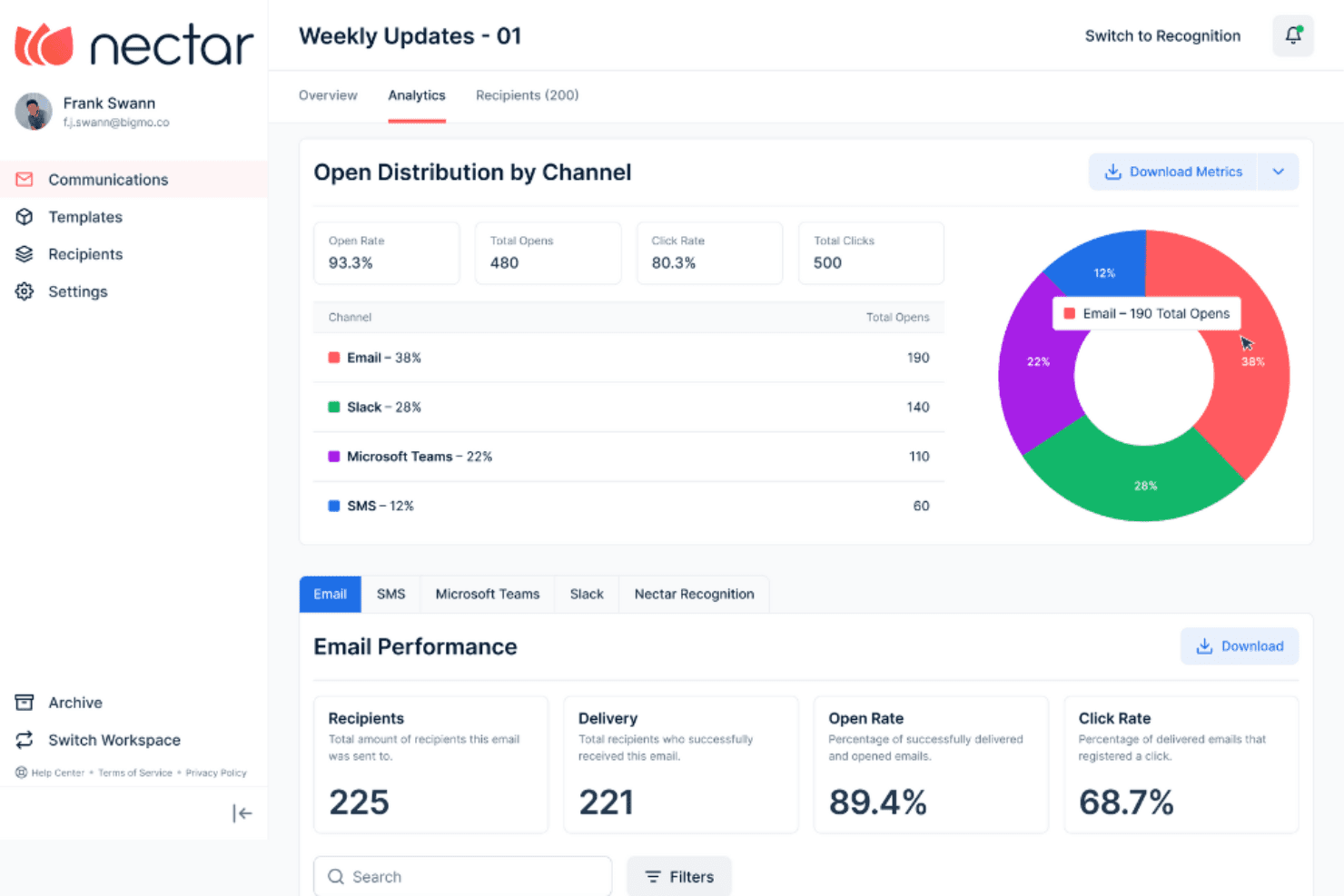
Nectar tracks email and channel open rates in one analytics view. Nectar Engage is an employee engagement platform focused on survey-based feedback. It offers custom surveys, eNPS tracking, proprietary engagement surveys, anonymous response collection, and analytics with AI sentiment analysis.
Who Is Nectar Best For?
Nectar Engage is a good fit for HR and people operations teams that need to collect anonymous employee feedback and follow up with respondents while maintaining confidentiality.
Why I Picked Nectar
I picked Nectar Engage for its approach to anonymous feedback and follow-up. Its SafeTalk feature allows managers to send follow-up questions to anonymous survey respondents through a confidential two-way communication channel. This helps teams investigate concerning responses without identifying the employees who submitted them. I also like that Nectar Engage withholds survey results until the required response threshold is met, helping protect confidentiality when reviewing employee feedback.
Nectar Key Features
- Proprietary engagement survey: Measure employee engagement across 10 pillars using a consistent Likert scale, developed with HR experts and informed by engagement research.
- Multi-channel survey delivery: Distribute surveys through email, SMS, Slack, Microsoft Teams, or Nectar's recognition feed to reach employees through their existing workflows.
- eNPS tracking: Schedule recurring eNPS surveys monthly, quarterly, or annually, and monitor sentiment trends through a dedicated dashboard.
- AI sentiment analysis: Analyze open-text survey responses automatically and generate comment summaries that highlight recurring themes across the workforce.
Nectar Engage Integrations
Nectar offers integrations with BambooHR, Gusto, Rippling, ADP, Slack, and Microsoft Teams. It also provides an API for custom integrations, although it does not publish a total integration count.
Pros and Cons
Pros:
- AI sentiment analysis summarizes open-text feedback
- Recurring eNPS surveys track sentiment changes
- SafeTalk enables anonymous two-way conversations
Cons:
- SafeTalk follow-ups depend on written feedback
- Survey results require minimum response thresholds
Learn more about Nectar: Best for weekly pulses with manager follow-up
- Free demo available
- From $2/user/month (billed annually)
Visit WebsiteCustomer Rating:4.3/5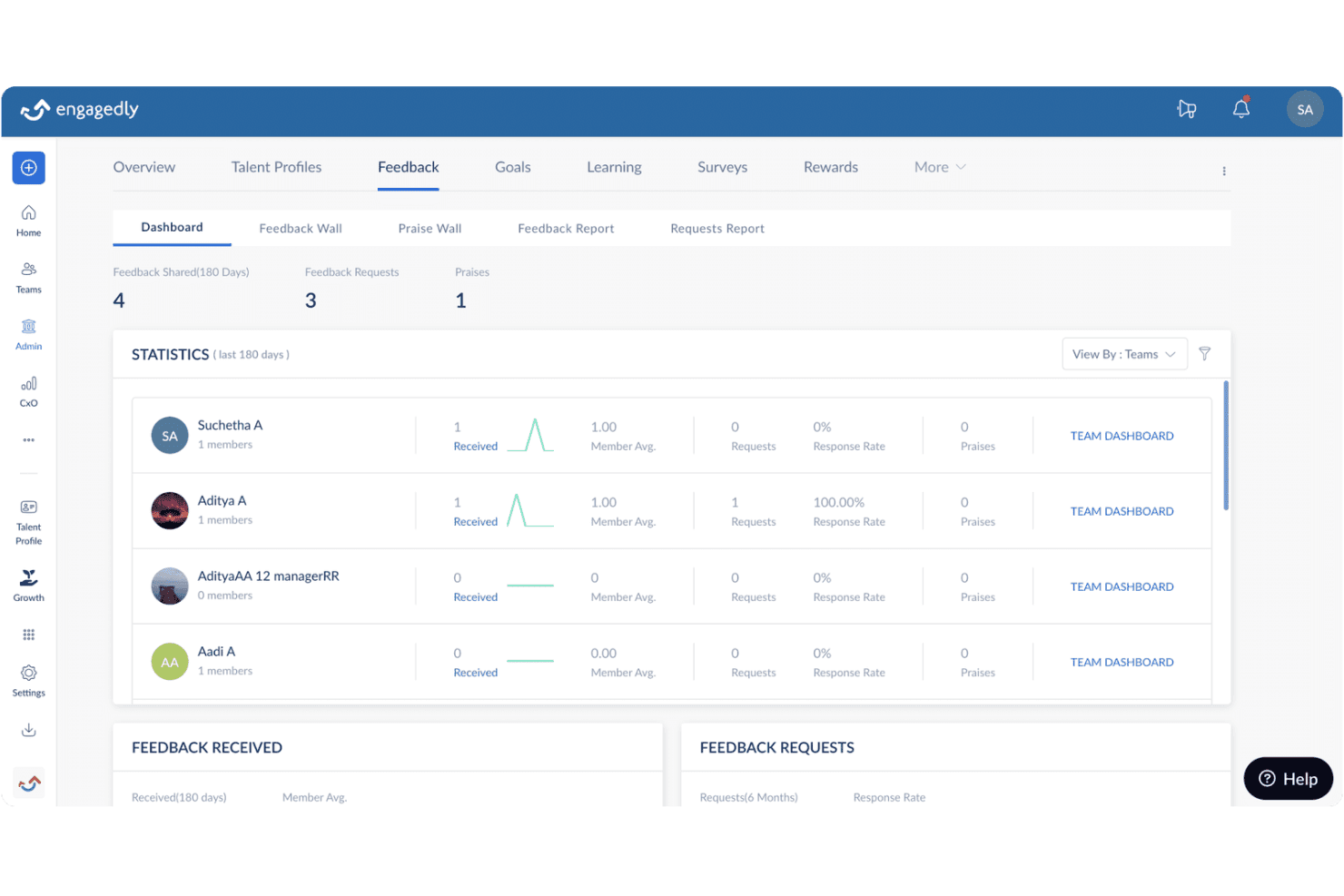
Engagedly tracks team feedback statistics across a 180-day period. Engagedly is an employee engagement platform that combines pulse surveys, engagement analytics, peer recognition, and an internal intranet to support team communication and feedback collection.
Who Is Engagedly Best For?
Engagedly is a good fit for growing small businesses and midsize teams that need recurring pulse surveys, manager follow-up workflows, and engagement analytics across departments.
Why I Picked Engagedly
I picked Engagedly for its Team Pulse feature, which connects recurring employee feedback with manager follow-up. Employees can respond to weekly pulse questions through email, Slack, or Microsoft Teams. Managers then use a dedicated review workflow to examine responses, identify recurring themes through Marissa AI summaries, and start direct conversations. Administrators can also send reminders to managers who haven't reviewed responses, helping maintain a consistent feedback and follow-up process.
Engagedly Key Features
- Engagement survey templates: Use the prebuilt e-10 template or Butterfly EI surveys to run customizable, recurring surveys with configurable anonymity settings and multiple delivery channels.
- Social wall and praise feed: Share public recognition and peer shout-outs through a social wall available across suite plans.
- Intranet and document repository: Centralize organizational announcements, internal job postings, milestone celebrations, and shared documents in one communication hub.
- Points and badges system: Award points or badges for positive behaviors, with redemption options through Tango gift cards or Switchfly travel rewards.
Engagedly Integrations
Engagedly lists integrations with Gusto, BambooHR, Slack, Microsoft Teams, Google SSO, and Google Sheets. Its Gusto integration synchronizes employee information and custom fields. API availability is not clearly documented.
Pros and Cons
Pros:
- Administrator reminders prompt managers to review responses
- Marissa AI summarizes recurring employee feedback themes
- Weekly pulse reviews include manager follow-up workflows
Cons:
- Submitted responses lock when reviews begin
- Administrators cannot edit manager-created pulse questions
Learn more about Engagedly: Best for linking feedback to recognition
- Free demo available
- Pricing upon request
Visit WebsiteCustomer Rating:4.9/5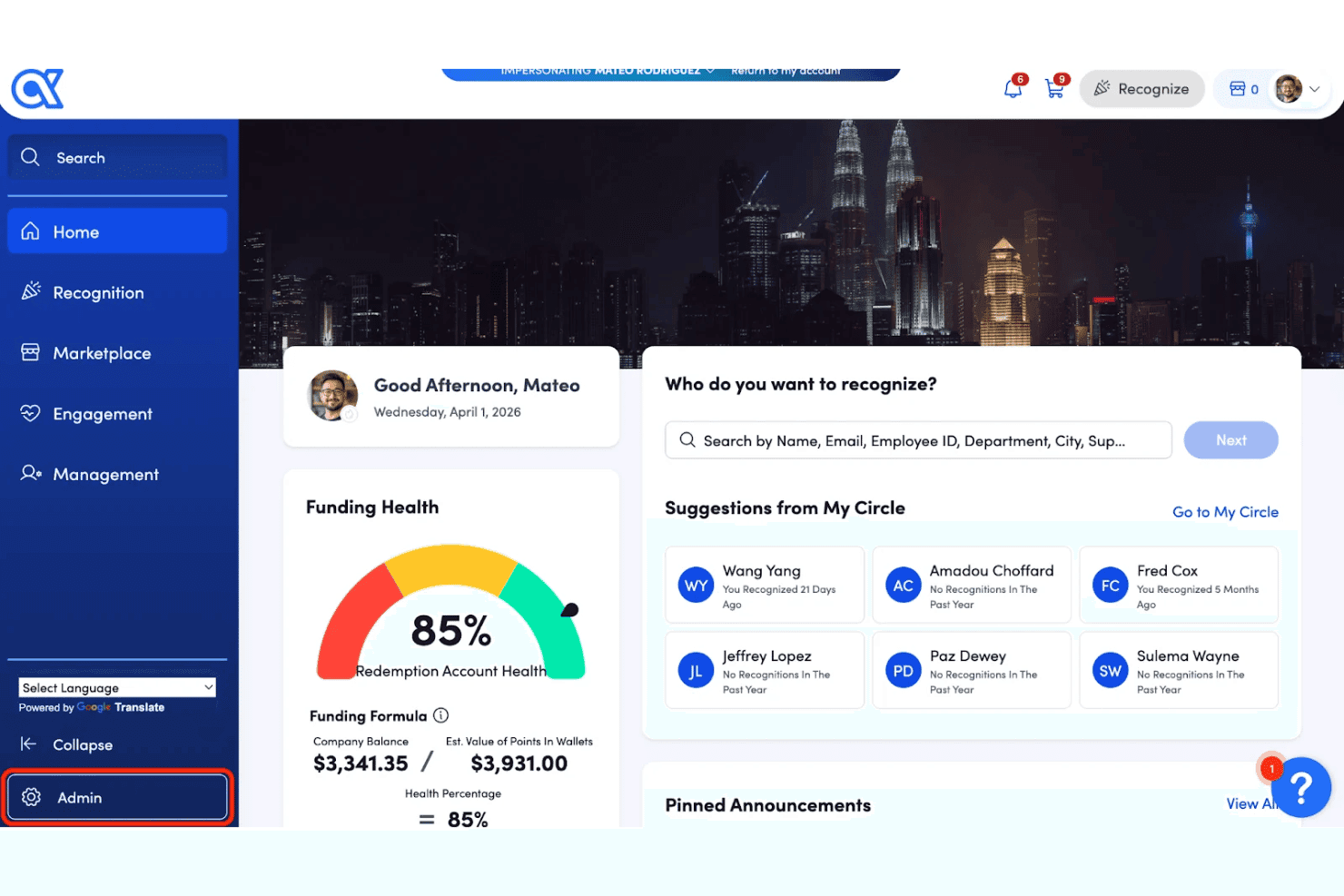
Awardco lets users recognize colleagues directly from the home dashboard. Awardco is an employee engagement platform that combines engagement surveys, pulse checks, and sentiment analytics with recognition tools to help businesses measure employee feedback and respond through recognition initiatives.
Who Is Awardco Best For?
Awardco Engage is a strong fit for HR managers and people operations leaders who want to connect employee survey results with recognition activities.
Why I Picked Awardco
I picked Awardco for its ability to connect engagement survey findings with recognition initiatives. When survey results identify a low-scoring theme, Awardco Engage can support targeted recognition campaigns that address the area requiring attention. This gives HR teams a way to use employee feedback when planning recognition activities rather than treating survey results as a separate reporting exercise. I also like that businesses can reward survey participation with points or gifts, providing an additional incentive for employees to share feedback.
Awardco Key Features
- Engagement and pulse surveys: Run annual engagement surveys, recurring pulse checks, or one-off surveys using a research-backed question library or customized questions.
- Real-time reporting dashboards: View engagement scores, eNPS, eSAT, theme scores, and participation rates in dashboards that can be filtered by leader or employee attributes.
- HRIS integrations: Connect with Workday, ADP Workforce Now, BambooHR, Rippling, and UKG to synchronize employee hierarchies and demographic data for survey targeting.
- Mobile survey access: Employees can receive survey notifications and complete surveys through Awardco's iOS and Android mobile apps.
Awardco Integrations
Awardco lists integrations with Gusto, BambooHR, Rippling, ADP Workforce Now, Workday, UKG, Slack, Microsoft Teams, and Qualtrics. It also provides REST APIs and webhooks for custom integrations.
Pros and Cons
Pros:
- Mobile apps support employee survey completion
- Survey participation can be rewarded with points or gifts
- Survey findings can inform targeted recognition campaigns
Cons:
- Written feedback requires ten group responses
- Anonymous surveys cannot use metadata filters
 Best for daily, values-linked peer recognition
- Free plan + 30-day free trial available
- From $3/user/month
Visit WebsiteCustomer Rating:4.6/5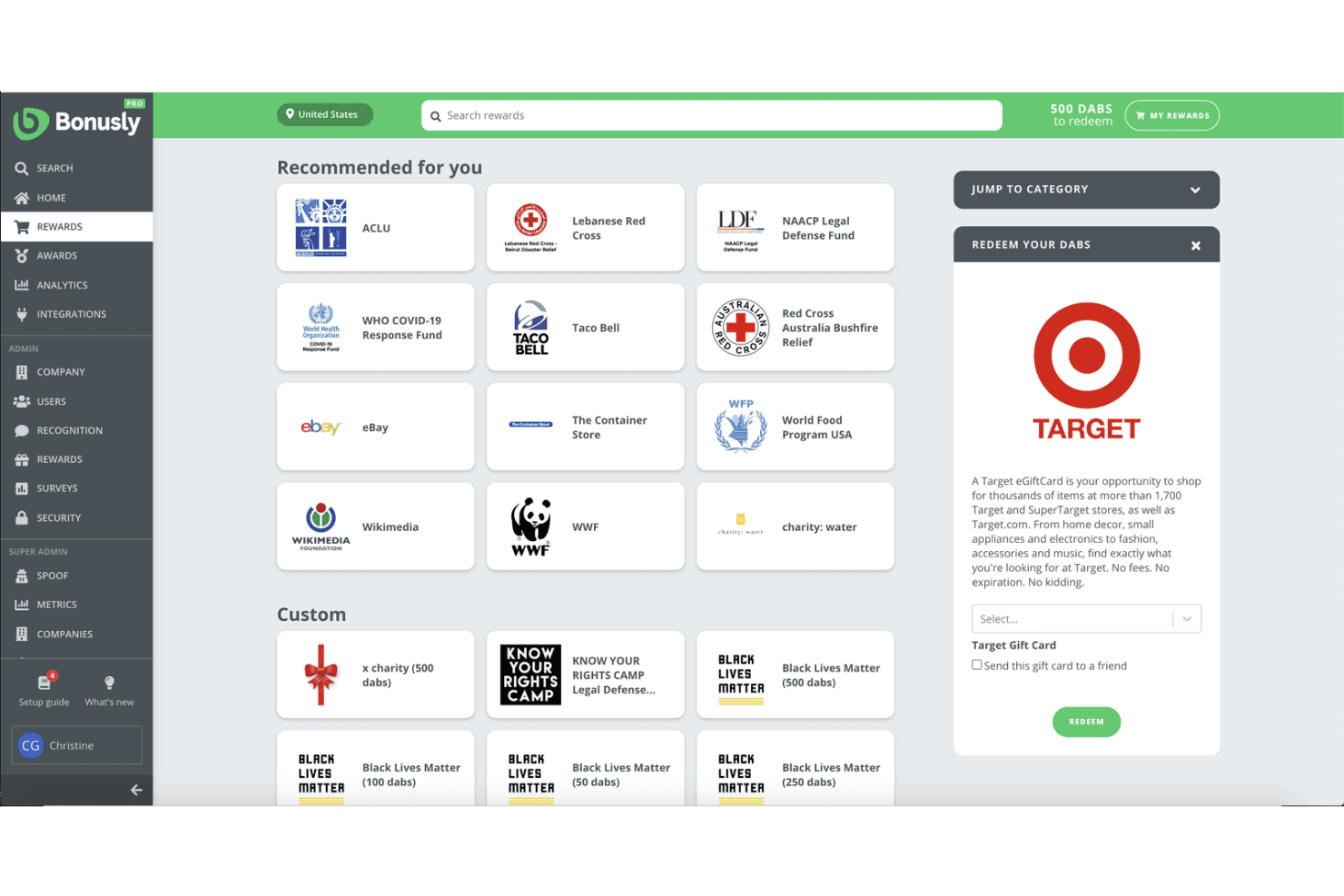
Bonusly lets users redeem reward points for gift cards and donations. Bonusly is an employee recognition and rewards platform that combines peer-to-peer recognition linked to company values, a global rewards catalog, automated milestone celebrations, pulse checks, and engagement analytics.
Who Is Bonusly Best For?
Bonusly is a strong fit for HR managers at small and midsize businesses that want to make peer recognition part of daily workflows rather than limit it to periodic performance reviews.
Why I Picked Bonusly
I picked Bonusly for its values-based approach to peer recognition. Employees can add company values hashtags to recognition shared through Slack or Microsoft Teams, helping teams reinforce specific workplace behaviors without leaving their existing communication tools. I also like its automated milestone program, which manages birthdays, work anniversaries, and new-hire welcomes without requiring manual coordination. For small HR teams, this provides a structured way to maintain recognition programs with less administrative work.
Bonusly Key Features
- Global rewards catalog: Employees can redeem recognition points for gift cards, cash, charitable donations, merchandise, or custom rewards from more than 1,200 options across over 200 countries.
- Pulse Checks: Run recurring employee sentiment surveys weekly, biweekly, or monthly, collecting scored responses and optional comments.
- Recognition analytics: Track participation rates, recognition linked to company values, and collaboration patterns across teams and departments using real-time dashboards.
- Bizy AI coaching: Identify potential disengagement signals, flag employees who haven't recently received manager recognition, and suggest recognition based on activity in connected tools.
Bonusly Integrations
Bonusly offers native integrations with more than 30 HRIS platforms, including ADP, Workday, BambooHR, Gusto, and HiBob, alongside Slack and Microsoft Teams. It also provides REST and MCP APIs for custom integrations and supports Zapier.
Pros and Cons
Pros:
- Recognition analytics track participation and collaboration
- Automated celebrations reduce milestone administration
- Values hashtags connect recognition to company culture
Cons:
- Administrators cannot view individual pulse comments
- Direct managers see individual pulse responses
Learn more about Bonusly: Best for linking sentiment to workforce data
- Free demo available
- Pricing upon request
Visit WebsiteCustomer Rating:4.5/5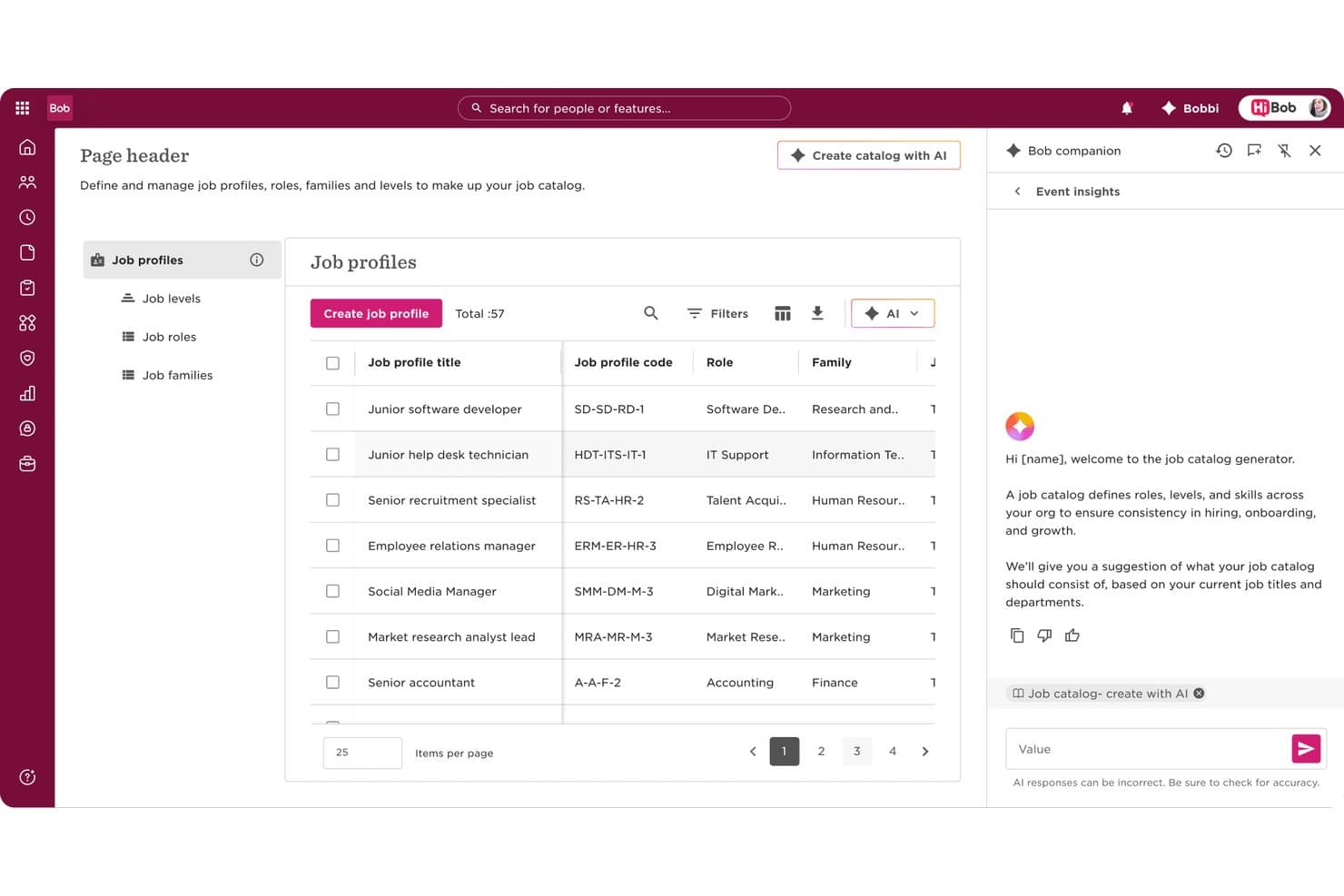
HiBob lets users build and manage job catalogs with AI assistance. HiBob is an HCM platform that combines engagement surveys, pulse checks, eNPS tracking, performance management, and anonymous feedback tools within a centralized HR system.
Who Is HiBob Best For?
HiBob is a strong fit for HR teams at midsize and growing companies that want to connect engagement data, including surveys, eNPS, and pulse checks, with broader workforce analytics.
Why I Picked HiBob
I picked HiBob for its ability to bring engagement data together with headcount, turnover, and performance information. When pulse survey scores decline, HR teams can investigate whether the change is concentrated within a particular team, location, or tenure group. I also like that eNPS results are available alongside other workforce metrics, allowing HR teams to interpret employee sentiment without moving between separate reporting platforms.
HiBob Key Features
- Anonymous engagement surveys: Run anonymous surveys using configurable question formats, including four-, five-, or seven-point scales and free-text responses, with reporting thresholds designed to protect respondent identities.
- Your Voice anonymous reporting: Allow employees to submit confidential cases and receive two-way responses without revealing their identities to HR representatives.
- Survey heatmaps: Compare engagement scores across teams, locations, and departments using visual heatmaps to identify differences in employee sentiment.
- Lifecycle survey automation: Trigger non-anonymous surveys automatically at employee milestones, such as the end of the first month, probation, or offboarding.
HiBob Integrations
HiBob lists more than 100 integrations across its broader platform, including marketplace connections with Slack, Google Workspace, ADP Workforce Now, and Deputy. Google Calendar and Outlook are native Bob Hiring integrations. It also provides a public HR API and webhooks for custom integrations.
Pros and Cons
Pros:
- Survey heatmaps compare sentiment across workforce groups
- Your Voice supports confidential two-way reporting
- Engagement scores connect with headcount and turnover data
Cons:
- Anonymous engagement surveys limit targeted individual follow-up
- Lifecycle surveys collect identifiable employee responses
 Best for engagement alongside everyday HR
- 7-day free trial + demo available
- From $10.25/user/month
Visit WebsiteCustomer Rating:3.9/5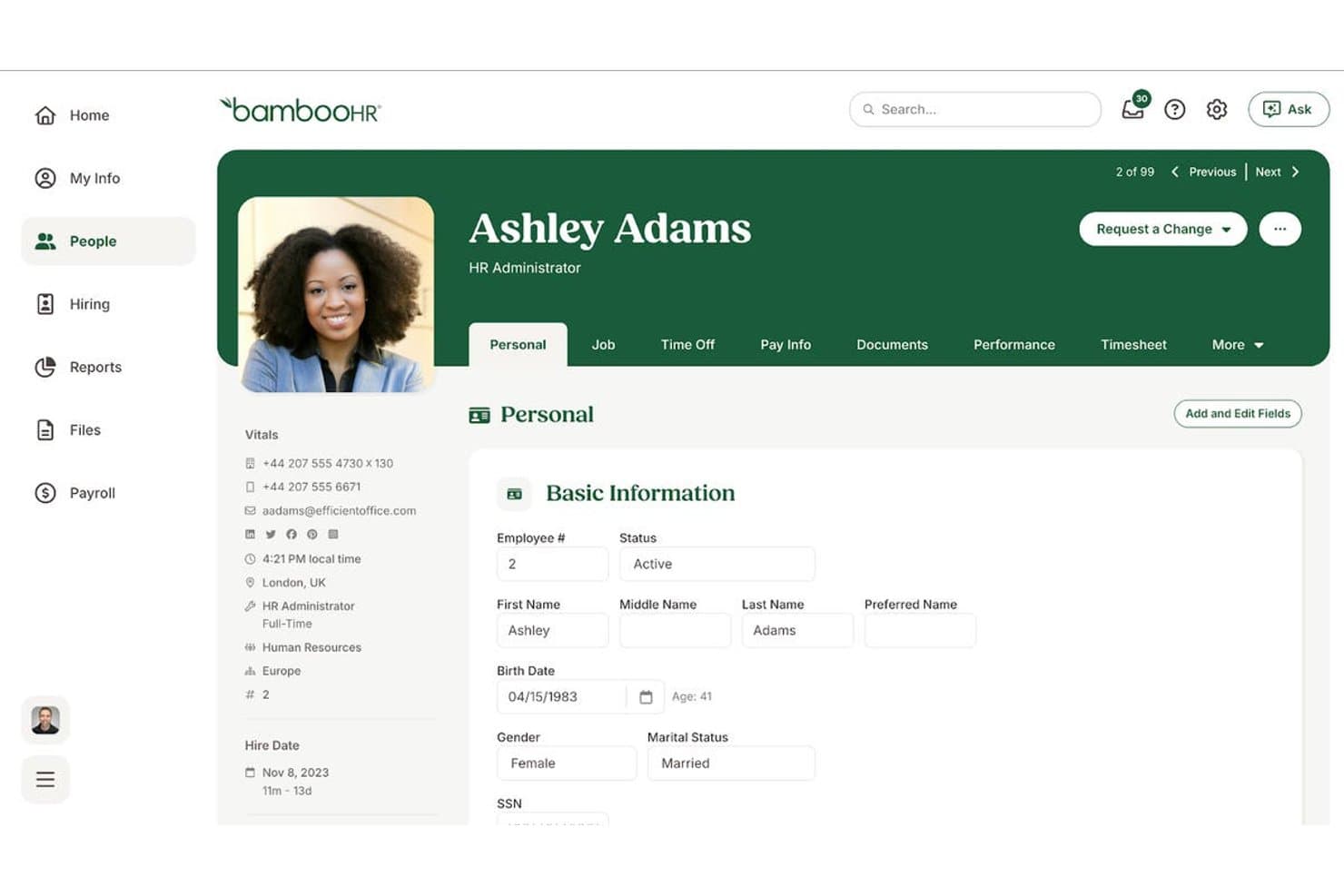
BambooHR centralizes employee personal info in one profile view. BambooHR is an HRIS platform for small businesses that combines employee records, onboarding, time-off management, and payroll with built-in engagement tools. These include eNPS surveys, employee wellbeing tracking, and a points-based recognition and rewards system.
Who Is BambooHR Best For?
BambooHR is a strong fit for small HR teams that want employee engagement tools within the same system they use to manage employee records, onboarding, and time off.
Why I Picked BambooHR
I picked BambooHR for its combination of employee engagement features and core HR management tools. Its eNPS surveys and wellbeing pulse checks sit alongside employee records, onboarding workflows, and time-off management, allowing HR teams to work with engagement data in a familiar system. I particularly like that Employee Satisfaction and Employee Wellbeing are included in the Core plan, providing recurring surveys and trend reporting without requiring an upgrade. The wellbeing heatmap also breaks down scores by department, location, and tenure, helping small HR teams identify where employee sentiment may need attention.
BambooHR Key Features
- Performance review cycles: Run 360-degree feedback and customizable performance reviews with company-wide and employee-specific reporting, available on Pro and Elite plans.
- Employee Community: Create a central space for announcements, polls, scheduled posts, and interest groups, with read confirmations and content analytics.
- Compliance Intelligence: Access legal guidance and more than 100 compliance templates and how-to guides powered by VirgilHR, included in Core.
- Bamboo AI assistant: Ask workforce questions in natural language to generate charts, custom reports, and insights related to burnout, engagement, and time-off patterns.
BambooHR Integrations
BambooHR offers more than 150 marketplace integrations, including Slack, Microsoft, Culture Amp, 15Five, Lattice, Greenhouse, and TalentLMS. It also provides an API for custom integrations.
Pros and Cons
Pros:
- Engagement data sits alongside existing HR records
- Wellbeing heatmaps segment results by employee attributes
- Satisfaction and wellbeing surveys are included in Core
Cons:
- Wellbeing assessments use predefined question categories
- Satisfaction surveys follow a two-question format
 Best for linking feedback to retention risk
- Not available
- Pricing upon request
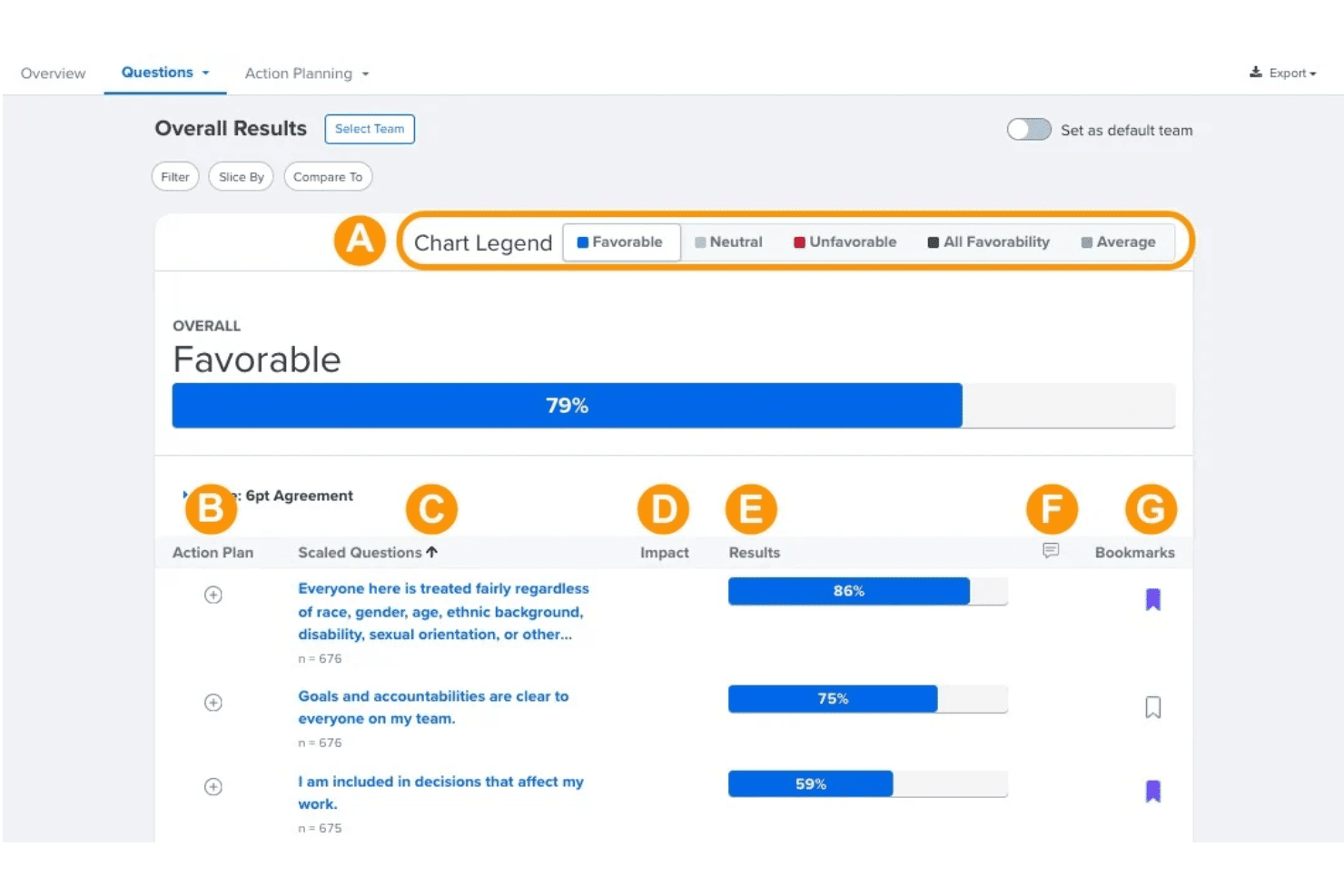
Quantum Workplace displays survey favorability results by question. Quantum Workplace is an employee engagement platform that combines scientifically validated engagement surveys, pulse and lifecycle surveys, AI-powered analytics, and retention risk reporting.
Who Is Quantum Workplace Best For?
Quantum Workplace is suited to growing businesses and organizations with established HR teams that need to connect engagement survey results with retention risk reporting.
Why I Picked Quantum Workplace
I picked Quantum Workplace for its ability to connect employee feedback with retention risk analysis. Its Retention Radar feature tracks turnover patterns across employee segments and identifies potential flight-risk signals over time, helping HR teams determine where additional attention may be needed. I also like its AI-powered narrative insights, which summarize recurring themes from open-ended survey responses. Together, these features help organizations interpret engagement results alongside broader employee retention trends.
Quantum Workplace Key Features
- Scientifically validated e9 survey model: Measure employee engagement using a research-backed nine-question framework with a six-point agreement scale.
- Employee lifecycle surveys: Trigger surveys automatically based on employee milestones or events through an HRIS connection, with additional recurring survey options.
- Benchmarking database: Compare engagement results against a database of more than 10,000 North American organizations, with filters for industry and company size.
- AI-powered action planning: Generate discussion prompts and research-informed action recommendations for managers based on team survey results.
Quantum Workplace Integrations
Quantum Workplace offers native integrations with BambooHR, Workday, ADP, UKG, Slack, Microsoft Teams, Okta, and Assembly by Quantum Workplace. Its HRIS connections synchronize employee data and support lifecycle survey triggers.
Pros and Cons
Pros:
- AI-generated action plans provide manager discussion prompts
- Engagement benchmarks draw on a large organization database
- Retention Radar identifies employee flight-risk signals
Cons:
- Public survey links permit repeat submissions
- Anonymous surveys exclude demographic filtering
Learn more about Quantum Workplace:
Outro software de envolvimento dos colaboradores para pequenas empresas
Eis algumas opções adicionais que não entraram na minha lista restrita, mas que ainda vale a pena consultar:
- 11Vantage CircleBest for cross-border teams with local rewards
- 12FondBest for linking perks and recognition
- 13MatterBest for chat-based kudos and pulse surveys
- 14HeyTacoBest for recognition and rewards in chat
- 15EmpulsBest for turning feedback into tracked action
Related Reviews
How I Evaluate Employee Engagement Software for Small Business
I split my evaluation into three parts. Core functionality carries the most weight: tools must run recurring pulse surveys and collect anonymous feedback. Next, I look for standout features like manager coaching nudges. Finally, I consider onboarding ease and per-seat pricing transparency.
Core Functionality (Table Stakes for This List)
When I'm selecting tools for my list, I score each one on a scale from 0 (does not offer the functionality) to 5 (excels in this area) for each core feature listed below. I then convert the total into a percentage to help assess each tool's overall fit, with extra weight on any functionalities I've deemed essential.
- Engagement Surveys & Pulses (Essential): I check whether the tool supports recurring pulse surveys, eNPS, and lifecycle surveys with flexible scheduling and question libraries.
- Recognition & Rewards: The tool should let peers and managers recognize contributions, accumulate points, and redeem rewards from a catalog.
- Engagement Analytics & Reporting: I look for dashboards that segment engagement scores by team or department and track trends over time.
- Anonymous Feedback Collection: Anonymity safeguards matter, so I evaluate whether employees can share open-ended comments without risk of identification.
- Small Business Scalability: Pricing, onboarding, and user management should fit teams without enterprise contracts or heavy setup requirements.
Once I have a list of tools that meet the criteria, I consider what sets each platform apart.
Differentiating Factors (What Sets Vendors Apart)
Here's how I compare and contrast different vendors:
Standout Features
I look for native Slack or Teams integration so surveys and recognition happen where people already work—tools like Bonusly and Nectar deliver kudos without pulling someone into a separate app. Manager coaching nudges also matter: I check whether the platform sends AI-driven prompts that help a non-specialist manager act on low scores, since small teams rarely have trained people leaders in every department. I also evaluate customizable reward catalogs, because a five-person office needs gift card and charity options that fit a tight budget, not enterprise perks.
Beyond Features
I check whether per-employee pricing stays transparent at small headcounts, since some vendors bury minimum seat requirements that inflate costs for a ten-person team. Anonymization policies matter just as much—in a tight-knit group, vague confidentiality promises won't encourage honest feedback, so I look for clear thresholds and data handling disclosures. I also evaluate how quickly a single HR generalist can launch the platform, favoring tools with prebuilt survey templates and self-service setup over those requiring dedicated onboarding calls.
Como escolher software de envolvimento dos colaboradores para pequenas empresas
Escolha uma plataforma verificando se as respetivas regras de confidencialidade, o processo de acompanhamento e os custos se adequam à forma como a sua equipa trabalha.
| Se a sua prioridade for… | Procure… |
| Opiniões honestas numa equipa pequena | Um limiar mínimo de respostas definido por escrito e uma política clara para o tratamento dos comentários |
| Acompanhamento após cada inquérito | Responsabilidade atribuída a uma pessoa específica para analisar os resultados e registar as ações seguintes |
| Custos previsíveis com equipas pequenas | Uma proposta discriminada que indique os preços por pessoa, o número mínimo de licenças e os custos opcionais |
| Um lançamento gerível | Uma lista de verificação da configuração que identifique o tempo necessário de RH, o contributo dos colaboradores e os dados necessários |
Como avaliar a sua lista restrita
- Confirme a confidencialidade: Solicite a política escrita do fornecedor sobre anonimato e retenção de dados, incluindo o limiar mínimo de respostas para a apresentação dos resultados.
- Teste o processo de acompanhamento: Faça um teste de 30 dias com um inquérito rápido e peça a dois gestores que documentem uma ação, um responsável e uma data-limite.
- Esclareça o custo total: Peça um orçamento com o número atual de colaboradores e com mais 10 licenças; solicite a discriminação dos mínimos e dos custos adicionais.
- Defina o âmbito da implementação: Solicite uma lista de verificação para o lançamento e estime as horas de preparação dos recursos humanos, os dados dos colaboradores necessários e quaisquer chamadas de integração antes de assinar.
- Escolha o compromisso: Prefira uma ferramenta autónoma de envolvimento quando a confidencialidade dos inquéritos e o acompanhamento direcionado forem mais importantes; escolha uma plataforma de recursos humanos mais abrangente quando for mais importante manter o trabalho de envolvimento associado aos registos dos colaboradores.
O que é o software de envolvimento dos colaboradores para pequenas empresas?
O software de envolvimento dos colaboradores para pequenas empresas ajuda as equipas a recolher feedback dos colaboradores, apoiar o reconhecimento e orientar o acompanhamento por parte dos gestores. Pode incluir inquéritos rápidos, feedback anónimo, relatórios de envolvimento e ferramentas para reconhecer contributos. As pequenas empresas podem utilizar estas funcionalidades para perceber como se sentem os colaboradores e decidir que medidas tomar, sem depender de um grande departamento de recursos humanos.
Funcionalidades
Eis as principais funcionalidades que procuro no software de envolvimento dos colaboradores para pequenas empresas:
- Inquéritos rápidos: Questionários breves e recorrentes recolhem feedback sobre o estado de espírito dos colaboradores ao longo do tempo. As equipas podem agendar inquéritos em intervalos regulares e utilizar bibliotecas de perguntas para explorar temas específicos.
- Feedback anónimo: Os colaboradores podem partilhar comentários sem associar os seus nomes às respostas. Verifique os limiares mínimos de respostas e as políticas de tratamento de comentários da plataforma para compreender como a confidencialidade é protegida.
- Inquéritos ao longo do ciclo de vida: Os inquéritos agendados em torno de momentos importantes, como a integração ou a saída, recolhem feedback sobre experiências específicas dos colaboradores. As equipas de recursos humanos podem utilizar estas respostas para identificar preocupações em diferentes fases da relação laboral.
- Reconhecimento e recompensas: Os colaboradores e os gestores podem reconhecer contributos através do reconhecimento entre pares ou de elogios públicos por parte dos gestores. Algumas plataformas também oferecem pontos e catálogos de recompensas, proporcionando formas estruturadas de reconhecer as conquistas dos colaboradores.
- Análise e relatórios de envolvimento: Os painéis de controlo organizam as respostas aos inquéritos e apresentam pontuações e tendências ao longo do tempo. Quando o número de respostas o permite, as equipas podem comparar resultados entre grupos e identificar áreas que requerem atenção.
- Planeamento de ações pelos gestores: As ferramentas de planeamento de ações permitem aos gestores documentar os passos de acompanhamento depois de analisarem o feedback dos colaboradores. A atribuição de responsáveis e datas-limite ajuda as equipas a acompanhar o progresso e a responsabilização.
- Integrações com recursos humanos e o local de trabalho: As integrações ligam o software de envolvimento às plataformas de comunicação e de recursos humanos quando são suportadas. Isto pode disponibilizar inquéritos e reconhecimento através de fluxos de trabalho familiares, reduzindo simultaneamente a introdução duplicada de dados.
Vantagens
Na minha experiência, o software de envolvimento dos colaboradores para pequenas empresas oferece várias vantagens práticas, incluindo:
- Informações mais precoces sobre o estado de espírito dos colaboradores: Os inquéritos rápidos recorrentes e os painéis de controlo de envolvimento ajudam as equipas de recursos humanos a identificar alterações no feedback ao longo do tempo.
- Feedback mais franco dos colaboradores: As opções de resposta anónima proporcionam aos colaboradores uma forma de partilhar preocupações, sujeita às políticas de confidencialidade e aos limiares de comunicação da plataforma.
- Feedback associado aos momentos importantes dos colaboradores: Os inquéritos de integração e de saída recolhem informações sobre fases específicas da experiência dos colaboradores.
- Reconhecimento mais visível dos colaboradores: O reconhecimento entre pares, os elogios públicos dos gestores, os pontos e os catálogos de recompensas proporcionam formas estruturadas de reconhecer os contributos dos colaboradores.
- Acompanhamento mais claro por parte dos gestores: As ferramentas de planeamento de ações permitem aos gestores atribuir responsáveis e prazos a ações baseadas nas conclusões dos inquéritos.
- Feedback integrado nos fluxos de trabalho existentes: As integrações com o Slack e o Microsoft Teams, quando disponíveis, permitem aos colaboradores participar em inquéritos ou atividades de reconhecimento sem mudar de plataforma.
Preços
O preço do software de envolvimento dos colaboradores varia consoante a dimensão da equipa, as funcionalidades e os complementos disponíveis. Alguns fornecedores oferecem planos gratuitos ou períodos de avaliação, enquanto outros exigem orçamentos personalizados ou subscrições anuais. A tabela abaixo apresenta categorias de preços indicativas e funcionalidades habitualmente disponíveis para ajudar as pequenas empresas a comparar as opções.
Tabela de comparação de planos de software de envolvimento dos colaboradores para pequenas empresas
| Tipo de plano | Preço médio | Funcionalidades comuns |
|---|---|---|
| Tipo de planoPlanos e períodos de avaliação gratuitos | Preço médioAcesso gratuito ou por tempo limitado | Funcionalidades comunsReconhecimento básico entre colegas, inquéritos limitados, relatórios introdutórios e demonstrações do produto |
| Tipo de planoFerramentas de envolvimento de baixo custo | Preço médio$1–$3/utilizador/mês | Funcionalidades comunsReconhecimento entre colegas, verificações básicas de satisfação, celebrações de marcos e relatórios simples |
| Tipo de planoPlataformas de envolvimento de gama média | Preço médio$3–$8/utilizador/mês | Funcionalidades comunsInquéritos recorrentes, feedback anónimo, programas de reconhecimento, análise do envolvimento e acompanhamento pelos gestores |
| Tipo de planoPlataformas avançadas ou personalizadas | Preço médio$8+/utilizador/mês ou preços personalizados | Funcionalidades comunsRelatórios avançados, inquéritos configuráveis, feedback ao longo do ciclo de vida, análise da força de trabalho e funcionalidades de RH mais abrangentes |
Perguntas frequentes
Eis as respostas às perguntas comuns sobre software de envolvimento dos colaboradores para pequenas empresas:
Uma pequena empresa pode utilizar software de envolvimento sem uma equipa de RH dedicada?
Sim, as pequenas empresas podem utilizar software de envolvimento dos colaboradores sem uma equipa de RH dedicada. Escolha uma plataforma com configuração autónoma, modelos de inquéritos e controlos de acesso claros baseados em funções. Comece com um breve inquérito de pulso e um conjunto focado de perguntas, em vez de configurar todas as funcionalidades disponíveis. Decida quem irá analisar os resultados antes de convidar os colaboradores a participar. Um responsável pode acompanhar a equipa, enquanto um representante de RH ou administrador designado monitoriza a participação e as definições de confidencialidade. Se a plataforma exigir uma configuração extensa ou assistência regular do fornecedor, confirme que a carga de trabalho é compatível com a capacidade da sua equipa.
Com que frequência deve uma pequena empresa enviar inquéritos de pulso?
Não existe uma frequência de inquéritos ideal única para todas as equipas. Considere começar com inquéritos de pulso mensais ou trimestrais e ajustar depois o calendário com base na frequência com que os responsáveis conseguem analisar os resultados e agir. Inquéritos breves enviados de forma consistente podem ajudar as equipas a identificar alterações na perceção dos colaboradores sem recolherem mais feedback do que aquele que conseguem abordar. Evite enviar inquéritos com tanta frequência que os colaboradores sintam estar a responder repetidamente às mesmas perguntas. Também pode agendar inquéritos separados após marcos específicos, como a integração, quando precisar de feedback sobre uma experiência concreta do colaborador.
O que deve fazer um responsável depois de receber os resultados de um inquérito?
Os responsáveis devem analisar os resultados do inquérito, discutir os temas recorrentes com as suas equipas e acordar um pequeno número de ações de acompanhamento. Evite prometer soluções antes de compreender o feedback, uma vez que os comentários abertos podem fornecer um contexto importante para as pontuações do inquérito. Para cada ação, atribua um responsável e uma data-limite e comunique os próximos passos aos colaboradores. Se os resultados suscitarem preocupações sensíveis, envolva o RH e siga os procedimentos de comunicação estabelecidos pela organização. Reveja as ações durante as reuniões subsequentes da equipa, para que os colaboradores possam ver o que mudou em resposta ao seu feedback.