

Gerir os recursos humanos através de ferramentas desligadas umas das outras torna tudo mais lento. O processamento salarial reside num sistema. O recrutamento está noutro. As avaliações de desempenho são realizadas noutro local completamente diferente.
O software de RH tudo-em-um resolve esse problema ao centralizar as suas principais funções de RH — desde os dados dos colaboradores e a integração de novos funcionários até ao processamento salarial, benefícios, conformidade e gestão do desempenho — numa única plataforma.
Mas eis o desafio: nem todas as soluções “tudo-em-um” são verdadeiramente abrangentes. Algumas centram-se sobretudo no processamento salarial. Outras dão prioridade ao recrutamento ou à conformidade global. A escolha certa depende da dimensão da sua empresa, dos seus planos de crescimento e da complexidade operacional.
Testei e analisei de forma independente as principais plataformas de RH tudo-em-um disponíveis atualmente, para identificar quais oferecem realmente uma funcionalidade unificada.
Abaixo, encontrará uma análise detalhada das melhores opções, incluindo os seus pontos fortes, compromissos e adequação ideal. Quer esteja a consolidar ferramentas ou a implementar o seu primeiro sistema de RH, este guia ajudá-lo-á a escolher com clareza.
Why Trust Our Software Recommendations
6,700+
Reviews
20
Industry experts
16+
Evaluation factors
14
Years
Our team has been testing and reviewing software since 2012. As HR experts ourselves, we know how difficult—and important—it is to choose the right software.
For this guide, we evaluated tools using hands-on testing and independent research, scoring tools using our selection criteria. We also draw on insights from industry thought leaders and practicing HR experts.
Our reviews reflect our human editorial judgment, not a sales pitch.
Expert reviewers:
- Phil GrayCOO
 Kim BehnkeHR Tech Editor & Analyst
 Josh BarkerPeople Ops Manager

Tabela comparativa de software de RH tudo-em-um
Esta tabela comparativa resume os detalhes de preços das minhas principais escolhas de software de RH tudo-em-um.
| Tool | Best For | Trial Info | Price | ||
|---|---|---|---|---|---|
| 1 | Best for unified payroll HRIS and compliance | Free demo available | From $5/user/month | Website | |
| 2 | Best for broad business apps integrations | Not available | From $8/user/month | Website | |
| 3 | Best as AI for business | Free trial + Free demo available | From $8/user/month | Website | |
| 4 | Best with advanced AI-powered HR automation | Free demo available | Pricing upon request | Website | |
| 5 | Best for startups and SMEs | Free plan + free demo available | From $2/user/month (billed annually) | Website | |
| 6 | Best for talent acquisition features | Free demo available | Pricing upon request | Website | |
| 7 | Best for onboarding that feeds employee records | Free demo available | From $4/user/month | Website | |
| 8 | Best for in-house or partner-run payroll | Free demo available | Pricing upon request | Website | |
| 9 | Best for fast-growing companies | Free demo available | From $2.50/employee/month | Website | |
| 10 | Best for remote team management | Free demo available | Pricing upon request | Website |


Análise do melhor software de RH tudo-em-um
Abaixo encontrará os meus resumos detalhados do melhor software de RH tudo-em-um que integrou a minha seleção. As minhas análises apresentam uma visão detalhada das principais funcionalidades, vantagens e desvantagens, integrações e casos de utilização ideais de cada ferramenta, para o ajudar a encontrar a melhor opção para si.
 Best for unified payroll HRIS and compliance
- Free demo available
- From $5/user/month
Visit WebsiteCustomer Rating:4.8/5
Global Payroll dashboard showing multi-country pay cycles, submission statuses, and review actions in one centralized view. For companies managing international teams, Deel provides a centralized platform for handling global HR operations. It supports payroll, hiring, and compliance in more than 150 countries, helping businesses navigate varying labor laws and payment requirements. As a global HR solution, Deel is designed to reduce the administrative complexity that often comes with cross-border workforce management.
Why I Picked Deel
I picked Deel because it brings global hiring, payroll, and compliance into one system, which can make it easier for you to manage distributed teams. Its centralized employee management tools help you keep records organized while supporting compliance with local labor regulations. I also like that its automated multi-country payroll can help ensure employees and contractors are paid accurately and on time, with taxes and deductions calculated according to local requirements. For companies operating internationally, these capabilities can help address common administrative and compliance challenges.
Deel Key Features
In addition to its core functionalities, Deel provides several features that enhance its utility as an all-in-one HR software:
- Recruiting and Onboarding: Streamlined processes for hiring, including automated offer letters and structured onboarding workflows.
- Time Off and Attendance: Automated tracking of various leave types with self-service requests and approvals.
- Performance Management: Tools for goal setting, feedback cycles, and real-time check-ins to enhance employee development.
- Analytics and Reporting: Unified dashboards for real-time insights into HR metrics, improving decision-making and operational efficiency.
Deel Integrations
Integrations include QuickBooks, Xero, Workday, SAP, NetSuite, Greenhouse, BambooHR, Lever, Rippling, and Zenefits.
Pros and Cons
Pros:
- Integrates with major HR systems
- Built-in compliance and contract management
- Global payroll across 150 countries
Cons:
- Limited directory customization options
- Reporting features lack advanced filtering
 Best for broad business apps integrations
- Not available
- From $8/user/month
Visit WebsiteCustomer Rating:4.9/5
Rippling offers an AI-powered HR assistant that surfaces voluntary termination data with tenure, department breakdowns, and manager attribution in seconds. Rippling is an all-in-one HR platform that unifies HR, IT, and Finance management—covering payroll, benefits administration, time tracking, onboarding, performance, and device management through a single connected employee data layer.
Who Is Rippling Best For?
Rippling suits fast-growing businesses that need HR, IT, and Finance operations to scale together without managing separate platforms.
Why I Picked Rippling
Rippling earns its spot on my shortlist because its 650+ integrations are woven directly into its automation layer, not bolted on as passive connectors. When I onboard a new hire, Rippling simultaneously provisions their Slack, Google Workspace, and device access without a single manual step. I also use the Rippling API Platform to build custom workflows that pull HR, IT, and Finance data together in ways I'd otherwise need three separate systems to achieve.
Rippling Key Features
- Global Employee Graph: Centralizes employee data, documents, org charts, and lifecycle changes across all modules in one system.
- Learning management system: Assigns compliance courses and tracks completion for employee development and regulatory requirements.
- Compliance automation tools: Performs automated tax filings, document collection, and tracks changing federal, state, and international HR regulations.
- Role-based permissions: Lets you specify exactly who can access sensitive HR, payroll, or benefit details with fine-grained controls.
Rippling Integrations
Rippling offers a wide range of native integrations including Google Workspace, Microsoft 365, Slack, QuickBooks, NetSuite, Zoom, Okta, DocuSign, Greenhouse, Lever, and Xero. An API is also available for custom integrations.
Pros and Cons
Pros:
- Supports global payroll across 185+ countries
- Automates device provisioning during new hire onboarding
- Unifies HR, IT, and Finance natively
Cons:
- Initial setup demands significant configuration time
- Support quality varies by account tier
 Best as AI for business
- Free trial + Free demo available
- From $8/user/month
Visit WebsiteCustomer Rating:4.4/5
Factorial's AI Analytics generates headcount reports with insights and recommendations. Factorial is an AI-driven HR platform that covers time tracking, absence management, onboarding, performance, benefits, and payroll preparation across a single system.
Who Is Factorial Best For?
Factorial suits growing businesses that want AI woven into everyday operations—from scheduling and reporting to answering employee policy questions—without juggling separate tools for each task.
Why I Picked Factorial
I picked Factorial as one of the best because its AI sits at the center of daily operations rather than acting as a bolt-on feature. I've seen it answer employee policy questions on the spot, build out timetables, and generate reports automatically—tasks that typically eat up a chunk of an HR team's week. What I find especially compelling is how that AI layer connects across modules like time tracking, scheduling, and performance, so your team isn't switching context to get answers.
Factorial Key Features
- 360-degree performance reviews: Employees, peers, and managers can all contribute feedback through structured review cycles built into the platform.
- Geolocation and QR-based time tracking: Staff clock in and out using their location or a scannable QR code, from desktop or mobile.
- Automated shift scheduling: Managers can create, rotate, and assign shifts in bulk without manually building each schedule.
- E-signature for HR documents: Employees can sign contracts, onboarding forms, and other documents digitally without leaving the platform.
Factorial Integrations
Factorial offers 72 marketplace integrations, including Silae, DATEV LODAS, Microsoft Power BI, Okta, Slack, Recruitee, and Zapier. It also provides a public REST API and webhooks for custom integrations.
Pros and Cons
Pros:
- Onboarding paperwork and tasks stay centralized
- Mobile clock-ins and shared absence calendars
- AI answers employee policy questions
Cons:
- Tailored workforce reports can require manual work
- Payroll runs require external providers
 Best with advanced AI-powered HR automation
- Free demo available
- Pricing upon request
Visit WebsiteCustomer Rating:4.5/5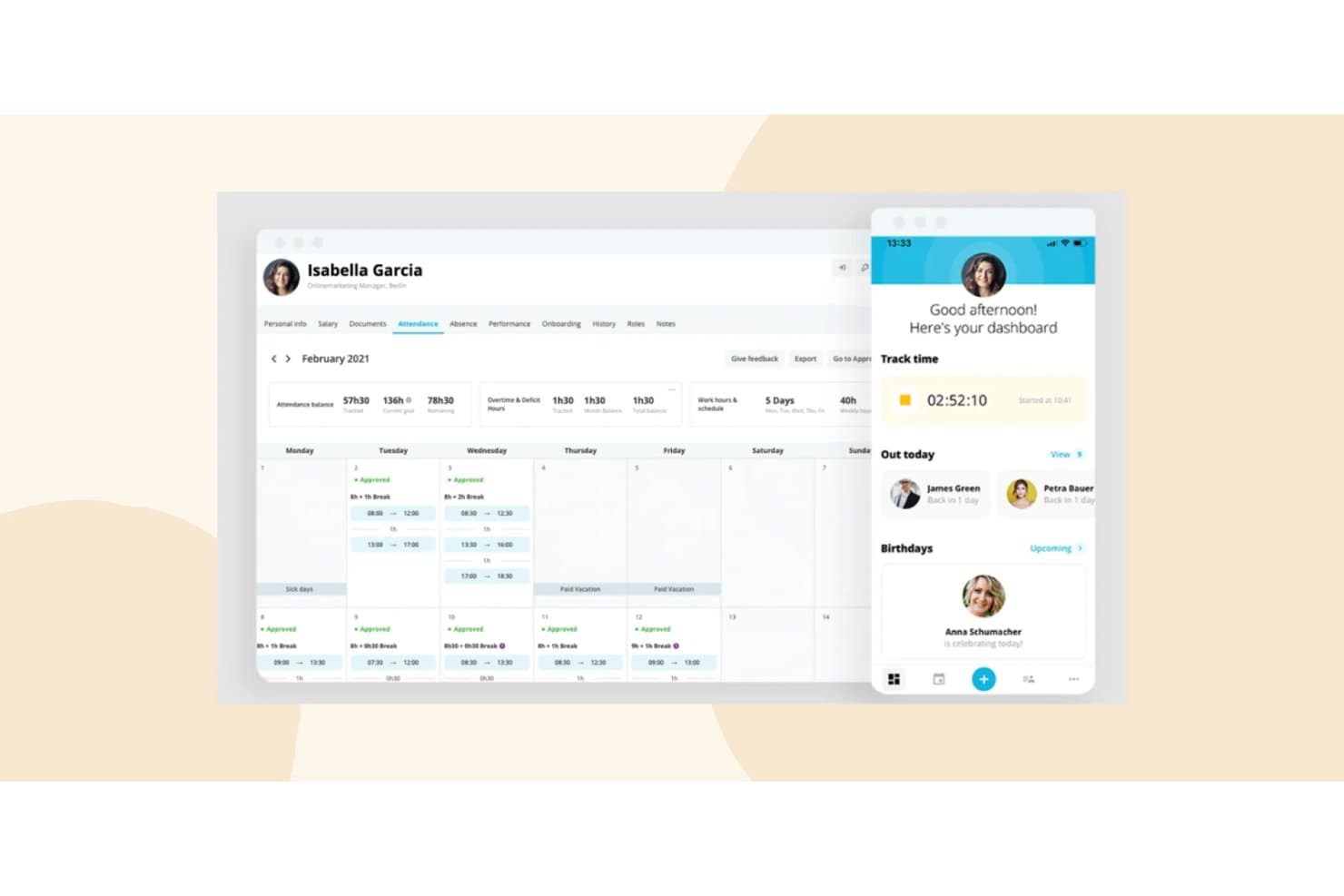
HiBob offers a comprehensive attendance tracking dashboard with a calendar view, time balances, and a mobile app showing real-time time tracking and team availability. HiBob (Bob) is a modular, all-in-one HR platform covering core HRIS, payroll, time and attendance, benefits, onboarding, performance management, compensation, and workforce planning in a single system.
Who Is HiBob Best For?
HiBob is a strong fit for mid-market, globally distributed companies that need a scalable HR platform across multiple regions and employee populations.
Why I Picked HiBob
HiBob earns its spot as one of the best on my shortlist because AI is genuinely embedded across the platform, not bolted on. I like that the Bob AI Companion lets me query people data in plain language and auto-generate performance reviews and job descriptions on the spot. HiBob also holds ISO 42001 certification, the AI management standard, which very few HR platforms have achieved, and that gives me real confidence in how the AI is governed.
HiBob Key Features
- Employee self-service portal: Empowers employees to manage their own personal data, time off, documents, and benefits.
- Configurable onboarding workflows: Automates new hire onboarding tasks, document signing, and compliance steps for each role or location.
- People analytics and reporting: Provides customizable dashboards for headcount, DEI metrics, turnover, and compensation analysis.
- Integration marketplace: Offers pre-built connectors for tools like Slack, Microsoft 365, and HR systems to sync data across platforms.
HiBob Integrations
HiBob offers native integrations with Slack, Microsoft 365, Google Workspace, Greenhouse, Jira, Okta, and Workable. An API is available for custom integrations.
Pros and Cons
Pros:
- Highly configurable onboarding and offboarding workflows
- Strong people analytics and DEI reporting dashboards
- AI-powered features embedded natively across the platform
Cons:
- Reporting customization requires significant setup time
- Payroll not native in most regions
 Best for startups and SMEs
- Free plan + free demo available
- From $2/user/month (billed annually)
Visit WebsiteCustomer Rating:4.8/5
TalentHR offers a time-tracking interface for logging employee work hours. TalentHR is an all-in-one HR software designed for startups and SMBs. It focuses on employee management, time tracking, and performance management, providing essential tools for efficient HR operations.
Why I picked TalentHR: TalentHR is tailored for startups and small businesses that need effective HR solutions without complexity. It includes features such as automated time-off tracking and performance management.
The platform’s onboarding tools help you integrate new hires into your team. Its user-friendly interface ensures that all leaders can manage HR tasks effectively.
Standout features and integrations:
Features include people analytics, which provides insights into workforce metrics, and customizable reporting to meet your specific needs. The platform also offers documentation and compliance management, ensuring your HR processes are secure and up-to-date.
Integrations include Slack, Google Calendar, Microsoft Outlook, and more.
Pros and Cons
Pros:
- Customizable reporting features
- Flexible pricing options
- Easy setup for new users
Cons:
- May not scale well for large teams
- Limited advanced features
Learn more about TalentHR: Best for talent acquisition features
- Free demo available
- Pricing upon request
Visit WebsiteCustomer Rating:4.3/5
Paylocity offers employee scheduling features including shift tracking, clock-in/clock-out functionality, and time-off management integrated within its HR platform. If you're part of a company that juggles payroll, talent acquisition, and benefits administration, Paylocity might just be what you need. This platform caters to diverse industries, including education, healthcare, and technology, and aims to simplify your HR processes while enhancing the employee experience.
Why I Picked Paylocity
I picked Paylocity because its unique ability to integrate HR, finance, and IT functions under one platform stands out as a significant advantage for businesses looking for an all-in-one HR solution. Paylocity's comprehensive payroll management ensures that you can handle payroll processing with ease and accuracy. Additionally, its talent acquisition features are designed to streamline recruiting efforts, making the hiring process more efficient. The platform also offers employee experience tools that empower your workforce and improve engagement, which is crucial for retaining top talent.
Paylocity Key Features
In addition to its standout capabilities, I also found several other features that enhance its all-in-one HR functionality:
- Expense Management: This feature allows you to automate and streamline the management of employee expenses, reducing manual errors and saving time.
- Corporate Cards: Paylocity's corporate card integration simplifies the process of issuing and managing company credit cards, providing real-time spending insights.
- Accounting Automation: With this feature, you can automate routine accounting tasks, improving accuracy and freeing up your finance team to focus on more strategic initiatives.
- Spend Analytics: This tool provides detailed insights into your company's spending patterns, helping you make informed financial decisions.
Paylocity Integrations
Integrations include Bank of America, Indeed, Fidelity, QuickBooks Online, NetSuite, Salesforce, ADP, BambooHR, Microsoft Dynamics, and Workday.
Pros and Cons
Pros:
- Built-in compliance tracking for labor laws
- Mobile app allows shift swaps and approvals
- Customizable scheduling workflows for complex organizations
Cons:
- No free plan for ongoing use
- Fewer industry-specific scheduling templates available
 Best for onboarding that feeds employee records
- Free demo available
- From $4/user/month
Visit WebsiteCustomer Rating:4.5/5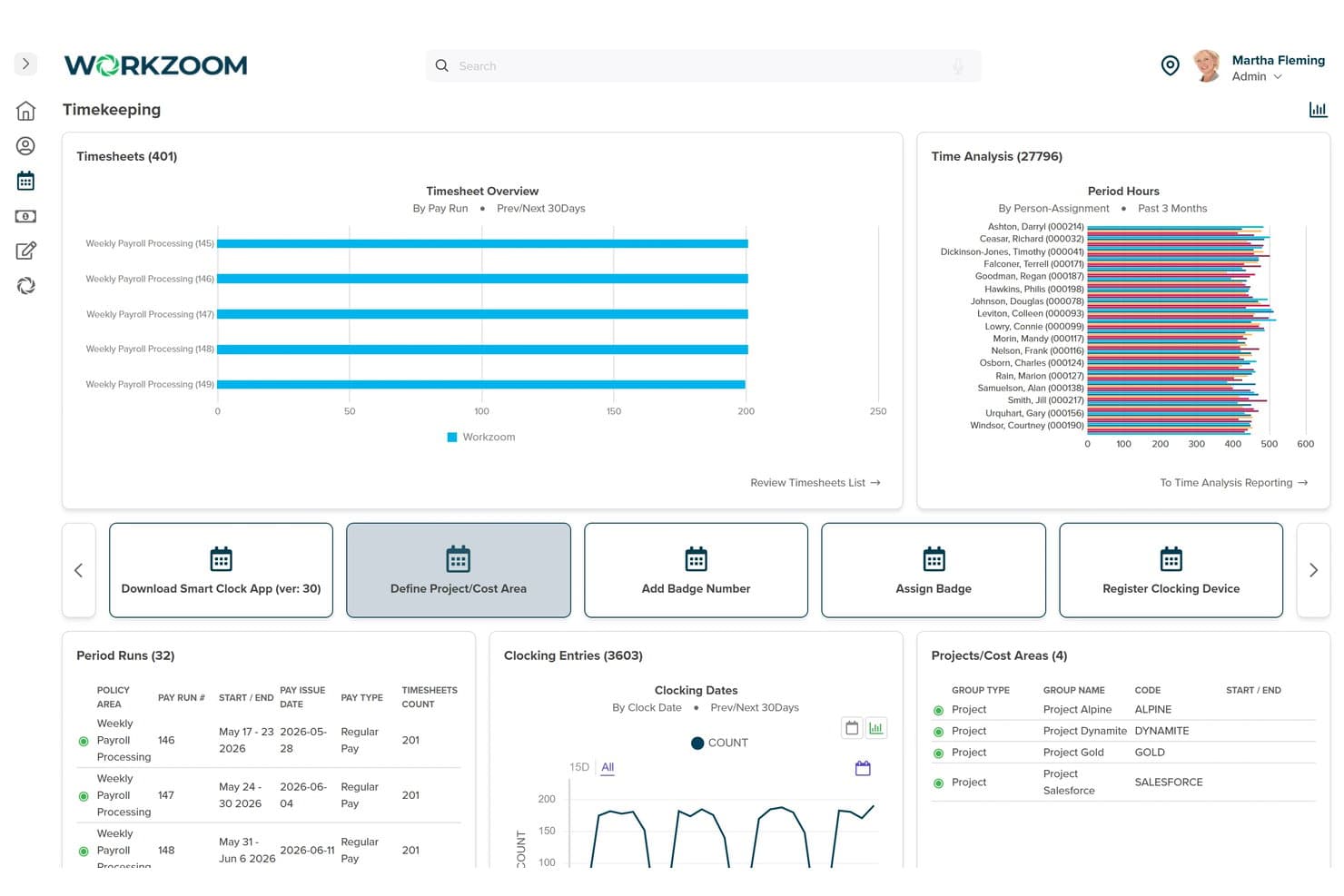
Workzoom centralizes timekeeping, timesheets, and clocking data in one dashboard. Workzoom is an HR platform covering recruiting, onboarding, personnel records, engagement, and compensation management across a shared employee record.
Who Is Workzoom Best For?
Workzoom suits mid-sized HR and people ops teams—typically 50 to 5,000 employees—who want recruiting, onboarding, and personnel records connected on a single employee record.
Why I Picked Workzoom
Workzoom earns its spot on my shortlist because of how tightly its onboarding connects to the rest of the employee record. When a new hire completes their digital onboarding portal, their tax forms, banking details, and benefit selections flow directly into Personnel without any re-entry. I also like that onboarding templates branch by role, department, and work site, so the right tasks automatically reach HR, IT, and the hiring manager the moment someone is hired.
Workzoom Key Features
- Date-effective employee records: Personnel preserves a dated history for every salary, role, status, and benefits change, so you can view your organization exactly as it existed at any past date.
- Pulse, engagement, and exit surveys: Run targeted surveys scored as favorable, neutral, or unfavorable, with anonymous feedback options and results compared against performance and turnover data.
- Position-based org management: Maintain positions independently of their current occupants to track vacancies, plan headcount, and route approvals through defined reporting lines.
- Applicant tracking with knock-out screening: Manage candidates through a stage-based pipeline with automatic declination for applicants who don't meet required criteria and side-by-side candidate comparison.
Workzoom Integrations
Workzoom offers three documented native integrations: Microsoft Entra ID, OneLogin, and Okta, all supporting SAML 2.0 single sign-on. API availability and a broader integration marketplace aren’t documented.
Pros and Cons
Pros:
- Reviewers praise responsive implementation support
- Shared records reduce HR data re-entry
- Onboarding documents flow into personnel records
Cons:
- Users report difficulty finding settings and reports
- Full local payroll covers only three countries
Learn more about Workzoom: Best for in-house or partner-run payroll
- Free demo available
- Pricing upon request
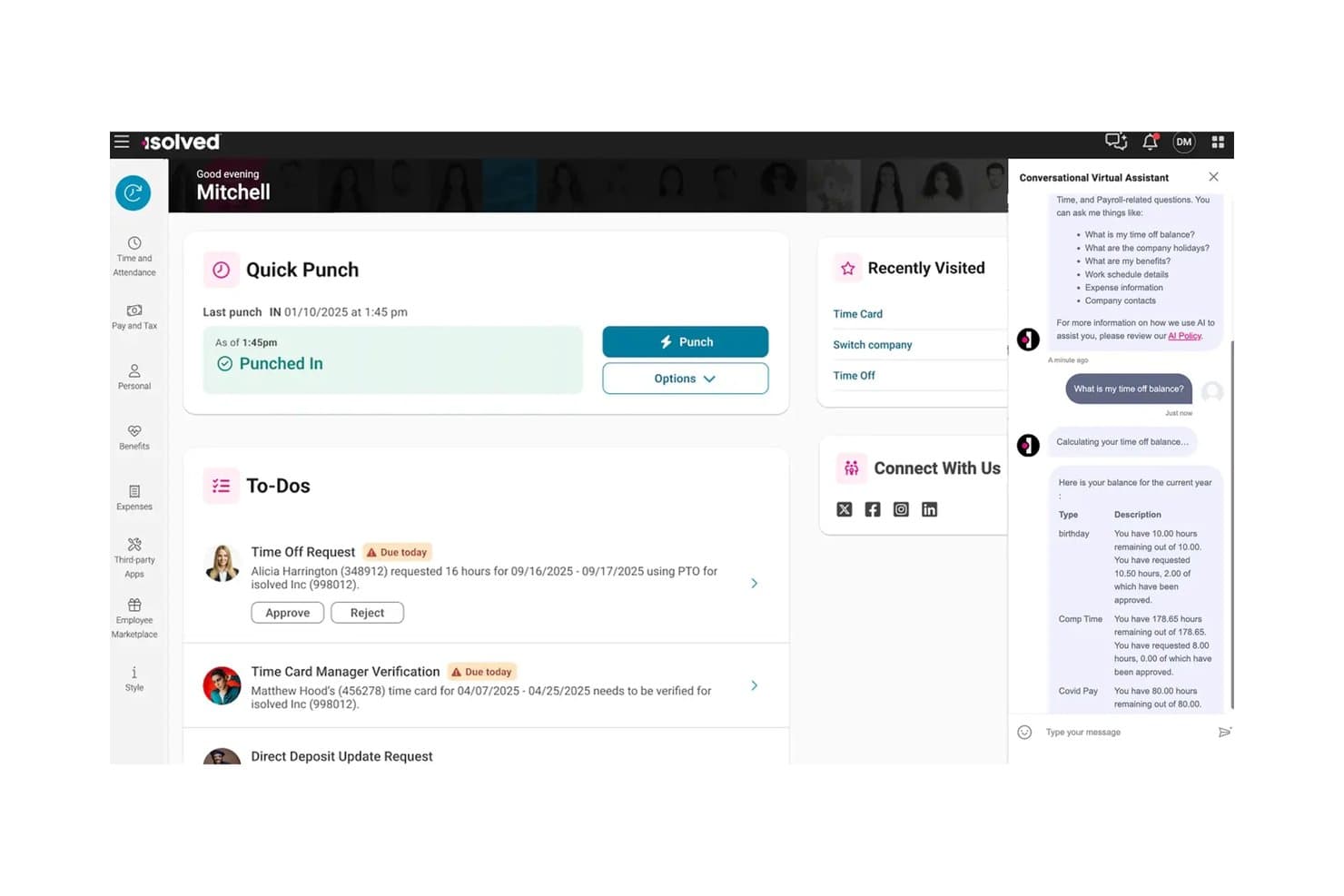
isolved's AI assistant delivers instant answers on time-off balances. isolved People Cloud is an all-in-one HCM platform that covers HR, payroll, benefits administration, time and attendance, talent acquisition, and talent management in a single connected system.
Who Is isolved Best For?
isolved People Cloud is a strong fit for payroll and benefits administrators who want HR, payroll, time tracking, and benefits enrollment running in one connected system—with the option to keep payroll in-house or hand it off to a partner.
Why I Picked isolved
I picked isolved as one of the best because it's one of the few platforms that lets you choose how payroll actually runs. You can keep it in-house with a specialist managing calculations, deductions, and compliance, or hand it off to a partner entirely. I also like that payroll pulls live data from time, PTO, and benefits, so there's no manual reconciliation before you run. The Guardian, isolved's payroll AI, reviews each run before close and flags potential errors automatically.
isolved Key Features
- Employee self-service portal: Employees can view and update direct deposit, access pay stubs, download W-2s, and manage PTO requests from web or mobile.
- Benefits enrollment and administration: Administrators manage plans directly in the platform while employees research, compare, and enroll in benefits during open enrollment.
- Onboarding workflow management: Configurable onboarding workflows carry applicant data into new-hire records, collect e-signatures, and notify personnel at each stage.
- Always-On HR AI chatbot: An AI-powered assistant lets employees get answers to HR questions and complete HR tasks without contacting the HR team.
isolved Integrations
isolved offers marketplace integrations with Sage Intacct through HCMConnect, QuickBooks Online, Employee Navigator, Payroll Integrations, and Remote. It also provides a REST API for custom integrations.
Pros and Cons
Pros:
- Payroll can run in-house or through a partner
- Employee self-service cuts routine HR requests
- Connected HR, payroll, and benefits workflows
Cons:
- Employee and administrator logins cause confusion
- Reports require extra steps and merging
Learn more about isolved: Best for fast-growing companies
- Free demo available
- From $2.50/employee/month
Visit WebsiteCustomer Rating:4.8/5
PeopleForce tracks hours, leave, and breaks in customizable attendance tables. PeopleForce is tailored for fast-growing companies that need scalable and efficient HR management. It focuses on employee engagement, performance tracking, and recruitment, helping businesses manage their expanding teams effectively.
Why I picked PeopleForce: PeopleForce is ideal for companies experiencing rapid growth, as it offers features such as automated recruitment workflows and real-time performance analytics. These capabilities help your team keep up with hiring demands and monitor employee progress.
The tool's employee engagement tools ensure that your growing team remains motivated and aligned with company goals. Additionally, PeopleForce's scalable platform adapts to the changing needs of your business.
Standout features and integrations:
Features include customizable performance reviews, which allow you to tailor evaluations to your team's needs. The platform also offers an employee recognition system to boost morale and encourage productivity. Additionally, PeopleForce provides detailed analytics and reporting to give you insights into your HR operations.
Integrations include Slack, Google, Microsoft, Zoom, LinkedIn, and more.
Pros and Cons
Pros:
- Customizable performance reviews
- Employee engagement tools
- Real-time performance analytics
Cons:
- Interface can feel overwhelming at first
- Some features take time to configure properly
Learn more about PeopleForce: 10Best for remote team management
HR Cloud
- Free demo available
- Pricing upon request
Visit WebsiteCustomer Rating:4.7/5
HR Cloud provides detailed timesheet tracking with a breakdown by category. HR Cloud is an all-in-one HRIS designed for businesses looking to manage remote teams effectively. It serves enterprises and startups across various industries, focusing on virtual team management, HR automation, and employee engagement.
Why I picked HR Cloud: HR Cloud excels in remote team management by offering features such as automated onboarding and centralized HR data management. It includes tools for time-off tracking and performance reviews, making it easier to manage a distributed workforce in less time.
The tool's employee self-service options empower your team to handle their HR tasks independently. Additionally, mobile access ensures that your remote employees stay connected and engaged.
Standout features and integrations:
Features include automated onboarding, centralized HR data management, and time-off tracking. The platform also supports performance reviews and employee self-service options, which help your team manage their HR tasks independently. Additionally, mobile access ensures that remote employees stay connected and engaged.
Integrations include QuickBooks, ADP, Paylocity, Workday, and more.
Pros and Cons
Pros:
- Centralized HR data management
- Automated onboarding process
- Customizable HR workflows
Cons:
- Requires internet for full functionality
- Occasional technical glitches
Learn more about HR Cloud:
Outro software de RH tudo-em-um
Eis algumas opções adicionais de software de RH tudo-em-um que não integraram a minha seleção, mas que vale a pena conhecer:
- 11GoCoBest for customizable workflows
- 12EddyBest for small business HR needs
- 13BambooHRBest for employee satisfaction
- 14Keka HRBest for integrated project & resource management
- 15PaycorBest for payroll and analytics
- 16RiseBest for Canadian businesses
- 17Sage HRBest for shift scheduling
- 18Zoho PeopleBest for integrated HR services
- 19OrangeHRMBest for open-source HR solutions
- 20BrightHRBest for absence management
- 21LatticeBest for performance reviews
- 22Employment HeroBest for employee benefits
- 23PaycomBest for payroll processing
- 24Breathe HRBest for small businesses
- 25Deel PayrollBest for global payroll management
- 26RemoteBest for managing global teams
- 27One ModelBest for data-driven HR insights
Related Reviews
How I Evaluate All in One HR Software
I look at these platforms in two layers: whether they cover the core HR stack—payroll, employee records, benefits, and time—end to end, and then what separates the strongest options from the rest.
Core Functionality (Table Stakes For This List)
When I'm selecting tools for my list, I rank each one on a scale from 0 (does not offer the functionality) to 5 (excels in this area) for each core functionality listed below. Then, I calculate the tool's total score into a percentage. Each tool needs to achieve a minimum total score of 75% to be considered for inclusion.
- Core HRIS & Employee Records: I check whether the platform serves as a true system of record—org charts, custom fields, document storage, and audit trails, not just a contact list.
- Payroll Processing: Whether payroll runs natively or through a deep integration matters. I look at tax filing automation, direct deposit, and multi-jurisdiction support.
- Benefits Administration: I evaluate how enrollment, carrier connections, and deduction syncing work together—especially during open enrollment season when volume spikes.
- Time, Attendance & PTO: The time module should tie directly into payroll. I look at approval workflows, accrual tracking, and mobile clock-in options for frontline teams.
- Talent Management: From job postings and applicant tracking through onboarding and performance reviews, I evaluate how well each stage connects within one platform.
- Compliance & Reporting: I look for automated compliance support for common filings and configurable dashboards that let HR leaders pull workforce data without IT help.
Once I have a list of tools that meet this criteria, I consider what sets each platform apart.
Differentiating Factors (What Sets Vendors Apart)
Here's how I compare and contrast different vendors:
Standout Features
Employee self-service portals make a big difference in daily HR workload. I look for platforms where employees can pull their own pay stubs, update addresses, and submit PTO requests from a mobile app—freeing HR from routine back-and-forth. For teams hiring across borders, global workforce support is another major separator. Some platforms handle multi-country payroll and localized compliance natively, while others rely on EOR partnerships. I also evaluate how flexible each tool's workflow builder is, since every company has its own approval chains, onboarding steps, and offboarding sequences.
Beyond Features
Integration ecosystems matter a lot here. I check whether a platform connects natively with your accounting software, productivity suite, and SSO provider—or if you'll need custom API work to keep data flowing. Pricing transparency is another factor I weigh carefully, since some vendors bundle payroll and benefits into base pricing while others charge per module or per payroll run. I also evaluate implementation support, especially how the vendor handles historical payroll migration and whether dedicated onboarding help is included or sold as an add-on.
Como escolher software de RH tudo-em-um
É fácil perder-se em listas extensas de funcionalidades e estruturas de preços complexas. Para o ajudar a manter-se concentrado enquanto conduz o seu processo específico de seleção de software, eis uma lista de verificação dos fatores a ter em conta:
| Fator | O que deve considerar |
|---|---|
| FatorEscalabilidade | O que deve considerarO software pode crescer com a sua empresa? Procure ferramentas capazes de gerir um número crescente de colaboradores sem exigir uma reformulação completa do sistema. |
| FatorIntegrações | O que deve considerarFunciona com as suas ferramentas atuais? Verifique se existem integrações nativas com o seu software atual, para evitar custos e complexidade adicionais. |
| FatorPersonalização | O que deve considerarPode adaptar o software aos seus fluxos de trabalho? Certifique-se de que a plataforma permite flexibilidade na criação de processos adequados às necessidades específicas da sua equipa. |
| FatorFacilidade de utilização | O que deve considerarO software é intuitivo? Tenha cuidado com interfaces excessivamente complexas que atrasem a adoção e a produtividade da sua equipa. |
| FatorImplementação e integração | O que deve considerarQuanto tempo demorará a configuração? Considere o tempo e os recursos necessários para uma implementação bem-sucedida, incluindo a formação e o apoio do fornecedor. |
| FatorCusto | O que deve considerarQual é o seu orçamento? Compare as estruturas de preços e esteja atento a custos ocultos, como os custos de utilizadores adicionais ou de funcionalidades premium. |
| FatorMedidas de segurança | O que deve considerarOs seus dados estão protegidos? Certifique-se de que o software cumpre as normas do setor em matéria de segurança dos dados e disponibiliza funcionalidades como encriptação e auditorias regulares. |
| FatorRequisitos de conformidade | O que deve considerarCumpre as normas legais? Verifique se o software permite cumprir a legislação laboral e os regulamentos relevantes nas regiões onde opera. |
O que é software de RH tudo-em-um?
O software de RH tudo-em-um combina várias funções de recursos humanos numa única plataforma. Os profissionais de RH, os gestores e os proprietários de empresas utilizam estas ferramentas para gerir dados dos colaboradores, salários, benefícios e muito mais. Funcionalidades como o processamento salarial e a administração de benefícios ajudam a reduzir a carga administrativa e a melhorar a organização. De um modo geral, estas ferramentas simplificam as tarefas de RH, facilitando a concentração das equipas em iniciativas estratégicas.
Funcionalidades
Ao selecionar um software de RH tudo-em-um, esteja atento às seguintes funcionalidades essenciais:
- Gestão de dados dos colaboradores: Centraliza todas as informações dos colaboradores num único local, facilitando o acesso e a atualização dos registos.
- Processamento salarial: Automatiza os cálculos e os pagamentos salariais, garantindo a precisão e poupando tempo em tarefas manuais.
- Administração de benefícios: Gere eficazmente os programas de benefícios dos colaboradores, ajudando a acompanhar as inscrições e a elegibilidade.
- Controlo do tempo e da assiduidade: Monitoriza as horas e a assiduidade dos colaboradores, contribuindo para um processamento salarial preciso e para a conformidade.
- Recrutamento e integração: Otimiza o processo de contratação, desde a publicação de ofertas de emprego até à integração dos novos colaboradores, melhorando a experiência dos candidatos.
- Gestão do desempenho: Acompanha o desempenho e os objetivos dos colaboradores, fornecendo informações úteis para o desenvolvimento e as avaliações.
- Gestão da conformidade: Garante o cumprimento da legislação e dos regulamentos laborais, reduzindo o risco de problemas legais.
- Relatórios personalizáveis: Permite criar relatórios adaptados às necessidades específicas da empresa, disponibilizando informações valiosas sobre as métricas de RH.
- Portal de autosserviço para colaboradores: Permite aos colaboradores aceder e gerir as suas próprias informações de RH, reduzindo a carga administrativa.
- Acesso através de aplicação móvel: Disponibiliza acesso às funções de RH em qualquer lugar, aumentando a flexibilidade e a conveniência para os utilizadores.
Benefícios
A implementação de um software de RH tudo-em-um proporciona vários benefícios para a sua equipa e para a sua empresa. Eis alguns dos benefícios que pode esperar:
- Maior eficiência: Automatiza tarefas repetitivas, como a gestão salarial e de benefícios, libertando tempo para atividades estratégicas.
- Maior precisão: Reduz os erros na introdução de dados e nos cálculos através da gestão centralizada dos dados dos colaboradores e de processos automatizados.
- Melhor conformidade: Ajuda a garantir o cumprimento da legislação laboral através de funcionalidades de gestão da conformidade, minimizando os riscos legais.
- Maior envolvimento dos colaboradores: Disponibiliza ferramentas como a gestão do desempenho e os portais de autosserviço, dando mais autonomia aos colaboradores e melhorando a sua satisfação.
- Recrutamento simplificado: Simplifica a contratação com funcionalidades de recrutamento e integração, melhorando a experiência dos candidatos e reduzindo o tempo necessário para contratar.
- Informações baseadas em dados: Disponibiliza relatórios e análises personalizáveis, ajudando-o a tomar decisões de RH informadas com base em dados em tempo real.
- Flexibilidade e acessibilidade: O acesso através de uma aplicação móvel permite gerir as tarefas de RH em qualquer lugar, proporcionando conveniência tanto aos gestores como aos colaboradores.
Custos e preços
A seleção de um software de RH tudo-em-um exige compreender os vários modelos e planos de preços disponíveis. Os custos variam consoante as funcionalidades, a dimensão da equipa, os complementos e outros fatores. A tabela abaixo resume os planos mais comuns, os seus preços médios e as funcionalidades normalmente incluídas nas soluções de software de RH tudo-em-um:
Tabela de comparação de planos para software de RH tudo-em-um
| Tipo de plano | Preço médio | Funcionalidades comuns |
|---|---|---|
| Tipo de planoPlano gratuito | Preço médio$0 | Funcionalidades comunsGestão básica de dados dos colaboradores, relatórios limitados e portal de autosserviço. |
| Tipo de planoPlano pessoal | Preço médio$5-$25/utilizador/mês | Funcionalidades comunsGestão de dados dos colaboradores, processamento salarial, controlo do tempo e da assiduidade e apoio básico. |
| Tipo de planoPlano empresarial | Preço médio$30-$50/utilizador/mês | Funcionalidades comunsRelatórios avançados, administração de benefícios, recrutamento e integração e gestão da conformidade. |
| Tipo de planoPlano empresarial de grande dimensão | Preço médio$60+/utilizador/mês | Funcionalidades comunsPainéis personalizáveis, apoio dedicado, análises avançadas e capacidades completas de integração. |
Perguntas frequentes sobre software de RH tudo-em-um
Eis algumas respostas a perguntas comuns sobre software de RH tudo-em-um:
Como escolher o software de RH tudo-em-um adequado para a minha empresa?
Comece por avaliar as necessidades da sua empresa e identificar as funcionalidades que melhor apoiariam os fluxos de trabalho da sua equipa. Considere fatores como a escalabilidade, a facilidade de utilização e a integração com os sistemas existentes. Consulte as avaliações dos utilizadores e solicite demonstrações para ver o software em ação. Isto ajudá-lo-á a compreender de que forma se adapta às suas operações diárias. Além disso, compare o custo com o seu orçamento e o valor que acrescenta à sua equipa.
O software de RH tudo-em-um consegue gerir equipas remotas?
Sim, quase todas as soluções de software de RH tudo-em-um oferecem funcionalidades que apoiam a gestão de equipas remotas. Procure ferramentas com acesso através de aplicações móveis, controlo de tempo e plataformas de comunicação que mantenham os colaboradores remotos ligados. Estas funcionalidades permitem-lhe gerir tarefas independentemente da localização da sua equipa. O software de RH adaptado ao trabalho remoto ajuda a manter a produtividade e o envolvimento em equipas distribuídas.
A segurança dos dados é uma preocupação com o software de RH tudo-em-um?
Sim, a segurança dos dados é uma preocupação fundamental. Ao selecionar o software, certifique-se de que este cumpre normas do setor, como o RGPD ou a CCPA. Procure funcionalidades como encriptação, auditorias de segurança regulares e controlos de acesso dos utilizadores. Estas medidas de proteção salvaguardam as informações sensíveis dos colaboradores e reduzem o risco de violações de dados. Verifique sempre se o fornecedor dá prioridade à segurança na sua plataforma.
Quanto tempo demora a implementar um software de RH tudo-em-um?
O tempo de implementação varia consoante a complexidade do software e a dimensão da sua empresa. Pode variar entre algumas semanas e vários meses. Para acelerar o processo, prepare a sua equipa organizando os dados dos colaboradores e definindo previamente os seus processos de RH. Trabalhe em estreita colaboração com a equipa de apoio do fornecedor durante a configuração e a formação para garantir uma transição tranquila. Esta preparação ajuda a minimizar as interrupções.