

10 Best AI Feedback Software for Employee Training Reviewed in 2026

Best AI Feedback Software for Employee Training Shortlist


Keeping your team motivated during training isn’t always easy. You’re juggling schedules, learning styles, and the pressure to make sure everyone actually retains what they learn. That’s why tools that give clear, practical feedback can make such a difference—they help you understand where people are improving and where they need support.
In my experience, AI tools can transform the way you approach training, providing real-time analytics and tailored learning paths. This article will explore the best AI feedback software available, focusing on its unique features and how they can address your team's specific needs.
I've tested these tools independently to ensure you get unbiased, reliable insights. Let's dive into how these solutions can enhance your training efforts and make a difference in your organization.
Why Trust Our Software Reviews
Our team has been testing and reviewing software since 2012. As HR experts ourselves, we know how difficult—and important—it is to choose the right software.
For this guide, we evaluated tools using hands-on testing and independent research, scoring tools using our selection criteria. We also draw on insights from industry thought leaders and practicing HR experts.
Our reviews reflect our human editorial judgment, not a sales pitch.
Expert reviewers:
AI Feedback Software Comparison Table
This comparison table summarizes pricing details for my top AI feedback software for employee training selections:
| Tool | Best For | Trial Info | Price | ||
|---|---|---|---|---|---|
| 1 | Best for AI-powered scenarios | 14-day free trial | Pricing upon request | Website | |
| 2 | Best with observational checklists | Free demo available | Pricing upon request | Website | |
| 3 | Best for survey integration | Free plan available | From $30/user/month (billed annually) | Website | |
| 4 | Best for engagement insights | Free demo available | Pricing upon request | Website | |
| 5 | Best for in-depth analytics | Free demo available | Pricing upon request | Website | |
| 6 | Best for corporate training | 45-day free trial + free demo available | From $20/month | Website | |
| 7 | Best for AI-driven courses | Free demo available | From $35/month for 25 courses | Website | |
| 8 | Best for onboarding | Free demo available | Pricing upon request | Website | |
| 9 | Best for compliance training | Free demo available | Pricing upon request | Website | |
| 10 | Best for team feedback | Free trial + free demo available | From $5/user/month (billed annually) | Website |
Best AI Feedback Software for Employee Training Reviews
Below are my detailed summaries of the best AI feedback software for employee training that made it onto my shortlist. My reviews offer a detailed look at the key features, pros & cons, integrations, and ideal use cases of each tool to help you find the best one for you.

SkyPrep
Best for AI-powered scenarios
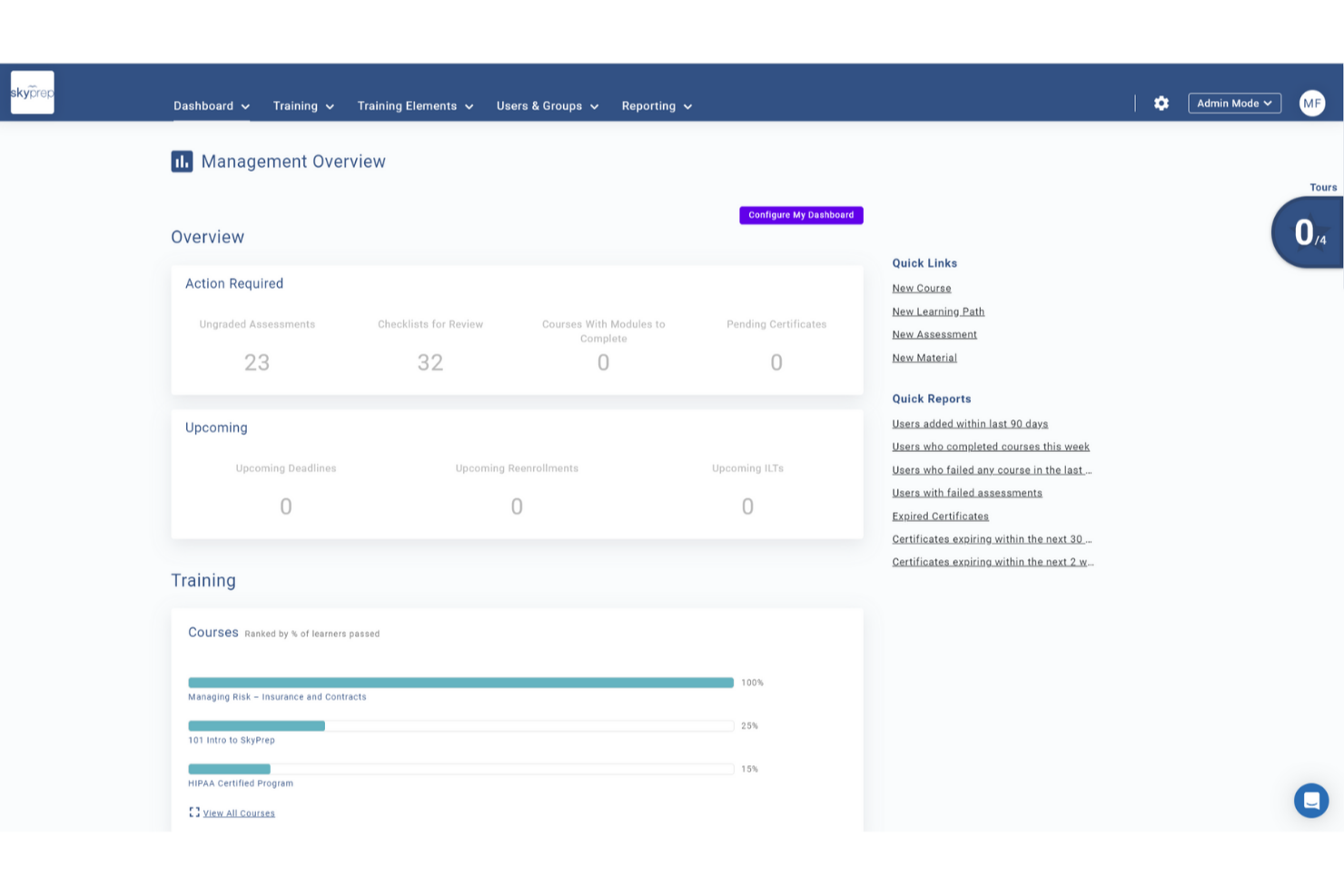
SkyPrep provides an online training platform that uses AI to make employee training more engaging and effective. It is designed for businesses that want to improve their training programs by supporting interactive learning and reducing manual administrative work. These capabilities help increase learner engagement while improving overall training efficiency.
Why I Picked SkyPrep
I picked SkyPrep because it integrates AI tools in a practical way that improves how feedback is used in employee training. The AI-powered scenarios simulate real-world situations, helping employees build decision-making skills in a realistic context. The interactive timelines are especially useful for onboarding and product training, enabling learners to navigate content in a clear, structured way. Together, these features support stronger skill assessment and better content comprehension without adding unnecessary complexity.
SkyPrep Key Features
In addition to its AI-driven feedback capabilities, I also found several other features that enhance its value:
- Hotspots: Enable learners to click on images for detailed explanations, enhancing understanding of complex concepts.
- Flowcharts: Visualize complex information and processes to aid comprehension, especially in compliance training.
- Org Charts: Display organizational structures to help new employees understand team dynamics.
- Virtual Classroom: Tools for conducting online training sessions that can be accessed from anywhere, facilitating flexible learning environments.
SkyPrep Integrations
Integrations include ADP, Zoom, BambooHR, Salesforce, Google Workspace, Microsoft Teams, Paycor, Paycom, QuickBooks, and Slack.
Pros and Cons
Pros:
- Org charts clarify team structure and dynamics
- Hotspots support deeper understanding of complex concepts
- AI-driven scenarios improve real-world decision-making skills
Cons:
- Basic built-in authoring tools with few advanced features
- Mobile app lacks offline access and gamification

Absorb
Best with observational checklists
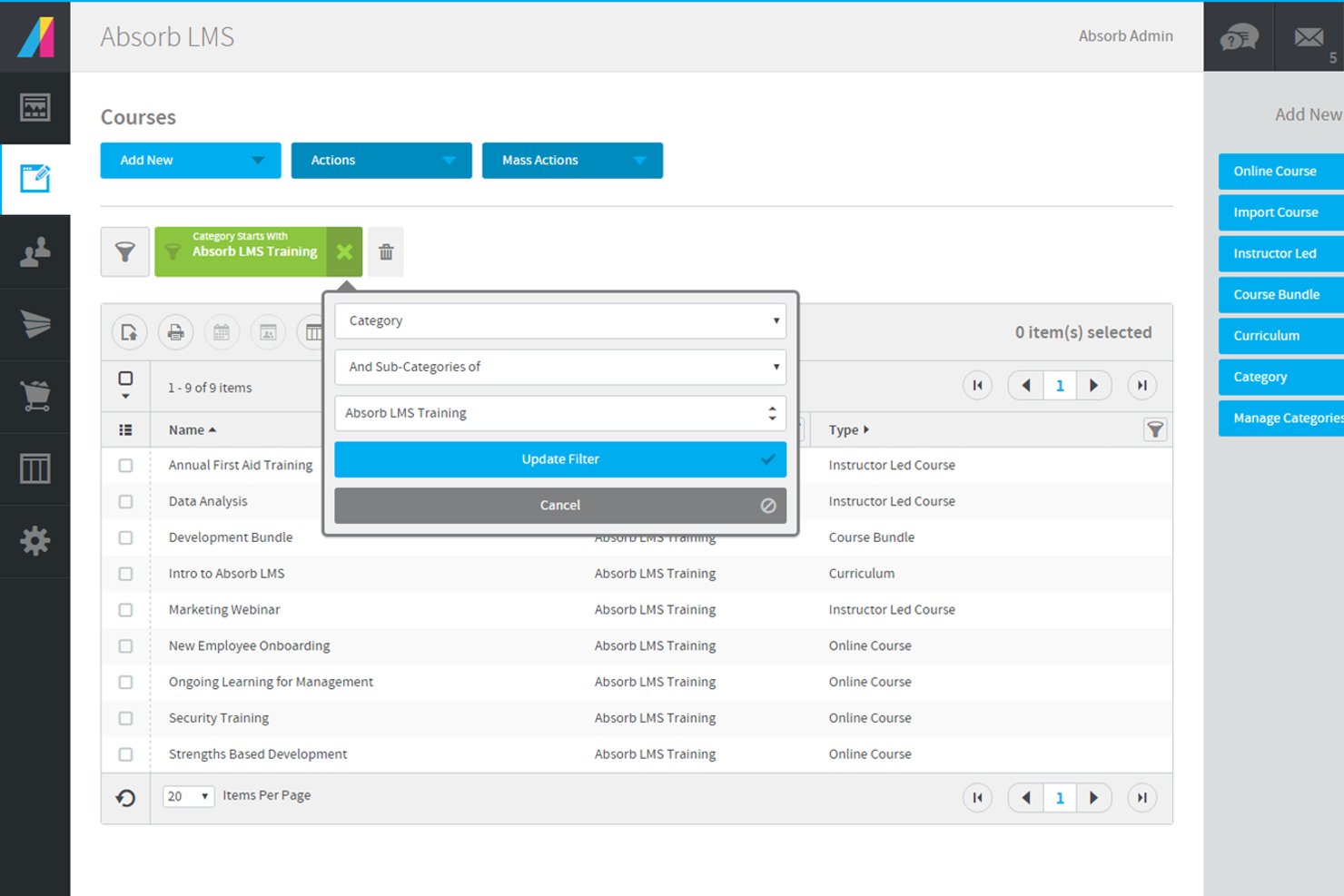
Absorb offers AI-driven feedback and training tools designed for organizations that want to elevate employee learning experiences. It’s a good fit for HR teams, L&D professionals, and businesses looking to automate feedback, track progress, and personalize training at scale. The platform helps you address skill gaps, compliance needs, and engagement challenges with flexible learning options and actionable insights.
Who Is Absorb Best For?
Absorb suits HR and learning and development teams in mid-sized to large organizations that need scalable, AI-powered employee training and feedback solutions.
Why I Picked Absorb
For teams that want to assess real-world skills and behaviors, I picked Absorb because of its strong support for observational checklists. This feature lets you create and manage structured checklists to evaluate employee performance during live or simulated training scenarios. I appreciate how the platform allows trainers to provide immediate, targeted feedback based on direct observation, which helps reinforce learning and track progress over time. The ability to tie checklist results into broader analytics and reporting also makes it easier to identify skill gaps and training needs.
Absorb Key Features
Some other features that make Absorb a strong choice for AI feedback in employee training include:
- AI-powered content recommendations: The platform suggests relevant training modules to learners based on their progress and performance data.
- Automated assessment tools: Create quizzes and tests that are automatically graded, providing instant feedback to employees.
- Customizable learning paths: Design tailored training journeys for different roles or departments within your organization.
- Advanced reporting and analytics: Access detailed dashboards and reports to monitor training effectiveness and learner engagement.
Absorb Integrations
Integrations include Microsoft Teams, Zoom, WebEx, Salesforce, ADP, LinkedIn Learning, Skillsoft, Workday, BambooHR, and SAP SuccessFactors.
Pros and Cons
Pros:
- Detailed analytics for tracking training outcomes
- AI-driven content recommendations for learners
- E-signature verification for compliance tracking
Cons:
- Some advanced features require higher-tier plans
- Limited customization of AI feedback workflows
New Product Updates from Absorb
Absorb Aura Adds Claude and ChatGPT Connections
Absorb Aura now connects to Claude or ChatGPT via MCP, enabling users to ask questions about their learning and the LMS directly inside the AI tool after a simple setup. For more information, visit Absorb's official site.
 .
.
Best for survey integration

SurveyMonkey is a versatile survey platform designed for businesses seeking to gather feedback and insights efficiently. Its main user base includes HR teams and managers who need to conduct employee surveys and analyze data to drive improvements. The AI capabilities of SurveyMonkey help analyze survey responses, offering actionable insights to enhance decision-making.
Why I picked SurveyMonkey: It's an ideal tool for integrating survey feedback into training programs. The AI-driven analytics provide you with deep insights into employee responses, helping you tailor training initiatives. You can create custom surveys that align with your team's specific goals. In my experience, these features make SurveyMonkey a valuable asset for organizations prioritizing feedback-driven training.
Standout Features & Integrations:
Features include customizable survey templates that let you create tailored questionnaires. The platform offers real-time results tracking, so you can see how your team responds instantly. Advanced data analysis tools help you interpret survey results and make informed decisions.
Integrations include Microsoft Teams, Slack, Salesforce, HubSpot, Mailchimp, Google Drive, Zendesk, Eventbrite, Shopify, and Constant Contact.
Pros and Cons
Pros:
- Includes advanced data analysis tools
- Provides real-time results tracking
- Offers customizable survey templates
Cons:
- Limited offline capabilities
- May require time to master features

Best for engagement insights

Culture Amp is an employee engagement and performance management platform designed for HR professionals and managers seeking to enhance workplace culture. It helps teams gather insights into employee engagement through AI-driven analytics and feedback tools, offering actionable data to improve team performance and satisfaction.
Why I picked Culture Amp: It's a great choice for teams focused on understanding and improving engagement. The AI features analyze employee feedback to provide clear insights into engagement levels and areas for improvement. You can use its tools to create surveys that capture valuable employee sentiment. In my experience, these capabilities make Culture Amp a key asset for organizations aiming to cultivate a positive workplace culture.
Standout Features & Integrations:
Features include customizable surveys that help you gather specific employee feedback. The platform offers performance management tools to track progress and set goals. You can also access a library of resources to support learning and development initiatives.
Integrations include Slack, Microsoft Teams, Workday, SAP SuccessFactors, BambooHR, Greenhouse, Lever, ADP, Google Workspace, and LinkedIn Learning.
Pros and Cons
Pros:
- Supports performance management and goal setting
- Offers customizable survey options
- Provides detailed engagement analytics
Cons:
- May not integrate smoothly with other HR platforms
- May have a learning curve for new users

Best for in-depth analytics

Qualtrics is a sophisticated survey and experience management platform designed for organizations that require detailed insights into customer and employee experiences. Its main users include HR teams and researchers, offering AI-driven analytics that transform raw data into actionable insights to enhance decision-making.
Why I picked Qualtrics: It's perfect for teams that need complete data analysis capabilities. The AI features help you uncover trends and insights from complex datasets, providing a deeper understanding of employee feedback. You can customize surveys to align with your organization's needs, ensuring relevant data collection. In my experience, these features make Qualtrics invaluable for teams that prioritize data-driven strategies.
Standout Features & Integrations:
Features include advanced survey logic that lets you tailor questions based on responses. The platform offers sentiment analysis to gauge employee feelings and attitudes. You can also access dashboards that visualize data in a way that's easy to interpret and share.
Integrations include Salesforce, Microsoft Teams, Slack, SAP, Adobe, Tableau, Google Analytics, HubSpot, Zendesk, and Marketo.
Pros and Cons
Pros:
- Offers sentiment analysis for feedback
- Supports advanced survey logic
- Provides detailed data visualization tools
Cons:
- Can be expensive for smaller organizations
- Requires time to master complex features

Best for corporate training

Skillsoft is an eLearning platform tailored for corporate training, serving businesses looking to enhance employee skills and development. It provides a wide range of learning content and AI-driven features to personalize learning experiences and track progress.
Why I picked Skillsoft: It's perfect for organizations seeking complete corporate training solutions. The AI capabilities offer personalized learning paths that adapt to individual needs, ensuring your team gains relevant skills. You can leverage its analytics to monitor progress and identify areas for improvement. In my experience, these features make Skillsoft an important tool for corporate learning and development.
Standout Features & Integrations:
Features include a vast content library that covers various topics and industries. The platform supports video-based learning to enhance engagement and retention. You can also access tools for tracking compliance and measuring learning impact.
Integrations include Workday, SAP SuccessFactors, Microsoft Teams, LinkedIn Learning, Cornerstone, Oracle, Saba, Moodle, Blackboard, and Canvas.
Pros and Cons
Pros:
- Offers tools for compliance tracking
- Supports video-based learning
- Extensive content library for diverse industries
Cons:
- Limited customization for specific needs
- May require time for onboarding


Coursebox AI is an innovative eLearning platform designed for educators and businesses seeking to leverage AI in course creation and delivery. It serves a diverse user base, offering AI-driven features that enhance the learning experience by personalizing content and automating administrative tasks.
Why I picked Coursebox AI: It's an excellent choice for teams that want to integrate AI into their training programs. The platform's AI features allow you to automate course creation, making it easier to develop personalized learning paths. You can also use its analytics to monitor learner progress and optimize outcomes. In my experience, these capabilities make Coursebox AI ideal for organizations aiming to deliver intelligent and adaptive learning experiences.
Standout Features & Integrations:
Features include a user-friendly course builder that simplifies content creation. The platform supports adaptive learning, ensuring courses adjust to individual learner needs. You can also access detailed analytics to track and improve learning performance.
Integrations include Google Workspace, Microsoft Teams, Slack, Zoom, Salesforce, LinkedIn Learning, Moodle, Blackboard, Canvas, and SAP SuccessFactors.
Pros and Cons
Pros:
- Provides detailed analytics for performance tracking
- Supports adaptive learning experiences
- Automates course creation with AI
Cons:
- Limited customization for specific industries
- May require initial setup time


WorkRamp is a versatile learning management platform designed for businesses that prioritize effective employee onboarding and continuous development. It serves a range of industries, offering AI-powered roleplays, coaching, and automated feedback that enhance the onboarding and training experience.
Why I picked Workramp: Why I picked WorkRamp is its strength in delivering onboarding programs supported by AI-driven coaching and feedback tools. Its AI roleplays allow employees to practice real-world scenarios and receive automated feedback, while recommendation tools surface relevant training content. These capabilities make it a practical solution for organizations aiming to accelerate onboarding effectiveness.
Standout Features & Integrations:
Features include a user-friendly course builder for creating onboarding content, analytics dashboards for tracking progress, and certification management for compliance workflows. AI roleplays generate automated performance feedback, helping teams practice communication, sales, or support scenarios at scale.
Integrations include Salesforce, Slack, Zoom, Microsoft Teams, Google Workspace, Workday, Okta, BambooHR, LinkedIn Learning, and Zendesk.
Pros and Cons
Pros:
- Enterprise security with SOC 2, SSO, RBAC
- Supports fully branded learning environments
- Native mobile apps for iOS and Android
Cons:
- Separate portals prevent unified reporting
- Lacks granular control in lesson structuring


Litmos is a cloud-based learning management system designed for businesses that require rigorous compliance training. It serves industries with strict regulatory requirements, offering AI-powered video assessments that deliver instant learner feedback and tools that automate compliance tracking and reporting.
Why I picked Litmos: Why I picked Litmos is its strong alignment with industries that rely on accurate and auditable training processes. Its AI/ML video assessment feature provides automated performance feedback, helping trainers evaluate communication and presentation skills at scale. Automated reporting and compliance tracking make it a reliable choice for organizations with mandatory certification or regulatory workflows.
Standout Features & Integrations:
Features include a course library with a wide range of compliance-focused content, mobile learning for flexible access, and analytics to track learner performance. AI/ML video assessments offer automated feedback, helping teams measure proficiency and identify areas that may require additional training.
Integrations include Salesforce, Microsoft Teams, Zoom, Okta, LinkedIn Learning, BambooHR, Workday, Zendesk, Shopify, and Google Workspace.
Pros and Cons
Pros:
- AI assistant for fast content summarization
- Embeds external content like videos and podcasts
- In-platform AI content authoring tool
Cons:
- Reporting tools lack full customization
- Limited analytics depth for advanced insights


OfficeVibe is an employee engagement platform designed for teams that want to improve communication and feedback. It primarily serves managers and HR professionals, offering tools for gathering insights into team dynamics and performance. The AI capabilities in OfficeVibe help analyze feedback, providing actionable insights to enhance team engagement and productivity.
Why I picked OfficeVibe: It's ideal for teams focused on enhancing feedback and communication. The AI-driven feedback analysis provides you with clear insights into team morale and areas for improvement. You can set up regular pulse surveys to keep a pulse on team sentiment. In my experience, these features make OfficeVibe a valuable tool for fostering a transparent and communicative team culture.
Standout Features & Integrations:
Features include customizable surveys that let you tailor questions to your team's needs. The platform offers feedback tools that encourage open communication and improve team dynamics. You can also access detailed reports to track engagement and identify trends over time.
Integrations include Slack, Microsoft Teams, Google Workspace, Jira, Trello, Asana, Zendesk, BambooHR, Workday, and Salesforce.
Pros and Cons
Pros:
- Provides detailed engagement reports
- Encourages open team communication
- Supports regular pulse surveys
Cons:
- May require time to interpret data
- Limited customization for larger organizations
Other AI Feedback Software for Employee Training
Here are some additional AI feedback software for employee training options that didn’t make it onto my shortlist, but are still worth checking out:
- Rehearsal
For game-based learning
- Learning Pool
For tailored content
- Deel HR
With global payroll automation
- Peoplebox.ai
For OKR integration
- Lattice
For performance management


How I Evaluate AI Feedback Software for Employee Training
I look for tools where AI adds real value—generating personalized coaching after a role-play, not just scoring a quiz. I break my evaluation into the core functionality a tool must have to make the list and the differentiating factors that separate one vendor from another.
Core Functionality (Table Stakes For This List)
When I'm selecting tools for my list, I rank each one on a scale from 0 (does not offer the functionality) to 5 (excels in this area) for each core functionality listed below. Then, I calculate the tool's total score into a percentage. Each tool needs to achieve a minimum total score of 65% to be considered for inclusion.
- AI-Generated Feedback: I look for tools that produce contextual, personalized feedback using AI rather than canned responses—think specific coaching tips after a sales role-play, not just a pass/fail score.
- Training Content Integration: The tool should connect with existing training content or platforms like an LMS, supporting formats like SCORM or xAPI so L&D teams aren't rebuilding courses from scratch.
- Performance Analysis: I evaluate how deeply the AI analyzes learner input—whether it can assess written answers, spoken responses, or simulation behaviors to pinpoint where someone struggled.
- Real-Time Feedback Delivery: Feedback that arrives days later misses the learning moment, so I check whether tools deliver coaching during or immediately after a training activity.
- Skill Gap & Progress Tracking: Strong tools let you track competency growth over time at the individual and team level, helping L&D managers spot patterns and adjust programs accordingly.
- Manager & L&D Reporting: I look for dashboards that give HR and L&D leaders a clear view of feedback trends, training outcomes, and areas where intervention may be needed across the org.
Once I have a list of tools that meet this criteria, I consider what sets each platform apart.
Differentiating Factors (What Sets Vendors Apart)
Here's how I compare and contrast different vendors:
Standout Features
Adaptive learning paths are a big differentiator—I look for tools where the AI reshapes content difficulty and feedback depth based on how each learner performs. Voice and video analysis matters too, especially for customer-facing roles where tone and delivery are part of the skill set. I also evaluate whether a platform can generate custom training scenarios using AI, saving L&D teams from manually building every role-play prompt.
Beyond Features
Data privacy is top of mind because these tools process sensitive employee performance data—I check for SOC 2 compliance, clear AI governance policies, and role-based access controls. Integration with existing HR and L&D stacks also carries real weight. A tool that syncs with your HRIS and LMS means employee data flows in without manual uploads. I also evaluate whether vendors offer meaningful implementation support, since rolling out AI feedback tools requires change management and trainer buy-in to drive adoption.
How to Choose AI Feedback Software for Employee Training
It’s easy to get bogged down in long feature lists and complex pricing structures. To help you stay focused as you work through your unique software selection process, here’s a checklist of factors to keep in mind:
| Factor | What to Consider |
|---|---|
| Scalability | Will the software grow with your team? Consider future growth and whether the tool can handle increased users or data without performance issues. |
| Integrations | Does it work with your current systems? Check if it integrates with tools like HR software, communication platforms, and data analytics systems. |
| Customizability | Can you tailor it to fit your needs? Look for options to adjust workflows, dashboards, and reporting to match your processes. |
| Ease of Use | Is it user-friendly for your team? Consider the learning curve and whether users can navigate the tool without extensive training or support. |
| Implementation and Onboarding | How quickly can you get started? Evaluate the setup process and the availability of resources like training videos or support to aid in onboarding. |
| Cost | Is it within your budget? Analyze the pricing structure, including any hidden fees or long-term contracts, to ensure it aligns with your financial plan. |
| Security Safeguards | How does it protect your data? Ensure it complies with industry standards for data protection and offers features like encryption and user access controls. |
| Support Availability | What support options are there? Consider the availability of customer service, including response times and channels like chat, email, or phone. |
What Is AI Feedback Software for Employee Training?
AI feedback software for employee training is a tool that uses artificial intelligence to provide real-time feedback and insights during training sessions. HR professionals, managers, and trainers typically use these tools to enhance employee learning and development.
Automated feedback, personalized learning paths, and data analytics help with improving training effectiveness, tailoring content to individual needs, and tracking progress. Overall, these tools provide valuable insights that can lead to more effective and engaging training experiences for employees.
Features
When selecting AI feedback software for employee training, keep an eye out for the following key features:
- Real-time feedback: Provides immediate insights and suggestions during training sessions to enhance learning and retention.
- Personalized learning paths: Uses AI to tailor training content to individual employee needs and skill levels.
- Automated analytics: Analyzes training data to offer actionable insights and track employee progress over time.
- Sentiment analysis: Evaluates employee responses to gauge morale and engagement during training.
- Adaptive learning: Adjusts training materials based on employee performance and feedback to optimize learning outcomes.
- Gamification elements: Incorporates game-like features to increase engagement and motivation among employees.
- Integration capabilities: Allows rapid connection with existing HR and communication tools for a unified workflow.
- Mobile access: Enables employees to access training and feedback from any location using mobile devices.
- Data visualization: Provides clear and intuitive visual representations of training data for easy interpretation.
- Security features: Ensures data protection through encryption and access controls to maintain confidentiality.
Benefits
Implementing AI feedback software for employee training provides several benefits for your team and your business. Here are a few you can look forward to:
- Improved learning retention: Real-time feedback helps employees absorb and retain information more effectively during training.
- Customized training experiences: Personalized learning paths tailor content to individual needs, boosting engagement and effectiveness.
- Informed decision-making: Automated analytics offer actionable insights, helping managers make data-driven improvements to training programs.
- Increased employee engagement: Gamification elements and interactive features keep employees motivated and invested in their learning.
- Efficient resource allocation: Adaptive learning ensures that training resources are focused where they're needed most, optimizing outcomes.
- Enhanced data security: Built-in security features protect sensitive training data, ensuring confidentiality and compliance.
- Better understanding of team dynamics: Sentiment analysis provides insights into employee morale and engagement, aiding in team management.
Costs & Pricing
Selecting AI feedback software for employee training requires an understanding of the various pricing models and plans available. Costs vary based on features, team size, add-ons, and more. The table below summarizes common plans, their average prices, and typical features included in AI feedback software for employee training solutions:
Plan Comparison Table for AI Feedback Software for Employee Training
| Plan Type | Average Price | Common Features |
|---|---|---|
| Free Plan | $0/user/month | Basic feedback capabilities, limited analytics, and standard security features. |
| Personal Plan | $5-$25/user/month | Enhanced feedback options, personalized learning paths, and basic integrations. |
| Business Plan | $30-$60/user/month | Detailed analytics, advanced integrations, and customizable training modules. |
| Enterprise Plan | $70-$100/user/month | Full suite of AI capabilities, extensive customization options, priority support, and advanced security. |
AI Feedback Software for Employee Training FAQs
Here are some answers to common questions about AI feedback software for employee training:
is there typically support for continuous learning beyond the initial training phase?
Many teams use AI feedback software not just during onboarding but throughout the employee lifecycle. It helps ensure employees keep improving their skills, stay aligned with expectations, and adapt as responsibilities change.
Can AI feedback software integrate with most existing HR systems?
Yes, many AI feedback tools offer integration capabilities with popular HR systems. Check if the software supports your current platforms like payroll, communication, and learning management systems. This integration can consolidate data flow and improve efficiency. Before purchasing, confirm compatibility with your existing systems and ask vendors about any additional costs associated with integrations.
What kind of support should I expect from software vendors?
You should expect extensive support, including onboarding assistance and ongoing technical help. Look for vendors that offer multiple support channels like chat, email, and phone. Check if they provide training resources like webinars, tutorials, and documentation. It’s also useful to have access to a dedicated account manager who can assist with any specific needs or challenges your team may face.
How secure is AI feedback software for employee training?
Most AI feedback software includes built-in security measures to protect your data. Look for features like encryption, user access controls, and regular security updates. Ensure that the software complies with industry standards and regulations, such as GDPR if applicable to your business. It’s important to review the vendor’s security policy and ask about data storage and handling practices.
Will AI feedback software improve employee engagement?
Yes, AI feedback software can enhance employee engagement by providing timely and personalized feedback. The use of AI allows for more relevant and engaging training experiences. It encourages participation through gamification features and personalized learning paths. By aligning training with individual goals and preferences, employees are more likely to stay motivated and invested in their development.