

10 Best EMS Scheduling Software in 2026

Best EMS Scheduling Software Shortlist


EMS scheduling software helps emergency medical services teams organize shifts, manage availability, and coordinate staffing across locations. If you’re searching for the best EMS scheduling software, you’re likely facing challenges with last-minute shift changes, overtime management, or keeping your team connected—especially when lives are on the line. In this guide, you’ll find trusted solutions that help you simplify scheduling, reduce manual errors, and keep your EMS operations running smoothly. I’ll break down what each tool does best so you can quickly find the right fit for your agency’s needs.
Why Trust Our Software Recommendations
Our team has been testing and reviewing software since 2012. As HR experts ourselves, we know how difficult—and important—it is to choose the right software.
For this guide, we evaluated tools using hands-on testing and independent research, scoring tools using our selection criteria. We also draw on insights from industry thought leaders and practicing HR experts.
Our reviews reflect our human editorial judgment, not a sales pitch.
Expert reviewers:
EMS Scheduling Software Comparison Table
This comparison table summarizes pricing details for my top EMS scheduling software selections:
| Tool | Best For | Trial Info | Price | ||
|---|---|---|---|---|---|
| 1 | Best for mobile-first shift management | Free trial available | From $2.50/user/month | Website | |
| 2 | Best for managing complex shift rotations | Free demo available | Pricing upon request | Website | |
| 3 | Best for communication tools within scheduling | Free trial + free plan available | From $1.70/user/month (billed annually) | Website | |
| 4 | Best for all-in-one operations management | Free demo available | Pricing upon request | Website | |
| 5 | Best for advanced overtime management | Free demo available | Pricing upon request | Website | |
| 6 | Best for multi-location staff coordination | Not available | Pricing upon request | Website | |
| 7 | Best for integration with incident reporting | Free demo available | Pricing upon request | Website | |
| 8 | Best for customizable crew scheduling templates | Free demo available | Pricing upon request | Website | |
| 9 | Best for automated compliance with labor rules | Free demo available | Pricing upon request | Website | |
| 10 | Best for unified personnel and asset scheduling | Free demo available | Pricing upon request | Website |
Best EMS Scheduling Software Reviews
Below are my detailed summaries of the best EMS scheduling software that made it onto my shortlist. My reviews offer a detailed look at the features, best use cases, and integrations of each platform to help you find the best one for you.

Best for mobile-first shift management
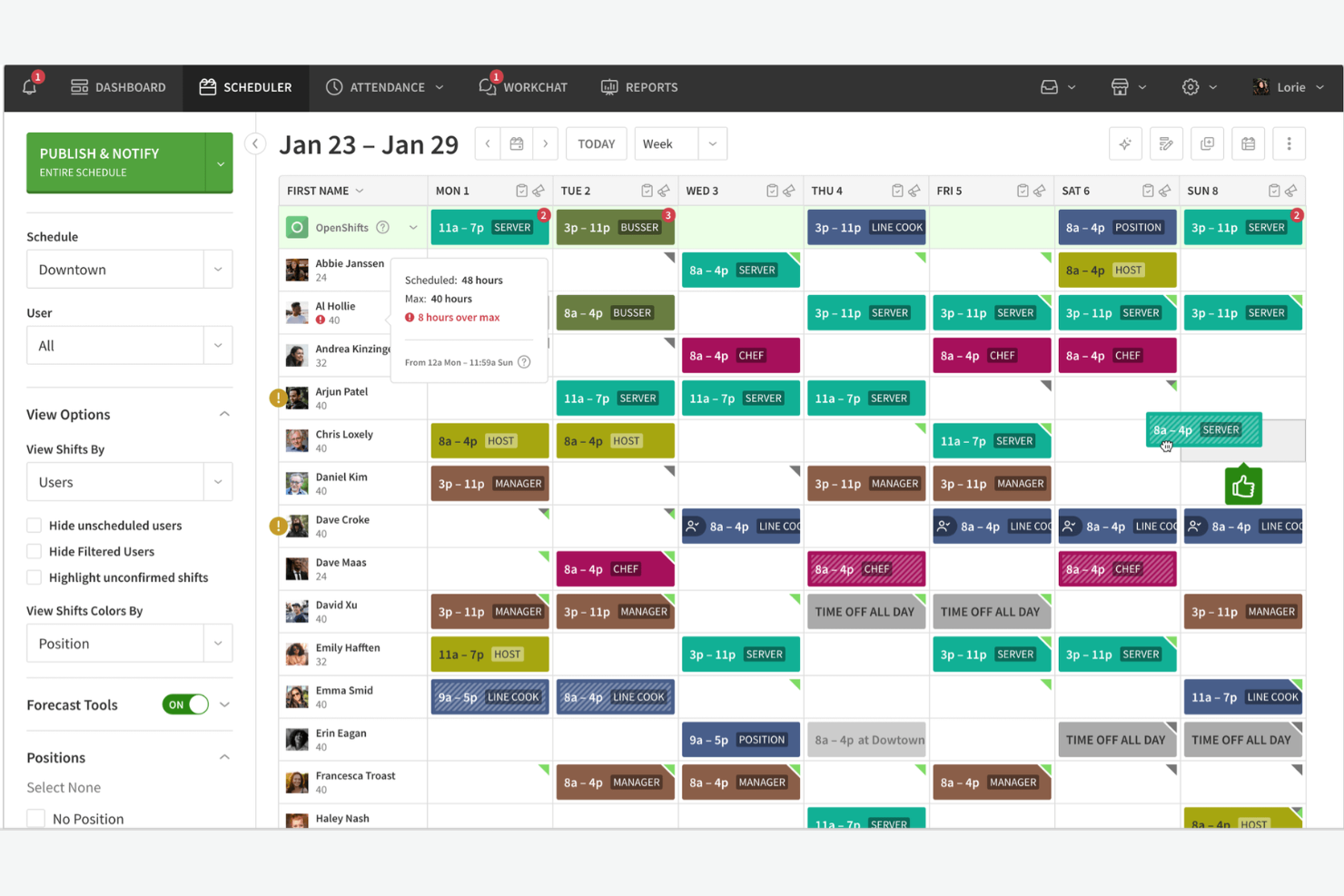
When I Work is EMS scheduling software designed for shift-based teams, offering features like real-time schedule updates, time-off requests, team messaging, and mobile access for emergency service organizations.
Who Is When I Work Best For?
When I Work is a good fit for EMS teams and emergency service organizations that need mobile-first shift scheduling and communication.
Why I Picked When I Work
I picked When I Work as one of the best because I can manage shift swaps, time-off requests, and last-minute schedule changes right from my phone. I like that my team gets instant notifications and can message each other directly in the app. In practice, that means we keep everyone in the loop and handle emergencies without missing a beat.
When I Work Key Features
- Labor forecasting: Predicts staffing needs based on historical data and trends.
- GPS clock-in: Lets staff clock in and out from approved locations using their mobile devices.
- Payroll export: Exports timesheets directly to payroll providers for processing.
- Multiple location management: Manages schedules and staff across different stations or sites.
When I Work Integrations
When I Work offers native integrations with QuickBooks, ADP, Gusto, Square, Paychex, Namely, BambooHR, Google Workspace, and Zapier. An API is also available for custom integrations.
Pros and Cons
Pros:
- Built-in team messaging for urgent coordination
- GPS clock-in helps verify staff locations
- Real-time alerts for shift updates and swaps
Cons:
- Limited reporting for compliance tracking
- No built-in fatigue or overtime monitoring

Aladtec
Best for managing complex shift rotations
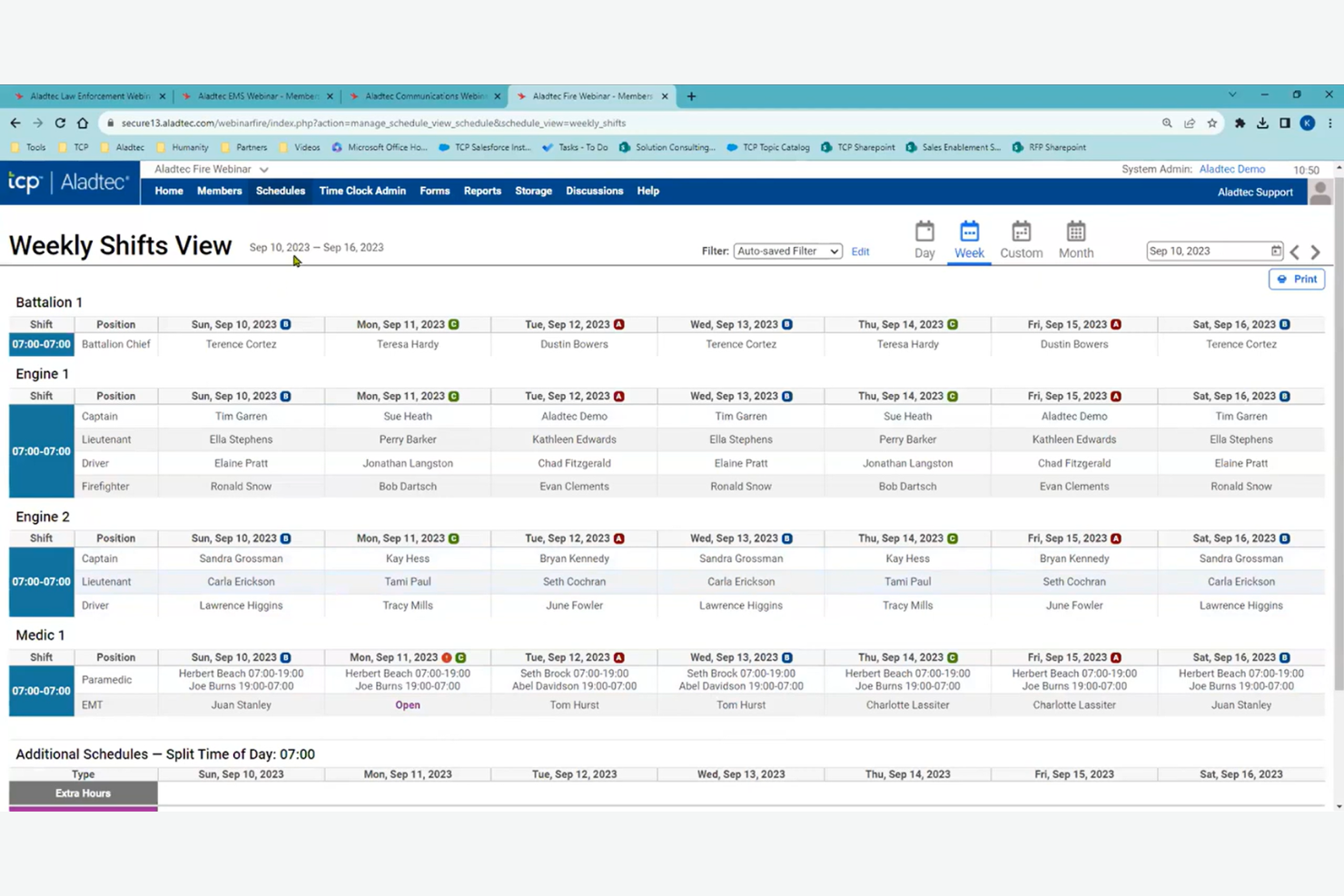
Aladtec is an EMS scheduling software platform designed for public safety teams that need automated shift scheduling, time-off management, and real-time communication tools tailored to complex staffing needs.
Who Is Aladtec Best For?
Aladtec suits EMS agencies and public safety departments that need to coordinate complex shift patterns and manage large, distributed teams.
Why I Picked Aladtec
I picked Aladtec as one of the best because it handles complex shift rotations that are common in EMS agencies. I like how the system lets me build custom rotation templates and automate recurring schedules for 24/7 coverage. My team is able to manage last-minute swaps and track certifications right within the platform.
Aladtec Key Features
- Time-off requests: Staff can submit and track time-off requests directly in the platform.
- Shift bidding: Team members can bid on open shifts based on their availability and qualifications.
- Mobile app access: Users can view schedules, swap shifts, and receive notifications from any device.
- Document management: Store and share important certifications, licenses, and policy documents securely.
Aladtec Integrations
Aladtec offers native integrations with TimeClock Plus and Humanity Schedule, and provides an API for custom integrations.
Pros and Cons
Pros:
- Offers mobile app for on-the-go access
- Tracks certifications and license expirations
- Handles 24/7 and rotating shift patterns
Cons:
- Limited native integration with external ePCRs
- No built-in payroll processing features

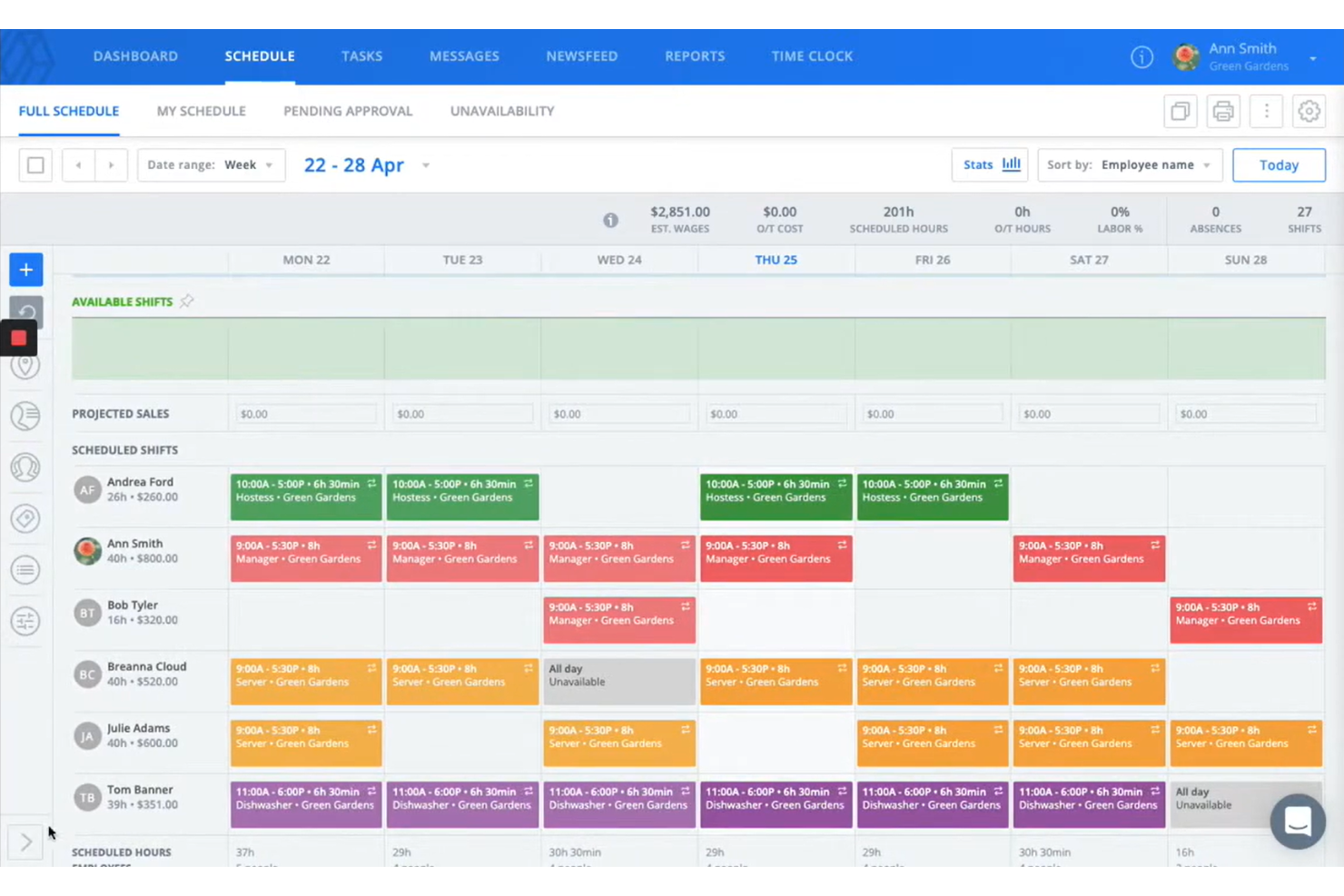
Sling is EMS scheduling software that combines shift planning, time tracking, and built-in team messaging to help emergency services manage schedules and communicate in one place.
Who Is Sling Best For?
Sling is a good fit for EMS teams and emergency service organizations that need to coordinate schedules and internal communication.
Why I Picked Sling
I picked Sling as one of the best because I can manage shift assignments and send group messages or urgent updates to my EMS team in the same platform. I like that I can create announcements, set up tasks, and use private or group chat to keep everyone informed about schedule changes. My team uses the newsfeed feature to post critical updates and reminders, so nothing gets missed during busy shifts.
Sling Key Features
- Shift swapping: Lets team members swap shifts directly in the app.
- Time clock: Tracks employee clock-ins and clock-outs for each shift.
- Labor cost tracking: Monitors scheduled and actual labor costs in real time.
- Availability management: Allows staff to set and update their availability preferences.
Sling Integrations
Sling offers native integrations with ADP, Gusto, Square, Shopify, and Zapier, and also provides an API for custom integrations.
Pros and Cons
Pros:
- Integration with payroll providers
- Mobile app for on-the-go schedule changes
- Labor cost tracking linked to scheduling
Cons:
- No direct integration with dispatch systems
- Limited reporting and analytics for EMS needs

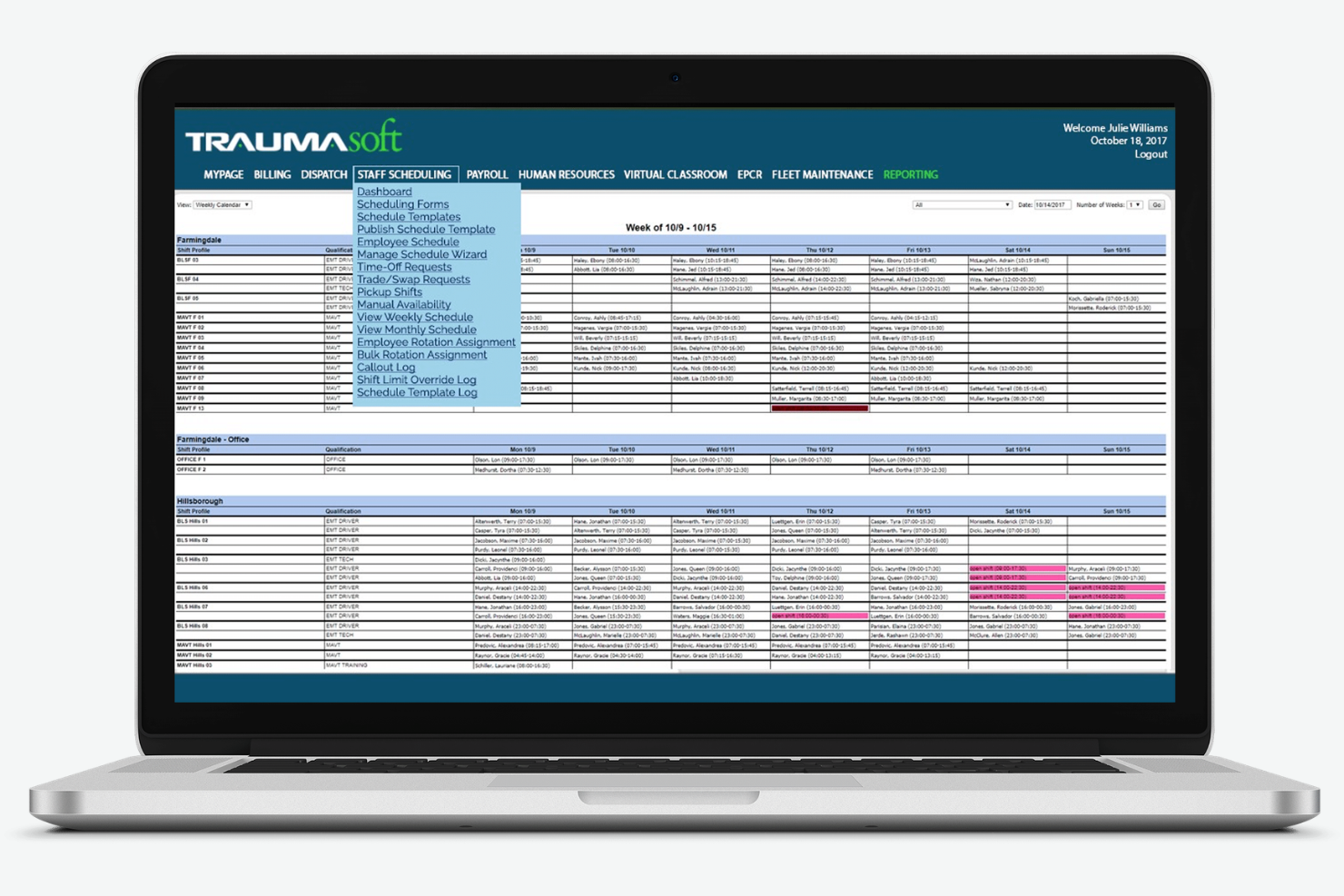
Traumasoft is EMS scheduling software that combines crew scheduling, time tracking, payroll, and resource management in a single platform designed for ambulance and emergency service providers.
Who Is Traumasoft Best For?
Traumasoft is a good fit for EMS agencies and ambulance services that want to manage scheduling, payroll, and operations from one platform.
Why I Picked Traumasoft
I picked Traumasoft as one of the best because I can handle crew scheduling, time tracking, and payroll all in one place without switching between systems. I like that my team can manage vehicle assignments and track certifications directly from the same dashboard. In practice, that means we keep operations, compliance, and scheduling tightly connected.
Traumasoft Key Features
- Automated shift notifications: Sends instant alerts to staff about new or changed shifts.
- Open shift bidding: Lets employees view and claim available shifts directly in the system.
- Certification tracking: Monitors staff credentials and expiration dates for compliance.
- Mobile scheduling access: Allows crews to view and manage schedules from any device.
Traumasoft Integrations
Traumasoft offers native integrations with QuickBooks, Sage, and Zoll, and provides an API for custom integrations.
Pros and Cons
Pros:
- Weekly software updates for features
- Centralized personnel records and education tracking
- Unified CAD and billing platform integration
Cons:
- Customization requests often face long backlogs
- Interface requires extensive technical setup

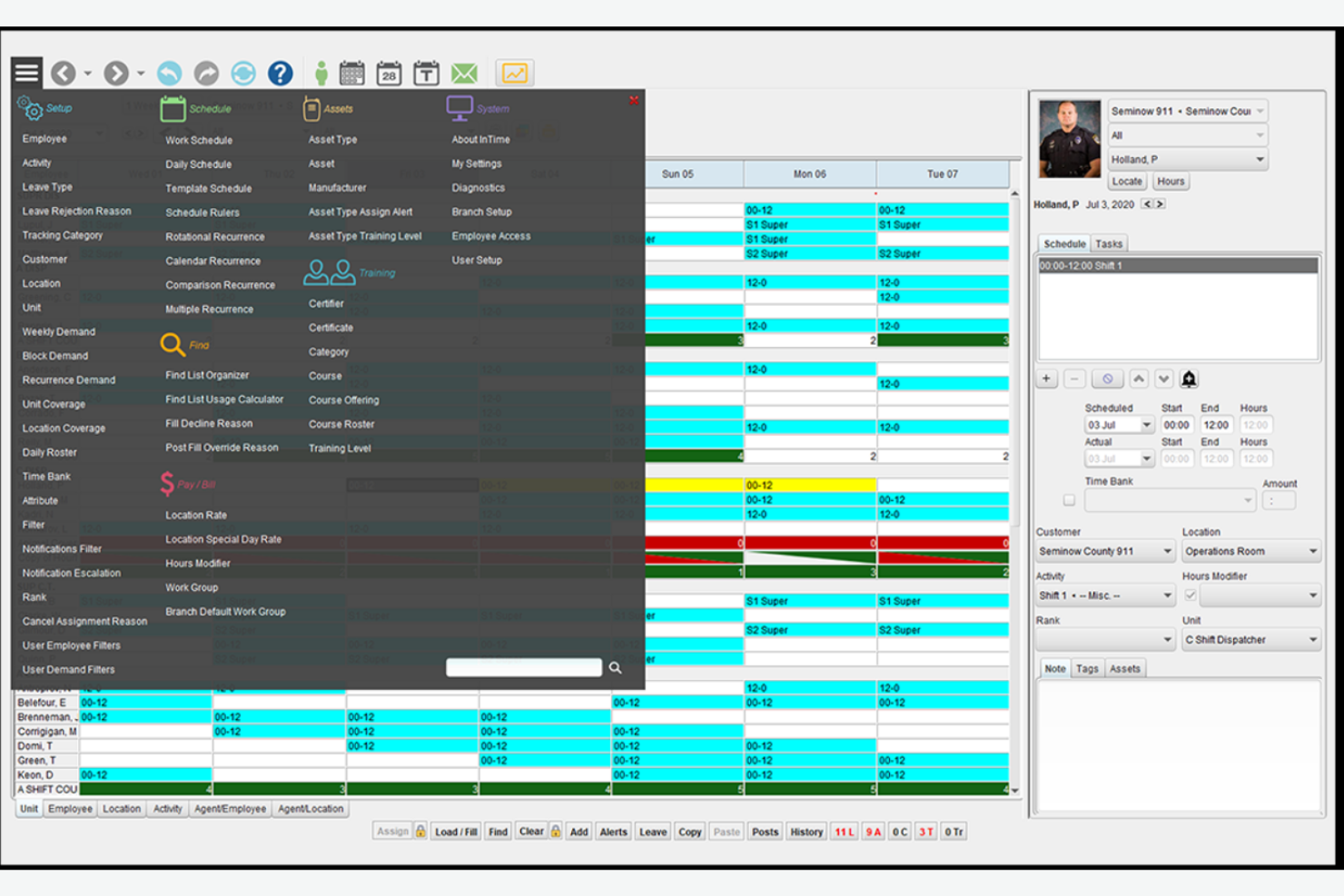
inTime is EMS scheduling software built for public safety teams, offering automated shift scheduling, overtime management, compliance tracking, and real-time communication tools tailored to complex staffing needs.
Who Is inTime Best For?
inTime is a strong fit for large EMS agencies and public safety departments that need advanced scheduling and overtime controls.
Why I Picked inTime
I picked inTime as one of the best because I can automate overtime assignments and set complex rules for union and agency policies. I like that my team can track overtime costs in real time and flag potential compliance issues before they become problems. In practice, that means we avoid burnout and stay within budget while keeping shifts covered.
inTime Key Features
- Shift bidding: Lets staff bid on open shifts directly in the platform.
- Automated shift reminders: Sends notifications to staff before their scheduled shifts.
- Integrated time clock: Tracks employee hours and attendance within the system.
- Document management: Stores and shares certifications, licenses, and training records.
inTime Integrations
inTime offers native integrations with UKG, ADP, and Microsoft 365, and provides an API for custom integrations.
Pros and Cons
Pros:
- Supports multi-location and multi-role scheduling
- Built-in document management for certifications
- Overtime rules engine supports union contracts
Cons:
- No direct integration with CAD systems
- Shift bidding lacks advanced automation options

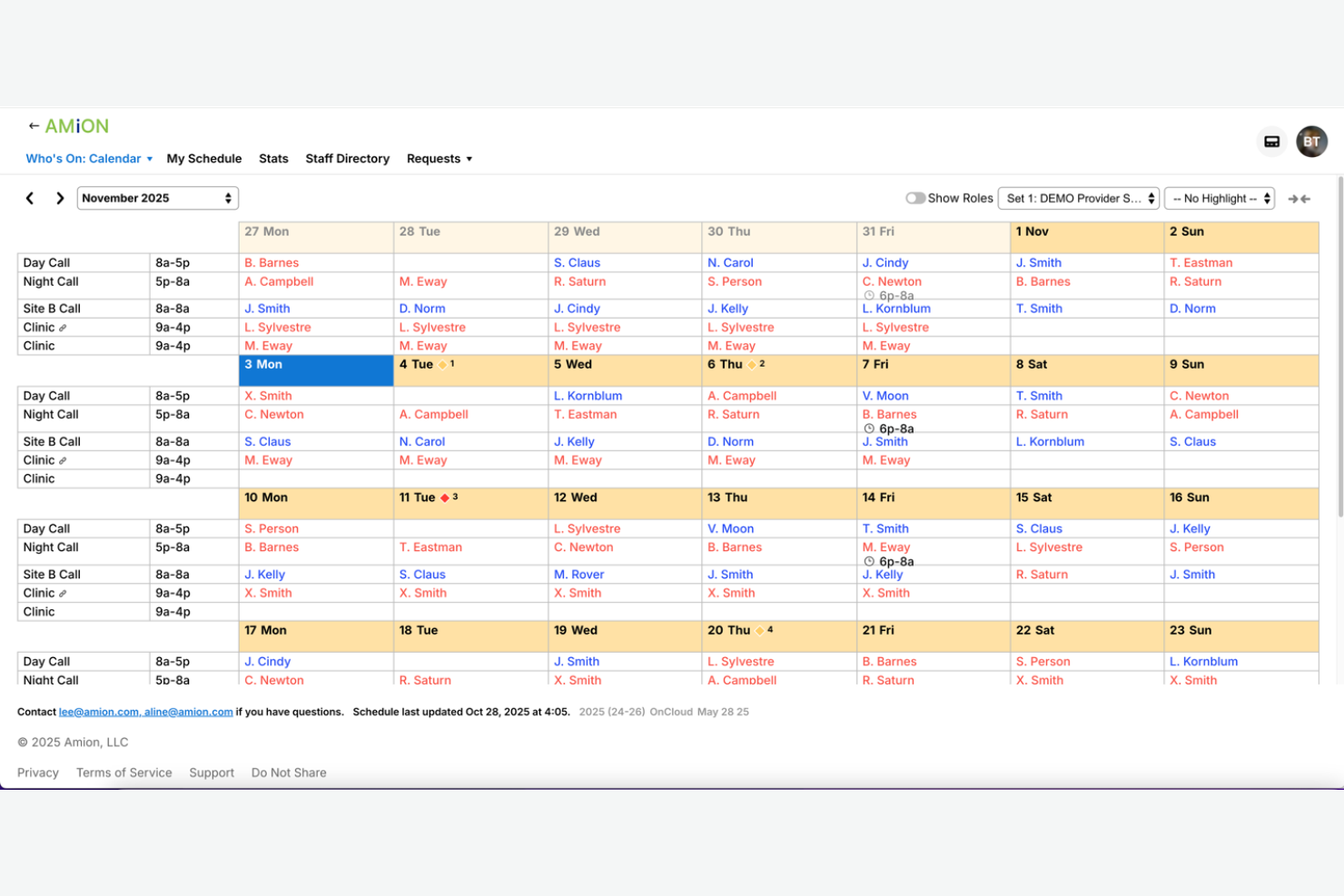
Amion is EMS scheduling software designed for healthcare and emergency teams, offering centralized shift planning, on-call management, and real-time updates for organizations with complex, multi-site staffing needs.
Who Is Amion Best For?
Amion is a good fit for EMS organizations and healthcare groups managing staff across multiple locations or departments.
Why I Picked Amion
I picked Amion as one of the best because I can coordinate schedules for teams working at multiple hospitals or EMS stations in one place. I like that I can set up location-based rules and quickly reassign staff between sites when coverage changes. My team uses Amion’s real-time updates and on-call tracking to keep everyone in sync, even when shifts span different facilities.
Amion Key Features
- Shift swap requests: Staff can request and approve shift swaps directly in the platform.
- Vacation and time-off tracking: Track and manage staff vacation and time-off requests in one place.
- Automated schedule publishing: Instantly publish finalized schedules to all staff members.
- Mobile access: Staff can view and manage schedules from any mobile device.
Amion Integrations
Amion offers native integrations with QGenda, TigerConnect, and Epic, and provides an API for custom integrations.
Pros and Cons
Pros:
- Customizable rules for department-specific needs
- Integrates with Epic and TigerConnect
- Supports on-call and shift swap management
Cons:
- Setup process can be time-consuming for large teams
- Interface feels outdated compared to competitors

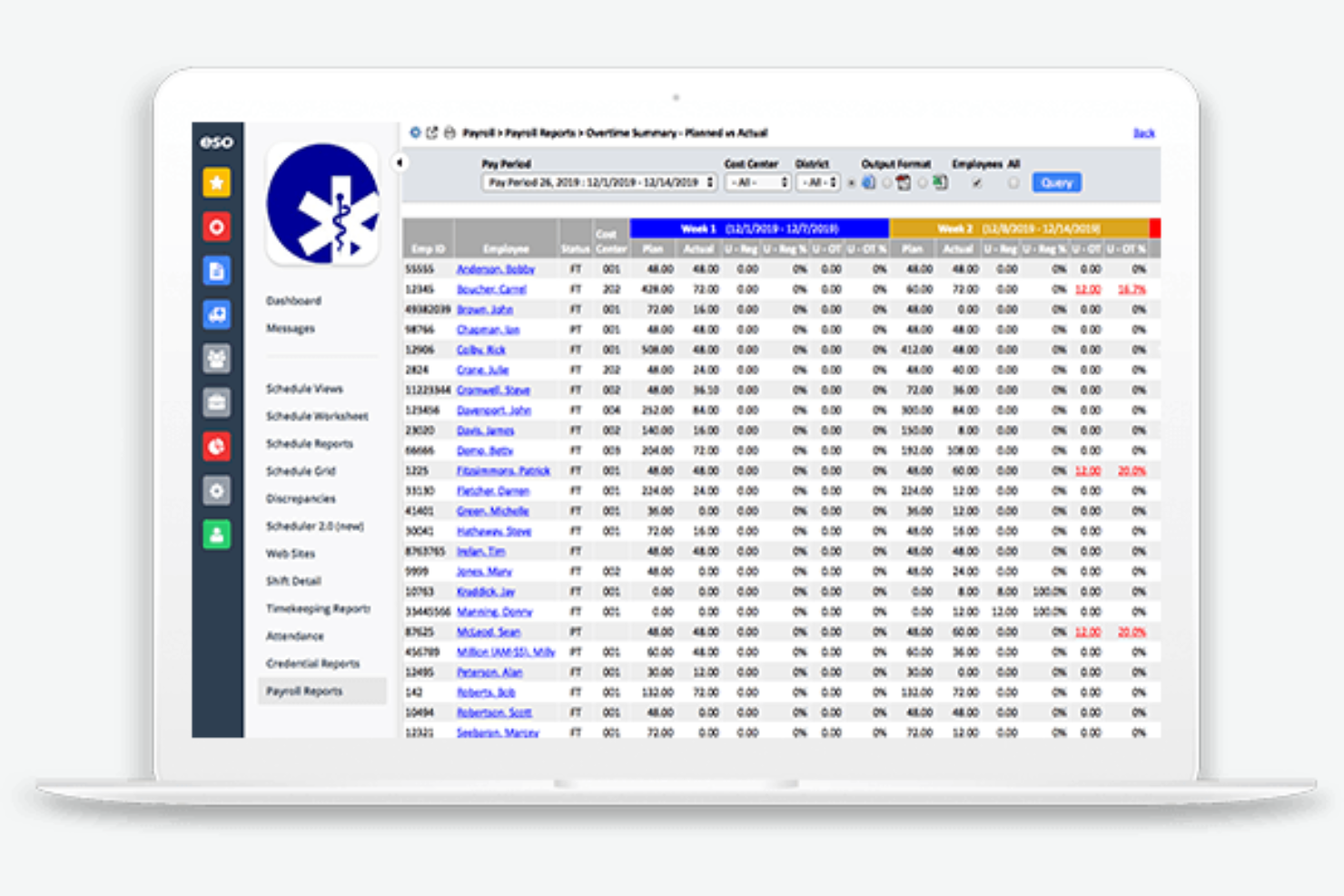
ESO Scheduling is EMS scheduling software designed for public safety teams that need automated shift management, real-time communication, and built-in compliance tracking for complex staffing environments.
Who Is ESO Scheduling Best For?
ESO Scheduling fits EMS agencies and fire departments that need to coordinate staffing and incident data in one system.
Why I Picked ESO Scheduling
I picked ESO Scheduling as one of the best because I can link scheduling directly with incident reporting, which saves my team time and reduces errors. I like that I can pull incident data into shift records and track staff assignments alongside response outcomes. My team uses the built-in compliance tools to ensure every shift meets regulatory requirements.
ESO Scheduling Key Features
- Automated shift assignments: Assign shifts based on rules, availability, and qualifications.
- Mobile access: Staff can view and manage schedules from any device.
- Time-off request management: Employees submit and track time-off requests within the platform.
- Certification tracking: Monitor staff certifications and receive alerts before expirations.
ESO Scheduling Integrations
ESO Scheduling offers native integrations with ESO EHR, ESO Fire Incidents, and other ESO Suite products, and provides an API for custom integrations.
Pros and Cons
Pros:
- Direct bidirectional integration with ESO ePCR
- Dynamic dashboards for real-time staffing snapshots
- Integrates scheduling with incident reporting tools
Cons:
- High entry cost for small departments
- Occasional performance lag on mobile web

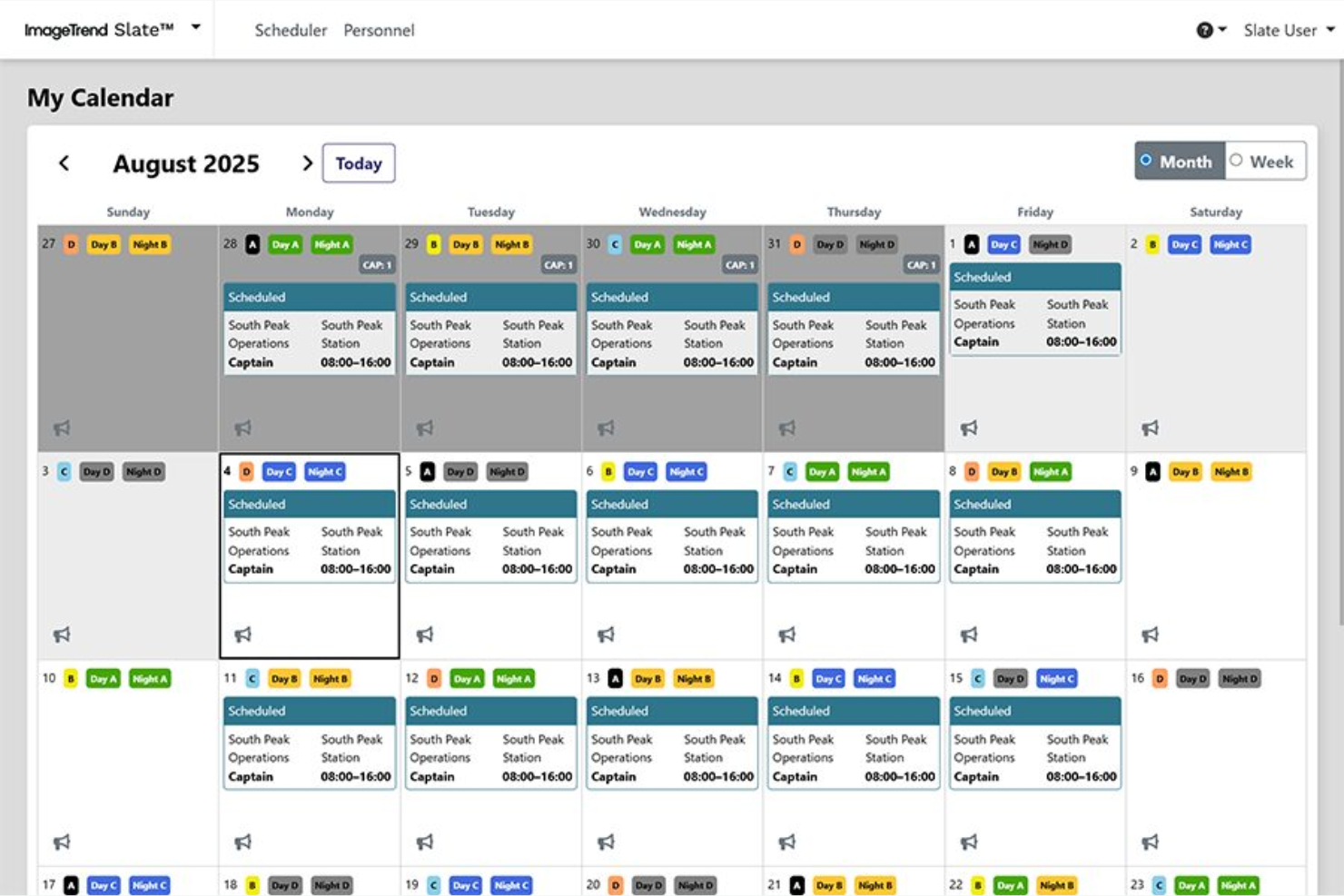
ImageTrend Slate is EMS scheduling software that helps public safety teams manage complex shift patterns, automate crew assignments, and track certifications in one centralized platform.
Who Is ImageTrend Slate Best For?
ImageTrend Slate is a good fit for EMS agencies and fire departments that need flexible scheduling for large, multi-shift teams.
Why I Picked ImageTrend Slate
I picked ImageTrend Slate as one of the best because I can build and reuse custom crew scheduling templates for different shift patterns and station needs. I like that my team can quickly adjust templates for holidays or special events without starting from scratch. The drag-and-drop interface lets me assign staff to shifts and roles in seconds, which is a huge time-saver during schedule changes.
ImageTrend Slate Key Features
- Automated shift notifications: Sends instant alerts to staff about new or changed shifts.
- Certification tracking: Monitors staff credentials and expiration dates.
- Time-off request management: Lets employees submit and track time-off requests within the platform.
- Reporting dashboard: Provides real-time visibility into staffing levels and scheduling trends.
ImageTrend Slate Integrations
ImageTrend Slate offers native integration with ImageTrend Elite for bidirectional data sync between scheduling and incident reporting, and an API is available for custom integrations.
Pros and Cons
Pros:
- Tiered notifications for emergency vacancy filling
- Native data syncing with ImageTrend Elite
- Automated shift bidding based on seniority
Cons:
- Complexity in managing non-traditional sub-groups
- Best features require ImageTrend ecosystem

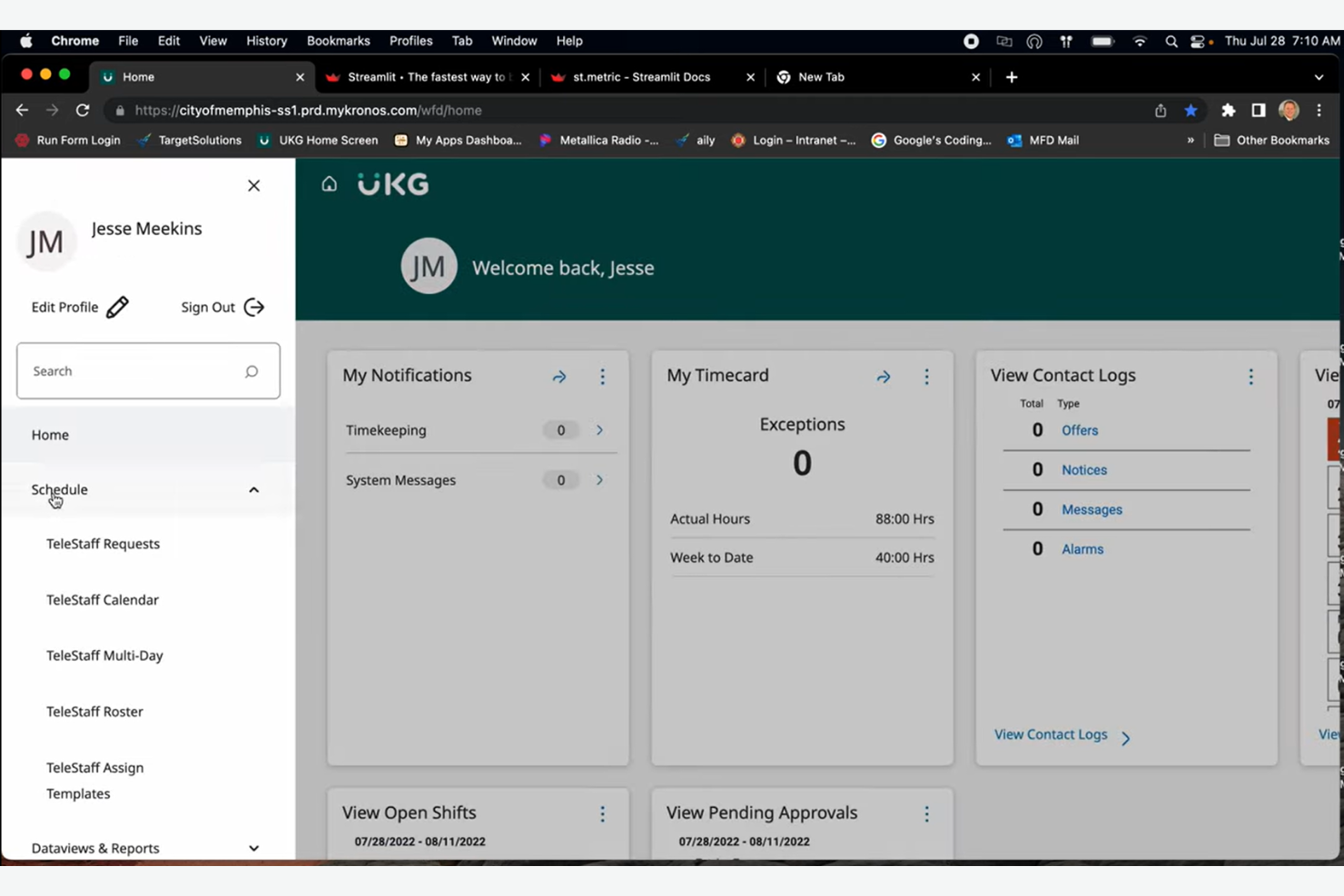
UKG TeleStaff Cloud is EMS scheduling software built for public safety agencies, offering automated shift scheduling, overtime management, and real-time compliance tracking in one platform.
Who Is UKG TeleStaff Cloud Best For?
UKG TeleStaff Cloud is a strong fit for large public safety agencies and EMS organizations that need automated scheduling and labor compliance.
Why I Picked UKG TeleStaff Cloud
I picked UKG TeleStaff Cloud as one of the best because I can automate complex labor rule compliance and scheduling for my EMS teams. I like that it automatically enforces union rules, overtime policies, and fatigue management in real time. My team uses the system’s audit trails and configurable workflows to stay audit-ready and reduce manual scheduling errors.
UKG TeleStaff Cloud Key Features
- Automated shift bidding: Lets staff bid on open shifts directly in the platform.
- Mobile scheduling access: Allows users to view and manage schedules from any device.
- Real-time notifications: Sends instant alerts for schedule changes and approvals.
- Certification tracking: Monitors employee credentials and expiration dates for compliance.
UKG TeleStaff Cloud Integrations
Integrations are not publicly listed.
Pros and Cons
Pros:
- Real-time overtime and fatigue management
- Handles complex public safety shift rotations
- Automates union and labor rule compliance
Cons:
- Significant one-time implementation fees
- Limited native integrations with HR platforms

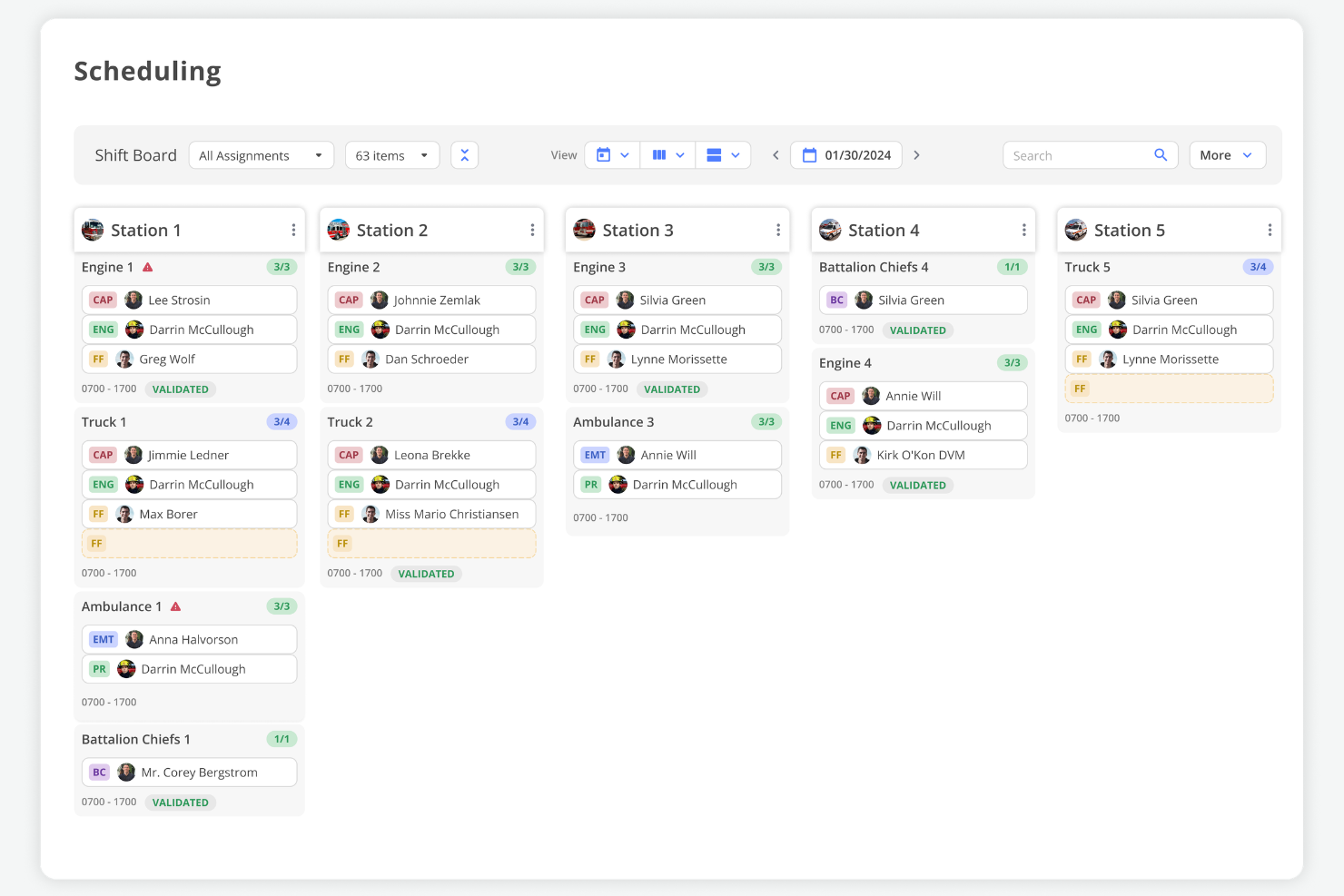
First Due is EMS scheduling software that combines personnel, apparatus, and asset scheduling in one platform, offering real-time shift management, automated workflows, and integrated resource tracking for public safety agencies.
Who Is First Due Best For?
First Due is a good fit for public safety agencies that need to coordinate both personnel and equipment scheduling in one system.
Why I Picked First Due
I picked First Due as one of the best because I can manage both personnel and apparatus schedules in a single dashboard. I like that my team can assign shifts, track vehicle availability, and coordinate asset usage without switching tools. In practice, that means we avoid double-booking resources and keep our EMS operations running smoothly.
First Due Key Features
- Automated shift bidding: Lets staff request and bid on open shifts directly in the platform.
- Real-time notifications: Sends instant alerts for schedule changes, approvals, and shift openings.
- Certification tracking: Monitors employee credentials and expiration dates for compliance.
- Mobile access: Allows users to view and manage schedules from any device.
First Due Integrations
First Due offers native integrations with ESO, ImageTrend, CentralSquare, Tyler Technologies, and Emergency Reporting, and provides an API for custom integrations.
Pros and Cons
Pros:
- Click-not-code setup for non-technical admins
- External links for sharing real-time staffing
- Drag-and-drop shift board for rapid adjustments
Cons:
- Mobile app lacks deep reporting views
- Fewer advanced HR analytics than competitors
Other EMS Scheduling Software
Here are some additional EMS scheduling software options that didn’t make it onto my shortlist, but are still worth checking out:
- Hero Schedule
For rapid shift swapping
- PowerTime
For time tracking with policy integration
- WhenToWork
For instant shift notifications
- Connecteam
For mobile onboarding of new staff
- Agendrix
For visual drag-and-drop scheduling
- eSchedule
For multi-agency scheduling support
- AngelTrack
For integrated crew credential tracking
- Pace Scheduler
For configurable time-off management
- Ninth Brain
For compliance-driven scheduling workflows
- Vector Scheduling
For real-time shift bidding


How I Evaluate EMS Scheduling Software
I evaluate EMS scheduling tools in two layers: baseline must-haves like 24/7 rotation support and cert tracking, and the differentiators that set the best options apart.
Core Functionality (Table Stakes For This List)
When I'm selecting tools for my list, I rank each one on a scale from 0 (does not offer the functionality) to 5 (excels in this area) for each core functionality listed below. Then, I calculate the tool's total score into a percentage. Each tool needs to achieve a minimum total score of 65% to be considered for inclusion.
- 24/7 Shift Rotation Scheduling: I check whether a platform supports EMS-specific rotation patterns like 24/48, Kelly, and Pitman schedules out of the box rather than forcing workarounds.
- Credential & Certification Tracking: Each tool should store and monitor paramedic and EMT certifications with expiration alerts so schedulers avoid assigning uncertified staff to a rig.
- Shift Bidding & Trade Management: I look for self-service shift swaps, giveaways, and open-shift bidding with approval workflows that let supervisors maintain control over coverage.
- Time-Off & Leave Management: PTO, sick leave, and FMLA requests should route through automated approvals that factor in minimum staffing thresholds before granting time off.
- Overtime & Payroll Integration: The tool should handle FLSA-compliant overtime calculations, including public safety work period rules, and export payroll-ready data to systems like Kronos or ADP.
- Mobile Access & Notifications: Field crews need a native mobile app where they can view schedules, respond to open-shift callouts, and submit trade requests without calling the station.
Once I have a list of tools that meet the criteria, I consider what sets each platform apart.
Differentiating Factors (What Sets Vendors Apart)
Here's how I compare and contrast different vendors:
Standout Features
An automated callout engine can save schedulers hours by contacting off-duty staff in priority order until someone accepts an open shift. I also evaluate fatigue management rules—tools that flag or block assignments violating maximum consecutive hours help agencies reduce burnout risk. Unit and apparatus assignment matters too. The best platforms let you schedule crews alongside specific rigs and station positions so each ambulance goes out with the right staffing mix.
Beyond Features
Agency size matters here. A volunteer department with 20 members has very different needs than a metro agency running 50+ units across multiple stations, so I check whether a platform scales in both directions. Ecosystem integrations also weigh heavily—connectivity with CAD and ePCR systems like ESO or ImageTrend keeps scheduling data aligned with operations. I evaluate onboarding support too, since migrating years of rotation history and seniority data from spreadsheets or legacy tools like Telestaff takes hands-on guidance.
How to Choose EMS Scheduling Software
It’s easy to get bogged down in long feature lists and complex pricing structures. To help you stay focused as you work through your unique software selection process, here’s a checklist of factors to keep in mind:
| Factor | What to Consider |
| Scalability | Will the software handle your current and future team size, including seasonal or rapid growth? |
| Integrations | Does it connect natively to your payroll, HR, dispatch, or timekeeping systems without workarounds? |
| Customizability | Can you tailor scheduling rules, notifications, and workflows to match your agency’s unique needs? |
| Ease of use | Will your staff and managers adopt it quickly, or will it require extensive training and support? |
| Implementation and onboarding | How long will it take to get up and running, and what resources or support will you need during rollout? |
| Cost | Are all costs clear up front, including setup, support, and per-user fees? Does it fit your budget? |
| Security safeguards | Does the vendor offer data encryption, access controls, and compliance with healthcare privacy laws? |
| Support availability | Is live support available when you need it, especially during nights, weekends, or emergencies? |
What Is EMS Scheduling Software?
EMS scheduling software is a digital tool designed to help emergency medical services organizations manage staff schedules, shift assignments, and coverage needs. It centralizes scheduling, time tracking, and communication, making it easier to coordinate teams, handle last-minute changes, and ensure compliance with labor rules. This software supports both administrators and field staff in maintaining reliable, responsive coverage.
Features of EMS Scheduling Software
When selecting EMS scheduling software, keep an eye out for the following key features:
- Shift scheduling: Lets you create, assign, and adjust shifts for EMS staff, ensuring coverage for all roles and time slots.
- Time and attendance tracking: Monitors when staff clock in and out, helping you verify hours worked and manage payroll accurately.
- Shift swapping: Allows employees to request and approve shift trades, making it easier to handle last-minute changes or coverage gaps.
- Availability management: Enables staff to set their preferred working times and blackout dates, reducing scheduling conflicts.
- Mobile access: Provides a mobile app or responsive web portal so staff can view schedules, request changes, and receive updates on the go.
- Automated notifications: Sends alerts and reminders about upcoming shifts, open shifts, or schedule changes to keep everyone informed.
- Labor cost tracking: Calculates scheduled and actual labor costs, helping you stay within budget and monitor overtime.
- Credential tracking: Stores and monitors staff certifications and license expirations to ensure compliance with regulatory requirements.
- Reporting and analytics: Offers built-in reports on scheduling patterns, overtime, and staffing trends to support data-driven decisions.
- Payroll integration: Connects directly to payroll systems to simplify wage calculations and reduce manual data entry.
Benefits of EMS Scheduling Software
Implementing EMS scheduling software provides several benefits for your team and your business. Here are a few you can look forward to:
- Improved shift coverage: Automated scheduling and real-time updates help ensure every shift is filled and coverage gaps are minimized.
- Faster response to changes: Mobile access and instant notifications let teams handle last-minute shift swaps or emergencies without delay.
- Reduced administrative workload: Automated time tracking, payroll integration, and credential management cut down on manual scheduling tasks.
- Better compliance: Built-in credential tracking and labor rule enforcement help you stay compliant with industry regulations and licensing requirements.
- Enhanced team communication: Integrated messaging and alerts keep everyone informed about schedule changes, open shifts, and important updates.
- Greater transparency: Staff can view their schedules, submit availability, and track hours worked, promoting fairness and accountability.
- Data-driven decision making: Reporting and analytics features provide insights into staffing trends, overtime, and labor costs to support better planning.
Costs and Pricing of EMS Scheduling Software
Selecting EMS scheduling software requires an understanding of the various pricing models and plans available. Costs vary based on features, team size, add-ons, and more. The table below summarizes common plans, their average prices, and typical features included in EMS scheduling software solutions:
Plan Comparison Table for EMS Scheduling Software
| Plan Type | Average Price | Common Features |
| Free Plan | $0 | Basic shift scheduling, limited user seats, mobile access, and basic notifications. |
| Personal Plan | $5–$15/user/month | Individual scheduling, time tracking, shift swap requests, and mobile app access. |
| Business Plan | $15–$30/user/month | Team scheduling, reporting, payroll integration, credential tracking, and automated alerts. |
| Enterprise Plan | $30–$50/user/month | Advanced analytics, custom integrations, compliance tools, dedicated support, and multi-location management. |
EMS Scheduling Software FAQs
Here are some answers to common questions about EMS scheduling software:
How does EMS scheduling software help with last-minute shift changes?
EMS scheduling software lets you quickly notify staff of open shifts, approve swap requests, and update the schedule in real time. This helps you fill gaps fast and keep your team of paramedics and EMTs informed, even during emergencies or unexpected absences. By automating notifications, you optimize the time spent on logistics rather than making manual phone calls.
Can EMS scheduling software track staff certifications and license expirations
Yes, most EMS scheduling software includes credential tracking. You can store certification details, set reminders for upcoming expirations, and ensure only qualified responders are scheduled for specific roles or shifts. This is especially useful for agencies that also coordinate with law enforcement for multi-disciplinary events.
Is it possible to integrate EMS scheduling software with payroll and HR systems?
Yes, many EMS scheduling tools offer integrations with payroll and HR platforms. This reduces manual data entry, helps automate wage calculations (including PTO accruals), and keeps employee records up to date across systems. This transition to a cloud-based environment ensures that workforce management data is accessible from anywhere.
What should I consider when choosing EMS scheduling software for a small agency?
Look for a solution that’s user-friendly, fits your budget, is secure, and doesn’t require a lot of technical setup. Make sure it covers your core scheduling process needs and offers responsive support, especially if you don’t have a dedicated IT team.
Beyond security, look for self-service features. These allow staff to check their schedules, request time off, or pick up extra hours directly from their mobile devices, which is essential for a modern emergency response team’s scheduling needs.
How secure is EMS scheduling software for storing sensitive employee data?
Most reputable EMS scheduling software uses encryption, access controls, and compliance measures to protect sensitive data. Always check that the vendor meets healthcare privacy standards and offers clear security documentation.