

10 Best Government Workforce Management Software In 2026

Best Government Workforce Management Software Shortlist


Government workforce management software helps public sector teams handle scheduling, time tracking, payroll, and compliance requirements unique to government agencies. If you're searching for tools that fit the complexities of public service, you know how tough it can be to balance strict regulations, union rules, and workforce diversity—all while driving results. The right solution keeps your agency aligned, audit-ready, and ready to adapt as needs change. In this list, I’ll show you which platforms best help agencies like yours manage talent, track hours, stay compliant, and simplify operations.
Why Trust Our Software Recommendations
Our team has been testing and reviewing software since 2012. As HR experts ourselves, we know how difficult—and important—it is to choose the right software.
For this guide, we evaluated tools using hands-on testing and independent research, scoring tools using our selection criteria. We also draw on insights from industry thought leaders and practicing HR experts.
Our reviews reflect our human editorial judgment, not a sales pitch.
Expert reviewers:
Government Workforce Management Software Comparison Table
This comparison table summarizes pricing details for my top government workforce management software selections:
| Tool | Best For | Trial Info | Price | ||
|---|---|---|---|---|---|
| 1 | Best for real-time payroll | Free demo available | Pricing upon request | Website | |
| 2 | Best for global operations and analytics | 30-day free trial | Pricing upon request | Website | |
| 3 | Best for civil service compliant hiring | Free demo available | Pricing upon request | Website | |
| 4 | Best for civic sector HR process integration | Free demo available | Pricing upon request | Website | |
| 5 | Best for complex public sector shift tracking | Free demo available | Pricing upon request | Website | |
| 6 | Best for configurable time collection in municipalities | Free demo available | Pricing upon request | Website | |
| 7 | Best for operational transparency in agencies | Free demo available | Pricing upon request | Website | |
| 8 | Best for tailored rostering in local government | Free demo available | Pricing upon request | Website | |
| 9 | Best for government hiring and applicant tracking | Not available | Pricing upon request | Website | |
| 10 | Best for large-scale workforce compliance | Free demo available | Pricing upon request | Website |
Best Government Workforce Management Software Reviews
Below are my detailed summaries of the best government workforce management software that made it onto my shortlist. My reviews offer a detailed look at the features, capabilities, and best use cases of each platform to help you find the best one for you.
Dayforce
Best for real-time payroll
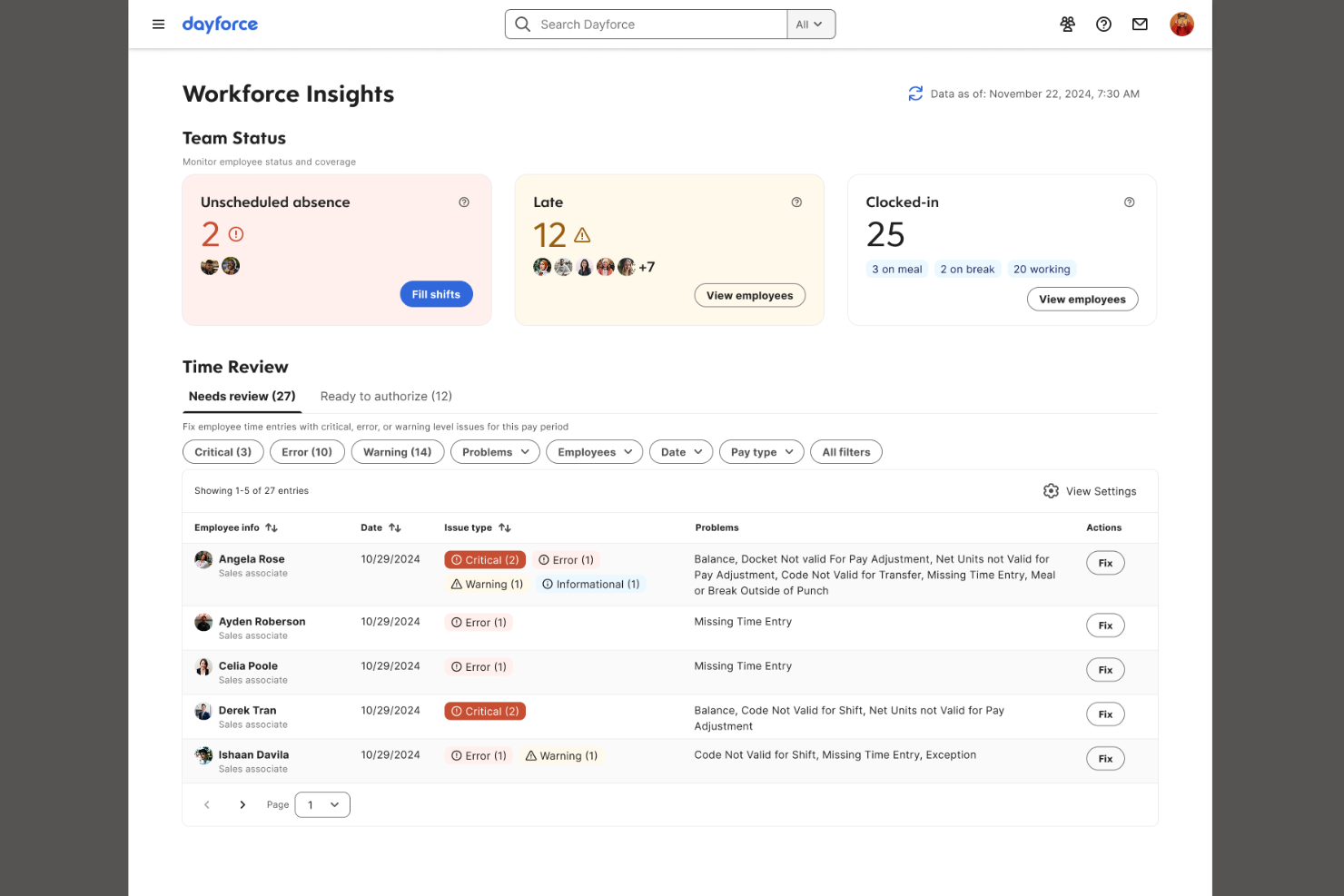
Dayforce is a government workforce management software platform that provides real-time payroll, time tracking, scheduling, and compliance tools for public sector teams.
Who Is Dayforce Best For?
Dayforce is a good fit for government agencies and public sector organizations that require unified payroll and workforce management across multiple locations.
Why I Picked Dayforce
I picked Dayforce as one of the best because its real-time, continuous payroll engine syncs time, attendance, and payroll data instantly. I like being able to process last-minute changes without waiting for batch payroll cycles, which is crucial for public sector teams.
Dayforce Key Features
- Scheduling tools: Generate and manage shift schedules based on compliance and labour rules.
- Absence management: Track and manage employee absences, leaves, and accruals in one system.
- Mobile self-service: Give employees access to schedules, time entries, and updates through a mobile app.
- Built-in compliance monitoring: Automatically monitor and flag compliance issues with labour legislation and union contracts.
Dayforce Integrations
Integrations include Accenture, Deloitte, PwC, RSM, AdminaHealth, Cornerstone Galaxy, and Oracle.
Pros and Cons
Pros:
- Granular employee scheduling features
- Public sector compliance configuration options
- Real-time payroll updates and corrections
Cons:
- Premium features require specific training
- Reporting setup requires significant configuration
Best for global operations and analytics
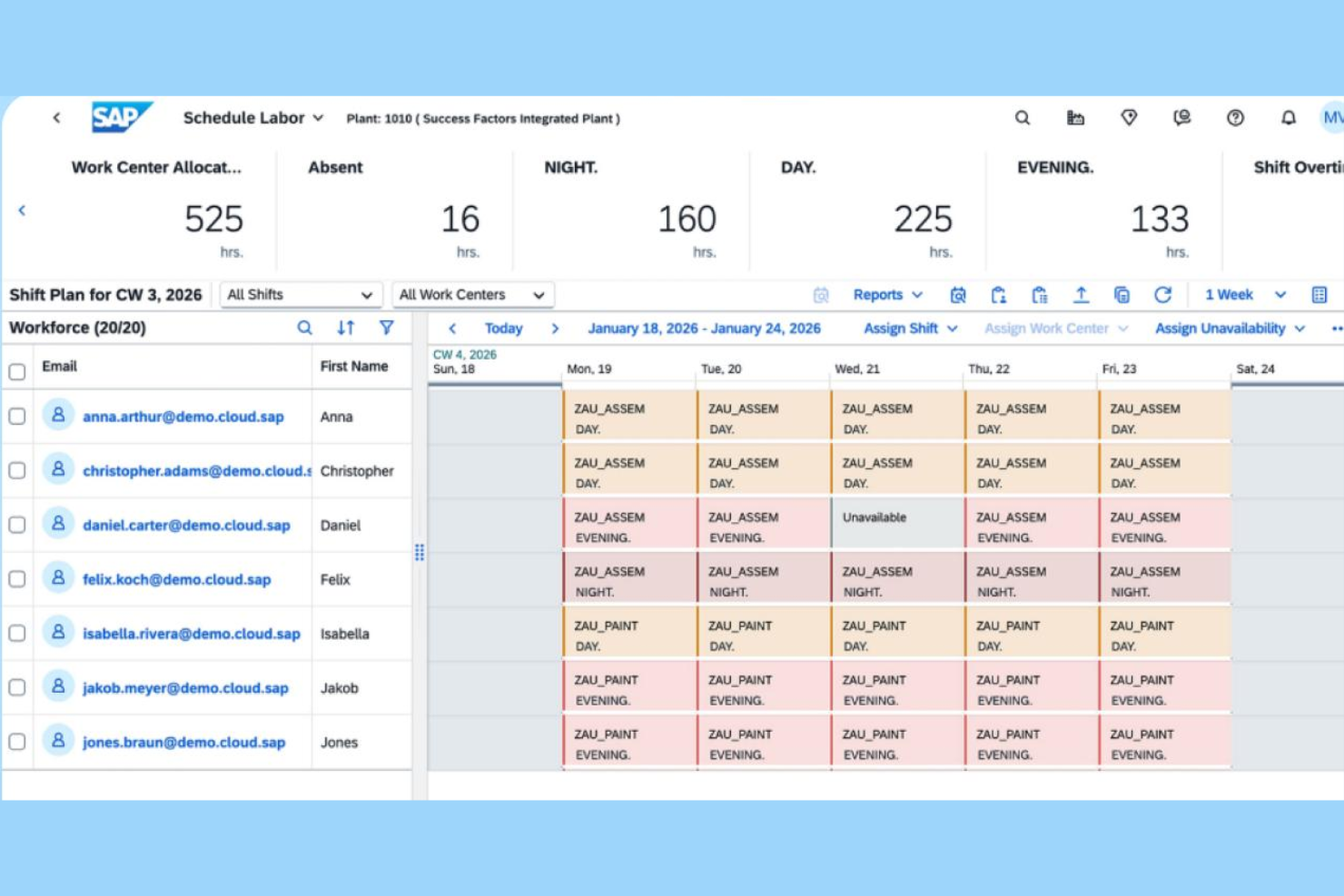
SAP SuccessFactors is a human capital management solution designed for government organizations that need connected workforce management, time and attendance, scheduling, global HR administration, and advanced people analytics.
Who Is SAP SuccessFactors Best For?
SAP SuccessFactors is a strong fit for government HR teams managing multinational workforces and requiring unified data visibility across global operations.
Why I Picked SAP SuccessFactors
I picked SAP SuccessFactors because I need workforce planning and analytics that scale to complex global operations. My team relies on its international compliance settings, multi-country scheduling, and analytics dashboards built for multinational government HR environments.
SAP SuccessFactors Key Features
- Time and attendance tracking: Centralizes employee clock-in/out and leave data for compliance.
- Role-based permission controls: Restrict access and actions by user role and department.
- Document management: Stores and organizes government HR policies and records.
- Automated absence management: Applies leave policies and calculates accruals by jurisdiction.
SAP SuccessFactors Integrations
Integrations include Oracle NetSuite, SAP S/4HANA, SAP Ariba, SAP payroll systems, SiteMinder, Amazon Web Services, Microsoft, and Cisco.
Pros and Cons
Pros:
- Built-in analytics and workforce trend dashboards
- Customizable for large organizational structures
- Covers multi-country compliance requirements
Cons:
- Configuration changes require lengthy approval processes
- Custom workflows require specialist IT help

NEOGOV
Best for civil service compliant hiring

NEOGOV is a public sector HR management platform for governments and agencies, offering applicant tracking, onboarding, performance management, and policy compliance tools for civil service hiring.
Who Is NEOGOV Best For?
NEOGOV is well-suited for city, county, and state government HR teams that require strict adherence to civil service hiring regulations.
Why I Picked NEOGOV
I picked NEOGOV as a top choice because I can automate rule-based rankings, manage eligibility lists, and apply exam scoring aligned with civil service guidelines. My team tracks candidate progress by exam type, ensuring strict compliance across large public sector hiring cycles.
NEOGOV Key Features
- Automated onboarding workflows: Create customized onboarding checklists and workflows for new hires.
- Performance evaluation templates: Use built-in templates to standardize performance reviews.
- Salary and HR analytics dashboards: Track workforce data and generate reports on key HR metrics.
- Employee self-service portal: Let employees update personal info and review policies themselves.
NEOGOV Integrations
Integrations include Alliance 2020, Accurate Background, AccuSourceHR, AssureHire, Biddle Consulting Group, Inc. (BCG), Cangrade, Carahsoft, CGI, Checkr, and Laserfiche.
Pros and Cons
Pros:
- Configurable hiring workflows for agencies
- Built-in public sector job board distribution
- Civil service scoring for applicant pools
Cons:
- Limited flexibility for evaluation templates
- Payroll features require an external module

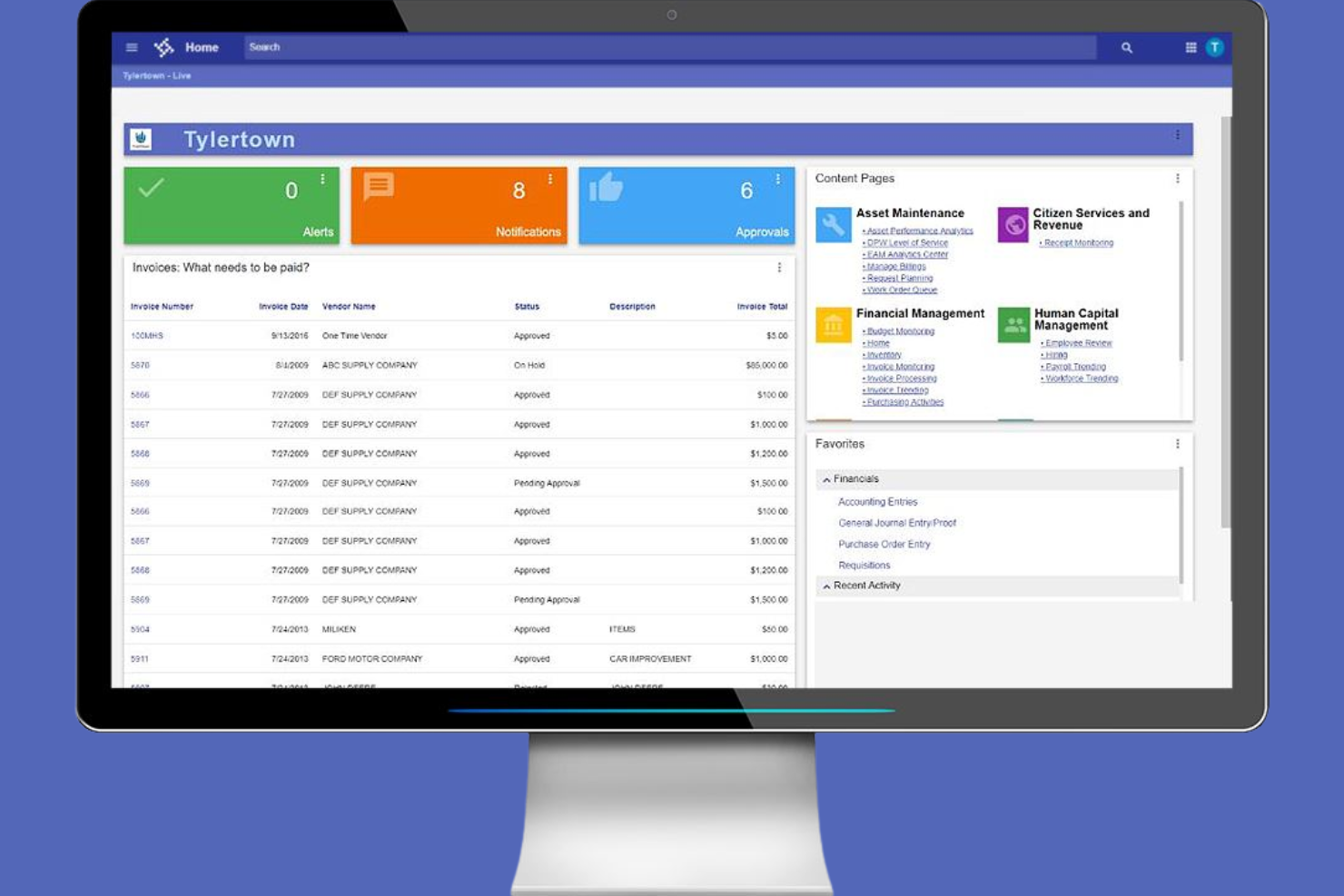
Tyler Technologies is a government workforce management platform for HR teams that offers employee lifecycle tracking, scheduling, payroll, compliance workflows, and centralized records purpose-built for civic organizations.
Who Is Tyler Technologies Best For?
Tyler Technologies fits civic HR, payroll, and administrative teams at city, county, and state agencies seeking industry-specific workforce management tools.
Why I Picked Tyler Technologies
I picked Tyler Technologies because I can coordinate HR, payroll, and performance management in one system and automate onboarding to offboarding steps. My team uses its workflow designer to enforce compliance with specific civic agency HR requirements.
Tyler Technologies Key Features
- Position control dashboard: Track employee roles, vacancies, and authorizations across departments in real time.
- Personnel action workflows: Process employee status changes like promotions, transfers, or terminations through automated workflows.
- Time and attendance tracking: Record and manage employee hours, absences, and leave requests in one system.
- Compensation management: Set salary structures, manage pay scales, and track pay adjustments through centralized tools.
Tyler Technologies Integrations
Integrations include AWS, Esri, Equifax Workforce Solutions, IAPP, Infinite Campus, and Microsoft.
Pros and Cons
Pros:
- Supports detailed position control management
- Centralizes personnel records for large agencies
- Unifies finance and HR record keeping
Cons:
- Reporting suite lacks advanced visualization options
- Workflow automation setup can be complex

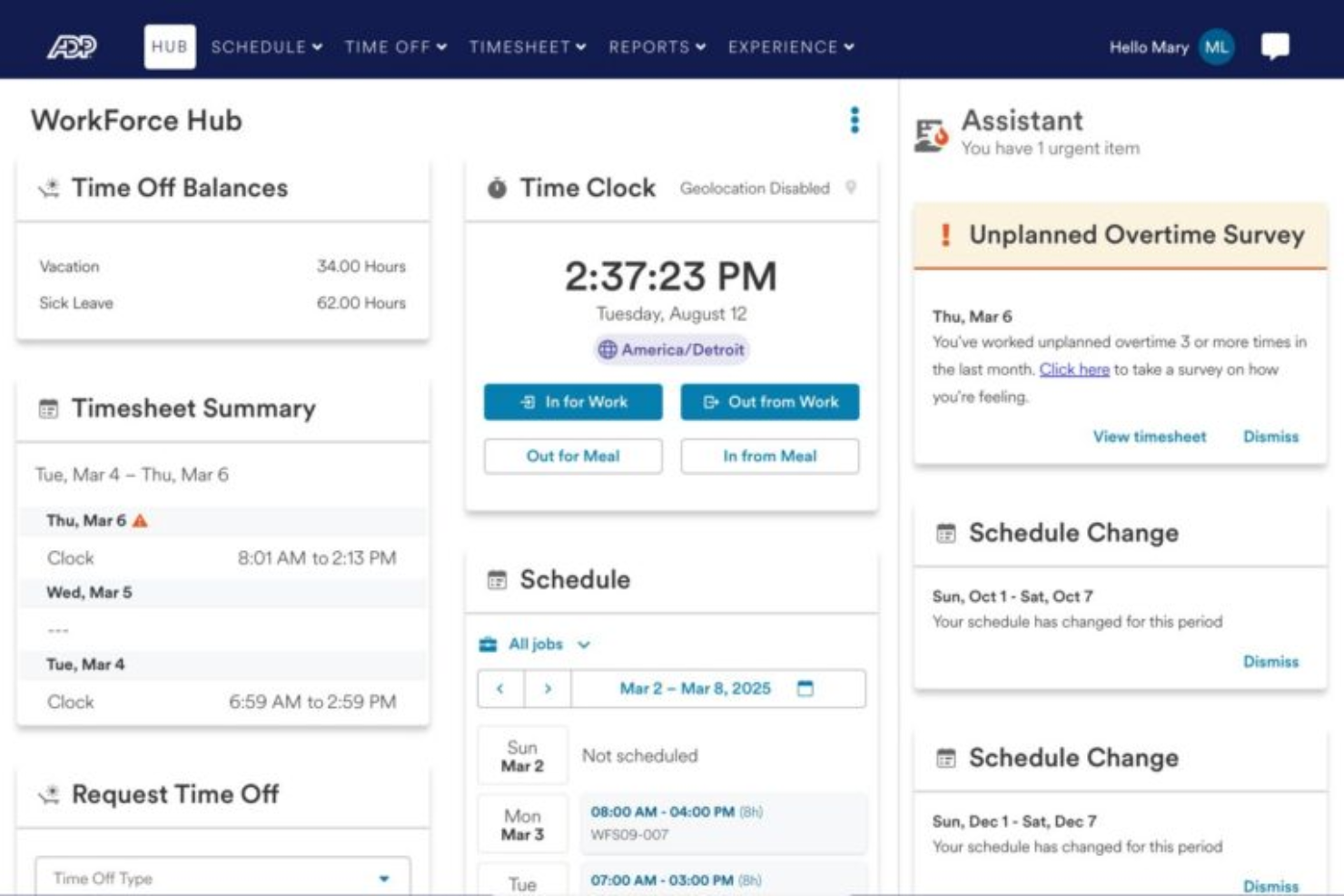
WorkForce Software is a workforce management platform for public sector organizations, offering tools for scheduling, leave tracking, time and attendance, and compliance monitoring.
Who Is WorkForce Software Best For?
WorkForce Software is a strong choice for large public sector organizations managing varied and complex employee shift patterns across multiple departments.
Why I Picked WorkForce Software
I picked WorkForce Software as one of the best because I can configure highly detailed shift patterns, rotations, and union labour rules to match public sector needs. I use its real-time time and attendance tracking to manage overlapping assignments and ensure accurate compliance.
WorkForce Software Key Features
- Automated leave management: Automates requests, approvals, and tracking for employee absences.
- Mobile workforce access: Let employees and managers review schedules and submit changes from mobile devices.
- Policy compliance monitoring: Applies and monitors adherence to public sector labour policies.
- Role-based access controls: Restrict system permissions by job function or department.
WorkForce Software Integrations
Integrations include SAP, Workday, Accenture, HR Path, KPMG, Connors Group, The Hackett Group, HRchitect, HR Strategies Consulting, and New Entity HCM.
Pros and Cons
Pros:
- Advanced mobile scheduling for deskless staff
- Real-time compliance alerts and notifications
- Manages complex unionized shift rotations
Cons:
- Custom reporting requires SQL knowledge
- Complex setup for custom workflows

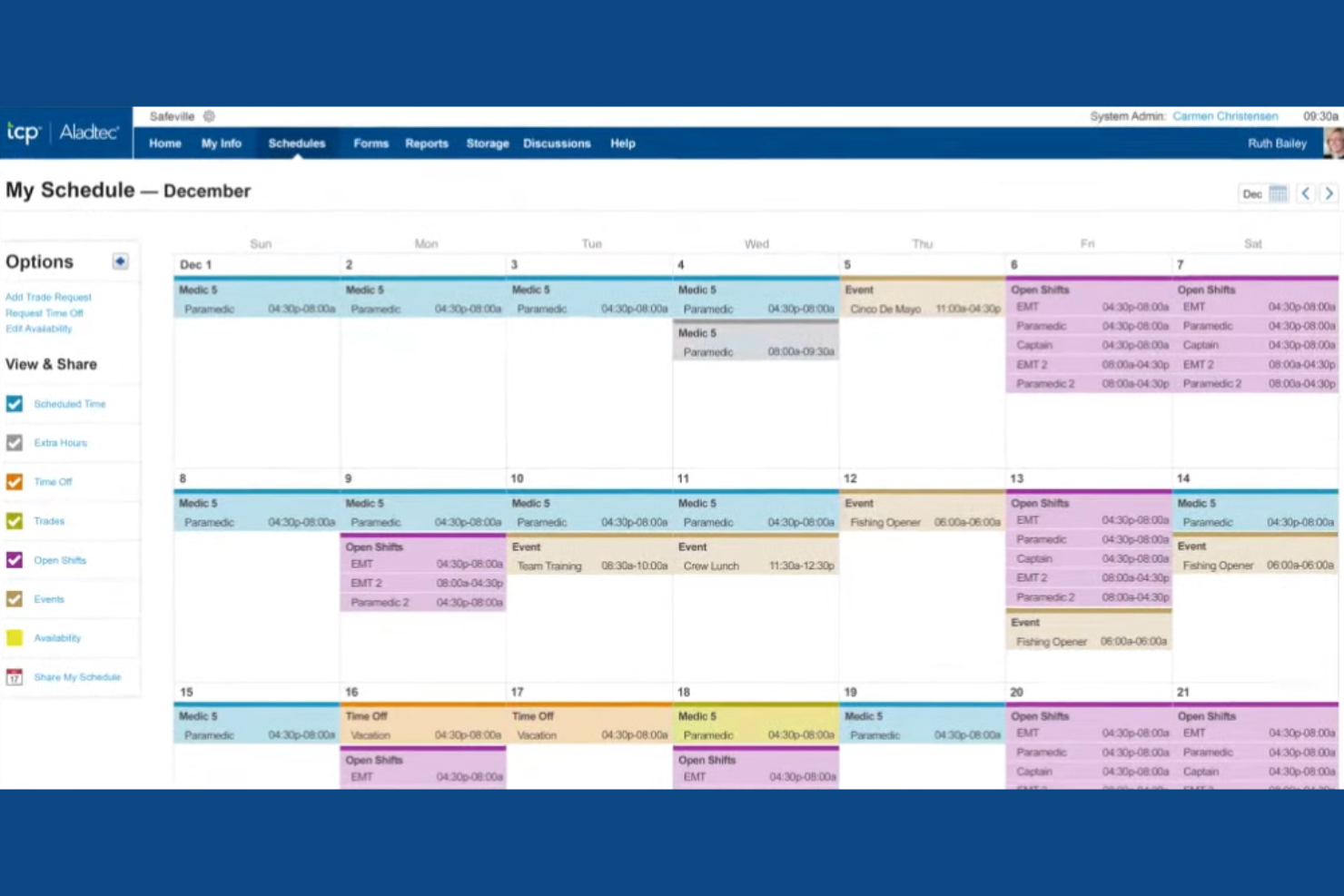
TCP Software is a government workforce management platform focused on time and attendance tracking, leave management, shift scheduling, and automated rules for municipal agencies.
Who Is TCP Software Best For?
TCP Software fits municipal HR and payroll departments that need customizable time collection and attendance management across multiple departments or locations.
Why I Picked TCP Software
I picked TCP Software because I rely on its adaptable time collection options, like biometric clocks and web punch, to capture complex and unionized municipal work schedules. My team uses its configurable rules engine to automate policy enforcement across city departments.
TCP Software Key Features
- Advanced scheduling tools: Create and manage rotating shifts, on-call coverage, and policy-driven assignments.
- Accrual management: Track and calculate vacation, sick, and comp time balances automatically.
- Mobile app access: Enable employees to clock in, request leave, and view schedules from mobile devices.
- Audit trail reporting: Maintain detailed logs of time edits and approvals for compliance and audits.
TCP Software Integrations
Integrations include Workday, Oracle, ADP WorkforceNow, PeopleSoft, Ellucian, BambooHR, Paycor, Paychex, Paycom, and QuickBooks.
Pros and Cons
Pros:
- Detailed compliance reporting for municipalities
- Supports complex union and overtime rules
- Highly configurable time tracking options
Cons:
- Requires a separate module for advanced reporting
- Mobile application has fewer features

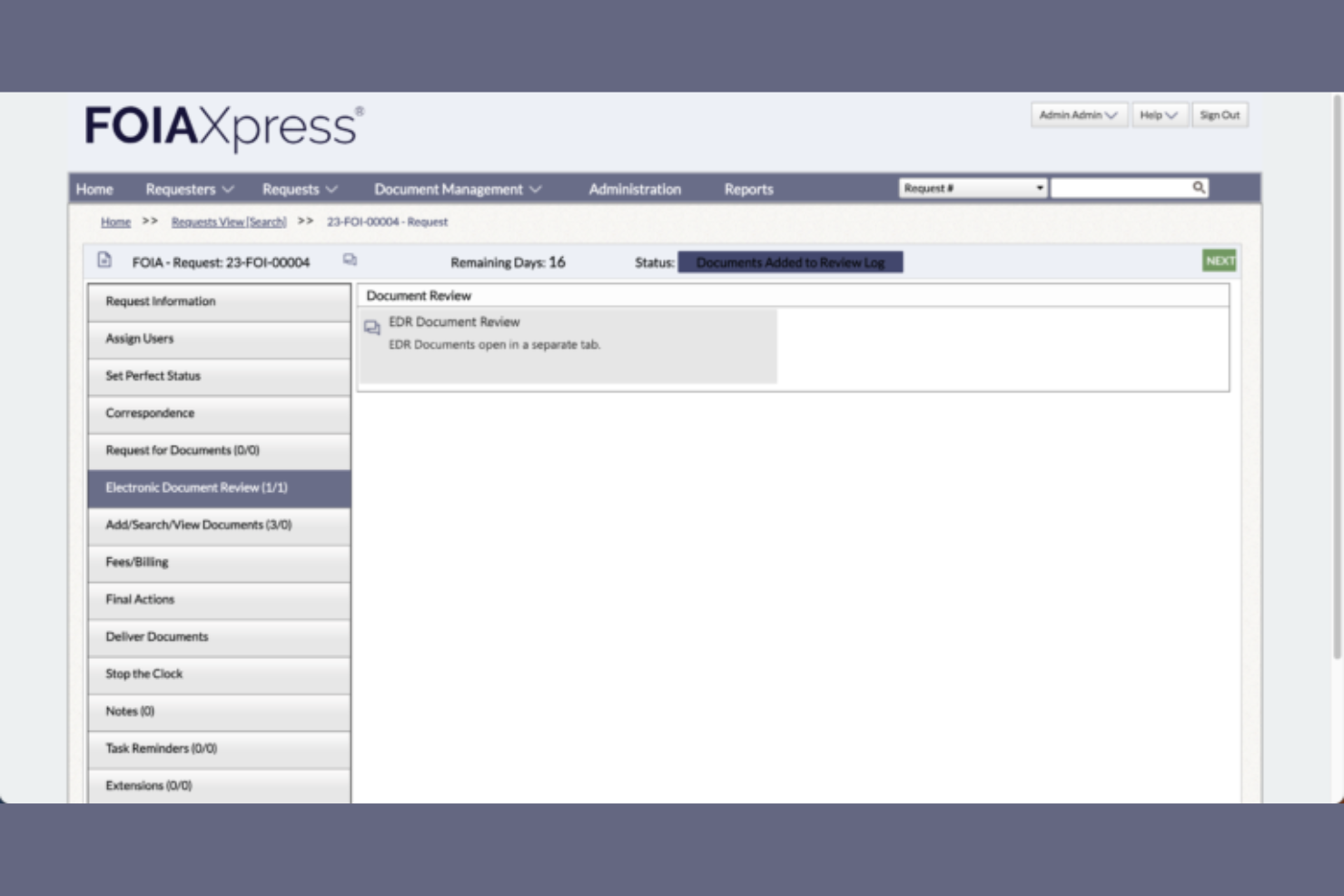
OPEXUS is a government workforce management platform that offers case management, workflow automation, document tracking, and audit reporting tools for public-sector agencies.
Who Is OPEXUS Best For?
OPEXUS is well-suited to federal, state, and local agency leaders and compliance teams who need workflow transparency across regulated public sector processes.
Why I Picked OPEXUS
I picked OPEXUS because I can track every workflow step, provide supervisors with real-time audit trails, and use automated reporting to spot process bottlenecks—a huge asset for operational transparency in agencies.
OPEXUS Key Features
- Case management dashboard: See all open cases and tasks in a centralized view.
- Automated document routing: Assign documents based on agency rules and staff roles.
- Custom forms builder: Design agency-specific digital forms for workflow intake.
- Role-based access controls: Set detailed permissions for staff, managers, and auditors.
OPEXUS Integrations
Integrations include Carahsoft, IPDS, OpenText, Copper River, iPSS, Mind Computing, SoftThink Solutions, ThunderCat Technology, and WITS Solutions.
Pros and Cons
Pros:
- Custom forms tailored to government processes
- Automated workflow handoffs between agency teams
- Audit trails built for compliance reviews
Cons:
- Few publicly documented integrations available
- Limited user community resources

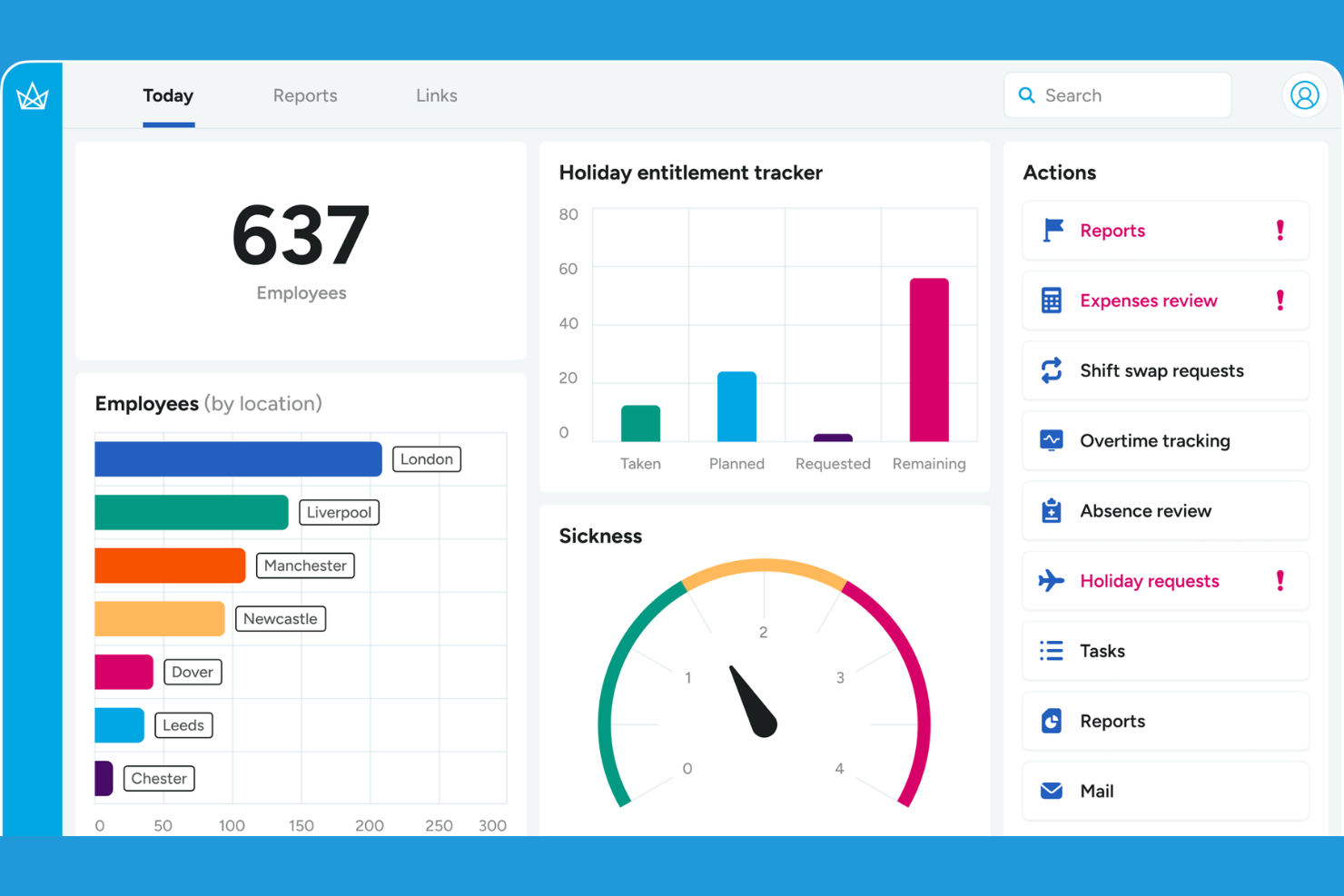
Crown Workforce Management is a workforce management solution for government agencies that provides roster creation, shift planning, attendance tracking, timesheets, and real-time reporting tailored to public sector requirements.
Who Is Crown Workforce Management Best For?
Crown Workforce Management suits local government HR teams needing advanced scheduling and attendance controls for diverse public sector operations.
Why I Picked Crown Workforce Management
I picked Crown Workforce Management because I count on its configurable rostering engine to build compliant, multi-site rotas for council teams. My team uses its rules-based shift assignment to handle unusual contracts and variable public sector hours.
Crown Workforce Management Key Features
- Absence management: Track, approve, and report on all forms of staff leave.
- Mobile app access: Enable employees to check schedules and clock in on the go.
- Time recording terminals: Use biometric or card-based terminals for on-site attendance capture.
- Payroll integration: Export approved timesheets directly into payroll systems.
Crown Workforce Management Integrations
Integrations include IRIS, Sopra Steria, Dayforce, Moorepay, Paxton, SAP, Oracle, ADP, SAGE, and Workday.
Pros and Cons
Pros:
- Custom rules for leave and overtime
- Adapts to complex public sector shift patterns
- Configurable multi-location scheduling templates
Cons:
- Documentation for reporting features is limited
- Initial setup process can take significant time

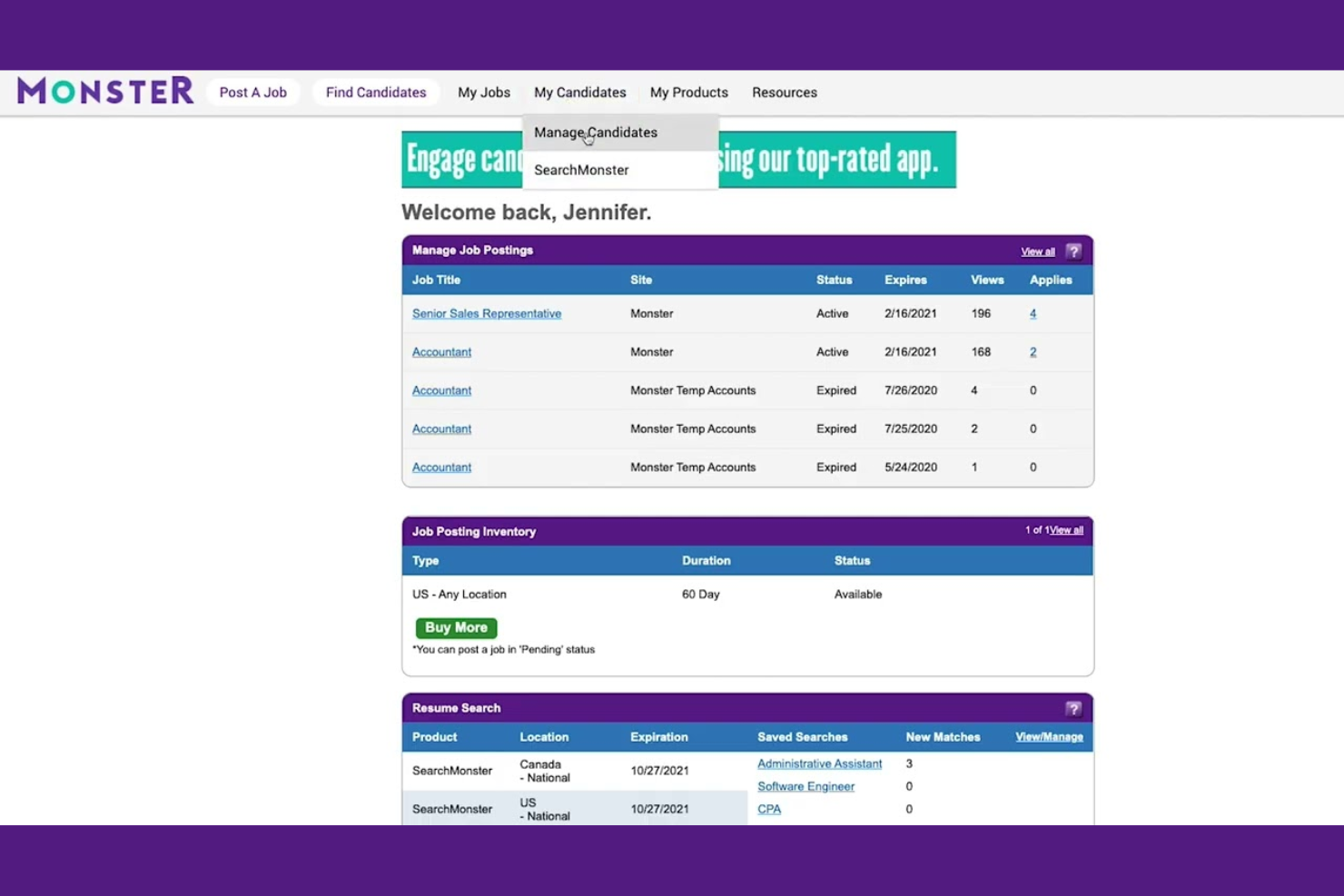
Monster Government Solutions is a government-focused applicant tracking system that combines job posting, candidate management, automated screening, and workflow tools for public sector hiring teams.
Who Is Monster Government Solutions Best For?
Monster Government Solutions is a strong fit for public sector HR departments managing civil service recruitment and compliance-driven applicant processes.
Why I Picked Monster Government Solutions
I picked Monster Government Solutions because I rely on its government-focused applicant workflow and compliance checklists to manage civil service hiring. My team uses its automated screening, bulk communications, and structured requisition approval to keep public sector recruitment on track.
Monster Government Solutions Key Features
- Dashboard analytics: Visualize hiring progress and recruitment metrics in real time.
- Role-based access controls: Assign system permissions to specific government user groups.
- Custom application forms: Build configurable forms to collect consistent applicant data.
- Veteran preference handling: Automatically identify and track veteran candidates through the process.
Monster Government Solutions Integrations
Integrations include Monster Hiring Management Enterprise, MonsterWorks, and Monster Applicant Assessment.
Pros and Cons
Pros:
- Public sector requisition workflows are configurable
- Strong audit tracking for compliance
- Handles civil service eligibility and scoring
Cons:
- Limited candidate self-service options
- Reporting requires manual data exports

Oracle HCM is a human capital management platform that combines core HR, workforce compliance, payroll, talent acquisition, and workforce analytics in a single configurable suite for large government organizations.
Who Is Oracle HCM Best For?
Oracle HCM is a strong fit for HR leaders in large, multi-jurisdictional government agencies that require strict, configurable compliance controls across the workforce lifecycle.
Why I Picked Oracle HCM
I picked Oracle HCM because I rely on its advanced policy engine and audit workflows to handle large-scale government compliance. My team uses its configurable controls, automated validations, and up-to-date regulatory rule sets to stay compliant in complex environments.
Oracle HCM Key Features
- Position management: Lets you define, track, and update government job positions.
- Talent acquisition: Supports public sector requisition, posting, and onboarding workflows.
- Workforce modelling: Enables scenario planning for reorganizations and staffing.
- Absence management: Tracks leave eligibility, accruals, and approvals for large workforces.
Oracle HCM Integrations
Integrations include Accu-Time Systems, dormakaba Workforce Solutions, Grosvenor Technology, and TCP Software.
Pros and Cons
Pros:
- Built-in civil service and compliance rules
- Granular role-based access controls for HR tasks
- Scalable to tens of thousands of employees
Cons:
- Report formatting requires manual configuration
- REST APIs limit batch data extracts
Other Government Workforce Management Software
Here are some additional government workforce management software options that didn’t make it onto my shortlist, but are still worth checking out:
- Workday
For AI-driven process automation
- Infor
For cloud-based industry solutions
- ADP
For built-in public sector compliance tools
- UKG
For people-first AI workforce insights
- Rippling
For real-time labour policy automation
- Paycor
For integrations with HR tech stacks
- Nakisa
For organizational structure visualization
- Synerion
For union agreement scheduling flexibility
- Indeavor
For automated demand-based scheduling


How I Evaluate Government Workforce Management Software
I split my evaluation into two layers: baseline requirements like civil service step tracking and union compliance, and differentiators that show which platforms are truly built for public sector HR.
Core Functionality (Table Stakes For This List)
When I'm selecting tools for my list, I rank each one on a scale from 0 (does not offer the functionality) to 5 (excels in this area) for each core functionality listed below. Then, I calculate the tool's total score into a percentage. Each tool needs to achieve a minimum total score of 55% to be considered for inclusion.
- Civil Service Position Management: I look for structured support for pay grades, step increases, and position classifications that mirror how agencies actually organize their workforce.
- Union & Labor Compliance: Each tool should handle collective bargaining rules, FLSA overtime calculations, and grievance tracking aligned with public sector labor agreements.
- Time Tracking & Scheduling: I evaluate how well scheduling handles the realities of government operations, like rotating shifts for public safety staff or comp time accrual policies.
- Public Sector Payroll Processing: Multi-fund payroll, retroactive adjustments, and pension contribution calculations are all areas I check for when reviewing payroll capabilities.
- Government-Focused Recruitment: The ATS should support merit-based hiring, veteran preference scoring, and background or clearance workflows typical of public sector applicant pipelines.
- Regulatory & Audit Reporting: I check for prebuilt EEO, workforce demographic, and compliance reports that agencies can pull for audits, council reviews, or oversight requests.
Once I have a list of tools that meet the criteria, I consider what sets each platform apart.
Differentiating Factors (What Sets Vendors Apart)
Here's how I compare and contrast different vendors:
Standout Features
Position control budgeting is a big differentiator. I look for tools that tie every headcount to a specific fund or appropriation, so HR leaders can forecast staffing against approved budgets. Succession and retirement planning also matters in this space, where large portions of a workforce may hit pension eligibility within the same window. I evaluate whether a platform tracks mandatory certifications and training renewals too, which is especially relevant for roles in public safety or regulatory enforcement.
Beyond Features
Security compliance is a major factor I evaluate. Platforms handling government employee data should meet standards like FedRAMP or StateRAMP, and I check whether vendors hold current certifications. Integration with existing government systems matters just as much—agencies often run ERP platforms like Tyler Technologies or Oracle, and the workforce tool needs to connect with pension systems and job boards. I also consider whether a vendor is available through cooperative purchasing contracts, since that can speed up the procurement timeline for public agencies.
How to Choose Government Workforce Management Software
It’s easy to get bogged down in long feature lists and complex pricing structures. To help you stay focused as you work through your unique software selection process, here’s a checklist of factors to keep in mind:
| Factor | What to Consider |
|---|---|
| Scalability | Can the solution support your current headcount and anticipated future growth? Watch for user or site limits. |
| Integrations | Will it connect with your payroll, ERP, HRIS, finance, and timekeeping systems? Confirm support for key vendors. |
| Customizability | Does the tool let you tailor workflows, approval paths, and compliance rules to your agency’s requirements? |
| Ease of use | Will managers and employees adopt it without heavy training? Try demos with real-world tasks. |
| Implementation and onboarding | What will migrating from your existing systems entail? Assess timeline, vendor involvement, migration support, and training. |
| Cost | Are there unexpected fees for modules, users, or upgrades? Scrutinize bundled vs. à la carte pricing. |
| Security safeguards | Does the software offer encryption, audit logs, and government-grade data protection? Ask about certifications and hosting details. |
| Compliance requirements | How well does the solution address agency, local, and union workforce regulations now and as they evolve? |
What is Government Workforce Management Software?
Government workforce management software is a category of digital tools designed to help public sector organizations manage employee scheduling, time tracking, leave administration, payroll compliance, and workforce analytics. These solutions centralize essential HR processes, support regulatory requirements, and simplify large-scale personnel operations, allowing agencies to coordinate staff efficiently and ensure compliance with government standards.
Features
Here are the core features any great government workforce management software should have:
- Time and attendance tracking: Captures employee work hours, attendance, overtime, and absences automatically, helping agencies comply with labour regulations and eliminate manual recordkeeping.
- Scheduling and shift management: Let managers create, modify, and assign shifts based on staffing needs, skill sets, and scheduling rules while accounting for compliance and union agreements.
- Leave management: Automates the entire leave request, approval, and accrual process, ensuring transparency and consistency for vacation, sick, parental, and other leave types.
- Payroll processing: Integrates time data with payroll calculations, tracks earnings and deductions, and generates accurate, on-time paychecks while supporting public sector pay rules and exceptions.
- Compliance tracking: Monitors adherence to government, union, and local labour laws through automated policy enforcement and audit-ready reporting.
- Role-based access controls: Restrict system permissions based on job function, department, or location to keep sensitive workforce data secure and limit errors.
- Employee self-service portal: Allows staff to view schedules, request changes, submit timesheets, and track leave balances through a secure online platform.
- Analytics and reporting: Generates detailed workforce reports, trends, and dashboards to help administrators monitor KPIs, identify shortages or overages, and plan future staffing more effectively.
- Document management: Stores and organizes key HR documents—such as certifications, contracts, and compliance records—for easy access and renewal tracking.
- Mobile accessibility: Provides mobile apps or a responsive design so managers and employees can handle scheduling, time tracking, and approvals on the go.
Benefits
Implementing government workforce management software provides several benefits for your team and your business. Here are a few you can look forward to:
- Accurate compliance management: Built-in tracking and automated rules help your agency meet government, labour, and union requirements with less manual oversight.
- Simplified scheduling: Smart shift management tools make it easier to allocate staff efficiently and minimize coverage gaps or overtime expenses.
- Increased transparency: Employee self-service portals and real-time dashboards provide visibility into schedules, leave balances, and overtime, helping foster trust and accountability.
- Simplified payroll processing: Direct time and attendance integration reduces errors by ensuring payroll calculations are based on up-to-date, verified data.
- Centralized workforce data: Secure document management and analytics keep crucial HR records, policies, and trends in one easily accessible platform.
- Improved workforce planning: Analytics and reporting features empower leaders to anticipate staffing needs and respond quickly to workforce changes.
- Improved employee engagement: Easy access to personal schedules, leave information, and requests helps employees stay informed and engaged.
Costs and Pricing
Selecting government workforce management software requires an understanding of the various pricing models and plans available. Costs vary based on features, team size, add-ons, and more. The table below summarizes common plans, their average prices, and typical features included in government workforce management software solutions:
Plan Comparison Table
| Plan Type | Average Price | Common Features |
|---|---|---|
| Free Plan | $0 | Basic scheduling, simple time tracking, and limited employee self-service. |
| Personal Plan | $5-$10/user/month | Advanced time tracking, leave management, mobile access, and basic reporting. |
| Business Plan | $15-$30/user/month | Custom workflows, shift planning, compliance management, document storage, integrations, and analytics. |
| Enterprise Plan | $35-$60/user/month | Role-based permissions, multi-location support, advanced security, audit logs, dedicated support, and full API access. |
FAQs
Here are some answers to common questions about government workforce management software:
How does government workforce management software address public sector compliance?
Government workforce management software is designed to track and enforce government, union, and labour regulations by automating rule-based scheduling, leave management, and documentation. This reduces compliance risks and eliminates manual processes that can lead to errors. Many solutions include audit-ready reporting and customizable workflows to align with unique agency or departmental requirements, improving overall operational efficiency.
Is it possible to integrate government workforce management software with existing payroll or HRIS systems?
Yes, most solutions can integrate with existing payroll and HRIS platforms to provide an end-to-end data flow. Integration ensures accurate data sharing between systems, reducing administrative work, eliminating time-consuming tasks, and minimizing errors during payroll and reporting processes. This helps human resources teams manage time & attendance accurately to the penny.
What should I consider when moving from spreadsheets to dedicated workforce management software?
Moving to an all-in-one platform requires planning. Look for data migration support, training resources, and hands-on onboarding assistance to help optimize your transition. Plan to review and clean your existing data before conversion to avoid bringing over errors or outdated details. Confirm that your chosen software can import from your current spreadsheet formats so you can begin making data-driven decisions right away.
Can these systems help manage staff across multiple locations or agencies?
Yes, many solutions support multi-location or multi-agency environments, including complex sectors like healthcare and the federal government. They let you centralize scheduling, reporting, and compliance tracking while still allowing for location-specific rules and permissions as needed. This broad visibility aids in long-term forecasting and helps control labour costs across departments.
How secure is workforce data in these government-focused tools?
Workforce management solutions for the government typically use encryption, role-based access, and audit logging to protect sensitive human resource management data. Security is critical for strategic decision-making regarding talent management and boosting the overall employee experience to improve staff retention. Always verify what certifications, hosting arrangements, and security features the vendor offers—especially during the procurement process—to ensure that it aligns with public sector requirements. You can often request a case study from the vendor to see how similar agencies secured their deployment.