

En iyi bordro hizmetleri, hesaplamaları otomatikleştirerek, uyumluluğu sağlayarak ve maliyetli hataları en aza indirerek ekibinize ödeme yapmanın stresini ortadan kaldırır.
Bordroyu manuel olarak yönetmek değerli zamanınızı tüketebilir ve cezalara veya mutsuz çalışanlara yol açan hata riskini artırabilir. Doğru bordro hizmeti, vergileri, bildirimleri ve doğrudan para yatırma işlemlerini hassasiyet ve güvenilirlikle yöneterek süreci baştan sona optimize eder.
Önde gelen sağlayıcıları bizzat test edip karşılaştırdıktan sonra, bugün mevcut olan en güvenilir ve kullanımı kolay bordro hizmetlerinin bir listesini hazırladım. Bu rehberde zamandan tasarruf sağlayan, doğruluğu artıran ve ekibinizin büyüklüğü ne olursa olsun uyumluluğunuzu korumanıza yardımcı olan güvenilir çözümleri bulacaksınız.
Why Trust Our Software Recommendations
6,700+
Reviews
20
Industry experts
16+
Evaluation factors
14
Years
Our team has been testing and reviewing software since 2012. As HR experts ourselves, we know how difficult—and important—it is to choose the right software.
For this guide, we evaluated tools using hands-on testing and independent research, scoring tools using our selection criteria. We also draw on insights from industry thought leaders and practicing HR experts.
Our reviews reflect our human editorial judgment, not a sales pitch.
Expert reviewers:
- Phil GrayCOO
 Kim BehnkeHR Tech Editor & Analyst
 Josh BarkerPeople Ops Manager

Bordro Hizmeti Sağlayıcıları Karşılaştırma Tablosu
Favori bordro hizmeti sağlayıcılarımın fiyatlandırma bilgilerini içeren bu kullanışlı karşılaştırma tablosunu hazırladım:
Sorted by: Default
| Service | Starting Price | Website | |
|---|---|---|---|
Best for payroll and compliance in one platform | 4.9 out of 5 | $29/user/month Free demo available | Website |
Best for salaried and hourly employees | 4.6 out of 5 | $79/user/month Free demo available | Book Demo |
Best for automated payroll and tax filing | 4.6 out of 5 | $49/month Free trial + free demo available | Book Demo |
Best for on-demand wage access | 4.3 out of 5 | Pricing upon request Free demo available | Website |
Best for multi-country EOR and contractor pay | 4.5 out of 5 | $19/contractor/month Not available | Book Demo |
Best for managing international payments | 4.5 out of 5 | $199/user/month Free plan + free demo available | Website |
Best for 24/5 dedicated support | 5.0 out of 5 | Pricing upon request Free demo available | Website |
Best for adjusting to latest tax laws | 4.1 out of 5 | Pricing upon request Free demo available | Website |
Best for customizable payroll workflows | 4.5 out of 5 | $50/user/month 30-day free trial + free demo available | Website |
Best for industry-specific payroll | 5.0 out of 5 | $49/month + $6/user/month 30-day free trial available | Website |


En İyi Bordro Hizmeti Sağlayıcıları İncelemeleri
Aşağıda, benim için öne çıkan en iyi bordro hizmeti sağlayıcılarının ayrıntılı bir dökümünü bulabilirsiniz. Her incelemede, bir sonraki çözümünüzü bulmanıza yardımcı olmak için temel özellikleri, artıları ve eksileri, entegrasyon seçeneklerini ve her aracın kimler için en uygun olduğunu bulacaksınız.
 Best for payroll and compliance in one platform
- Free demo available
- From $29/user/month
Visit WebsiteCustomer Rating:4.9/5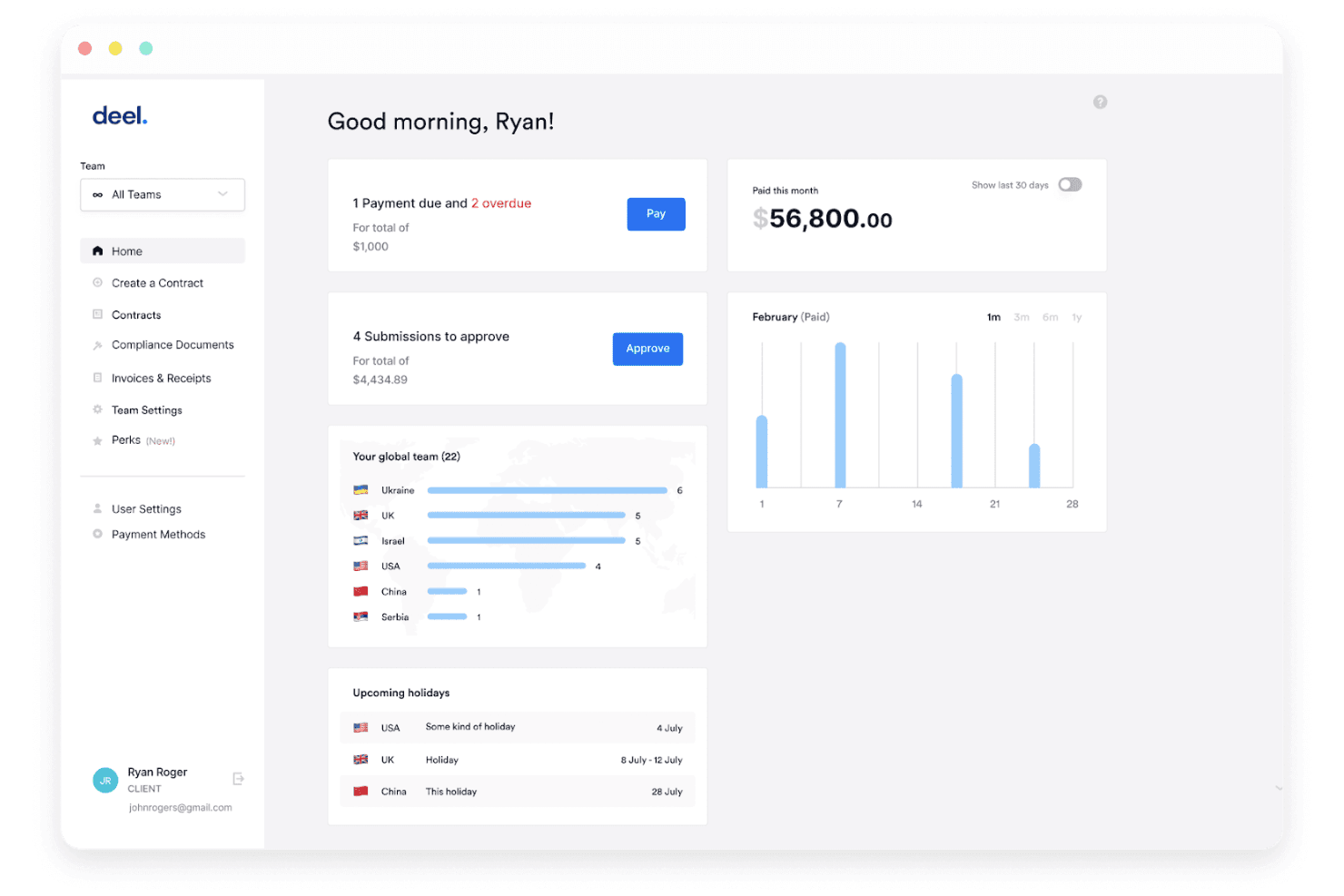
Deel Payroll offers a client dashboard with payment alerts, team distribution by country, upcoming holidays, and monthly payment analytics. Deel is a global payroll and workforce management platform that handles contractor payments, employer of record (EOR) services, PEO co-employment, tax filings, and compliance across 150+ countries from a single system.
Who Is Deel Payroll Best For?
Deel works well for companies hiring across multiple countries who need to manage contractors, EOR employees, and local payroll in one place.
Why I Picked Deel Payroll
Deel is built for organizations running payroll across multiple countries and worker types at the same time. What I find genuinely useful is how it handles employer of record, contractor of record, and PEO co-employment in one place, so you're not juggling separate vendors when your team spans 10 countries. The AI-powered contractor misclassification assessment is a practical compliance tool, not just a checkbox feature. I also appreciate the localized contract generation, which adapts automatically to local labor law rather than requiring manual legal review every time you hire in a new country.
Standout Services
- Deel API access: Connect payroll data directly to your existing HR, finance, and ERP systems for custom workflow automation.
- Workflow builder for onboarding and offboarding: Create custom onboarding, offboarding, and communication flows tailored to each region and role.
- Localized compliance alerts: Receive automatic notifications when local employment or tax laws change in any supported country.
- 24/7 global support with rapid resolution: Access on-demand support with documented first-contact resolution rates and fast average response times, including for EOR and contractors.
Pros and Cons
Pros:
- Localized contracts adapt to local labor law
- AI flags contractor misclassification risks automatically
- Handles EOR, PEO, and contractor payroll globally
Cons:
- Benefits admin feels disconnected from core payroll
- US and Canada payroll errors reported repeatedly
Learn more about Deel Payroll: Best for salaried and hourly employees
- Free demo available
- From $79/user/month
Visit WebsiteCustomer Rating:4.6/5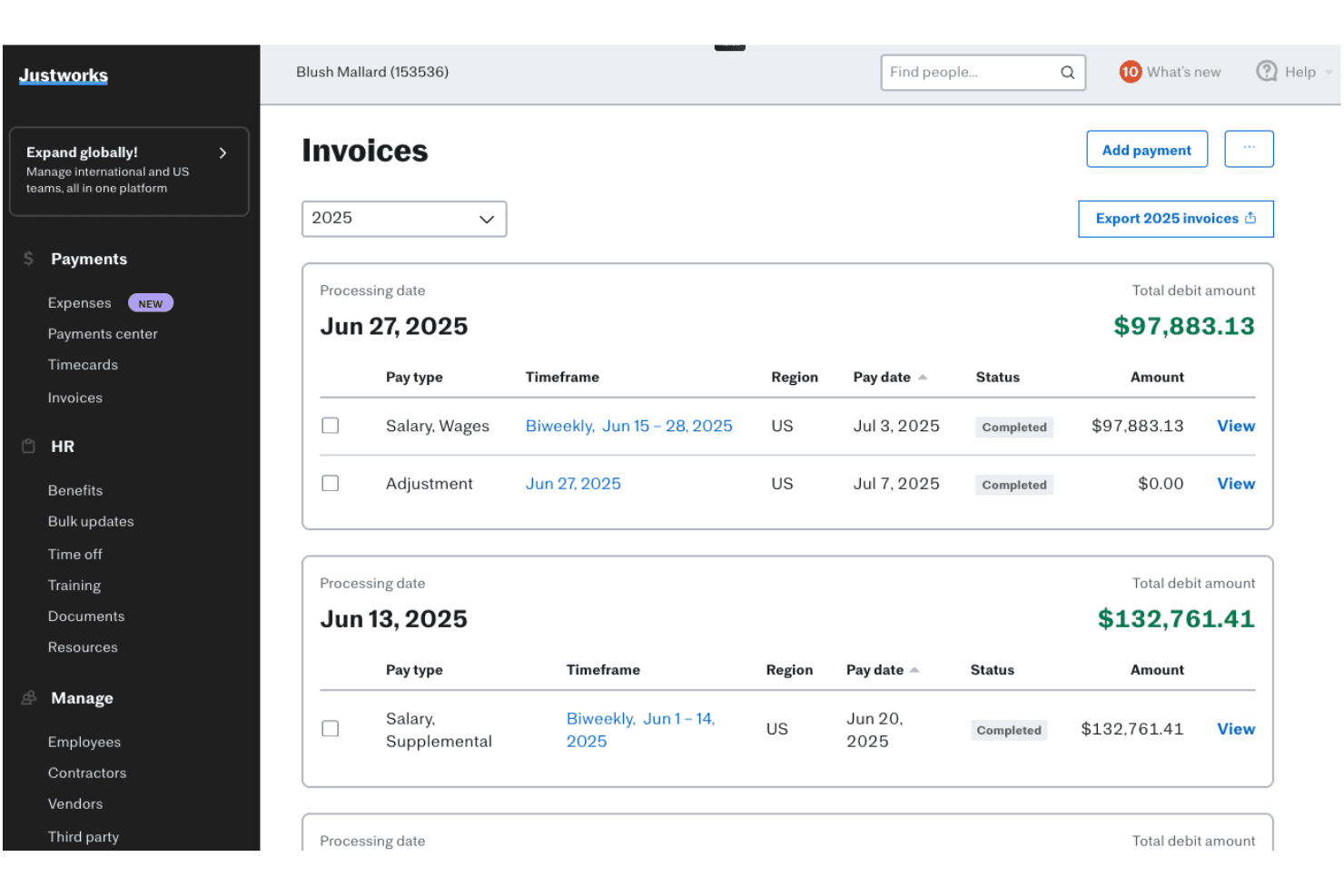
Justworks lets users track and export payroll invoices by pay period. Justworks is a PEO and payroll platform that combines payroll processing, tax filings, benefits administration, and HR compliance tools into a single system for small and mid-sized businesses.
Who Is Justworks Best For?
Justworks works well for small and mid-sized businesses that need to manage both salaried and hourly workers under one payroll and HR system.
Why I Picked Justworks
Justworks handles salaried and hourly workers in one payroll system without requiring you to patch together separate tools. I appreciate how it supports multiple pay rates, custom payroll periods, tips processing, and off-cycle payments, which matters when your team includes both fixed-salary staff and shift-based hourly workers. The built-in time tracking add-on connects directly to payroll runs, so what employees clock gets calculated and paid without manual entry in between.
Standout Services
- Global employer of record (EOR) service: Hire and pay international employees with full compliance support in over 60 countries.
- Benefits marketplace administration: Manage medical, dental, vision, 401(k), commuter, HSA/FSA, and mental health benefits from one platform.
- 24/7 expert human support: Access to HR and compliance specialists by phone, chat, or email, any time your team needs answers.
- Accounting software integrations: Connect payroll and HR data directly to QuickBooks, Xero, Brex, Ramp, and other business platforms.
Pros and Cons
Pros:
- 24/7 access to HR and compliance specialists
- Built-in time tracking connects directly to payroll
- Handles salaried and hourly workers in one system
Cons:
- Onboarding takes up to six weeks to complete
- Reporting features lack depth for payroll analysis
Learn more about Justworks: Best for automated payroll and tax filing
- Free trial + free demo available
- From $49/month
Visit WebsiteCustomer Rating:4.6/5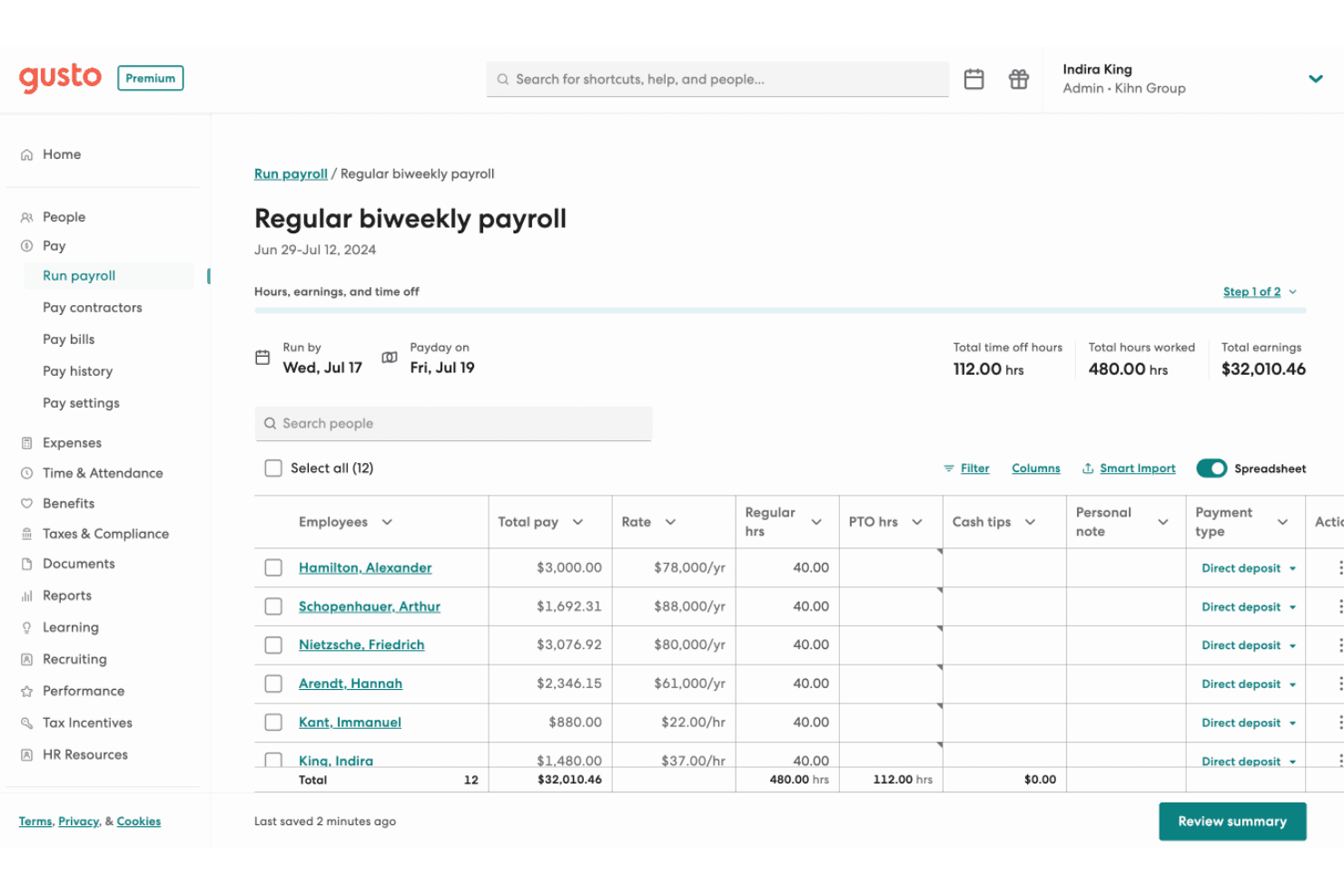
Gusto offers a detailed regular biweekly payroll interface showing employee pay, hours, rates, and payment types for easy payroll management. Gusto is a payroll and HR platform that handles payroll processing, automated tax filing, benefits administration, and employee onboarding for small and mid-sized businesses.
Who Is Gusto Best For?
Gusto is a strong fit for small and mid-sized businesses that want payroll, tax filing, and HR tools in one place without a dedicated payroll team.
Why I Picked Gusto
Gusto's AutoPilot feature is what sets it apart: it runs recurring payroll automatically without you touching a thing. When I evaluated it, I liked that federal, state, and local tax forms (W-2s, 1099s, 940s, 941s) are filed automatically each pay cycle, not just at year-end. If your team runs payroll on a set schedule, Gusto handles the entire cycle, including calculations, filings, and direct deposit, without manual input.
Standout Services
- Employee self-service portal: Lets employees view pay stubs, download tax forms, and update personal information online or with the mobile app.
- Benefits administration marketplace: Offers integrated medical, dental, vision, 401(k), and college savings plans managed directly through Gusto.
- Pre-built accounting integrations: Syncs payroll data with accounting platforms like QuickBooks, Xero, FreshBooks, and more for accurate financial records.
- Guided payroll migration: Includes support to import historical pay data and set up prior wages so you can switch providers with less hassle.
Pros and Cons
Pros:
- Handles payroll, benefits, and HR in one place
- Tax forms filed automatically every pay cycle
- AutoPilot runs payroll without manual input
Cons:
- Scaling past 50 employees gets difficult
- Support quality drops when errors occur
 Best for on-demand wage access
- Free demo available
- Pricing upon request
Visit WebsiteCustomer Rating:4.3/5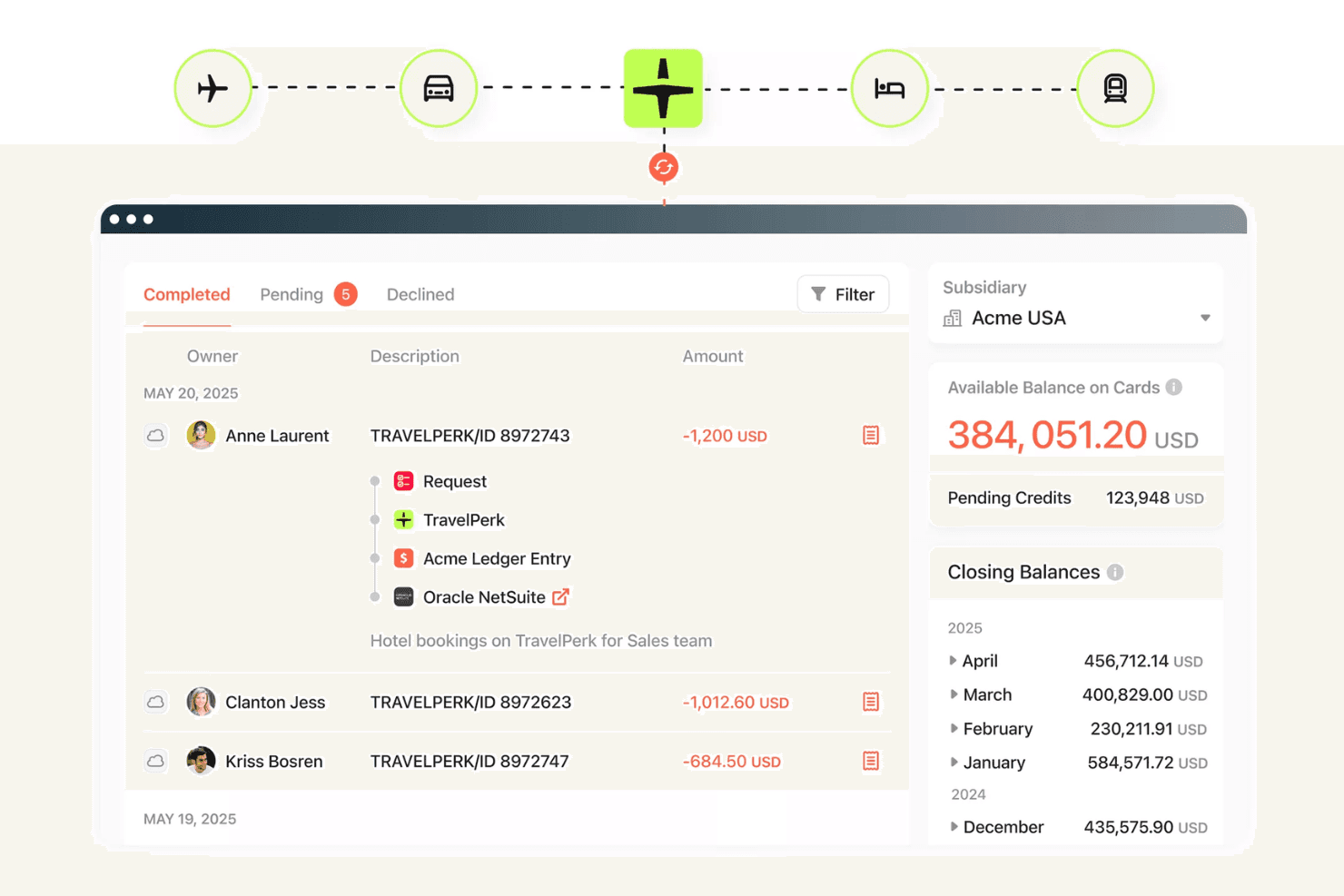
Paylocity tracks corporate travel expenses and card balances across subsidiaries. Paylocity is a unified HCM platform that combines payroll processing, tax filing, benefits administration, workforce management, and HR tools in a single system built for businesses from small teams to large enterprises.
Who Is Paylocity Best For?
Paylocity suits HR and payroll teams at small to midsize companies who want on-demand wage access built directly into their payroll system, without managing a separate third-party tool.
Why I Picked Paylocity
What sets Paylocity apart is its native on-demand pay, built directly into payroll rather than bolted on as a third-party add-on. Employees can request earned wages by 2 PM CT and receive funds the same day, with Paylocity pre-funding transfers so your cash flow stays intact. I like that the calculation shows real-time net pay, factoring in taxes and deductions, so employees can't accidentally overdraw what they've actually earned.
Standout Services
- Payroll Readiness Dashboard: Gives you 40+ automated payroll error audits and flags before submission.
- Global payroll management: Lets you process payroll for employees in over 100 countries from a single platform.
- Integrated benefits administration: Offers self-service enrollment with electronic carrier feeds and ACA compliance tools.
- Garnishment managed services: Handles wage garnishments and ensures compliance with deduction rules automatically.
Pros and Cons
Pros:
- Payroll audits catch errors before submission
- Real-time net pay shown before withdrawal
- Native same-day earned wage access included
Cons:
- PTO tracking feels clunky and outdated
- Customer support response times can be slow
 Best for multi-country EOR and contractor pay
- Not available
- From $19/contractor/month
Visit WebsiteCustomer Rating:4.5/5
HireGlobal tracks worker payments by billing cycle, status, and amount due. HireGlobal by Toptal is a global workforce platform that handles employer of record, contractor management, agent of record, and local payroll across 180+ countries—covering employment contracts, tax compliance, and worker payments in a single system.
Who Is HireGlobal Best For?
HireGlobal is a strong fit for companies hiring across multiple countries who need to manage a mix of employees and contractors without setting up local entities.
Why I Picked HireGlobal
What sets HireGlobal apart is how it handles the messiest part of global hiring: managing employees and contractors under different legal frameworks, across dozens of countries, without making you choose a single rigid model. I picked it because its Virtual EOR tier is genuinely unlike what most payroll platforms offer, covering worker classification, compliant contracts, local payments, and $1M indemnification per worker. When you're paying a mix of full-time staff in Germany and contractors in the Philippines, that kind of coverage matters.
Standout Services
- Consolidated multi-currency payroll platform: Run payroll and manage payments in 50+ currencies across 180+ countries from one interface.
- $1M per-worker compliance indemnification: Automatically included on select plans, covering major legal and classification risks for each worker.
- Guided onboarding and contract management: Access a centralized workflow with compliance-reviewed contracts and onboarding for both employees and contractors.
- Integrated global background checks: Run compliant background screening as part of the hiring and onboarding workflow.
Pros and Cons
Pros:
- Pays workers across 180+ countries and 50+ currencies
- $1M indemnification per worker on select plans
- Covers EOR, AOR, and contractors in one platform
Cons:
- Less suited for domestic-only payroll needs
- Small review base due to recent launch
Learn more about HireGlobal: Best for managing international payments
- Free plan + free demo available
- From $199/user/month
Visit WebsiteCustomer Rating:4.5/5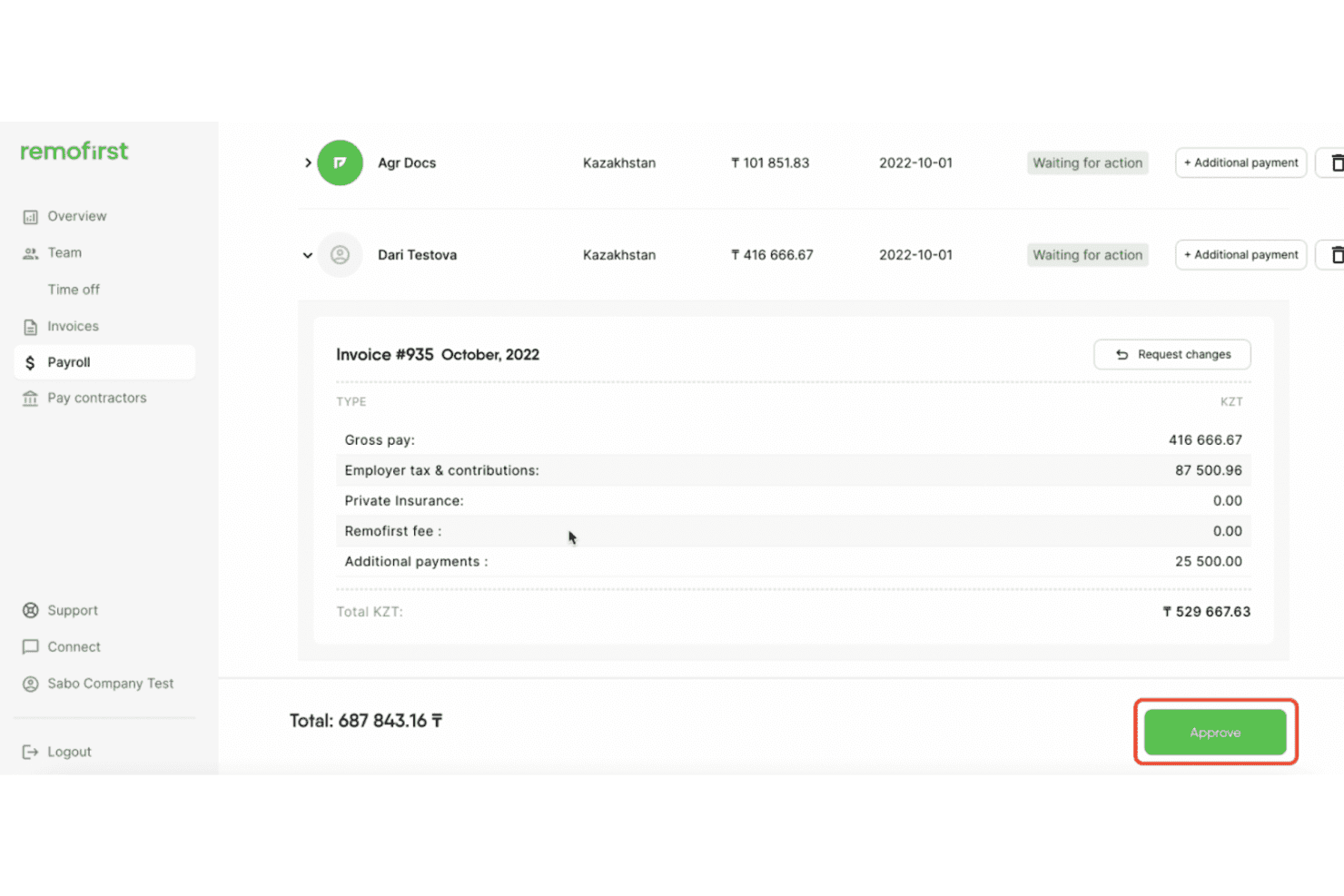
RemoFirst breaks down payroll invoices by tax, fees, and payments. RemoFirst is a global employer of record platform that handles international payroll, contractor payments, tax filings, and compliance across 185+ countries for companies hiring across borders.
Who Is RemoFirst Best For?
RemoFirst is a strong fit for startups and SMBs hiring their first international employees or contractors across multiple countries without a local entity.
Why I Picked RemoFirst
RemoFirst stood out to me because it's built specifically for the complexity of paying people across borders. When I evaluated it, the multi-currency payroll support across 100+ currencies was the clearest differentiator, covering situations where you're paying contractors in Singapore, full-time employees in Germany, and freelancers in Brazil all in a single pay cycle. I also like that contractor management is free at the base tier, so you can onboard and manage contracts without committing to payment processing fees upfront.
Standout Services
- Dedicated account manager: Each client receives a single point of contact for payroll setup, ongoing questions, and support.
- 24/7 embedded HR chat support: Hiring managers and employees can access HR help at any time through the in-platform chat feature.
- Native integrations with HR tools: Connect to BambooHR, ADP Workforce Now, and GoCardless for automated data syncing and payments.
- RemoHealth add-on: Offer global medical, dental, and vision insurance to employees as an upgrade to your payroll package.
Pros and Cons
Pros:
- Dedicated account manager included by default
- Free contractor management at base tier
- Covers payroll in 185+ countries
Cons:
- Compliance depth varies by country
- Payroll delays reported at some employees
 Best for 24/5 dedicated support
- Free demo available
- Pricing upon request
Visit WebsiteCustomer Rating:5/5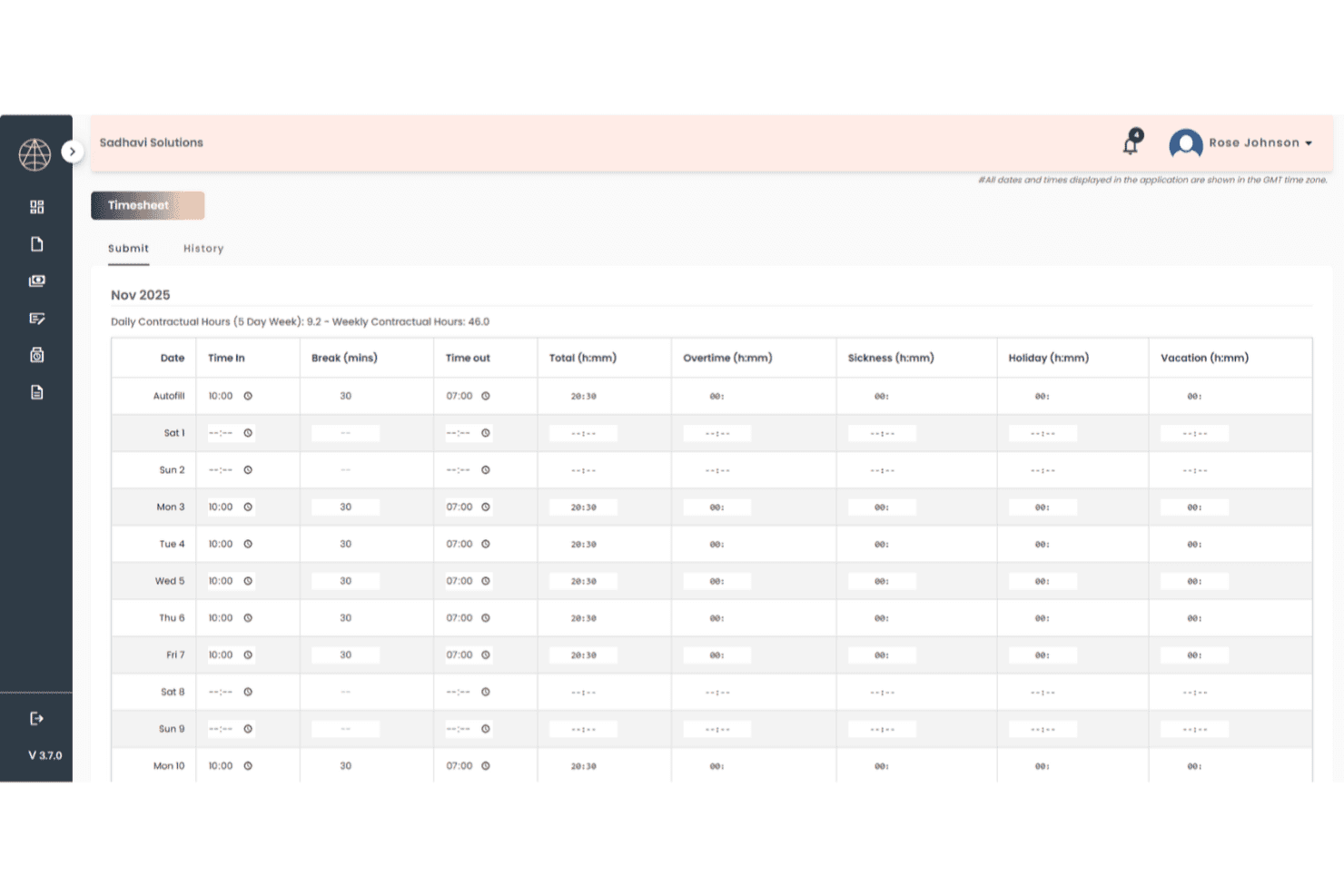
TopSource lets users log daily work hours via a monthly timesheet. TopSource Worldwide is a global employer of record and payroll provider that handles employment contracts, tax withholding, statutory benefits, and HR administration for companies hiring full-time employees across 180+ countries without a local legal entity.
Who Is TopSource Best For?
Mid-market and enterprise teams hiring across borders who want a dedicated account manager and human-first support rather than a self-serve platform.
Why I Picked TopSource
What stood out to me about TopSource is its 24/5 phone support backed by a named account manager who actually knows your payroll setup. When something goes wrong mid-cycle in, say, Belgium or India, you're not filing a ticket and waiting. I appreciate that TopSource pairs this with quarterly compliance reviews, so issues tend to get caught before they escalate rather than after.
Standout Services
- Global payroll coverage: Run compliant payroll for employees in 180+ countries without local entity setup or separate vendors.
- Portico platform integrations: Connect payroll with HRIS, ATS, and finance systems like Workday, SAP SuccessFactors, and QuickBooks through a flexible API.
- Customizable benefits administration: Tailor benefit packages to each country, with statutory requirements and regional customization managed for you.
- Proactive compliance reviews: Receive scheduled quarterly checks on payroll processes, tax filings, and local rule changes from in-country specialists.
Pros and Cons
Pros:
- Quarterly compliance reviews catch issues early
- Compliant payroll runs across 180+ countries
- Named account manager knows your payroll setup
Cons:
- Self-service portal feels dated and limited
- Reporting lacks detail for finance teams
Learn more about TopSource: Best for adjusting to latest tax laws
- Free demo available
- Pricing upon request
Visit WebsiteCustomer Rating:4.1/5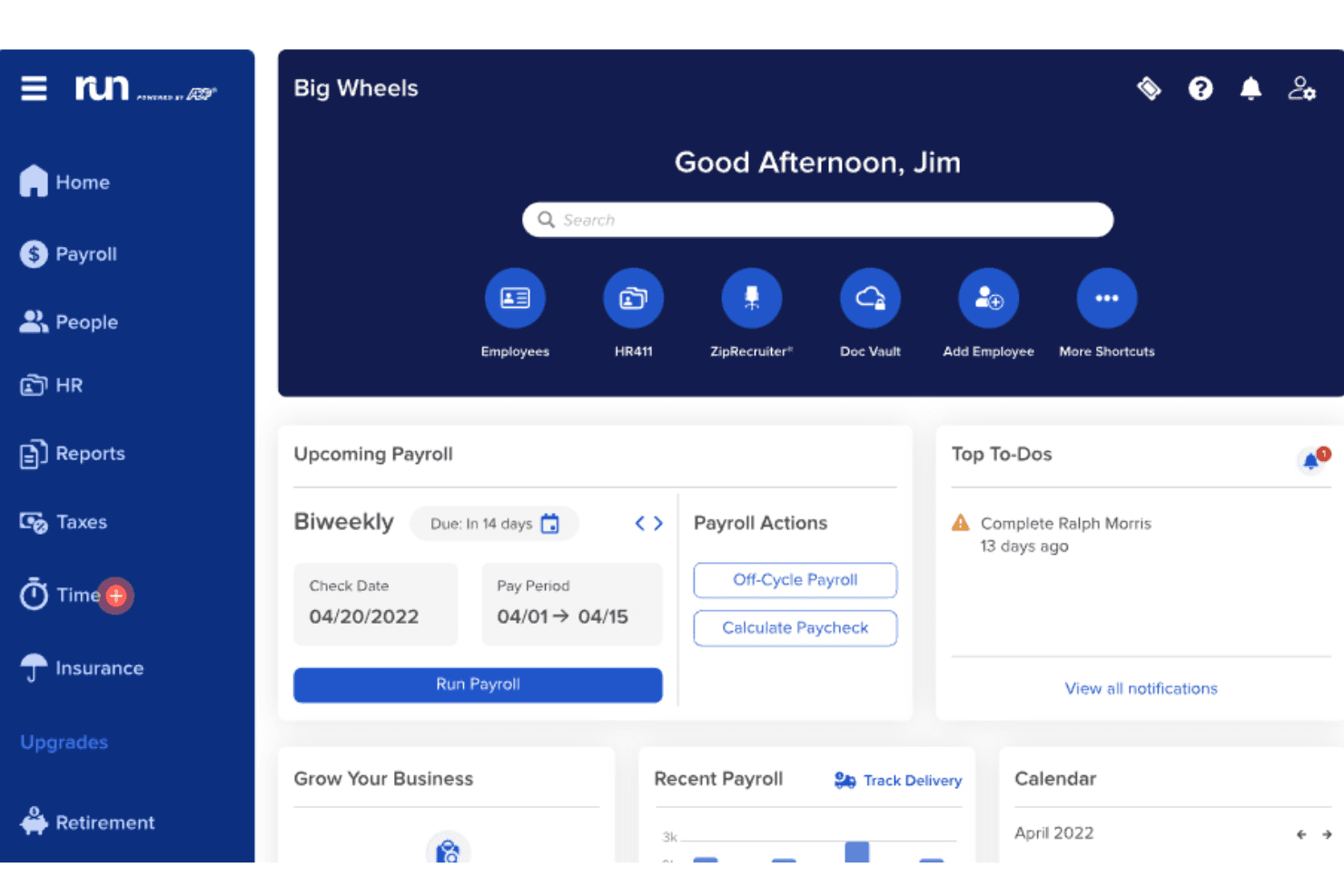
RUN Powered by ADP centralizes payroll, HR, and scheduling on one dashboard. RUN Powered by ADP is a payroll and HR platform built for small businesses that combines automated tax filing, multi-jurisdiction payroll processing, and employee management tools in a single, AI-assisted system.
Who Is RUN Powered by ADP Best For?
Small businesses with up to 49 employees that want payroll, tax filing, and HR tools managed in one place.
Why I Picked RUN Powered by ADP
ADP Assist, the platform's built-in AI assistant, flags payroll errors before you run payroll, which I find genuinely useful when there are mid-cycle changes to hours or deductions. What I appreciate most is the penalty coverage: if ADP makes a tax filing error, they cover the cost, which matters when you're managing multi-state employees and local tax rules. The 24/7 real-person support is also a real differentiator, especially during year-end W-2 and 1099 processing when questions can't wait.
Standout Services
- General ledger integration: Sync payroll data directly with accounting platforms like QuickBooks, Xero, and Wave for simple journal entry transfers.
- Automated multi-state tax filing: Calculate, file, and remit federal, state, and local payroll taxes—including multi-jurisdiction support—on your behalf.
- Employee self-service mobile app: Give employees secure access to pay stubs, tax forms, and personal details from their smartphones.
- Flexible payment options: Handle direct deposits, contractor payments, and payroll debit cards within a single solution.
Pros and Cons
Pros:
- 24/7 support from real payroll specialists
- Tax penalties covered if ADP files incorrectly
- AI flags payroll errors before each run
Cons:
- Opaque pricing requires a sales call
- Add-on fees stack up quickly
Learn more about RUN Powered by ADP®: Best for customizable payroll workflows
- 30-day free trial + free demo available
- From $50/user/month
Visit WebsiteCustomer Rating:4.5/5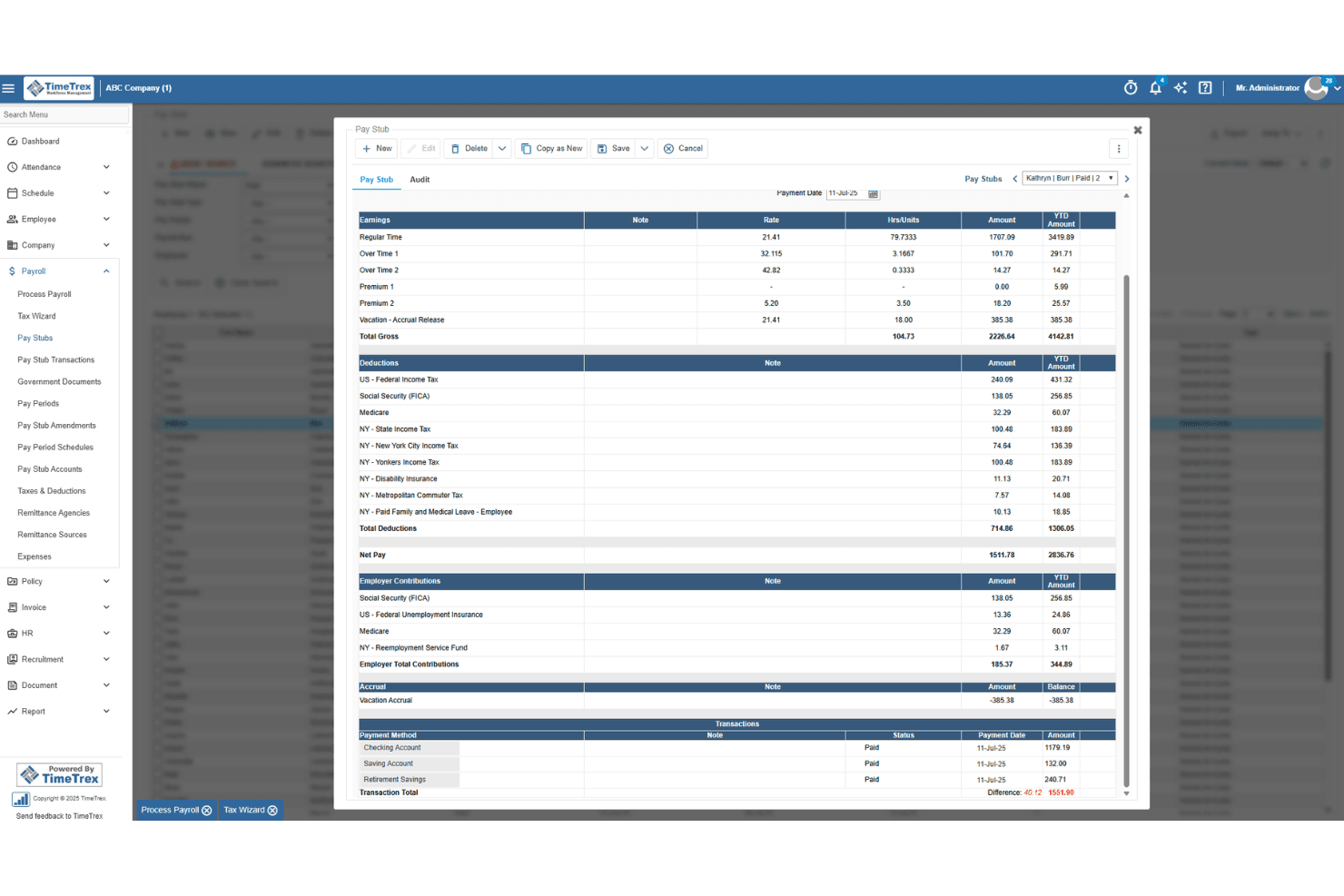
TimeTrex generates detailed pay stubs with earnings, deductions, and taxes. TimeTrex is a workforce management platform that combines payroll processing, time and attendance tracking, employee scheduling, and HR management in a single cloud-hosted or self-hosted open-source system.
Who Is TimeTrex Best For?
TimeTrex suits HR and payroll teams at small to mid-sized businesses that need time tracking, scheduling, and payroll managed in one place.
Why I Picked TimeTrex
TimeTrex gives payroll teams real control over how their workflows are built. I like that you can configure deduction rules, pay calculations, and approval chains to match how your organization actually runs, rather than bending your processes to fit the software. The drag-and-drop scheduling and real-time timesheet tracking feed directly into payroll, which cuts down on manual data entry before each pay run. If you're managing hourly workers across multiple locations, that connection between time data and wage calculations is where TimeTrex earns its place.
Standout Services
- Biometric facial recognition time clocks: Use touchless time tracking hardware to help ensure accurate employee attendance data.
- On-site open source deployment: Choose self-hosted, open source software when your business requires full control over data and hosting.
- Job costing and wage allocation tools: Track labor costs against departments, locations, or projects for detailed payroll reporting.
- Payroll report generation suite: Export custom wage, deduction, and benefits reports to track payroll expenses and support compliance needs.
Pros and Cons
Pros:
- Free open-source edition available for self-hosted teams
- Supports multi-state and multi-country payroll compliance
- Real-time timesheets feed directly into payroll
Cons:
- Dashboard can feel cluttered and hard to navigate
- Tax forms are generated but not filed for you
Learn more about TimeTrex: 10Best for industry-specific payroll
OnPay
- 30-day free trial available
- From $49/month + $6/user/month
Visit WebsiteCustomer Rating:5/5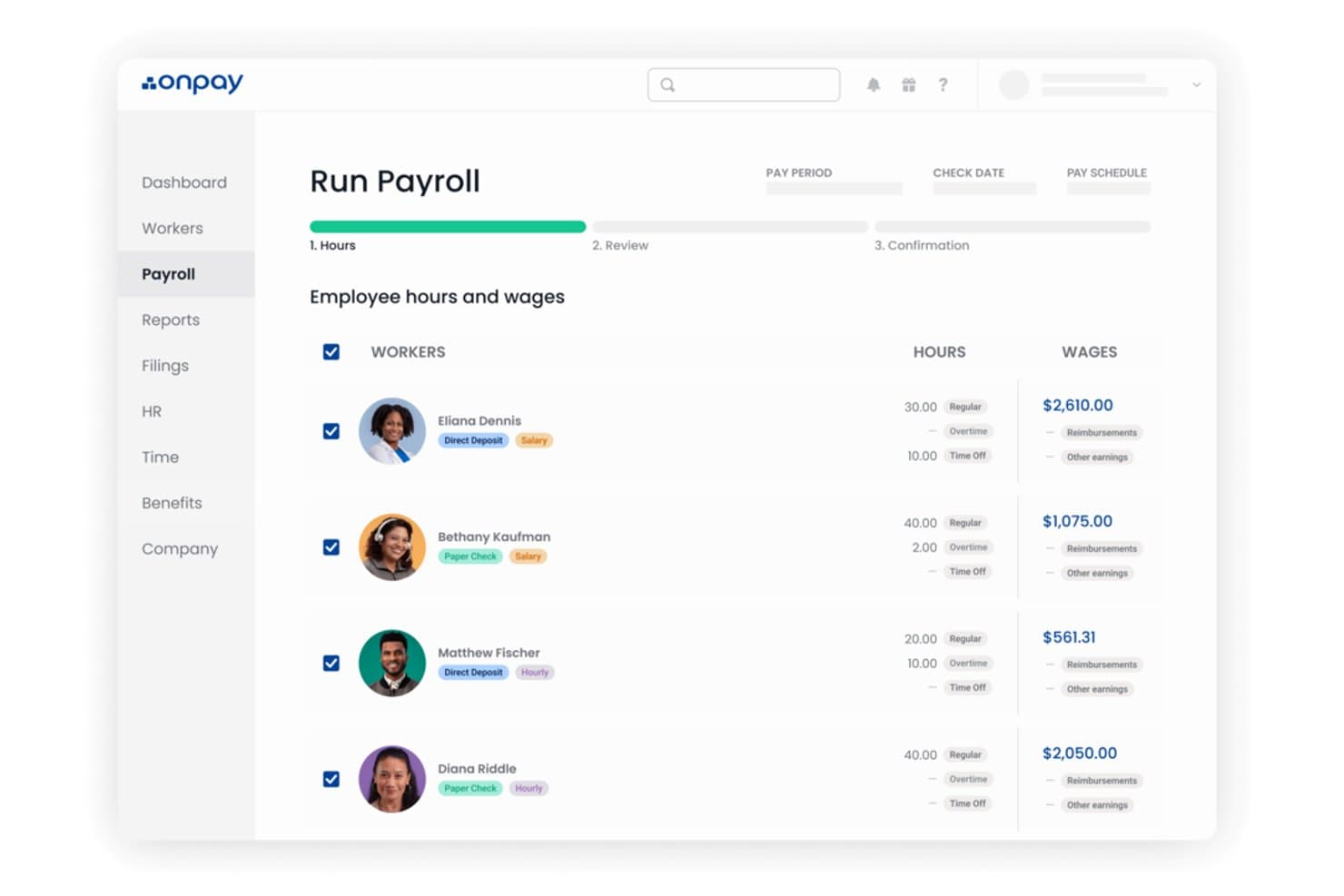
OnPay lets users review employee hours and wages before running payroll. OnPay is a payroll and HR software platform that handles tax filings, benefits administration, worker onboarding, and multi-state payroll processing for small to mid-sized businesses across industries like restaurants, nonprofits, healthcare, and agriculture.
Who Is OnPay Best For?
OnPay is a strong fit for small businesses in industries like restaurants, healthcare, nonprofits, and agriculture that need payroll built around their specific compliance and workforce needs.
Why I Picked OnPay
OnPay is one of the few payroll tools I've seen built around industry-specific compliance from the ground up. For a restaurant running tipped wages or a farm managing seasonal agricultural workers, the payroll rules are genuinely different, and OnPay handles those nuances natively. I also appreciate that clergy payroll and nonprofit-specific tax treatment are supported out of the box, not bolted on. Those are the scenarios where generic payroll tools tend to break down.
Standout Services
- Accuracy guarantee for tax filings: OnPay covers penalties or interest resulting from payroll tax filing errors.
- White-glove setup and onboarding: Get hands-on migration and payroll setup support from payroll specialists.
- Integrated benefits administration: Manage health, dental, vision, HSA/FSA, and more with licensed advisors at no extra cost.
- No-fee accounting and time tracking integrations: Connect QuickBooks, Xero, and common time tools without extra integration fees.
Pros and Cons
Pros:
- Free guided setup with payroll migration support
- Tax penalty coverage included with every plan
- Handles tipped wages and agricultural payroll natively
Cons:
- No international payroll support
- No native mobile app for employers
Diğer Bordro Hizmeti Sağlayıcıları
Kısa listeme giremeyen ancak yine de değerlendirilmeye değer olabilecek birkaç seçenek daha şunlar:
- 11Patriot PayrollBest for US-based businesses
- 12ADPBest for union payroll and garnishments
- 13LanoBest for linking pay and invoices
- 14CloudPayBest for treasury and payroll in one
- 15Paychex Best for payroll during mergers
- 16Justworks PayrollBest for payroll and benefits renewals
- 17NeeyamoBest for remote global onboarding
- 18Payroll4FreeBest for free payroll service
- 19HSP GroupBest for scaling internationally
- 20Reliable Payroll ServicesBest for personalized support
- 21RipplingBest for paying employees & contractors worldwide
- 22RemotePeopleBest for global payroll compliance
- 23Buddy PunchBest for employee time-tracking
- 24MultiplierBest for cross-border cost previews
- 25PaycomBest for real-time pay previews
- 26WorksuiteBest for global contractors and freelancers
- 27PaycorBest for local tax setups
- 28Paychex FlexBest reporting features
- 29QuickBooks PayrollBest for Quickbooks Accounting users
İlgili Yazılım İncelemeleri
Aradığınızı hâlâ bulamadıysanız, test edip değerlendirdiğimiz şu ilgili araçlara göz atın:
- Muhasebe Yazılımı
- ERP Yazılımı
- POS Sistemleri
- Faturalandırma Yazılımı
- Tahmin Yazılımı
- Üye İşyeri Hesabı Hizmetleri
- Gider Raporu Yazılımı
Bordro Hizmetleri Nedir?
Bordro hizmetleri, çalışanlara nasıl ödeme yaptığınızı, vergileri nasıl hesapladığınızı ve temel uyumluluk gerekliliklerini nasıl ele aldığınızı otomatikleştiren çözümlerdir. Bu araçlar; farklı çalışan türlerini ve ödeme düzenlerini desteklerken ücret hesaplamalarını, kesintileri, vergi bildirimlerini ve yıl sonu formlarını yönetir. Bordro hizmetlerini kullanmak, işletmeniz yerel olarak veya birden fazla bölgede faaliyet gösteriyor olsun, ekibinizin manuel çalışmayı azaltmasına, maliyetli hatalardan kaçınmasına ve kurallar değiştikçe uyumluluğunu korumasına yardımcı olur.
How I Evaluate Payroll Services
I split my evaluation into what a payroll service must do—like automated tax filing and direct deposit—and what sets the best ones apart for distributed teams or contractor-heavy workforces.
Core Functionality (Table Stakes For This List)
When I'm selecting tools for my list, I rank each one on a scale from 0 (does not offer the functionality) to 5 (excels in this area) for each core functionality listed below. Then, I calculate the tool's total score into a percentage. Each tool needs to achieve a minimum total score of 75% to be considered for inclusion.
- Automated Payroll Processing: I check whether the platform can handle scheduled pay runs with direct deposit, including off-cycle payments for things like bonuses or termination payouts.
- Tax Filing & Compliance: Each tool should calculate, file, and remit payroll taxes at every applicable level, and I look for automatic updates when tax rates or regulations change.
- Employee Self-Service Portal: I evaluate whether employees can independently access pay stubs, download tax documents, and update their banking or address details without HR intervention.
- Multi-Classification Payments: The platform should support paying a mix of salaried, hourly, and contract workers—similar to how Gusto and Rippling handle W-2 and 1099 payees in one system.
- Year-End Tax Forms: I look for automated generation and distribution of W-2s and 1099s, including electronic delivery and the ability to handle corrections after filing.
- Benefits & Deductions Management: The tool should process pre- and post-tax deductions like retirement contributions, health insurance premiums, and court-ordered garnishments within each pay run.
Once I have a list of tools that meet the criteria, I consider what sets each platform apart.
Differentiating Factors (What Sets Vendors Apart)
Here's how I compare and contrast different vendors:
Standout Features
Global payroll coverage matters when your team spans multiple countries—I look for platforms like Deel and Remote that handle local compliance and multi-currency payments without needing a separate provider. An embedded HR suite is equally valuable because onboarding, time tracking, and PTO management live alongside payroll data. I also evaluate on-demand pay access, which lets employees draw earned wages before payday and can be a real differentiator for retention.
Beyond Features
I check how well each platform connects with your existing stack—syncing payroll data to QuickBooks or Xero for journal entries, for example, saves hours of manual reconciliation. Pricing transparency also weighs heavily; some vendors bundle tax filing and year-end forms into base pricing while others charge extra for each. I also evaluate implementation support, especially how a provider handles mid-year migrations, including importing prior wage and tax history from your previous payroll system.
Bordro Hizmeti Nasıl Seçilir?
Doğru bordro hizmeti, mevcut sürecinizde gerçekte neyin aksadığına bağlıdır; bu nedenle herhangi bir sağlayıcıyı değerlendirmeden önce en büyük sorun noktanızı belirleyerek başlayın.
| Önceliğiniz… | Şunları arayın… |
|---|---|
| Önceliğiniz…Vergi beyannamesi hatalarını azaltmak | Şunları arayın…Yazılı bir ceza garantisiyle otomatik çoklu yetki alanı beyannamesi verme |
| Önceliğiniz…Karma bir iş gücüne ödeme yapmak | Şunları arayın…W-2, 1099 ve uluslararası yüklenici ödemelerini yöneten tek bir platform |
| Önceliğiniz…Çalışanların finansal refahını desteklemek | Şunları arayın…Üçüncü taraf eklentisi olmayan, yerleşik isteğe bağlı ödeme erişimi |
| Önceliğiniz…Birden fazla ülkede bordroyu yönetmek | Şunları arayın…Sadece para birimi dönüşümü değil, yerel uyumluluk motorları ve çoklu para birimli doğrudan para yatırma |
| Önceliğiniz…İK yönetimini yalın tutmak | Şunları arayın…İKYS'niz ve muhasebe platformunuzla yerel entegrasyonlar |
Kısa Listenizi Nasıl Değerlendirmelisiniz?
- Paralel bir bordro çalıştırın: Deneme ortamında gerçek bir ödeme dönemini işleyin ve hesaplama açıklarını tespit etmek için çıktıyı mevcut sağlayıcınızın rakamlarıyla karşılaştırın.
- Vergi beyannamesi verme hizmet düzeyi anlaşmasını isteyin: Tedarikçilerden eyalet ve yerel ödemeler için kesin işlem sürelerini ve geç beyannamelerde uygulanan cezaları nasıl yönettiklerini yazılı olarak sunmalarını isteyin.
- Döngü dışı ödemeyi test edin: Deneme süreniz sırasında bir döngü dışı ödeme işlemi başlatın ve bunun ek bir ücret taşıyıp taşımadığını doğrulayın; ücret tarifesini adı belirtilmiş bir belge olarak alın.
- Entegrasyon kapsamını kontrol edin: Platformu muhasebe sisteminize bağlayın ve genel muhasebe defteri eşlemesinin manuel dışa aktarımlar olmadan çalıştığını doğrulayın.
- Tam hizmet ve self servis arasındaki denge: Yönetilen bordro size hata kapsamı sağlarken daha az kontrol sunar; self servis esneklik sağlar ancak uyumluluk riskini ekibinize aktarır—seçiminizi yalnızca maliyete göre değil, kurum içi kapasitenize göre yapın.
Bordro Hizmetleri Ne Zaman Kullanılmalı?
Manuel süreçler, uyumluluk açıkları veya iş gücü karmaşıklığı ekibinizin zamanını tüketiyor ve kuruluşunuzu riske maruz bırakıyorsa bordro hizmetleri doğru tercihtir.
En çok anlamlı oldukları durumlar şunlardır:
- Ödeme işlemleriniz sürekli hata üretiyorsa: Tek bir yanlış hesaplanmış kesinti veya atlanmış ücret haczi cezaları tetikleyebilir ve çalışanların güvenini zedeleyebilir. Bordro hizmetleri, manuel iş akışlarında sorun çıkaran hesaplamaları otomatikleştirir; böylece ekibiniz her ödeme döneminden sonra sorun gidermek zorunda kalmaz.
- Birden fazla çalışan türüne ödeme yapıyorsanız: W-2 çalışanlarını, 1099 yüklenicilerini ve uluslararası işe alımları ayrı sistemlerde yönetmek açıklar yaratır. Tüm sınıflandırmaları yöneten tek bir platform mutabakat süresini kısaltır ve kayıtlarınızı düzenli tutar.
- Vergi son tarihleri kaçırılıyorsa: Ekibiniz eyalet ve yerel ödeme takvimlerini manuel olarak takip ediyorsa bir şeylerin sonunda gözden kaçması kaçınılmazdır. Yetki alanı düzeyinde uyumluluk sunan otomatik beyanname verme, bu son tarih baskısını İK takviminizden kaldırır.
- Yeni bir ülkeye genişliyorsanız: Tek bir uluslararası çalışanı işe almak bile alışık olmadığınız vergi düzenlemeleri ve iş kurallarıyla ilgilenmek anlamına gelir. Yerel uyumluluk motorlarına sahip bir bordro hizmeti, aksi takdirde çözmek için dışarıdan hukuk danışmanlığı gerektirecek hatalı adımlara karşı sizi korur.
Bordronun Temel Hizmetleri ve Özellikleri
En iyi bordro hizmetleri, vergi, uyumluluk ve idari işleri azaltırken bordroyu otomatikleştirir. Sağlayıcıları karşılaştırırken şu özelliklere öncelik verin:
- Otomatik Bordro İşleme: Yinelenen ve döngü dışı bordro işlemlerini desteklerken ücretleri, kesintileri, fazla mesaiyi ve net ödemeyi hesaplar.
- Bordro Vergisi Beyannamesi Verme: Federal, eyalet ve yerel bordro vergilerini sizin adınıza hesaplar, keser, beyan eder ve öder.
- Çok Eyaletli ve Küresel Bordro: İş gücünüz genişledikçe farklı vergi yetki alanlarında, eyaletlerde veya ülkelerde çalışan personeli destekler.
- Çalışan ve Yüklenici Ödemeleri: Farklı çalışan türlerini, ödeme takvimlerini, doğrudan para yatırmaları ve yüklenici ödemelerini tek bir sistemden yönetir.
- Uyumluluk Desteği: Bordroyu etkileyebilecek vergi son tarihlerini, ücret gerekliliklerini, bordro kayıtlarını ve mevzuat değişikliklerini yönetmeye yardımcı olur.
- İK ve Muhasebe Entegrasyonları: Yinelenen veri girişini azaltmak için bordro verilerini İKYS, zaman takibi, yan haklar ve muhasebe sistemleriyle senkronize eder.
- Çalışan Self Servisi: Çalışanlara İK'ya başvurmadan maaş bordrolarına, vergi belgelerine, ödeme ayrıntılarına ve kişisel bilgilere erişim sağlar.
Doğru bordro hizmeti nihayetinde manuel bordro işlerini azaltmalı, çalışan verilerini doğru tutmalı ve vergi beyannamesi verme ile uyumluluğu daha kolay yönetilebilir hâle getirmelidir.
Bordro Hizmetlerinin Yaygın Yapay Zekâ Özellikleri
Yapay zekâ, bordro doğruluğunu desteklemek ve manuel incelemeyi azaltmak için giderek daha fazla kullanılıyor. Aranması gereken en yararlı özellikler şunlardır:
- Bordro Hatası Tespiti: İşleme alınmadan önce olağandışı ödemeleri, kesintileri veya bordro verilerini işaretler.
- Otomatik Veri Doğrulama: Bordro bilgilerinde eksik veya tutarsız verileri kontrol eder.
- Bordro İçgörüleri: Ekiplerin eğilimleri belirlemesine ve bordro ile iş gücü verilerini daha hızlı analiz etmesine yardımcı olur.
Yapay zekâ bordronun incelenmesini kolaylaştırabilir; ancak bordro hizmeti seçilirken doğru işlem, vergi uyumluluğu ve güvenilir destek öncelik olmaya devam etmelidir.
Bordro Hizmetlerinin Faydaları
Bordro hizmetleri, bordro doğruluğunu artırırken çalışanlara ödeme yapmanın idari ve uyumluluk yükünü azaltabilir. Başlıca faydalar şunlardır:
- Daha Az Bordro Yönetimi: Hesaplamaların, ödemelerin, kesintilerin ve bildirimlerin otomatikleştirilmesi, İK ve finans ekiplerinin bordro işlemlerine ayırdığı zamanı azaltır.
- Daha Düşük Uyumluluk Riski: Bordro sağlayıcıları bordro vergilerini hesaplayıp bildirebilir, son tarihleri takip edebilir ve işletmelerin federal, eyalet ve yerel gereklilikleri karşılamasına yardımcı olabilir.
- Daha Az Bordro Hatası: Otomatik hesaplamalar ve bordro kontrolleri; ücretler, kesintiler, vergiler ve çalışan ödemelerindeki hataları azaltabilir.
- Eyaletler Arası ve Küresel Bordronun Daha Kolay Yönetimi: Birden fazla yargı bölgesini destekleyen sağlayıcılar, iş gücünüz genişledikçe farklı vergi, bordro ve uyumluluk gerekliliklerinin yönetilmesine yardımcı olabilir.
- Bordro Verilerinde Daha İyi Görünürlük: Entegre raporlama, İK ve finans ekiplerinin bordro maliyetlerine, çalışan ücretlerine, vergilere ve iş gücü verilerine daha net erişmesini sağlar.
- Daha Kolay Ölçeklendirme: Bir bordro hizmeti, kurum içindeki bordro yönetiminin aynı oranda artırılmasını gerektirmeden ek çalışanları, yüklenicileri, konumları ve yargı bölgelerini destekleyebilir.
Sonuç olarak bordro hizmeti, işletmelerin bordroyu yürütürken gereken manuel işi ve uyumluluk karmaşıklığını azaltıp çalışanlara doğru ve zamanında ödeme yapmasına yardımcı olabilir.
Bordro Hizmetlerindeki Eğilimler
Bordro hizmetleri, sağlayıcıların daha fazla otomasyon, uyumluluk desteği ve iş gücü verisi özelliği eklemesiyle temel bordro işlemlerinin ötesine geçerek gelişiyor. İzlenmesi gereken başlıca eğilimler şunlardır:
- Yapay Zekâ ve Bordro Otomasyonu: Sağlayıcılar bordro hatalarını belirlemek, manuel görevleri otomatikleştirmek, verileri doğrulamak ve uyumluluk takibini desteklemek için giderek daha fazla yapay zekâ kullanıyor.
- Daha Güçlü Uyumluluk Araçları: Değişen vergi, ücret, ücret şeffaflığı ve istihdam gereklilikleri, yargı bölgeleri genelinde uyumluluğu izleyip yönetebilen bordro hizmetlerine olan talebi artırıyor.
- Entegre İK ve Bordro Verileri: İşletmeler, veri girişini azaltmak ve bordro doğruluğunu artırmak için birbirine bağlı bordro, İK, zaman takibi ve iş gücü sistemlerine yöneliyor.
- Küresel ve Birden Fazla Yargı Bölgesinde Bordro: Dağıtık iş gücü, eyaletler ve ülkeler arasındaki farklı vergi, ödeme ve uyumluluk gerekliliklerini yönetebilen sağlayıcılara duyulan ihtiyacı artırıyor.
- Kazanılmış Ücrete Erişim: Bazı bordro sağlayıcıları, çalışanların geleneksel maaş gününden önce kazandıkları ücretlerin bir kısmına erişmesine olanak tanımak için ödeme seçeneklerini genişletiyor.
- Bordro Analitiği: Bordro verileri, iş gücü planlaması, iş gücü maliyeti analizi, tahminleme ve diğer İK ile finans kararları için giderek daha fazla kullanılıyor.
Alıcılar açısından bu eğilimler, bordro hizmetleri karşılaştırılırken otomasyon, uyumluluk yetenekleri, entegrasyonlar ve iş gücü kapsamını giderek daha önemli faktörler hâline getiriyor.
Bordro Hizmetlerinin Fiyatlandırması
Bordro hizmetlerinin maliyeti, iş gücünüzün büyüklüğüne ve gereken uyumluluk kapsamına bağlı olarak genellikle aylık $25 ile $200 arasında, ayrıca çalışan başına $2 ile $15 arasındadır. Sağlayıcılar genellikle aşağıdaki fiyatlandırma yapılarından biriyle çalışır:
| Fiyatlandırma Modeli | Ortalama Fiyat | Hizmet Kapsamı | En Uygun Olduğu Yer |
|---|---|---|---|
| Fiyatlandırma ModeliBordro işlemi başına | Ortalama Fiyatİşlem başına $25–$60 | Hizmet KapsamıTek seferlik bordro işlemleri | En Uygun Olduğu YerKüçük veya mevsimlik işverenler |
| Fiyatlandırma ModeliAylık abonelik | Ortalama FiyatAylık $30–$80 + $5/ee | Hizmet KapsamıOtomatik bordro, doğrudan ödeme | En Uygun Olduğu YerDüzenli bordro yürüten işletmeler |
| Fiyatlandırma ModeliÇalışan başına/aylık | Ortalama FiyatÇalışan başına/aylık $5–$15 | Hizmet KapsamıVergi bildirimleri, çalışanların kendi hizmetlerini kullanabilmesi | En Uygun Olduğu YerBüyüyen ekipler veya birden fazla eyalette faaliyet gösteren yapılar |
| Fiyatlandırma ModeliYıllık sözleşme | Ortalama FiyatYıllık $300–$2,000+ | Hizmet KapsamıYıl boyunca bordro ve uyumluluk | En Uygun Olduğu Yerİstikrar arayan daha büyük kuruluşlar |
| Fiyatlandırma ModeliÖzel kurumsal | Ortalama FiyatPazarlığa tabi, yıllık $2,000+ | Hizmet KapsamıBirden fazla ülke, karmaşık entegrasyonlar | En Uygun Olduğu YerÇok uluslu veya yüksek karmaşıklığa sahip ekipler |
Doğru planı seçmek, maliyeti belirli özellikler ve ihtiyaçlarla eşleştirmenize yardımcı olabilir.
Fiyatlandırmayı Etkileyen Temel Faktörler
Belirli fiyatlandırma modelinin yanı sıra, bordro hizmetlerinin maliyetini etkileyebilecek bazı ek faktörler şunlardır:
- Çalışan sayısı: Daha yüksek çalışan sayısı, toplam aylık veya işlem başına maliyetleri artırır.
- Bordro sıklığı: Haftalık veya iki haftada bir yapılan bordro işlemleri, aylık dönemlere göre daha maliyetlidir.
- Birden fazla yargı bölgesine uyum: Eyalet, yerel veya uluslararası vergi bildirimlerinin eklenmesi, fiyatlandırma kademelerini yükseltir.
- Ek özellikler: Yan hak entegrasyonu, haciz kesintilerinin işlenmesi ve gelişmiş iş akışı otomasyonları genellikle temel fiyata eklenir.
- Destek ve hizmet düzeyi: Özel ilgi sunan destek veya yönetilen bordro hizmetleri, kendi kendine hizmet seçeneklerine kıyasla maliyetleri artırır.
Bu yapıları ve faktörleri bilmek, sağlayıcıları karşılaştırmanızı ve işletmenizin ihtiyaçlarına uygun teklifler almanızı kolaylaştırır.
Bordro Hizmetleri: SSS
Bordro hizmetleri hakkında birçok kişinin merak ettiği birkaç popüler sorunun yanıtlarını burada bulabilirsiniz.
Bordro Hizmeti ile Bordro Yazılımı ve PEO Arasındaki Fark Nedir?
Bordro hizmetleri, bordro yazılımları ve PEO’lar bordroyu yönetebilir; ancak temel olarak \u003cstrong data-start=\u0022169\u0022 data-end=\u0022238\u0022\u003eişi kimin yönettiği ve İK sorumluluğunun ne kadarının dışarıdan alındığı\u003c/strong\u003e açısından farklılık gösterir. PEO’lar, genellikle ortak istihdam düzenlemesi kapsamında faaliyet göstermeleri nedeniyle farklıdır.
\u003ctable\u003e
\u003cthead\u003e
\u003ctr\u003e
\u003cth\u003e\u003c/th\u003e
\u003cth\u003e\u003cstrong\u003eBordro Hizmeti\u003c/strong\u003e\u003c/th\u003e
\u003cth\u003e\u003cstrong\u003eBordro Yazılımı\u003c/strong\u003e\u003c/th\u003e
\u003cth\u003e\u003cstrong\u003ePEO\u003c/strong\u003e\u003c/th\u003e
\u003c/tr\u003e
\u003c/thead\u003e
\u003ctbody\u003e
\u003ctr\u003e
\u003ctd\u003e\u003cstrong\u003eNedir?\u003c/strong\u003e\u003c/td\u003e
\u003ctd\u003eDışarıdan alınan bordro hizmeti sağlayıcısı\u003c/td\u003e
\u003ctd\u003eEkibinizin işlettiği yazılım\u003c/td\u003e
\u003ctd\u003eBordro + daha kapsamlı İK dış kaynak hizmeti\u003c/td\u003e
\u003c/tr\u003e
\u003ctr\u003e
\u003ctd\u003e\u003cstrong\u003eBordroyu kim yürütür?\u003c/strong\u003e\u003c/td\u003e
\u003ctd\u003eSağlayıcı\u003c/td\u003e
\u003ctd\u003eŞirket içi ekibiniz\u003c/td\u003e
\u003ctd\u003ePEO\u003c/td\u003e
\u003c/tr\u003e
\u003ctr\u003e
\u003ctd\u003e\u003cstrong\u003eVergi beyannamesi verme\u003c/strong\u003e\u003c/td\u003e
\u003ctd\u003eGenellikle sağlayıcı tarafından yürütülür\u003c/td\u003e
\u003ctd\u003ePlana bağlı olarak otomatikleştirilir veya şirket içinde yönetilir\u003c/td\u003e
\u003ctd\u003eGenellikle PEO tarafından yürütülür\u003c/td\u003e
\u003c/tr\u003e
\u003ctr\u003e
\u003ctd\u003e\u003cstrong\u003eİK desteği\u003c/strong\u003e\u003c/td\u003e
\u003ctd\u003eSınırlı veya isteğe bağlı\u003c/td\u003e
\u003ctd\u003eSınırlı veya eklenti olarak sunulur\u003c/td\u003e
\u003ctd\u003eKapsamlı\u003c/td\u003e
\u003c/tr\u003e
\u003ctr\u003e
\u003ctd\u003e\u003cstrong\u003eYan haklar yönetimi\u003c/strong\u003e\u003c/td\u003e
\u003ctd\u003eBazen sunulur\u003c/td\u003e
\u003ctd\u003eBazen sunulur\u003c/td\u003e
\u003ctd\u003eGenellikle dahildir\u003c/td\u003e
\u003c/tr\u003e
\u003ctr\u003e
\u003ctd\u003e\u003cstrong\u003eOrtak istihdam\u003c/strong\u003e\u003c/td\u003e
\u003ctd\u003eHayır\u003c/td\u003e
\u003ctd\u003eHayır\u003c/td\u003e
\u003ctd\u003eGenellikle evet\u003c/td\u003e
\u003c/tr\u003e
\u003ctr\u003e
\u003ctd\u003e\u003cstrong\u003eŞunlar için en uygun\u003c/strong\u003e\u003c/td\u003e
\u003ctd\u003eBordroyu dışarıdan almak isteyen işletmeler\u003c/td\u003e
\u003ctd\u003eBordro üzerindeki kontrolü elinde tutmak isteyen işletmeler\u003c/td\u003e
\u003ctd\u003eBordronun yanı sıra İK, yan haklar ve uyumluluk desteği isteyen işletmeler\u003c/td\u003e
\u003c/tr\u003e
\u003c/tbody\u003e
\u003c/table\u003e
\u003cp class=\u0022my-1.5\u0022\u003e\u003c/p\u003e
Bordro hizmetleri çalışan yan haklarını ve kesintilerini nasıl yönetir?
Bordro hizmetleri, sağlık sigortası, emeklilik katkıları ve hacizler gibi yan hak kesintilerini her ödeme döneminde otomatikleştirir. Birçok hizmet, kayıt değişikliklerini senkronize eden ve uygunluğu izlemenize veya açık kayıt dönemini yönetmenize olanak tanıyan yan hak yönetimi araçlarını içerir. Sağlayıcının özel planlarınızı yönetip yönetemediğini ve denetim ile şeffaflık amacıyla ayrıntılı kesinti raporları oluşturup oluşturamadığını kontrol edin.
Bordro hizmetleri hassas çalışan verilerini işlerken ne kadar güvenlidir?
Önde gelen bordro sağlayıcıları, çalışan verilerini güvende tutmak için şifreleme, güvenli veri merkezleri ve düzenli güvenlik denetimleri kullanır. Çok faktörlü kimlik doğrulama, ayrıntılı erişim kontrolleri ve üçüncü taraf sertifikaları (SOC 2 gibi) arayın. Yalnızca yetkili personelin bordro ayrıntılarını gördüğünden emin olmak için satıcılara veri ihlaline müdahale planlarını sorun.
Bordro hizmetleri mevcut İK veya muhasebe yazılımlarıyla nasıl entegre olabilir?
Önde gelen bordro hizmetlerinin çoğu, popüler İK bilgi sistemleri ve muhasebe sistemleri için entegrasyonlar veya açık API’ler sunar. Bu sayede çalışan verilerini senkronize edebilir, çift veri girişini azaltabilir ve raporlamayı otomatikleştirebilirsiniz. Satın almadan önce daha sorunsuz bir iş akışı için bordro hizmetinin temel yazılımınızla doğrudan entegrasyonları destekleyip desteklemediğini kontrol edin.
En iyi bordro hizmeti hangisidir?
En iyi bordro hizmeti ihtiyaçlarınıza bağlıdır; ancak \u003cstrong data-start=\u0022367\u0022 data-end=\u0022436\u0022\u003eGusto, küçük ve orta ölçekli işletmeler için genel olarak güçlü bir seçenektir\u003c/strong\u003e; Paycom, Justworks ve Deel gibi sağlayıcılar ise daha özel bordro gereksinimlerine uygundur.
Bordromu ücretsiz olarak kendim hazırlayabilir miyim?
\u003cp class=\u0022PDq2pG_selectionAnchorContainer\u0022 data-start=\u0022605\u0022 data-end=\u0022788\u0022\u003eEvet, bordroyu ücretsiz olarak manuel şekilde hazırlayabilirsiniz; ancak ücretleri ve vergileri hesaplamaktan, kayıtları tutmaktan, gerekli formları sunmaktan ve vergi ödemelerini zamanında yapmaktan siz sorumlu olursunuz.\u003c/p\u003e
Bu hizmetlerle ne sıklıkta bordro hazırlayabilirim?
Çoğu bordro sağlayıcısı bordroyu gerektiği kadar sık hazırlamanıza olanak tanır: haftalık, iki haftada bir, ayda iki kez veya talep üzerine. Bazı hizmetler, ek ücret almadan her ay sınırsız işlem yapılmasını bile destekler. Özellikle saatlik çalışanlarınız veya karmaşık ödeme döngüleriniz varsa işlem sınırlarını ya da ek ücretleri sorun.
Bordro hizmetleri birden fazla eyalette çalışan uzaktan çalışanlar için vergi uyumluluğunu nasıl yönetir?
\u003cp data-path-to-node=\u00228\u0022\u003eModern bordro platformları, bir çalışan işe alındığında birden fazla eyalette vergi uyumluluğunu otomatik olarak başlatmak için adres eşleştirmeli konum belirleme motorlarından yararlanır. Çalışanın ev adresi girildikten sonra platform şunları yapar:\u003c/p\u003e
\u003col start=\u00221\u0022 data-path-to-node=\u00229\u0022\u003e
\u003cli\u003e
\u003cp data-path-to-node=\u00229,0,0\u0022\u003e\u003cb data-path-to-node=\u00229,0,0\u0022 data-index-in-node=\u00220\u0022\u003eDoğru Kesintileri Hesaplar:\u003c/b\u003e Vergi kurallarını şirket merkezinin bulunduğu yere göre değil, işin fiziksel olarak yapıldığı yere göre uygulayarak eyalet ve yerel gelir vergisi kesintilerini otomatik olarak hesaplar.\u003c/p\u003e
\u003c/li\u003e
\u003cli\u003e
\u003cp data-path-to-node=\u00229,1,0\u0022\u003e\u003cb data-path-to-node=\u00229,1,0\u0022 data-index-in-node=\u00220\u0022\u003eSUI ve Ücretli İzin Beyanlarını Otomatikleştirir:\u003c/b\u003e Eyalet İşsizlik Sigortası (SUI) hesaplamalarını düzenler ve eyalet tarafından zorunlu tutulan ücretli aile ve sağlık izni programları için katkıları yönetir.\u003c/p\u003e
\u003c/li\u003e
\u003cli\u003e
\u003cp data-path-to-node=\u00229,2,0\u0022\u003e\u003cb data-path-to-node=\u00229,2,0\u0022 data-index-in-node=\u00220\u0022\u003eVergi Kayıtlarını Yönetir:\u003c/b\u003e Birçok tam hizmet sağlayıcısı, yeni bir eyalette ilk çalışanınızı işe aldığınızda işletmenizi yeni eyalet gelir idarelerine kaydettirmenize yardımcı olur.\u003c/p\u003e
\u003c/li\u003e
\u003c/ol\u003e