

Üretim için İK yazılımı; fabrikaların ve tesislerin vardiya planlama, uyumluluk, bordro ve çalışan kayıtları gibi iş gücü görevlerini yönetmesine yardımcı olan dijital araçları ifade eder. Üretim için en iyi İK yazılımını arıyorsanız vardiya yönetimi, sendika kuralları veya birden fazla tesiste çalışma sürelerini takip etme gibi zorluklarla karşı karşıya olabilirsiniz.
Doğru platform, ekibinizin karmaşık iş gücü ihtiyaçlarını karşılamasına, uyumluluğu korumasına ve üretim alanındaki çalışanları desteklemesine yardımcı olabilir. Bu kılavuzda, özellikle üretim için tasarlanmış İK yazılımlarından derlenmiş bir kısa liste bulacaksınız; böylece seçenekleri karşılaştırabilir ve operasyonunuza en uygun olanı seçebilirsiniz.
Why Trust Our Software Recommendations
6,700+
Reviews
20
Industry experts
16+
Evaluation factors
14
Years
Our team has been testing and reviewing software since 2012. As HR experts ourselves, we know how difficult—and important—it is to choose the right software.
For this guide, we evaluated tools using hands-on testing and independent research, scoring tools using our selection criteria. We also draw on insights from industry thought leaders and practicing HR experts.
Our reviews reflect our human editorial judgment, not a sales pitch.
Expert reviewers:
- Phil GrayCOO
 Kim BehnkeHR Tech Editor & Analyst
 Josh BarkerPeople Ops Manager

Üretim için İK Yazılımı Karşılaştırma Tablosu
Üretim için en iyi İK yazılımı seçimlerimin fiyatlandırma ayrıntılarını bu karşılaştırma tablosunda özetliyorum:
Sorted by: Default
| Tool | Starting Price | Website | |
|---|---|---|---|
Best with a single database for automated HR tasks | 4.3 out of 5 | Pricing upon request Free demo available | Book Demo |
Best for union workforce management | 4.3 out of 5 | Pricing upon request Free demo available | Website |
Best for cross-border workforce management | 4.8 out of 5 | $5/user/month Free demo available | Website |
Best for small manufacturer HR automation | 4.5 out of 5 | Pricing upon request Free demo available | Website |
Best for compliance document management | 4.8 out of 5 | $2/user/month Free plan + free demo available | Website |
Best as AI for business | 4.4 out of 5 | $8/user/month Free trial + Free demo available | Website |
Best for customizable employee review templates | 2.6 out of 5 | $2.50/user/month 14-day free trial | Website |
Best for biometric attendance integration | 4.8 out of 5 | $125/month Free plan + trial + demo available | Website |
Best for employee self-service portals | 4.7 out of 5 | Pricing upon request Free demo available | Website |
Best for European workforce administration | 4.3 out of 5 | Pricing upon request Free demo available | Website |


Üretim için İK Yazılımı İncelemeleri
Aşağıda kısa listeme giren üretim için İK yazılımlarına ilişkin ayrıntılı özetlerimi bulabilirsiniz. İncelemelerim, her platformun özelliklerine, en uygun kullanım alanlarına ve entegrasyonlarına ayrıntılı bir bakış sunarak sizin için en iyi seçeneği bulmanıza yardımcı olur.
 Best with a single database for automated HR tasks
- Free demo available
- Pricing upon request
Visit WebsiteCustomer Rating:4.3/5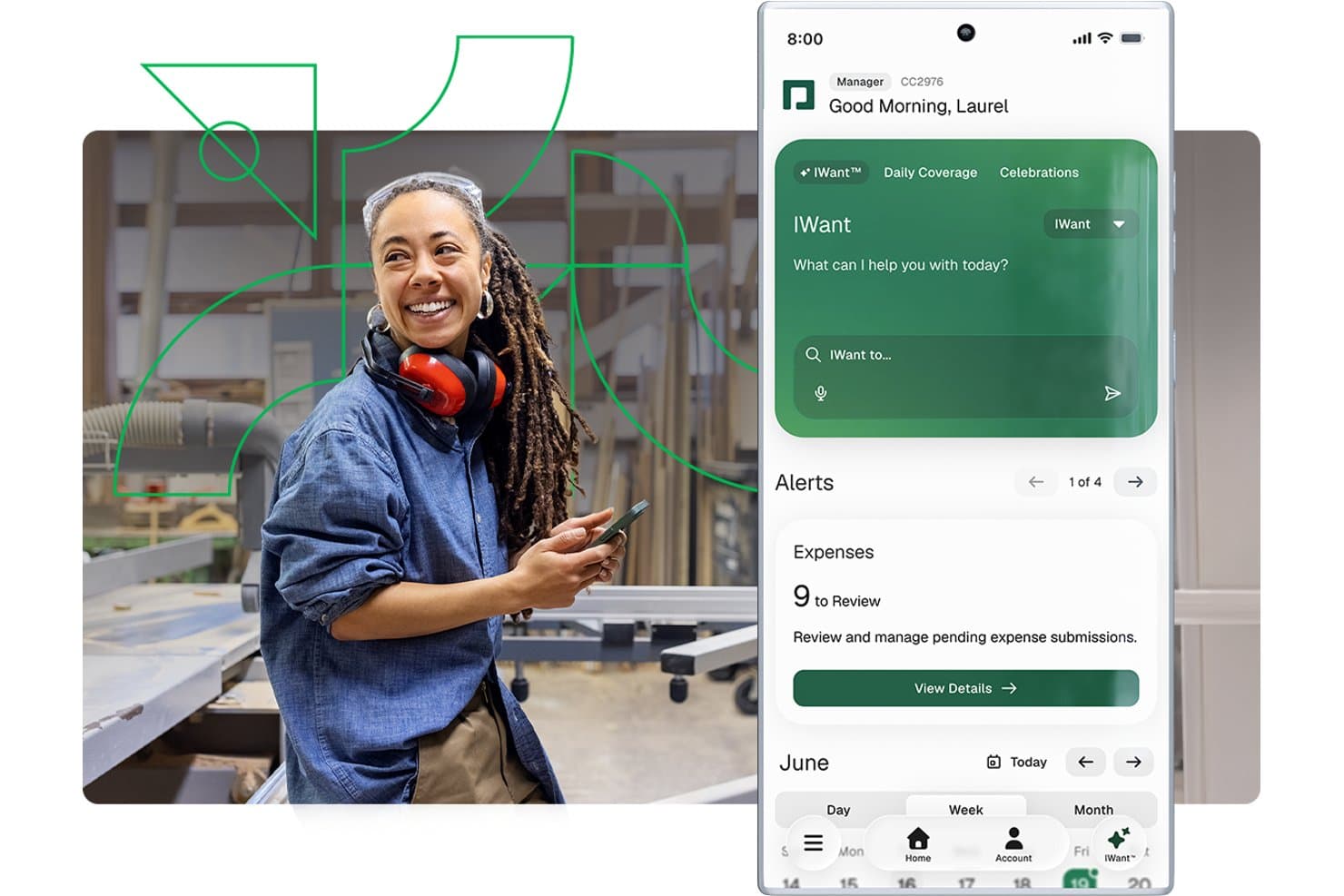
Paycom offers a mobile app with an AI assistant, expense review alerts, and scheduling tools tailored for managers in manufacturing environments. Paycom is a single-database HCM platform that brings payroll, time and labor tracking, compliance, certification management, recruiting, and employee records into one system for manufacturing teams.
Who Is Paycom Best For?
Paycom is a strong fit for mid-size US manufacturers with 50–5,000 employees that want payroll, HR, and compliance managed in one system.
Why I Picked Paycom
I picked Paycom as one of the best because its single-database design means payroll, time tracking, and certification records share the same data layer, with no syncing or duplicate entries. I particularly like Beti®, which prompts floor workers to review and approve their own paycheck data before processing, catching errors at the source. Certification management also flags expiring licenses 30 days out, so a machine operator's qualification never quietly lapses.
Paycom Key Features
- Manager on-the-Go mobile app: Lets plant and line supervisors approve timecards, punch edits, and requests from the shop floor.
- Proximity-based time clocks: Prevents buddy punching with physical or mobile clocks that confirm in-person employee presence.
- Certification expiration alerts: Automatically notifies managers 30 days before a worker’s license, permit, or training credential expires.
- OSHA safety training library: Offers a built-in learning system with courses on OSHA, HAZWOPER, and HAZCOM for manufacturing staff compliance.
Paycom Integrations
Paycom offers native integrations with NetSuite, PayBridge, Kronos Workforce Central, Indeed, and Google Calendar. An API is available for custom integrations.
Pros and Cons
Pros:
- Employees review and approve paychecks pre-processing
- OSHA and safety training included for compliance
- All HR and payroll in one database
Cons:
- Limited manufacturing ERP and MES connectivity
- No full EHS or accident reporting module
 Best for union workforce management
- Free demo available
- Pricing upon request
Visit WebsiteCustomer Rating:4.3/5
Paylocity supports workforce and payroll operations in manufacturing. Paylocity offers HR software tailored for manufacturers managing unionized workforces and complex labor agreements. This platform helps HR teams automate union rule compliance, track seniority, and manage shift bidding. If you need to coordinate union contracts and simplify workforce management, Paylocity brings specialized tools for these challenges.
Why I Picked Paylocity
Union workforce management in manufacturing brings unique challenges, which is why I picked Paylocity for this shortlist. The platform offers automated tracking of union rules, seniority, and contract terms, helping HR teams stay compliant with complex agreements. I appreciate that Paylocity supports shift bidding and grievance tracking, which are essential for manufacturers with unionized teams. These features make it a strong choice for organizations that need to manage union contracts and workforce logistics in one place.
Paylocity Key Features
Some other features in Paylocity that support manufacturing HR teams include:
- Time and Attendance Tracking: Capture employee hours and attendance data in real time for accurate payroll processing.
- Mobile App Access: Employees and managers can review schedules, request time off, and approve changes from any device.
- Onboarding Workflows: Automate new hire paperwork, training assignments, and document collection for faster onboarding.
- Performance Management Tools: Set goals, conduct reviews, and track employee progress within a centralized platform.
Paylocity Integrations
Integrations include AbsencePro, Checkr, Indeed, Toast, 15Five, Asana, Atlassian, SAP Concur, Greenhouse, Dropbox, and more.
Pros and Cons
Pros:
- Grievance tracking centralizes dispute documentation
- Shift bidding tools help manage seniority rules
- Union contract tracking supports complex agreements
Cons:
- Time-off approval workflows are not highly configurable
- No built-in equipment certification tracking
 Best for cross-border workforce management
- Free demo available
- From $5/user/month
Visit WebsiteCustomer Rating:4.8/5
Deel HR offers an HRIS dashboard with time-off tracking, new joiner stats, and employee management tools suited for manufacturing workforce oversight. Deel HR is a cloud-based HR platform that helps manufacturing companies manage employees and contractors across multiple countries. It centralizes global payroll, compliance, and worker data in one system
Who Is Deel HR Best For?
Deel HR is a strong fit for mid-size to large manufacturers operating across multiple countries who need a single system to manage international employees and contractors.
Why I Picked Deel HR
Deel stands out for how directly it addresses the operational challenge of employing people across borders. Manufacturing companies expanding into new regions often face delays and legal complexity when setting up local entities. Deel allows teams to hire and onboard workers quickly while staying aligned with local labor laws. The worker classification assessment also adds practical value for teams balancing contractor and employee relationships across jurisdictions. While it doesn’t cover manufacturing-specific workforce needs like shift scheduling or shop-floor labor tracking, it works well as the system of record for international hiring, payments, and compliance.
Deel HR Key Features
- Global payroll processing: Run payroll in 100+ currencies with automatic tax calculations and local deductions applied per country.
- Automated onboarding workflows: Set up country-specific onboarding checklists, contracts, and document collection for new hires.
- Time off and attendance tracking: Configure and manage leave policies by country or team, with approvals built into the platform.
- HR reporting and analytics: Pull workforce reports across locations, headcount, and employment types from a single dashboard.
Deel HR Integrations
Deel HR offers native integrations with Workday, Greenhouse, BambooHR, HiBob, NetSuite, QuickBooks, Xero, Okta, and Slack. It also provides an API for custom integrations.
Pros and Cons
Pros:
- Multi-country payroll in a single dashboard
- Strong compliance monitoring across regions
- EOR service available for 100+ countries
Cons:
- Limited manufacturing-specific integrations natively available
- Does not support plant-level workforce operations like shift scheduling
 Best for small manufacturer HR automation
- Free demo available
- Pricing upon request
Visit WebsiteCustomer Rating:4.5/5
HiBob strengthens HR workflows in small manufacturing teams. HiBob is designed for small manufacturers that want to automate HR tasks without adding complexity. The platform helps HR managers handle onboarding, time-off, and document management in one place, which is especially useful for teams with limited admin support. If you’re looking to reduce manual work and keep processes organized as your shop floor grows, HiBob is built for these needs.
Why I Picked HiBob
For small manufacturers, automating HR processes can free up valuable time and reduce errors. HiBob stands out for its workflow automation tools that let you set up custom onboarding checklists, automate document collection, and trigger reminders for compliance tasks. I like that you can tailor these workflows to fit the unique needs of a small factory, from managing certifications to tracking probation periods. This focus on automation makes HiBob a practical choice for manufacturers looking to streamline HR without a large HR team.
HiBob Key Features
Some other features that make HiBob useful for small manufacturers include:
- Time-Off Management: Track vacation, sick leave, and other absences with customizable policies.
- Org Chart Visualization: View and update your factory’s reporting structure in a visual format.
- Employee Directory: Access searchable profiles with contact details, roles, and shift assignments.
- Performance Reviews: Run structured review cycles and gather feedback from supervisors and peers.
HiBob Integrations
Integrations include ADP, Zendesk, Zapier, Deel, Jira, JobAdder, Entra ID, Paylocity, Remote, Slack, Xero, Zoom, and more.
Pros and Cons
Pros:
- Visual org charts for multi-site factories
- Custom workflows for safety and compliance tasks
- Automated onboarding for hourly and shift workers
Cons:
- No native support for union contract tracking
- No built-in time clock for shop floor
 Best for compliance document management
- Free plan + free demo available
- From $2/user/month (billed annually)
Visit WebsiteCustomer Rating:4.8/5
TalentHR enhances people operations and performance reviews. TalentHR gives manufacturing HR teams a way to centralize and control compliance documents without extra manual work. It’s especially useful for businesses that need to track certifications, licenses, and safety training across multiple roles or locations. If you’re looking to reduce risk and keep audit trails organized, TalentHR is built to handle these compliance demands.
Why I Picked TalentHR
Manufacturing teams often struggle to keep compliance documents organized and accessible, especially when dealing with certifications and safety records. TalentHR addresses this by letting you store, categorize, and set expiration reminders for all compliance-related files in one place. I appreciate that you can assign documents to specific roles or employees, making it easier to track who needs what training or certification. This focus on compliance document management makes TalentHR a strong fit for manufacturers who need to stay audit-ready and reduce paperwork headaches.
TalentHR Key Features
Some other features that make TalentHR practical for manufacturing HR teams include:
- Customizable Employee Profiles: Store job details, shift assignments, and emergency contacts for each worker.
- Time-Off Tracking: Manage vacation, sick leave, and other absences with approval workflows.
- Automated Notifications: Send alerts for expiring documents, upcoming reviews, or policy updates.
- Role-Based Access Controls: Limit sensitive HR data visibility based on user roles and permissions.
TalentHR Integrations
Integrations include Slack, Google Calendar, TalentLMS, WordPress, Google Workspace, Zapier, Make, and more. An API is also available for custom integrations.
Pros and Cons
Pros:
- Automated reminders for compliance renewals
- Role-based access for plant and office staff
- Document expiration alerts for safety certifications
Cons:
- Mobile app not available for on-floor supervisors
- No built-in time tracking for shifts
Learn more about TalentHR: Best as AI for business
- Free trial + Free demo available
- From $8/user/month
Visit WebsiteCustomer Rating:4.4/5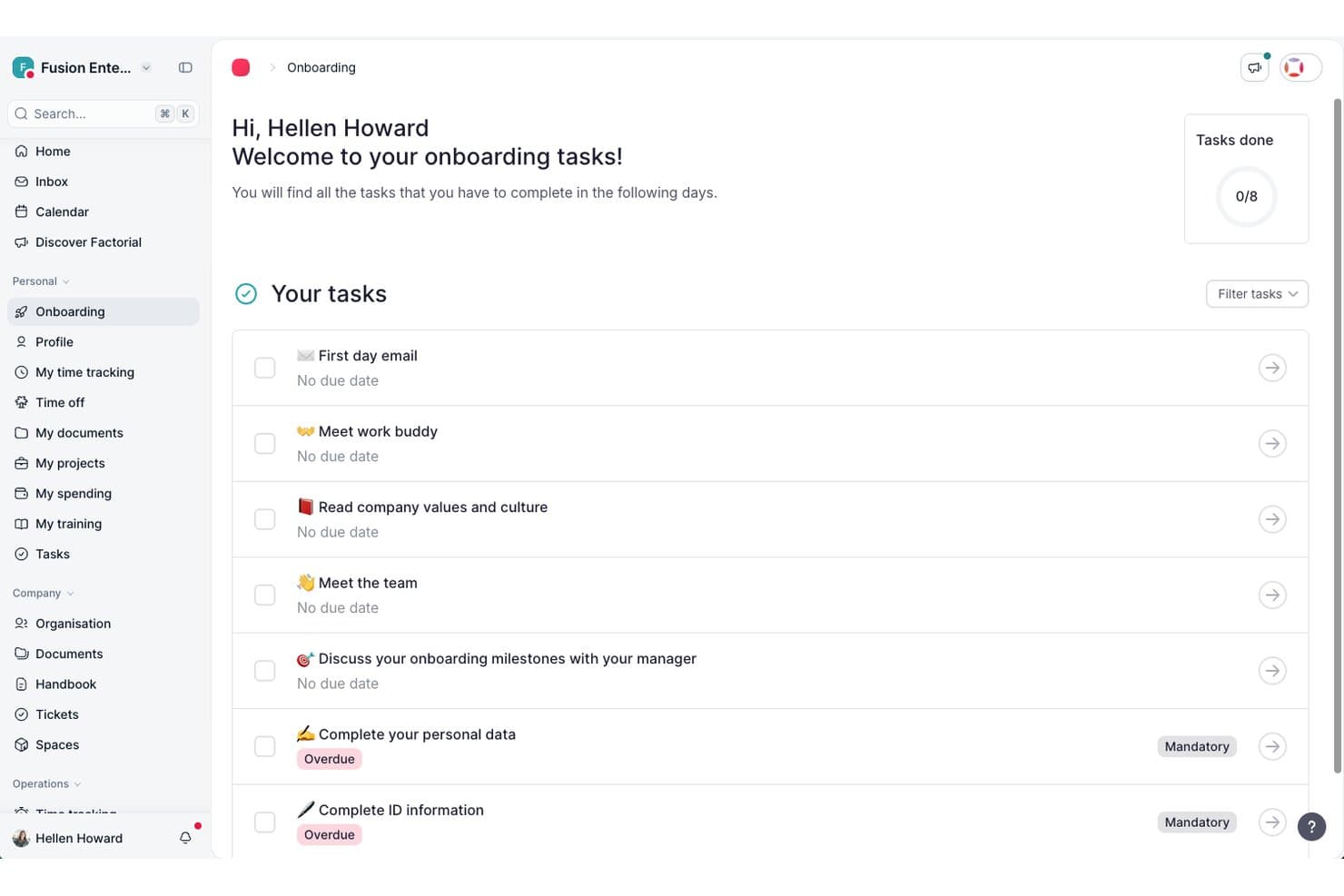
Factorial guides new hires through onboarding tasks in one place. Factorial is an AI-driven HR platform for manufacturing teams that covers time tracking, shift scheduling, employee recordkeeping, recruitment, and document management across distributed sites.
Who Is Factorial Best For?
Factorial suits HR generalists and administrators at small to mid-sized businesses who want a single AI-powered platform to handle everyday people operations across multiple locations.
Why I Picked Factorial
I've included Factorial in my top picks because its AI for business positioning translates into genuinely practical tools for manufacturing HR teams, particularly around scheduling and reporting. I like that its AI can turn plain-language questions into real-time reports, so you're not wrestling with manual exports when you need a quick read on hours worked across sites. It also handles automated shift planning and AI-powered CV parsing, which takes real pressure off HR generalists managing hourly workers and rotating schedules.
Factorial Key Features
- Multi-method clock-in: Employees can clock in using geolocation, geofencing, QR codes, or two-factor authentication directly from the mobile app.
- Document expiry flagging: Factorial centralizes legal documents and sends automated notifications when documents are approaching their expiry date.
- AI CV parsing: The recruitment module automatically screens and filters candidate CVs based on skills and qualifications you define.
- Time-off policy configuration: HR teams can create unlimited custom absence types and time-off policies tied to specific locations or contract types.
Factorial Integrations
Factorial lists marketplace integrations with ZKTeco, a3innuva Nómina, DATEV LODAS, Sage 200, Sage Despachos, Microsoft Power BI, and Okta. It offers a public API, webhooks, SDKs, API keys, and OAuth 2.0, plus Zapier connectivity to hundreds of tools.
Pros and Cons
Pros:
- AI turns questions into real-time workforce reports
- Mobile offline clock-ins support distributed shop-floor teams
- Reviewers praise centralized employee and document records
Cons:
- Complex overtime and pay differentials need manual checks
- Reviewers report limited rotating-shift schedule configuration
 Best for customizable employee review templates
- 14-day free trial
- From $2.50/user/month (billed annually)
Visit WebsiteCustomer Rating:2.5/5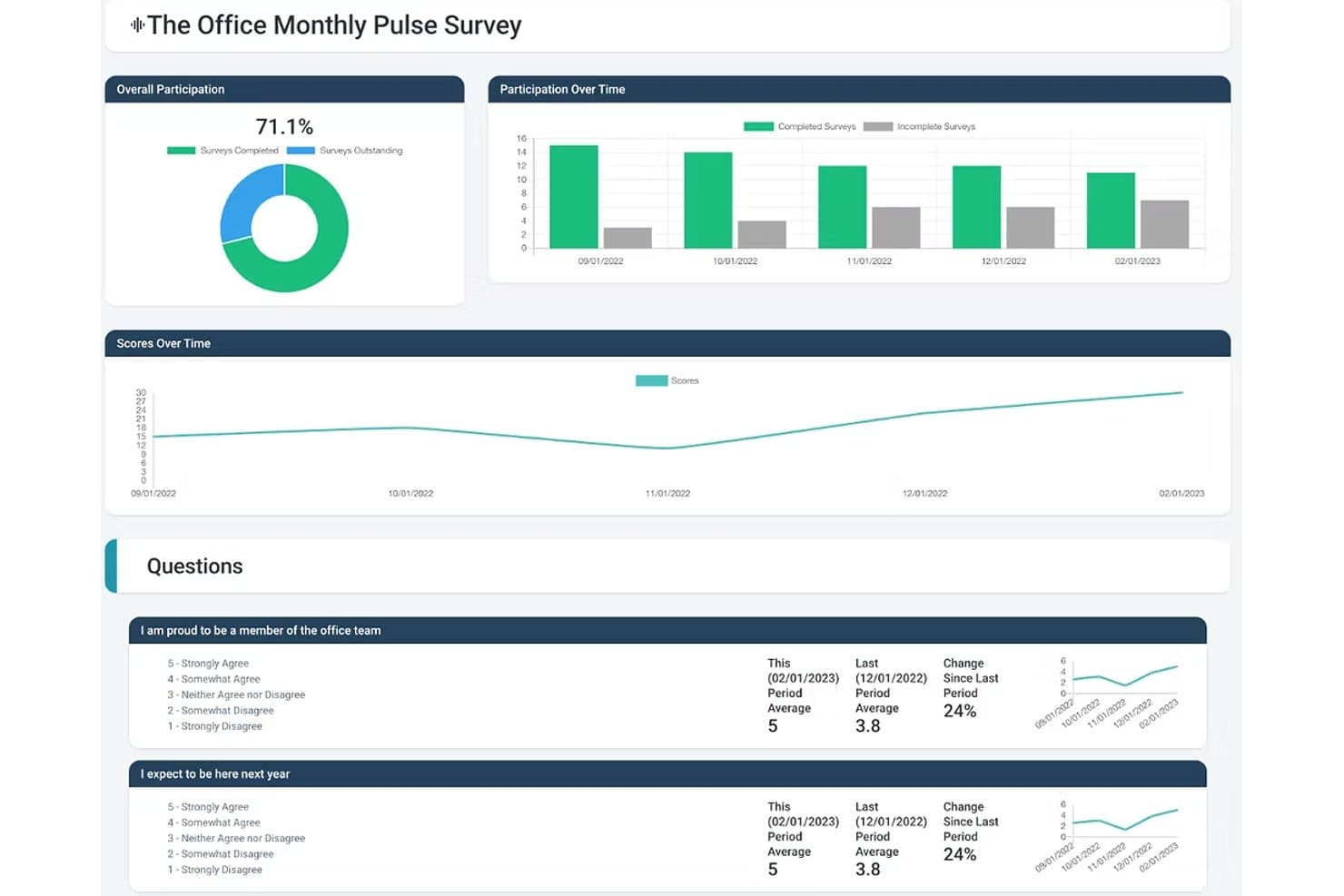
Express Evaluations helps manufacturing HR teams measure employee engagement with pulse surveys, participation tracking, and trend analytics. Express Evaluations is a performance management platform that lets HR teams build custom employee review templates, run 360-degree feedback cycles, track goals, and manage performance improvement plans.
Who Is Express Evaluations Best For?
It's a strong fit for HR teams at small to midsize organizations looking to replace paper-based or spreadsheet-driven performance reviews with a structured digital process.
Why I Picked Express Evaluations
I picked Express Evaluations because its custom template builder lets me create role-specific review forms for positions across the floor, from machine operators to shift supervisors. I can assign different rating scales and competency criteria per role, so a quality inspector isn't evaluated against the same criteria as a warehouse lead. Hire-date and anniversary-date scheduling also means I can automatically trigger reviews at the right point in each hourly worker's tenure, not just at year-end.
Express Evaluations Key Features
- Peer and 360-degree evaluations: Collect feedback from colleagues, direct reports, and managers for a well-rounded performance review.
- Automated notifications and reminders: Ensure timely completion of evaluations with built-in scheduling and automatic email reminders.
- Employee document vault: Securely store performance records, signed reviews, and supporting documents for compliance and auditing.
- Org chart and employee profiles: Visualize team structures and maintain profile information for every employee in one place.
Express Evaluations Integrations
Native integrations are not clearly documented. An API is available for custom integrations.
Pros and Cons
Pros:
- Quick setup with minimal HR configuration
- Review scheduling tied to hire anniversary dates
- Role-specific templates for varied job positions
Cons:
- Missing safety compliance and OSHA tools
- No shift scheduling or time tracking
Learn more about Express Evaluations: Best for biometric attendance integration
- Free plan + trial + demo available
- From $125/month
Visit WebsiteCustomer Rating:4.8/5
factoHR monitors workforce attendance and performance. factoHR stands out for manufacturers looking to connect HR processes with biometric attendance systems on the shop floor. This platform is a strong fit for businesses that need accurate, real-time tracking of employee shifts, overtime, and presence across multiple locations. If your team manages large workforces with complex attendance needs, factoHR brings together biometric hardware integration and HR management in one place.
Why I Picked factoHR
For manufacturers who need precise attendance tracking, factoHR’s biometric attendance integration addresses a common challenge on the factory floor. The platform connects directly with fingerprint and facial recognition devices, ensuring accurate, tamper-proof records of employee time and presence. I picked factoHR because it also supports shift scheduling and overtime calculation based on real attendance data, which is essential for managing large, shift-based teams. This focus on hardware integration and real-time attendance management makes it a practical choice for manufacturing environments.
factoHR Key Features
Some other features that make factoHR useful for manufacturing HR teams include:
- Payroll Processing: Calculates salaries, deductions, and statutory compliance based on attendance and shift data.
- Performance Management: Tracks employee goals, appraisals, and feedback cycles within the platform.
- Expense Management: Lets employees submit and track reimbursement claims digitally.
- Mobile App: Provides employees and managers with access to attendance, leave, and payroll information on the go.
factoHR Integrations
Native integrations are not currently listed.
Pros and Cons
Pros:
- Offers shift and overtime calculation tools
- Supports multi-location workforce management
- Connects directly with biometric attendance devices
Cons:
- Biometric device setup may require vendor assistance
- No built-in safety incident tracking
Learn more about factoHR: Best for employee self-service portals
- Free demo available
- Pricing upon request
Visit WebsiteCustomer Rating:4.7/5
HR Cloud tracks employee feedback and HR workflows. HR Cloud offers manufacturing teams a way to centralize HR tasks and empower employees with self-service access to their own information. This platform is especially useful for organizations with distributed or shift-based workforces that need to manage onboarding, time off, and document access without bottlenecks. If you’re looking to reduce HR admin workload and give employees more control over their data, HR Cloud’s self-service portals are designed for that need.
Why I Picked HR Cloud
Manufacturing organizations often need to give employees quick, secure access to their own HR information, and HR Cloud’s self-service portals address this directly. Employees can update personal details, request time off, and access important documents without waiting for HR intervention. I picked HR Cloud because it also lets teams manage onboarding tasks and track compliance documents through the same portal, which is especially helpful for high-turnover or shift-based environments. This focus on employee empowerment and process transparency makes it a strong fit for manufacturing HR needs.
HR Cloud Key Features
Some other features that manufacturing HR teams may find useful include:
- Asset Management: Tracks company equipment and assets assigned to employees.
- HR Document Storage: Centralizes storage and retrieval of HR policies, forms, and compliance documents.
- Employee Recognition Tools: Enable peer-to-peer recognition and digital badges for achievements.
- Custom Workflows: Lets you automate HR processes like approvals and notifications.
HR Cloud Integrations
Integrations include ADP, QuickBooks, UKG, Workday, SAP, Paycor, Paylocity, Dayforce, Slack, Microsoft Teams, and more.
Pros and Cons
Pros:
- Custom workflows automate HR approval processes
- Peer recognition tools boost workforce morale
- Asset management tracks equipment assignments
Cons:
- Limited safety training tracking features
- No built-in biometric attendance integration
Learn more about HR Cloud: 10Best for European workforce administration
Personio
- Free demo available
- Pricing upon request
Visit WebsiteCustomer Rating:4.3/5
Personio helps SMBs manage recruiting and onboarding. Personio is designed for manufacturers with operations across Europe who need HR software that supports multi-country compliance and workforce administration. It’s especially useful for HR teams managing diverse employment laws, time tracking, and payroll in different European countries. If your business needs a centralized platform for handling cross-border HR processes and documentation, Personio brings these capabilities together with a focus on European requirements.
Why I Picked Personio
Managing HR across multiple European countries brings unique challenges, especially for manufacturers with distributed teams. Personio is built to handle European workforce administration, offering features like localized payroll processing and compliance management for different countries. I picked Personio because it helps HR teams track time, absences, and employment contracts in line with local regulations. Its focus on supporting multi-country HR processes makes it a strong fit for manufacturers operating across Europe.
Personio Key Features
Some other features that make Personio useful for manufacturing HR teams include:
- Document Management: Centralizes storage and access for contracts, certificates, and HR documents.
- Automated Workflows: Lets you set up custom approval processes for hiring, onboarding, and leave requests.
- Employee Self-Service: Allows staff to update personal information, submit absences, and access payslips online.
- Recruiting Module: Manages job postings, candidate pipelines, and interview scheduling within the platform.
Personio Integrations
Integrations include Flip, 360Learning, Yoffix, eloomi, Jira, DocuSign, Power BI, Asana, and more.
Pros and Cons
Pros:
- Handles shift planning for distributed teams
- Offers automated document and contract management
- Supports multi-country payroll and compliance
Cons:
- Payroll features focus on European regulations only
- Limited manufacturing-specific analytics dashboards
Learn more about Personio:
Diğer Üretim için İK Yazılımları
- 11CiphrBest for UK-based manufacturing teams
- 12BambooHRBest for onboarding hourly employees
- 13EPAY SystemsBest for labor cost tracking
- 14GNSABest for payroll in multi-site operations
- 15OneDirectoryBest for centralized plant team directories
- 16PaycorBest for shift scheduling in large plants
- 17Zoho PeopleBest for customizable workflow automation
- 18ADPBest for scalable workforce analytics
- 19Deltek Core HRBest for integrated project-based HR
How I Evaluate HR Software for Manufacturing
I split my evaluation into baseline criteria—like shift scheduling and OSHA compliance—and differentiators that separate the best options for plant managers and HR teams.
Core Functionality (Table Stakes For This List)
When I'm selecting tools for my list, I rank each one on a scale from 0 (does not offer the functionality) to 5 (excels in this area) for each core functionality listed below. Then, I calculate the tool's total score into a percentage. Each tool needs to achieve a minimum total score of 65% to be considered for inclusion.
- Shift Scheduling & Time Tracking: I look for rotating shift support, overtime logic, and time clock options like kiosk or biometric punch-in that work across multiple plant locations.
- Hourly Payroll Processing: Manufacturing payroll gets complicated fast with shift differentials and union pay rules, so I check how each tool handles those calculations.
- Safety & Compliance Management: I evaluate whether a platform tracks OSHA logs, incident reports, and corrective actions rather than just storing safety documents in a file folder.
- Certification & Training Tracking: Expired forklift certifications or lapsed safety training can shut down a line, so I look for expiration alerts and renewal workflows.
- High-Volume Recruiting & Onboarding: Hiring surges are common in manufacturing, and I check whether a tool supports bulk applicant workflows, mobile apply, and paperless onboarding.
- Core HRIS & Employee Records: The platform should maintain centralized records across production, warehouse, and office staff with self-service access for benefits and PTO.
Once I have a list of tools that meet the criteria, I consider what sets each platform apart.
Differentiating Factors (What Sets Vendors Apart)
Here's how I compare and contrast different vendors:
Standout Features
I check whether platforms offer multilingual self-service portals, since many plant floors employ workers who speak different languages and need to access pay stubs or request time off independently. Offline functionality matters too—shop floors often have poor connectivity, so time clocks and mobile apps that sync when a connection returns are a real advantage. I also look for labor cost forecasting that lets operations managers model headcount against upcoming production schedules.
Beyond Features
ERP integration is one of the first things I evaluate. A platform that connects with systems like SAP or Epicor means labor costs flow directly into production reporting without manual exports. Multi-site scalability also matters—I look for tools that let you configure different labor rules per location while keeping everything under one roof. Finally, I consider implementation support, especially whether the vendor has experience onboarding non-desk workers across shifts who may never sit down at a computer.
Üretim için İK yazılımı nasıl seçilir?
Uzun özellik listeleri ve karmaşık fiyatlandırma yapıları arasında kaybolmak kolaydır. Kendinize özgü yazılım seçimi sürecinizde ilerlerken odağınızı korumanıza yardımcı olmak için aklınızda bulundurmanız gereken faktörlerin bir kontrol listesini aşağıda bulabilirsiniz:
| Faktör | Dikkate alınması gerekenler |
| Ölçeklenebilirlik | Yazılım, büyük yükseltmelere ihtiyaç duymadan mevsimsel iş gücü değişikliklerini, birden fazla tesisi veya gelecekteki büyümeyi yönetebilecek mi? |
| Entegrasyonlar | Manuel veri girişini önlemek için bordro, ERP veya çalışma saati kayıt sistemlerinize yerel olarak bağlanıyor mu? |
| Özelleştirilebilirlik | İş akışlarını, formları ve izinleri üretim süreçlerinize ve politikalarınıza uyacak şekilde özelleştirebilir misiniz? |
| Kullanım kolaylığı | Ön saflardaki yöneticiler ve üretim alanı çalışanları, çok az eğitimle arayüzü anlaşılır ve erişilebilir bulacak mı? |
| Uygulama ve işe alıştırma | Sistemi çalışır duruma getirmek ne kadar sürecek ve tedarikçi uygulama sırasında hangi kaynakları veya desteği sağlayacak? |
| Maliyet | Kurulum, lisanslar, destek ve yükseltmeler dahil tüm maliyetler açıkça belirtilmiş mi ve ihtiyaç duyduğunuz kullanıcı sayısı için bütçeniz dahilinde mi? |
| Güvenlik önlemleri | Sistem, hassas çalışan bilgilerini korumak için role dayalı erişim, denetim izleri ve veri şifreleme sunuyor mu? |
| Uyumluluk gereksinimleri | Yazılım, üretime özgü sertifikaları, güvenlik eğitimlerini ve iş hukuku uyumluluğunu takip etmenize yardımcı olabilir mi? |
Üretim için İK yazılımı nedir?
Üretim için İK yazılımı; üretim şirketlerinin çalışan kayıtları, çalışma süresi takibi, uyumluluk ve İK operasyonları dahil olmak üzere insan kaynaklarını yönetmesine yardımcı olan bulut tabanlı bir platformdur. Bu İK sistemleri, üretim sektörü için geliştirilmiştir ve üretim iş gücünü aday takip, geçmiş kontrolü ve çalışan yaşam döngüsünün tamamını yönetme araçlarıyla destekler. Birçok çözüm, manuel elektronik tablolar gibi araçlara olan bağımlılığı azaltırken bordro yazılımı ve üretim bordrosu da dahil olmak üzere bordro çözümleriyle hepsi bir arada İK çözümü olarak çalışır. Ayrıca çalışan bağlılığını ve elde tutmayı destekler, küçük işletmelerin ve büyük operasyonların en iyi yetenekleri çekmesine yardımcı olurlar.
Üretim için İK yazılımının özellikleri
Üretim için İK yazılımı seçerken aşağıdaki temel özelliklere dikkat edin:
- Çalışma süresi ve devam takibi: Doğru bordro hesaplaması ve mevzuata uyum sağlamak için çalışanların çalışma saatlerini, vardiya düzenlerini ve fazla mesailerini izler; genellikle fiziksel zaman saatleri veya kartlı geçiş sistemleriyle entegre olur.
- Çalışan öz hizmet portalı: Çalışanların kişisel bilgilerini güncellemesine, izin talep etmesine (PTO) ve doğrudan İK ile iletişime geçmeden maaş bordrolarına veya çalışma programlarına erişmesine olanak tanır.
- İşe alım ve işten ayrılma yönetimi: Yeni çalışanları gerekli evraklar, iş güvenliği eğitimi ve oryantasyon görevleri boyunca yönlendirirken, ayrılan çalışanların çıkış süreçlerini de yönetir.
- Belge yönetimi: Sözleşmeler, sertifikalar ve iş güvenliği kayıtları gibi İK belgelerini güvenli ve aranabilir bir dijital arşivde saklar ve düzenler.
- Mevzuata uyum takibi: İK ekiplerinin iş mevzuatı, iş güvenliği sertifikaları ve üretime özgü eğitim yenilemeleri dahil olmak üzere yasal gereklilikleri izlemesine ve belgelemesine yardımcı olur.
- Bordro entegrasyonu: İzlenen çalışma saatleri ve devam verilerine göre ücret hesaplamalarını, kesintileri ve doğrudan para yatırma işlemlerini otomatikleştirmek için bordro sistemlerine bağlanır.
- Varlık ve ekipman takibi: Çalışanlara verilen şirket ekipmanlarını veya üniformaları zimmetler ve izler; kayıpların azaltılmasına ve sorumluluğun korunmasına yardımcı olur.
- Özel iş akışı otomasyonu: İK ekiplerinin üretim operasyonlarına göre uyarlanmış onay süreçlerini, bildirimleri ve görev atamalarını tasarlamasını ve otomatikleştirmesini sağlar.
- Performans ve eğitim yönetimi: Çalışan performans değerlendirmelerini, beceri gelişimini ve devam eden eğitim ihtiyaçlarını izler; genellikle bir öğrenme yönetim sistemiyle entegre olur.
- Çok tesisli yönetim: Birden fazla fabrika veya lokasyondaki İK operasyonlarını destekler; dağınık ekipler için merkezi denetim ve raporlama olanağı sunar.
Üretim için İK yazılımının faydaları
Üretim için İK yazılımını uygulamak, ekibiniz ve işletmeniz için çeşitli faydalar sağlar. Yararlanabileceğiniz bazı avantajlar şunlardır:
- Geliştirilmiş mevzuata uyum: Sertifikaların, iş güvenliği eğitimlerinin ve iş mevzuatının otomatik olarak izlenmesi, uyum risklerinin ve denetim süreçlerindeki zorlukların azaltılmasına yardımcı olur.
- Doğru çalışma süresi ve devam takibi: Entegre takip araçları bordro hatalarını en aza indirir ve vardiyalı çalışanlar için adil ücretlendirme sağlar.
- Basitleştirilmiş işe alım süreci: Dijital işe alım iş akışları, yeni çalışanların işlemlerini hızlandırır ve gerekli tüm belgelerin ve eğitimlerin tamamlanmasını sağlar.
- Merkezi belge yönetimi: Güvenli dijital depolama, çalışan kayıtlarının ve İK belgelerinin düzenlenmesini, bulunmasını ve güncellenmesini kolaylaştırır.
- Çalışan görünürlüğünün artırılması: Gerçek zamanlı panolar ve raporlama, birden fazla lokasyondaki devam durumu, performans ve çalışan eğilimleri hakkında içgörü sağlar.
- İdari iş yükünün azaltılması: Öz hizmet portalları ve iş akışı otomasyonu, İK ekiplerini tekrarlayan görevlerden kurtararak stratejik girişimlere daha fazla odaklanmalarını sağlar.
- Varlık sorumluluğunun iyileştirilmesi: Ekipman ve varlık takip özellikleri, zimmetleri izlemeye ve şirket mülklerinin kaybolmasını veya yanlış yere konulmasını azaltmaya yardımcı olur.
Üretim için İK yazılımının maliyetleri ve fiyatlandırması
Üretim için İK yazılımı seçerken mevcut çeşitli fiyatlandırma modellerinin ve planların anlaşılması gerekir. Maliyetler özelliklere, ekip büyüklüğüne, eklentilere ve diğer unsurlara göre değişir. Aşağıdaki tabloda üretim için İK yazılımı çözümlerindeki yaygın planlar, ortalama fiyatları ve genellikle sunulan özellikler özetlenmiştir:
Üretim için İK yazılımı plan karşılaştırma tablosu
| Plan Türü | Ortalama Fiyat | Yaygın Özellikler |
| Ücretsiz Plan | $0 | Temel çalışan kayıtları, sınırlı çalışma süresi takibi ve basit belge depolama. |
| Kişisel Plan | $5-$10/kullanıcı/ay | Çalışan öz hizmeti, temel işe alım araçları ve standart mevzuata uyum takibi. |
| İşletme Planı | $15-$25/kullanıcı/ay | Gelişmiş çalışma süresi ve devam takibi, bordro entegrasyonu, iş akışı otomasyonu ve çok tesisli yönetim. |
| Kurumsal Plan | $30-$50/kullanıcı/ay | Özel iş akışları, varlık takibi, gelişmiş analizler, özel destek ve güçlendirilmiş güvenlik önlemleri. |
Üretim İçin İK Yazılımı SSS
Üretim için İK yazılımı hakkında sık sorulan bazı soruların yanıtları şunlardır:
Üretim için İK yazılımı, iş kanunlarına uyumu nasıl destekler?
Üretim için İK yazılımı; ekibinizin iş kanunu gerekliliklerini karşılamasını sağlamak için sertifikaları, güvenlik eğitimlerini ve çalışma saatlerini izlemenize yardımcı olur. Birçok sistem, süresi dolan belgeler için otomatik uyarılar sunar ve denetimler için raporlar oluşturur. Böylece düzenlemelere tabi bir ortamda uyumluluğu sürdürmek kolaylaşır.
Üretim için İK yazılımı birden fazla vardiyayı ve konumu yönetebilir mi?
Evet, çoğu üretim için İK yazılımı, karmaşık vardiya programlarını yönetmek ve birden fazla tesisi desteklemek üzere tasarlanmıştır. Çalışanları farklı vardiyalara atayabilir, konumlar genelinde devam durumunu izleyebilir ve iş gücünü daha iyi denetlemek için birleştirilmiş raporlar oluşturabilirsiniz.
Üretim için İK yazılımında hangi entegrasyonları aramalıyım?
Bordro sistemleri, ERP platformları, zaman takip cihazları ve planlama araçlarıyla entegrasyonları arayın. Bu bağlantılar manuel veri girişini azaltır, doğru kayıtların tutulmasına yardımcı olur ve İK süreçlerinizin mevcut üretim sistemlerinizle sorunsuz şekilde çalışmasını sağlar.
Üretim için İK yazılımının uygulanması ne kadar sürer?
Uygulama süreleri değişiklik gösterir; ancak çoğu ekip birkaç haftadan birkaç aya kadar sürebilen bir süreç bekleyebilir. Süreyi etkileyen faktörler arasında veri taşıma gereksinimleri, eğitim ihtiyaçları ve iş akışlarınızın karmaşıklığı bulunur. Tedarikçiler, başlamanıza yardımcı olmak için genellikle işe alıştırma desteği sunar.
Üretim için İK yazılımı küçük üreticiler için uygun mudur?
Evet, birçok üretim için İK yazılımı çözümü küçük üreticilere uygun ölçeklenebilir planlar sunar. Temel özelliklerle başlayabilir ve işletmeniz büyüdükçe planınızı yükseltebilirsiniz. Böylece yalnızca ihtiyacınız olan özellikler için ödeme yaparsınız.