

En iyi açık kaynaklı İK yazılımları, sizi katı tedarikçi sözleşmelerine bağlı bırakmadan esneklik, kontrol ve maliyet tasarrufu sağlar.
Mevcut İK sisteminiz fazla pahalı, kısıtlayıcı veya esnek değilmiş gibi geliyorsa açık kaynaklı çözümler güçlü bir alternatif sunar. Bu araçlar, çalışan verilerinin yönetimi, izin takibi, işe alım ve raporlama gibi temel İK süreçlerini özelleştirmenize ve ölçeklendirmenize olanak tanırken verileriniz ve altyapınız üzerindeki tam kontrolü korumanızı sağlar.
Onlarca açık kaynaklı İK platformunu araştırdıktan sonra bugün mevcut olan en iyi seçeneklerin bir listesini derledim. Bu rehberde özelleştirme, kullanılabilirlik ve ölçeklenebilirlik arasında denge kuran araçları bulacaksınız; böylece kuruluşunuzun ihtiyaçlarına ve bütçesine gerçekten uyan bir İK sistemi oluşturabilirsiniz.
Why Trust Our Software Recommendations
6,700+
Reviews
20
Industry experts
16+
Evaluation factors
14
Years
Our team has been testing and reviewing software since 2012. As HR experts ourselves, we know how difficult—and important—it is to choose the right software.
For this guide, we evaluated tools using hands-on testing and independent research, scoring tools using our selection criteria. We also draw on insights from industry thought leaders and practicing HR experts.
Our reviews reflect our human editorial judgment, not a sales pitch.
Expert reviewers:
- Phil GrayCOO
 Kim BehnkeHR Tech Editor & Analyst
 Josh BarkerPeople Ops Manager

Açık Kaynaklı İK Yazılımları Karşılaştırma Tablosu
Bu karşılaştırma tablosu, en iyi açık kaynaklı İK yazılımı seçimlerimin fiyatlandırma ayrıntılarını özetlemektedir:
Sorted by: Default
| Tool | Starting Price | Website | |
|---|---|---|---|
Best for data visualization | 4.6 out of 5 | $9/user/month Free plan + 14-day trial available | Book Demo |
Best for ease of use | 4.2 out of 5 | $31/user/month Free to use one app only | Website |
Best personnel information management | 4.2 out of 5 | Pricing upon request Free plan available OR 30-day free trial | Website |
Best for small businesses | 4.2 out of 5 | €69/month Free plan + 15-day free trial + free demo available | Website |
Best Wordpress-based HR software | 4.3 out of 5 | Free software Free to use | Website |
Best for integrated ERP and CRM capabilities | 4.5 out of 5 | €5/month Free plan + 15-day free trial + free demo available | Website |
Best for customizable HR workflows | Not rated | $50/month Free trial + free download available | Website |
Best for insightful HR reporting and analytics | Not rated | Free to use Free demo available | Website |
Best internal job portal | Not rated | $0.90/user/month 45 days free trial | Website |
Best for accurate time tracking | 4.5 out of 5 | $50/user/month 30-day free trial + free demo available | Website |


Açık Kaynaklı İK Yazılımı İncelemeleri
İşte, en iyi kullanım alanını, dikkat çeken bazı özellikleri ve arayüzün genel görünümünü sunmak için en iyi 15 açık kaynaklı İK yazılımı çözümünün her birinin kısa açıklaması. Listenin sonunda ek bonus seçenekleri bulmak için okumaya devam edin.
 Best for data visualization
- Free plan + 14-day trial available
- From $9/user/month (billed annually)
Visit WebsiteCustomer Rating:4.6/5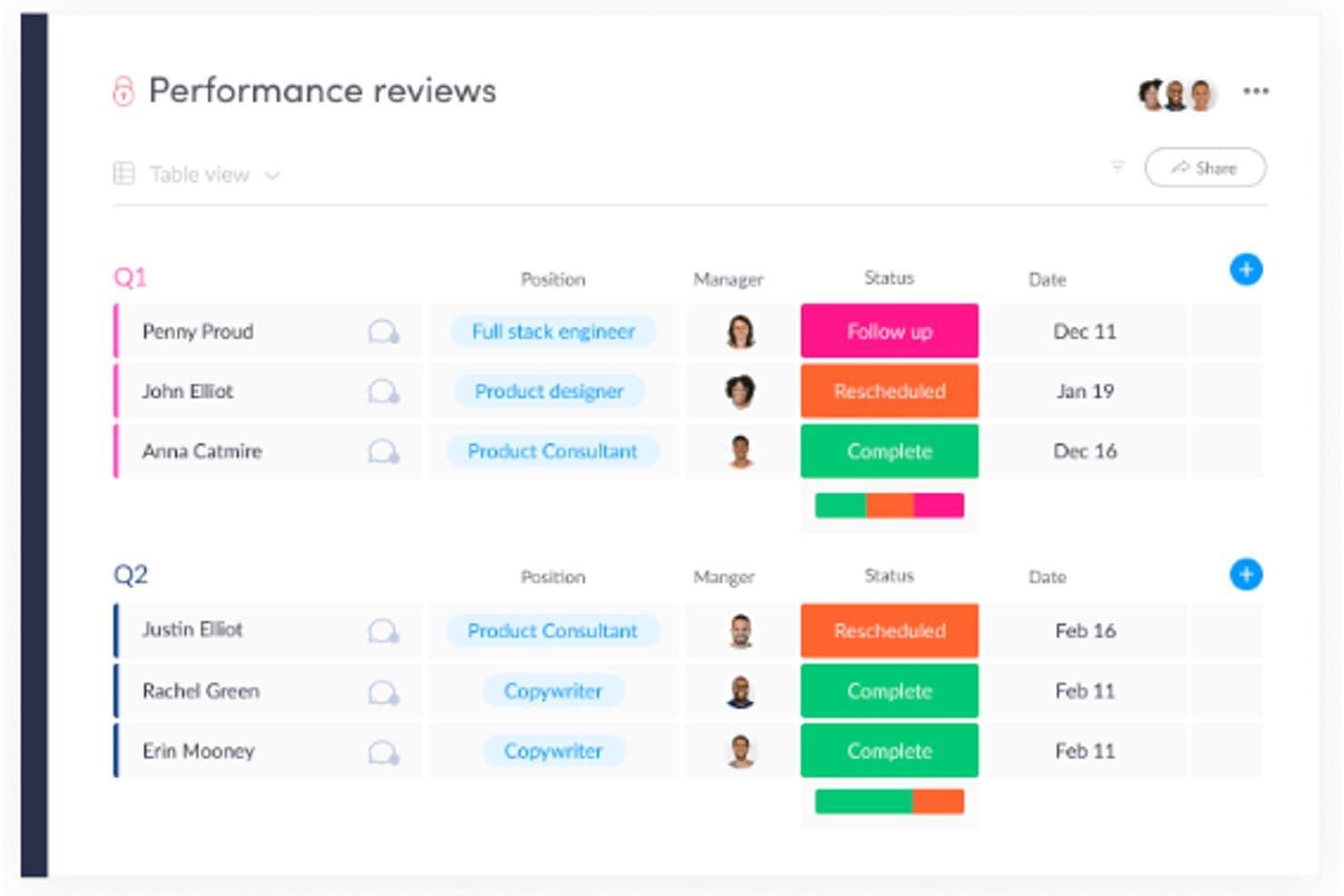
Users can track and visualize any type of company data using monday’s flexible boards and built-in templates. monday AI Workspace is a customizable work management platform that combines AI-powered project planning, visual dashboards, workflow automation, and collaboration tools that can be adapted to HR processes like recruiting, onboarding, and employee management.
Who Is monday AI Workspace Best For?
It's a strong fit for mid-sized HR and people ops teams that want flexible, visual workflows without investing in a dedicated HRIS.
Why I Picked monday AI Workspace
monday AI Workspace earns its spot on my shortlist because of how it handles data visualization for HR workflows. I particularly like the live dashboards that pull data across multiple boards, letting my team track headcount, onboarding progress, and open roles in one consolidated view. The color-coded status columns and timeline views make bottlenecks visible at a glance, without anyone needing to dig through spreadsheets or generate manual reports.
monday AI Workspace Key Features
- Customizable workflow builder: Drag-and-drop interface to design and automate HR processes like onboarding or performance reviews.
- Document management: Upload, store, and organize employee documents and HR files securely within boards.
- Role-based permissions: Control access to sensitive HR data with custom user roles and permissions.
- Integrated forms: Create internal forms for requests such as leave, equipment, and feedback, linking submissions directly to workflows.
monday AI Workspace Integrations
monday AI Workspace offers hundreds of native integrations through its built-in integrations and marketplace, including Slack, Salesforce, HubSpot, Google Workspace, Microsoft 365, Zoom, DocuSign, GitHub, Jira, and Dropbox. It also supports Zapier and provides an API for custom integrations.
Pros and Cons
Pros:
- AI features automate repetitive HR tasks
- Flexible boards adapt to any HR workflow
- Highly visual dashboards for HR data
Cons:
- No native payroll or leave modules
- Not open source or self-hostable
Learn more about monday AI Workspace:

Odoo encapsulates everything any HR department is likely to need in an integrated suite. Odoo Employees makes the cut for how it brings core HR functions together with clear dashboards and customizable views. I've found the contracts management and time off tracking modules fast to set up, which really makes onboarding and tracking leave requests simple. When teams need basic HR operations and want to bring all employee info into one place, I recommend Odoo for how quickly you can get started.
What I like is that hard-to-find HR details, like contract statuses or absences, are right there when you need them. I usually see teams appreciate not spending hours chasing paperwork, especially if they're used to email or spreadsheets.
Odoo Employees' Best For
- Small to midsize orgs needing unified HR basics
- Teams managing contracts, leave, and attendance centrally
Odoo Employees' Not Great For
- Companies needing advanced talent or payroll features
- Organizations with highly specialized HR compliance needs
What sets Odoo Employees apart
Odoo Employees is built around the idea that HR data and people management should live with the rest of your core business processes. Instead of creating a separate workflow like you find in BambooHR or Gusto, Odoo expects you to manage contracts, leave, and employee records within a unified system. This tends to work best when you want a basic HR toolkit inside an all-in-one platform, with quick access to information and simple oversight.
Tradeoffs with Odoo Employees
Odoo Employees optimizes for centralizing essential HR functions, but the tradeoff is a lack of depth in areas like analytics and advanced talent management. In practice, this means you miss out on specialized HR features that standalone suites offer.
Pros and Cons
Pros:
- Straightforward setup for core HR tasks
- Employee self-service reduces everyday HR admin requests
- Clean, consistent interface across all HR workflows
Cons:
- Payroll localization depends on country-specific configurations
- Reporting depth is limited without additional setup
Learn more about Odoo Employees: Best personnel information management
- Free plan available OR 30-day free trial
- Pricing upon request
Visit WebsiteCustomer Rating:4.2/5
With OrangeHRM, you can find all the information you need fast. OrangeHRM sits on my shortlist because it’s built around personnel information management that you rarely get with other open source HR platforms. I like how it manages detailed employee profiles, including job, salary, license, and contract history, all in a single location.
When I’m working with organizations that care about strong record-keeping, OrangeHRM’s granular data fields and access controls make it easy. Teams usually lean on its reporting and audit trail features for compliance and workforce planning, which is where I think it delivers the most value.
OrangeHRM’s Best For
- Organizations needing detailed personnel record management
- HR teams focused on compliance and audit trails
OrangeHRM’s Not Great For
- Companies wanting built-in payroll or benefits modules
- Teams looking for modern, highly visual user interfaces
What sets OrangeHRM apart
OrangeHRM stands out by building HR processes around granular personnel records rather than focusing on payroll, recruiting, or benefits out of the box. Compared to tools like Bitrix24 or ERPNext, OrangeHRM expects you to treat core employee data as the foundation and layer other HR workflows on top.
In practice, this works well when organizations depend on highly structured records for compliance and decision-making.
Tradeoffs with OrangeHRM
OrangeHRM optimizes for structured HR data, but that means you give up broader, all-in-one functionality like integrated payroll and benefits management. As a result, you need other tools if you want those features in your stack.
Pros and Cons
Pros:
- Open-source core keeps long-term HR system costs low
- Strong role-based permissions protect sensitive personnel information
- Centralized employee records reduce duplication
Cons:
- Advanced reporting needs paid plans or customization
- Payroll requires third-party integration rather than native tools
Learn more about OrangeHRM: Best for small businesses
- Free plan + 15-day free trial + free demo available
- From €69/month
Visit WebsiteCustomer Rating:4.2/5
Bitrix 24 offers professional HR software in open-source format. Bitrix24 stands out to me when small businesses need more than just basic HR tools. I see a lot of value in how it combines time management, employee directory, and document workflows under one open source system, so teams don’t have to juggle multiple apps.
One thing I like is that it gives you self-service tools for leave requests and time tracking, while also letting you automate approval workflows as you scale. I tend to point small teams here when they need access controls and employee records in a single interface, without outgrowing their stack right away.
Bitrix24’s Best For
- Small businesses needing a central HR and collaboration tool
- Companies wanting built-in document management and time tracking
Bitrix24’s Not Great For
- Large enterprises with complex, multi-country HR requirements
- Teams wanting highly customizable open source code
What sets Bitrix24 apart
Bitrix24 stands out by approaching HR as part of a broader workplace platform, rather than a standalone HR tool like OrangeHRM or Sentrifugo. You work in the same place you collaborate, manage documents, and track time—so HR processes blend in with daily workflow. In practice, this setup works best for small businesses looking to avoid tool sprawl and keep everything under one roof.
Tradeoffs with Bitrix24
Bitrix24 optimizes for a unified workspace, but that means HR features have less depth and configurability than tools built just for HR management. You’ll find limitations as HR needs grow more nuanced or specialized.
Pros and Cons
Pros:
- Scales gradually as headcount and needs increase
- Built-in chat and video reduce reliance on extra tools
- Designed for small teams
Cons:
- Fewer native integrations outside major ecosystems
- Initial setup takes time due to feature breadth
Learn more about Bitrix24:

WP ERP has a project management module to help you keep track of projects to ensure their timely completion WP ERP makes my shortlist because it’s one of the few HR tools built directly for WordPress sites. I like that you can manage company-wide employee records, attendance, and leave policies right from your WP dashboard, with data fully stored inside your existing website. What stands out to me is how easy it is to handle day-to-day HR tasks without leaving WordPress, which is key for site-centric organizations.
WP ERP’s Best For
- WordPress site owners managing HR directly from their site
- Small businesses wanting open-source, on-site HR control
WP ERP’s Not Great For
- Organizations not running WordPress sites
- Enterprises needing complex HR analytics or compliance tools
What sets WP ERP apart
WP ERP treats your WordPress site as the center of your HR work, so you manage HR tasks directly alongside your website admin tools. Unlike something like OrangeHRM, which runs as a standalone platform, WP ERP expects you to handle HR, employee records, and leave management from within your WP dashboard. This works best if you live mostly inside WordPress and don’t want to jump between systems.
Tradeoffs with WP ERP
WP ERP optimizes for WP-based workflow, but you sacrifice advanced HR analytics and broader compliance features that exist in dedicated platforms. If you outgrow the WordPress environment, the limits become clear.
Learn more about WP ERP: Best for integrated ERP and CRM capabilities
- Free plan + 15-day free trial + free demo available
- From €5/month
Visit WebsiteCustomer Rating:4.5/5
Dolibarr allows you to manage and approve employee expense reports. Dolibarr shows up on my list because it combines HR management with ERP and CRM tools in a single open source stack. I find it fits well when you want to support HR processes like recruiting and employee records alongside finance, project management, and sales workflows from the same interface.
What I appreciate is how you can connect HR events, absences, and contracts directly to business operations without leaving the platform. This keeps everything aligned across teams that need integration, not just basic HR functions.
Dolibarr’s Best For
- Organizations needing both HR and business process integration
- Teams that want open source ERP with HR modules
Dolibarr’s Not Great For
- Companies needing specialized HR features, like advanced payroll
- Teams focused solely on stand-alone HR solutions
What sets Dolibarr apart
Dolibarr takes a broad, modular approach, bringing HR, ERP, and CRM together in one open source system. It’s designed so you can run HR tasks alongside things like accounting or inventory from the same workspace. Compared to something focused like OrangeHRM, Dolibarr expects you to weave HR into bigger organizational workflows.
This works well when you want everything tracked in one place instead of managing separate apps.
Tradeoffs with Dolibarr
By optimizing for breadth and integration, Dolibarr sacrifices the depth you get from HR-only tools. If you need advanced HR features or detailed reporting, you’ll probably find things missing.
Learn more about Dolibarr: Best for customizable HR workflows
- Free trial + free download available
- From $50/month (unlimited users)

ERPNext's user management interface simplifies the process of managing user roles and permissions. ERPNext landed on my list because it’s open source and gives you full flexibility over how HR workflows are structured. When I’ve worked with organizations that need to build custom HR processes—think unique approvals, onboarding paths, or department-specific policies—ERPNext is one of the few that actually lets you model this with its workflow engine.
What I appreciate most is how approachable it is for teams who want to automate repetitive HR steps without heavy coding or external add-ons. You can build forms, set up rules, or trigger notifications, so HR doesn’t end up stuck in email chains chasing paperwork.
ERPNext’s Best For
- Organizations with unique or customizable HR workflow needs
- Companies wanting open source HRM with built-in automation
ERPNext’s Not Great For
- Teams wanting modern UI and out-of-the-box HR templates
- Companies seeking prebuilt payroll or localized compliance tools
What sets ERPNext apart
ERPNext is built with customization in mind, letting you shape HR processes with its workflow tools so you aren’t boxed in by preset fields or rigid templates. Where something like OrangeHRM relies on ready-to-use modules, I see ERPNext working better when you want to create your own forms, approval paths, or onboarding routes using a visual editor. In practice, that means you have more leeway to match HR systems exactly to local policies and business preferences.
Tradeoffs with ERPNext
ERPNext optimizes for flexibility and customization, but as a result, setup can take more time and requires people who know what they want to build. If you want an HR system that works out of the box with minimal input, this isn’t the fastest option.
Learn more about ERPNext:

ADempiere's HR management module offers comprehensive features for recruiting, payroll, time tracking, and even performance management. ADempiere is on my shortlist because it’s one of the more flexible open source ERP tools with a strong track record in HR analytics and reporting. I recommend it when you need HR reporting tied directly to live workforce activity, payroll, and performance data inside the same platform. You get customizable dashboards and detailed reports, and I appreciate how much you can tailor the data views to your own HR process.
ADempiere’s Best For
- Organizations needing tailored HR reporting with real-time data
- Companies integrating HR with ERP, payroll, and accounting
ADempiere’s Not Great For
- Teams wanting plug-and-play HR features
- Companies looking for modern UI or mobile HR tools
What sets ADempiere apart
ADempiere is shaped by its foundation as an open source ERP, so HR features are tied closely to finance and operations. Instead of focusing on an HR-first design like OrangeHRM or Sentrifugo, it expects you to connect reporting and analytics directly to payroll, time tracking, and business processes. In practice, this works well when you want HR data always linked to what’s happening in the rest of your business.
Tradeoffs with ADempiere
ADempiere optimizes for integration with broader ERP workflows, but that means HR features feel less modern and need more setup. Teams focused just on HR will find it slower to get value.
Learn more about ADempiere: Best internal job portal
- 45 days free trial
- From $0.90/user/month

IceHrm includes a full range of recruitment features. IceHrm Open Source Edition makes my shortlist because it’s one of the few HR suites that actually gives you robust internal job posting tools out of the box. I’ve seen teams use its internal job portal to handle cross-department transfers and promote advancement, all while tracking candidates in the same system. What I like is how straightforward it makes promoting roles to current employees without bolt-on modules or workarounds.
IceHrm’s Best For
- Organizations building internal mobility and promotion programs
- HR teams seeking open source control and customization
IceHrm’s Not Great For
- Companies needing sophisticated payroll or benefits management
- Teams reliant on large-scale external candidate sourcing
What sets IceHrm apart
IceHrm takes an open approach to traditional HR tasks by putting internal mobility front and center. Unlike OrangeHRM or Sentrifugo, which often focus on basic leave tracking or attendance, IceHrm leans into using an internal job portal to support employee growth. In practice, this works well when you want to encourage transfers and promotions within the organization rather than defaulting to external hiring.
Tradeoffs with IceHrm
IceHrm optimizes for transparency and internal talent movement, but you lose advanced features like automated payroll or modern engagement tools, which means you’ll need other solutions as your needs evolve.
Learn more about IceHrm Open Source Edition: 10Best for accurate time tracking
TimeTrex
- 30-day free trial + free demo available
- From $50/user/month
Visit WebsiteCustomer Rating:4.5/5
TimeTrex's timesheets let you accurately track clock ins and outs. TimeTrex stands out for open source HR software when you need accurate time tracking built into a broader workforce platform. I’ve watched teams rely on its punch-in/out options, geolocation-stamped time cards, and automated scheduling, especially for businesses with strict attendance policies. What I like most is how I can run detailed payroll straight from the same system, with compliance tools and audit logs making the whole process feel safer.
This works best when accurate records drive not just payroll but also compliance and visibility for hourly workforces.
TimeTrex’s Best For
- Businesses that need accurate time and attendance tracking
- HR teams managing payroll and compliance in one system
TimeTrex’s Not Great For
- Teams looking for advanced talent management features
- Organizations needing modern, user-friendly dashboards
What sets TimeTrex apart
TimeTrex takes a strict approach to workforce oversight, making time tracking and attendance compliance its top priority. In practice, you build work schedules, manage timecards, and run payroll in one place, so administrative staff control all the moving parts from a single hub. Unlike something like OrangeHRM, which focuses more on talent and performance, TimeTrex stays tightly centered on accurate records and payroll-ready data.
Tradeoffs with TimeTrex
TimeTrex optimizes for timekeeping and compliance, but that focus means you miss out on modern talent management modules, so teams needing growth and engagement tools look elsewhere.
Learn more about TimeTrex:
Diğer Açık Kaynaklı İK Yazılımları
İşte en iyi 10 listeme giremeyen, değerlendirmeye değer birkaç açık kaynaklı İK sistemi daha. Bunların her biri için kapsamlı bir inceleme yapmaya yerim olmadı ancak yine de dikkate alınmaya değerler:
- 11Open HRMSBest for tracking KPIs
- 12MintHCMBest for a holistic approach to HCM
- 13SentrifugoBest for an employee self-service portal
- 14BazaraBest for HR with talent acquisition.
- 15JoraniBest leave management software
- 16SimpleHRMBest free open source HR software
- 17WaypointHRBest for compensation management
İlgili İK Yazılımı İncelemeleri
Aradığınızı hâlâ burada bulamadıysanız test edip değerlendirdiğimiz şu diğer ilgili araçlara göz atın:
- İK Yazılımı
- Bordro Yazılımı
- İşe Alım Yazılımı
- Kayıtlı İşveren Hizmetleri
- Aday Takip Sistemleri
- İşgücü Yönetimi Yazılımı
How I Evaluate Open Source HR Software
I evaluate open source HR tools in two layers: core requirements like self-hosting, OSS licensing, and employee records, then differentiators like community health and payroll depth.
Core Functionality (Table Stakes For This List)
When I'm selecting tools for my list, I rank each one on a scale from 0 (does not offer the functionality) to 5 (excels in this area) for each core functionality listed below. Then, I calculate the tool's total score into a percentage. Each tool needs to achieve a minimum total score of 65% to be considered for inclusion.
- Open Source Licensing: I check for a recognized OSI-approved license (GPL, MIT, AGPL, Apache) and confirm the source code is publicly available in a live repository.
- Self-Hosting Capability: Each tool should support on-premise or self-hosted deployment so your team controls where HR data lives and how infrastructure is managed.
- Employee Records Management: I look for a centralized employee database that handles profiles, org hierarchy, contracts, and document storage across the full employee lifecycle.
- Leave & Attendance Tracking: Tools should handle leave requests, approval workflows, and attendance logging—like configuring regional holiday calendars or multi-level manager approvals.
- Payroll & Compensation Module: I evaluate whether the platform includes payroll runs, payslip generation, and salary structures, or offers a direct integration path with payroll systems.
- Extensibility & API Access: A documented REST API, webhook support, or plugin architecture matters here—especially for teams connecting HR data to ERPs or identity providers.
Once I have a list of tools that meet this criteria, I consider what sets each platform apart.
Differentiating Factors (What Sets Vendors Apart)
Here's how I compare and contrast different vendors:
Standout Features
An employee self-service portal is a big differentiator—it lets staff submit leave requests, download payslips, and update personal details without filing tickets with HR. I also evaluate multi-language and localization support, which matters for teams spread across regions who need locale-specific date formats, currencies, and labor law templates. Performance management is another feature I look for, especially tools that tie goal tracking and appraisal cycles directly to employee records.
Beyond Features
Community health is one of the first things I check. A project with regular commits, active forum discussions, and recent releases signals long-term viability—abandoned repos are a real risk in this space. I also evaluate the licensing model closely, since an AGPL license carries different obligations than MIT when you're modifying source code for internal use. Compliance and data security round out my assessment, particularly role-based access controls and audit logging for handling sensitive employee data on self-hosted infrastructure.
Açık kaynaklı İK yazılımı nedir?
Açık kaynaklı İK yazılımı, kaynak kodu herkesin kullanmasına, değiştirmesine ve dağıtmasına açık olan bir insan kaynakları yönetimi aracı türüdür. İşletmelerin çalışan verilerinin yönetimi, bordro, işe alım ve performans değerlendirmesi gibi İK süreçlerini kendi özel ihtiyaçlarına göre özelleştirmelerine olanak tanır. Bu yazılım, geliştiricilerden ve kullanıcılardan oluşan bir topluluk tarafından desteklenerek genellikle maliyet avantajları ve esneklik sunar.
Özellikler
Her iyi açık kaynaklı İK yazılımının sahip olması gereken temel özellikler şunlardır:
- Özelleştirilebilir kod: İş akışlarını, formları ve özellikleri kuruluşunuzun benzersiz ihtiyaçlarına uyacak şekilde düzenlemek için yazılımı değiştirin. Bu, sizin için en önemli unsurları tam olarak oluşturma özgürlüğüne sahip olmak istiyorsanız mükemmeldir.
- Çalışan veritabanı yönetimi: Çalışan bilgilerini depolayın, düzenleyin ve kolayca güncelleyin; böylece ayrıntıları hızlıca bulabilir ve elektronik tablolar içinde kaybolmaktan kurtulabilirsiniz.
- Role dayalı erişim denetimleri: Farklı kullanıcılar için izinler belirleyerek hassas İK verilerinin gizli kalmasını ve çalışanların günlük görevleri için ihtiyaç duydukları erişime sahip olmasını sağlayın.
- Zaman ve devam takibi: Çalışan devam durumunu, izin taleplerini ve çalışma saatlerini kaydederek bordro süreçlerini kolaylaştırın ve zaman takibiyle ilgili sorunlardan kaçının.
- Performans yönetimi araçları: Hedefleri, geri bildirimleri ve değerlendirmeleri tek bir yerde yönetin; böylece sürekli destek sağlayabilir ve ekiplerin yolunda ilerlemesini sağlayabilirsiniz.
- Bordro entegrasyonu: Hesaplamaları ve ödemeleri otomatikleştirmek için bordro çözümlerine bağlanarak idari yükleri azaltın.
- İşe alım ve işe başlangıç: İş ilanları yayınlayın, başvuruları yönetin ve ilk görüşmeden işe başlanan ilk güne kadar ilerlemeyi takip edin; tüm bunları süreçleriniz değiştikçe uyarlayabileceğiniz bir şekilde gerçekleştirin.
- Belge yönetimi: Sözleşmeleri, politikaları ve diğer önemli dosyaları güvenli bir şekilde depolayın; böylece masa çekmecelerini karıştırmadan ihtiyacınız olanı kolayca bulabilirsiniz.
- Raporlama ve analiz: Çalışan eğilimleri, çalışan sayıları, çalışan devir oranı ve daha fazlası hakkında içgörüler elde etmek için ayrıntılı raporlar oluşturun; kristal küreye gerek yok!
Yaygın Açık Kaynaklı İK Yazılımı Yapay Zekâ Özellikleri
Yukarıda listelenen standart açık kaynaklı İK yazılımı özelliklerinin yanı sıra bu çözümlerin çoğu şu özelliklerle yapay zekâyı da kullanmaya başlıyor:
- Özgeçmiş taramasını otomatikleştirme: Yapay zekâ başvuruları analiz eder ve en iyi adayları öne çıkarır; böylece zahmetli manuel incelemeyi atlayıp görüşmelere odaklanabilirsiniz.
- Öngörücü iş gücü analizleri: Çalışan devir riski ve iş gücü ihtiyaçlarını öngörmek için yapay zekâyı kullanarak kalıpları fark etmenize ve daha akıllıca plan yapmanıza yardımcı olun.
- İK desteği için sohbet robotları: Etkileşimli yapay zekâ sohbet robotları, çalışanların politikalar veya yan haklar hakkındaki sorularını anında yanıtlayarak taşmak üzere olan gelen kutusunun yükünü azaltır.
- Yapay zekâ destekli performans değerlendirmeleri: Gelişim fırsatlarını belirlemek için geri bildirimleri otomatik olarak toplayıp değerlendirin ve koçluk sürecindeki belirsizlikleri ortadan kaldırın.
- Akıllı planlama: Yapay zekâ vardiya atamalarını ve takvimleri optimize etmeye yardımcı olur; doğru kişilerin doğru zamanda doğru yerde olmasını sağlar.
Açık kaynaklı İK yazılımı kullanırken kodu özelleştirme özgürlüğüne sahip olursunuz. Ancak özelleştirme önceliğiniz değilse, kullanıma hazır işlevler sunan bu İK yazılımı platformlarını inceleyin.
Avantajlar
Aralarından seçim yapabileceğiniz çok sayıda İK yazılımı listesi var; öyleyse neden açık kaynaklı bir çözüm seçmelisiniz? Açık kaynaklı İK yazılımı, kullanıcılar ve kuruluşlar için çok sayıda avantaj sunar. Kuruluşunuzda açık kaynaklı İK yazılımı uygulamak istemenizin birkaç nedeni şunlardır:
- Uygun maliyet: Açık kaynaklı yazılım kullanmanın en yaygın avantajı ücretsiz olmasıdır. Özel mülk sistemlerle ilişkili yüksek lisans ücretlerini ortadan kaldıran açık kaynaklı bir sistem, işletmenizin genel operasyonel maliyetlerini azaltır.
- Özelleştirme: Kuruluşlar, açık kaynaklı İK yazılımını kendi özel ihtiyaçlarını karşılayacak şekilde değiştirebilir; böylece benzersiz süreçleri ve gereksinimleriyle uyumlu, kişiselleştirilmiş bir çözüm elde edebilir.
- Topluluk desteği: Açık kaynaklı sistemler genellikle kapsamlı destek ve kaynaklar sunan, sorun giderme yardımı ve düzenli güncellemeler sağlayan canlı bir geliştirici ve kullanıcı topluluğuyla birlikte gelir.
- Şeffaflık: Yazılımın açık yapısı, kullanıcıların kaynak kodunu görüp anlamasına olanak tanır ve gizli işlevler veya güvenlik endişeleri bulunmamasını sağlar.
- Yenilik: Kaynak koduna erişim yeniliği teşvik eder ve kuruluşların en yeni özellikleri ve iyileştirmeleri hızlıca uygulamasına olanak tanır.
İşletmeler, açık kaynaklı İK yazılımını seçerek maliyetlerden tasarruf edebilir ve ihtiyaçlarına tam olarak uyan bir sistem oluşturmak için gereken esneklik ile denetimi elde edebilir. Bu avantajlar bir araya gelerek daha verimli, güvenli ve uyarlanabilir bir İK yönetimi sürecine katkıda bulunur ve kuruluşları sürdürülebilir başarı için konumlandırır.
Maliyetler ve Fiyatlandırma
Bazen her şey fiyata bağlıdır ve açık kaynaklı yazılımlar genellikle oldukça uygun maliyetlidir. Hatta çoğu durumda yazılım ücretsiz olarak kullanılabilir.
Birçok açık kaynak sağlayıcı, daha gelişmiş özelliklere erişmek istemeniz durumunda kullanıcılara aynı yazılımın ücretli sürümüne yükseltme seçeneği de sunar. Kullanıcı olarak bu tür bir esnekliğe sahip olmak harikadır. Bu, kararınızı vermeden önce yazılımı indirip kullanmaya alışmak için biraz zaman ayırabileceğiniz anlamına gelir.
Ayrıca yazılımı gerçekten beğenir ve daha fazla özelliğe erişmek isterseniz, sürümü yükseltebilir veya BT departmanınızdan yazılımı kendi benzersiz işletme ihtiyaçlarınıza uyacak şekilde özelleştirmeyi denemesini isteyebilirsiniz.
SSS
Açık kaynak insan kaynakları yazılımları hakkında sıkça duyduğum soruların bazı yanıtları:
Yazılımla ilgili olarak \u0022açık kaynak\u0022 ne anlama gelir?
\u003cem\u003eAçık kaynak\u003c/em\u003e terimi, bir bilgisayar programının kaynak kodunun kamuya açık hâle getirildiği bir yazılım geliştirme ve dağıtım modeli türünü ifade eder. Bu bilgilerin kamuya açık olması sayesinde diğer yazılım geliştiricileri, uygulamayı kendi özel ihtiyaçlarına göre özelleştirmek için temel kaynak kodunu değiştirebilir. Açık kaynak yazılımlar genellikle, sektörü ve son kullanıcıları daha iyi bir noktaya taşımak amacıyla proje üzerinde karşılıksız (yani ücretsiz) çalışan geliştiricilerden oluşan teknik topluluklar tarafından iş birliği içinde geliştirilir.
HRIS ile HRMS arasındaki fark nedir?
İnsan Kaynakları Bilgi Sistemleri (HRIS), devam durumu, zaman takibi ve bordro işleme gibi daha temel işlevler sunan yazılımlardır. İnsan Kaynakları Yönetim Sistemleri (HRMS) ise raporlama, çalışan bağlılığı ve performans değerlendirmesi gibi özellikleri içerecek şekilde işlevselliği bir adım ileri taşıyan çalışan yönetimi araçlarıdır.
Açık kaynak insan kaynakları yazılımları için hangi yazılım entegrasyonları önemlidir?
Yazılım entegrasyonları, verileri bir sistemden diğerine manuel olarak veya içe ve dışa aktarma yoluyla aktarma gereksinimi gibi birçok angarya işi ortadan kaldırabilir. Bunun yerine, yerel yazılım entegrasyonlarını kullanarak ekibinizin üretkenliğini artırabilir ve insan kaynakları profesyonellerinizin daha verimli çalışmasına yardımcı olabilirsiniz.
Aradığınız insan kaynakları yazılımının türüne bağlı olarak bakmanız gereken belirli entegrasyonlar değişecektir; ancak e-posta sağlayıcıları, dijital takvimler, bordro yazılımları ve Google Workspace ile Microsoft SharePoint gibi çalışma platformlarıyla entegrasyonlar her zaman faydalıdır.