

Özellikle ekibinizi verimli bir şekilde eğitmekle görevlendirildiğinizde, İK dünyasında yol almak zor olabilir. Yeni işe alınanları işe alıştırmaktan sektör standartlarına uyumu sağlamaya kadar birçok sorumluluğu aynı anda yürütmek zorunda kalabilirsiniz. Çevrim içi eğitim yazılımları tam da bu noktada işe yarar.
Deneyimlerime göre bu araçlar, tüm eğitim ihtiyaçlarınız için merkezi bir platform sunarak iş yükünüzü hafifletebilir. Öğrenme verimliliğini ve katılımını artırarak işinizi kolaylaştırır ve ekibinizin becerilerini geliştirir.
Bu makalede, çevrim içi eğitim yazılımları için en iyi seçimlerimi paylaşacağım. Bu araçları bağımsız olarak test edip inceledim ve sizin gibi İK profesyonelleri için gerçekten önemli olan noktalara odaklandım. Eğitim hedeflerinizi en iyi şekilde destekleyebilecek seçeneklere birlikte göz atalım.
Why Trust Our Software Recommendations
6,700+
Reviews
20
Industry experts
16+
Evaluation factors
14
Years
Our team has been testing and reviewing software since 2012. As HR experts ourselves, we know how difficult—and important—it is to choose the right software.
For this guide, we evaluated tools using hands-on testing and independent research, scoring tools using our selection criteria. We also draw on insights from industry thought leaders and practicing HR experts.
Our reviews reflect our human editorial judgment, not a sales pitch.
Expert reviewers:
- Phil GrayCOO
 Kim BehnkeHR Tech Editor & Analyst
 Josh BarkerPeople Ops Manager

Çevrim İçi Eğitim Yazılımları Karşılaştırma Tablosu
Bu karşılaştırma tablosu, çevrim içi eğitim yazılımları için en iyi seçimlerimin fiyatlandırma ayrıntılarını özetlemektedir:
Sorted by: Default
| Tool | Starting Price | Website | |
|---|---|---|---|
Best for training distributed global teams | 4.8 out of 5 | $5/user/month Free demo available | Website |
Best for comprehensive ethics and compliance training | 4.5 out of 5 | Pricing upon request Free demo available | Website |
Best for personalized skill development programs | 4.6 out of 5 | $3.97/user/month Free trial available | Book Demo |
Best for corporate compliance training | 4.6 out of 5 | Pricing upon request Free trial available | Website |
Best for HR-embedded employee training | 4.4 out of 5 | $8/user/month Free trial + Free demo available | Website |
Best for rapid online training setup | 4.6 out of 5 | $119/month Free plan + free demo available | Book Demo |
Best for an intuitive user experience and quality customer support | 4.7 out of 5 | Pricing upon request 14-day free trial + demo available | Website |
Best online training software with a PowerPoint plugin | 4.6 out of 5 | $970/author Free trial available | Website |
Best for creating mobile training courses | 4.6 out of 5 | Pricing upon request Free plan + 14-day free trial available | Website |
Best for automated learning paths | Not rated | Pricing upon request Free demo available | Website |


En İyi Çevrim İçi Eğitim Yazılımları İncelemesi
Piyasadaki tüm farklı seçenekler karşısında bunalmış olabilirsiniz. Endişelenmeyin; burada en iyi çevrim içi eğitim yazılımlarının temel özellikleri, ekran görüntüleri, deneme sürümleri ve fiyatlandırma bilgileriyle birlikte bir değerlendirmesini bulabilirsiniz.
 Best for training distributed global teams
- Free demo available
- From $5/user/month
Visit WebsiteCustomer Rating:4.8/5
Deel Engage offers a comprehensive learning management system for training employees. Deel Engage is a comprehensive talent development platform that uniquely integrates online training with performance reviews and career progression frameworks.
Why I picked Deel: Firstly, I like that Deel takes online training a step further than traditional platforms. Its Engage suite allows managers to evaluate employee performance with robust analytics and 360-degree feedback, which can then be used to build career progression frameworks and the necessary training resources to support employee growth.
As for the online training software itself, the learning management system offers an intuitive drag-and-drop interface for quick course development, with options to integrate interactive quizzes and other multimedia elements.
Deel Standout Features and Integrations:
Standout features include AI-powered course creation, automated course assignments based on specific criteria, and an extensive library of internal and external resources to help reduce the manual effort needed to coordinate and distribute training materials.
Integrations include Workday, BambooHR, Slack, and Personio. Custom integrations are also available through its Open API.
Pros and Cons
Pros:
- Automated training workflows
- Real-time progress monitoring
- Drag-and-drop LMS interface
Cons:
- Could have more customization options
- Potential learning curve for new users
 Best for comprehensive ethics and compliance training
- Free demo available
- Pricing upon request
Visit WebsiteCustomer Rating:4.5/5
Mitratech's LMS allows you to view reports on training progress. Mitratech specializes in providing comprehensive solutions in compliance training and ethics reporting. On the employee training side, it offers a variety of eLearning courses with topics including diversity & inclusion, employment law, ethics & compliance, and business skills.
Why I picked Mitratech: I like that Mitratech's learning management system supports a wide range of learning styles by integrating different formats, like audio, digital docs, and instructor-led lessons so employees can learn effectively. Since Mitratech already has a host of courses aimed at compliance and ethics, these can be seamlessly loaded onto the platform.
Alternatively, the platform also supports courses purchased from other providers, providing employers with the flexibility to tailor their training materials. The learning path options are also accessible, meeting both 508 and WCAG standards.
Mitratech Standout Features and Integrations:
Standout features include a flexible user interface, reference material, training progress, and communication options. The online training modules include foundation courses, microlearning courses, and ethical snapshots.
Integrations include courses purchased from other providers. You can also integrate Mitratech courses with your existing LMS.
Pros and Cons
Pros:
- In-depth training courses
- Robust data management
- Tailor to specific learning styles
Cons:
- Flexibility of LMS interface may present a learning curve
- Focuses mostly on compliance training
Learn more about Mitratech: Best for personalized skill development programs
- Free trial available
- From $3.97/user/month (billed annually)
Visit WebsiteCustomer Rating:4.6/5
iSpring LMS shows courses and progress on desktop and mobile. iSpring LMS is a web-based training management solution that helps organizations run the full employee-development cycle efficiently, from onboarding to continuous skill growth.
Why I picked iSpring LMS: I decided to include this software on my list because of its flexibility and training personalization potential. Authoring capabilities are especially strong. For example, the integrated AI-assisted course building tool allows you to create interactive courses with quizzes, video, audio, and other engaging elements. You can also upload existing content, like PowerPoint presentations, and convert them into online courses.
The platform also features development plans, a feature that lets you map out personalized skill-building journeys for each employee. You can combine courses, on-the-job tasks, assessments, and deadlines into a clear, structured path that adapts to different roles and experience levels, making training feel purposeful rather than generic.
Because of its customizability, the software can be used for employee onboarding, product and sales training, compliance training, and performance evaluations. You can also increase engagement with built-in gamification: Points, leaderboards, and badges motivate learners to complete training and stay active over time.
iSpring LMS Standout Features and Integrations:
Standout features include the ability to craft individualized learning paths for each employee. I found this to be a really useful tool for encouraging professional development and aligning growth goals with each employee's unique career trajectory. The software is also mobile-compatible, so you can access employee data, track employee performance, and run reports from anywhere, even if you don't have a central office.
Integrations include ADP, BambooHR, Salesforce, Workday, and Zoom. Additional integrations can be configured using the REST/SOAP API
Pros and Cons
Pros:
- Well-suited for processes that require extensive training
- Personalized development plans
- 360-degree feedback
Cons:
- Limited native software integrations
- Complicated pricing structure (many modules and add-on options)
Learn more about iSpring LMS: Best for corporate compliance training
- Free trial available
- Pricing upon request
Visit WebsiteCustomer Rating:4.6/5
The “Edit Course” screen has plenty of customization options, including uploading various assets. Absorb is a cloud-based online training solution to impart effective corporate learning. The software specializes in corporate compliance training to help your employees understand legalities, ethics, and other compliance criticalities.
Why I picked Absorb: I have always secretly hated corporate compliance training. I would just tick random boxes and stroll past endless blocks of text. Absorb adds a unique twist to corporate compliance training with automated scheduling and enrollment. Furthermore, Absorb allows you to create personalized to-do lists for learners to improve engagement.
If you’re a Learning and Development (L&D) HR manager, you’ll probably agree that managing expiring certifications is a nightmare. Absorb helps automate all your retraining and renewals, and improves your productivity.
Absorb Standout Features and Integrations:
Features that set Absorb apart include social learning, which enables seasoned employees to mentor juniors. A multi-language feature and unique learning paths help HR managers to train employees across multiple geographies.
Integrations include 15+ tools such as BambooHR, Degreed, Google Suite, Microsoft Azure, Namely, Okta, Salesforce, WebEx, Workday, Zoom, and others.
Pros and Cons
Pros:
- Great customer service
- Robust pre-built templates
- Extensive customization options
Cons:
- Resources lack a thumbnail feature
- Limited assessment features
Learn more about Absorb: Best for HR-embedded employee training
- Free trial + Free demo available
- From $8/user/month
Visit WebsiteCustomer Rating:4.4/5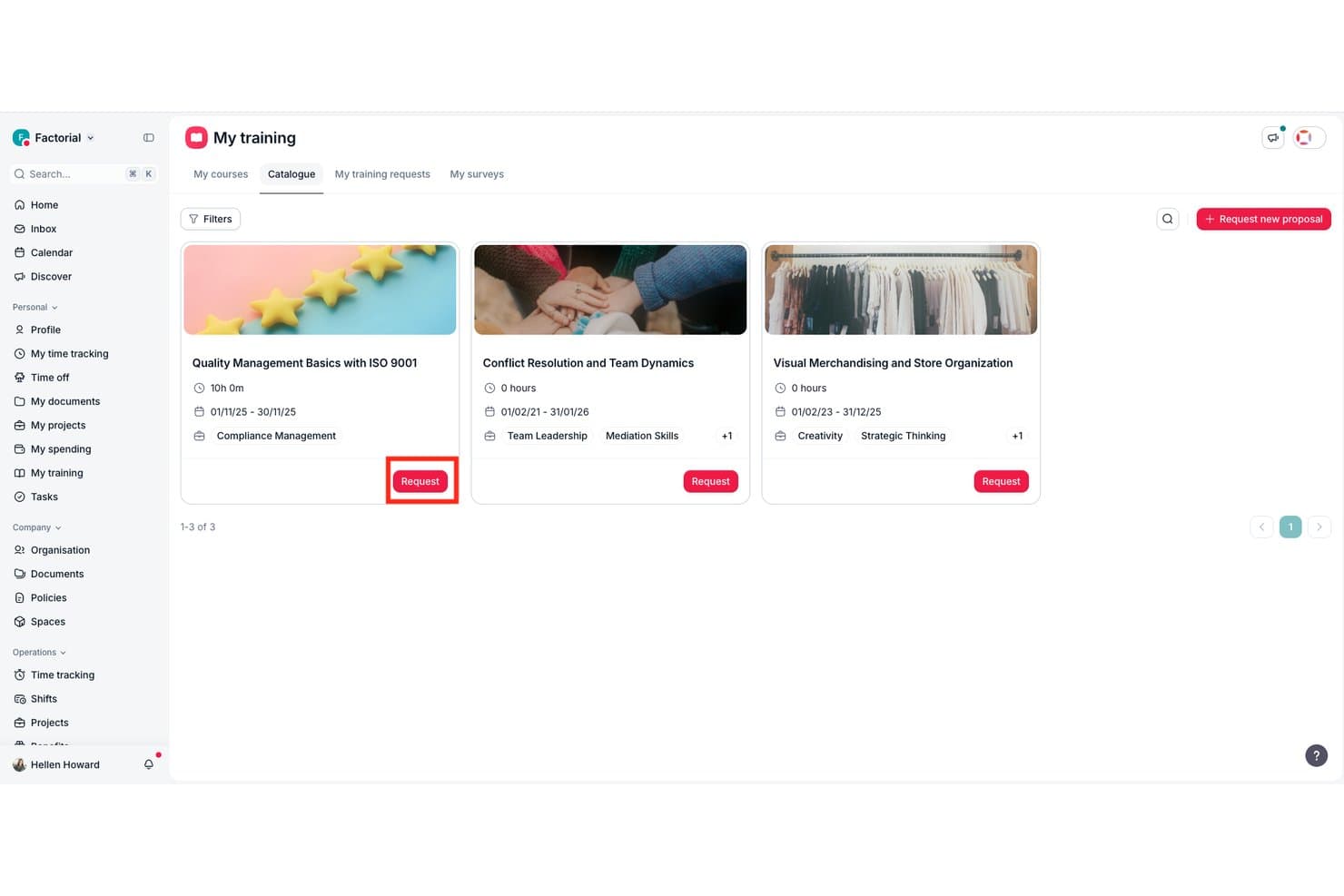
Factorial lets users browse and request courses from a training catalogue. Factorial is an HR platform with a built-in training module that lets you build courses, import SCORM content, track learner progress, run knowledge tests, and manage training catalogs alongside your core HR workflows.
Who Is Factorial Best For?
Factorial suits HR teams at small and mid-sized businesses that want to manage employee training alongside performance reviews, onboarding, and records in one place.
Why I Picked Factorial
I picked Factorial as one of the best because it's the only tool on this list that connects training directly to performance reviews, so a course on leadership skills can sit right alongside a 360-degree review and a competency-tracking profile for the same employee. I love that you can build courses with text, images, and video, set knowledge tests with custom passing scores, and auto-issue certificates on completion, all without leaving the HR platform your team already uses for onboarding and records.
Factorial Key Features
- SCORM import: Upload SCORM 1.2 and SCORM 2004 packages as
.zipfiles to add externally authored content to your training catalog. - LMS connectivity logs: Monitor course interactions at the individual level, including when employees start and finish a course.
- Training Insights dashboard: View training KPIs alongside financial and executive reporting areas in a centralized analytics dashboard.
- Course expiration reminders: Flag mandatory courses approaching their renewal date so administrators can act before certifications lapse.
Factorial Integrations
Factorial has marketplace integrations with Okta, LinkedIn, Recruitee, Slack, and Microsoft Power BI. It also offers a public REST API, webhooks, API keys, OAuth 2.0, SDKs, and Zapier for custom connectivity.
Pros and Cons
Pros:
- Progress logs and exports track completions
- SCORM imports support reusable course libraries
- Training links directly to performance reviews
Cons:
- Quiz depth and renewal workflows are basic
- Interactive course authoring remains limited
 Best for rapid online training setup
- Free plan + free demo available
- From $119/month (billed annually)
Visit WebsiteCustomer Rating:4.6/5
TalentLMS’ course library view highlights recent activity, curated collections, and language options for quick course selection. If you’re looking for online training software that helps your team learn without slowing you down, TalentLMS meets you where you are—whether you're building courses from scratch or rolling out training across multiple groups. You get a platform that keeps setup simple, gives you control over content, and adapts to different training styles, from self-paced modules to blended sessions. It’s built to take the weight off your plate so your people can grow without creating more operational drag.
Why I Picked TalentLMS
I picked TalentLMS because it lets you launch online training programs quickly while still supporting the complexity growing teams face. You can upload your own materials, build new content with AI, or pull from a large ready-made course library, which makes it easy to cover evolving training needs without stalling. Its automations—like enrolments, reminders, and reassignments—remove a lot of repetitive admin work so you can keep training consistent over time. And features like skills mapping and detailed reporting help you understand what your workforce knows, where gaps exist, and how training contributes to actual development.
TalentLMS Key Features
In addition to its flexible content creation and automation tools, TalentLMS includes several features that support a complete online training experience:
- Gamification: Adds points, badges, and leaderboards to keep learners motivated and involved.
- Learning Paths: Lets you guide learners step-by-step through structured skill-building sequences.
- Branches: Creates separate portals for different teams or regions while still managing everything from one platform.
- Blended Learning: Combines self-paced and instructor-led training.
TalentLMS Integrations
Integrations include Salesforce, Shopify, WordPress, BambooHR, ADP Workforce Now, Zoom, Microsoft Teams, GoTo, BigBlueButton, and Stripe.
Pros and Cons
Pros:
- Built-in assessments support skills measurement and certification.
- AI tools speed up course creation for fast-changing training needs.
- Clear learner grouping features support complex training structures.
Cons:
- Large multimedia files may require external hosting solutions.
- Built-in collaboration tools are basic compared with dedicated learning communities.
Learn more about TalentLMS: Best for an intuitive user experience and quality customer support
- 14-day free trial + demo available
- Pricing upon request
Visit WebsiteCustomer Rating:4.7/5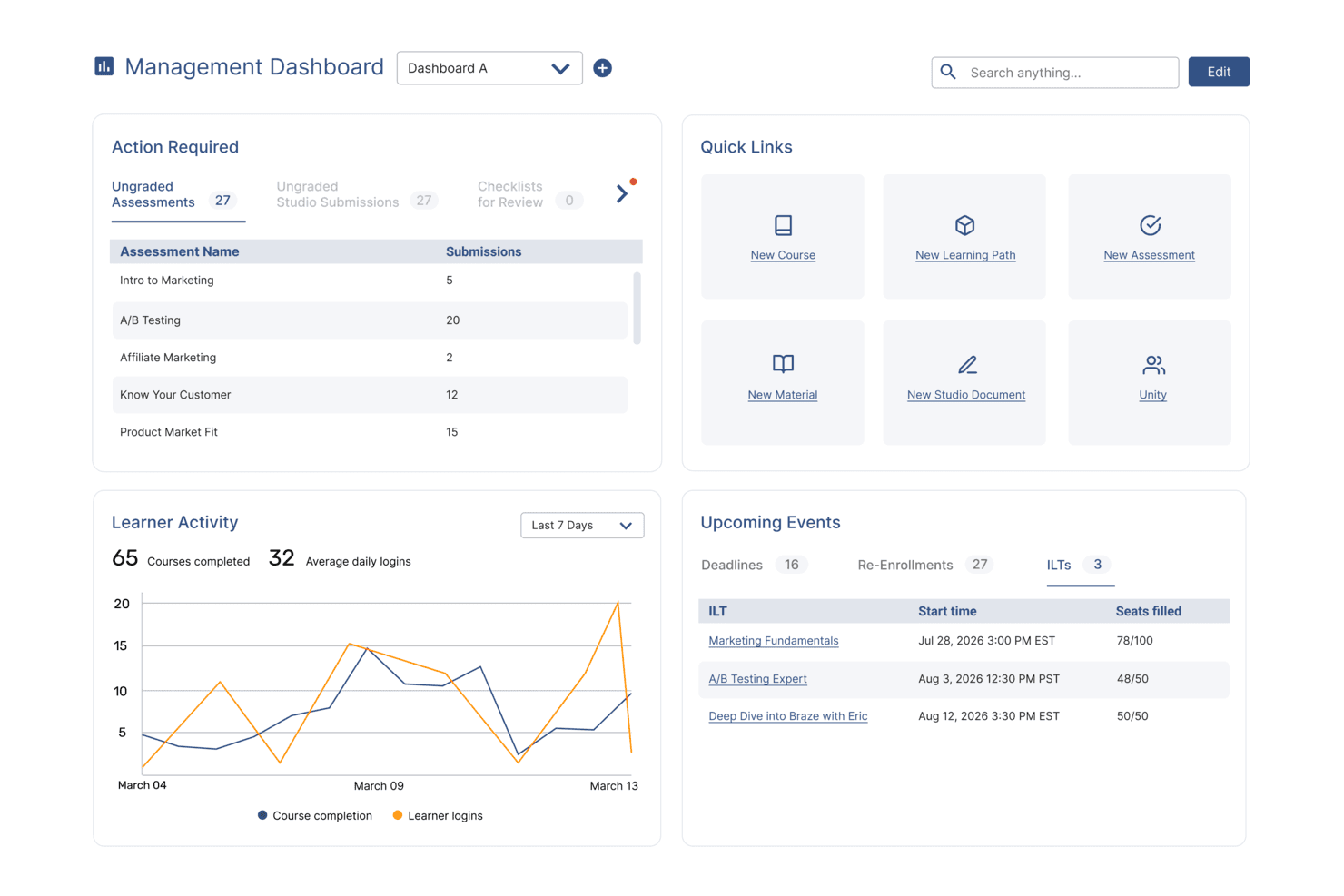
SkyPrep's management dashboard displays learner activity, upcoming events, and quick links. SkyPrep is an intuitive and easy-to-use online training platform that simplifies the process of creating, managing, and delivering training programs. With its user-friendly interface and robust features, SkyPrep empowers organizations to efficiently train their employees and track their progress.
Why I picked SkyPrep: the platform excels as an online training tool due to its exceptional ability to automate various online training processes. By streamlining administrative tasks such as course creation, enrollment management, and progress tracking, users can free up valuable time and resources for their organizations. Its automated features, including self-enrollment options, automated notifications, and customizable workflows, ensure a seamless training experience. And automated reporting and analytics provide insightful data on learner performance, enabling organizations to make data-driven decisions and continually improve their training programs.
SkyPrep Standout Features and Integrations
Features include an intuitive course builder that empowers users to create engaging training content without the need for technical expertise. The drag-and-drop interface, multimedia support, and customizable assessments enable organizations to design interactive courses tailored to their specific needs.
Users can also take advantage of SkyPrep's partnership with OpenSesame for access to thousands of pre-built courses across various industry verticals and topics.
Integrations include Okta, SAML, onelogin, Stripe, PayPal, Shopify, ADP, Workday, Salesforce, HubSpot, Zoom, GoTo, Webex, G Suite, Office 365, Twilio, iorad, UKG, and more.
Pros and Cons
Pros:
- Branding personalization
- Customizable workflow automations
- User-friendly interface
Cons:
- Pricing structure may not work for all org sizes
- Minimal advanced reporting functionality
Learn more about SkyPrep: Best online training software with a PowerPoint plugin
- Free trial available
- From $970/author (billed annually)
Visit WebsiteCustomer Rating:4.6/5
You can create courses straight from PowerPoint using iSpring Suite. iSpring has specialized in creating eLearning software for over two decades now. The iSpring Suite features an amazing PowerPoint plugin that allows you to create courses from PPT presentations.
Why I picked iSpring Suite: I’m enthralled by the idea of creating employee training courses straight out of Microsoft PowerPoint. iSpring Suite has an extensive eLearning authoring toolkit with features like slide courses, smart quizzes, and interactive pages.
Furthermore, iSpring Suite also helps you build interactive assessments with drag-and-drops, flexible scoring, and other customizable testing logic.
iSpring Suite Standout Features and Integrations:
Standout features include a useful PPT to SCORM conversion feature that allows you to export powerpoint presentations into online courses. Additionally, the eLearning interactions help boost engagement through highly interactive templates.
Integration details are currently not available.
Pros and Cons
Pros:
- Great customer service
- Role-play simulations
- Versatile HTML5 publishing
Cons:
- Slightly steep learning curve
- Limited collaboration features
Learn more about iSpring Suite : Best for creating mobile training courses
- Free plan + 14-day free trial available
- Pricing upon request
Visit WebsiteCustomer Rating:4.6/5
Your employees can take courses on their mobile devices, while you can login to Connecteam’s dashboard to view learning analytics. Connecteam targets businesses with deskless teams. They have over 500K daily active users spread across 79+ countries worldwide. Additionally, Connecteam has a great mobile app that helps employees upskill on the go.
Why I picked Connecteam: I love taking courses on my mobile - whether on the tram or during a run. Connecteam’s mobile application effectively enables employees to acquire critical skills, while away from their desktops. The mobile app also serves as a knowledge repository for your employees to access corporate documents too.
You can quickly create various courses and design customized course flows. Furthermore, Connecteam also enables you to oversee each employee’s learning progress and proactively reach out to them if they encounter any roadblocks.
Connecteam Standout Features and Integrations:
Standout features include micro training units that split large training modules into small chunks to improve online learning efficiency. The compliance module is comprehensive with easy content revisions and a mandatory training record.
Integrations include Paychex, Xero, Gusto, QuickBooks Payroll (online + desktop), Zapier, Google Calendar, API access, and others.
Pros and Cons
Pros:
- Robust time tracking features
- All-in-one employee management
- Certification tracking
Cons:
- Occasional application lags
- Limited admin customization features
Learn more about Connecteam: Best for automated learning paths
- Free demo available
- Pricing upon request

Track learner milestones, automate course assignments, and review real-time engagement metrics with EducateMe. EducateMe LMS is an innovative online training platform that caters to organizations looking to scale their internal knowledge sharing. This AI-powered solution appeals to corporations, academies, and training agencies by offering tools for efficient content creation and management. It addresses training challenges by providing scalable solutions for employee onboarding, compliance training, and more.
Why I Picked EducateMe LMS
I picked EducateMe LMS for its unique AI-driven approach to online training. It allows you to build automated logic into your training paths, ensuring that as your team scales smoothly, the quality of education remains consistent without manual intervention. It’s particularly effective for technical teams that need to stay updated on rapidly changing product features or internal SOPs. Plus, its analytics feature provides real-time insights into learner engagement, allowing you to continually improve your training programs.
EducateMe LMS Key Features
In addition to its AI capabilities, EducateMe LMS offers a range of features that enhance its functionality as an online training software.
- Content Creation Tools: These tools enable your team to design interactive and engaging learning materials tailored to your organization's needs.
- White-Label Options: You can customize the platform to align with your brand identity, offering a smooth experience for your learners.
- Real-Time Reporting: This feature provides insights into learner engagement and course effectiveness, helping you make data-driven decisions.
- CRM Integrations: These integrations streamline administrative tasks, allowing you to manage your training programs more efficiently.
EducateMe LMS Integrations
Integrations include Google Workspace, Slack, Zoom, Salesforce, Figma, Calendly, and more. An API is available for custom integrations.
Pros and Cons
Pros:
- Highly scalable automation features
- Integrates well with popular CRM tools
- Supports diverse learning formats
Cons:
- Limited offline functionality
- No built-in video recording tool
Learn more about EducateMe LMS:
Diğer Çevrim İçi Eğitim Yazılımları
İşte listeme girmeyen ancak kesinlikle göz atmaya değer birkaç çevrim içi eğitim aracı daha:
- 11ContinuBest for enterprise-grade data security
- 12TeachFloorBest for cohort-based training and peer learning
- 13LearnUponBest for creating custom learning portals
- 14GuiddeBest for AI-powered video training
- 15CoassembleBest for creating impactful training campaigns
- 16WeSchoolBest for simplifying corporate training
- 17eloomiBest online training software with an intuitive course builder
- 18MedTrainerBest for healthcare compliance training
- 19BridgeBest for built-in training analytics
- 20GuruBest for AI-driven enterprise knowledge
- 21WhaleBest for employee onboarding training
- 22CompassBest for interactive training walkthroughs
- 23PitchMonsterBest for accelerating new sales rep onboarding
- 24TraineazeBest for motivating employees via skill upgrades
- 25SafetyAmpBest for delivering safety learning courses
- 26ExecBest for AI-powered conversation roleplays
- 27Synergy LearningBest for customized LMS development
- 28Adobe Learning ManagerBest online training software with a multi-tenant architecture
- 29TrainualBest for transforming SOPs into training manuals
- 30Mitratech PerformBest online training software with auto-enrollment features
How I Evaluate Online Training Software
I evaluate online training software in two layers: the baseline—things like SCORM delivery, enrollment management, and completion tracking—and differentiators like AI authoring or HRIS integrations.
Core Functionality (Table Stakes For This List)
When I'm selecting tools for my list, I rank each one on a scale from 0 (does not offer the functionality) to 5 (excels in this area) for each core functionality listed below. Then, I calculate the tool's total score as a percentage. Each tool needs to achieve a minimum total score of 65% to be considered for inclusion.
- Course Authoring Tools: I look for built-in content creation that supports multiple formats, including video, SCORM packages, and interactive quizzes, so your team can build courses without third-party tools.
- Content Delivery & LMS Portal: Each tool should offer a centralized, organized learning portal where employees can browse, enroll in, and complete courses from any device.
- Learner Management & Enrollment: I evaluate how the platform handles user grouping, role assignments, and learning paths—for example, auto-enrolling new hires into an onboarding track by department.
- Assessments & Certification Issuance: Strong platforms let you build knowledge checks with varied question types and automatically issue certificates, which is especially useful for recurring compliance training.
- Progress Tracking & Reporting: I check whether dashboards surface completion rates, scores, and overdue assignments clearly enough for an L&D manager to flag gaps at a glance.
- HR System Integrations: The platform should connect with your existing HRIS or HCM so employee data syncs automatically, eliminating duplicate data entry when someone joins, moves teams, or exits.
Once I have a list of tools that meet the criteria, I consider what sets each platform apart.
Differentiating Factors (What Sets Vendors Apart)
Here's how I compare and contrast different vendors:
Standout Features
AI-powered course creation is a major differentiator. Platforms that generate draft lessons from uploaded documents save L&D teams hours of manual work. Pre-built content libraries also matter—ready-made courses on compliance or soft skills let you deploy training on day one instead of building from scratch. I evaluate skills and competency mapping too, which ties course completions to career paths and gives talent leaders clear visibility into workforce development gaps.
Beyond Features
Pricing structure matters a lot here. Per-seat pricing can balloon fast for organizations with seasonal or frontline workers, so I check whether platforms offer active-user billing or flat-rate tiers instead. Learner accessibility is another priority—I look for multi-language support and WCAG compliance, especially for global teams onboarding across regions. I also evaluate compliance readiness, including SOC 2 certification and audit trail capabilities, since many HR teams need to prove training completion during regulatory reviews.
Çevrim İçi Eğitim Yazılımı Nasıl Seçilir?
Uzun özellik listeleri ve karmaşık fiyatlandırma yapıları arasında kaybolmak kolaydır. Kendinize özgü yazılım seçimi sürecinizde ilerlerken odağınızı korumanıza yardımcı olmak için göz önünde bulundurmanız gereken faktörleri içeren bir kontrol listesi hazırladım:
| Faktör | Nelere Dikkat Edilmeli? |
|---|---|
| FaktörÖlçeklenebilirlik | Nelere Dikkat Edilmeli?Yazılım ekibinizle birlikte büyüyebilir mi? Ek maliyet veya karmaşıklık olmadan ek kullanıcıları, kursları ve içerikleri destekleyip desteklemediğini kontrol edin. |
| FaktörEntegrasyonlar | Nelere Dikkat Edilmeli?Mevcut araçlarınıza bağlanabiliyor mu? İK sistemleri, iletişim araçları ve ekibinizin kullandığı diğer platformlarla sorunsuz bir şekilde entegre olduğundan emin olun. |
| FaktörÖzelleştirilebilirlik | Nelere Dikkat Edilmeli?İhtiyaçlarınıza göre uyarlayabilir misiniz? Kurumsal yapınıza uyacak şekilde marka görünümünü, öğrenme yollarını ve kullanıcı rollerini özelleştirme seçeneklerini arayın. |
| FaktörKullanım kolaylığı | Nelere Dikkat Edilmeli?Ekibiniz için kullanımı sezgisel mi? Kapsamlı bir eğitim ihtiyacını azaltmak için arayüzü test ederek anlaşılır olduğundan emin olun. |
| FaktörUygulama ve işe alıştırma | Nelere Dikkat Edilmeli?Başlamak ne kadar sürer? Uzun gecikmeleri önlemek için gereken eğitim veya veri aktarımı da dâhil olmak üzere kurulum sürecini değerlendirin. |
| FaktörMaliyet | Nelere Dikkat Edilmeli?Bütçenize uygun mu? Fiyatlandırma planlarını, gizli ücretleri ve sunulan değeri karşılaştırın. Karar vermeden önce test etmek için ücretsiz denemeler sunan seçenekleri arayın. |
| FaktörGüvenlik önlemleri | Nelere Dikkat Edilmeli?Verileriniz korunuyor mu? Hassas bilgileri güvence altına almak için veri şifrelemesini, düzenlemelere uyumu ve erişim kontrollerini doğrulayın. |
| FaktörDestek erişilebilirliği | Nelere Dikkat Edilmeli?İhtiyaç duyduğunuzda yardım alabilecek misiniz? 7/24 desteği, yanıt sürelerini ve bilgi tabanları ile topluluk forumları gibi mevcut kaynakları kontrol edin. |
Çevrim İçi Eğitim Yazılımı Nedir?
Çevrim içi eğitim yazılımı, eğitim içeriklerini ve eğitim programlarını internet üzerinden sunmak için kullanılan dijital bir platformdur. İK yöneticileri, kurumsal eğitmenler ve eğitimciler gibi profesyoneller, öğrenme verimliliğini ve katılımını artırmak için bu araçları kullanır. Kurs sunumu, ilerleme takibi ve multimedya desteği gibi özellikler, yapılandırılmış ve etkileşimli öğrenme deneyimleri sağlamaya yardımcı olur. Genel olarak bu araçlar, eğitimi hem kuruluşlar hem de öğrenenler için daha erişilebilir ve esnek hâle getirir.
Özellikler
Çevrim içi eğitim yazılımı seçerken aşağıdaki temel özelliklere dikkat edin:
- Kurs sunumu: Eğitim içeriklerini öğrenenlere dağıtmak için bir platform sağlar ve eğitimi her yerden erişilebilir hâle getirir.
- İlerleme takibi: Öğrenenlerin kurslardaki ilerlemesini izleyerek eğitmenlerin ek desteğe kimin ihtiyaç duyduğunu belirlemesine yardımcı olur.
- Multimedya desteği: Öğrenme deneyimini geliştirmek için video, ses ve etkileşimli öğelerin entegrasyonuna olanak tanır.
- Özelleştirilebilir öğrenme yolları: Kullanıcıların eğitim programlarını bireysel veya kurumsal ihtiyaçlara uyacak şekilde düzenlemesine olanak tanıyarak ilgili içeriklerin sunulmasını sağlar.
- Entegrasyon olanakları: İş akışlarını ve veri paylaşımını kolaylaştırmak için mevcut İK ve iletişim araçlarına bağlanır.
- Sertifikalandırma ve uyumluluk: Sertifika düzenlemek ve sektör standartlarına uyumluluğu takip etmek için araçlar sunar.
- Mobil erişilebilirlik: Öğrenenlerin eğitim materyallerine çeşitli cihazlardan erişebilmesini sağlayarak öğrenmede esneklik sunar.
- Analizler ve raporlama: Öğrenen performansı ve kurs etkinliği hakkında içgörüler sağlayarak karar alma süreçlerine yardımcı olur.
- Kullanıcı dostu arayüz: Hem yöneticiler hem de öğrenenler için kolay gezinme sağlayarak kapsamlı eğitim ihtiyacını azaltır.
- Güvenlik önlemleri: Şifreleme ve erişim denetimleriyle hassas verileri koruyarak düzenlemelere uyumluluğu sağlar.
Avantajlar
Çevrim içi eğitim yazılımını uygulamak, ekibiniz ve işletmeniz için çeşitli avantajlar sağlar. Yararlanabileceğiniz avantajlardan bazıları şunlardır:
- Artan erişilebilirlik: Öğrenenlerin eğitim materyallerine her yerden erişmesini sağlayarak öğrenmeyi yoğun programlara dâhil etmeyi kolaylaştırır.
- Gelişmiş katılım: Etkileşimli multimedya içeriği, eğitim süreci boyunca öğrenenlerin ilgisini ve motivasyonunu korur.
- Maliyet tasarrufu: Fiziksel eğitim alanlarına ve materyallerine duyulan ihtiyacı azaltarak genel giderlerden tasarruf sağlar.
- Ölçeklenebilirlik: Önemli ek maliyetler oluşturmadan daha fazla kullanıcı ve içeriği destekleyerek büyüyen ekiplerin ihtiyaçlarını karşılar.
- Kişiselleştirilmiş öğrenme: Özelleştirilebilir öğrenme yolları, eğitimin her öğrenenin rolü ve ihtiyaçlarıyla ilgili olmasını sağlar.
- Verimli takip: İlerleme takibi ve analizler, öğrenen performansı hakkında içgörüler sağlayarak iyileştirilmesi gereken alanların belirlenmesine yardımcı olur.
- Gelişmiş uyumluluk: Sertifikalandırma ve uyumluluk özellikleri, ekibinizin sektör standartlarını ve düzenlemelerini karşılamasını sağlar.
Maliyetler & Fiyatlandırma
Çevrim içi eğitim yazılımı seçmek, mevcut çeşitli fiyatlandırma modellerinin ve planların anlaşılmasını gerektirir. Maliyetler; özelliklere, ekip büyüklüğüne, eklentilere ve daha fazlasına göre değişir. Aşağıdaki tablo, çevrim içi eğitim yazılımı çözümlerinde yaygın planları, ortalama fiyatlarını ve genellikle sunulan özellikleri özetlemektedir:
Çevrim İçi Eğitim Yazılımı İçin Plan Karşılaştırma Tablosu
| Plan Türü | Ortalama Fiyat | Yaygın Özellikler |
|---|---|---|
| Plan TürüÜcretsiz Plan | Ortalama Fiyat$0 | Yaygın ÖzelliklerTemel kurs sunumu, sınırlı kullanıcı erişimi ve temel analizler. |
| Plan TürüBireysel Plan | Ortalama Fiyat$5-$25/kullanıcı/ay | Yaygın ÖzelliklerKurs sunumu, multimedya desteği ve ilerleme takibi. |
| Plan Türüİşletme Planı | Ortalama Fiyat$25-$50/kullanıcı/ay | Yaygın ÖzelliklerÖzelleştirilebilir öğrenme yolları, entegrasyonlar ve mobil erişilebilirlik. |
| Plan TürüKurumsal Plan | Ortalama Fiyat$50-$100+/kullanıcı/ay | Yaygın ÖzelliklerGelişmiş analizler, özel destek ve kapsamlı uyumluluk araçları. |
Çevrimiçi Eğitim Yazılımı SSS
Çevrimiçi eğitim yazılımı hakkında sorularınız mı var? Daha fazla bilgi edinmek için bu SSS’lere göz atın:
Eğitim yazılımı ile öğrenme yönetim sistemi arasındaki fark nedir?
Eğitim yazılımı, öncelikle içerik oluşturma, sunma ve izleme süreçlerine odaklanarak belirli eğitim programlarının sunulmasına yöneliktir.
Bir LMS (öğrenme yönetim sistemi), çalışanları yönetmeye, kaydetmeye, test etmeye ve değerlendirmeye yardımcı olan kapsamlı bir platformdur. LMS için ilginç bir benzetme hareketli bir havaalanı terminaliyken, çevrimiçi eğitim yazılımı bir uçak taşıyıcısıdır.
Çevrimiçi eğitim yazılımındaki kursları özelleştirebilir miyim?
Evet, çoğu çevrimiçi eğitim yazılımı, kursları ihtiyaçlarınıza uyacak şekilde özelleştirmenize olanak tanır. Genellikle öğrenme yollarını ayarlayabilir, multimedya ögeleri ekleyebilir ve arayüzü kuruluşunuzun renkleri ve logolarıyla markalayabilirsiniz. Bu esneklik, ekibinizde karşılık bulan ve özel eğitim hedeflerinizi karşılayan bir öğrenme deneyimi oluşturmanıza yardımcı olur.
Çevrimiçi eğitim yazılımı güvenli mi?
Evet, saygın çevrimiçi eğitim yazılımı sağlayıcıları verilerinizi korumak için güvenlik önlemleri uygular. Veri şifreleme, erişim denetimleri ve sektör düzenlemelerine uygunluk gibi özellikleri arayın. Bilgilerinizin güvende kalmasını sağlamak için sağlayıcının güvenlik protokollerini mutlaka inceleyin ve güvenlik özelliklerinin tanıtılmasını istemeyi düşünün.
Çevrimiçi eğitim yazılımını kullanmak için teknik becerilere ihtiyacım var mı?
Hayır, çoğu çevrimiçi eğitim yazılımını kullanmak için ileri düzey teknik becerilere ihtiyacınız yoktur. Bu platformlar, sezgisel arayüzler ve kolay gezinme özellikleriyle kullanıcı dostu olacak şekilde tasarlanmıştır. Bununla birlikte, temel bilgisayar becerilerine sahip olmak daha hızlı başlamanıza yardımcı olur. Birçok sağlayıcı, kurslarınızı etkili bir şekilde kurmanıza ve yönetmenize yardımcı olmak için eğitimler ve destek sunar.