

Çalışan eğitimlerini yönetmek baş ağrıtıcı olabilir. Programları düzenliyor, ilerlemeyi takip ediyor ve yatırım getirisini kanıtlamaya çalışıyorsunuz. Size yardımcı olacak bir yazılım aramanız şaşırtıcı değil.
Deneyimlerime göre, doğru eğitim yönetimi yazılımı büyük bir fark yaratabilir. Ekibinizi düzenli tutar ve herkesin aynı bilgiler doğrultusunda ilerlemesini sağlar. Zamandan tasarruf eder ve stresi azaltırsınız.
En iyi seçenekleri sunabilmek için sayısız aracı inceledim ve test ettim. Bu makale, öne çıkan seçenekleri temel özelliklerini ve avantajlarını açıklayarak değerlendirmenize yardımcı olacak. Ekibinizin ihtiyaçlarına uygun bir çözüm bulacaksınız.
Why Trust Our Software Recommendations
6,700+
Reviews
20
Industry experts
16+
Evaluation factors
14
Years
Our team has been testing and reviewing software since 2012. As HR experts ourselves, we know how difficult—and important—it is to choose the right software.
For this guide, we evaluated tools using hands-on testing and independent research, scoring tools using our selection criteria. We also draw on insights from industry thought leaders and practicing HR experts.
Our reviews reflect our human editorial judgment, not a sales pitch.
Expert reviewers:
- Phil GrayCOO
 Kim BehnkeHR Tech Editor & Analyst
 Josh BarkerPeople Ops Manager

Eğitim Yönetimi Yazılımları Karşılaştırma Tablosu
Aşağıdaki tablo, en iyi eğitim yönetimi yazılımı seçimlerimin fiyatlandırma ayrıntılarını karşılaştırır.
Sorted by: Default
| Tool | Starting Price | Website | |
|---|---|---|---|
Best training management software with AI-powered capabilities | 4.8 out of 5 | $5/user/month Free demo available | Website |
Best for AI roleplay coaching | Not rated | Pricing upon request Free demo available | Website |
Best for user and administrator experience | 4.6 out of 5 | $3.97/user/month Free trial available | Book Demo |
Best training management software for internal training | 4.6 out of 5 | Pricing upon request Free trial available | Website |
Best as AI for business | 4.4 out of 5 | $8/user/month Free trial + Free demo available | Website |
Best for role-based training assignments | 4.6 out of 5 | $119/month Free plan + free demo available | Book Demo |
Best for new process/new systems training | 4.7 out of 5 | Pricing upon request 14-day free trial + demo available | Website |
Best for automated course scheduling | 4.5 out of 5 | $118/user/month Free trial available | Website |
Best for building onboarding programs and learning paths | 4.3 out of 5 | Pricing upon request Free demo available | Website |
Best with multilingual course delivery | 4.7 out of 5 | Pricing upon request Free demo available | Website |


En İyi Eğitim Yönetimi Yazılımları İncelemeleri
Kısa listeme giren en iyi eğitim yönetimi yazılımlarına ilişkin ayrıntılı özetlerimi aşağıda bulabilirsiniz. İncelemelerim, ihtiyaçlarınıza en uygun aracı bulmanıza yardımcı olmak için her aracın temel özelliklerine, artılarına \u0026 eksilerine, entegrasyonlarına ve ideal kullanım alanlarına ayrıntılı bir bakış sunuyor.
 Best training management software with AI-powered capabilities
- Free demo available
- From $5/user/month
Visit WebsiteCustomer Rating:4.8/5
Deel offers an all-in-one solution for managing training courses, performance, and career development. Deel HR helps global HR teams and people leaders manage employee training, compliance, and skill development in one platform, making it easier to upskill distributed workforces and track progress across multiple locations.
Who Is Deel HR Best For?
Deel HR is a strong fit for HR teams at mid-size to enterprise companies managing training and development across international or remote workforces.
Why I Picked Deel HR
I've included Deel HR in my top picks because its AI capabilities go well beyond basic automation—they're woven directly into the training and talent management workflow. I particularly like how Deel AI can draft competency libraries, training content, and feedback in minutes, pulling from a knowledge base built by HR and compliance experts across 150+ countries. That's a real advantage when you're building learning programs for a distributed team and don't want to start from scratch every time. The Engage module also connects learning directly to performance reviews, career development plans, and OKRs, so training isn't siloed from the rest of your people strategy.
Deel HR Key Features
- Learning path assignment: Assign structured training paths to employees based on role, location, or department.
- Compliance training tracking: Monitor completion of mandatory compliance courses and certifications across your workforce.
- Employee self-service portal: Let employees access training materials, track their own progress, and update their profiles independently.
- People analytics dashboard: View workforce training data, skill gaps, and development trends in one centralized reporting view.
Deel HR Integrations
Integrations include FaceUp, Snowflake, DefensX, Microsoft Finance, Kintsugi, ReFresh OS, Revo.ai, Keeper, Human Interest, and Everyminute.
Pros and Cons
Pros:
- Intuitive drag-and-drop interface
- Automates training workflows
- Seamless integration with Deel HR
Cons:
- Could offer more customization options
- Learning curve for new users


EducateMe LMS provides analytics to track learner progress and performance. EducateMe LMS is a training management platform for organizations and educators that deliver interactive, skill-focused learning experiences and track employee or learner progress in real time.
Who Is EducateMe LMS Best For?
EducateMe LMS is a good fit for L&D teams and training managers at mid-sized companies who need a structured, scalable way to build and deliver skill-based learning programs.
Why I Picked EducateMe LMS
EducateMe LMS earns its spot on my shortlist because of how well its AI roleplay coach handles the kind of practice scenarios that traditional LMS platforms just can't replicate. I like that you can generate a full roleplay scenario from a single prompt—whether that's a sales objection conversation, a difficult manager-employee discussion, or a job interview prep session. The AI coach stays on-topic using configurable guardrails and branching logic, so learners aren't just going through the motions. The rubric-based feedback system gives learners consistent, specific input on their performance instead of the hit-or-miss feedback from human reviewers.
EducateMe LMS Key Features
- Learning paths: Build structured, step-by-step course sequences that guide learners through skill development in a set order.
- Program builder: Combine quizzes, flashcards, and assignments into a single interactive learning program using a block-based editor.
- Automation: Set up automatic reminders, enrollments, and course assignments to reduce manual admin work.
- Progress tracking and analytics: View detailed reports and scorecards on learner activity, course completions, and performance across training programs.
EducateMe LMS Integrations
Integrations include Notion, Loom, and Zoom, as well as a robust API for custom solutions.
Pros and Cons
Pros:
- API access and single sign-on
- Supports SCORM-compliant course content
- AI-powered roleplay coaching simulations
Cons:
- Advanced setup may require support
- Minimum user requirement for pricing
Learn more about EducateMe LMS: Best for user and administrator experience
- Free trial available
- From $3.97/user/month (billed annually)
Visit WebsiteCustomer Rating:4.6/5
iSpring LMS shows courses and progress on desktop and mobile. iSpring LMS is a cloud-based training management platform for organizations that want to build employee skills with interactive courses, automated learning paths, and real-time progress tracking.
Who Is iSpring LMS Best For?
iSpring LMS is a great fit for mid-sized businesses and enterprises that need a straightforward platform for delivering and managing employee skill-building programs at scale.
Why I Picked iSpring LMS
iSpring LMS earns its spot on my shortlist because of how well it balances the learner and admin experience without sacrificing depth. I really like the admin dashboard—it gives you a clear view of course completion rates, individual learner progress, and department-level performance all in one place. On the learner side, the mobile app lets team members pick up training mid-course on any device, which keeps skill-building moving even outside the office. The automated enrollment rules are another feature I rely on, letting me assign specific learning paths based on job role or department without manual setup each time.
iSpring LMS Key Features
- Individual development plans: Build personalized, role-specific skill development plans that assign targeted tasks and milestones to each employee.
- 360-degree review: Collect structured performance feedback from peers, managers, and direct reports to assess employee competencies and identify skill gaps.
- Gamification: Award points and badges and display learner progress on leaderboards to encourage course completion and skill-building engagement.
- AI-powered course authoring: Generate course text, quiz questions, and images using a built-in AI assistant directly inside the LMS.
iSpring LMS Integrations
Integrations include Salesforce, MS Azure, MS Exchange, BambooHR, Udemy, Go1, LinkedIn Learning, and other popular course libraries.
Pros and Cons
Pros:
- Features a knowledge base
- Easy to create onboarding workflows
- Works on mobile devices both online and offline
Cons:
- More software integrations would be welcomed
- Convoluted pricing rubric (many add-on options)
Learn more about iSpring LMS: Best training management software for internal training
- Free trial available
- Pricing upon request
Visit WebsiteCustomer Rating:4.6/5
Absorb’s administrative panel helps L&D managers keep track of their team’s learning progress, course completions, and competencies. Absorb is a learning management platform built for organizations that want to deliver, track, and manage skill-building programs for employees, partners, or customers across industries.
Who Is Absorb Best For?
Absorb is a strong fit for mid-size to enterprise organizations with dedicated L&D teams managing structured internal training programs at scale.
Why I Picked Absorb
Absorb is one of the most complete platforms I've seen for managing internal training at scale. What I particularly like is Absorb Skills, which lets employees self-assess against 200 competencies and thousands of skills, then automatically assigns courses to close the gaps. That kind of role-based, goal-aligned learning path is exactly what internal L&D teams need when they're trying to move the needle on workforce capability. I also like the Intelligent Assist feature, which lets admins pull reports using plain-language prompts—so instead of digging through dashboards, you can type "show me all users who didn't complete leadership training" and receive a pre-populated report.
Absorb Key Features
- Course authoring tools: Build and publish training content directly in the platform using a built-in course creation suite.
- Automated enrollment: Assign courses to learners automatically based on role, department, or custom rules.
- Certification management: Issue, track, and renew certifications with automated expiry reminders.
- Mobile learning: Learners can access training content on any device, including offline access via the mobile app.
Absorb Integrations
Integrations include ADP, BambooHR, Namely, Workday, SAP SuccessFactors, UKG Pro, Dayforce, Salesforce, HubSpot, and Zoom.
Pros and Cons
Pros:
- Offline and online learning
- Great customization and localization options
- Responsive customer support
Cons:
- Search filters are not very specific
- System has a learning curve
Learn more about Absorb: Best as AI for business
- Free trial + Free demo available
- From $8/user/month
Visit WebsiteCustomer Rating:4.4/5
Factorial centralizes HR analytics into visual workforce reports. Factorial is an AI for business that brings HR, training, and people operations together—covering everything from learning schedules and course tracking to automated certificates and training insights reporting.
Who Is Factorial Best For?
Factorial suits HR teams at growing SMBs that want training, performance, and people operations managed in one AI-powered platform.
Why I Picked Factorial
I picked Factorial as one of the best because its AI for business positioning goes beyond typical HR software, actively assisting with day-to-day operations like planning learning schedules, generating training reports, and answering employee policy questions. I especially like how the Training Insights dashboard surfaces KPI-level data, including financial and executive metrics, so training managers can tie program outcomes to business results. Automatic enrollment rules and bulk certificate downloads reduce the manual lift that usually comes with managing training at scale.
Factorial Key Features
- Live session attendance tracking: Factorial automatically records participant attendance for live training sessions and stores transcripts, chat logs, and notes as an auditable record.
- Automatic enrollment rules: Set rule-based enrollment criteria to add employees to courses without manually managing rosters each time.
- LMS course builder: Build structured, interactive learning content directly within Factorial using a built-in course builder that supports knowledge tests and configurable completion criteria.
- Mobile training access: Employees can access training content and complete quizzes from Factorial's mobile app, without needing a desktop.
Factorial Integrations
Factorial offers native integrations with Google Workspace, Slack, Microsoft Azure, Okta, LinkedIn, and Recruitee. It also supports public API access, API keys, OAuth 2.0, webhooks, SDKs, and Zapier.
Pros and Cons
Pros:
- Automatic enrollment and completion rules track progress
- Skills and learning paths sit alongside HR records
- A reviewer praised stepwise new-hire training
Cons:
- Limited instructor and resource coordination
- Learners can't self-enroll in existing trainings
 Best for role-based training assignments
- Free plan + free demo available
- From $119/month (billed annually)
Visit WebsiteCustomer Rating:4.6/5
TalentLMS’ course library view highlights recent activity, curated collections, and language options for quick course selection. TalentLMS gives HR teams and training managers a flexible platform to build, deliver, and track skill-building programs for employees, partners, or customers, enabling HR to manage learning at scale across roles and departments.
Who Is TalentLMS Best For?
TalentLMS is a strong fit for mid-sized businesses that need to train multiple employee groups, such as sales teams, customer support staff, or new hires, within a single system.
Why I Picked TalentLMS
TalentLMS earns its spot on my shortlist because of how well it handles role-based training assignments at scale. I particularly like the Branches feature, which lets you create separate training portals for different teams or departments—so sales and customer support teams each have a learning environment built around their specific skill needs, all managed from one central admin view. The custom roles and permissions system lets you control exactly what each user type sees and does, keeping training focused and relevant. AI-powered skills mapping ties it together by automatically matching courses to skill gaps, so you don't have to determine training needs manually.
TalentLMS Key Features
- Gamification: Add points, badges, levels, and leaderboards to courses to drive learner motivation and engagement throughout training programs.
- Assessments and certifications: Build quizzes, surveys, and assignments to measure skill progress, and issue custom certificates that can be set to expire and renew.
- Automations: Trigger training actions automatically based on user behavior, such as course completions, inactivity, or certification expiration.
- TalentLibrary: Access a built-in library of 1,000+ expert-built courses that learners can use to build job-relevant skills right away.
TalentLMS Integrations
Integrations include BambooHR, Salesforce, TalentHR, Sage People, Intercom, ADP Workforce Now, Zendesk Chat, Zoom, Microsoft Teams, and GoTo.
Pros and Cons
Pros:
- Clear learner grouping features support complex training structures.
- AI tools speed up course creation for fast-changing training needs.
- Built-in assessments support skills measurement and certification.
Cons:
- Built-in collaboration tools are basic compared with dedicated learning communities.
- Large multimedia files may require external hosting solutions.
Learn more about TalentLMS: Best for new process/new systems training
- 14-day free trial + demo available
- Pricing upon request
Visit WebsiteCustomer Rating:4.7/5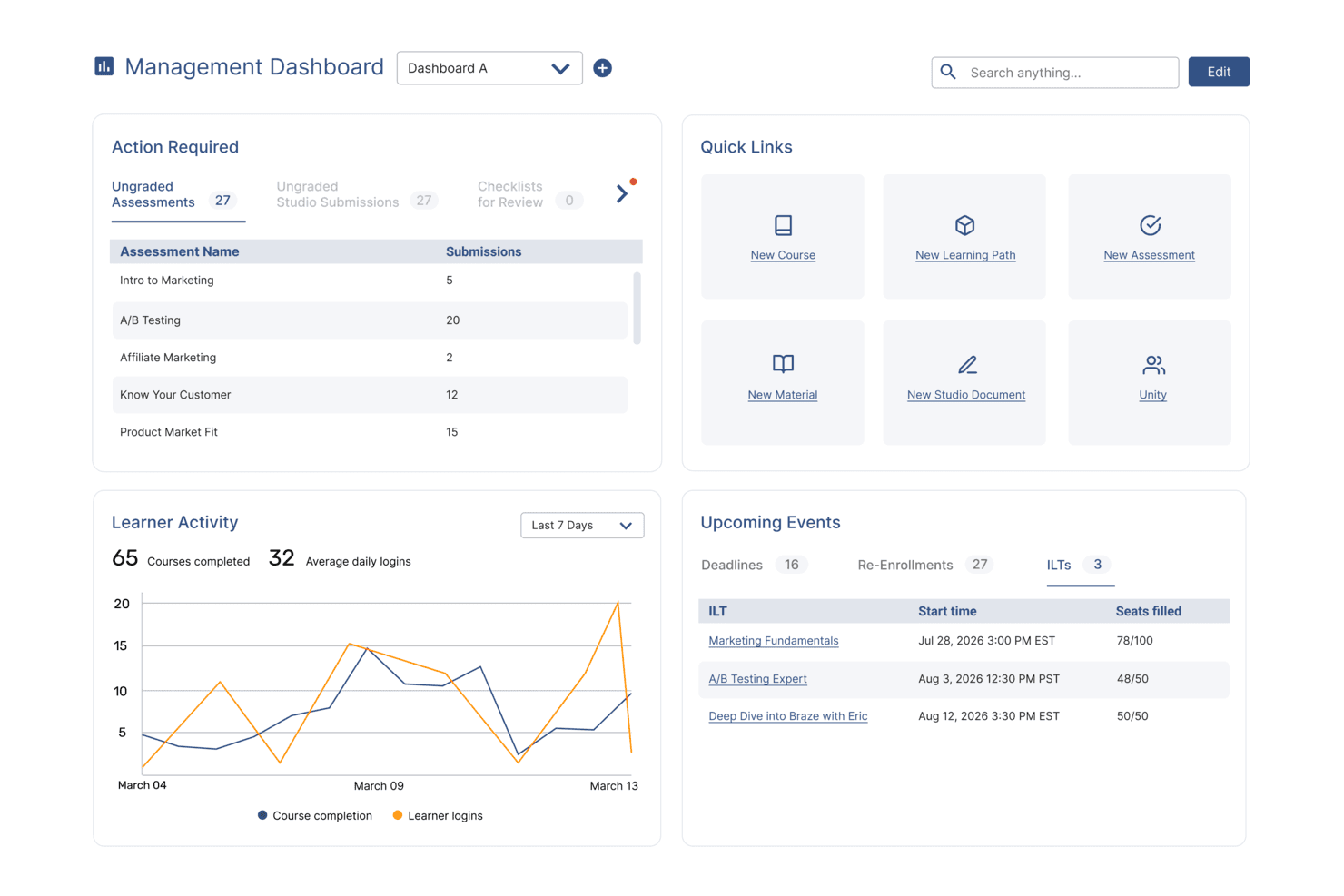
SkyPrep's management dashboard displays learner activity, upcoming events, and quick links. SkyPrep is a cloud-based training management platform built for HR teams and business leaders who need to deliver, track, and manage skill-building programs for employees adapting to new roles, tools, or processes.
Who Is SkyPrep Best For?
SkyPrep is a strong fit for mid-sized organizations that need a straightforward way to train employees across departments without relying on a dedicated L&D team.
Why I Picked SkyPrep
I picked SkyPrep as one of the best because it handles new process and systems training in a way that is purpose-built for operational change. I like how you can build structured learning paths that walk employees through a new tool or workflow step by step, with quizzes and assessments built in to confirm understanding before they move on. My team also uses the automated training assignments feature, which triggers the right course to the right employee the moment a role or process change is logged—no manual follow-up needed.
SkyPrep Key Features
- Gamification: Add points, badges, and leaderboards to courses to keep learners engaged throughout training programs.
- Reporting and analytics: Access out-of-the-box dashboards that track learner progress, course completion rates, and assessment scores.
- AI-powered content creation: Use SkyPrep's AI tools to generate and refine course content directly within the platform.
- Multi-tenant LMS: Run separate training portals for different departments, brands, or client groups from a single account.
SkyPrep Integrations
Integrations include ADP, Workday, BambooHR, Salesforce, HubSpot, Zoom, Microsoft Teams, Stripe, PayPal, and GoToMeeting.
Pros and Cons
Pros:
- Excellent course authoring tools
- Responsive customer support
- Easy to set up & learn
Cons:
- Automatic video captions locked to highest paid plan
- Pricing plans not publicly available
Learn more about SkyPrep: Best for automated course scheduling
- Free trial available
- From $118/user/month (billed annually)
Visit WebsiteCustomer Rating:4.5/5
Arlo gives you a centralized dashboard to manage training events, tasks, registrations, contacts, and orders all in one place. Arlo Training Management Software helps training providers, corporate L&D teams, and professional educators manage, deliver, and track instructor-led courses, organizing skill-building programs and streamlining the training process.
Who Is Arlo Training Management Software Best For?
Arlo is a strong fit for training providers and corporate L&D teams that run high volumes of instructor-led courses and need a dedicated platform to manage scheduling, registration, and learner communications.
Why I Picked Arlo Training Management Software
Arlo earns its spot on my shortlist because of how well it handles automated course scheduling for teams running multiple instructor-led programs at once. I like that you can set up recurring courses with predefined templates, so scheduling a new cohort doesn't mean rebuilding everything from scratch. Arlo also automates waitlist management and learner communications, sending enrollment confirmations and reminders without manual follow-up. This scheduling automation is useful when you're coordinating skill-building programs across different locations, trainers, and time zones.
Arlo Training Management Software Key Features
- Blended learning delivery: Package classroom sessions, live webinars, and elearning modules into a single multi-session course with unified scheduling and registration.
- Certification and license management: Approve and renew certifications and licenses across all training formats, with automated reminders before expiry.
- Mobile attendance tracking: Instructors can record attendance, mark grades, and view registrant details in real time from the Arlo mobile app.
- AI-powered elearning authoring: Build interactive courses from prompts or existing documents using AI workflows, with drag-and-drop quizzes and multimedia content.
Arlo Training Management Software Integrations
Integrations include Moodle, Wordpress, Xero, AccountsIQ, Authorize.Net, Campaign Monitor, CourseCheck, GoToWebinar, Salesforce, and Zoom.
Pros and Cons
Pros:
- Centralized course and event scheduling with templates
- Real-time reporting and CRM give insight into performance
- Automated workflows for bookings, reminders, certificates
Cons:
- No built-in support for multi-language UI
- Setup and initial configuration can be complex
Learn more about Arlo Training Management Software: Best for building onboarding programs and learning paths
- Free demo available
- Pricing upon request
Visit WebsiteCustomer Rating:4.3/5
Mitratech Perform lets users easily create and manage an online library of relevant courses they’d like their employees to complete, including exams that can be used as assessments. Mitratech Perform is an online platform that allows managers to track and monitor employee performance throughout their careers. It helps organizations set goals, provide feedback on performance, and develop employee skills.
Why I picked Mitratech Perform: Mitratech Perform provides a comprehensive suite of features to support the development and retention of employees in any organization, regardless of size. Its platform allows users to develop customized learning plans tailored to individual needs, measure progress, and assign tasks quickly and easily. By creating custom learning plans for each employee, you can ensure your employees get the most out of their training experience while working towards organizational objectives.
Mitratech Perform Standout Features & Integrations
Their multimedia course creation feature is a highly effective tool that allows curricula to be easily created and tailored. Through its intuitive platform, Mitratech Perform simplifies the course creation process by providing templates, drag-and-drop features, and interactive slides. Those building the course can customize the lessons' look and feel while weaving in important teaching points. This gives them added control over the quality of learning in those courses.
Mitratech Perform's SCORM compliance feature offers an efficient and effective means of integrating training courses from external sources into their online training management software. SCORM is a standard for packaging, launching, tracking, and reporting content used within the software. It allows users to integrate third-party e-learning content into their existing platform and ensure that course progress data and scores are synced across different vendors.
Integrations are available with HR systems and CRM software, and with content creation tools like Canva, Vimeo, and HTML, allowing instructional designers to create rich, engaging learning experiences that meet the needs of learners of all levels.
Pros and Cons
Pros:
- Integrates with other Mitratech Perform modules for easy onboarding workflows
- Easy to integrate SCORM content from third-party providers
- Training progress can be linked to specific employee performance goals
Cons:
- Pricing details and plan features are not transparent
- Small list of pre-built integrations
Learn more about Mitratech Perform: 10Best with multilingual course delivery
Continu
- Free demo available
- Pricing upon request
Visit WebsiteCustomer Rating:4.7/5
Continu dashboard showcasing AI-powered learning and workforce training programs. Continu is a training management software platform for businesses that brings together course authoring, SCORM compatibility, reporting tools, and resource management in one system.
Who Is Continu Best For?
Continu is a good fit for mid-to-large organizations with dedicated L&D teams that need a scalable platform for managing employee, partner, and customer training.
Why I Picked Continu
I've included Continu in my top picks because it handles multilingual course delivery natively through its Extend feature. Each white-labeled portal can serve content in multiple languages, either automatically or manually translated, which means a global team managing partner training across 20+ countries doesn't have to duplicate portals or build workarounds. I also like how Smart Segmentation™ layers on top of that, letting you target learners by region so the right language content reaches the right audience automatically.
Continu Key Features
- Continu Insights: An analytics dashboard where you can ask plain-English questions about your learning data and get instant answers without SQL or manual reporting.
- Learning Tracks: Build structured, multi-content course paths that combine videos, articles, SCORM files, and assessments in a defined sequence.
- Badges and certifications: Award learners with digital badges or certificates upon completing courses or demonstrating specific competencies.
- Compliance auditing: View real-time reports showing which learners haven't completed mandatory training, with automated reminders via Slack, MS Teams, or email.
Continu Integrations
Continu offers native integrations with Salesforce, Slack, Microsoft Teams, Zoom, and Google Workspace. It also provides an API for custom integrations.
Pros and Cons
Pros:
- Custom external portals for partner training
- Smart Segmentation for assigning training paths
- Native Salesforce, Slack, Teams integrations
Cons:
- No mobile app for on-the-go training
- Few off-the-shelf content library options
Learn more about Continu:
Diğer Eğitim Yönetimi Yazılımları
Kısa listeme giremeyen ancak yine de göz atmaya değer bazı ek eğitim yönetimi yazılımı seçenekleri şunlardır:
- 11LooopBest training management for automated learning pathways
- 12LearnUponBest training management software for ecommerce
- 13GuiddeBest for AI-driven video tutorials
- 14WeSchoolBest solution to simplify corporate training
- 15DoceboBest training management software for enterprises
- 16eloomiBest training management software for personalized learning and development
- 17BridgeBest for advanced course authoring
- 18Litmos LMSBest training management software for corporate training
- 19Constructor TechBest training management software that fosters active learning
- 20Seismic’s LessonlyBest training management software for sales teams
How I Evaluate Training Management Software
I split my evaluation into two layers: the baseline must-haves—like session scheduling and compliance tracking—and the differentiators that separate good tools from great ones.
Core Functionality (Table Stakes For This List)
When I'm selecting tools for my list, I rank each one on a scale from 0 (does not offer the functionality) to 5 (excels in this area) for each core functionality listed below. Then, I calculate the tool's total score as a percentage. Each tool needs to achieve a minimum total score of 65% to be considered for inclusion.
- Course & Session Scheduling: I check whether you can build a course catalogue, assign instructors, and schedule recurring sessions across in-person, virtual, and blended formats.
- Enrollment & Registration Management: Self-enrollment, manager approvals, waitlists, and group registration are all things I look for when evaluating how a tool handles learner intake.
- Training Records & Transcripts: Each tool should maintain a centralized learner history, so I evaluate how it logs completions, attendance, and scores into auditable transcripts.
- Certification & Compliance Tracking: I look for automated expiration alerts and recertification workflows, especially for teams managing safety certifications or mandatory regulatory training.
- Reporting & Analytics: Whether it's pulling completion rates by department or tracking overdue compliance training, I evaluate the depth and flexibility of each tool's reporting.
- Communication & Notifications: Automated enrollment confirmations, session reminders, and deadline alerts all matter, so I check how configurable each tool's notification workflows are.
Once I have a list of tools that meet the criteria, I consider what sets each platform apart.
Differentiating Factors (What Sets Vendors Apart)
Here's how I compare and contrast different vendors:
Standout Features
Skills and competency mapping is a big differentiator I look for because it lets L&D managers tie courses to specific job roles and identify gaps across teams. Native content authoring is another factor worth evaluating, especially for teams that need to build custom courses with quizzes and SCORM packages without relying on a separate tool. I also consider whether a platform supports selling courses externally through built-in e-commerce features, which matters for organizations that monetize their training programs.
Beyond Features
HRIS integrations are one of the first things I check because syncing employee data from platforms like Workday or BambooHR eliminates manual roster management. Industry-specific compliance fit also matters, particularly for teams in healthcare or manufacturing that need prebuilt frameworks for OSHA or HIPAA training. I evaluate scalability too, looking at whether a platform supports multi-language delivery and flexible licensing models that won't penalize you as headcount grows across regions.
Eğitim Yönetimi Yazılımı Nasıl Seçilir?
Uzun özellik listeleri ve karmaşık fiyatlandırma yapıları içinde kaybolmak kolaydır. Kendinize özgü yazılım seçim sürecinizi yürütürken odağınızı korumanıza yardımcı olmak için göz önünde bulundurmanız gereken faktörleri içeren bir kontrol listesi hazırladım:
| Faktör | Dikkate Alınması Gerekenler |
|---|---|
| FaktörÖlçeklenebilirlik | Dikkate Alınması GerekenlerYazılım ekibinizle birlikte büyüyebilir mi? Gelecekteki ihtiyaçları ve aracın ek maliyetler veya performans sorunları olmadan artan kullanıcı ve veri miktarını yönetip yönetemeyeceğini değerlendirin. |
| FaktörEntegrasyonlar | Dikkate Alınması GerekenlerMevcut sistemlerinizle çalışıyor mu? Veri silolarını önlemek ve iş akışlarını kolaylaştırmak için İK, bordro ve diğer araçlarla uyumluluğunu kontrol edin. |
| FaktörÖzelleştirilebilirlik | Dikkate Alınması GerekenlerSüreçlerinize uyacak şekilde uyarlayabilir misiniz? Gösterge tablolarını, raporları ve kullanıcı rollerini ekibinizin ihtiyaçlarına göre özelleştirme seçenekleri sunan araçları tercih edin. |
| FaktörKullanım kolaylığı | Dikkate Alınması GerekenlerEkibiniz yazılımı kendinden emin bir şekilde kullanabilir mi? Arayüzü ve gezinme yapısını değerlendirin. Basit ve sezgisel bir tasarım, eğitim süresini azaltır ve benimsenmeyi artırır. |
| FaktörUygulama ve işe alıştırma | Dikkate Alınması GerekenlerNe kadar hızlı kullanmaya başlayabilirsiniz? Kurulum desteğini, eğitim kaynaklarını ve yazılımı çalışır hâle getirmek için ekibinizden gereken süre veya çabayı değerlendirin. |
| FaktörMaliyet | Dikkate Alınması GerekenlerToplam sahip olma maliyeti nedir? Yalnızca fiyat etiketine bakmayın. Net bir mali tablo elde etmek için abonelik ücretlerini, kurulum maliyetlerini ve varsa gizli ücretleri hesaba katın. |
| FaktörGüvenlik önlemleri | Dikkate Alınması GerekenlerVerileriniz ne kadar güvende? Yazılımın veri koruma standartlarına uyduğundan ve şifreleme, erişim kontrolleri ile düzenli güvenlik güncellemeleri sunduğundan emin olun. |
Eğitim Yönetimi Yazılımı Nedir?
Eğitim yönetimi yazılımı, çalışan eğitim programlarını düzenlemeye, sunmaya ve takip etmeye yardımcı olan bir araçtır. İK profesyonelleri, eğitim koordinatörleri ve yöneticiler, öğrenme ve gelişimi desteklemek için genellikle bu araçları kullanır. Planlama, ilerleme takibi ve rapor oluşturma, eğitimi verimli bir şekilde yönetmeye ve kurumsal hedeflere ulaşmaya yardımcı olur. Genel olarak bu araçlar eğitim süreçlerini kolaylaştırır ve iş gücünün gelişimini iyileştirir.
Özellikler
Eğitim yönetimi yazılımı seçerken aşağıdaki temel özelliklere dikkat edin:
- Planlama: Eğitim oturumlarını verimli bir şekilde planlamanıza ve düzenlemenize olanak tanır; çakışma veya anlaşmazlık yaşanmamasını sağlar.
- İlerleme takibi: Öğrencilerin ilerlemesini ve performansını izleyerek eğitimin etkililiği ve iyileştirilmesi gereken alanlar hakkında içgörüler sunar.
- Raporlama ve analiz: Eğitimin etkisini değerlendirmeye ve bilinçli kararlar almaya yardımcı olacak ayrıntılı raporlar oluşturur.
- İçerik sunumu: Eğitim materyallerini sunmak için farklı öğrenme stillerine uyum sağlayan birden fazla biçimi destekler.
- Entegrasyonlar: Veri akışını kolaylaştırmak ve işlevselliği artırmak için mevcut İK ve bordro sistemlerine bağlanır.
- Özelleştirilebilirlik: Panoları, raporları ve kullanıcı rollerini belirli kurumsal ihtiyaçlara uyacak şekilde düzenleme seçenekleri sunar.
- Mobil erişim: Öğrencilerin eğitim materyallerine hareket hâlindeyken erişmesine olanak tanıyarak esnekliği ve etkileşimi artırır.
- Güvenlik önlemleri: Şifreleme ve erişim denetimleriyle hassas verileri koruyarak veri koruma standartlarına uyumu sağlar.
- Kullanıcı dostu arayüz: Gezinmeyi kolaylaştıran ve kullanıcıların öğrenme süresini azaltan sezgisel bir tasarım sunar.
- İşe alıştırma desteği: Sorunsuz uygulama ve benimsemeyi kolaylaştırmak için eğitim videoları ve etkileşimli turlar gibi kaynakları içerir.
Avantajlar
Eğitim yönetimi yazılımını uygulamak, ekibiniz ve işletmeniz için çeşitli avantajlar sağlar. Yararlanabileceğiniz avantajlardan bazıları şunlardır:
- Geliştirilmiş organizasyon: Planlama ve içerik sunumu özellikleri, eğitim programlarının iyi organize edilmesini ve kolayca yönetilmesini sağlar.
- Geliştirilmiş takip: İlerleme takibi ve raporlama, öğrencilerin performansı hakkında içgörüler sunarak iyileştirilmesi gereken alanların belirlenmesine yardımcı olur.
- Zaman tasarrufu: Planlama ve raporlama gibi idari görevlerin otomatikleştirilmesi, daha stratejik faaliyetler için zaman kazandırır.
- Artırılmış erişilebilirlik: Mobil erişim, öğrencilerin eğitim materyalleriyle her yerden etkileşim kurmasına olanak tanıyarak esnekliği ve katılımı artırır.
- Daha iyi veri entegrasyonu: Mevcut sistemlerle entegrasyonlar, platformlar arasında sorunsuz bir bilgi akışı sağlayarak veri silolarını azaltır.
- Daha güçlü güvenlik: Güvenlik önlemleri hassas bilgileri koruyarak veri koruma düzenlemelerine uyumu sağlar.
- Özelleştirilebilir deneyim: Özelleştirilebilirlik, yazılımı belirli süreçlerinize uyacak şekilde düzenlemenize ve kullanıcı memnuniyetini artırmanıza olanak tanır.
Maliyetler ve Fiyatlandırma
Eğitim yönetimi yazılımı seçmek, mevcut çeşitli fiyatlandırma modellerini ve planlarını anlamayı gerektirir. Maliyetler özelliklere, ekip büyüklüğüne, eklentilere ve daha fazlasına göre değişir. Aşağıdaki tablo, eğitim yönetimi yazılımı çözümlerinde yaygın planları, bunların ortalama fiyatlarını ve genellikle sundukları özellikleri özetlemektedir:
Eğitim Yönetimi Yazılımı için Plan Karşılaştırma Tablosu
| Plan Türü | Ortalama Fiyat | Yaygın Özellikler |
|---|---|---|
| Plan TürüÜcretsiz Plan | Ortalama Fiyat$0 | Yaygın ÖzelliklerTemel planlama, sınırlı raporlama ve topluluk desteği. |
| Plan TürüKişisel Plan | Ortalama Fiyat$5-$25/kullanıcı/ay | Yaygın ÖzelliklerGelişmiş takip, mobil erişim ve e-posta desteği. |
| Plan Türüİşletme Planı | Ortalama Fiyat$30-$75/kullanıcı/ay | Yaygın ÖzelliklerGelişmiş analiz, entegrasyonlar ve özelleştirilebilirlik. |
| Plan TürüKurumsal Plan | Ortalama Fiyat$100+/kullanıcı/ay | Yaygın ÖzelliklerKapsamlı güvenlik, tam özelleştirme ve özel hesap yönetimi. |
Eğitim Yönetimi Yazılımı SSS'leri
Eğitim yönetimi yazılımı hakkında sık sorulan soruların bazı yanıtları burada yer alıyor:
Eğitim yönetimi yazılımı harici öğrenenleri veya çalışan olmayan kişileri (ör. yükleniciler ya da iş ortakları) yönetebilir mi?
Evet, birçok sistem konuk hesapları oluşturarak veya ayrı portallar kullanarak harici kullanıcılara öğrenme atamanıza olanak tanır. Erişim düzeylerini kontrol edebilir, ilerlemelerini kurum içi personelden ayrı olarak takip edebilir ve tamamladıklarında sertifika sağlayabilirsiniz. Bu, yüklenicileri, tedarikçileri veya iş ortaklarını çalışan kayıtlarınıza karıştırmadan eğitim sürecinize dâhil etmenizi kolaylaştırır.
Eğitim yönetimi yazılımı ekibim için ne tür raporlama ve analizler sağlayabilir?
Eğitim yönetimi yazılımı genellikle öğrenenlerin tamamladığı eğitimler, süresi geçmiş kurslar ve kurs performansı hakkında gösterge panelleri ve raporlar sunar. Gerekli oturumları tamamlamamış öğrenenleri belirlemenize ve yenilenmesi gerekebilecek kursları öne çıkarmanıza yardımcı olabilir. Eğitim programınızı yönlendirmek ve uyumluluk ya da gelişim ilerlemesini takip etmek için bu içgörüleri kullanabilirsiniz.
Eğitim yönetimi yazılımının uygulanması ne kadar sürer?
Uygulama süresi, yazılımın karmaşıklığına ve ekibinizin hazırlık düzeyine göre değişir. Basit sistemler birkaç gün içinde uygulanabilirken daha karmaşık kurulumlar birkaç hafta sürebilir. Sorunsuz bir geçiş sağlamak için eğitim oturumlarını planlayın ve kaynak ayırın. Sorunları gidermek için bir pilot grupla başlamayı değerlendirin.
Eğitim yönetimi yazılımını kullanmak için teknik uzmanlığa ihtiyacım var mı?
Hayır, çoğu eğitim yönetimi yazılımı teknik olmayan kullanıcılar için tasarlanmıştır. Bu yazılımlar genellikle kullanıcı dostu arayüzler sunar ve eğitimler ile müşteri hizmetleri gibi destek kaynakları sağlar. Bununla birlikte, ilk kurulum sırasında veya diğer sistemlerle entegrasyon yapmayı planlıyorsanız teknik becerilere sahip birinin bulunması yararlı olabilir.