

En iyi çalışan eğitimi yazılımı, İK profesyonellerinin öğrenme iş akışlarını basitleştirmesine, etkileşimi artırmasına ve eğitim etkinliğini ölçmesine yardımcı olur; tüm bunları elektronik tablolar veya hantal eski araçlar içinde kaybolmadan yapmanızı sağlar.
Eğitim programlarını düzenli tutmakta, çalışanların ilerlemesini takip etmekte veya yönetime yatırım getirisini kanıtlamakta zorlanıyorsanız yalnız değilsiniz. Piyasadaki çok sayıda çözüm, hangisinin ekibinizin ihtiyaçlarına gerçekten uygun olduğunu bilmeyi zorlaştırabilir.
Bu liste, LMS platformlarını, satış etkinleştirme araçlarını, uyumluluk sistemlerini ve öğrenme deneyimi platformlarını içerir; çünkü “çalışan eğitimi yazılımı” artık yalnızca geleneksel kurs sunumundan çok daha fazlasını kapsıyor. Yapılandırılmış sertifika takibi, satış temsilcilerine koçluk yapma, düzenleyici gereklilikleri yönetme veya etkileşimli öğrenme yolları oluşturma gibi konularda farklı ekiplerin farklı yeteneklere ihtiyacı vardır.
Aşağıda, bu kategorilerdeki en iyi çalışan eğitimi yazılımlarını; her aracın kimler için en uygun olduğu ve nerede kullanılabileceğine dair net açıklamalarla birlikte bulacaksınız. Böylece ekibinizin öncelikleri ve bütçesi için doğru çözümü seçebilirsiniz.
Why Trust Our Software Recommendations
6,700+
Reviews
20
Industry experts
16+
Evaluation factors
14
Years
Our team has been testing and reviewing software since 2012. As HR experts ourselves, we know how difficult—and important—it is to choose the right software.
For this guide, we evaluated tools using hands-on testing and independent research, scoring tools using our selection criteria. We also draw on insights from industry thought leaders and practicing HR experts.
Our reviews reflect our human editorial judgment, not a sales pitch.
Expert reviewers:
- Phil GrayCOO
 Kim BehnkeHR Tech Editor & Analyst
 Josh BarkerPeople Ops Manager

Çalışan Eğitimi Yazılımları Karşılaştırma Tablosu
Bu karşılaştırma tablosu, çalışan eğitimi yazılımı konusundaki en iyi seçimlerimin fiyatlandırma ayrıntılarını özetlemektedir:
Sorted by: Default
| Tool | Starting Price | Website | |
|---|---|---|---|
Best for goal and career development | 4.8 out of 5 | $5/user/month Free demo available | Website |
Best for mobile usage and training deskless employees | 4.6 out of 5 | Pricing upon request Free plan + 14-day free trial available | Website |
Best for role-based employee training | 4.6 out of 5 | $119/month Free plan + free demo available | Book Demo |
Best for building courses from existing documents | 4.8 out of 5 | $8/user/month Free plan available | Website |
Best for powering the entire training cycle | 4.6 out of 5 | $3.97/user/month Free trial available | Book Demo |
Best as an AI for business | 4.4 out of 5 | $8/user/month Free trial + Free demo available | Website |
Best for AI voice roleplay in healthcare training | Not rated | $50/seat/month 14-day free trial | Website |
Best for quality customer support | 4.7 out of 5 | Pricing upon request 14-day free trial + demo available | Website |
Best for upskilling and reskilling employees | 4.6 out of 5 | Pricing upon request Free trial available | Website |
Best for AI-driven practice scenarios | Not rated | Pricing upon request Free demo available | Website |


En İyi Çalışan Eğitimi Yazılımları İncelemeleri
Çalışan eğitimini yönetmek ve takip etmek için en iyi yazılımların kısa bir açıklamasını burada bulabilirsiniz. Seçim sürecinizde size yardımcı olmak için her sistemin en uygun kullanım alanını ve dikkat çeken özelliklerini açıkladım. Ayrıca, kullanıcı arayüzlerini önceden görebilmeniz için her biriyle ilgili bir ekran görüntüsü de ekledim.
 Best for goal and career development
- Free demo available
- From $5/user/month
Visit WebsiteCustomer Rating:4.8/5
Deel Engage allows you to set up training automation for a better onboarding experience. Deel HR gives HR teams and business leaders a platform to manage employee training, track development progress, and support growth for distributed and global teams.
Who Is Deel HR Best For?
Deel HR is a strong fit for HR teams managing global or remote workforces who need to connect employee training with structured career growth.
Why I Picked Deel HR
Deel HR connects goal setting directly to career development within one integrated system. Through Deel Engage, you can define company, team, and individual OKRs and track progress in real time across customizable review cycles. The career progression framework lets you map role expectations and growth paths so employees know what's required to advance. AI-assisted content drafting lets teams build competency libraries and training content without starting from scratch.
Deel HR Key Features
- 360-degree feedback: Collect structured feedback from peers, managers, and direct reports as part of employee development cycles.
- Employee surveys: Run engagement and pulse surveys to gather team sentiment and identify areas for development focus.
- Learning management: Assign and track training courses and learning materials directly within employee profiles.
- Onboarding workflows: Build structured onboarding task sequences to guide new hires through role-specific training steps.
Deel HR Integrations
Integrations include BambooHR, Workday, Personio, HiBob, Greenhouse, Lever, Slack, Microsoft Teams, and Okta.
Pros and Cons
Pros:
- Automates course assignments using employee role, region, or start date
- Connects training to performance reviews and long-term career growth
- AI-powered course creation dramatically reduces time spent building training content
Cons:
- Lacks built-in social learning or peer collaboration features
- Reporting customization may require additional support or API use
 Best for mobile usage and training deskless employees
- Free plan + 14-day free trial available
- Pricing upon request
Visit WebsiteCustomer Rating:4.6/5
With Connecteam’s employee training software and education app, users can easily schedule classes to save valuable time and effort. Connecteam is an employee training platform built for businesses with frontline, field, or deskless teams who need to deliver training, track progress, and communicate—all from a mobile app.
Who Is Connecteam Best For?
Connecteam is a great fit for small to mid-sized businesses in industries like retail, hospitality, construction, and healthcare that rely on hourly or shift-based workers.
Why I Picked Connecteam
Connecteam earns its spot on my shortlist because it's purpose-built for training teams who don't sit at a desk. I chose it for its mobile-first course builder, which lets you create training modules with videos, PDFs, and quizzes that employees complete on their phones—no laptop required. Managers get real-time visibility into who has completed training and who hasn't, which helps when coordinating a dispersed crew across multiple job sites or store locations.
Connecteam Key Features
- Knowledge base: Store and organize company documents, SOPs, and reference materials that employees can access on demand from their mobile devices.
- In-app chat: Send direct or group messages to employees in the field without needing personal phone numbers or third-party messaging apps.
- Surveys and polls: Collect employee feedback or run knowledge checks using built-in survey tools tied directly to your workforce.
- Automated onboarding workflows: Assign onboarding tasks, training courses, and forms to new hires automatically based on their role or location.
Connecteam Integrations
Integrations include QuickBooks, Gusto, Xero, ADP, Zapier, Wix, Lightspeed, PrismHR, Square, and BambooHR.
Pros and Cons
Pros:
- Offline learning works well for job sites with poor connectivity
- Smart Groups automate enrollment based on roles or locations
- Mobile-first design fits frontline and shift-based training needs
Cons:
- Advanced reporting/custom analytics for training may be limited
- Training depth (e.g. simulations, branching scenarios) not as rich as specialized eLearning tools
Learn more about Connecteam: Best for role-based employee training
- Free plan + free demo available
- From $119/month (billed annually)
Visit WebsiteCustomer Rating:4.6/5
TalentLMS’ course library view highlights recent activity, curated collections, and language options for quick course selection. TalentLMS is a cloud-based learning management system for businesses that deliver, track, and manage employee training, with flexible course-creation and assignment tools.
Who Is TalentLMS Best For?
TalentLMS suits small to mid-sized businesses that need a straightforward platform to train employees, partners, or customers across multiple teams or departments.
Why I Picked TalentLMS
I picked TalentLMS as one of the best because of how well it handles role-based training at scale. The Branches feature lets you create separate training environments for different departments or teams, each with its own content, users, and branding—all managed from a single admin view. I also like the Custom Roles & Permissions feature, which lets you define exactly what admins, instructors, and learners can access, so training stays relevant and content doesn't cross between groups. Paired with Groups, which lets you assign entire course sets to a team in one click, role-specific training becomes manageable.
TalentLMS Key Features
- Course authoring: Build courses directly in the platform using text, video, presentations, and quizzes without needing a separate authoring tool.
- Gamification: Add points, badges, and leaderboards to training courses to increase learner engagement and course completion rates.
- Certification management: Create and automatically issue certificates when learners complete a course or pass an assessment.
- Reporting and analytics: Track learner progress, course completion, and assessment scores through built-in reporting dashboards.
TalentLMS Integrations
Integrations include BambooHR, Salesforce, TalentHR, Sage People, Intercom, ADP Workforce Now, Zendesk Chat, Zoom, Microsoft Teams, and GoTo.
Pros and Cons
Pros:
- Built-in assessments support skills measurement and certification.
- AI tools speed up course creation for fast-changing training needs.
- Clear learner grouping features support complex training structures.
Cons:
- Large multimedia files may require external hosting solutions.
- Built-in collaboration tools are basic compared with dedicated learning communities.
Learn more about TalentLMS: Best for building courses from existing documents
- Free plan available
- From $8/user/month (billed annually)
Visit WebsiteCustomer Rating:4.8/5
GoSkills tracks learner progress with coins, levels, and leaderboards. GoSkills is a cloud-based LMS that combines a block-based course builder, AI-assisted content generation, a built-in library of 600+ expert-led courses, and team-level assignment and progress tracking.
Who Is GoSkills Best For?
GoSkills is a strong fit for L&D coordinators and HR teams that need to build internal training courses quickly from existing company documents and materials.
Why I Picked GoSkills
I picked GoSkills as one of the best because of how well its AI course builder, Genie, handles existing company documents. You can upload policies, manuals, or internal guides directly as source material, and Genie generates a full course outline, lessons, and quizzes from them. I also like that the block-based editor lets you refine everything before publishing, so the final course still reflects your brand and voice.
GoSkills Key Features
- Block-based course builder: Create courses by assembling video, quiz, image, and interactive content blocks without any coding.
- Scheduled course refreshers: Set recurring training assignments with configurable intervals, due dates, and automated reminders.
- Team-level reporting: Track completion rates, learning time, quiz scores, and certificates earned across teams, departments, or cohorts.
- User-generated content: Enable learners to create internal how-to guides or courses, then add that content to your training library and track its performance.
GoSkills Integrations
GoSkills has native SSO integrations with Google, Okta, and Microsoft. Its API supports custom integrations, including automatic GoSkills learner creation from existing software, with development required.
Pros and Cons
Pros:
- Onboarding assignments are quick to launch
- Completion reports capture scores and certificates
- Genie turns company documents into courses
Cons:
- Quiz creation offers limited flexibility
- Some library courses lack advanced depth
Learn more about GoSkills: Best for powering the entire training cycle
- Free trial available
- From $3.97/user/month (billed annually)
Visit WebsiteCustomer Rating:4.6/5
iSpring LMS shows courses and progress on desktop and mobile. iSpring LMS gives HR teams and learning professionals a platform to create, deliver, and track employee training programs, making it easier for organizations to manage onboarding, compliance, and ongoing development in one place.
Who Is iSpring LMS Best For?
iSpring LMS is a good fit for mid-sized to large organizations that need a structured, scalable approach to employee training across departments.
Why I Picked iSpring LMS
iSpring LMS earns its spot on my shortlist because it covers every stage of the training cycle without requiring you to stitch together separate tools. I like that you can build courses directly in iSpring Suite, assign them through automated learning paths, and then track completion and quiz scores in the same platform. The detailed reporting dashboard lets my team monitor individual progress, identify knowledge gaps, and pull compliance reports without exporting data elsewhere. That end-to-end visibility—from content creation to performance tracking—distinguishes it.
iSpring LMS Key Features
- Gamification: Employees earn points and badges and track their progress on leaderboards to stay motivated throughout training.
- 360-degree review: Collects structured feedback from peers, managers, and direct reports to assess employee competencies and role fit.
- Knowledge base: Stores corporate resources, guides, and FAQs in a role-controlled, cloud-based hub that employees can access anytime.
- Mobile app: A native iOS and Android app lets learners complete training offline, with progress synced automatically when they reconnect.
iSpring LMS Integrations
Integrations include Salesforce, MS Azure, MS Exchange, BambooHR, Udemy, Go1, LinkedIn Learning, and other popular course libraries.
Pros and Cons
Pros:
- Automated enrollment and reminders save significant administrative time
- White-label capability allows for complete brand customization
- Extremely fast setup
Cons:
- Integration setup can be overly technical for non-developers
- Limited gamification or social learning features compared to newer platforms
Learn more about iSpring LMS: Best as an AI for business
- Free trial + Free demo available
- From $8/user/month
Visit WebsiteCustomer Rating:4.4/5
Factorial centralizes HR analytics into visual workforce dashboards. Factorial is an AI-powered HR platform that combines an LMS, course authoring, skills-based learning paths, and training tracking within a broader suite covering payroll, onboarding, and workforce management.
Who Is Factorial Best For?
Factorial is a strong fit for HR teams at small and mid-sized businesses that want training built into the same platform they use for payroll, onboarding, and people management.
Why I Picked Factorial
I picked Factorial as one of the best because its AI sits at the center of how the platform actually works, not just as a bolt-on feature. I'm particularly drawn to how Factorial AI handles the day-to-day operational load: it can auto-generate full training courses from existing PDFs, answer employee questions about company policies, and produce reports without manual input. That kind of AI-driven assistance makes it a natural fit for HR teams that want training built into the same system running their payroll, scheduling, and workforce management.
Factorial Key Features
- SCORM course import: Upload and manage existing SCORM-based eLearning packages directly within Factorial's training module.
- Knowledge tests: Build quizzes within courses to assess whether employees have retained what they've learned.
- Automated certificate generation: Automatically issue completion certificates to employees once they finish a training course.
- Skills and competency tracking: Map employee competencies to identify development gaps and link training assignments to specific skills.
Factorial Integrations
Factorial integrates with Okta, Microsoft Azure AD, Slack, Google Workspace, Microsoft Outlook, and Microsoft Power BI. It also offers an open API for custom integrations and supports Zapier.
Pros and Cons
Pros:
- HR platform embeds onboarding and learning
- Training connects directly to employee competencies
- AI-generated courses from existing PDFs
Cons:
- Reporting remains basic for advanced analysis
- Newly launched LMS has limited maturity
 Best for AI voice roleplay in healthcare training
- 14-day free trial
- From $50/seat/month

Trainio lets users sequence role-play scenarios for new hire onboarding. Trainio is an AI voice roleplay training platform purpose-built for healthcare teams, offering scenario-based practice, a knowledge hub, rubric-scored assessments, and learning path management.
Who Is Trainio Best For?
Trainio is a strong fit for healthcare organizations that need to train patient-facing staff on high-stakes conversational skills like de-escalation, patient intake, and crisis communication.
Why I Picked Trainio
I picked Trainio as one of the best because it's the only training platform I've seen purpose-built for the high-stakes conversational situations healthcare staff face every day. The AI voice roleplay engine covers scenarios like de-escalation, patient intake, and crisis communication, with AI personas that shift mood and behavior based on how a learner responds. Rubric-based scoring delivers instant, objective feedback after every session, and those transcripts double as audit-ready evidence for CARF and Joint Commission reviews.
Trainio Key Features
- Knowledge Hub: A central document repository where staff can upload and search SOPs, call scripts, protocols, videos, and PDFs, with an AI chatbot that answers questions using only your organization's uploaded content.
- Role-, team-, and location-based enrollment: Automatically assigns learning paths to staff based on their role, team, or care site, so new hires get the right scenarios from day one without manual setup.
- SCORM import: Brings existing training content into the platform alongside Trainio's native roleplay scenarios, keeping all training in one place.
- Learning path certificates: Issues completion certificates when staff finish a structured learning path, giving managers a trackable record of readiness.
Trainio Integrations
Trainio offers documented integrations with Slack, Zoom, and Google Calendar, plus SCORM import. Enterprise plans add HRIS integration, SSO, API access, and an MCP server, with Zapier also supported.
Pros and Cons
Pros:
- Rubric-based feedback removes trainer subjectivity
- Unlimited AI voice roleplay scenarios included
- Audit-ready transcripts for healthcare accreditation
Cons:
- Not suitable for non-healthcare training needs
- No traditional course or quiz authoring
Learn more about Trainio: Best for quality customer support
- 14-day free trial + demo available
- Pricing upon request
Visit WebsiteCustomer Rating:4.7/5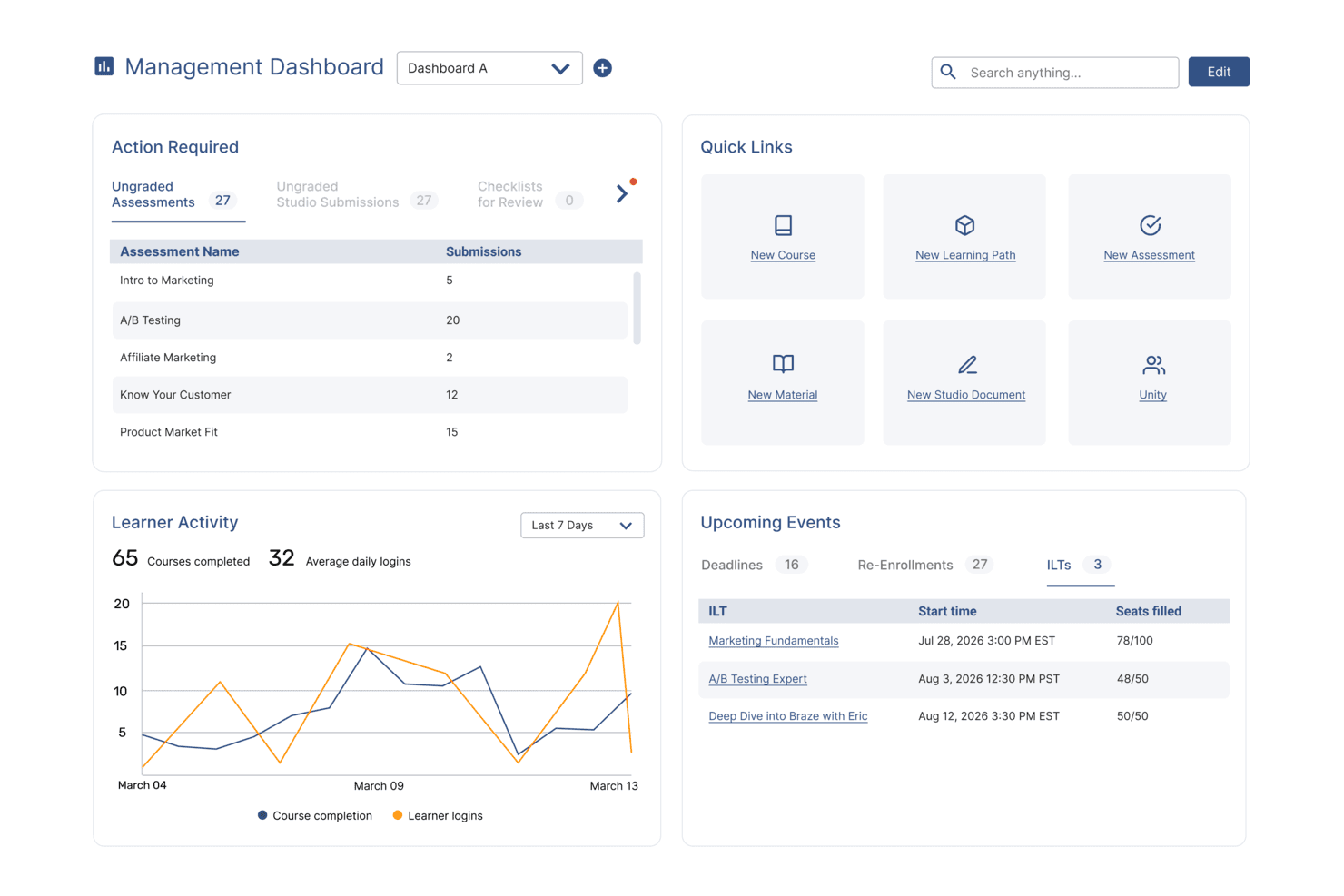
SkyPrep's management dashboard displays learner activity, upcoming events, and quick links. SkyPrep is a cloud-based employee training platform for HR teams and business leaders who deliver, track, and manage workplace learning with customizable courses, automated workflows, and detailed reporting.
Who Is SkyPrep Best For?
SkyPrep is a strong fit for small to mid-sized businesses that need a straightforward LMS without a steep learning curve or heavy IT involvement.
Why I Picked SkyPrep
SkyPrep earns its spot on my shortlist because of how seriously it takes customer support—something that's genuinely rare in the LMS space. When my team runs into a configuration issue or needs help setting up a new training path, SkyPrep's support team responds and resolves the problem. I also like that every plan includes a dedicated customer success manager, so you're not left navigating a help center alone. That level of hands-on support makes a real difference when you're onboarding new hires or rolling out compliance training under a tight deadline.
SkyPrep Key Features
- Course auto-enrollment: Automatically assign courses to learners based on predefined rules, removing the need for manual enrollment.
- Gamification: Add points, badges, and leaderboards to training courses to increase learner engagement.
- Multi-tenant LMS: Create separate, branded training portals for different clients, departments, or branches from a single account.
- Reporting and analytics: Access out-of-the-box reports to track learner progress, course completion rates, and training impact.
SkyPrep Integrations
Integrations include ADP, Workday, BambooHR, Salesforce, HubSpot, Zoom, Microsoft Teams, Paylocity, Stripe, and GoToMeeting.
Pros and Cons
Pros:
- Dedicated Customer Success Manager for setup and ongoing support
- Fast response times and hands-on troubleshooting help
- Very easy navigation reduces learner confusion and support burden
Cons:
- Mobile experience could be improved for larger multimedia courses
- Limited built-in content library compared to some competitors
Learn more about SkyPrep: Best for upskilling and reskilling employees
- Free trial available
- Pricing upon request
Visit WebsiteCustomer Rating:4.6/5
Absorb LMS comes with an accessible and intuitive interface all wrapped in a professionally designed, custom branded style. Absorb gives HR teams and learning leaders a flexible platform to deliver, track, and manage employee training programs, making it easier for organizations to build skills, ensure compliance, and support ongoing development at scale.
Who Is Absorb Best For?
Absorb is a strong fit for mid-size to enterprise organizations that need a scalable platform to manage structured learning programs across large or distributed workforces.
Why I Picked Absorb
I've included Absorb in my top picks because of how specifically it's built around the challenge of upskilling and reskilling at scale. What I like most is Absorb Skills, which uses AI to generate personalized learning paths based on each employee's self-assessment against nearly 200 competencies and 10,000 skills. In practice, that means my team can identify exactly where a software engineer or operations lead falls short on a given competency and auto-assign courses to close that gap—without manually curating content for every individual. The 20,000+ pre-tagged courses in the Amplify Max library make it easy to cover everything from digital literacy to leadership development without building content from scratch.
Absorb Key Features
- Compliance training management: Assign, track, and auto-renew mandatory compliance courses with automated reminders and completion records.
- Reporting and analytics dashboard: Monitor learner progress, course completion rates, and training ROI across teams and departments.
- Mobile learning app: Employees can access and complete training on iOS and Android devices, including offline course viewing.
- Instructor-led training (ILT) management: Schedule, manage, and track in-person or virtual instructor-led sessions alongside self-paced online courses.
Absorb Integrations
Integrations include ADP, BambooHR, Salesforce, Zoom, Microsoft Teams, Okta, Workday, LinkedIn Learning, SAP SuccessFactors, and Google Workspace.
Pros and Cons
Pros:
- Competency mapping helps identify and close skill gaps
- Certification rules simplify ongoing reskilling in regulated industries
- Supports SCORM/xAPI content for specialized skill-building modules
Cons:
- Social learning and collaboration features are less developed than some competitors
- Interface customization is somewhat limited
Learn more about Absorb: Best for AI-driven practice scenarios
- Free demo available
- Pricing upon request

EducateMe LMS provides analytics to track learner progress and performance. EducateMe LMS is a learning management platform designed for HR teams and business leaders who want to deliver engaging, interactive employee training that adapts to modern workplace needs.
Who Is EducateMe LMS Best For?
EducateMe LMS is a strong fit for mid-sized businesses and growing teams that need a structured, scalable way to build and deliver employee training programs.
Why I Picked EducateMe LMS
I picked EducateMe LMS as one of the best because of how it handles AI-driven practice scenarios for employee training. I like that learners can work through realistic, role-specific simulations that mirror actual workplace situations—like handling a difficult customer conversation or navigating a compliance decision. The AI generates dynamic responses based on learner input, so no two practice runs feel identical. I also use the branching scenario builder to design multi-path exercises that test decision-making without needing a developer to set them up.
EducateMe LMS Key Features
- Course builder: Create structured training courses using a drag-and-drop editor that supports video, quizzes, and text-based content.
- Progress tracking dashboard: Monitor individual and group learner progress, completion rates, and assessment scores in one view.
- Cohort-based learning: Organize learners into groups and deliver training on a shared schedule with collaborative assignments.
- Automated notifications: Send reminders and deadline alerts to learners and managers based on course activity and completion status.
EducateMe LMS Integrations
Integrations include Zoom, Slack, Google Calendar, Outlook Calendar, Stripe, BambooHR, Workday, HiBob, ADP Workforce Now, and Okta.
Pros and Cons
Pros:
- API access and single sign-on
- Supports SCORM-compliant course content
- AI-powered roleplay coaching simulations
Cons:
- Advanced setup may require support
- Minimum user requirement for pricing
Learn more about EducateMe LMS:
Diğer Çalışan Eğitimi Yazılımları
Birkaç seçeneğe daha ihtiyacınız varsa göz atmaya değer birkaç çalışan eğitimi programını burada bulabilirsiniz:
- 11MitratechBest for compliance-focused training
- 12Groundwork1Best for email-based training
- 13ContinuBest with multilingual platform support
- 14LearnWorldsBest for white-labeling training materials
- 15Seismic LearningBest for sales-specific training and coaching
- 16LearnUponBest for educating both internal and external audiences
- 17GuiddeBest training video creator with AI
- 18ThinkificBest for progress and engagement reporting
- 19SkilljarBest for driving product adoption through education
- 20Kallidus LearnBest employing training gamification & engagement tracking
- 21DoceboBest for delivering AI-powered learning to any audience
- 22eloomiBest with AI-powered features
- 23BridgeBest for advanced course authoring
- 24Constructor TechBest LMS for its interactive learning approach
- 25GO1Best for accessing a large library of eLearning courses
- 26Biz LibraryBest for a large collection of business training materials
- 27EduflowBest for corporate training
- 28CompassBest for interactive training guides
- 29PitchMonsterBest for practicing objection handling skills
- 30LeapsomeBest for closing the loop between learning, engagement, and performance
- 31QooperBest for bringing training, upskilling, reskilling and mentoring experience under one platform
- 32eduMeBest for AI-powered content creation
- 33Mitratech PerformBest for multimedia course creation & training
- 34ExecBest for AI-driven training capabilities
- 35SAI360Best for compliance-focused training
- 36Synergy LearningBest for customized training solutions
- 37ProProfs Training MakerBest for adding quizzes and surveys to easy-to-use courses
- 38eFrontAn enterprise learning management system engineered to support complex learning ecosystems
- 39LooopA performance platform that allows learners to easily access support resources when they need them
- 40TrainualBest for automated onboarding
İlgili İK Yazılımı İncelemeleri
Aradığınızı burada hâlâ bulamadıysanız test edip değerlendirdiğimiz diğer ilgili araçlara göz atın:
- İK Yazılımı
- Bordro Yazılımı
- İşe Alım Yazılımı
- Kayıtlı İşveren Hizmetleri
- Aday Takip Sistemleri
- İşgücü Yönetimi Yazılımı
How I Evaluate Employee Training Software
I evaluate each platform on two levels: the baseline it must hit—course authoring, compliance tracking, learner reporting—and the differentiators that make one tool the right fit over another.
Core Functionality (Table Stakes For This List)
When I'm selecting tools for my list, I rank each one on a scale from 0 (does not offer the functionality) to 5 (excels in this area) for each core functionality listed below. Then, I calculate the tool's total score as a percentage. Each tool needs to achieve a minimum total score of 75% to be considered for inclusion.
- Course Authoring & Content Management: I look for native authoring tools that support multiple formats—SCORM, video, quizzes, documents—so your team can build onboarding modules or product training without a separate tool.
- Course Assignment & Learning Paths: Each platform should let you assign courses by role, team, or department and sequence them into structured paths, like a new manager curriculum that builds from fundamentals to advanced topics.
- Progress Tracking & Reporting: I check whether managers and admins can pull completion rates, quiz scores, and learner activity into dashboards or exportable reports that are useful for quarterly business reviews.
- Assessments & Certifications: The platform should support quizzes with pass/fail logic and generate certificates on completion—particularly important when you need to document skills verification for internal promotions or audits.
- Compliance & Recertification Management: I evaluate how each tool handles recurring training deadlines, automated reminders, and audit-ready records, such as annual safety training that requires proof of completion and renewal tracking.
- Employee-Facing Learning Portal: Your learners need a dedicated space to view assigned courses, track their own progress, and browse available training—platforms like Docebo and TalentLMS each approach this differently, but the baseline expectation is a clear, accessible learner experience.
Once I have a list of tools that meet the criteria, I consider what sets each platform apart.
Differentiating Factors (What Sets Vendors Apart)
Here's how I compare and contrast different vendors:
Standout Features
AI-driven personalization matters when you're managing training across hundreds of roles—I look for platforms that adapt learning paths based on skill gaps rather than just manual assignments. Mobile and offline access is a big differentiator for organizations with deskless or field-based workers who can't train at a desktop. I also evaluate whether a platform ties training to a skills and competency framework, which helps L&D teams connect course completions to real career development goals.
Beyond Features
HR tech stack integrations are a priority—I check whether the platform connects natively with your HRIS so employee data syncs automatically and enrollments trigger without manual work. Content library access is another key factor, since platforms that bundle or integrate with providers like Go1 or OpenSesame save your team from building every course from scratch. I also evaluate pricing structure, particularly whether it scales by active users or total headcount, which makes a real difference as your organization grows.
Training is not only about compliance. Whether you are hiring one or two people or scaling globally, start by understanding the company’s goals and tailor the training to those goals.
How to Choose Employee Training Software
To identify the employee training software that best suits your needs, you must determine your primary users and document the specific challenges they face.
Consider the following points when carrying out your own employee training software selection process:
| Key Consideration | Description / Actions |
|---|---|
| Key ConsiderationProblem to Solve | Description / ActionsIdentify the core challenges you are trying to address to clarify the features and functions required. |
| Key ConsiderationUsers and Access | Description / ActionsDetermine who will use the software (e.g., HR managers, managers, employees), how many licenses are needed, and prioritize the requirements of each group. |
| Key ConsiderationTool Compatibility | Description / ActionsList the tools you will replace, continue using, or integrate (e.g., İKYS, ÖYS). Decide whether integrations or an all-in-one platform make more sense. |
| Key ConsiderationDesired Outcomes | Description / ActionsDefine goals and success metrics, such as digitizing training or improving mobile access or engagement, so you can evaluate tools based on outcomes rather than features alone. |
| Key ConsiderationOrganizational Fit | Description / ActionsAssess how well the software fits into your existing workflows and systems; note what works well and what needs improvement. |
| Key ConsiderationFinal Tip | Description / ActionsEvery business is different; do not assume there is a one-size-fits-all solution, and tailor your choice to your unique needs. |
Remember that every business is different; do not assume that an employee training system will work for your organization simply because it is popular.
Trends in Employee Training Software
Employee training software has continued to evolve to adapt to the changing needs of businesses and incorporate developments in emerging technologies such as artificial intelligence (AI), virtual reality (VR), and augmented reality (AR). Let’s take a brief look at the trends currently influencing training software development:
Employees need to see how training benefits them. If they do not see its value for their own careers, they will not engage. Align the training with their personal goals and connect it to the company’s broader strategy.
- Greater Emphasis on Personalized Learning Paths: There is a clear trend toward providing more personalized and adaptive learning experiences. Tools increasingly use artificial intelligence to analyze employee performance and learning styles and tailor content to individual needs. This personalization makes training more relevant and engaging while directly addressing the learner’s gaps and strengths.
- Sürükleyici Öğrenme için AR ve VR Entegrasyonu: Artırılmış Gerçeklik (AR) ve Sanal Gerçeklik (VR) giderek daha yaygın hale geliyor; bir zamanlar yenilikçi olan sürükleyici öğrenme deneyimleri artık giderek daha fazla talep görüyor. Bu teknolojiler, özellikle teknik becerilerin geliştirilmesi, güvenlik eğitimi ve sosyal becerilerin güçlendirilmesi için faydalı olan uygulamalı eğitim simülasyonları sunar.
- Etkileşimi Artırmaya Yönelik Oyunlaştırma Unsurları: Oyunlaştırma, öğrenci etkileşimini ve motivasyonunu artırmak için daha gelişmiş oyun benzeri unsurlar içeren araçlarla önemli bir özellik olmaya devam ediyor. Rozetler, liderlik tabloları ve ödüller, öğrenme içeriğiyle daha entegre hale geliyor; böylece sonradan eklenen unsurlar olmaktan çıkıp öğrenme deneyiminin kritik bir parçasına dönüşüyor.
- Mobil Öğrenme Olanakları: Uzaktan çalışma hâlâ yaygın olduğundan, mobil erişilebilirlik artık bir lüks değil, gereklilik haline geldi. Eğitim yazılımları giderek mobil öncelikli olarak tasarlanıyor ve öğrencilerin eğitim materyallerine her zaman, her yerden ve herhangi bir cihazdan erişebilmesini sağlıyor.
- Uyumluluk ve Sertifika Takibi: Düzenleyici gereklilikler gelişmeye devam ederken, uyumluluk eğitimlerini ve sertifikaları takip edip yönetmeye yönelik özelliklere olan talep de arttı. Bu, kuruluşların sektör standartlarına ve düzenlemelere uyumlu kalmasını sağlar.
Bu eğilimler, çalışan eğitim yazılımı pazarında daha ilgi çekici, kişiselleştirilmiş ve etkili öğrenme deneyimleri oluşturmaya yönelik daha geniş kapsamlı bir değişimi yansıtıyor.
Öğrenme stratejinizin bu gelişen eğilimlerden yararlanmasını sağlamak için en güncel çalışan öğrenimi trendlerini de gözden geçirmek isteyebilirsiniz.
Çalışan Eğitim Yazılımı Nedir?
Çalışan eğitim yazılımı, İK ekiplerinin ve yöneticilerin çalışan öğrenme programları oluşturmasına, sunmasına ve takip etmesine yardımcı olan dijital bir platformdur.
Eğitimi kolaylaştırmak, beceri gelişimini iyileştirmek ve özellikle manuel takip, tutarsız öğrenme deneyimleri veya dağınık kaynaklar nedeniyle zorlanan ekipler için uyumluluğu sağlamak amacıyla kullanılır.
Çalışan Eğitim Yazılımının Temel Özellikleri
Çalışan eğitim yazılımı seçerken aşağıdaki temel özelliklere dikkat edin:
- Kurs yönetimi: Eğitim materyallerini sorunsuz bir şekilde düzenleyin, planlayın ve güncelleyin; böylece içeriği güncel tutabilir ve ekibinizin ilgisini canlı tutabilirsiniz. Bu, yapılandırılmış bir öğrenme deneyimi sunmanıza ve yeni konuları veya uyumluluk gerekliliklerini hızla uygulamaya koymanıza yardımcı olur.
- Kullanıcı ilerleme takibi: Her çalışanın kurslardaki ilerlemesini izleyerek kimlerin başarılı olduğunu ve kimlerin biraz teşvike ihtiyaç duyabileceğini görün. Bu sayede desteği kişiselleştirebilir ve her adımda dönüm noktalarını kutlayabilirsiniz.
- Değerlendirme araçları: Öğrenmeyi ve bilgilerin kalıcılığını ölçmek için kısa sınavlar, testler ve etkileşimli ödevler oluşturun. Bu araçlar, geri bildirimi bir tahmin oyununa dönüştürmeden bilgi eksiklerini belirlemeyi ve eğitimin etkililiğini ölçmeyi kolaylaştırır.
- Özelleştirilebilir öğrenme yolları: Eğitim süreçlerini farklı roller, departmanlar veya bireysel kariyer hedefleri için uyarlayın. İçeriği ayarlamanıza olanak tanındığında çalışanlar, yaptıkları işe ve bundan sonra yapmak istediklerine gerçekten uygun bir öğrenme deneyimi elde eder.
- Raporlama ve analiz: Katılım, tamamlama oranları ve test puanları hakkında yalnızca birkaç tıklamayla raporlar oluşturun. Açık ve anlaşılır analizler eğilimleri görmenize, iyileştirme fırsatlarını belirlemenize ve eğitim yatırımınızın gerçek etkisini kanıtlamanıza olanak tanır.
- İçerik kütüphanesi: Eğitim materyallerinden ve şablonlardan, hatta sektöre özel modüllerden oluşan yerleşik bir depoya erişin. Zengin bir kütüphane, her şeyi sıfırdan oluşturmak zorunda kalmamanızı ve yüksek kaliteli içeriği ihtiyaçlarınıza uyarlayabilmenizi sağlar.
- Mobil erişilebilirlik: Çalışanların sahada veya evde olmalarından bağımsız olarak hareket hâlindeyken öğrenmelerini sağlayın. Mobil uyumlu eğitim, engelleri ortadan kaldırır ve ekibinizin zaten sürdürdüğü yoğun ve esnek yaşamlara saygı gösterir.
- Entegrasyon olanakları: Yazılımı İK sistemlerinize, CRM'lerinize veya iş yerindeki diğer araçlarınıza bağlayın. Entegrasyonlar verileri senkronize tutmanıza ve eğitim yaşam döngüsünün bazı bölümlerini otomatikleştirmenize yardımcı olarak zamandan tasarruf sağlar ve manuel iş yükünü azaltır.
- Sertifika programları: Kurs tamamlandıktan sonra sertifikalar ve rozetler verin. Bu belgeler çalışanları motive eder, başarılarını takdir eder ve hatta uyumluluk ihtiyaçlarına yardımcı olabilir.
Çalışan Eğitim Yazılımlarındaki Yaygın Yapay Zekâ Özellikleri
Yukarıda listelenen standart çalışan eğitim yazılımı özelliklerinin yanı sıra, bu çözümlerin çoğu aşağıdaki gibi özelliklerle yapay zekâyı da bünyesine katıyor:
Doğal dil sohbet robotları: Çalışanların sorularını yanıtlar ve sorunları 7/24 gidermeye yardımcı olarak öğrenme süreci boyunca anında destek ve rehberlik sağlar.
Kişiselleştirilmiş öğrenme önerileri: Her çalışanın öğrenme geçmişine, hedeflerine ve performansına göre uyarlanmış kurslar ve kaynaklar önerir; böylece hiç kimse herkese uyan tek tip bir eğitimde takılıp kalmaz.
Otomatik içerik oluşturma: Yapay zekâ destekli içerik oluşturma araçlarıyla kısa sürede kısa sınavlar, eğitim modülleri veya öğrenme materyalleri oluşturur; içeriği güncel ve ilgili tutarken geliştirme süresini azaltır.
Akıllı beceri açığı analizi: Çalışanların nerelerde daha fazla desteğe veya yeni becerilere ihtiyaç duyduğunu belirlemek için iş gücü verilerini anında analiz ederek daha akıllı ve hedefe yönelik eğitim planları oluşturmanıza yardımcı olur.
Uyarlanabilir değerlendirmeler: Bir öğrenenin performansına göre sınav zorluğunu ve içeriğini gerçek zamanlı olarak ayarlayarak her değerlendirmenin ilgi çekici ve uygun düzeyde zorlayıcı olmasını sağlar.
Çalışan Eğitim Yazılımının Faydaları
Çalışan eğitim programınızı geliştirmek için teknolojiye yatırım yapmak, hem kullanıcılar hem de kuruluşlar açısından önemli faydalar sağlayabilecek stratejik bir adımdır. Benzersiz ihtiyaçlarınıza en uygun çalışan eğitim yazılımına yatırım yaparak elde edebileceğiniz çeşitli faydalar şunlardır:
- Merkezi Öğrenme Kaynakları: Tüm eğitim materyalleri için tek bir kaynak sunan çalışan eğitim yazılımı, erişimi ve düzenlemeyi kolaylaştırır. Bu merkezileştirme, çalışanların kaynakları kolayca bulup kullanabilmesini sağlayarak zamandan tasarruf edilmesine ve hayal kırıklığının azaltılmasına yardımcı olur.
- Kişiselleştirilmiş Öğrenme Yolları: Gelişmiş eğitim yazılımları, bireysel çalışanların ihtiyaçlarına ve beceri düzeylerine uygun özelleştirilmiş eğitim programları oluşturmanıza olanak tanır. Bu düzeydeki kişiselleştirme, öğrenme deneyimini geliştirerek her kullanıcı için daha ilgili ve etkili hale getirir.
- Oyunlaştırma Yoluyla Artan Etkileşim: Birçok platform puanlar, rozetler ve liderlik tabloları gibi oyunlaştırma unsurlarını içerir. Oyunlaştırma, etkileşimi ve motivasyonu artırarak öğrenme sürecini daha keyifli ve ilgi çekici hale getirir.
- Esnek ve Erişilebilir Öğrenme: Çalışan eğitim yazılımları genellikle mobil öğrenmeyi destekleyerek kullanıcıların eğitim materyallerine her zaman ve her yerden erişmesine olanak tanır. Bu esneklik, farklı programlara ve öğrenme tercihlerine uyum sağlayarak geleneksel sınıf ortamının dışında sürekli öğrenmeyi kolaylaştırır.
- Uygun Maliyetli Eğitim Çözümleri: Yüz yüze eğitim oturumlarına, seyahate ve basılı materyallere duyulan ihtiyacı azaltan çalışan eğitim yazılımı, eğitim maliyetlerini önemli ölçüde düşürebilir. Dijital eğitimin verimliliği ve etkililiği de yatırım getirisinin artmasına katkıda bulunur.
Gördüğünüz gibi bir eğitim platformuna yatırım yapmak, eğitim yönetiminin idari yönlerini kolaylaştırabilir ve çalışanların öğrenme deneyimini geliştirerek performansın ve iş memnuniyetinin artmasını sağlayabilir.
Çalışan Eğitim Yazılımı Maliyetleri & Fiyatlandırması
Dürüst olalım. Çoğu zaman her şey fiyatla ilgilidir. Çalışan eğitim yazılımı tasarım gereği modüler olduğundan, bu listedeki yazılım sağlayıcılarının çoğu fiyatlandırma bilgilerini yalnızca talep üzerine sunar; çünkü yazılımı ihtiyaçlarınıza göre özelleştirirler. Fiyatlandırma planları hakkında daha fazla bilgi almak için web sitelerini ziyaret etmenizi ve özelleştirilmiş bir fiyat teklifi talep etmenizi öneririm.
Ancak çalışan eğitim yazılımının ne kadara mal olacağı konusunda daha gerçekçi bir fikir edinmenize yardımcı olmak için farklı kuruluş ihtiyaçları, büyüklükleri ve bütçelerine yönelik çeşitli planları ve fiyatlandırma yapılarını açıklayan bir özet tablo hazırladım.
Çalışan Eğitim Yazılımı İçin Plan Karşılaştırma Tablosu
| Plan Türü | Ortalama Fiyat | Kullanıcı Başına Ortalama Fiyat | Yaygın Özellikler |
|---|---|---|---|
| Plan TürüÜcretsiz | Ortalama Fiyat$0 | Kullanıcı Başına Ortalama Fiyat | Yaygın ÖzelliklerTemel eğitim modüllerine erişim, sınırlı kullanıcı kapasitesi ve temel ilerleme takibi |
| Plan TürüTemel | Ortalama Fiyat$100 - $500 aylık | Kullanıcı Başına Ortalama Fiyat$2-$10 kullanıcı başına/ay | Yaygın ÖzelliklerÖzelleştirilebilir eğitim programları, analiz ve raporlama, e-posta desteği ve 50 kullanıcıya kadar kapasite |
| Plan TürüStandart | Ortalama Fiyat$500 - $1,500 aylık | Kullanıcı Başına Ortalama Fiyat$2-$20 kullanıcı başına/ay | Yaygın ÖzelliklerGelişmiş raporlama, entegrasyon özellikleri, telefon ve sohbet desteği ve 250 kullanıcıya kadar kapasite |
| Plan TürüPremium | Ortalama Fiyat$1,500 - $5,000 aylık | Kullanıcı Başına Ortalama Fiyat$2-$20 kullanıcı başına/ay | Yaygın ÖzelliklerMarkasızlaştırma, gelişmiş entegrasyon, özel hesap yöneticisi, 500 kullanıcıya kadar kapasite ve özel geliştirme seçenekleri |
| Plan TürüKurumsal | Ortalama FiyatÖzel Fiyatlandırma | Kullanıcı Başına Ortalama FiyatÖzel Fiyatlandırma | Yaygın ÖzelliklerÖzelleştirilebilir özellikler ve entegrasyonlar, özel müşteri başarı yöneticisi, sınırsız kullanıcı, yerinde eğitim ve öncelikli destek |
Çalışan eğitim yazılımı fiyatlandırma planlarının dökümü.
Bu seçenekleri değerlendirirken hem kullanıcı başına maliyeti hem de her planın özellikler ve destek açısından sunduğu genel değeri göz önünde bulundurun. Bu ikili bakış açısı, yalnızca uygun maliyetli bir çözüm seçmenizi değil, aynı zamanda kuruluşunuzun eğitim ihtiyaçlarını kapsamlı biçimde karşılayan bir çözüm bulmanızı sağlar.
Ayrıca her yazılım için ücretsiz deneme veya demo talep etmenizi öneririm. Böylece çok fazla zaman ayırmadan önce yazılımları uygulamalı olarak deneyimleyebilirsiniz.
Sıkça Sorulan Sorular
Çalışan eğitim yazılımının nasıl çalıştığını ve neler sunduğunu hâlâ merak mı ediyorsunuz? Sıkça sorulan soruların bu yanıtları başlamak için iyi bir noktadır:
Çalışan eğitim yazılımını seçerken hangi entegrasyonları aramalıyım?
Eğitim platformlarını değerlendirirken İK bilgi sisteminiz, performans yönetimi ve Slack veya Microsoft Teams gibi iletişim araçlarınızla entegrasyonları arayın. Bunlar çalışan verilerini senkronize etmenize, kullanıcı tanımlamayı otomatikleştirmenize, öğrenmenin etkisini izlemenize ve raporlamayı kolaylaştırmanıza olanak tanır. İçerik kitaplıklarıyla entegrasyon veya tek oturum açma da ekibinizin zamandan tasarruf etmesini ve benimsemeyi artırmasını sağlayabilir.
Çoğu platformda çalışan eğitim verileri ne kadar güvenlidir?
Çalışan eğitim platformları genellikle veri şifreleme, güvenli bulut barındırma ve role dayalı erişim gibi güçlü güvenlik özellikleri sunar. Düzenlemeye tabi bölgelerde faaliyet gösteriyorsanız SOC 2, ISO 27001 veya GDPR desteği gibi uyumluluk sertifikalarına sahip platformları arayın.
Satıcılara veri gizliliği politikalarını ve hassas çalışan bilgilerini nasıl koruduklarını sorun.
Çalışan eğitim platformları devam eden uyumluluk takibini nasıl destekler?
Önde gelen çözümlerin çoğu kurs tamamlama, sertifika yenileme ve politika onaylarını gerçek zamanlı olarak takip eder. Otomatik hatırlatıcılar ayarlayabilir ve denetimler için uyumluluk raporları oluşturabilirsiniz.
Katı düzenlemelere sahip sektörler için özelleştirilebilir uyumluluk panoları ve kanıt veya sertifika ekleme olanağı sunan platformları arayın.
Çalışan eğitim yazılımı hatırlatıcıları ve ilerleme takibini otomatikleştirebilir mi?
Evet, birçok platform tamamlanmamış kurslar için hatırlatıcıları otomatikleştirir ve çalışanları yaklaşan son tarihler veya süresi dolan sertifikalar hakkında bilgilendirir. İlerleme takibi panoları, hem öğrenenlerin hem de yöneticilerin durumu ve tamamlama oranlarını izlemesine ve eksikleri belirlemesine yardımcı olur. Otomasyon özellikleri, İK ve L&D ekiplerini manuel takip işlerinden kurtarır.
Çalışan eğitim araçları genellikle hangi içerik biçimlerini destekler?
Modern eğitim yazılımları video, ses, SCORM ve xAPI kurslarını, PDF’leri, sınavları, web seminerlerini ve etkileşimli modülleri destekler. Bazı araçlar ayrıca mikro öğrenmeye, oyunlaştırmaya ve mobil uyumlu içerik oluşturmaya olanak tanır. Seçtiğiniz platformun ekibinizin mevcut materyalleri ve gelecekteki ihtiyaçlarıyla uyumlu olduğundan emin olun.
Bu sistemler küresel ekipler için farklı dilleri destekleyebilir mi?
Evet, çoğu çalışan eğitim platformu birden fazla dili ve yerelleştirme ayarlarını destekler. Bu özellik, farklı coğrafi konumlarda tutarlı eğitim sunmak isteyen çok uluslu şirketler için kritik öneme sahiptir.
Küresel ekipler için satın alırken yazılımın hem arayüzü hem de içeriği çevirebildiğini, bölgesel uyumluluğu yönetebildiğini ve çok dilli değerlendirmelere olanak tanıdığını kontrol edin. Tüm kullanıcılar için erişilebilirliği sağlamak amacıyla örnek içerikle kullanılabilirliği test edin.
Bu platformlar belirli sektörlere göre özelleştirilebilir mi?
Birçok platform sağlık, finans, üretim veya perakende gibi belirli sektörlere göre uyarlanmış şablonlar, uyumluluk modülleri ve içerik kitaplıkları sunar. Bunun ötesinde, çoğu sistem ek özelleştirme seçenekleri sunar; yani kursları, simülasyonları ve değerlendirmeleri sektöre özgü standartları, düzenlemeleri ve uygulamaları yansıtacak şekilde uyarlayabilirsiniz.
Satıcılara özellikleri ve kurs materyallerini sektörünüzün düzenlemelerini, terminolojisini ve iş akışlarını yansıtacak şekilde uyarlayıp uyarlayamayacaklarını sorun. Bu düzeyde kişiselleştirme, öğrenme etkileşimini ve etkinliğini artırarak çalışanların mümkün olan en ilgili ve etkili eğitimi almasını sağlayabilir. Ayrıca iş gücünüz için işe alıştırma ve uyumluluk süreçlerini hızlandırabilir.
Çalışan eğitim sistemi ile öğrenme yönetim sistemi arasındaki fark nedir?
Terimler sıklıkla birbirinin yerine kullanılsa da çalışan eğitim yazılımı ve öğrenme yönetim sistemleri (LMS) biraz farklı amaçlara hizmet eder.
Çalışan eğitim sistemleri (bazen eğitim yönetim sistemleri olarak da adlandırılır) kurum içi ekiplerin zorunlu eğitimleri düzenlemesi, sunması ve takip etmesi için tasarlanmıştır. Bu araçlar; özellikle sektör düzenlemelerine uyması gereken iş sağlığı ve güvenliği kursları veya işe alıştırma programları için uyumluluk, eğitim yönetimi ve planlamaya odaklanır.
Öte yandan, öğrenme yönetim sistemleri daha çok öğrenen odaklıdır. Çalışanlara isteğe bağlı, beceri geliştirmeye yönelik içeriklere erişim sunarak sürekli gelişimi desteklemek ve etkileşimi artırmak için tasarlanmıştır. LMS platformları, daha zengin bir öğrenme deneyimi oluşturmak amacıyla genellikle sosyal öğrenme araçları, tartışma forumları ve kişinin kendi yönlendirdiği öğrenme yolları gibi etkileşimli özellikler içerir.