

Startup'lar için en iyi bordro yazılımı, ödemeleri otomatikleştirmenize, vergi düzenlemelerine uyum sağlamanıza ve elektronik tablolar ya da evrak işleri arasında boğulmadan iş gücünüzü ölçeklendirmenize yardımcı olur. Büyüyen bir şirkette İK uzmanıysanız, büyük olasılıkla ya ihtiyaçlarınıza ayak uyduramayan bir sistemden bıkmışsınızdır ya da bordroyu hâlâ manuel olarak yönetiyorsunuzdur.
İster yüklenici ödemelerini hesaplamak, ister vergi bildirimlerini takip etmek, ister yeni çalışanları işe almak olsun, startup'lara uygun bordro yazılımı belirsizlikleri ortadan kaldırır ve size değerli zaman kazandırır. Saatleri takip etme, yan hak kesintilerini ayarlama ve doğru ödemeleri zamanında yapma gibi karmaşık süreçleri, kurum içinde tam zamanlı bir finans ekibine ihtiyaç duymadan kolaylaştırır.
Yıllardır İK ve bordro sistemlerini inceliyor, sizin gibi şirketlerin hantal araçlardan (ya da hiç araç kullanmamaktan) sorunsuz çalışan verimli platformlara geçmesine yardımcı oluyorum. Bu rehberde, kullanılabilirlik, özellikler, entegrasyonlar, ölçeklenebilirlik ve desteğe göre startup'lar için en iyi seçenekleri açıklayacağım; böylece doğru seçimi daha hızlı yapabilirsiniz.
Why Trust Our Software Recommendations
6,700+
Reviews
20
Industry experts
16+
Evaluation factors
14
Years
Our team has been testing and reviewing software since 2012. As HR experts ourselves, we know how difficult—and important—it is to choose the right software.
For this guide, we evaluated tools using hands-on testing and independent research, scoring tools using our selection criteria. We also draw on insights from industry thought leaders and practicing HR experts.
Our reviews reflect our human editorial judgment, not a sales pitch.
Expert reviewers:
- Phil GrayCOO
 Kim BehnkeHR Tech Editor & Analyst
 Josh BarkerPeople Ops Manager

Karşılaştırma Tablosu: Startup'lar için Bordro Yazılımı
Bu karşılaştırma tablosu, startup’lar ve küçük işletmeler için en iyi bordro yazılımı seçimlerimin fiyatlandırma ayrıntılarını özetlemektedir:
Score legend (out of 5)
- Excellent4.5–5
- Good4–4.4
- Average3–3.9
- Below average2–2.9
- Poor1–1.9
Sorted by: Default
| Tool | Starting Price | Website | |||||||
|---|---|---|---|---|---|---|---|---|---|
Best for startups running global payroll | 3.2 out of 5 | 3 | 4 | 2 | 4 | 3 | 3 | $29/user/month Free demo available | Website |
Best for multi-state hiring without a PEO | 3.8 out of 5 | 4 | 4 | 4 | 4 | 3 | 4 | $35/user/month + $89/month platform fee Free demo available | Website |
Best for managing distributed global workforces | Not rated | 2 | 2 | 2 | 3 | Not rated | 1 | $19/contractor/month Not available | Book Demo |
Best for automated payroll processing | 4.0 out of 5 | 4 | 4 | 4 | 4 | 4 | 4 | $49/month Free trial + free demo available | Book Demo |
Best for user-friendliness and 24/7 support | 2.5 out of 5 | 2 | 3 | 1 | 5 | 3 | 1 | $199/user/month Free plan + free demo available | Website |
Best with integrated time tracking tools | 3.2 out of 5 | 3 | 3 | 3 | 4 | 3 | 3 | $79/user/month Free demo available | Book Demo |
Best for automated tax filings | 3.5 out of 5 | 4 | 4 | 4 | 2 | 3 | 4 | Pricing upon request Free demo available | Website |
Best for paying part-time or hourly employees | 3.3 out of 5 | 3 | 4 | 3 | 4 | 3 | 3 | $99/month Free plan + 30-day free trial + free demo available | Website |
Best for centralized payroll management | 2.2 out of 5 | 3 | 3 | 1 | 1 | 2 | 3 | Pricing upon request Free demo available | Website |
Best for accurate time-to-payroll integration | 2.5 out of 5 | 1 | 3 | 2 | 3 | 3 | 3 | $50/user/month 30-day free trial + free demo available | Website |


Startup'lar için En İyi Bordro Yazılımları İncelemeleri
Startup’lar için önde gelen bordro yazılımlarının güçlü ve zayıf yönlerini keşfedin. Kapsamlı değerlendirmelerim aracılığıyla özellikleri ve hangi kullanım senaryoları için ideal oldukları hakkında bilgi edinin.
 Best for startups running global payroll
- Free demo available
- From $29/user/month
Visit WebsiteCustomer Rating:4.9/5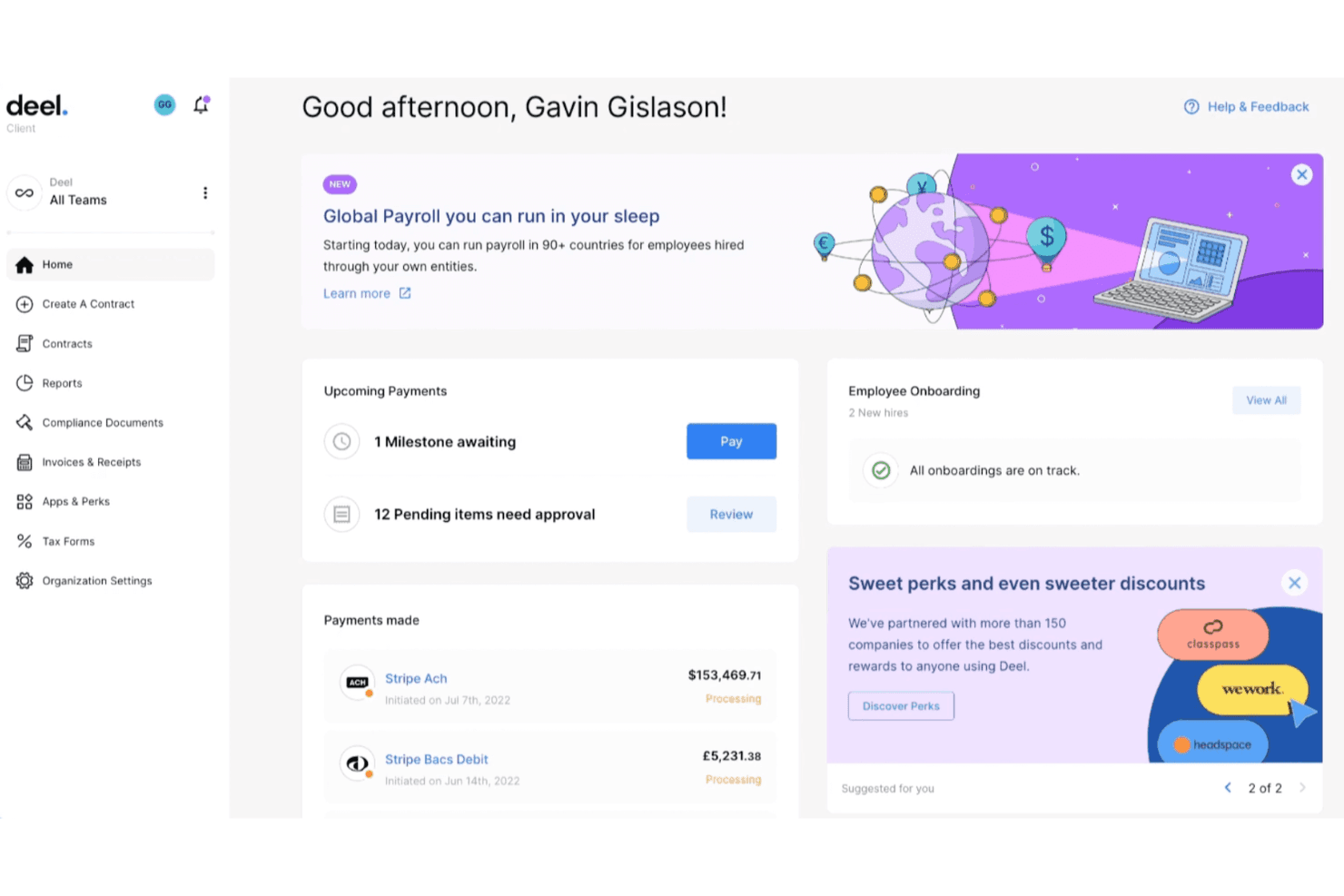
Deel's robust dashboard makes it easy to manage payroll in one place. Deel Payroll is a global payroll platform that lets you run payroll for employees, contractors, and employer-of-record workers across 150+ countries, with built-in local compliance calculations, multi-currency payments, and accounting integrations.
Who Is Deel Payroll Best For?
Deel Payroll is a strong fit for startups hiring across multiple countries who need one platform to pay employees, contractors, and EOR workers without managing separate regional payroll systems.
Why I Picked Deel Payroll
I've included Deel Payroll in my top picks because it's one of the few platforms built to handle payroll across employees, contractors, and EOR workers across countries from a single dashboard. I especially like that you can choose between running payroll in-house or handing operations to Deel's local experts country by country, so a startup expanding into Germany doesn't have to manage German payroll rules itself. The managed model also assumes liability for miscalculations, which matters a lot when you're scaling fast without a dedicated payroll team.
Deel Payroll Key Features
- Payroll autopilot automation: Auto-submission and auto-approval run at configured deadlines when variance thresholds are met, reducing manual steps for recurring payroll cycles.
- GL Sync for accounting integrations: Payroll-run journal entries post directly to NetSuite, Xero, QuickBooks, Sage, SAP, and Microsoft Dynamics Finance using a client-configured mapping template.
- Equity grant tracking: Direct employees can receive NSO, ISO, and RSU equity grants tracked in Deel, including customizable grant types and vesting information.
- AI-powered anomaly detection: Built-in AI checks payroll inputs and results before approval, flagging missing data, variances, and potential compliance risks.
Deel Payroll Integrations
Deel Payroll offers 200+ integrations, including native connections with Workday, BambooHR, NetSuite, Xero, QuickBooks, Sage, SAP, and Microsoft Dynamics Finance. It also supports an API and Zapier for custom integrations.
Pros and Cons
Pros:
- Supports employees, contractors, and EOR workers
- Convenient international payouts
- Consolidated international payroll
Cons:
- Occasional payroll errors and slower resolutions
- Client-managed tax registrations add compliance work
Learn more about Deel Payroll: 2Best for multi-state hiring without a PEO
Warp
- Free demo available
- From $35/user/month + $89/month platform fee
Visit WebsiteCustomer Rating:4.4/5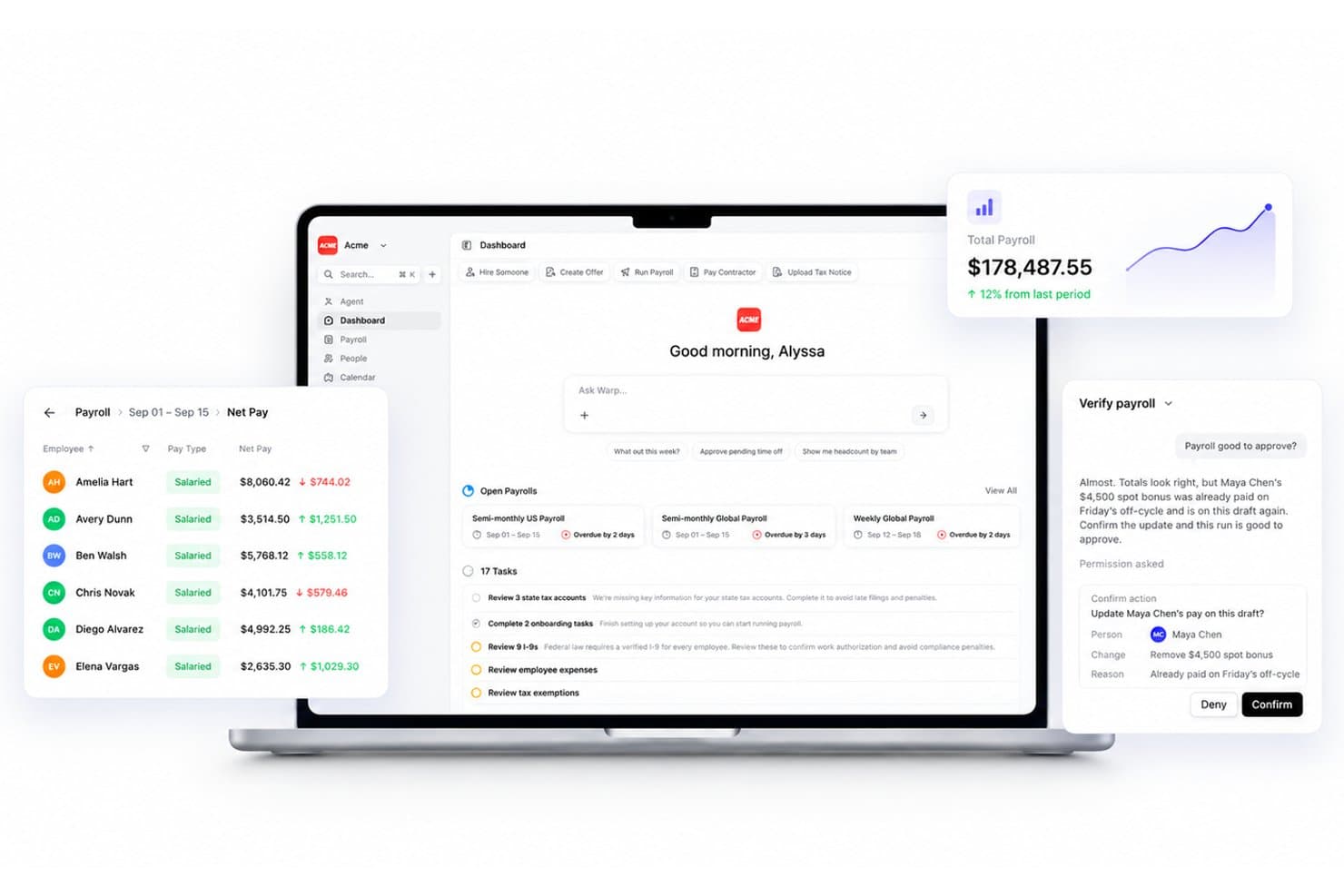
Warp automates payroll verification and flags duplicate bonus payments. Warp is a payroll and HR platform built for startups that handles automated tax filing, multi-state compliance, employee and contractor payments, benefits administration, and onboarding in a single system.
Who Is Warp Best For?
Warp is a strong fit for early-stage startups hiring across multiple states that want automated tax registration and compliance without bringing in a PEO.
Why I Picked Warp
Warp earns its spot on my shortlist because it's built specifically for startups that are hiring across multiple states but aren't ready to bring in a PEO. I love how its AI agents handle state tax registrations automatically, identifying the right agencies, submitting applications, and storing credentials in the dashboard, so you're not chasing down paperwork every time you hire in a new state. It also resolves 80% of tax notices instantly without you lifting a finger, which is exactly the kind of compliance coverage a lean team needs.
Warp Key Features
- AutoPay: Automates recurring payroll runs on your set schedule so payroll processes without manual intervention each cycle.
- Employee onboarding portal: Collects tax forms, direct deposit details, I-9 verification, and benefits enrollment in a self-service flow most new hires complete in under 10 minutes.
- Global contractor payments: Sends payments to contractors in 150+ countries and currencies, with same-day arrival for 95% of transfers once funds leave your Warp balance.
- Accounting integrations: Syncs payroll journal entries directly to QuickBooks, Xero, NetSuite, and Rillet after each payroll run.
Warp Integrations
Warp offers native integrations with QuickBooks, Xero, NetSuite, Rillet, Ashby, Lever, Checkr, Human Interest, Accrue 401k, and Vestwell. It also provides REST API, CLI, and MCP access for custom connections.
Pros and Cons
Pros:
- Reviewers praise its intuitive payroll workflows
- Reviewers report time saved on payroll tasks
- Automates state tax registrations across jurisdictions
Cons:
- Independent user-review history remains limited
- International contractor payments don’t provide employer-of-record services
Learn more about Warp: Best for managing distributed global workforces
- Not available
- From $19/contractor/month
Visit WebsiteCustomer Rating:4.5/5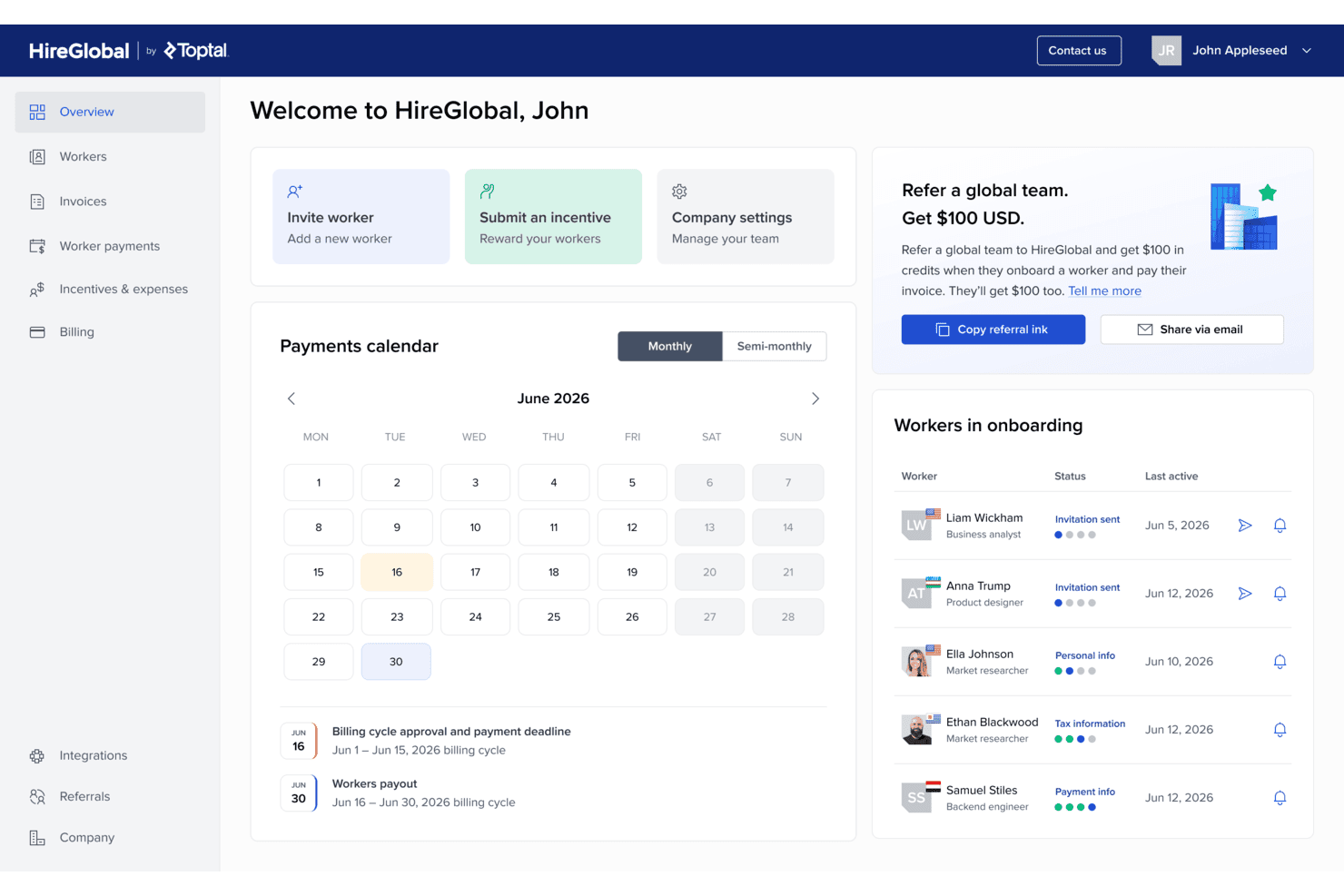
HireGlobal onboarding screen for setting up billing address and payment details, with confirmation that billing information has been saved. HireGlobal is a global employer of record platform that handles cross-border hiring, payroll, benefits, and employment compliance across 180+ countries through contractor, agent of record, and full EOR models.
Who Is HireGlobal Best For?
HireGlobal suits HR managers and operations leads at companies hiring across borders who need a single platform to manage EOR, contractor, and payroll compliance.
Why I Picked HireGlobal
I picked HireGlobal as one of the best because it's built for companies hiring across borders without the overhead of opening local entities in every country. I like that it covers contractor, Agent of Record, and full EOR models in one platform across 180+ countries, so when a startup brings on a full-time hire in Germany or a contractor in Brazil, the compliance, contracts, and payroll are handled through the same workflow. The Virtual EOR plan also includes $1 million in indemnification coverage per worker, which I think is a meaningful safeguard for teams scaling internationally without a dedicated legal function.
HireGlobal Key Features
- Tiered hiring models: Choose from Contractor, Agent of Record, Virtual EOR, or full EOR plans depending on how each worker needs to be engaged.
- Consolidated invoicing: Pay one invoice per billing cycle covering all workers, with individual payments distributed by HireGlobal.
- Localized employment contracts: Generate locally compliant contracts for workers in each country, tailored to local labor law requirements.
- Startup accelerator program: Access three months free, worker indemnification, and prioritized onboarding if your company is affiliated with Y Combinator, Techstars, or 500 Global.
HireGlobal Integrations
HireGlobal integrations are not clear, and they don't list them publicly on their website.
Pros and Cons
Pros:
- Consolidates global worker payments into one invoice
- Responsive support for global hires
- Handles payroll across 180+ countries
Cons:
- Payments require approval and advance client funding
- Tax filing coverage lacks jurisdiction-level detail
Learn more about HireGlobal: Best for automated payroll processing
- Free trial + free demo available
- From $49/month
Visit WebsiteCustomer Rating:4.6/5
Gusto simplifies payroll for startups by automating tax calculations, payments, and employee benefit management through an easy-to-use online platform. Gusto is a payroll platform for startups and small businesses that handles automated payroll runs, tax filing, contractor payments, multi-state compliance, and employee self-service from a single dashboard.
Who Is Gusto Best For?
Gusto is a strong fit for early-stage startups and small businesses that want payroll, tax filing, and contractor payments handled automatically from day onewithout needing a dedicated payroll specialist on staff.
Why I Picked Gusto
Gusto earns its spot on my shortlist because its AutoPilot feature genuinely removes recurring payroll from your to-do list: once configured, it calculates wages, withholds taxes, and submits payroll automatically the day before each deadline. I also like that every plan includes unlimited payroll runs with automated federal, state, and local tax filing built in, so a founder running their first payroll gets the same compliance coverage as a team scaling across multiple states.
Gusto Key Features
- Multi-state payroll support: The Plus plan lets you run payroll across all 50 US states, with built-in tax-account setup and state-specific compliance handled for each new state you add.
- Global contractor payments: You can pay contractors in more than 120 countries directly through Gusto, with automated 1099 generation for US contractors included.
- QuickBooks Online integration: Gusto syncs a detailed journal entry to QuickBooks every time payroll runs, with category mapping and grouping by employee, department, job, or project.
- Employee self-service portal: Employees can access paystubs, download tax documents, edit withholding elections, and update personal details through the Gusto mobile app on iOS and Android.
Gusto Integrations
Gusto’s integrations directory lists 153 marketplace integrations, including QuickBooks, Xero, Expensify, Homebase, and Hubstaff. It also offers a RESTful API and Embedded Payroll API for custom integrations.
Pros and Cons
Pros:
- Employees access paystubs and tax forms independently
- automated payroll tax handling is useful
- Routine payroll is easy to use
Cons:
- Per-employee costs rise as startups grow
- Support delays can be frustrating resolving payroll issues
 Best for user-friendliness and 24/7 support
- Free plan + free demo available
- From $199/user/month
Visit WebsiteCustomer Rating:4.5/5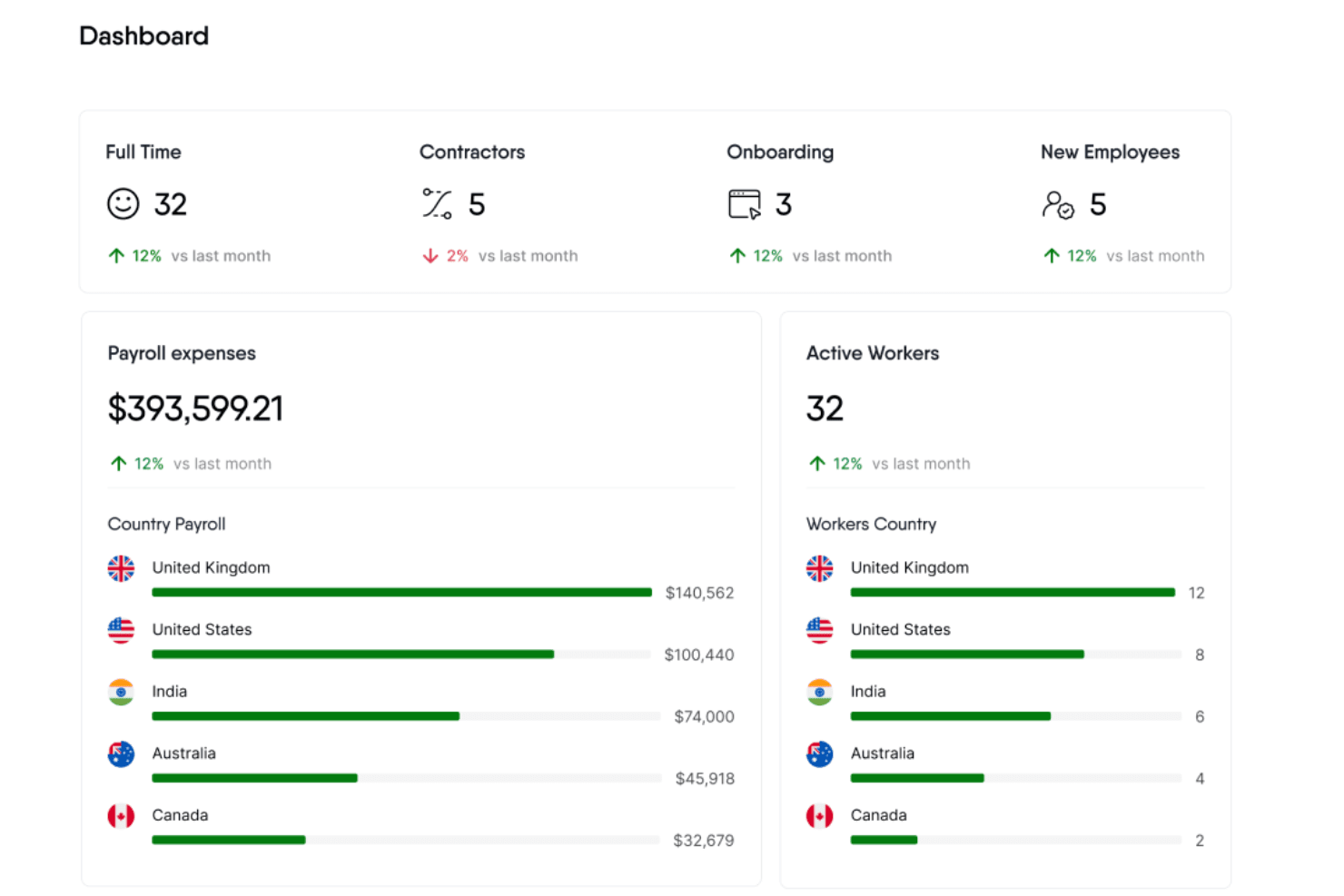
RemoFirst's dashboards provide insight into team distribution, expenses, and other payroll and HR-related data. RemoFirst is a global employer of record platform that handles international payroll, tax filings, localized employment contracts, benefits, and compliance for full-time employees across 185+ countries.
Who Is RemoFirst Best For?
RemoFirst is a strong fit for startups hiring their first international employees and wanting a straightforward, affordable way to stay compliant across borders.
Why I Picked RemoFirst
RemoFirst earns its spot on my shortlist because its 24/7 support isn't just a checkbox—every customer gets a dedicated account manager regardless of team size, plus embedded platform chat for real-time help. When you're hiring in a country for the first time and a compliance question comes up at midnight, that access matters. I also appreciate that RemoFirst handles payroll, local tax withholdings, and localized employment contracts across 185+ countries, all without requiring you to establish a local entity.
RemoFirst Key Features
- Localized employment contracts: Automatically generates employment contracts aligned with the labor laws of each country where you hire.
- Multi-currency payroll invoicing: Invoices clients in eight currencies, including USD, EUR, and GBP, while paying employees in their local currency.
- Contractor-to-employee conversion: Supports transitioning international contractors to full-time employment status without requiring a new entity setup.
- SOC 2 Type II and ISO 27001 certification: Meets established security and data-protection standards for managing sensitive employee and payroll data across borders.
RemoFirst Integrations
RemoFirst offers four documented native integrations: Workday, BambooHR, GoCardless, and ADP Workforce Now. It also provides an API for custom integrations.
Pros and Cons
Pros:
- Hire internationally without setting up local entities
- Employee portal provides payslip access and updates
- Responsive support for local compliance questions
Cons:
- Slow resolution of complex issues
- U.S. state payroll handling isn’t documented
 Best with integrated time tracking tools
- Free demo available
- From $79/user/month
Visit WebsiteCustomer Rating:4.6/5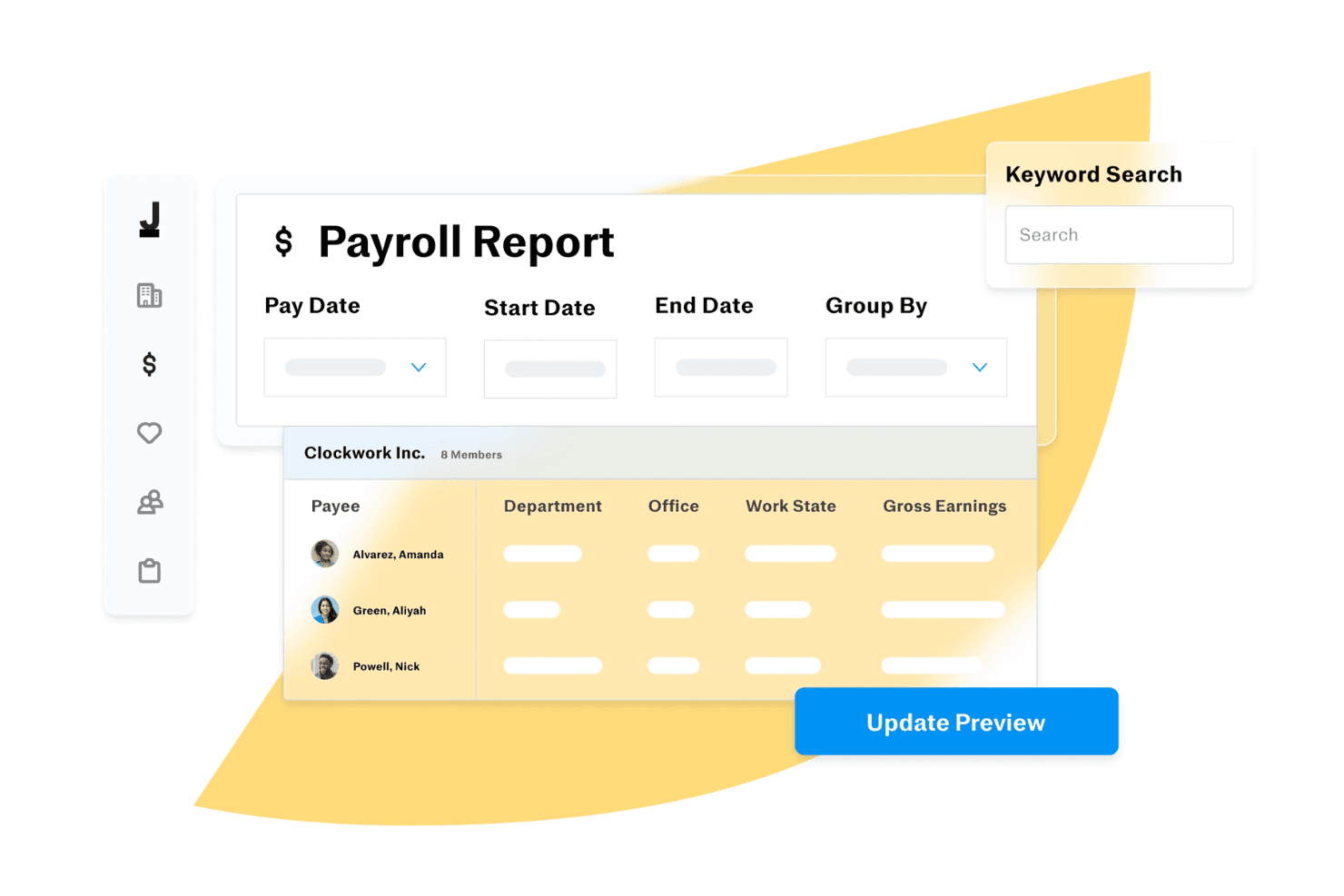
Payroll reporting screen in Justworks with pay date filters, grouping options, employee earnings breakdown, and update preview functionality. Justworks Payroll is a self-service payroll platform for small businesses that handles payroll processing, multi-state tax filings, contractor payments, and HR tools like onboarding, PTO management, and time tracking.
Who Is Justworks Best For?
Justworks Payroll is a strong fit for small businesses and early-stage startups that want payroll, HR tools, and time tracking in one place without paying PEO-level prices.
Why I Picked Justworks
I picked Justworks as one of the best because its built-in time tracking syncs directly with payroll, so when hourly employees submit timecards, those hours flow straight into the next payroll run without manual data entry. I also love that the payroll forecast gives a 30-day view of scheduled payments, including per-employee net pay and employer tax contributions, which is genuinely useful when you're managing cash flow on a startup budget.
Justworks Key Features
- Multi-state payroll processing: Run payroll for employees across multiple states, with Justworks handling state tax filings once you provide the required state account details.
- Off-cycle and bonus payments: Schedule one-time payments, bonuses, reimbursements, and tips outside of your regular payroll run.
- 1099 filing for US contractors: Justworks generates and files Forms 1099-MISC and 1099-NEC for eligible contractors when their filing status is set to "Justworks to file."
- International contractor payments: Onboard and pay independent contractors in more than 60 countries, with payment in USD or local currency depending on the contractor's location.
Justworks Integrations
Justworks lists Sage Intacct and Xero among its marketplace integrations, with Brex also available. Its Partner API supports custom connections, including the documented Electric integration for employee onboarding and offboarding updates.
Pros and Cons
Pros:
- Timecards feed directly into payroll
- Payroll reports support monthly planning
- Simple payroll workflows
Cons:
- State-tax filings depend on company setup
- Onboarding can stretch across several weeks
Learn more about Justworks: Best for automated tax filings
- Free demo available
- Pricing upon request
Visit WebsiteCustomer Rating:4.1/5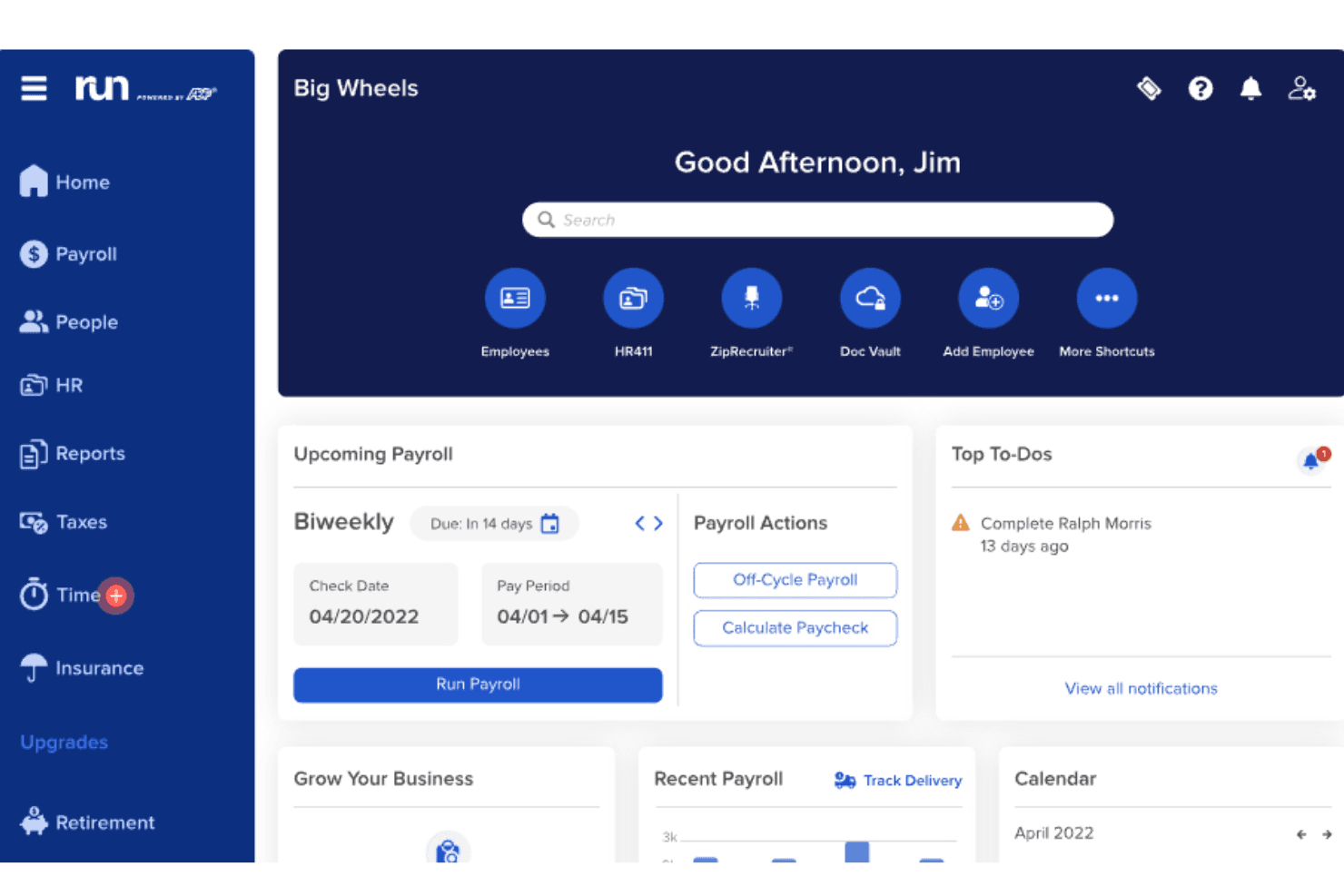
RUN by ADP offers an intuitive dashboard for startups to access payroll information, tasks, and other essential features in one place. RUN Powered by ADP® is a small-business payroll and HR platform that handles payroll processing, automated tax filing, multi-state and contractor payments, new-hire onboarding, and HR management across four tiered plans.
Who Is RUN Powered by ADP® Best For?
RUN Powered by ADP® is a strong fit for small-business owners and HR administrators who want payroll taxes handled automatically without building an in-house compliance team.
Why I Picked RUN Powered by ADP®
I picked RUN Powered by ADP® as one of the best because automated tax filing is where it genuinely earns its reputation. The platform calculates, files, deposits, and reconciles federal, state, and local payroll taxes, and ADP will cover penalties caused by its own filing errors. I also like RUN & DONE®, which puts recurring payroll on autopilot so a founder processing payroll every two weeks isn't manually triggering the same run each cycle.
RUN Powered by ADP® Key Features
- Multi-jurisdiction payroll: Pay employees working across multiple states or local tax jurisdictions within a single pay period.
- New hire onboarding: Let new employees complete W-4 forms, direct-deposit setup, and personal information electronically before their first day.
- ADP Assist™ payroll inspector: Flags potential payroll errors using AI before you approve and submit each pay run.
- General ledger export: Send payroll journal entries directly to QuickBooks, Xero, Wave, or Creative Solutions after each payroll.
RUN Powered by ADP® Integrations
RUN Powered by ADP® offers native integrations with QuickBooks, Xero, Wave, and Creative Solutions. Marketplace integrations include Employee Navigator, Connecteam, 7shifts, and DailyPay, and an API is available for custom integrations.
Pros and Cons
Pros:
- Multi-state tax handling for distributed teams
- Quick payroll runs with useful previews
- Automated federal, state, and local tax filings
Cons:
- Payroll support quality varies between cases
- Local-jurisdiction edge cases can frustrate teams
Learn more about RUN Powered by ADP®: Best for paying part-time or hourly employees
- Free plan + 30-day free trial + free demo available
- From $99/month (billed annually)
Visit WebsiteCustomer Rating:4.2/5
Homebase streamlines payroll for startups by offering easy time tracking, automatic tax calculations, and easy integration with various accounting and point-of-sale systems. Homebase is a payroll and workforce management platform built for hourly and shift-based teams, handling payroll calculations, automated tax filing, direct deposit, and new-hire onboarding from a single app.
Who Is Homebase Best For?
Homebase is a natural fit for small businesses and startups built around shift-based, hourly teams—think restaurants, retail shops, and service businesses that need scheduling, time tracking, and payroll to work together.
Why I Picked Homebase
Homebase earns its spot on my shortlist because it's built specifically for shift-based, hourly teams—the kind of businesses where pay complexity lives in tip pools, variable overtime, and clocked hours rather than salaried runs. I love how it converts timesheet data directly into a payroll run, which cuts out the manual reconciliation that trips up most small restaurants and retail shops. It also handles W-2 and 1099 workers in the same workflow, so mixed-staff businesses can pay both without juggling separate systems.
Homebase Key Features
- Autopayroll scheduling: Set a daily submission time and Homebase automatically runs payroll, sending a reminder before it submits and a confirmation after.
- New hire onboarding packets: Send digital onboarding packets to W-2 employees and 1099 contractors that collect W-4s, W-9s, I-9s, state tax forms, and direct deposit details.
- Multi-state withholding and filing: Homebase calculates and files taxes based on each employee's work location, applying state reciprocity rules where applicable.
- Benefits integrations: Connect Payroll directly to 401(k), workers' compensation, and healthcare benefit providers from within the platform.
Homebase Integrations
Homebase lists 17 marketplace integrations, including QuickBooks, Gusto, ADP, Paychex, Square Payroll, and Shopify. It also offers a public JSON API with read-only keys by request and write access for approved partners.
Pros and Cons
Pros:
- Employee onboarding collects tax and banking forms
- Tip pools and overtime suit shift teams
- Timesheets reduce hourly payroll reconciliation
Cons:
- State registrations and tax exceptions need employer attention
- Reported tax delays raise compliance risk
 Best for centralized payroll management
- Free demo available
- Pricing upon request
Visit WebsiteCustomer Rating:4.5/5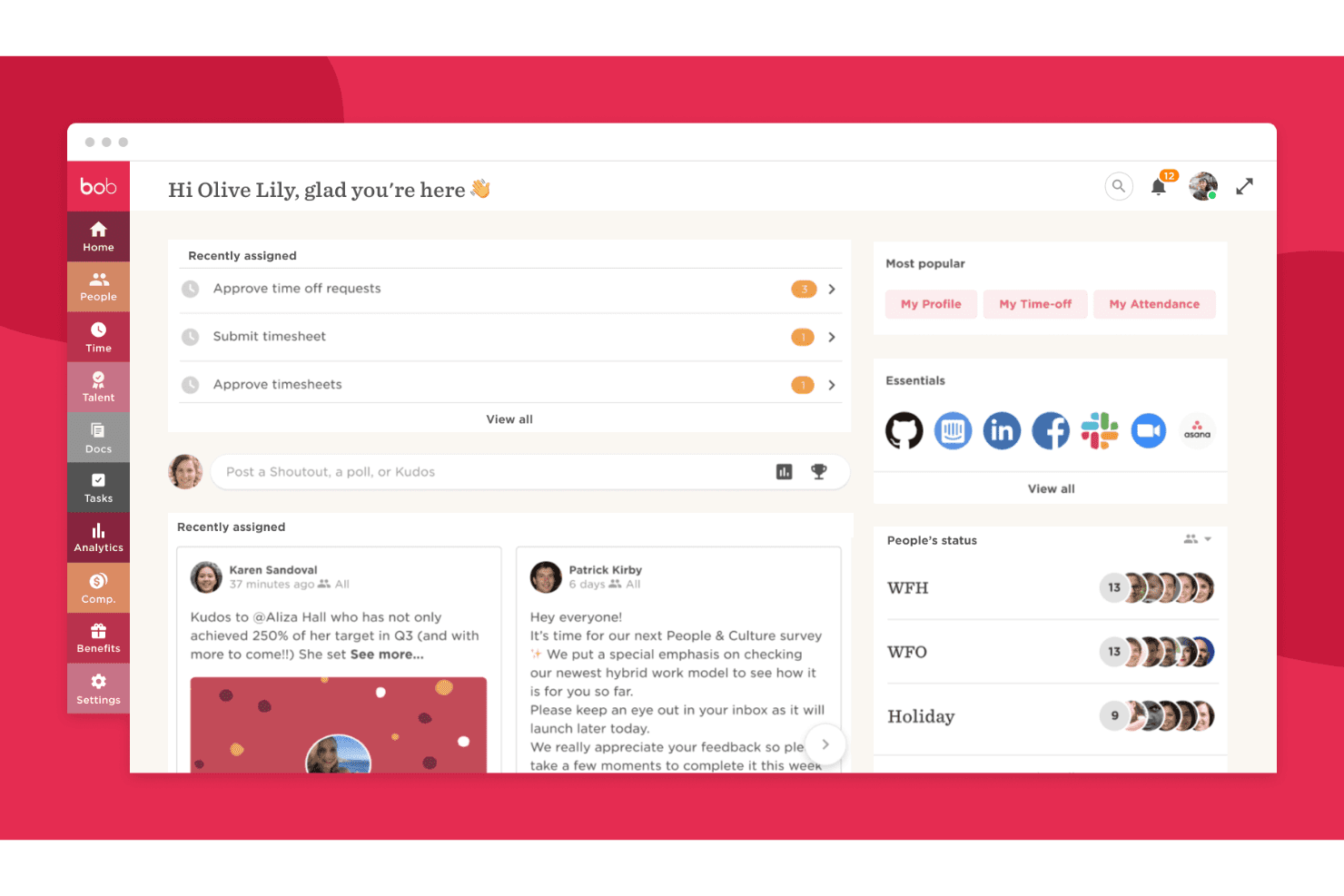
HiBob dashboard displays performance management tools. HiBob is an HR and payroll platform that combines native US and UK payroll processing, a centralized Payroll Hub for third-party provider connections, and built-in HR, benefits, and time tracking in one system.
Who Is HiBob Best For?
HiBob is a strong fit for HR teams at growing companies that need payroll, benefits, and people data managed in one connected platform.
Why I Picked HiBob
I picked HiBob as one of the best because of how it handles payroll from a central hub rather than forcing you to manage multiple disconnected systems. Its Payroll Hub lets you connect providers like ADP, Paylocity, and TriNet in one dashboard, with real-time visibility across multiple pay cycles. I also like that native US payroll covers all 50 states for tax filing, while UK payroll handles IR-35 contractors and wage-compliance alerts automatically.
HiBob Key Features
- AI payroll preview: An AI-assisted tool gives payroll admins a pre-run summary with insights designed to reduce reconciliation time before committing pay.
- Payroll Connect: A no-code setup wizard lets you map and configure data flows between HiBob and third-party payroll systems without developer support.
- Wage compliance alerts: Automatic alerts flag minimum-wage and living-wage issues so your team can catch problems before running payroll.
- Benefits-to-payroll sync: Benefits enrollment data updates payroll automatically, keeping deductions current without manual data entry between systems.
HiBob Integrations
HiBob’s Payroll Hub connects with ADP Workforce Now, Paylocity, TriNet, Xero, bswift, and Sequoia. It also offers a public HR API and webhooks for custom integrations.
Pros and Cons
Pros:
- Centralizes employee records and onboarding tasks
- Supports payroll across multiple states
- Payroll data stays connected to HR workflows
Cons:
- Occasional slowdowns during payroll week
- US 1099 contractor workflows aren’t documented
 10Best for accurate time-to-payroll integration
TimeTrex
- 30-day free trial + free demo available
- From $50/user/month
Visit WebsiteCustomer Rating:4.5/5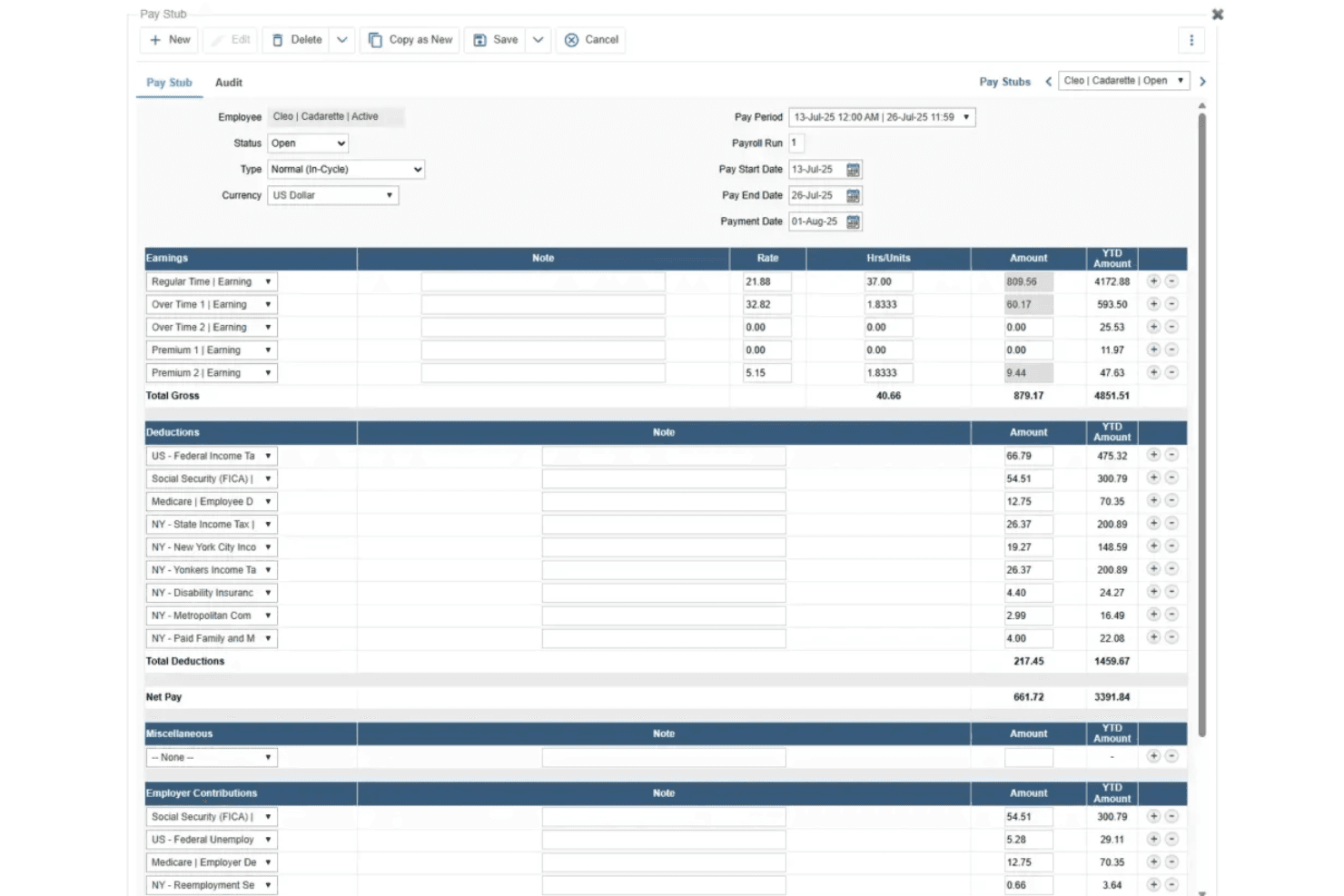
TimeTrex displays detailed employee pay stubs with automated earnings, deductions, and payroll calculations. TimeTrex is a workforce management platform that combines payroll processing, time and attendance tracking, employee scheduling, leave management, and HR tools in a single system.
Who Is TimeTrex Best For?
TimeTrex suits small businesses that track hourly or shift-based employees and want time and attendance data to feed directly into payroll without manual re-entry.
Why I Picked TimeTrex
I picked TimeTrex as one of the best because its time-to-payroll integration is genuinely tight in a way that removes a real pain point for startups with hourly or shift-based teams. When an employee clocks in through the web punch or mobile app, that time data flows directly into the payroll run, so you're not reconciling timesheets manually before each pay period. The payroll processing wizard then walks you through exceptions, timesheet verification, and pay stub generation in one guided sequence, cutting the back-and-forth that typically eats up a founder's or office manager's afternoon.
TimeTrex Key Features
- Employee scheduling: Managers can build and adjust shifts, with AI-powered tools to help plan staffing coverage across pay periods.
- Leave and absence management: Employees submit time-off requests through a self-service portal, and approvals automatically update schedules and payroll records.
- Customizable payroll reports: Generates configurable reports on payroll data and labor costs, with options to link pay-stub accounts to your accounting system.
- Multi-state tax configuration: Supports federal, state, and local tax formulas for employees working across multiple U.S. jurisdictions.
TimeTrex Integrations
TimeTrex has documented integrations with QuickBooks, Sage, ADP, Paychex, and Ceridian. A RESTful API supports custom integrations for payroll, HR, and accounting workflows.
Pros and Cons
Pros:
- Labor reports clarify employee costs
- Dependable clock-in and timesheet access
- Time data reduces payroll rework
Cons:
- Setup rules and navigation take effort
- Tax forms still require manual filing
Learn more about TimeTrex:
Değerlendirilebilecek Diğer Startup Bordro Yazılımları
Aşağıda, kısa listeme aldığım ancak en iyi 10 listeme giremeyen, yine de daha yakından incelenmeye değer ek startup bordro yazılımlarının bir listesi yer almaktadır:
- 11TopSourceBest for consolidating providers in stages
- 12Patriot PayrollBest for ease of use for small businesses
- 13RipplingBest for running payroll within minutes
- 14PaylocityBest for payroll review before submission
- 15UZIOBest for all-in-one platform seekers
- 16Square PayrollBest for integrating payroll with POS systems
- 17PlaneBest for pay runs by schedule and country
- 18OnPayBest for startups seeking full-service payroll
- 19SurePayrollBest for household employers
- 20Justworks PayrollBest for small teams needing an all-in-one HR platform
How I Evaluate Payroll Software for Startups
I split my evaluation into three parts, giving the most weight to core functionality: calculate pay and file payroll taxes accurately. Next, I look for differentiators such as AutoPilot payroll or global contractor support. Finally, I consider fast setup, responsive tax support, and pricing that fits a lean startup.
Core Functionality (Table Stakes For This List)
When I'm selecting tools for my list, I score each one on a scale from 0 (does not offer the functionality) to 5 (excels in this area) for each core functionality listed below. I then convert the total into a percentage to help assess each tool's overall fit, with extra weight on any functionalities I’ve deemed essential.
- Automated Tax Filing (Essential): I check whether the platform calculates, withholds, and files taxes across applicable jurisdictions, and flags issues that need attention.
- Payroll Run Processing (Essential): I evaluate how the tool handles pay schedules, wages, deductions, and direct deposits, including off-cycle payments for corrections.
- Contractor Payments: I look for support for paying contractors alongside employees, with tax form preparation and clear records for mixed workforces.
- Multi-Location Payroll: I assess how the platform applies the right tax rules when employees work in different locations, without relying on manual workarounds.
- Employee Self-Service: I check whether employees can access pay stubs and tax documents, and update personal or banking details without HR intervention.
- Startup-Scale Pricing: I compare entry-level plan features and pricing structures to see whether a small team can cover core payroll needs as headcount grows.
Once I have a list of tools that meet the criteria, I consider what sets each platform apart.
Differentiating Factors (What Sets Vendors Apart)
Here's how I compare and contrast different vendors:
Standout Features
I look for AutoPilot payroll that runs on schedule without manual approval—a must when founders wear multiple hats and can't babysit every pay cycle. Equity and cap table tracking matters too, since startups offering stock options need accurate reporting for grants, vesting, and tax events. I also evaluate international contractor and EOR support, checking whether a platform lets you pay global hires without juggling separate tools as your team grows beyond one country.
Beyond Features
I look for setup speed and guided onboarding, since most startup founders running their first payroll need to go live in days, not weeks. Tax penalty guarantees also matter—a single filing error can hit a cash-strapped team hard, so I check whether the vendor covers penalties caused by their platform. Finally, I evaluate whether tiered plans let you add HR, benefits, or international capabilities over time without migrating to a new system mid-growth.
Startup'lar için Bordro Yazılımı Nasıl Seçilir?
Kendinize özgü yazılım seçim sürecinizi yürütürken aşağıdaki noktaları göz önünde bulundurun:
- Maliyet Verimliliği: Girişimler mali durumlarını dikkatle yönetmelidir ve bordro yazılımı da bunun bir istisnası değildir. Gizli ücretler olmadan şeffaf fiyatlandırma sunan bordro sağlayıcılarını tercih edin. Örneğin, bütçesi kısıtlı bir girişim, çalışan başına ücretlendirme yerine sabit aylık ücret alan bir bordro sisteminden yararlanabilir; çünkü bu, şirket büyüdükçe maliyetlerin daha öngörülebilir olmasını sağlar.
- Ölçeklenebilirlik: Girişiminiz büyüdükçe bordro ihtiyaçlarınız da değişecektir. Daha sonra maliyetli ve zaman alıcı bir geçiş yapma gereksinimini ortadan kaldırmak için işletmenizle kolayca ölçeklenebilen bir yazılım seçin. Örneğin, bir yıl içinde çalışan sayısını iki katına çıkarmayı planlayan bir girişim, artan sayıda çalışan profilini ve karmaşık ücretlendirme yapılarını yönetebilen bir bordro sistemine öncelik vermelidir.
- Uyumluluk Yönetimi: Bordro yazılımı, ilgili tüm vergi yasalarına ve düzenlemelerine uyduğunuzdan emin olmanıza yardımcı olmalıdır. Özel bir İK departmanı bulunmayabilecek girişimler için bu büyük önem taşır. En güncel vergi oranlarına ve düzenlemelere uyacak şekilde otomatik olarak güncellenen bir bordro sistemi, girişimi yüksek maliyetli yasal cezalardan kurtarabilir.
- Entegrasyon Yetenekleri: İK ve muhasebe yazılımı gibi diğer sistemlerle entegre olabilme özelliği kritik öneme sahiptir. Bu, veri tutarlılığını sağlar ve manuel veri girişi hatalarını azaltır. Popüler bir muhasebe yazılımı kullanan bir girişim, bu yazılımla entegre olan ve finansal yönetimi kolaylaştıran bir bordro sisteminden yararlanabilir.
- Kullanıcı Dostu Arayüz: Girişimlerde genellikle birden fazla sorumluluk üstlenen çalışanlar bulunur ve çalışanların tümü teknoloji konusunda bilgili olmayabilir. Sezgisel bir arayüze sahip bordro sistemi, eğitim süresini ve hataları en aza indirir. Örneğin, küçük bir ekibe sahip bir girişim, teknik geçmişlerinden bağımsız olarak tüm ekip üyelerinin kolayca kullanabileceği bir yazılım seçerek zamandan tasarruf edebilir ve hayal kırıklığını azaltabilir.
Girişimler İçin Bordro Yazılımındaki Trendler
Bordro yazılımı sürekli gelişmektedir. Bordro yazılımını etkileyen en yeni trendlerden bazıları şunlardır:
- Uzaktan Çalışma Platformlarıyla Entegrasyon: Bordro sistemleri, uzaktan çalışma platformlarıyla giderek daha fazla entegre oluyor. Bu, farklı saat dilimlerindeki çalışma saatlerinin otomatik olarak takip edilmesini sağlar. Küresel ölçekte uzaktan çalışan bir iş gücüne sahip girişimler için bu önemlidir.
- Vergi Uyumluluğu İçin Yapay Zekâ: Yapay zekâ (AI), karmaşık vergi düzenlemelerini yönetmek için kullanılmaktadır. Yapay zekâ, vergi yükümlülüklerini öngörebilir ve optimizasyon önerilerinde bulunabilir. Bu, hataları ve cezaları en aza indirmeyi amaçlayan girişimler için kritik öneme sahiptir.
- Gerçek Zamanlı Bordro İşleme: Gerçek zamanlı bordro işleme daha yaygın hâle geliyor. Çalışanların işi tamamladıktan hemen sonra ödeme almasını sağlar. Bu trend, anında ücretlendirmeye önem veren yetenekleri çekmek ve elde tutmak açısından önemlidir.
- Çalışanların Finansal Sağlığı Araçları: Bordro yazılımı artık çoğu zaman çalışanların finansal sağlığına yönelik araçlar da içeriyor. Bu araçlar, çalışanların kazançlarını, birikimlerini ve yatırımlarını yönetmesine yardımcı olur. Bordro yazılımının rolünü yalnızca işlem gerçekleştirme işlevinin ötesine taşıması ilgi çekicidir.
- Merkeziyetsiz Bordro Sistemleri: Blok zinciri teknolojisi, merkeziyetsiz bordro sistemlerinin gelişmesini teşvik ediyor. Bu sistemler işlemlerde daha yüksek güvenlik ve şeffaflık sunar. Bu durum, veri güvenliğine ve yenilikçiliğe öncelik veren girişimler için özellikle önemlidir.
Bu trendler, girişimlerin bu yıl bordroyu yönetme biçiminde dinamik bir değişim yaşanacağını gösteriyor.
Girişimler İçin Bordro Yazılımı Nedir?
Girişimler için bordro yazılımı, erken aşamadaki şirketlerde çalışan ödemelerini, vergi hesaplamalarını ve bordro uyumluluğunu otomatikleştiren dijital bir araçtır. Hataları azaltmak, zamandan tasarruf etmek ve bünyelerinde tam kapsamlı bir bordro departmanı bulundurmadan yasal düzenlemelere uyum sağlamak isteyen İK ekipleri, kurucular ve finans yöneticileri tarafından kullanılır.
Büyüyen işletmeler için tasarlanan bu yazılım, girişimlerin ücretleri hesaplama, yan hak kesintilerini yönetme, bordro vergilerini beyan etme ve doğru ödemeleri zamanında gerçekleştirme gibi görevleri yerine getirmesine yardımcı olur.
Özellikler
Girişimlerde bordro işlemleri hızla karmaşık hâle gelebilir; ancak doğru yazılım bunları basit, doğru ve ölçeklenebilir kılar. Araçları karşılaştırırken uyumluluğu destekleyen, süreçleri kolaylaştıran ve ekibinizle birlikte büyüyen özelliklere odaklanın.
Göz önünde bulundurmanız gereken olmazsa olmaz özellikler şunlardır:
- Otomatik Vergi Hesaplamaları: Bu özellik, tüm maaş bordrosu vergisi hesaplamalarının doğru olmasını ve yürürlükteki yasalara uygun şekilde yapılmasını sağlar. Doğru vergi hesaplamaları, maliyetli cezalardan kaçınmak ve devlet düzenlemelerine uyumu sürdürmek için hayati önem taşır.
- Doğrudan Mevduat: Doğrudan mevduat, çalışanlara verimli ve elektronik ödeme yapılmasını sağlar. Bu özellik, zamanında ve güvenli ücret ödemesi için gereklidir ve fiziksel çek ihtiyacını ortadan kaldırır.
- Entegrasyon Olanakları: Diğer sistemlerle entegre olabilme özelliği, veri yönetimini kolaylaştırır. Muhasebe yazılımları ve zaman takip sistemleriyle entegrasyon, doğru kayıtların tutulması ve manuel veri girişinin azaltılması açısından önemlidir.
- Uyum Yönetimi: Bu özellik, yeni girişimlerin düzenleyici değişiklikleri yakından takip etmesine yardımcı olur. İş kanunlarına ve vergi düzenlemelerine uyumu sürdürmek, hukuki sorunlardan ve para cezalarından kaçınmak isteyen her işletme için kritik öneme sahiptir.
- Çalışanlar için Öz Hizmet Portalı: Öz hizmet portalı, çalışanların ücret bilgilerini görüntülemesine ve yönetmesine olanak tanır. Bu özellik, şeffaflığın teşvik edilmesi ve insan kaynakları personelinin idari yükünün azaltılması açısından önemlidir.
- Maaş Bordrosu Raporlama: Kapsamlı raporlama araçları, maaş bordrosu giderleri hakkında içgörüler sağlar. Ayrıntılı raporlar, finansal planlama ve işletmenin genel durumunun izlenmesi açısından önemlidir.
- Zaman ve Devam Takibi: Bu özellik, çalışma saatlerinin izlenmesi ve ücretin hesaplanması sürecini kolaylaştırır. Zamanın ve devam durumunun doğru şekilde takip edilmesi, çalışanlara çalıştıkları tüm saatler için ödeme yapılmasını sağlamak açısından kritik öneme sahiptir.
- Çok Eyaletli Maaş Bordrosu: Birden fazla eyalette maaş bordrosu işlemlerini gerçekleştirebilme özelliği, farklı konumlarda çalışanları bulunan yeni girişimler için gereklidir. Bu özellik, çeşitli eyaletlerin vergi kanunlarına ve düzenlemelerine uyumu sağlar.
- Ölçeklenebilirlik: Maaş bordrosu yazılımı işletmeyle birlikte büyümelidir. Ölçeklenebilirlik, sistem değiştirme ihtiyacı olmadan artan çalışan sayısına uyum sağlamak açısından önemlidir.
- Veri Güvenliği: Hassas çalışan verilerinin korunması büyük önem taşır. Güçlü veri güvenliği önlemleri, veri ihlallerine karşı koruma sağlamak ve güveni sürdürmek açısından önemlidir.
Doğru maaş bordrosu yazılımını seçmek, yeni girişimin faaliyetlerinin verimliliğini ve uyumunu önemli ölçüde etkileyebilecek stratejik bir karardır. Yeni girişimler, bu temel özelliklere odaklanarak yalnızca mevcut ihtiyaçlarını karşılayan değil, aynı zamanda büyüme hedeflerini de destekleyen bir sistem seçtiklerinden emin olabilirler.
Faydalar
Maaş bordrosunu manuel olarak hazırlamak zaman alır ve maliyetli hatalara yol açabilir; yeni girişimler bu iki durumu karşılayamaz. Maaş bordrosu yazılımı, uyumu korumanıza, ekibinize doğru ödeme yapmanıza ve büyümeye odaklanmak için zaman ve kaynak ayırmanıza yardımcı olur.
Yeni girişimler için temel faydalar şunlardır:
- Maliyet Etkinliği: Maaş bordrosu yazılımının kullanılması, manuel maaş bordrosu işlemleriyle ilişkili maliyetleri önemli ölçüde azaltabilir. Hesaplamaları ve ödemeleri otomatikleştiren yeni girişimler, ek personel işe alma veya maaş bordrosu yönetimini dış kaynaklara devretme giderlerinden tasarruf edebilir.
- Zaman Tasarrufu: Maaş bordrosu yazılımı, maaş bordrosu sürecini kolaylaştırarak temel iş faaliyetlerine yönlendirilebilecek değerli zamandan tasarruf sağlar. Bu otomasyon, maaş bordrosuyla ilgili görevlere harcanan saatleri azaltarak yeni girişimlerin büyümeye ve gelişmeye odaklanmasına olanak tanır.
- Doğruluk ve Uyum: Maaş bordrosu hesaplamalarında ve vergi bildirimlerinde doğruluğun sağlanması, maaş bordrosu yazılımıyla kolaylaşır. Yazılım, vergi kanunlarına ve düzenlemelerine uyumun sürdürülmesine yardımcı olarak maliyetli hata ve ceza riskini azaltır.
- Gelişmiş Güvenlik: Maaş bordrosu yazılımı genellikle hassas finansal verileri korumak için güçlü güvenlik önlemleri içerir. Bu güvenlik, yetkisiz erişimi ve olası dolandırıcılığı önlemeye yardımcı olduğu için yeni girişimler açısından kritik öneme sahiptir.
- Ölçeklenebilirlik: Yeni girişimler büyüdükçe maaş bordrosu yazılımı, işletmenin değişen ihtiyaçlarına kolayca uyum sağlayabilir. Bu ölçeklenebilirlik, önemli değişikliklere veya yükseltmelere gerek kalmadan maaş bordrosu sisteminin artan çalışan sayısını yönetebilmesini sağlar.
Maaş bordrosu yazılımı, yeni girişimlere maaş bordrosu süreçlerini daha verimli yönetme olanağı sunar. Böylece yeni girişimler, işletme hedeflerine odaklanmaya devam ederken maliyetlerini düşük tutabilir ve vergi kanunlarına uyum sağlayabilir. Yeni girişimler geliştikçe maaş bordrosu yazılımının ölçeklenebilirliği, büyüme dönemlerinde sorunsuz geçişlere olanak tanır ve bu yazılımı gelecek için akıllı bir yatırım hâline getirir.
Maliyetler ve Fiyatlandırma
Yeni girişimlerin bütçeleri kısıtlıdır; bu nedenle maliyeti uyum ve kullanım kolaylığıyla dengeleyen bir maaş bordrosu yazılımı bulmak çok önemlidir. Birçok sağlayıcı, otomatik vergi bildirimi, doğrudan mevduat ve çalışanların öz hizmet kullanımı gibi temel özellikleri de içeren esnek planları, genellikle küçük ekipler için tasarlanmış fiyatlarla sunar.
Tipik fiyatlandırmaya ve her kademede neler bekleyebileceğinize hızlı bir genel bakış:
Yeni Girişimler için Maaş Bordrosu Yazılımı Plan Karşılaştırma Tablosu
| Plan Türü | Ortalama Fiyat | Yaygın Özellikler |
| Ücretsiz Seçenek | Sınırlamalarla ücretsiz | Sınırlı sayıda çalışan için bordro işleme, banka hesabınıza doğrudan para yatırma, vergi hesaplamaları |
| Temel Plan | $10 - $19 aylık | Bordro kurulumu, doğrudan para yatırma, çalışan portalı, işçi tazminatı entegrasyonu, sınırsız bordro çalıştırma |
| Standart Plan | $20 - $45 aylık | Vergi hesaplamaları ve formları, izin takibi, harici yazılım entegrasyonları, İK işlevleri |
| Tam Hizmet Planı | $30 - $99 aylık | Otomatik vergi bildirimleri, puantaj entegrasyonu, çalışan yan hakları, aynı gün doğrudan para yatırma |
| Premium Plan | $45 ve üzeri aylık | Sağlık yan hakları, 401(k) planları, 1099 elektronik dosyalama & ödeme, GPS iş takibi, işçi tazminatı özellikleri |
Yeni kurulan şirketler için bordro yazılımında plan türleri, maliyetler ve özelliklerin dökümü.
Bordro yazılımı planı seçerken yeni kurulan şirketler, iş gücünün büyüklüğünü, bordro ihtiyaçlarının karmaşıklığını ve bütçelerini dikkate almalıdır. Tek başına çalışan girişimciler ve çok küçük işletmeler, tek çalışan için özel bordro çözümlerini değerlendirmekten yarar sağlayabilir. Her durumda, yalnızca mevcut gereksinimleri karşılamakla kalmayıp işletmenin büyümesiyle birlikte ölçeklenebilen bir plan seçmek önemlidir.
SSS
Bordro yazılımı ve yeni işletmelerin faaliyete geçmesine nasıl yardımcı olabileceği hakkında sıkça sorabileceğiniz soruların bazı yanıtlarını burada bulabilirsiniz:
Bordro yazılımı bir girişime nasıl fayda sağlar?
Bordro yazılımı, bordro hesaplamalarını ve vergi bildirimlerini otomatikleştirerek zaman kazandırabilir ve hataları azaltabilir. Ayrıca iş kanunlarına ve vergi düzenlemelerine uyumu sağlamaya yardımcı olur. Bunun yanı sıra çalışanlara maaş bordrolarını görüntüleme ve kişisel bilgilerini yönetme konusunda self servis seçenekleri sunabilir; bu da genel memnuniyeti artırabilir.
Bordro yazılımı, girişimlerin kullandığı diğer sistemlerle entegre olabilir mi?
Evet, birçok bordro yazılımı çözümü muhasebe yazılımı, zaman takip araçları ve insan kaynakları bilgi sistemleri (HRIS) gibi diğer sistemlerle entegrasyon özellikleri sunar. Bu entegrasyon, iş süreçlerini kolaylaştırmaya ve farklı platformlar arasındaki veri doğruluğunu artırmaya yardımcı olabilir.
Bir girişim için bordro yazılımı kurmak zor mudur?
Bordro yazılımını kurmanın zorluğu, seçilen çözüme bağlı olarak değişebilir. Ancak birçok yazılım sağlayıcısı, kurulum sürecini kolaylaştırmak için kullanıcı dostu arayüzler ve adım adım kılavuzlar sunar. Bazıları ayrıca kurulum sırasında karşılaşılabilecek zorluklarda yardımcı olmak için müşteri desteği de sağlar.
Bordro yazılımı sağlayıcılarından ne tür bir müşteri desteği bekleyebilirim?
Müşteri desteği seçenekleri, yardım makaleleri ve video eğitimleri gibi çevrim içi kaynaklardan sohbet, e-posta veya telefon üzerinden canlı desteğe kadar çeşitlilik gösterebilir. Bazı sağlayıcılar, başlangıçta bordroyu yürütmenize yardımcı olmak veya ilk kurulum aşamasında daha karmaşık sorunlarda destek sağlamak için özel hesap yöneticileri ya da destek ekipleri de sunabilir.
Bordro yazılımı girişimler için vergileri ve uyumluluğu nasıl yönetir?
Bordro yazılımı genellikle çalışan maaşlarından doğru federal ve yerel vergi tutarını hesaplayan ve kesen özellikler içerir. Ayrıca yıl sonu vergi formlarının hazırlanmasını ve sunulmasını yönetebilir, uyumluluğun sağlanmasına yardımcı olmak için en güncel vergi oranları ve düzenlemelerle güncel kalabilir.
Uzaktan veya uluslararası ekipleri olan girişimler için bordro yazılımı seçenekleri var mı?
Evet, uzaktan veya uluslararası ekipleri olan girişimlerin ihtiyaçlarını karşılamak üzere tasarlanmış bordro yazılımı seçenekleri vardır. Bu çözümler birden fazla vergi yetki alanını ve para birimini yönetebilir, ayrıca uluslararası iş kanunlarına uyumu sağlayabilir.
Yeni bir restoran açmak için en iyi bordro yazılımı hangisidir?
Yeni bir restoran açarken kurulumu kolay, uygun fiyatlı ve bahşiş bildirimi, birden fazla ücret oranı ve saatlik planlama gibi sektöre özgü ihtiyaçları karşılayacak şekilde tasarlanmış bir bordro yazılımı seçmek önemlidir. Ekibinizi büyütürken zamandan tasarruf etmek ve idari işleri azaltmak için otomatik vergi bildirimi, doğrudan ödeme ve çalışan self servis portalları sunan araçları tercih edin.
Yeni restoran sahipleri; işe alım ve işe başlatma özellikleri, iş kanunlarına uyumluluk uyarıları ve zaman takip ya da POS sistemleriyle entegrasyonlar içeren yazılımlardan da yararlanabilir. Bu özellikler bordro hatalarını azaltmaya, ilk günden itibaren uyumluluğu korumaya ve ekibiniz ile işletmeniz büyürken bordro sürecinizin sorunsuz ilerlemesini sağlamaya yardımcı olur.
Seçenekleri araştırırken biraz zaman kazanmanıza yardımcı olmak için sırada en iyi restoran bordro yazılımı listemize göz atın!