

Küçük işletmelerin ihtiyaçlarına göre tasarlanmış çok sayıda farklı başvuru takip sistemi bulunduğundan, sizin için doğru sistemi bulmak zor olabilir. Aday başvurularınızı hızlıca analiz etmenize yardımcı olacak uygun maliyetli bir yazılım istiyorsunuz; ancak hangi yazılımın en iyi seçenek olduğunu belirlemeniz gerekiyor.
Bu yazıda, hızlı büyüme yaşayan küçük bir şirketteki kişisel işe alım deneyimime dayanarak küçük işletmeler için en iyi başvuru takip sistemlerine ilişkin görüşlerimi paylaşacak ve bu seçimi sizin için kolaylaştıracağım.
Why Trust Our Software Recommendations
6,700+
Reviews
20
Industry experts
16+
Evaluation factors
14
Years
Our team has been testing and reviewing software since 2012. As HR experts ourselves, we know how difficult—and important—it is to choose the right software.
For this guide, we evaluated tools using hands-on testing and independent research, scoring tools using our selection criteria. We also draw on insights from industry thought leaders and practicing HR experts.
Our reviews reflect our human editorial judgment, not a sales pitch.
Expert reviewers:
- Phil GrayCOO
 Kim BehnkeHR Tech Editor & Analyst
 Josh BarkerPeople Ops Manager

Karşılaştırma Tablosu: Küçük İşletmeler için Başvuru Takip Sistemi
Bu karşılaştırma tablosu, küçük işletmeler için en iyi başvuru takip sistemi seçimlerimdeki fiyatlandırma ayrıntılarını özetlemektedir:
Score legend (out of 5)
- Excellent4.5–5
- Good4–4.4
- Average3–3.9
- Below average2–2.9
- Poor1–1.9
Sorted by: Default
| Tool | Starting Price | Website | |||||||
|---|---|---|---|---|---|---|---|---|---|
Best for built-in recruiting analytics | 4.2 out of 5 | 4 | 4 | 4 | 5 | 4 | 4 | $400/month Free demo available | Website |
Best for AI-assisted hiring workflows | 3.0 out of 5 | 3 | 3 | 3 | 3 | 3 | 3 | $8/user/month Free trial + Free demo available | Website |
Best for structured hiring | 3.7 out of 5 | 4 | 4 | 3 | 4 | 3 | 4 | Pricing upon request Free demo available | Website |
Best for automated offers | 3.2 out of 5 | 2 | 3 | 4 | 3 | 3 | 4 | $10.25/user/month 7-day free trial + demo available | Website |
Best for in-house talent acquisition teams | 3.8 out of 5 | 3 | 4 | 4 | 4 | 4 | 4 | Pricing upon request Free demo available | Book Demo |
Best AI-native platform for recruitment agencies | 3.3 out of 5 | 5 | 2 | 2 | 4 | 4 | 3 | $599/user/month Free demo available | Book Demo |
Best with built-in immigration support | 3.2 out of 5 | 2 | 3 | 4 | 3 | 3 | 4 | $5/user/month Free demo available | Website |
Best for hiring within an all-in-one HR system | Not rated | 2 | 3 | 3 | 4 | Not rated | Not rated | $2/user/month Free plan + free demo available | Website |
Best for AI recruitment and candidate sourcing | 3.5 out of 5 | 4 | 4 | 4 | 4 | 3 | 2 | $15/user/month 14-day free trial + free demo available | Website |
Best for combined ATS and CRM | 3.8 out of 5 | 4 | 3 | 5 | 4 | 4 | 3 | $79/user/month Free demo available | Book Demo |


Küçük İşletmeler için En İyi Başvuru Takip Sistemi İncelemesi
Aşağıda, kısa listeme giren küçük işletmeler için en iyi başvuru takip sistemlerine ilişkin ayrıntılı özetlerimi bulabilirsiniz. İncelemelerim; her aracın temel özelliklerini, artılarını & eksilerini, entegrasyonlarını ve ideal kullanım alanlarını ayrıntılı şekilde ele alarak sizin için en iyi seçeneği bulmanıza yardımcı olur.
 Best for rediscovering past candidates
- Free demo available
- From $400/month
Visit WebsiteCustomer Rating:4.4/5
Ashby organizes candidates by pipeline stage for streamlined hiring. Ashby is an all-in-one recruiting platform that combines applicant tracking, candidate CRM, interview scheduling, and analytics into a single system built for structured, full-cycle hiring.
Who Is Ashby Best For?
Ashby is a strong fit for dedicated talent acquisition teams that want sourcing, pipeline management, scheduling, and analytics in one place.
Why I Picked Ashby
I've included Ashby in my top picks because its AI Talent Rediscovery feature is genuinely useful for teams that have been hiring for a while and built up a candidate database worth revisiting. When a new role opens, Ashby surfaces past candidates who already fit, grouped by signal type, so I'm not starting from scratch. Pair that with Boolean-powered candidate search and automated outreach sequences, and re-engaging a warm pipeline becomes a structured process rather than a manual dig through old files.
Ashby Key Features
- Structured candidate pipeline: Organizes candidates into defined stages—Leads, Application Review, Active, Pending Offer, Hired, and Archived—with bulk actions available across all stages.
- Automated interview scheduling: Sends direct-booking links showing live panel availability, with stage-triggered reminders and questionnaires sent automatically as candidates progress.
- Customizable scorecards and feedback forms: Assigns stage-specific feedback forms to interviewers, with candidate reviews tracking individual scores and team averages in one place.
- Full-funnel diversity reporting: Collects anonymous EEOC and diversity survey responses and breaks down pipeline pass-through rates by demographic group across every hiring stage.
Ashby Integrations
Ashby offers 250+ marketplace integrations, including Google Workspace, Microsoft Office 365, Slack, Workday, BambooHR, Checkr, HireRight, and Justifacts. It also provides a public API and lists Zapier.
Pros and Cons
Pros:
- Connects scorecards with recruiting analytics
- Automates interview booking and candidate reminders
- Finds qualified candidates in past pipelines
Cons:
- Hiring-manager access can complicate seat planning
- Initial workflow configuration takes recruiter attention
Learn more about Ashby: Intuitive applicant tracking system with AI-driven recommendations and social media recruitment tools
- 14-day free trial + free demo available
- From $15/user/month (billed annually)
Visit WebsiteCustomer Rating:4.8/5
Manatal’s platform creates a talent pipeline page for each vacant position, making it easy to track where candidates are in the hiring process. Manatal’s applicant tracking system simplifies the hiring process, helping hiring teams of any size manage their talent pools and strengthen their team collaboration. Their system creates individual talent pipelines for each vacant position, making it easy to track and share progress with other hiring managers. To boost the number of candidate applications, Manatal feeds job postings to thousands of free and premium job posting boards following the parameters of your job ad campaigns.
Recruiters dealing with high-volume hiring will appreciate Manatal’s built-in artificial intelligence, which includes AI-driven recommendations for which candidates are the best fit based on extensive candidate scorecards and comparisons of their direct skills against your detailed job descriptions. Rich candidate profiles also capture a candidate’s entire digital presence including their LinkedIn, Twitter, Instagram and Facebook accounts, all within their profile, making social media recruitment simple.
Manatal’s cloud-based SaaS software is fully accessible from their mobile app as well, making it easy to stay on top of activity when you’re away from your desk too. The system also includes integrations with LinkedIn, Gmail, Outlook, Mailchimp and other platforms. Access to their API and Zapier integration are available for customized system configurations too.
Pricing for Manatal starts at $15 USD/user/month. A free demo and a 14-day free trial can also be requested via their website.
 Efficient ATS with auto-populated offer letters and insightful applicant analytics
- 7-day free trial + demo available
- From $10.25/user/month
Visit WebsiteCustomer Rating:3.9/5
Offer letter templates are built right into BambooHR’s applicant tracking system, making it fast and easy to get offers into candidates hands. Efficiency and speed are two core elements of BambooHR’s applicant tracking system, which includes time-saving features like sending multiple email template responses at once, and branded digital offer letters that auto-populate candidate and job details. To improve the candidate experience, electronic signatures also make it fast and easy to accept a new position. Automated reminders also ensure hiring managers communicate with applicants in a timely fashion, ensuring they feel acknowledged and informed throughout the hiring process.
To help with your overall recruitment process, BambooHR also includes useful birds-eye-view applicant information. Their Applicant Sources Report parses out your candidate data to show you where the majority of your applicants are coming from, helping you to either focus your resources on what’s working the best, or address any shortcomings directly. As well, their Applicant Funnel Report digs deeper into your recruitment timeline to pinpoint the slower portions of your process so you can look at ways to speed up those steps.
BambooHR integrates directly with 60+ common HR software solutions including job posting boards like Indeed, Glassdoor, and ZipRecruiter, as well as social media sites like LinkedIn, Twitter and Facebook. They also have a full-feature mobile app so you can stay in touch with candidates from anywhere.
Pricing details for BambooHR are available upon request. A free trial and free demo can also be requested via their website.
 Best as AI for business
- Free trial + Free demo available
- From $8/user/month
Visit WebsiteCustomer Rating:4.4/5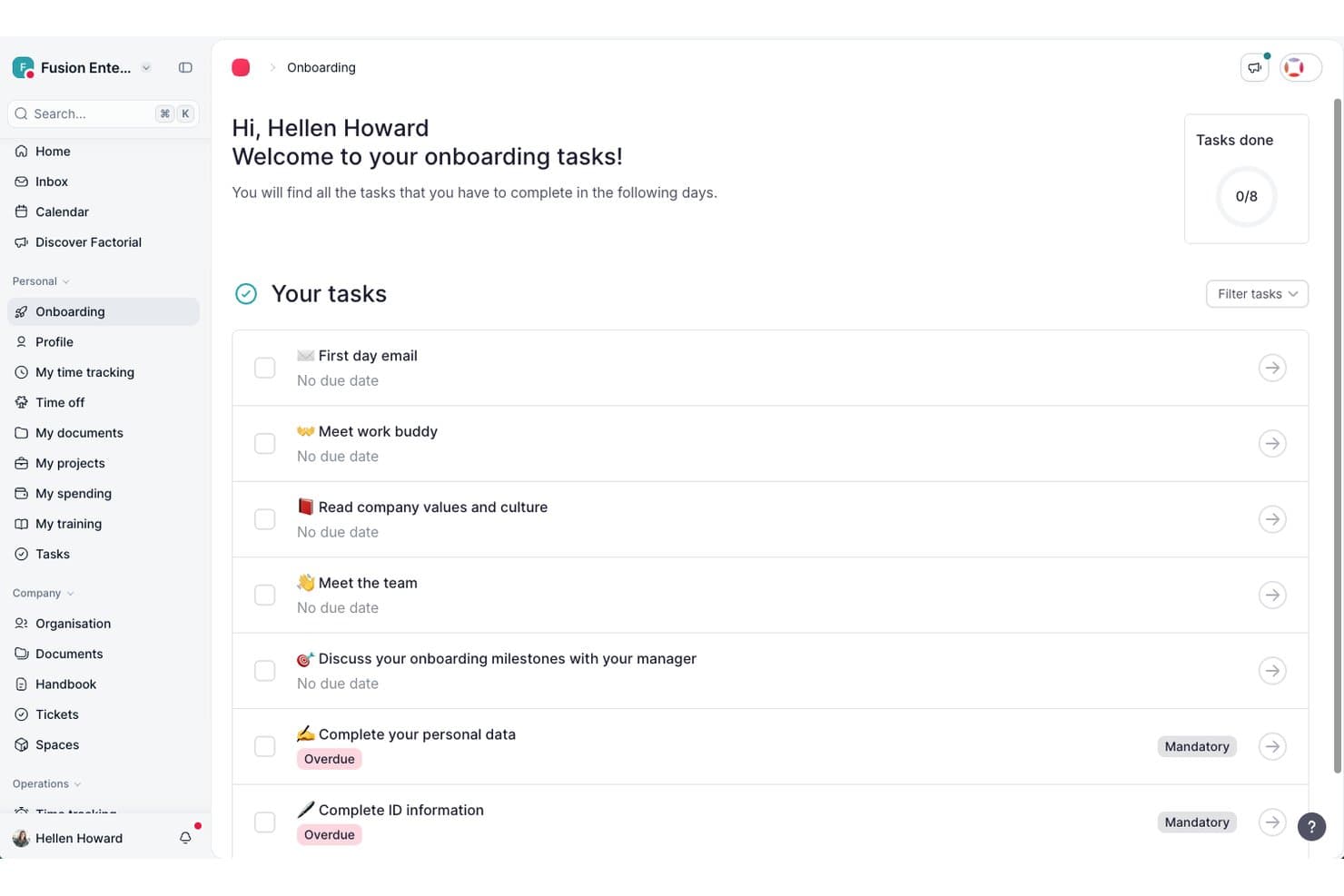
Factorial guides new hires through onboarding tasks in one place. Factorial is an AI-powered HR platform that brings recruiting, time management, performance, and employee data into one place, with AI assistance built into day-to-day tasks like writing job descriptions, summarizing resumes, and managing hiring pipelines.
Who Is Factorial Best For?
Factorial suits HR managers and recruiters at growing companies who want AI woven into daily HR tasks—from drafting job descriptions to generating performance summaries—without juggling separate tools.
Why I Picked Factorial
I picked Factorial as one of the best because its AI runs through the daily work of hiring, not just as a bolt-on. When I'm building out a role, the AI drafts the job description, suggests relevant competencies, and generates resume summaries so I'm not reading every CV cold. I also like how candidate pipeline stages are fully customizable, with automatic emails triggered when applicants move between phases, keeping communication consistent without any manual follow-up.
Factorial Key Features
- Evaluation forms: Rate candidates from 1 to 5 on individual competencies and add a written overall summary for each applicant.
- Automated stage-based emails: Trigger candidate emails automatically when applicants move to a specified hiring phase.
- Role-based hiring team access: Assign recruiter, hiring manager, or reviewer roles with different levels of pipeline visibility and editing permissions.
- Calendar-linked interview scheduling: Connect your calendar to Factorial to schedule candidate interviews directly within the platform.
Factorial Integrations
Factorial offers marketplace integrations with Google Workspace, Slack, LinkedIn, Recruitee, and Microsoft Power BI, plus Zapier. It also provides a public API, webhooks, SDKs, API keys, and OAuth 2.0 for custom integrations.
Pros and Cons
Pros:
- AI resume summaries speed initial review
- Evaluation forms capture competency ratings and notes
- Customizable stages trigger candidate emails
Cons:
- Microbusiness fit can feel oversized
- Resume search and filtering aren't documented
 Best for AI-driven candidate matching
- Free demo available
- Modular pricing, from $6/employee/month (module-dependent)
Visit WebsiteCustomer Rating:4.6/5
This job requisition form in Folks HR allows users to create a new job posting by entering applicant details, job location, opening date, and position title. Folks HR's ATS is an all-in-one applicant tracking system designed to help small and medium-sized businesses manage their recruitment processes more efficiently. You can use it to centralize applications, post to job boards, and simplify how you source, screen, and hire candidates.
I included Folks HR's ATS in this list because it offers an intuitive ATS designed specifically for smaller businesses that may not have a dedicated recruitment team. You can manage applications through a centralized CV library, automate interview communications, and customize your hiring workflows—all from one platform. It also helps you create branded career pages quickly, making it easier to present a polished image to prospective candidates without relying on extra marketing resources.
Other standout features include AI-powered resume parsing to help identify the most qualified applicants faster, detailed recruitment analytics to track time-to-hire and other key metrics, and direct sourcing through LinkedIn to expand your reach. Folks HR's ATS also makes it simple to connect with candidates through automated updates and organized communication tools, keeping your hiring process on track without extra effort.
Integrations are available with platforms like Integrations include ADP, Agendrix, Applauz, Employeur D, Emprez, Evolia, Merinio, Nethris, and Payworks. These integrations support payroll, time tracking, and other ATS processes, helping you manage more of your ATS ecosystem in one place.
Learn more about Folks HR: Best with built-in onboarding automations
- Free plan + free demo available
- From $2/user/month (billed annually)
Visit WebsiteCustomer Rating:4.8/5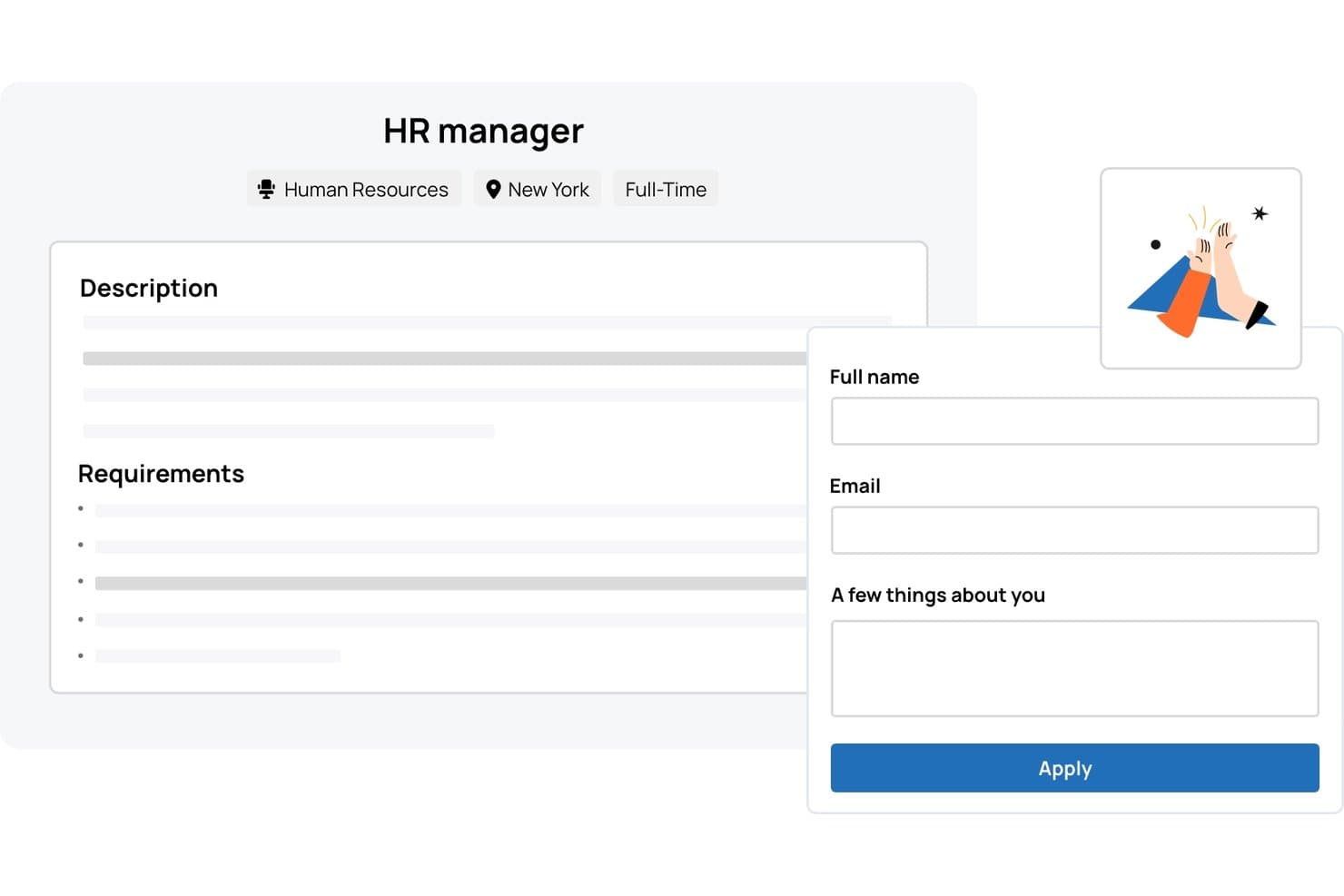
TalentHR offers a job listing page with an integrated application form allowing candidates to submit their name, email, and a brief bio directly. TalentHR is an applicant tracking and HR management platform designed for small businesses, offering digital recruitment workflows, onboarding tools, and built-in HR records management.
Who Is TalentHR Best For?
TalentHR suits small businesses and startups looking for HR software that handles hiring, onboarding, and employee management in one place.
Why I Picked TalentHR
I picked TalentHR as one of the best because the built-in onboarding automation for new hires really speeds up document collection and training assignments. I can set up onboarding workflows that automatically trigger the right forms and tasks for every new starter.
TalentHR Key Features
- Customizable recruitment pipeline: Tailor each hiring stage to match your team's unique workflow.
- Careers page builder: Create and update branded job listings directly from the platform.
- Interview notes tracking: Store and access feedback and evaluations for every candidate.
- Employee records management: Keep all employee documents and information organized in one platform.
TalentHR Integrations
TalentHR offers native integrations with Google Workspace, Microsoft 365, and Slack, and provides an API for custom integrations.
Pros and Cons
Pros:
- Built-in applicant and employee document management
- Customizable recruitment pipeline stages
- Automated onboarding workflows for new hires
Cons:
- Limited candidate sourcing features compared to peers
- No native job board posting support
Learn more about TalentHR: Best for compliant global hiring and payroll management
- Free demo available
- From $14/user/month
Visit WebsiteCustomer Rating:4.9/5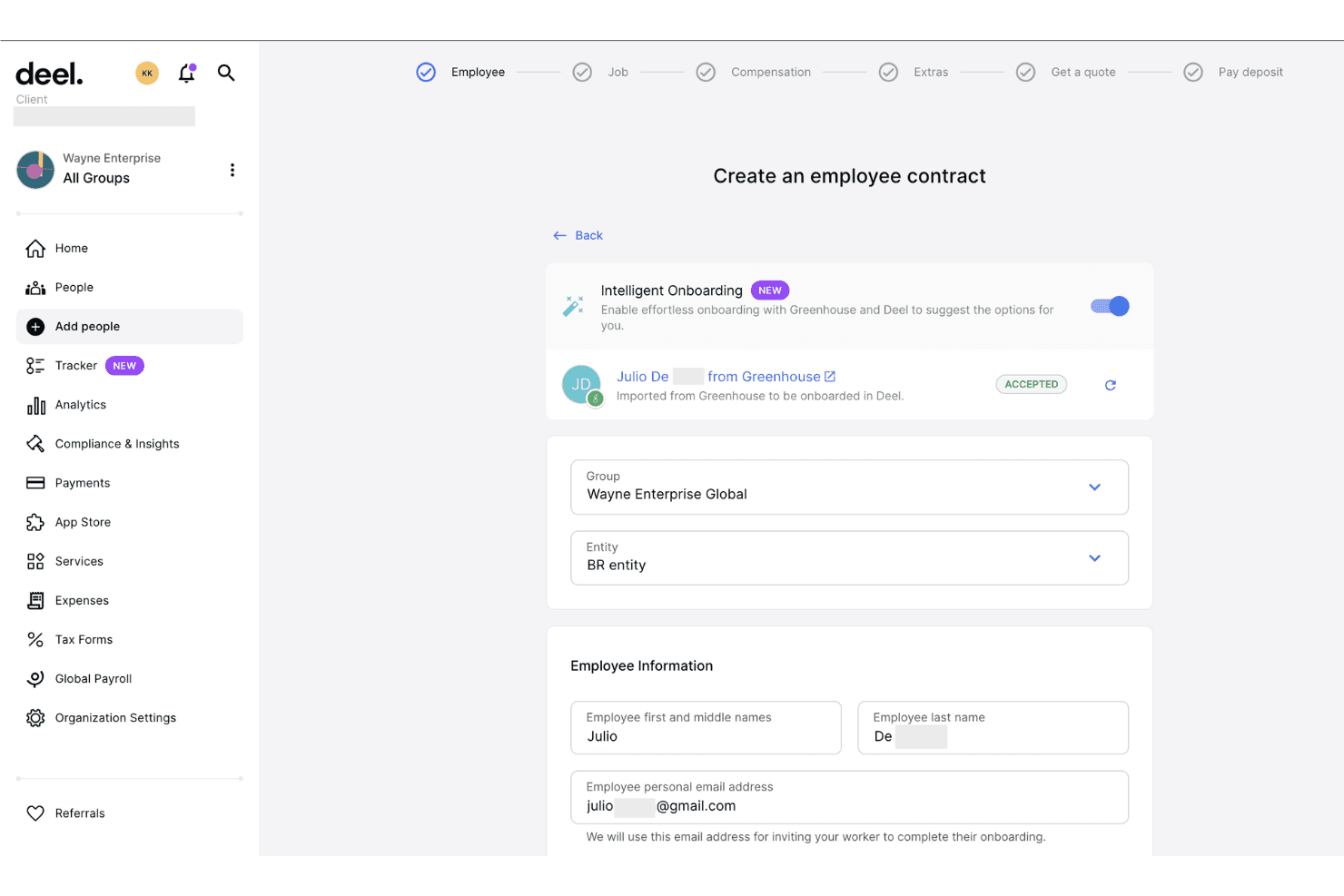
Deel Hire imports candidates from Greenhouse to streamline employee onboarding. Deel Hire is an AI-powered applicant tracking system that combines job board distribution, automated candidate screening, interview scheduling, and built-in compliance tools within Deel's broader HR and payroll platform.
Who Is Deel Hire Best For?
Deel Hire is a strong fit for startups and small businesses hiring across multiple countries who need compliance built directly into their recruiting process.
Why I Picked Deel Hire
Deel Hire earns its spot on my shortlist because compliance is woven into every step of the recruiting workflow, not bolted on afterward. When I use Deel, candidate data flows automatically from the ATS into onboarding and payroll. That matters most when hiring across countries with different legal requirements. The AI screening tools handle first-round candidate reviews based on role criteria, so my team can focus entirely on final-stage decisions.
Deel Hire Key Features
- AI-assisted job posting: Create and post job listings to over 1,000 boards with automated role and compensation suggestions.
- Google Workspace and Microsoft Teams integration: Schedule interviews and sync candidate activities within your existing workflow tools.
- Analytics dashboard: Track hiring metrics such as time-to-hire and pipeline conversion rates in real time.
- Global compliance controls: Manage applicant permissions, data privacy, and hiring documentation tailored to local laws in over 150 countries.
Deel Hire Integrations
Deel Hire offers native integrations with Google Workspace and Microsoft Teams. An API is available for custom integrations.
Pros and Cons
Pros:
- AI screening reduces manual candidate review time
- ATS and payroll housed in one platform
- Built-in compliance across 150+ countries
Cons:
- Reporting less developed than dedicated ATSs
- Overkill for domestic-only small business hiring
Learn more about Deel Hire: Best for flexible workflow visualization
- Free plan + 14-day trial available
- From $9/user/month (billed annually)
Visit WebsiteCustomer Rating:4.6/5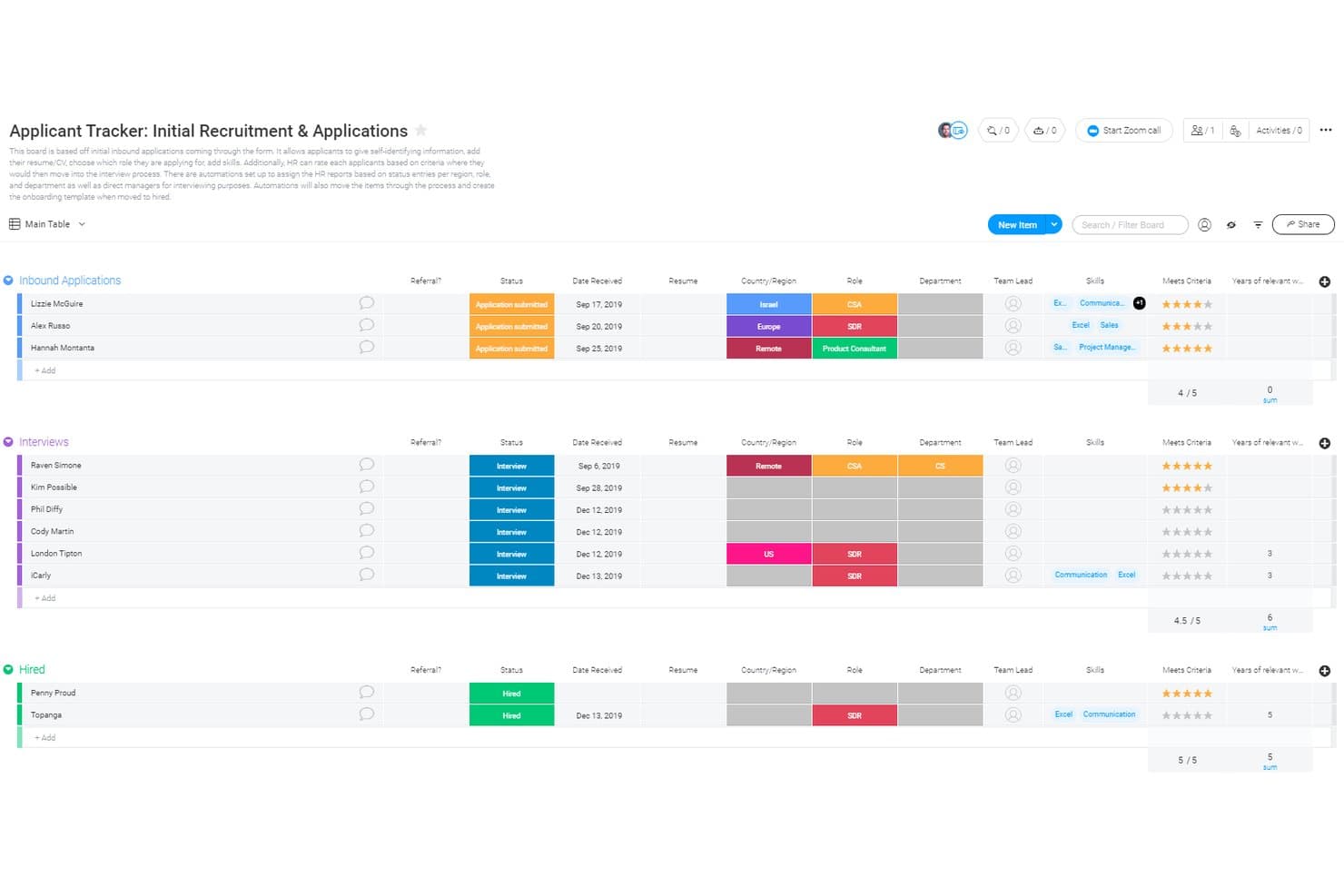
monday AI Workspace offers a structured applicant tracking board with grouped stages—Inbound Applications, Interviews, and Hired—displaying candidate details like status, date, role, department, skills, and rating criteria. monday AI Workspace is a general-purpose work management platform that small businesses can configure as an ATS using customizable boards, WorkForms, automations, and AI-powered workflow tools.
Who Is monday AI Workspace Best For?
It's a strong fit for small business owners and office managers who want to build a custom hiring workflow inside a platform they're already using for broader operations.
Why I Picked monday AI Workspace
I picked monday AI Workspace because no other tool on my shortlist lets you build and visualize a hiring pipeline in as many ways. I can switch between Kanban, Timeline, and Calendar views on the same candidate board, and set automation triggers that move candidates and fire status emails when a stage changes. The Vibe app builder even lets me spin up a custom AI agent to handle initial screening questions.
monday AI Workspace Key Features
- WorkForms: Collect candidate details and applications through customized forms shared via public links.
- AI-powered columns: Use AI columns to extract and summarize information from candidate resumes or application notes.
- Role-based permissions: Control access to boards, automations, and candidate pipelines for different hiring stakeholders.
- Automated email triggers: Send emails automatically to candidates when their pipeline status changes.
monday AI Workspace Integrations
monday AI Workspace offers hundreds of native integrations through its built-in integrations and marketplace, including Slack, Google Workspace, Microsoft 365, Jira, Dropbox, Zoom, HubSpot, Salesforce, GitHub, and Outlook. It also supports Zapier and provides an API for custom integrations.
Pros and Cons
Pros:
- AI tools speed up application review
- Automations reduce repetitive candidate communication tasks
- Highly visual pipeline with multiple board views
Cons:
- Recruiting setup requires significant manual configuration
- No native resume parsing or job posting
Learn more about monday AI Workspace: Best with integrated payroll and time tracking
- Free plan + 30-day free trial + free demo available
- From $99/month (billed annually)
Visit WebsiteCustomer Rating:4.2/5
Homebase applicant tracking and hiring dashboard for managing job postings, candidates, and team scheduling in one platform. Homebase is an applicant tracking system for small businesses that combines hiring tools, employee scheduling, time tracking, payroll, and team communication in one platform.
Who Is Homebase Best For?
Homebase is a good fit for small businesses with hourly teams that need to manage hiring, scheduling, and payroll in one place.
Why I Picked Homebase
I picked Homebase as one of the best because I can manage applicant tracking, payroll, and time tracking all in one place. My team uses the built-in time clock to track hours and syncs that data directly with payroll, which saves us from manual entry. I also like that I can onboard new hires and run payroll without switching between different systems.
Homebase Key Features
- Job posting distribution: Post open positions to multiple job boards directly from the platform.
- Applicant messaging: Communicate with candidates through built-in messaging tools.
- Interview scheduling: Set up and manage interview times with candidates inside the system.
- Document storage: Store and organize candidate documents and onboarding paperwork securely.
Homebase Integrations
Homebase offers native integrations with Square, Clover, Toast, Shopify, PayAnywhere, Talech, Lightspeed, Revel, ADP RUN, Gusto, QuickBooks Online Plus, Paychex, Rippling, Wells Fargo, Bank of America, Heartland, Millennium, SurePayroll, TipHaus, and GoDaddy. It also posts jobs directly to Indeed, Google Jobs, ZipRecruiter, Glassdoor, and Craigslist. An API is available for custom integrations.
Pros and Cons
Pros:
- Shift scheduling links directly to hiring
- Built-in time tracking for hourly roles
- Direct job posting to major job boards
Cons:
- Reporting features are basic for hiring analytics
- No built-in video interview functionality
 Best for reaching a broader range of candidates
- Free demo available
- Pricing upon request
Visit WebsiteCustomer Rating:4.4/5
Post job listings across over 1000 job boards and find the best candidates for the role with the software's smart recommendations. Greenhouse is a recruiting software that offers an 'essential' plan that's well-suited to the needs of small businesses. The platform helps you reach, classify, and nurture talent, and build a robust candidate pipeline and find the best candidates for each available position.
When you're ready to advertise a job opening, you can post on over 1,000 job boards through the software. This includes both niche sites and major job marketplaces, and the software makes recommendations of where you should post based on historical and industry performance. By casting a wider net, you're more likely to find the best people for the role.
A contact database is included in the system, making it easier to keep track of applicant contact information and send personalized follow ups and communications. You can also automate your messaging to reduce your manual workload.
The software allows you to screen candidates anonymously using scorecards you can set up. This helps you both mitigate unconscious bias and ensure you're evaluating people fairly and consistently.
You can connect the platform to other tools including Broadbean, Canditech, Cord, Docusign, Dropbox, FlexJobs, Google Meet, Indeed, Microsoft Teams, Paradox, and Seek. A free demo is available, and pricing information is available upon request.
Küçük İşletmeler için Diğer Başvuru Takip Sistemleri
Kısa listeme giremeyen ancak yine de incelemeye değer bazı ek küçük işletme başvuru takip sistemi seçeneklerini burada bulabilirsiniz:
- 11Mitratech PerformBest for teams looking for an end-to-end solution
- 12AvaHRBest for small businesses with fewer than 100 employees
- 13WizehireBest for human-powered hiring support
- 14EddyCollaborative candidate tracking tools within a core HR framework
- 15RecruiteeStraightforward recruiting platform with smart campaigns and custom landing pages
- 16JazzHRFull-feature applicant tracking system with enhanced candidate experience functions
- 17Mitratech TalentReefBest applicant tracking system for hiring hourly workers
- 18Unnanu HireBest for AI/ML powered resume scoring feature
- 19GoHireATS system with industry-specific customizations to help businesses scale
- 20PluralBest for integrated performance tools
How I Evaluate Applicant Tracking Systems for Small Business
I split my evaluation into baseline must-haves—like multi-board job posting and candidate pipeline tracking—and the differentiators that separate a good ATS from the right one for a small team.
Core Functionality (Table Stakes For This List)
When I'm selecting tools for my list, I rank each one on a scale from 0 (does not offer the functionality) to 5 (excels in this area) for each core functionality listed below. Then, I calculate the tool's total score into a percentage. Each tool needs to achieve a minimum total score of 65% to be considered for inclusion.
- Job Posting Distribution: I check how many job boards a tool pushes to in a single click—think Indeed, LinkedIn, ZipRecruiter—and whether it supports both free and sponsored listings.
- Candidate Pipeline Management: A clear, visual pipeline where you can drag candidates between stages like "Phone Screen" and "Offer" makes a real difference when you're juggling multiple open roles.
- Resume Parsing & Storage: I evaluate whether the tool reliably extracts candidate details from uploaded resumes and lets you search your talent pool later using filters or keywords.
- Careers Page Builder: I look for a branded, embeddable careers page your team can launch without a developer—something that matches your site and works well on mobile devices.
- Hiring Team Collaboration: Tools like scorecards, @mentions, and role-based permissions matter here, especially when a store manager and an HR lead both need input on the same hire.
- Small Business Pricing & Scalability: I evaluate whether transparent, published pricing exists for teams under 200 employees, including free tiers or per-job plans that fit seasonal hiring patterns.
Once I have a list of tools that meet the criteria, I consider what sets each platform apart.
Differentiating Factors (What Sets Vendors Apart)
Here's how I compare and contrast different vendors:
Standout Features
Interview scheduling automation saves hours when you're coordinating between candidates and busy hiring managers—I look for tools with two-way calendar sync and self-scheduling links. Built-in SMS outreach is another feature I evaluate closely, since texting tends to get faster responses from candidates in hourly or retail roles. I also check whether a platform includes native offer letters with e-signature, which lets small teams close candidates without paying for a separate signing tool.
Beyond Features
Integrations with payroll and HRIS tools like Gusto, BambooHR, or Rippling matter a lot—I evaluate whether candidate data flows into your existing stack without manual re-entry. Time-to-value is another factor I weigh, since most small businesses need to post their first job within a day, not after a weeks-long implementation. Mobile experience counts too. Hiring managers reviewing candidates between meetings need a native app with push notifications, not a clunky mobile browser workaround.
Küçük İşletmeler için Başvuru Takip Sistemi Nasıl Seçilir?
Uzun özellik listeleri ve karmaşık fiyatlandırma yapıları arasında kaybolmak kolaydır. Size özgü yazılım seçim sürecinizi yürütürken odağınızı korumanıza yardımcı olmak için aklınızda bulundurmanız gereken faktörleri aşağıda bir kontrol listesi halinde bulabilirsiniz:
| Faktör | Dikkat Edilmesi Gerekenler |
|---|---|
| FaktörÖlçeklenebilirlik | Dikkat Edilmesi GerekenlerSistem işletmenizle birlikte büyüyecek mi? Ekibiniz genişledikçe önemli maliyetler veya teknik sınırlamalar olmadan daha fazla kullanıcıyı ya da iş ilanını destekleyebildiğinden emin olun. |
| FaktörEntegrasyonlar | Dikkat Edilmesi GerekenlerMevcut araçlarınızla çalışıyor mu? Her şeyi birbirine bağlı tutmak ve manuel veri girişini azaltmak için İK yazılımları, e-posta ve takvimlerle uyumluluğunu kontrol edin. |
| FaktörÖzelleştirilebilirlik | Dikkat Edilmesi GerekenlerSistemi iş akışlarınıza uyacak şekilde düzenleyebilir misiniz? Ekibinizin kendine özgü ihtiyaçlarına uygun olarak alanları, süreçleri ve gösterge panellerini ayarlama seçeneklerini arayın. |
| FaktörKullanım kolaylığı | Dikkat Edilmesi GerekenlerSistem tüm kullanıcılar için sezgisel mi? Eğitim süresini en aza indiren ve tüm ekibinizin hızlıca benimsemesini sağlayan anlaşılır bir arayüz olduğundan emin olun. |
| FaktörUygulama ve işe alıştırma | Dikkat Edilmesi GerekenlerNe kadar hızlı başlayabilirsiniz? Sorunsuz bir işe alıştırma sürecini kolaylaştırmak için kurulum sürecini, sunulan desteği ve eğitimler veya kılavuzlar gibi kaynakları değerlendirin. |
| FaktörMaliyet | Dikkat Edilmesi GerekenlerToplam sahip olma maliyeti nedir? İlk fiyatlandırmanın ötesine bakın; bütçenizi etkileyebilecek bakım ücretlerini, eklentileri ve gizli maliyetleri göz önünde bulundurun. |
| FaktörGüvenlik önlemleri | Dikkat Edilmesi GerekenlerVerileriniz ve adayların bilgileri korunuyor mu? Veri şifreleme, veri koruma yasalarına uyumluluk ve kullanıcı erişim denetimleri gibi özellikleri kontrol edin. |
| FaktörDestek erişilebilirliği | Dikkat Edilmesi GerekenlerMüşteri desteğine ne kadar kolay erişilebiliyor? Özellikle kritik işe alım dönemlerinde veya teknik sorunlarla karşılaştığınızda, birden fazla kanal üzerinden güvenilir yardım alabilmek istersiniz. |
Küçük İşletmeler İçin Aday Takip Sistemi Nedir?
Küçük işletmeler için aday takip sistemi, işe alım sürecini yönetmeye ve düzenlemeye yardımcı olmak üzere tasarlanmış bir yazılımdır. İnsan kaynakları profesyonelleri ve işe alım uzmanları bu araçları genellikle başvuruları takip etmeyi, mülakatları planlamayı ve aday verilerini depolamayı kolaylaştırmak için kullanır. İş ilanı yayınlama yönetimi, aday takibi ve mülakat planlama gibi özellikler verimliliğe ve düzenli çalışmaya yardımcı olur. Bu araçlar, küçük işletmeler için işe alım sürecinde zaman kazandırır ve karmaşıklığı azaltır.
Özellikler
Her iyi küçük işletme aday takip sisteminde bulunması gereken temel özellikler şunlardır:
- İş ilanı yayınlama yönetimi: Birden fazla platformda iş ilanları oluşturmanıza ve yönetmenize olanak tanır; böylece zamandan tasarruf eder ve daha geniş bir kitleye ulaşırsınız.
- Aday takibi: Başvuru sahiplerinin işe alım sürecindeki ilerlemesini izlemenize yardımcı olur ve hiçbir adımın atlanmamasını sağlar.
- Mülakat planlama: Adaylar ve ekip üyeleriyle mülakatlar ayarlamayı kolaylaştırır ve karşılıklı yazışmaları azaltır.
- Özelleştirilebilir iş akışları: İşe alım süreçlerini ekibinizin kendine özgü ihtiyaçlarına uyacak şekilde düzenlemenize olanak tanır ve verimliliği ve düzeni artırır.
- Entegrasyon özellikleri: İletişimi ve veri girişini kolaylaştırmak için e-posta ve takvimler gibi mevcut araçlara bağlanır.
- Veri güvenliği: Aday bilgilerinin şifreleme ve veri koruma yasalarına uyum yoluyla korunmasını sağlar.
- Raporlama ve analiz: İşe alım ölçümleri ve eğilimleri hakkında içgörüler sunarak bilinçli kararlar almanıza yardımcı olur.
- Mobil erişim: İşe alım görevlerini hareket hâlindeyken yönetme olanağı sunarak yoğun insan kaynakları profesyonelleri için esnekliği artırır.
- Kullanıcı dostu arayüz: Eğitim süresini en aza indiren ve tüm ekibin benimsemesini teşvik eden sezgisel bir tasarıma sahiptir.
- Eğitim kaynakları: Yeni kullanıcıların sistemi hızlı bir şekilde öğrenmesine ve etkili biçimde kullanmasına yardımcı olacak eğitimler ve kılavuzlar içerir.
Avantajlar
Küçük işletmeler için aday takip sisteminin uygulanması ekibiniz ve işletmeniz için çeşitli avantajlar sağlar. Yararlanmayı bekleyebileceğiniz avantajlardan bazıları şunlardır:
- Zaman tasarrufu: İş ilanı yayınlama ve adayları takip etme gibi tekrarlayan görevleri otomatikleştirerek daha stratejik faaliyetler için zaman kazandırır.
- Gelişmiş düzen: Tüm aday bilgilerini ve işe alım verilerini tek bir yerde tutarak önemli ayrıntıların kaybolma riskini azaltır.
- Geliştirilmiş iş birliği: Ekip üyelerinin aday bilgilerine kolayca erişmesine ve bu bilgileri güncellemesine olanak tanıyarak iletişimi ve karar alma süreçlerini iyileştirir.
- Daha iyi aday deneyimi: Başvuru sahiplerine zamanında güncellemeler ve iletişim sunarak şirketinizle yaşadıkları genel deneyimi geliştirir.
- Veriye dayalı içgörüler: İşe alım süreçleri hakkında raporlar ve analizler sunarak bilinçli kararlar almanıza ve gelecekteki işe alım stratejilerinizi geliştirmenize yardımcı olur.
- Ölçeklenebilirlik: İşe alım ihtiyaçlarınız arttıkça daha fazla kullanıcıyı ve iş ilanını destekleyerek işletmenizle birlikte büyür.
- Maliyet verimliliği: Manuel süreçlere ve harici işe alım hizmetlerine duyulan ihtiyacı azaltarak uzun vadede tasarruf sağlar.
Maliyetler ve Fiyatlandırma
Küçük işletmeler için aday takip sistemi seçmek, mevcut çeşitli fiyatlandırma modellerini ve planları anlamayı gerektirir. Maliyetler özelliklere, ekip büyüklüğüne, eklentilere ve daha fazlasına göre değişir. Bütçeleri sınırlı olan ekipler, ücretli bir plana ihtiyaç duyup duymadıklarına karar vermeden önce ücretsiz ATS seçeneklerini karşılaştırabilir.
Aşağıdaki tablo, küçük işletmeler için aday takip sistemi çözümlerinde yaygın planları, ortalama fiyatlarını ve genellikle sunulan özellikleri özetlemektedir:
Küçük İşletmeler İçin Aday Takip Sistemi Plan Karşılaştırma Tablosu
| Plan Türü | Ortalama Fiyat | Yaygın Özellikler |
|---|---|---|
| Plan TürüÜcretsiz Plan | Ortalama Fiyat$0 | Yaygın ÖzelliklerTemel iş ilanı yayınlama, aday takibi ve sınırlı raporlama. |
| Plan TürüBireysel Plan | Ortalama Fiyat$5-$25/kullanıcı/ay | Yaygın Özelliklerİş ilanı yayınlama, özgeçmiş ayrıştırma, e-posta entegrasyonu ve temel analiz. |
| Plan Türüİşletme Planı | Ortalama Fiyat$30-$75/kullanıcı/ay | Yaygın ÖzelliklerGelişmiş analiz, özelleştirilebilir iş akışları, insan kaynakları araçlarıyla entegrasyonlar ve mobil erişim. |
| Plan TürüKurumsal Plan | Ortalama Fiyat$80-$150/kullanıcı/ay | Yaygın ÖzelliklerTam özelleştirme, özel destek, çoklu dil desteği ve geliştirilmiş güvenlik. |
SSS
Küçük işletmeler için aday takip sistemi hakkında sık sorulan soruların bazı yanıtları:
Bir aday takip sisteminin uygulama süresi nedir?
Uygulama süresi değişiklik gösterir, ancak çoğu aday takip sistemi birkaç gün ile birkaç hafta içinde kurulabilir. Süre, mevcut süreçlerinizin karmaşıklığına ve ihtiyaç duyduğunuz özelleştirme düzeyine bağlıdır. Süreci hızlandırmak için iş tanımları, ekip rolleri ve mevcut iş akışları gibi gerekli tüm bilgi ve kaynakları önceden hazırlayın. Bazı sağlayıcılar, ekibiniz için sorunsuz bir geçiş sağlamak üzere kurulum sürecinde size rehberlik edecek destek hizmeti sunar.
Aday takip sistemleri diğer İK araçlarıyla entegre olabilir mi?
Evet, çoğu aday takip sistemi bordro, performans yönetimi ve çalışan bağlılığı platformları gibi diğer İK araçlarıyla entegrasyon olanakları sunar. Bu araçları entegre ederek manuel veri girişini azaltan ve farklı işlevler arasındaki iletişimi geliştiren daha bütünleşik bir İK ekosistemi oluşturabilirsiniz. Satın almadan önce sistemin ekibinizin hâlihazırda kullandığı belirli araçları destekleyip desteklemediğini kontrol edin.
Aday takip sistemleri değiştirilirken veri aktarımı yapılabilir mi?
Evet, sistemler değiştirilirken genellikle veri aktarımı yapılabilir, ancak bunun için dikkatli bir planlama gerekir. Tüm aday verilerinin, iş ilanlarının ve geçmiş kayıtların kayıp yaşanmadan aktarıldığından emin olmalısınız. Birçok sağlayıcı bu sürece yardımcı olmak için aktarım desteği veya araçları sunar. Olası sorunlara karşı koruma sağlamak amacıyla aktarımı başlatmadan önce verilerinizi yedeklemeniz iyi bir fikirdir.
Aday takip sistemleri ne kadar güvenlidir?
Aday takip sistemleri genellikle veri şifreleme, güvenli kullanıcı erişimi ve veri koruma yasalarına uyum gibi güçlü güvenlik önlemleri sunar. Bir sistemi değerlendirirken güvenlik protokollerini ve sahip oldukları sertifikaları sorun. Adaylarınızın bilgilerinin güvenli bir şekilde işlendiğinden ve sistemin bölgenizdeki ilgili düzenlemelere uygun olduğundan emin olmanız önemlidir.