

10 Best Free ATS Reviewed in 2026

Best Free ATS Shortlist


Finding the right applicant tracking system (ATS) can feel like searching for a needle in a haystack, especially when you're on a budget. You want a tool that simplifies your hiring process without draining your resources. That's where free ATS solutions come in handy.
In my experience, these free tools offer the essential features you need to manage your recruitment efforts efficiently. They help you organize candidates, track applications, and make informed hiring decisions.
In this article, I'll share my top picks for free ATS options. I've independently tested and reviewed each one to ensure you get unbiased insights. Whether you're a small business or a growing team, there's something here to fit your needs.
Why Trust Our Software Reviews
Our team has been testing and reviewing software since 2012. As HR experts ourselves, we know how difficult—and important—it is to choose the right software.
For this guide, we evaluated tools using hands-on testing and independent research, scoring tools using our selection criteria. We also draw on insights from industry thought leaders and practicing HR experts.
Our reviews reflect our human editorial judgment, not a sales pitch.
Expert reviewers:
Free ATS Comparison Table
Here are the base costs for each of the tools that made it onto my shortlist:
| Tool | Best For | Trial Info | Price | ||
|---|---|---|---|---|---|
| 1 | Best for fast onboarding and training automation | Free plan + free demo available | From $2/user/month (billed annually) | Website | |
| 2 | Best for built-in interview scheduling | 7-day free trial + free demo available | From $99/month (billed annually) | Website | |
| 3 | Best for drag-and-drop interface | 14-day free trial | From $157/month (billed annually) | Website | |
| 4 | Best for easy-to-use interface | Free demo available | Pricing upon request | Website | |
| 5 | Best for visual recruiting pipelines | Free demo available | Pricing upon request | Website | |
| 6 | Best for AI-driven sourcing | Free demo + 7-day free trial available | From $149/user/month (billed annually) | Website | |
| 7 | Best for data-driven recruiting | Free demo available | From $400/month | Website | |
| 8 | Best for extensive job board reach | Free plan available | From $150/month | Website | |
| 9 | Best for gig economy hiring | Free plan available | From $12.75/user/month | Website | |
| 10 | Best for hiring in the automotive industry | Free demo available | Pricing upon request | Website |
Best Free ATS Reviews
Below are my detailed summaries of the best free ATS that made it onto my shortlist. My reviews offer a detailed look at the key features, pros & cons, integrations, and ideal use cases of each tool to help you find the best one for you. While some of these tools offer a completely free version, others offer a free trial period. I’ve added a note about what’s free in each of my reviews.

TalentHR
Best for fast onboarding and training automation
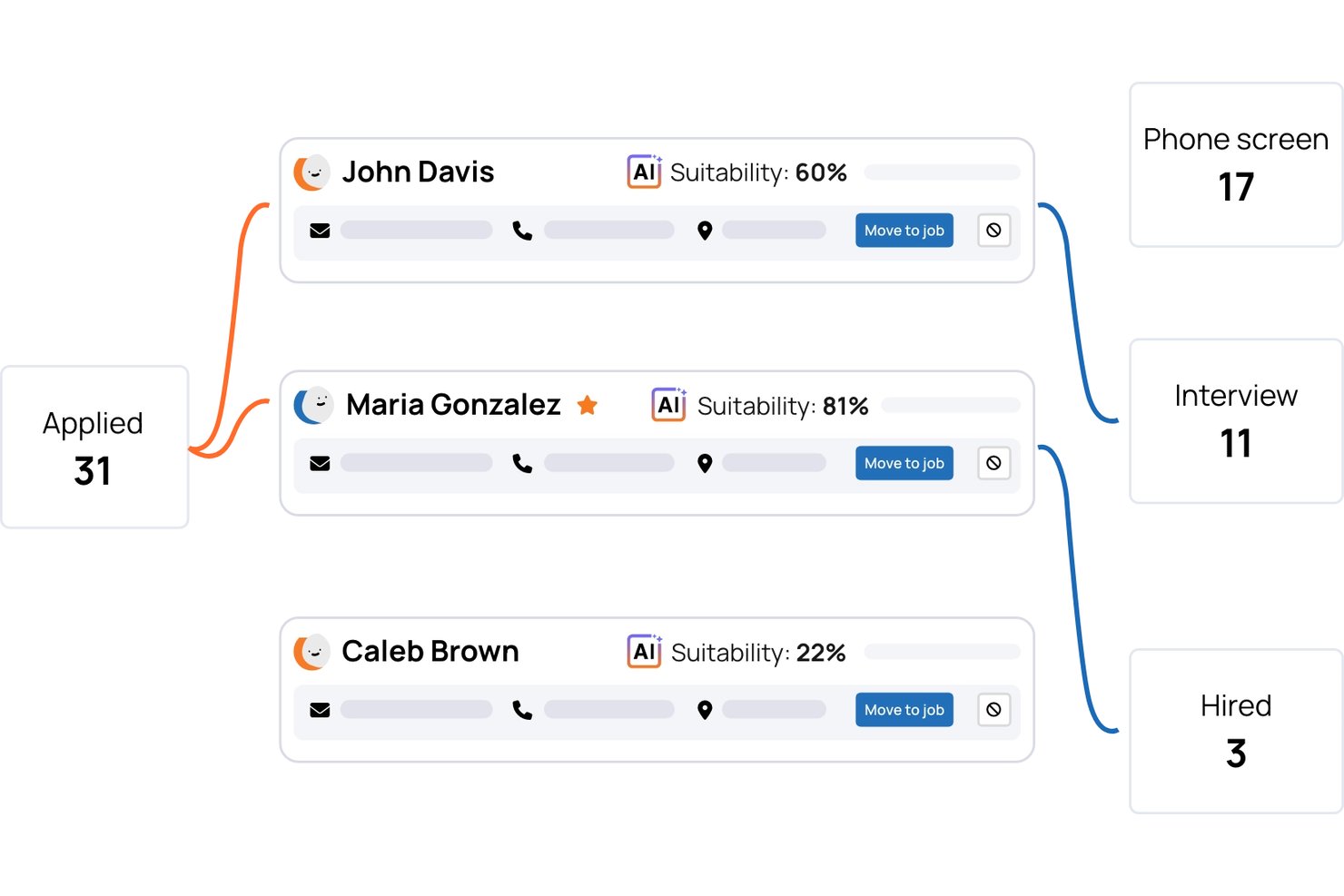
TalentHR is an applicant tracking and core HR software platform designed to manage recruitment, onboarding, training, time off, and performance workflows in a single system.
Who Is TalentHR Best For?
HR teams at small to midsize businesses looking to centralize hiring, onboarding, and employee management.
Why I Picked TalentHR
I picked TalentHR as one of the best because I can automate onboarding steps, design interactive training modules, and launch digital checklists for new hires right out of the box. This keeps our hiring and training timelines short and structured.
TalentHR Key Features
- AI-assisted HR workflows: Smart suggestions help speed up document management and daily administrative tasks.
- People analytics dashboard: Visual dashboards deliver headcount, PTO, and department metrics in real time.
- Digital signature support: Capture and store employee signatures for contracts and policies directly in the platform.
- Self-service employee portal: Employees update personal records, access forms, and submit leave requests without admin help.
TalentHR Integrations
TalentHR provides native integrations with Slack, Google Calendar, Outlook, WordPress, Microsoft Teams, Google Workspace, Zapier, and more. An API is also available for custom integrations.
Pros and Cons
Pros:
- AI-powered tools for HR admin tasks
- Digital checklists speed up new hire tracking
- Automated workflows for onboarding paperwork
Cons:
- Few built-in external job board options
- Limited advanced candidate pipeline management
AvaHR
Best for built-in interview scheduling

AvaHR is a hiring platform featuring applicant tracking, job posting to 100+ boards, candidate scoring, pre-screening questionnaires, and onboarding workflows.
Who Is AvaHR Best For?
AvaHR works well for small to mid-sized businesses that need a structured hiring process without the complexity of enterprise-grade recruiting tools.
Why I Picked AvaHR
I've included AvaHR in my top picks because its built-in interview scheduling sets it apart from free ATS tools that rely on third-party calendar links. The automated pipeline stage actions let you trigger interview scheduling directly when a candidate moves to a specific hiring stage, so nothing falls through the cracks. I also like that you can send interview reminders via SMS from inside the platform, keeping candidates engaged without switching between tools.
AvaHR Key Features
- AI candidate scoring: AvaHR ranks applicants based on how well they match your job requirements, so you can prioritize your strongest candidates.
- One-click job distribution: Post open roles to 100+ job boards, including Indeed and LinkedIn, directly from the platform in a single action.
- Offer letter templates with eSignatures: Create, send, and collect signed offer letters without leaving AvaHR or using a separate document signing tool.
- Culture profile builder: Add videos and photos to your job listings to give candidates a look at your team and workplace before they apply.
AvaHR Integrations
AvaHR connects with a range of apps through Zapier, including Gusto, BambooHR, Checkr, Slack, Google Calendar, Calendly, Salesforce, HubSpot, Microsoft Teams, and ADP Workforce Now. An API is also available for custom integrations.
What's Free?
AvaHR offers a free trial that includes access to its intuitive interface and core recruitment features, with limitations on the trial duration, and it also provides a free demo.
Pros and Cons
Pros:
- Pipeline triggers automate stage-based actions
- Culture profiles with video and photos
- One-click posting to 50+ job boards
Cons:
- eSignatures cost extra on lower plans
- No free-forever plan available
Best for drag-and-drop interface

Breezy HR is an applicant tracking system designed for small to medium-sized businesses. It performs key functions like job posting, candidate management, and interview scheduling.
Why I picked Breezy HR: The free version offers a user-friendly drag-and-drop interface that simplifies the recruitment process. You can easily organize candidates and move them through different hiring stages. The tool also provides customizable pipelines, which are included in the free plan. These features make it accessible and efficient for teams looking to streamline their hiring efforts.
Standout features & integrations:
Features include customizable career pages, interview self-scheduling, and automated reference checks. You can create branded career pages to attract candidates. The tool also offers video interviewing capabilities, which can be useful for remote hiring.
Integrations include LinkedIn, Google Calendar, Indeed, ZipRecruiter, Glassdoor, Slack, BambooHR, Xero, QuickBooks, and ADP.
What's free?
Breezy HR offers a free-forever plan with essential features like the drag-and-drop interface and customizable pipelines, but it limits the number of active positions and users.
Pros and Cons
Pros:
- Branded career pages
- Automated reference checks
- Video interviewing tools
Cons:
- Restricted user access
- No advanced analytics
Best for easy-to-use interface

Recruitee is a collaborative hiring platform designed for HR teams and recruiters, helping streamline the recruitment process from job posting to hire. It supports key functions like candidate management and job advertising, making it ideal for businesses seeking efficient hiring solutions.
Why I picked Recruitee: The free trial offers an intuitive interface that simplifies the recruitment process. You can easily post jobs and manage candidates with minimal setup. The platform provides collaborative tools to enhance team communication. These features align with its focus on ease of use, making it accessible for teams of all sizes.
Standout features & integrations:
Features include customizable pipelines, talent pool management, and career site creation. Customizable pipelines allow you to tailor the hiring process to fit your needs. Talent pool management helps you organize and nurture potential candidates. Career site creation lets you build branded pages to attract applicants.
Integrations include LinkedIn, Google Calendar, Slack, Indeed, Glassdoor, Zapier, BambooHR, Google Workspace, Microsoft Office 365, and Mailchimp.
What's free?
Recruitee offers a free trial that includes access to its intuitive interface and core recruitment features, with limitations on the trial duration and number of users.
Pros and Cons
Pros:
- Efficient candidate management
- Easy job posting
- Collaborative team tools
Cons:
- Limited reporting features
- No mobile app

Lever
Best for visual recruiting pipelines

Lever is a talent acquisition suite designed for recruitment teams and HR professionals. It provides functionalities such as candidate relationship management and recruitment automation, supporting end-to-end hiring processes.
Why I picked Lever: The free version offers visual recruiting pipelines, which help you track candidates through different hiring stages. You can manage candidate interactions and schedule interviews with ease. It also provides analytics to measure recruitment performance. These features make it an excellent choice for teams wanting a clear overview of the hiring process.
Standout features & integrations:
Features include candidate relationship management, automated interview scheduling, and recruitment analytics. Candidate relationship management helps build strong connections with potential hires. Automated scheduling reduces the time spent on coordinating interviews. Recruitment analytics provide insights to improve your hiring strategy.
Integrations include LinkedIn, Zoom, Slack, Microsoft Office 365, Google Workspace, DocuSign, Indeed, Glassdoor, Zapier, and ADP.
What's free?
Lever offers a free trial with access to visual recruiting pipelines and candidate management tools, though restrictions may apply based on user numbers and features.
Pros and Cons
Pros:
- Easy interview coordination
- Candidate relationship management
- Recruitment performance analytics
Cons:
- No mobile application
- Limited customization options

Loxo
Best for AI-driven sourcing

Loxo is a recruitment platform designed for staffing agencies and talent acquisition teams. It performs key functions like candidate sourcing, recruitment automation, and customer relationship management.
Why I picked Loxo: The free version includes AI-driven sourcing, which automates finding candidates and saves you time. It offers a recruiting CRM and built-in VoIP calling, allowing you to manage client relationships effectively. The tool also provides email automation features to streamline communication. These features align with its focus on AI-driven sourcing, making it valuable for agencies looking to enhance their recruitment process.
Standout features & integrations:
Features include a recruiting CRM, built-in VoIP calling, and email automation. The recruiting CRM helps you manage client interactions and track candidate progress. Built-in VoIP calling allows you to make calls directly from the platform. Email automation tools save time by scheduling and sending follow-up emails.
Integrations include LinkedIn, Gmail, Outlook, Indeed, ZipRecruiter, Monster, Facebook, Twitter, Slack, and Mailchimp.
What's free?
Loxo offers a free-forever plan that includes AI-driven sourcing, a recruiting CRM, and email automation, with limitations on the number of users and integrations.
Pros and Cons
Pros:
- Recruiting CRM included
- Built-in VoIP calling
- AI-driven candidate sourcing
Cons:
- Restricted reporting tools
- No mobile app


Ashby is a recruiting software designed for data-driven hiring teams, providing tools for applicant tracking and recruitment analytics. It caters to businesses that prioritize data in their recruitment processes, helping them make informed hiring decisions.
Why I picked Ashby: The free trial includes access to recruitment analytics, which is crucial for data-driven teams. You can track key metrics and gain insights into your hiring pipeline. The platform also offers customizable dashboards to visualize recruitment data. These features align with its focus on data-driven recruiting, making it a valuable tool for analytics-focused teams.
Standout features & integrations:
Features include customizable dashboards, recruitment analytics, and applicant tracking. Customizable dashboards allow you to tailor data views to your needs. Recruitment analytics provide insights into hiring trends and performance. Applicant tracking helps you manage candidates through the recruitment process efficiently.
Integrations include LinkedIn, Slack, Google Workspace, Microsoft Office 365, Zoom, DocuSign, Greenhouse, Lever, BambooHR, and Zapier.
What's free?
Ashby offers a limited-time free trial that includes access to recruitment analytics and customizable dashboards, with restrictions on the number of users and features.
Pros and Cons
Pros:
- Efficient applicant tracking
- Customizable data dashboards
- Data-driven analytics tools
Cons:
- Limited customization options
- No mobile app


Indeed is a job search engine widely used by employers to post job listings and by job seekers to find employment opportunities. It serves HR teams and recruiters by providing tools for job posting and candidate search.
Why I picked Indeed: The free plan allows you to post jobs and access a vast pool of candidates. You can use filters to narrow down applicants, making the hiring process more efficient. Indeed offers employer branding tools to help you attract the right talent. These features support its focus on extensive job board reach, providing a broad exposure for your job listings.
Standout features & integrations:
Features include candidate messaging, resume search, and employer branding tools. Candidate messaging allows direct communication with applicants. Resume search helps you find candidates who match your requirements. Employer branding tools enhance your company’s visibility to potential hires.
Integrations include LinkedIn, Glassdoor, BambooHR, Greenhouse, iCIMS, Jobvite, Lever, Workday, ADP, and Paycor.
What's free?
Indeed offers a free-forever plan that includes basic job posting and access to their candidate database, with certain limitations on visibility and promotion.
Pros and Cons
Pros:
- Direct candidate messaging
- Employer branding tools
- Extensive candidate database
Cons:
- High competition for candidates
- Limited visibility for free posts

Giig Hire is a recruitment software designed for gig economy employers and small agencies. It supports functions like candidate management and job posting, providing a platform to handle high-volume hiring needs.
Why I picked Giig Hire: The free plan offers unlimited candidates, CVs, jobs, and clients, which is ideal for handling gig economy demands. It includes email integration and a custom careers page, allowing you to manage recruitment efficiently. These features cater to the unique needs of gig hiring, making it a valuable tool for small teams. The platform's focus on unlimited usage without hidden fees is a standout feature.
Standout features & integrations:
Features include a LinkedIn Chrome extension, CV formatting, and automated email tools. The LinkedIn extension helps source candidates directly from LinkedIn. CV formatting ensures resumes are easy to read, and automated emails save time on candidate communication.
Integrations include LinkedIn, Indeed, Glassdoor, Google for Jobs, ZipRecruiter, Facebook, Twitter, Slack, Gmail, and Outlook.
What's free?
Giig Hire offers a free-forever plan with unlimited candidates, CVs, jobs, and clients, plus email integration and a custom careers page.
Pros and Cons
Pros:
- Custom careers page
- Email integration included
- Unlimited candidates and jobs
Cons:
- No mobile app
- Limited advanced features


Hireology is a recruitment and hiring platform tailored for the automotive industry, helping dealerships and related businesses streamline their hiring processes. It provides tools for candidate sourcing, onboarding, and employee management.
Why I picked Hireology: The free trial includes features like candidate sourcing and custom job templates, which are crucial for automotive businesses. You can manage and track applicants effectively using its user-friendly interface. The platform offers tools for creating branded job descriptions to attract the right candidates. These features cater specifically to the hiring needs of the automotive industry.
Standout features & integrations:
Features include candidate sourcing, onboarding automation, and employee management tools. Candidate sourcing helps you find qualified applicants quickly. Onboarding automation streamlines the process of getting new hires started. Employee management tools ensure that you can keep track of your workforce efficiently.
Integrations include ADP, BambooHR, Indeed, LinkedIn, Paycor, Paylocity, Dealertrack, QuickBooks, Salesforce, and ZipRecruiter.
What's free?
Hireology offers a limited-time free trial that includes access to candidate sourcing and job management tools, with restrictions on the duration and number of users.
Pros and Cons
Pros:
- Employee management tools
- Onboarding automation
- Branded job descriptions
Cons:
- Limited customization options
- No mobile app
Other Free ATS
Here are some additional ATS options that also offer free plans or trials. While these tools didn’t make it onto my shortlist, they’re still worth checking out:
- Plural
For branded careers pages for small teams
- MightyRecruiter
For unlimited job postings
- Dover
For automated candidate sourcing
- Manatal
With multilingual and RTL language support
- monday AI Workspace
With customizable AI-powered workflows
- Recooty
With integrated social media posting
- Zoho Recruit
For global compliance support
- Bullhorn ATS & CRM
For staffing agency needs


How I Evaluate Free ATS
First, I define what counts as free. For ATS platforms, that means a free-forever plan—not a trial—since managing an active hiring pipeline is an ongoing need, not a one-time project. From there, I evaluate tools across two layers: the core functionality every ATS must offer to make the list, and the differentiators that separate one option from another.
Core Functionality (Table Stakes For This List)
In addition to my free offer requirements, I also use a scoring system to select tools for my list. Here's how it works:
I rank each one on a scale from 0 (does not offer the functionality) to 5 (excels in this area) for each core functionality listed below. Then, I calculate the tool's total score into a percentage. Each tool needs to achieve a minimum total score of 65% to be considered for inclusion.
- Job Posting & Distribution: I check whether a free plan lets you publish roles to external job boards or a hosted careers page, since manual cross-posting eats up hours every week.
- Candidate Database & Search: A searchable candidate database matters—I look for the ability to store profiles, tag applicants, and revisit past candidates when a similar role opens up.
- Hiring Pipeline Management: I evaluate how each tool structures its pipeline stages, from application through offer, and whether you can customize those stages to match your actual workflow.
- Resume Parsing & Screening: Manually reading every resume slows hiring down, so I look for tools that extract candidate data automatically and let you filter by key criteria.
- Multi-User Collaboration: I check whether free plans support multiple team members with notes, scorecards, or feedback sharing so hiring managers stay in the loop without side-channel emails.
- Candidate Communication Tools: Built-in email templates, conversation logging, or scheduling links help keep candidate outreach organized—I look at what's available without upgrading.
Once I have a list of tools that meet the criteria, I consider what sets each platform apart.
Differentiating Factors (What Sets Vendors Apart)
Here's how I compare and contrast different vendors:
Standout Features
Interview scheduling saves real time—I look for tools that offer self-service booking links so candidates pick their own slots instead of triggering a five-email chain. Custom application forms also matter, especially ones with knockout questions that filter out unqualified applicants before they ever hit your pipeline. A branded careers page rounds things out by giving small teams a professional storefront for open roles without needing a developer.
Beyond Features
I pay close attention to integrations—specifically whether a free plan connects to Gmail or Outlook and syncs with Google or Microsoft calendars, since that's where most scheduling and communication actually happens. Compliance matters too; I check for GDPR-ready consent capture and data retention controls, because mishandling candidate data creates real risk even at small hiring volumes. Upgrade transparency is another factor I weigh. I want clear documentation of free plan limits so teams know exactly when they'll need to move to a paid tier.
How to Choose Free ATS
Complex feature lists and pricing structures can make it hard to figure out what you’re really getting from a free ATS. To help you stay focused as you work through your software selection process, here are some factors to keep in mind:
| Factor | What to Consider |
|---|---|
| Free Offer Scope | Check what’s included in the free plan. Are essential features like job posting and candidate tracking available, or are they locked behind a paywall? |
| Scalability | Consider if the ATS can grow with your team. Will it accommodate more users and job postings as your hiring needs expand? |
| Integrations | Ensure it integrates with tools you already use, like LinkedIn or Google Workspace, to streamline your recruitment workflow. |
| Ease of Use | Look for an intuitive interface that doesn’t require extensive training. Your team should feel comfortable navigating the system quickly. |
| Customization | Determine how much you can tailor the ATS to fit your hiring process. Can you customize workflows and pipelines easily? |
| Support | Evaluate the support options available. Is there live chat, email support, or a comprehensive help center to assist when issues arise? |
| Security | Check if the ATS complies with data protection regulations like GDPR, ensuring your candidate data is secure and managed properly. |
What Is Free ATS?
An Applicant Tracking System (ATS) is software that helps businesses manage their recruitment processes, often offering free plans or trials that include basic features like job posting and candidate tracking. HR professionals, recruiters, and hiring managers typically use these tools to simplify and organize hiring tasks. They provide value by saving time, improving candidate management, and ensuring a more organized recruitment process. Features like job posting, candidate tracking, and collaboration tools help manage recruitment efficiently and effectively.
Features
Let’s go over the features commonly found in ATS, and which ones are usually included in free vs. paid plans.
Typically Free ATS Features
- Job posting: Allows you to post open positions on multiple job boards to reach a wide pool of candidates.
- Candidate tracking: Helps you monitor applicant progress through different stages of the hiring process.
- Basic analytics: Provides insights into recruitment metrics, helping you evaluate the effectiveness of your hiring strategy.
- Collaboration tools: Enable team members to communicate and share feedback on candidates, improving decision-making.
- Customizable pipelines: Let you tailor the recruitment workflow to fit your specific hiring process.
- Resume database: Stores and organizes candidate profiles and resumes for easy access and management.
- Email integration: Facilitates direct communication with candidates through integrated email systems.
Typically Paid ATS Features
- Advanced analytics: Offers deeper insights and data-driven reports to enhance your recruitment strategy.
- AI-driven candidate matching: Uses artificial intelligence to match candidates to job openings based on their qualifications.
- Video interviewing: Enables remote interviews, saving time and resources in the hiring process.
- Automated resume checker: Extracts information from resumes, like phone numbers and qualification matches for the specific job, and inputs it into the system automatically, reducing manual data entry to find the best candidates for the job.
- Employer branding tools: Enhance your company's visibility with tools to create and manage a professional employer brand, including email templates and job postings.
- Onboarding automation: Streamlines the process of integrating new hires into the company, making it more efficient.
- Mobile application: Provides access to the ATS on the go, allowing you to manage recruitment tasks from anywhere.
Benefits
Implementing a free applicant tracking tool provides several benefits for your team and your business. Here are a few you can look forward to:
- Cost savings: Free ATS solutions allow you to manage recruitment processes without the expense of a paid tool, saving your team money.
- Improved organization: Features like candidate tracking and resume databases help keep your hiring process organized and efficient.
- Wider reach: Free job posting capabilities enable you to advertise open positions on multiple job boards, attracting a broader range of candidates.
- Enhanced collaboration: Built-in collaboration tools allow your team to share feedback and make informed hiring decisions together.
- Time efficiency: Automated features like email integration and customizable pipelines reduce manual tasks and speed up the recruitment process.
- Flexibility: Customizable pipelines and dashboards let you tailor the system to fit your specific recruitment needs, even in a free version.
- Access to analytics: Basic analytics features provide insights into your hiring process, helping you make data-driven decisions without extra cost.
Costs and Pricing
I realize you came to this article looking for the best ATS options that are available for free. However, since free plans only offer limited features, there's a good chance you'll need to scale your plan up in the future.
The table below summarizes common plans, their average prices, and typical features included in applicant tracking systems:
Plan Comparison Table for ATS
| Plan Type | Average Price | Common Features |
|---|---|---|
| Free Plan | $0 | Basic job posting, candidate tracking, resume database, and email integration. |
| Personal Plan | $5-$25/user/month | Enhanced job posting, customizable pipelines, basic analytics, and limited integrations. |
| Business Plan | $30-$75/user/month | Advanced analytics, video interviewing, employer branding tools, and mobile application access. |
| Enterprise Plan | $80-$150/user/month | Full customization, AI-driven candidate matching, onboarding automation, and dedicated support. |
Free ATS FAQs
Here are some answers to common questions about free ATS:
What is the 7-second rule in a resume?
The 7-second rule suggests hiring managers spend about seven seconds reviewing a resume. This emphasizes the need for a clear, concise, and well-organized resume to quickly capture attention. Use headings like “Work Experience” and “Skills” to make key information easy to spot.
Is a 70% ATS score good?
A 70% ATS score is generally acceptable for some companies, but aiming for 80% or higher can significantly boost your chances. This score reflects how well your resume matches the job description, so tailoring your resume to each application can improve your score.
How to make a 100% ATS-friendly resume?
To create a 100% ATS-friendly resume, tailor it with job-specific skills and action verbs from the job posting. Avoid using graphics, tables, or fancy designs, and ensure proper parsing by using clear headings like “Work Experience” and “Education.”
Can free ATSs handle high-volume applications?
Free ATS solutions can manage high-volume applications, but they might have limitations on the number of candidates or job postings. If you’re expecting a large number of applications, check the free plan’s capacity and consider if a paid plan might better suit your needs.
Do free ATSs offer customization options?
Most free ATS solutions offer some level of customization, such as adjustable pipelines or custom job templates. However, these options may be limited compared to paid plans. Evaluate if the available customization meets your team’s specific recruitment needs.
How secure is candidate data in a free ATS?
Free ATS solutions prioritize data security, but it’s crucial to verify if they comply with data protection regulations like GDPR. Check their security features and data handling policies to ensure candidate information is protected.