

İK verilerini takip etmek bunaltıcı olabilir—manuel veri girişi yapmak, temel iş gücü ölçümlerini izlemek ve uyumluluğu sağlamak değerli zamanınızı alır. İşte İK raporlama yazılımları bu noktada devreye girer. Veri yönetimini kolaylaştırır, hataları azaltır ve bilinçli kararlar alabilmeniz için gerçek zamanlı içgörüler sunar. İster iş gücü planlamasını optimize ediyor, ister çalışanları elde tutma oranını artırıyor, ister düzenlemelere uyum sağlıyor olun, doğru raporlama aracı elektronik tabloların ötesine geçmenize ve gerçekten önemli olan şeye—çalışanlarınıza—odaklanmanıza yardımcı olur.
Her İK teknoloji yığını için güçlü raporlama özelliklerine sahip olmak çok önemlidir. Kullanımı fazla karmaşık olmadan bordro, çalışan devir oranı ve diğer temel ölçümler hakkında içgörüler sağlayan raporlar oluşturmanıza olanak tanımalıdır.

Doğru İK raporlama aracı, İK profesyonellerinin çalışan performansını, çeşitlilik ölçümlerini ve devir oranlarını izlemekten manuel raporların ve elektronik tabloların ötesine geçmesine yardımcı olabilir. Sezgisel panolar, tahmine dayalı analizler ve otomasyon özellikleri sayesinde bu platformlar, İK ekiplerinin veriye dayalı kararlar almasını sağlar.
Bu makalede, günümüzde kullanılabilen en iyi İK raporlama yazılımı çözümlerini derledik ve öne çıkan özelliklerini, güçlü yönlerini ve ideal kullanım alanlarını vurguladık.
Why Trust Our Software Recommendations
6,700+
Reviews
20
Industry experts
16+
Evaluation factors
14
Years
Our team has been testing and reviewing software since 2012. As HR experts ourselves, we know how difficult—and important—it is to choose the right software.
For this guide, we evaluated tools using hands-on testing and independent research, scoring tools using our selection criteria. We also draw on insights from industry thought leaders and practicing HR experts.
Our reviews reflect our human editorial judgment, not a sales pitch.
Expert reviewers:
- Phil GrayCOO
 Kim BehnkeHR Tech Editor & Analyst
 Josh BarkerPeople Ops Manager

İK Raporlama Yazılımları Karşılaştırma Tablosu
Bu karşılaştırma tablosu, en iyi İK raporlama yazılımı seçimlerim için fiyatlandırma ayrıntılarını özetlemektedir:
Sorted by: Default
| Tool | Starting Price | Website | |
|---|---|---|---|
Best for HR reporting across multiple countries | 4.8 out of 5 | $5/user/month Free demo available | Website |
Best as AI for business | 4.4 out of 5 | $8/user/month Free trial + Free demo available | Website |
Best for custom dashboards | 4.7 out of 5 | $120/month 14-day free trial | Website |
Best for HR data visualization | 4.5 out of 5 | Pricing upon request 14-day free trial | Website |
Best for people insights | 4.9 out of 5 | Pricing upon request Free demo available | Website |
Best for anonymous feedback tools | 4.4 out of 5 | $416.58/month Free demo available | Website |
Best for integrated planning | 4.3 out of 5 | Pricing upon request Free demo available | Website |
Best for workforce intelligence | 4.4 out of 5 | Pricing upon request 30-day free trial + free demo | Website |
Best for data unification | 4.4 out of 5 | Pricing upon request Free demo available | Website |
Best for SMB insights | 4.1 out of 5 | $6/employee/month 30-day free trial | Website |


En İyi İK Raporlama Yazılımı İncelemeleri
En iyi İK raporlama yazılımlarının ayrıntılı değerlendirmelerini ve özetlerini keşfedin. Her inceleme; avantajları ve dezavantajları, temel özellikleri ve ideal kullanım senaryolarını ele alacaktır.
 Best for HR reporting across multiple countries
- Free demo available
- From $5/user/month
Visit WebsiteCustomer Rating:4.8/5
Deel offers a dashboard for managing HR workflows and tasks efficiently. Deel provides a centralized platform for businesses that need better visibility into HR data while managing global teams. It brings together payroll, compliance, and workforce management in one system, making it easier to hire, pay, and support employees and contractors across multiple countries. For companies operating internationally, Deel helps reduce the administrative burden that often comes with cross-border HR operations.
Why I Picked Deel
I picked Deel because it gives you a clear, consolidated view of your workforce data in one place. You can track key metrics such as headcount, compensation, time off, and turnover through real-time reporting tools that support faster, more informed decision-making. I also like that Deel supports compliance in over 150 countries and automates multi-country payroll, which can be especially helpful if you are managing complex international employment requirements.
Deel Key Features
In addition to its robust HR reporting capabilities, Deel offers several other features that enhance workforce management:
- Global Employee Management: Facilitates managing employees across different jurisdictions with ease.
- Performance Management: Aligns company objectives with individual goals through Deel Engage, enhancing clarity and focus for your teams.
- Compensation and Benefits Management: Centralizes and automates compensation complexities, ensuring compliance with regional regulations.
- Employee Self-Service: Provides a unified portal for employees to access essential information, reducing HR workload.
Deel Integrations
Integrations include popular tools like QuickBooks, Xero, BambooHR, Greenhouse, Lever, Slack, and Salesforce, enhancing the platform's functionality and ensuring seamless data flow across your existing systems. Native integrations are not currently listed by Deel, but an API is available for custom integrations.
Pros and Cons
Pros:
- Integrates with major HR systems
- Built-in compliance and contract management
- Global payroll across 150 countries
Cons:
- Limited directory customization options
- Reporting features lack advanced filtering
 Best as AI for business
- Free trial + Free demo available
- From $8/user/month
Visit WebsiteCustomer Rating:4.4/5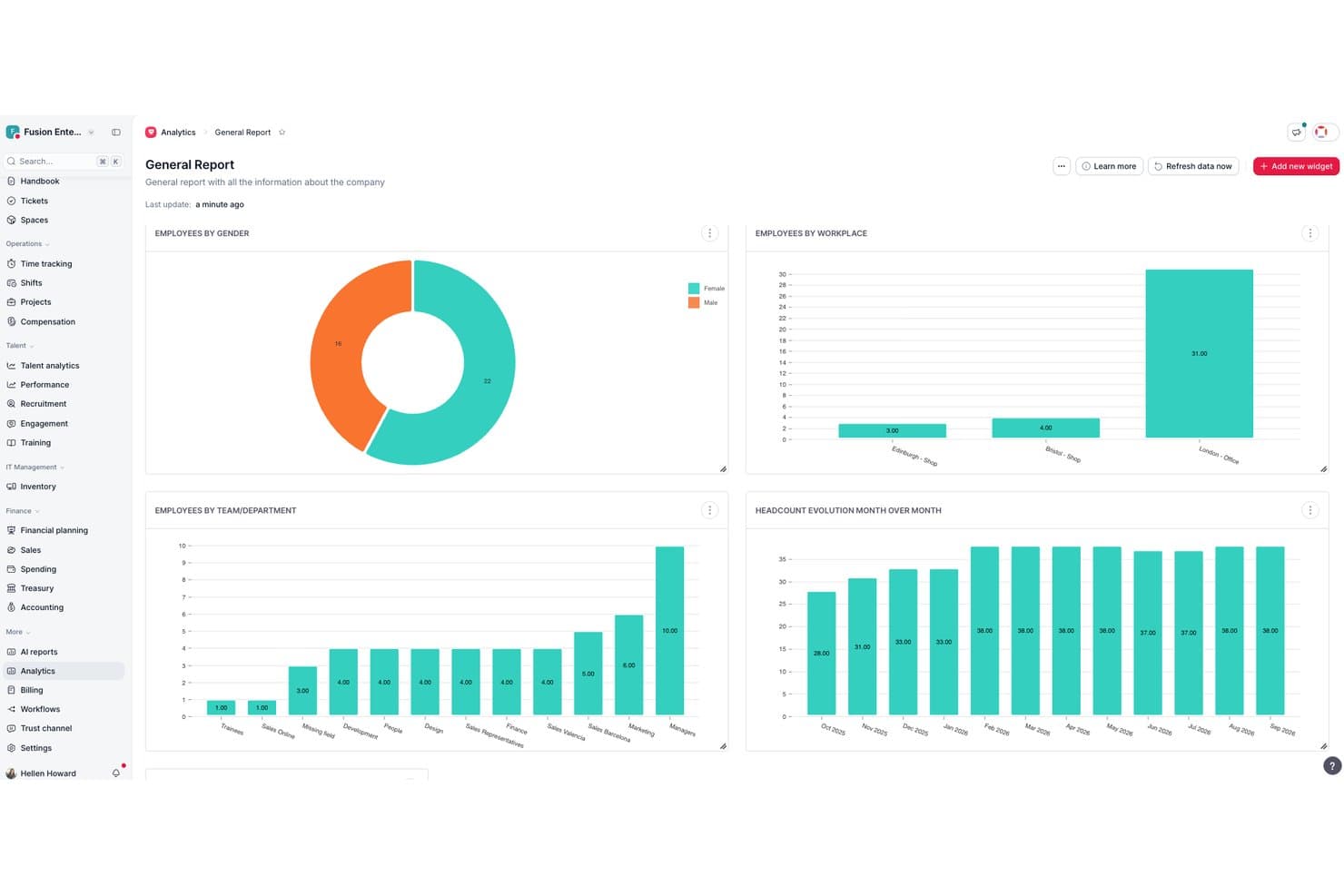
Factorial's analytics dashboard visualizes workforce data across gender, location, and headcount trends. Factorial is an AI-powered HR platform that assists with day-to-day operations including timetable planning, report creation, and answering employee policy questions—alongside broader HR analytics covering turnover, compensation, performance, and diversity data.
Who Is Factorial Best For?
Factorial suits HR teams that want AI assistance woven into daily operations—from answering policy questions to generating reports—rather than a standalone reporting tool.
Why I Picked Factorial
I've included Factorial in my top picks because its AI sits inside the reporting workflow itself, not bolted on as an afterthought. I can ask a plain-language question, like whether attrition correlates with performance, and Factorial's AI agent retrieves live data, identifies trends, and builds a report without me touching SQL. Custom dashboards also let me configure widgets across DEI, compensation, and retention so the right metrics surface for the right audience.
Factorial Key Features
- SQL and AI report builder: Create custom reports manually, via SQL queries, or by asking Factorial's AI agent in plain language to pull and structure the data you need.
- Configurable dashboard widgets: Add, remove, resize, and reposition widgets across dashboards to surface the metrics most relevant to your team or role.
- Permission-based report access: Set granular report permissions to control who can view, create, and manage reports, including protection for sensitive payroll data.
- Power BI integration: Connect Factorial to Power BI via its public API to query and analyze your workforce data in an external analytics environment.
Factorial Integrations
Factorial offers marketplace integrations with Microsoft Power BI, SAP Business One, Microsoft Business Central, Sage 200, DATEV LODAS, Silae, Okta, Slack, and Recruitee. It also provides a public API and supports Zapier.
Pros and Cons
Pros:
- Clean roster exports support survey preparation
- Dashboards surface leave and employee status
- AI turns workforce questions into reports
Cons:
- Recurring report scheduling isn’t documented
- Tailored turnover reports can require workarounds
 Best for custom dashboards
- 14-day free trial
- From $120/month (billed annually)
Visit WebsiteCustomer Rating:4.7/5
Klipfolio is an HR reporting software that offers customizable dashboards to visualize and manage key HR data effectively. Klipfolio is a versatile tool for creating tailored HR analytics dashboards. It stands out for its custom dashboard capabilities, allowing users to craft visualizations that align precisely with their HR data needs.
Why I picked Klipfolio: I selected Klipfolio for its exceptional customization options, which empower HR teams to construct dashboards that accurately reflect their specific metrics and KPIs. I believe it's the best for custom dashboards because it enables the creation of detailed, pixel-perfect visualizations, ensuring that HR professionals can focus on the data that truly matters to their organization.
Standout features & integrations:
Klipfolio shines with its ability to monitor a broad spectrum of HR metrics, including employee engagement and diversity ratios. The platform facilitates the integration of data from various HR systems into one cohesive dashboard, simplifying the reporting process and eliminating the need for disparate manual reports.
Integrations are available with Google Analytics, HubSpot, Salesforce, Slack, Trello, Basecamp, Quickbooks, Google Calendar, Asana, LinkedIn, and others, allowing HR professionals to amalgamate data from multiple sources for a more complete view of HR functions.
Pros and Cons
Pros:
- Integrations with a range of HR-related tools and platforms
- Broad tracking capabilities for various HR metrics and KPIs
- Highly customizable dashboards for specific HR reporting needs
Cons:
- May require a learning curve for users to fully utilize customization features
- Higher starting price point compared to some other HR analytics tools
Learn more about Klipfolio: Best for HR data visualization
- 14-day free trial
- Pricing upon request
Visit WebsiteCustomer Rating:4.5/5
Tableau analyzes employee data and presents it visually via customizable dashboards to aid decision-making. Tableau is a comprehensive analytics platform that specializes in HR data visualization. It is best for transforming complex HR data into actionable insights through visual representation.
Why I picked Tableau: I chose Tableau for its robust data visualization capabilities that make it stand out from other HR reporting tools. Its ability to handle complex datasets and present them in an intuitive manner is unparalleled. I believe Tableau is best for HR data visualization because it empowers HR professionals to see and understand their data, leading to better decision-making.
Standout features & integrations:
Tableau's HR reporting software offers a suite of products for visual data preparation, analytics, and secure collaboration. It provides expert-built dashboards to address HR-specific business needs with Accelerators on the Tableau Exchange. The software also includes features for analyzing survey data, understanding training needs, and making data-driven decisions.
Integrations are available with Salesforce, for CRM, MongoDB, Jira, Oracle, Athena (or Amazon S3), Redshift, PostgreSQL, Google BigQuery, Snowflake, and MySQL.
Pros and Cons
Pros:
- Free training and a vibrant community for support
- Regular product updates with new features
- Powerful data visualization capabilities
Cons:
- Loads slowly on low-end devices
- Complexity may create a steeper learning curve for new users
Learn more about Tableau:

Crunchr is an HR reporting software that offers analytics and data visualization for workforce planning and decision-making. Crunchr offers analytics and reporting tools for effective people decision-making. It stands out for providing accessible insights into workforce dynamics.
Why I picked Crunchr: I selected Crunchr for its ability to simplify complex data into understandable insights, which is crucial for any organization focusing on its people. This tool stands out due to its user-friendly interface and the democratization of data, making it distinct from other HR reporting tools that may not prioritize accessibility. I judge Crunchr to be best for people insights because it empowers decision-makers with a clear understanding of their workforce, enabling swift and informed decisions.
Standout features & integrations:
Crunchr's platform boasts HR dashboards that allow for the creation of insightful displays, and its workforce planning capabilities help align business strategies with workforce needs. The software integrates data from various HR and business systems, offering a unified view of an organization's human resources. It provides both pre-built and customizable analytics, AI-driven guided analytics, and robust security features that comply with data privacy laws and GDPR.
Integrations are available with multiple HR and business systems, including Slack, Microsoft Teams, Zoom, Google Workspace, Microsoft Office 365, Xero, QuickBooks Online, ADP Workforce Now, SAP SuccessFactors, and Zapier.
Pros and Cons
Pros:
- Customizable dashboards with AI-driven analytics
- Access to pre-built analytics upon setup
- Quick implementation process
Cons:
- Potential learning curve for users new to data analytics
- Lack of transparent pricing information on the website
Learn more about Crunchr: Best for anonymous feedback tools
- Free demo available
- From $416.58/month (billed annually)
Visit WebsiteCustomer Rating:4.4/5
Workleap displays AI-powered eNPS analysis with trend summaries and score changes to help leaders understand employee sentiment. Tailored for businesses looking for an HR reporting solution, Workleap’s Officevibe offers tools focused on employee engagement and retention. It’s well-suited to industries where understanding team dynamics matters, such as tech startups and remote work environments. With custom surveys and real-time insights, it helps surface issues early, making it easier to keep teams motivated and productive. The platform reduces the complexity of people management and supports building a healthy workplace culture.
Why I Picked Workleap
I chose Workleap because it does a strong job of turning employee feedback into actionable insights, which is essential for HR reporting software. Its customizable surveys and anonymous feedback tools let you target specific organizational challenges. The AI-powered insights and recommendations help make sense of trends in the data and support better management decisions. Together, these features help improve employee engagement and make it easier to address issues before they escalate.
Workleap Key Features
In addition to its unique insights capabilities, Workleap offers several other features that enhance its functionality as an HR reporting tool.
- Real-Time Analytics: Provides instant access to data and trends, enabling quick decision-making.
- Good Vibes Recognition Cards: Allows team members to celebrate each other's achievements, fostering a culture of appreciation.
- Trend Reporting: Helps you track changes in employee sentiment over time, offering a historical view of engagement levels.
- Integration with Existing Tools: Seamlessly connects with platforms like Slack and Teams, making it easier to incorporate into your current workflow.
Workleap Integrations
Integrations include Slack, Microsoft Teams, BambooHR, Workday, SAP SuccessFactors, Oracle Cloud Human Capital Management, ADP Workforce Now, UKG Pro, Paylocity, and Zoho People.
Pros and Cons
Pros:
- AI powered insights identify trends
- Customizable and anonymous pulse surveys for employees
- Native Slack and Teams integration available
Cons:
- Reporting depth limited for analytics
- Limited customization options for specific team needs
Learn more about Workleap: Best for integrated planning
- Free demo available
- Pricing upon request
Visit WebsiteCustomer Rating:4.3/5
SAP Analytics Cloud analyzes employee data and generates actionable insights to aid decision-making. SAP Analytics Cloud is a comprehensive solution for HR analytics and workforce planning. It stands out for its integrated approach to planning, aligning HR with financial and operational strategies.
Why I picked SAP Analytics Cloud: I chose SAP Analytics Cloud for its robust integration capabilities that align HR with financial and operational planning. This tool is best for integrated planning because it enables businesses to forecast future workforce needs and optimize workforce plans in alignment with their strategic priorities. Its bidirectional integration with SAP SuccessFactors ensures that HR data is up-to-date and reflective of current and future business needs.
Standout features & integrations:
SAP Analytics Cloud offers a suite of features including a standard HR metrics catalog with over 2,000 predefined metrics, interactive HR analysis and dashboards, and an integrated HR data foundation. It provides a reliable view of the workforce with real-time access to data and insights, robust security features, and predictive planning tools.
Integrations include SAP SuccessFactors, SAP S/4HANA, Microsoft Office 365, Google Drive, Salesforce, Tableau, Power BI, ServiceNow, Slack, and Microsoft Teams.
Pros and Cons
Pros:
- Real-time access to data and insights for informed decision-making
- Extensive HR metrics catalog with over 2,000 predefined metrics
- Integrated workforce planning aligns with financial and operational strategies
Cons:
- May be too complex for small businesses or those with simpler needs
- May be complex to implement for businesses without existing SAP infrastructure
Learn more about SAP Analytics Cloud: Best for workforce intelligence
- 30-day free trial + free demo
- Pricing upon request
Visit WebsiteCustomer Rating:4.4/5
Visier is a cloud-based analytics platform designed to transform raw data into actionable workforce insights. Visier stands out as the best for workforce intelligence because it automates the most time-consuming aspects of people analytics, allowing HR teams to focus on high-value analysis with undeniable business impact.
Why I picked Visier: I chose Visier for its ability to scale impact efficiently by automating data wrangling and report maintenance, which are typically resource-intensive tasks. Its open and extensible platform supports a wide range of projects, making it distinct from other HR analytics tools. I believe Visier is best for workforce intelligence due to its comprehensive library of customizable content and prebuilt connectors to popular HR systems, which expedite data onboarding and insight generation.
Standout features & integrations:
Visier's standout features include data discovery, modeling and simulation, data blending, demand forecasting, and trend analysis. It also offers recruitment management, reporting and analytics, talent management, AI/machine learning, customizable reports, and predictive modeling.
Integrations are available natively with ADP, Greenhouse, iCIMS, Oracle Recruiting Cloud, SAP, Taleo, Workday, and others.
Pros and Cons
Pros:
- Simplifies data integration from multiple systems
- Offers a vast library of ready-to-use, customizable content
- Automates time-consuming aspects of people analytics
Cons:
- Some users find the mobile version clunky
- Lack of pricing transparency
Learn more about Visier:

Company HR dashboard in ChartHop displaying headcount, departures, new hires, and annual turnover trends. ChartHop is a platform that centralizes and visualizes HR data to empower teams with data-driven insights. It stands out as the best for data unification due to its ability to bring all people data into one accessible and actionable platform.
Why I Picked ChartHop: I chose ChartHop for this list because it offers a comprehensive solution for managing people data and operations in one place. Its ability to unify data across various dimensions makes it distinct from other HR reporting tools. I believe ChartHop is best for data unification because it provides a single source of truth for all people data, which is crucial for making informed decisions and fostering transparency within an organization.
Standout features & integrations:
ChartHop's standout features include dynamic org charts, headcount planning, compensation reviews, engagement surveys, and performance management. These tools are designed to streamline HR processes and provide clear visualizations for strategic planning.
Integrations are available with Greenhouse, ADP, BambooHR, Slack, Workday, Microsoft Teams, Namely, Salesforce, Google Workspace, and Lever, enhancing its capabilities in people analytics and organizational management.
Pros and Cons
Pros:
- Facilitates strategic headcount planning and forecasting
- Offers dynamic, data-rich org charts for transparency
- Centralizes all people data in one platform
Cons:
- User interface sometimes feels a bit clunky
- Creating granular reports can be complicated at times
Learn more about ChartHop: 10Best for SMB insights
Sage HR
- 30-day free trial
- From $6/employee/month
Visit WebsiteCustomer Rating:4.1/5
Sage HR provides comprehensive analytics and customizable reports to help businesses track employee performance and HR metrics efficiently. Sage HR is a comprehensive human resources management solution designed to streamline HR processes for small and medium-sized businesses. It is recognized as the best tool for providing valuable insights into SMB operations.
Why I picked Sage HR: I chose Sage HR for this list because of its robust feature set tailored specifically for the unique needs of small and medium-sized businesses. Its ability to provide deep insights into workforce analytics sets it apart from other HR reporting tools. I believe Sage HR is best for SMB insights due to its user-friendly interface and comprehensive reporting capabilities that empower SMBs to make data-driven decisions.
Standout features & integrations:
Standout features include a reporting dashboard for monitoring workforce productivity, attendance, and absence levels, as well as tools for headcount and team growth analysis and employee turnover analysis. These features are crucial for SMBs to understand and improve their HR processes.
Sage HR integrates natively with a variety of tools, including Google Workspace, Slack, and Zapier, among others. These integrations facilitate data flow and enhance the overall functionality of the HR reporting software.
Pros and Cons
Pros:
- Integrates with popular tools like Google Workspace and Slack
- Ability to analyze headcount, team growth, and employee turnover
- Customizable reporting dashboard for detailed workforce analytics
Cons:
- Pricing for recruitment module is significantly higher than other add-ons
- Additional features such as performance and shift scheduling come at extra costs
Learn more about Sage HR:
Değerlendirilebilecek Diğer İK Raporlama Yazılımları
Aşağıda, kısa listeme aldığım ancak en iyi 10 listeme giremeyen ve yine de göz atmaya değer ek İK raporlama yazılımı çözümlerinin bir listesi yer almaktadır:
- 11Workday HCM Best for integrated solutions
- 12RipplingBest for HR metrics
- 13Employment HeroBest for Canadian SMBs
- 14Agentnoon Best for analyzing org design
- 15BambooHRBest for instant reports
- 16Paycor Best for custom reporting capabilities
- 17IntelliHRBest for actionable people analytics
- 18Folks HRBest for simplicity and ease of use
- 19AccessBest for comprehensive HR insights
- 20DayforceBest for real-time performance tracking
İlgili İK Yazılımı İncelemeleri
Burada aradığınızı hâlâ bulamadıysanız, test edip değerlendirdiğimiz şu diğer ilgili araçlara göz atın:
- İK Yazılımı
- Bordro Yazılımı
- İşe Alım Yazılımı
- Kayıtlı İşveren Hizmetleri
- Aday Takip Sistemleri
- İş Gücü Yönetimi Yazılımı
How I Evaluate HR Reporting Software
I split every evaluation into two layers: the baseline reporting capabilities a tool must have to qualify, and the differentiators—like pay equity analytics or compliance automation—that separate good from great.
Core Functionality (Table Stakes For This List)
When I'm selecting tools for my list, I rank each one on a scale from 0 (does not offer the functionality) to 5 (excels in this area) for each core functionality listed below. Then, I calculate the tool's total score into a percentage. Each tool needs to achieve a minimum total score of 65% to be considered for inclusion.
- Prebuilt HR Report Templates: I check for ready-made reports across headcount, turnover, absenteeism, and compensation so HR teams aren't building every report from scratch.
- Custom Report Builder: The tool should let you create ad-hoc reports with filters, grouping, and calculated fields—like turnover by department and tenure band.
- HR Data Source Integration: I look at native connectors to HRIS, payroll, ATS, and time tracking systems so workforce data flows into one reporting layer.
- Workforce Dashboards & Visuals: Interactive dashboards with drill-down into KPIs like attrition rate or headcount trends matter more than static charts.
- Compliance Reporting: I evaluate whether the tool supports regulatory reports such as EEO-1, ACA, or pay equity with audit-ready formatting and export options.
- Scheduled Reports & Exports: Teams need the ability to automate recurring report delivery in formats like PDF, Excel, or CSV to key stakeholders on a set cadence.
Once I have a list of tools that meet this criteria, I consider what sets each platform apart.
Differentiating Factors (What Sets Vendors Apart)
Here's how I compare and contrast different vendors:
Standout Features
Predictive analytics is a big differentiator—I look for tools that flag attrition risk or forecast hiring needs before they become urgent. Pay equity analytics also carries weight, especially for organizations preparing board-level compensation reviews. Natural language querying is another feature I evaluate closely, since it lets HR generalists pull reports by typing a question rather than navigating complex filters. Built-in benchmarking data rounds things out by giving your metrics real context against industry peers.
Beyond Features
Data security matters a lot when employee PII is involved—I check for SOC 2 Type II certification and role-based access controls that restrict sensitive fields like salary data. Integration depth is equally important; a tool that connects natively to your HRIS, payroll, and ATS saves weeks of manual data wrangling. I also evaluate scalability, particularly multi-entity and multi-country reporting for growing organizations. Finally, implementation speed tells me how quickly your team goes from contract signing to delivering its first executive dashboard.
İK Raporlama Yazılımı Nasıl Seçilir?
Kendi benzersiz yazılım seçimi sürecinizi yürütürken aşağıdaki noktaları göz önünde bulundurun:
- Veri Entegrasyonu Yetenekleri: Yazılımın mevcut İK sistemleriniz ve veri kaynaklarınızla entegre olabildiğinden emin olun. Bu, verileri birleştirmek ve doğru raporlama sağlamak açısından kritik öneme sahiptir. Örneğin, şirketiniz bordro, yan haklar ve zaman takibi için çeşitli sistemler kullanıyorsa İK raporlama yazılımı kapsamlı raporlar oluşturmak için tüm bu kaynaklardan veri çekebilmelidir.
- Özelleştirme ve Esneklik: Raporları özel ihtiyaçlarınıza uygun şekilde özelleştirmenize olanak tanıyan yazılımları arayın. Farklı kuruluşlar, raporları için farklı veri noktalarına ve biçimlere ihtiyaç duyabilir. Örneğin, çok uluslu bir şirketin raporları çeşitli bölgesel iş yasaları ve düzenlemelerine uygun hâle getirmek için özelleştirmesi gerekebilir.
- Kullanıcı Dostu Arayüz: Eğitim süresini en aza indirmek ve İK personelinin benimsemesini kolaylaştırmak için sezgisel bir arayüze sahip yazılımları seçin. Kullanıcı dostu bir arayüz, teknoloji konusunda daha az deneyimli bir İK ekibine sahip kuruluşlar için özellikle önemlidir; böylece bu ekipler kapsamlı BT desteği olmadan rapor oluşturup yorumlayabilir.
- Ölçeklenebilirlik: Yazılımın işletmenizin büyümesine ayak uydurup uyduramayacağını değerlendirin. Şirketiniz büyüdükçe raporlama ihtiyaçlarınız daha karmaşık hâle gelecektir. Bir girişimin başlangıçta temel raporlamaya ihtiyacı olabilir; ancak büyüdükçe tahmine dayalı analiz veya kurumsal kaynak planlama (ERP) sistemleriyle entegrasyon gibi daha gelişmiş özelliklere ihtiyaç duyacaktır.
- Uyumluluk ve Güvenlik Özellikleri: Yazılımın veri koruma düzenlemelerine uyduğundan ve güçlü güvenlik önlemlerine sahip olduğundan emin olun. Bu, sağlık hizmetleri veya finans gibi katı veri gizliliği yasalarının geçerli olduğu sektörlerdeki şirketler için hayati önem taşır.
İK Raporlama Yazılımındaki Trendler
İK raporlama yazılımları yeni zorluklara yanıt verecek şekilde gelişmektedir. Geleceğini şekillendiren bazı önemli trendler şunlardır:
- Yapay Zekâ ve Makine Öğrenimiyle Entegrasyon: Yapay zekâ ve makine öğrenimi, İK raporlama araçlarına giderek daha fazla entegre edilmektedir. Tahmine dayalı analiz sağlar ve rutin görevleri otomatikleştirir. Bu trend, veriye dayalı karar alma açısından önemlidir.
- Çalışan Deneyimine Daha Fazla Odaklanma: İK yazılımları artık çalışan deneyimi ölçütlerine öncelik vermektedir. Çalışan bağlılığını ve memnuniyetini gerçek zamanlı olarak izler. Bu değişim, yetenekleri elde tutmak açısından kritik öneme sahiptir.
- Mobil Raporlama Yeteneklerinin Yükselişi: İK raporlamasına mobil erişim standart hâle gelmektedir. Hareket hâlindeyken gerçek zamanlı veri alınmasına ve karar verilmesine olanak tanır. Bu trend, modern iş gücünün hareketliliğini yansıtır.
- Veri Güvenliği ve Gizliliğine Vurgu: İK yazılımlarında veri güvenliğine daha fazla önem verilmektedir. Şifreleme ve GDPR gibi düzenlemelere uyumluluk artık temel özelliklerdir. Bu, hassas çalışan bilgilerinin korunması açısından hayati önem taşır.
- Kapsamın Kendi Kendine Hizmet Analizlerine Doğru Genişlemesi: Kendi kendine hizmet analizleri, İK profesyonellerini ve yöneticileri güçlendirmektedir. Kullanıcılar BT desteği olmadan raporları özelleştirebilir. Bu özerklik, operasyonel verimlilik açısından önemlidir.
İK Raporlama Yazılımı Nedir?
İK raporlama yazılımı, çalışanlarla ilgili verileri toplamak, analiz etmek ve sunmak üzere tasarlanmış dijital bir platformdur. İnsan kaynakları profesyonelleri tarafından iş gücü ölçütlerini izlemek, raporlama süreçlerini kolaylaştırmak ve karar alma süreçlerini desteklemek için kullanılır.
Yazılım; işe alım, devam durumu, performans ve ücretlendirme gibi çeşitli İK unsurlarıyla ilgili bilgileri toplar. İK yöneticileri ve işletme liderleri, eğilimleri anlamak, bilinçli kararlar almak ve personeli daha etkili bir şekilde yönetmek için bu verileri kullanır.
İK raporlama yazılımının bileşenleri arasında veri toplama mekanizmaları, analitik araçlar, özelleştirilebilir rapor şablonları ve verilerin görsel olarak sunulmasını sağlayan panolar bulunur. Bu unsurlar, İK ölçütlerine ilişkin net bir görünüm sunmak, iş gücü yönetimiyle ilgili hızlı ve bilinçli kararlar alınmasını kolaylaştırmak üzere birlikte çalışır.
Özellikler
Her iyi İK raporlama yazılımında bulunması gereken temel özellikler şunlardır:
- Özelleştirilebilir Raporlar: Özelleştirilebilir raporlar, İK profesyonellerinin kuruluşları için en önemli verilere odaklanmasına olanak tanır ve ilgili içgörülerin her zaman erişilebilir olmasını sağlar.
Esneklik çok önemlidir. İK süreçleriniz zaman içinde gelişebilir ve sistem, tamamen yenilenmeye gerek kalmadan uyum sağlamanıza olanak tanımalıdır. İş akışlarını ve raporları değişen ihtiyaçlarınıza uyacak şekilde özelleştirebilme olanağına sahip olmak istersiniz.

- Gerçek Zamanlı Veriler: Gerçek zamanlı verilere sahip olmak, İK ekiplerinin en güncel bilgilere dayanarak zamanında kararlar almasını sağlar; bu da dinamik bir iş ortamında hayati önem taşır.
- Uyumluluk Takibi: Uyumluluk takibi, şirketin tüm iş yasalarına ve yönetmeliklerine uymasını sağlamak ve hukuki sorun riskini azaltmak için gereklidir.
- Çalışan Verilerinin Yönetimi: Çalışan verilerinin etkili bir şekilde yönetilmesi, doğru kayıtların tutulmasına yardımcı olur ve gerektiğinde bilgilere erişimi kolaylaştırır.
- Devamsızlık ve İzin Raporlama: Bu özellik, İK'nın devamsızlık eğilimlerini izlemesine ve analiz etmesine, kalıpları belirlemesine ve çalışan devamsızlığıyla ilgili üretkenliği etkileyebilecek sorunları ele almasına yardımcı olur.
- Devir Oranı ve Çalışanları Elde Tutma Metrikleri: İK, çalışan devir oranı ve çalışanları elde tutma metriklerini analiz ederek çalışan memnuniyetini artırmaya ve maliyetli çalışan kayıplarını azaltmaya yönelik stratejiler geliştirebilir.
- Performans Verilerinin Analizi: Çalışan performans verilerinin analizi, yüksek performans gösteren çalışanların belirlenmesine ve çalışanların ek desteğe veya eğitime ihtiyaç duyabileceği alanların tespit edilmesine yardımcı olur.
- Yan Haklar Yönetimi: Kolaylaştırılmış yan haklar yönetimi, çalışanların hak kazandıkları yan hakları almasını ve İK'nın bunları verimli bir şekilde yönetmesini sağlar.
- Eğitim ve Gelişim Takibi: Eğitim ve gelişimin izlenmesi, çalışanların becerilerini geliştirmesini ve kuruluşun başarısına katkıda bulunmasını sağlamaya yardımcı olur.
- İş Akışı Otomasyonu: İş akışlarını otomatikleştirmek, İK profesyonelleri için zaman kazandırır ve manuel görevleri azaltır; böylece idari işler yerine daha stratejik görevlere odaklanmalarını sağlar.
Bu özelliklere sahip İK raporlama yazılımını seçmek, İK departmanının üretken ve uyumlu bir iş yeri oluşturma rolünü önemli ölçüde destekleyebilir. İK profesyonelleri, bu araçlardan yararlanarak kuruluşu ileriye taşımak için değerli içgörüler ve stratejiler sunabilir.
Faydalar
İK raporlama yazılımı, bir kuruluşun insan kaynakları departmanının verimliliğini ve etkinliğini önemli ölçüde etkileyebilecek birçok avantaj sunar. Bu araçlar, iş gücü verilerine ilişkin değerli içgörüler sağlayarak daha iyi karar alma ve strateji oluşturma süreçlerine yardımcı olur. Aşağıda, İK raporlama yazılımının kullanıcılara ve kuruluşlara sağladığı çeşitli faydalar yer almaktadır:
- Geliştirilmiş Karar Alma: İK raporlama yazılımı, yöneticilerin bilinçli kararlar almasını sağlayan veriye dayalı içgörüler sunar. Gerçek zamanlı verilere ve analizlere erişim, eğilimlerin belirlenmesine ve iş hedefleriyle uyumlu stratejik seçimler yapılmasına yardımcı olur.
- Zaman Tasarrufu: Otomatik rapor oluşturma, aksi takdirde manuel veri derleme için harcanacak saatleri ortadan kaldırır. Bu verimlilik, İK profesyonellerinin idari işlerle uğraşmak yerine daha stratejik görevlere odaklanmasını sağlar.
- Geliştirilmiş Uyumluluk: Yazılım, güncel kayıtların tutulmasına ve yasal ve düzenleyici gerekliliklere uygun raporların oluşturulmasına yardımcı olur. Bu, uyumsuzluk cezaları riskini azaltır ve kuruluşun gerekli iş yasalarına ve standartlarına uymasını sağlar.
- Daha İyi Veri Yönetimi: İK verilerinin merkezi olarak depolanması, veri erişimi ve yönetimi sürecini kolaylaştırır. Kullanıcılar, zaman içinde çalışan performansını ve kuruluş eğilimlerini izlemek için gerekli olan geçmiş ve güncel verilere kolayca erişebilir.
- Artırılmış Şeffaflık: Raporların paydaşlarla paylaşılması kolaydır ve kuruluş içinde şeffaflığı teşvik eder. Bu açıklık, departmanlar arasındaki ve İK süreçleri ve kararlarıyla ilgili olarak çalışanlarla olan güveni ve iletişimi geliştirebilir.
İK raporlama yazılımı, bir kuruluşun insan kaynaklarını yönetme biçiminde devrim yaratabilecek güçlü bir araçtır. İşletmeler, bu tür yazılımların yeteneklerinden yararlanarak kuruluşun genel başarısına katkıda bulunan daha stratejik bir İK işlevinden faydalanabilir.
Maliyetler ve Fiyatlandırma
İK raporlama yazılımı söz konusu olduğunda fiyatlandırma ve planlar; işletmenizin büyüklüğüne, çalışan sayısına ve ihtiyaç duyduğunuz belirli özelliklere bağlı olarak önemli ölçüde değişiklik gösterebilir. Farklı plan seçeneklerini ve bunların fiyatlandırmasını anlamak, özellikle bu tür yazılımları kullanma konusunda çok az deneyimi olan veya hiç deneyimi olmayan yazılım alıcıları için kritik öneme sahiptir.
İK Raporlama Yazılımı İçin Plan Karşılaştırma Tablosu
| Plan Türü | Ortalama Fiyat | Yaygın Özellikler |
| Ücretsiz Plan | $0 (Sınırlı özellikler) | Temel İK işlevleri; çalışan veri tabanı ve sınırlı raporlama içerebilir |
| Giriş Seviyesi Planı | $30 - $50 aylık | Bordro işlemleri, işe alım, işe alıştırma, temel raporlama ve temel iş gücü analitiği |
| Orta Seviye Plan | $50 - $100 aylık | Gelişmiş raporlama ve analitik, performans yönetimi ve eğitim gibi ek İK işlevleri |
| Gelişmiş Plan | $100 - $200+ aylık | Gelişmiş analitik, özel raporlama ve stratejik İK araçları içeren kapsamlı İK paketi |
| Kurumsal Plan | Özel fiyatlandırma | Tamamen özelleştirilebilir çözümler, kurumsal düzeyde destek ve entegrasyon olanakları |
| Çalışan Başına Ödeme | $5 - $10 çalışan/ay başına | Çalışan sayısına göre ölçeklenebilir fiyatlandırma; genellikle SaaS aboneliklerinde kullanılır |
İK raporlama yazılımı için plan türlerinin, maliyetlerin ve özelliklerin dökümü.
SSS
İK raporlama yazılımı ve nasıl çalıştığı hakkında aklınıza gelebilecek sık sorulan bazı soruların yanıtları aşağıda yer almaktadır:
İK raporlama yazılımı karar alma süreçlerini nasıl iyileştirir?
İK raporlama yazılımı, İK profesyonellerinin ve yönetimin bilinçli kararlar almasını sağlayan gerçek zamanlı veriler ve içgörüler sunar. Kuruluşlar trendleri ve kalıpları analiz ederek iyileştirme alanlarını belirleyebilir, gelecekteki ihtiyaçları öngörebilir ve stratejik İK girişimleri geliştirebilir.
İK raporlama yazılımı diğer sistemlerle entegre olabilir mi?
Evet, çoğu İK raporlama yazılımı bordro, zaman takibi, yan hak yönetimi ve performans yönetimi sistemleri gibi çeşitli diğer sistemlerle entegre olabilir. Bu entegrasyon özelliği, çalışanlarla ilgili tüm verilerin merkezi bir yerde toplanmasını sağlayarak raporlama ve analizi daha verimli hâle getirir.
İK raporlama yazılımı kullanılarak ne tür raporlar oluşturulabilir?
İK raporlama yazılımı; çalışan devir oranı raporları, işe alım metrikleri, devamsızlık raporları, ücretlendirme ve ücret eşitliği, eğitim ve gelişim raporları ile uyumluluk raporları dâhil ancak bunlarla sınırlı olmamak üzere çok çeşitli raporlar oluşturabilir. Belirli kurumsal ihtiyaçları karşılamak için özel raporlar da oluşturulabilir
İK raporlama yazılımı her büyüklükteki işletme için uygun mudur?
İK raporlama yazılımı ölçeklenebilir olacak şekilde tasarlanmıştır ve küçük girişimlerden büyük kuruluşlara kadar her büyüklükteki işletme tarafından kullanılabilir. Yazılım genellikle kuruluşların değişen ihtiyaçlarını karşılamak için farklı özellikler ve fiyatlandırma planları sunar.
İK raporlama yazılımı seçerken nelere dikkat etmeliyim?
İK raporlama yazılımı seçerken raporlamanız gereken belirli İK işlevleri, yazılımın entegrasyon özellikleri, kullanım kolaylığı, özelleştirme seçenekleri, veri güvenliği özellikleri ve sunulan müşteri desteğinin düzeyi gibi unsurları göz önünde bulundurun.
İK raporlama yazılımı ne kadar güvenlidir?
İK raporlama yazılımı genellikle hassas çalışan verilerini korumak için güçlü güvenlik özellikleri içerir. Bunlar arasında veri şifreleme, güvenli erişim kontrolleri ve düzenli güvenlik denetimleri bulunur. Veri koruma düzenlemelerine uygunluğu sağlamak için herhangi bir İK raporlama yazılımının güvenlik önlemlerini değerlendirmek önemlidir.
İK raporlama yazılımının etkili bir şekilde kullanılabilmesi için eğitim gerekir mi?
İK raporlama yazılımı kullanıcı dostu olacak şekilde tasarlansa da özellikle karmaşık raporlama ve analiz işlemleri için yazılımı etkili bir şekilde kullanabilmek adına belirli düzeyde eğitim gerekebilir. Sağlayıcılar genellikle eğitim kaynakları sunar ve kullanıcı eğitimine yatırım yapmak, kuruluşların İK raporlama yazılımlarının faydalarını en üst düzeye çıkarmasına yardımcı olabilir.