

İşe alım ve işten ayrılma yazılımı, ekiplerin çalışan geçişlerini baştan sona yönetmesine yardımcı olan bir yazılım türüdür. Bu araçlar, görevleri otomatikleştirerek, ilerlemeyi izleyerek ve yeni çalışanın ilk gününden son ayrılışına kadar uyumluluğu sağlayarak İK yönetimini destekler. Manuel çalışmayı azaltıp süreçleri standartlaştırarak kuruluşların atlanan adımlardan kaçınmasına ve hem çalışanlar hem de İK ekipleri için daha sorunsuz ve tutarlı bir deneyim oluşturmasına yardımcı olurlar. Bu kılavuz, en iyi çözümleri karşılaştırmanıza, her birini farklı kılan özellikleri anlamanıza ve kuruluşunuzun kendine özgü ihtiyaçlarına en uygun seçeneği bulmanıza yardımcı olacaktır.
Why Trust Our Software Recommendations
6,700+
Reviews
20
Industry experts
16+
Evaluation factors
14
Years
Our team has been testing and reviewing software since 2012. As HR experts ourselves, we know how difficult—and important—it is to choose the right software.
For this guide, we evaluated tools using hands-on testing and independent research, scoring tools using our selection criteria. We also draw on insights from industry thought leaders and practicing HR experts.
Our reviews reflect our human editorial judgment, not a sales pitch.
Expert reviewers:
- Phil GrayCOO
 Kim BehnkeHR Tech Editor & Analyst
 Josh BarkerPeople Ops Manager

İşe Alım ve İşten Ayrılma Yazılımı Karşılaştırma Tablosu
Bu karşılaştırma tablosu, en iyi işe alım ve işten ayrılma yazılımı seçimlerimin fiyatlandırma ayrıntılarını özetlemektedir:
Sorted by: Default
| Tool | Starting Price | Website | |
|---|---|---|---|
Best for global HR compliance management | 4.8 out of 5 | $5/user/month Free demo available | Website |
Best as AI for business | 4.4 out of 5 | $8/user/month Free trial + Free demo available | Website |
Best for customizable, audit-ready onboarding | 3.9 out of 5 | $10.25/user/month 7-day free trial + demo available | Website |
Best with optional AI tools HR tasks | 4.8 out of 5 | $2/user/month Free plan + free demo available | Website |
Best for SaaS license management | 4.7 out of 5 | $2.99/month 14-day free trial | Website |
Best for Apple device provisioning | 4.7 out of 5 | $4/device/month 14-day free trial | Website |
Best for large enterprise integrations | 4.3 out of 5 | Pricing upon request Free demo available | Website |
Best for construction field-worker onboarding | 4.4 out of 5 | Pricing upon request Free demo available | Website |
Best with granular SaaS access controls | Not rated | Pricing upon request Free demo available | Website |
Best for automating complex workflow steps | 5.0 out of 5 | $1000/month Free plan available | Website |


İşe Alım ve İşten Ayrılma Yazılımı İncelemeleri
Aşağıda, kısa listeme giren en iyi işe alım ve işten ayrılma yazılımlarının ayrıntılı özetlerini bulabilirsiniz. İncelemelerim, size en uygun olanı bulmanıza yardımcı olmak için her platformun özelliklerine, en uygun kullanım alanlarına ve entegrasyonlarına ayrıntılı bir bakış sunmaktadır.
 Best for global HR compliance management
- Free demo available
- From $5/user/month
Visit WebsiteCustomer Rating:4.8/5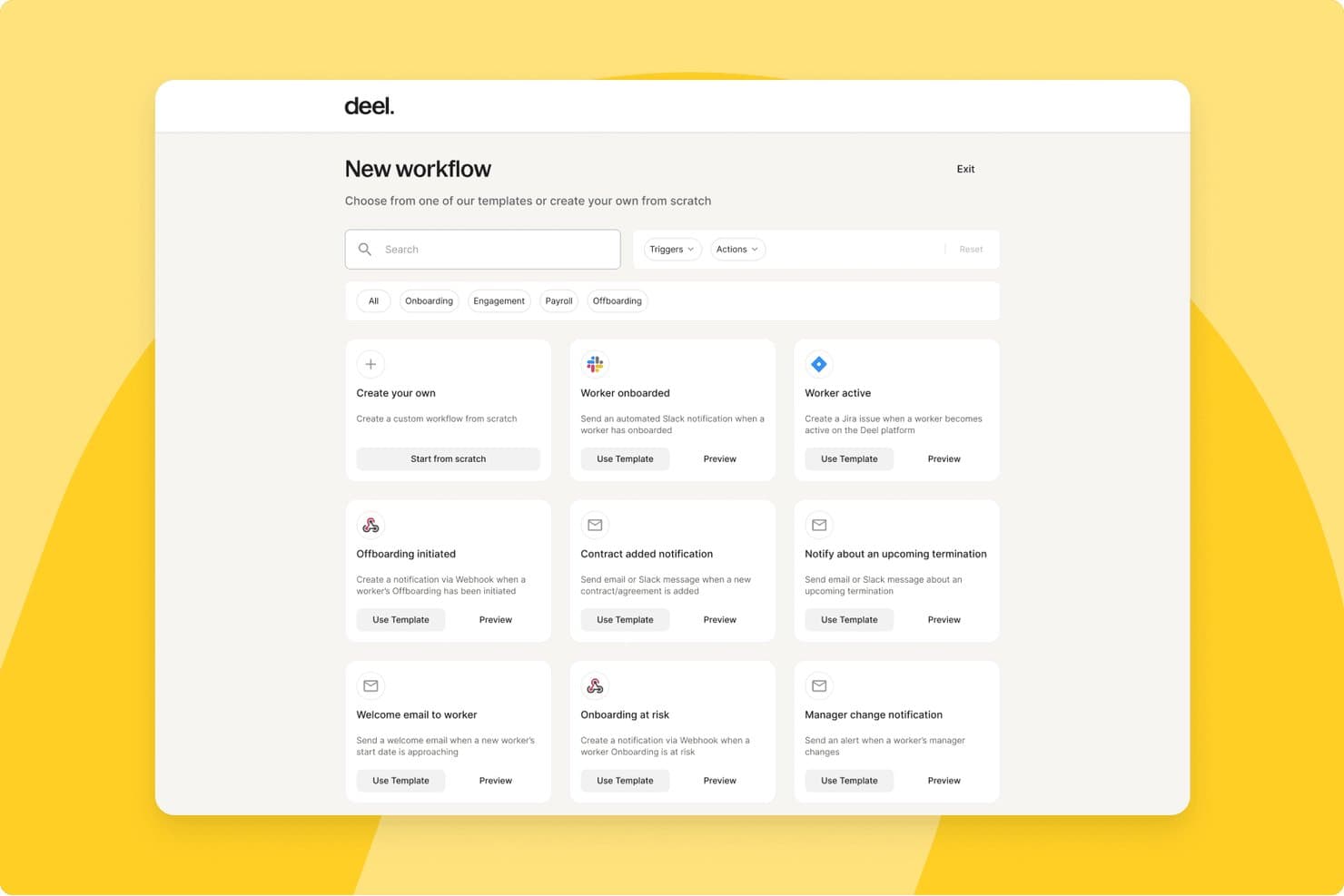
Deel HR offers a workflow automation dashboard where users can create custom workflows or choose from pre-built templates for onboarding, offboarding, payroll, and contractor management. Deel HR is a global people platform that manages the full employee lifecycle, including onboarding, offboarding, document management, access provisioning, payroll, and compliance across 150+ countries.
Who Is Deel HR Best For?
Deel HR is a strong fit for companies managing distributed or international teams who need compliant onboarding and offboarding across multiple countries and jurisdictions.
Why I Picked Deel HR
Deel HR earns its spot on my shortlist because of how it handles compliance-heavy onboarding across multiple countries in a single workflow. I love that localized contracts update automatically when local laws change, so my team isn't manually tracking regulatory shifts across 10+ jurisdictions. The guided onboarding flow collects country-specific tax forms, employment agreements, and documents in one place, with built-in compliance rules applied based on each worker's location and contract type.
Deel HR Key Features
- Automated device provisioning: Orders and ships laptops and work-from-home gear to new hires in 130+ countries.
- Google Workspace integration: Creates accounts and assigns app access for employees as part of onboarding.
- Localized compliance workflows: Applies country-specific fields and document requirements for remote and in-country hires.
- Centralized document management: Stores contracts, policy acknowledgements, and compliance forms with access controls.
Deel HR Integrations
Deel HR offers integrations with QuickBooks, Xero, BambooHR, Expensify, NetSuite, Sage Intacct, Greenhouse, Workday, SAP, and ADP, among others available through its app store. It also connects with Zapier and provides an API for custom integrations.
Pros and Cons
Pros:
- Country-specific onboarding workflows built in natively
- Onboards contractors and employees in one platform
- Automated compliance updates across 150+ countries
Cons:
- Can be complex for single-country teams
- Offboarding tools less developed than onboarding features
 Best as AI for business
- Free trial + Free demo available
- From $8/user/month
Visit WebsiteCustomer Rating:4.4/5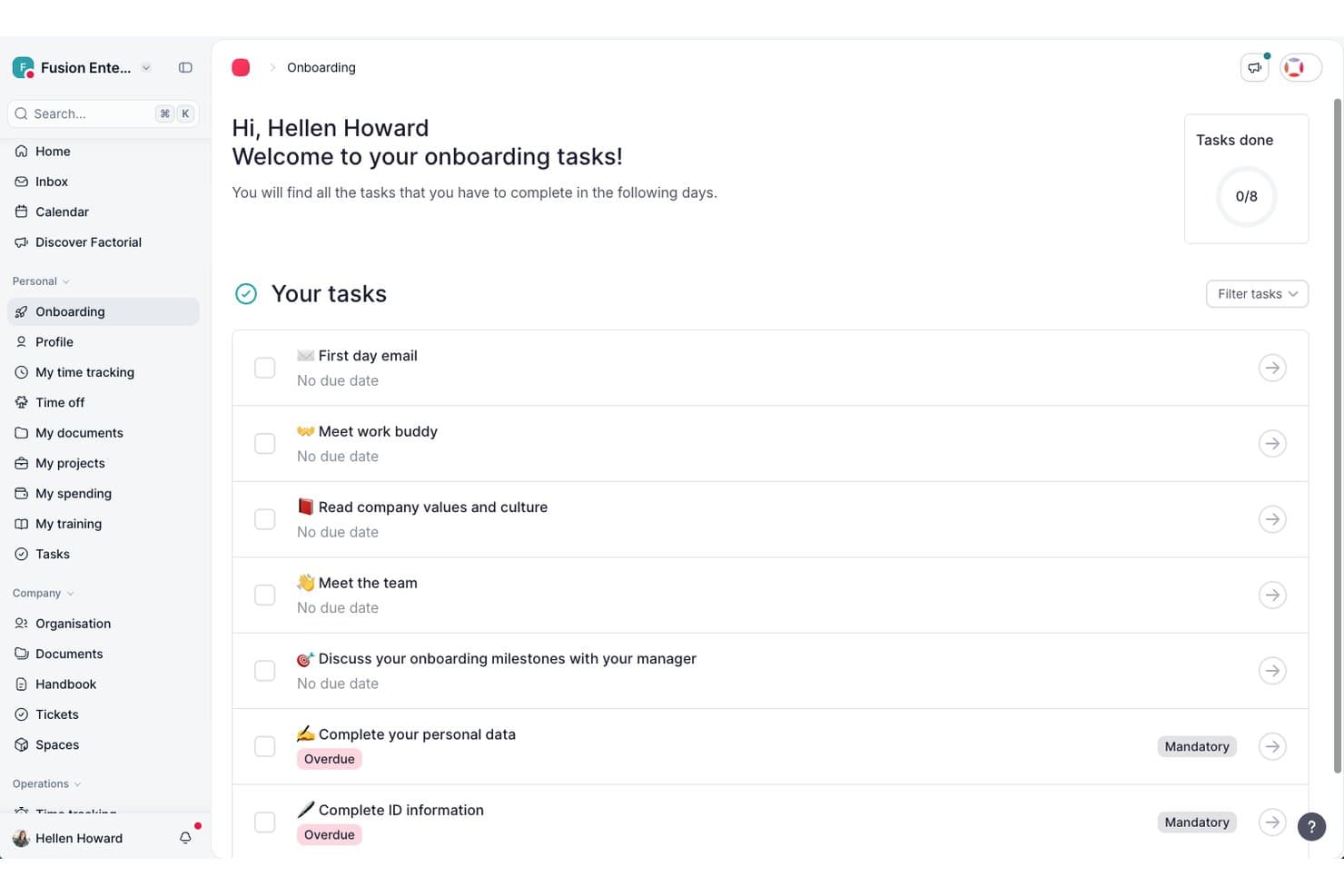
Factorial guides new hires through onboarding tasks in one place. Factorial is an AI-powered onboarding and offboarding platform that centralizes employee workflows, document collection, legal e-signature, task assignment, and access provisioning across HR, IT, and management.
Who Is Factorial Best For?
Factorial is a strong fit for HR generalists and people ops teams who want a single AI-powered platform to manage employee workflows, documents, and day-to-day HR operations without juggling multiple tools.
Why I Picked Factorial
I've included Factorial in my top picks because its AI for business positioning goes well beyond a typical HR platform, with Factorial One actively tracking onboarding progress across all new hires so you're not manually checking in on each person. I also like that its AI can answer employee questions about policies and generate reports on the fly, cutting down the back-and-forth that usually clogs up HR inboxes during busy onboarding periods. The Welcome Space lets future employees complete paperwork and access key documents before day one, which means their first week can actually start productively.
Factorial Key Features
- Welcome Space preboarding: Future employees can access documents, complete personal details, and finish admin tasks before their official start date.
- Legal e-signature via Signaturit: Employees can sign contracts and documents from any device, including mobile, with legally valid e-signatures.
- SaaS Management provisioning: Connecting Google Workspace or Microsoft Entra ID automates account creation, updates, and suspension during onboarding and offboarding.
- Mobile onboarding task space: New hires have a dedicated in-app space to view and complete their onboarding tasks directly from their smartphone.
Factorial Integrations
Factorial offers marketplace integrations with Google Workspace, Microsoft Azure, Okta, and Recruitee, plus public API access, webhooks, SDKs, API keys, and OAuth 2.0. It also supports Zapier.
Pros and Cons
Pros:
- Centralized documents simplify contract access and signing
- Employee self-service cuts routine HR emails
- Onboarding workflows help standardize store training
Cons:
- Limited reporting obscures onboarding bottlenecks
- Integration gaps can leave candidate data manual
 Best for customizable, audit-ready onboarding
- 7-day free trial + demo available
- From $10.25/user/month
Visit WebsiteCustomer Rating:3.9/5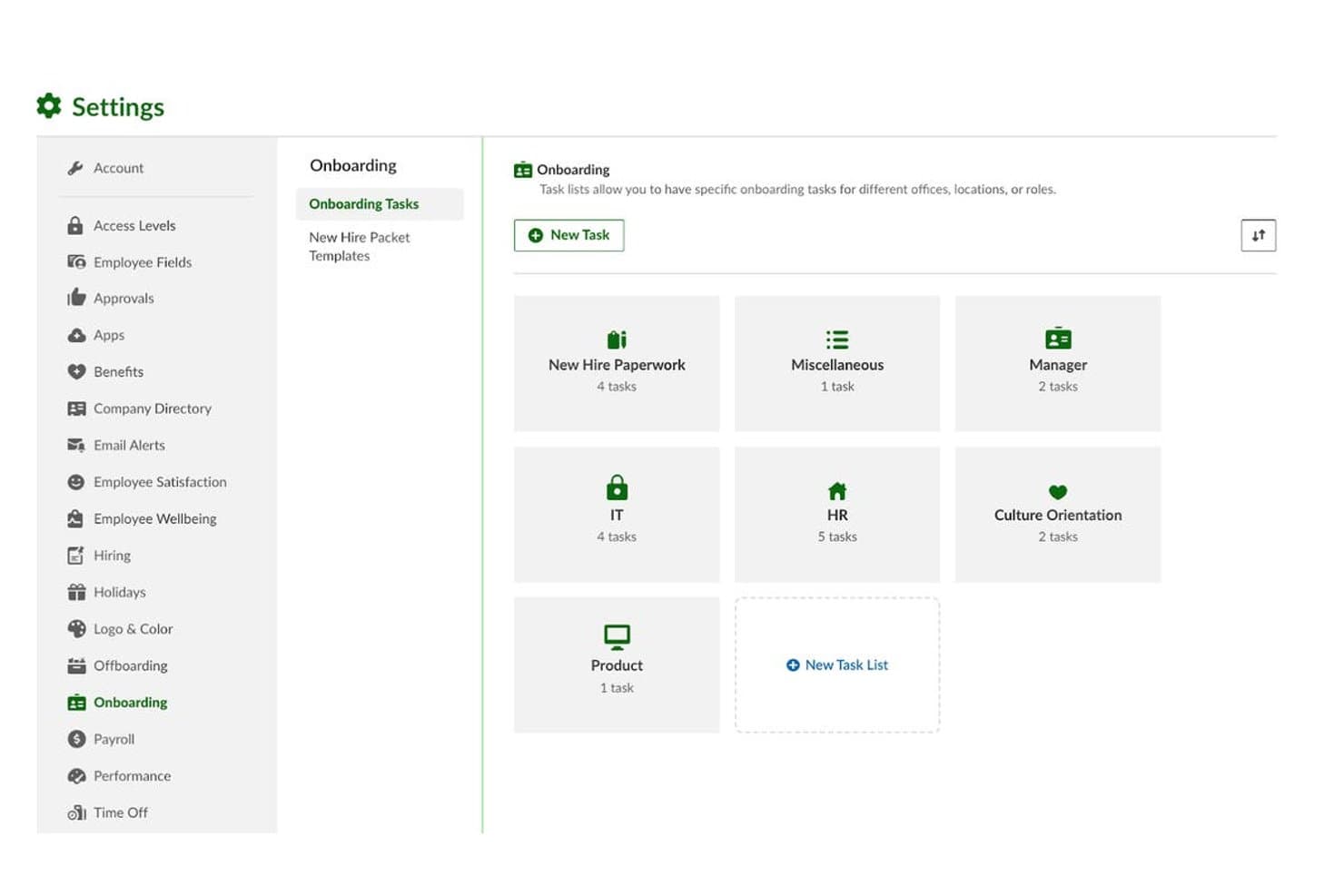
BambooHR offers customizable onboarding task lists organized by category, such as IT, HR, Manager, and Culture Orientation, with the ability to create new task lists. BambooHR is an HR platform for mid-market teams that centralizes employee lifecycle management, with dedicated onboarding and offboarding workflows, e-signatures, compliance tracking, and an integrated ATS.
Who Is BambooHR Best For?
It's a strong fit for HR operations managers at growing companies in the 50–1,000 employee range who need structured, compliant onboarding without heavy IT involvement.
Why I Picked BambooHR
I picked BambooHR as one of the best because its compliance infrastructure is genuinely built into onboarding, not bolted on. I-9 verification runs automatically through Mitratech, and VirgilHR flags regulatory gaps before they become audit issues. New hire packets are fully customizable, so I can tailor signature workflows, policy acknowledgements, and role-specific forms without rebuilding them from scratch each time.
BambooHR Key Features
- New hire engagement portal: Personalized portal delivers welcome content, introductions, and pre-start checklists to new hires.
- Self-service mobile app: Employees can complete onboarding and offboarding tasks, upload documents, and track progress from their phone.
- Structured review cycles: Built-in tools let managers schedule milestone check-ins and feedback loops for new hires.
- Knowledge transfer tracking: Offboarding workflows include dedicated tools for documenting responsibilities and reassigning project ownership.
BambooHR Integrations
BambooHR offers 150+ native integrations, including Checkr, Remote, Slack, Cronofy, Zendesk, Paychex, QuickBooks, Microsoft 365, Google Workspace, Risotto, and more. An API is available for custom integrations.
Pros and Cons
Pros:
- Built-in 30/60/90 check-ins for ramp tracking
- Preboarding portal engages new hires early
- Customizable onboarding checklists by role or department
Cons:
- Advanced report customization requires extra configuration
- Offboarding tools less developed than onboarding
 Best with optional AI tools HR tasks
- Free plan + free demo available
- From $2/user/month (billed annually)
Visit WebsiteCustomer Rating:4.8/5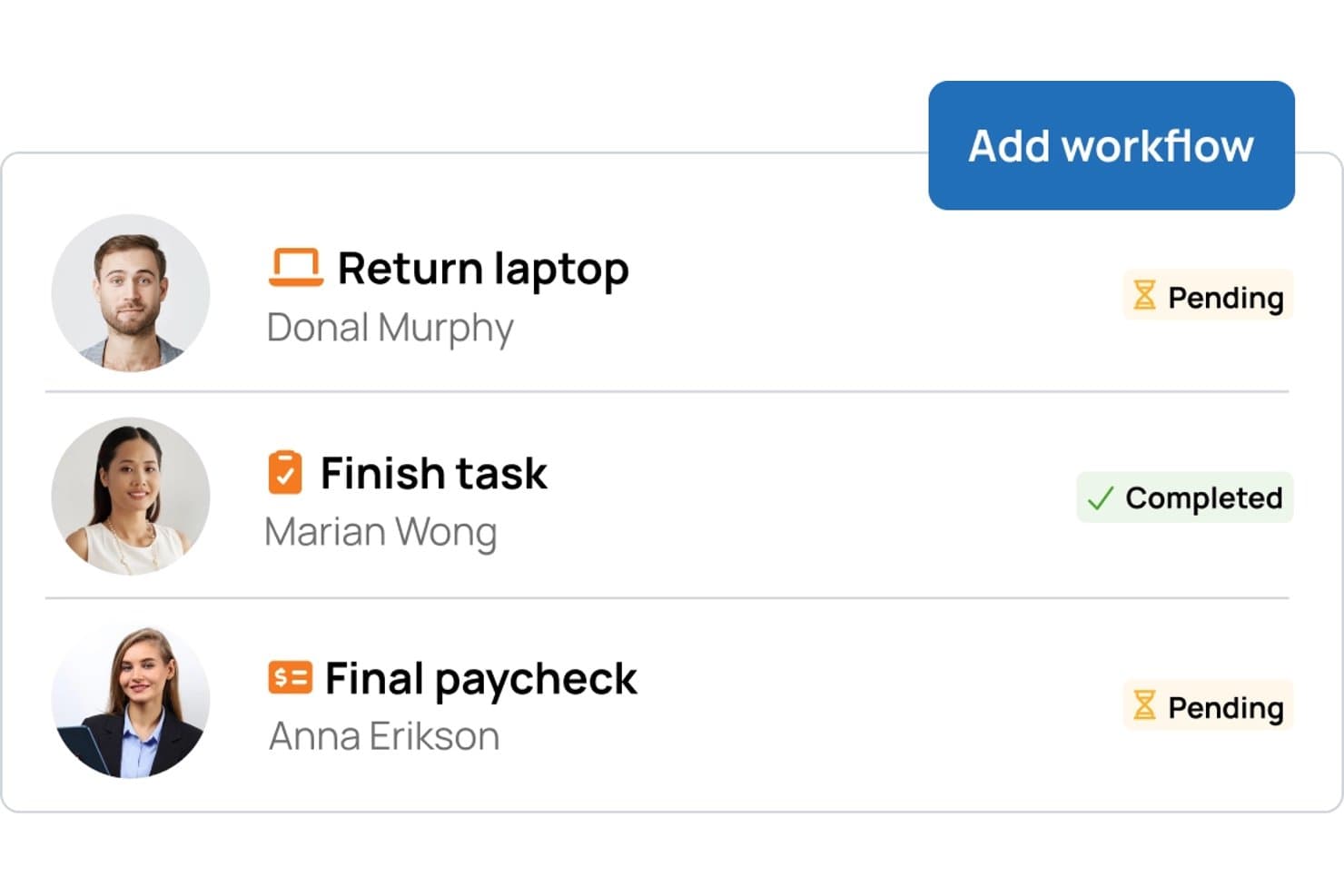
TalentHR offers a workflow management interface for offboarding tasks, displaying pending and completed items assigned to specific employees. TalentHR is a cloud-based onboarding and offboarding software designed for HR teams who need automated workflows, employee data management, time-off tracking, and core compliance tools in one centralized system.
Who Is TalentHR Best For?
HR teams at small and mid-sized companies who want streamlined, centralized onboarding and offboarding tools with optional automation.
Why I Picked TalentHR
I picked TalentHR as one of the best because I can automate repetitive onboarding and offboarding steps using its optional AI tools, like auto-generating onboarding documents or handling notifications. In practice, that means my team spends less time on manual admin.
TalentHR Key Features
- Employee self-service portal: Team members can update details and access onboarding materials directly.
- Custom onboarding workflows: HR teams can design step-by-step onboarding sequences for various roles.
- Role-based access controls: You control who sees and edits sensitive onboarding and personnel data.
- Digital document management: Store, organize, and retrieve employee agreements and compliance paperwork.
TalentHR Integrations
TalentHR offers native integrations with Google Workspace, Microsoft 365, Slack, Greenhouse, and PayFit. It connects with Zapier and provides an API for custom integrations.
Pros and Cons
Pros:
- Employee self-service portal for faster onboarding
- Customizable onboarding and offboarding workflows
- AI tools automate repetitive onboarding steps
Cons:
- Offboarding features receive less product focus
- Native integrations are limited
Learn more about TalentHR: Best for SaaS license management
- 14-day free trial
- From $2.99/month (billed annually)
Visit WebsiteCustomer Rating:4.7/5
1Password is a SaaS management platform that automates onboarding and offboarding while tracking app usage and access. 1Password is a SaaS management platform designed for IT and operations teams who need to automate onboarding and offboarding while gaining visibility into app usage and access across their organization.
Who Is 1Password Best For?
IT teams at mid-sized and large organizations managing SaaS access and licenses across multiple departments.
Why I Picked 1Password
I picked 1Password as one of the best because I can track SaaS license usage and automate onboarding and offboarding tasks from a single dashboard. I like that 1Password lets me reclaim unused licenses during offboarding, which helps control costs. My team uses its workflow automation to ensure every app assignment and removal is logged and auditable.
1Password Key Features
- Automated app discovery: Identifies all SaaS applications in use across your organization.
- Custom onboarding checklists: Lets you build step-by-step onboarding tasks for new hires.
- Access review workflows: Schedules and manages periodic access reviews for compliance.
- Integration with HRIS systems: Syncs employee data to trigger onboarding and offboarding actions.
1Password Integrations
1Password offers native integrations with Google Workspace, Okta, Microsoft 365, Slack, BambooHR, Workday, Salesforce, Jira, Zendesk, and Zapier. An API is also available for custom integrations.
Pros and Cons
Pros:
- Offers centralized visibility into SaaS app usage
- Provides audit trails for compliance reporting
- Tracks license usage and reclaims unused seats
Cons:
- Incomplete support for locally hosted legacy apps
- Limited customization of offboarding workflows
Learn more about 1Password: 6Best for Apple device provisioning
Jamf
- 14-day free trial
- From $4/device/month
Visit WebsiteCustomer Rating:4.7/5
Jamf is a device management platform that helps IT teams automate Apple device setup, security, and compliance. Jamf is a device management platform designed for IT teams in organizations that deploy, onboard, and offboard Apple devices, helping automate setup, security, and compliance for Macs, iPhones, and iPads.
Who Is Jamf Best For?
IT administrators in education, healthcare, and enterprise organizations managing large fleets of Apple devices.
Why I Picked Jamf
I picked Jamf as one of the best because I can automate Apple device provisioning for new hires and remotely wipe or reassign devices during offboarding. I like that Jamf integrates with Apple Business Manager, so my team can zero-touch deploy Macs and iPads right out of the box. I also use Jamf’s security and compliance controls to enforce company policies during onboarding and offboarding.
Jamf Key Features
- Self-Service app: Lets employees install approved apps and resources on their own devices.
- Remote lock and unlock: Allows IT to secure or unlock devices during offboarding or emergencies.
- Inventory management: Tracks device status, ownership, and assignment across the organization.
- Automated software updates: Schedules and pushes OS and app updates to Apple devices.
Jamf Integrations
Jamf offers native integrations with Apple Business Manager, Microsoft Azure Active Directory, Google Workspace, and Okta. An API is also available for custom integrations.
Pros and Cons
Pros:
- Offers granular device inventory tracking
- Supports remote device lock and wipe
- Automates zero-touch Apple device setup
Cons:
- No built-in onboarding task management
- Limited to Apple device environments only
Learn more about Jamf: Best for large enterprise integrations
- Free demo available
- Pricing upon request
Visit WebsiteCustomer Rating:4.3/5
Workday is a cloud HR platform that helps enterprises manage onboarding, employee data, and global workforce processes. Workday is a cloud-based HR platform used by large enterprises to automate onboarding and offboarding, manage employee data, and coordinate complex workforce processes across global teams.
Who Is Workday Best For?
HR and IT teams at global enterprises managing complex onboarding and offboarding workflows.
Why I Picked Workday
I picked Workday as one of the best because I can automate onboarding and offboarding at scale for global teams, with workflows that connect HR, IT, and finance. I like that Workday’s integration framework lets my team sync employee data across multiple enterprise systems. In practice, that means we can trigger provisioning and deprovisioning tasks automatically as people join or leave, even in highly regulated industries.
Workday Key Features
- Task management dashboard: Tracks onboarding and offboarding tasks for each employee.
- Document management: Stores, shares, and manages employee documents securely.
- Role-based access controls: Assign permissions based on job roles and responsibilities.
- Automated notifications: Send alerts and reminders for key onboarding and offboarding steps.
Workday Integrations
Workday offers native integrations with ServiceNow, Salesforce, Okta, ADP, SAP, DocuSign, Greenhouse, LinkedIn, Slack, and native integrations across the Microsoft ecosystem, including Microsoft 365 and Azure. An API is also available for custom integrations.
Pros and Cons
Pros:
- Tracks onboarding progress with real-time dashboards
- Handles complex, global onboarding requirements
- Automates compliance tasks and document collection
Cons:
- Limited flexibility for mid-market organizations’ needs
- System updates may disrupt custom integrations
Learn more about Workday: Best for construction field-worker onboarding
- Free demo available
- Pricing upon request
Visit WebsiteCustomer Rating:4.4/5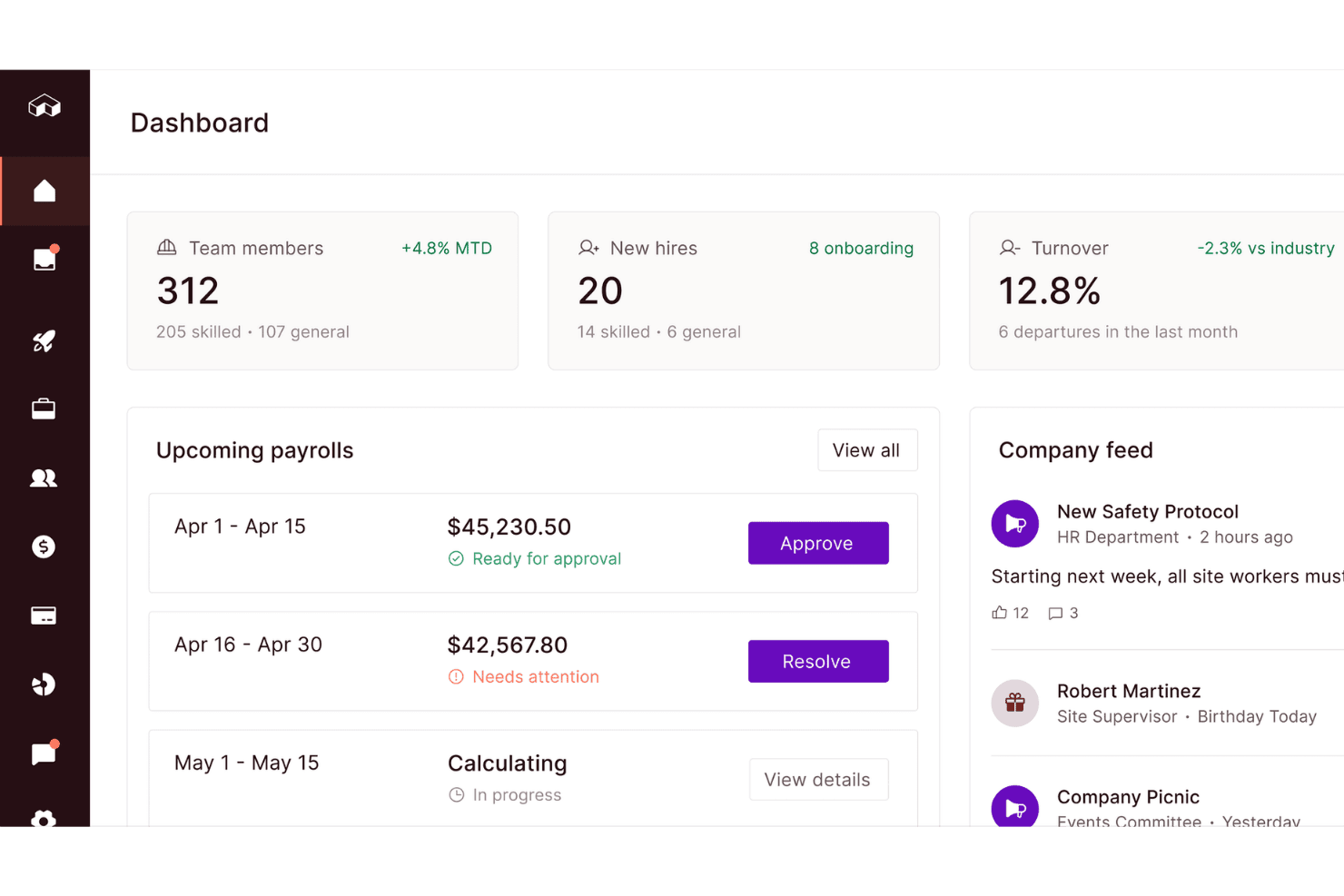
Miter centralizes payroll, hiring, and team data in one dashboard. Miter is a construction-focused HCM platform that combines digital onboarding, payroll, benefits administration, document collection, and e-signatures in one system built for field and office workforces.
Who Is Miter Best For?
Miter is a strong fit for construction companies that need to onboard hourly field workers, union crews, and multi-state hires within a single HCM platform.
Why I Picked Miter
I picked Miter as one of the best because it's purpose-built for construction workforces, where onboarding a union crew or a batch of hourly field workers looks nothing like a typical office hire. I love that new hires can complete I-9s, W-4s, and e-signatures entirely on mobile, without needing a personal email address or desktop login, using text-based invitations or kiosk mode. Role-specific onboarding packets and automated reminders mean a foreman's paperwork looks different from an office hire's, right out of the box.
Miter Key Features
- Benefits enrollment: Supports digital open enrollment and qualifying-life-event enrollment for medical, dental, vision, and 401(k) benefits, with deductions synced to payroll.
- Applicant tracking system: Manages candidates and job postings across a branded careers page, Indeed, and LinkedIn, with one-click conversion of accepted candidates into onboarding.
- Certification expiration reminders: Tracks employee licenses, certifications, and safety documents in employee profiles and sends automated alerts before expiration dates.
- I-9 and E-Verify tracking: Monitors verification status for new hires centrally, so HR teams can confirm compliance before a worker reaches the jobsite.
Miter Integrations
Miter offers native integrations with BambooHR, Employee Navigator, Checkr, and Coast for employee data, benefits, background checks, cards, and offboarding. It also supports custom integrations through a REST API.
Pros and Cons
Pros:
- Role-specific packets include automated reminders
- Text and kiosk access needs no email
- Mobile paperwork suits field hires
Cons:
- Reporting issues can complicate compliance follow-up
- Offboarding lacks coordinated task checklists
Learn more about Miter: Best with granular SaaS access controls
- Free demo available
- Pricing upon request

BetterCloud helps IT teams automate onboarding, offboarding, and enforcing security across cloud apps. BetterCloud is a SaaS management platform built for IT and security teams at mid-sized and large organizations who need to automate onboarding, offboarding, and enforce security policies across multiple cloud applications.
Who Is BetterCloud Best For?
IT and security teams at mid-sized to large organizations managing multiple SaaS applications.
Why I Picked BetterCloud
I picked BetterCloud as one of the best because I can set up highly granular SaaS access controls for onboarding and offboarding, down to individual user permissions and app-specific policies. I like that I can automate deprovisioning steps across dozens of SaaS tools, ensuring no access is left behind. My team uses BetterCloud’s policy engine to enforce security standards and trigger alerts if offboarding steps aren’t completed as required.
BetterCloud Key Features
- Workflow builder: Create automated onboarding and offboarding workflows with drag-and-drop actions.
- Audit logs: Track every change and action taken during user lifecycle events.
- Prebuilt SaaS connectors: Connect directly to popular cloud apps for user provisioning and data management.
- Role-based access controls: Assign permissions to admins and managers based on job function.
BetterCloud Integrations
BetterCloud offers 100+ native integrations, including Google Workspace, Okta, Slack, Dropbox, and Zapier. An API is available for custom integrations.
Pros and Cons
Pros:
- Enables custom workflow creation for IT teams
- Tracks and audits all user lifecycle actions
- Automates onboarding and offboarding across SaaS apps
Cons:
- Requires technical setup for advanced automations
- No mobile app for workflow management
Learn more about BetterCloud: Best for automating complex workflow steps
- Free plan available
- From $1000/month
Visit WebsiteCustomer Rating:5/5
Stitchflow helps HR and operations teams manage complex onboarding and offboarding across departments and systems. Stitchflow is designed for HR teams and operations leaders who need to coordinate complex onboarding and offboarding processes across multiple departments and systems.
Who Is Stitchflow Best For?
Large organizations or fast-growing companies with complex, multi-step onboarding and offboarding requirements across teams.
Why I Picked Stitchflow
I picked Stitchflow as one of the best because it lets me automate multi-step onboarding and offboarding workflows that involve several departments and approvals. I like how I can build conditional logic into each workflow, so tasks trigger only when certain criteria are met. My team uses Stitchflow to coordinate IT, HR, and facilities handoffs without missing a step.
Stitchflow Key Features
- Task assignment: Assign onboarding and offboarding tasks to specific users or teams.
- Progress tracking dashboard: Monitor the status of every workflow step in real time.
- Document management: Store, share, and request required documents within each workflow.
- Automated notifications: Send reminders and alerts to stakeholders as tasks become due.
Stitchflow Integrations
Stitchflow offers 60+ native API integrations with tools like Okta, Jira, Slack, and connects to additional apps using a local browser agent for platforms without management APIs. An API is also available for custom integrations.
Pros and Cons
Pros:
- Offers granular task assignment and tracking
- Supports automated IT provisioning and deprovisioning
- Handles multi-department onboarding with conditional logic
Cons:
- Lacks built-in employee feedback collection
- Limited prebuilt templates for onboarding flows
Learn more about Stitchflow:
Diğer İşe Alım ve İşten Ayrılma Yazılımları
Kısa listeme giremeyen ancak yine de göz atmaya değer bazı ek işe alım ve işten ayrılma yazılımı seçenekleri şunlardır:
- 11RipplingBest with unified HR and IT actions
- 12AuvikBest for network-connected SaaS oversight
- 13GustoBest for payroll-driven transitions
- 14AxeroBest for knowledge base onboarding
- 15MitratechBest for policy-driven process automation
- 16OktaBest for automated identity provisioning workflows
- 17miniOrangeBest with customizable user lifecycle automation
- 18SailPointBest for policy-driven access certification
How I Evaluate Onboarding and Offboarding Software
I split my evaluation into baseline requirements—like automated workflows and e-signature support—and the differentiators that set tools apart for HR teams managing high-volume or global hiring.
Core Functionality (Table Stakes For This List)
When I'm selecting tools for my list, I rank each one on a scale from 0 (does not offer the functionality) to 5 (excels in this area) for each core functionality listed below. Then, I calculate the tool's total score into a percentage. Each tool needs to achieve a minimum total score of 65% to be considered for inclusion.
- Onboarding Workflow Automation: I look for role-based task sequences that trigger automatically when a new hire is added, with reminders that loop in managers, IT, and facilities without manual follow-up.
- Offboarding Workflow Automation: Exit workflows should coordinate asset returns, access revocation, and knowledge transfer tasks across departments rather than relying on a single HR-managed checklist.
- Document & E-Signature Management: I evaluate whether the tool lets you send offer letters, tax forms, and policy acknowledgements for e-signature in bulk or individually, with secure storage and audit trails.
- Access & Provisioning Management: Tools should automate app and system provisioning at hire and revoke access at departure, whether natively or through integrations with identity providers like Okta or Azure AD.
- Compliance & Audit Tracking: I check for automated tracking of required forms and completion statuses, along with audit-ready logs that support regional labor and data privacy requirements.
- HRIS & Third-Party Integrations: The platform should sync employee data bi-directionally with your HRIS, payroll, and ATS so you're not manually updating records across multiple systems every time someone joins or leaves.
Once I have a list of tools that meet the criteria, I consider what sets each platform apart.
Differentiating Factors (What Sets Vendors Apart)
Here's how I compare and contrast different vendors:
Standout Features
Preboarding portals stand out because they let new hires complete tasks, meet their team, and absorb company culture before day one. I also look for built-in 30/60/90 day check-in cadences that give managers a structured way to track ramp-up progress and flag early disengagement. Lifecycle reporting rounds out the picture—dashboards that surface task completion rates, time-to-productivity, and exit interview trends help HR teams tie onboarding and offboarding efforts to measurable outcomes.
Beyond Features
Compliance and data security matter here because onboarding and offboarding workflows handle sensitive personal data. I check for SOC 2 Type II certification and configurable data retention policies. Scalability is another key factor—teams that onboard contractors, seasonal staff, and full-time employees across multiple regions need workflows that adapt without rebuilding from scratch. I also evaluate implementation timelines, since a tool with prebuilt templates and guided setup gets HR teams live faster during peak hiring seasons.
İşe Alım ve İşten Ayrılma Yazılımı Nasıl Seçilir?
Uzun özellik listeleri ve karmaşık fiyatlandırma yapıları içinde kaybolmak kolaydır. Kendinize özgü yazılım seçimi sürecinizde ilerlerken odaklanmanıza yardımcı olmak için aklınızda bulundurmanız gereken faktörlerin kontrol listesi aşağıdadır:
| Faktör | Dikkat Edilmesi Gerekenler |
|---|---|
| FaktörÖlçeklenebilirlik | Dikkat Edilmesi GerekenlerYazılım mevcut ve öngörülen çalışan sayınızı karşılayabilecek mi? Büyüdükçe kullanıcı sınırlarını ve fiyatlandırmadaki artışları sorun. |
| FaktörEntegrasyonlar | Dikkat Edilmesi GerekenlerİKYS'nize, bordro sisteminize, kimlik sağlayıcınıza ve diğer temel sistemlerinize yerel olarak bağlanabiliyor mu? Manuel çalışmaya yol açabilecek eksiklikleri kontrol edin. |
| FaktörÖzelleştirilebilirlik | Dikkat Edilmesi Gerekenlerİş akışlarını, bildirimleri ve erişim kurallarını politikalarınıza ve süreçlerinize uyacak şekilde uyarlayabilir misiniz? Geçici çözümler kullanmaya zorlayan katı araçlardan kaçının. |
| FaktörKullanım kolaylığı | Dikkat Edilmesi GerekenlerİK, BT ve yöneticiler arayüzü sezgisel bulacak mı? Kafa karıştırıcı adımları veya gizli ayarları belirlemek için gerçek kullanıcılarla test edin. |
| FaktörUygulama ve işe alım | Dikkat Edilmesi GerekenlerKurulum ne kadar sürecek ve hangi kaynaklar gerekli olacak? Veri aktarımı desteği, eğitim ve tipik kullanıma alma zaman çizelgeleri hakkında bilgi alın. |
| FaktörMaliyet | Dikkat Edilmesi GerekenlerGerekli tüm özellikler teklif edilen fiyata dahil mi? Ek ücretlere, minimum kullanıcı sayısına veya sözleşme kilitlenmelerine dikkat edin. |
| FaktörGüvenlik önlemleri | Dikkat Edilmesi GerekenlerAraç şifreleme, denetim günlükleri ve rol tabanlı erişim sunuyor mu? Kuruluşunuzun güvenlik standartlarını karşıladığını doğrulayın. |
| FaktörDestek erişilebilirliği | Dikkat Edilmesi GerekenlerHangi destek kanalları sunuluyor ve hangi saatlerde hizmet veriliyor? Standart çalışma saatleri dışında yardıma ihtiyacınız olup olmayacağını değerlendirin. |
İşe Alım ve İşten Ayrılma Yazılımı Nedir?
İşe alım ve işten ayrılma yazılımı, yeni çalışanların bir kuruluşa dahil edilmesi ve ayrıldıklarında erişimlerinin güvenli bir şekilde kaldırılması süreçlerini otomatikleştiren ve yöneten dijital bir araçtır. Bu platformlar, İK ve BT ekiplerinin görevleri koordine etmesine, sistem izinlerini atamasına veya iptal etmesine, ilerlemeyi izlemesine ve kurum içi politikalar ile mevzuat gerekliliklerine uyumu sağlamasına yardımcı olur.
İşe Alım ve İşten Ayrılma Yazılımlarının Özellikleri
İşe alım ve işten ayrılma yazılımı seçerken aşağıdaki temel özelliklere dikkat edin:
- Otomatik kullanıcı sağlama: Yeni işe alınan kişiler için rollerine veya departmanlarına göre hesapları otomatik olarak oluşturur ve sistemlere, uygulamalara ve cihazlara erişim atar.
- Otomatik erişim kaldırma: Bir çalışan işten ayrıldığında erişimi anında iptal eder ve tüm bağlı sistemlerdeki hesapları kaldırarak güvenlik risklerini azaltır.
- İş akışı yönetimi: Hiçbir şeyin atlanmamasını sağlamak için İK, BT ve diğer departmanlardaki işe alım ve işten ayrılma görevlerini tasarlamanıza, atamanıza ve takip etmenize olanak tanır.
- Kimlik sağlayıcılarıyla entegrasyon: Kullanıcı erişimini ve kimlik bilgilerini senkronize etmek için Active Directory veya Okta gibi platformlara doğrudan bağlanır.
- Role dayalı erişim denetimleri: İzinleri ve erişim düzeylerini işlevlere göre ayarlamanıza olanak tanıyarak çalışanların yalnızca ihtiyaç duydukları kaynaklara erişmesini sağlar.
- Denetim izleri ve raporlama: Uyumluluk, güvenlik denetimleri ve süreç iyileştirme amacıyla tüm işe alım ve işten ayrılma işlemlerinin ayrıntılı kayıtlarını tutar.
- Özelleştirilebilir şablonlar: İşe alım ve işten ayrılma kontrol listeleri, e-postalar ve belgeler için önceden oluşturulmuş veya düzenlenebilir şablonlar sunar.
- Kendi kendine hizmet portalları: Yeni işe alınan ve işten ayrılan çalışanlara formları doldurabilecekleri, belgeleri yükleyebilecekleri ve ilerlemelerini takip edebilecekleri merkezi bir alan sunar.
- Bildirimler ve hatırlatıcılar: Süreçlerin planlandığı şekilde ilerlemesini sağlamak için paydaşlara bekleyen görevler, onaylar veya son tarihler hakkında otomatik uyarılar gönderir.
- Belge yönetimi: Sözleşmeler, NDA'lar ve işten ayrılma kontrol listeleri gibi gerekli işe alım ve işten ayrılma belgelerini depolar, paylaşır ve takip eder.
İşe Alım ve İşten Ayrılma Yazılımlarının Faydaları
İşe alım ve işten ayrılma yazılımını uygulamak ekibiniz ve işletmeniz için çeşitli faydalar sağlar. Yararlanabileceğiniz faydalardan bazıları şunlardır:
- Azalan manuel iş yükü: Otomatik iş akışları ve kullanıcı sağlama, İK ve BT ekiplerinin tekrarlayan görevlerini ortadan kaldırır.
- Gelişmiş güvenlik: Anında erişim kaldırma ve denetim izleri, yetkisiz erişimi ve veri ihlallerini önlemeye yardımcı olur.
- Tutarlı çalışan deneyimi: Standartlaştırılmış kontrol listeleri ve şablonlar, her çalışanın aynı işe alım ve işten ayrılma sürecinden geçmesini sağlar.
- Üretkenliğe daha hızlı ulaşma: Otomatik hesap kurulumu ve net görev atamaları, yeni işe alınan çalışanların hızlı bir şekilde çalışmaya başlamasına yardımcı olur.
- Daha iyi uyumluluk: Ayrıntılı etkinlik kayıtları ve raporlama, mevzuat gerekliliklerini ve iç denetimleri destekler.
- Ekipler arası koordinasyonun güçlendirilmesi: Merkezi iş akışları ve bildirimler, İK, BT ve yöneticilerin sorumluluklar ve son tarihler konusunda uyum içinde olmasını sağlar.
- Büyüme için ölçeklenebilirlik: Otomatik süreçler ve entegrasyonlar, kuruluşunuz büyüdükçe işe alım ve işten ayrılma süreçlerini yönetmeyi kolaylaştırır.
İşe Alım ve İşten Ayrılma Yazılımlarının Maliyetleri ve Fiyatlandırması
İşe alım ve işten ayrılma yazılımı seçmek, mevcut çeşitli fiyatlandırma modellerinin ve planların anlaşılmasını gerektirir. Maliyetler özelliklere, ekip büyüklüğüne, eklentilere ve diğer unsurlara göre değişir. Aşağıdaki tabloda yaygın planlar, ortalama fiyatları ve işe alım ve işten ayrılma yazılımı çözümlerinde genellikle sunulan özellikler özetlenmiştir:
İşe Alım ve İşten Ayrılma Yazılımları için Plan Karşılaştırma Tablosu
| Plan Türü | Ortalama Fiyat | Yaygın Özellikler |
|---|---|---|
| Plan TürüÜcretsiz Plan | Ortalama Fiyat$0 | Yaygın ÖzelliklerTemel işe alım kontrol listeleri, sınırlı kullanıcı sağlama, e-posta bildirimleri ve basit raporlama. |
| Plan TürüKişisel Plan | Ortalama Fiyat$5–$10/kullanıcı/ay | Yaygın ÖzelliklerOtomatik işe alım iş akışları, temel entegrasyonlar, kendi kendine hizmet portalları ve standart destek. |
| Plan Türüİşletme Planı | Ortalama Fiyat$15–$25/kullanıcı/ay | Yaygın ÖzelliklerGelişmiş iş akışı otomasyonu, role dayalı erişim denetimleri, denetim kayıtları ve HRIS ile entegrasyon. |
| Plan TürüKurumsal Plan | Ortalama Fiyat$30–$50/kullanıcı/ay | Yaygın ÖzelliklerÖzelleştirilebilir iş akışları, toplu kullanıcı sağlama, gelişmiş güvenlik, özel destek ve uyumluluk araçları. |
İşe Alım ve İşten Ayrılma Yazılımı SSS
İşe alım ve işten ayrılma yazılımı hakkında sık sorulan soruların bazı yanıtlarını burada bulabilirsiniz:
İşe alım ve işten ayrılma yazılımı güvenliği nasıl geliştirir?
İşe alım ve işten ayrılma yazılımı, erişim sağlama ve erişimi kaldırma işlemlerini otomatikleştirerek güvenliği geliştirir. Böylece çalışanların yalnızca ihtiyaç duydukları erişime sahip olması ve biri işten ayrıldığında tüm izinlerin derhâl iptal edilmesi sağlanır. Bu, yetkisiz erişim ve veri ihlali riskini azaltır.
İşe alım ve işten ayrılma yazılımı mevcut İK ve BT sistemlerimle entegre olabilir mi?
Evet, çoğu işe alım ve işten ayrılma yazılımı HRIS, bordro sistemleri, kimlik sağlayıcıları ve diğer temel iş sistemleriyle entegre olabilir. Bu entegrasyonlar, kullanıcı hesaplarının oluşturulmasını, güncellenmesini ve kaldırılmasını otomatikleştirerek manuel çalışmayı ve hataları azaltır.
İşe alım ve işten ayrılma yazılımını değerlendirirken nelere dikkat etmeliyim?
Ölçeklenebilirliğe, entegrasyon özelliklerine, iş akışı özelleştirmesine, kullanım kolaylığına ve güvenlik önlemlerine odaklanın. Yazılımın kuruluşunuzun büyüklüğüne, süreçlerine ve uyumluluk gereksinimlerine ne ölçüde uyduğunu ve ekibinizin ihtiyaç duyduğu desteği ve eğitimi sunup sunmadığını değerlendirin.
İşe alım ve işten ayrılma yazılımı küçük işletmeler için uygun mudur?
Evet, birçok çözüm küçük işletmeler için uygun esnek planlar ve özellikler sunar. Ekstra iş yükü oluşturmadan ekibinizin işe alım ve işten ayrılma süreçlerini yönetmesine yardımcı olacak basit kuruluma, uygun fiyatlara ve temel otomasyon özelliklerine sahip araçları tercih edin.
İşe alım ve işten ayrılma yazılımının uygulanması ne kadar sürer?
Uygulama süresi sağlayıcıya ve karmaşıklığa göre değişir, ancak bulut tabanlı çözümlerin çoğu birkaç gün ila birkaç hafta içinde kurulabilir. Entegrasyonlar, veri aktarımı ve iş akışı özelleştirmesi gibi faktörler zaman çizelgesini etkileyebilir. Bu nedenle sağlayıcılara tipik işe alım sürelerini sorun.