En iyi yan haklar yönetimi yazılımı, kayıt ve uygunluktan mevzuata uygunluk ve raporlamaya kadar her şeyi kolaylaştırmanıza yardımcı olur; böylece çalışan yan haklarını güvenle ve zahmetsizce yönetebilirsiniz.
Büyüyen bir ekip genelinde sağlık sigortası, emeklilik planları ve isteğe bağlı yan haklarla ilgilenirken hataların, kaçırılan son tarihlerin veya mevzuata uygunluk sorunlarının ortaya çıkması kolaydır. Doğru platform, uygunluk takibini otomatikleştirir, açık kayıt dönemini kolaylaştırır ve tüm sigorta sağlayıcısı verilerini merkezileştirerek zamandan tasarruf etmenizi ve hataları azaltmanızı sağlar.
Çalışanların kendi işlemlerini yapabilmesi, entegre plan karşılaştırmaları ve otomatik hatırlatıcılar gibi özellikler sayesinde bu araçlar memnuniyeti artırır ve destek taleplerini azaltır.
Küçük ve orta ölçekli işletmeler tarafından kullanılan çeşitli platformları değerlendirdikten sonra sezgisel, ölçeklenebilir ve yan haklar yönetimini sorunsuz ve stressiz hâle getirmek üzere tasarlanmış, sınıfının en iyisi seçeneklerden oluşan bir liste hazırladım.
Why Trust Our Software Recommendations
6,700+
Reviews
20
Industry experts
16+
Evaluation factors
14
Years
Our team has been testing and reviewing software since 2012. As HR experts ourselves, we know how difficult—and important—it is to choose the right software.
For this guide, we evaluated tools using hands-on testing and independent research, scoring tools using our selection criteria. We also draw on insights from industry thought leaders and practicing HR experts.
Our reviews reflect our human editorial judgment, not a sales pitch.
Expert reviewers:
- Phil GrayCOO
 Kim BehnkeHR Tech Editor & Analyst
 Josh BarkerPeople Ops Manager

Yan Haklar Yönetimi Yazılımları Karşılaştırma Tablosu
Bu karşılaştırma tablosu, en iyi yan haklar yönetimi yazılımı seçimlerimin fiyatlandırma ayrıntılarını özetlemektedir.
Sorted by: Default
| Tool | Starting Price | Website | |
|---|---|---|---|
Best for all-in-one benefits administration | 4.6 out of 5 | $79/user/month Free demo available | Book Demo |
Best for offering localized benefits for international employees | 4.8 out of 5 | $5/user/month Free demo available | Website |
Best for flexible and personalized employee healthcare benefits | 5.0 out of 5 | $45/user/month Not available | Website |
Best for COBRA compliance management | Not rated | Pricing upon request No free trial available | Website |
Best for automated benefit deductions | 4.6 out of 5 | $49/month Free trial + free demo available | Book Demo |
Best for syncing benefit deduction costs directly with payroll | 5.0 out of 5 | $49/month + $6/user/month 30-day free trial available | Website |
Best for offering global healthcare benefits to international teams | 4.5 out of 5 | $199/user/month Free plan + free demo available | Website |
Best for direct integrations with benefit providers | 4.2 out of 5 | Pricing upon request Free demo available | Website |
Best for AI-guided benefits decisions | 4.5 out of 5 | Pricing upon request Free demo available | Website |
Best HCM software suite for integrated benefits management and easy employee self-service | 3.9 out of 5 | Pricing upon request | Website |


En İyi Yan Haklar Yönetimi Yazılımı İncelemeleri
Aşağıda, kısa listeme giren en iyi yan haklar yönetimi yazılımlarına ilişkin ayrıntılı özetlerimi bulabilirsiniz. İncelemelerimde, size en uygun olanı bulmanıza yardımcı olmak için her aracın temel özelliklerine, artılarına & eksilerine, entegrasyonlarına ve ideal kullanım alanlarına ayrıntılı bir bakış sunuyorum.
 Best for all-in-one benefits administration
- Free demo available
- From $79/user/month
Visit WebsiteCustomer Rating:4.6/5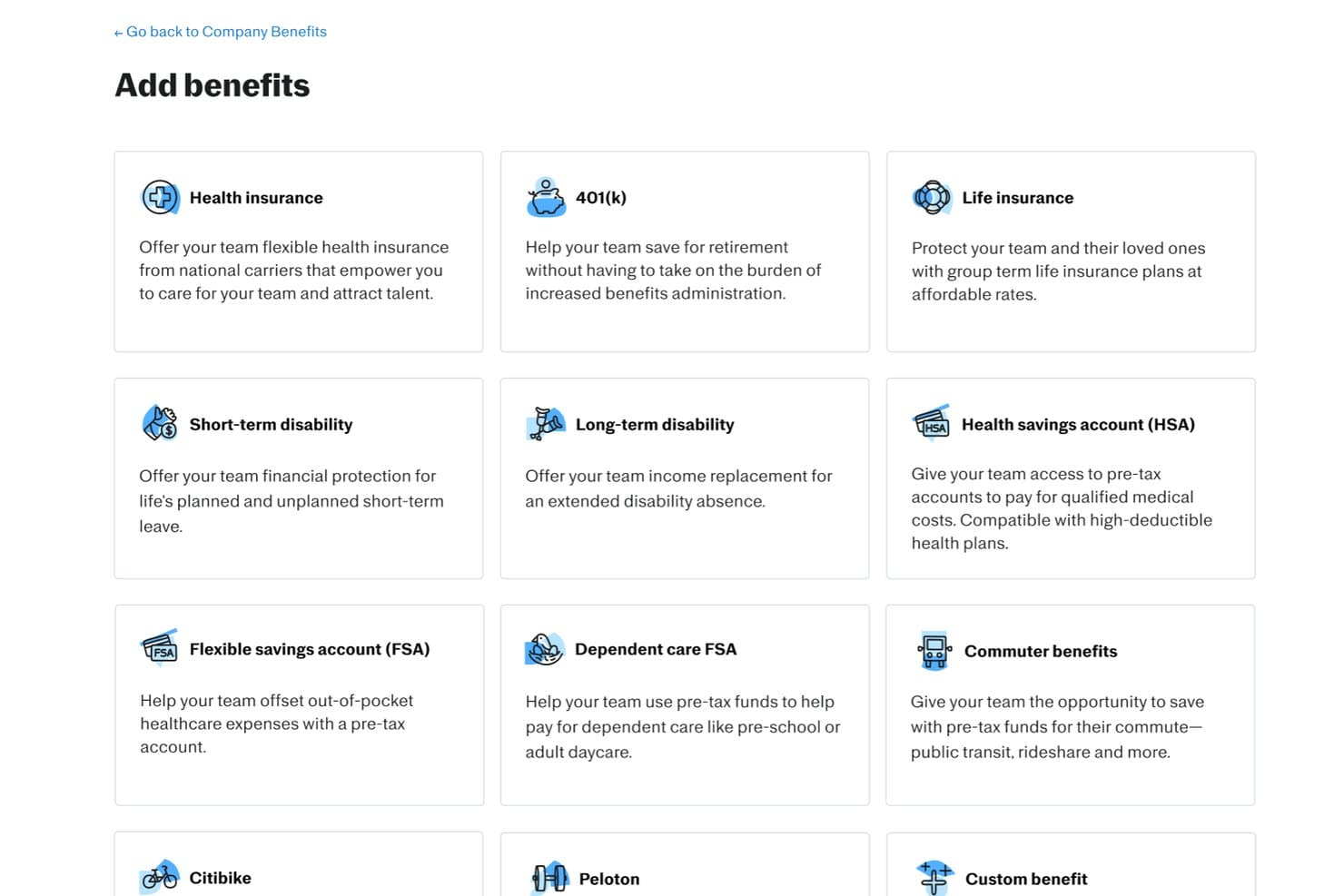
Justworks offers a wide range of employee benefits options including health insurance, 401(k), life insurance, disability, HSA, FSA, and commuter benefits that employers can add directly from a single interface. Justworks is a benefits administration software platform that unifies payroll, HR, compliance, and employee benefits enrollment for organizations looking to manage employee plans, onboarding, and regulatory requirements in one system.
Who Is Justworks Best For?
Small and midsize companies that want an all-in-one platform to manage payroll, HR, and benefits administration with built-in compliance support.
Why I Picked Justworks
I picked Justworks as one of the best because I value being able to reach live human support 24/7, especially when handling urgent benefits or payroll questions. I can manage benefits enrollment and life events anytime, knowing their team is available to troubleshoot complex issues in real time.
Justworks Key Features
- Automated ACA reporting: The platform generates and files ACA forms for eligible employees.
- Online open enrollment workflows: Employees use guided workflows to select and change benefits plans online.
- COBRA administration: Justworks manages COBRA enrollment and communications for terminated employees.
- Built-in payroll processing: Payroll runs alongside benefits with synced deductions and employee changes.
Justworks Integrations
Justworks offers native integrations with QuickBooks, Xero, and QuickBooks Time. An API is available for custom integrations.
Pros and Cons
Pros:
- Offers a wide selection of national benefit plans
- Automated ACA and COBRA administration included
- 24/7 live human support for employees
Cons:
- No advanced decision support tools for employees
- You must use Justworks’ chosen insurance carriers
Learn more about Justworks: Best for offering localized benefits for international employees
- Free demo available
- From $5/user/month
Visit WebsiteCustomer Rating:4.8/5
Deel’s self-service platform provides a consistent, reliable experience for employees and contractors alike. Deel is a benefits administration software designed for businesses managing employees across multiple countries. It focuses on global payroll and benefits management, providing tools to handle complex international compliance and payroll tasks.
Why I picked Deel: Deel excels in global payroll capabilities, making it ideal for companies with international teams. It offers features like customizable benefit plans and seamless integrations with HR tools.
The tool also supports various employment models, ensuring compliance and efficient payroll processes. Its user-friendly interface simplifies global benefits management, making it the best option for global payroll.
Standout features & integrations:
Features include customizable benefit plans, guided enrollment experiences, and automatic payroll deductions. Deel supports open enrollment management, allowing HR teams to manage plans and track employee participation efficiently. The software also supports various pre-tax programs, enhancing its global payroll capabilities.
Integrations include QuickBooks, Xero, NetSuite, BambooHR, Gusto, Greenhouse, Lever, Slack, Microsoft Teams, and Workable.
Pros and Cons
Pros:
- Provides automatic payroll deductions
- Maintains existing broker relationships
- Offers guided enrollment experiences
Cons:
- May not fit all industry needs
- Limited offline support options
 Best for flexible and personalized employee healthcare benefits
- Not available
- From $45/user/month
Visit WebsiteCustomer Rating:5/5
Employees can choose their preferred health insurance plan and other healthcare benefits with Thatch. Thatch is a health benefits platform designed for businesses aiming to provide flexible healthcare options to employees. It offers employers tools to manage health benefits through an Individual Coverage Health Reimbursement Arrangement (ICHRA), allowing employees to select their preferred health, dental, and vision plans.
Why I picked Thatch: Thatch provides AI-driven analytics that help your team understand healthcare usage and costs. It offers a curated marketplace for health and wellness services, enhancing employee satisfaction. The platform's budget-based healthcare spending model allows employees to choose plans that suit their needs. Its tools for designing and implementing ICHRA make it a standout choice for personalized benefits management.
Thatch runs enrollment, compliance, carrier payments, and payroll deductions for employee health budgets, replacing manual admin work end to end.
Standout features & integrations:
Features include budget-based healthcare spending, a curated marketplace for health services, and the Thatch Visa debit card for unspent budgets. Employees can select from a variety of insurance plans, ensuring personalized healthcare. The platform also simplifies management for employers with its ICHRA tools.
Integrations include compatibility with all payroll providers and insurance plans, requiring minimal setup.
Pros and Cons
Pros:
- Excellent customer support
- Simplified management for employers
- Personalized healthcare experience
Cons:
- May not cover all state QHPs
- Requires proactive employee engagement
Learn more about Thatch: Best for COBRA compliance management
- No free trial available
- Pricing upon request

WEX Benefits reimbursement screen showing document upload requirements and the Add documentation button for submitting eligible expense receipts. WEX Benefits offers a versatile solution for businesses aiming to simplify their employee benefits management. With features like Health Savings Accounts (HSAs), Flexible Spending Accounts (FSAs), and COBRA compliance, it caters to a wide range of industries, including healthcare and public sectors. This platform is particularly appealing to HR professionals and benefits administrators seeking customizable solutions to optimize operations and ensure compliance.
Why I Picked WEX Benefits
I picked WEX Benefits because of its focus on simplifying complex benefits administration tasks, which is crucial for businesses of all sizes. The software's standout feature is its COBRA compliance management, which ensures that your organization remains compliant with regulations while managing employee benefits. Additionally, the integration with Health Savings Accounts (HSAs) and Flexible Spending Accounts (FSAs) offers a streamlined approach to managing various benefits accounts, addressing the common challenge of juggling multiple systems.
WEX Benefits Key Features
In addition to its standout features, I also found several other key functionalities that enhance its appeal:
- Customizable Solutions: Tailor the platform to meet the specific needs of your organization, ensuring that the software fits seamlessly into your existing processes.
- Advanced Analytics: Gain insights into benefits usage and trends, helping you make data-driven decisions to optimize your benefits offerings.
- Real-Time Payments: Manage payments efficiently with real-time processing, reducing the administrative burden on your team.
- Extensive Resources: Access a wealth of resources, including blogs, reports, and podcasts, to stay informed and make the most of the platform.
WEX Benefits Integrations
Integrations include payroll and benefits vendors, ensuring seamless data management and enhancing user experience. Native integrations are not specifically listed by WEX Benefits, but the platform supports various benefits accounts and professional services.
Pros and Cons
Pros:
- Advanced reporting and analytics tools
- Strong COBRA compliance capabilities
- Comprehensive HSA and FSA support
Cons:
- Limited publicly listed integrations
- Pricing not publicly available
Learn more about WEX Benefits: Best for automated benefit deductions
- Free trial + free demo available
- From $49/month
Visit WebsiteCustomer Rating:4.6/5
Gusto provides personalized health plan recommendations based on your company’s details. For growing businesses seeking an all-in-one platform to manage payroll, benefits, and HR, Gusto is a great option. It is tailored for small to medium-sized businesses across various industries that need a streamlined approach to administering employee benefits. Gusto addresses the challenge of managing multiple benefits offerings while ensuring compliance, making it a valuable tool for HR professionals and business owners alike.
Why I Picked Gusto
I picked Gusto for its seamless integration of benefits administration with payroll and HR functions. The platform's ability to automate payroll deductions for benefits like dental, vision, and 401(k) plans simplifies management tasks. Moreover, its employee self-service feature empowers team members to manage their benefits independently, fostering a more engaging user experience. Gusto's comprehensive compliance support also ensures that businesses remain aligned with regulations, reducing administrative burdens.
Gusto Key Features
In addition to the features mentioned above, Gusto offers several other capabilities that enhance its benefits administration functions.
- Open Enrollment Management: Provides tools to manage open enrollment periods, allowing employees to select or waive benefits efficiently.
- Life Event Management: Facilitates changes in benefits due to qualifying life events, ensuring that employee coverage is always up-to-date.
- Multi-State Payroll Management: Handles payroll for teams across different states, accommodating the geographic diversity typical in trucking.
- COBRA Administration: Offers guidance and support for managing COBRA coverage for departing employees, ensuring compliance with federal regulations.
Gusto Integrations
Integrations include QuickBooks, Xero, Freshbooks, Hubstaff, Expensify, Greenhouse, Breezy HR, JazzHR, Carta, and Shopify.
Pros and Cons
Pros:
- Provides COBRA administration support for departing employees.
- Integrated employee self-service enhances user engagement.
- Automated payroll deductions simplify benefits management.
Cons:
- Premium benefits availability may be limited in certain U.S. states.
- Limited global reach compared to some competitors.
 Best for syncing benefit deduction costs directly with payroll
- 30-day free trial available
- From $49/month + $6/user/month
Visit WebsiteCustomer Rating:5/5
OnPay’s HR management software automatically links employee benefits directly to payroll, saving teams time by avoiding manual data entry. OnPay is payroll and HR software tailored for small businesses, offering key functions such as payroll processing, tax filing, and benefits administration. It supports small teams with straightforward tools to manage employee benefits and compliance requirements.
Why I picked OnPay: OnPay is designed to meet the needs of small businesses with its simple interface and essential features. It offers automated tax filings, allowing your team to save time on compliance tasks.
OnPay's benefits administration tools include easy plan setup and management, making it accessible for smaller teams. The software is priced competitively, making it ideal for small businesses.
Standout features & integrations:
Features include automated payroll tax filings, employee self-service portals, and flexible pay schedules. OnPay also provides direct deposit options, simplifying payment processes for your team. You can track and manage PTO to ensure accurate leave management.
Integrations include QuickBooks, Xero, TSheets, Mineral, Guideline, Vestwell, Kabbage, Humanity, Deputy, and When I Work.
Pros and Cons
Pros:
- Direct deposit options
- Flexible pay schedules
- Automated tax filings
Cons:
- No advanced HR tools
- Basic reporting features
 Best for offering global healthcare benefits to international teams
- Free plan + free demo available
- From $199/user/month
Visit WebsiteCustomer Rating:4.5/5
For contractors, Remofirst manages invoices, ensuring timely and accurate payments. RemoFirst is a global Employer of Record solution, ideal for businesses looking to hire and manage international contractors without setting up local entities. It offers services like global payroll, onboarding, and health insurance to support companies in over 185 countries.
Why I picked RemoFirst: RemoFirst is tailored for international contractor management, offering fast onboarding and payroll processing across multiple currencies. It provides visa and work permit support, making it easier for your team to manage compliance.
The platform’s health insurance through RemoHealth ensures your contractors are covered globally. Its cost-effective employment solutions suit businesses expanding worldwide.
Standout features & integrations:
Features include support for over 185 countries, tailored health coverage, and efficient payroll processing. RemoFirst assists with visas and work permits, ensuring compliance with local regulations. You can manage time off and bonuses, enhancing the overall employment experience for your global team.
Integrations include QuickBooks, Xero, BambooHR, Slack, Microsoft Teams, Gusto, Greenhouse, Lever, Asana, and Trello.
Pros and Cons
Pros:
- Cost-effective solutions
- Visa and permit support
- Tailored health insurance
Cons:
- May need initial training
- Requires setup for each region
 Best for direct integrations with benefit providers
- Free demo available
- Pricing upon request
Visit WebsiteCustomer Rating:4.2/5
Paychex Flex's dashboard simplifies task management by providing admins with a convenient way to set up reminders for upcoming payments or review timesheets from remote staff. Paychex Flex is a cloud-based HR and payroll solution designed for businesses of all sizes. It offers payroll management, benefits administration, and human resources services, making it easier for teams to manage their employee data efficiently.
Why I picked Paychex Flex: Paychex Flex simplifies payroll management with its user-friendly interface and automated processes. It offers features such as direct deposit and mobile access, enabling your team to manage payroll on the go. Paychex Flex also provides tax compliance support, reducing the burden of regulatory tasks. Its scalability makes it suitable for businesses that anticipate growth.
Standout features & integrations:
Features include customizable reporting, employee self-service, and mobile app access. Paychex Flex allows you to create detailed reports tailored to your business needs. The employee self-service portal empowers your team to manage their own information and access pay stubs.
Integrations include QuickBooks, Xero, Indeed, BambooHR, TSheets, Google Workspace, Microsoft Teams, Salesforce, Slack, and ADP.
Pros and Cons
Pros:
- Employee self-service portal
- Customizable reporting options
- Mobile access for payroll management
Cons:
- Some features need manual updates
- Occasional customer support delays
Learn more about Paychex Flex: Best for AI-guided benefits decisions
- Free demo available
- Pricing upon request
Visit WebsiteCustomer Rating:4.5/5
Healthee provides an intuitive, AI-powered benefits platform for users. Healthee helps teams cut through the complexity of health benefits by using AI-assisted guidance to make benefits selection and coverage clearer for employees and administrators alike, especially during open enrollment and year-round care navigation. It appeals to HR leaders, finance teams, brokers, PEOs, and third-party administrators who want to reduce repetitive questions and help employees understand their plans and access care with confidence.
Why I Picked Healthee
I picked Healthee because its AI-powered benefits decision support and navigation directly assist benefits administrators and HR teams in simplifying complex health coverage information for employees. Its AI-driven plan comparison tool gives personalized recommendations that help employees choose the right benefits during open enrollment, reducing confusion and questions.
The built-in AI assistant “Zoe” can answer benefits and coverage questions in real time, taking routine inquiries off your team’s plate. These features support your goals of improving benefits utilization and reducing administrative workload.
Healthee Key Features
In addition to the features already mentioned, I also found the following useful:
- Provider Search and Ratings: Enables your team to easily find and evaluate in-network healthcare providers.
- Preventive Care Reminders: Encourages proactive health management with in-app reminders and suggestions.
- Fraud Detection: Uses AI to identify and mitigate instances of fraud, waste, and abuse in claims processing.
- Telehealth Services: Provides access to 24/7 telehealth visits with licensed physical and mental health professionals without submitting claims.
Healthee Integrations
While Healthee does not publish a catalog of native integrations, the platform supports a flexible API and embeddable UI widgets so you can add its personalized benefits experience to your HR tech environment.
Pros and Cons
Pros:
- AI virtual assistant Zoe enhances benefits navigation efficiency.
- Cost transparency tools help users make informed decisions.
- 24/7 telehealth access provides immediate medical consultation.
Cons:
- Limited benefits to select providers may restrict options.
- Some users wish for support for non-medical benefits for a more all-in-one system.
Learn more about Healthee: Best HCM software suite for integrated benefits management and easy employee self-service
- Pricing upon request
Visit WebsiteCustomer Rating:3.9/5
Benefits enrollment is simplified through ADP’s benefits management portal, which has a mobile app version for Android and iOS devices as well. ADP Vantage HCM is a human capital management solution designed for large U.S. enterprises. It provides services like payroll, benefits administration, and talent management to streamline HR operations for big organizations.
Why I picked ADP Vantage HCM: ADP Vantage HCM is tailored for large businesses, offering extensive payroll and benefits management features. It supports complex organizational structures with its customizable reporting tools.
The platform's talent management capabilities help your team recruit and retain top talent. Its compliance support ensures your business meets regulatory requirements efficiently.
Standout features & integrations:
Features include advanced analytics, mobile access, and employee self-service options. ADP Vantage HCM's analytics help you track workforce trends and make data-driven decisions. The mobile app allows your team to access HR functions from anywhere, enhancing flexibility.
Integrations include QuickBooks, Microsoft Dynamics, Workday, Oracle, SAP, Salesforce, Kronos, NetSuite, BambooHR, and Slack.
Pros and Cons
Pros:
- Customizable reporting tools
- Strong compliance features
- Advanced analytics for decision making
Cons:
- Occasional system updates needed
- Learning curve for advanced features
Learn more about ADP Vantage HCM:
Diğer Yan Haklar Yönetimi Yazılımları
İşte en iyi listeye giremeyen birkaç seçenek daha. Kullanışlı yan haklar yönetimi yazılımları için ek önerilere ihtiyacınız varsa bunlara göz atın ve diğer araçlara ilişkin önerilerinizi yorum olarak paylaşmaktan çekinmeyin:
- 11GoCoBest for self-service benefits enrollment
- 12BenefitFocusBest for an extensive catalog of industry-leading benefit products that are pre-vetted
- 13TrinetBest for managing ACA compliance and COBRA administration
- 14SAP SuccessFactorsBest for collecting feedback on benefit programs
- 15AbenityBest platform for offering employee savings programs
- 16InsperityBest for an employee benefits administration outsourcing solution
- 17Infor CloudSuite HCMBest for retirement programs
- 18PeoplekeepBest for offering health savings accounts and healthcare reimbursement stipends
- 19RipplingBest for automatically enrolling new hires in health plans
- 20JustworksBest for its flexibility in changing benefit packges
- 21Papaya GlobalBest workforce management platform for simplifying the complex world of global benefits
- 22PaycorBest for employee self-service
- 23ADP Workforce NowBest for managing the entire employee lifecycle
- 24BambooHRBest for easy-to-use benefits administration and mobile app-based vacation requests
- 25TriNet HR PlusBest for simplifying the benefits enrollment process from healthcare plans to perks like commuter benefits
- 26APSBest for automating the benefits enrollment process from a user-friendly dashboard
- 27NamelyBest benefits packages to help small and mid-sized companies attract and retain top talent
- 28BerniePortalBest all-in-one HR software solution with benefits administration processes designed for small businesses
- 29UZIOBest HR solution for benefits brokers and employers working together to build comprehensive benefit packages
- 30Collage HRBest HRIS platform to streamline your people processes such as payroll and benefits
- 31Employment HeroBest employee benefits platform for Canadian organizations
- 32CleoBest family benefits platform with a personalized mobile app
- 33Justworks PayrollBest for on-demand access to high-quality primary medical care services at no extra charge
- 34BuckBest benefits solution for employee self-service, plan sponsor access, and case management
- 35CriterionBest integrated HRIS benefits management module for an open enrollment process
How I Evaluate Benefits Administration Software
I evaluate on two layers: non-negotiables like carrier EDI feeds, ACA reporting, and open enrollment workflows, then differentiators like decision-support tools and broker portals.
Core Functionality (Table Stakes For This List)
When I'm selecting tools for my list, I rank each one on a scale from 0 (does not offer the functionality) to 5 (excels in this area) for each core functionality listed below. Then, I calculate the tool's total score into a percentage. Each tool needs to achieve a minimum total score of 65% to be considered for inclusion.
- Plan Setup & Management: I evaluate how flexibly a platform handles plan configuration across medical, dental, vision, life, disability, and voluntary lines, including eligibility rules and multi-tier contribution structures.
- Open & Life-Event Enrollment: Guided enrollment workflows matter here, so I look for platforms that support both annual open enrollment and qualifying life events like marriage, birth, or job status changes.
- Carrier Connections & EDI Feeds: I check whether the platform maintains a broad library of pre-built carrier connections and manages ongoing EDI feed maintenance, error alerts, and reconciliation.
- Compliance Management: ACA reporting (1094-C/1095-C generation), COBRA administration, and ERISA/HIPAA support all factor in, along with how proactively the platform updates for regulatory changes.
- Payroll & HRIS Integration: The platform should sync deductions, demographics, and status changes with major payroll and HCM systems like ADP, UKG, Workday, or Paylocity through native or API-based connections.
- Employee Self-Service Portal: I look for portals where employees can compare plans side by side, manage dependents, upload documents, and access benefits information year-round—not just during enrollment windows.
Once I have a list of tools that meet this criteria, I consider what sets each platform apart.
Differentiating Factors (What Sets Vendors Apart)
Here's how I compare and contrast different vendors:
Standout Features
Decision-support tools are a major differentiator. I look for platforms that recommend plans based on an employee's household size, expected care needs, and financial profile. Benefits analytics dashboards also carry weight when HR directors need to track enrollment trends and cost share heading into renewal season. Broker and TPA collaboration portals round out my evaluation, since many teams rely on outside advisors who need their own access to manage renewals and pull reporting.
Beyond Features
Implementation support matters here. Migrating historical enrollment data and building EDI feeds from scratch is complex, so I check whether a vendor provides a dedicated implementation manager. I also evaluate market fit, since a platform built for 50-person companies often struggles at 2,000 employees, and vice versa. Security and compliance posture round things out. I look for SOC 2 Type II and HIPAA certifications, plus role-based access controls that let you limit what brokers, admins, and managers can each see.
Yan Haklar Yönetimi Yazılımı Nasıl Seçilir?
Uzun özellik listeleri ve karmaşık fiyatlandırma yapılarına kendinizi kaptırmanız kolaydır. Kendinize özgü yazılım seçim süreciniz üzerinde çalışırken odağınızı korumanıza yardımcı olmak için göz önünde bulundurmanız gereken faktörlerin bir kontrol listesini burada bulabilirsiniz:
| Etken | Dikkate Alınması Gerekenler |
|---|---|
| EtkenÖlçeklenebilirlik | Dikkate Alınması GerekenlerYazılım işletmenizle birlikte büyüyebilir mi? Çalışan sayısındaki artışı ve genişletilen yan hak tekliflerini sorunsuz bir şekilde yönetip yönetemeyeceğini değerlendirin. |
| EtkenEntegrasyonlar | Dikkate Alınması GerekenlerMevcut sistemlerinizle çalışıyor mu? Bordro, İK ve muhasebe yazılımlarıyla sorunsuz bağlantılar arayın. |
| EtkenÖzelleştirilebilirlik | Dikkate Alınması Gerekenlerİhtiyaçlarınıza göre uyarlayabilir misiniz? Platformun iş akışlarını ve raporları süreçlerinize uyacak şekilde değiştirmenize olanak tanıdığından emin olun. |
| EtkenKullanım kolaylığı | Dikkate Alınması GerekenlerTüm ekip üyeleri için kullanıcı dostu mu? Eğitim süresini en aza indiren ve verimliliği en üst düzeye çıkaran basit arayüze sahip bir araç seçin. |
| EtkenUygulama ve işe alışma | Dikkate Alınması GerekenlerÇalışır duruma gelmesi ne kadar sürecek? Sorunsuz bir geçiş için kurulum sürecini, gereken kaynakları ve mevcut desteği değerlendirin. |
| EtkenMaliyet | Dikkate Alınması GerekenlerBütçenize uyuyor mu? Fiyatlandırma planlarını karşılaştırın ve gizli ücretleri kontrol edin. Hem başlangıç maliyetlerini hem de uzun vadeli değeri göz önünde bulundurun. |
| EtkenGüvenlik önlemleri | Dikkate Alınması GerekenlerVerileriniz ve işlemleriniz güvende mi? Yazılımın veri koruma standartlarına uygunluğunu ve hassas bilgileri işleme kapasitesini doğrulayın. |
| EtkenUyumluluk gereklilikleri | Dikkate Alınması GerekenlerSektör standartlarınızı karşılıyor mu? Özellikle sağlık hizmetleri veya finansal verilerle çalışıyorsanız, aracın ilgili düzenlemelere uyumluluğu desteklediğinden emin olun. |
Yan Hak Yönetimi Yazılımındaki Son Trendler
Yan hak yönetimi teknolojisi istikrarlı bir hızla gelişiyor. İşte göz önünde bulundurmanız gereken en yeni trendlerden bazıları:
- Yapay Zekâ Destekli Karar Desteği: Seçimi kolaylaştırmak ve yan haklardan yararlanmayı iyileştirmek için çalışan verilerine ve kullanım modellerine dayalı kişiselleştirilmiş plan önerileri.
- Entegre İyi Yaşam ve Finansal İyi Oluş Araçları: Platforma yerleşik ruh sağlığı kaynaklarına, fitness programlarına, finansal danışmanlığa ve öğrenci kredisi desteğine erişim.
- Gelişmiş Uyumluluk Otomasyonu: Pahalı cezalardan kaçınmak için otomatik raporlamayla birlikte ACA, COBRA, HIPAA ve diğer düzenlemeler için gerçek zamanlı takip ve uyarılar.
- Mobil Öncelikli Deneyim: Çalışanların yan haklarını her yerden yönetmesine olanak tanıyan mobil uygulamalar ve duyarlı portallar; uzaktan veya masa başında çalışmayan ekipler için idealdir.
- İK Sistemleriyle Gerçek Zamanlı Entegrasyonlar: Manuel veri girişini ortadan kaldırmak ve hataları azaltmak için bordro, HRIS ve sigorta sağlayıcılarıyla sorunsuz senkronizasyon.
- Çalışan Katılımı Özellikleri: Katılımı ve anlayışı artırmak için oyunlaştırma, teşvik bildirimleri, eğitici içerikler ve hedefli iletişimler.
- Küresel ve Uzaktan Çalışan Ekipler için Destek: Uluslararası yan hak yönetimine uyum sağlayan ve İşveren Kayıt Kuruluşu (EOR) hizmetleriyle entegre olan özellikler.
Yan Hak Yönetimi Yazılımı Nedir?
Yan hak yönetimi yazılımı, kuruluşların çalışan yan hakları programlarını verimli bir şekilde yönetmesine yardımcı olmak için tasarlanmış bir araçtır. İK profesyonelleri ve yan hak yöneticileri, doğru yan hak kaydını ve mevzuata uyumluluğu sağlamak için genellikle bu araçları kullanır.
Otomatik kayıt, uyumluluk takibi ve raporlama özellikleri, idari yüklerin azaltılmasına ve veri doğruluğunun artırılmasına yardımcı olur. Genel olarak bu araçlar, karmaşık yan hak planlarının yönetimini basitleştirerek zamandan tasarruf sağlar ve hataları azaltır.
Özellikler
Yan hak yönetimi yazılımı seçerken aşağıdaki temel özelliklere dikkat edin:
- Otomatik kayıt: Çalışanların yan hak planlarına kaydedilmesi sürecini kolaylaştırarak zamandan tasarruf sağlar ve hataları azaltır.
- Uyumluluk takibi: Kuruluşunuzun mevzuat gerekliliklerini karşılamasını sağlayarak ceza riskini en aza indirir.
- Çalışan self servis portalı: Çalışanların yan hak bilgilerini yönetmesine ve değişiklikleri bağımsız olarak yapmasına olanak tanıyarak katılımı artırır ve idari iş yükünü azaltır.
- Özelleştirilebilir planlar: Yan hak paketlerini iş gücünüzün kendine özgü ihtiyaçlarını karşılayacak şekilde uyarlamanızı sağlar.
- Raporlama ve analiz: Yan hak kullanımı ve trendleri hakkında içgörüler sunarak bilinçli kararlar almanıza yardımcı olur.
- Mobil erişim: Çalışanlara yan hak bilgilerine hareket hâlindeyken erişme kolaylığı sunar.
- Entegrasyon olanakları: Veri tutarlılığını sağlamak ve süreçleri kolaylaştırmak için mevcut İK, bordro ve muhasebe sistemlerine bağlanır.
- Güvenlik önlemleri: Gizliliği ve uyumluluğu sağlamak için hassas çalışan verilerini güçlü güvenlik önlemleriyle korur.
- Bütçe yönetimi: Çalışan yan haklarıyla ilişkili maliyetleri takip etmeye ve yönetmeye yardımcı olarak finansal planlamayı destekler.
Faydalar
Yan hak yönetimi yazılımını uygulamak, ekibiniz ve işletmeniz için çeşitli faydalar sağlar. İşte yararlanabileceğiniz birkaç fayda:
- Zaman tasarrufu: Kayıt ve bordro süreçlerinin otomatikleştirilmesi, manuel görevleri azaltarak ekibinizin stratejik çalışmalara odaklanmasını sağlar.
- Geliştirilmiş doğruluk: Otomatik özellikler, yan haklar yönetimindeki insan hatalarını en aza indirerek çalışanların doğru yan haklardan yararlanmasını sağlar.
- Gelişmiş uyumluluk: Uyumluluk takibi özellikleri, işletmenizin mevzuat gerekliliklerini karşılamasına yardımcı olarak para cezası riskini azaltır.
- Artan çalışan memnuniyeti: Self servis portalları, çalışanların yan haklarını yönetmelerini sağlayarak daha yüksek bağlılık ve memnuniyet elde edilmesine katkıda bulunur.
- Veriye dayalı kararlar: Raporlama ve analizler, yan hak kullanımına ilişkin değerli bilgiler sunarak bilinçli kararlar almanıza yardımcı olur.
- Maliyet yönetimi: Bütçe yönetimi araçları, yan hak giderlerini takip etmeye ve kontrol etmeye yardımcı olarak finansal planlamayı destekler.
- Esneklik: Özelleştirilebilir planlar, yan hak paketlerini iş gücünüzün kendine özgü ihtiyaçlarına uyacak şekilde düzenlemenize olanak tanır.
Maliyetler & Fiyatlandırma
Yan hak yönetimi yazılımını seçmek, mevcut çeşitli fiyatlandırma modellerinin ve planların anlaşılmasını gerektirir. Maliyetler özelliklere, ekip büyüklüğüne, eklentilere ve diğer etkenlere göre değişir. Aşağıdaki tabloda, yan hak yönetimi yazılımı çözümlerinde yaygın olarak sunulan planlar, bunların ortalama fiyatları ve genellikle içerdikleri özellikler özetlenmiştir:
Yan Hak Yönetimi Yazılımı için Plan Karşılaştırma Tablosu
| Plan Türü | Ortalama Fiyat | Yaygın Özellikler |
|---|---|---|
| Plan TürüÜcretsiz Plan | Ortalama Fiyat$0 | Yaygın ÖzelliklerTemel kayıt işlemleri, sınırlı raporlama ve self servis portalı. |
| Plan TürüBireysel Plan | Ortalama Fiyat$5-$25/kullanıcı/ay | Yaygın ÖzelliklerOtomatik kayıt, uyumluluk takibi ve temel analizler. |
| Plan Türüİşletme Planı | Ortalama Fiyat$30-$60/kullanıcı/ay | Yaygın ÖzelliklerÖzelleştirilebilir planlar, entegrasyon özellikleri ve gelişmiş raporlama. |
| Plan TürüKurumsal Plan | Ortalama Fiyat$65-$120/kullanıcı/ay | Yaygın ÖzelliklerTam kapsamlı analiz paketi, özel destek ve geliştirilmiş güvenlik özellikleri. |
Yan Haklar Yönetimi Yazılımı SSS
Yan haklar yönetimi yazılımıyla ilgili sık sorulan bazı soruların yanıtları:
Yan haklar yönetimi yazılımı, çalışan yan hakları sistemlerini kurmanıza nasıl yardımcı olur?
Yan haklar yönetimi yazılımı, çalışan yan haklarını tek bir yerde yapılandırmanıza ve yönetmenize olanak tanır. Şirket büyüklüğüne, konuma ve bütçeye göre yan hak seçenekleri oluşturabilirsiniz. Platform genellikle plan tasarımı konusunda size rehberlik eder, yan hakları bordroya bağlamanıza yardımcı olur ve hem İK hem de çalışanlar için kayıt işlemlerini çok daha kolay hale getirir.
Yan haklar yönetimi yazılımı, yan haklar yönetimi dış kaynak hizmetleriyle karşılaştırıldığında nasıldır?
Yan haklar yönetimi yazılımı kontrolü sizin elinizde tutar ancak günlük olarak daha fazla yönetim gerektirir. Dış kaynak kullanımı, uyumluluk ve yönetim işlerini üçüncü bir tarafa devreder; ancak size daha az esneklik sunar ve uzun vadede daha maliyetli olabilir. Yazılım kullanırken hizmet sağlayıcı seçimlerini siz kontrol eder ve hassas verileri şirket içinde tutarsınız.
Yan haklar yönetimi yazılımında veri güvenliği endişe edilmesi gereken bir konu mudur?
Evet, çalışan bilgileriyle çalışırken veri güvenliği hayati önem taşır. Şifreleme, sıkı erişim kontrolleri ve GDPR, HIPAA veya diğer gizlilik kurallarına uyumluluk sunan bir yazılım seçin. Satıcılara her zaman güvenlik denetimleri, veri ihlallerine müdahale planları ve hassas verileri nasıl korudukları hakkında sorular sorun.
Büyüyen bir ekip için yan haklar yönetimi yazılımında hangi özelliklere öncelik vermeliyim?
Ölçeklenebilir kayıt araçları, kolay işe alıştırma, güçlü raporlama ve kapsamlı entegrasyon seçenekleri sunan yazılımları arayın. Otomatik uyumluluk araçları, mobil erişilebilirlik ve self servis portallar, çevik kalmak isteyen büyüyen İK ekipleri için temel özelliklerdir.
Yan haklar yazılımını kullanarak ACA, COBRA ve diğer düzenlemelere uyumluluğu nasıl sağlayabilirim?
Önde gelen yan haklar yönetimi sistemleri, ACA ve COBRA gibi yasal düzenlemeler için uyumluluk takibini ve bildirim işlemlerini otomatikleştirir. Son tarihleri işaretler, raporlar oluşturur ve şirketinizin güncel kalması için hatırlatmalar sunar. Satıcının uyumluluk özelliklerini düzenleyici değişikliklerle güncellediğini her zaman doğrulayın.
Yan haklar yönetimi araçları bordro veya İKYS sistemimle entegre olabilir mi?
Evet, önde gelen platformların çoğu bordro, İKYS ve muhasebe yazılımlarıyla sorunsuz entegrasyonlar sunar. Satın almadan önce desteklenen entegrasyonların bir listesini isteyin ve manuel veri girişinden kaçınmak için sistemler arasında verilerin nasıl aktığını görmek üzere bir demo talep edin.
Self servis kayıt, İK ekibime ve çalışanlarıma nasıl fayda sağlar?
Self servis kayıt, İK için manuel veri girişini azaltır ve çalışanların kendi yan haklarını inceleyip güncellemesine olanak tanır. Bu, evrak işlerini azaltır, hataları en aza indirir ve İK’nın formların peşinden koşmak yerine daha yüksek etkili görevlere odaklanmasını sağlar.
Yeni bir yan haklar yönetimi yazılımına geçerken yatırım getirisini değerlendirmenin en iyi yolu nedir?
Açık kayıt dönemi gibi süreçlerde tasarruf edilen zamanı, hata azalmalarını, uyumluluk riskini ve daha az destek talebini ölçerek yatırım getirisini hesaplayın. Satıcılardan örnek olay incelemeleri isteyin. Maliyetleri idari iş yükü ve çalışan deneyimindeki iyileşmelerle karşılaştırarak takip edin.