

10 beste Software zur Kompetenzverwaltung für Unternehmen im Jahr 2026

Die beste Kompetenzmanagement-Software für Unternehmen – Auswahl


Kompetenzmanagement-Software für Unternehmen hilft Ihnen dabei, die Fähigkeiten zu verfolgen, zu analysieren und weiterzuentwickeln, die Ihre Belegschaft benötigt, um im großen Maßstab wettbewerbsfähig zu bleiben. Wenn Sie nach einer klaren Möglichkeit suchen, Lücken zu erkennen, Talente auf die Anforderungen des Unternehmens abzustimmen oder Umschulungen zu unterstützen, kann die richtige Plattform den entscheidenden Unterschied machen. Personalverantwortliche, die sich mit starkem Wachstum, Fachkräftemangel oder einer komplexen Personalplanung auseinandersetzen, können diese Tools nutzen, um bessere Entscheidungen zu treffen und die Mitarbeitererfahrung zu verbessern. In diesem Leitfaden finden Sie die besten Optionen, mit denen Ihre Organisation Kompetenzen abbilden, Lücken schließen und ihre Talentstrategie zukunftssicher gestalten kann.
Warum Sie unseren Software-Bewertungen vertrauen können
Unser Team testet und bewertet Software seit 2012. Als HR-Experten wissen wir selbst, wie schwierig – und wichtig – es ist, die richtige Software auszuwählen.
Für diesen Leitfaden haben wir Tools mithilfe von praktischen Tests und unabhängiger Recherche bewertet und dabei unsere Bewertungskriterien angewendet. Zudem greifen wir auf Erkenntnisse von Branchenvordenkern und praktizierenden HR-Experten zurück.
Unsere Bewertungen spiegeln unser menschliches redaktionelles Urteilsvermögen wider, keine Verkaufsstrategie.
Expertenprüfer:
Vergleichstabelle für Kompetenzmanagement-Software für Unternehmen
Diese Vergleichstabelle fasst die Preisdetails meiner Auswahl der besten Kompetenzmanagement-Software für Unternehmen zusammen:
| Tool | Best For | Trial Info | Price | ||
|---|---|---|---|---|---|
| 1 | Am besten für personalisierte Lernpfade | Kostenlose Demo verfügbar | Preise auf Anfrage | Website | |
| 2 | Am besten für agiles Workforce-Planning geeignet | Kostenlose Demo verfügbar | Preise auf Anfrage | Website | |
| 3 | Am besten geeignet für gezielten Kompetenzlückenschluss | Kostenlose Demo verfügbar | Preise auf Anfrage | Website | |
| 4 | Am besten geeignet für prädiktive Workforce-Einblicke | Kostenlose Demo verfügbar | Preise auf Anfrage | Website | |
| 5 | Am besten für automatisierte Skill-Mappings | Kostenlose Demo verfügbar | Preise auf Anfrage | Website | |
| 6 | Am besten geeignet für rollenbasierte Kompetenzbewertungen | 7-tägige kostenlose Testphase + kostenlose Demo verfügbar | Preis auf Anfrage | Website | |
| 7 | Am besten geeignet für KI-gestütztes Workforce-Matching | Kostenlose Demo verfügbar | Preise auf Anfrage | Website | |
| 8 | Am besten geeignet für Compliance-Tools auf Enterprise-Niveau | 30-tägige kostenlose Testversion verfügbar | Preise auf Anfrage | Website | |
| 9 | Am besten für Einblicke in interne Talentmobilität | Kostenlose Demo verfügbar | Preis auf Anfrage | Website | |
| 10 | Am besten geeignet für dynamische Skill-Taxonomien | Kostenlose Demo verfügbar | Preis auf Anfrage | Website |
Bewertungen der besten Kompetenzmanagement-Software für Unternehmen
\u003cspan data-slate-fragment=\u0022JTVCJTdCJTIyY2hpbGRyZW4lMjIlM0ElNUIlN0IlMjJ0ZXh0JTIyJTNBJTIyQmVsb3clMjBhcmUlMjBteSUyMGRldGFpbGVkJTIwc3VtbWFyaWVzJTIwb2YlMjB0aGUlMjBiZXN0JTIwc2tpbGxzJTIwbWFuYWdlbWVudCUyMHNvZnR3YXJlJTIwZm9yJTIwZW50ZXJwcmlzZXMlMjB0aGF0JTIwbWFkZSUyMGl0JTIwb250byUyMG15JTIwc2hvcnRsaXN0LiUyME15JTIwcmV2aWV3cyUyMG9mZmVyJTIwYSUyMGRldGFpbGVkJTIwbG9vayUyMGF0JTIwdGhlJTIwY2FwYWJpbGl0aWVzJTJDJTIwdXNlJTIwY2FzZXMlMkMlMjBhbmQlMjBpbnRlZ3JhdGlvbnMlMjBvZiUyMGVhY2glMjBwbGF0Zm9ybSUyMHRvJTIwaGVscCUyMHlvdSUyMGZpbmQlMjB0aGUlMjBiZXN0JTIwb25lJTIwZm9yJTIweW91LiUyMiU3RCU1RCUyQyUyMnR5cGUlMjIlM0ElMjJwJTIyJTJDJTIyaWQlMjIlM0ElMjJjSVBsbHd3cS0xJTIyJTdEJTVE\u0022\u003eIm Folgenden finden Sie meine ausführlichen Zusammenfassungen der besten Kompetenzmanagement-Software für Unternehmen, die es in meine Auswahl geschafft hat. Meine Bewertungen bieten einen detaillierten Einblick in die Funktionen, Anwendungsfälle und Integrationen jeder Plattform, damit Sie die beste Lösung für Ihre Anforderungen finden.\u003c/span\u003e
Am besten für personalisierte Lernpfade
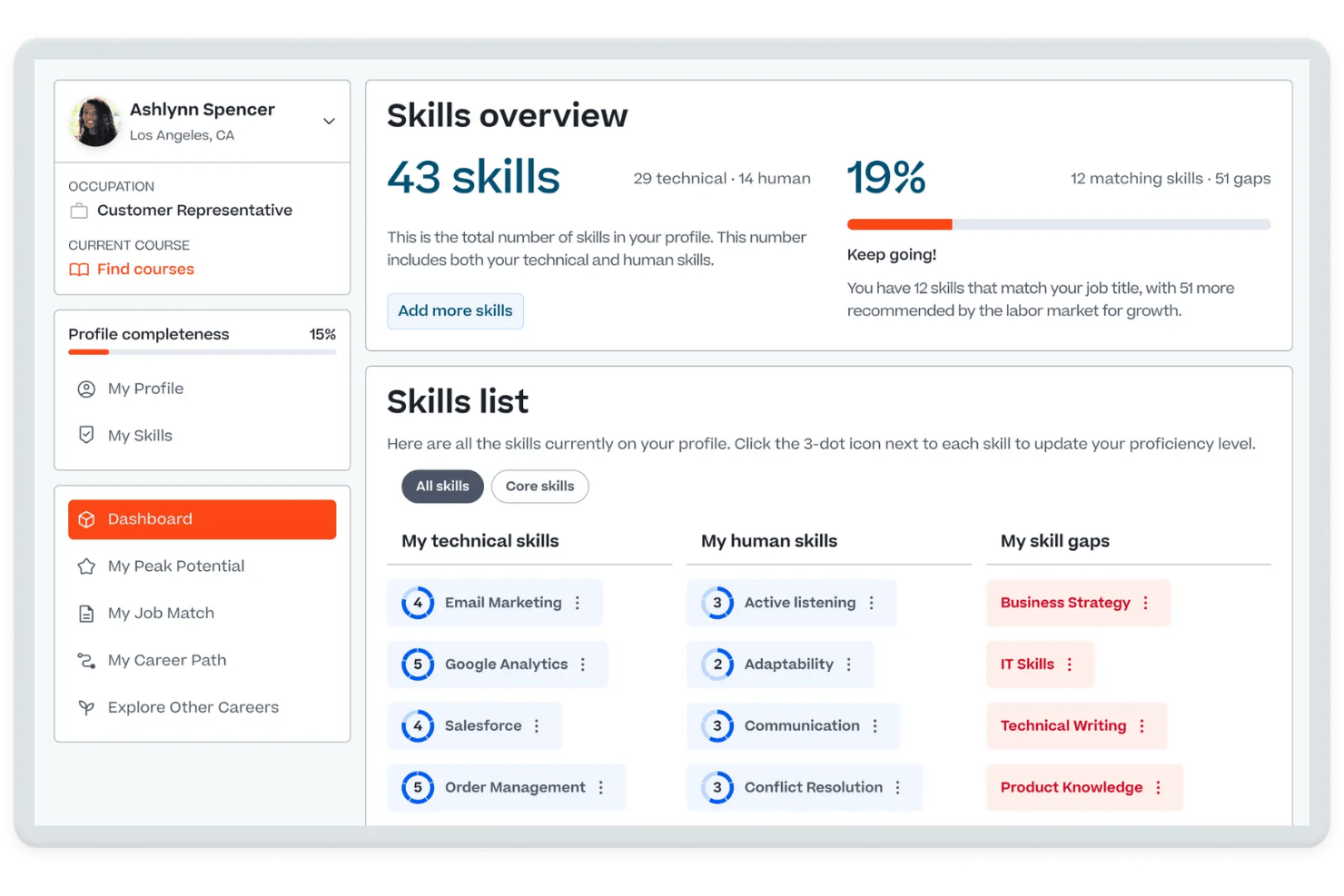
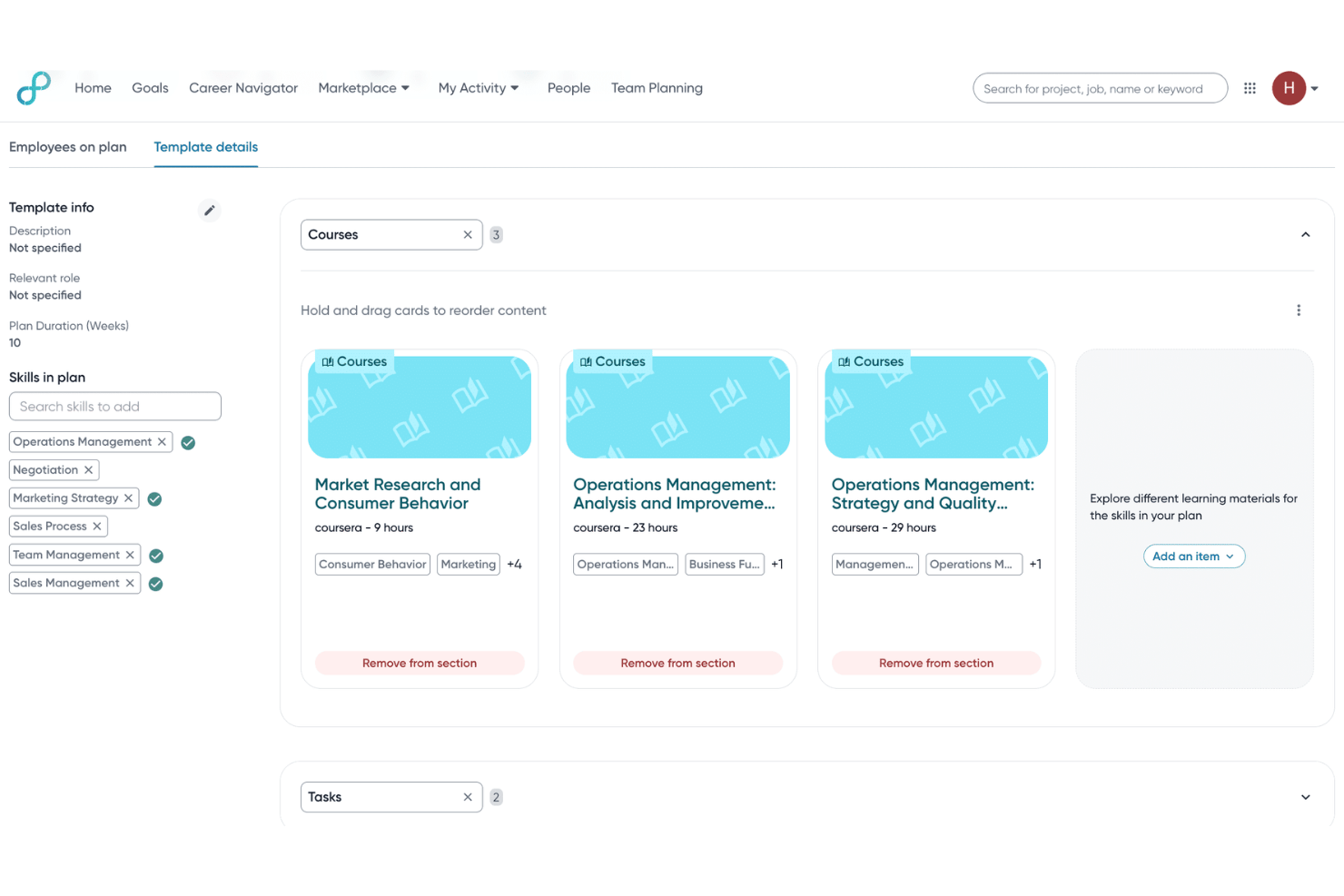
Cornerstone OnDemand ist eine KI-gestützte Talent-Experience-Plattform, die eine Skill-Ontologie-Engine, Skill-Gap-Analyse, Lernmanagement, Leistungsmanagement und Workforce-Planung in einem einzigen Enterprise-System vereint.
Für wen ist Cornerstone OnDemand am besten geeignet?
Es eignet sich besonders für große, global verteilte Organisationen, die Skill-Entwicklung, Compliance-Trainings und Workforce-Planung im großen Maßstab verwalten müssen.
Warum ich Cornerstone OnDemand ausgewählt habe
Ich habe Cornerstone OnDemand als eine der besten Lösungen ausgewählt, weil die Skills Engine sehr eng mit den individuellen Lernpfaden verknüpft ist. Wenn auf Mitarbeiterebene eine Skill-Lücke festgestellt wird, erstellt der Embark Navigator automatisch einen personalisierten Entwicklungsleitfaden, der formales Lernen, Mentoring und praktische Übungen kombiniert. Mir gefällt, dass diese Pfade keine statischen Checklisten sind — sie werden kontinuierlich aktualisiert, während die KI neue Skill-Signale aus verbundenen Enterprise-Systemen ableitet.
Wichtige Funktionen von Cornerstone OnDemand
- Skills Architect: Ermöglicht das Erstellen und Pflegen detaillierter Stellenarchitekturen und Skill-Profile auf mehreren Organisationsebenen.
- People Graph: Aggregiert Skill- und Workforce-Daten aus HRIS, ATS, LMS und anderen Enterprise-Systemen für Echtzeit-Einblicke.
- Nachfolgeplanungstools: Unterstützt Talentpools, 9-Box-Grids und Szenarienmodellierung für die strategische Personalreserve.
- Extend Integration Marketplace: Bietet vorgefertigte Konnektoren, APIs und Webhooks zur Integration mit HR-, Produktivitäts- und Lernplattformen.
Cornerstone OnDemand-Integrationen
Cornerstone OnDemand bietet native Integrationen mit Workday, Salesforce, Slack, Microsoft Copilot, LinkedIn und AWS. Eine API und Webhooks stehen für individuelle Integrationen zur Verfügung, außerdem bietet der Extend Marketplace zusätzliche vorgefertigte Konnektoren.
Pros and Cons
Pros:
- KI-gestützte Skill-Ontologie und -Mapping
- Dynamische Skill-Gap-Analysen im großen Maßstab
- End-to-End-Tools für Nachfolgeplanung und Talentpools
Cons:
- Anpassung von Berichten und Analysen ist begrenzt
- Skill-Erkennung kann zwischen Regionen uneinheitlich sein

Fuel50
Am besten für agiles Workforce-Planning geeignet
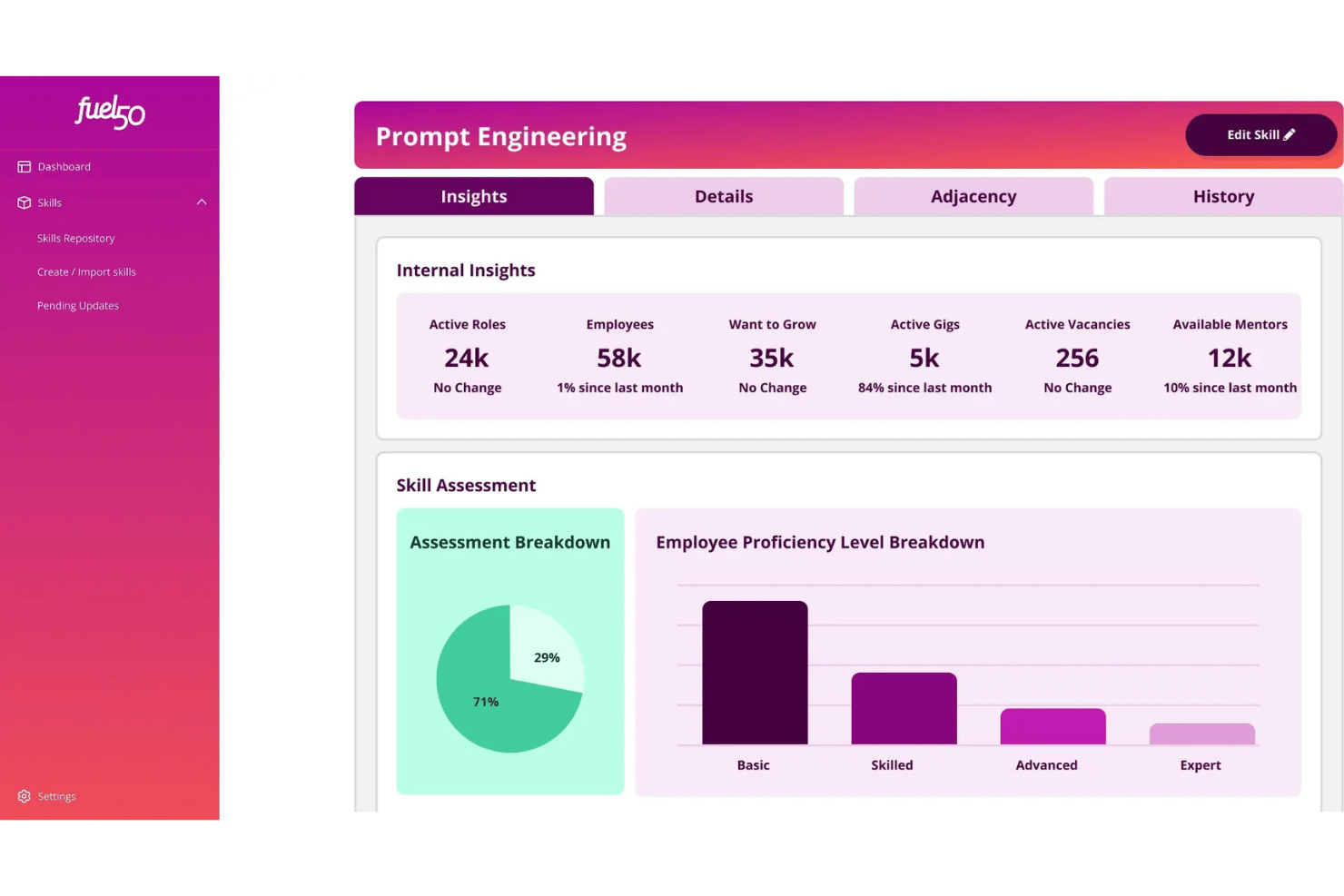
Fuel50 ist eine KI-gestützte Talent-Intelligence-Plattform, die eine Ontologie mit über 5.500 Fähigkeiten, ein Skill-Inventar, eine Lückenanalyse und einen integrierten Talentmarktplatz für interne Mobilität und Karriereentwicklung vereint.
Für wen ist Fuel50 am besten geeignet?
Fuel50 eignet sich hervorragend für große Unternehmen mit einer etablierten Jobarchitektur, die eine dedizierte Skill-Intelligence-Schicht für ihre bestehende HR-Tech-Landschaft benötigen.
Warum ich Fuel50 gewählt habe
Ich habe Fuel50 als eine der besten Lösungen ausgewählt, weil das Strategic Insights Modul externe Signale des Arbeitsmarkts anzeigt, darunter Trends bei Stellenanzeigen, prognostiziertes Skill-Wachstum und Gehaltsbenchmarks. Das bedeutet, ich kann erkennen, welche Fähigkeiten an Marktwert gewinnen oder verlieren, bevor eine Lücke zu einem Problem wird. Mir gefällt auch, dass das Live-Skill-Inventar in Echtzeit aktualisiert wird und Personalplanern ein aktuelles Bild von Angebot und Nachfrage der Skills vermittelt, anstatt nur einer vierteljährlichen Momentaufnahme.
Wichtige Funktionen von Fuel50
- Skill-Ontologie: Zugriff auf eine ständig aktualisierte Bibliothek von über 5.500 von Experten kuratierten und anpassbaren Kompetenzen für das Workforce Management in Unternehmen.
- Skill-Architektur: Verknüpfen Sie Skills mit Rollen, Jobfamilien und Funktionen im großen Maßstab mithilfe KI-gestützter Skill-to-Role-Mapping-Technologie.
- Module des Talentmarktplatzes: Ermöglichen Sie interne Jobmobilität, kurzfristige Projektarbeiten, Mentoring-Verbindungen und Entwicklungspfade – alles auf einer Plattform.
- Enterprise-HR-Integrationen: Anbindung an Workday, SAP SuccessFactors, Oracle HCM sowie führende LMS/LXP-Plattformen für vereinheitlichte Skill-Daten über verschiedene Systeme hinweg.
Fuel50 Integrationen
Fuel50 bietet native Integrationen mit Workday, SAP SuccessFactors und Oracle HCM sowie weiteren Lösungen und stellt eine API für kundenspezifische Integrationen bereit.
Pros and Cons
Pros:
- KI-gesteuerter Gig- und interner Mobilitätsmarktplatz
- Tiefgehende, von Psychologen kuratierte Skill-Ontologie
- Live-übergreifendes Skill-Inventar und Analysen
Cons:
- Selbsteinschätzungsprozess kann als aufwändig empfunden werden
- Implementierungsdauer länger als der Durchschnitt
Beamery
Am besten geeignet für gezielten Kompetenzlückenschluss
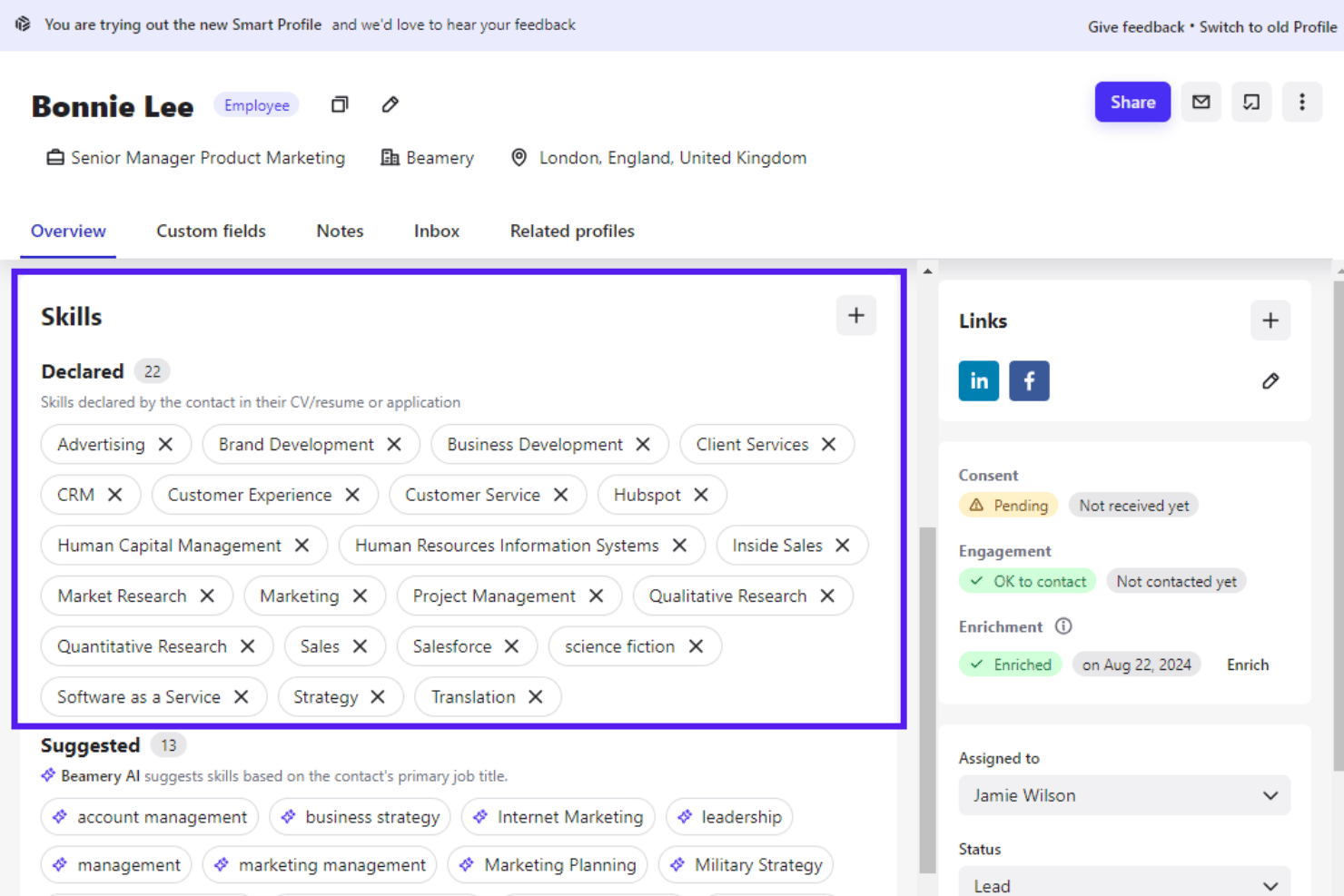
Beamery ist eine KI-gestützte Workforce-Intelligence-Plattform, die das Management von Kompetenz-Taxonomien, Kompetenzlücken-Analyse, szenarienbasiertes Workforce-Planning und Talent-Matching für große Unternehmen vereint.
Für wen ist Beamery am besten geeignet?
Beamery eignet sich für CHROs und Leiter der Personalplanung in großen, globalen Unternehmen, die komplexe Personaltransformationen wie Fusionen & Übernahmen, rasantes Wachstum oder die Einführung von GenAI meistern.
Warum ich Beamery gewählt habe
Ich habe Beamery wegen der gezielten Schließung von Kompetenzlücken im Enterprise-Maßstab ausgewählt. Die Workforce Intelligence Suite ermöglicht es, Veränderungsszenarien zu modellieren und Kompetenzdefizite zu erkennen, bevor sie zu kritischen Risiken werden. Besonders gut gefällt mir Ray, der KI Talent Advisor, der unstrukturierte Mitarbeiterdaten in ein strukturiertes, individuelles Kompetenzmodell umwandelt – genau das, was Flex benötigte, um Kompetenzen von 140.000 Mitarbeitenden weltweit zu standardisieren.
Schlüsselfunktionen von Beamery
- Talent-CRM: Erstellung und Verwaltung segmentierter Talentpools für strategische Ansprache und Pflege von Talentpipelines.
- Stellenentwicklung und -kalibrierung: Aufbau, Bearbeitung und Pflege maßgeschneiderter Stellenprofile, die mit Rollenrahmenwerken verknüpft sind.
- Kampagnen zur Kandidatenbindung: Automatisierte Ansprache- und Engagement-Workflows mit personalisierten Inhalten für jede Zielgruppe.
- Bidirektionale HRIS-Integrationen: Automatische Synchronisierung von Kompetenz- und Personaldaten mit SAP SuccessFactors, Workday und führenden ATS-Plattformen.
Beamery-Integrationen
Beamery bietet native Integrationen mit Workday, SAP SuccessFactors, Greenhouse, Jobvite, Oracle Taleo, SmartRecruiters, ADP, Infinite BrassRing, LinkedIn CRM Connect und HireEZ. Für individuelle Integrationen steht eine API zur Verfügung.
Pros and Cons
Pros:
- Anpassbare Kompetenz-Ontologie für große Unternehmen
- Fortschrittliche Workforce-Intelligence und Szenarienmodellierung
- Automatisierte Kompetenzextraktion aus verschiedenen Datenquellen
Cons:
- Keine nativen Kompetenzbewertungs-Funktionen
- Begrenzte Talentmarktplatz-Funktionalität

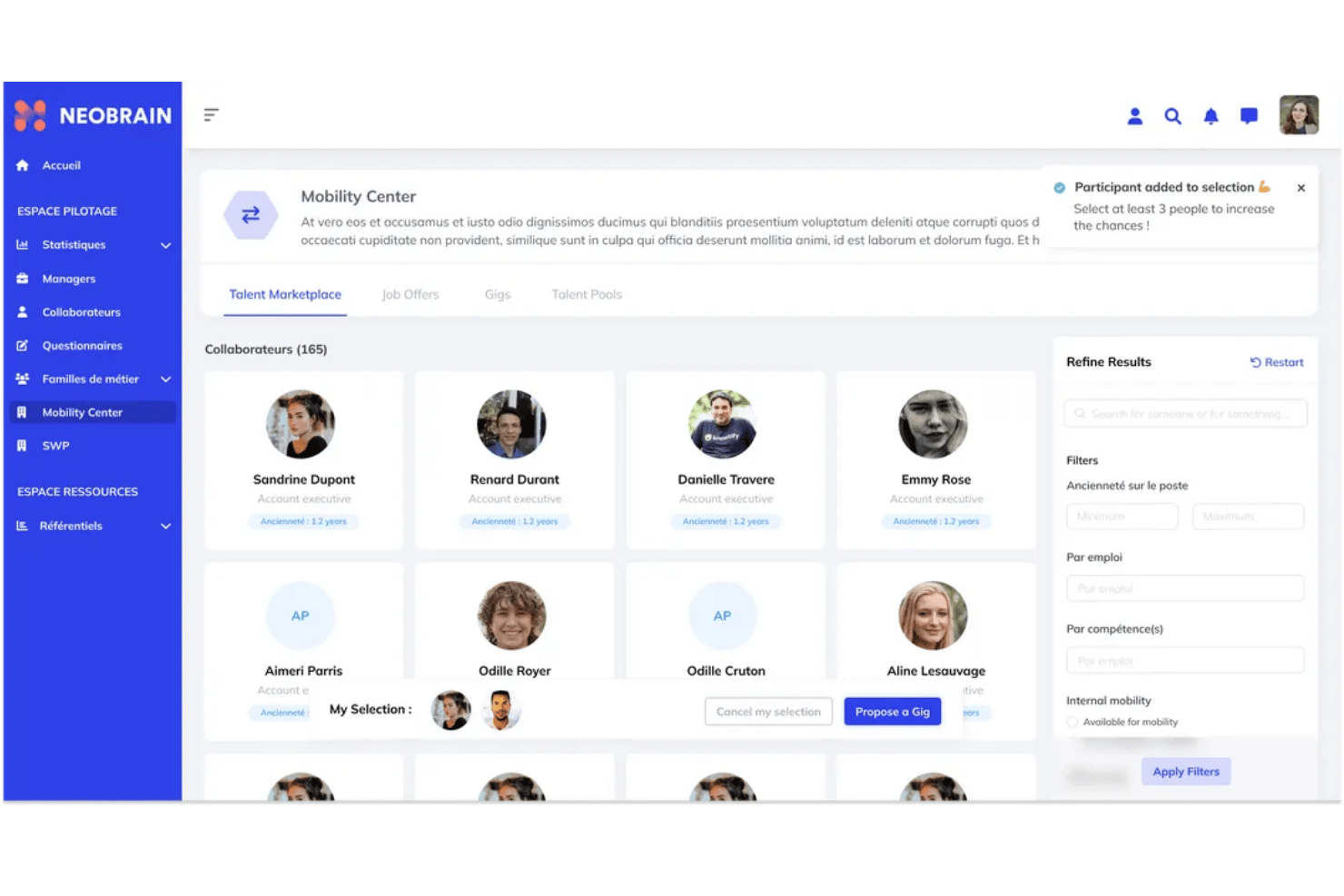
Neobrain ist eine KI-gestützte Plattform für Skill-Management, die speziell für große Unternehmen entwickelt wurde und dynamisches Skill-Mapping, 360°-Bewertungen, einen internen Talentmarktplatz und strategische Workforce-Planungswerkzeuge in einer Suite vereint.
Für wen ist Neobrain am besten geeignet?
Neobrain ist speziell für HR- und Workforce-Planning-Teams in großen Unternehmen mit mehr als 5.000 Mitarbeitern konzipiert, die komplexe, verteilte Talentpools verwalten.
Warum ich Neobrain ausgewählt habe
Neobrain verdient seinen Platz auf meiner Shortlist durch das Strategic Workforce Planning-Modul, das die prädiktive Analytik hervorragend umsetzt. Mir gefällt, dass es über statische Dashboards hinausgeht und meinem Team ermöglicht, Was-wäre-wenn-Szenarien zu modellieren, um Skill-Engpässe vorherzusagen, bevor sie zu Einstellungsproblemen werden. Die Lexi KI-Engine ist besonders beeindruckend, da sie bis zu 40% der Mitarbeiterkompetenzen aufdeckt, die in einer solchen Belegschaftsgröße sonst unentdeckt blieben.
Neobrain Hauptfunktionen
- Dynamisches Skill-Mapping: Visualisieren Sie die Kompetenzen Ihrer Belegschaft in Echtzeit mit einer kontinuierlich aktualisierenden Plattform.
- Interner Talentmarktplatz: Ordnen Sie Mitarbeiter passenden Jobs, Projekten, Einsätzen und Mentoring-Möglichkeiten im gesamten Unternehmen zu.
- 360°-Kompetenzbewertung: Führen Sie Selbst-, Peer- und Managerbewertungen mit umfassenden Methoden und Kompetenzbewertungen durch.
- Umfangreiche HR-Integrationen: Verbinden Sie sich mit führenden HRIS-, LMS-, ATS- und Assessment-Systemen über vorkonfigurierte Konnektoren und API-Zugang.
Neobrain Integrationen
Neobrain bietet native Integrationen mit Workday, SAP SuccessFactors, Oracle Cloud HCM, Personio, Cornerstone OnDemand, 360Learning, LinkedIn Learning, SmartRecruiters und Teamtailor. Eine offene API steht für individuelle Integrationen zur Verfügung.
Pros and Cons
Pros:
- Prädiktive Workforce-Einblicke durch KI
- Deckt Mitarbeiterkompetenzen automatisch auf
- Kompetenz-Mapping in Echtzeit aktualisiert
Cons:
- Benutzeroberfläche manchmal überwältigend
- Flexibilität der Kompetenz-Taxonomie kann eingeschränkt sein

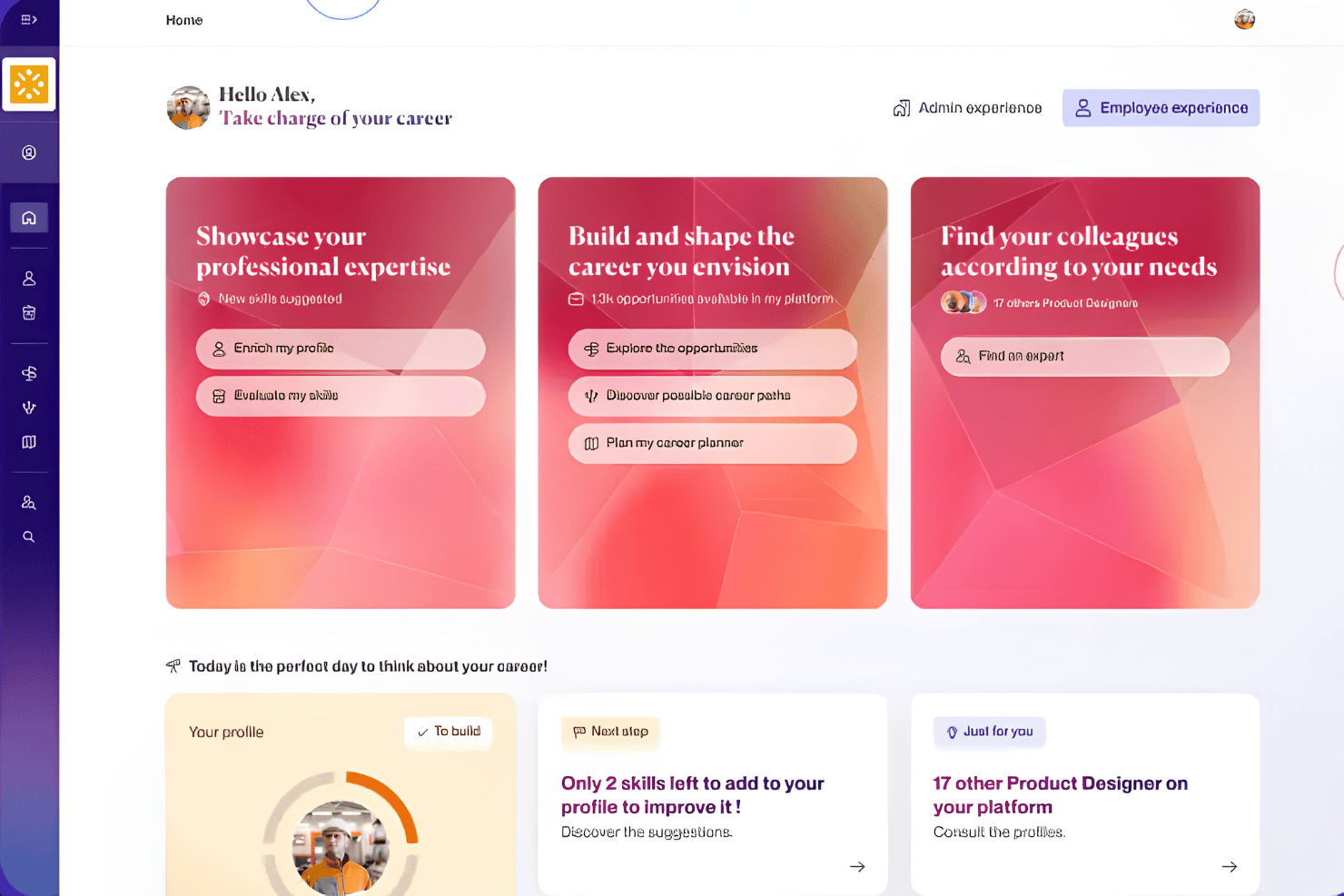
365Talents ist eine KI-gestützte Skill-Intelligence-Plattform, die die Kompetenzen der Belegschaft abbildet, interne Talentmobilität unterstützt und Skill-Daten mit der strategischen Personalplanung großer, dezentraler Organisationen verknüpft.
Für wen ist 365Talents am besten geeignet?
Die Lösung eignet sich besonders für Großunternehmen mit komplexen, mehrsprachigen Belegschaften, die umfassende Skill-Intelligence für globale Teams benötigen.
Warum habe ich 365Talents ausgewählt?
365Talents verdient seinen Platz auf meiner Shortlist, weil die Skills Intelligence Engine Kompetenzen aus echten Arbeitsdaten, Lebenslauf-Analysen und Mitarbeiter-Selbstauskünften abgeleitet, sodass die Personalabteilung keine Taxonomie manuell pflegen muss. Besonders gefällt mir die Validierung durch den Menschen, bei der KI-abgeleitete Skills zur Bestätigung gekennzeichnet werden, bevor sie als Tatsache gelten. Die dynamischen Skills-Frameworks aktualisieren sich zudem automatisch mit Veränderung der Stellenarchitekturen, sodass die Übersicht stets aktuell bleibt – ganz ohne manuelle Anpassung.
365Talents Hauptfunktionen
- Dashboards für strategische Personalplanung: Visualisiert das Angebot und den Bedarf an Kompetenzen in Abteilungen für unternehmensübergreifende Modellierung.
- Personalisierte Karrierepfade: Schlägt maßgeschneiderte Entwicklungsmöglichkeiten basierend auf Kompetenzen und Ambitionen vor.
- Interner Talentmarktplatz: Vermittelt Mitarbeitende zu internen Positionen, Projekten und Mentoring-Angeboten auf Basis ihrer aktuellen Skills.
- Enterprise HR-Integrationen: Verbindet sich mit über 100 HRIS-, LMS-, ATS- und Core-HR-Systemen zur Synchronisation von Kompetenzdaten über verschiedene Plattformen hinweg.
365Talents Integrationen
365Talents bietet native Integrationen mit Docebo, Workday, SAP SuccessFactors und Oracle sowie eine API für individuelle Integrationen.
Pros and Cons
Pros:
- KI leitet Fähigkeiten aus verschiedenen Datenquellen ab
- Mehrsprachige Skill-Taxonomie für globale Teams
- Unterstützt dynamische Job- und Kompetenzframeworks
Cons:
- Anpassbarkeit von Berichten kann eingeschränkt sein
- Genauigkeit des Skill-Matchings erfordert ggf. manuelle Überprüfung

iMocha
Am besten geeignet für rollenbasierte Kompetenzbewertungen
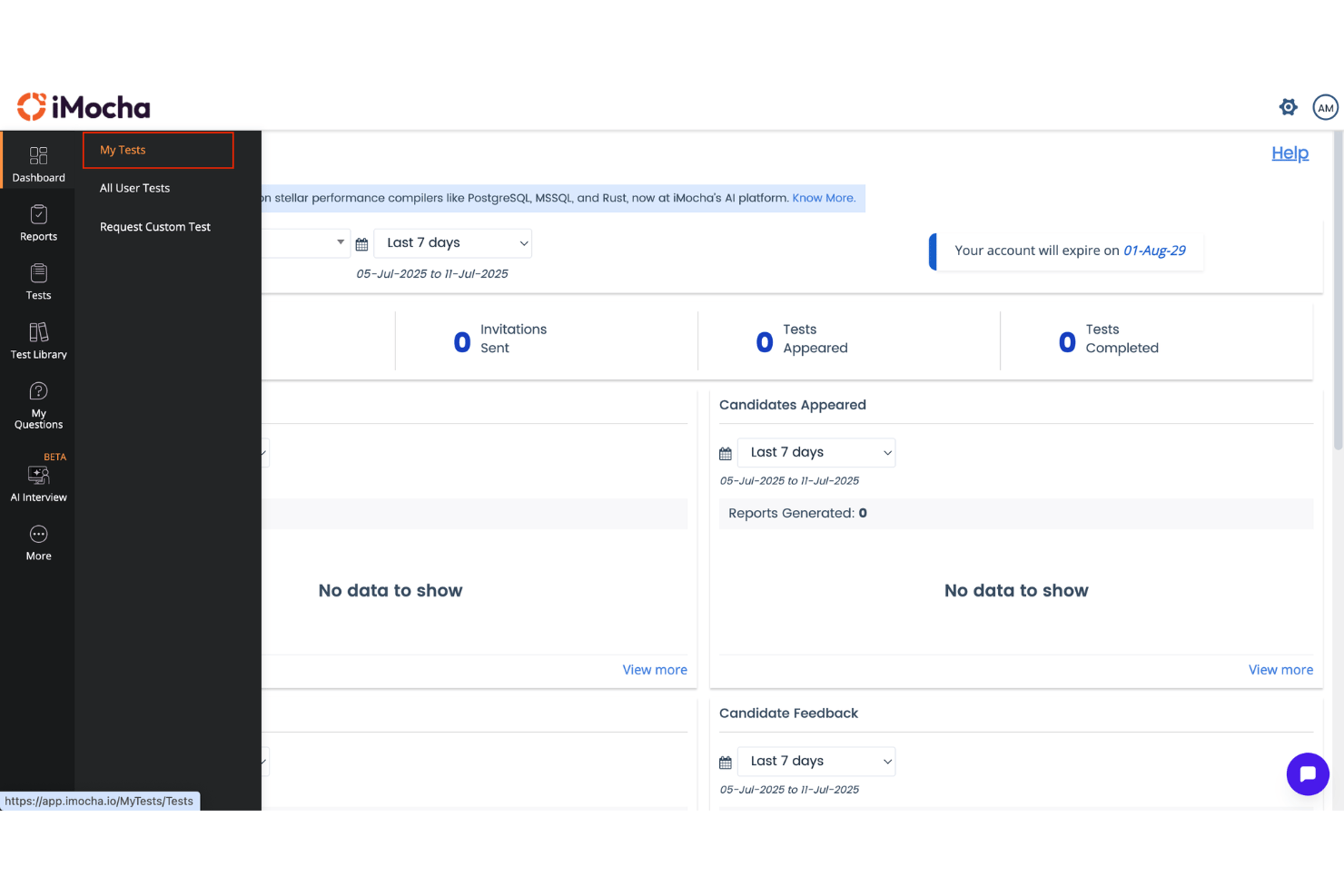
iMocha ist eine Skills-Intelligence-Plattform, die Skill-Taxonomie-Management, KI-gestützte Assessments, Gap-Analyse und Workforce-Analytics vereint und Integrationen mit Unternehmenssystemen wie HRIS, LMS und ATS bietet.
Für wen ist iMocha am besten geeignet?
iMocha ist besonders gut geeignet für große Unternehmen, die Workday, SAP SuccessFactors oder Oracle HCM einsetzen und technische Fähigkeiten in der gesamten Belegschaft bewerten und verwalten müssen.
Warum ich iMocha ausgewählt habe
iMocha sichert sich seinen Platz auf meiner Shortlist durch die präzise Zuordnung von Jobrollen zu Kompetenzanforderungen, noch bevor eine Bewertung beginnt. Besonders schätze ich AI-SkillsMatch, das eine Stellenanforderung in eine rollenspezifische Skill-Architektur überführt und Kandidaten oder Mitarbeitende direkt daran misst. Die Bibliothek mit über 10.000 Skills, sortiert nach technischen, funktionalen und verhaltensorientierten Bereichen, erlaubt es mir, Bewertungen für Nischenrollen zu erstellen, ohne bei Null zu beginnen.
iMocha Hauptfunktionen
- Tara Conversational AI Interview: Führt adaptive, KI-basierte Interviews zur Bewertung technischer und sozialer Kompetenzen in großem Umfang durch.
- Dashboards zur Kompetenzlücken-Analyse: Visualisiert Skill-Bestände, Lücken und Talentpools nach Abteilung, Standort oder Team.
- Enterprise-taugliches Proctoring: Nutzt intelligente Videoüberwachung, Ausweisprüfung und Browser-Lockdown zur Sicherung der Testintegrität und Einhaltung von Compliance.
- Multi-Source-Skills-Validierung: Ermöglicht die Validierung von Kompetenzen durch Mitarbeitende selbst, Vorgesetzte und mehrere Beurteilende zusätzlich zu automatisierten Assessments.
iMocha Integrationen
iMocha bietet native Integrationen mit SAP SuccessFactors, Workday, Oracle Cloud HCM, Greenhouse, iCIMS, Lever, SmartRecruiters, BambooHR, Cornerstone OnDemand, Degreed und Microsoft Teams. Darüber hinaus besteht eine Anbindung an Zapier und eine API für individuelle Integrationen.
Pros and Cons
Pros:
- Branchenführende Tiefe bei der Bewertung technischer Skills
- Multi-Source-Skills-Validierung inklusive 360-Grad-Feedback
- Dynamische, anpassbare Skills-Taxonomie für Unternehmen
Cons:
- Begrenzte interne Talentmarkt-Funktionalitäten
- Berichtswesen kann für neue Administratoren komplex wirken

Am besten geeignet für KI-gestütztes Workforce-Matching
Eightfold AI ist eine Talent-Intelligence-Plattform, die Deep Learning einsetzt, um Fähigkeiten in der Belegschaft zu kartieren, abzuleiten und zu analysieren – für Rekrutierung, interne Mobilität, Karriereentwicklung und strategische Personalplanung.
Für wen ist Eightfold AI am besten geeignet?
Eightfold AI richtet sich an HR-Teams in Großunternehmen – in der Regel bei Organisationen mit über 10.000 Mitarbeitenden – die komplexes und großflächiges Skills-Intelligence- und Workforce-Planning-Management betreiben.
Warum habe ich Eightfold AI ausgewählt?
Eightfold AI verdient seinen Platz auf meiner Shortlist, da seine Matching-Engine weit über eine Keyword-Übereinstimmung hinausgeht. Sie leitet Fähigkeiten aus Lebensläufen, Berufserfahrung und integrierten HR-Systemen ab und bewertet Kandidaten und Mitarbeitende anhand von Rollenanforderungen mit einer proprietären Ontologie von 1,6 Millionen Skills. Besonders gefällt mir, dass dieselbe Engine auch die interne Mobilität ermöglicht, indem sie Mitarbeitende mit angrenzenden Fähigkeiten für offene Stellen aufzeigt – bevor ein Team überhaupt eine externe Einstellung in Betracht zieht.
Wichtige Funktionen von Eightfold AI
- Talent-Marktplatz: Zeigt Jobs, Projekte und Mentoring-Angebote im Unternehmen basierend auf den Kompetenzprofilen der Mitarbeitenden an.
- Dashboard für Personalplanung: Visualisiert das Angebot und die Nachfrage nach Fähigkeiten auf Team-, Abteilungs- und Organisationsebene.
- Kontrollen zur Förderung von Diversität und zur Bias-Reduktion: Ermöglicht anonymisierte Auswahlprozesse und Bias-Prüfungen, um die Abhängigkeit von unsachlichen Kriterien zu verringern.
- Enterprise-HR-Integrationen: Bidirektionale Anbindung an Plattformen wie Workday, SAP, Greenhouse und Oracle Cloud.
Eightfold AI Integrationen
Eightfold AI bietet native Integrationen mit Workday, SAP SuccessFactors, Oracle HCM Cloud, Greenhouse, iCIMS, Lever, ADP, SmartRecruiters, Taleo und weiteren Systemen. Für individuelle Integrationen steht außerdem eine API zur Verfügung.
Pros and Cons
Pros:
- Branchenführende Engine zur Kompetenzableitung
- Workforce-Planning-Tools in Unternehmensqualität
- KI-gestützte Empfehlungen zur Karriereentwicklung
Cons:
- Analyse-Dashboards können eingeschränkt wirken
- Gelegentliche Fehlzuordnungen bei der Kompetenzableitung

Am besten geeignet für Compliance-Tools auf Enterprise-Niveau
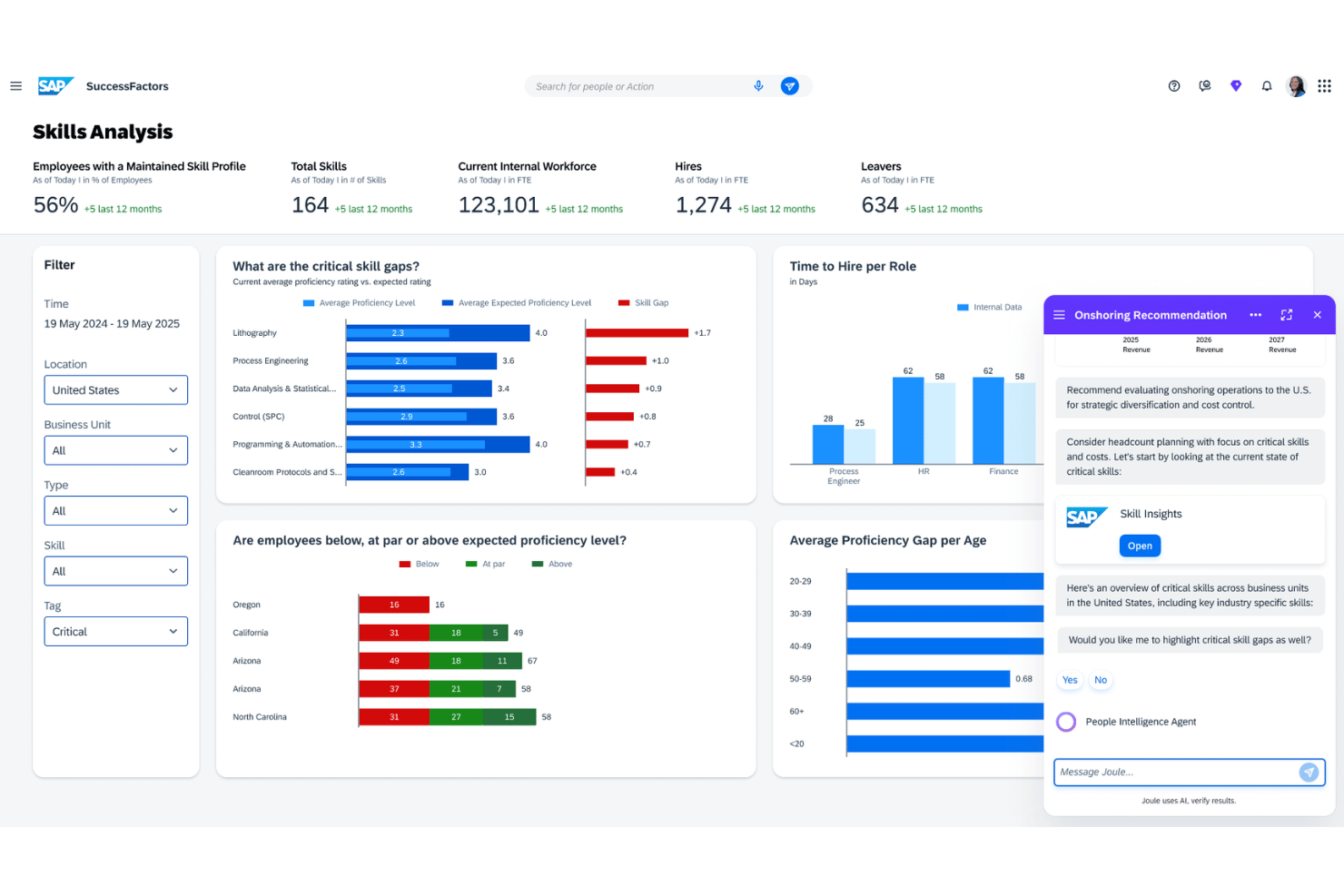
SAP SuccessFactors ist eine cloudbasierte HCM-Suite, die eine KI-gesteuerte Skill-Taxonomie, ein Talent Intelligence Hub, Lernmanagement, Leistungsbewertungs-Tools und Workforce Planning-Funktionen in einem weltweit lokalisierten HR-Ökosystem vereint.
Für wen ist SAP SuccessFactors am besten geeignet?
SAP SuccessFactors ist entwickelt für große, multinationale Unternehmen, die eine einheitliche HR- und Skills-Management-Plattform für komplexe, verteilte Belegschaften benötigen.
Warum habe ich SAP SuccessFactors ausgewählt?
Ich habe SAP SuccessFactors ausgewählt, weil die integrierte Compliance-Engine weit über bloße Checklisten-Schulungen hinausgeht. SuccessFactors Learning weist automatisch verpflichtende Compliance-Kurse anhand von Rolle, Region und gesetzlichen Anforderungen zu und verfolgt deren Abschluss. Zusammen mit dem Talent Intelligence Hub kann ich erkennen, welche Mitarbeitenden Zertifikate oder Fähigkeiten im Zusammenhang mit bestimmten Compliance-Verpflichtungen in über 100 lokalisierten Jurisdiktionen haben.
SAP SuccessFactors Hauptfunktionen
- Talent Intelligence Hub: Zentralisiert Skill-Daten und verbindet sie mit HR-Prozessen.
- Nachfolge- und Entwicklungs-Tools: Unterstützt die interne Mobilität und Nachfolgeplanung für Führungspositionen.
- KI-gesteuerte Lernempfehlungen: Liefert personalisierte Lernvorschläge auf Basis von Skill- und Talentdaten.
- Modul für Leistung und Ziele: Ermöglicht skill-basierte Zielvereinbarungen und Leistungsbewertungen im großen Maßstab.
SAP SuccessFactors Integrationen
SAP SuccessFactors bietet native Integrationen mit SAP S/4HANA, ADP, Kronos, Skillsoft und SAP Cloud Platform Integration. Eine API steht für kundenspezifische Integrationen zur Verfügung.
Pros and Cons
Pros:
- Unterstützt mehr als 100 länderspezifische Compliance-Vorschriften
- Skalierbare Skill-Taxonomie für große Unternehmen
- Umfangreiche Lokalisierung für globale Belegschaften
Cons:
- Erfordert erhebliche IT-Ressourcen für die Implementierung
- Komplexer Prozess zur Skill-Konfiguration
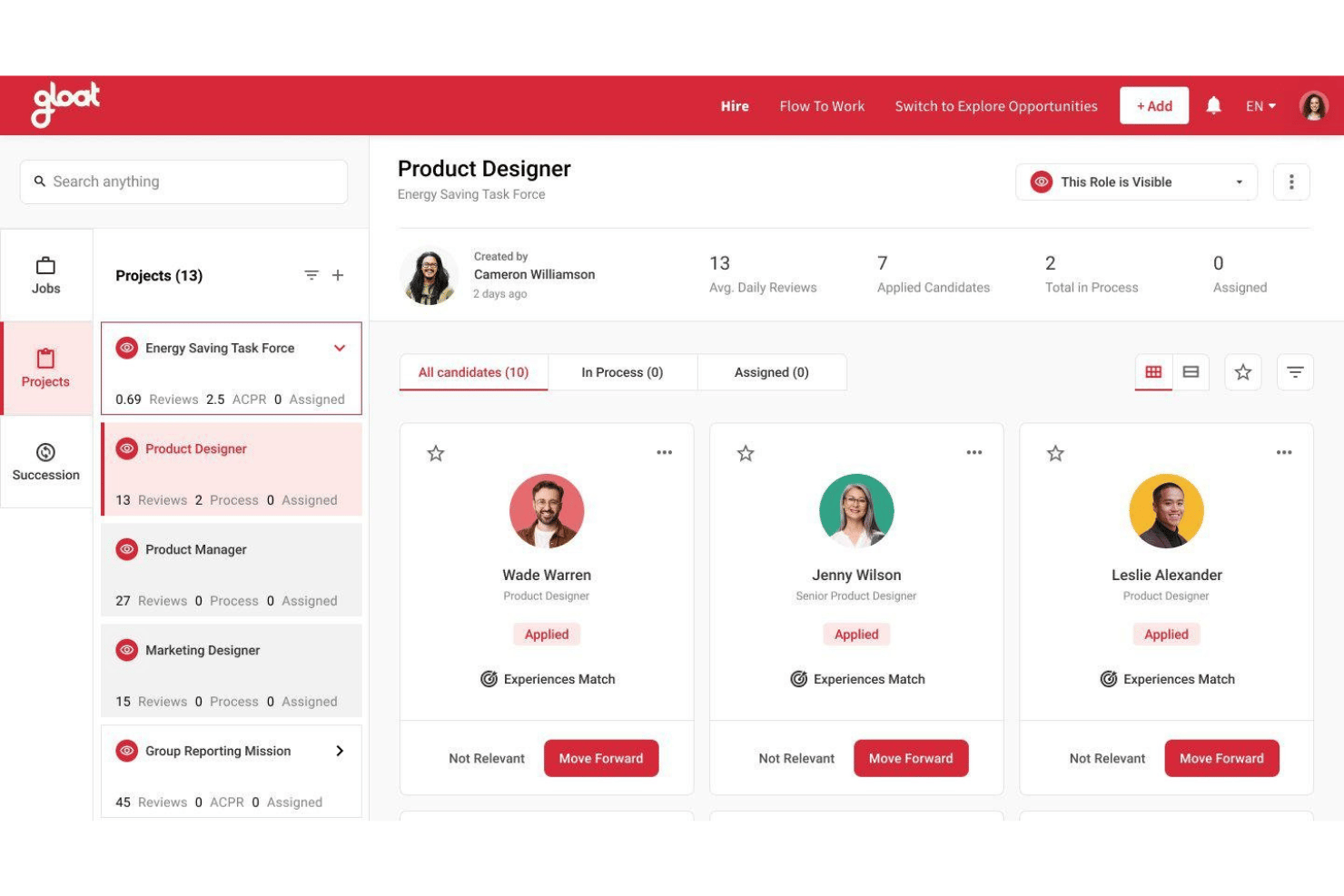
Gloat ist eine KI-gestützte Talentmarktplatz-Plattform, die Kompetenzableitung, Matching für interne Mobilität, Karrierepfadplanung und Analysen zur Personalplanung für große Unternehmen kombiniert.
Für wen ist Gloat am besten geeignet?
Gloat eignet sich besonders für große, weltweit agierende Unternehmen, in denen Personalverantwortliche und Teams für Personalplanung Kompetenzen und interne Mobilität in großem Umfang managen müssen.
Warum ich Gloat ausgewählt habe
Ich habe Gloat als eines der besten ausgewählt, weil der KI-gesteuerte Talentmarktplatz über ein einfaches internes Job-Board hinausgeht. Die Loomra™ Context Engine erstellt ein aktuelles Kompetenznetzwerk für jeden Mitarbeitenden, sodass bei der Eröffnung eines Projekts Gloat es mit abgeleiteten Fähigkeiten aus der beruflichen Laufbahn abgleicht – und nicht nur mit dem, was jemand in ein Profil eingetragen hat. Außerdem nutze ich den Retention Risk Analyzer, um Kündigungsrisiken zu erkennen, bevor daraus offene Stellen werden, und zu sehen, bei welchen Mitarbeitenden der Einblick in interne Entwicklungsmöglichkeiten fehlt.
Gloat Hauptfunktionen
- Vorgefertigte Agentenvorlagen: Wählen Sie aus Vorlagen wie Karriereentwicklungsberater und Retention Risk Analyzer für spezifische HR-Szenarien.
- Governance-Engine: Legen Sie Genehmigungsprozesse, Berechtigungsregeln und rollenbasierte Zugriffsrechte für interne Möglichkeiten fest.
- Bidirektionale HRIS-Integrationen: Synchronisieren Sie Mitarbeiter- und Kompetenzdaten mit Workday, SAP SuccessFactors und Oracle HCM Cloud.
- In-App-Bereitstellung in Teams und Slack: Mitarbeitende greifen direkt in Microsoft Teams, Slack oder Google Chat auf Gloat zu.
Gloat Integrationen
Gloat bietet native Integrationen mit SAP SuccessFactors, Workday HCM, Oracle HCM Cloud, Microsoft Teams, Slack, Google Chat und Microsoft Copilot. Eine API für individuelle Integrationen ist verfügbar.
Pros and Cons
Pros:
- KI-basierte Karriereweg- und Kompetenzvorschläge
- Dynamische Updates der Kompetenzontologie für jede Rolle
- Integrierter Talentmarktplatz für interne Mobilität
Cons:
- Einrichtung und Datenzuordnung können komplex sein
- Einige Reporting-Funktionen bieten keine Anpassungsmöglichkeiten
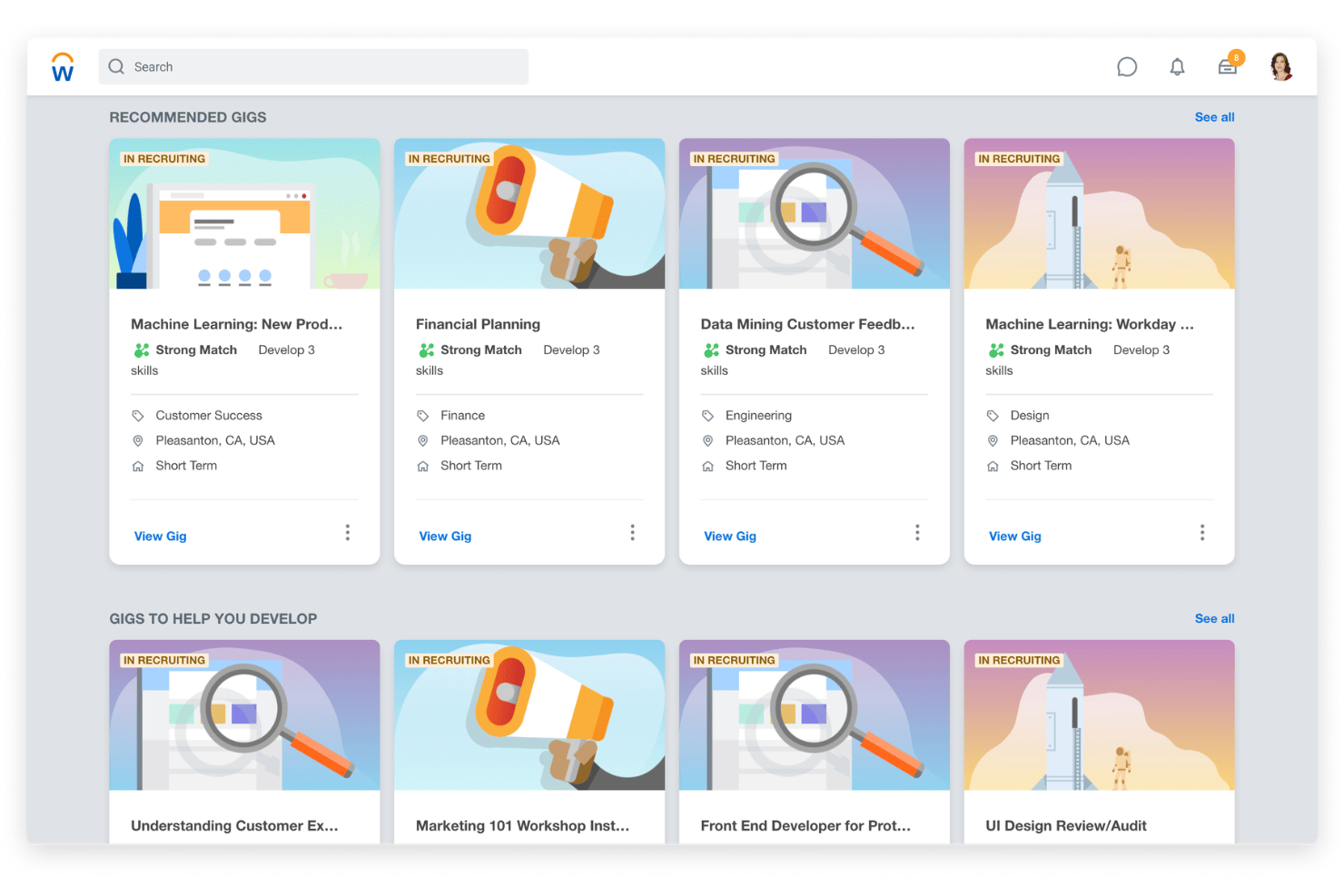
Workday Skills Cloud ist eine KI-gestützte Plattform für Skill-Management, die in Workday HCM integriert ist. Sie erkennt, organisiert und aktualisiert kontinuierlich Fähigkeiten der Belegschaft über Recruiting, Lernen, Karriereentwicklung und Workforce Planning hinweg.
Für wen ist Workday Skills Cloud am besten geeignet?
Workday Skills Cloud eignet sich besonders für große Unternehmen, die bereits Workday HCM nutzen und eine kompetenzbasierte Talentstrategie über eine komplexe, verteilte Belegschaft hinweg aufbauen möchten.
Warum habe ich Workday Skills Cloud ausgewählt?
Workday Skills Cloud verdient einen Platz auf meiner Shortlist, weil sich die Taxonomie tatsächlich weiterentwickelt. Angetrieben von Workday Illuminate™ werden Mitarbeiterfähigkeiten kontinuierlich aus realen Arbeitsaktivitäten abgeleitet und aktualisiert – nicht nur aus Lebensläufen oder Selbsteinschätzungen. Die Ontologie bildet Beziehungen zwischen Fähigkeiten ab, erkennt Synonyme und angrenzende Kompetenzen, die eine statische Bibliothek nicht erfassen würde. Mir gefällt außerdem, dass Signale aus Tools wie Salesforce und Jira genutzt werden, um Fähigkeiten sichtbar zu machen, die Mitarbeitende nicht explizit aufgeführt haben.
Wichtige Funktionen von Workday Skills Cloud
- Karriere-Hub und Talent-Marktplatz: Verbindet Mitarbeitende mit Jobs, Projekten, Aufgaben und Mentoring-Möglichkeiten basierend auf verifizierten Skill-Daten.
- Prism Analytics Integration: Kombiniert interne und externe Quellen für detaillierte Analysen von Fähigkeitslücken und Benchmarking.
- Personalisierte Lernempfehlungen: Schlägt automatisch Lerninhalte vor, die auf das Qualifikationsprofil und Entwicklungsziele der Mitarbeitenden abgestimmt sind.
- Manager Insights Hub: Stellt Managern Dashboards und KI-gestützte Empfehlungen für die Planung und Entwicklung von Fähigkeiten der Belegschaft bereit.
Workday Skills Cloud Integrationen
Workday Skills Cloud verfügt über native Integrationen innerhalb der Workday Suite, einschließlich Workday HCM, Learning und Recruiting-Module, und bietet zertifizierte Integrationen mit TechWolf und weiteren. Eine API steht für kundenspezifische Integrationen zur Verfügung.
Pros and Cons
Pros:
- KI-gestützte Skills-Erkennung ist hochpräzise
- Dynamische Visualisierungstools für Workforce Skills
- Detailliertes Management von Fähigkeiten-Ontologien
Cons:
- Nur für Workday HCM Kunden verfügbar
- Skill-Mapping kann ressourcenintensiv sein
Weitere Kompetenzmanagement-Software für Unternehmen
\u003cspan data-slate-fragment=\u0022JTVCJTdCJTIyY2hpbGRyZW4lMjIlM0ElNUIlN0IlMjJ0ZXh0JTIyJTNBJTIySGVyZSUyMGFyZSUyMHNvbWUlMjBhZGRpdGlvbmFsJTIwc2tpbGxzJTIwbWFuYWdlbWVudCUyMHNvZnR3YXJlJTIwZm9yJTIwZW50ZXJwcmlzZXMlMjBvcHRpb25zJTIwdGhhdCUyMGRpZG4lRTIlODAlOTl0JTIwbWFrZSUyMGl0JTIwb250byUyMG15JTIwc2hvcnRsaXN0JTJDJTIwYnV0JTIwYXJlJTIwc3RpbGwlMjB3b3J0aCUyMGNoZWNraW5nJTIwb3V0JTNBJTIyJTdEJTVEJTJDJTIydHlwZSUyMiUzQSUyMnAlMjIlMkMlMjJpZCUyMiUzQSUyMmM1LWhLUWNfQkMlMjIlN0QlNUQ=\u0022\u003eHier finden Sie einige weitere Optionen für Kompetenzmanagement-Software für Unternehmen, die es nicht in meine Auswahl geschafft haben, aber dennoch einen Blick wert sind:\u003c/span\u003e
- Degreed Skills+
Am besten geeignet für umsetzbare Skill-Analysen
- Reejig
Am besten für ethische Talententscheidungen geeignet
- Phenom
Am besten geeignet für einheitliche Talent Experience-Analysen
- Skillsoft
Am besten geeignet für integrierte Lerninhaltsbibliotheken
- Pluralsight
Am besten geeignet zum Benchmarking technischer Fähigkeiten
- SeekOut
Am besten geeignet für externe Talentanalysen
- TalentGuard
Am besten zur individuellen Modellierung von Karrierepfaden
- AG5
Am besten geeignet für Echtzeit-Dashboards zur Analyse von Qualifikationslücken
- Kahuna
Am besten für die Erfassung der Kompetenz von Mitarbeitenden im Frontline-Bereich
- Lightcast Skills Taxonomy
Am besten geeignet für Open-Source-Skills-Datenframeworks


Wie ich Kompetenzmanagement-Software für Unternehmen bewerte
Wenn ein CHRO die Kompetenzen von 50.000 Mitarbeitenden abbilden muss, unterteile ich meine Bewertung in unverzichtbare Funktionen und die Unterscheidungsmerkmale, die gute Plattformen von wirklich strategischen abheben.
Kernfunktionen (Grundvoraussetzungen für diese Liste)
Bei der Auswahl von Tools für meine Liste bewerte ich jedes einzelne auf einer Skala von 0 (bietet die Funktion nicht) bis 5 (überzeugt in diesem Bereich) hinsichtlich jeder der unten aufgeführten Kernfunktionen. Anschließend berechne ich die Gesamtpunktzahl des Tools als Prozentsatz. Jedes Tool muss eine Mindestgesamtpunktzahl von 65% erreichen, um in die engere Auswahl zu kommen.
- Kompetenz-Taxonomie & Ontologie: Ich prüfe, ob die Plattform eine vorgefertigte, anpassbare Kompetenzen-Bibliothek mit Synonymen, Kompetenzstufen und Rollen-Zuordnungen bereitstellt, die für unterschiedliche Geschäftsbereiche skalierbar ist.
- Kompetenzen-Erkennung & -Bewertung: Ein starkes Tool zieht Kompetenzdaten aus Lebensläufen, Projektverläufen und angebundenen Systemen statt sich nur auf manuelle Selbsteinschätzungen zu verlassen.
- Kompetenzlücken-Analyse: Ich achte auf Übersichten zu Lücken auf individueller, Team- und Organisationsebene, sodass Workforce-Planer gezielt erkennen, wo Umschulungsmaßnahmen am dringendsten sind.
- Workforce-Planungs-Insights: Dashboards, die Kompetenzangebot und -bedarf gegenüberstellen, helfen Talent-Leadern dabei, Rekrutierungs- sowie L&D-Bedarfe vorausschauend im Einklang mit der Geschäftsstrategie zu planen.
- Talent-Marktplatz & Mobilität: Ich prüfe, ob die Plattform Kompetenzprofile mit Projektangeboten, Mentoring-Programmen und offenen Stellen verknüpft, um interne Karrieremobilität zu fördern.
- Enterprise-HR-Integrationen: Bidirektionaler Datenaustausch mit zentralen Systemen wie HRIS, LMS, ATS und Performance-Lösungen hält Kompetenzdaten im gesamten Tech-Stack aktuell.
Erfüllen Tools die genannten Kriterien, analysiere ich weiter, wodurch sich jede Plattform abhebt.
Unterscheidungsmerkmale (Was Anbieter unterscheidet)
So vergleiche ich die verschiedenen Anbieter:
Herausragende Funktionen
Künstliche Intelligenz zur Kompetenz-Erkennung ist ein wesentliches Unterscheidungsmerkmal. Ich suche nach Plattformen, die Fähigkeiten aus Projektdaten und angebundenen Tools extrahieren, anstatt Mitarbeitende zur manuellen Selbsteinstufung aufzufordern. Kompetenzbasierte Workforce-Planung ist ebenfalls entscheidend, insbesondere wenn sie Szenarien-Modellierungen enthält, mit denen Talent-Leiter visualisieren können, wie sich zum Beispiel durch eine Umstrukturierung oder Produkteinführung der Kompetenzbedarf verschiebt. Zusätzlich prüfe ich, ob der interne Talentmarktplatz einer Plattform über reines Job-Matching hinausgeht und projektbasierte Einsätze, Mentoring und Entwicklungsaufgaben basierend auf Kompetenznähe vorschlägt.
Mehr als nur Funktionen
Die Skalierbarkeit für Unternehmen ist mein erster Prüfpunkt. Eine Plattform muss Hunderttausende Mitarbeiterprofile weltweit performant verwalten können, ohne Berichte oder Datensynchronisierung auszubremsen. Datensicherheit ist genauso wichtig: Ich achte auf SOC 2 Typ II-Zertifizierung, regionale Datenhaltung sowie rollenbasierte Zugriffskontrolle, die HR-Administratoren fein granulierte Rechte ermöglicht. Implementierungsunterstützung ist ein weiteres Unterscheidungsmerkmal: Das Ausrollen einer Kompetenzplattform für eine globale Belegschaft erfordert erfahrene Berater und Change-Management-Ressourcen – ein Help Center alleine reicht nicht aus.
So wählen Sie Kompetenzmanagement-Software für Unternehmen aus
Es ist leicht, sich in langen Funktionslisten und komplexen Preisstrukturen zu verlieren. Damit Sie sich bei der Bearbeitung Ihres individuellen Auswahlprozesses auf das Wesentliche konzentrieren können, finden Sie hier eine Checkliste mit Faktoren, die Sie berücksichtigen sollten:
| Faktor | Was zu beachten ist |
| Skalierbarkeit | Kann das System Ihre aktuelle Belegschaftsgröße und Ihr Wachstum bewältigen – über mehrere geografische Regionen, Marken oder Geschäftsbereiche hinweg? Prüfen Sie Kundenreferenzen von Organisationen ähnlicher Größe. |
| Integrationen | Auf welche HRIS-, LMS-, ATS- und Kollaborationstools verlassen Sie sich? Ermitteln Sie den Integrationsbedarf und prüfen Sie genau, ob vorgefertigte Konnektoren vorhanden sind, anstatt auf individuelle API-Entwicklung zu setzen. |
| Anpassbarkeit | Können Sie Skill-Kataloge, Benutzerberechtigungen und Berichtsstrukturen an Ihr Organigramm und Ihre Sprache anpassen? Hüten Sie sich vor übermäßiger Anpassung, die die Wertschöpfung verzögert oder Rollouts erschwert. |
| Benutzerfreundlichkeit | Ist die Plattform für Administratoren und Endbenutzer intuitiv? Führen Sie Demos sowohl mit HR- als auch mit Geschäftspartnern durch, um Arbeitsabläufe und das Akzeptanzpotenzial zu validieren, nicht nur die Navigation auf der Oberfläche. |
| Implementierung und Onboarding | Wie viel interne Kapazität haben Sie für die Einführung, die Schulung der Stakeholder und das Veränderungsmanagement? Bitten Sie um einen Implementierungsplan, nicht nur um einen allgemeinen Zeitplan oder eine Liste von Ergebnissen. |
| Kosten | Skaliert die Preisgestaltung fair mit Ihrer Mitarbeiterzahl und Ihren Nutzungsmustern? Prüfen Sie die Gesamtbetriebskosten – Lizenzierung, Konfiguration, Beratung und Support nach dem Start – und nicht nur den Listenpreis. |
| Sicherheitsvorkehrungen | Welche Datenschutzrahmenwerke und Zertifizierungen erfüllt der Anbieter? Fragen Sie nach Datenresidenz, Berechtigungen und danach, wie während der Nutzung auf Mitarbeiterdaten zugegriffen wird und wie diese aufbewahrt werden. |
| Compliance-Anforderungen | Haben Sie besondere Anforderungen im Zusammenhang mit regionalen Datenschutzgesetzen oder der Aufsicht durch Gewerkschaften? Stellen Sie sicher, dass das System Szenarien wie die DSGVO, länderspezifische Datenresidenz und Prüfpfade bewältigen kann. |
Was ist Skill-Management-Software für Unternehmen?
Skill-Management-Software für Unternehmen ist eine spezialisierte Plattform, die großen Organisationen dabei hilft, die Skills ihrer Mitarbeiter in großem Umfang zu erfassen, zu bewerten und zu analysieren. Diese Systeme unterstützen das Talentmanagement, indem sie eine Skill-Matrix bereitstellen, Skill-Level nachverfolgen und Möglichkeiten zum Schließen von Skill-Lücken in verschiedenen Abteilungen und Rollen identifizieren.
Sie unterstützen außerdem das Kompetenzmanagement, die Talententwicklung und Schulungsprogramme. Dadurch helfen sie Organisationen, die Fähigkeiten ihrer Belegschaft zu optimieren und Lerninitiativen an den Geschäftszielen auszurichten. Indem Unternehmen manuelle Tabellenkalkulationen durch zentralisierte Skill-Daten ersetzen, können sie fundiertere Entscheidungen zur Belegschaft treffen.
Funktionen
Achten Sie bei der Auswahl von Skill-Management-Software für Unternehmen auf die folgenden wichtigen Funktionen:
- Skill-Taxonomie und Ontologie: Bietet eine strukturierte, anpassbare Bibliothek von Skills mit Beziehungen, Synonymen und Kompetenzstufen, um zu standardisieren, wie Fähigkeiten in der gesamten Organisation erfasst und analysiert werden. Unterstützt Kompetenzrahmenwerke, um Skills an Geschäftsfunktionen und Unternehmensziele auszurichten.
- KI-gestützte Skill-Erkennung: Erkennt und aktualisiert Skill-Profile von Mitarbeitern automatisch, indem Daten aus Lebensläufen, Projektarbeit und integrierten Tools abgerufen werden, wodurch die Abhängigkeit von manuellen Selbsteinschätzungen verringert wird.
- Skill-Bewertung aus mehreren Quellen: Unterstützt Bewertungen durch Mitarbeiter selbst, Vorgesetzte und Kollegen mit konfigurierbaren Kompetenzskalen, sodass HR-Teams Fähigkeiten aus mehreren Perspektiven validieren und wichtige Skills identifizieren können.
- Analyse von Skill-Lücken: Vergleicht die aktuellen Skills von Mitarbeitern mit den Anforderungen von Rollen oder Projekten und den Unternehmenszielen. Dadurch lassen sich Schulungsbedarf, zukünftige Skill-Anforderungen und Prioritäten für die Personalentwicklung leichter identifizieren.
- Dashboards für die Personalplanung: Visualisieren die Verteilung, Lücken und Überschüsse von Skills in Teams, Berufsgruppen oder Geschäftsbereichen und unterstützen HR-Führungskräfte bei der Szenarioplanung und strategischen Entscheidungsfindung.
- Interner Talentmarktplatz: Verknüpft die Skills von Mitarbeitern mit befristeten Einsätzen, Projekten und Vollzeitstellen innerhalb des Unternehmens und fördert interne Mobilität, Mitarbeiterbindung, berufliche Entwicklung und neue Wachstumschancen.
- Personalisierte Lernempfehlungen: Schlägt auf Grundlage identifizierter Skill-Lücken gezielte Kurse, Zertifizierungen oder anspruchsvolle Aufgaben vor und lässt sich häufig in unternehmenseigene LMS oder Lernplattformen integrieren.
- Integrationen mit Unternehmenssystemen: Synchronisiert Skill-Daten mit HRIS, LMS, ATS und Kollaborationsplattformen, sorgt für Konsistenz und reduziert die administrative Dateneingabe im gesamten Technologie-Stack des Unternehmens.
- Compliance- und Sicherheitskontrollen: Bietet Prüfpfade, Berechtigungseinstellungen und Datenschutzfunktionen, um sensible Mitarbeiterinformationen zu schützen und regionale Datenschutzanforderungen zu unterstützen.
- Globalisierung und Lokalisierung: Unterstützt mehrere Sprachen, Währungen und regionale Einstellungen, um eine einheitliche Einführung in internationalen oder an mehreren Standorten tätigen Organisationen zu ermöglichen.
Vorteile
Die Implementierung von Software für Kompetenzmanagement in Unternehmen bietet Ihrem Team und Ihrem Unternehmen mehrere Vorteile. Hier sind einige, auf die Sie sich freuen können:
- Zentralisierte Übersicht über Kompetenzen: Verschaffen Sie sich einen unternehmensweiten Überblick über die Fähigkeiten der Mitarbeitenden. So lassen sich Talente leichter identifizieren, Nachfolgeregelungen verwalten und die Stärken der Belegschaft verstehen.
- Zielgerichtetes Lernen und Entwickeln: Nutzen Sie Kompetenzlückenanalysen und Lernempfehlungen, um den richtigen Mitarbeitenden die passende Schulung bereitzustellen und dadurch Maßnahmen zur Weiterqualifizierung und Umschulung zu beschleunigen.
- Strategische Personalplanung: Nutzen Sie Echtzeitdaten zu Kompetenzen und Dashboards, um den Bedarf an Talenten zu prognostizieren, das Unternehmenswachstum zu unterstützen und sich an sich wandelnde geschäftliche Anforderungen anzupassen.
- Verbesserte interne Mobilität: Ordnen Sie Mitarbeitende relevanten Projekten, kurzfristigen Einsätzen oder offenen Stellen auf Grundlage ihrer Kompetenzen und beruflichen Ziele zu. Dies fördert die berufliche Entwicklung und Mitarbeiterbindung.
- Automatisierte Verwaltung von Kompetenzdaten: Nutzen Sie KI-gestützte Ableitungen und Systemintegrationen, um Kompetenzprofile ohne manuelle Dateneingabe oder Engpässe durch Selbstauskünfte aktuell zu halten.
- Compliance und Datenschutz: Gewährleisten Sie den Schutz personenbezogener Daten und erfüllen Sie regionale gesetzliche Anforderungen durch robuste Sicherheitskontrollen, Prüfpfade und eine konfigurierbare Zugriffsverwaltung.
- Globale Einheitlichkeit: Unterstützen Sie mehrsprachige und regionale Anforderungen und ermöglichen Sie eine standardisierte Erfassung von Kompetenzen sowie Mobilität an allen internationalen Standorten.
Kosten & Preise
Bei der Auswahl von Software für Kompetenzmanagement in Unternehmen ist es wichtig, die verschiedenen verfügbaren Preismodelle und Tarife zu verstehen. Die Kosten variieren je nach Funktionen, Teamgröße, Zusatzoptionen und weiteren Faktoren. Die folgende Tabelle fasst gängige Tarife, ihre durchschnittlichen Preise und typische Funktionen zusammen, die in Lösungen für Kompetenzmanagement-Software in Unternehmen enthalten sind:
Vergleichstabelle der Tarife für Software zum Kompetenzmanagement in Unternehmen
| Tarifart | Durchschnittlicher Preis | Übliche Funktionen |
|---|---|---|
| Kostenloser Tarif | $0 | Grundlegende Kompetenzerfassung, begrenzte Anzahl an Benutzerplätzen, minimale Berichterstattung und Community-Support. |
| Persönlicher Tarif | $5-$25/user/month | Individuelle Profile, Tools zur Selbsteinschätzung, Zugriff auf Kompetenzkataloge und Standardintegrationen. |
| Geschäftstarif | $30-$60/user/month | Team-Dashboards, Bewertungen aus mehreren Quellen, weitere Integrationen, anpassbare Taxonomien und standardmäßige Sicherheitskontrollen. |
| Unternehmenstarif | $70-$150/user/month | Fortschrittliche KI-gestützte Kompetenzableitung, Integrationen für Unternehmen, Dashboards zur Personalplanung, dedizierte Unterstützung bei der Implementierung und Compliance-Funktionen. |
Häufig gestellte Fragen zur Skill-Management-Software für Unternehmen
Hier finden Sie Antworten auf häufige Fragen zur Skill-Management-Software für Unternehmen:
Wie unterstützt Skill-Management-Software die Personalbedarfsplanung?
Skill-Management-Software stellt HR-Führungskräften Echtzeitdaten zu den Fähigkeiten der Mitarbeitenden im gesamten Unternehmen bereit. Dadurch lassen sich der Personalbedarf besser prognostizieren, Kompetenzlücken erkennen und fundierte Entscheidungen zu Einstellungen, Schulungen und Nachfolgeplanung treffen.
Kann Skill-Management-Software in bestehende HR-Systeme integriert werden?
Ja, die meisten Lösungen bieten vorgefertigte Integrationen mit gängigen HRIS-, LMS- und ATS-Plattformen. Dadurch bleiben Kompetenzprofile aktuell und der Aufwand für Dateneingaben und manuelle Prozesse in Ihrem HR-Technologie-Stack wird reduziert.
Was ist die KI-Kompetenzermittlung und warum ist sie wichtig?
Die KI-Kompetenzermittlung aktualisiert Mitarbeiterprofile automatisch, indem sie Projektdaten, Lebensläufe und verbundene Tools analysiert. Dadurch entfällt die manuelle Selbstauskunft, Profile bleiben aktuell und verborgene Talente innerhalb des Unternehmens werden sichtbar.
Ist es möglich, Kompetenzen mit dieser Software global zu verwalten?
Ja, führende Plattformen unterstützen mehrere Sprachen, Währungen und Compliance-Anforderungen. So lassen sich Kompetenzen in globalen Teams und an verschiedenen Standorten einheitlich erfassen und analysieren.
Wie sicher sind Mitarbeiterdaten in Skill-Management-Software?
Anbieter bieten in der Regel starke Sicherheitsvorkehrungen, darunter rollenbasierte Zugriffsrechte, Prüfprotokolle, Datenverschlüsselung und die Einhaltung von Rahmenwerken wie SOC 2 und DSGVO. Prüfen Sie im Rahmen Ihrer Bewertung stets die Zertifizierungen des Anbieters und die Optionen zur Datenresidenz. Wenn eine größere Kontrolle über Ihre Datenumgebung wichtig ist, können Open-Source-Plattformen für das Kompetenzmanagement mehr Flexibilität bei Hosting und Konfiguration bieten.