

10 beste Softwarelösungen für Ressourcenmanagement im Jahr 2026

Beste Software zur Ressourcenverwaltung – Auswahlliste


Software zur Ressourcenverwaltung hilft Ihnen dabei, die Nutzung von Zeit, Fähigkeiten und Werkzeugen Ihres Teams über verschiedene Projekte hinweg zuzuweisen, zu verfolgen und zu optimieren. Wenn Sie mit Überlastung, widersprüchlichen Zeitplänen oder nicht ausreichend genutzten Talenten zu kämpfen haben, ist die Suche nach der richtigen Lösung entscheidend, damit Projekte termingerecht abgeschlossen werden und Teams zufrieden bleiben. In diesem Leitfaden erhalten Sie einen übersichtlichen Vergleich der besten Tools zur Ressourcenverwaltung, erfahren, was jedes Tool einzigartig macht und wie sie sich in Ihren Arbeitsalltag integrieren lassen. Am Ende wissen Sie genau, welche Produkte auf Ihre Auswahlliste gehören und warum.
Warum Sie unseren Software-Bewertungen vertrauen können
Unser Team testet und bewertet Software seit 2012. Als HR-Experten wissen wir selbst, wie schwierig – und wichtig – es ist, die richtige Software auszuwählen.
Für diesen Leitfaden haben wir Tools mithilfe von praktischen Tests und unabhängiger Recherche bewertet und dabei unsere Bewertungskriterien angewendet. Zudem greifen wir auf Erkenntnisse von Branchenvordenkern und praktizierenden HR-Experten zurück.
Unsere Bewertungen spiegeln unser menschliches redaktionelles Urteilsvermögen wider, keine Verkaufsstrategie.
Expertenprüfer:
Vergleichstabelle für Software zur Ressourcenverwaltung
Diese Vergleichstabelle fasst die Preisinformationen meiner Auswahl der besten Software zur Ressourcenverwaltung zusammen.
| Tool | Best For | Trial Info | Price | ||
|---|---|---|---|---|---|
| 1 | Am besten für die Ressourcen- und Finanzplanung von Agenturen geeignet | Kostenlose Demo verfügbar | Preis auf Anfrage | Website | |
| 2 | Am besten für schnelle Teamplanung im großen Maßstab | 30 Tage kostenlos testen | Ab $5/Nutzer/Monat | Website | |
| 3 | Am besten geeignet zur Verknüpfung von Budgets mit Personaleinsatz | 14-tägige kostenlose Testphase + kostenlose Demo verfügbar | Ab $10/Nutzer/Monat (jährliche Abrechnung) | Website | |
| 4 | Am besten geeignet zur Kombination von Projektverfolgung und Abrechnung | 14-tägige kostenlose Testphase + kostenlose Demo | Ab $19,90/Nutzer/Monat (jährliche Abrechnung) | Website | |
| 5 | Am besten geeignet zur Optimierung von Multi-Projektumgebungen | 30-tägige kostenlose Testphase + kostenlose Demo | Ab €22,5/Nutzer/Monat (jährliche Abrechnung) | Website | |
| 6 | Am besten geeignet für die Echtzeit-Visualisierung von Projektzeitplänen | 30-tägige kostenlose Testversion | Ab $7/Nutzer/Monat | Website | |
| 7 | Am besten für visuelle Planung in globalen Teams | 14-tägige kostenlose Testversion | Ab $5.27/Ressource/Jahr (jährliche Abrechnung) | Website | |
| 8 | Am besten geeignet, um Ressourcen mit Umsatzzielen abzugleichen | Kostenlose Demo | Preise auf Anfrage | Website | |
| 9 | Am besten für Szenarienplanung in Echtzeit | 30-tägige kostenlose Testversion | Ab $7/Sitz/Monat | Website | |
| 10 | Am besten für KI-gesteuertes Workload-Balancing | Kostenlose Demo | Preis auf Anfrage | Website |


Bewertungen der besten Software zur Ressourcenverwaltung
Nachfolgend finden Sie meine ausführlichen Zusammenfassungen der besten Software zur Ressourcenverwaltung, die es auf meine Auswahlliste geschafft hat. Meine Bewertungen bieten einen detaillierten Einblick in die Funktionen, Integrationen und besten Einsatzmöglichkeiten jeder Plattform, damit Sie die für Sie beste Lösung finden.

Am besten für die Ressourcen- und Finanzplanung von Agenturen geeignet
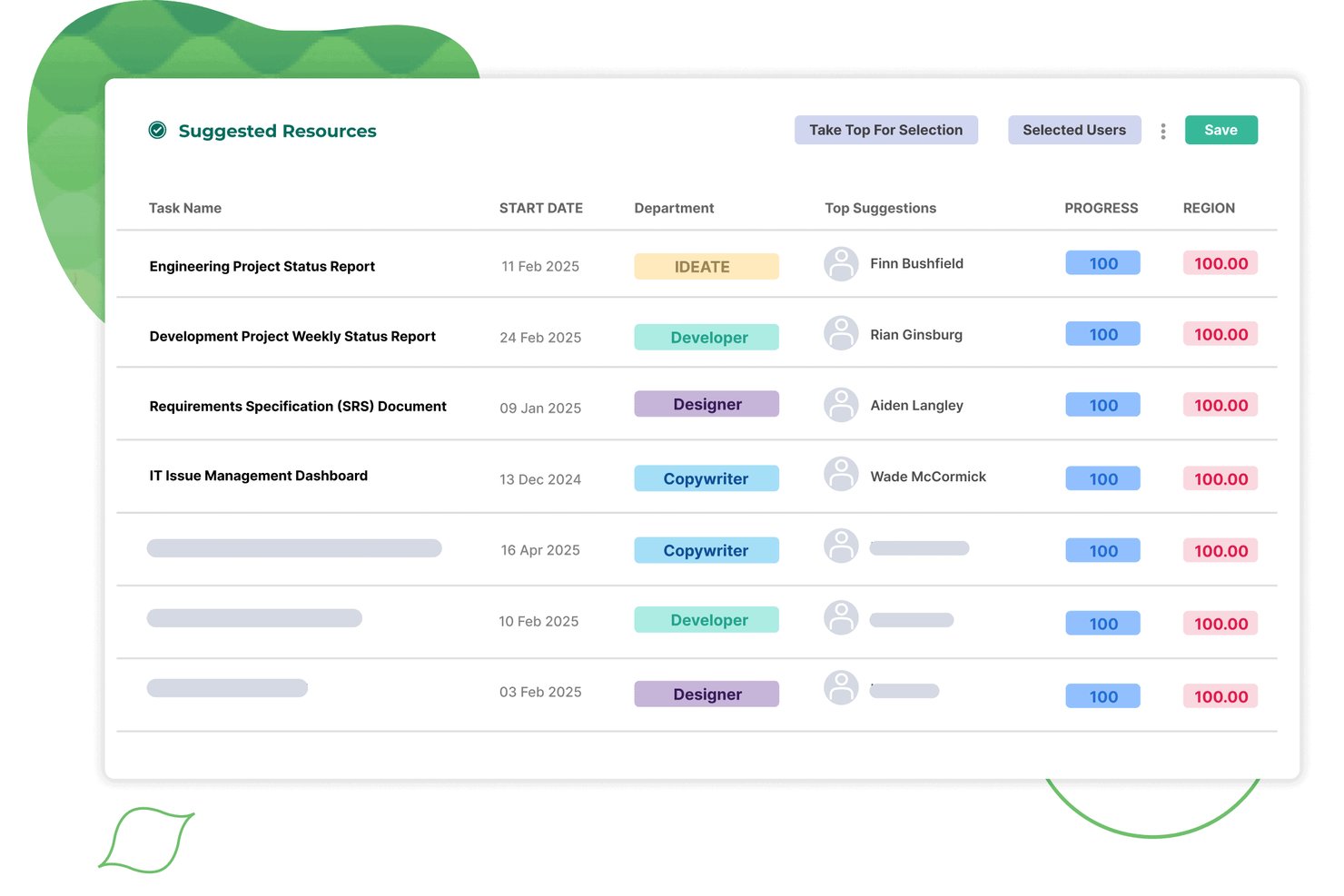
Screendragon ist eine Ressourcenmanagementplattform für Agentur- und Kundenservice-Teams, die Kapazitätsplanung, Ressourcenzuweisung, Auslastungsberichte, integrierte Zeiterfassungen und Nachfrageprognosen in einem einzigen System kombiniert.
Für wen eignet sich Screendragon am besten?
Screendragon eignet sich besonders für mittelgroße bis große Agentur- und Kundenservice-Teams, die Ressourcenplanung, Auslastungsverfolgung und Finanzprognosen in einer vernetzten Plattform benötigen.
Warum ich Screendragon ausgewählt habe
Screendragon steht auf meiner Auswahlliste, weil die Plattform die Ressourcenplanung direkt mit finanziellen Ergebnissen verknüpft – etwas, das die meisten Ressourcenmanagement-Tools nicht leisten. Mir gefällt, dass die Planung mit einem Klick einen Projektplan in einen vollständigen Ressourcenplan umwandelt, einschließlich einer automatischen Zuweisung nach Qualifikationen und einer Live-Auslastungsberichterstattung, die mit Finanzprognosen verknüpft ist. In der Praxis bedeutet das, dass Agenturteams eine Kapazitätslücke erkennen und deren finanzielle Auswirkungen modellieren können, ohne zwischen verschiedenen Tools wechseln zu müssen.
Wichtige Funktionen von Screendragon
- Integrierte Zeiterfassungen: Zeiterfassungen sind direkt mit Live-Projektplänen und Ressourcenbuchungen verknüpft und erfassen sowohl abrechenbare als auch nicht projektbezogene Zeiten wie Urlaub und Schulungen.
- KI-gestützte Ressourcenplanung: Integrierte KI-Agenten automatisieren die Aufgabenzuweisung, optimieren Ressourcenentscheidungen und protokollieren jede Aktion in einem vollständigen Prüfprotokoll.
- Mit der Pipeline verknüpfte Kapazitätsprognosen: Ansichten der zukünftigen Kapazität beziehen Pipeline-Daten ein, um Nachfragelücken sichtbar zu machen, bevor Projekte bestätigt werden.
- Anpassbare KPI-Dashboards: Planer können personalisierte Dashboards erstellen, die Portfoliodaten automatisch zusammenfassen und Berichte direkt an die Beteiligten senden.
Screendragon-Integrationen
Screendragon bietet native Integrationen mit Microsoft Power BI, Jira Software, Slack, Microsoft Teams, NetSuite, SAP, Salesforce, Microsoft Dynamics 365 und PeopleSoft. Der universelle API-Konnektor und das Entwicklerportal unterstützen benutzerdefinierte Integrationen.
Pros and Cons
Pros:
- Ressourcenzuweisung nach Qualifikationen mit einem Klick
- Auslastungs- und Umsatzprognosen in einer Ansicht
- Benutzerdefinierte KPI-Dashboards für Ressourcenplaner
Cons:
- Für Organisationen mit mehr als 30 Nutzern konzipiert
- Keine Szenarienplanung für Personalbestand und Einstellungen
New Product Updates from Screendragon
Screendragon Unveils New AI Hub
Screendragon introduced AI Hub, a new capability that lets teams build and manage AI agents directly within workflows. The update helps marketing teams automate tasks, maintain governance controls, and scale AI-driven operations more efficiently. For more information, visit Screendragon's official site.

Am besten für schnelle Teamplanung im großen Maßstab
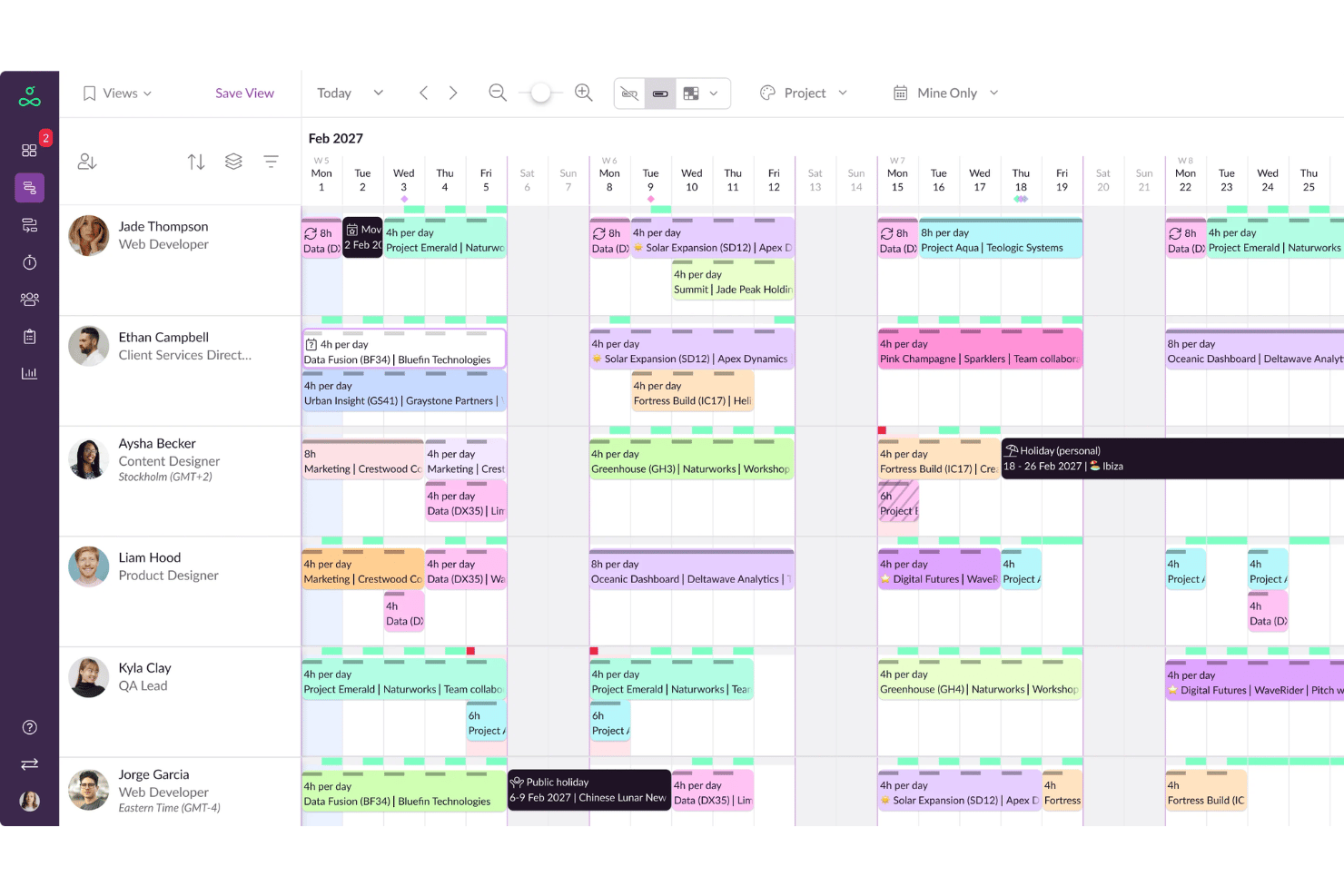
Resource Guru ist eine spezialisierte Plattform für Ressourcenplanung und Kapazitätsmanagement mit Drag-and-Drop-Planung, Verfügbarkeitsverfolgung, Abwesenheitsmanagement, Auslastungsberichten und Stundenzetteln.
Für wen ist Resource Guru am besten geeignet?
Es eignet sich besonders für Agenturen, Beratungen und IT-Serviceteams, die einen klaren Überblick darüber benötigen, wer wann für mehrere parallele Projekte verfügbar ist.
Warum habe ich Resource Guru ausgewählt
Resource Guru verdient seinen Platz auf meiner Auswahlliste, weil die Planung bei großen Teams sehr schnell vonstattengeht. Besonders gefällt mir das Echtzeit-Konfliktmanagement, das Überbuchungen direkt beim Zuweisen meldet, statt erst im Nachhinein. Das Wartelisten-Feature hebt es deutlich ab: Wenn eine Ressource ausgelastet ist, werden neue Buchungen automatisch in eine Warteschlange gestellt, anstatt stille Planungskonflikte zu verursachen.
Resource Guru – Hauptfunktionen
- Gantt-Diagramme auf Projektebene: Darstellung von Projektzeitplänen und Abhängigkeiten für eine einfache Nachverfolgung.
- Individuelle Verfügbarkeitsfelder: Definieren Sie einzigartige Arbeitsmuster oder Rollen für Personen und Ressourcen.
- Integrierte Stundenzettel: Arbeitsstunden können direkt in der Planungsansicht erfasst und überprüft werden.
- Abwesenheitsmanagement-Modul: Verfolgen Sie Urlaub, Feiertage und Krankheitstage für eine exakte Kapazitätsplanung.
Resource Guru Integrationen
Resource Guru bietet native Integrationen mit Google Kalender, Outlook Kalender, Slack, Microsoft Teams und Trello. Es verbindet sich mit Salesforce, Workday, Basecamp, QuickBooks, Google Sheets und Zapier. Für eigene Integrationen steht eine API zur Verfügung.
Pros and Cons
Pros:
- Ideal zur Verfügbarkeitsabfrage über Abteilungen hinweg
- Sofortige Konfliktwarnungen bei Doppelbelegungen
- Flexible Ressourcentypen, einschließlich Equipment und Räume
Cons:
- Nur eingeschränktes natives Skill- oder Kompetenzmanagement
- Berichte sind im Vergleich zu Enterprise-Tools einfach gehalten
New Product Updates from Resource Guru

Resource Guru Adds More Control Over Calendar Sync
Resource Guru adds more control over Google and Outlook Calendar sync, including source calendar selection and destination calendar options. These updates help users manage external events and Resource Guru bookings with less clutter. For more information, visit Resource Guru’s official site.
 .
.
Am besten geeignet zur Verknüpfung von Budgets mit Personaleinsatz
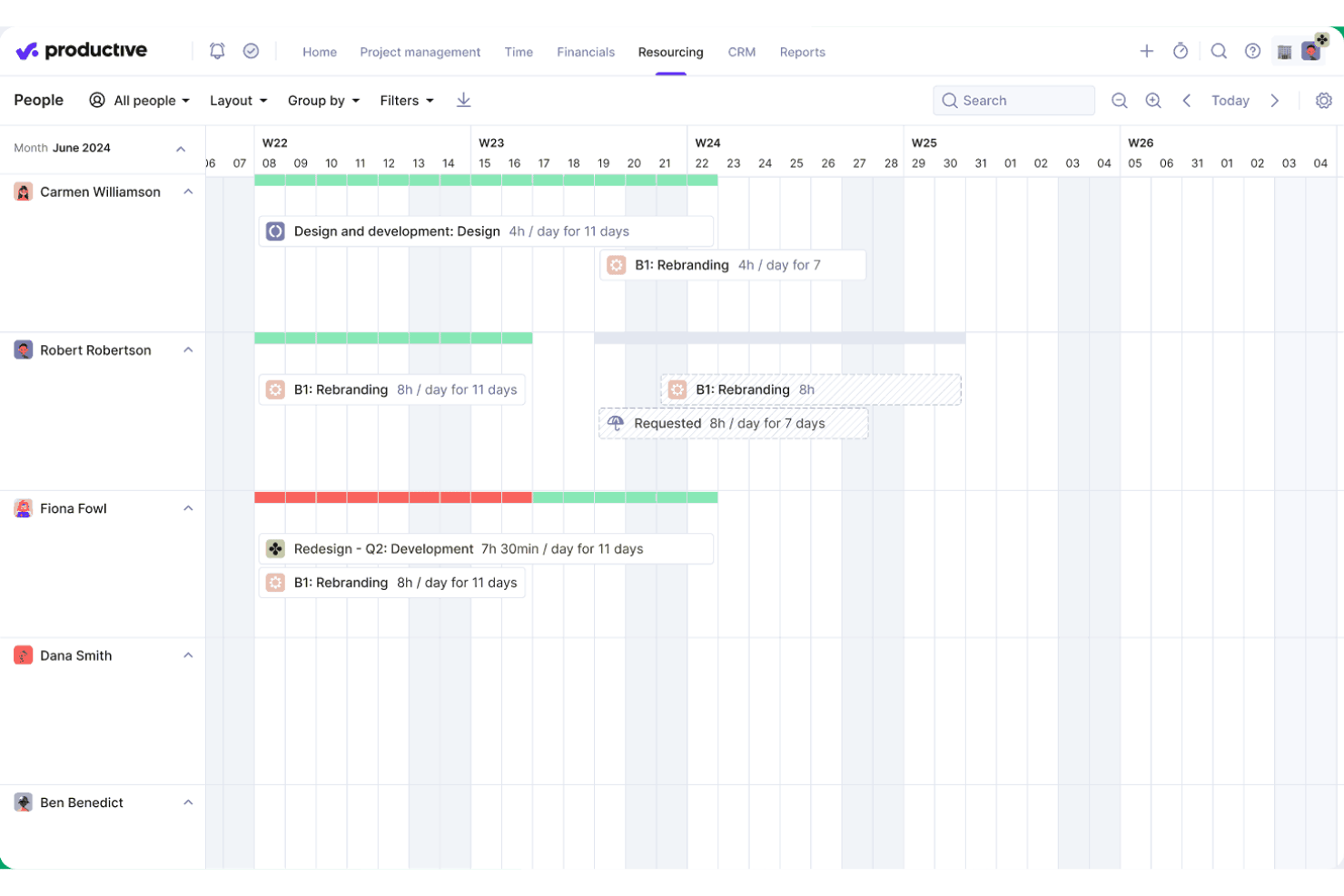
Productive ist eine agenturorientierte Plattform, die Ressourcenplanung, Projektmanagement, Zeiterfassung, Budgetierung und Auslastungsberichte in einem System vereint.
Für wen ist Productive am besten geeignet?
Productive eignet sich besonders für Agenturen und professionelle Dienstleistungsunternehmen, die abrechenbare Mitarbeiter über mehrere Kundenprojekte hinweg verwalten müssen.
Warum habe ich Productive ausgewählt?
Ich habe Productive in meine Top-Auswahl aufgenommen, weil kein anderes mir bekanntes Tool die geplanten Arbeitsstunden direkt mit Live-Budget- und Profitabilitätsdaten so eng verknüpft wie dieses. Wenn mein Team eine Person im Resource Planner einem Projekt zuteilt, werden die Kostenprognosen und Margenberechnungen sofort aktualisiert. Mit dem Scenario Builder können wir verschiedene Personalzusammenstellungen durchspielen, bevor wir uns festlegen, und sehen dabei den Budgeteinfluss jeder Option direkt im Vergleich.
Wichtige Funktionen von Productive
- KI-gestützte Ressourcenzuordnung: Schlägt automatisch die besten verfügbaren Teammitglieder für anstehende Projekte basierend auf Qualifikation und Verfügbarkeit vor.
- Kompetenzdatenbank: Ermöglicht eine strukturierte Erfassung der Fähigkeiten, Zertifikate und Kompetenzen der Mitarbeitenden.
- Integrierte Abwesenheitserfassung: Genehmigte Urlaubs- und Feiertagsanträge werden sofort mit der Ressourcenplanung synchronisiert.
- Fortschrittliche Reporting-Intelligenz: Bietet detaillierte, anpassbare Analysen zu Teamauslastung, Kapazität und Projektkennzahlen.
Productive-Integrationen
Productive bietet native Integrationen zu Jira, HubSpot, Xero, QuickBooks, Sage, BambooHR, hiBob, Personio, Slack und Google Calendar. Darüber hinaus wird Zapier unterstützt und eine API für individuelle Integrationen bereitgestellt.
Pros and Cons
Pros:
- Live-Verfolgung der Budgetauswirkungen auf Projekte
- Szenarienmodellierung zur Personaleinteilung
- Qualifikationsmatrix für den Personaleinsatz
Cons:
- Vor allem für Agentur-Workflows konzipiert
- Eingeschränkte Personalplanung außerhalb abrechenbarer Projekte
New Product Updates from Productive
Productive Adds Voice Dictation, Slack Connector, Proposals, and Overtime
Productive adds voice dictation, a Slack Connector, proposal controls, and overtime tracking. These updates support faster AI interactions, client proposals, and time management. For more information, visit Productive’s official site.

Scoro
Am besten geeignet zur Kombination von Projektverfolgung und Abrechnung
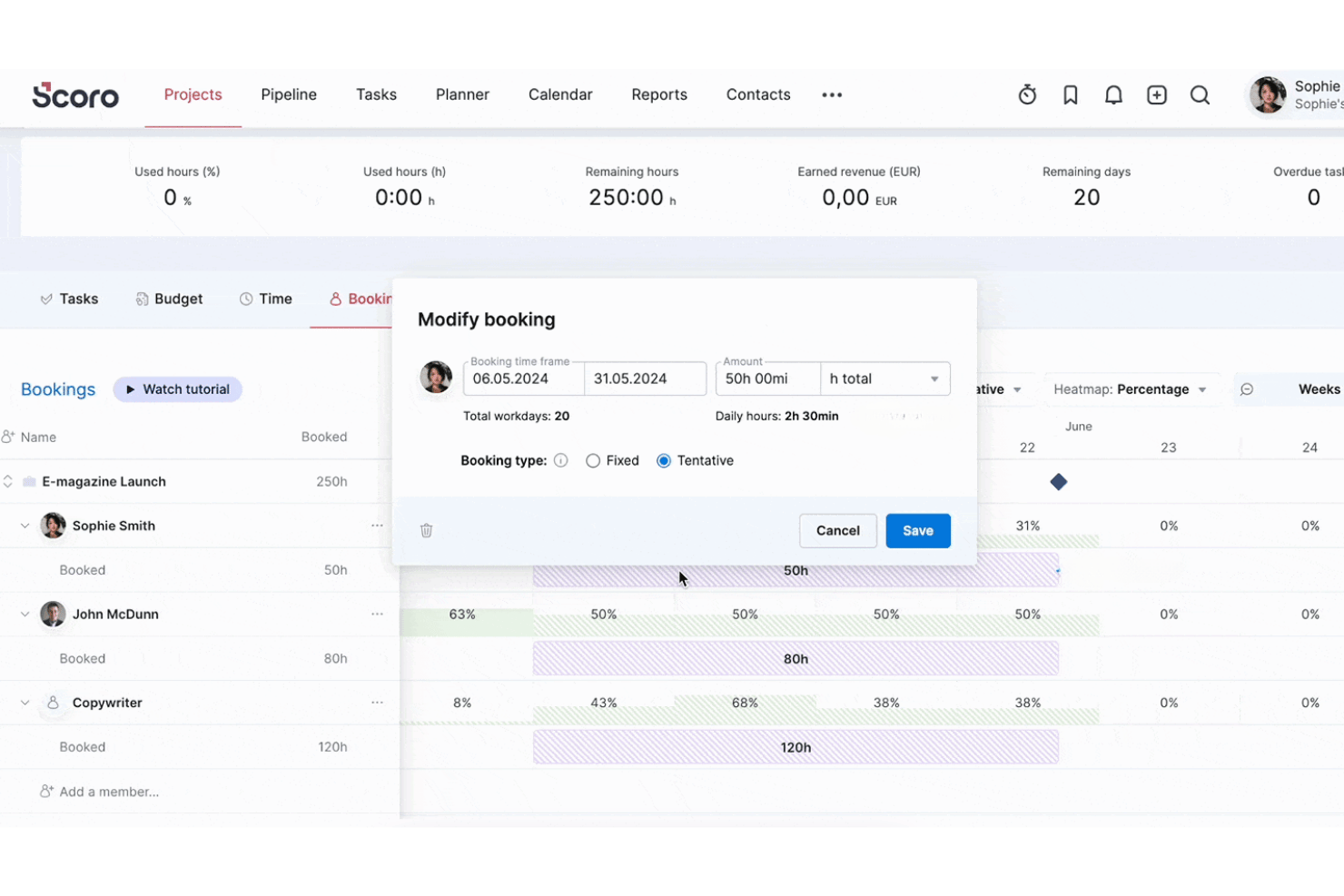
Scoro ist eine Plattform zur Automatisierung von Professional Services, die Ressourcenplanung, Kapazitätsprognose, Zeiterfassung, Projektmanagement und Rechnungsstellung in einem einzigen, vernetzten System vereint.
Für wen ist Scoro am besten geeignet?
Scoro eignet sich besonders für Agenturen, Beratungsunternehmen und andere projektbasierte Dienstleister, die Ressourcen und Projektfinanzen an einem Ort verwalten müssen.
Warum habe ich Scoro ausgewählt?
Ich habe Scoro in meine Top-Auswahl aufgenommen, weil es eines der wenigen Ressourcenmanagement-Tools ist, das die Ressourcenplanung direkt mit der Rechnungsstellung verbindet. Wenn ich ein Teammitglied im Planner einplane, fließt diese Zeit direkt in die Abrechnung ein – egal, ob das Projekt auf Festpreis-, Zeit- und Material- oder Retainerbasis läuft. Außerdem gefällt mir, dass Kosten- und Gewinnprognosen in Echtzeit aktualisiert werden, sobald Buchungen sich ändern. So kann ich die Auswirkung auf die Marge sehen, bevor ich eine Ressource einem Projekt zuweise.
Wichtige Funktionen von Scoro
- Rollenbasierte Ressourcenplanung: Weisen Sie Teammitgliedern Rollen zu und verfolgen Sie deren Verfügbarkeit sowie Auslastung über mehrere Projekte hinweg.
- Dashboard für Auslastungsberichte: Überwachen Sie abrechenbare und nicht abrechenbare Stunden mit integrierten Filtern für Teams, Rollen und Zeiträume.
- Verwaltung von Abwesenheiten und Feiertagen: Behalten Sie Personalabwesenheiten und Urlaubstage im Blick, um eine genaue Planung zu gewährleisten.
- Integrierte Projekt-Gantt-Diagramme: Stellen Sie alle Aufgaben und Abhängigkeiten in einer Zeitachsenansicht dar, um die Projektkoordination zu verbessern.
Scoro Integrationen
Scoro bietet native Integrationen mit Google Kalender, Apple Kalender, MS Exchange, Google Drive, Dropbox, HubSpot, Salesforce, QuickBooks, Xero, Exact Online, Expensify und Stripe. Es besteht außerdem eine Verbindung zu Zapier und eine API für individuelle Integrationen steht zur Verfügung.
Pros and Cons
Pros:
- Verknüpft Ressourcenplanung direkt mit der Projektabrechnung
- Tools zur Echtzeit-Margen- und Gewinnprognose
- Integrierte Auslastungs- und Workload-Heatmaps
Cons:
- Keine strukturierte Skill- oder Kompetenzmatrix
- Fehlende HRIS- oder Workforce-Analytics-Funktionen
New Product Updates from Scoro

Scoro Adds Time Mobile App and ELI Improvements
Scoro adds the Scoro Time mobile app for iOS/Android to track time anywhere and expands ELI with attachments, smarter filtering, and trigger-based actions. For more information, visit Scoro's official site.

Epicflow
Am besten geeignet zur Optimierung von Multi-Projektumgebungen
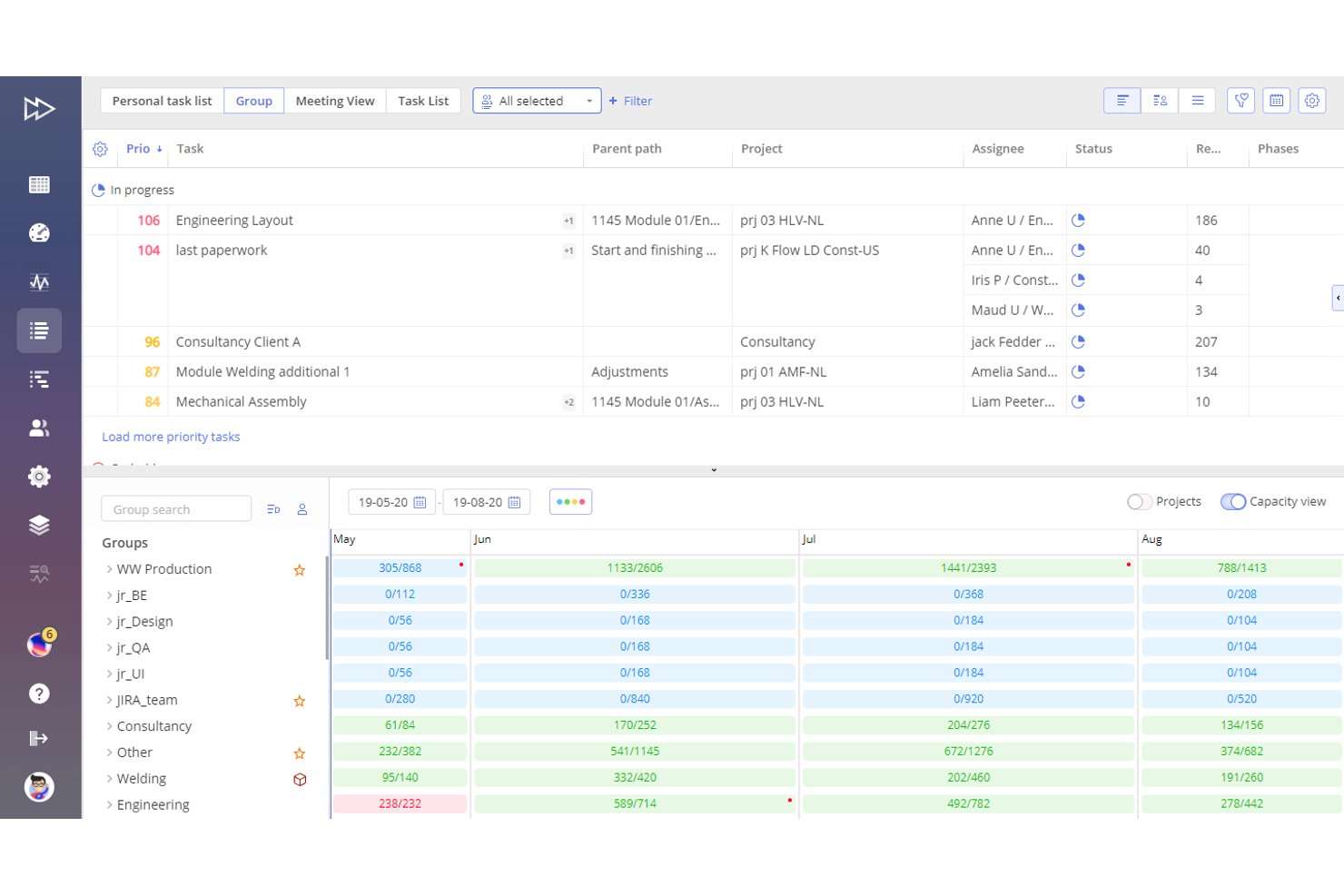
Epicflow ist eine KI-gestützte Plattform für Ressourcenmanagement und Portfolio-Optimierung, die auf der Engpasstheorie basiert und Mehrprojektplanung, Ausgleich der Arbeitslast, Kapazitätsplanung sowie kompetenzbasierte Ressourcenallokation vereint.
Für wen ist Epicflow am besten geeignet?
Epicflow eignet sich besonders für Portfoliomanager und PMO-Leiter in den Bereichen Ingenieurwesen, Verteidigung und Fertigung, die viele miteinander verbundene Projekte mit gemeinsamen Spezialressourcen steuern.
Warum habe ich Epicflow ausgewählt
Ich habe Epicflow als eines der besten Tools ausgewählt, weil kein anderes Tool überlappende Projekte mit einem geteilten Ressourcenpool so handhabt wie dieses. Die Was-wäre-wenn-Analyse ermöglicht es mir, die Auswirkungen einer kurzfristigen Änderung der Projektpriorität zu simulieren, bevor ich eine endgültige Entscheidung treffe – besonders wichtig, wenn ein wichtiger Ingenieur bereits in vier aktive Arbeitsströme involviert ist. Das Future Load Diagramm zeigt Engpässe in der Kapazität schon Wochen im Voraus auf, sodass ich Zuweisungen neu verteilen kann, bevor sie zu Lieferungsrisiken werden.
Wichtige Funktionen von Epicflow
- Epica KI-Assistent: Ein integriertes KI-Tool, das Einblicke, Warnungen, Benachrichtigungen und Schritt-für-Schritt-Anleitungen im Prozess liefert.
- Aufgabenliste mit automatischer Priorisierung: Erstellt und passt automatisch eine priorisierte Aufgabenliste basierend auf Echtzeit-Projektdaten und vorhandenen Ressourcenkapazitäten an.
- Kompetenz- und Attributverwaltung: Ermöglicht das Zuordnen von Aufgaben zu Ressourcen mithilfe einer strukturierten Datenbank für Fähigkeiten, Kompetenzen und Attribute.
- Integration mit PM- und ERP-Tools: Verbindet sich per API oder CSV-Import/Export mit Jira, SAP, MS Project, Oracle Primavera und anderen Plattformen.
Epicflow Integrationen
Epicflow bietet native Integrationen mit Jira, Microsoft Project, SAP, Oracle Primavera und Workfront und stellt eine API für individuelle Integrationen bereit. Auch ein CSV-Import und Export wird unterstützt.
Pros and Cons
Pros:
- Optimal für überlappende Projekte mit geteilten Ressourcen
- Fortschrittliche Prognose von Arbeitslast und Engpässen
- Automatische Priorisierung von Aufgaben nach Portfoliobedarf
Cons:
- Kein integriertes PTO- oder Urlaubsmanagement
- Begrenzte Anbindung an HR- oder Payroll-Systeme

Float
Am besten geeignet für die Echtzeit-Visualisierung von Projektzeitplänen
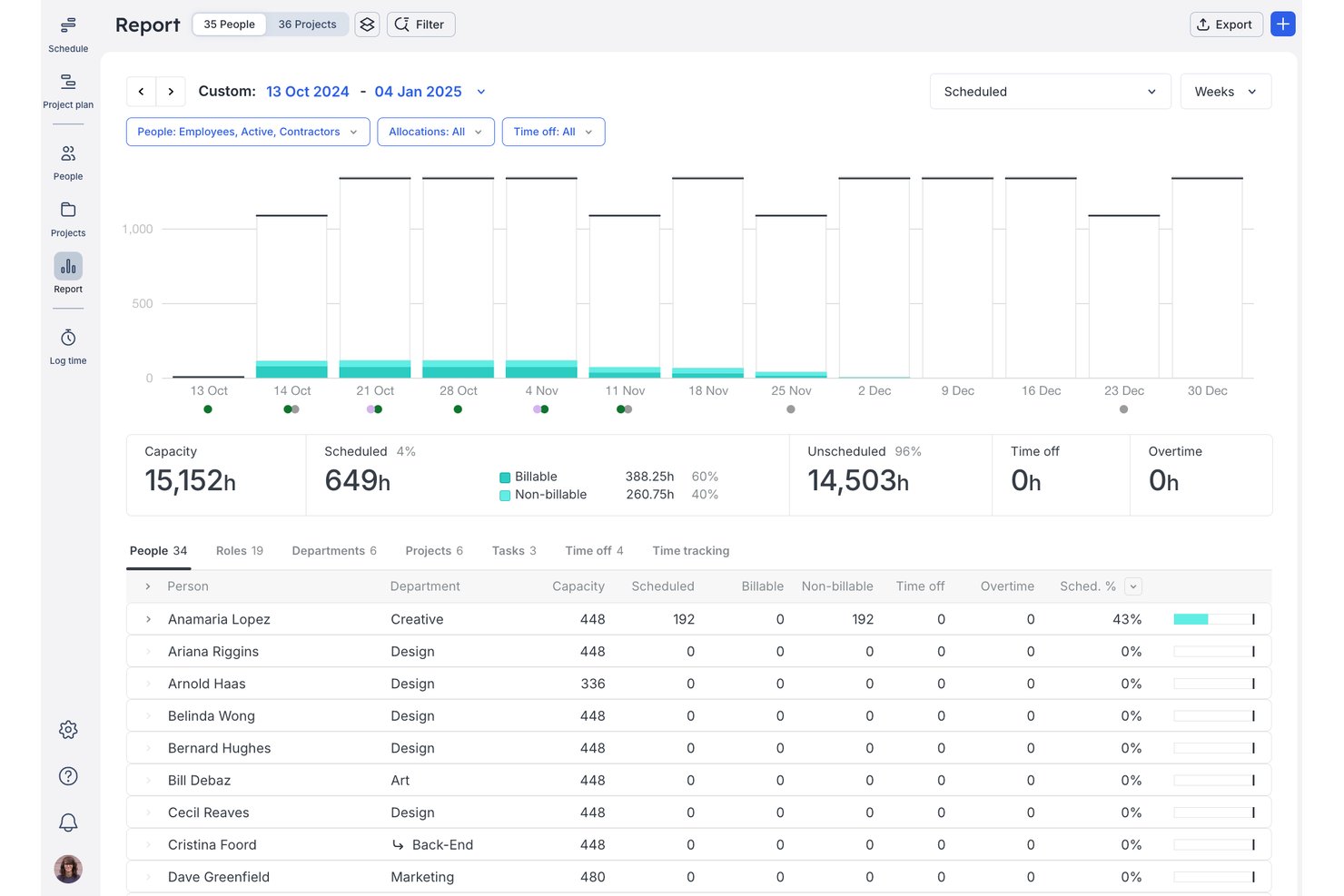
Float ist eine Ressourcenmanagement-Plattform für Teams im Bereich professionelle Dienstleistungen, die visuelle Einsatzplanung, Kapazitätsplanung, Zeiterfassung und Auslastungsberichte vereint.
Für wen ist Float am besten geeignet?
Float eignet sich für kleine bis mittelgroße Agenturen und Beratungsunternehmen, in denen Betriebsleiter einen klaren, aktuellen Überblick darüber benötigen, wer an welchen Kundenprojekten arbeitet.
Warum ich Float ausgewählt habe
Ich habe Float als eine der besten Lösungen ausgewählt, da die Live-Drag-and-Drop-Zeitleiste einen stets aktuellen Überblick über jede Person, jedes Projekt und jede Zuteilung an einem Ort bietet. Farblich gekennzeichnete Kapazitätsbalken warnen sofort, wenn Teammitglieder überbucht werden, sobald Sie eine Buchung anpassen. Smart Assign zeigt daraufhin an, wer basierend auf Fähigkeiten, Rolle und verfügbarer Kapazität tatsächlich verfügbar ist, sodass Sie bei der Besetzung neuer Projekte nicht raten müssen.
Wichtige Funktionen von Float
- Unterstützung für mehrere Währungen bei Projekten: Weisen Sie Budgets und Stundensätze in bis zu fünf Währungen für internationale Projekte zu.
- Vorausgefüllte und automatisch aufgezeichnete Stundenzettel: Erfassen Sie tatsächlich geleistete Arbeitsstunden und vergleichen Sie diese mit den geplanten Zuteilungen.
- Rollenbasierte Berechtigungseinstellungen: Kontrollieren Sie den Zugriff auf Projektinformationen und Planungsverwaltung nach Benutzerrolle.
- iOS- und Android-Apps: Verwalten Sie Zeitpläne, nehmen Sie Aktualisierungen vor und sehen Sie Teamzuweisungen von mobilen Geräten aus ein.
Float Integrationen
Float bietet native Integrationen mit Asana, Jira, Trello, Google Kalender, Outlook Kalender, Slack, ClickUp, Teamwork, Basecamp und Linear. Zudem ist eine Anbindung an Zapier möglich und es gibt eine API für benutzerdefinierte Integrationen.
Pros and Cons
Pros:
- Echtzeit-Drag-and-Drop-Planungstafel
- Farbmarkierte Ansichten der Teamkapazität und -verfügbarkeit
- Smart Assign automatisiert Vorschläge für die Projektbesetzung
Cons:
- Keine integrierte Personal- oder Mitarbeiterverwaltung
- Keine Nachverfolgung von Qualifikationsniveaus und Zertifizierungen

Ganttic
Am besten für visuelle Planung in globalen Teams
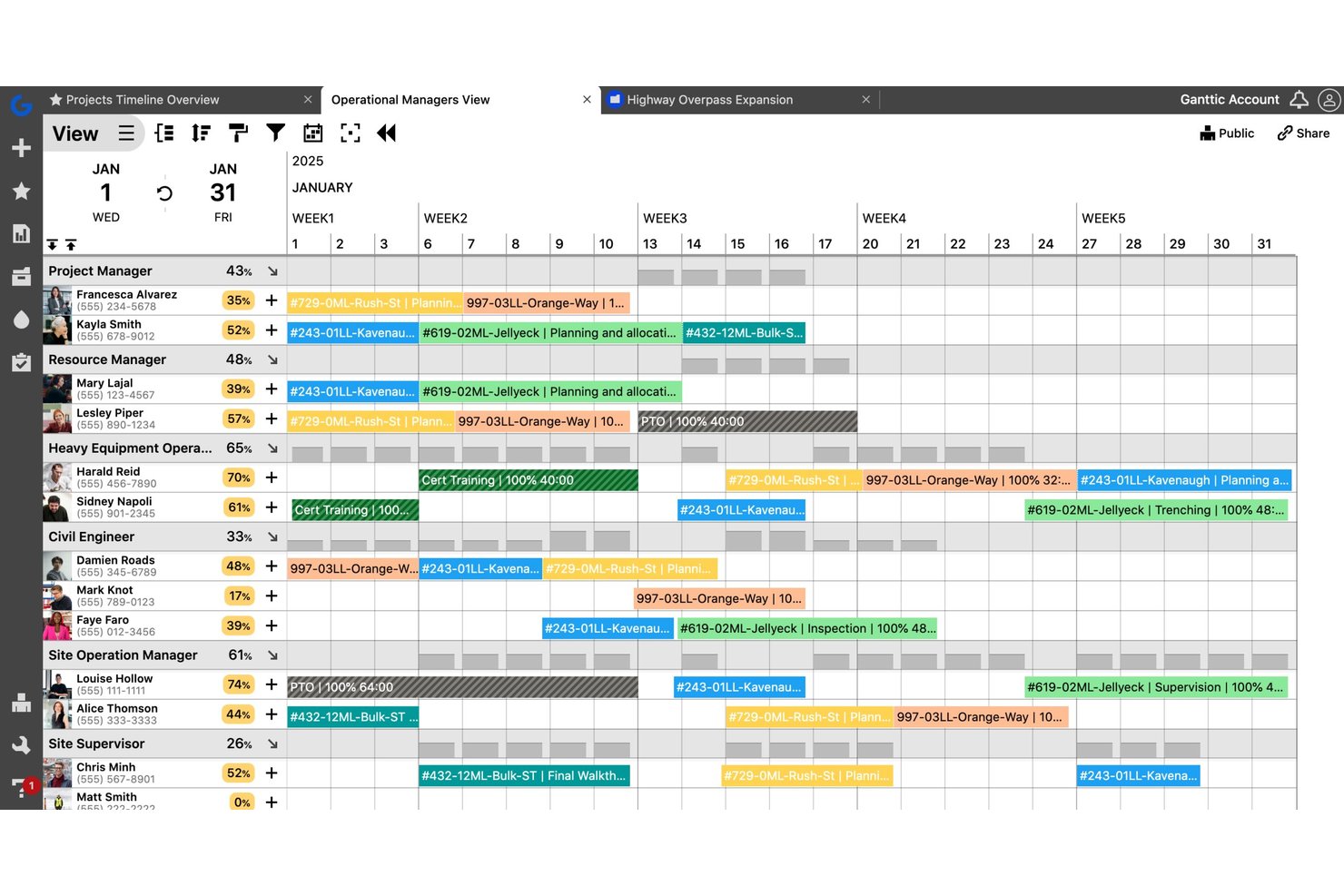
Ganttic ist ein visuelles Ressourcenplanungs-Tool, mit dem Teams Personen, Ausrüstung und Einrichtungen projektübergreifend mithilfe von Drag-and-Drop-Gantt-Diagrammen, Kapazitätsverfolgung und Auslastungsberichten planen können.
Für wen ist Ganttic am besten geeignet?
Ganttic eignet sich für Projektmanager und Operationsteams in Branchen wie Ingenieurwesen, Bauwesen und Medien, die mehrere parallel laufende Projekte mit gemeinsamen Ressourcen koordinieren.
Warum ich mich für Ganttic entschieden habe
Ich habe Ganttic unter die besten gewählt, weil der duale Gantt-Ansichtsmodus in der Praxis überzeugt. Ich kann in derselben Oberfläche zwischen einer ressourcenorientierten und einer projektorientierten Ansicht wechseln, was besonders nützlich ist, wenn Teams über verschiedene Zeitzonen hinweg koordiniert werden müssen. Die Möglichkeit, Ressourcen nach benutzerdefinierten Feldern wie Region oder Abteilung zu filtern und zu gruppieren, sorgt für eine organisierte globale Planung, ohne für jeden Standort eigene Pläne erstellen zu müssen.
Ganttic Schlüsselfunktionen
- Automatische Auslastungsverfolgung: Überwacht die Arbeitsbelastung und Auslastung von Ressourcen automatisch über alle Projekte und Teams hinweg.
- Multi-Ressourcen- und parallele Aufgabenplanung: Weist mehreren Personen oder Geräten eine Aufgabe zu, ohne Doppelbelegungen zu verursachen.
- Individuelle Datenfelder für Ressourcen: Fügt Ressourcen, Projekten und Aufgaben individuelle Felder hinzu, um spezifische Workflow-Anforderungen zu unterstützen.
- API- und Integrationsmöglichkeiten: Verbindung zu Google Kalender, Outlook, Slack und weiteren Diensten über integrierte Schnittstellen oder die öffentliche API.
Ganttic Integrationen
Ganttic bietet native Integrationen mit Google Kalender, Microsoft Outlook und OneLogin. Es verbindet sich mit Zapier und stellt eine API für individuelle Integrationen bereit.
Pros and Cons
Pros:
- Visuelle Gantt-Ansicht für Ressourcenplanung
- Flexible individuelle Datenfelder für Ressourcen
- Plant Personen und Ausrüstung gemeinsam
Cons:
- Keine native Skills- oder Kompetenzverfolgung
- Eingeschränkte Freigabe- und Anforderungs-Workflows

Parallax
Am besten geeignet, um Ressourcen mit Umsatzzielen abzugleichen
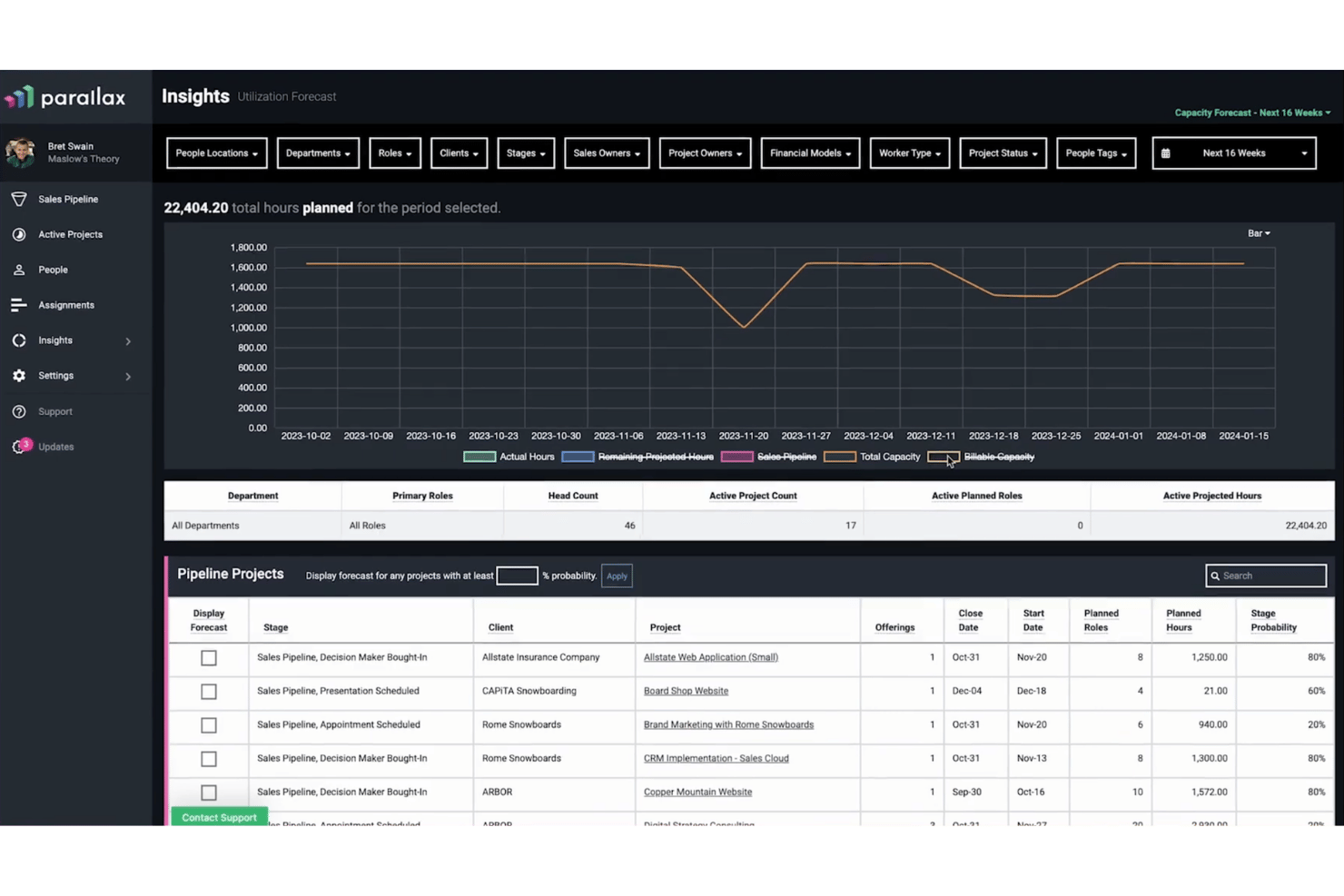
Parallax ist eine Plattform für Ressourcenmanagement und Forecasting, die speziell für professionelle Dienstleistungsunternehmen entwickelt wurde. Sie vereint Kapazitätsplanung, Auslastungsüberwachung, vorausschauende Personalplanung und Projektfinanztransparenz an einem Ort.
Für wen ist Parallax am besten geeignet?
Parallax eignet sich besonders für Digitalagenturen und Softwareberatungen, die Personalentscheidungen direkt mit Projektmargen und Umsatzzielen verknüpfen müssen.
Warum habe ich Parallax ausgewählt?
Ich habe Parallax in meine Top-Auswahl aufgenommen, weil es eines der wenigen Ressourcenmanagement-Tools ist, das Personalentscheidungen direkt mit den Umsatzergebnissen verknüpft. Besonders gefällt mir die Margin Control-Funktion, mit der Projektmargen in Echtzeit überwacht werden und Probleme erkannt werden, bevor sie sich verschärfen. In Kombination mit Staffing Foresight, das CRM-Pipelinedaten mit laufender Projektlast verbindet, erhält mein Team eine zukunftsorientierte Übersicht über Kapazität und Umsatz an einem Ort.
Zentrale Funktionen von Parallax
- Visueller Workforce Planer: Anzeige der Teamkapazitäten und Arbeitslasten über verschiedene Zeiträume mit farbcodierten Visualisierungen.
- Filterung nach Rolle und Fähigkeiten: Filtern von Ressourcenansichten nach Projektrolle, Skillset oder Team für eine detaillierte Ressourcenabstimmung.
- Integrierte Zeiterfassung: Erfassung der tatsächlich geleisteten Stunden direkt in Parallax oder über Integrationen wie Harvest oder Jira.
- Pipeline-Forecast: Zusammenführung von CRM-Pipelinedaten mit aktiven Projekten zur Prognose von Nachfrage, Kapazität und Umsatz.
Parallax-Integrationen
Parallax bietet native Integrationen mit Harvest, HubSpot, Asana, Jira, Microsoft Teams, Slack, NetSuite und Salesforce Platform. Eine API steht für individuelle Integrationen zur Verfügung.
Pros and Cons
Pros:
- Überwacht Auslastung und Kapazität in Echtzeit
- Verknüpft prognostizierte Nachfrage mit Personalplanung
- Visualisiert die Auslastung des Teams Monate im Voraus
Cons:
- Eingeschränkte Tiefe bei der Skill-Matrix-Verfolgung
- Individuelle Berichts-Exporte werden nicht unterstützt

Runn
Am besten für Szenarienplanung in Echtzeit
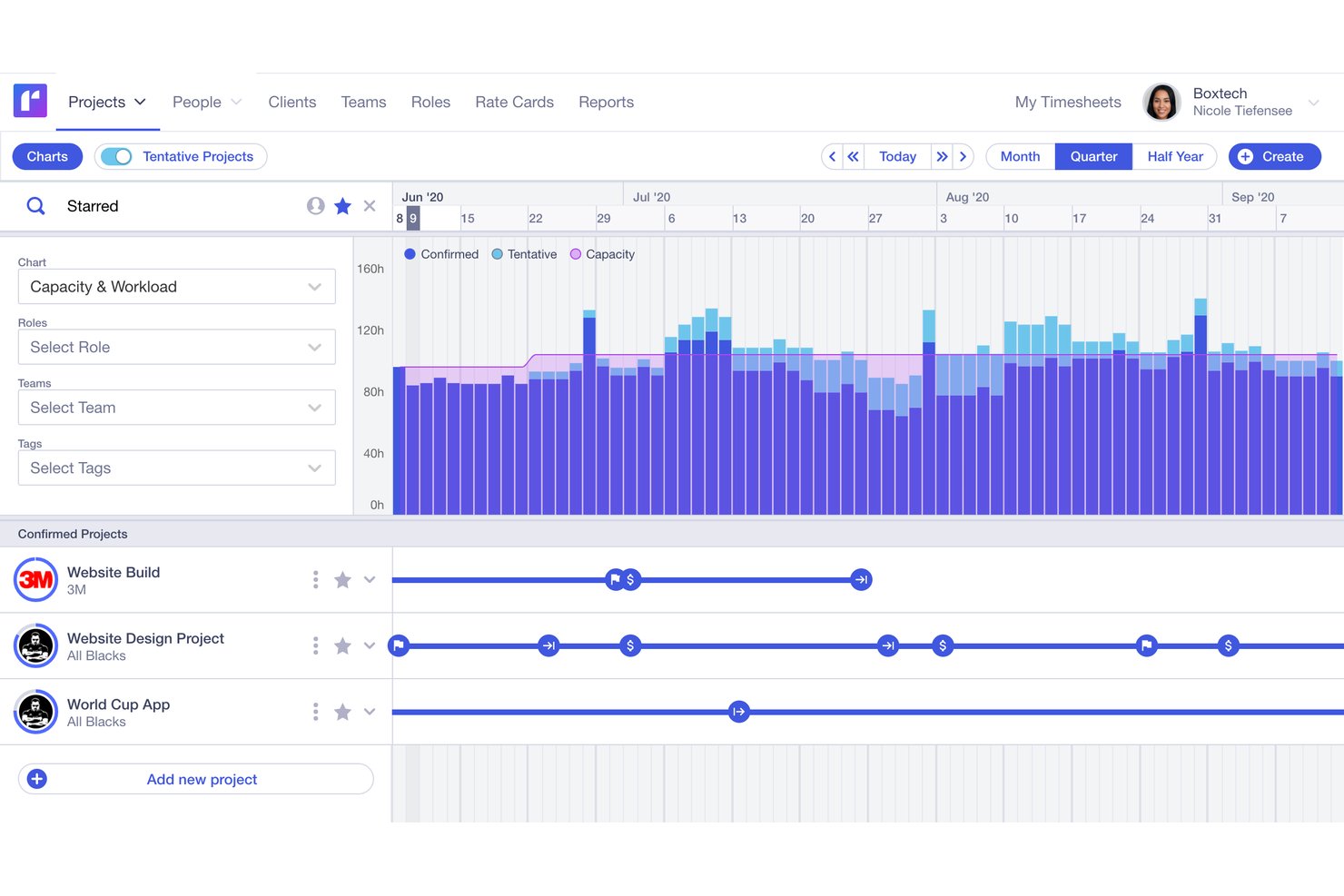
Runn ist eine Ressourcenmanagement-Plattform, die visuelle Einsatzplanung, Kapazitätsprognosen, Auslastungsberichte, Zeiterfassung und Projektfinanzen in einem Planungstool vereint.
Für wen ist Runn am besten geeignet?
Runn eignet sich besonders für Unternehmen im Bereich professionelle Dienstleistungen, Beratungsagenturen und IT-Teams, die projektbasierte Arbeitskräfte über mehrere parallele Aufträge hinweg steuern müssen.
Warum habe ich Runn ausgewählt?
Runn hat es auf meine Shortlist geschafft, weil das Tool eine exzellente Echtzeitplanung mit Was-wäre-wenn-Szenarien bietet. Ich kann mehrere gespeicherte Szenarien nebeneinander erstellen und Ressourcen zwischen unverbindlichen Projekten verschieben, um zu sehen, wie sich die Kapazität verändert, bevor ich mich auf einen Plan festlege. Die Kombination aus Platzhalter-Ressourcen und Live-Kapazitätsdiagrammen ermöglicht meinem Team, ein neues Kundenprojekt gegenüber aktuellen Arbeitslasten zu planen, ohne den Live-Zeitplan zu beeinflussen.
Wichtige Funktionen von Runn
- Planung mit mehreren Ansichten: Wechseln Sie zwischen monatlichen, vierteljährlichen oder halbjährlichen Layouts, um verschiedene Zeithorizonte zu planen.
- Integrations-Marktplatz: Verbinden Sie sich dank integrierter Schnittstellen mit HR-Systemen wie BambooHR und Zeit-Tracking-Tools wie Harvest.
- Individuelle Reporting-Dashboards: Erstellen Sie private Dashboards mit erweiterten Filteroptionen und exportieren Sie Projektdaten für eine tiefere Analyse.
- Verfolgung von Projektfinanzen: Verwalten Sie Budgets und Preislisten und vergleichen Sie geplante mit tatsächlichen Werten direkt im Tool.
Runn-Integrationen
Runn bietet native Integrationen mit BambooHR, HiBob, Humaans, ADP Workforce Now, Workday, Jira, Harvest und Clockify und lässt sich über Zapier anbinden. Für individuelle Integrationen steht eine API zur Verfügung.
Pros and Cons
Pros:
- Echtzeit-Szenarienplanung für Projektressourcen
- Visuelle Einsatzplanung über verschiedene Zeithorizonte hinweg
- Platzhalter-Ressourcen für Pipeline- und Einstellplanung
Cons:
- Individuelle Berichte sind schwer zu konfigurieren
- Keine spezielle mobile App verfügbar

Mosaic
Am besten für KI-gesteuertes Workload-Balancing
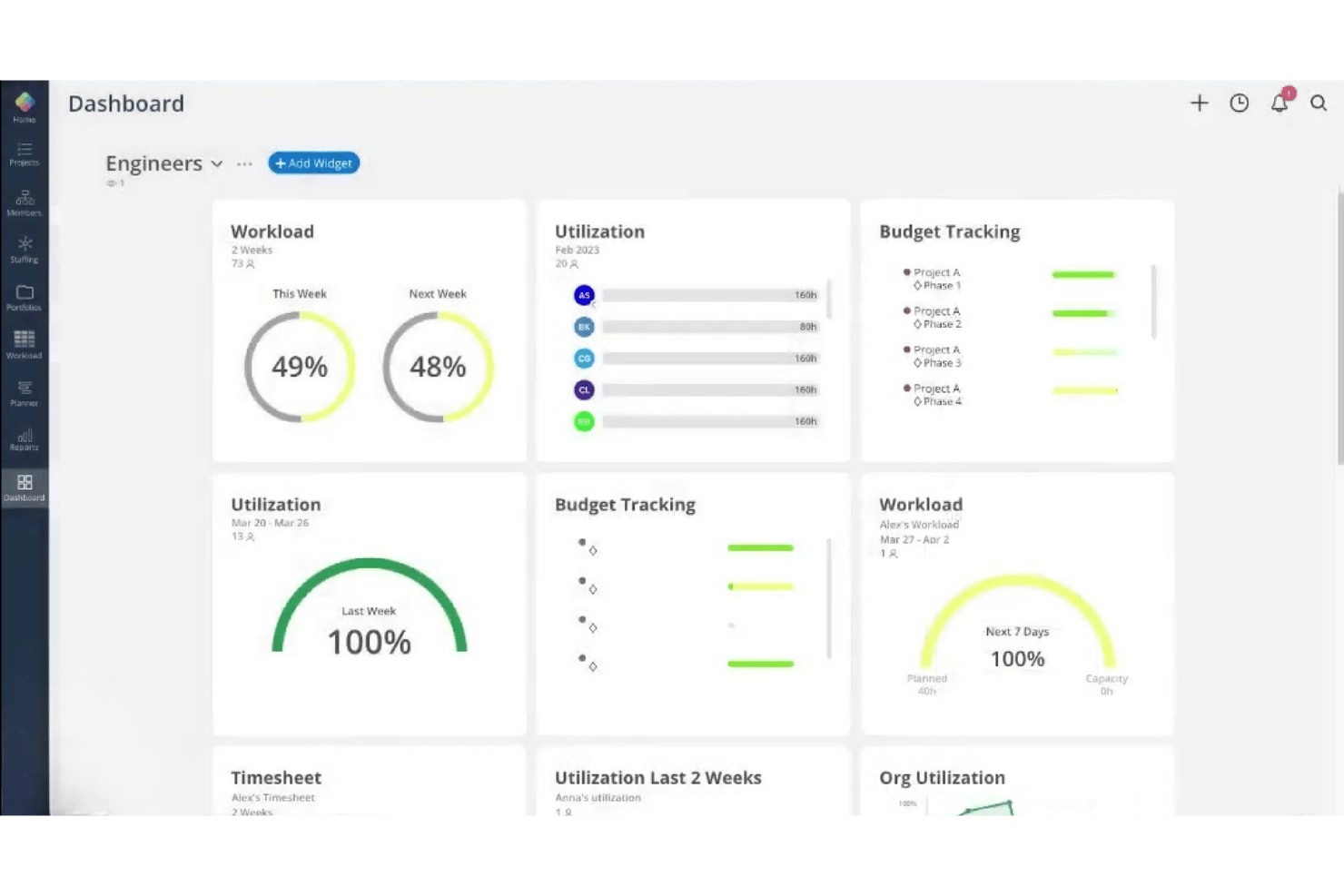
Mosaic ist eine KI-gestützte Ressourcenmanagement-Plattform für projektbasierte Teams, die Ressourcenplanung, Kapazitätsmanagement, Arbeitsbelastungsprognosen, Auslastungsberichte und Zeiterfassung an einem Ort vereint.
Für wen ist Mosaic am besten geeignet?
Mosaic eignet sich besonders für kleine bis mittelgroße projektbasierte Unternehmen aus den Bereichen Architektur, Ingenieurwesen und Kreativdienstleistungen, die die Teamkapazitäten über mehrere gleichzeitig laufende Projekte steuern müssen.
Warum habe ich Mosaic ausgewählt?
Ich habe Mosaic als eine der besten Lösungen ausgewählt, weil der KI-Assistent Chello die Projektbelastung aktiv überwacht und Risiken erkennt, bevor sie zu Problemen werden. Mir gefällt, dass Fristverschiebungen automatisch gemeldet werden und fehlende Updates verfolgt werden, sodass ich nicht jedes Projekt manuell prüfen muss. Die automatisierte Umplanungsfunktion passt Arbeitspläne in Echtzeit an, wenn sich Prioritäten verschieben, und sorgt so für eine ausgeglichene Arbeitslast im ganzen Team.
Wichtige Funktionen von Mosaic
- Rollenbasierte Projektzuweisung: Weisen Sie Teammitglieder je nach Fähigkeiten und Kapazität bestimmten Rollen in Projekten zu.
- Gantt- und Kanban-Ansicht: Wählen Sie verschiedene visuelle Projektansichten, um Zeitpläne und Aufgabenfortschritt zu verwalten.
- Auslastungs- und Gewinnberichte: Überwachen Sie Mitarbeiterauslastung und Projektprofitabilität in Dashboard-Berichten.
- Integrierte Zeiterfassung: Erfassen Sie Arbeitsstunden und verwalten Sie Stundenzettel auf derselben Plattform wie Ressourcenplanung und Projektmanagement.
Mosaic-Integrationen
Mosaic bietet native Integrationen mit Asana, Jira, Slack, Microsoft 365, Microsoft Outlook, Dropbox Business, Gmail, QuickBooks, Deltek Vision, Deltek Ajera und Deltek Vantagepoint. Eine API für eigene Integrationen ist verfügbar.
Pros and Cons
Pros:
- KI-Assistent steuert Team-Arbeitslast proaktiv
- Automatisches Umplanen bei geänderten Projektprioritäten
- Visuelle Dashboards für Auslastung und Prognosen
Cons:
- Begrenzte Skills-Matrix für Talentverteilung
- Nicht für HR-zentrierte Personalplanung optimiert
Weitere Software zur Ressourcenverwaltung
Hier finden Sie einige zusätzliche Optionen für Software zur Ressourcenverwaltung, die es nicht auf meine Auswahlliste geschafft haben, aber dennoch einen Blick wert sind:
- Kantata
Am besten für die Verwaltung komplexer Kundenergebnisse geeignet
- Saviom
Am besten geeignet für fortschrittliche unternehmensweite Anpassungen
- Hub Planner by Milient
Am besten geeignet für Zeiterfassung und Genehmigungsworkflows
- Wrike
Am besten für anpassbare Arbeitslastansichten
- Celoxis
Am besten für integrierte Kapazitätsplanung und -verfolgung
- Teamwork.com
Am besten für die Zusammenarbeit von Agenturen mit Kunden
- Accelo
Am besten für einheitliches Kundenarbeitsmanagement
- ClickTime
Am besten geeignet zur Verfolgung von abrechenbaren Ressourcenstunden
- Birdview PSA
Am besten geeignet für Ressourceneinblicke im Projektportfolio
- Resource Management by Smartsheet
Am besten geeignet für vorgefertigte Dienstplanvorlagen


Wie ich Ressourcenmanagement-Software bewerte
Ich teile meine Bewertung in die grundlegenden Funktionen auf, die jedes Tool beherrschen muss – wie Kapazitätsplanung und Auslastungsberichte – sowie die Unterscheidungsmerkmale, die eine Plattform gegenüber anderen bevorzugt machen.
Grundlegende Funktionen (Mindestanforderungen für diese Liste)
Wenn ich Tools für meine Liste auswähle, bewerte ich jedes auf einer Skala von 0 (bietet die Funktion nicht an) bis 5 (überragt in diesem Bereich) in Bezug auf jede unten aufgeführte Kernfunktionalität. Anschließend berechne ich die Gesamtpunktzahl des Tools als Prozentsatz. Jedes Tool muss eine Gesamtpunktzahl von mindestens 65 % erreichen, um in Betracht gezogen zu werden.
- Ressourcenzuteilung & Terminplanung: Ich achte auf visuelle Drag-and-Drop-Planer, die Konflikte kennzeichnen, wenn zwei Projekte in einem Sprint um die gleiche Person konkurrieren.
- Kapazitätsplanung: Jedes Tool sollte die Echtzeit-Kapazität gegenüber dem anstehenden Bedarf anzeigen, damit Sie einen Überhang an freien Mitarbeitern oder eine entstehende Personallücke frühzeitig erkennen.
- Kompetenz- & Fähigkeitsmanagement: Ich prüfe, ob Sie nach Zertifikaten, Qualifikationsgrad oder Rollentyp suchen können, um die richtige Person dem Projektbedarf zuzuordnen.
- Auslastungsberichte: Dashboards sollten abrechenbare und nicht abrechenbare Stunden nach Team oder Person aufschlüsseln, damit Führungskräfte auf Auslastungstrends reagieren können – und sie nicht nur ansehen.
- Zeiterfassung & Verfügbarkeitsmanagement: Ich prüfe, ob Zeiterfassungstools Urlaubsansprüche, Feiertage und Kalenderintegrationen einbinden, sodass die tatsächliche Verfügbarkeit abgebildet wird, nicht nur die geplanten Arbeitsstunden.
- Bedarfsprognose: Die Plattform sollte es ermöglichen, zukünftige Projektpipelines mit vorläufigen Zuteilungen zu modellieren, damit Personalentscheidungen der tatsächlichen Nachfrage voraus sind.
Sobald ich eine Liste von Tools habe, die die Kriterien erfüllen, schaue ich, was jede Plattform besonders macht.
Unterscheidungsmerkmale (Was Anbieter unterscheidet)
So vergleiche und bewerte ich unterschiedliche Anbieter:
Herausragende Funktionen
Kapazitäts-Heatmaps sind wichtig, weil sie auf einen Blick überlastete oder unausgelastete Teammitglieder sichtbar machen – viel schneller als das Durchsehen von Datenzeilen. Ich achte auch auf Szenarienplanungs-Sandkästen, in denen Sie die Auswirkungen eines potenziellen Deals auf die Personalplanung simulieren können, ohne echte Zeitpläne zu verändern. Finanzprognosen runden das Bild ab, da sie Personalentscheidungen direkt mit Umsatz- und Margenprognosen verknüpfen, sodass Sie sofort erkennen, ob es wirtschaftlich sinnvoll ist, beispielsweise einen Entwickler aus einem Projekt abzuziehen, um ein anderes zu unterstützen.
Mehr als nur Funktionen
Die Integration mit anderen Tools ist zentral – ich prüfe, ob die Plattform einen bidirektionalen Abgleich mit Tools wie Asana, Jira oder monday.com sowie mit Buchhaltungssystemen wie QuickBooks oder Xero ermöglicht. Auch die Preisstruktur ist entscheidend, insbesondere ob nicht abrechenbare Stakeholder wie Führungskräfte als kostenpflichtige Nutzer zählen – das kann die Kosten bei Unternehmenswachstum schnell erhöhen. Darüber hinaus bewerte ich Berichtswesen und Führungstransparenz, denn vorgefertigte Berichte zu Auslastung und Profitabilität ersparen es, jedes Mal für das Management eigenständig Dashboards erstellen zu müssen.
So wählen Sie Software zur Ressourcenverwaltung aus
Bei langen Funktionslisten und komplexen Preisstrukturen verliert man leicht den Überblick. Damit Sie sich bei der Auswahl einer Software auf Ihre individuellen Anforderungen konzentrieren können, finden Sie hier eine Checkliste mit den wichtigsten Faktoren:
| Faktor | Was Sie berücksichtigen sollten |
|---|---|
| Skalierbarkeit | Funktioniert die Software auch dann noch für Sie, wenn Ihre Belegschaft, die Anzahl der Projekte oder Ihre Regionen im Laufe der Zeit wachsen? |
| Integrationen | Synchronisiert sich die Lösung reibungslos mit Ihren Plattformen für Projektmanagement, Finanzen, HRIS und Kalender? |
| Anpassbarkeit | Können Sie Workflows, Rollen oder Ansichten an die Struktur Ihrer Organisation anpassen – und sind Sie nicht nur auf die Standardeinstellungen beschränkt? |
| Benutzerfreundlichkeit | Verstehen Teamleiter und nicht technische Benutzer sofort, wie sie Zeitpläne erstellen und Berichte ausführen? |
| Implementierung und Einführung | Wie lange dauert es von der Anmeldung bis zur Planung Ihrer ersten Schicht, und welche Schulungen werden angeboten? |
| Kosten | Gibt es versteckte Gebühren für Zusatzfunktionen, oder steigen die Preise stark an, wenn Sie neue Abteilungen hinzufügen? |
| Sicherheitsvorkehrungen | Unterstützt die Software die Anforderungen an den Datenschutz in Ihrer Branche und bietet sie Kontrolle darüber, wer auf vertrauliche Informationen zugreifen kann? |
| Interner Ressourcenbedarf | Verfügen Sie intern über ausreichende IT- oder Administrationskapazitäten, um Einrichtung, Benutzerberechtigungen und laufenden Support zu verwalten? |
Was ist Software zur Ressourcenverwaltung?
Software zur Ressourcenverwaltung ist eine digitale Plattform, die Organisationen dabei unterstützt, Mitarbeiter Projekten zuzuweisen, die Verfügbarkeit zu verfolgen und Arbeitslasten anhand von Fähigkeiten und Bedarf auszugleichen. Diese Tools bieten HR- und Betriebsteams einen Echtzeitüberblick über Kapazitäten, Auslastungsquoten und Planungskonflikte, sodass sie vorausschauend planen und eine Überlastung oder unzureichende Auslastung von Mitarbeitern vermeiden können.
Funktionen von Software zur Ressourcenverwaltung
Achten Sie bei der Auswahl von Software zur Ressourcenverwaltung auf die folgenden wichtigen Funktionen:
- Ressourcenplanung: Weisen Sie Personen mithilfe visueller Werkzeuge wie Kalendern oder Drag-and-Drop-Oberflächen Projekten, Aufgaben oder Schichten zu, damit Sie Pläne bei veränderten Anforderungen schnell anpassen können.
- Kapazitätsplanung: Verfolgen Sie die Kapazität von Teams und Einzelpersonen im Verhältnis zum Projektbedarf, um Überzuweisungen zu verhindern und zu erkennen, wo zusätzliche Unterstützung oder Einstellungen erforderlich sein könnten.
- Kompetenzverwaltung: Pflegen Sie durchsuchbare Profile mit den Kompetenzen, Zertifizierungen und Erfahrungen jeder Person, damit Sie für jede Aufgabe leicht die passende Person finden.
- Auslastungsberichte: Überwachen Sie abrechenbare und nicht abrechenbare Stunden, erkennen Sie unterbeschäftigte Teammitglieder und analysieren Sie die Arbeitslastverteilung mithilfe von Dashboards und detaillierten Berichten.
- Erfassung von Arbeitszeit und Verfügbarkeit: Erfassen Sie Arbeitsstunden, Urlaub, Feiertage und andere Abwesenheitsarten, um einen realistischen Überblick darüber zu erhalten, wann Mitarbeitende für Aufgaben verfügbar sind.
- Bedarfsprognose: Modellieren Sie bevorstehende Projektpipelines oder Geschäftsanforderungen, um sicherzustellen, dass die richtige Personal- und Kompetenzkombination bereitsteht, bevor neue Arbeit eintrifft.
- Konflikterkennung: Erhalten Sie automatische Warnungen, wenn zwei Projekte um dieselbe Ressource konkurrieren, damit Sie Buchungskonflikte proaktiv lösen können.
- Anpassbare Berechtigungen: Legen Sie Zugriffsebenen und Sichtbarkeit nach Rolle oder Abteilung fest, um vertrauliche Informationen zu schützen und verschiedene Genehmigungsabläufe zu unterstützen.
- Berichte und Analysen: Exportieren oder visualisieren Sie wichtige Erkenntnisse zu Ressourcentrends, damit Führungskräfte in HR und operativen Bereichen fundierte Entscheidungen treffen und klar mit Beteiligten kommunizieren können.
Häufige KI-Funktionen von Ressourcenmanagementsoftware
Über die oben aufgeführten Standardfunktionen von Ressourcenmanagementsoftware hinaus integrieren viele dieser Lösungen KI mit Funktionen wie:
- Automatisierte Ressourcenzuweisung: KI analysiert Projektanforderungen, Kompetenzen und Verfügbarkeit, um die am besten geeigneten Teammitglieder für jede Aufgabe vorzuschlagen und so den manuellen Planungsaufwand zu reduzieren.
- Prädiktive Kapazitätsprognose: Modelle des maschinellen Lernens erkennen durch die Analyse historischer Daten bevorstehende Spitzen oder Engpässe bei der Arbeitslast und helfen Ihnen, Einstellungen oder Neuzuweisungen im Voraus zu planen.
- Intelligente Konfliktlösung: KI erkennt potenzielle Planungskonflikte und empfiehlt optimale Anpassungen, damit Sie Probleme lösen können, bevor sie sich auf Projektzeitpläne auswirken.
- Analyse von Kompetenzlücken: KI gleicht den aktuellen und bevorstehenden Projektbedarf mit dem Kompetenzbestand Ihrer Belegschaft ab, hebt Lücken hervor und schlägt gezielte Schulungen oder Einstellungen vor.
- Prognose von Auslastungstrends: Algorithmen prognostizieren Auslastungsquoten auf Grundlage vergangener Muster und ermöglichen so eine proaktive Verteilung der Arbeitslast, während sie das Risiko von Überlastung oder unproduktiven Zeiten reduzieren.
Vorteile von Ressourcenmanagementsoftware
Die Einführung von Ressourcenmanagementsoftware bietet Ihrem Team und Ihrem Unternehmen mehrere Vorteile. Hier sind einige, auf die Sie sich freuen können:
- Verbesserte Projektzuweisung: Weisen Sie Mitarbeitende anhand ihrer Kompetenzen, Verfügbarkeit und des Geschäftsbedarfs den richtigen Projekten zu und reduzieren Sie so Fehlzuweisungen und Leerlaufzeiten.
- Bessere Arbeitslastverteilung: Visuelle Planung und Konfliktwarnungen in Echtzeit helfen, Überzuweisungen, Überlastung und übermäßige unproduktive Zeiten in Ihrer Belegschaft zu vermeiden.
- Genaue Kapazitätsprognosen: Nutzen Sie Werkzeuge zur Kapazitätsplanung und Bedarfsmodellierung, um die Personalstärke an die eingehenden Projektpipelines anzupassen.
- Mehr Transparenz für HR und Führungskräfte: Dashboards und Auslastungsberichte ermöglichen HR, Führungskräften und leitenden Angestellten schnellen Zugriff auf Daten für fundiertere Entscheidungen.
- Vereinfachte Compliance und Genehmigungen: Integrierte Berechtigungen, Zeiterfassung und Prüfpfade vereinfachen Compliance, Genehmigungen und Abwesenheitsverwaltung.
- Datenbasierte Entscheidungen: Analysen und benutzerdefinierte Berichte zeigen Trends und Lücken auf und unterstützen agile Anpassungen Ihrer Ressourcenstrategien.
- Schnellere Einarbeitung und Implementierung: Integrationsfunktionen und flexible Arbeitsabläufe helfen Teams, schnell von Tabellenkalkulationen zu einem vollständig erfassten digitalen Ressourcenmanagement überzugehen.
Kosten und Preise von Ressourcenmanagementsoftware
Bei der Auswahl von Ressourcenmanagementsoftware ist es wichtig, die verschiedenen verfügbaren Preismodelle und Tarife zu verstehen. Die Kosten variieren je nach Funktionen, Teamgröße, Zusatzoptionen und weiteren Faktoren. Die folgende Tabelle fasst gängige Tarife, ihre durchschnittlichen Preise und typische enthaltene Funktionen von Ressourcenmanagementlösungen zusammen:
Tarifvergleichstabelle für Ressourcenmanagementsoftware
| Tariftyp | Durchschnittspreis | Übliche Funktionen |
|---|---|---|
| Kostenloser Tarif | $0 | Grundlegende Planung, begrenzte Nutzerplätze, einfache Auslastungsansichten und Standard-Support. |
| Persönlicher Tarif | $5-$20/Benutzer/Monat | Individuelle Arbeitszeiterfassung, grundlegende Ressourcenzuweisung, Dashboard für einzelne Nutzer und grundlegende Berichtsfunktionen. |
| Geschäftstarif | $15-$40/Benutzer/Monat | Teamplanung, Tools zur Kapazitätsplanung, Erfassung von Fähigkeiten, Integrationen und erweiterte Berichtsfunktionen. |
| Unternehmenstarif | $40-$80/Benutzer/Monat | Individuelle Berechtigungen, erweiterte Analysen, bevorzugter Support, API-Zugriff und Sicherheitsoptionen auf Unternehmensniveau. |


Häufig gestellte Fragen zur Ressourcenmanagement-Software
Hier finden Sie Antworten auf häufige Fragen zur Ressourcenmanagement-Software:
Wie unterscheidet sich Ressourcenmanagement-Software von Projektmanagement-Software?
Ressourcenmanagement-Software konzentriert sich auf die Zuweisung von Mitarbeitenden, die Überwachung der Verfügbarkeit und das Arbeitslastmanagement, während Projektmanagement-Software eine umfassendere Projektplanung, Aufgabenverwaltung und Zeitpläne abdeckt. Spezielle Software für die Ressourcenplanung unterstützt außerdem das Portfoliomanagement und verhindert Ressourcenkonflikte. Viele Organisationen nutzen beides gemeinsam, um vollständige Transparenz über ihre Abläufe zu erhalten.
Kann Ressourcenmanagement-Software dazu beitragen, das Burnout-Risiko von Mitarbeitenden zu verringern?
Ja, spezielle Software für die Ressourcenplanung schafft durch eine übersichtliche Arbeitslastansicht Transparenz über die Arbeitslasten, weist auf Überlastungen hin und ermöglicht ein proaktives Kapazitätsmanagement. Der Einsatz eines speziellen Planungstools hilft Ihrem Team, ausgewogene Arbeitslasten aufrechtzuerhalten, die Ressourcenauslastung zu verbessern und gleichzeitig die Risiken von Burnout und Fluktuation zu verringern.
Welche Arten von Teams profitieren am meisten von Ressourcenmanagement-Software?
Projektbasierte Teams, Kreativagenturen, Beratungsunternehmen und IT-Abteilungen, die mehrere Projekte, Zeitpläne und Projektbudgets gleichzeitig verwalten, profitieren in hohem Maße. Diese Teams verlassen sich auf einen Ressourcenplaner, um Zuweisungen zu optimieren, die abrechenbare Auslastung zu verbessern und neben dem allgemeinen Kapazitätsbedarf auch die Ressourcenprognose zu bewältigen.
Wie schwierig ist die Implementierung von Ressourcenmanagement-Software?
Die Implementierung hängt in der Regel von Ihren aktuellen Prozessen und der Größe Ihres Teams ab. Viele Anbieter bieten Unterstützung bei der Migration, Schulungen und Integrationen an, die den Übergang von Tabellenkalkulationen oder älteren Tools erleichtern und gleichzeitig die Skalierbarkeit bei wachsendem Unternehmen sicherstellen können.
Lässt sich Ressourcenmanagement-Software in HR- oder Gehaltsabrechnungssysteme integrieren?
Ja, viele Lösungen lassen sich in HRIS-, Gehaltsabrechnungs- und Zeiterfassungstools integrieren. Dadurch können Mitarbeiterdaten einfach importiert, Urlaubssalden synchronisiert und die Ressourcenplanung korrekt und aktuell gehalten werden.
Kann ich Berechtigungen für verschiedene Benutzerrollen anpassen?
Ja, bei den meisten Ressourcenmanagement-Plattformen können Sie festlegen, wer Daten nach Abteilung, Aufgabenbereich oder Hierarchieebene anzeigen, bearbeiten oder verwalten darf. Dadurch werden sensible Geschäftsinformationen geschützt und reale Genehmigungsabläufe abgebildet.