

10 herramientas de comunicación interna para 2026

Lista de las mejores herramientas de comunicación interna


Las herramientas de comunicación interna son plataformas de software que ayudan a tu equipo a compartir información, coordinar el trabajo y mantenerse conectado en toda la organización. Si buscas las mejores herramientas de comunicación interna, probablemente quieras mejorar la colaboración, reducir los malentendidos y mantener a todos alineados, ya sea que tu plantilla trabaje a distancia, en un modelo híbrido o de forma presencial.
Con tantas opciones disponibles, es fundamental encontrar herramientas que se adapten a las necesidades de tu equipo, sean compatibles con tus flujos de trabajo y puedan escalar a medida que crece tu organización. En esta lista encontrarás soluciones de confianza que abordan los desafíos reales del entorno laboral y te ayudan a crear un equipo más conectado, informado y comprometido.
Por qué confiar en nuestras reseñas de software
Nuestro equipo lleva probando y evaluando software desde 2012. Como expertos en RR. HH., sabemos lo difícil —y lo importante— que es elegir el software adecuado.
Para esta guía, evaluamos las herramientas mediante pruebas prácticas e investigación independiente, puntuando las herramientas según nuestros criterios de selección. También nos basamos en la experiencia de líderes de opinión del sector y de profesionales de RR. HH. en activo.
Nuestras reseñas reflejan nuestro criterio editorial humano, no un discurso de ventas.
Revisores expertos:
Tabla comparativa de herramientas de comunicación interna
Esta tabla comparativa resume los detalles de precios de mi selección de las mejores herramientas de comunicación interna:
| Tool | Best For | Trial Info | Price | ||
|---|---|---|---|---|---|
| 1 | La mejor para llegar a empleados de primera línea | Demo gratuita disponible | Precios bajo consulta | Website | |
| 2 | Mejor para fomentar la cultura de la empresa | Demostración gratuita disponible | Precio a consultar | Website | |
| 3 | Mejor mensajería autodestructiva para datos seguros | Prueba gratuita de 30 días + demo gratis disponible | Desde $2.50/usuario/mes | Website | |
| 4 | Las mejores sugerencias potenciadas por IA para gestión de tareas | Plan gratuito + demo gratis disponible | Desde $3/usuario/mes (facturado anualmente) | Website | |
| 5 | Mejor para la colaboración con Microsoft 365 | Disponible plan gratuito | Desde $4/usuario/mes (facturado anualmente) | Website | |
| 6 | La mejor mensajería con hilos para reducir el desorden | Plan gratuito disponible | Desde $6/usuario/mes (facturado anualmente) | Website | |
| 7 | Ideal para comunicación móvil primero | Prueba gratis de 14 días + demo gratuita | Desde $3.75/usuario/mes (facturado anualmente) | Website | |
| 8 | Mejor para el compromiso de una fuerza laboral global | Demostración gratuita disponible | Precios a consultar | Website | |
| 9 | Ideal para usuarios de Google Workspace | Prueba gratuita de 14 días disponible | Desde $4.60/mes (facturado anualmente) | Website | |
| 10 | Ideal con la integración de reuniones por video | Plan gratuito + demostración gratuita disponible | Desde $14.16/usuario/mes (facturado anualmente) | Website |
Análisis de herramientas de comunicación interna
A continuación encontrarás mis resúmenes detallados de las herramientas de comunicación interna que llegaron a mi lista de selección. Mis análisis ofrecen una visión detallada de las funciones, los casos de uso más adecuados y las integraciones de cada plataforma para ayudarte a encontrar la mejor opción para ti.

La mejor para llegar a empleados de primera línea
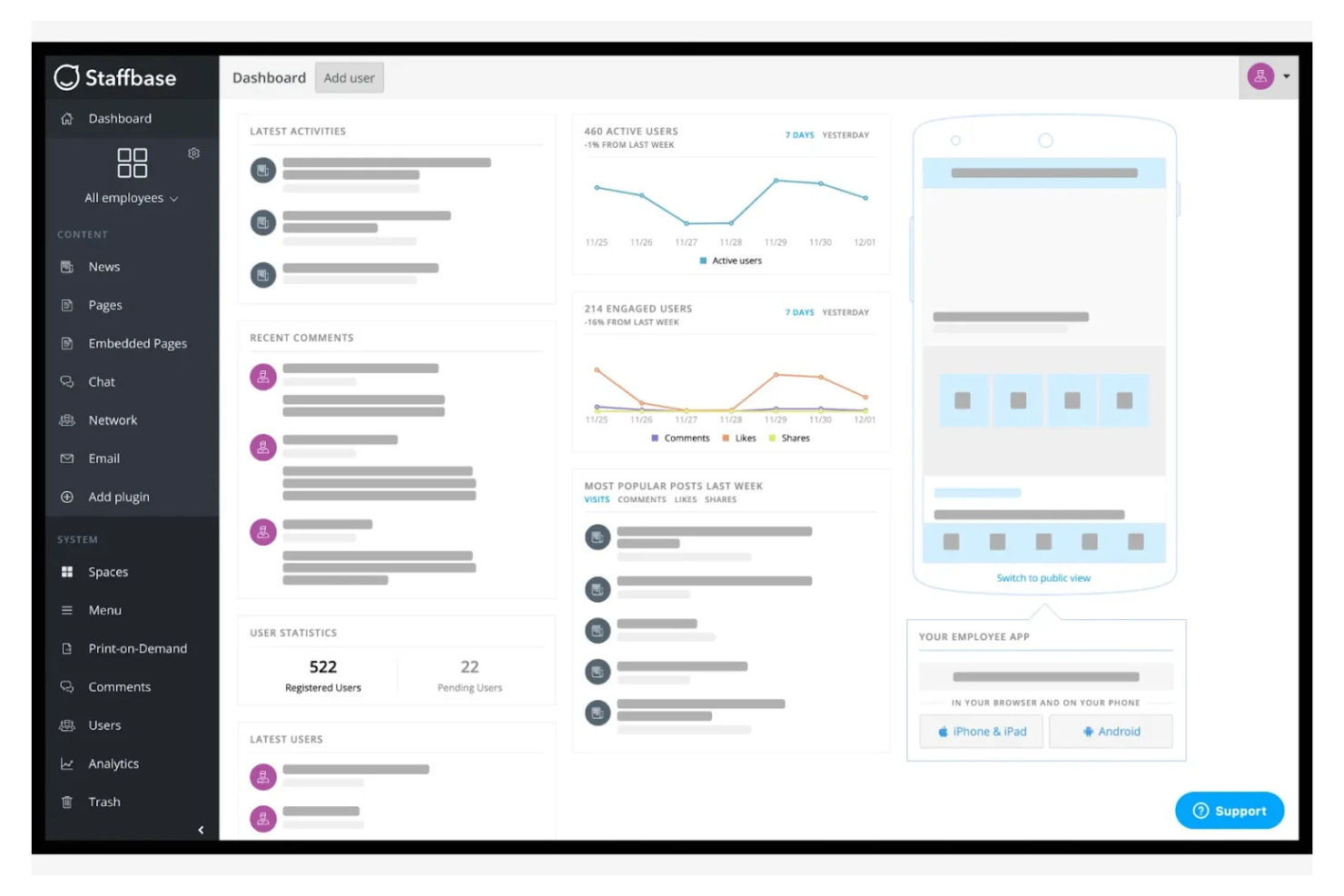
Staffbase está diseñada para organizaciones que necesitan conectar con empleados que no siempre están en un escritorio. La plataforma ayuda a llegar a los trabajadores de primera línea y móviles mediante noticias, actualizaciones y recursos dirigidos en cualquier dispositivo. Es especialmente útil en sectores como la salud, el comercio minorista y la manufactura, donde mantener a todos informados puede ser un desafío.
Por qué elegí Staffbase
Llegar a los empleados que no siempre están frente a una computadora es un verdadero reto, y ahí es donde destaca Staffbase. La plataforma ofrece una aplicación para empleados enfocada en dispositivos móviles para la gestión del conocimiento que entrega noticias y recursos a los trabajadores de primera línea.
Me gusta que puedas segmentar las comunicaciones por ubicación, departamento o puesto, así los mensajes llegan a las personas correctas sin perderse. Este enfoque en comunicaciones internas específicas y accesibles hace que Staffbase sea una opción fuerte para organizaciones con una gran fuerza laboral de primera línea.
Funciones clave de Staffbase
Otras funcionalidades de Staffbase ayudan a las organizaciones a gestionar la comunicación y el compromiso a gran escala:
- Canales de noticias personalizables: Crea y gestiona múltiples canales de noticias para diferentes equipos o temáticas.
- Encuestas a empleados: Recoge opiniones del personal con herramientas de encuestas integradas.
- Programación de contenido: Planifica y programa anuncios o actualizaciones para que se publiquen en momentos específicos.
- Gestión de documentos: Almacena y comparte archivos importantes, políticas y recursos dentro de la plataforma.
Integraciones de Staffbase
Las integraciones incluyen Microsoft 365, SharePoint, Slack, Salesforce y más.
Pros and Cons
Pros:
- Herramientas de encuestas integradas
- Opciones de programación de contenido
- Admite apps de empleados con marca
Cons:
- Funcionalidad de chat en tiempo real limitada
- Integraciones restringidas con sistemas externos de RRHH

Workvivo
Mejor para fomentar la cultura de la empresa

Workvivo adopta un enfoque social para la comunicación interna, facilitando que las organizaciones construyan un sentido de pertenencia. Es una excelente opción para equipos de recursos humanos y líderes que desean aumentar la participación y conectar a los empleados con los valores de la empresa, especialmente en ambientes distribuidos o híbridos. La plataforma reúne noticias, reconocimientos y funciones interactivas que ayudan a fortalecer la cultura más allá de simplemente compartir novedades.
Por qué elegí Workvivo
Lo que distingue a Workvivo es su enfoque en la construcción de una cultura empresarial vibrante a través de la comunicación. La plataforma ofrece un feed social donde los empleados pueden compartir actualizaciones, celebrar logros y reconocer las contribuciones de los demás.
Me gusta cómo Workvivo permite vincular publicaciones y reconocimientos directamente con los valores de la empresa, haciendo que la cultura sea visible y práctica cada día. Estas funciones lo convierten en una excelente opción para organizaciones que quieren ir más allá de los mensajes básicos y fomentar una verdadera implicación.
Funciones clave de Workvivo
Otras funciones de Workvivo ayudan a las organizaciones a conectar e informar a los empleados de manera significativa:
- Gestión de eventos: Gestiona diversos tipos de comunicación interna organizando y rastreando la asistencia a eventos de la empresa.
- Compartir podcasts y vídeos: Sube y comparte contenido multimedia para apoyar tus iniciativas de cultura y atraer a empleados con diferentes estilos de comunicación.
- Encuestas breves: Recoge rápidamente opiniones de los empleados mediante encuestas cortas y dirigidas.
- Base de conocimientos: Centraliza documentos importantes, políticas y recursos para un acceso sencillo.
Integraciones de Workvivo
Las integraciones incluyen Zoom, Slack, Microsoft Teams, SharePoint, Google Drive y más.
Pros and Cons
Pros:
- Insignias de reconocimiento entre compañeros
- Feed de actividad al estilo de redes sociales
- Ofrece herramientas de gestión de eventos
Cons:
- Sin calendario editorial integrado
- Herramientas básicas de formato de texto
Mejor mensajería autodestructiva para datos seguros

Troop Messenger está diseñado para organizaciones que necesitan mensajería de equipo segura y privada sin sacrificar la facilidad de uso. Es una excelente opción para industrias como gobierno, defensa o salud, donde la protección de datos y el cumplimiento normativo son prioridades. Con funciones como cifrado de extremo a extremo y despliegue local, Troop Messenger ayuda a los equipos a mantener protegidas conversaciones y archivos sensibles.
Por qué elegí Troop Messenger
La seguridad es una de las principales preocupaciones para muchas organizaciones, y por eso incluí Troop Messenger en esta lista. La plataforma ofrece cifrado de extremo a extremo para mensajes y archivos, lo que ayuda a proteger información sensible del acceso no autorizado.
También me gusta que Troop Messenger permite el despliegue local, brindando a las empresas control total sobre sus datos y necesidades de cumplimiento. Para equipos que gestionan comunicaciones confidenciales o trabajan en sectores regulados, estas funciones orientadas a la seguridad hacen que Troop Messenger sea una opción sólida.
Funciones Clave de Troop Messenger
Otras funciones de Troop Messenger ayudan a los equipos a colaborar y gestionar la comunicación de forma más efectiva:
- Burnout Chat: Envía mensajes autodestructivos que desaparecen después de un tiempo establecido.
- Forkout: Difunde un mensaje a varios usuarios o grupos a la vez.
- Uso compartido remoto de pantalla: Comparte tu pantalla con miembros del equipo para colaborar en tiempo real.
- Responder después: Marca mensajes para contestar en un momento más conveniente.
Integraciones de Troop Messenger
Las integraciones incluyen Google Drive, Dropbox y Zapier.
Pros and Cons
Pros:
- Opción de despliegue local autohospedado
- Filtros avanzados de búsqueda de archivos
- Mensajes autodestructivos burnout únicos
Cons:
- Límite reducido de participantes en videollamada
- Diseño de interfaz de usuario desactualizado

Chanty
Las mejores sugerencias potenciadas por IA para gestión de tareas

Chanty está diseñado para equipos que buscan una solución de chat sencilla sin complicaciones innecesarias. Es especialmente útil para pequeñas empresas o grupos que desean comenzar con la mensajería de equipo de manera rápida y con una configuración mínima. Con su interfaz simple y la gestión de tareas incorporada, Chanty ayuda a los equipos a mantener las conversaciones y los puntos de acción en un solo lugar.
Por qué elegí Chanty
Para los equipos que quieren estar listos y funcionando con el menor esfuerzo posible, Chanty destaca por su sencilla configuración de chat para equipos. Puedes crear canales, iniciar mensajes directos y organizar conversaciones sin un proceso de incorporación complicado.
Me gusta que Chanty incluya la gestión de tareas integrada, de modo que puedes convertir mensajes en elementos procesables directamente desde el chat. Esto lo hace una opción práctica para pequeños equipos o empresas que desean mantener la comunicación y colaboración de manera sencilla.
Características clave de Chanty
Otras características de Chanty ayudan a los equipos a comunicarse y colaborar de forma más eficiente:
- Mensajería de voz: Graba y envía mensajes de voz directamente en cualquier chat o canal.
- Mensajes fijados: Fija mensajes importantes en canales o conversaciones para una consulta rápida.
- Teambook: Accede a un centro centralizado con todos tus mensajes, tareas y archivos compartidos.
- Llamadas de audio y video integradas: Inicia llamadas de audio o video con miembros del equipo desde la aplicación.
Integraciones de Chanty
Las integraciones incluyen Trello, GitHub, Google Drive, Dropbox y más.
Pros and Cons
Pros:
- Tablero Kanban integrado para tareas
- Historial de mensajes ilimitado y buscable
- Grabación de fragmentos de mensajes de voz
Cons:
- Videollamadas grupales grandes con fallos
- Sin calendario nativo integrado

Mejor para la colaboración con Microsoft 365

Microsoft Teams reúne chat, reuniones y colaboración en documentos en un solo espacio de trabajo para organizaciones que ya usan Microsoft 365. Es una excelente opción para grupos que desean conectar la comunicación con herramientas como Outlook, SharePoint y OneDrive. La plataforma ayuda a los equipos a coordinar proyectos, compartir archivos y mantener las conversaciones vinculadas a los documentos y calendarios que utilizan cada día.
Por qué elegí Microsoft Teams
Lo que distingue a Microsoft Teams es su profunda integración con la suite Microsoft 365, lo que lo convierte en una elección natural para organizaciones que ya han invertido en esas herramientas. Teams permite coeditar documentos de Word, Excel o PowerPoint directamente desde un chat o reunión, así la colaboración ocurre en tiempo real sin cambiar de aplicación.
Me resulta muy útil que los eventos de calendario, correos electrónicos y archivos de Outlook y SharePoint sean accesibles directamente desde Teams, manteniendo todo en contexto. Esta integración estrecha ayuda a los equipos a conservar la comunicación, la programación y la gestión de documentos en un solo lugar.
Funciones clave de Microsoft Teams
Otras funciones de Microsoft Teams complementan sus capacidades para la comunicación interna:
- Chats privados y grupales: Utiliza el software de comunicación interna para iniciar conversaciones individuales o grupales para debates rápidos.
- Grabación y transcripción de reuniones: Graba reuniones y genera automáticamente transcripciones buscables para consultarlas más tarde.
- Pestañas personalizables: Alinea tu estrategia de comunicación interna añadiendo aplicaciones, archivos o sitios web como pestañas en los canales.
- Salas para subgrupos: Divide reuniones grandes en grupos pequeños para debates o actividades centradas.
Integraciones de Microsoft Teams
Las integraciones incluyen Microsoft Word, Excel, PowerPoint, OneNote, SharePoint, Planner, Trello, GitHub, Zoom y más.
Pros and Cons
Pros:
- Reuniones por videollamada integradas
- Incluye grabación y transcripción de reuniones
- Permite que los equipos agreguen aplicaciones y recursos a los canales
Cons:
- La función de búsqueda puede no encontrar mensajes antiguos
- Configuración confusa para acceso de invitados

Twist
La mejor mensajería con hilos para reducir el desorden
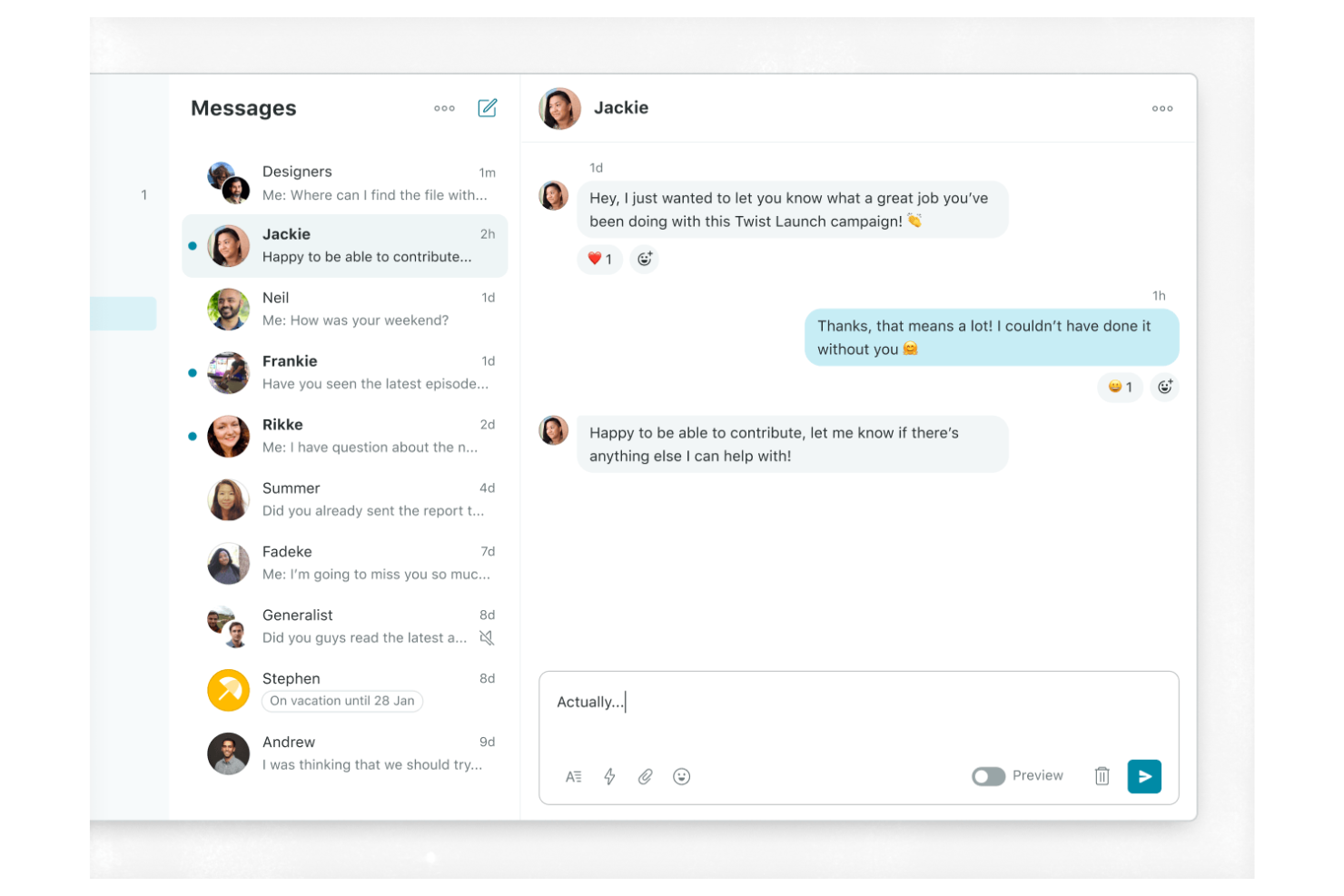
Twist adopta un enfoque diferente para la mensajería de equipos, centrándose en la comunicación asincrónica y los hilos organizados. Es ideal para equipos distribuidos, empresas que priorizan el trabajo remoto o cualquier grupo que desee reducir la sobrecarga de notificaciones y mantener conversaciones fáciles de seguir. Con su estructura basada en hilos, Twist te ayuda a evitar el caos del chat en tiempo real y facilita encontrar debates importantes más tarde.
Por qué elegí Twist
Lo que diferencia a Twist es su apuesta por la mensajería asincrónica para equipos, algo especialmente valioso para quienes trabajan en diferentes zonas horarias o con horarios flexibles. En lugar de depender de chats en tiempo real, Twist organiza las conversaciones en hilos, haciendo que sea más fácil mantener los temas enfocados y que las conversaciones sean localizables.
Me gusta que puedas ponerte al día con los temas importantes sin tener que revisar un historial de chat interminable o perder actualizaciones clave. Este enfoque ayuda a los equipos a reducir distracciones y mantener claridad en su comunicación interna.
Funciones clave de Twist
Otras funciones de Twist permiten que los equipos gestionen la comunicación y colaboración de manera más intencionada:
- Vista de bandeja de entrada: Consulta todos tus mensajes nuevos y actualizaciones de hilos en un solo lugar organizado.
- Integraciones con herramientas: Conecta Twist con aplicaciones como GitHub, Zapier y Todoist para automatizar los flujos de trabajo.
- Búsqueda avanzada: Encuentra rápidamente conversaciones pasadas, archivos e hilos usando palabras clave y filtros.
- Acceso de invitados: Invita colaboradores externos a canales específicos sin darles acceso completo al espacio de trabajo.
Integraciones de Twist
Las integraciones incluyen Asana, Google Calendar, Box, Calendly, Jira y más.
Pros and Cons
Pros:
- Diseño de hilos asincrónicos y estructurados
- Menos fatiga por alertas de notificaciones
- Sensación de archivo de correo electrónico basado en hilos
Cons:
- Sin indicadores de presencia en tiempo real
- Catálogo limitado de integraciones de terceros

Blink
Ideal para comunicación móvil primero
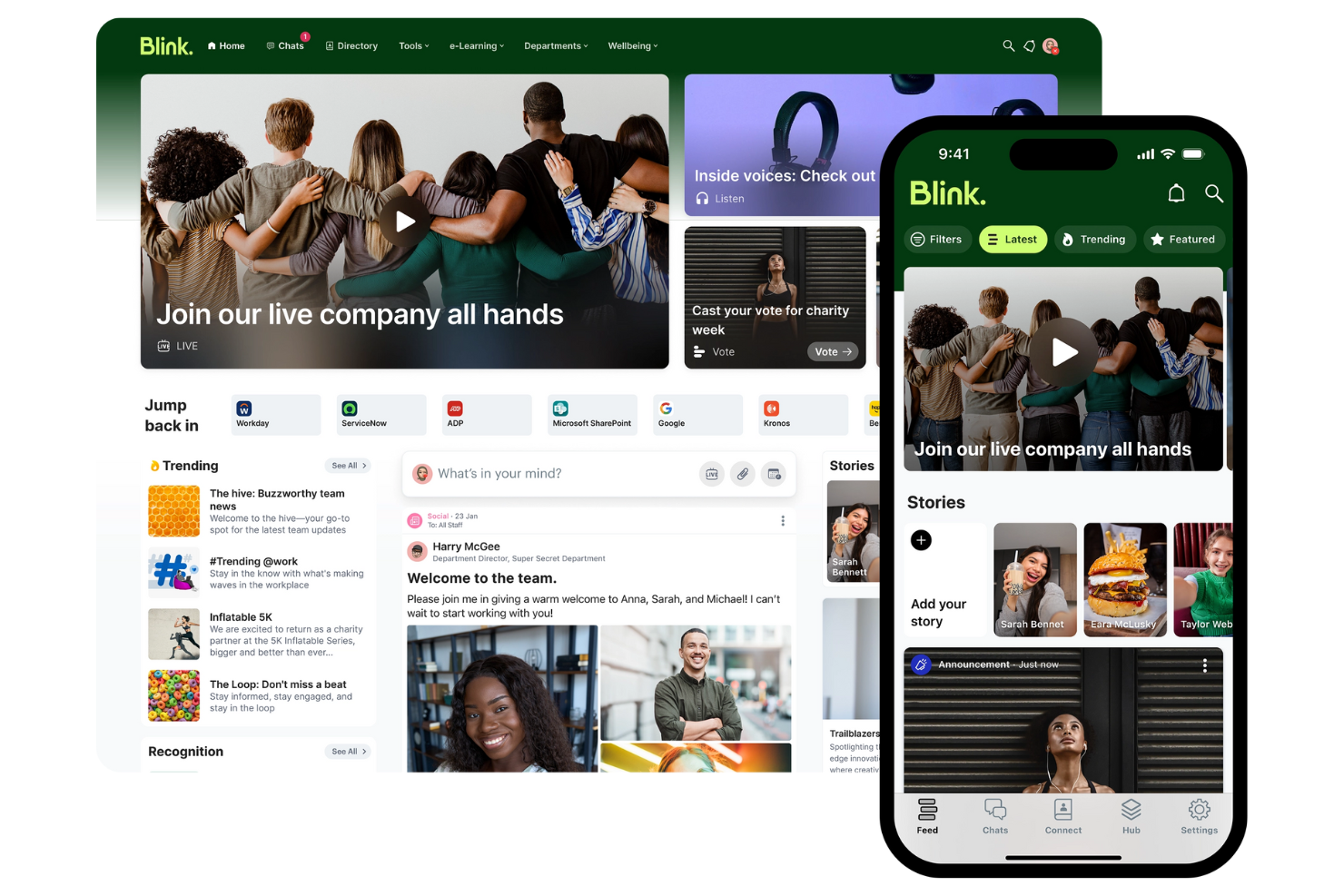
Blink pone la comunicación móvil en el centro, lo que lo convierte en una opción sólida para organizaciones con empleados de primera línea o sin escritorio. Está diseñado para equipos en industrias como comercio minorista, salud y transporte que necesitan llegar a empleados que no siempre están en un escritorio.
Con funciones diseñadas para actualizaciones rápidas, compartir recursos y mensajería segura, Blink ayuda a mantener a todos conectados sin importar dónde trabajen.
Por qué elegí Blink
Blink destaca por su enfoque móvil primero, que es especialmente importante para organizaciones con una gran cantidad de empleados de primera línea o remotos. La aplicación ofrece un canal unificado para noticias de la compañía, actualizaciones de políticas y alertas urgentes, todo optimizado para dispositivos móviles.
Me gusta que Blink incluya mensajería directa y chats grupales seguros, lo que facilita a los empleados conectarse y colaborar en movimiento. Estas características hacen de Blink una opción adecuada para equipos que necesitan llegar a personas que no están atadas a un escritorio o computadora.
Funciones clave de Blink
Otras funciones de Blink ayudan a los equipos a gestionar la comunicación y recursos de manera más eficiente:
- Centro de documentos: Almacena y comparte documentos importantes para que los empleados puedan acceder a ellos desde sus dispositivos móviles.
- Microaplicaciones: Agrega herramientas y flujos de trabajo personalizados directamente en la plataforma Blink para respaldar necesidades comerciales específicas.
- Encuestas y sondeos: Recoge opiniones de los empleados rápidamente con herramientas integradas de encuestas y votaciones.
- Inicio de sesión único (SSO): Permite a los usuarios acceder a Blink de manera segura usando sus credenciales corporativas existentes.
Integraciones de Blink
Las integraciones incluyen Microsoft 365, Google Workspace, Jira, ServiceNow y más.
Pros and Cons
Pros:
- Canal de noticias para empleados enfocado en primera línea
- Acceso seguro con inicio de sesión único
- Formularios digitales para trabajadores móviles
Cons:
- Gestión compleja de grupos a gran escala
- Módulos de participación estructurada limitados

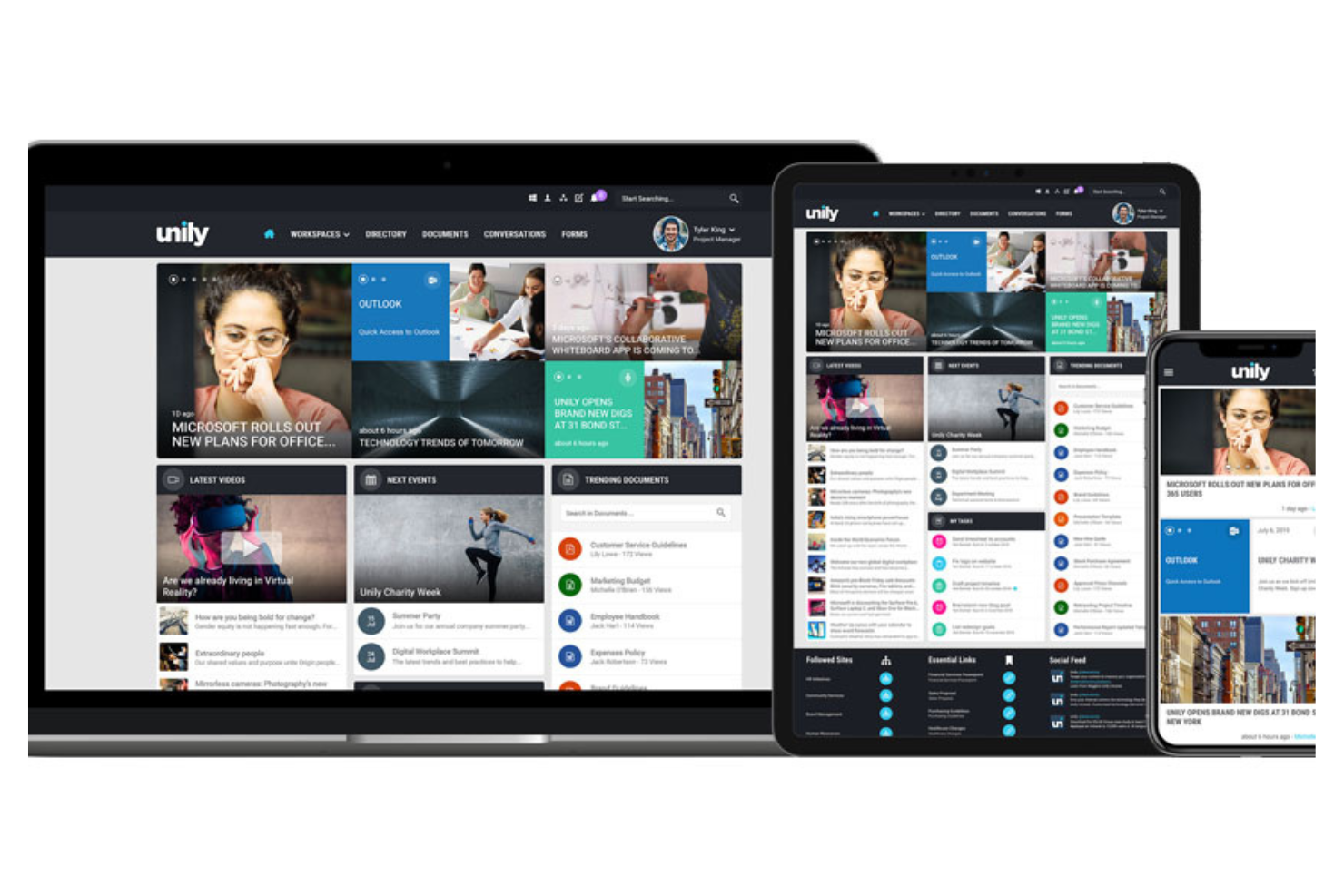
Unily está diseñado para organizaciones con una fuerza laboral global que necesitan conectar a sus empleados en distintas ubicaciones, idiomas y dispositivos. Es especialmente útil para grandes empresas y equipos multinacionales que desean ofrecer comunicaciones dirigidas y fomentar el compromiso a gran escala. Con funciones para contenido multilingüe, fuentes de noticias personalizadas y acceso móvil, Unily te ayuda a llegar a cada empleado, esté donde esté trabajando.
Por qué elegí Unily
Unily destaca en organizaciones que necesitan involucrar a una fuerza laboral dispersa y global. Su gestión de contenido multilingüe permite entregar comunicaciones en varios idiomas, para que cada empleado pueda acceder a la información en su idioma preferido.
Me gusta cómo las fuentes de noticias personalizadas de Unily garantizan que las actualizaciones relevantes lleguen a las personas adecuadas, sin importar dónde se encuentren. Estas características hacen de Unily una opción sólida para empresas que buscan construir una experiencia global para los empleados más allá de las fronteras.
Funciones clave de Unily
Otras funciones en Unily ayudan a los equipos a comunicarse y colaborar de manera más eficaz:
- Creador de páginas por arrastrar y soltar: Crea y personaliza páginas de intranet sin codificación ni soporte de TI gracias a una interfaz fácil de usar.
- Centro de videos: Comparte, organiza y transmite contenido audiovisual para comunicaciones a nivel empresarial.
- Aplicación móvil: Permite a los empleados acceder a las comunicaciones internas y recursos desde cualquier dispositivo.
- Herramientas de redes sociales: Activa comentarios, 'me gusta' y comparticiones para fomentar la participación y el feedback.
Integraciones de Unily
Las integraciones incluyen Microsoft 365, ServiceNow, Zoom, Salesforce, Google Workspace y más.
Pros and Cons
Pros:
- Traducción de contenido con tecnología de IA
- Protocolos de seguridad de nivel empresarial
- Análisis multinivel y métricas de compromiso
Cons:
- Alto coste total de propiedad
- Flujos de aprobación complejos de varios pasos

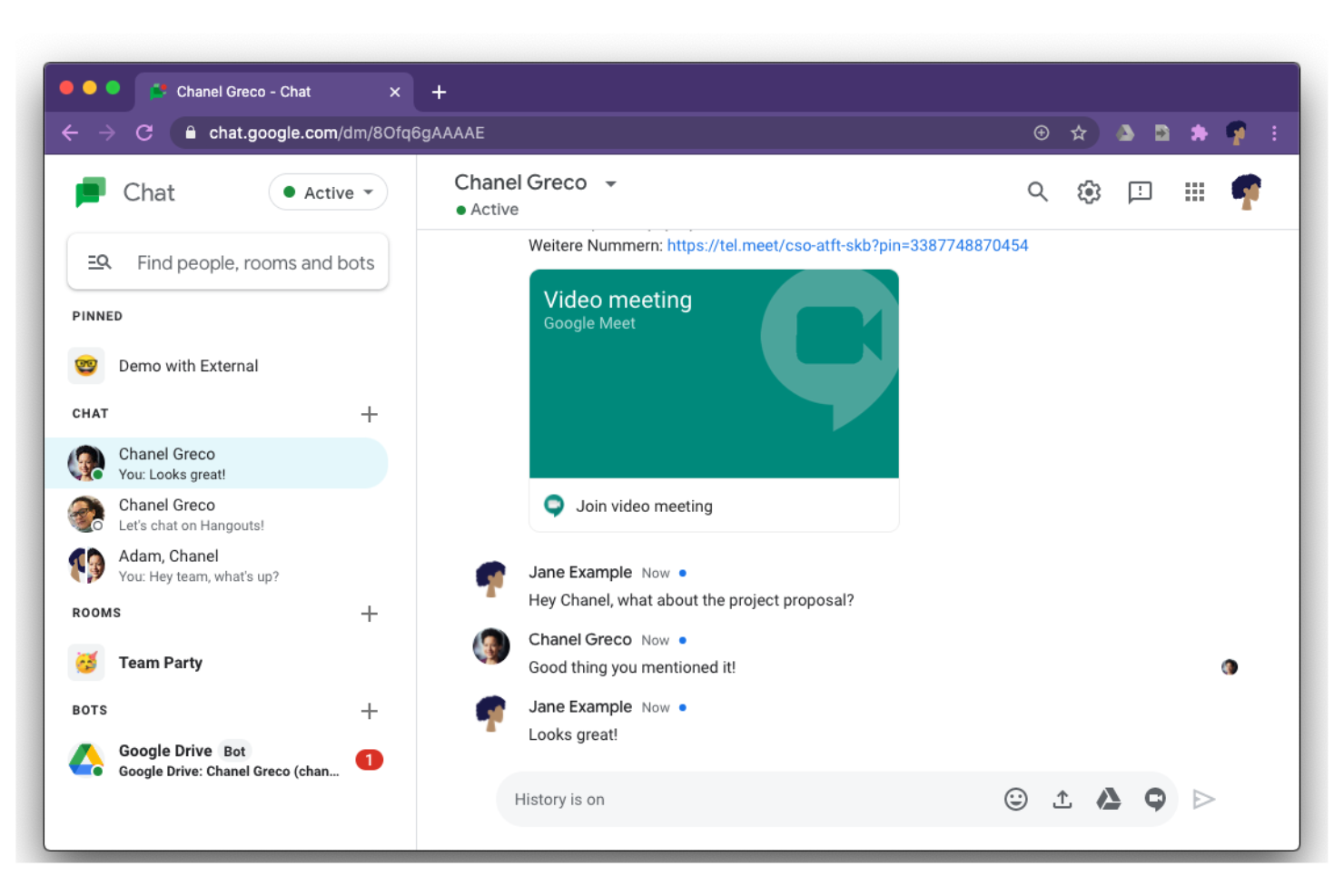
Google Chat ofrece herramientas de mensajería para conectar conversaciones con Docs, Drive y Calendar para equipos que dependen de Google Workspace. Es especialmente útil para organizaciones que desean mantener la mensajería, el intercambio de archivos y las actualizaciones de proyectos dentro del mismo ecosistema que su correo electrónico y documentos. La plataforma ayuda a los grupos a coordinar el trabajo, gestionar tareas y mantener las discusiones organizadas junto a las herramientas que ya utilizan.
Por qué elegí Google Chat
Para los equipos que ya utilizan Google Workspace, Google Chat destaca porque mantiene toda la comunicación y colaboración en el mismo entorno. Puedes compartir Google Docs, Sheets y Slides directamente en los chats o salas, lo que facilita comentar y editar archivos sin salir de la conversación.
Me gusta que las invitaciones del calendario y los enlaces de reuniones de Google Calendar estén accesibles directamente en el chat, por lo que la programación y el seguimiento permanecen conectados. Esta integración estrecha ayuda a los equipos a mantener su trabajo y conversaciones organizados en un lugar familiar.
Características clave de Google Chat
Otras funciones de Google Chat ayudan a los equipos a gestionar la comunicación y proyectos de manera más eficiente:
- Conversaciones organizadas en hilos: Mantén las discusiones organizadas por tema dentro de salas o chats de grupo.
- Bots y automatización: Utiliza bots integrados para automatizar tareas como programación o recordatorios.
- Mensajes directos: Inicia chats privados uno a uno o en grupo fuera de las salas para conversaciones rápidas.
- Aplicaciones para móviles y computadoras: Accede a Google Chat desde aplicaciones dedicadas tanto en dispositivos móviles como en ordenadores de escritorio.
Integraciones de Google Chat
Las integraciones incluyen Google Drive, Google Calendar, Google Meet, Gmail, Google Docs, Google Sheets, Google Slides, Trello, Asana y más.
Pros and Cons
Pros:
- Integración directa con Google Drive
- Automatiza recordatorios y programación
- Tiene una aplicación móvil
Cons:
- Controles de notificaciones básicos
- Menos integraciones con aplicaciones de terceros


El chat de equipo de Zoom es especialmente útil para los equipos que dependen de las reuniones por video para la colaboración diaria. La herramienta conecta el chat, el intercambio de archivos y la programación de reuniones en un solo lugar, lo que facilita pasar de la mensajería al video en directo con un solo clic. Es una opción adecuada para las organizaciones que quieren mantener las conversaciones y las reuniones estrechamente vinculadas sin cambiar de plataforma.
Por qué elegí el chat de equipo de Zoom
Lo que distingue al chat de equipo de Zoom es la forma en que reúne el chat y las reuniones por video en un único flujo de trabajo. Puedes iniciar una reunión de Zoom directamente desde cualquiera de tus canales de comunicación, lo que ayuda a los equipos a pasar rápidamente de las conversaciones escritas a las conversaciones cara a cara cuando es necesario.
Aprecio que los archivos compartidos y los resúmenes de las reuniones permanezcan accesibles dentro del chat, para que el contexto importante no se pierda entre reuniones y mensajes. Este enfoque mantiene una comunicación fluida para los equipos que dependen tanto del chat como del video para realizar su trabajo.
Funciones clave del chat de equipo de Zoom
Otras funciones del chat de equipo de Zoom ayudan a los equipos a gestionar la comunicación y la colaboración diarias:
- Canales y chats grupales: Organiza las conversaciones por proyecto, departamento o tema para mantener debates centrados.
- Reacciones a mensajes y menciones: Usa reacciones con emojis para responder rápidamente y llamar la atención de alguien.
- Respuestas en hilos: Mantén agrupados los mensajes relacionados para disponer de un mejor contexto en los canales con mucha actividad.
- Intercambio y almacenamiento de archivos: Comparte documentos e imágenes directamente en el chat para garantizar una comunicación interna eficaz.
Integraciones del chat de equipo de Zoom
Las integraciones incluyen Zoom Meetings, Google Drive, Microsoft 365, Slack, Salesforce, Dropbox, Trello, Asana, GitHub y muchas más.
Pros and Cons
Pros:
- Puede iniciar reuniones por video desde cualquier chat
- Admite debates de equipo tanto públicos como privados
- Reacciones a mensajes y respuestas en hilos
Cons:
- No incluye funciones integradas de seguimiento de proyectos
- Función de búsqueda lenta
Otras herramientas de comunicación interna
Estas son algunas opciones adicionales de herramientas de comunicación interna que no llegaron a mi lista de selección, pero que merece la pena consultar:


Cómo evalúo las herramientas de comunicación interna
Cuando los equipos de RRHH necesitan contactar a un empleado de almacén sin correo electrónico corporativo, la herramienta lo gestiona o no — divido mi evaluación en requisitos básicos imprescindibles y en lo que hace destacar a cada opción.
Funcionalidad principal (requisitos mínimos para esta lista)
Al seleccionar herramientas para mi lista, califico cada una en una escala del 0 (no ofrece la funcionalidad) al 5 (destaca en esta área) por cada funcionalidad principal que se indica a continuación. Luego, calculo la puntuación total de la herramienta como un porcentaje. Cada herramienta necesita alcanzar una puntuación mínima total del 65% para ser considerada en la inclusión.
- Mensajería multicanal: Verifico si la plataforma admite mensajes directos, chats de grupo y canales de difusión para que RRHH pueda publicar una actualización de beneficios y un chat de equipo en un solo lugar.
- Accesibilidad móvil: Una app móvil nativa es importante porque los trabajadores de primera línea en comercios o sanidad a menudo dependen de sus teléfonos personales para mantenerse conectados con RRHH.
- Segmentación de audiencias: Busco la capacidad de enviar mensajes por departamento, ubicación o función — como dirigir una actualización de seguridad solo al personal de almacén.
- Analítica de participación: Las métricas de lectura y alcance te indican si alguien realmente vio ese recordatorio de inscripción abierta, así que evalúo los informes que ofrece cada herramienta.
- Compartir contenidos y archivos: Los equipos necesitan compartir PDFs de políticas, vídeos de formación y fotos de eventos dentro de la plataforma en vez de enlazar a otras herramientas de almacenamiento.
- Directorio de empleados y perfiles: Un directorio con roles y departamentos que sea buscable ayuda a los nuevos empleados a encontrar rápido el contacto adecuado, especialmente en varias sedes u oficinas.
Una vez tengo una lista de herramientas que cumplen estos criterios, considero qué distingue a cada plataforma.
Factores diferenciadores (lo que distingue a los proveedores)
Así es como comparo y contrasto diferentes proveedores:
Características destacadas
Las encuestas rápidas y las herramientas de retroalimentación permiten a los equipos de RRHH medir el ambiente dentro de la misma plataforma donde ocurren las conversaciones diarias, lo que genera mayores tasas de respuesta que redirigir a las personas a una herramienta de encuestas separada. Las alertas de crisis y emergencia son importantes para organizaciones con personal de primera línea — evalúo si la plataforma permite confirmaciones de lectura obligatorias para incidentes de seguridad o cumplimiento. La asistencia mediante IA para crear contenido también es relevante, en especial para equipos globales donde RRHH necesita redactar y traducir anuncios en varios idiomas.
Más allá de las características
Las integraciones con sistemas de información de RRHH son críticas — verifico si los registros de empleados de plataformas como Workday o BambooHR se sincronizan automáticamente, de modo que RRHH no tenga que agregar y eliminar usuarios manualmente a medida que las personas se incorporan o se van. La adecuación a una fuerza laboral sin escritorio también es importante, en particular si la herramienta permite acceso compartido desde un dispositivo o cuentas basadas en número de teléfono para trabajadores sin correo corporativo. Para organizaciones en sectores regulados como sanitarios o financieros, evalúo certificaciones de cumplimiento como SOC 2 Type II y HIPAA, junto con controles de acceso por rol y registros de auditoría.
Cómo elegir herramientas de comunicación interna
Es fácil perderse entre las largas listas de funciones de las distintas aplicaciones de mensajería y las complejas estructuras de precios. Para ayudarte a mantener la concentración mientras avanzas en tu proceso único de selección de software, aquí tienes una lista de factores que debes tener en cuenta:
| Factor | Qué debes tener en cuenta |
|---|---|
| Escalabilidad | ¿La herramienta será compatible con el tamaño de tu equipo a medida que crezca? Comprueba los límites de usuarios, los niveles de precios y el rendimiento con grupos grandes. |
| Integraciones | ¿La herramienta se conecta con tu HRIS, tus sistemas de gestión de proyectos o de almacenamiento de archivos? Confirma las integraciones nativas y las opciones de API. |
| Personalización | ¿Puedes adaptar los canales, los permisos y las notificaciones a la estructura y los flujos de trabajo de tu organización? Evita las herramientas con configuraciones rígidas. |
| Facilidad de uso | ¿Los empleados adoptarán la herramienta rápidamente? Busca una navegación clara, necesidades mínimas de formación y comentarios positivos de organizaciones similares. |
| Implementación e incorporación | ¿Cuánto tiempo llevará implementarla? Evalúa la asistencia para la migración, los recursos de formación y si necesitarás la participación del departamento de TI para la configuración. |
| Coste | ¿Los planes de precios son transparentes y predecibles? Ten en cuenta los precios basados en usuarios, los costes adicionales y los compromisos contractuales. |
| Medidas de seguridad | ¿La herramienta cumple tus estándares de protección de datos? Busca cifrado, controles de acceso y registros de auditoría, especialmente si gestionas información confidencial. |
| Requisitos de cumplimiento | ¿La herramienta es compatible con las necesidades legales o normativas de tu sector, como el RGPD o HIPAA? Confirma las certificaciones y las opciones de residencia de datos. |
¿Qué son las herramientas de comunicación interna?
Las herramientas de comunicación interna son plataformas de software que ayudan a los equipos y las organizaciones a compartir mensajes, archivos y actualizaciones dentro del entorno laboral. Estas herramientas admiten la comunicación en tiempo real y asíncrona, lo que facilita que los empleados colaboren, coordinen proyectos y se mantengan informados.
A menudo incluyen funciones como chats grupales, mensajería directa, intercambio de archivos e historiales de conversaciones con función de búsqueda, todo ello diseñado para mantener la información interna organizada y accesible.
Características
Al seleccionar herramientas de comunicación interna, presta atención a las siguientes características clave:
- Mensajería directa: Permite mantener conversaciones privadas, individuales, entre empleados para resolver preguntas rápidas o tratar asuntos confidenciales.
- Canales de chat grupal: Permite que los equipos o departamentos se comuniquen en espacios específicos organizados por tema, proyecto o función.
- Intercambio de archivos: Permite a los usuarios cargar, enviar y acceder a documentos, imágenes y otros archivos directamente dentro de las conversaciones.
- Historial de mensajes con función de búsqueda: Ofrece la posibilidad de buscar mensajes y archivos anteriores, lo que facilita recuperar información importante cuando sea necesario.
- Gestión de permisos de usuario: Controla quién puede acceder, publicar o moderar contenido en los canales, ayudando a mantener la seguridad y el orden.
- Notificaciones de mensajes: Avisa a los usuarios de nuevos mensajes o menciones, garantizando que las actualizaciones importantes se vean rápidamente.
- Compartición de pantalla: Permite a los usuarios compartir sus pantallas durante reuniones o chats para realizar demostraciones, solucionar problemas o colaborar.
- Videollamadas y llamadas de voz: Admite audio en tiempo real y reuniones virtuales para seguimientos o conversaciones urgentes.
- Fijación de mensajes: Permite a los usuarios destacar y guardar mensajes importantes en la parte superior de un canal o chat para consultarlos fácilmente.
- Aplicaciones para móviles y ordenadores: Ofrece acceso a las herramientas de comunicación desde distintos dispositivos, facilitando el trabajo remoto y en movilidad.
Beneficios
La implementación de herramientas de comunicación interna ofrece varios beneficios para tu equipo y tu empresa. Estos son algunos de los que puedes esperar:
- Intercambio de información más rápido: La mensajería y las notificaciones en tiempo real ayudan a los equipos a distribuir rápidamente las actualizaciones y las decisiones.
- Mejora de la colaboración: Los canales de chat grupal, el intercambio de archivos y la compartición de pantalla facilitan que los empleados trabajen juntos en proyectos.
- Mejor conservación del conocimiento: Los historiales de mensajes con función de búsqueda y los mensajes fijados garantizan que la información importante esté siempre accesible.
- Mayor seguridad: La gestión de permisos de usuario y las medidas de seguridad protegen las conversaciones confidenciales y los datos de la empresa.
- Mayor flexibilidad: Las aplicaciones para móviles y ordenadores facilitan la comunicación de los empleados remotos, híbridos y que trabajan en movilidad.
- Responsabilidades más claras: La mensajería directa y el historial de mensajes proporcionan un registro de las conversaciones y decisiones para consultarlo en el futuro.
- Menor saturación del correo electrónico interno: El chat centralizado y el intercambio de archivos reducen la necesidad de mantener largos hilos de correo y comunicaciones dispersas.
Costes y precios
Seleccionar herramientas de comunicación interna requiere comprender los distintos modelos de precios y planes disponibles. Los costes varían en función de las características, el tamaño del equipo, los complementos y otros factores. La siguiente tabla resume los planes habituales, sus precios medios y las características que suelen incluir las soluciones de herramientas de comunicación interna:
Tabla comparativa de planes de herramientas de comunicación interna
| Tipo de plan | Precio medio | Características habituales |
|---|---|---|
| Plan gratuito | $0 | Mensajería básica, canales grupales limitados, intercambio de archivos, búsqueda básica y almacenamiento limitado. |
| Plan personal | $4–$8/usuario/mes | Mensajería directa, chats grupales, intercambio de archivos, historial con función de búsqueda y asistencia básica. |
| Plan empresarial | $8–$15/usuario/mes | Permisos avanzados, videollamadas y llamadas de voz, integraciones, mayor capacidad de almacenamiento y asistencia prioritaria. |
| Plan corporativo | $15–$25/usuario/mes | Seguridad personalizada, herramientas de cumplimiento normativo, opciones locales, gestión de cuentas dedicada y análisis avanzados. |
Preguntas frecuentes sobre herramientas de comunicación interna
Estas son algunas respuestas a preguntas frecuentes sobre las herramientas de comunicación interna:
¿Cómo ayudan las herramientas de comunicación interna a los equipos remotos e híbridos?
Las herramientas de comunicación interna ayudan a los equipos remotos e híbridos al proporcionar mensajería en tiempo real, videollamadas y uso compartido de archivos entre dispositivos. Esto permite a los empleados mantenerse conectados, colaborar en proyectos y acceder a actualizaciones importantes sin importar desde dónde trabajen.
¿Pueden las herramientas de comunicación interna integrarse con otros programas de trabajo?
Sí, la mayoría de las herramientas de comunicación interna ofrecen integraciones con sistemas de información de recursos humanos, gestión de proyectos y almacenamiento de archivos. Las integraciones ayudan a centralizar los flujos de trabajo, reducir los cambios de contexto y garantizar que la información fluya correctamente entre las plataformas que tu equipo ya utiliza.
¿Qué funciones de seguridad debo buscar en las herramientas de comunicación interna?
Busca funciones como el cifrado de extremo a extremo, los controles de acceso de usuarios, los registros de auditoría y las certificaciones de cumplimiento. Estas medidas de protección ayudan a proteger los datos confidenciales de la empresa y garantizan que tus comunicaciones cumplan los requisitos legales o del sector.
¿Cómo puedo fomentar la adopción de una nueva herramienta de comunicación interna?
Empieza con recursos de formación claros, recorridos por el producto y asistencia durante la incorporación. Involucra a los responsables de equipo como promotores, establece expectativas de uso y recopila comentarios para abordar las preocupaciones desde el principio. La comunicación constante sobre el valor de la herramienta también ayuda a impulsar su adopción.
¿Hay herramientas de comunicación interna adecuadas para pequeñas empresas?
Sí, muchas herramientas de comunicación interna ofrecen planes gratuitos o de bajo coste diseñados para equipos pequeños. Estos planes suelen incluir funciones básicas como mensajería, chats grupales y uso compartido de archivos, lo que las hace accesibles para organizaciones con presupuestos limitados.