

10 mejores herramientas de software de analítica de personas para 2026

Lista de los mejores programas de análisis de personas


¿Te sientes abrumado por la enorme cantidad de datos que gestiona tu equipo de RR. HH. a diario? El software de análisis de personas podría ser justo lo que necesitas. Convierte los datos sin procesar en información útil, lo que te ayuda a tomar decisiones fundamentadas sobre contratación, retención y satisfacción de los empleados.
Según mi experiencia, los profesionales de RR. HH. se enfrentan constantemente a la presión de optimizar su plantilla. Necesitas herramientas que simplifiquen el proceso y ofrezcan resultados claros. Ahí es donde entra en juego el software de análisis de personas.
He probado y analizado numerosas opciones para ofrecerte una lista imparcial y bien documentada de las mejores soluciones disponibles. Puedes confiar en que mis reseñas se centran en lo que realmente importa para ti y tu equipo. Veamos las mejores opciones que pueden marcar la diferencia en tu estrategia de RR. HH.
Por qué confiar en nuestras reseñas de software
Nuestro equipo lleva probando y evaluando software desde 2012. Como expertos en RR. HH., sabemos lo difícil —y lo importante— que es elegir el software adecuado.
Para esta guía, evaluamos las herramientas mediante pruebas prácticas e investigación independiente, puntuando las herramientas según nuestros criterios de selección. También nos basamos en la experiencia de líderes de opinión del sector y de profesionales de RR. HH. en activo.
Nuestras reseñas reflejan nuestro criterio editorial humano, no un discurso de ventas.
Revisores expertos:
Tabla comparativa de programas de análisis de personas
La siguiente tabla compara los precios, la disponibilidad de pruebas gratuitas y las opciones de demostración de mi selección de los mejores programas de análisis de personas.
| Tool | Best For | Trial Info | Price | ||
|---|---|---|---|---|---|
| 1 | Ideal para soporte integrado de nóminas y cumplimiento | Demostración gratuita disponible | Desde $8/usuario/mes + cuota base de $50/mes | Website | |
| 2 | Ideal para obtener información procesable sobre la fuerza laboral | Demostración gratuita disponible | Precios a consultar | Website | |
| 3 | Ideal para obtener información sobre el comportamiento del usuario | Prueba gratuita + demo gratis disponible | Desde $14/asiento/mes (facturado anualmente) | Website | |
| 4 | Mejor software de análisis de personas por fuentes ilimitadas de datos contextuales de la fuerza laboral | Demostración gratuita disponible | Precio bajo consulta | Website | |
| 5 | Ideal para visualizar la equidad salarial y la compensación total | Demostración gratuita disponible | Precio bajo solicitud | Website | |
| 6 | El mejor software de análisis de personas para la visualización de datos de RRHH | Plan gratuito disponible | Desde $15/usuario/mes (facturado anualmente) | Website | |
| 7 | Mejor software de análisis de personas para democratizar información | Demostración gratuita disponible | Precio a consultar | Website | |
| 8 | El mejor software de people analytics para el seguimiento de eNPS | Demo gratuita disponible | Desde $4.50-$11.70/empleado/mes | Website | |
| 9 | Ideal para convertir comentarios en recomendaciones prácticas | Demostración gratuita disponible | Desde $4,999/año | Website | |
| 10 | El mejor software de análisis de personas para analítica predictiva | Demostración gratuita disponible | Precio bajo consulta | Website |

Los mejores programas de análisis de personas
Aquí tienes una breve descripción de cada programa de análisis de personas para mostrar el caso de uso más adecuado de cada herramienta, sus funciones destacadas y algunas ventajas & desventajas. También he incluido capturas de pantalla para ofrecerte una vista general de su interfaz de usuario.

Ideal para soporte integrado de nóminas y cumplimiento
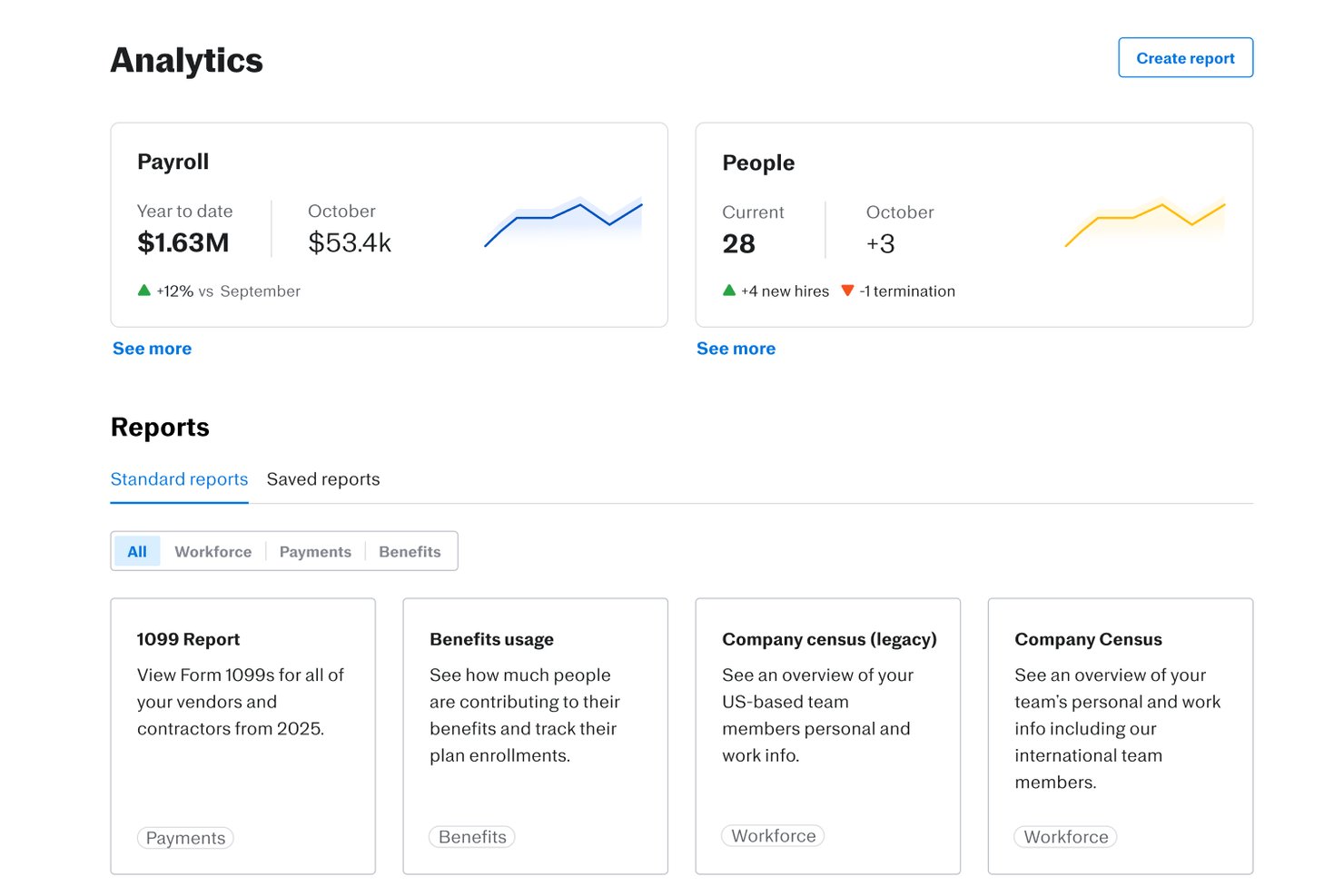
Justworks es una plataforma de RR.HH. y nómina basada en la nube diseñada para ayudar a las organizaciones a gestionar datos de la fuerza laboral, incorporación de empleados, beneficios, seguimiento del tiempo, cumplimiento normativo y análisis básicos de personas dentro de un sistema unificado.
¿Para quién es Justworks?
Empresas pequeñas y medianas que buscan una plataforma todo en uno para gestionar nóminas, RR.HH. y cumplimiento normativo en EE. UU.
Por qué elegí Justworks
Elegí Justworks como uno de los mejores porque puedo confiar en su nómina, cumplimiento normativo y análisis básicos unificados para seguir cambios en la plantilla, tendencias de empleo y datos de riesgos desde una sola plataforma. La nómina y el cumplimiento siempre están actualizados sin necesidad de actualizaciones manuales.
Características clave de Justworks
- Generador de informes personalizados: Crea y exporta informes de datos de personal adaptados a tus necesidades de análisis de la fuerza laboral.
- Directorio de empleados: Accede a una lista buscable de perfiles de empleados con funciones, equipos y detalles clave de la plantilla.
- Seguimiento de tiempo y asistencia: Supervisa las horas de los empleados, tiempo libre remunerado y patrones de asistencia en un único panel.
- Gestión de documentos: Almacena y organiza políticas de RR.HH., formularios de cumplimiento y contratos de empleados para un fácil acceso.
Integraciones de Justworks
Justworks ofrece más de 20 integraciones, incluyendo QuickBooks, Xero, NetSuite, Sage Intacct, Greenhouse, JazzHR, Lever, 15Five, Leapsome, Carta, Brex y Vanta.
Pros and Cons
Pros:
- Seguimiento de cumplimiento integrado en paneles de análisis
- Informes automatizados de plantilla y rotación
- Datos de nómina fácilmente accesibles para análisis
Cons:
- Sin funciones de análisis predictivo
- Analítica personalizada limitada más allá de los métricos centrales

Ideal para obtener información procesable sobre la fuerza laboral
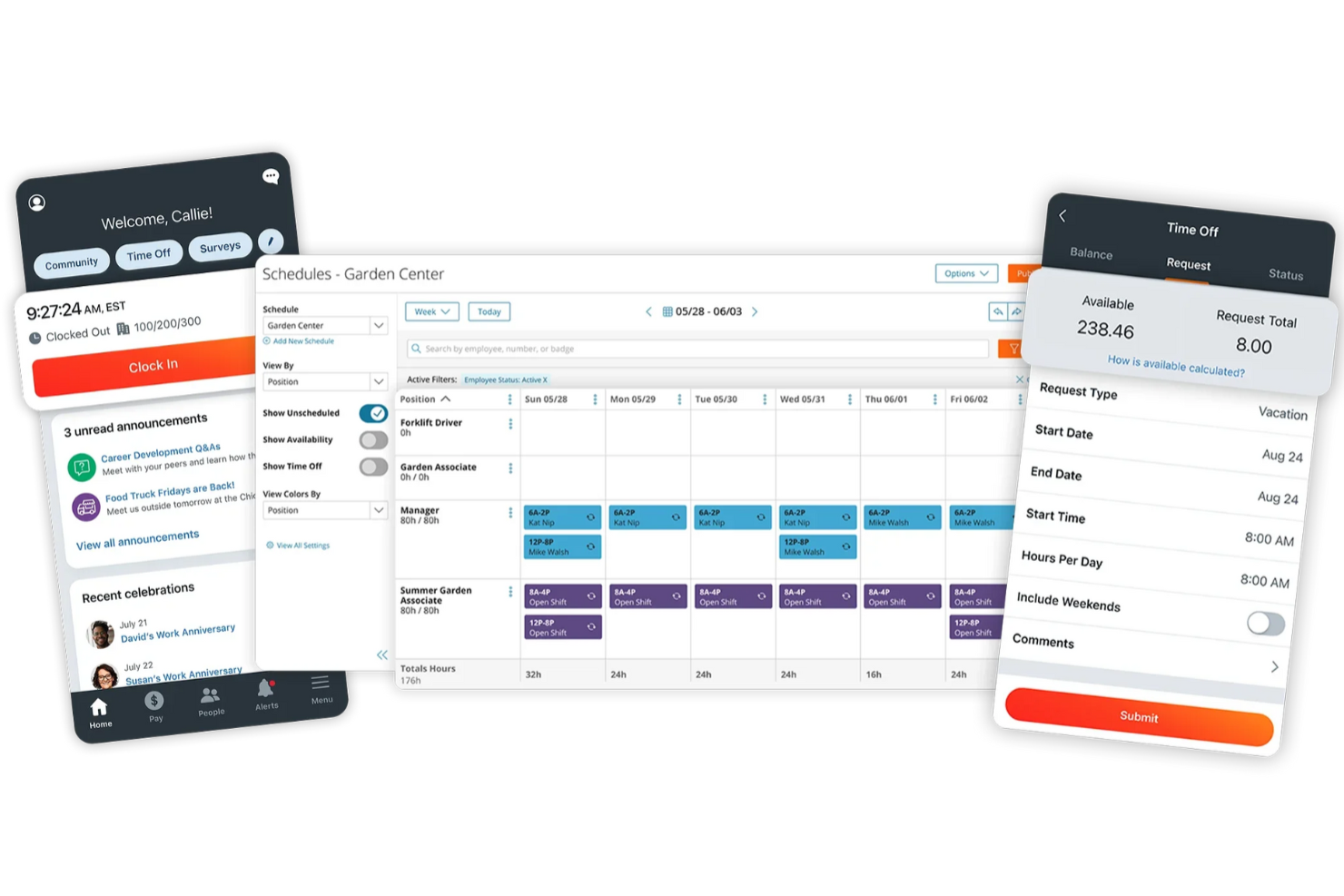
Paylocity es una plataforma de gestión de capital humano que ofrece a los equipos de RRHH información en tiempo real impulsada por IA para mejorar las decisiones sobre la plantilla a lo largo del ciclo de vida del empleado. Desde el desempeño y la participación hasta la rotación y la compensación, ayuda a transformar los datos de las personas en acciones estratégicas.
Por qué elegí Paylocity: Seleccioné Paylocity por sus destacadas capacidades analíticas de personas que abarcan el reclutamiento, la incorporación, el desempeño y el desarrollo del talento. Su Modern Workforce Index (MWI) ofrece modelado predictivo y recomendaciones accionables sobre tendencias de la fuerza laboral como el riesgo de deserción, costos laborales y representación en Diversidad, Equidad, Inclusión y Accesibilidad (DEIA), proporcionando a los líderes de RRHH una hoja de ruta clara para tomar decisiones proactivas.
A diferencia de las herramientas que simplemente muestran métricas, el paquete analítico de Paylocity te guía con los siguientes pasos, ya sea cerrar brechas de habilidades, presupuestar de manera más inteligente o mejorar la retención.
Características destacadas e integraciones de Paylocity
Las características incluyen tableros en tiempo real, seguimiento de desempeño, información predictiva y modelado de compensaciones. También admite la administración de beneficios, autoservicio para empleados, planificación de sucesión y automatización de cumplimiento.
Las integraciones incluyen Salesforce, NetSuite, BambooHR, Greenhouse, Oracle HCM, Workday, Criteria Corp, The Predictive Index y otros, permitiendo datos unificados en todo tu ecosistema de RRHH.
Pros and Cons
Pros:
- Incluye servicios de cumplimiento fiscal
- Opciones de pago bajo demanda
- Flujos de trabajo e informes personalizados
Cons:
- La configuración puede tomar mucho tiempo
- Opciones de personalización limitadas en ciertos módulos
New Product Updates from Paylocity

Paylocity Expands Expense and Purchase Request Tools
Paylocity adds connected personal cards, smarter expense categorization, and a streamlined purchase request experience. This reduces manual entry and helps finance teams manage expenses and approvals more efficiently. For more information, visit Paylocity’s official site.
 .
.
Teramind
Ideal para obtener información sobre el comportamiento del usuario

Teramind es una plataforma integral diseñada para abordar la ciberseguridad, la gestión del cumplimiento normativo, la gestión de riesgos internos, la prevención de pérdida de datos y la productividad.
Por qué elegí Teramind: Me gustan sus análisis de comportamiento del usuario. Esta función te permite rastrear y entender lo que está haciendo tu equipo, ofreciendo información sobre sus acciones y niveles de productividad. No se trata solo de vigilar, sino de comprender el flujo de trabajo e identificar áreas de mejora. Con el análisis de comportamiento del usuario, puedes ver cómo se utiliza el tiempo y tomar decisiones informadas para aumentar la productividad.
Otra característica importante de Teramind es su capacidad avanzada de telemetría de datos. Esto te brinda información enriquecida sobre cómo tus empleados están desempeñándose e interactuando con sus entornos. Con la telemetría de datos avanzada, puedes profundizar en métricas importantes, como el uso de los recursos y dónde pueden existir cuellos de botella en los procesos.
Características y conexiones destacadas de Teramind
Características incluyen grabación y reproducción de sesiones, monitoreo de correos electrónicos, rastreo de transferencias de archivos, rastreo de trabajos de impresión, monitoreo del portapapeles, monitoreo de la actividad en la red, gestión de políticas y reglas, control remoto de escritorios, análisis de riesgos, gestión de cumplimiento, análisis de productividad y control del tiempo activo versus inactivo.
Conexiones incluyen Google Cloud BigQuery, Splunk Cloud Platform, Jira, Zendesk, Redmine, Microsoft Power BI, IBM Security QRadar, LogRhythm, ArcSight, McAfee Business Protection, Microsoft Entra ID y ServiceNow.
Pros and Cons
Pros:
- Análisis detallados del comportamiento del usuario para detectar anomalías
- Alertas en tiempo real y respuestas automatizadas ante violaciones de políticas
- Admite implementaciones en la nube y en las instalaciones
Cons:
- Mínimo de 5 asientos
- Soporte limitado para monitoreo de dispositivos móviles

Mejor software de análisis de personas por fuentes ilimitadas de datos contextuales de la fuerza laboral
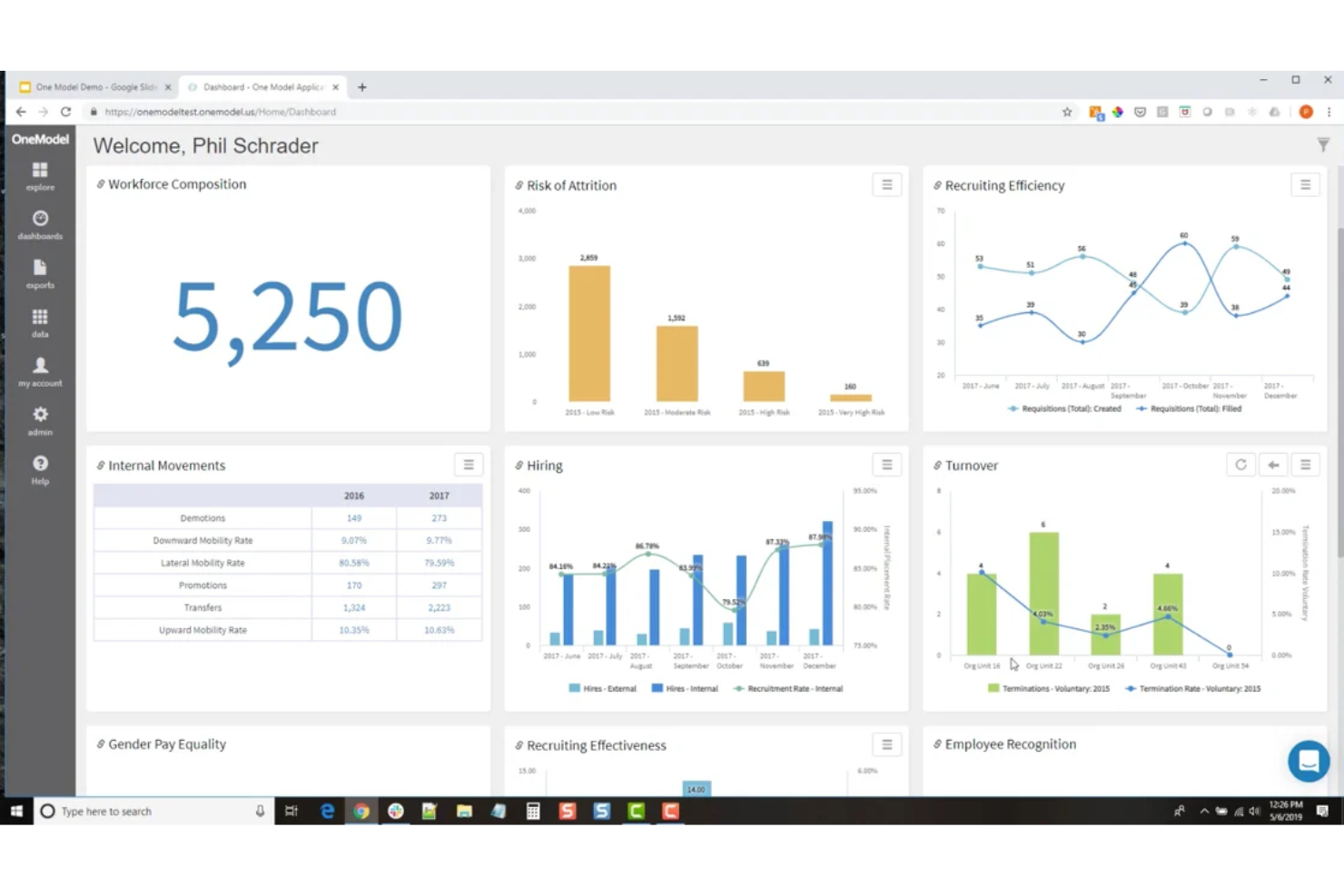
One Model es una plataforma integral de analítica de personas diseñada para ayudar a las empresas a interpretar los datos de su fuerza laboral. Es una herramienta que se centra en convertir las enormes cantidades de datos que generan las empresas en algo útil.
Por qué elegí One Model: One Model ofrece fuentes de datos contextuales ilimitadas sobre la fuerza laboral, lo que significa que puedes integrarte con y extraer datos de fuentes financieras, de ventas, del mercado laboral y de experiencia del cliente, además de todo lo que ya ofrecen en analítica de personas. Disponen de una extensa lista de integraciones de terceros para respaldar esto, e incluso puedes conectarte a herramientas de formularios y encuestas para recolectar tus propios datos autogestionados.
Otra característica que distingue a One Model es su enfoque en la colaboración. No se trata solo de analizar números; se trata de ayudar a tu equipo a tomar mejores decisiones. Puedes compartir informes, crear tableros e incluso configurar alertas para mantener a todos informados. Es una excelente manera de asegurarse de que todos estén alineados y trabajen hacia los mismos objetivos.
Características destacadas e integraciones de One Model
Las características incluyen modelado de datos sencillo, métricas predefinidas, analítica y storyboards. Todo está diseñado para que puedas comenzar rápidamente sin tener que construir tu propio sistema desde cero.
También ofrecen analítica integrada con IA, que aprovecha algoritmos avanzados y técnicas de aprendizaje automático para extraer patrones valiosos y hacer predicciones a partir de los datos de RRHH, permitiendo una planificación de la fuerza laboral y gestión del talento más precisa.
Las integraciones incluyen SuccessFactors, Workday, ADP, Ultimate Software, SAP, Oracle, PeopleSoft, BambooHR, Fairsail, Namely, Deltek, Cornerstone, Azure, Snowflake, AWS, Google Cloud, CultureAmp, Waggl, ModernSurvey, Glint, Maritz, Confirmit, Reflektive, Qualtrix y otros para LMS, nóminas y ATS.
Pros and Cons
Pros:
- Amplia gama de integraciones ofrecidas
- Información potenciada por IA
- Modelado de planes integral
Cons:
- Puede que no sea apto para PYMES/startups
- Organigramas restringidos al plan más alto

Workleap
Ideal para visualizar la equidad salarial y la compensación total
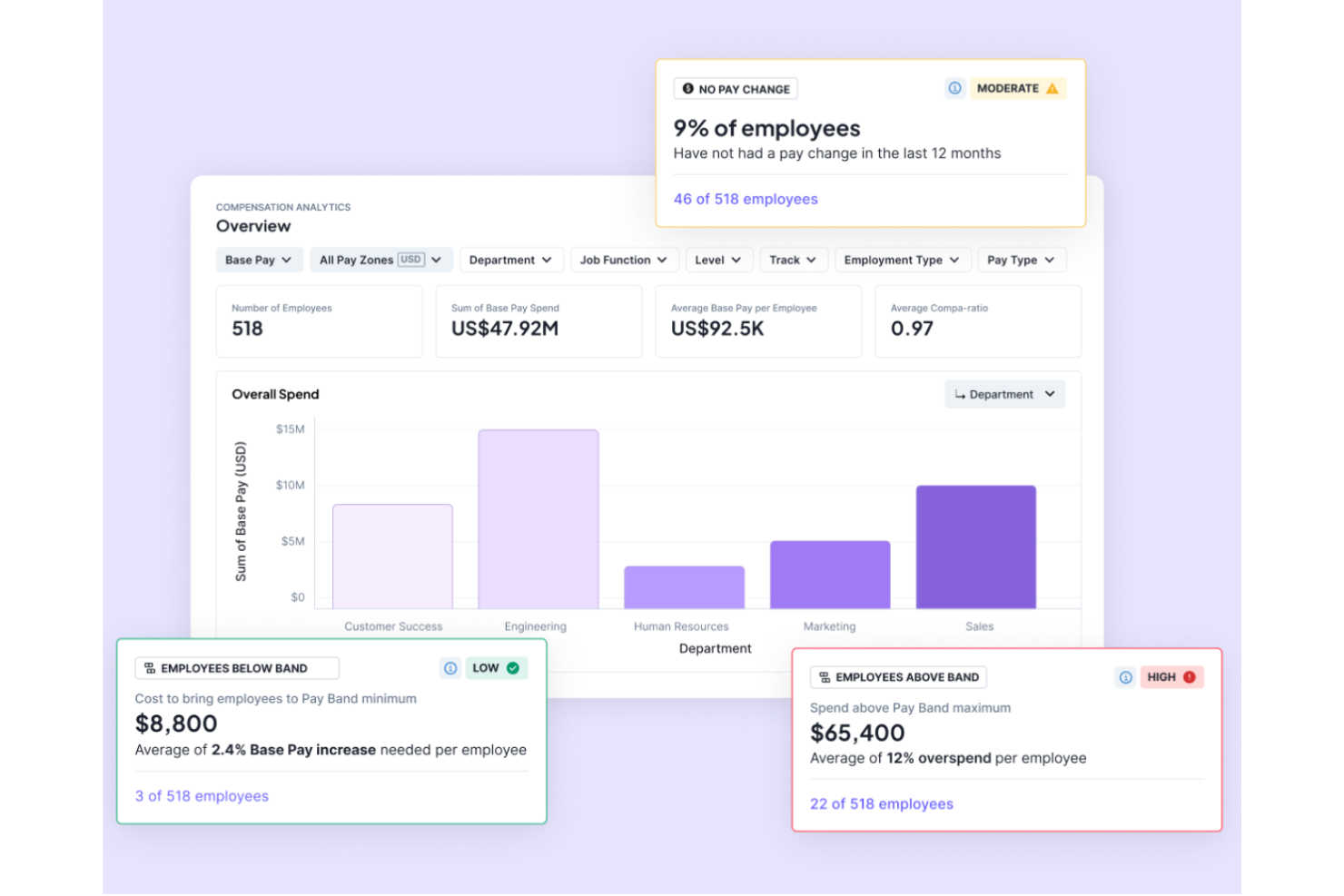
Barley ayuda a los equipos de RRHH y Personas a tomar decisiones inteligentes, proactivas y eficientes sobre compensaciones utilizando análisis de datos e información en tiempo real. Unifica todas tus necesidades de compensación mientras resalta indicadores clave de rendimiento (KPI) importantes en equidad salarial, distribución de salarios y salud de la compensación. Barley mejora la eficiencia automatizando los flujos de trabajo de compensación/mérito e identifica áreas de riesgo en toda la empresa para que puedas enfocar tus prioridades en lo que (y quién) más importa.
Por qué elegí Barley: Barley ofrece un software integral de gestión de compensaciones con funciones como gestión de bandas salariales, análisis de cohortes, análisis de compensación, análisis de equidad salarial y datos de referencia global (impulsados por Mercer). Este software permite a las organizaciones gestionar y analizar sus datos de compensación de manera eficaz, asegurando prácticas salariales justas y competitivas al tiempo que proporciona información valiosa para la adquisición y retención de talento. También ayuda a los equipos de RRHH y Personas a gestionar sus procesos de compensación, tomar decisiones equitativas basadas en datos, reducir el tiempo del ciclo de compensación, asignar eficientemente los gastos y evitar sobrecostos.
Además, Barley ofrece integraciones con varios sistemas HRIS y ATS y ha recibido comentarios positivos por su interfaz intuitiva, automatización de procesos y capacidad de proporcionar contexto valioso y análisis para las decisiones de compensación. En general, Barley ayuda a las organizaciones a gestionar y visualizar sus datos de compensación en una única plataforma.
Características e integraciones destacadas de Barley
Las características incluyen Total Rewards, que ayuda a los empleados a comprender el valor total de su paquete de compensación a través de un portal personalizado, que incluye salario, acciones, transparencia salarial y beneficios. Además, la comparación de candidatos, permisos configurables para la seguridad y revisiones automáticas de compensación son otras características destacadas de Barley.
Las integraciones incluyen BambooHR, Lever, Paylocity, HiBob, Namely, ADP Workforce Now, Ceridian Dayforce y UKG Pro.
Pros and Cons
Pros:
- Alto nivel de personalización
- Servicios de atención al cliente receptivos
- Ayuda a aumentar la transparencia salarial
Cons:
- La configuración inicial puede requerir mucho tiempo
- Depende de datos de referencia externos
Tableau
El mejor software de análisis de personas para la visualización de datos de RRHH
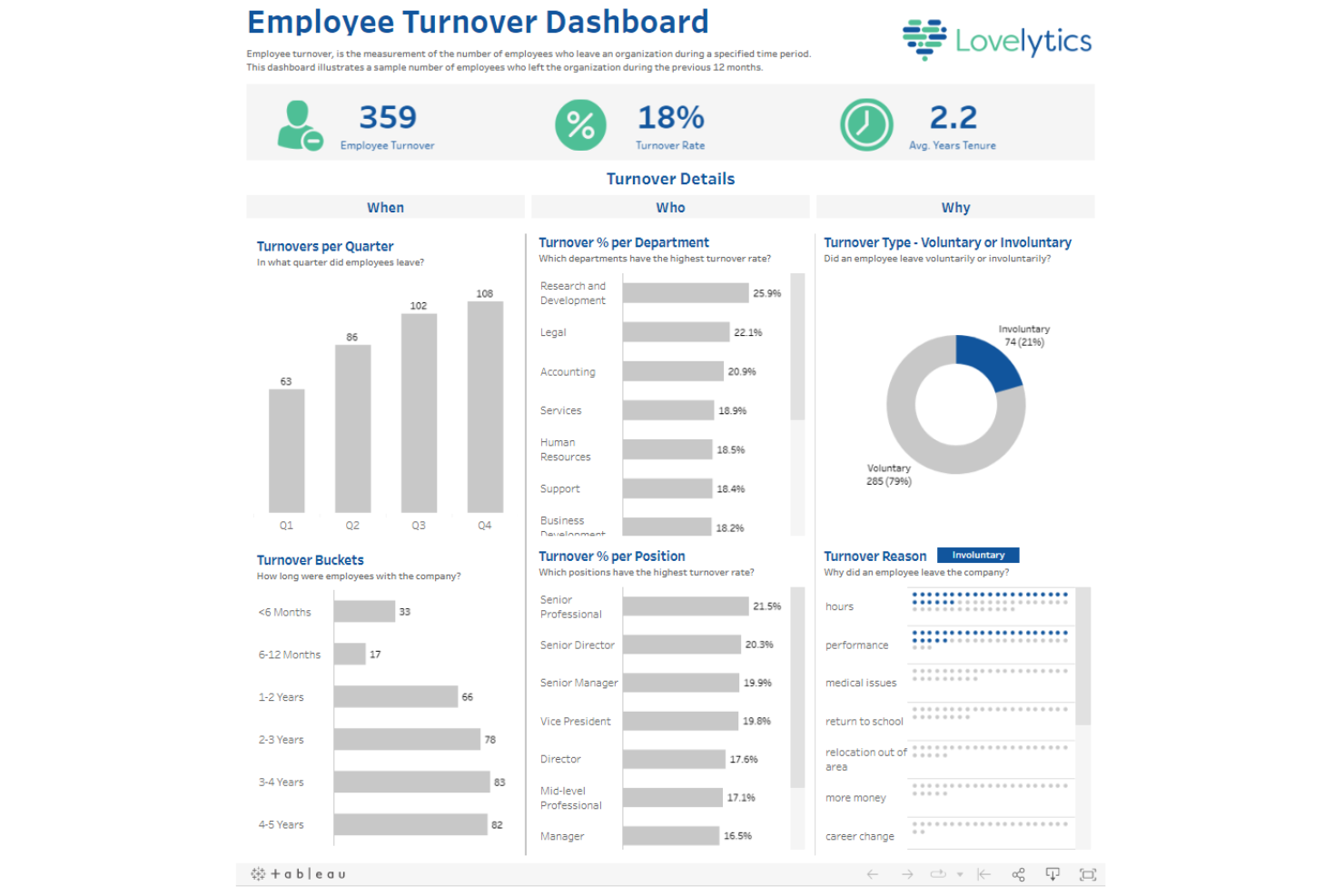
Tableau es un software de análisis de personas que ayuda a los profesionales de recursos humanos a visualizar datos en paneles compartibles.
Por qué elegí Tableau: Tableau recopila y rastrea tus datos de RRHH en tiempo real. El software te permite crear paneles detallados a partir de plantillas prediseñadas. Las plantillas son personalizables, por lo que puedes adaptarlas a las necesidades de tu empresa.
Las funciones de informes de Tableau facilitan la detección de tendencias y hacen que los datos sean una parte fundamental de la toma de decisiones. Los gráficos del software destacan anomalías, permitiéndote obtener información valiosa de los datos de tu plantilla y presentarlas a las partes interesadas. La capacidad del software para segmentar y analizar grandes conjuntos de datos lo hace ideal para organizaciones grandes.
Funciones destacadas e integraciones de Tableau
Funciones incluyen plantillas de paneles, seguimiento de datos en tiempo real, preparación de datos de autoservicio y seguimiento de encuestas y NPS.
Las integraciones están disponibles de forma nativa con Amazon Redshift, Google Analytics, Google Sheets, IBM BigInsights, Microsoft Excel, OneDrive, Oracle, Presto, Salesforce, SAP HANA, y otros.
Pros and Cons
Pros:
- Rastrea e interpreta grandes conjuntos de datos
- Paneles personalizables
- Implementación sencilla
Cons:
- Algunas funciones avanzadas tienen una curva de aprendizaje pronunciada
- Puede responder lentamente en dispositivos de gama baja

Crunchr
Mejor software de análisis de personas para democratizar información
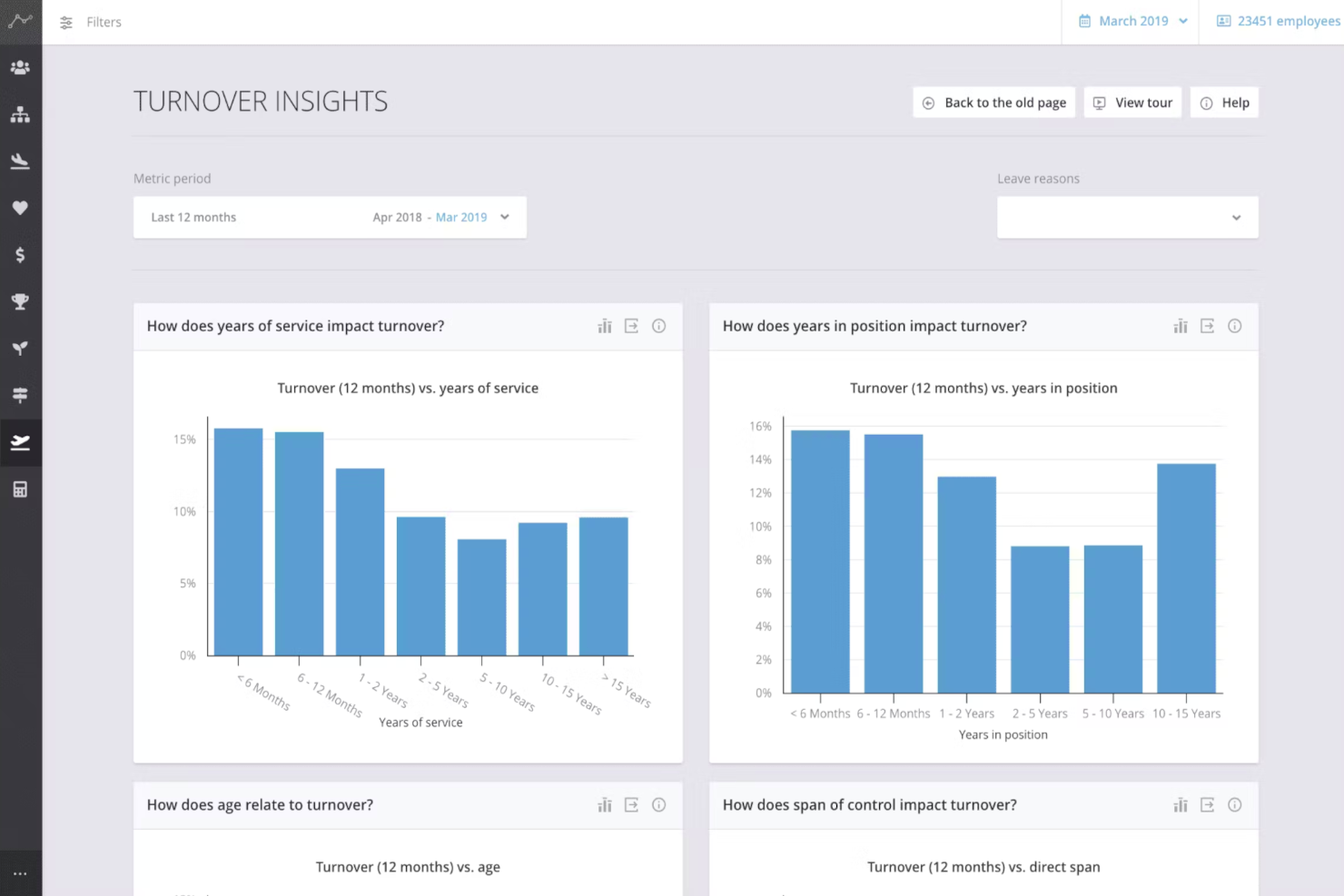
Crunchr es un software innovador que utiliza análisis de personas para ayudar a las organizaciones a comprender mejor a su fuerza laboral. Ayuda a las empresas a tomar decisiones mejor fundamentadas en cuanto a la gestión de talento, planificación de sucesión y retención de empleados.
Por qué elegí Crunchr: El software integra todas tus fuentes de datos (de tus sistemas de información de RRHH, sistemas de reclutamiento, sistemas de compensación y encuestas a empleados) y los agrega y visualiza para un análisis de datos más conveniente y efectivo. Puedes utilizar visualizaciones enriquecidas como paneles de control, gráficos, visuales y mediciones para identificar tendencias de la fuerza laboral y brechas de rendimiento, permitiendo tomar decisiones informadas basadas en datos.
Crunchr emplea análisis predictivos para pronosticar tendencias y resultados de la fuerza laboral a partir de datos históricos. La plataforma utiliza inteligencia artificial para identificar asociaciones y relaciones causales entre la fuerza laboral y los objetivos organizacionales, permitiendo a los gerentes tomar decisiones informadas basadas en conocimientos derivados de los datos.
Sus análisis de competencias ayudan a los gerentes a evaluar las habilidades y competencias de los empleados, identificando oportunidades para el desarrollo y promoción de los mismos. Los gerentes también pueden desarrollar planes de aprendizaje personalizados y hacer seguimiento al progreso de sus empleados, asegurando que permanezcan comprometidos y motivados.
Funciones destacadas e integraciones de Crunchr
Las funciones incluyen la capacidad de segmentar tu fuerza laboral en varias categorías según demografía, habilidades, rendimiento e intenciones de retención. También puedes identificar fácilmente los factores influyentes detrás de la rotación de empleados, lo que permite a los gerentes crear estrategias específicas de retención.
Crunchr incluye una opción de referencia comparativa donde puedes comparar los detalles de la fuerza laboral de tu empresa con los de competidores, normas de la industria o grupos segmentados. Usando referencias comparativas, es posible establecer cómo están desempeñándose los diversos grupos dentro de tu empresa e identificar la causa raíz de cualquier brecha.
Crunchr cumple con las regulaciones de seguridad y privacidad estándar de la industria, e incluye sólidas funciones de privacidad y gestión de usuarios, brindando un control granular sobre quién tiene acceso a tus datos sensibles de fuerza laboral.
Las integraciones están disponibles con numerosos sistemas de software, incluidos sistemas de gestión de desempeño, compromiso, reclutamiento y aprendizaje y desarrollo, así como sistemas de RRHH como Oracle, SAP y Workday.
Pros and Cons
Pros:
- Los datos pueden mejorar los planes de sucesión y detectar empleados en riesgo de salida
- Los análisis predictivos pueden ayudar con la planificación de la fuerza laboral
- Las herramientas de visualización hacen que los datos sean fáciles de entender
Cons:
- No hay prueba gratuita disponible
- Los detalles sobre el precio no son transparentes
El mejor software de people analytics para el seguimiento de eNPS
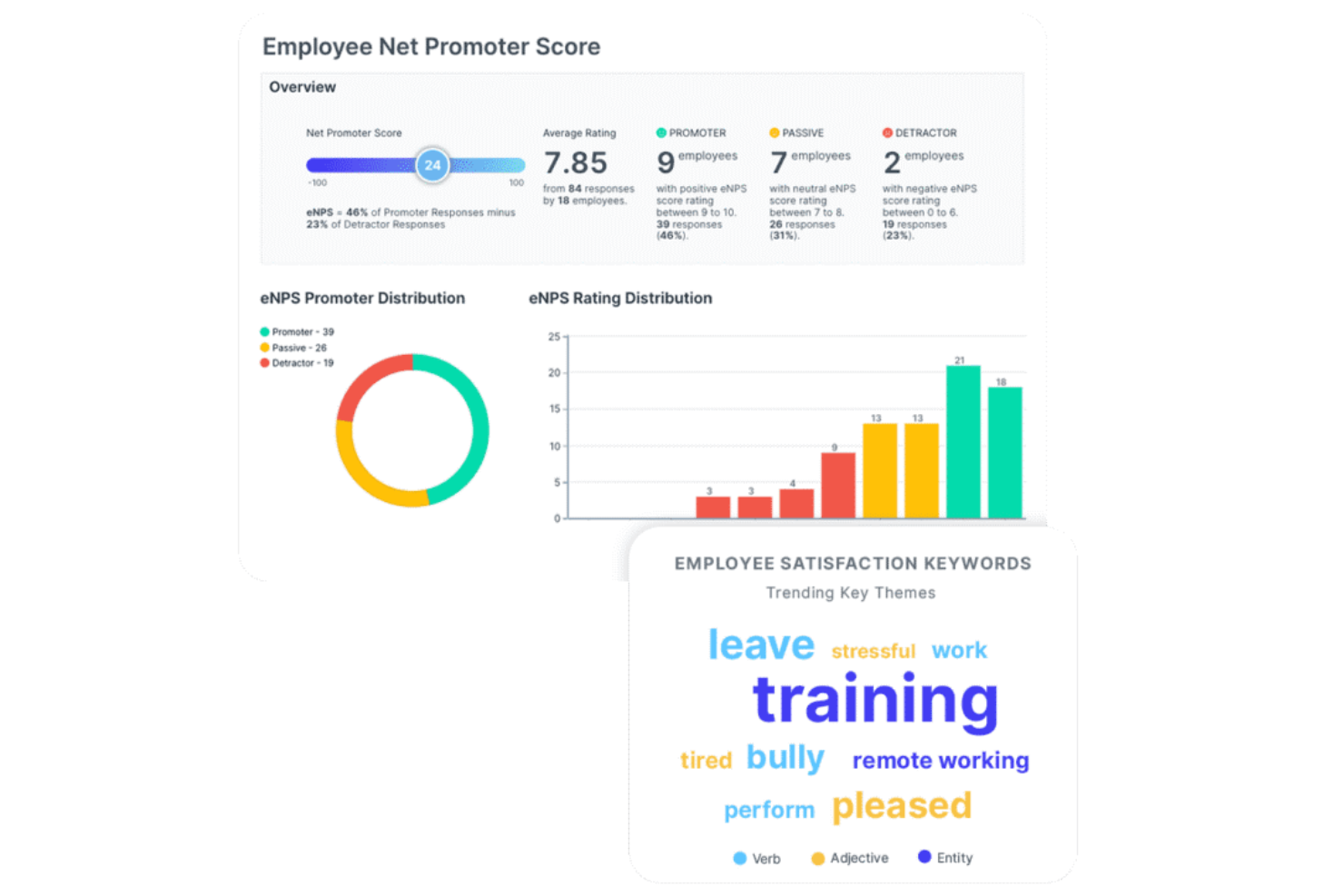
intelliHR es una plataforma integral de gestión del capital humano (HCM) que ayuda a las empresas a evaluar la satisfacción de los empleados con datos cualitativos y cuantitativos.
Por qué elegí intelliHR: intelliHR permite a los equipos de RR. HH. medir el índice neto de promotores de empleados (eNPS) de una organización mediante encuestas personalizadas de pulso y análisis de sentimiento impulsados por IA. La herramienta te ayuda a hacer seguimiento de las palabras clave relacionadas con la satisfacción de los empleados para que puedas identificar tendencias a tiempo y tomar acciones correctivas cuando sea necesario.
La herramienta de analítica de intelliHR incrementa la transparencia de tus datos de empleados creando informes fáciles de interpretar. El software te ayuda a entender cómo los cambios en la plantilla o en la remuneración pueden llevar a cambios en la satisfacción, por lo que sus conocimientos pueden ayudarte a mejorar tus procesos empresariales. Gracias a su capacidad para monitorear la satisfacción laboral, esta herramienta es ideal para empresas con altas tasas de rotación.
Funciones destacadas e integraciones de intelliHR
Funciones incluyen plantillas de informes, flujos de trabajo automatizados, información accionable, incorporación de empleados, retención de talento y seguimiento de cumplimiento.
Las integraciones están disponibles de forma nativa con Bonusly, Go1, Greenhouse, Lever, PandaDoc, Perkbox, Talos, Teamtailor, Workable, Xero y otros.
Pros and Cons
Pros:
- Fácil de rastrear los objetivos
- Seguimiento del compromiso de los empleados
- Más de 30 plantillas de informes prediseñadas
Cons:
- Algunos usuarios pueden experimentar una curva de aprendizaje pronunciada debido a la personalización y a las integraciones
- Materiales de formación poco accesibles

Workleap
Ideal para convertir comentarios en recomendaciones prácticas

Navegar por la participación de los empleados puede ser complicado, pero Workleap está diseñado para abordar directamente esos desafíos. Está pensado para organizaciones que desean mejorar la cultura laboral, especialmente profesionales de RR. HH. y líderes de equipo que necesitan una mayor claridad sobre la dinámica de sus equipos. Al enfatizar la retroalimentación anónima y el reconocimiento entre pares, Workleap fomenta una comunicación más abierta y un reconocimiento constante entre los equipos.
Por Qué Elegí Workleap
Elegí Workleap por su capacidad de transformar la retroalimentación de los empleados en recomendaciones prácticas, que es un requisito básico para el software de analítica de personas. Sus encuestas personalizables permiten enfocarse en problemas específicos dentro de la organización, mientras que la retroalimentación anónima ayuda a los empleados a compartir opiniones sinceras sin vacilar. Las recomendaciones impulsadas por IA traducen esos datos en propuestas prácticas, ayudando a tomar decisiones informadas para mejorar la participación de los empleados.
Características Principales de Workleap
Además de sus funcionalidades principales, Workleap ofrece otras características que pueden beneficiar significativamente a tu equipo:
- Encuestas Pulsadas: Recoge regularmente el sentir de los empleados para mantenerte al día sobre la moral del equipo.
- Tarjetas de Buenas Vibras: Fomenta el reconocimiento entre pares permitiendo que los empleados celebren los logros de sus compañeros.
- Integración con Slack y Teams: Incorpora Workleap fácilmente en tus herramientas de comunicación existentes para un mejor seguimiento del compromiso.
- Conversaciones Estructuradas: Facilita la retroalimentación y el desarrollo continuo a través de conversaciones planificadas.
Integraciones de Workleap
Las integraciones incluyen Slack, Microsoft Teams y una API para integraciones personalizadas.
Pros and Cons
Pros:
- Las encuestas personalizables permiten una retroalimentación específica
- La retroalimentación anónima fomenta opiniones sinceras
- Análisis en tiempo real que ofrecen recomendaciones prácticas
Cons:
- Capacidades limitadas de informes avanzados disponibles
- Curva de aprendizaje para los nuevos usuarios

El mejor software de análisis de personas para analítica predictiva
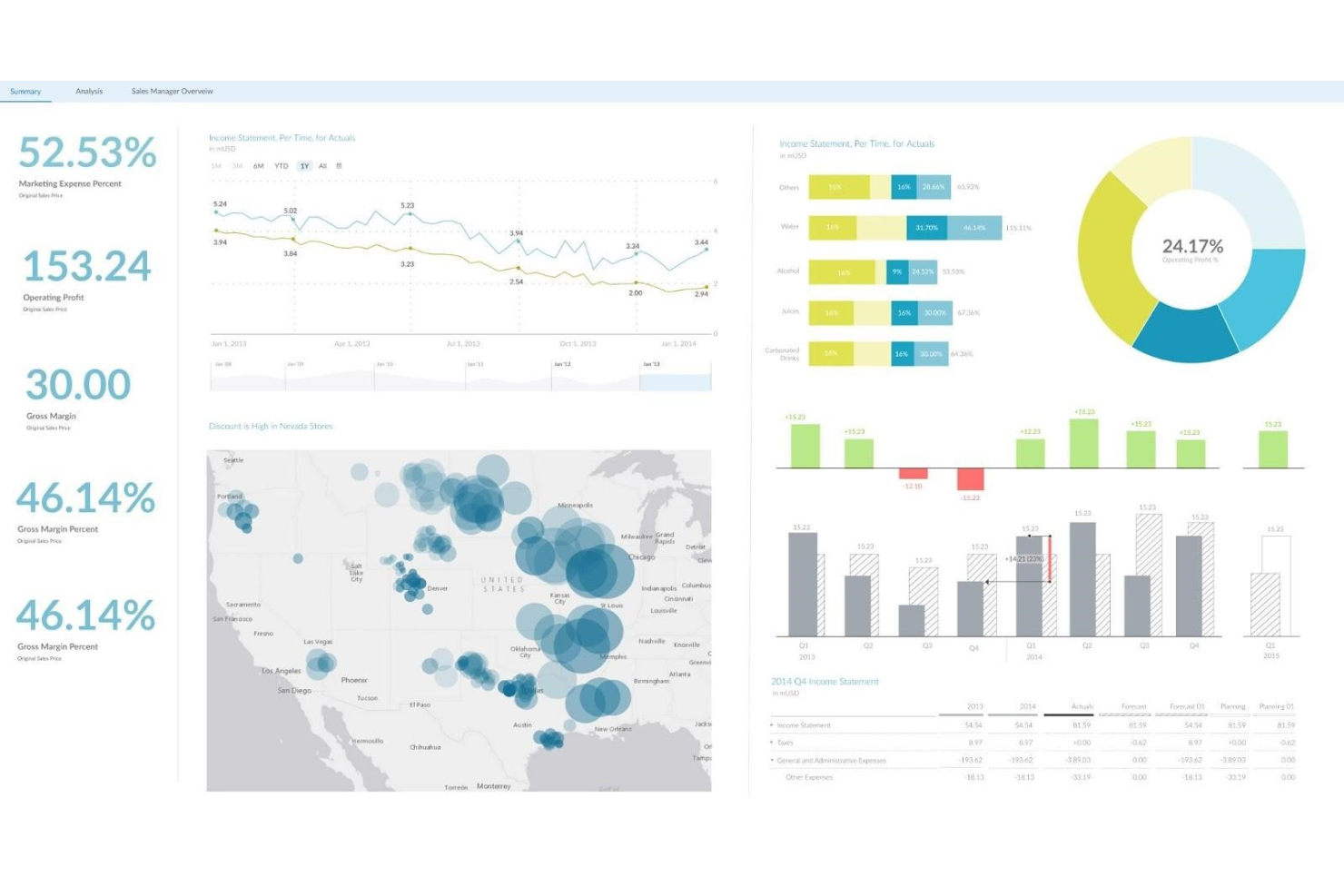
SAP Analytics Cloud es un software de inteligencia empresarial que utiliza el aprendizaje automático para simular escenarios a partir de predicciones, lo que te permite gestionar tu fuerza laboral fácilmente.
Por qué elegí SAP Analytics Cloud: SAP Analytics Cloud extrae datos de tus soluciones de software de RR.HH. y los organiza en paneles ordenados. El módulo de análisis de datos de la herramienta utiliza IA para analizar los datos y crear pronósticos, simulando varios escenarios para que puedas tomar decisiones basadas en datos.
SAP Analytics Cloud ofrece una variedad de plantillas que puedes usar para segmentar y analizar los datos de RR.HH. Los análisis de la plataforma son excelentes, ya que abordan muchas necesidades comunes y urgentes de los empleados.
Características destacadas de SAP Analytics Cloud e integraciones
Funciones incluyen analítica predictiva, pronósticos, información automatizada, modelado de escenarios y un portal de autoservicio.
Integraciones disponibles de forma nativa con Google BigQuery, Microsoft Azure, MongoDB, MS Excel, SAP Hana, Zoho y más.
Pros and Cons
Pros:
- Sorprendentemente fácil de usar
- Buena variedad de plantillas
- Paneles detallados
Cons:
- Número limitado de registros cargados en cada importación
- Los conjuntos de datos grandes pueden tardar en cargar
Otros programas de análisis de personas
Estas son algunas opciones más interesantes que no se incluyeron en la lista de los mejores programas de análisis de personas:
- Visier
Mejor software de análisis de personal para empresas con trabajadores por hora
- ChartHop
El mejor software de people analytics para previsión de plantilla
- UKG Pro
Mejor software de análisis de personas para seguimiento del talento
- Orgvue
Mejor software de análisis de personas para la planificación de la fuerza laboral
- Compass
Ideal para monitorear la adopción digital
- Nakisa
Mejor software de análisis de personal para un diseño organizacional sencillo
- SplashHR
Mejor software de analítica de personal para seguimiento de DE&I
- Knoetic
El mejor software de análisis de personal para paneles personalizados
- Deel HR
Ideal para la gestión de fuerza laboral global
- Peoplebox.ai
El mejor software de análisis de personas para las tendencias de compromiso y desempeño
- Agentnoon
Ideal para análisis de plantilla y compensación
- Intelogos
Ideal para análisis de equipos impulsados por IA


Reseñas relacionadas
Si aún no has encontrado lo que buscas aquí, consulta estas otras herramientas que hemos probado y evaluado:
Cómo evalúo el software de People Analytics
Evalúo las herramientas de people analytics en dos niveles: los requisitos básicos como la integración con Workday y el modelado de rotación, y los diferenciadores que separan una solución de nivel CHRO de una plataforma de operaciones de RRHH.
Funcionalidad principal (Requisitos fundamentales para esta lista)
Cuando selecciono herramientas para mi lista, califico cada una en una escala del 0 (no ofrece la funcionalidad) al 5 (destaca en esta área) para cada funcionalidad principal que se indica a continuación. Luego, calculo la puntuación total de la herramienta como porcentaje. Cada herramienta debe lograr una puntuación total mínima del 65% para ser considerada para su inclusión.
- Integración de datos de la fuerza laboral: Verifico si una plataforma puede extraer datos de HRIS, ATS, nómina y sistemas de desempeño, para que los equipos de RRHH no tengan que exportar manualmente CSVs de cinco herramientas distintas.
- Métricas y KPIs de RRHH predefinidos: Cada herramienta debe mostrar métricas listas para usar, como la tasa de rotación, el tiempo para cubrir vacantes y las proporciones de diversidad, sin que los analistas tengan que construir fórmulas desde cero.
- Tableros y reportes personalizados: Busco creadores de tablero de arrastrar y soltar que permitan a un gestor de operaciones de RRHH crear un panel de retención para la dirección y una vista de plantilla para finanzas a partir del mismo conjunto de datos.
- Análisis predictivo y avanzado: Las herramientas deben ofrecer modelos que alerten sobre riesgos de rotación o pronostiquen necesidades de contratación, no solo mostrar tendencias históricas en un gráfico.
- Segmentación y análisis detallado: Evalúo si es posible segmentar los datos por departamento, antigüedad, ubicación y atributos demográficos para comparar, por ejemplo, la rotación de nuevas contrataciones entre diferentes regiones.
- Seguridad de datos y controles de cumplimiento: El acceso basado en roles, umbrales de anonimización de datos y soporte para cumplimiento de normativas como GDPR son fundamentales cuando se gestionan registros sensibles de empleados.
Una vez que tengo una lista de herramientas que cumplen con este criterio, considero qué distingue a cada plataforma.
Factores diferenciadores (¿Qué distingue a los proveedores?)
Así es como comparo y contrasto diferentes proveedores:
Características destacadas
El análisis de equidad salarial es fundamental para mí. Una herramienta que modela brechas de compensación entre segmentos demográficos brinda a los líderes de DEI información procesable, no solo conciencia. También busco la opción de benchmarking externo, que te permite comparar la rotación o los puntajes de compromiso con referentes del sector en vez de operar en aislamiento. La función de consulta en lenguaje natural también cobró mucho valor. Cuando un HRBP puede escribir “muéstrame la rotación voluntaria de gerentes contratados el año pasado” y recibir una respuesta real, la adopción de la herramienta en el equipo se dispara.
Más allá de las funcionalidades
La compatibilidad con el stack tecnológico de RRHH es vital aquí. Verifico si la plataforma tiene conectores nativos para el HRIS, ATS y sistemas de nómina que ya utiliza tu equipo. Una herramienta con tableros excelentes vale poco si no puede extraer datos de tu instancia de Workday o BambooHR. También valoro la velocidad de implementación. Algunas plataformas requieren meses de servicios profesionales antes de mostrar un solo insight, mientras que otras envían plantillas listas para usar que permiten a los equipos de RRHH generar su primer informe de rotación en semanas. Para equipos multinacionales, también evalúo las opciones de residencia de datos y los controles de anonimización.
Cómo elegir un programa de análisis de personas
Es fácil perderse entre largas listas de funciones y estructuras de precios complejas. Para ayudarte a mantener la concentración mientras avanzas en tu proceso particular de selección de software, aquí tienes una lista de factores que debes tener en cuenta:
| Factor | Qué tener en cuenta |
|---|---|
| Escalabilidad | ¿Puede el software crecer junto con tu organización? Considera si admite volúmenes de datos y cantidades de usuarios cada vez mayores sin aumentos significativos de costes. |
| Integraciones | ¿Se conecta con tus sistemas de RR. HH. existentes? Comprueba la compatibilidad con herramientas como los sistemas de información de recursos humanos (HRIS), las nóminas y el software de selección para evitar interrupciones en los flujos de trabajo. |
| Personalización | ¿Puedes adaptar el software a tus necesidades? Busca opciones para ajustar los paneles, los informes y las métricas de acuerdo con los requisitos específicos de tu equipo. |
| Facilidad de uso | ¿La interfaz es intuitiva para todos los usuarios? Asegúrate de que tanto los miembros del equipo con conocimientos técnicos como aquellos que no los tienen puedan utilizar el sistema sin frustraciones. |
| Implementación e incorporación | ¿Con qué rapidez puede empezar tu equipo? Evalúa el tiempo y los recursos necesarios para la configuración, la formación y la puesta al día de tu equipo. |
| Coste | ¿Los planes de precios son claros y se ajustan a tu presupuesto? Considera los costes totales, incluidas las tarifas ocultas por funciones o usuarios adicionales, para evitar gastos inesperados. |
| Medidas de seguridad | ¿El proveedor prioriza la protección de datos? Verifica que cumpla las normas del sector y ofrezca funciones como el cifrado y los controles de acceso. |
| Disponibilidad del soporte | ¿Tendrás acceso a ayuda cuando la necesites? Busca opciones de soporte disponibles las 24 horas, los 7 días de la semana, y evalúa la capacidad de respuesta del equipo de atención al cliente del proveedor. |
¿Qué es el software de análisis de personas?
El software de análisis de personas es una herramienta que ayuda a las organizaciones a analizar los datos de los empleados para mejorar las decisiones y estrategias de RR. HH. Los profesionales de RR. HH., los directivos y los analistas de datos suelen utilizar estas herramientas para obtener información sobre las tendencias de la plantilla y el rendimiento de los empleados. Las funciones de generación de informes, visualización de datos y análisis predictivo ayudan a tomar decisiones fundamentadas, realizar un seguimiento del rendimiento y planificar. En general, estas herramientas proporcionan información valiosa que mejora la gestión de la plantilla y aumenta la eficiencia de la organización.
Funciones
Al seleccionar un software de análisis de personas, presta atención a las siguientes funciones clave:
- Análisis de datos de empleados: Proporciona información sobre las tendencias de la plantilla y ayuda a tomar decisiones de RR. HH. basadas en datos.
- Planificación de la plantilla: Ayuda a prever las necesidades de personal y a alinear los recursos con los objetivos empresariales.
- Seguimiento del rendimiento: Supervisa las métricas de rendimiento de los empleados para identificar puntos fuertes y áreas de mejora.
- Predicción de la rotación: Analiza patrones para predecir la rotación de empleados y contribuir a las estrategias de retención.
- Métricas de diversidad e inclusión: Realiza un seguimiento de los datos de diversidad para respaldar iniciativas de inclusión en el lugar de trabajo.
- Capacidades de análisis predictivo: Ofrece previsiones y tendencias para orientar las futuras estrategias de RR. HH.
- Paneles personalizables: Permite a los usuarios adaptar las vistas y los informes a sus necesidades y preferencias específicas.
- Integración con sistemas HRIS: Garantiza un flujo de datos fluido entre las herramientas de RR. HH. existentes para realizar análisis exhaustivos.
- Actualizaciones de datos en tiempo real: Proporciona información actualizada para tomar decisiones oportunas.
- Herramientas avanzadas de visualización de datos: Mejora la comprensión de datos complejos mediante representaciones gráficas claras.
Ventajas
La implementación de un software de análisis de personas ofrece varias ventajas para tu equipo y tu empresa. Estas son algunas de las que puedes esperar:
- Mejora de la toma de decisiones: El acceso a datos precisos y análisis predictivos te ayuda a tomar decisiones de RR. HH. fundamentadas.
- Mejora de la planificación de la plantilla: Las herramientas de previsión respaldan la planificación estratégica de personal y la asignación de recursos.
- Aumento de las tasas de retención: Las funciones de predicción de la rotación permiten identificar y abordar los riesgos de rotación.
- Mejor gestión del rendimiento: El seguimiento del rendimiento te ayuda a supervisar y mejorar la productividad de los empleados.
- Apoyo a las iniciativas de diversidad: Las métricas de diversidad e inclusión ofrecen información para fomentar un entorno de trabajo inclusivo.
- Ahorro de costes: Una planificación eficiente de los recursos y la reducción de la rotación pueden generar ahorros económicos.
- Información en tiempo real: Los datos actualizados permiten responder oportunamente a las tendencias y los cambios de la plantilla.
Costes y precios
La selección de un software de análisis de personas requiere comprender los distintos modelos de precios y planes disponibles. Los costes varían según las funciones, el tamaño del equipo, los complementos y otros factores. La tabla siguiente resume los planes habituales, sus precios medios y las funciones que suelen incluir las soluciones de software de análisis de personas:
Tabla comparativa de planes para software de analítica de personas
| Tipo de plan | Precio medio | Características habituales |
|---|---|---|
| Plan gratuito | $0 | Análisis de datos básico, informes limitados y asistencia de la comunidad. |
| Plan personal | $5-$25/usuario/mes | Visualización avanzada de datos, paneles fáciles de usar y asistencia por correo electrónico. |
| Plan empresarial | $30-$75/usuario/mes | Informes personalizables, integración con HRIS y asistencia prioritaria. |
| Plan para empresas | $100+/usuario/mes | Análisis predictivo, gestor de cuentas dedicado e integración completa con todos los sistemas de RR. HH. |
Software de analítica de personas: preguntas frecuentes
A continuación, encontrarás respuestas a algunas preguntas frecuentes que puedes tener sobre el software de analítica de personas y su funcionamiento.
¿Cómo se integra el software de analítica de personas con los sistemas de RR. HH. existentes?
Sí, el software de analítica de personas suele integrarse con los sistemas de RR. HH. existentes. La integración permite agilizar el flujo de datos entre plataformas como HRIS, nóminas y herramientas de selección de personal. Esto garantiza la coherencia de los datos en todos los sistemas y reduce la introducción manual de datos. Antes de realizar la compra, comprueba si el software admite la integración con tus sistemas actuales para evitar problemas de compatibilidad.
¿Cómo funcionan los sistemas de software de analítica de personas?
El software de analítica de personas obtiene datos de múltiples fuentes, como HCM, HRIS u otras soluciones de RR. HH., y los interpreta. Estas herramientas ofrecen una visión clara de diferentes métricas de RR. HH., con el objetivo final de facilitar la comprensión de cómo estas métricas pueden afectar a diversos resultados empresariales.
¿Cómo puede la analítica de personas ayudarme a mejorar mis procesos de RR. HH.?
Las empresas utilizan la analítica de personas porque ayuda a los responsables a ver los datos de RR. HH. en contexto. Esto les permite determinar qué afecta a las métricas de RR. HH. y cómo estas métricas influyen en diferentes resultados empresariales. Al comprender los datos de tu plantilla, puedes mejorar la capacidad de tu empresa para atraer y retener el mejor talento. También mejorarás la cultura de tu empresa para ofrecer una experiencia superior a los empleados, entre otras ventajas.