

10 mejores programas de gestión de documentos de RR. HH. para 2026

Software de gestión de documentos de HR


El software de gestión de documentos de HR ayuda a tu equipo a organizar, almacenar y proteger los registros de los empleados, las políticas y los documentos de cumplimiento en un único sistema digital. Si buscas formas de reducir el papeleo manual, mejorar la preparación para auditorías o mantener los archivos confidenciales accesibles pero protegidos, la plataforma adecuada puede marcar una gran diferencia.
Esta lista te ayudará a comparar las principales soluciones de gestión de documentos de HR para 2026, para que puedas encontrar herramientas que se adapten a tus necesidades de cumplimiento, preferencias de flujo de trabajo y tamaño de empresa.
Por qué confiar en nuestras reseñas de software
Nuestro equipo lleva probando y evaluando software desde 2012. Como expertos en RR. HH., sabemos lo difícil —y lo importante— que es elegir el software adecuado.
Para esta guía, evaluamos las herramientas mediante pruebas prácticas e investigación independiente, puntuando las herramientas según nuestros criterios de selección. También nos basamos en la experiencia de líderes de opinión del sector y de profesionales de RR. HH. en activo.
Nuestras reseñas reflejan nuestro criterio editorial humano, no un discurso de ventas.
Revisores expertos:
Reseñas de software de gestión de documentos de HR
A continuación encontrarás mis resúmenes detallados del software de gestión de documentos de HR que llegó a mi selección. Mis reseñas ofrecen un análisis detallado de las funciones, los casos de uso más adecuados y las integraciones de cada plataforma para ayudarte a encontrar la mejor opción para ti.

Ideal para la centralización de documentos de beneficios
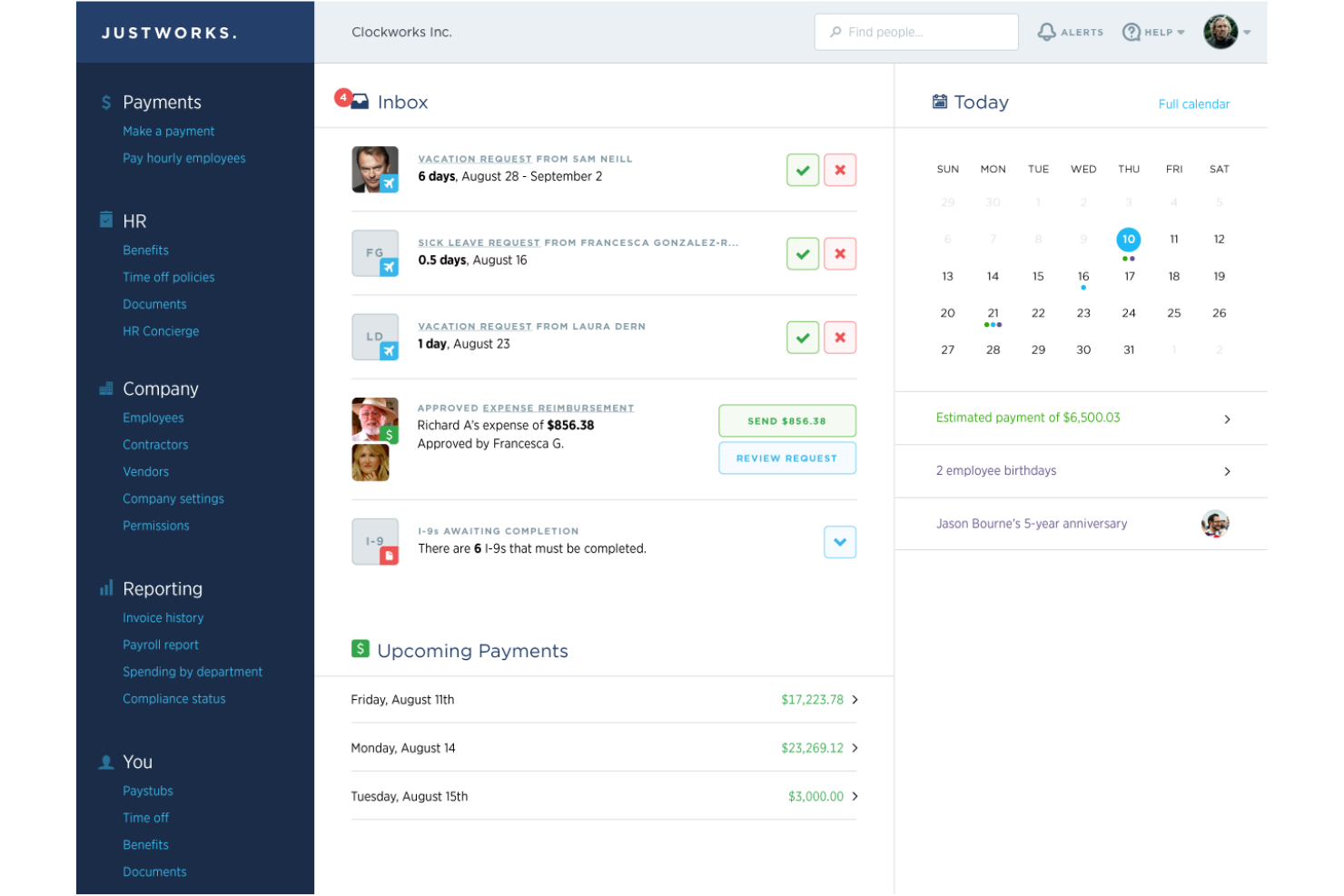
Si su equipo de RR. HH. necesita un lugar centralizado para gestionar todos los documentos relacionados con los beneficios, Justworks está diseñado para usted. La plataforma centraliza los formularios de inscripción de beneficios, los detalles de los planes y los avisos de cumplimiento, para que nada se pierda ni pase desapercibido. Es especialmente útil para pequeñas y medianas empresas que desean simplificar la administración de beneficios y el acceso a documentos para los empleados.
Por qué elegí Justworks
Centralizar los documentos de beneficios es un desafío para muchos equipos de RR. HH., y Justworks responde directamente a esta necesidad. Elegí Justworks porque almacena todos los formularios relacionados con los beneficios, los resúmenes de los planes y los avisos de cumplimiento en una ubicación segura, facilitando así que tanto RR. HH. como los empleados encuentren lo que necesitan. La plataforma también permite gestionar documentos de inscripción y distribuir avisos requeridos de forma electrónica, lo que reduce el papeleo y el seguimiento manual. Para las organizaciones que quieren mantener la documentación de beneficios organizada y accesible, Justworks ofrece una solución enfocada.
Características clave de Justworks
Además de la centralización de documentos de beneficios, Justworks ofrece varias otras funciones para los equipos de RR. HH.:
- Listas de verificación automatizadas para incorporación: Asigne y supervise las tareas y documentos requeridos para nuevas contrataciones.
- Soporte de firma electrónica: Recopile firmas digitales en formularios y acuerdos de RR. HH. directamente en la plataforma.
- Alertas de vencimiento de documentos: Reciba notificaciones cuando documentos importantes de RR. HH. estén próximos a vencer o requieran actualización.
- Portal de autoservicio para empleados: Permita que los empleados accedan, descarguen y suban documentos de RR. HH. de manera segura por su cuenta.
Integraciones de Justworks
Las integraciones incluyen Greenhouse, Ramp, Vouch, Lever, Brex, Electric, JazzHR, Trainual, Leapsome y Vanta.
Pros and Cons
Pros:
- Gestión de documentos de cumplimiento integrada en PEO
- Almacenamiento automatizado de presentaciones de impuestos de nómina
- Acceso a consultores expertos en RR. HH. 24/7
Cons:
- No ofrece configuraciones detalladas de permisos sobre documentos
- No incluye capacidad de edición de documentos

Deel HR
Mejor para incorporación de empleados a nivel global

Deel HR es una plataforma global de gestión documental de RR.HH. que centraliza los archivos de empleados, automatiza flujos de cumplimiento y permite la incorporación internacional, la gestión de contratos y el almacenamiento de documentos para equipos distribuidos.
¿Para Quién es Mejor Deel HR?
Deel HR es ideal para equipos de recursos humanos en empresas multinacionales que gestionan documentos de empleados, incorporación y cumplimiento en varios países y regiones.
Por Qué Elegí Deel HR
Elegí Deel HR como uno de los mejores porque mi equipo puede incorporar empleados en más de 100 países con plantillas de documentos localizadas y controles de cumplimiento integrados. Me gusta que Deel HR automatice la recopilación de documentos y las firmas electrónicas para nuevas contrataciones, por lo que nunca faltan formularios requeridos. Mi equipo puede seguir el progreso de la incorporación y almacenar todos los acuerdos laborales de manera segura en un solo lugar.
Funciones Clave de Deel HR
- Controles de acceso basados en roles: Establece permisos para la visibilidad y edición de documentos según el rol del usuario.
- Rastreo de auditorías: Monitorea toda acción sobre los documentos con registros con sello de tiempo para el cumplimiento.
- Carga masiva de documentos: Sube y organiza varios archivos de RR.HH. a la vez para una gestión más rápida.
- Campos de documentos personalizados: Agrega y administra campos de datos únicos para adaptar los registros a las necesidades de tu organización.
Integraciones de Deel HR
Deel HR ofrece integraciones nativas con plataformas como Workday, BambooHR, Greenhouse, HiBob y QuickBooks. Hay una API disponible para integraciones personalizadas.
Pros and Cons
Pros:
- Incluye recopilación de firmas digitales para archivos de RR.HH.
- Centraliza el almacenamiento de documentos de empleados y contratistas
- Proporciona rastreo de auditorías para la actividad documental
Cons:
- La carga masiva de documentos puede ser lenta
- Personalización limitada para plantillas de documentos
New Product Updates from Deel HR

Deel Expands Stablecoin Wallet to 80+ Countries
Deel expands its Stablecoin Wallet to 80+ countries with dollar-backed balances and optional rewards. This gives eligible contractors more ways to hold and manage earnings inside Deel. For more information, visit Deel’s official site.
 .
.
Ideal para flujos de aprobación de documentos personalizables
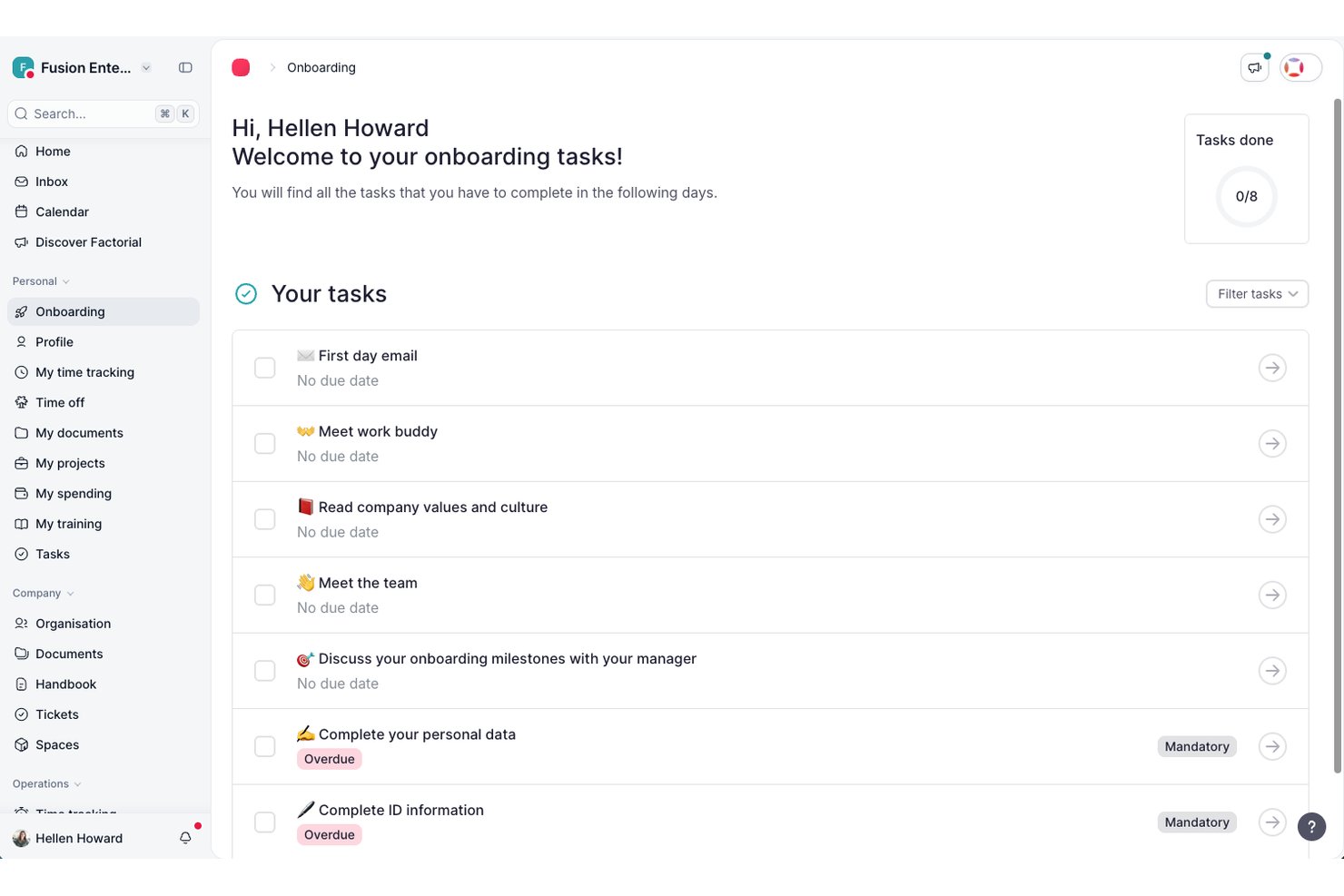
Factorial es una plataforma de RR. HH. con un sistema integrado de gestión documental que incluye almacenamiento centralizado de documentos, plantillas rellenables con variables de datos de empleados, firmas electrónicas, grupos de permisos configurables y distribución masiva de documentos.
¿Para quién es más adecuado Factorial?
Factorial es una buena opción para empresas medianas que necesitan una única plataforma para gestionar conjuntamente las operaciones de RR. HH. y los documentos de los empleados.
Por qué elegí Factorial
Factorial es una de mis principales opciones porque me encanta que permita crear flujos de aprobación de documentos con revisores asignables en cada etapa. Puedes crear grupos de aprobación para distintos roles—gerentes, RR. HH., finanzas—y enviar los documentos a cada grupo en secuencia. Lo que me resulta más útil es el Centro de flujos de trabajo, donde puedes usar plantillas prediseñadas o crear un flujo personalizado desde cero y, después, hacer seguimiento del progreso de cada documento pendiente directamente en la plataforma. Esto mantiene transparente la cadena de aprobación sin que nadie tenga que perseguir firmas manualmente.
Funciones principales de Factorial
- Plantillas de documentos rellenables: Crea plantillas con variables dinámicas que completan automáticamente los datos de los empleados, como el nombre, el cargo y la fecha de incorporación, al enviarlas.
- Firmas electrónicas conformes con eIDAS: Recopila firmas electrónicas legalmente válidas en los documentos directamente dentro de la plataforma.
- Solicitudes masivas de documentos: Envía una solicitud de documentos a varios empleados a la vez y pídeles que carguen archivos en su centro del empleado.
- Estructura de carpetas personalizada: Organiza los documentos de los empleados y de la empresa en carpetas configurables, con almacenamiento separado para archivos personales y archivos de toda la empresa.
Integraciones de Factorial
Factorial ofrece un mercado de aplicaciones con 99 integraciones, incluidas Google Workspace, LinkedIn, Slack, Okta, Monday, Microsoft Dynamics 365 y Microsoft Power BI. También se conecta con Zapier y proporciona una API pública para integraciones personalizadas.
Pros and Cons
Pros:
- Firmas electrónicas integradas en los documentos de RR. HH.
- Conciliación automática de las nóminas con los empleados
- Admite ocho idiomas en toda la plataforma
Cons:
- Los flujos de aprobación carecen de lógica condicional avanzada
- La asistencia después de la incorporación puede ser lenta
Doxis
La mejor opción para el cumplimiento de los expedientes de RR. HH. en múltiples entidades
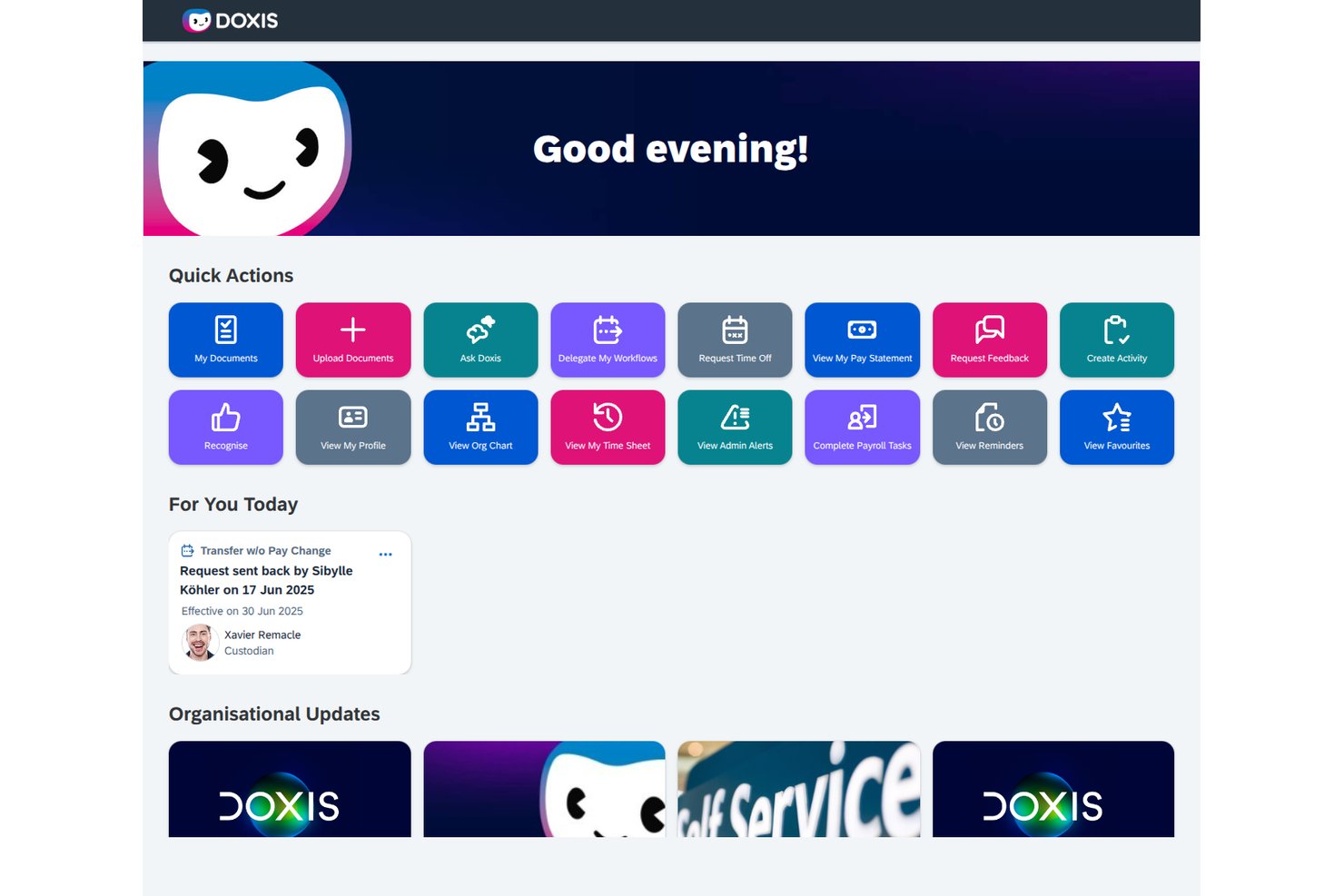
Doxis es una plataforma de gestión de documentos de RR. HH. basada en IA que centraliza los expedientes digitales del personal, automatiza los flujos de trabajo documentales y aplica reglas de conservación y cumplimiento en múltiples entidades y ubicaciones.
¿Para quién es más adecuado Doxis?
Doxis es una opción especialmente adecuada para equipos de RR. HH. empresariales que gestionan expedientes del personal en múltiples entidades jurídicas o países, sobre todo aquellos que ya utilizan SAP SuccessFactors o Workday.
Por qué elegí Doxis
Elegí Doxis como una de las mejores opciones porque está diseñado específicamente para la complejidad que implica gestionar RR. HH. en múltiples entidades jurídicas o países. Mientras que la mayoría de las herramientas tratan los expedientes del personal como una estructura única, Doxis permite configurar tipos de documentos, reglas de conservación y estructuras de carpetas por país o entidad jurídica, de modo que un equipo en Alemania y otro en los Países Bajos reciben automáticamente las reglas de cumplimiento adecuadas. También me gusta cómo su comprobador de integridad basado en IA identifica documentos faltantes o próximos a caducar en cada expediente, algo importante al auditar de una sola vez decenas de registros específicos de cada entidad.
Características principales de Doxis
- Expediente electrónico de RR. HH.: Cada empleado obtiene un expediente digital estructurado con una disposición de carpetas predefinida que contiene contratos, documentos de nómina, registros de formación y evaluaciones de desempeño a lo largo de todo el ciclo de vida del empleado.
- Constructor de flujos de trabajo BPMN 2.0: Los flujos de trabajo de RR. HH. para la incorporación, las aprobaciones y la desvinculación se crean mediante herramientas de bajo código con lógica condicional, aprobaciones en varios pasos y notificaciones automáticas por correo electrónico o SMS.
- Portal de autoservicio para empleados: Los empleados pueden consultar su propio expediente dentro de un período definido por RR. HH., cargar documentos como justificantes médicos, solicitar certificados y enviar cambios en sus datos personales con fechas de entrada en vigor.
- Programación automatizada de la conservación: Los períodos de conservación se establecen por tipo de documento y se aplican automáticamente; cada eliminación queda registrada en el registro de auditoría para respaldar el cumplimiento del RGPD y la GoBD.
Integraciones de Doxis
Doxis ofrece integraciones documentadas con SAP SuccessFactors, Workday, SAP HCM, ADP, Oracle PeopleSoft y Microsoft Dynamics. Las integraciones del marketplace incluyen DocuSign, Adobe Acrobat Sign, FP Sign, MOXIS y e-Sign Agent.
Pros and Cons
Pros:
- Los usuarios destacan la adaptabilidad de los expedientes electrónicos del personal
- La conservación automatizada respalda reglas de cumplimiento específicas de cada entidad
- Los equipos pueden ampliar su uso a partir de proyectos piloto departamentales
Cons:
- El alcance empresarial puede resultar abrumador para equipos de RR. HH. más pequeños
- La firma en RR. HH. suele depender de servicios externos
Mejor para colaboración en tiempo real

Google Docs es una plataforma de gestión de documentos basada en la nube que permite a los equipos de RR. HH. crear, organizar y colaborar en archivos de empleados y documentos de RR. HH. en tiempo real.
¿Para Quién es Mejor Google Docs?
Equipos de RR. HH. en empresas pequeñas y medianas que necesitan una solución sencilla y basada en la nube para la colaboración y el intercambio de documentos.
Por Qué Elegí Google Docs
Elegí Google Docs como uno de los mejores porque mi equipo puede colaborar en archivos de RR. HH. en tiempo real, haciendo que las actualizaciones y los comentarios sean visibles instantáneamente. Me gusta que podamos controlar los permisos de uso compartido para documentos sensibles y organizar carpetas para la incorporación, cumplimiento y registros de empleados. En la práctica, eso significa que el personal de RR. HH. puede trabajar junto en políticas o contratos sin confusión de versiones.
Características Clave de Google Docs
- Galería de plantillas: Acceso a plantillas prediseñadas para políticas de RR. HH., listas de verificación de incorporación y formularios de empleados.
- Historial de versiones: Seguimiento de cambios en los documentos y restauración de versiones previas según sea necesario.
- Comentarios y sugerencias: Añade comentarios o sugiere ediciones sin alterar el texto original.
- Edición móvil: Crea y actualiza documentos de RR. HH. desde cualquier dispositivo móvil.
Integraciones de Google Docs
Google Docs ofrece integraciones nativas en todo el ecosistema de Google Workspace, incluyendo Google Drive, Google Sheets, Google Slides y Gmail. Hay una API disponible para integraciones personalizadas.
Pros and Cons
Pros:
- Fácil compartir con usuarios internos y externos
- Configuración sencilla de permisos para acceso a documentos
- Almacenamiento en la nube con guardado automático
Cons:
- Sin herramientas integradas de cumplimiento o retención de RR. HH.
- No está diseñado para necesidades de seguridad de datos sensibles en RR. HH.

Eddy
Mejor para incorporación de pequeñas empresas

Eddy ofrece a las pequeñas empresas una forma de centralizar los documentos de RR. HH. y las tareas de incorporación en un solo panel. Es especialmente útil para equipos que desean digitalizar el papeleo, gestionar archivos de empleados y automatizar la incorporación sin una configuración compleja. Si busca una solución que simplifique la recopilación de documentos y el cumplimiento normativo para nuevas contrataciones, Eddy está pensado para satisfacer esas necesidades.
Por qué elegí Eddy
Para las pequeñas empresas que quieren simplificar la incorporación y la gestión documental, Eddy ofrece un conjunto de herramientas enfocado. Sus listas de verificación para la incorporación de empleados permiten asignar, rastrear y almacenar los documentos requeridos para cada nueva contratación, facilitando la organización. Elegí Eddy porque brinda a los equipos de RR. HH. una forma de administrar archivos de empleados, recopilar firmas digitales y asegurar el cumplimiento sin complejidades adicionales. Si necesita una plataforma sencilla para optimizar el papeleo y almacenamiento de documentos en la incorporación, Eddy está diseñado con esas prioridades en mente.
Funciones clave de Eddy
Otras funciones de Eddy que pueden resultar útiles a los equipos de RR. HH. incluyen:
- Permisos de documentos según el rol: Controle quién puede ver, editar o cargar documentos específicos de RR. HH. dentro de la plataforma.
- Seguimiento de vencimiento de documentos: Establezca y monitoree fechas de expiración para certificaciones, licencias u otros documentos con plazos.
- Plantillas personalizadas de documentos: Cree y reutilice plantillas para formularios y acuerdos recurrentes de RR. HH.
- Herramienta de solicitud de documentos a empleados: Envíe solicitudes de documentos faltantes directamente a empleados y rastree las respuestas.
Integraciones de Eddy
Las integraciones incluyen SimplyInsured, Checkr, LinkedIn, Next, QuickBooks Online, SmartPay, 401GO, Indeed, Employee Navigator y Express Evaluations.
Pros and Cons
Pros:
- Listas de verificación de incorporación automatizan la recopilación de documentos
- Las firmas digitales están incluidas para formularios de RR. HH.
- Plantillas personalizadas para documentos recurrentes de RR. HH.
Cons:
- No permite carga masiva de documentos de empleados
- Informes limitados sobre historial de actividad de documentos

DocuWare
Ideal para archivado seguro en la nube

DocuWare ofrece a los equipos de RR. HH. una forma segura de archivar y gestionar documentos confidenciales de empleados en la nube. Es especialmente útil para organizaciones que necesitan cumplir con estrictos estándares de cumplimiento o manejar registros confidenciales en varias ubicaciones. Con cifrado avanzado y políticas automatizadas de retención, DocuWare te ayuda a mantener los archivos de RR. HH. protegidos y organizados.
Por qué elegí DocuWare
Cuando el archivo seguro y en la nube es una prioridad para RR. HH., DocuWare ofrece una solución enfocada. Elegí DocuWare porque utiliza cifrado avanzado y controles de acceso para mantener protegidos los documentos confidenciales de RR. HH. en cada etapa. Las políticas automatizadas de retención y eliminación ayudan a los equipos de RR. HH. a mantenerse en cumplimiento con las regulaciones y políticas internas. Estas características hacen de DocuWare una excelente opción para organizaciones que necesitan resguardar registros confidenciales de empleados en la nube.
Funciones clave de DocuWare
Otras funciones de DocuWare que los equipos de RR. HH. pueden encontrar valiosas incluyen:
- Flujos de trabajo de documentos automatizados: Deriva documentos de RR. HH. para aprobaciones, firmas o revisiones según reglas personalizadas.
- Acceso móvil: Visualiza, sube y gestiona archivos de RR. HH. de manera segura desde dispositivos móviles.
- Búsqueda por texto completo: Localiza rápidamente registros y documentos de empleados usando búsquedas por palabras clave.
- Creación de documentos basada en plantillas: Genera formularios y cartas estándar de RR. HH. utilizando plantillas predefinidas.
Integraciones de DocuWare
Las integraciones incluyen SAP, Microsoft Outlook, Sage, QuickBooks, SharePoint, Infor, Oracle, JD Edwards, Microsoft Dynamics y Microsoft Teams.
Pros and Cons
Pros:
- Ofrece indexación inteligente de datos de documentos
- Búsqueda por texto completo en todos los documentos subidos
- Formularios W-4 e I-9 pre-rellenados
Cons:
- Acceso limitado a documentos sin conexión
- Sin integración nativa con sistemas de nómina
Box
La mejor opción con herramientas colaborativas empresariales
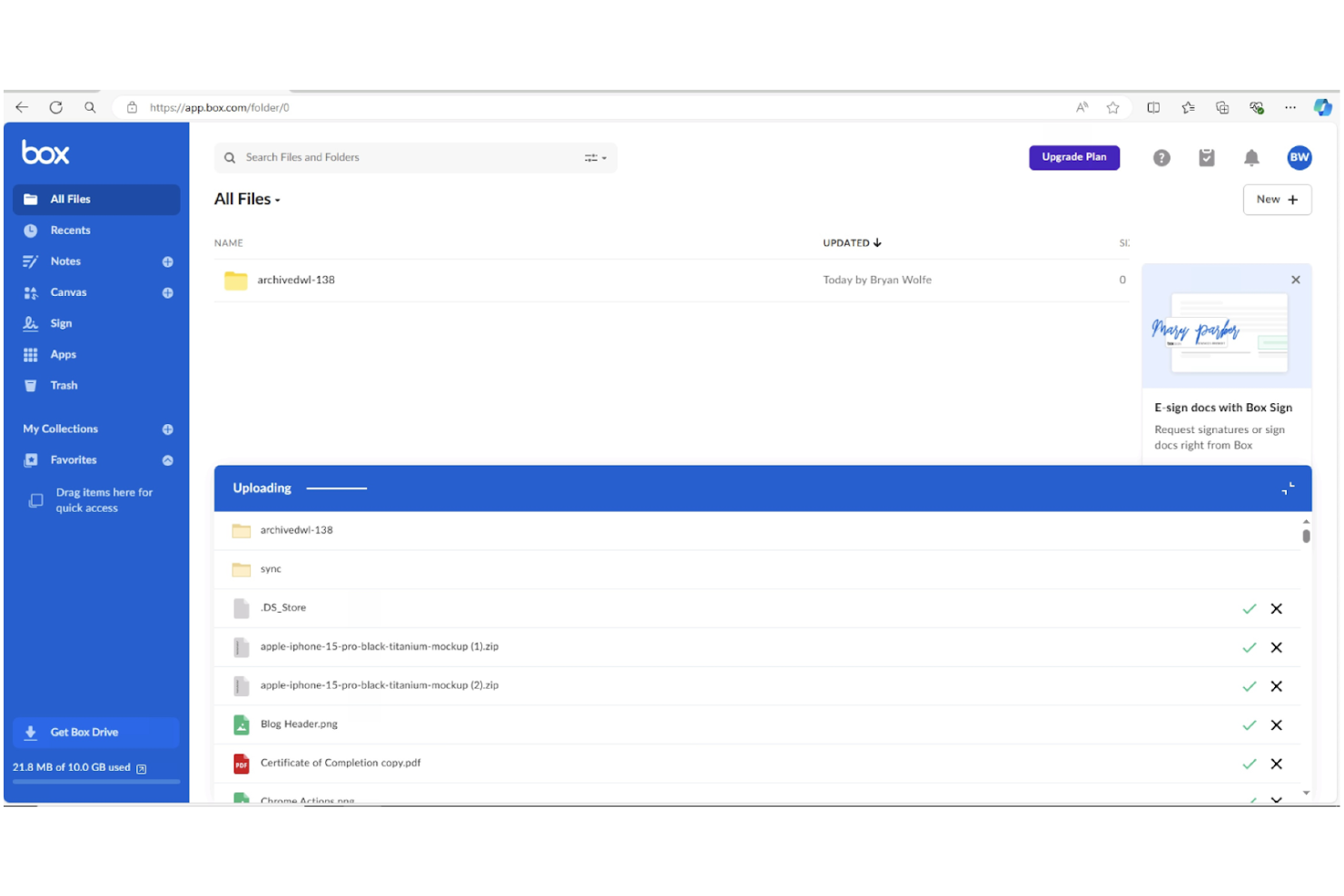
Para los equipos de RR. HH. que necesitan colaborar entre departamentos o ubicaciones, Box ofrece una plataforma segura para gestionar y compartir documentos confidenciales de empleados. Su integración con herramientas empresariales populares lo convierte en una opción ideal para organizaciones más grandes con flujos de trabajo complejos. Box ayuda a los profesionales de RR. HH. a centralizar archivos, controlar el acceso y simplificar la colaboración de documentos sin sacrificar el cumplimiento normativo.
Por qué elegí Box
Cuando los equipos de RR. HH. necesitan colaborar con otros departamentos o socios externos, Box destaca por sus funciones de colaboración de nivel empresarial. Elegí Box porque permite que varios usuarios coediten, comenten y gestionen de forma segura documentos confidenciales de RR. HH. en tiempo real. Sus controles detallados de permisos permiten establecer niveles de acceso para diferentes partes interesadas, lo cual es especialmente importante para proteger la información confidencial de los empleados. Para organizaciones que dependen del trabajo en equipo transversal y necesitan mantener una estricta seguridad documental, Box ofrece una solución flexible y escalable.
Funciones clave de Box
Otras funciones que hacen que Box sea útil para la gestión de documentos de RR. HH. incluyen:
- Plantillas de flujos de trabajo automatizados: Crea y despliega procesos documentales repetibles para tareas a lo largo del ciclo de vida del empleado, como la incorporación.
- Historial de versiones de documentos: Haz un seguimiento y restaura versiones anteriores de los archivos según sea necesario.
- Integración legal de firma electrónica: Recoge firmas directamente en Box usando Box Sign.
- Búsqueda avanzada con etiquetado de metadatos: Ubica documentos rápidamente utilizando etiquetas y filtros personalizados.
Integraciones de Box
Las integraciones incluyen Microsoft 365, Google Workspace, Salesforce, Workday, Slack, Oracle NetSuite, Okta, Broadcom, Splunk, Adobe y Palo Alto Networks.
Pros and Cons
Pros:
- Controles granulares de cifrado AES de 256 bits
- Vista previa nativa de más de 120 tipos de archivo
- Herramienta de firma electrónica integrada para aprobaciones
Cons:
- Arquitectura de permisos de carpetas externas compleja
- Las velocidades de carga masiva pueden ser inconsistentes
Revver
Mejor para búsquedas avanzadas

Cuando necesitas localizar rápidamente documentos de RR. HH. en un repositorio grande o complejo, Revver ofrece herramientas de búsqueda avanzadas que realmente destacan. La plataforma está diseñada para equipos de RR. HH. y organizaciones que gestionan grandes volúmenes de archivos y requieren una recuperación precisa y rápida. Sus capacidades de búsqueda ayudan a reducir el tiempo dedicado a buscar políticas, expedientes de empleados o documentos de cumplimiento, lo que lo convierte en una excelente opción para equipos con altas exigencias de acceso documental.
Por qué elegí Revver
Encontrar el documento adecuado rápidamente puede ser un reto para las operaciones de RR. HH., especialmente cuando se gestionan miles de archivos. Elegí Revver porque sus capacidades avanzadas de búsqueda te permiten filtrar por metadatos, palabras clave y tipos de documento, lo que facilita mucho dar con exactamente lo que necesitas. La plataforma también admite búsqueda de texto completo dentro de los documentos, por lo que puedes localizar información específica aunque no recuerdes el nombre del archivo. Para profesionales de RR. HH. que necesitan herramientas de búsqueda fiables y detalladas para gestionar bibliotecas de documentos complejas, Revver ofrece una ventaja clara.
Características clave de Revver
Otras características que hacen útil a Revver para la gestión documental de RR. HH. incluyen:
- Políticas automatizadas de retención de documentos: Establece reglas sobre cuánto tiempo se almacenan los documentos y cuándo deben eliminarse.
- Controles de acceso basados en roles: Asigna permisos a los usuarios según su función para proteger archivos sensibles de RR. HH.
- Seguimiento de historial de versiones: Visualiza y restaura versiones anteriores de los documentos cuando sea necesario.
- Carga y etiquetado masivo: Carga múltiples archivos a la vez y aplica etiquetas para una organización más sencilla.
Integraciones de Revver
Las integraciones incluyen Microsoft 365, Google Drive, Microsoft Teams, Microsoft Outlook, Microsoft OneDrive, Google Docs, Google Sheets, Microsoft Word y Microsoft PowerPoint.
Pros and Cons
Pros:
- Filtros de búsqueda avanzados para consultas complejas
- Herramienta de comparación de versiones de documentos en pantalla dual
- Capacidad de almacenamiento de primer nivel de 20TB
Cons:
- No permite edición colaborativa de documentos en tiempo real
- Automatización de flujos de trabajo limitada para aprobaciones de RR. HH.

Dayforce
Mejor con gestión de nómina integrada
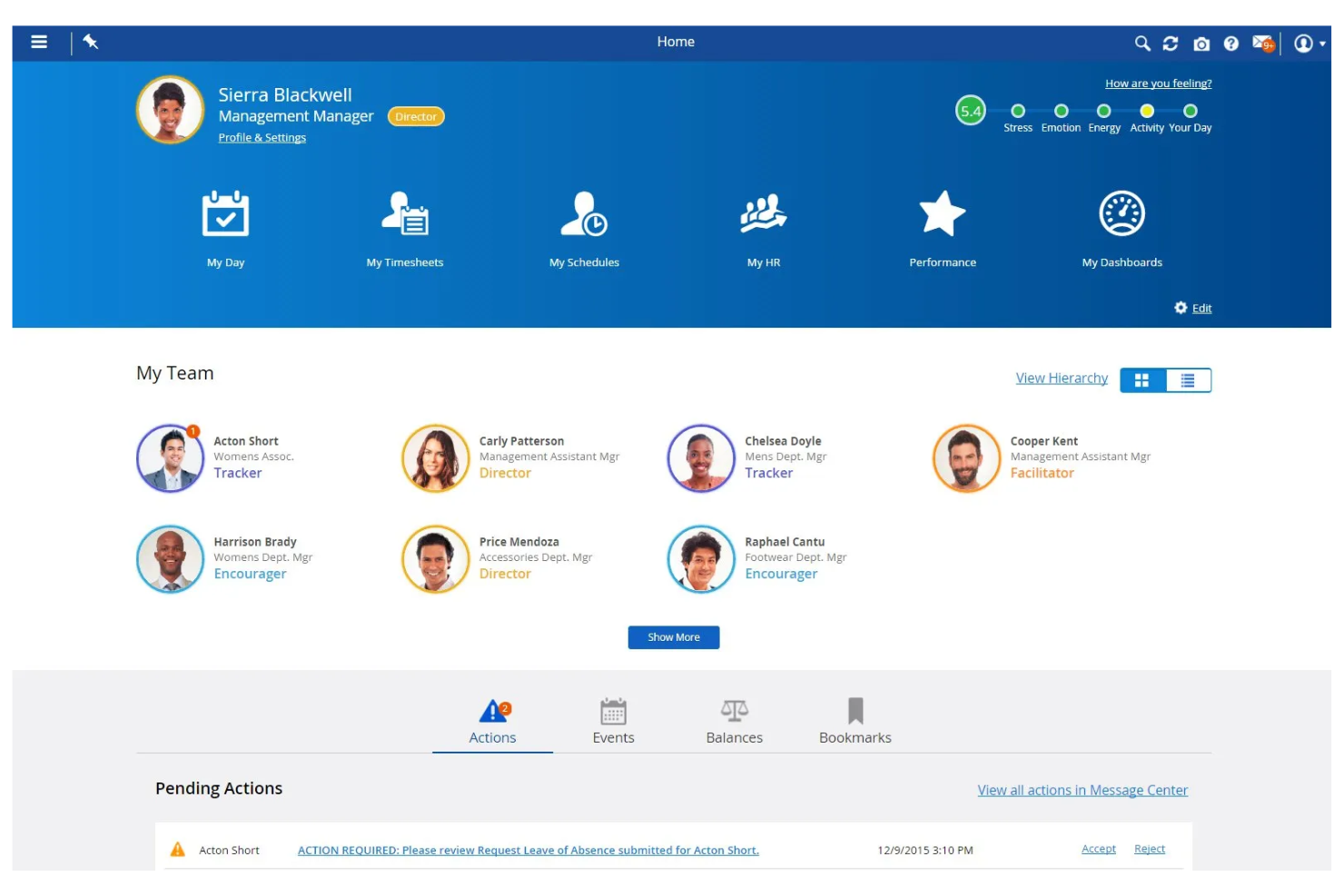
Dayforce destaca para los equipos de RR.HH. que desean una gestión documental estrechamente conectada con la nómina y los datos de la fuerza laboral. Esta plataforma todo en uno es ideal para organizaciones que necesitan gestionar archivos confidenciales de empleados junto con la nómina, los beneficios y los registros de cumplimiento en un solo lugar. Si buscas reducir la entrada manual de datos y asegurar la precisión de la nómina mediante flujos de trabajo documentales integrados, Dayforce reúne estas capacidades.
Por qué elegí Dayforce
Lo que distingue a Dayforce es su capacidad para conectar la gestión documental de RR.HH. directamente con el procesamiento de nóminas. Esta integración permite almacenar, actualizar y acceder a documentos de empleados—como formularios fiscales, contratos y registros de cumplimiento—junto a los datos de nómina, reduciendo el riesgo de errores y entradas duplicadas. Elegí Dayforce porque sincroniza automáticamente los cambios en los documentos con las actualizaciones de nóminas, lo que ayuda a los equipos de RR.HH. a mantener registros precisos para auditorías e informes. Para organizaciones donde la precisión de la nómina y el cumplimiento están estrechamente vinculados con los flujos de trabajo documentales, Dayforce ofrece una solución unificada.
Características clave de Dayforce
Otras características de Dayforce que los equipos de RR.HH. pueden encontrar valiosas incluyen:
- Alertas automatizadas de vencimiento de documentos: Recibe notificaciones cuando los documentos importantes de RR.HH. están próximos a vencer o requieren renovación.
- Controles de acceso a documentos basados en roles: Asigna permisos para que solo los usuarios autorizados puedan ver o editar archivos específicos.
- Carga masiva y etiquetado de documentos: Sube varios documentos a la vez y etíquetalos para facilitar su organización y recuperación.
- Seguimiento de auditoría: Monitoriza todas las acciones y cambios realizados en los documentos para cumplir con la normativa y garantizar la responsabilidad.
Integraciones de Dayforce
Las integraciones incluyen Salesforce, Microsoft Dynamics, Workday, SAP, Oracle, ADP, Kronos, QuickBooks, Ceridian e Infor.
Pros and Cons
Pros:
- Almacenamiento de cumplimiento de nómina global y multimoneda
- Autoservicio de documentos de empleados potenciado por IA
- Rastreo de auditoría documental para todas las acciones de los usuarios
Cons:
- Interfaz compleja para la creación de informes personalizados
- Actualizaciones frecuentes provocan inestabilidad en el sistema
Otros software de gestión de documentos de HR
Estas son algunas opciones adicionales de software de gestión de documentos de HR (DMS) que no llegaron a mi selección, pero que aun así merece la pena revisar:
- PandaDoc
Ideal para flujos de trabajo de documentos con firma electrónica
- Document Locator
Mejor integración con Microsoft Office
- DynaFile
Ideal para escanear registros en papel a digital
- WorkDocs
Mejor para el seguimiento automático del cumplimiento
- Paycom
Ideal para acceso autoservicio del empleado


Cómo evalúo el software de gestión documental para RR.HH.
Divido mi evaluación en dos capas: las capacidades básicas que una herramienta debe tener—como la organización estructurada de expedientes de empleados y firmas electrónicas conformes—y los diferenciadores que separan a los mejores del resto.
Funcionalidad Básica (Requisitos imprescindibles para esta lista)
Cuando selecciono herramientas para mi lista, califico cada una en una escala del 0 (no ofrece la funcionalidad) al 5 (sobresale en este aspecto) para cada funcionalidad clave que se menciona a continuación. Luego, calculo la puntuación total de la herramienta como un porcentaje. Cada herramienta necesita alcanzar una puntuación mínima total del 65% para ser considerada para su inclusión.
- Gestión de expedientes de empleados: Busco un sistema estructurado y centrado en el empleado donde los documentos estén organizados por perfil—no simplemente almacenados en carpetas genéricas que se deban clasificar manualmente.
- Controles y permisos de acceso: Archivos sensibles como registros disciplinarios o documentación médica necesitan restricciones granulares basadas en el rol para que sólo el personal autorizado pueda verlos.
- Firmas electrónicas y flujos de trabajo documental: Evalúo si la herramienta admite firmas electrónicas nativas y el enrutamiento automático, como enviar una carta de oferta para su aprobación y luego al candidato para la firma.
- Políticas de cumplimiento y retención: Verifico si la plataforma cuenta con calendarios de retención incorporados, registros de auditoría y soporte normativo para que tu equipo pueda hacer seguimiento de vencimientos del I-9 o responder solicitudes de eliminación conforme a GDPR.
- Plantillas y generación de documentos: Las plantillas prediseñadas y personalizables con campos combinados son importantes—como completar automáticamente un contrato laboral con los datos de un nuevo empleado desde su perfil.
- Integración con HRIS y nómina: La herramienta debería conectarse con tu plataforma actual de HRIS o nómina para que los datos de los empleados fluyan entre sistemas sin entradas duplicadas ni cargas manuales.
Una vez que tengo una lista de herramientas que cumplen los criterios, considero qué diferencia a cada plataforma.
Factores diferenciadores (lo que distingue a los proveedores)
Así es como comparo y contrasto a los diferentes proveedores:
Características destacadas
Los paquetes de incorporación automatizados son un gran diferenciador—busco herramientas que reúnan los formularios de nuevos empleados en kits secuenciales con recordatorios para que no se pase por alto nada durante la primera semana de alguien. Un portal de autoservicio para empleados también agrega mucho valor, ya que brinda al personal acceso directo a recibos de sueldo, políticas y documentos personales sin tener que hacer una solicitud al área de recursos humanos. También evalúo si una plataforma utiliza IA o reconocimiento óptico de caracteres (OCR) para clasificar automáticamente los archivos subidos, lo cual ahorra horas de etiquetado manual al migrar registros antiguos.
Más allá de las funcionalidades
Las certificaciones de seguridad son importantes cuando se almacena información sensible de empleados. Verifico el cumplimiento de SOC 2 Tipo II o ISO 27001, además de los estándares de cifrado y soporte para SSO/MFA. La profundidad de integración es igualmente clave—tu herramienta de gestión documental debe sincronizarse con tu HRIS y sistema de nómina existentes para mantener los registros actualizados sin reingresos manuales. También evalúo el soporte de implementación y migración, especialmente las opciones de importación masiva para equipos que migran de archivos en papel o discos compartidos con miles de documentos antiguos por organizar.
Cómo elegir un software de gestión de documentos de HR
Es fácil perderse entre largas listas de funciones y estructuras de precios complejas. Para ayudarte a mantener la concentración mientras avanzas en tu proceso único de selección de software, estos son los factores que debes tener en cuenta:
| Factor | Qué debes considerar |
|---|---|
| Escalabilidad | ¿El software podrá gestionar el volumen de documentos a medida que tu plantilla crezca o cambie con el tiempo? |
| Integraciones | ¿La herramienta se conecta de forma nativa con tu HRIS, nómina u otros sistemas principales que ya utilizas? |
| Personalización | ¿Puedes adaptar los flujos de trabajo de los documentos, los permisos y las plantillas a las necesidades de tu organización? |
| Facilidad de uso | ¿El personal de HR y los empleados podrán navegar por el sistema y utilizarlo con una formación mínima? |
| Implementación e incorporación | ¿Cuánto tiempo se tardará en migrar los documentos y formar a los usuarios? ¿Se proporcionan recursos para la incorporación? |
| Coste | ¿Los niveles de precios son claros y predecibles? Presta atención a las tarifas por usuario, los límites de almacenamiento o los cargos adicionales. |
| Medidas de seguridad | ¿El software ofrece cifrado, controles de acceso y registros de auditoría para proteger los datos confidenciales? |
| Requisitos de cumplimiento | ¿El sistema puede cumplir con los estándares de conservación de documentos, privacidad y auditoría de tu sector? |
¿Qué es el software de gestión de documentos de HR?
El software de gestión de documentos de HR es un sistema digital que almacena, organiza y protege los registros de los empleados y los documentos de HR en una ubicación centralizada. Estas plataformas ayudan a los equipos de HR a gestionar los permisos de acceso, realizar un seguimiento de las versiones de los documentos y garantizar el cumplimiento de las políticas legales y de la empresa.
Al digitalizar los flujos de trabajo de los documentos, los equipos de HR reducen el papeleo manual, mejoran la seguridad de los datos y facilitan que los empleados y los responsables encuentren y gestionen archivos importantes.
Características
Al seleccionar un software de gestión documental de RR. HH., presta atención a las siguientes características clave:
- Almacenamiento de documentos: Centraliza todos los archivos y registros de RR. HH. en un repositorio digital seguro, lo que facilita organizar y recuperar los documentos cuando sea necesario.
- Controles de acceso: Permite establecer permisos para determinar quién puede ver, editar o compartir documentos específicos, protegiendo la información confidencial de los empleados.
- Seguimiento de versiones: Mantiene un historial de los cambios realizados en los documentos, para que puedas ver quién hizo las actualizaciones y volver a versiones anteriores si es necesario.
- Distribución de documentos: Permite a RR. HH. enviar documentos a personas o grupos, realizar un seguimiento de la entrega y confirmar la recepción o el acuse de recibo.
- Compatibilidad con firmas electrónicas: Permite que los empleados y responsables proporcionen una firma electrónica, acelerando las aprobaciones y reduciendo el uso de papel.
- Registros de auditoría: Registra toda la actividad relacionada con los documentos, incluidas las visualizaciones, ediciones y descargas, para respaldar el cumplimiento normativo y las auditorías internas.
- Funcionalidad de búsqueda: Proporciona herramientas de búsqueda para localizar rápidamente documentos por palabra clave, fecha o nombre del empleado.
- Gestión de políticas de conservación: Automatiza el archivado y la eliminación de documentos en función de los requisitos legales o de la empresa, reduciendo los riesgos de incumplimiento.
- Creación de formularios personalizados: Permite a los equipos de RR. HH. crear y distribuir formularios digitales para la incorporación, las actualizaciones de políticas u otros procesos de RR. HH.
- Acceso móvil: Ofrece acceso seguro a los documentos desde teléfonos inteligentes o tabletas, facilitando el trabajo de RR. HH. a distancia y sobre la marcha.
Ventajas
La implementación de un software de gestión documental de RR. HH. ofrece varias ventajas para tu equipo y tu empresa. Estas son algunas de las que puedes esperar:
- Mejora del cumplimiento normativo: Los registros de auditoría automatizados, las políticas de conservación y el seguimiento de los acuses de recibo te ayudan a cumplir los requisitos legales y empresariales con menos esfuerzo manual.
- Recuperación más rápida de documentos: El almacenamiento centralizado y las herramientas de búsqueda avanzada proporcionan un acceso sencillo a los registros de empleados y archivos de RR. HH. cuando los necesitas.
- Mayor seguridad de los datos: Los controles de acceso y el cifrado protegen la información confidencial de los empleados frente al acceso no autorizado o el uso compartido accidental.
- Reducción del papeleo: Los formularios digitales, las firmas electrónicas y los flujos de trabajo automatizados minimizan el papeleo manual y las necesidades de almacenamiento físico.
- Mejor experiencia para los empleados: El acceso de autoservicio a los documentos permite a los empleados encontrar y gestionar sus propios registros sin tener que esperar a RR. HH.
- Incorporación y desvinculación simplificadas: La distribución automatizada de documentos y los formularios personalizados simplifican el proceso de incorporar a nuevos empleados o gestionar las salidas.
- Escalabilidad para equipos en crecimiento: El almacenamiento en la nube y los permisos flexibles permiten que tu sistema de gestión documental crezca junto con tu organización.
Costes y precios
Seleccionar un software de gestión documental de RR. HH. requiere comprender los distintos modelos de precios y planes disponibles. Los costes varían en función de las características, el tamaño del equipo, los complementos y otros factores. La siguiente tabla resume los planes habituales, sus precios medios y las características que suelen incluir las soluciones de software de gestión documental de RR. HH.:
Tabla comparativa de planes de software de gestión documental de RR. HH.
| Tipo de plan | Precio medio | Características habituales |
|---|---|---|
| Plan gratuito | $0 | Almacenamiento básico de documentos, acceso limitado para usuarios, búsqueda sencilla y asistencia básica. |
| Plan personal | $5-$15/usuario/mes | Gestión individual de documentos, compatibilidad con firmas electrónicas, controles de acceso básicos y almacenamiento limitado. |
| Plan empresarial | $15-$30/usuario/mes | Uso compartido de documentos en equipo, permisos avanzados, registros de auditoría, formularios personalizados y opciones de integración. |
| Plan corporativo | $30-$60/usuario/mes | Almacenamiento ilimitado, herramientas avanzadas de cumplimiento normativo, flujos de trabajo personalizados, asistencia especializada y opciones de SSO. |
Preguntas frecuentes sobre el software de gestión de documentos de recursos humanos
Estas son algunas respuestas a preguntas frecuentes sobre el software de gestión de documentos de recursos humanos:
¿Cómo ayudan los sistemas de gestión de documentos de recursos humanos a cumplir la normativa?
Los sistemas de gestión de documentos de recursos humanos ayudan a cumplir la normativa mediante la automatización de los calendarios de conservación, el seguimiento de los acuses de recibo de documentos y el mantenimiento de registros de auditoría. Estas funciones facilitan el cumplimiento de los requisitos legales, la preparación para auditorías y la gestión de los datos confidenciales de los empleados de acuerdo con la normativa.
¿Puede el software de gestión de documentos de recursos humanos integrarse con otras herramientas de recursos humanos?
Sí, la mayoría de los programas de gestión de documentos de recursos humanos pueden integrarse con plataformas de sistemas de información de recursos humanos, nóminas e incorporación de empleados. Las integraciones reducen la introducción manual de datos, mantienen la coherencia de los registros de los empleados y permiten a los equipos de recursos humanos gestionar documentos dentro de sus flujos de trabajo actuales.
¿Qué debo buscar al evaluar la seguridad de un software de gestión de documentos de recursos humanos?
Busca funciones como el cifrado, los controles de acceso basados en roles y los registros de auditoría detallados. Estas medidas de protección salvaguardan la información confidencial de los empleados frente al acceso no autorizado y ayudan a supervisar quién consulta o edita los documentos.
¿Cuánto se tarda en implementar un software de gestión de documentos de recursos humanos?
El tiempo de implementación varía, pero la mayoría de las soluciones basadas en la nube pueden configurarse en unos días o varias semanas. Entre los factores se incluyen el tamaño de la biblioteca de documentos, las necesidades de integración y la disponibilidad de recursos de incorporación, como la formación y la asistencia para la migración.
¿Es posible migrar archivos en papel existentes a un sistema digital de gestión de documentos de recursos humanos?
Sí, puedes digitalizar los archivos en papel escaneándolos y cargándolos en el sistema. Muchos proveedores ofrecen asistencia para la migración o colaboran con servicios de escaneado para ayudarte a convertir y organizar tus registros existentes.