

10 parasta palkanlaskentaominaisuuksilla varustettua kirjanpito-ohjelmistoa vuonna 2026

Parhaat palkanmaksuominaisuuksia sisältävät kirjanpito-ohjelmistot – vertailulista


Palkanmaksuominaisuuksia sisältävä kirjanpito-ohjelmisto yhdistää taloushallinnon keskeiset työkalut ja integroidun työntekijöiden palkanmaksun käsittelyn. Näin voit hallinnoida kirjanpitoa, hoitaa palkanmaksun sekä kirjata palkkakulut ja -velat yhdessä järjestelmässä. Jos haluat pitää luvut tarkkoina, säästää aikaa ja varmistaa vaatimustenmukaisuuden, oikean ratkaisun löytäminen on olennaista.
Tässä oppaassa vertailen palkanmaksuominaisuuksia sisältäviä kirjanpito-ohjelmistoja pienistä tiimeistä monimutkaisiin suuryrityksiin. Näet, mitkä vaihtoehdot sopivat parhaiten integroituihin palkanmaksu- ja kirjanpitotoimintoihin, palkanmaksun ja pääkirjanpidon automaatioon, verotukeen sekä erikokoisille yrityksille.
Miksi voit luottaa ohjelmistosuosituksiimme
Tiimimme on testannut ja arvioinut ohjelmistoja vuodesta 2012. Olemme itse HR-asiantuntijoita, joten tiedämme, kuinka vaikeaa ja tärkeää oikean ohjelmiston valitseminen on.
Tätä opasta varten arvioimme työkaluja käytännön testauksen ja riippumattoman tutkimuksen avulla ja pisteytimme ne valintakriteeriemme perusteella. Hyödynnämme myös alan johtavien asiantuntijoiden ja kokeneiden HR-ammattilaisten näkemyksiä.
Arvostelumme perustuvat toimituksemme omaan harkintaan. Ne eivät ole myyntipuhetta.
Asiantuntija-arvioijat:
Palkanmaksuominaisuuksia sisältävien kirjanpito-ohjelmistojen vertailutaulukko
| Tool | Best For | Trial Info | Price | ||
|---|---|---|---|---|---|
| 1 | Paras projektipohjaiseen palkkakustannusten seurantaan | Ilmainen esittely saatavilla | Hinta saatavilla pyynnöstä | Website | |
| 2 | Sopii parhaiten yritystason taloushallintoon ja globaaliin palkanlaskentaan | Ilmainen esittely saatavilla | Hinnoittelu pyynnöstä | Website | |
| 3 | Paras avoimen lähdekoodin kirjanpitoon ja palkanlaskentaan | 14 päivän maksuton kokeilu | Alkaen $5/kuukausi | Website | |
| 4 | Sopii parhaiten modulaarisiin kirjanpito- ja palkanlaskentasovelluksiin | Ilmainen sopimus saatavilla | Alkaen 31,10 $/käyttäjä/kuukausi | Website | |
| 5 | Sopii parhaiten palkanlaskennan kirjauksiin yrityksen pääkirjanpitoon | Ilmainen esittely saatavilla | Hinta pyydettäessä | Website | |
| 6 | Paras automaattisiin palkanlaskennan päiväkirjavienteihin | 30 päivän ilmainen kokeilu | Alkaen $40/kuukausi | Website | |
| 7 | Paras kirjanpitoon ja palkanlaskentaan yhden kirjautumisen kautta | 30 päivän ilmainen kokeilujakso | Alkaen $20/kuukausi | Website | |
| 8 | Paras työpöytäkirjanpitoon palkkahallinnon kanssa | 30 päivän maksuton kokeilujakso | Alkaen $124.42 kuukaudessa | Website | |
| 9 | Paras verotaulukoita hyödyntävään työpöytäpohjaiseen palkkahallintoon | 30 päivän ilmainen kokeilu | Alkaen 40 $/kuukausi palkkahallinnon kanssa | Website | |
| 10 | Paras operatiivisiin työnkulkuihin integroitavaan palkanlaskentaan | 90 päivän ilmainen kokeilujakso | Alkaen 35 $/käyttäjä/kuukausi | Website |
Palkanmaksuominaisuuksia sisältävien kirjanpito-ohjelmistojen arvostelut
Alla on yksityiskohtaiset yhteenvedot parhaista palkanmaksuominaisuuksia sisältävistä kirjanpito-ohjelmistoista, jotka pääsivät vertailulistalleni. Arvosteluissani tarkastellaan yksityiskohtaisesti kunkin ohjelmiston ominaisuuksia, hinnoittelua ja parhaita käyttötapauksia, jotta löydät itsellesi parhaiten sopivan vaihtoehdon.
Paras projektipohjaiseen palkkakustannusten seurantaan
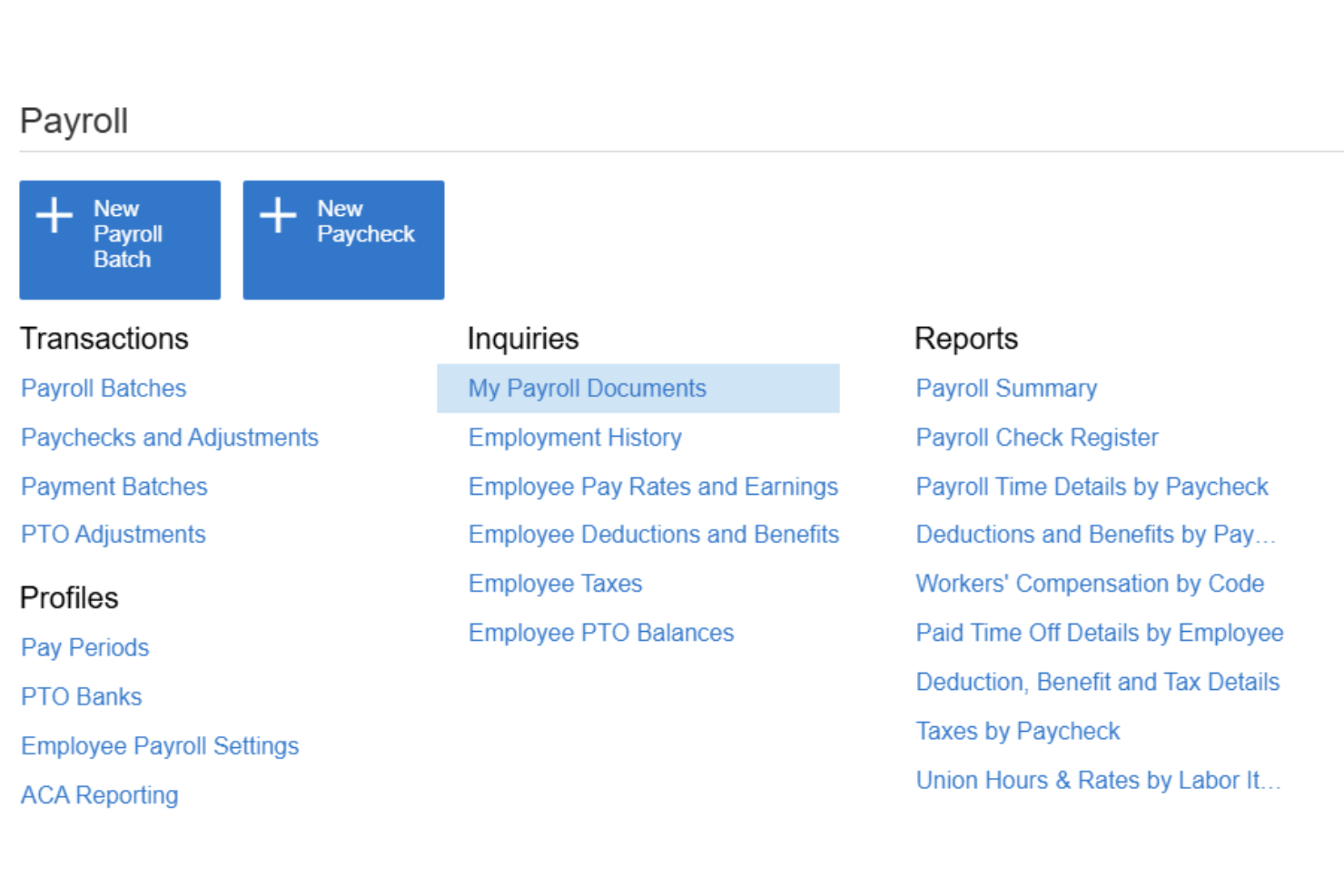
Acumatica on pilvipohjainen toiminnanohjausalusta keskisuurille yrityksille. Se yhdistää koko palkanlaskennan käsittelyn, pääkirjanpidon, projektikustannusten seurannan ja työajan hallinnan yhteen järjestelmään.
Kenelle Acumatica sopii parhaiten?
Acumatica sopii erinomaisesti keskisuurille rakennus-, valmistus- ja asiantuntijapalveluyrityksille, jotka tarvitsevat palkkakustannusten suoran kohdistamisen projekteihin ja työkoodeihin.
Miksi valitsin Acumatican
Valitsin Acumatican yhdeksi parhaista vaihtoehdoista, koska mikään muu käyttämäni taloushallintoalusta ei mahdollista palkkakustannusten erittelyä samanaikaisesti projektin, tehtävän, kustannuskoodin, ammattiliiton ja työvuoron mukaan. Kun tiimini käsittelee palkat, kustannukset kirjautuvat automaattisesti pääkirjanpitoon määrityksillä, jotka vastaavat projektin rakennetta eivätkä ainoastaan yleistä palkkatiliä. Hyödynnän myös varmennettua palkkaraportointia, joka on välttämätön rakennusprojekteissa, joissa sovelletaan työehtosopimusten mukaisia vähimmäispalkkoja.
Acumatican tärkeimmät ominaisuudet
- Työntekijöiden itsepalveluportaali: Työntekijät voivat tarkastella palkkalaskelmia, verolomakkeita, suoraveloitustietoja ja palkallisen vapaan pyyntöjä verkossa tai mobiililaitteella.
- Palkkaverotus ja vaatimustenmukaisuus: Tukee ajantasaisia liittovaltion, FICA-, osavaltio- ja paikallisverotietoja, sähköisiä palkkailmoituksia, vaatimustenmukaisuuden koontinäyttöjä ja palkkahallinnon tarkastusjälkiä.
- Moniyrityslaskenta: Hallitse palkanlaskentaa ja taloushallintoa useissa yrityksissä tai toimipaikoissa yhdestä keskitetystä alustasta.
- Natiivisti integroitu työajan kirjaus: Työaikatiedot tuodaan suoraan palkanlaskentaan hyväksyntätyönkulkuineen ja puuttuvasta työajasta muistuttavine ilmoituksineen.
Acumatican integraatiot
Acumatica tarjoaa natiivisti integroitavat yhteydet Microsoft 365:een, DocuSigniin, Avalaraan, ADP:hen ja Tableaun. Mukautettuja integraatioita varten on saatavilla API-rajapinta.
Pros and Cons
Pros:
- Sisäänrakennettu palkkakustannusten kohdistaminen projektitasolla
- Tukee palkanlaskentaa samanaikaisesti useissa yrityksissä
- Varmennettu palkkaraportointi työehtosopimusten mukaisten vähimmäispalkkojen projekteihin
Cons:
- Pienemmille palkkatiimeille monimutkainen määritys
- Käyttöönottoa ei voi tehdä itsenäisesti ilman kumppania

Workday
Sopii parhaiten yritystason taloushallintoon ja globaaliin palkanlaskentaan
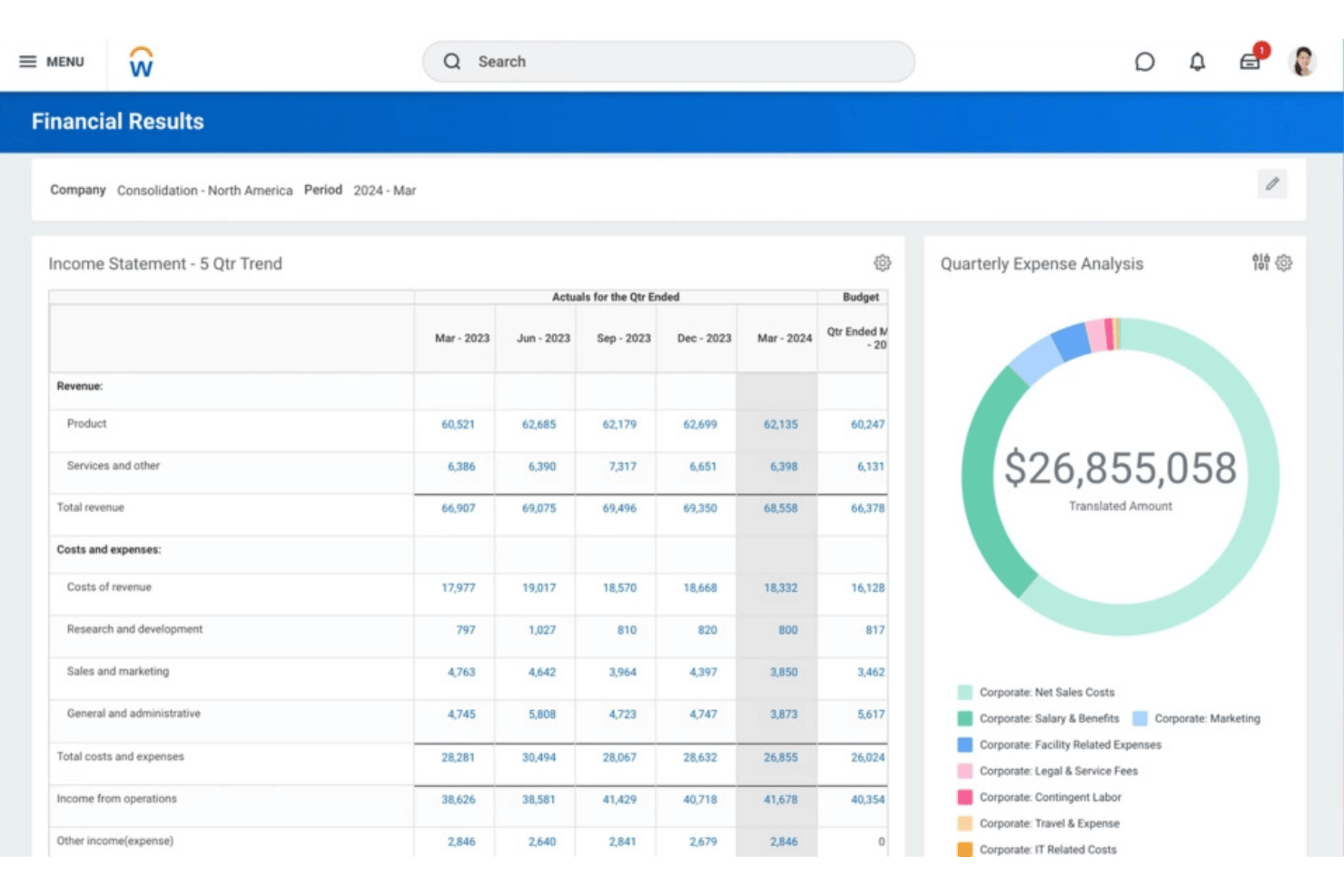
Workday on yritystason alusta, joka yhdistää palkanlaskennan, taloushallinnon ja HCM:n yhteen järjestelmään. Siihen kuuluu natiivipääkirja, jatkuva palkanlaskenta sekä Workdayn ja sen kumppaniekosysteemin tukemat globaalit palkanlaskentaominaisuudet.
Kenelle Workday sopii parhaiten?
Workday on suunniteltu suurille ja yritystason organisaatioille, joiden on hallittava monimutkaisia, usean yksikön talous- ja palkanlaskentatoimintoja useissa maissa yhden alustan kautta.
Miksi valitsin Workdayn
Valitsin Workdayn, koska se yhdistää yritystason palkanlaskennan suoraan taloushallintoon. Palkkalaskennan tulokset voivat muodostaa kirjanpitovientejä ja siirtää työvoimakustannukset pääkirjaan, kun taas Workday Financial Management hoitaa keskeiset kirjanpitotoiminnot, kuten pääkirjan, osto- ja myyntireskontran, käyttöomaisuuden ja konsolidoinnin.
Workdayn tärkeimmät ominaisuudet
- Palkanlaskennan kirjanpito: Workday muodostaa automaattisesti kirjanpitoviennit palkanlaskennan tulosten perusteella ja tukee työvoimakustannusten kohdentamista.
- Pääkirjan integrointi: Palkanlaskennan tulokset voidaan siirtää Workday Financial Managementiin tilikirjaussääntöjen, tilikausien aikataulujen, kirjatyyppien ja muiden kirjanpitomääritysten avulla.
- Jatkuva palkanlaskenta: Workday tukee jatkuvaa palkanlaskentaa sen sijaan, että palkanlaskentaa käsiteltäisiin ainoastaan erillisenä kauden lopun prosessina.
- Globaali palkanlaskenta: Natiivin/suoran palkanlaskennan kattavuutta täydentävät Workdayn globaali kumppaniekosysteemi ja kaksisuuntaiset integraatiot.
- Työntekijöiden itsepalvelu: Työntekijät voivat käyttää palkkatietoja Workdayn mobiilikäyttöön ensisijaisesti suunnitellun käyttökokemuksen kautta; Workdayn dokumentaatio tukee erityisesti työntekijöiden pääsyä palkkalaskelmiin mobiililaitteilla.
- Työajasta palkanlaskentaan: Hyväksytty työaika voidaan välittää palkkalaskelmiin yhdistämällä työajan laskentatunnisteet ansioihin tai vähennyksiin.
Workday-integraatiot
Workday tarjoaa natiiviliitännät ADP:hen, Kronokseen, Salesforceen, Microsoft 365:een, SAP:iin, ServiceNow’hun ja Oracleen sekä ohjelmointirajapinnan mukautettuja integraatioita varten.
Pros and Cons
Pros:
- Palkanlaskenta ja taloushallinto toimivat samassa järjestelmässä
- Natiivi palkanlaskenta yli 180 maassa
- Työntekijöiden itsepalvelu vähentää henkilöstöhallinnon hallinnollista työtaakkaa
Cons:
- Liian raskas alle 500 työntekijän yrityksille
- Käyttöönotto edellyttää merkittävää IT-osallistumista

ERPNext
Paras avoimen lähdekoodin kirjanpitoon ja palkanlaskentaan
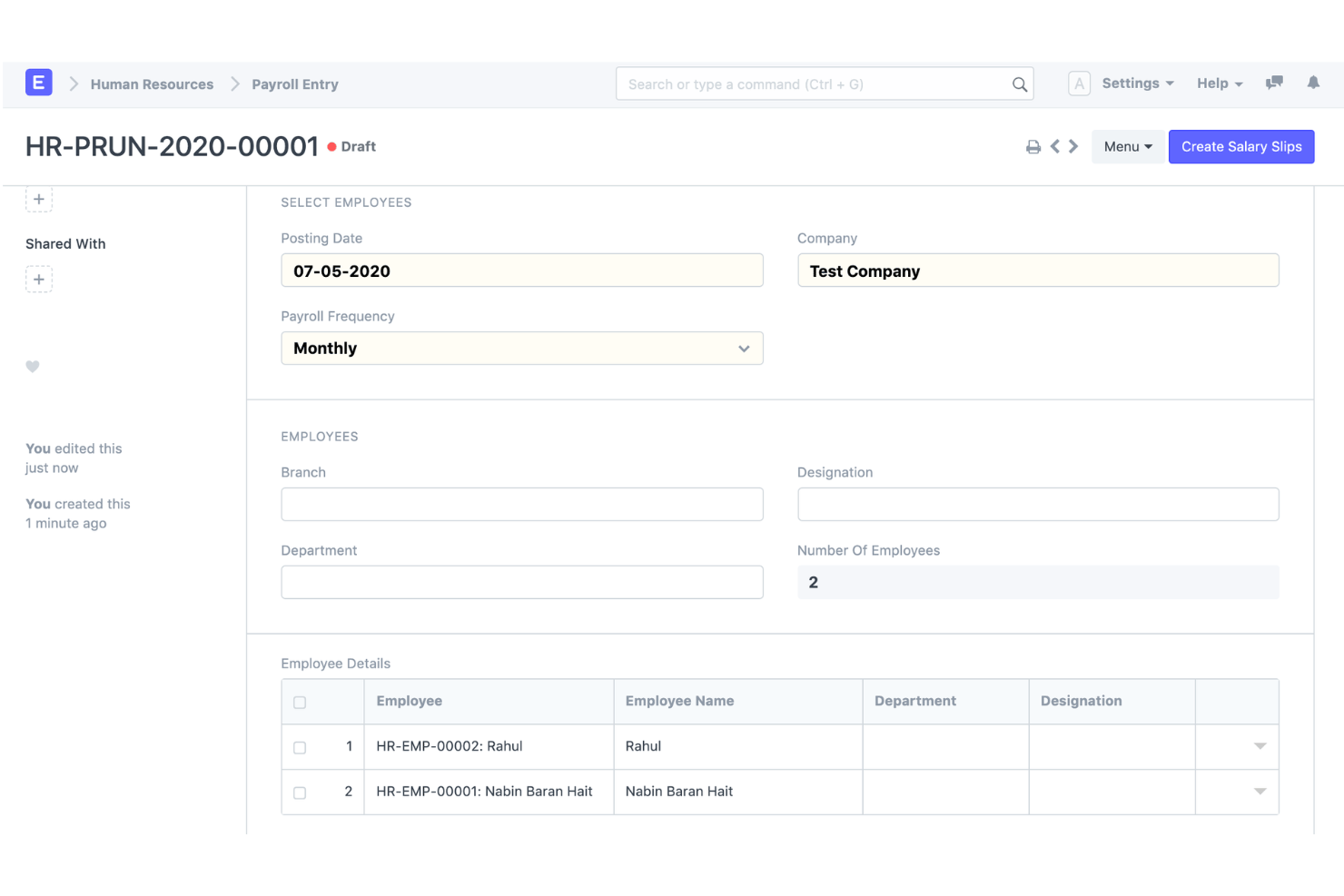
ERPNext on avoimen lähdekoodin ERP-alusta, joka yhdistää kahdenkertaisen kirjanpidon, palkanlaskennan, henkilöstöhallinnon ja varaston seurannan yhteen itse isännöityyn tai pilvipalveluna käyttöön otettavaan järjestelmään.
Kenelle ERPNext sopii parhaiten?
ERPNext sopii teknisesti osaaville pk-yrityksille ja kasvaville keskisuurille yrityksille, jotka tarvitsevat monipuolisen ERP-järjestelmän ilman käyttäjäkohtaisia lisenssimaksuja.
Miksi valitsin ERPNextin
ERPNext päätyi suosikkivaihtoehtojeni joukkoon, koska sen palkanlaskentamoduuli kirjaa tapahtumat suoraan pääkirjaan käyttäen samaa tilikarttaa ja samoja kustannuspaikkoja, jotka määrität muulle kirjanpidolle. Pidän tästä, koska yhden koodipohjan ansiosta palkanlaskennan tietoja ei tarvitse synkronoida väliohjelmistolla erilliseen kirjanpitojärjestelmään. Avoimen lähdekoodin lisenssi tarkoittaa myös sitä, että voin muokata palkkakomponentteja tai pääkirjatilien määrityksiä tiettyyn rakenteeseen sopiviksi ilman, että minun tarvitsee odottaa toimittajan tuotekehityssuunnitelmaa.
ERPNextin tärkeimmät ominaisuudet
- Integroitu palkanlaskenta: Palkkarakenteet, ansiot ja vähennykset, palkanmaksukaudet, palkkalaskelmat ja palkanlaskentaerien käsittely.
- Palkanlaskennan kirjanpito: Palkkakulut ja -maksut voidaan yhdistää kirjanpitojärjestelmään sen sijaan, että niitä ylläpidettäisiin täysin erillisessä palkkahallinnon tuotteessa.
- Pääkirja: ERPNext sisältää täyden kahdenkertaisen pääkirjan ja luo pääkirjamerkinnät automaattisesti hyväksytyistä kirjanpitotapahtumista.
- Kustannuspaikat ja projektit: Palkkakustannukset voidaan kohdistaa projekteille, ja ERPNextin kirjanpito tukee kustannuspaikkoja, projekteja ja muita kirjanpidon dimensioita.
- Moniyritys- ja monivaluuttakirjanpito: ERPNext tukee useita yrityksiä, tytäryhtiöitä, sivukonttoreita ja valuuttoja sekä yhdisteltyä raportointia.
- Mukautettavuus: ERPNext on avoimen lähdekoodin ohjelmisto, joka on rakennettu Frappe-kehyksen päälle ja tarjoaa vähäkoodisia sekä koodittomia mukautusmahdollisuuksia.
ERPNext-integraatiot
ERPNext tarjoaa natiiviset integraatiot PayPaliin, Razorpayhin, Amazon S3:een, Slackiin, Dropboxiin, Shopifyhin ja WooCommerceen. Mukautettuja integraatioita varten on saatavilla ohjelmointirajapinta.
Pros and Cons
Pros:
- Laajat taloushallinnon ulkopuolelle ulottuvat ERP-toiminnot
- Avoimen lähdekoodin kirjanpito ja palkanlaskenta
- Vahva yhteys palkanlaskennan ja kirjanpidon välillä
Cons:
- Enemmän käyttöönottoa ja määrityksiä kuin valmiiksi konfiguroiduissa pk-yritysten kirjanpito- ja palkanlaskentatuotteissa
- Palkanlaskennan vaatimustenmukaisuus ja maakohtaiset ominaisuudet vaihtelevat maittain

Odoo
Sopii parhaiten modulaarisiin kirjanpito- ja palkanlaskentasovelluksiin
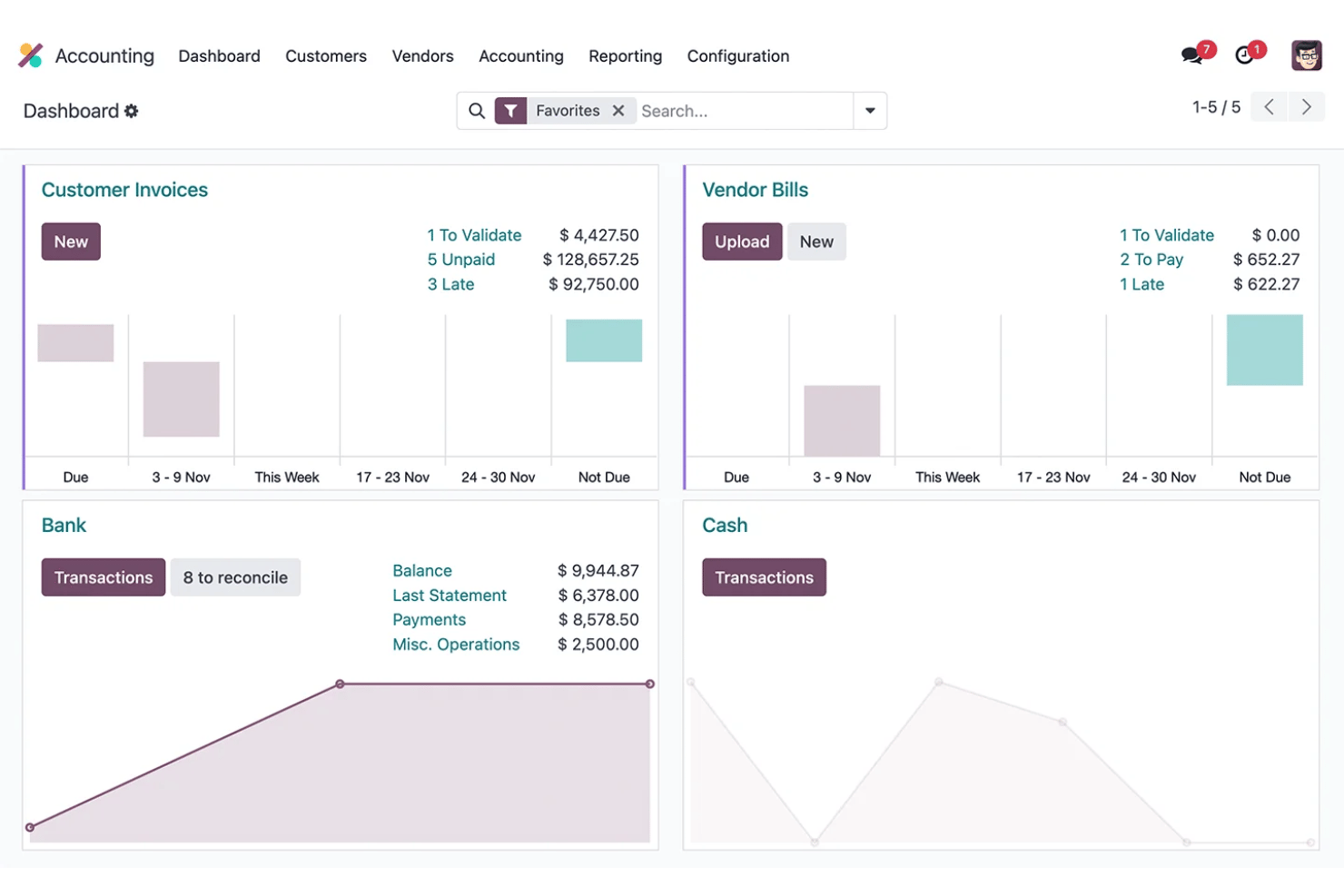
Odoo on avoimen lähdekoodin ERP-alusta, joka yhdistää modulaarisen kirjanpidon, palkanlaskennan, henkilöstöhallinnon ja kulujenhallinnan yhteen jaettuun tietokantaan.
Kenelle Odoo sopii parhaiten?
Odoo sopii hyvin kasvaville pienille ja keskisuurille yrityksille, joissa on 6–250 työntekijää ja jotka haluavat yhdistää kirjanpidon, palkanlaskennan ja henkilöstöhallinnon yhdeksi alustaksi ilman useiden erillisten työkalujen hallintaa.
Miksi valitsin Odoon
Valitsin Odoon, koska yritykset voivat yhdistää sen täyden kirjanpitosovelluksen palkanlaskentaan ja muihin liiketoimintasovelluksiin yhdessä modulaarisessa alustassa. Kun kirjanpitoa ja palkanlaskentaa käytetään yhdessä, palkanlaskennan palkkasäännöt voidaan yhdistää veloitus- ja hyvitystileihin, mikä auttaa yhdistämään työntekijöiden palkat pääkirjanpitoon ilman täysin erillistä kirjanpitojärjestelmää.
Odoon tärkeimmät ominaisuudet
- Kirjanpito: Täydellinen kahdenkertainen kirjanpito osto- ja myyntireskontralla, täsmäytyksellä, talousraportoinnilla, käyttöomaisuudella ja budjeteilla.
- Palkanlaskennan kirjanpito: Palkkasäännöt voidaan yhdistää veloitus- ja hyvitystileihin, mikä yhdistää palkanlaskennan laskelmat kirjanpidon päiväkirjoihin.
- Palkanmaksuerät: Yritykset voivat luoda ja käsitellä useita palkkalaskelmia yhdessä, mukaan lukien palkkalaskelmien ryhmittelyn palkkarakenteen, osaston tai työtehtävän mukaan.
- Työajasta palkanlaskentaan: Palkanlaskenta käyttää työntekijöiden työmerkintöjä työajan laskemiseen ennen palkkarakenteiden ja -sääntöjen soveltamista.
- Palkanlaskennan maakohtaiset asetukset: Maakohtaiset palkanlaskenta-asetukset huomioivat paikalliset verot, maksut, lisät ja sääntelyvaatimukset silloin, kun niitä tuetaan.
- Usean yrityksen kirjanpito: Odoo tukee useita yrityksiä sekä tarvittaessa eri maiden verolainsäädäntöön mukautettuja asetuksia.
Odoon integraatiot
Odoo tarjoaa alkuperäiset integraatiot Stripen, Plaidin, PayPalin, Authorize.Netin ja Shopifyn kanssa, ja mukautettuja integraatioita varten on saatavilla API.
Pros and Cons
Pros:
- Modulaariset sovellukset skaalautuvat yrityksesi tarpeiden mukaan
- Palkanlaskenta kirjautuu automaattisesti pääkirjanpitoon
- Avoimen lähdekoodin koodikanta mahdollistaa perusteellisen mukauttamisen
Cons:
- Palkanlaskennan veroilmoitukset edellyttävät kolmannen osapuolen tukea
- Käyttöönotto edellyttää huomattavan määrän teknisiä määrityksiä
Sopii parhaiten palkanlaskennan kirjauksiin yrityksen pääkirjanpitoon
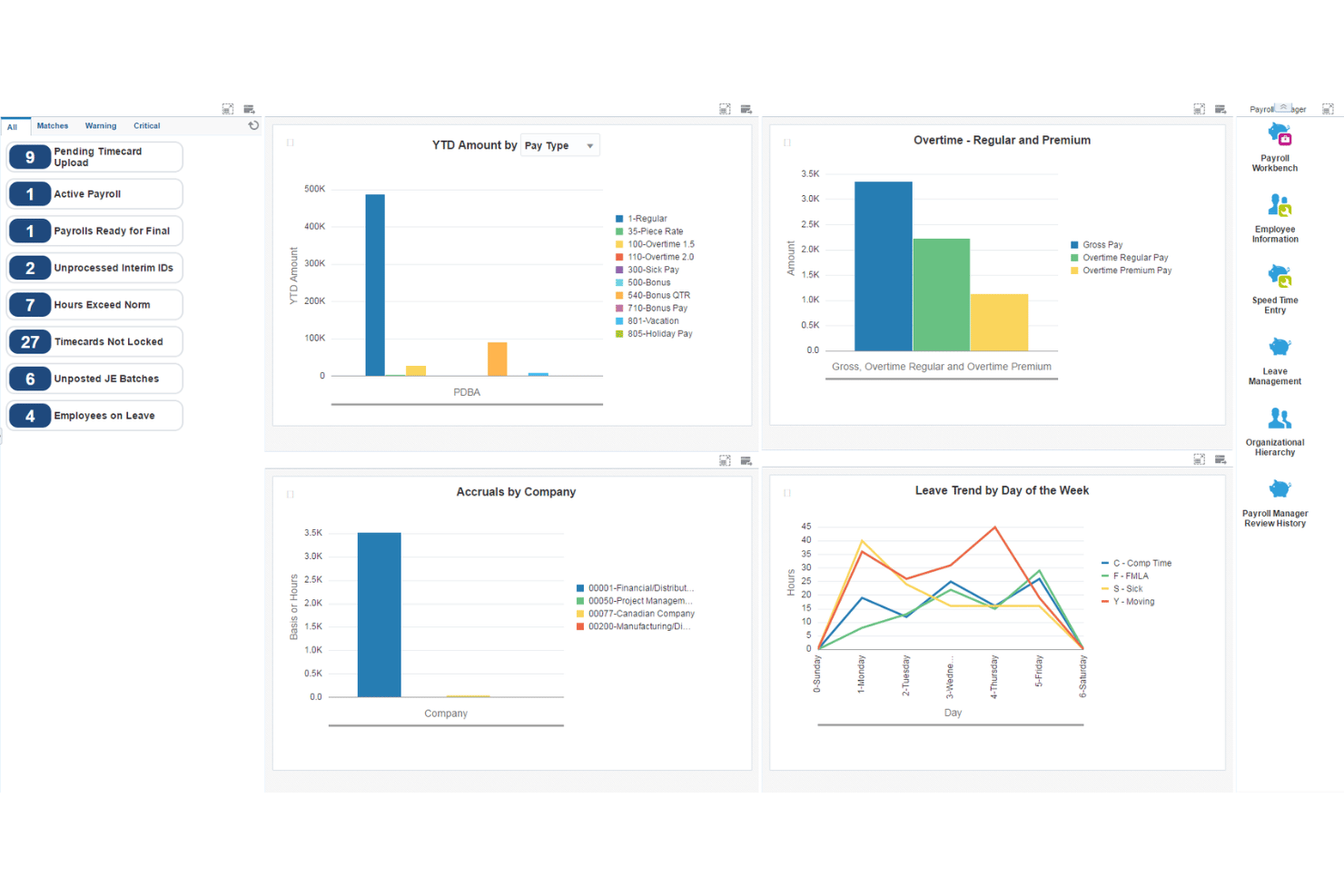
JD Edwards EnterpriseOne on Oraclen kokonaisvaltainen ERP-ohjelmistopaketti, joka yhdistää koko palkanlaskennan elinkaaren, pääkirjanpidon, ostoreskontran ja myyntireskontran, käyttöomaisuuden sekä henkilöstöpääoman hallinnan paikallisissa, pilvi- ja hybridikäyttöönottoympäristöissä.
Kenelle JD Edwards EnterpriseOne sopii parhaiten?
JD Edwards EnterpriseOne on suunniteltu suurille valmistus-, jakelu- ja pääomavaltaisilla toimialoilla toimiville yrityksille, jotka tarvitsevat integroitua palkanlaskentaa ja taloushallintoa suuressa mittakaavassa.
Miksi valitsin JD Edwards EnterpriseOnen
Valitsin JD Edwards EnterpriseOnen, koska sen palkanlaskentajärjestelmä yhdistyy syvällisesti yrityksen taloushallintoon. Palkanlaskenta voi luoda ja kirjata päiväkirjavientejä pääkirjanpitoon määritettävien automaattisten kirjanpito-ohjeiden avulla, kun taas palkanlaskennan velat, kuten verot ja vakuutukset, voidaan siirtää ostoreskontraan.
JD Edwards EnterpriseOnen tärkeimmät ominaisuudet
- Palkanlaskennan ja pääkirjanpidon integraatio: Palkanlaskenta voi luoda päiväkirjavientejä ja päivittää EnterpriseOnen pääkirjanpitoa automaattisilla tai manuaalisilla kirjausvaihtoehdoilla.
- Automaattiset kirjanpito-ohjeet: AAI-ohjeet määrittävät, miten luodut kirjanpitoviennit jaetaan pääkirjanpidon tileille, mikä antaa suurille organisaatioille huomattavan hallinnan palkanlaskennan kirjauksiin.
- Palkanlaskennan velat ja ostoreskontra: EnterpriseOne voi luoda automaattisesti tositteita palkanlaskennan verojen, vakuutusmaksujen ja muiden kolmansille osapuolille maksettavien palkanlaskennan velkojen käsittelyä varten ostoreskontraintegraation kautta.
- Työkustannusten laskenta: Palkanlaskenta tukee työvoimakustannusten ja niihin liittyvien sivukulujen kohdistamista, mukaan lukien palkat, verot, vakuutukset, työtunnit ja tilitiedot. Nämä tapahtumat voidaan siirtää tilikirjaan.
- Yhdysvaltojen palkanlaskenta: EnterpriseOne tukee liittovaltion, osavaltioiden ja paikallisten ennakonpidätys- ja raportointivaatimuksia, ja verojen ennakonpidätyslaskennassa käytetään Vertexiä.
- Kanadan palkanlaskenta: Järjestelmässä on myös Kanadan palkanlaskennan toiminnallisuudet, jotka kattavat ansiot, vähennykset, verot, bruttopalkasta nettopalkkaan ja nettopalkasta bruttopalkkaan tehtävät laskelmat, lomakertymät sekä viranomaisten sääntelemät verotiedot.
JD Edwards EnterpriseOnen integraatiot
JD Edwards EnterpriseOne tarjoaa natiivin integraation Oracle Cloud Infrastructureen, Oracle Analytics Cloudiin ja Oracle Databaseen sekä ohjelmointirajapinnan mukautettuja integraatioita varten.
Pros and Cons
Pros:
- Työkustannusten yksityiskohtainen kirjaaminen osastoittain
- Usean yrityksen palkanlaskennan ja kirjanpidon natiivi tuki
- Määritettävä pääkirjanpidon tilikartoitus palkanlaskenta-ajoille
Cons:
- Käyttöönotto edellyttää huomattavia IT- ja konsultointiresursseja
- Ei sovellu pienille tai keskisuurille yrityksille

Wave
Paras automaattisiin palkanlaskennan päiväkirjavienteihin
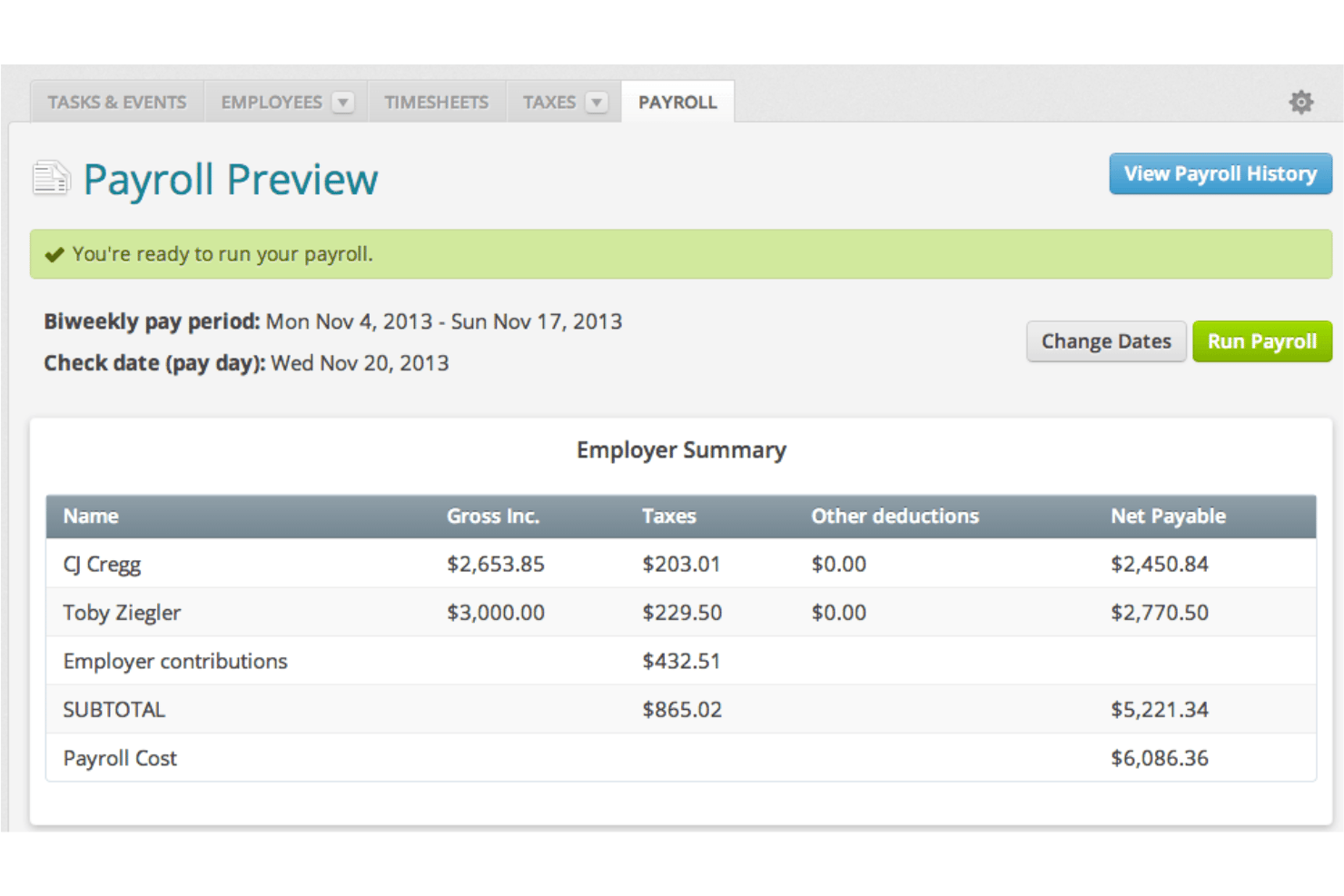
Wave on pienyritysten kirjanpito- ja palkanlaskenta-alusta, joka yhdistää kahdenkertaiseen kirjanpitoon perustuvan kirjanpidon, laskutuksen ja koko palkanlaskennan käsittelyn yhdeksi järjestelmäksi.
Kenelle Wave sopii parhaiten?
Wave on suunniteltu yrittäjäomistajille ja pienyrityksille, jotka tarvitsevat palkanlaskennan ja kirjanpidon samaan paikkaan maksamatta ominaisuuksista, joita ne eivät käytä.
Miksi valitsin Waven
Valitsin Waven yhdeksi parhaista vaihtoehdoista, koska jokainen palkanlaskenta-ajo kirjautuu automaattisesti päiväkirjavienteinä kirjanpidon pääkirjaan, ja palkat, verot sekä vähennykset kohdistetaan oikeille tileille reaaliajassa. Koska palkanlaskenta ja kirjanpito käyttävät samaa tietomallia, manuaalista vientiä tai täsmäytystä ei tarvita. Pidän myös siitä, että W-2-lomakkeet, 1099-NEC-lomakkeet ja palkkaraportit luodaan kaikki samassa järjestelmässä.
Waven tärkeimmät ominaisuudet
- Suoraveloitusmaksut: Lähetä palkat suoraan työntekijöiden ja toimeksisaajien pankkitileille ilman lisäkustannuksia.
- Työntekijöiden itsepalveluportaali: Anna tiimin jäsenten tarkastella palkkalaskelmia turvallisesti ja hallita henkilötietojaan verkossa.
- Automaattinen palkanlaskennan verojen ilmoittaminen: Laske, pidätä ja ilmoita liittovaltion ja osavaltioiden palkanlaskennan verot Yhdysvalloissa toimiville yrityksille.
- Vuoden lopun verolomakkeiden luonti: Luo ja toimita työntekijöille ja toimeksisaajille tarkoitetut W-2- ja 1099-NEC-lomakkeet järjestelmän sisällä.
Waven integraatiot
Natiivisti tuettuja integraatioita ei ole dokumentoitu selkeästi. Mukautettuja integraatioita varten on saatavilla API.
Pros and Cons
Pros:
- Palkanlaskenta ja kirjanpito käyttävät samaa tietomallia
- Automaattiset päiväkirjaviennit jokaisen palkanlaskenta-ajon jälkeen
- W-2- ja 1099-NEC-lomakkeet luodaan alustalla
Cons:
- Palkanlaskenta saatavilla vain Yhdysvalloissa ja Kanadassa, Quebeciä lukuun ottamatta
- Rajallinen tuki yli 10 työntekijän kasvaville tiimeille

Paras kirjanpitoon ja palkanlaskentaan yhden kirjautumisen kautta
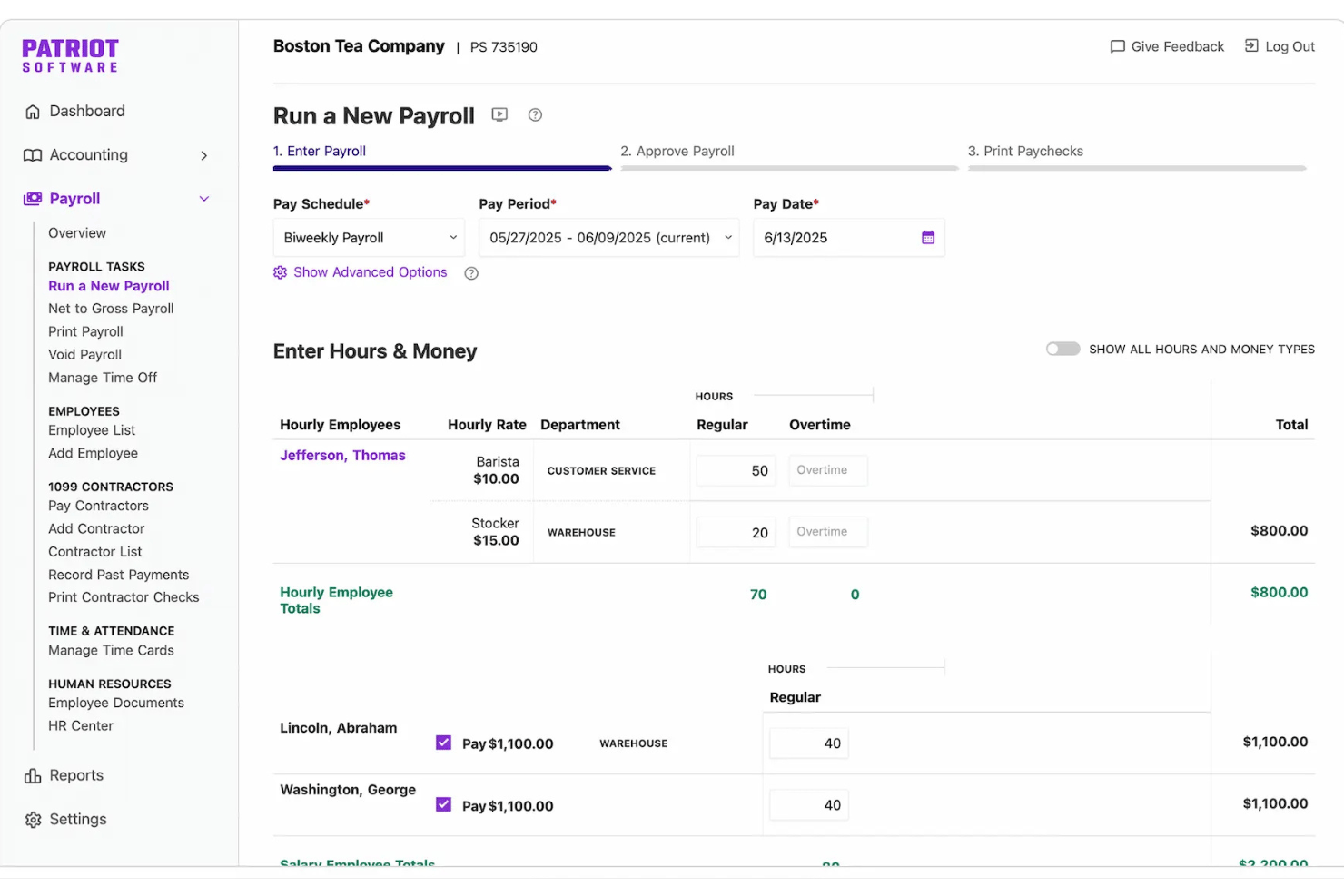
Patriot Software on pienyrityksille tarkoitettu kirjanpito- ja palkanlaskenta-alusta, joka yhdistää kahdenkertaiseen kirjanpitoon perustuvan kirjanpidon, laskutuksen, suoratalletukset ja palkanlaskennan yhteen kirjautumiseen. Palkkaverot voi ilmoittaa sen täyden palvelun palkanlaskentapalvelupaketin kautta.
Kenelle Patriot Software sopii parhaiten?
Patriot Software sopii erityisen hyvin pienyritysten omistajayrittäjille ja palkanlaskennan ylläpitäjille, joiden on hallittava kirjanpitoa ja palkanlaskentaa ilman kahden erillisen järjestelmän käyttöä.
Miksi valitsin Patriot Softwaren
Valitsin Patriot Softwaren yhdeksi parhaista vaihtoehdoista, koska sekä palkanlaskenta että kirjanpito ovat käytettävissä yhden kirjautumisen kautta ja niiden välinen yhteys on automaattinen. Aina kun suoritan palkanlaskennan, Patriot lisää päiväkirjamerkinnän suoraan pääkirjaan ja kohdistaa palkat, veronpidätykset ja vähennykset oikeille tileille ilman manuaalista työtä. Pidän myös kahden kirjanpidon järjestelmästä, jonka avulla voin vaihtaa käteisperusteisen ja suoriteperusteisen kirjanpidon välillä ilman työkalun vaihtamista tai tietojen kaksoiskappaleita.
Patriot Softwaren tärkeimmät ominaisuudet
- Usean osavaltion palkkaverotuksen ilmoittaminen: Täyden palvelun palkanlaskenta laskee, ilmoittaa ja maksaa liittovaltion, osavaltioiden ja paikalliset palkkaverot puolestasi.
- Työntekijöiden itsepalveluportaali: Työntekijät voivat tarkastella palkkalaskelmia ja verotusasiakirjoja sekä päivittää suoratalletustietonsa verkossa.
- Työajan ja läsnäolon lisäosa: Seuraa työntekijöiden työtunteja ja vapaan kertymistä, jotka synkronoituvat suoraan palkanlaskentaan erillisen moduulin avulla.
- Toimeksisaajien ja 1099-lomakkeiden käsittely: Maksa toimeksisaajille ja luo 1099-lomakkeita samassa alustassa kuin työntekijöiden palkanlaskenta.
Patriot Softwaren integraatiot
Patriot Software tarjoaa natiivit integraatiot Vestwellin kanssa 401(k)-järjestelyjä varten, SimplyInsuredin kanssa sairausvakuutuksia varten ja ERGO NEXTin kanssa työtapaturmavakuutuksia varten. Mukautettuja integraatioita varten on saatavilla API. Natiiveja integraatioita muiden kirjanpito- tai palkanlaskentatyökalujen kanssa ei ole dokumentoitu selkeästi.
Pros and Cons
Pros:
- Palkanlaskenta lisää tiedot automaattisesti pääkirjaan
- Tukee sekä käteisperusteista että suoriteperusteista kirjanpitoa
- Täyden palvelun palkanlaskenta automatisoi palkkaverojen ilmoittamisen
Cons:
- Raportointityökalut eivät ole riittävän monipuolisia edistyneille käyttäjille
- Ei natiiveja henkilöstöhallinnon tai etujen hallinnan ominaisuuksia

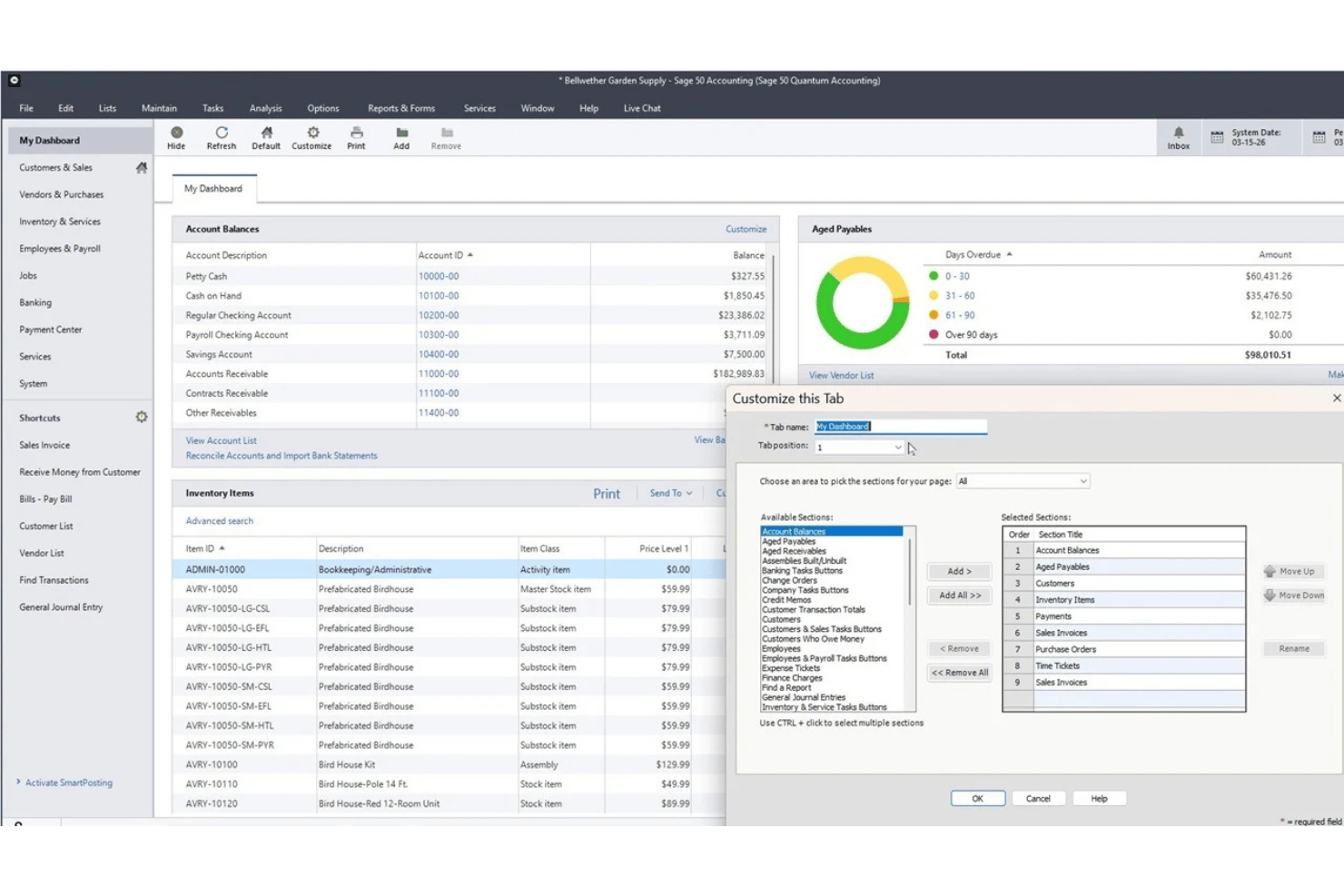
Sage 50 Accounting on pienyritysten kirjanpitoalusta, joka on saatavana pilvi- ja työpöytäversioina ja yhdistää taloushallinnon, varastonhallinnan, projektikustannuslaskennan ja integroidun palkkahallintomoduulin.
Kenelle Sage 50 Accounting sopii parhaiten?
Sage 50 sopii erinomaisesti pienyrityksille ja yrityksen omille kirjanpitäjille, jotka tarvitsevat yksityiskohtaista kirjanpitoa, projektikustannuslaskentaa ja palkkahallinnon toimintoja yhdessä järjestelmässä.
Miksi valitsin Sage 50 Accountingin
Olen sisällyttänyt Sage 50 Accountingin parhaiden vaihtoehtojeni joukkoon, koska palkkahallintomoduuli on rakennettu suoraan kirjanpitojärjestelmään eikä liitetty siihen ulkopuolisena kolmannen osapuolen integraationa. Pidän siitä, että palkkahallinnon ajot kirjataan automaattisesti päiväkirjavienteinä pääkirjaan ja että palkat, verot ja vähennykset kohdistetaan ilman manuaalista täsmäytystä. Projektikustannuslaskennan ja palkkahallinnon yhdistelmä samassa työpöytäympäristössä erottaa Sage 50:n todella edukseen, sillä sen avulla näet, tuottiko projekti voittoa, kun työvoimakustannukset on otettu kokonaisuudessaan huomioon.
Sage 50 Accountingin tärkeimmät ominaisuudet
- Projektikustannuslaskentamoduuli: Seuraa työvoimaa, materiaaleja ja yleiskustannuksia työ- tai projektikohtaisesti saadaksesi kattavan kuvan projektin kannattavuudesta.
- Usean yrityksen hallinta: Hallitse useiden liiketoimintayksiköiden tapahtumia ja raportointia yhdessä järjestelmässä.
- Varastonhallinta: Seuraa varastotasoja, sarjanumeroita, toimittajia ja kokoonpanoja suoraan kirjanpitoalustalla.
- Edistyneet raportointityökalut: Käytä yli 150 raporttia, jotka kattavat muun muassa ostovelat, myyntisaamiset, kulut, voitot, varaston, palkkahallinnon ja projektit, sekä mukauta raportteja ja tarkastele tapahtumia yksityiskohtaisesti.
Sage 50 Accountingin integraatiot
Sage 50 Accounting tarjoaa valmiit integraatiot Microsoft 365:n, AutoEntryn ja Sage Payrollin kanssa. Mukautettuja integraatioita varten on saatavana API-rajapinta.
Pros and Cons
Pros:
- Palkkahallinnon kirjaukset viedään suoraan pääkirjaan
- Kattava kirjanpitoon integroitu projektikustannuslaskenta
- Palkkahallinnon tapahtumien vahva tarkastusketju
Cons:
- Palkkahallinto edellyttää lisätilausta
- Palkkahallinto ja sähköinen ilmoittaminen edellyttävät erillisiä tilauksia

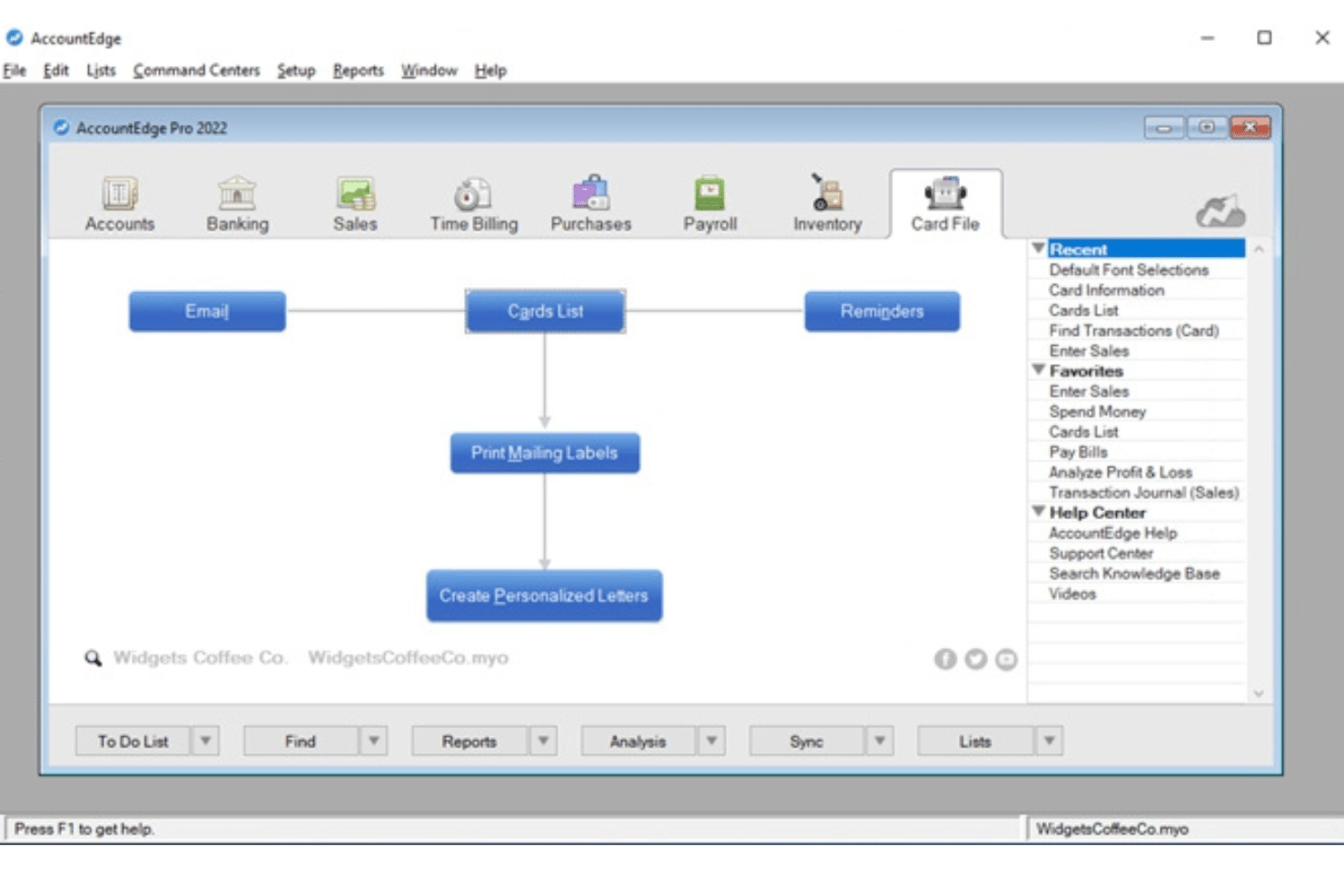
AccountEdge on pienyrityksille tarkoitettu työpöytäpohjainen taloushallintoalusta, joka yhdistää kahdenkertaiseen kirjanpitoon perustuvan kirjanpidon, varastonhallinnan ja laskutuksen valinnaiseen palkkahallinnon lisäosaan, joka tukee rajatonta työntekijämäärää ja tarjoaa ajantasaiset liittovaltion, osavaltioiden/provinssien ja paikalliset palkkaverokannat.
Kenelle AccountEdge sopii parhaiten?
Se sopii erinomaisesti yrittäjävetoisille yrityksille ja pienyritysten palkkahallinnon ylläpitäjille, jotka suosivat työpöytäpohjaista taloushallinto-ohjelmistoa ja haluavat käsitellä rajattoman työntekijämäärän palkat ilman työntekijäkohtaisia maksuja.
Miksi valitsin AccountEdgen
AccountEdge päätyi parhaiden vaihtoehtojeni joukkoon erityisesti palkkaverotaulukoiden käsittelyn ansiosta. Sen sijaan, että veropäivitykset haettaisiin pilvipalvelusta, AccountEdge mahdollistaa liittovaltion, osavaltioiden ja paikallisten verotaulukoiden lataamisen ja käyttöönoton suoraan työpöytäohjelmistossa. Pidän myös siitä, että palkkakäsittelyt kirjautuvat automaattisesti päiväkirjamerkintöinä pääkirjanpitoon. Palkat, verot ja vähennykset kohdistetaan oikeille tileille ilman manuaalista uudelleenkirjausta.
AccountEdgen tärkeimmät ominaisuudet
- Kahdenkertainen pääkirjanpito: Tarjoaa kattavan kirjanpitoratkaisun, johon kuuluvat tilikartta, päiväkirjamerkinnät, ostoreskontra, myyntireskontra ja talousraportit.
- Varaston ja nimikkeiden seuranta: Seuraa varastoitavia ja ei-varastoitavia nimikkeitä sekä kokoonpanoja ja hallinnoi useita sijainteja ja mukautettuja variaatioita.
- Mukautettavat raportit: Tarjoaa satoja vakioraportteja taloushallintoon, palkkahallintoon ja vaatimustenmukaisuuteen sekä edistyneitä analytiikkatoimintoja Power BI -viennin avulla.
- Integroitu tuntiveloitus: Mahdollistaa työaikakirjausten syöttämisen, työntekijä- tai projektikohtaisten mukautettujen veloitushintojen käytön ja tuntien suoran yhdistämisen palkkahallintoon.
AccountEdgen integraatiot
AccountEdge tarjoaa lisäosia pankkisyötteisiin, suoramaksuihin, palkkalomakkeisiin ja sähköiseen ilmoittamiseen, AccountEdge Connectiin, Web Payhin sekä maksujen käsittelyyn. AccountEdge Connect lisää selainpohjaisen käytön myynteihin, ostoihin, tuntiveloitukseen ja työntekijöiden työaikakirjauksiin, jotka synkronoituvat takaisin työpöytäohjelmistoon.
Pros and Cons
Pros:
- Ladattavat verotaulukot päivittävät palkkalaskelmat
- Palkkakirjaukset siirtyvät automaattisesti pääkirjanpitoon
- Tukee rajattoman työntekijämäärän palkanmaksuja
Cons:
- Suoramaksu ja palkkojen sähköinen ilmoittaminen maksavat lisämaksun
- Palveluntarjoaja ei automatisoi veroilmoitusten jättämistä

Striven
Paras operatiivisiin työnkulkuihin integroitavaan palkanlaskentaan
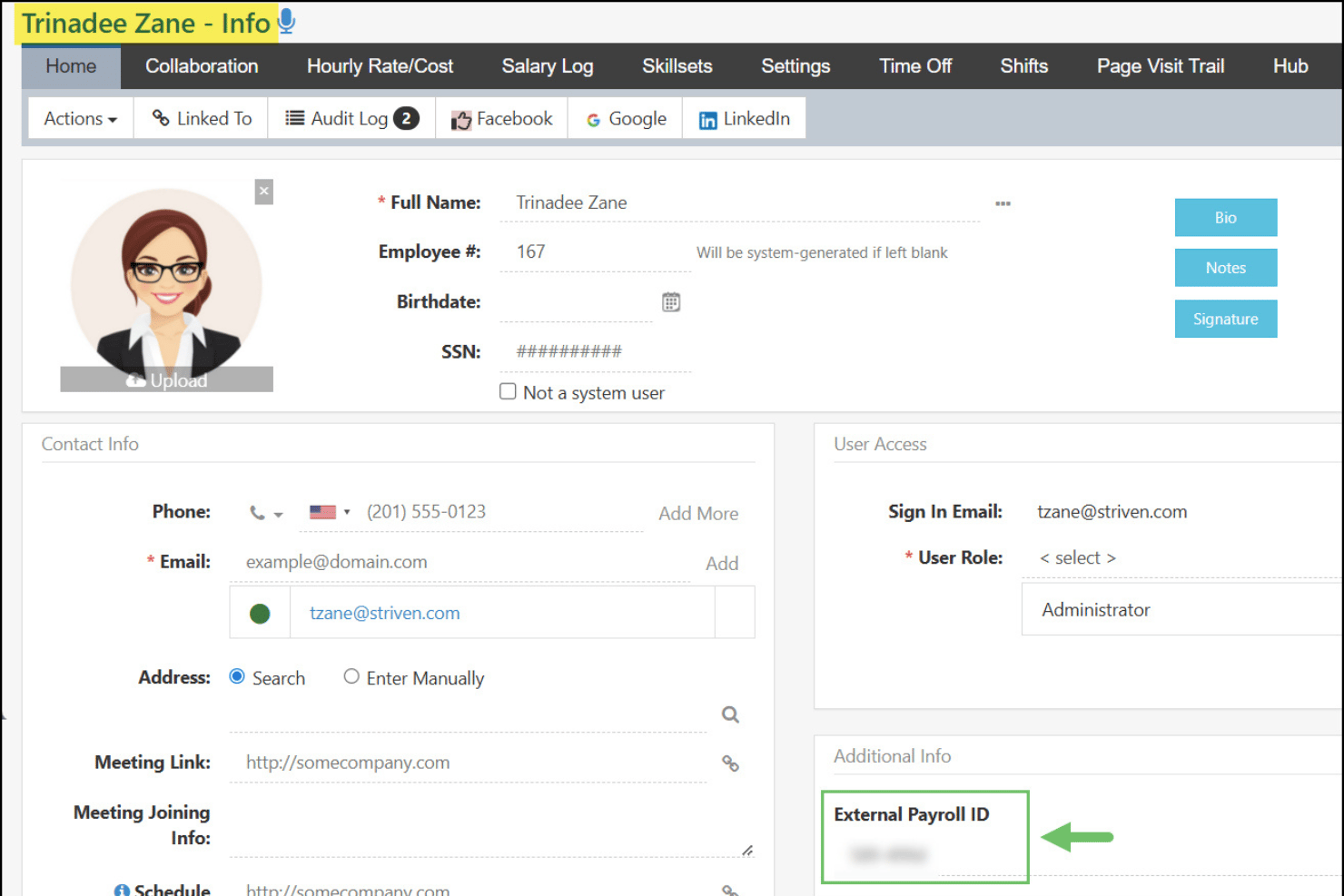
Striven on pilvipohjainen toiminnanohjausalusta pienille ja keskisuurille yrityksille. Se yhdistää pääkirjanpidon, palkkamenojen seurannan, projektinhallinnan, CRM:n ja henkilöstöhallinnon työkalut yhteen järjestelmään.
Kenelle Striven sopii parhaiten?
Striven sopii hyvin kenttäpalvelualojen, kuten LVI-, sähkö- tai viherrakennusalan, yrittäjäomistajille, jotka tarvitsevat kirjanpidon ja operatiivisten työnkulkujen hallintaa yhdessä paikassa.
Miksi valitsin Strivenin
Valitsin Strivenin yhdeksi parhaista vaihtoehdoista sen vuoksi, miten se yhdistää palkkatiedot yrityksen muuhun toimintaan. Kun tiimini kirjaa työntekijöiden työtunnit projektille, kyseiset työvoimakustannukset kohdistetaan automaattisesti vastaaville pääkirjanpitotileille, mikä antaa tarkan kuvan työkohtaisista kuluista. Palkkatiedoston luontityökalu vie maksutiedot CSV- tai XML-muodossa ulkoiselle palkkapalvelulle, joten tietoja ei tarvitse syöttää uudelleen manuaalisesti.
Strivenin tärkeimmät ominaisuudet
- Mukautettu tilikartta: Luo ja hallitse yksityiskohtaista ja muokattavaa tilikarttaa kahdenkertaista kirjanpitoa varten.
- Roolipohjainen käyttöoikeuksien hallinta: Määritä tarkasti rajatut järjestelmäkäyttäjien roolit ja käyttöoikeudet kirjanpitoa, henkilöstöhallintoa ja taloushallintoa varten.
- Pankkitilien täsmäytyksen automatisointi: Täsmäytä yhdistetyiltä pankkitileiltä tulevat tapahtumat suoraan kirjanpitomoduulissa.
- Integroitu projektikirjanpito: Kohdista kustannukset, tuotot ja palkkakulut tiettyihin töihin tai projekteihin tarkkaa raportointia varten.
Strivenin integraatiot
Natiiveja integraatioita ei ole dokumentoitu selkeästi. Työkalu tukee API:n kautta toteutettavia integraatioita mukautettuja työnkulkuja varten.
Pros and Cons
Pros:
- Työvoimakustannukset kirjataan automaattisesti tietyille pääkirjanpitotileille
- Työajanseuranta integroituu natiivisti palkanmaksuihin
- Yksi alusta kattaa henkilöstöhallinnon, kirjanpidon ja palkanlaskennan
Cons:
- Palkkaverotietojen ilmoittaminen perustuu ulkoisiin palveluntarjoajiin
- Palkkatietojen raportoinnin mukautusmahdollisuudet ovat rajalliset
Muut palkanmaksuominaisuuksia sisältävät kirjanpito-ohjelmistot
Tässä on joitakin muita palkanmaksuominaisuuksia sisältäviä kirjanpito-ohjelmistoja, jotka eivät päässeet vertailulistalleni mutta joihin kannattaa silti tutustua:
- QuickBooks Workforce
Paras yhdistettyyn palkanlaskentaan, henkilöstöhallintoon ja kirjanpitoon
- Microsoft Dynamics GP
Sopii parhaiten edistyneisiin palkanvähennyksiin ja henkilöstöetuihin
- SAP S/4HANA
Paras maailmanlaajuiseen palkanlaskentaan SAP-taloudenhallinnan kanssa


Miten arvioin palkanlaskentaominaisuuksia sisältäviä kirjanpito-ohjelmistoja
Kun palkkatiedot eivät siirry sujuvasti pääkirjanpitoon, tiedän, että työkalusta puuttuu yksi palkanlaskennan ja kirjanpidon yhdistämisen suurimmista hyödyistä. Siksi erotan välttämättömät ominaisuudet niistä ominaisuuksista, jotka todella erottavat alustat toisistaan.
Perustoiminnot (tämän luettelon vähimmäisvaatimukset)
Kun valitsen työkaluja luettelooni, annan jokaiselle työkalulle arvosanan asteikolla 0:sta (ei tarjoa toimintoa) 5:een (erinomainen tällä osa-alueella) jokaisen alla luetellun perustoiminnon osalta. Sen jälkeen muunnan työkalun kokonaispistemäärän prosenttiosuudeksi ja käytän 65:tä prosenttia vertailuarvona arvioidakseni, kuinka hyvin se sopii kokonaisuutena tähän luetteloon.
- Integroitu palkanlaskenta: Etsin sisäänrakennettuja tai tiiviisti integroituja palkanmaksuja, joissa on suoratalletus ja joustavat aikataulut, jotta yritykset voivat maksaa työntekijöille ja toimeksisaajille ilman, että palkkatietoja tarvitsee siirtää manuaalisesti järjestelmien välillä.
- Pääkirjanpito: Arvioin, tukeeko pääkirjanpito ostovelkoja ja myyntisaamisia, päiväkirjavientejä ja mukautettavia raportteja – esimerkiksi osastoittain eritellyn tuloslaskelman muodostamista.
- Palkkaverotuksen automatisointi: Verovaatimukset muuttuvat usein, joten arvioin, miten työkalu laskee ennakonpidätykset, tukee verojen maksamista ja ilmoittamista sekä muodostaa saatavilla olevat vuoden lopun lomakkeet, kuten W-2-lomakkeet.
- Työntekijätiedot & vähennykset: Jokaisen profiilin tulisi sisältää palkkatasot, ennakonpidätykset, edut ja ulosmittaukset – tiedot, joita joutuisit muuten seuraamaan erillisessä järjestelmässä.
- Palkanlaskennan ja pääkirjanpidon synkronointi: Jokaisen palkanmaksun jälkeen palkat ja verovelat tulisi kirjata automaattisesti oikeille pääkirjanpitotileille, ja mukana tulisi olla kirjausketju vuosineljänneksen lopun tarkastelua varten.
- Työajan & palkallisen vapaan seuranta: Sisäänrakennetut työaikalomakkeet ja suoraan palkanlaskentaan siirtyvät palkallisen vapaan kertymäkäytännöt säästävät sinut tuntien syöttämiseltä uudelleen jokaisella palkanmaksukaudella.
Kun minulla on luettelo kriteerit täyttävistä työkaluista, tarkastelen, mikä erottaa kunkin alustan muista.
Erottavat tekijät (mikä erottaa palveluntarjoajat toisistaan)
Näin vertailen eri palveluntarjoajia:
Erottuvat ominaisuudet
Työntekijöiden itsepalveluportaali vähentää henkilöstöhallinnolle tulevia pyyntöjä – henkilöstö voi hakea itse palkkalaskelmansa, päivittää suoratalletustietonsa ja lähettää poissaolopyyntöjä ilman jatkuvaa viestittelyä. Arvioin myös toimeksisaajien ja 1099-työntekijöiden hallintaa, erityisesti jos tiimissäsi on sekä W-2-työntekijöitä että freelancereita, jotka tarvitsevat vuoden lopussa 1099-NEC-lomakkeet. Usean osavaltion verojen ilmoittaminen on myös tärkeää, etenkin hajautetuissa tiimeissä, joissa jokainen uusi työntekijä voi aiheuttaa uusia lainkäyttöalueisiin liittyviä vaatimuksia.
Ominaisuuksia laajemmin
Hinnoittelun läpinäkyvyys on tärkeä tekijä – tarkistan, sisältyvätkö palkanlaskennan maksut kirjanpitotilaukseen vai veloitetaanko ne työntekijäkohtaisena lisämaksuna, sillä kustannukset kasvavat nopeasti tiimin kasvaessa. Myös siirtymisen tuki on tärkeää, erityisesti jos vaihdat järjestelmää kesken vuoden ja sinun on tuotava vuoden alusta lukien kertyneet palkat ja veronpidätykset oikein. Tarkastelen myös kirjanpitäjän kanssa tehtävään yhteistyöhön liittyviä ominaisuuksia, kuten roolipohjaisia käyttöoikeuksia, joiden avulla kirjanpitäjäsi voi käyttää pääkirjanpitoa koskematta palkanlaskennan hyväksyntöihin.
Näin valitset palkanmaksuominaisuuksia sisältävän kirjanpito-ohjelmiston
Oikean palkanmaksuominaisuuksia sisältävän kirjanpito-ohjelmiston valinta riippuu siitä, miten kukin alusta käsittelee juuri sinun yhdistelmääsi vaatimustenmukaisuudesta, automaatiosta ja henkilöstöhallinnon tehtävistä. Ennen alustan valitsemista päätä, kuinka tiiviisti haluat palkanmaksun ja kirjanpidon olevan yhteydessä toisiinsa. Kaikki yhdessä -järjestelmä voi vähentää täsmäytystyötä, kun taas palkanmaksulisäosan sisältävä kirjanpito-ohjelmisto saattaa tarjota enemmän joustavuutta. Jos sinulla on jo palkanmaksupalveluntarjoaja, luotettava integraatio voi riittää – kunhan palkkakulut ja -velat siirtyvät tarkasti pääkirjanpitoon.
| Jos tärkeintä on... | Etsi seuraavia ominaisuuksia... |
|---|---|
| Tarkat palkkaverotilitykset | Automaattiset verolaskelmat, tuki ilmoitusten tekemiseen ja päivitykset vaatimustenmukaisuuteen |
| Saumaton synkronointi palkanmaksun ja kirjanpidon välillä | Natiivi, automaattinen pääkirjan päiväkirjavientien kohdistus |
| Tunti- ja kuukausipalkkaisten työntekijöiden hallinta | Joustava työajan seuranta ja yhdistetyt palkanmaksuajot |
| Eri lainkäyttöalueiden palkanmaksun käsittely | Verotuki kaikille osavaltioille ja paikallisalueille, joissa sinulla on työntekijöitä |
| Helppo siirtyminen vanhasta järjestelmästä | Avustettu palkkatietojen siirto ja vuoden alusta lasketut tuonnit |
Näin arvioit ehdokaslistaasi
- Varmista vuoden lopun verotuki: Vahvista, mitkä W-2- ja 1099-lomakkeet ohjelmisto tuottaa tai toimittaa. Tarkista myös, mitä lainkäyttöalueita se tukee ja aiheutuuko vuoden lopun ilmoituksista lisäkustannuksia.
- Suorita simuloitu palkanmaksukokeilu: Määritä testipalkanmaksu käyttämällä tavanomaisia palkanmaksuaikataulujasi, ansioitasi, vähennyksiäsi ja urakoitsijoitasi. Tarkista sitten, miten syntyvät kulut ja velat kirjautuvat pääkirjaan.
- Lähetä tukipyyntö siirtotilanteesta: Kuvaile tarvetta tuoda vuoden alusta tähän mennessä kertyneet palkkatiedot kesken vuoden ja seuraa vastauksen perusteellisuutta sekä aikatauluja.
- Selvitä verojen ilmoittamisesta vastaaminen: Vahvista, laskeeko, ilmoittaako ja maksaako palveluntarjoaja palkkaverot puolestasi. Tarkista lisäksi, mitä lainkäyttöalueita palveluntarjoaja kattaa ja kuka käsittelee virheet tai myöhästyneet ilmoitukset.
- Punnitse hallintaa ja helppoutta: Päätä, haluatko erittäin muokattavat kirjanpitotyökalut yhdistettynä palkanmaksuun vai palkanmaksuun keskittyvän järjestelmän, jossa on perusmuotoinen kirjanpito.
Mitä palkanmaksuominaisuuksia sisältävä kirjanpito-ohjelmisto on?
Palkanmaksuominaisuuksia sisältävä kirjanpito-ohjelmisto yhdistää keskeiset taloushallinnon työkalut sisäänrakennettuun tai integroituun palkanmaksuun. Näihin työkaluihin voi kuulua esimerkiksi pääkirjanpito, ostoreskontra ja myyntireskontra, laskutus sekä talousraportointi. Näiden alustojen avulla voit laskea työntekijöiden palkat, hallita vähennyksiä ja veroja sekä kirjata palkkakulut ja -velat kirjanpitojärjestelmääsi ilman, että tietoja tarvitsee siirtää manuaalisesti erillisten työkalujen välillä.
Toisin kuin erilliset palkanmaksuohjelmistot, nämä alustat yhdistävät palkanmaksutoiminnot suoraan taloustietoihisi. Ohjelmistosta riippuen suoritetut palkanmaksut voivat automaattisesti luoda päiväkirjamerkintöjä, päivittää kulu- ja velkatilejä, kohdistaa työvoimakustannuksia osastoille tai projekteille sekä siirtää palkkatiedot talousraportteihin.
Ominaisuudet
Kun valitset palkanmaksuominaisuuksia sisältävää kirjanpito-ohjelmistoa, kiinnitä huomiota seuraaviin keskeisiin ominaisuuksiin:
- Integroitu palkanmaksu: Maksa palkat, laske bruttopalkasta nettopalkkaan etenevät palkat ja yhdistä työntekijöiden palkat, vähennykset ja palkkavelat kirjanpitotietoihisi.
- Palkkaverotuksen hallinta: Laske ja pidätä sovellettavat palkkaverot. Alustasta ja paketista riippuen käytettävissä voi olla myös verojen maksaminen, ilmoittaminen sekä vuoden lopun lomakkeet, kuten W-2- ja 1099-lomakkeet.
- Pääkirjan synkronointi: Kohdista palkkatapahtumat automaattisesti oikeille tileille, jotta palkkakulut ja verovelat ovat aina ajan tasalla.
- Työntekijätietojen hallinta: Tallenna palkkatasot, veronpidätykset, etuusvähennykset ja työsuhdetiedot työntekijäkohtaisiin profiileihin.
- Urakoitsijoiden ja 1099-maksujen hallinta: Maksa urakoitsijoille työntekijöiden rinnalla ja sujuvoita vuoden lopun 1099-NEC-ilmoitusten tekemistä samassa järjestelmässä.
- Työajan ja palkallisen vapaan seuranta: Kerää tehdyt työtunnit ja palkalliset vapaatiedot ja siirrä ne suoraan palkanmaksuihin täsmällisiä palkkoja varten.
- Suora talletus ja maksuvaihtoehdot: Tarjoa työntekijöille ja urakoitsijoille joustavia maksuvaihtoehtoja, kuten suoria talletuksia, palkkakortteja tai tulostettuja sekkejä.
- Työntekijöiden itsepalveluportaalit: Anna työntekijöille mahdollisuus tarkastella palkkalaskelmia ja verolomakkeita, pyytää vapaata sekä hallita henkilötietojaan ilman henkilöstöhallinnon apua.
- Mukautettavat raportit ja analytiikka: Luo palkka- ja talousraportteja, joissa korostuvat työvoimakustannukset, ylityöt ja etuuksien käyttö, jotta liiketoimintapäätökset ovat parempia.
- Tietoturva- ja käyttöoikeusvalvonta: Määritä käyttäjien käyttöoikeustasot, edellytä hyväksyntöjä ja luo tarkastusketjuja palkka- ja taloustietojen suojaamiseksi.
Hyödyt
Palkanmaksuominaisuuksia sisältävän kirjanpito-ohjelmiston käyttöönotto tarjoaa tiimillesi ja yrityksellesi useita hyötyjä. Tässä muutamia etuja, joita voit odottaa:
- Manuaalisen tietojen syöttämisen väheneminen: Palkanmaksun ja pääkirjan automaattinen synkronointi poistaa päällekkäisen tietojen syöttämisen ja auttaa ehkäisemään kalliita virheitä.
- Parantunut palkanmaksuverojen vaatimustenmukaisuus: Automatisoidut laskelmat ja vaatimustenmukaisuustyökalut voivat auttaa pitämään palkanmaksuverot ja vuoden lopun raportoinnin sovellettavien liittovaltion, osavaltioiden ja paikallisten vaatimusten mukaisina.
- Nopeammat palkanmaksusyklit: Integroidut työajanseuranta- ja suoratalletusominaisuudet nopeuttavat jokaista palkanmaksukertaa aina palkan laskemisesta palkkatositteen toimittamiseen.
- Työntekijöiden parempi läpinäkyvyys: Itsepalveluportaalien kautta työntekijät voivat tarkastella palkkatositteita, verolomakkeita ja vapaapäiväsaldoja ilman henkilöstöhallinnon pullonkauloja.
- Tarkempi talousraportointi: Reaaliaikainen palkanmaksutietojen kirjaaminen pääkirjanpitoon varmistaa, että palkka-, vero- ja etuustiedot näkyvät aina yrityksen raporteissa.
- Helpompi urakoitsijoiden ja useiden osavaltioiden palkanmaksu: Urakoitsijoita ja useita verotusalueita tukevat alustat voivat vähentää eri työntekijätyyppien maksamiseen eri sijainneissa liittyvää manuaalista työtä. Kansainvälisesti laajentuvat yritykset voivat tutustua myös oppaaseemme, joka käsittelee kansainvälistä palkanmaksua Meksikossa.
- Parannettu turvallisuus ja hallinta: Roolipohjaiset käyttöoikeudet ja tarkastusketjut pitävät arkaluonteiset palkka- ja taloustiedot suojattuina luvattomalta käytöltä.
Kulut ja hinnoittelu
Palkanmaksuominaisuuksilla varustetun kirjanpito-ohjelmiston valinta edellyttää saatavilla olevien erilaisten hinnoittelumallien ja suunnitelmien ymmärtämistä. Kustannukset vaihtelevat suuresti sen mukaan, sisältyykö palkanmaksu ohjelmistoon, myydäänkö se lisäominaisuutena vai hankitaanko se osana laajempaa ERP-ohjelmistokokonaisuutta. Pienyrityksille tarkoitetuissa tuotteissa kuukausittainen kirjanpitotilaus yhdistyy usein palkanmaksun perusmaksuun ja työntekijäkohtaisiin maksuihin, kun taas yritystason alustat käyttävät tyypillisesti mukautettua hinnoittelua, joka perustuu moduuleihin, käyttäjiin, yrityksen kokoon ja käyttöönottotarpeisiin. Alla oleva taulukko tiivistää yleisimmät hinnoittelumallit:
Palkanmaksuominaisuuksilla varustettujen kirjanpito-ohjelmistojen yleiset hinnoittelumallit
| Suunnitelman tyyppi | Keskimääräinen hinta | Yleiset ominaisuudet |
|---|---|---|
| Ilmainen kirjanpito | $0 perussuunnitelma; palkanmaksusta peritään yleensä lisämaksu | Peruskirjanpito, laskutus, talousraportit ja valinnainen maksullinen palkanmaksu |
| Kirjanpito + palkanmaksun lisäosa | Kuukausittainen kirjanpitomaksu + palkanmaksun perusmaksu ja/tai työntekijäkohtainen maksu | Integroitu kirjanpito, palkanmaksun käsittely, suoratalletus ja palkanmaksutietojen kirjaaminen pääkirjanpitoon |
| Käyttäjäkohtainen tai modulaarinen ohjelmisto | Käyttäjien ja valittujen moduulien perusteella määräytyvät kuukausi- tai vuosimaksut | Kirjanpito- ja palkanmaksumoduulit sekä ylimääräisiä henkilöstöhallinnon, varaston, projektien tai operatiivisen toiminnan työkaluja |
| Yritystason ERP | Yksilöllinen tarjous | Edistynyt taloushallinto, palkanmaksu, usean oikeushenkilön tuki, käyttöoikeudet, integraatiot ja käyttöönottopalvelut |
Palkkaominaisuuksilla varustetun kirjanpito-ohjelmiston usein kysytyt kysymykset
Tässä on vastauksia yleisiin palkkaominaisuuksilla varustettua kirjanpito-ohjelmistoa koskeviin kysymyksiin:
Voinko maksaa sekä työntekijöille että toimeksisaajille kirjanpito-ohjelmistolla, joka sisältää palkanlaskennan?
Monet palkanlaskentaominaisuuksia sisältävät kirjanpitoalustat tukevat sekä W-2-työntekijöitä että 1099-toimeksisaajia, mutta toimeksisaajien maksamiseen ja verolomakkeisiin liittyvät ominaisuudet vaihtelevat tuotteen ja tilauksen mukaan. Jos käytät molempia työntekijätyyppejä, tarkista, tukeeko ohjelmisto toimeksisaajien maksuja ja luoko tai toimittaako se vaaditut W-2- ja 1099-NEC-lomakkeet.
Miten palkkaverotus hoidetaan näissä järjestelmissä?
Palkkaverotukseen liittyvä tuki vaihtelee alustan ja tilauksen mukaan. Jotkin järjestelmät laskevat ennakonpidätykset, mutta jättävät ilmoitusten tekemisen ja maksut sinun vastuullesi, kun taas täyden palvelun palkanlaskentatuotteet voivat laskea, ilmoittaa ja maksaa liittovaltion, osavaltioiden ja paikalliset palkkaverot puolestasi. Tarkista ennen järjestelmän valintaa, mitä lainkäyttöalueita ja vuoden lopun lomakkeita tuetaan.
Millaista tukea on saatavilla, kun palkkatietoja siirretään aiemmalta palveluntarjoajalta?
Useimmat palveluntarjoajat tarjoavat käyttöönottotukea, ja jotkin tarjoavat nimettyjä siirtoasiantuntijoita, jotka auttavat tuomaan vuoden alusta kertyneet palkkatiedot ja varmistavat sujuvan siirtymän.
Voivatko työntekijät käyttää palkkalaskelmia ja verolomakkeita itse?
Kyllä, työntekijöiden itsepalveluportaalit ovat yleisiä. Niiden avulla henkilöstö voi hakea palkkalaskelmia, tarkastella verotusasiakirjoja ja päivittää henkilötietoja ilman HR-osaston osallistumista.
Sisältyykö ohjelmistoon edistynyt työajanseuranta vai tarvitsenko kolmannen osapuolen työkaluja?
Joissakin ratkaisuissa on sisäänrakennettu työajanseuranta, kun taas toiset tarjoavat saumattomia integraatioita työajankirjaussovelluksiin. Kummassakin tapauksessa työtunnit pysyvät tarkkoina palkanlaskentaa varten.