

10 migliori strumenti di collaborazione online per i team nel 2026

10 I migliori strumenti di collaborazione online


Secondo Gartner, l'uso degli strumenti di collaborazione è aumentato dal 50% nel 2019 all'80% nel 2021.
Sebbene la pandemia di COVID-19 ne sia stata la causa principale, le sue conseguenze ci hanno lasciato il lavoro da remoto e modelli di lavoro ibridi in quasi tutte le aziende. Pertanto, continuiamo a fare affidamento sugli strumenti di collaborazione remota mentre cerchiamo modi per migliorare la produttività nei team geograficamente distribuiti.
Gli strumenti presenti in questo elenco offrono diverse opzioni per comunicare con il tuo team, condividere idee e interagire con le parti interessate al progetto.
Come ho scelto i migliori strumenti di collaborazione
Ho valutato e confrontato i software di collaborazione tra team più popolari sul mercato, considerando sia le recensioni sia l'interfaccia utente. Ho poi ponderato i fattori che rendono gli strumenti di collaborazione una buona opzione per la gestione dei progetti, come quelli indicati di seguito.
- Interfaccia utente – Gli strumenti di collaborazione per i progetti devono avere un aspetto pulito e una navigazione intuitiva. Devono consentire un accesso semplice ai diversi canali di comunicazione, alle funzioni di ricerca, alle note private, alla messaggistica privata e ai registri della cronologia.
- Usabilità – Tutti i membri del team devono essere coinvolti, altrimenti gli strumenti di collaborazione falliranno sempre. Pertanto, cerco qualcosa che sia facile da imparare, con numerose risorse di formazione e un solido supporto clienti.
- Integrazione – La collaborazione nell'ambiente di lavoro odierno richiede comunicazione e condivisione tra più piattaforme. Le tue esigenze di integrazione sono specifiche, ma un buon strumento di collaborazione dovrebbe includere alcune integrazioni di base con altri software per team: app per la pianificazione delle risorse, app per la documentazione di Google e Microsoft, strumenti per il monitoraggio del tempo e qualsiasi strumento di gestione dei progetti o di gestione delle attività che utilizzi.
- Prezzo – Il prezzo sarà il primo criterio decisivo per l'adozione o meno di un nuovo strumento. Tieni presente che il prezzo medio degli strumenti di collaborazione si aggira intorno a $8/utente/mese.
Perché fidarsi delle nostre recensioni sui software
Il nostro team testa e recensisce software dal 2012. In quanto esperti HR noi stessi, sappiamo quanto sia difficile — e importante — scegliere il software giusto.
Per questa guida, abbiamo valutato gli strumenti attraverso test pratici e ricerche indipendenti, assegnando un punteggio agli strumenti in base ai nostri criteri di selezione. Ci basiamo inoltre sulle competenze di leader di pensiero del settore e di professionisti HR attivi.
Le nostre recensioni riflettono il nostro giudizio editoriale umano, non un discorso di vendita.
Revisori esperti:
Tabella riepilogativa degli strumenti di collaborazione
| Tool | Best For | Trial Info | Price | ||
|---|---|---|---|---|---|
| 1 | Ideale per collegare obiettivi e progetti | 14 giorni di prova gratuita | Da $6/utente/mese | Website | |
| 2 | Ideale per la collaborazione su documenti nelle agenzie | Prova gratuita di 14 giorni + demo gratuita disponibile | Da $10/mese (fatturato annualmente) | Website | |
| 3 | Ideale per flussi collaborativi automatizzati | Demo gratuita disponibile | Prezzo su richiesta | Website | |
| 4 | Miglior strumento di collaborazione per le aziende enterprise | 14 giorni di prova gratuita | Da $12/utente/mese | Website | |
| 5 | Ideale per la gestione della conoscenza | Demo gratuita disponibile | Prezzo su richiesta | Website | |
| 6 | Ideale per lo sviluppo di applicazioni | Prova gratuita di 30 giorni | Da $35/utente/mese (fatturato annualmente) | Website | |
| 7 | Ideale per le caselle di posta in arrivo collaborative | È disponibile una prova gratuita di 30 giorni | A partire da 14 $/utente/mese (con fatturazione annuale) | Website | |
| 8 | Ideale per note di riunione alimentate dall'AI | Piano gratuito disponibile | Da $14.16/utente/mese (fatturato annualmente) | Website | |
| 9 | Ideale per le lavagne online | Piano gratuito disponibile | Da $8/utente/mese | Website | |
| 10 | Ideale per la collaborazione nel design | Piano gratuito disponibile | Da $3/editor/mese (fatturato annualmente) | Website |


Panoramica dei migliori strumenti di collaborazione
Ecco un elenco di strumenti di collaborazione per i progetti da cui iniziare. Analizziamo i principali elementi distintivi del software, seguiti da una panoramica delle sue caratteristiche e funzioni e, infine, delle sue integrazioni e dei prezzi.

Ideale per collegare obiettivi e progetti
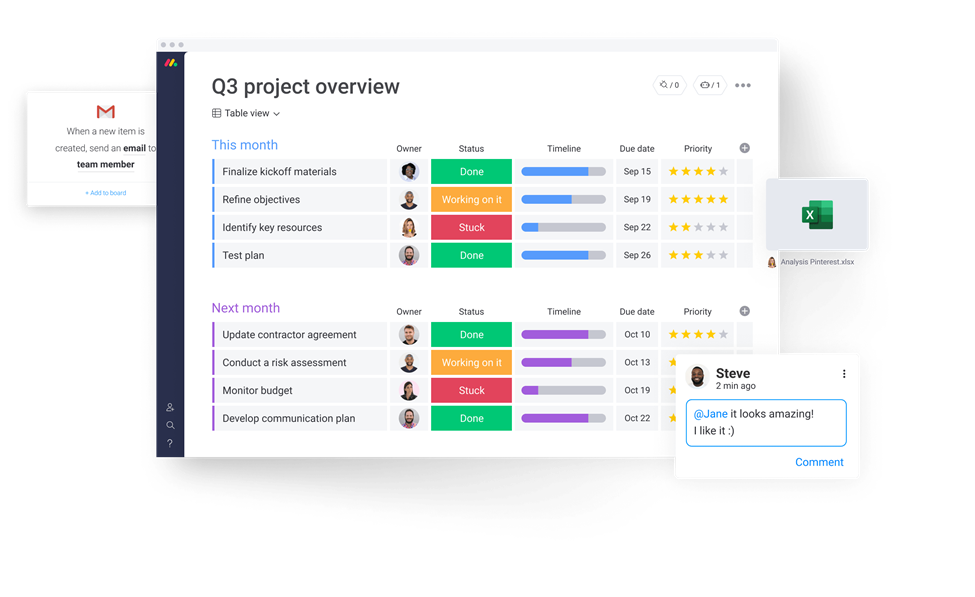
monday.com è un software di collaborazione e gestione delle attività noto per il suo design semplice e le funzionalità intuitive. Per molte organizzazioni, rappresenta la colonna portante per il lavoro di squadra e processi snelli. Hasan Hanif, Fondatore & CEO di Colour Vistas, ha spiegato come ha trasformato le operazioni della sua azienda: “Le cose che mi piacciono di più di Monday sono che ci permette di lavorare all’unisono, in profondità. Fornisce informazioni… che mantengono tutti allo stesso ritmo. L'automazione ha eliminato la monotonia nelle nostre operazioni e ci ha aiutato ad automatizzare la maggior parte dei nostri processi. … Ha reso le nostre routine più efficienti e semplici, rendendoci più collaborativi.”
Perché ho scelto monday.com: Mi piace la quantità di strumenti di collaborazione che questa piattaforma offre per aiutarti a lavorare su progetti e attività con il tuo team. Ma il motivo principale per cui l’ho inserita nella mia lista sono le sue capacità di definizione degli obiettivi. Puoi sviluppare i tuoi obiettivi strategici e poi collegarli a progetti e compiti. Questo aiuta a mantenere tutti allineati e concentrati sul lavoro, contribuendo a un miglior lavoro di squadra.
In quanto a project management, la piattaforma è altamente personalizzabile, il che è sempre una priorità assoluta per me quando valuto strumenti di gestione dei progetti. Puoi scegliere tra una varietà di visualizzazioni per monitorare i progressi. I documenti condivisi permettono agli utenti di co-creare verbali di riunione, fare brainstorming e collaborare con altri membri del team. Tutto ciò che riguarda il tuo progetto può convivere in un unico posto.
Funzionalità e integrazioni principali di monday.com
Le funzionalità includono il Teamwork Hub di monday.com, uno spazio dedicato dove i membri del team possono monitorare le dipendenze, condividere aggiornamenti e risolvere blocchi in tempo reale. Inoltre, la piattaforma supporta l’accesso per ospiti esterni, consentendo a collaboratori come clienti o fornitori di lavorare insieme al tuo team, mantenendo comunque il controllo sulle informazioni condivise.
Le integrazioni includono Slack, Google Drive, Gmail, Google Calendar, Jira, GitHub, Trello, Dropbox, Zoom e Typeform. Molte altre sono accessibili tramite un account Zapier a pagamento.
Pros and Cons
Pros:
- Piattaforma completa per la gestione del lavoro
- Interfaccia intuitiva e facile da usare
- Piano gratuito per sempre disponibile
Cons:
- Spazio di archiviazione limitato nei piani base e gratuiti
- Reportistica limitata nei piani base e gratuiti
New Product Updates from monday AI Workspace
monday AI Workspace Adds Human Approval Routing
monday AI Workspace adds a human-in-the-loop approval block to AI Workflows, sending approval requests and routing workflow paths based on responses. For more information, visit monday AI Workspace's official site.

Ideale per la collaborazione su documenti nelle agenzie
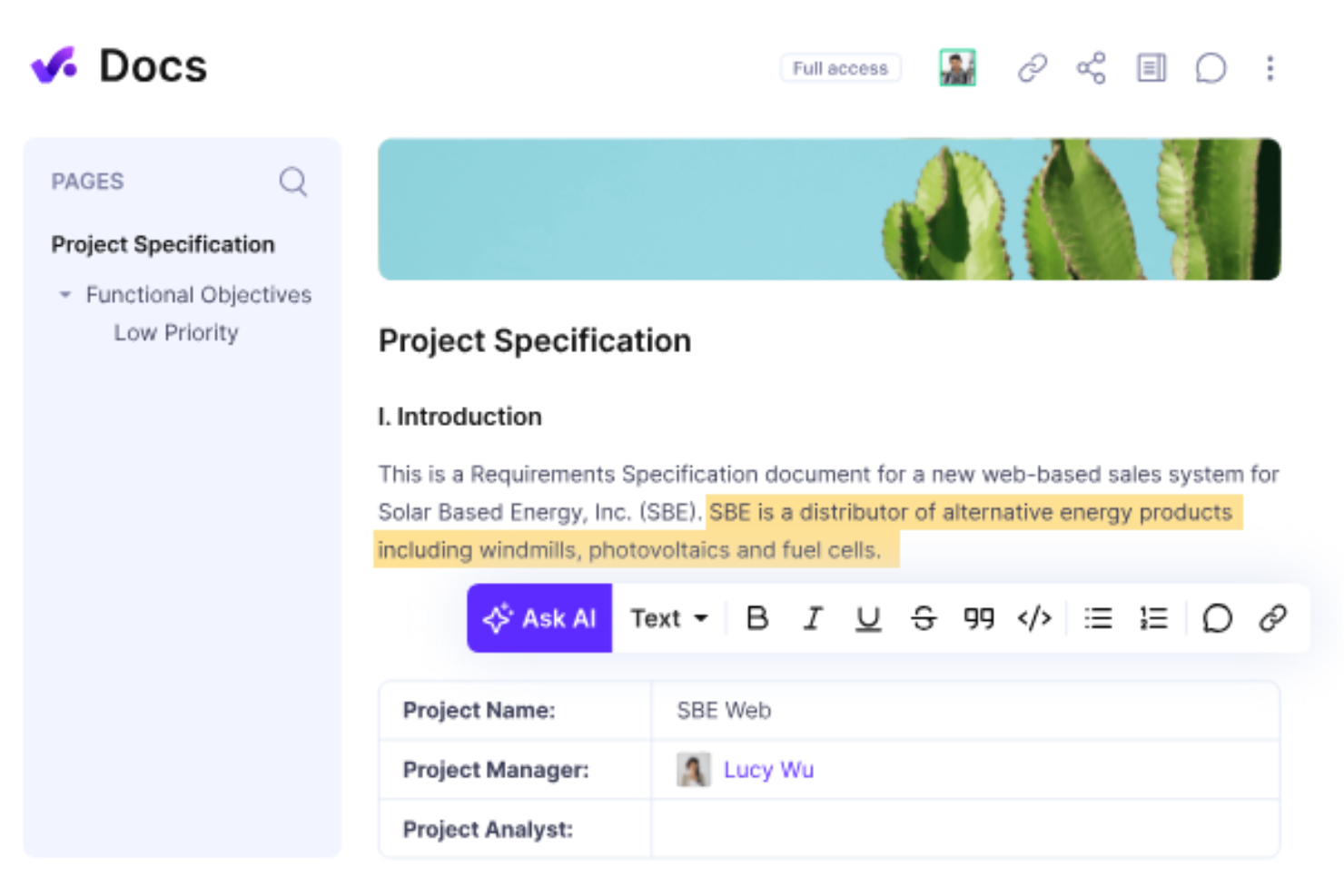
Productive è una piattaforma completa e robusta progettata per semplificare la gestione dei progetti e le operazioni di agenzie e servizi professionali. Offre una suite completa di strumenti per pianificare, monitorare e gestire progetti, risorse e finanze.
Perché ho scelto Productive: Una delle sue caratteristiche principali è la capacità di collaborazione in tempo reale integrata negli strumenti di gestione dei progetti. I team possono facilmente assegnare compiti, impostare scadenze e monitorare l'avanzamento, assicurando che tutti rimangano aggiornati. Le funzioni di chat e commenti della piattaforma permettono inoltre feedback e discussioni istantanee.
Un'altra caratteristica significativa che rende Productive ideale per la collaborazione online è la funzione Docs. Questa funzionalità consente ai team di creare, condividere e collaborare sui documenti direttamente all'interno della piattaforma. Centralizzando la gestione dei documenti, Productive assicura che tutti i membri del team abbiano accesso alle versioni più aggiornate dei file e possano collaborare contemporaneamente sugli stessi documenti.
Funzionalità principali e integrazioni di Productive
Le funzionalità di spicco includono uno strumento condiviso di pianificazione del team che consente ai responsabili di allocare le risorse e coordinare la disponibilità su più progetti in tempo reale. Le dashboard dedicate ai progetti offrono inoltre uno spazio centrale per il team, in cui discutere aggiornamenti, condividere idee e monitorare le consegne.
Le integrazioni comprendono Jira, Slack, QuickBooks, Xero, Trello, Zapier, Google Drive, Sage, BambooHR, Gusto e HubSpot.
Pros and Cons
Pros:
- Permette di monitorare la redditività di ogni progetto
- Strumenti avanzati per la gestione delle risorse
- Interfaccia facile da usare
Cons:
- Le integrazioni potrebbero essere più complete
- La configurazione iniziale può richiedere tempo
New Product Updates from Productive

Productive Adds Agent Triggers, Teams Integration, and Time Controls
Productive adds automated agent triggers, broader AI file support, Microsoft Teams integration, Resource Planner improvements, and new time entry controls. These updates expand automation while improving scheduling, collaboration, and time tracking. For more information, visit Productive’s official site.

Ideale per flussi collaborativi automatizzati

Screendragon è una piattaforma di gestione del lavoro progettata per team di marketing, agenzie e servizi professionali. Combina la gestione dei progetti, l'automazione dei flussi di lavoro, la gestione delle risorse e del budget in un'unica soluzione.
Perché ho scelto Screendragon: La funzione di smart briefs di Screendragon migliora la raccolta delle richieste di lavoro grazie a una logica intelligente e all'automazione che guidano gli utenti su quali informazioni fornire e quando. Questo garantisce che il team inizi i progetti con brief chiari e completi, riducendo incomprensioni e creando una solida base per una collaborazione di successo.
È inoltre possibile creare flussi di lavoro personalizzati per approvazione, revisione e modifica dei materiali, semplificando i cicli di feedback e gestendo il controllo delle versioni in un unico luogo. Invece di inseguire email sparse, tutti i feedback vengono centralizzati all'interno della piattaforma, assicurando che le decisioni siano tracciate tramite percorsi di audit automatizzati.
Funzionalità e integrazioni principali di Screendragon
Le funzionalità includono avanzate capacità di gestione delle attività, offrendo Gantt chart e bacheche Kanban per creare elenchi di attività, assegnare compiti e regolare le tempistiche. Screendragon dispone anche di strumenti integrati per la gestione delle risorse, offrendo una panoramica completa della capacità del team, permettendo di identificare i colli di bottiglia e gestire i carichi di lavoro.
Le integrazioni includono MS Power BI, Slack, MS Teams, Zapier, Google Drive, Trello, Microsoft 365, Box, Jira, Microsoft OneDrive e PeopleSoft.
Pros and Cons
Pros:
- Integra diversi strumenti come la gestione progetti e il monitoraggio del budget
- Ottime funzioni di pianificazione delle risorse
- Piattaforma personalizzabile in base alle tue esigenze specifiche
Cons:
- La profondità della piattaforma può creare complessità
- Configurazione che richiede tempo
New Product Updates from Screendragon
Screendragon Unveils New AI Hub
Screendragon introduced AI Hub, a new capability that lets teams build and manage AI agents directly within workflows. The update helps marketing teams automate tasks, maintain governance controls, and scale AI-driven operations more efficiently. For more information, visit Screendragon's official site.
Hive
Miglior strumento di collaborazione per le aziende enterprise
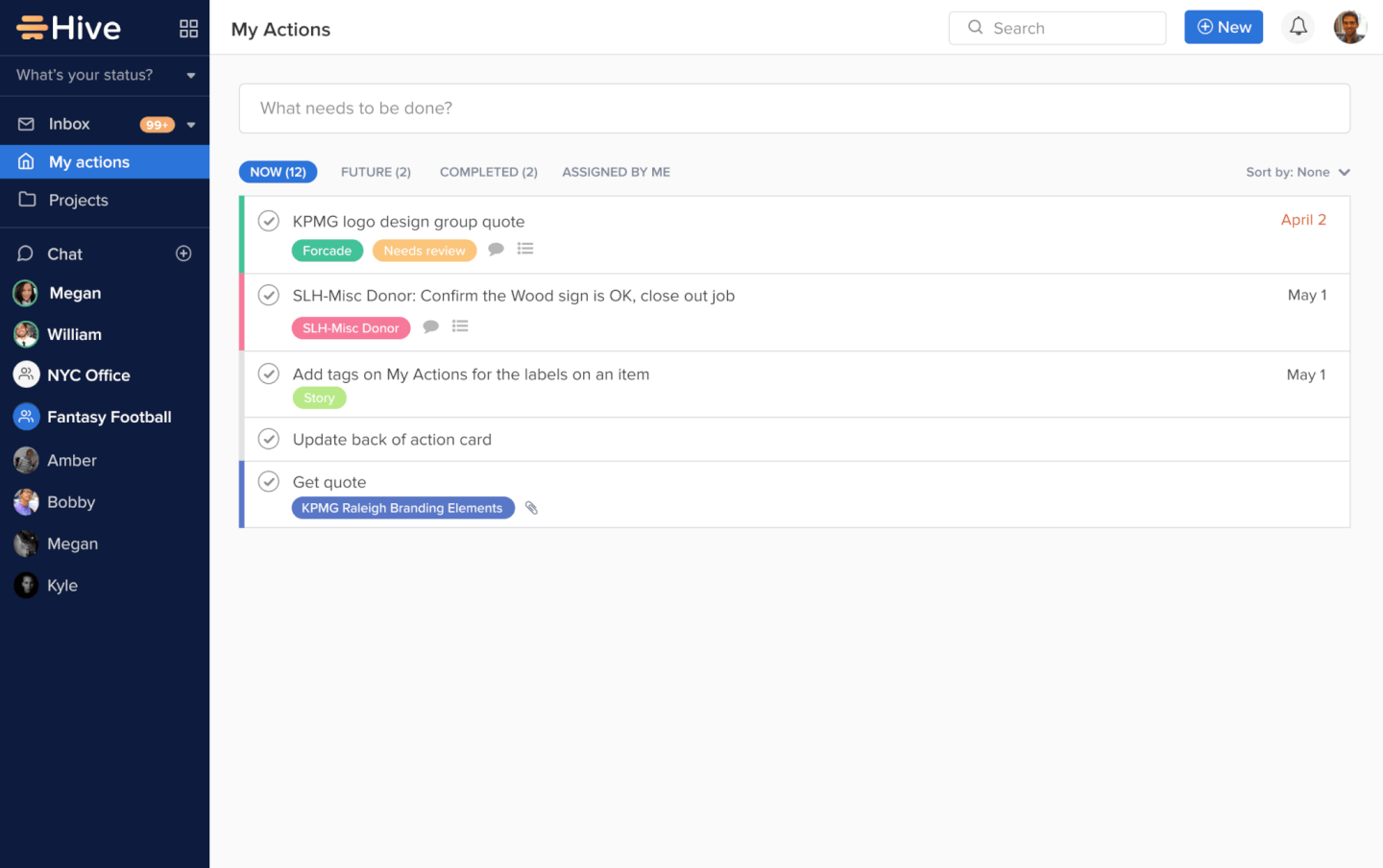
Hive è uno strumento di gestione dei progetti e una piattaforma di collaborazione che supporta aziende come Starbucks, Uber, WeWork e IBM. Grazie ad analisi basate sull'IA, migliaia di integrazioni, viste flessibili sui progetti e molto altro, Hive semplifica il lavoro in un'unica piattaforma centralizzata. Utilizzato da team di varie dimensioni, da 10 persone a 1.000, Hive è una soluzione eccellente per una vasta gamma di aziende e stili di lavoro.
Le capacità di monitoraggio del tempo, analisi e visualizzazione flessibile di Hive consentono una comprensione trasparente del lavoro degli altri membri del team e dei progetti futuri. Hive offre inoltre una delle prime integrazioni email complete in uno strumento di gestione dei progetti, che permette di inviare e ricevere messaggi Gmail e Outlook direttamente dall'app. Scegli Hive se cerchi uno strumento di collaborazione completo e ben strutturato, che può essere scalato in base alle esigenze del team.
Lo strumento costa $12 per utente al mese con fatturazione annuale.
Axero
Ideale per la gestione della conoscenza
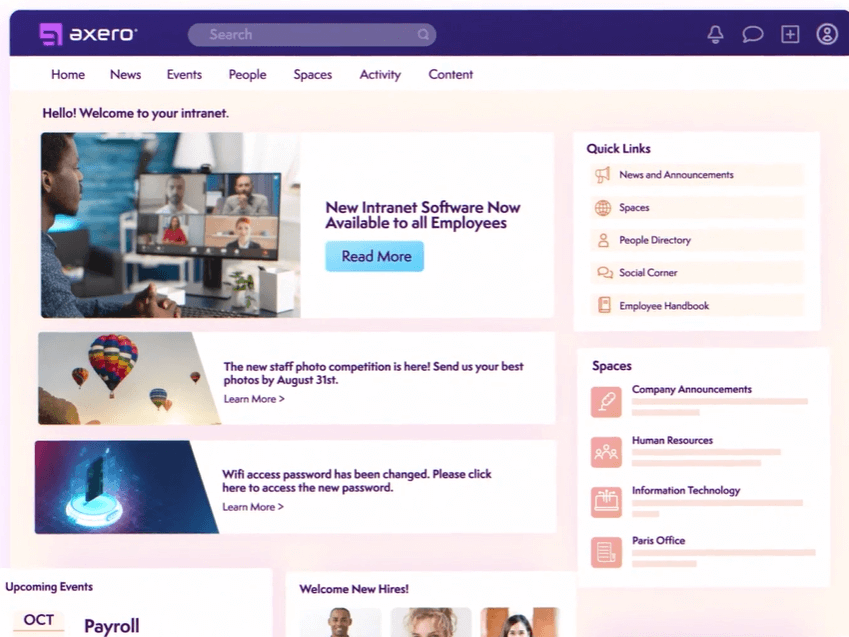
Axero è una piattaforma di condivisione delle conoscenze che può essere utilizzata per creare hub di contenuti per la collaborazione interna ed esterna. È una soluzione flessibile che si adatta alle esigenze di diversi tipi e dimensioni di aziende.
Perché ho scelto Axero: Ho deciso di includere questa piattaforma nella mia lista per la sua capacità di costruire una base di conoscenze sia per collaboratori interni che esterni (o entrambi). È abbastanza flessibile da adattarsi a vari contesti, ma offre comunque la struttura necessaria per mantenere le informazioni organizzate, accessibili e gestite.
Puoi creare spazi sia pubblici che privati nel wiki aziendale e sviluppare contenuti in diversi formati. Post sul blog, forum, sondaggi e comunicazioni sono tra i tipi di contenuto supportati. Inoltre, i pulsanti per i commenti e i like permettono l'interazione e il coinvolgimento, mentre la chat dal vivo consente di centralizzare tutte le comunicazioni in un unico spazio.
Funzionalità e integrazioni rilevanti di Axero
Funzionalità includono una funzione collaborativa di modifica dei documenti che permette a più membri del team di lavorare su contenuti condivisi in tempo reale. Inoltre, il feed delle attività di Axero aggrega gli aggiornamenti da tutta la piattaforma, assicurando che i membri del team possano rimanere informati su nuovi contenuti, commenti e sviluppi dei progetti senza dover passare da uno strumento all'altro.
Integrazioni includono Outlook 365, Sharepoint, OneDrive, Microsoft Teams, Google Workspace, Slack, Zoom, Dropbox, Box, Unsplash e Twilio, tra gli altri.
Pros and Cons
Pros:
- Altamente flessibile e personalizzabile a vari contesti
- Può essere utilizzato per la condivisione della conoscenza sia interna che esterna
- Adatto alle esigenze delle grandi organizzazioni
Cons:
- Le integrazioni non sono incluse nel piano di base
- Occorre tempo per familiarizzare con tutte le funzionalità

Ideale per lo sviluppo di applicazioni

QuickBase è una piattaforma che consente lo sviluppo di applicazioni personalizzate senza richiedere competenze di programmazione avanzate. Si distingue per il suo approccio no-code, permettendo agli utenti di creare soluzioni specifiche per settore con funzionalità come integrazioni, automazioni e capacità mobili.
Perché ho scelto QuickBase: Ho selezionato QuickBase come strumento di collaborazione dopo aver valutato le sue capacità di permettere ai team di creare e personalizzare applicazioni senza la necessità di grandi competenze di programmazione. Ciò che differenzia QuickBase è la sua interfaccia intuitiva e l'empowerment che offre agli sviluppatori 'cittadini', permettendo loro di automatizzare i flussi di lavoro e collegare dati con facilità. Credo che QuickBase sia la scelta migliore per lo sviluppo di app senza codice grazie alla sua flessibilità e alle soluzioni complete che offre, in grado di soddisfare una vasta gamma di esigenze aziendali senza richiedere profonde conoscenze tecniche.
QuickBase si distingue come un eccellente strumento per la collaborazione grazie alla sua interfaccia intuitiva e alle funzioni personalizzabili che si adattano a numerose esigenze aziendali. Permette ai team di creare e condividere applicazioni interattive basate sui dati senza richiedere competenze tecniche avanzate. Questa flessibilità consente un'integrazione fluida dei dati da fonti diverse, favorendo un lavoro di squadra efficiente e decisioni rapide.
Funzionalità e integrazioni principali di QuickBase
Funzionalità includono una piattaforma no-code che consente agli utenti di creare applicazioni personalizzate per le proprie esigenze aziendali. Inoltre, i registri di controllo integrati di QuickBase forniscono una rete di sicurezza collaborativa tracciando modifiche e aggiornamenti, consentendo ai team di rivedere e ripristinare le azioni quando necessario.
Integrazioni includono Salesforce, Microsoft Teams, Google Calendar, Tableau, QuickBase Pipelines, Slack e Zapier.
Pros and Cons
Pros:
- La piattaforma semplice e no-code è facile da apprendere anche per chi non ha competenze tecniche
- I flussi di lavoro sono facili da configurare e personalizzare
- Notifiche e promemoria avanzati
Cons:
- Il piano team richiede un minimo di 20 utenti
- Il costo può essere proibitivo per le piccole imprese

Missive
Ideale per le caselle di posta in arrivo collaborative

Missive è una piattaforma di posta in arrivo collaborativa che unifica i canali di messaggistica email, SMS e social con chat interna integrata, gestione delle attività e automazione dei flussi di lavoro.
Per chi è più adatto Missive?
Missive è una soluzione ideale per i team a contatto con i clienti e per i team dedicati alle operazioni con i clienti che devono collaborare internamente gestendo grandi volumi di email e messaggi multicanale.
Perché ho scelto Missive
Ho incluso Missive tra le mie scelte principali perché è l'unico strumento di questo elenco che integra la collaborazione tra team direttamente nella posta in arrivo. Mi piace molto il fatto che le conversazioni interne siano affiancate alle conversazioni email in tempo reale, così il mio team può redigere insieme una risposta per un cliente, assegnarla a un collega e collegarla automaticamente a un'attività senza mai uscire dalla conversazione. La posta in arrivo multicanale, che riunisce WhatsApp, SMS e Instagram insieme alle email, lo rende davvero utile per qualsiasi team in cui la comunicazione esterna sia il principale strumento di collaborazione.
Funzionalità principali di Missive
- Motore di regole: Automatizza fino a 1.000 azioni nella posta in arrivo, tra cui assegnazione automatica, risposta automatica e instradamento attivato dall'intelligenza artificiale, senza scrivere codice.
- Bilanciamento del carico di lavoro: Distribuisci le conversazioni in arrivo tra i colleghi utilizzando regole di assegnazione a rotazione, al collega meno impegnato o casuale.
- Registro di controllo: Registra ogni azione nella posta in arrivo con marca temporale e attribuzione all'utente, così i responsabili del team hanno piena visibilità su chi ha fatto cosa.
- Accesso degli ospiti: Aggiungi collaboratori esterni a conversazioni specifiche senza consumare un'utenza a pagamento.
- Server MCP di Missive: Collega strumenti di intelligenza artificiale esterni, come Claude o ChatGPT, per interrogare le conversazioni di collaborazione, controllare i calendari e redigere risposte, mantenendo però obbligatoria la revisione del team prima dell'invio.
Integrazioni di Missive
Missive offre oltre 40 integrazioni native, tra cui Asana, ClickUp, Trello, Todoist, Google Drive, Dropbox, HubSpot, Zoom, Google Meet e GitHub. Fornisce inoltre un'API REST aperta, webhook, connettività Zapier e il suo nuovo Server MCP nei piani Productive e Business (richiede l'attivazione da parte dell'amministratore).
Pros and Cons
Pros:
- Conversazioni interne affiancate alle conversazioni in tempo reale
- La posta in arrivo multicanale unifica email e messaggistica
- Il motore di automazione supporta regole avanzate per i flussi di lavoro
Cons:
- Nessuna funzionalità nativa di kanban o lavagna
- La modifica collaborativa dei file dipende da strumenti esterni
New Product Updates from Missive
Missive Adds Conversation Pins
Missive now lets you pin key links, decisions, and notes inside a conversation, keeping them accessible in a dedicated Pins section in the Details sidebar. For more information, visit Missive's official site.
 .
.
Zoom
Ideale per note di riunione alimentate dall'AI
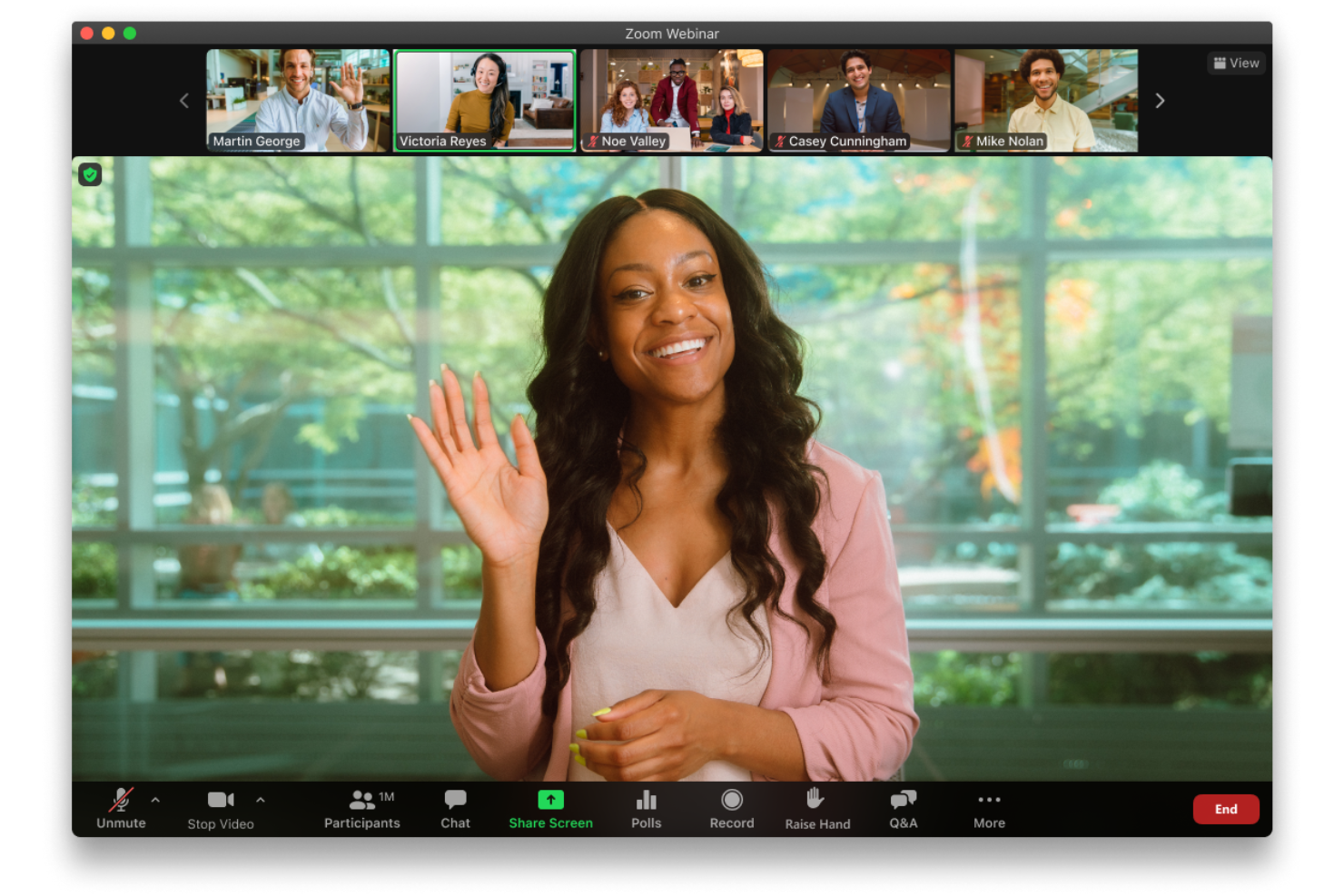
Zoom è una piattaforma di collaborazione per video, voce e chat che aiuta i team a connettersi e lavorare insieme in tempo reale. Offre strumenti di riunione flessibili, chat persistente e assistenza AI, rendendolo adatto sia a piccoli gruppi che a grandi organizzazioni.
Perché ho scelto Zoom: Ho scelto Zoom perché rende le riunioni virtuali più produttive e inclusive. Il suo assistente AI può riassumere le discussioni, evidenziare le attività da svolgere e generare note, così non devi preoccuparti di perdere dettagli chiave. Puoi anche attivare i sottotitoli tradotti in oltre 30 lingue, facilitando la comprensione delle conversazioni ai team globali. Oltre alle riunioni, Zoom supporta la collaborazione continua tramite canali di chat di gruppo e un servizio VoIP cloud, mantenendo la comunicazione centralizzata e organizzata.
Funzionalità e integrazioni di spicco di Zoom
Le funzionalità includono lavagne interattive, layout di riunione personalizzati, sondaggi e quiz per il coinvolgimento e brevi clip video per aggiornamenti asincroni. Supporta anche thread di chat continua con risorse fissate, oltre alla pianificazione di appuntamenti tramite Zoom Scheduler.
Le integrazioni includono Microsoft Teams, Salesforce, Google Workspace, Slack, HubSpot, Asana, Confluence for Zoom, Microsoft 365, Calendly, Kahoot!, Fathom e Read AI.
Pros and Cons
Pros:
- Audio e video affidabili
- Ottimi strumenti di collaborazione come le stanze separate e le lavagne
- Flessibile per team di qualsiasi dimensione
Cons:
- La versione gratuita ha limiti stringenti sulle riunioni
- Alcune funzionalità avanzate richiedono un periodo di apprendimento

Miro
Ideale per le lavagne online

Miro è una lavagna online collaborativa progettata per facilitare brainstorming, ideazione, riunioni di team, pianificazione di progetti e altre attività di gruppo. Marissa Taffer, Fondatrice & Presidente di M. Taffer Consulting, si affida molto a questo strumento per il lavoro di squadra da remoto: “Miro è fantastico per la collaborazione virtuale. Lo uso molto per sessioni di brainstorming e retrospettive degli sprint. Un team che ho gestito adorava organizzare retrospettive a tema utilizzando i temi del Miroverse!”
Perché ho scelto Miro: Ho deciso di includere questa piattaforma per la sua straordinaria versatilità e flessibilità. Il tuo team può iniziare da una tela vuota oppure scegliere tra oltre 1.000 modelli preimpostati inclusi. Miro supporta una vasta gamma di espressioni delle idee, dai dati numerici agli elementi del brand, insieme a elementi visuali tradizionali come post-it digitali e video.
Funzionalità uniche come Stickies Capture e TalkTrack permettono agli utenti rispettivamente di convertire note fisiche in digitale e registrare video esplicativi per la collaborazione asincrona. Con integrazioni come Jira e Asana, oltre a Confluence e Notion, Miro collega la generazione di idee all'esecuzione dei progetti, agevolando un ambiente di collaborazione coeso per il team.
Funzionalità e integrazioni principali di Miro
Funzionalità includono voto in tempo reale e funzioni timer che consentono ai gruppi di dare priorità alle idee e rimanere focalizzati durante le sessioni di brainstorming. Lo strumento “Sticky Notes Digitali” offre flessibilità infinita per organizzare i pensieri, mentre la funzione “Mappa Mentale” favorisce l’ideazione libera con visualizzazioni strutturate.
Integrazioni includono Zoom, Figma, Asana, Microsoft Teams, Jira, Slack, Google Drive, monday.com, Confluence, Box, Airtable, Notion, Azure e Webex. Alcune integrazioni sono disponibili solo nei piani a pagamento.
Pros and Cons
Pros:
- Configurazione intuitiva e semplice
- Migliaia di modelli personalizzabili
- Soluzione estremamente versatile e flessibile
Cons:
- Nessuna esportazione PDF di alta qualità con il piano gratuito
- Lo zoom può essere a scatti su progetti di grandi dimensioni
New Product Updates from Miro
Miro Adds Japan Data Residency for Enterprise Customers
Miro has introduced Japan data residency for enterprise customers, offering in-region storage for production data, backups, and metadata, plus in-region compute infrastructure. For more information, visit Miro's official site.

FigJam
Ideale per la collaborazione nel design
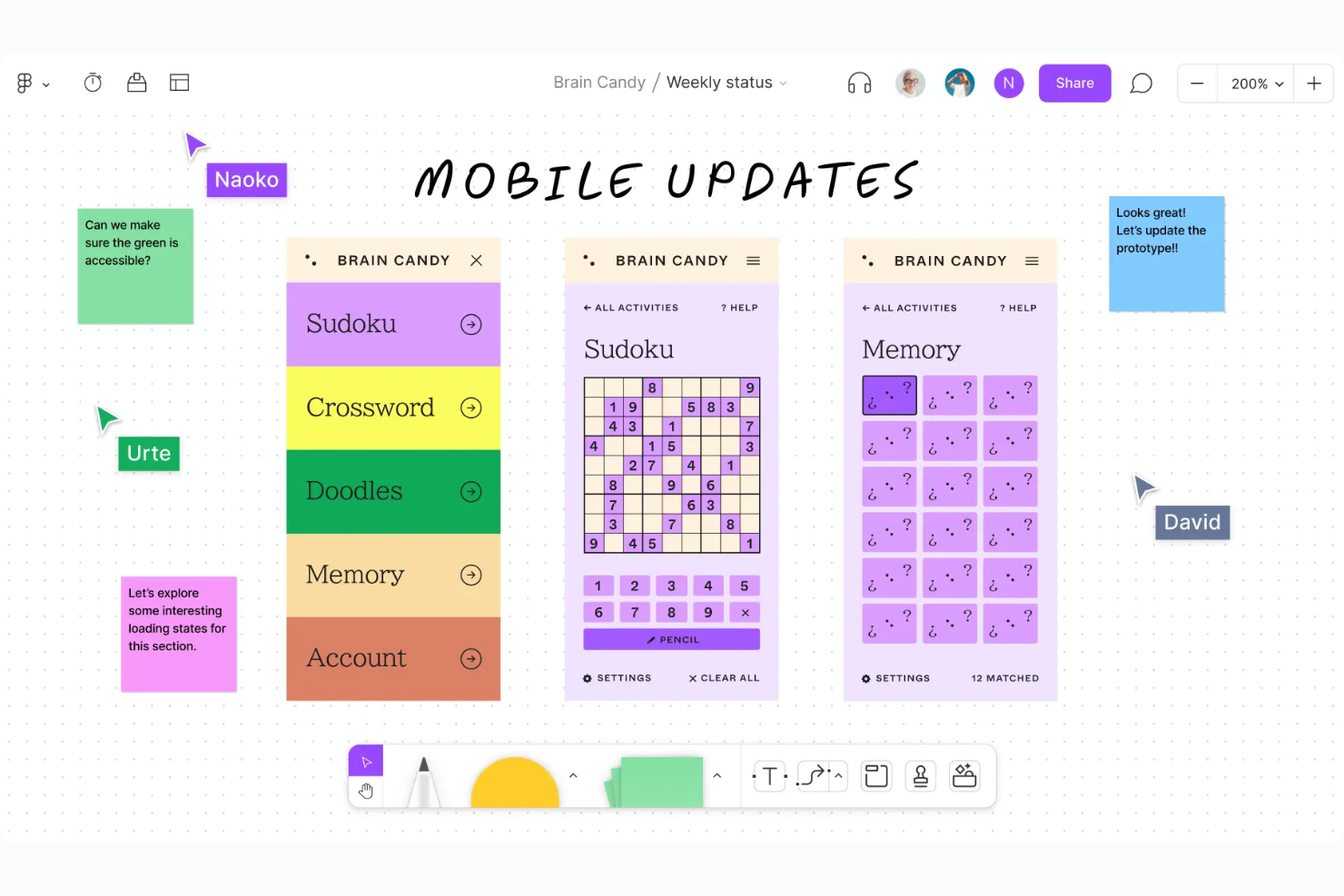
FigJam trasforma l'esperienza di collaborazione del tuo team con una lavagna online dinamica, pensata per la creatività e il lavoro di squadra. Ideale per settori e professionisti dello sviluppo prodotto, supporta attività come brainstorming e pianificazione strategica, rendendolo perfetto per team di design e project manager. Grazie agli strumenti di comunicazione in tempo reale e all'integrazione con software di project management, FigJam aiuta ad allineare i membri del team sugli obiettivi progettuali e favorisce soluzioni innovative.
Perché ho scelto FigJam
Ho scelto FigJam perché eccelle nella collaborazione per il design, offrendo uno spazio intuitivo per brainstorming e diagrammi in tempo reale che migliorano i flussi creativi. La sua capacità unica di supportare discussioni dinamiche tramite chat e audio dal vivo, unita a oltre 300 modelli pronti all'uso, lo rende uno strumento versatile per allineare gli sforzi del team nei progetti di design. L'integrazione senza interruzioni con strumenti di project management come Asana e Jira rende il processo di design ancora più snello, risolvendo il problema del coordinamento tra i team. La possibilità di includere collaboratori esterni senza necessità di login assicura che la collaborazione sul design resti flessibile e inclusiva.
Funzionalità principali di FigJam
Oltre ai suoi punti di forza nella collaborazione per il design, FigJam offre una gamma di funzionalità che migliorano l'interazione del team e la creatività.
- Timbri ed Emote: Gli utenti possono inserire timbri sulla lavagna e utilizzare emote per reazioni emoji temporanee per esprimere emozioni o feedback.
- Chiamate audio: Gli utenti possono avviare o partecipare a conversazioni audio direttamente su FigJam per discussioni in tempo reale.
- Funzione Spotlight: Consente agli utenti di evidenziare la propria visualizzazione ai collaboratori, rendendo più semplice guidare le discussioni durante le riunioni.
- Modelli personalizzati: I team possono creare e pubblicare modelli per ottimizzare i flussi di lavoro e mantenere la coerenza nei progetti.
Integrazioni con FigJam
Le integrazioni includono Atlassian, Microsoft, Slack, Zoom, Dropbox e Asana.
Pros and Cons
Pros:
- Integrazione molto utile con Figma
- Facile da usare e intuitivo
- Piano freemium per un massimo di 3 file
Cons:
- L'onboarding e il supporto dell'account sono riservati al piano enterprise
- Gli utenti che non usano Figma potrebbero non beneficiare di tutte le funzionalità
Altri strumenti di collaborazione online
Sebbene non li abbiamo inclusi nella recensione, esistono altri strumenti di collaborazione che non abbiamo ancora avuto modo di analizzare completamente. Di seguito è riportato un elenco di alcune opzioni aggiuntive di strumenti di collaborazione per la tua agenzia o il tuo studio:
- MeisterTask
Ideale per bacheche di progetto visive
- Troop Messenger
Ideale per la messaggistica sicura
- Blink
Ideale per la collaborazione da mobile
- Nifty
Ideale per la collaborazione in team
- Approval Studio
Ideale per la revisione creativa
- Kintone
Ideale per thread di lavoro dedicati
- Backlog
Ideale per team di sviluppo
- Workzone
Ideale per il controllo granulare dei permessi
- Filestage
Ideale per la gestione dei feedback
- Evernote
Ideale per organizzare le idee
- Milanote
Ideale per bacheche visive create dal team
- Teamwork.com
Ideale per chat aziendali a livello di compagnia
- Samepage
Ideale per la personalizzazione
- Redbooth
Ideale per creare dashboard di team
- Gmelius
Il miglior strumento di collaborazione per Gmail
- MyHub
Ideale per la comunicazione interna
- Nutcache
Ideale per la collaborazione sulla pianificazione
- Next Matter
Ideale per flussi di lavoro complessi
- Content Workflow
Ideale per la gestione collaborativa dei contenuti
- Ideagen Huddle
Miglior strumento per la collaborazione su documenti
- Podio
Ideale per flussi di lavoro automatizzati low-code
- ProjectManager
Il migliore per l'onboarding dei dipendenti integrato
- Confluence
Ideale per flussi di lavoro flessibili e personalizzabili
- Favro
Ideale per team agili
- Hibox
Ideale per la gestione delle riunioni
- Workmates
Ideale per comunicazioni interne e intranet aziendale


Domande frequenti sugli strumenti di collaborazione online
Trova le risposte alle domande comuni su questo argomento.
Cosa sono gli strumenti di collaborazione?
Quali caratteristiche devo cercare quando scelgo gli strumenti di collaborazione?
Quali sono i vantaggi dei software di collaborazione?
Guida all'acquisto degli strumenti di collaborazione online
Come scegliere il miglior strumento di collaborazione per il tuo team.
Per cosa ti serve?
Qual è la dimensione del tuo team?
Come si integrerebbe nel tuo flusso di lavoro?
Quanto tempo occorre per la configurazione?
Qual è la curva di apprendimento?
Quanto costa?
Qual è il prossimo passo?
Se stai cercando strumenti per la collaborazione online, contatta gratuitamente un consulente di SoftwareSelect per ricevere consigli.
Compili un modulo e fai una breve conversazione durante la quale il consulente approfondirà le tue esigenze specifiche. Dopodiché riceverai una selezione ristretta di software da valutare. Ti assisteranno persino durante l'intero processo di acquisto, comprese le negoziazioni sul prezzo.
Altri articoli correlati:
- Abbiamo testato la collaborazione con i clienti guidata dagli sviluppatori di un'agenzia: ecco cosa è successo
- Esempi di piani di comunicazione per i progetti, modello e guida pratica