

10 soluzioni software per la gestione del personale nel Regno Unito per il 2026

Software per la gestione della forza lavoro nel Regno Unito: selezione


Il software per la gestione della forza lavoro nel Regno Unito comprende strumenti digitali progettati per aiutare le aziende britanniche a gestire programmazione dei turni, presenze, paghe e conformità in un unico luogo. Se stai cercando la piattaforma giusta, probabilmente devi conciliare turni complessi, normative in continua evoluzione e la necessità di supportare team sia in sede sia da remoto.
La scelta del software giusto può aiutarti a ridurre le attività amministrative manuali, mantenere la conformità e coinvolgere il personale. In questo elenco troverai un confronto chiaro delle principali soluzioni britanniche per la gestione della forza lavoro per il 2026, così potrai scegliere con sicurezza quella più adatta alle esigenze della tua organizzazione.
Perché fidarsi delle nostre recensioni sui software
Il nostro team testa e recensisce software dal 2012. In quanto esperti HR noi stessi, sappiamo quanto sia difficile — e importante — scegliere il software giusto.
Per questa guida, abbiamo valutato gli strumenti attraverso test pratici e ricerche indipendenti, assegnando un punteggio agli strumenti in base ai nostri criteri di selezione. Ci basiamo inoltre sulle competenze di leader di pensiero del settore e di professionisti HR attivi.
Le nostre recensioni riflettono il nostro giudizio editoriale umano, non un discorso di vendita.
Revisori esperti:
Tabella di confronto dei software per la gestione della forza lavoro nel Regno Unito
Questa tabella di confronto riassume i dettagli sui prezzi delle mie migliori selezioni di software per la gestione della forza lavoro nel Regno Unito:
| Tool | Best For | Trial Info | Price | ||
|---|---|---|---|---|---|
| 1 | Ideale per assumere in oltre 150 paesi | Demo gratuita disponibile | Da $5/dipendente/mese | Website | |
| 2 | La soluzione migliore come intelligenza artificiale per le aziende | Demo gratuita disponibile | A partire da $8/utente/mese | Website | |
| 3 | Ideale per la gestione dei turni nel settore dell’ospitalità | Prova gratuita + demo gratuita disponibile | Da $5/utente/mese (fatturato annualmente) | Website | |
| 4 | Ideale per l'automazione del monitoraggio delle assenze dei dipendenti | Demo gratuita disponibile | Prezzo su richiesta | Website | |
| 5 | Ideale per informazioni unificate tra HR e finanza | Demo gratuita disponibile | Prezzi su richiesta | Website | |
| 6 | Ideale per l'integrazione di dati tra payroll e gestione della forza lavoro | Demo gratuita disponibile | Prezzo su richiesta | Website | |
| 7 | Ideale per la pianificazione del personale per eventi | Prova gratuita di 14 giorni + demo gratuita disponibile | Da $100/utente/mese | Website | |
| 8 | Ideale per la conformità nelle organizzazioni complesse | Demo gratuita disponibile | Prezzo su richiesta | Website | |
| 9 | Ideale per la pianificazione della forza lavoro nei contact centre | Demo gratuita disponibile | Prezzo su richiesta | Website | |
| 10 | Ideale per i fornitori di servizi di facility e sicurezza | Demo gratuita disponibile | Prezzo su richiesta | Website |
Recensioni dei software per la gestione della forza lavoro nel Regno Unito
Di seguito trovi le mie analisi dettagliate dei software per la gestione della forza lavoro nel Regno Unito inclusi nella mia selezione. Le mie recensioni offrono una panoramica approfondita delle funzionalità, dei migliori casi d’uso e delle integrazioni di ogni piattaforma, per aiutarti a trovare quella più adatta a te.

Deel HR
Ideale per assumere in oltre 150 paesi
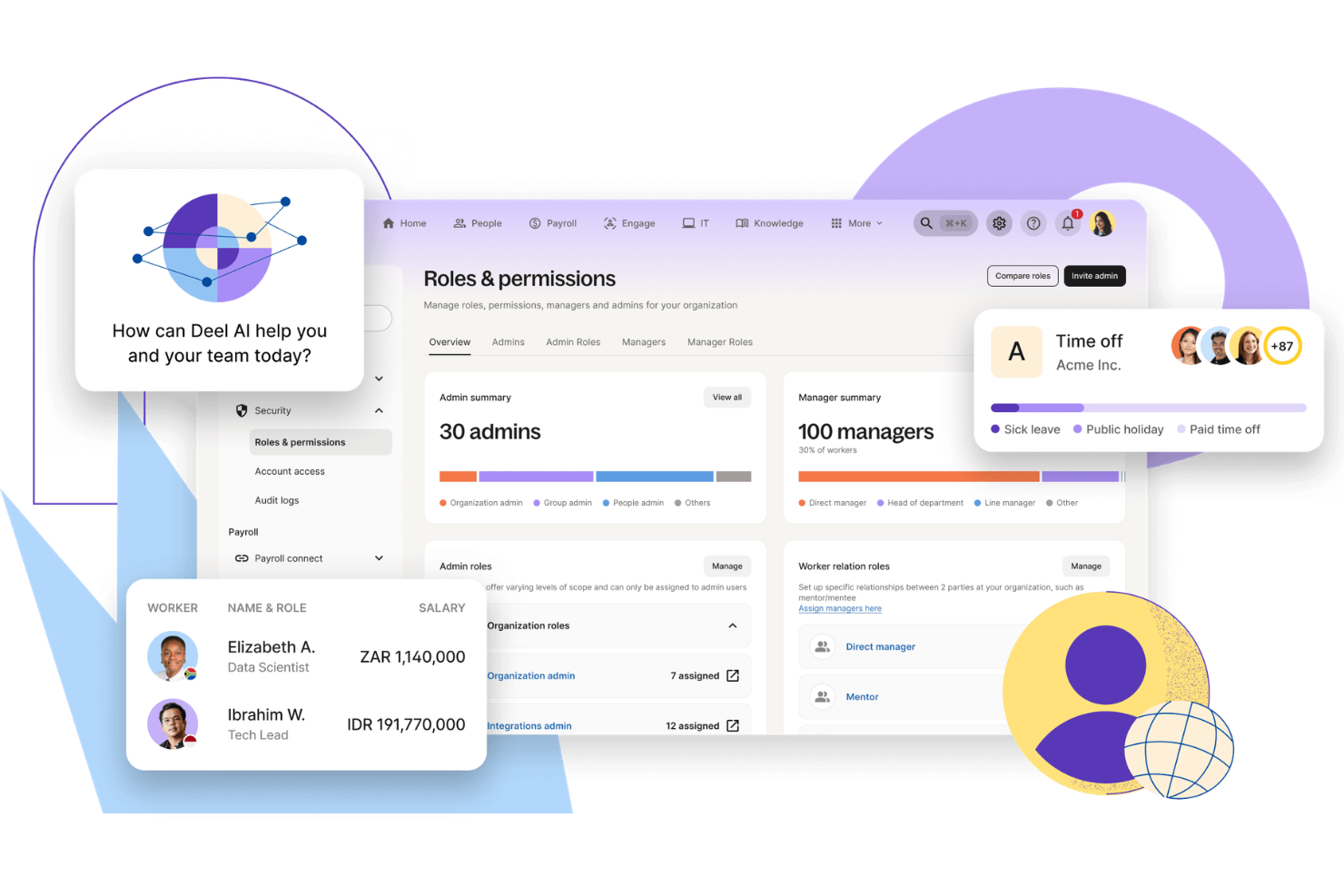
Deel HR è una piattaforma di gestione del personale per le aziende del Regno Unito che integra assunzioni internazionali, HRIS, conformità, paghe e gestione dei collaboratori in un unico sistema.
Per chi è ideale Deel HR?
I team HR di aziende britanniche che assumono o gestiscono dipendenti e collaboratori in diversi paesi e regioni.
Perché ho scelto Deel HR
Ho scelto Deel HR tra i migliori perché posso assumere dipendenti o collaboratori in oltre 150 paesi quasi istantaneamente. Il mio team utilizza la generazione automatica dei contratti di Deel e le procedure di onboarding localizzate per permettere ai nuovi assunti di iniziare subito. Mi affido anche alla gestione documentale integrata della piattaforma di Deel per gestire i requisiti di conformità specifici del paese durante il processo di assunzione.
Funzionalità principali di Deel HR
- Gestione globale delle paghe: Elabora le paghe per dipendenti e collaboratori in diversi paesi da un’unica dashboard.
- Gestione delle assenze: Tieni traccia e approva le richieste di permesso dei dipendenti con politiche personalizzabili per ogni sede.
- Gestione dati HRIS: Archivia e organizza i dati dei dipendenti, contratti e documenti in un’unica piattaforma sicura.
- Gestione delle spese: Invia, esamina e rimborsa le spese dei dipendenti direttamente nel sistema.
Integrazioni di Deel HR
Le integrazioni native non sono chiaramente documentate. Deel HR offre un’API per integrazioni personalizzate.
Pros and Cons
Pros:
- HRIS centralizzato per dati del personale globale
- Monitoraggio delle prestazioni e cicli di valutazione integrati
- Gestione delle paghe in più valute
Cons:
- Integrazioni native limitate con altre piattaforme HR
- Alcune funzionalità richiedono piani di livello superiore
New Product Updates from Deel HR

Deel Expands Stablecoin Wallet to 80+ Countries
Deel expands its Stablecoin Wallet to 80+ countries with dollar-backed balances and optional rewards. This gives eligible contractors more ways to hold and manage earnings inside Deel. For more information, visit Deel’s official site.
 .
.
La soluzione migliore come intelligenza artificiale per le aziende
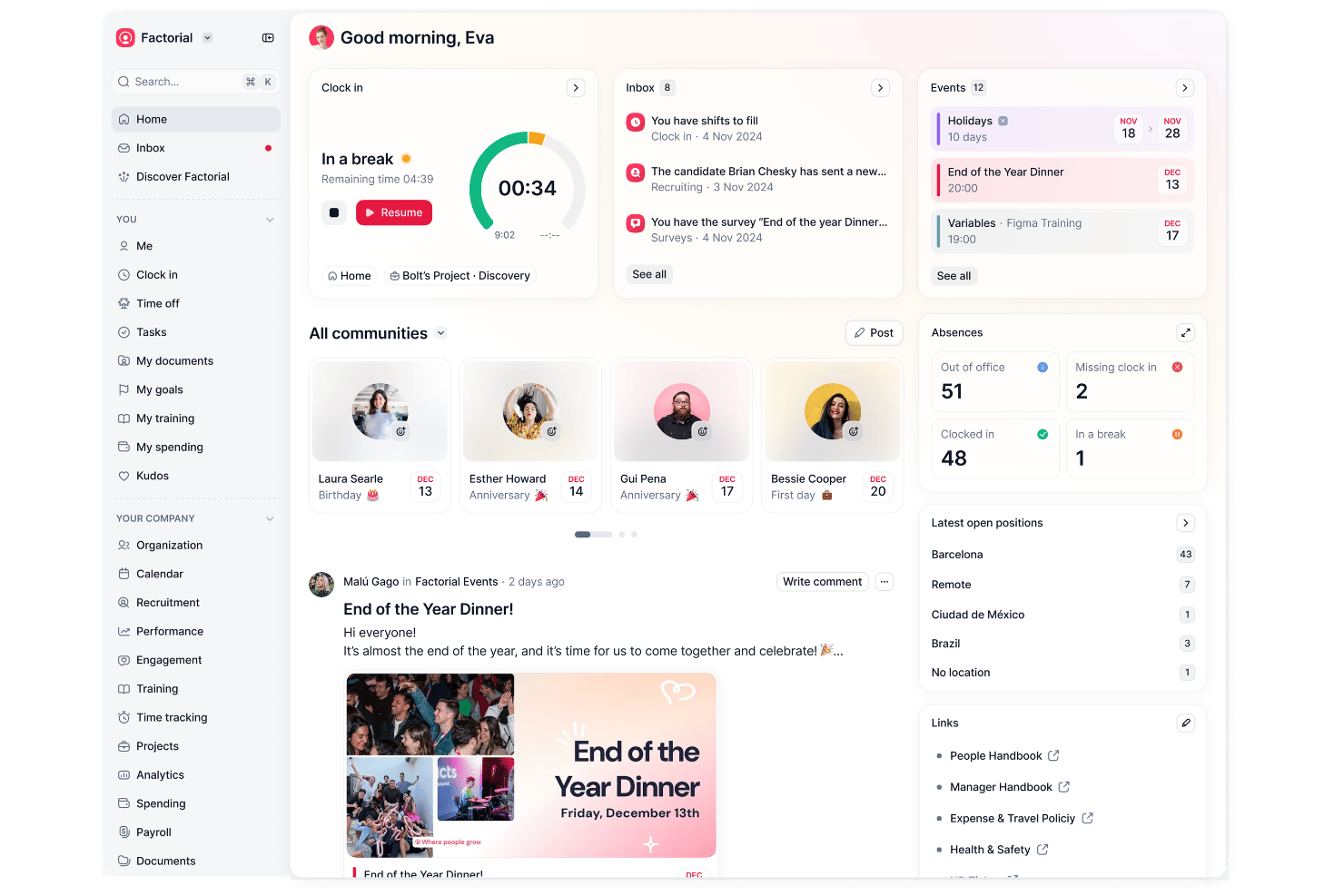
Factorial è una piattaforma completa per le risorse umane e la gestione della forza lavoro che include la pianificazione dei turni, il monitoraggio di orari e presenze, la gestione delle assenze e i flussi di lavoro per le buste paga, con strumenti di intelligenza artificiale integrati in ogni modulo per supportare la pianificazione, la reportistica e le richieste dei dipendenti.
Per chi è più indicato Factorial?
Factorial è adatto ai team HR delle PMI in crescita che desiderano un'unica piattaforma per gestire le operazioni relative al personale, dalla pianificazione al monitoraggio delle ore fino alla reportistica, con l'intelligenza artificiale integrata in ogni area.
Perché ho scelto Factorial
Ho scelto Factorial come una delle soluzioni migliori perché il suo livello di intelligenza artificiale assiste attivamente nelle attività di gestione della forza lavoro, invece di limitarsi a fornire report. L'agente di intelligenza artificiale analizza le tendenze relative alle assenze e al monitoraggio delle ore per evidenziare le carenze di capacità, mentre gli strumenti di pianificazione automatica gestiscono automaticamente la creazione dei turni. I dipendenti possono inoltre rivolgere domande direttamente all'intelligenza artificiale sulle politiche di congedo, riducendo le domande ricorrenti che tendono ad accumularsi nelle caselle di posta dei team HR.
Funzionalità principali di Factorial
- Pianificazione dei turni con trascinamento della selezione: I responsabili possono creare e pubblicare i turni utilizzando un'interfaccia visiva con trascinamento della selezione, con supporto per modelli di turni in blocco e a rotazione.
- Monitoraggio mobile delle ore con geolocalizzazione: I dipendenti registrano l'entrata e l'uscita dall'app mobile, mentre le coordinate vengono registrate a ogni evento di rilevazione dell'orario per verificare la posizione.
- Calendario delle assenze del team: Un calendario condiviso mostra le assenze approvate e la disponibilità del team, offrendo ai responsabili una visione chiara della copertura in qualsiasi momento.
- Portale self-service per i dipendenti: I dipendenti possono controllare i propri turni, inviare richieste di assenza e richiedere cambi di turno direttamente dall'app senza contattare le risorse umane.
Integrazioni di Factorial
Factorial offre integrazioni disponibili sul marketplace con Microsoft Business Central, Microsoft Power BI, Microsoft Outlook Calendar, Slack, Sage 200 e SAP Business One. La sua API pubblica supporta OAuth 2.0, webhook e SDK per integrazioni personalizzate, ed è disponibile anche Zapier.
Pros and Cons
Pros:
- L'intelligenza artificiale aiuta ad analizzare le tendenze delle assenze per valutare la capacità
- La pianificazione automatica può creare i turni
- I dipendenti possono richiedere turni e congedi
Cons:
- Non è documentata alcuna applicazione delle norme britanniche sull'orario di lavoro
- Le previsioni della domanda non risultano utilizzate per definire i turni

Deputy
Ideale per la gestione dei turni nel settore dell’ospitalità
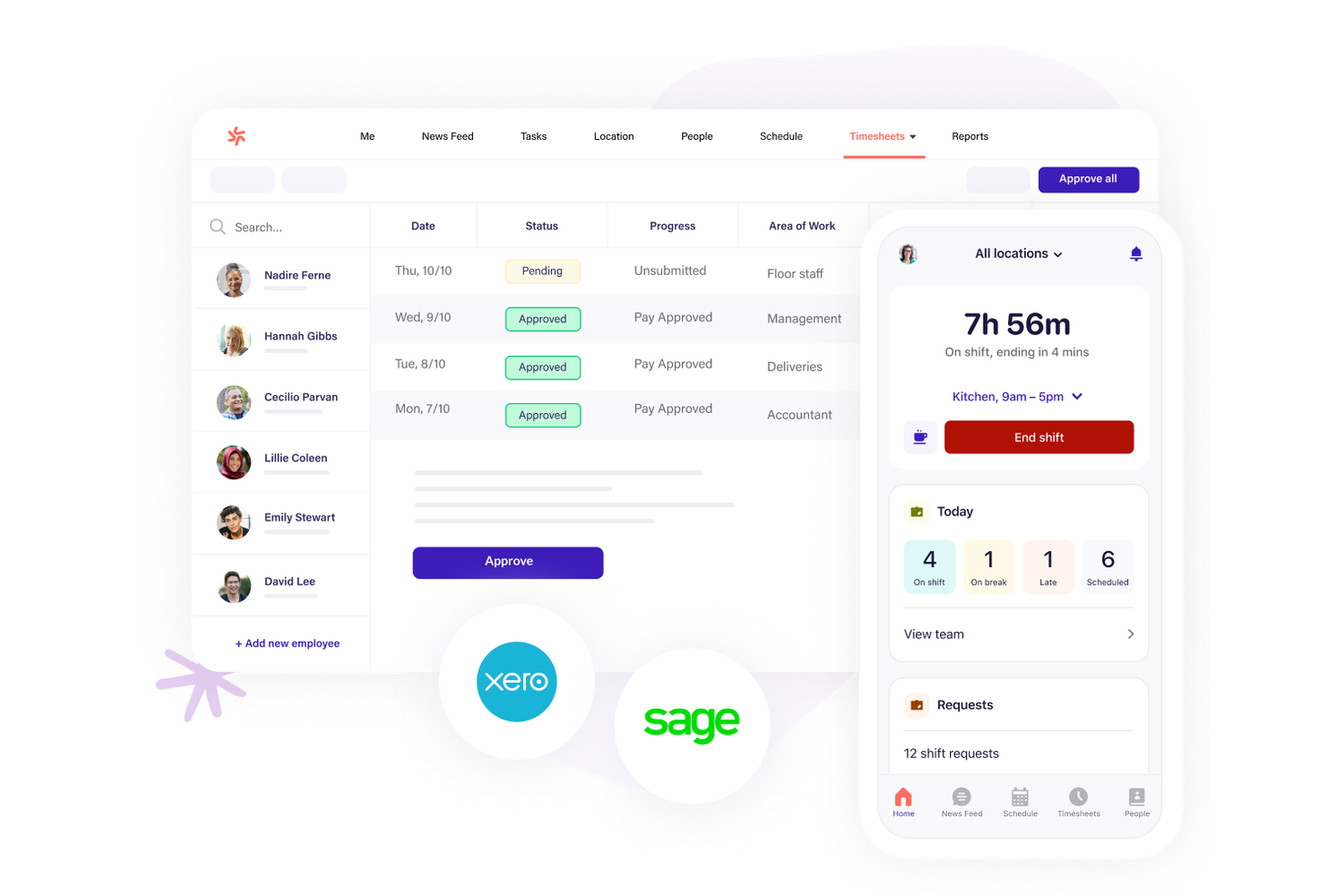
Le aziende del settore dell’ospitalità che cercano una gestione precisa dei turni spesso scelgono Deputy per le sue capacità di pianificazione dei turni. La piattaforma è progettata per manager e responsabili di team che devono coordinare il personale a ore, gestire cambiamenti dell’ultimo minuto e garantire la conformità alle normative sull’orario di lavoro. Deputy ti aiuta a gestire schemi di turni complessi, monitorare le presenze e comunicare aggiornamenti istantanei tra diverse sedi.
Perché ho scelto Deputy
Per la gestione dei turni nel settore dell’ospitalità, Deputy offre funzionalità che rispondono direttamente alla natura frenetica e basata sui turni di questo settore. Ho scelto Deputy perché il suo strumento di pianificazione drag-and-drop consente di creare e modificare rapidamente i turni, anche per grandi team con disponibilità variabile.
La piattaforma include anche notifiche automatiche dei turni e monitoraggio in tempo reale delle presenze, aiutando i manager a gestire i cambiamenti dell’ultimo minuto e le assenze improvvise. Queste funzioni rendono Deputy una soluzione ideale per le aziende del settore dell'ospitalità nel Regno Unito che devono mantenere le operazioni fluide in più sedi.
Funzionalità principali di Deputy
Oltre ai suoi punti di forza nella gestione dei turni, Deputy offre anche diverse altre funzionalità utili:
- Schede attività personalizzabili: I manager possono visualizzare, modificare e approvare le schede attività digitali prima di esportarle in busta paga.
- Gestione delle assenze: I dipendenti possono richiedere permessi e i manager possono tenere traccia dei saldi e approvare le richieste direttamente dalla piattaforma.
- Assegnazione dei compiti: Assegna compiti specifici ai membri del team e ne monitora il completamento insieme ai turni.
- Strumenti di reportistica: Genera report su presenze, costi salariali e conformità del lavoro per una migliore analisi della forza lavoro.
Integrazioni di Deputy
Le integrazioni includono BambooHR, Box, Clover, Dropbox, Epos Now, HiBob, Lightspeed, QuickBooks, Sage, e altre.
Pros and Cons
Pros:
- Lo scambio dei turni è automatizzato per il personale orario
- Il calcolo delle ferie nel Regno Unito è integrato
- La timbratura GPS aiuta a prevenire le frodi sugli orari
Cons:
- La configurazione delle regole sugli straordinari può essere complessa
- Nessun sistema integrato per la selezione o la gestione delle candidature

edays
Ideale per l'automazione del monitoraggio delle assenze dei dipendenti
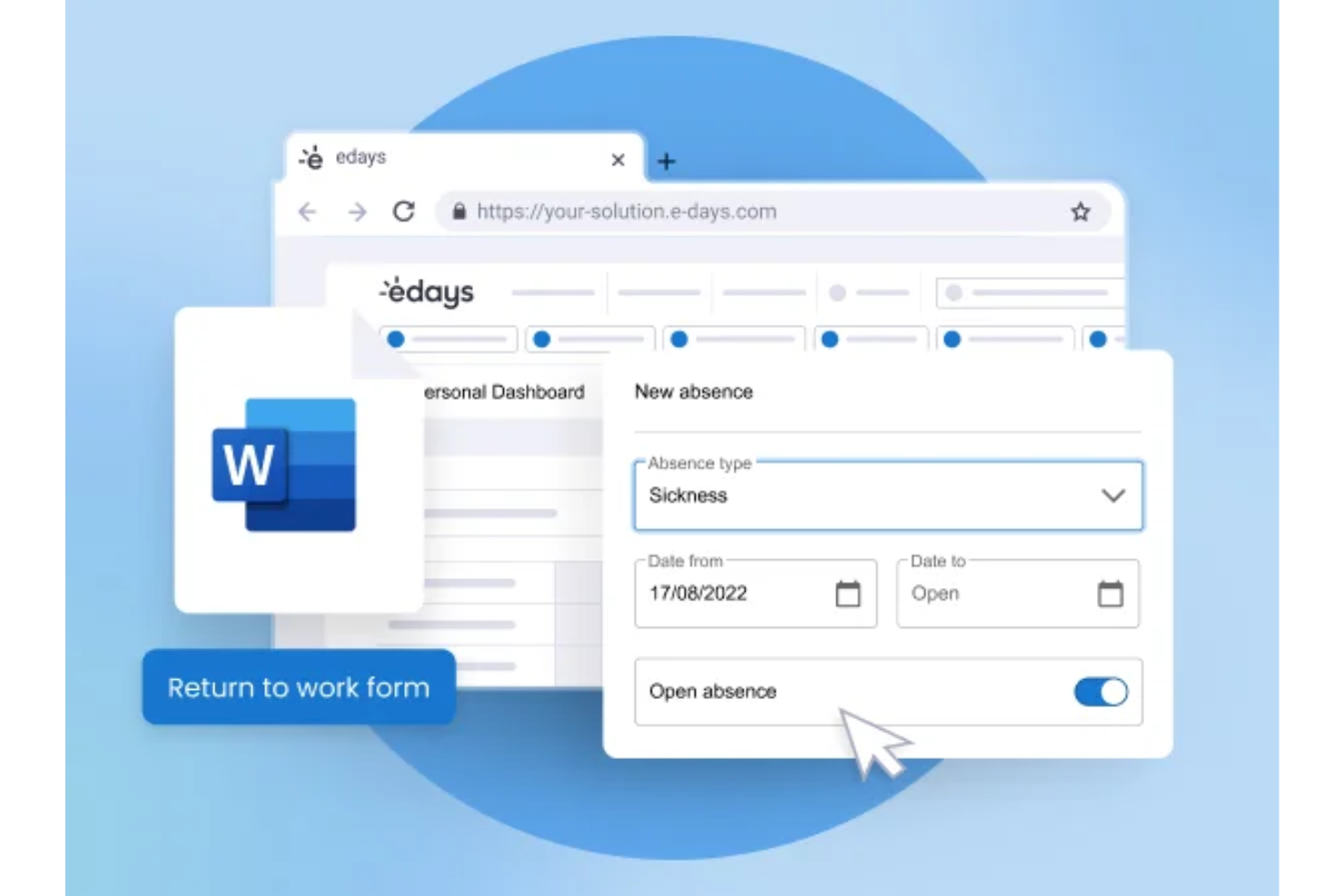
edays è una piattaforma britannica di gestione delle assenze e della forza lavoro che copre la gestione di ferie e permessi, il monitoraggio delle assenze per malattia, la rilevazione di presenze e orari, la pianificazione dei dipendenti e le principali funzionalità HR in un unico sistema configurabile.
Per chi è ideale edays?
edays è adatto per organizzazioni di medie e grandi dimensioni nel Regno Unito e a livello globale, con politiche di assenza complesse, più sedi o un alto volume di assenze da gestire.
Perché ho scelto edays
Ho incluso edays tra le mie migliori scelte perché l'automazione della gestione delle assenze va ben oltre il semplice flusso di richiesta e approvazione. Quello che trovo più utile è il sistema configurabile di trigger delle assenze: imposti le condizioni e edays avvisa automaticamente i responsabili giusti non appena vengono superate le soglie, così nulla sfugge. Mi piace anche il fatto che il riporto e gli accantonamenti siano completamente automatizzati, il che significa niente ricalcoli manuali a fine anno per diversi tipi di turni. Il punteggio del Bradford Factor si aggiorna in tempo reale su ogni profilo dipendente, consentendo ai manager una visione immediata dei modelli di assenza senza alcun monitoraggio manuale.
Funzionalità principali di edays
- Generatore di turni drag-and-drop: Crea e gestisci i turni dei dipendenti in modo visivo, con filtri per competenze, ruoli e requisiti di turno.
- Foglio ore online: I dipendenti registrano ore lavorate, straordinari e riposi compensativi direttamente sulla piattaforma per la revisione e l'approvazione del responsabile.
- Moduli di rientro al lavoro: Attivazione automatica di moduli personalizzabili quando un dipendente rientra da un'assenza per malattia.
- Costruttore di report personalizzati: Crea report di assenze e forza lavoro su misura con opzioni di consegna programmata ed esportazione dati.
Integrazioni edays
edays offre integrazioni pronte all'uso con Cornerstone OnDemand, Cegid, IntelliHR ed ELMO, oltre a sincronizzazione dei calendari tramite Outlook, Gmail e iCal. È disponibile un'API per integrazioni personalizzate con HRIS, sistemi paghe e dispositivi di timbratura fisica.
Pros and Cons
Pros:
- Gestisce le regole di permesso per più paesi in un unico sistema
- Trigger automatici avvertono tempestivamente i responsabili
- Monitora le assenze per giorni o ore
Cons:
- I grafici dei report necessitano di aggiustamenti manuali
- La configurazione multi-paese richiede molto tempo per l’amministrazione

Workday
Ideale per informazioni unificate tra HR e finanza
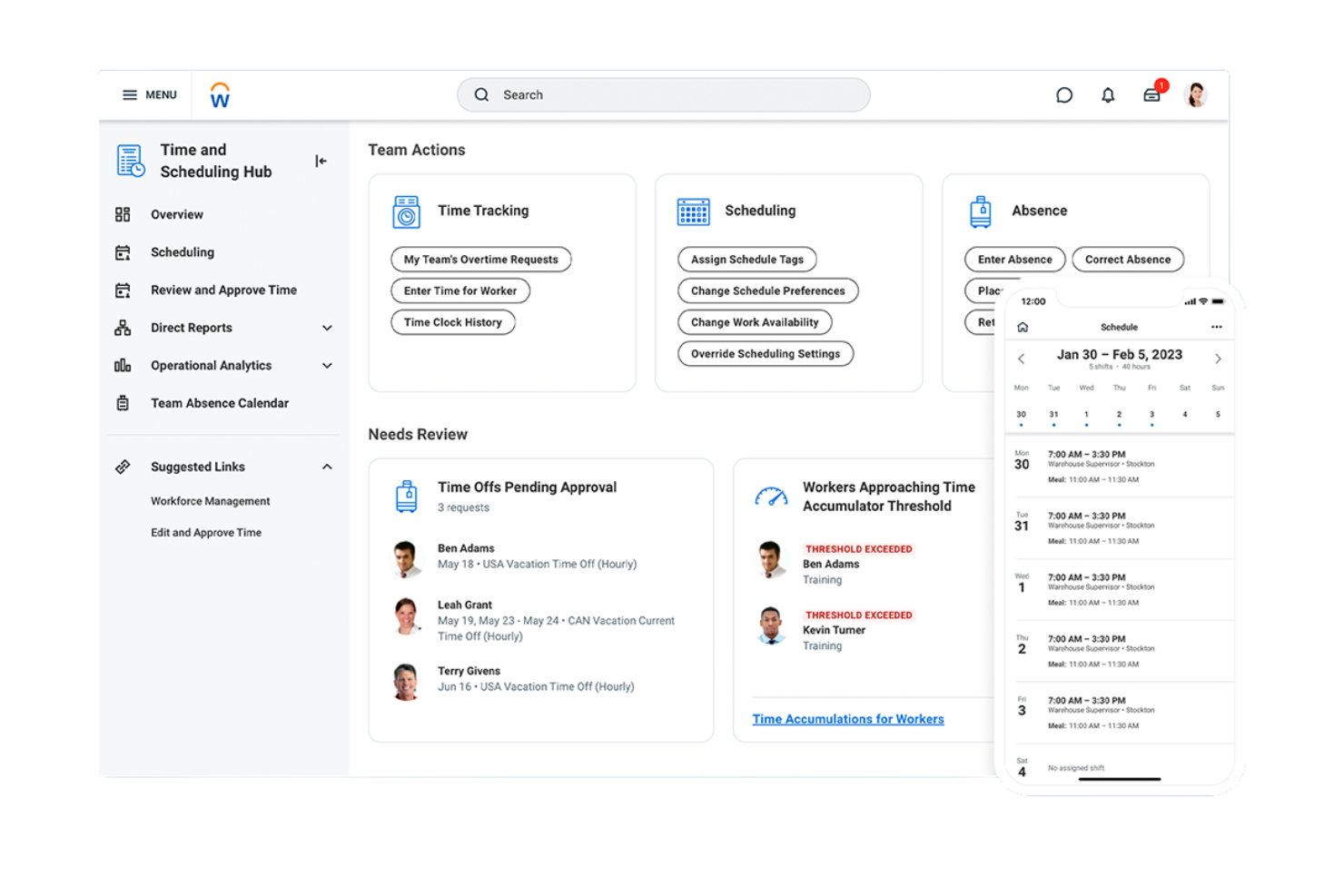
Workday riunisce dati HR e finanziari in un'unica piattaforma, rendendolo una scelta solida per le organizzazioni del Regno Unito che desiderano informazioni unificate su persone e budget. È particolarmente utile per le aziende di grandi dimensioni o per quelle con esigenze di reportistica complesse che desiderano collegare la pianificazione della forza lavoro alla previsione finanziaria. Con Workday, i team HR e finanziari possono collaborare su organico, costi e conformità da un'unica fonte attendibile.
Perché ho scelto Workday
Ciò che distingue Workday dal software di gestione della forza lavoro nel Regno Unito è la sua capacità di unificare i dati HR e finanziari in tempo reale. Ho scelto Workday perché consente di collegare pianificazione della forza lavoro, buste paga e previsione finanziaria in un'unica piattaforma, così che i team HR e finanziari possano prendere decisioni sulla base degli stessi dati.
Gli strumenti di analisi della piattaforma aiutano a monitorare organico, costi del lavoro e scostamenti dal budget senza dover passare da un sistema all'altro. Questo approccio unificato è particolarmente prezioso per le organizzazioni che devono allineare la strategia delle persone agli obiettivi finanziari.
Funzionalità principali di Workday
Altre funzionalità che rendono Workday utile per la gestione della forza lavoro includono:
- Rilevamento Orario Automatico: I dipendenti possono timbrare l'ingresso e l'uscita, e i manager possono rivedere le ore direttamente sulla piattaforma.
- Suite per la Gestione dei Talenti: Strumenti per recruiting, onboarding, valutazione delle prestazioni e pianificazione della successione sono tutti integrati.
- Accesso Mobile: Lo staff e i manager possono accedere a orari, approvare richieste e visualizzare report dai loro telefoni.
- Monitoraggio della Conformità: Il sistema monitora i cambiamenti normativi e aiuta a garantire che i processi HR rispettino gli standard occupazionali del Regno Unito.
Integrazioni Workday
Le integrazioni native non sono attualmente elencate.
Pros and Cons
Pros:
- Integrazione dati HR e finanziari in tempo reale
- Strumenti integrati per la gestione dei talenti e delle successioni
- Dashboard personalizzabili per l'analisi della forza lavoro
Cons:
- Manca di CRM nativo e funzionalità complete per la supply chain
- L'implementazione può richiedere mesi con alti costi aggiuntivi

ADP
Ideale per l'integrazione di dati tra payroll e gestione della forza lavoro
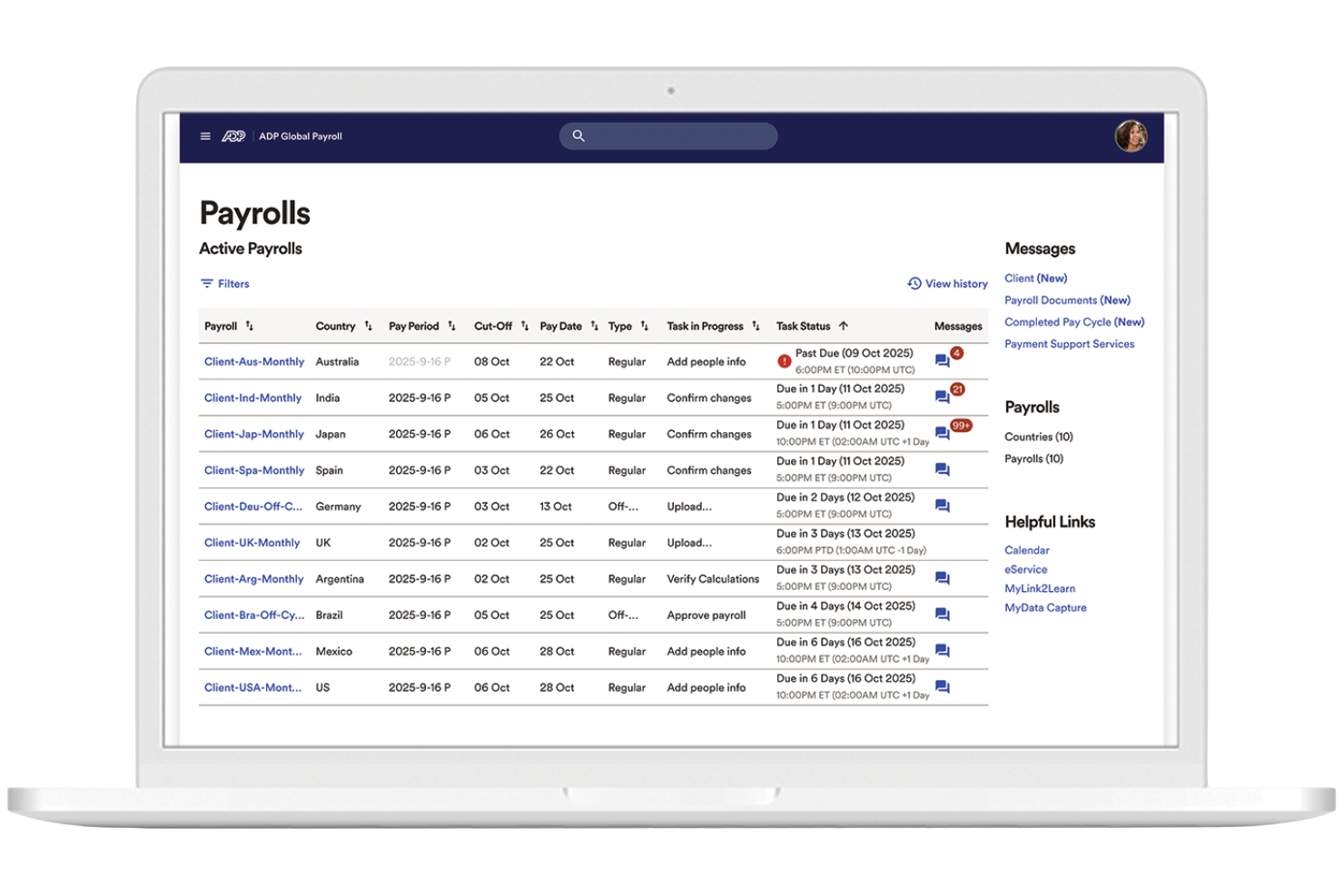
ADP è una soluzione di gestione del personale che collega dati di retribuzione e risorse umane in un unico sistema. Si adatta alle organizzazioni nel Regno Unito che vogliono gestire in un unico luogo stipendi, rilevazione delle presenze e analisi della forza lavoro. ADP riduce l'inserimento manuale dei dati e mantiene allineati i registri dei dipendenti tra i diversi sistemi.
Perché ho scelto ADP
Per le organizzazioni britanniche che hanno bisogno che stipendi e dati della forza lavoro funzionino insieme, ADP si distingue per il suo approccio integrato. Ho scelto ADP perché collega l'elaborazione degli stipendi con la rilevazione di orari e presenze, così i team HR possono gestire salari, ore lavorate e conformità da un'unica piattaforma.
Il sistema offre anche strumenti di analisi della forza lavoro che aiutano a monitorare i trend nei costi del lavoro e nelle presenze. Questo rende ADP una scelta solida per le aziende che vogliono ridurre l'inserimento manuale dei dati e mantenere accurati i dati sul personale su HR e buste paga.
Funzionalità principali di ADP
Altre caratteristiche che rendono ADP utile per la gestione del personale includono:
- Portale self-service per i dipendenti: Il personale può visualizzare le buste paga, aggiornare i dati personali e accedere ai documenti fiscali online.
- Gestione automatica delle assenze: Monitora, approva e registra le richieste di ferie dei dipendenti direttamente dalla piattaforma.
- Gestione documentale: Archivia e organizza in modo sicuro i documenti HR per un accesso facile e il rispetto delle normative.
- App mobile: Dipendenti e responsabili possono accedere agli orari, richiedere permessi e visualizzare informazioni sulle buste paga dal proprio telefono.
Integrazioni di ADP
Le integrazioni native non sono attualmente elencate.
Pros and Cons
Pros:
- Self-service per i dipendenti per buste paga e permessi
- Dashboard di analytics per analisi dei costi del lavoro
- Scalabile per aziende multi-sede e di grandi dimensioni
Cons:
- La creazione di report personalizzati richiede competenze tecniche
- Integrazioni native limitate per strumenti specifici UK
Ideale per la pianificazione del personale per eventi
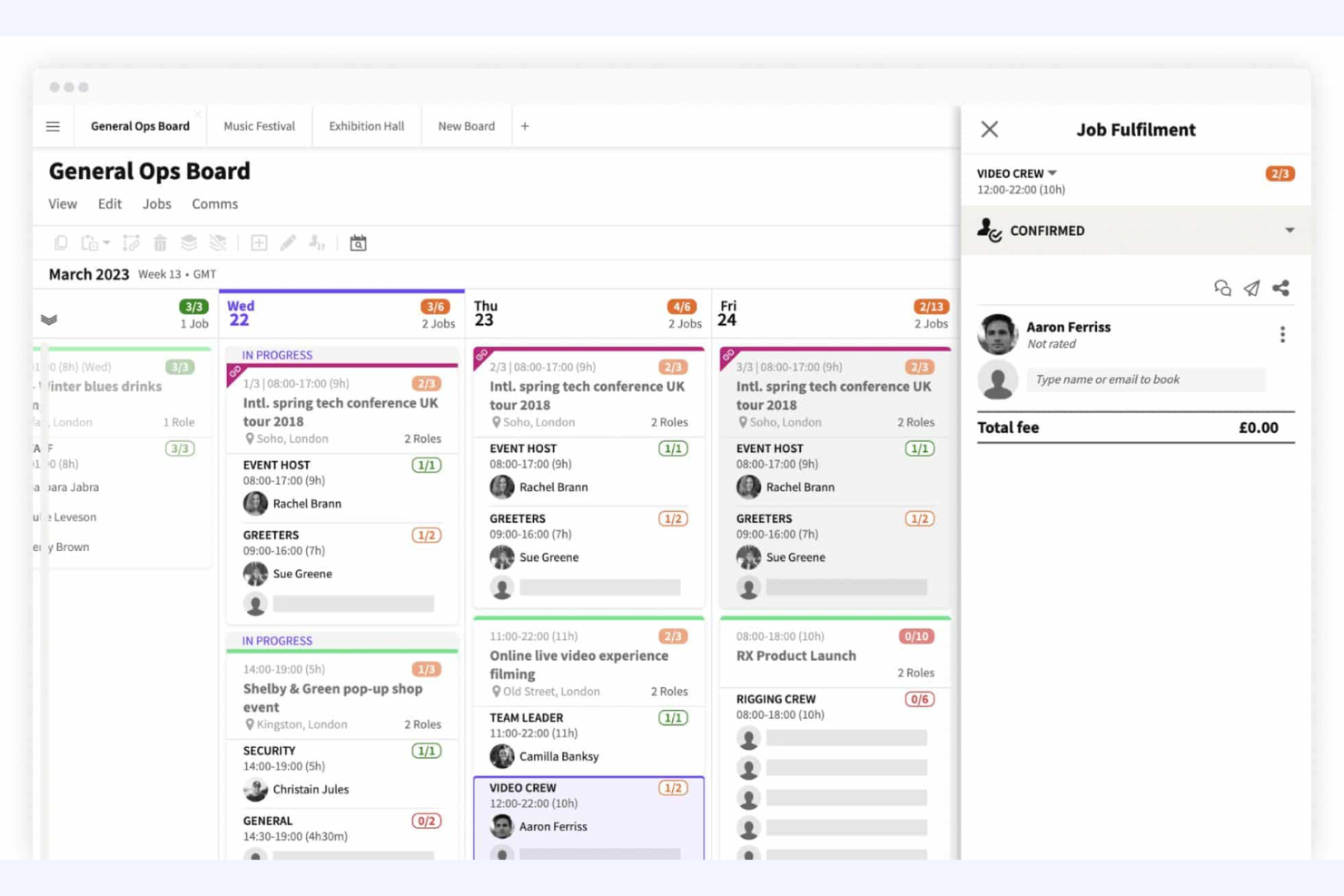
Liveforce è pensato per agenzie e organizzazioni che devono pianificare e gestire il personale per eventi su più sedi. È una soluzione ideale per organizzatori di eventi, agenzie di staffing e società di produzione che desiderano gestire cambiamenti dell'ultimo minuto, assegnazioni di turni e comunicazioni con lo staff in un unico luogo. Con Liveforce, puoi creare rapidamente le liste del personale, monitorare la disponibilità dello staff e mantenere tutti aggiornati in tempo reale.
Perché ho scelto Liveforce
Per le organizzazioni che devono coordinare rapidamente e in modo affidabile il personale per eventi, Liveforce si distingue per i suoi strumenti di pianificazione focalizzati sugli eventi. Ho scelto Liveforce perché consente di creare e pubblicare turni, gestire le prenotazioni del personale e affrontare i cambiamenti last minute da un'unica dashboard.
Le funzionalità di monitoraggio della disponibilità e messaggistica istantanea della piattaforma aiutano a coprire i ruoli e comunicare aggiornamenti senza ritardi. Questo rende Liveforce una scelta eccellente per i team nel Regno Unito che gestiscono personale temporaneo o freelance durante eventi, festival o attivazioni pop-up.
Funzionalità Principali di Liveforce
Altre funzionalità che rendono Liveforce utile per la gestione della forza lavoro includono:
- Profili del personale personalizzabili: Archivia documenti, certificazioni e storico lavorativo per ogni membro dello staff.
- Foglio presenze automatizzati: Il personale può inviare le ore lavorate e i responsabili possono approvare i fogli presenze direttamente dalla piattaforma.
- Portale staff con branding personalizzato: Fornisci allo staff l’accesso a un portale con il branding della tua azienda per offerte di lavoro e aggiornamenti.
- Messaggistica in blocco: Invia annunci o proposte di turno a gruppi selezionati di personale contemporaneamente.
Integrazioni Liveforce
Non sono attualmente indicate integrazioni native.
Pros and Cons
Pros:
- Il personale può caricare documenti e certificazioni
- Messaggistica in blocco raggiunge immediatamente i gruppi di personale
- Il portale staff personalizzato rafforza l’identità dell’agenzia
Cons:
- Opzioni di report limitate per le analisi dei turni
- Nessuna API pubblica per integrazioni personalizzate

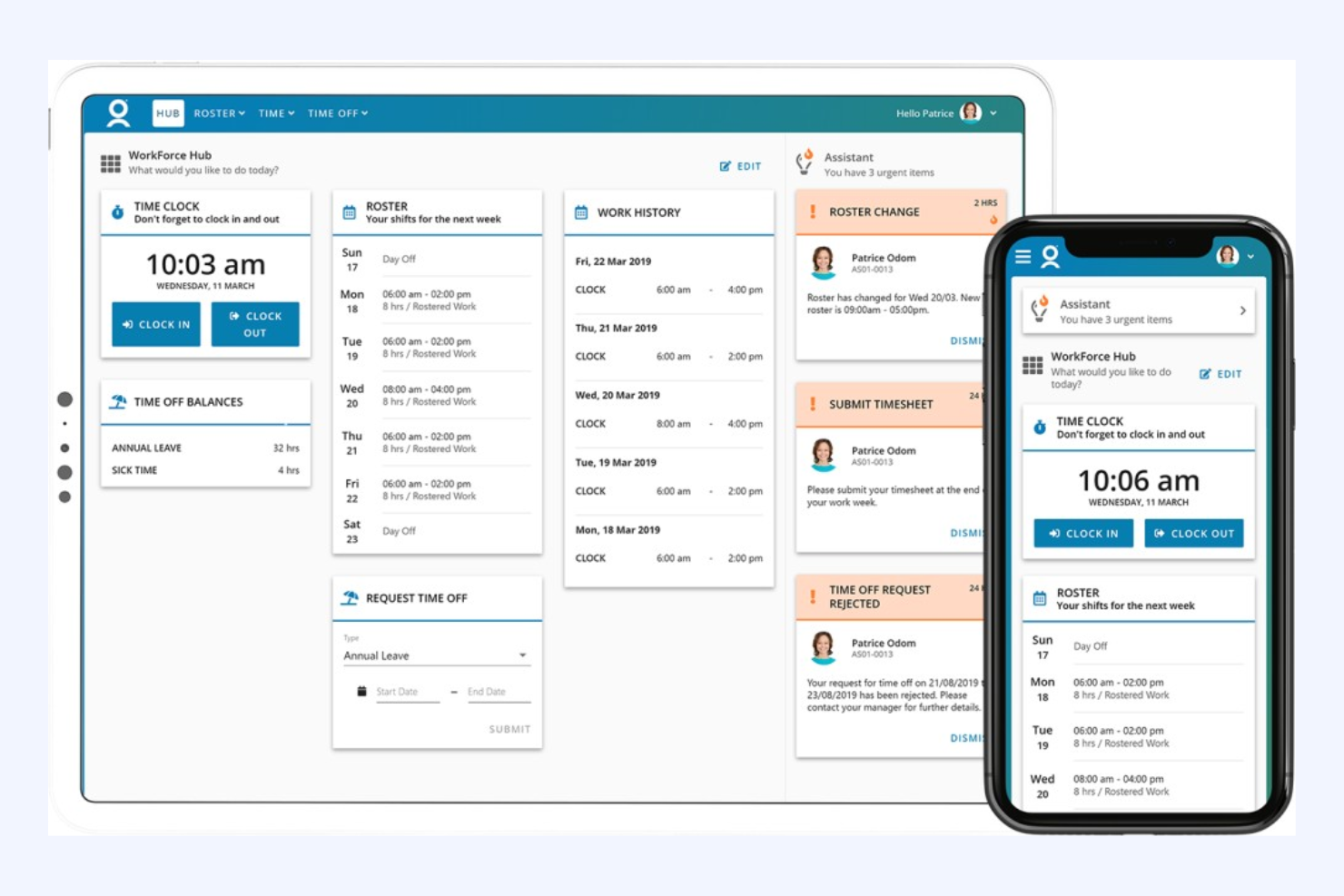
WorkForce Software è progettato per le grandi organizzazioni del Regno Unito che devono gestire la conformità e la complessità della forza lavoro attraverso più regioni o unità aziendali. È particolarmente indicato per i responsabili HR e i team operativi in settori altamente regolamentati come sanità, manifattura e settore pubblico. La piattaforma aiuta ad automatizzare la conformità alle leggi sul lavoro del Regno Unito, a gestire gli accordi sindacali e a gestire regole di pianificazione complesse su larga scala.
Perché ho scelto WorkForce Software
Per le organizzazioni che devono affrontare stringenti requisiti di conformità e strutture della forza lavoro complesse, WorkForce Software si distingue come una soluzione progettata ad hoc. L'ho scelto perché offre un'automazione avanzata della conformità, incluso il monitoraggio in tempo reale dell'aderenza alle leggi sul lavoro UK e la gestione degli accordi sindacali.
La piattaforma supporta anche regole di pianificazione configurabili, permettendo di adattare i turni e le politiche sugli straordinari alle esigenze sia legali sia operative. Queste funzionalità la rendono una scelta forte per i team HR che vogliono ridurre il rischio di non conformità e gestire una forza lavoro ampia e distribuita.
Funzionalità principali di WorkForce Software
Altre funzionalità che rendono WorkForce Software prezioso per le organizzazioni UK includono:
- Portale self-service mobile: I dipendenti possono richiedere permessi, scambiarsi i turni e visualizzare le pianificazioni tramite il proprio telefono.
- Gestione delle assenze: Traccia e gestisce tutti i tipi di assenza, compresi indennità di malattia e ferie previste per legge.
- Dashboard di analisi in tempo reale: Accedi ai dati aggiornati sulla forza lavoro e sulle metriche di conformità in un'unica visuale.
- Notifiche automatizzate: Invia avvisi per cambi di turno, violazioni della conformità o necessità di approvazione.
Integrazioni di WorkForce Software
Le integrazioni includono ADP, SAP SuccessFactors, Oracle HCM Cloud, UKG, Microsoft Azure Active Directory, ServiceNow, Kronos, Workday e altri.
Pros and Cons
Pros:
- Regole configurabili per accordi sindacali e locali
- Analisi in tempo reale per la conformità del personale
- Supporto multilingue per team diversificati
Cons:
- Flessibilità limitata per le esigenze delle piccole imprese
- Ritardi occasionali nelle risposte dell'assistenza clienti


Aspect è progettato appositamente per i contact centre nel Regno Unito che necessitano di ottimizzare la pianificazione e la programmazione della forza lavoro. È particolarmente utile per i responsabili delle operazioni e gli analisti della forza lavoro che gestiscono elevati volumi di chiamate e una domanda fluttuante. La piattaforma ti aiuta a prevedere le esigenze di personale, gestire i turni degli agenti e mantenere i livelli di servizio in ambienti ad alto ritmo.
Perché ho scelto Aspect
Quando si tratta di pianificazione della forza lavoro nei contact centre, Aspect offre strumenti specializzati che affrontano le sfide uniche di questo ambiente. Ho scelto Aspect perché fornisce funzionalità avanzate di previsione e programmazione, permettendoti di prevedere i volumi di chiamata e allineare di conseguenza il personale.
La piattaforma include anche il monitoraggio dell'aderenza in tempo reale, così puoi tenere traccia delle prestazioni degli agenti e apportare aggiustamenti al volo. Queste funzionalità aiutano i responsabili dei contact centre a mantenere i livelli di servizio e a rispondere rapidamente ai cambiamenti nella domanda.
Funzionalità principali di Aspect
Altre funzionalità che rendono Aspect utile per i team dei contact centre includono:
- Asta dei turni automatizzata: Gli agenti possono fare offerte per i turni preferiti in base alla disponibilità e alle regole aziendali.
- Accesso mobile per gli agenti: Il personale può visualizzare i turni, richiedere ferie e ricevere notifiche dai propri dispositivi mobili.
- Strumenti di gestione intraday: I responsabili possono regolare in tempo reale il personale e le pause mentre i volumi di chiamata variano.
- Reportistica storica: Accesso a report dettagliati sulle prestazioni passate, sull'aderenza ai turni e sulle tendenze della forza lavoro.
Integrazioni di Aspect
Le integrazioni includono Amazon Connect e sono disponibili opzioni API native per integrazioni personalizzate.
Pros and Cons
Pros:
- Previsioni avanzate per contact centre multicanale
- Asta dei turni automatizzata per la flessibilità degli agenti
- Monitoraggio dell'aderenza in tempo reale per i supervisori
Cons:
- L'esportazione dei report può essere lenta nei periodi di picco
- Configurazione complessa per le operazioni multi-sito

La piattaforma Lighthouse di TEAM Software è progettata per i fornitori di servizi di gestione delle strutture e sicurezza che devono coordinare grandi squadre distribuite. È particolarmente adatta a responsabili operativi e supervisori che gestiscono personale mobile su più sedi. Lo strumento aiuta a gestire la pianificazione dei turni, la conformità dei siti e la visibilità in tempo reale della forza lavoro in settori dove la responsabilità e la copertura sono fondamentali.
Perché ho scelto TEAM Software
Per i fornitori di servizi nei settori facility e sicurezza, Lighthouse di TEAM Software si distingue perché è costruito per affrontare le esigenze specifiche della gestione di squadre mobili e disperse. Ho scelto questo strumento perché offre il tracciamento della posizione in tempo reale e la verifica della presenza in sede, fondamentali per garantire che il personale sia presente e conforme in ogni sito.
La piattaforma supporta anche la segnalazione di incidenti e la pianificazione automatizzata dei turni, aiutando i supervisori a rispondere rapidamente alle problematiche e a mantenere la copertura. Queste funzionalità la rendono una scelta efficace per le aziende che devono bilanciare responsabilità, sicurezza ed efficienza operativa su più sedi.
Funzionalità di TEAM Software
Oltre alla gestione del personale mobile, ho trovato utili anche queste funzionalità:
- Avvisi di conformità automatizzati: Il sistema avvisa i responsabili quando i requisiti di conformità sono a rischio.
- Checklist sito personalizzabili: I supervisori possono creare e assegnare checklist specifiche per ciascun sito, da completare da parte dello staff.
- Registrazione incidenti da mobile: Il personale può segnalare incidenti direttamente dai dispositivi mobili, allegando foto e note.
- Messaggistica in tempo reale: I team possono comunicare istantaneamente tramite lo strumento di messaggistica integrato nella piattaforma.
Integrazioni TEAM Software
Attualmente non sono elencate integrazioni native.
Pros and Cons
Pros:
- Checklist specifiche per sito migliorano la responsabilità nelle attività
- Avvisi automatici di conformità riducono i controlli manuali
- Il tracciamento GPS verifica la presenza del personale in sito
Cons:
- Le funzionalità di reportistica non includono visualizzazioni dati avanzate
- Supporto limitato per flussi di lavoro fuori dal settore sicurezza
Altri software per la gestione della forza lavoro nel Regno Unito
Ecco alcune ulteriori opzioni di software per la gestione della forza lavoro nel Regno Unito che non sono entrate nella mia selezione, ma che vale comunque la pena esaminare:
- BigChange
Ideale per il monitoraggio delle attività di una forza lavoro mobile
- Rippling
Ideale per workflow di onboarding automatizzati
- Workforce.com
Ideale per la pianificazione in tempo reale di grandi team
- UKG
Ideale per l’integrazione della forza lavoro globale
- Parim
Ideale per la gestione dei turni in operazioni multi-sede


Come Valuto il Software di Gestione della Forza Lavoro
Valuto gli strumenti di gestione della forza lavoro da due prospettive: le capacità fondamentali che una piattaforma deve avere—pianificazione dei turni, rilevamento delle presenze e stima della domanda—e gli elementi distintivi che rendono un prodotto davvero speciale.
Funzionalità di Base (Criteri Minimi per questa Lista)
Quando seleziono gli strumenti per la mia lista, attribuisco a ciascuno un punteggio da 0 (non offre la funzionalità) a 5 (eccelle in quest'area) per ognuna delle funzionalità chiave elencate di seguito. Successivamente, calcolo il punteggio totale dello strumento in percentuale. Ogni strumento deve raggiungere un punteggio totale minimo del 75% per essere considerato per l'inclusione.
- Pianificazione dei Turni: Valuto come ogni piattaforma gestisce la creazione dei turni, la pianificazione basata su modelli e l'assegnazione su più sedi—come la coordinazione di orari rotativi tra punti vendita o reparti ospedalieri.
- Rilevamento Presenze e Orari: Le modalità di rilevamento degli ingressi sono importanti, che si tratti di timbrature da mobile geolocalizzate per team sul campo, modalità chiosco per magazzini o fogli presenza online per il personale d’ufficio.
- Previsioni del Fabbisogno e Pianificazione del Personale: Cerco strumenti che utilizzano dati storici e input aziendali per stimare il fabbisogno di personale, ad esempio anticipando i picchi stagionali nel settore dell’ospitalità o della logistica.
- Gestione di Assenze e Permessi: Questo aspetto copre quanto bene lo strumento tiene traccia dei saldi ferie, gestisce richieste sovrapposte di assenza e supporta i flussi di approvazione—soprattutto per chi supervisiona grandi team di lavoratori orari.
- Gestione della Conformità Normativa: Controllo se la piattaforma applica soglie di straordinario, periodi minimi di riposo e regole sulle pause tra diverse giurisdizioni, fondamentale per chi ha dipendenti in più regioni.
- Analisi e Reportistica della Forza Lavoro: Report solidi significano dashboard che evidenziano tendenze sui costi, schemi di straordinario e anomalie di presenza, così che l’HR possa basarsi su dati concreti e non sull’intuito.
Una volta creata una lista degli strumenti che soddisfano i criteri, valuto ciò che distingue ciascuna piattaforma.
Fattori Differenzianti (Cosa Distingue i Fornitori)
Ecco come confronto le diverse soluzioni:
Funzionalità Distintive
L’ottimizzazione dei turni tramite intelligenza artificiale è un vero elemento distintivo—cerco strumenti che generano automaticamente i turni in base a competenze, disponibilità e domanda prevista dei dipendenti, non solo tramite modelli drag-and-drop. L’autonomia mobile è altrettanto importante, soprattutto per chi lavora in prima linea e ha necessità di scambiare turni o inviare richieste di permesso senza dover chiamare un responsabile. Strumenti integrati di comunicazione come messaggistica in-app e notifiche dei turni riducono il bisogno di app di chat separate, centralizzando gli aggiornamenti inerenti alla forza lavoro.
Oltre le Funzionalità
La profondità d’integrazione è una delle prime cose che verifico—gli strumenti di workforce management devono sincronizzarsi con i sistemi paghe e HRIS esistenti, così che i dati siano immediatamente disponibili per i pagamenti senza esportazioni manuali. Anche la specificità settoriale conta molto. Un’organizzazione sanitaria con turni rotativi di 12 ore ha esigenze molto diverse da una catena retail che gestisce coperture part-time. Valuto inoltre la scalabilità, in particolare se una piattaforma supporta gerarchie multi-sede e accesso basato sui ruoli man mano che il numero di addetti cresce da alcune decine a migliaia.
Come scegliere un software per la gestione della forza lavoro nel Regno Unito
È facile perdersi in lunghi elenchi di funzionalità e strutture tariffarie complesse. Per aiutarti a rimanere concentrato mentre affronti il tuo specifico processo di selezione del software, ecco una lista di fattori da tenere presenti:
| Fattore | Cosa considerare |
|---|---|
| Scalabilità | Il software supporterà la crescita del numero di dipendenti, le nuove sedi o il cambiamento della struttura dei team nel tempo? |
| Integrazioni | Lo strumento si collega nativamente ai sistemi HR, paghe, informatici e di comunicazione già in uso? |
| Personalizzazione | Puoi adattare flussi di lavoro, autorizzazioni e report per rispecchiare i processi specifici della tua organizzazione? |
| Semplicità d'uso | Il tuo team HR e i responsabili saranno in grado di navigare e utilizzare il sistema con una formazione minima? |
| Implementazione e avviamento | Quanto tempo servirà per rendere operativo il sistema e di quali risorse o supporto avrai bisogno durante il lancio? |
| Costo | Tutti i costi sono chiari, inclusi configurazione, supporto e componenti aggiuntivi, e rientrano nel tuo budget e nei tuoi piani di crescita? |
| Misure di sicurezza | Il fornitore soddisfa i tuoi standard di protezione dei dati, inclusi la conformità al GDPR e i controlli sicuri degli accessi? |
| Requisiti di conformità | Il software può aiutarti a rimanere aggiornato sulle leggi britanniche in materia di lavoro, sulla conservazione dei documenti e sulle esigenze di audit? |
Che cos'è un software per la gestione della forza lavoro nel Regno Unito?
Il software per la gestione della forza lavoro nel Regno Unito comprende software WFM e software per l'ottimizzazione della forza lavoro progettati per aiutare le organizzazioni a gestire programmazione, presenze, paghe e conformità alle normative locali. Queste soluzioni software, utilizzate comunemente in ambienti come i contact center, centralizzano i dati della forza lavoro e supportano l'intero ciclo di vita dei dipendenti.
Grazie alle funzionalità basate sull'intelligenza artificiale, forniscono dati e informazioni in tempo reale per monitorare i KPI, gestire i livelli di organico e migliorare le prestazioni del team e dei dipendenti nel complesso. Questi strumenti supportano la gestione delle prestazioni, la gestione della qualità e funzioni più ampie delle risorse umane.
Aiutando i team a ottimizzare le operazioni, semplificare i flussi di lavoro e prendere decisioni informate, le piattaforme per la gestione della forza lavoro possono aumentare la produttività, migliorare il coinvolgimento dei dipendenti, favorire la fidelizzazione e sostenere un migliore equilibrio tra lavoro e vita privata, incrementando al contempo la produttività della forza lavoro e migliorando l'esperienza complessiva del cliente.
Funzionalità
Ecco le funzionalità principali che qualsiasi ottimo software per la gestione della forza lavoro nel Regno Unito dovrebbe offrire:
- Monitoraggio di orari e presenze: controlla le ore lavorate, le assenze e gli straordinari dei dipendenti, spesso tramite fogli presenze digitali o sistemi di registrazione dell'entrata e dell'uscita, per garantire paghe accurate e conformità normativa.
- Pianificazione dei turni: consente ai responsabili di creare, modificare e condividere i programmi dei turni, contribuendo a prevenire i conflitti e a garantire una copertura adeguata nei vari team.
- Elaborazione delle buste paga: automatizza il calcolo degli stipendi, delle detrazioni e dei pagamenti, mantenendosi aggiornato sulle normative fiscali e pensionistiche del Regno Unito.
- Gestione delle ferie e delle assenze: consente ai dipendenti di richiedere permessi e monitora approvazioni, saldi e diritti alle ferie previsti dalla legge in conformità con la normativa del Regno Unito.
- Gestione dei documenti: archivia in modo sicuro contratti, politiche e documenti delle risorse umane, semplificando l'accesso, l'aggiornamento e la condivisione dei file quando necessario.
- Gestione della conformità: aiuta le organizzazioni a rimanere conformi alle leggi sul lavoro del Regno Unito monitorando le modifiche normative, generando tracce di verifica e segnalando potenziali problemi.
- Report e analisi: fornisce report personalizzabili sulle tendenze della forza lavoro, le presenze, i costi e altri indicatori delle risorse umane per supportare un processo decisionale basato sui dati.
- Portale autonomo per i dipendenti: offre al personale accesso ai propri turni, alle buste paga e alle informazioni personali, riducendo il lavoro amministrativo delle risorse umane e rendendo i dipendenti più autonomi.
- Funzionalità di integrazione: si connette ad altri sistemi aziendali, come gli strumenti per le risorse umane, le buste paga e l'IT, per centralizzare i dati e ridurre l'inserimento manuale.
Vantaggi
L'implementazione di un software per la gestione della forza lavoro nel Regno Unito offre numerosi vantaggi al team e all'azienda. Ecco alcuni dei risultati che puoi aspettarti:
- Maggiore conformità: il monitoraggio e gli avvisi automatizzati aiutano a rispettare le leggi sul lavoro del Regno Unito e riducono il rischio di errori costosi.
- Dati centralizzati sulla forza lavoro: tutti i dati dei dipendenti, i turni e le informazioni sulle buste paga sono archiviati in un'unica piattaforma sicura, semplificando l'accesso e gli aggiornamenti.
- Riduzione del carico di lavoro amministrativo: la pianificazione dei turni, l'elaborazione delle buste paga e la gestione delle ferie automatizzate riducono l'inserimento manuale dei dati e le attività ripetitive delle risorse umane.
- Maggiore precisione: il monitoraggio digitale degli orari e l'elaborazione delle buste paga riducono gli errori nei calcoli degli stipendi e nei registri delle presenze.
- Migliore esperienza dei dipendenti: i portali autonomi consentono al personale di gestire le proprie informazioni, visualizzare i turni e richiedere permessi in autonomia.
- Processo decisionale migliore: i report e le analisi integrati forniscono informazioni sulle tendenze della forza lavoro, sui costi e sulla produttività, favorendo una pianificazione più consapevole.
- Scalabilità per la crescita: strumenti flessibili e opzioni di integrazione supportano l'organizzazione durante l'espansione o l'adattamento a nuove esigenze della forza lavoro.
Costi e prezzi
La scelta di un software per la gestione della forza lavoro nel Regno Unito richiede la comprensione dei diversi modelli e piani tariffari disponibili. I costi variano in base alle funzionalità, alle dimensioni del team, agli strumenti aggiuntivi e ad altri fattori. La tabella seguente riassume i piani più comuni, i relativi prezzi medi e le funzionalità tipicamente incluse nelle soluzioni software per la gestione della forza lavoro nel Regno Unito:
Tabella comparativa dei piani per i software di gestione della forza lavoro nel Regno Unito
| Tipo di piano | Prezzo medio | Funzionalità comuni |
|---|---|---|
| Piano gratuito | £0 | Monitoraggio di base degli orari, pianificazione limitata e semplici dati dei dipendenti. |
| Piano personale | £4–£10/utente/mese | Monitoraggio di orari e presenze, gestione delle ferie e reportistica di base. |
| Piano aziendale | £10–£25/utente/mese | Pianificazione avanzata, elaborazione delle buste paga, strumenti per la conformità, integrazioni e autonomia per i dipendenti. |
| Piano per grandi imprese | £25–£40/utente/mese | Flussi di lavoro personalizzati, analisi avanzate, assistenza dedicata, maggiore sicurezza e gestione di più sedi. |
Domande frequenti
Ecco alcune risposte alle domande comuni sul software di gestione della forza lavoro nel Regno Unito:
Il software di gestione della forza lavoro nel Regno Unito supporta i team da remoto e ibridi?
Sì, la maggior parte delle soluzioni software per la gestione della forza lavoro nel Regno Unito include funzionalità per gestire i team da remoto e ibridi. Cerca l’accesso basato sul cloud, le app mobili e gli strumenti digitali per la pianificazione che ti aiutino a coordinare il personale in più sedi o modalità di lavoro.
In che modo il software di gestione della forza lavoro nel Regno Unito aiuta a garantire la conformità alla legislazione del lavoro britannica?
Il software di gestione della forza lavoro nel Regno Unito include spesso strumenti di conformità integrati che monitorano l’orario di lavoro, i diritti alle ferie e le buste paga in linea con le normative britanniche. Molte piattaforme forniscono inoltre avvisi sulle modifiche normative e generano report pronti per gli audit.
Il software di gestione della forza lavoro nel Regno Unito può integrarsi con i sistemi HR e paghe esistenti?
Sì, molte piattaforme software per la gestione della forza lavoro nel Regno Unito offrono integrazioni con sistemi HR, paghe e IT diffusi. Per le organizzazioni che necessitano di funzionalità più ampie oltre alla gestione della forza lavoro, anche il software HR per le aziende del Regno Unito può essere una soluzione da prendere in considerazione. Verifica la disponibilità di connettori nativi o API aperte per garantire un flusso di dati uniforme e ridurre l’inserimento manuale tra le piattaforme.
Cosa devo considerare quando eseguo la migrazione a una nuova soluzione software di gestione della forza lavoro nel Regno Unito?
Pianifica la migrazione dei dati, la formazione degli utenti e la mappatura dei processi. Esamina le risorse per l’onboarding, come tour del prodotto, modelli e canali di assistenza, per aiutare il tuo team a effettuare una transizione fluida e a iniziare a utilizzare efficacemente il nuovo sistema.
Il software di gestione della forza lavoro nel Regno Unito comporta costi nascosti?
Alcuni fornitori applicano costi aggiuntivi per funzionalità avanzate, integrazioni o assistenza. Esamina sempre i dettagli dei prezzi, i termini del contratto e gli eventuali costi per componenti aggiuntivi prima di scegliere una soluzione.