

10 Best HR Software in the UK Reviewed in 2026

10 Best HR Software in the UK Shortlist


Managing HR in the UK can become complicated quickly, especially when you’re handling employee data, leave requests, payroll details, and compliance requirements across different systems. Many teams reach a point where manual processes or basic tools no longer support their day-to-day needs. That’s where HR software becomes valuable: it centralises information, reduces repetitive admin work, and ensures your organisation aligns with UK employment regulations.
I reviewed a range of HR systems used by UK businesses of varying sizes to understand how they address common challenges. Each tool in this list offers a different approach, whether you need support with payroll, talent management, onboarding, or general HR administration. Below, you’ll find insights into what each option does well and which types of organisations they’re best suited for, so you can choose a solution that matches your team’s structure and priorities.
Why Trust Our Software Recommendations
Our team has been testing and reviewing software since 2012. As HR experts ourselves, we know how difficult—and important—it is to choose the right software.
For this guide, we evaluated tools using hands-on testing and independent research, scoring tools using our selection criteria. We also draw on insights from industry thought leaders and practicing HR experts.
Our reviews reflect our human editorial judgment, not a sales pitch.
Expert reviewers:
HR Software in the UK Comparison Table
The table below compares pricing details for my top HR software selections in the UK.
| Tool | Best For | Trial Info | Price | ||
|---|---|---|---|---|---|
| 1 | Best for small business HR | 14-day free trial + free demo available | From £24/month/business | Website | |
| 2 | Best for UK companies hiring across borders | Free demo available | From $5/user/month | Website | |
| 3 | Best with automated document management | Free demo available | From $8/user/month | Website | |
| 4 | Best for UK-based contractor management | Free demo available | From $199/user/month | Website | |
| 5 | Best for medium-sized companies | Free demo available | Pricing upon request | Website | |
| 6 | Cloud HRIS for automations | Free trial + free demo available | From $4.08/user/month | Website | |
| 7 | Best for configurable absence management | Free demo available | Pricing upon request | Website | |
| 8 | Best for small businesses | 30-day free trial | From $1.50/user/month | Website | |
| 9 | Best for European regulations | Free demo available | Pricing upon request | Website | |
| 10 | Best for data analytics | Free demo available + 14-day free trial | From $4/user/month (billed annually) | Website |

Best HR Software in the UK Review
Below are my detailed summaries of the best HR Software in the UK that made it onto my shortlist. My reviews offer a thorough look at the key features, pros & cons, integrations, and ideal use cases for each tool, helping you find the best one for you.

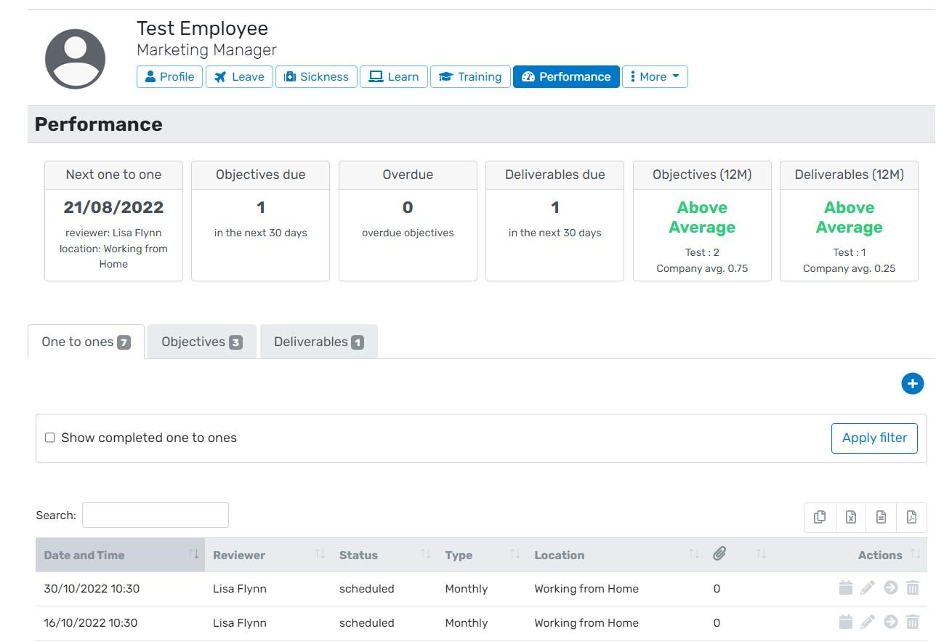
BreatheHR is a cloud-based human resources management tool for small to medium-sized organisations in the UK. It helps teams manage things like employee records, holiday and sickness tracking, document storage, and performance reviews in one place.
Why I picked BreatheHR: BreatheHR can handle holiday and absence requests, manage documents with e-signatures, and track performance in a way that’s easy for your team to follow. It also supports flexible working requests and keeps your people's data in a secure space you don’t have to piece together. You can set permissions so only the right people can see sensitive info.
Standout features & integrations:
Features include people profiles that let you keep key employee details in one place, so your team can stay organised. Holiday and sickness tracking helps you handle requests and approvals without extra back-and-forth. The platform also gives you dashboards with built-in reports.
Integrations include Xero Payroll, Microsoft Outlook, Hireful, plus access via the Breathe API and the Breathe Marketplace.
Pros and Cons
Pros:
- UK-focused compliance tools
- Employee self-service lowers admin
- Single-account pricing helps with budgeting
Cons:
- Custom fields aren’t very flexible
- The leave calendar can feel clunky

Deel HR
Best for UK companies hiring across borders
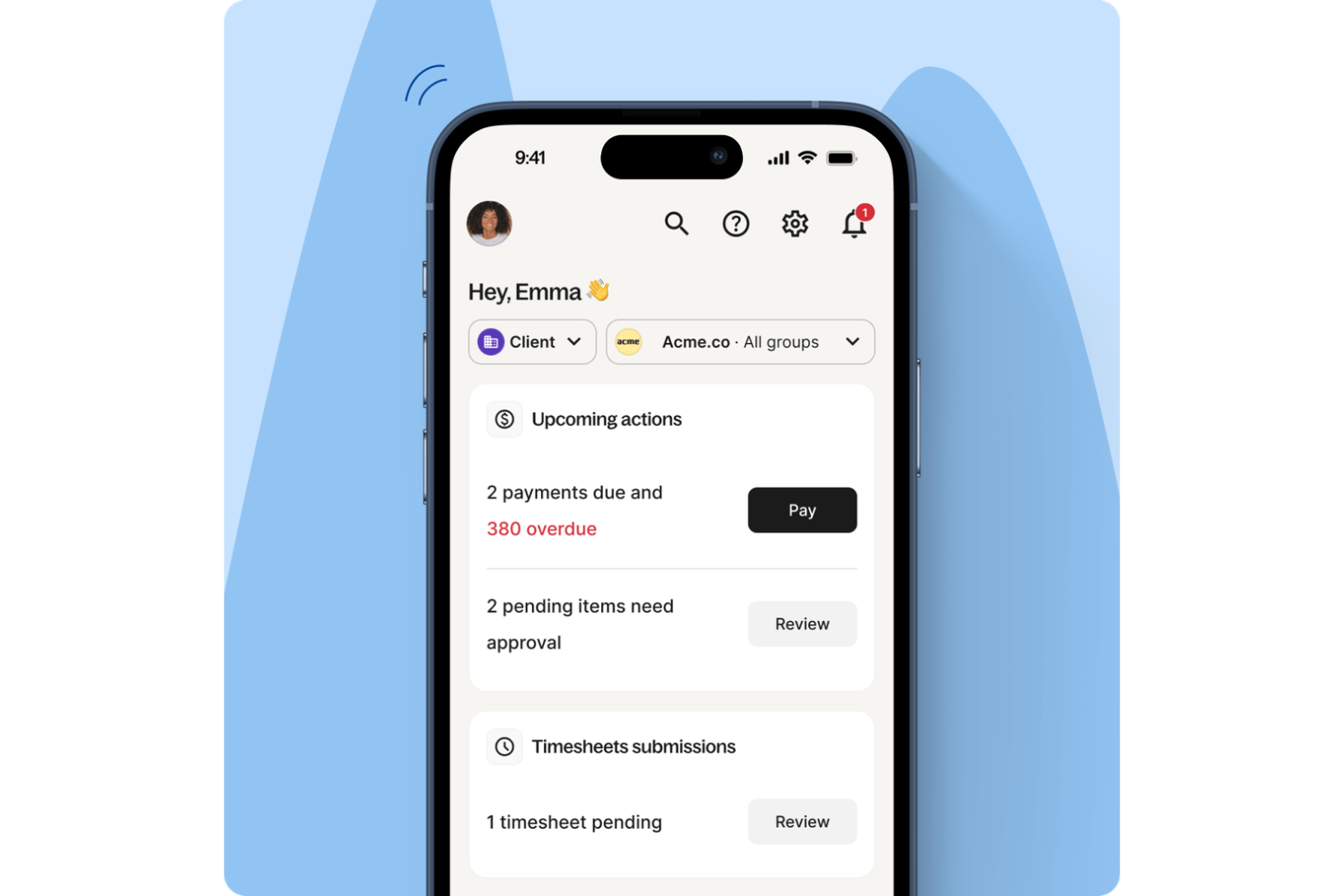
Deel is an HR platform that helps UK businesses hire, pay, and manage employees and contractors around the world. It’s built for companies that need to navigate international employment laws, global payroll, and remote workforce management without setting up local entities. As an HR software solution for UK businesses with global teams, Deel centralizes compliance, contracts, and payments in one place.
Why I Picked Deel
I picked Deel because it gives UK businesses a practical way to manage international hiring and payroll while staying aligned with local labor laws. If you’re employing talent across multiple countries, you can use Deel to handle compliant contracts, tax documentation, and multi-country payroll from a single platform. I also like that it reduces the administrative burden tied to cross-border payments and regulatory changes, which can be especially complex for growing global teams.
Deel Key Features
In addition to its compliance and payroll capabilities, I also found several other valuable features that Deel offers:
- Applicant Tracking System (ATS): Streamline your hiring process with tools that manage job postings, applications, and candidate evaluations.
- Performance Management: Monitor and evaluate employee performance with integrated tools that support continuous feedback and development.
- Compensation Management: Efficiently manage employee compensation packages, including salary adjustments and bonuses.
- Workforce Planning: Plan and optimize your workforce strategy with data-driven insights and analytics.
Deel Integrations
Integrations include Xero, QuickBooks, NetSuite, BambooHR, Greenhouse, Lever, Workday, Slack, and Zapier.
Pros and Cons
Pros:
- Integrates with major HR systems
- Built-in compliance and contract management
- Global payroll across 150 countries
Cons:
- Limited directory customization options
- Reporting features lack advanced filtering
New Product Updates from Deel HR

Deel Expands Stablecoin Wallet to 80+ Countries
Deel expands its Stablecoin Wallet to 80+ countries with dollar-backed balances and optional rewards. This gives eligible contractors more ways to hold and manage earnings inside Deel. For more information, visit Deel’s official site.
 .
.
Best with automated document management
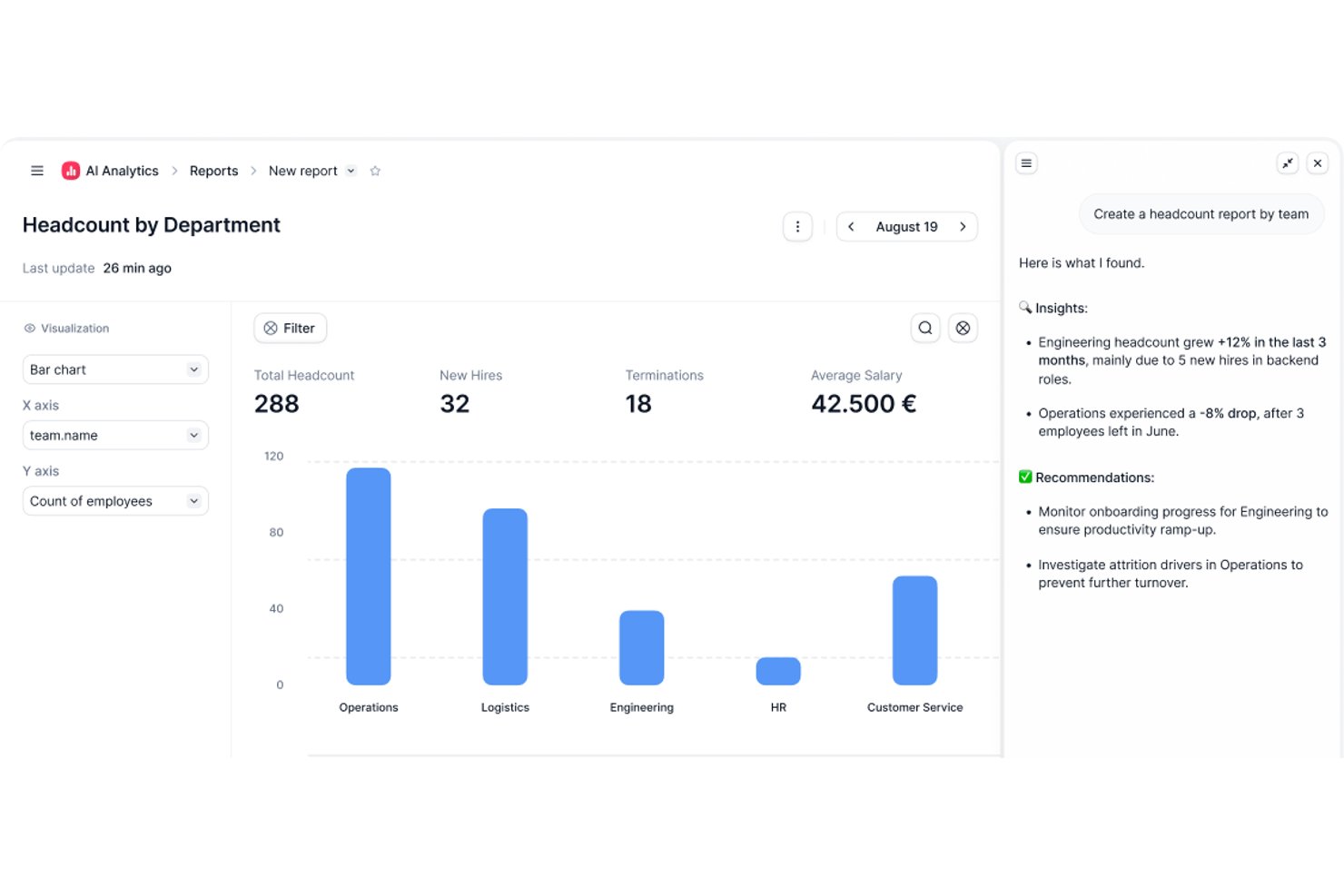
Factorial is a UK HR software platform with core tools for employee record management, onboarding workflows, time off tracking, payroll, and compliance in one central system.
Who Is Factorial Best For?
Factorial is a good fit for small to mid-sized businesses that need an all-in-one HR platform to manage their people operations without a large HR team.
Why I Picked Factorial
Factorial is one of my top picks because I love how it ties document management directly into every HR process rather than treating it as a separate module. When a new hire joins, I can set up automated workflows that collect signed contracts, ID documents, and tax forms without chasing anyone manually. The document variables system is a particularly nice touch—it pulls existing employee data from the platform to auto-fill documents, so I'm not re-entering the same information across multiple forms. I also rely on the bulk payslip distribution feature, which automatically matches uploaded payslips to each employee by name and ID.
Factorial Key Features
- Customizable absence reasons: Set up distinct time off types (sick leave, annual leave, unpaid leave, etc.) so absence records are correctly categorized across your team.
- ATS with CV filtering: Automatically screen incoming CVs to surface top candidates, and store all applicant details in a centralized pipeline.
- Auto-updating org chart: Generate an org chart that updates in real time as employee data changes, so your team structure is always current.
- Role-based user permissions: Assign and adjust permission levels for individual workflows and documents to control who can view, edit, or approve HR data.
Factorial Integrations
Factorial offers 10+ native integrations, including Sage 50 Payroll, Microsoft Power BI, Microsoft Dynamics 365, Slack, LinkedIn, Gmail, Teamtailor, Recruitee, Okta, and ZKTeco. It also connects with Zapier and provides an API for custom integrations.
Pros and Cons
Pros:
- Detailed audit trails for compliance
- Multi-entity support for UK branches
- Localised payroll features for UK regulations
Cons:
- Performance review templates need more depth
- Some reports lack export options

Best for UK-based contractor management
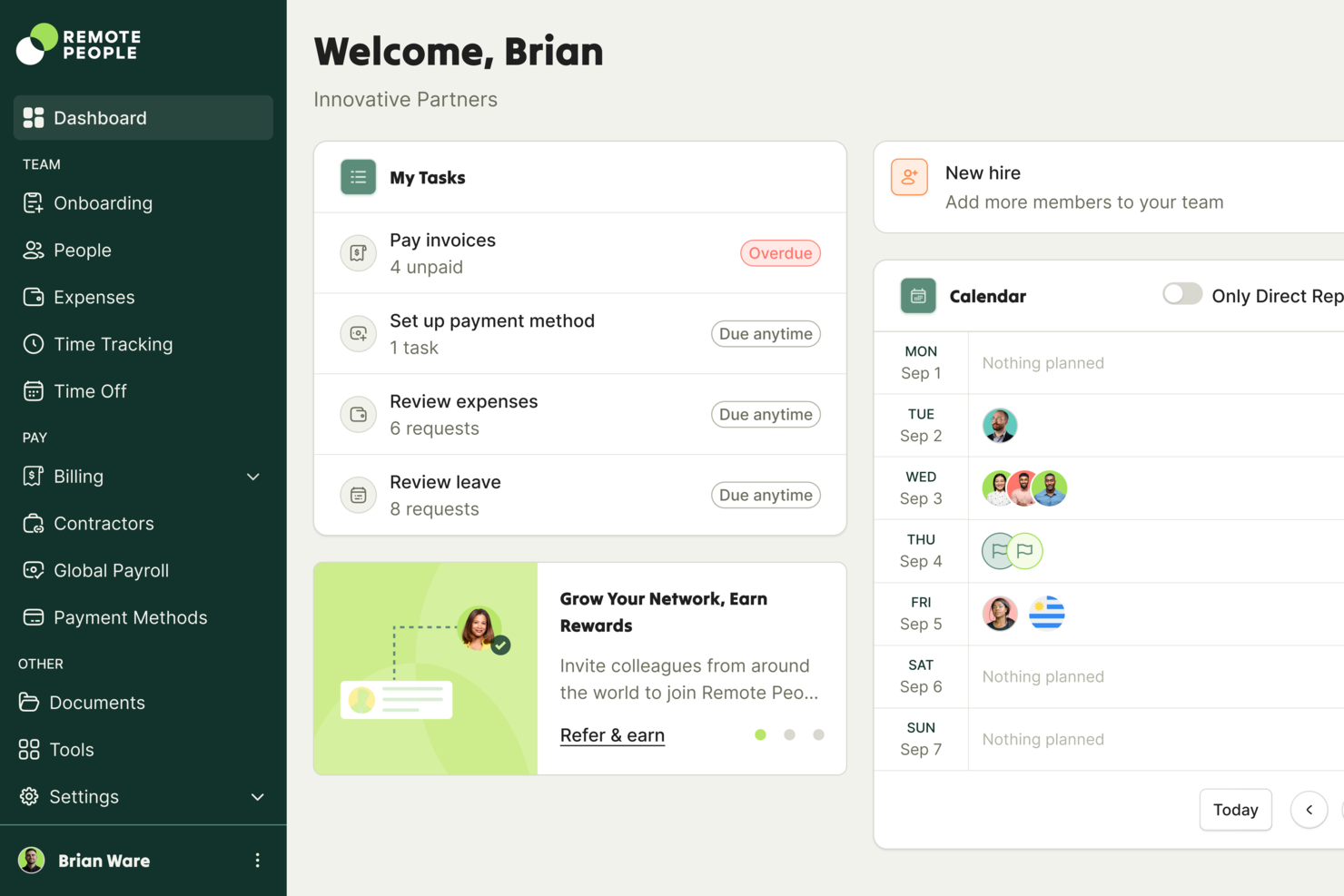
RemotePeople is an HR software platform designed for UK organizations that need tools for managing contractors, onboarding, offboarding, leave requests, and timesheet workflows.
Who Is RemotePeople Best For?
RemotePeople is a strong fit for UK-based HR teams managing a mix of contractors and permanent employees across distributed or hybrid work setups.
Why I Picked RemotePeople
I've included RemotePeople in my top picks because its contractor management tools are genuinely built for the compliance complexity that UK-based teams deal with. IR35 and misclassification risk are real concerns, and I like that RemotePeople includes an AI-powered classification risk detection tool that flags issues before you engage a contractor. In practice, that means you're not waiting until something goes wrong to find out you've misclassified someone. I also like the automated onboarding workflows that handle document collection and contract generation, getting contractors up and running in minutes with country-specific agreements that reflect UK labor law.
RemotePeople Key Features
- Real-time legal insights: Get alerts when contractor laws change in the countries where you have active engagements, so your agreements stay current without manual monitoring.
- Contractor self-serve portal: Contractors submit invoices, update their own payment details, and track payment status directly in the platform, cutting back-and-forth for your HR team.
- Bulk payment processing: Approve and pay your entire contractor workforce in one batch, with payments arriving in 1-3 days across 150+ currencies.
- One-click contractor-to-employee conversion: Convert a contractor to a full-time employee directly within the platform when the working relationship changes.
RemotePeople Integrations
Native integrations are not clearly documented. RemotePeople offers an API for custom integrations.
Pros and Cons
Pros:
- Payroll supports multi-currency contractor payments
- Invoicing connects seamlessly with UK banks
- Automated IR35 status assessments included
Cons:
- No mobile app available for contractors or admins
- Reporting options are limited for custom analytics

HiBob
Best for medium-sized companies

HiBob is an HR platform for medium-sized companies, focusing on core HR functions, talent management, and payroll for both the US and UK. It provides tools for onboarding, time and attendance, compensation management, and people analytics, making it versatile for HR needs.
Why I picked HiBob: HiBob fits medium-sized companies that need structured HR workflows as they scale. Its automation tools help standardize onboarding and approvals, while its UK payroll connections give teams compliance support without manual work. The platform’s analytics also help mid-sized teams monitor engagement and workforce trends.
Standout features & integrations:
Features include onboarding automation, real-time engagement tracking, and people analytics. You can manage payroll efficiently with its integration options. The platform also emphasizes HR automation and supports diversity, equity, and inclusion initiatives.
Integrations include Microsoft Teams, Slack, Zoom, Google Workspace, Greenhouse, Okta, Workable, DocuSign, LinkedIn, and BambooHR.
Pros and Cons
Pros:
- Supports diversity initiatives
- Scalable for growing teams
- Intuitive layout
Cons:
- Complex setup process
- Few personalization settings

BrightHR
Cloud HRIS for automations

BrightHR is a cloud-based HR management platform for small to medium-sized businesses, offering tools for employee records, document management, leave tracking, and health & safety compliance. It provides unlimited document storage, which is especially useful for UK businesses that must maintain detailed HR files, policies, and compliance records.
Why I picked BrightHR: BrightHR is a strong fit for teams that want a cloud HRIS with built-in automations and robust document management. Its platform centralizes employee files, contracts, and compliance documents, helping companies stay organized and audit-ready. The system’s UK-focused features—such as holiday entitlement calculations, sickness tracking, and basic HR compliance tools—make it particularly appealing for organizations operating within UK employment regulations.
Standout features & integrations
Features include an intuitive mobile app for managing HR tasks on the go. Its shift scheduling tool helps teams coordinate work hours more efficiently. The platform’s confidential, unlimited document storage also supports secure handling of employee files and sensitive compliance documents. Integrations are available with popular UK payroll systems, helping automate routine HR and reporting workflows.
Integrations include Xero, QuickBooks, Sage, Google Workspace, Microsoft Teams, Slack, BambooHR, Zapier, Salesforce, and Trello.
Pros and Cons
Pros:
- Trusted health & safety tools
- Efficient shift scheduling
- Unlimited document storage
Cons:
- Limited leave-calendar event options
- Reporting lacks depth

edays
Best for configurable absence management
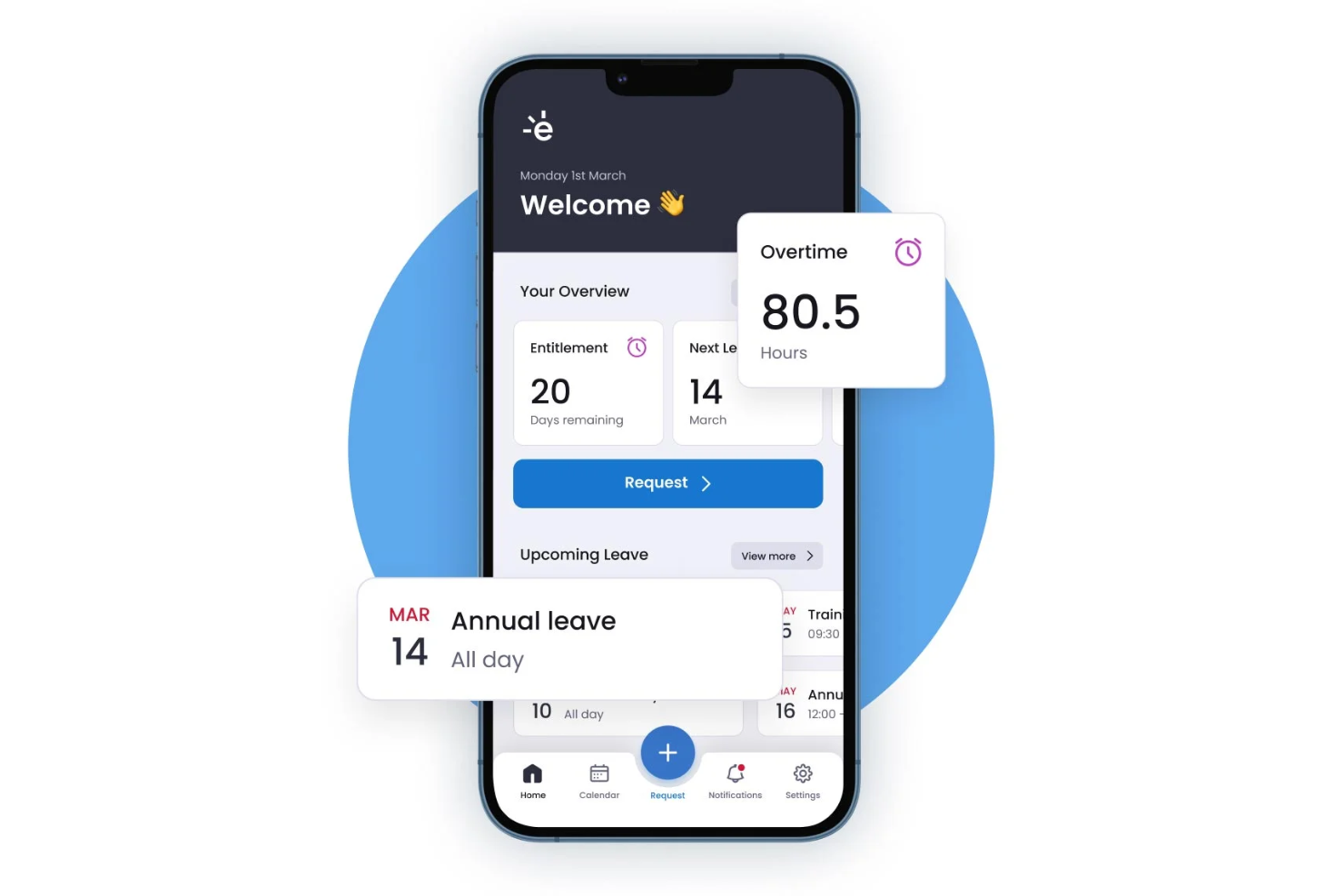
Built around absence management, edays is a cloud-based HR platform covering leave tracking, sickness monitoring, time and attendance, return-to-work workflows, and employee wellbeing tools.
Who Is edays Best For?
edays is a good fit for HR teams in mid-size to enterprise organizations managing complex absence policies across multiple locations or countries.
Why I Picked edays
edays earns its spot on my shortlist because the level of absence configurability genuinely sets it apart. I can create unlimited custom absence types, each with its own entitlement rules, carryover logic, and recording unit (hours, days, or half-days), which matters when you're managing a mix of shift workers and salaried staff under one system. I also like how absence triggers work: you set the conditions, and the system automatically alerts the right people, so nothing slips through. That combination of custom types and automated triggers makes it one of the most adaptable absence tools I've used.
edays Key Features
- Bradford Factor tracking: Monitors sickness patterns using the Bradford Factor formula to help managers identify and act on persistent short-term absence.
- Return-to-work forms: Digital forms automatically triggered after a sickness absence period, capturing employee sign-off and manager notes.
- Holiday planner: A visual team calendar that shows who is in or out, helping managers approve or decline leave with full context.
- Absence reporting dashboard: Pre-built reports covering absence trends, entitlement usage, and headcount data across the organization.
edays Integrations
edays offers a small set of out-of-the-box integrations with HRIS partners, including Cornerstone OnDemand, Cegid, IntelliHR, and ELMO, along with calendar syncing through Outlook, Gmail, and iCal. It also partners with wellbeing providers BHSF and Doctor Care Anywhere. An API and SFTP options are available for custom integrations with payroll, HR systems, and physical time clocks.
Pros and Cons
Pros:
- Customisable sickness journeys with return-to-work forms
- Color-coded team calendar shows availability instantly
- Adapts to local legal leave obligations
Cons:
- Admin setup can be surprisingly complex
- Reports need manual tweaking to be useful

Best for small businesses

Zoho People is an HR management tool for small businesses, offering features like attendance tracking, leave management, and performance appraisals. It focuses on simplifying HR processes, making it easier for small teams to manage their workforce efficiently.
Why I picked Zoho People: Zoho People suits small businesses that need straightforward HR tools without a complex system. Its modular setup lets teams start with essentials like leave and attendance, then expand into performance or scheduling as needed. The interface is simple enough for small teams without dedicated HR specialists.
Standout features & integrations:
Features include a built-in employee self-service portal that gives your team access to their information anytime. The tool also offers a shift scheduling feature to help you manage work hours efficiently. Additionally, it has a document management system to keep your files organized and accessible.
Integrations include Zoho CRM, Zoho Projects, QuickBooks, Slack, Google Workspace, Microsoft Office 365, Zapier, Xero, Adobe Sign, and DocuSign.
Pros and Cons
Pros:
- Built-in employee self-service
- Easy performance appraisals
- Customizable modules
Cons:
- Limited offline functionality
- Limited mobile app features

Personio
Best for European regulations

Personio is an HR software solution for small- to medium-sized businesses that provides core HR, payroll, and talent management functions. It helps manage employee records, absences, and payroll efficiently while ensuring compliance with European regulations.
Why I picked Personio: Personio is particularly well-suited for businesses that need to comply with European regulations, making it a reliable choice for compliance. Its payroll feature is designed to handle complex European payroll requirements. The tool also offers employee self-service options, enabling your team to access their information easily. Additionally, its talent management capabilities support performance reviews and recruitment processes.
Standout features & integrations:
Features include customizable workflows that let you tailor processes to your business needs. The document management system keeps all your files organized and accessible. You can also use its reporting and analytics features to gain insights into your HR data.
Integrations include Slack, Microsoft Teams, Google Workspace, LinkedIn, Xero, DATEV, Indeed, SAP, Greenhouse, and Workable.
Pros and Cons
Pros:
- Self-service access for staff
- Customizable workflows
- Compliance with European regulations
Cons:
- Payroll needs manual fixes
- No shift-work tools

Best for data analytics

Access PeopleHR is an HR software solution for small- to medium-sized businesses, offering core HR functions such as recruitment, performance management, and employee development. It focuses on data analytics to provide valuable insights into your workforce.
Why I picked Access PeopleHR: Access PeopleHR excels in data analytics, helping you make informed decisions about your team. Its analytics feature provides detailed reports on employee performance and HR metrics. You can track key performance indicators to identify areas for improvement. The tool also supports recruitment and onboarding processes, making it an excellent solution for managing your workforce.
Standout features & integrations:
Features include a performance management system that helps you monitor employee progress and set goals. The recruitment module simplifies the hiring process, making it easier to find the right talent. Additionally, the software offers a document management system to keep all your HR files organized.
Integrations include Xero, QuickBooks, Sage, Google Workspace, Microsoft Teams, Slack, LinkedIn, Indeed, BambooHR, and Zapier.
Pros and Cons
Pros:
- Detailed reporting features
- Easy performance management
- Strong data analytics capabilities
Cons:
- Limited offline functionality
- Learning curve for new users
Other HR Software in the UK
Here are some additional HR Software in the UK options that didn’t make it onto my shortlist, but are still worth checking out:
- Sage HR
For remote teams
- CharlieHR
For startups
- MHR (iTrent)
For payroll integration
- Head Light
For talent management
- Cezanne
For configurable HR module
- Employment Hero
For compliance support
- Rippling
For global payroll solutions
- BambooHR®
For employee self-service
- 1st Money
For payroll simplicity
- Zelt
For startup HR management


How I Evaluate HR Software in the UK
I split every evaluation into two layers: the baseline capabilities a tool must have—like UK statutory leave and PAYE-ready payroll—and the differentiators that set one platform apart from another.
Core Functionality (Table Stakes For This List)
When I'm selecting tools for my list, I rank each one on a scale from 0 (does not offer the functionality) to 5 (excels in this area) for each core functionality listed below. Then, I calculate the tool's total score into a percentage. Each tool needs to achieve a minimum total score of 65% to be considered for inclusion.
- Employee Records Management: I look for a centralised database where you can store contracts, right-to-work documents, and emergency contacts with custom fields and permission controls.
- UK Absence & Holiday Tracking: Each tool should handle pro-rated statutory entitlement, UK bank holiday calendars, and absence types like SSP-eligible sickness and parental leave.
- UK Payroll Integration: I check whether the platform connects to HMRC-recognised payroll providers or runs native payroll with RTI submissions, P45/P60 generation, and pension auto-enrolment.
- Onboarding & Offboarding Workflows: A good platform lets you build task sequences for new starters and leavers, covering offer letters, e-signatures, IT provisioning, and exit interviews.
- GDPR & UK Compliance: Data handling matters here. I evaluate UK data residency options, retention policies, access audit logs, and tools to manage data subject access requests.
- Employee Self-Service Portal: Your team should be able to request leave, download payslips, update bank details, and access company documents from a web or mobile portal.
Once I have a list of tools that meet this criteria, I consider what sets each platform apart.
Differentiating Factors (What Sets Vendors Apart)
Here's how I compare and contrast different vendors:
Standout Features
I pay close attention to HR analytics, especially tools that support gender pay gap reporting and Bradford Factor scoring out of the box. Built-in performance management is another differentiator—platforms like BreatheHR and HiBob let you run review cycles and track goals without bolting on a separate tool. I also evaluate whether a vendor offers an integrated ATS, since managing job postings to UK boards and right-to-work checks inside the same system saves HR teams significant admin time.
Beyond Features
Pricing transparency matters a lot in this space. I check whether vendors publish per-employee-per-month rates in GBP and clearly disclose what's included at each tier, since payroll modules and add-ons can quietly inflate costs. Integration with UK-specific tools is another priority—I look for native connections to providers like Sage, Xero, and pension schemes such as NEST. UK-based support with GMT/BST availability also makes a real difference when you need help mid-payroll run or during an HMRC submission deadline.
How to Choose HR Software in the UK
It’s easy to get bogged down in long feature lists and complex pricing structures. To help you stay focused as you work through your unique software selection process, here’s a checklist of factors to keep in mind:
| Factor | What to Consider |
| Scalability | Can the software grow with your company? Look for flexible plans that accommodate increased users and additional features as your team expands. |
| Integrations | Does it integrate with existing tools? Ensure compatibility with your current systems like payroll, accounting, or communication platforms to avoid disruptions. |
| Customizability | Can you tailor the software to fit your needs? Check if you can adjust workflows, fields, and permissions to match your specific HR processes. |
| Ease of use | Is it user-friendly? Consider the learning curve and whether your team can easily adopt it without extensive training. |
| Implementation and onboarding | How smooth is the setup process? Evaluate the time and resources needed to get up and running, including any support for data migration and team training. |
| Cost | Does it fit your budget? Compare pricing models, such as per-user or flat rate, and be aware of any hidden fees or long-term contracts. |
| Security safeguards | How secure is your data? Look for encryption, regular backups, and compliance with data protection regulations like GDPR. |
| Support availability | What support options are available? Consider the availability of customer service, including hours, channels, and the quality of assistance you can expect. |
What Is HR Software in the UK?
HR Software in the UK is a digital solution designed to manage human resources tasks for businesses operating in the UK. These tools are commonly used by HR professionals, managers, and small business owners to efficiently handle employee data, payroll, and compliance. Time tracking, payroll management, and employee records features help with organizing workloads, ensuring compliance, and improving productivity. Overall, these tools simplify HR processes and support better decision-making for teams.
Features of HR Software in the UK
When selecting HR Software in the UK, keep an eye out for the following key features:
- Employee records management: Allows you to maintain and update employee information, ensuring data accuracy and easy access.
- Payroll processing: Automates salary calculations and tax deductions, reducing errors and saving time on manual tasks.
- Time tracking: Helps monitor employee attendance and hours worked, providing insights into productivity and efficiency.
- Compliance management: Ensures adherence to UK employment laws and regulations, minimizing legal risks for your business.
- Performance management: Facilitates performance reviews and goal setting, helping to track employee progress and development.
- Recruitment tools: Make the hiring process easier with applicant tracking and interview scheduling to find the right candidates.
- Self-service portal: Empowers employees to manage their own information, such as leave requests and personal details, improving engagement.
- Document management: Organizes HR documents in a secure digital format, ensuring easy retrieval and compliance with data protection regulations.
- Analytics and reporting: Provides data-driven insights into HR metrics, supporting informed decision-making and strategic planning.
- Customizable workflows: Tailor processes to your specific business needs, enhancing flexibility and efficiency.
Benefits of HR Software in the UK
Implementing HR Software in the UK provides several benefits for your team and your business. Here are a few you can look forward to:
- Reduced admin workload: Routine HR tasks take less time, helping teams focus on strategic work.
- More consistent HR processes: Standardized templates and automation reduce variation across onboarding, reviews, and day-to-day workflows.
- Improved transparency for employees: Centralized access to policies, schedules, and requests enables them to find information without relying on HR.
- Stronger workforce insights: HR data presented in dashboards and summaries helps teams spot trends in attendance, hiring, and performance.
- Better employee experience: Faster responses, easier access to information, and more transparent processes contribute to a smoother daily experience for staff.
- Smoother new-hire ramp-up: Structured onboarding sequences help new employees understand what to expect and get fully productive sooner.
- Easier adaptation to business changes: Modular features and configurable settings make it simpler to adjust HR processes as teams grow or reorganize.
Costs and Pricing of HR Software in the UK
Selecting HR Software in the UK requires an understanding of the various pricing models and plans available. Costs vary based on features, team size, add-ons, and more. The table below summarizes common plans, their average prices, and typical features included in HR Software in the UK solutions:
Plan Comparison Table for HR Software in the UK
| Plan Type | Average Price | Common Features |
| Free Plan | £0–£2 per user/month or small-org fixed fee | Basic employee records, limited reporting, and a self-service portal. |
| SMB HR Plan | £2–£6 per user/month or ~ £22–£90 per month per organisation | Core HR records, leave and absence management, basic document storage, and self-service portal. |
| Mid-market HR suite | £5–£15 per user/month or £90–£159 per organisation | Extended modules: performance/reviews, time tracking, shift/rota, basic payroll/export support. |
| Enterprise | £15–£30+ per user/month, or custom quote | Full HR + payroll (or payroll-ready), advanced reporting & analytics, compliance support, add-ons & integrations, enterprise-grade support. |
HR Software in the UK FAQs
Here are some answers to common questions about HR Software in the UK:
What is the difference between cloud-based and on-premise HR software?
Cloud-based HR software is hosted on the vendor’s servers and accessed via the internet, while on-premise software is installed locally on your company’s servers. Cloud solutions offer flexibility and remote access, which is helpful for HR teams managing a distributed workforce. On-premises solutions might provide greater control over data, but often require more maintenance. Consider your team’s needs, technical resources, and budget when choosing between the two, especially if you’re evaluating broader HCM or HRIS options.
How can HR software help with legal compliance?
Yes, HR software can help with legal compliance by keeping you up to date on employment laws and regulations. It often includes tools for tracking employee data, managing documentation, and generating reports to ensure compliance with standards such as GDPR compliant practices. Many systems also support structured processes throughout the employee lifecycle, including onboarding and offboarding, which helps maintain accurate records and meet regulatory requirements. Regular updates from the software vendor can help you stay compliant without having to track legislative changes.
Can HR software integrate with other business tools?
Yes, most HR software solutions offer integrations with other business tools, such as payroll software, accounting platforms, and communication systems. These integrations help you keep data synchronized across different systems, saving time and reducing errors. Some platforms also connect with timesheets and HR & payroll modules to simplify day-to-day admin tasks. Before purchasing, check the software’s compatibility with your current tools to ensure a smooth workflow, especially if you manage a global workforce.
How do I know if a specific HR software is right for my team?
Evaluate your team’s specific needs, including employee count, the complexity of HR admin tasks, and budget. Look for software that aligns with these requirements and offers features you find most valuable, whether that’s HR solutions for compliance, human capital management capabilities, or systems that support long-term retention. Consider trial periods to test usability and effectiveness. Reading user reviews and requesting demos can help you determine whether the tool fits your team’s workflow, particularly if you’re assessing more specialized tools such as ai-powered HR platforms or full human resources information system suites.