

I 10 migliori software per l’inserimento nelle piccole imprese recensiti nel 2026

Migliori software per l'inserimento dei dipendenti per piccole imprese


L'inserimento di nuovi dipendenti può essere un compito impegnativo, soprattutto per piccole imprese come la tua. Con risorse e tempo limitati, garantire un buon inizio ai nuovi assunti è una sfida. In base alla mia esperienza, il software giusto per l'inserimento dei dipendenti può fare davvero la differenza.
Ho testato e analizzato diverse soluzioni per aiutarti a trovare quella più adatta al tuo team. Questi strumenti possono semplificare il processo di inserimento, farti risparmiare tempo e migliorare l'esperienza complessiva per tutte le persone coinvolte.
In questo articolo condividerò le mie migliori scelte di software per l'inserimento dei dipendenti, pensate per le piccole imprese. Troverai un'analisi imparziale e approfondita di ogni opzione, che ti aiuterà a prendere la decisione migliore per le tue esigenze.
Perché fidarsi delle nostre recensioni sui software
Il nostro team testa e recensisce software dal 2012. In quanto esperti HR noi stessi, sappiamo quanto sia difficile — e importante — scegliere il software giusto.
Per questa guida, abbiamo valutato gli strumenti attraverso test pratici e ricerche indipendenti, assegnando un punteggio agli strumenti in base ai nostri criteri di selezione. Ci basiamo inoltre sulle competenze di leader di pensiero del settore e di professionisti HR attivi.
Le nostre recensioni riflettono il nostro giudizio editoriale umano, non un discorso di vendita.
Revisori esperti:
Tabella comparativa: software per l'inserimento dei dipendenti per piccole imprese
Questa tabella comparativa riassume i dettagli dei prezzi delle mie migliori selezioni di software per l’inserimento dei dipendenti per piccole imprese:
| Tool | Best For | Trial Info | Price | ||
|---|---|---|---|---|---|
| 1 | Ideale come IA per le aziende | Demo gratuita disponibile | A partire da $8/utente/mese | Website | |
| 2 | Ideale per programmi di onboarding basati sui ruoli | Prova gratuita di 30 giorni + demo gratuita disponibile | Da $3.97/utente/mese | Website | |
| 3 | Ideale con simulazioni di roleplay supportate dall'AI | Prova gratuita disponibile | Da $239/mese (80 utenti) | Website | |
| 4 | Ideale per team piccoli e di medie dimensioni | Demo gratuita disponibile | Prezzo su richiesta | Website | |
| 5 | Ideale per la creazione di corsi con IA | Piano gratuito + demo gratuita disponibili | Da $119/mese (fatturazione annuale) | Website | |
| 6 | Ideale per analytics di benchmark integrati | Prova gratuita + demo gratuita disponibili | Da $10/dipendente/mese | Website | |
| 7 | Ideale per documentare flussi di onboarding ripetibili | Demo gratuita disponibile | Prezzo su richiesta | Website | |
| 8 | Ideale per la gestione dei documenti | Demo gratuita disponibile | Da $5/dipendente/mese | Website | |
| 9 | Ideale per pratiche HR globali | Prova gratuita di 7 giorni | Da $2/utente/mese (fatturato annualmente) | Website | |
| 10 | Ideale per l'integrazione con la suite Zoho | Prova gratuita di 30 giorni + demo gratuita disponibile | Da $1.25/utente/mese (fatturato annualmente) | Website |


Recensioni dei migliori software per l'inserimento dei dipendenti per piccole imprese
Di seguito trovi le mie descrizioni dettagliate dei migliori software per l’inserimento dei dipendenti inclusi nel mio elenco ristretto per piccole imprese. Le mie recensioni offrono un’analisi approfondita delle funzionalità principali, dei vantaggi e degli svantaggi, delle integrazioni e degli scenari di utilizzo ideali di ogni strumento, per aiutarti a trovare quello più adatto a te.

Ideale come IA per le aziende
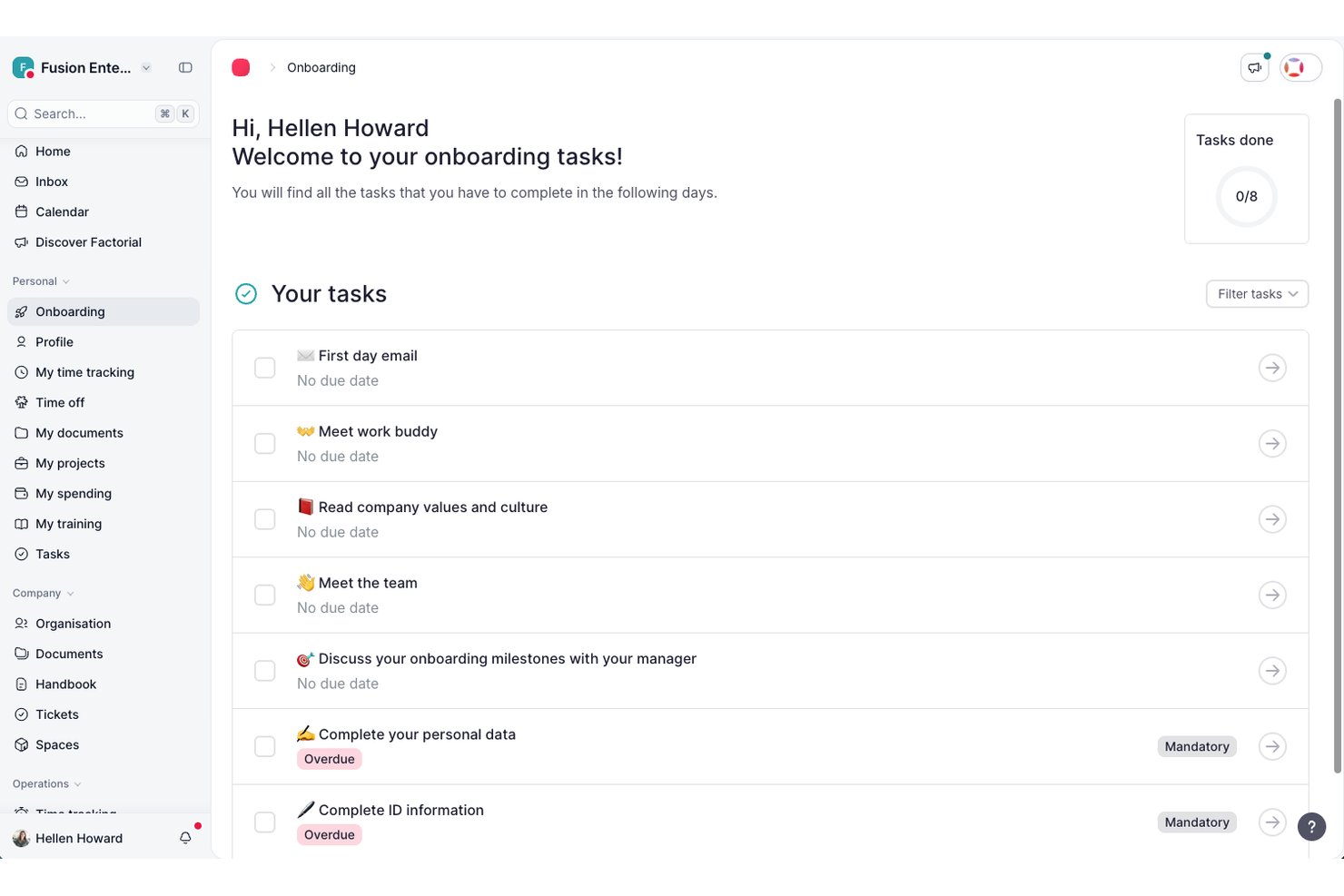
Factorial è una piattaforma basata sull'IA per le risorse umane e le operazioni aziendali, che riunisce in un unico luogo i flussi di lavoro per l'inserimento dei dipendenti, la raccolta dei documenti, le firme elettroniche e l'autonomia dei dipendenti.
Per chi è più adatto Factorial?
Factorial è una soluzione ideale per i responsabili delle risorse umane delle piccole aziende che desiderano un'unica piattaforma per gestire i flussi di lavoro di inserimento, la raccolta dei documenti e le operazioni quotidiane relative al personale, con l'assistenza dell'IA integrata.
Perché ho scelto Factorial
Ho scelto Factorial come una delle migliori soluzioni perché il suo approccio all'IA per le aziende va ben oltre le attività di inserimento di base, gestendo ogni aspetto, dalla pianificazione degli orari alla generazione di report e alla risposta automatica alle domande dei dipendenti sulle politiche aziendali. Mi piace molto il modo in cui il suo assistente IA utilizza il contesto aziendale per rispondere direttamente alle domande dei nuovi assunti, evitando così che i team delle risorse umane debbano gestire continuamente le stesse richieste sulle politiche. I modelli di flusso di lavoro per l'inserimento dei nuovi assunti e gli strumenti per la firma elettronica collettiva mi permettono di portare un nuovo assunto dall'offerta alla documentazione del primo giorno senza dover rincorrere manualmente nessuno.
Caratteristiche principali di Factorial
- Creazione di politiche per l'inserimento: Definisci e assegna politiche di inserimento articolate in più fasi, che mettono automaticamente in coda le attività per i nuovi dipendenti fin dal primo giorno.
- Invio collettivo dei documenti: Invia contratti, manuali o qualsiasi documento delle risorse umane a più dipendenti contemporaneamente direttamente dalla piattaforma.
- Spazio di benvenuto (accesso preliminare all'inserimento): Offri ai nuovi assunti un accesso limitato alle informazioni aziendali principali prima della data ufficiale di inizio.
- Inserimento tramite app mobile: Consenti ai nuovi dipendenti di visualizzare le attività, consultare i documenti e completare le fasi di inserimento da uno smartphone.
Integrazioni di Factorial
Factorial offre integrazioni tramite catalogo con Okta, Slack, Recruitee, a3innuva Nómina, Sage 200, SAP Business One e Microsoft Power BI. Fornisce inoltre un'API pubblica, webhook, SDK, un server MCP e Zapier.
Pros and Cons
Pros:
- I contratti centralizzati riducono la documentazione dispersa
- I nuovi assunti gestiscono le attività senza e-mail ripetute
- Le importazioni CSV permettono ai piccoli team di iniziare rapidamente
Cons:
- I flussi di lavoro personalizzati possono richiedere soluzioni alternative
- I report sull'avanzamento dell'inserimento offrono possibilità di personalizzazione limitate

Ideale per programmi di onboarding basati sui ruoli

iSpring LMS è un sistema di gestione dell'apprendimento che supporta l'onboarding dei dipendenti insieme a programmi di formazione continua e conformità. Permette ai team di creare, assegnare e monitorare i corsi di formazione, rendendolo adatto alle organizzazioni che desiderano che l'onboarding avvenga all'interno di un ambiente di apprendimento centralizzato, invece che come uno strumento di workflow separato.
Per chi è più indicato iSpring LMS?
iSpring LMS è ideale per le piccole imprese e i team delle risorse umane che hanno bisogno di inserire rapidamente nuovi dipendenti con contenuti formativi strutturati.
Perché ho scelto iSpring LMS
Ho scelto iSpring LMS come uno dei migliori perché posso avviare programmi di onboarding istantaneamente utilizzando la sua libreria di corsi predefiniti e modelli. Il mio team riesce ad assegnare immediatamente moduli di conformità e onboarding già pronti ai nuovi assunti. Mi piace poter personalizzare questi corsi in base ai nostri processi senza dover partire da zero.
Funzionalità principali di iSpring LMS
- Iscrizione automatica: Assegna automaticamente i corsi di onboarding ai nuovi assunti in base al ruolo o al reparto.
- Dashboard di monitoraggio dei progressi: Monitora in tempo reale i tassi di completamento e l'attività nei corsi da parte dei partecipanti.
- Generatore di quiz e valutazioni: Crea quiz interattivi per testare le conoscenze e rafforzare i contenuti dell'onboarding.
- Generazione di certificati: Emetti certificati personalizzati ai dipendenti che completano i moduli di onboarding.
Integrazioni di iSpring LMS
iSpring LMS offre integrazioni native con Salesforce, Microsoft Azure, Microsoft Exchange, BambooHR, Udemy, Go1 e LinkedIn Learning. È disponibile un'API per integrazioni personalizzate.
Pros and Cons
Pros:
- Responsabile dedicato al successo del cliente per il supporto
- Percorsi di apprendimento automatizzati per nuovi assunti
- Compatibilità con contenuti SCORM e xAPI
Cons:
- Personalizzazione limitata per i workflow di onboarding
- Il processo di importazione massiva degli utenti può essere macchinoso
New Product Updates from iSpring LMS

iSpring LMS Adds Multiple Observations to OJT Sessions
iSpring LMS now lets managers log multiple observations within one OJT session, grouping visits and auto-generating summary stats like averages, criterion results, and comparisons. For more information, visit iSpring LMS's official site.


EducateMe LMS offre alle piccole imprese una piattaforma flessibile per progettare e gestire programmi di onboarding dei dipendenti. Lo strumento è particolarmente indicato per i team che desiderano combinare l'apprendimento interattivo, il monitoraggio dei progressi e flussi di lavoro personalizzabili in un unico posto. Aiuta a semplificare i compiti di onboarding e favorisce un'esperienza più coinvolgente per i nuovi assunti.
Per chi è più adatto EducateMe LMS?
EducateMe LMS è ideale per piccole imprese e team HR che vogliono offrire esperienze di onboarding strutturate e interattive con percorsi di apprendimento personalizzabili.
Perché ho scelto EducateMe LMS
Per le piccole imprese che desiderano rendere l'onboarding più interattivo, ho scelto EducateMe LMS grazie alle sue simulazioni di roleplay supportate dall'AI. Queste simulazioni permettono ai nuovi assunti di esercitarsi in scenari reali in un ambiente digitale sicuro, aiutandoli così a costruire fiducia e competenze prima di iniziare nel loro ruolo. La piattaforma consente anche di creare scenari personalizzati adattati alle esigenze della propria azienda, rendendo il processo di onboarding più rilevante e coinvolgente. Questo approccio favorisce un apprendimento più rapido e aiuta i nuovi dipendenti a sentirsi pronti già dal primo giorno.
Caratteristiche principali di EducateMe LMS
Tra le altre funzionalità che rendono EducateMe LMS utile per l'onboarding nelle piccole imprese ci sono:
- Costruttore di corsi personalizzato: Crea e organizza corsi di onboarding con moduli, quiz e contenuti multimediali personalizzati per la tua azienda.
- Promemoria automatici: Imposta notifiche automatiche per mantenere i nuovi assunti al passo con i loro compiti di onboarding e le scadenze.
- Dashboard dei progressi: Monitora in tempo reale il percorso di onboarding di ciascun dipendente tramite dashboard visive per manager e nuovi assunti.
- Personalizzazione branding: Applica logo, colori e elementi del brand della tua azienda al portale di onboarding per un'esperienza coerente.
Integrazioni di EducateMe LMS
Le integrazioni includono Zoom, Stripe, Slack, Auth0, Rippling, Salesforce, Notion, Zelt, Figma e Workday. È disponibile anche un'API per integrazioni personalizzate.
Pros and Cons
Pros:
- Simulazioni supportate dall'AI per una formazione interattiva dei dipendenti
- Le opzioni SSO semplificano l'accesso sicuro dei dipendenti
- I promemoria automatici aiutano i nuovi assunti a restare al passo
Cons:
- Meno modelli di onboarding predefiniti rispetto ad alcuni concorrenti
- Le esportazioni dei report potrebbero non offrire opzioni di personalizzazione avanzate

SkyPrep
Ideale per team piccoli e di medie dimensioni
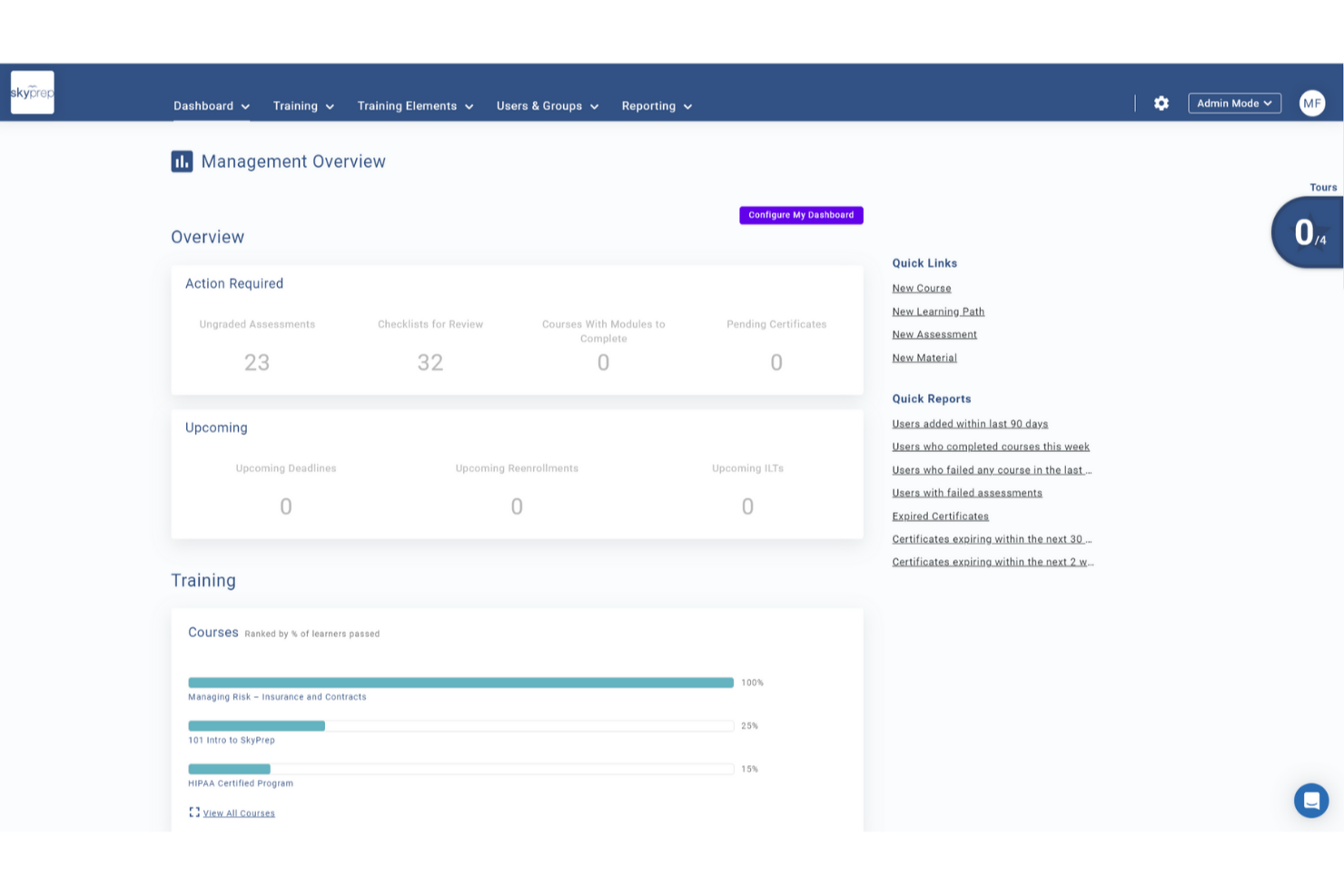
SkyPrep è una piattaforma di formazione online pensata per le piccole imprese, che offre una suite completa di strumenti per migliorare l’esperienza di onboarding del tuo team. Si rivolge ad aziende di diversi settori che desiderano semplificare il processo di inserimento dei nuovi assunti grazie a funzionalità progettate per coinvolgere i nuovi arrivati e rendere più efficiente la formazione. Affrontando sfide come la ritenzione delle conoscenze e la coerenza della formazione, SkyPrep assicura che il tuo team sia ben preparato e allineato agli obiettivi aziendali fin dal primo giorno.
Perché ho scelto SkyPrep
Ho scelto SkyPrep perché offre una piattaforma intuitiva che riduce significativamente il tempo di formazione grazie a metodi di apprendimento avanzati. Con funzionalità come la gestione dei flussi di lavoro automatizzata e report dettagliati, puoi monitorare efficacemente i progressi dell’onboarding e garantire la conformità agli standard aziendali. Inoltre, la sua integrazione con sistemi HR popolari come ADP e Workday semplifica la gestione delle registrazioni degli utenti, rendendolo una scelta ideale per le piccole imprese che vogliono migliorare i processi di onboarding.
Caratteristiche principali di SkyPrep
Oltre alle sue funzionalità di base, SkyPrep offre diverse caratteristiche che ne aumentano il valore come strumento di onboarding:
- Single Sign-On (SSO): Consente al tuo team di accedere utilizzando le credenziali degli account cloud già esistenti, semplificando il processo di accesso.
- Gestione dei contenuti: Crea corsi e contenuti utilizzando diversi formati, inclusi documenti, immagini e video, offrendo un’esperienza di apprendimento dinamica.
- Strumenti webinar: Supporta piattaforme come Zoom e Microsoft Teams, facilitando la conduzione di sessioni di formazione dal vivo.
- Percorsi di apprendimento: Percorsi formativi strutturati guidano i nuovi assunti nell’onboarding, assicurando che tutti i passaggi necessari vengano completati.
- Dashboard per manager: Offrono visibilità sui progressi dei dipendenti, permettendo ai manager di individuare ed affrontare eventuali necessità di supporto.
Integrazioni di SkyPrep
Le integrazioni includono Zoom, GoToMeeting, Cisco Webex, Microsoft Teams, ClickMeeting, BigBlueButton, ADP, Workday, Salesforce e HubSpot.
Pros and Cons
Pros:
- Iscrizioni automatizzate basate sui ruoli
- Dashboard in tempo reale
- Firma elettronica integrata
Cons:
- Prezzi non pubblicamente disponibili
- La personalizzazione dei report può essere limitata

Ideale per la creazione di corsi con IA

TalentLMS offre alle piccole imprese un modo flessibile per gestire online l’onboarding e la formazione. La piattaforma è progettata per i team che vogliono creare, organizzare e monitorare l’apprendimento senza una curva di apprendimento ripida. Se hai bisogno di integrare rapidamente nuovi assunti e mantenere la formazione coerente man mano che la tua azienda cresce, TalentLMS mette a disposizione strumenti per aiutarti a farlo.
Per chi è ideale TalentLMS?
TalentLMS è adatto a piccole imprese e team HR che cercano una soluzione semplice e scalabile per l’onboarding e la formazione dei dipendenti in diversi ruoli o sedi.
Perché ho scelto TalentLMS
Ho scelto TalentLMS per la creazione di corsi supportata dall’IA, che facilita notevolmente alle piccole imprese la realizzazione veloce di contenuti di onboarding. Gli strumenti AI della piattaforma possono generare schemi di corso e suggerire materiali pertinenti, così non devi partire da zero ogni volta che assumi una nuova persona. Apprezzo anche il fatto che l’IA possa raccomandare quiz e valutazioni in base agli obiettivi di formazione, aiutandoti a mantenere l’onboarding coerente e rilevante. Queste funzionalità sono particolarmente utili per piccoli team che devono creare formazione di qualità senza un progettista didattico dedicato.
Funzionalità principali di TalentLMS
Altre funzionalità che rendono TalentLMS utile per l’onboarding di team di piccole imprese includono:
- Branding personalizzato: Aggiungi il logo, i colori e il dominio della tua azienda per creare un ambiente di formazione familiare ai nuovi assunti.
- Percorsi di apprendimento automatizzati: Imposta sequenze di corsi che guidano i dipendenti passo dopo passo nell’onboarding.
- App mobile per l’apprendimento: Consenti ai nuovi membri del team di accedere ai materiali di onboarding da qualsiasi dispositivo, inclusi smartphone e tablet.
- Reportistica e analisi: Monitora i progressi degli utenti, il completamento dei corsi e i risultati dei quiz per valutare l’efficacia dell’onboarding.
Integrazioni di TalentLMS
Le integrazioni includono BambooHR, Salesforce, TalentHR, Sage People, Intercom, ADP Workforce Now, Zendesk Chat, Zoom, Microsoft Teams e GoTo.
Pros and Cons
Pros:
- Strumenti basati su IA velocizzano la creazione dei corsi
- Percorsi di apprendimento automatizzati per onboarding strutturato
- App mobile che permette ai nuovi assunti di formarsi ovunque
Cons:
- Alcune integrazioni richiedono piani di livello superiore
- Opzioni limitate per valutazioni approfondite delle competenze
New Product Updates from TalentLMS
TalentLMS Adds Learning Paths, AI Video, and Learner Experience Updates
TalentLMS introduced updates across learning management, content creation, and learner experience, including Learning Paths for Groups, AI video generation in TalentCraft, video bookmarking, and expanded administration tools. For more information, visit TalentLMS’s official site.

Ideale per analytics di benchmark integrati
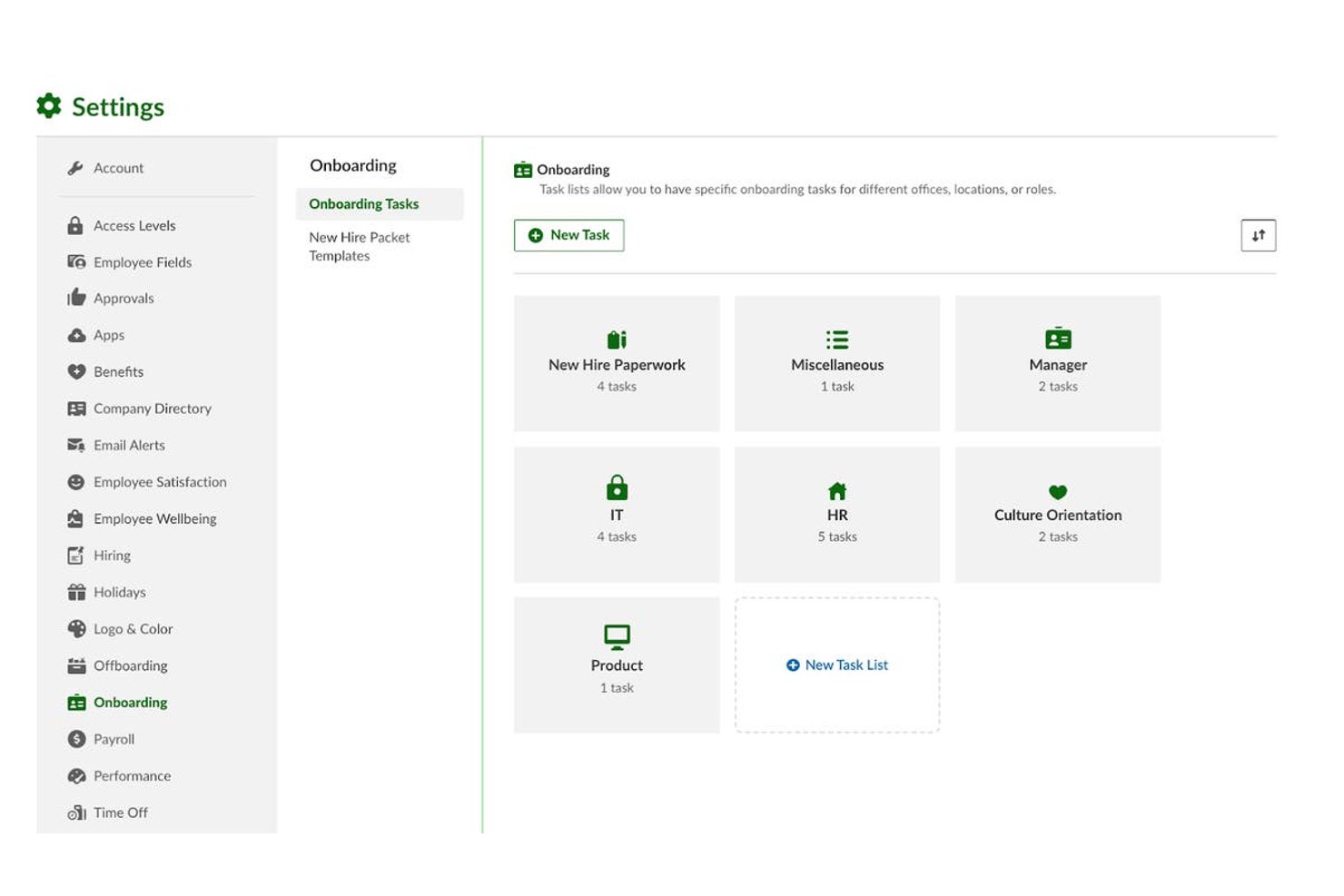
BambooHR è una piattaforma HR tutto-in-uno per piccole e medie imprese che unisce flussi di lavoro per l'onboarding, firme elettroniche, moduli di conformità, self-service per i dipendenti, gestione paghe e people analytics in un unico sistema.
Per Chi È Ideale BambooHR?
BambooHR è particolarmente adatto a generalisti HR e team di gestione del personale di piccole e medie aziende che si occupano di assunzioni, onboarding e dati dei dipendenti senza un grande dipartimento HR.
Perché Ho Scelto BambooHR
BambooHR merita un posto nella mia selezione grazie a una caratteristica che raramente vedo negli strumenti di onboarding per PMI: dati di benchmark reali integrati direttamente nella piattaforma. Con il piano Elite, posso confrontare i tassi di turnover della mia azienda, i punteggi eNPS e i dati sul benessere dei dipendenti con organizzazioni di dimensioni simili senza dover esportare nulla. Inoltre, ho benchmarking salariale fornito da Mercer già integrato, il che rende le decisioni sulle retribuzioni durante l'onboarding molto più informate e difendibili.
Funzionalità Principali di BambooHR
- Checklist di onboarding: Crea, assegna e monitora liste strutturate di attività di onboarding per ogni nuovo assunto.
- Portale di pre-onboarding personalizzato: Offri ai nuovi assunti l'accesso a un portale personalizzato per completare la documentazione e conoscere il team prima del primo giorno.
- Automazione dei moduli di conformità: Distribuisci, raccogli e valida moduli federali e statali, inclusi I-9, W-4 e autorizzazioni per deposito diretto.
- Integrazioni HRIS e payroll: Collega i flussi di lavoro di onboarding con le principali piattaforme per paghe, benefit e HRIS per una sincronizzazione automatica dei dati.
Integrazioni di BambooHR
BambooHR offre oltre 150 integrazioni native, tra cui Checkr, Remote, Slack, Cronofy, Zendesk, Paychex, QuickBooks, Microsoft 365, Google Workspace, Risotto e molte altre. È disponibile un’API per integrazioni personalizzate.
Pros and Cons
Pros:
- Analytics di benchmark integrati per i dati della forza lavoro
- Firme elettroniche automatizzate su tutti i documenti di onboarding
- Il portale per i nuovi assunti è attivo già prima del primo giorno
Cons:
- Gestione paghe è un componente aggiuntivo a pagamento
- Personalizzazione dei report limitata nel piano base
New Product Updates from BambooHR®

BambooHR Expands Compensation Benchmarking Data
BambooHR adds monthly-refreshed compensation benchmarks, additional data sources, and clearer job match indicators. This gives teams more context when comparing pay data and selecting relevant benchmarks. For more information, visit BambooHR’s official site.
 .
.
Trainual
Ideale per documentare flussi di onboarding ripetibili
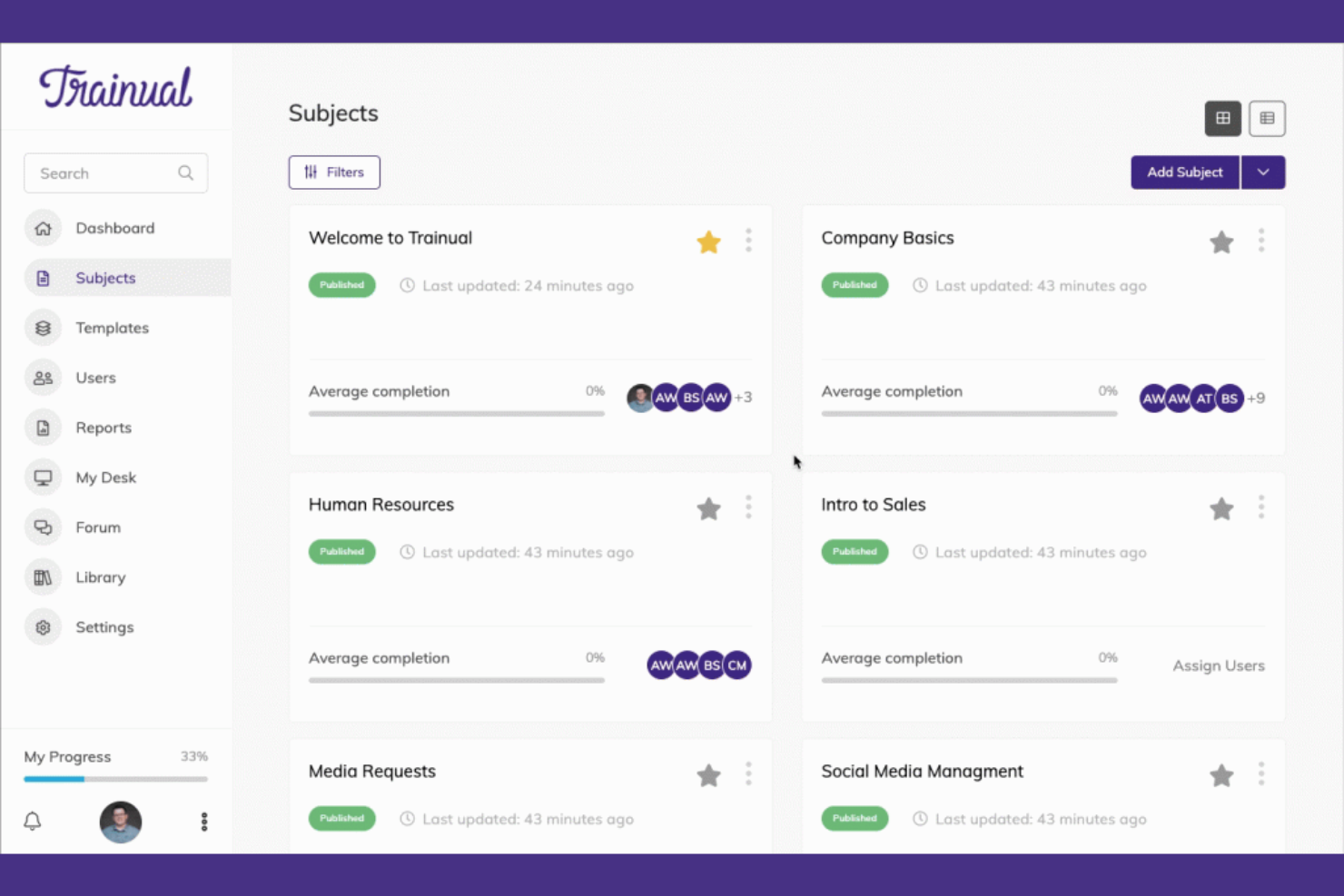
Trainual è una piattaforma di formazione e onboarding rivolta alle piccole imprese. Permette agli utenti di documentare processi, politiche e procedure, garantendo coerenza e chiarezza ai nuovi assunti.
Perché ho scelto Trainual: Eccelle nella formazione grazie ai suoi modelli facili da usare e alle opzioni di personalizzazione. Puoi configurare rapidamente moduli formativi su misura per le esigenze del tuo team. La piattaforma offre quiz e test per assicurarsi che i contenuti vengano compresi e assimilati. Questo focus sulla formazione strutturata ti aiuta a mantenere alti standard con la crescita dell'azienda.
Funzionalità e integrazioni principali:
Le funzionalità includono modelli personalizzabili per la creazione di manuali e guide di onboarding. La piattaforma consente di inserire elementi multimediali come video e immagini nei materiali formativi. Quiz e test aiutano a garantire che il team comprenda e ricordi le informazioni.
Le integrazioni comprendono Zapier, Slack, Google Data Studio, Microsoft Entra, QuickBooks, BambooHR e altri ancora.
Pros and Cons
Pros:
- Modelli formativi personalizzabili
- Supporto multimediale
- Configurazione rapida
Cons:
- Non è un HRIS completo — manca di funzioni di gestione stipendi e automazione della compliance
- Manutenzione manuale necessaria quando i processi cambiano
GoCo
Ideale per la gestione dei documenti
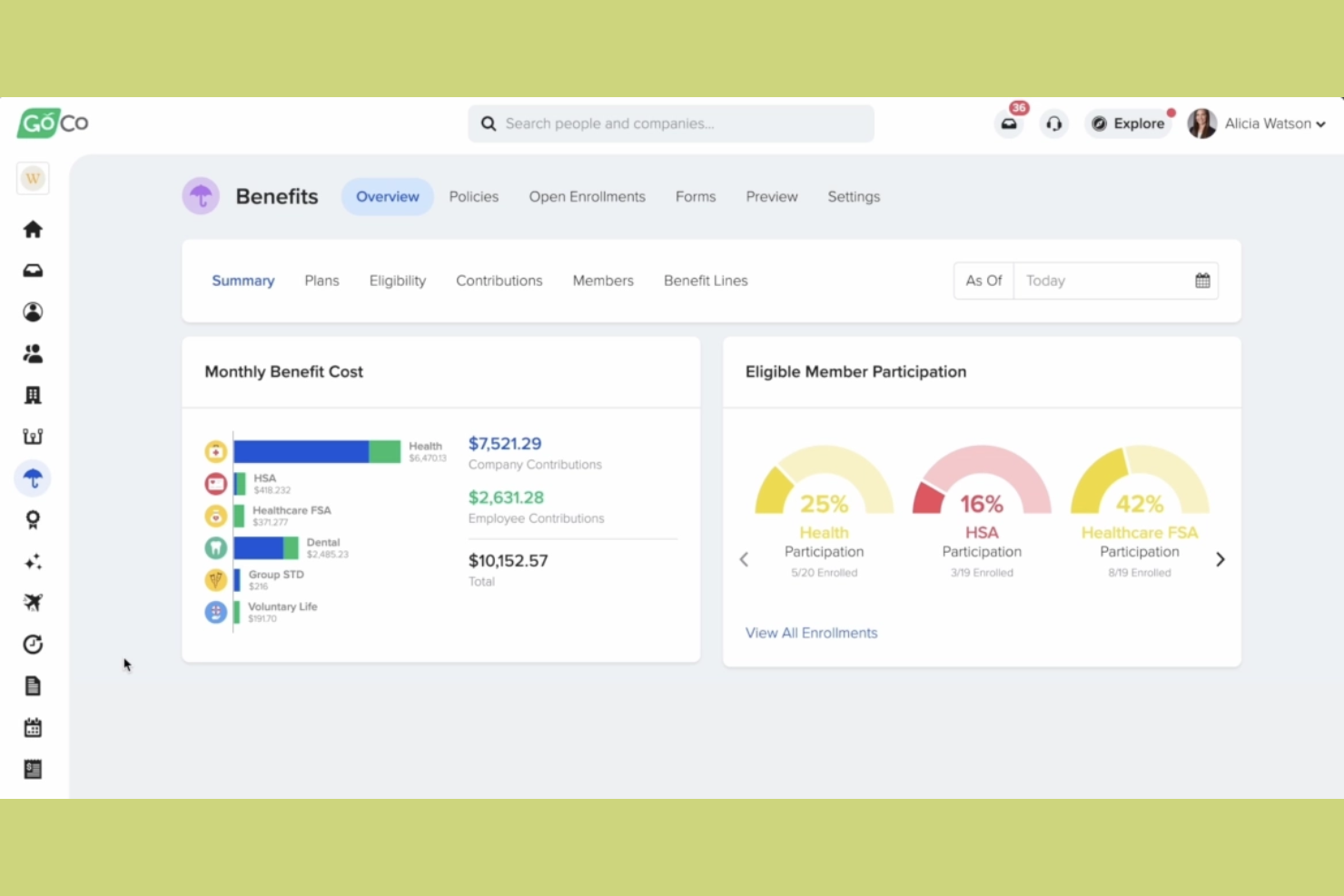
GoCo è una piattaforma per la gestione delle risorse umane e dei benefit pensata per le piccole imprese che desiderano semplificare i propri processi HR. Offre strumenti per l'onboarding, l'amministrazione dei benefit e la gestione dei documenti, rendendo più semplice la gestione della forza lavoro.
Perché ho scelto GoCo: Eccelle nella gestione dei documenti, offrendo funzionalità come le firme digitali e l'archiviazione sicura dei documenti. Puoi facilmente caricare e organizzare i file dei dipendenti, assicurandoti che tutto sia accessibile e conforme alle normative. Questa attenzione alla gestione documentale garantisce che le tue attività HR si svolgano in modo fluido ed efficiente.
Funzionalità e integrazioni di spicco:
Le funzionalità includono firme digitali, che semplificano la gestione di contratti e accordi. L'archiviazione sicura dei documenti assicura che tutti i tuoi file siano organizzati e protetti. I promemoria automatici ti aiutano a monitorare attività e scadenze importanti, riducendo il rischio di dimenticanze.
Le integrazioni comprendono QuickBooks, Slack, JazzHR, Greenhouse, Checkr, Workable e altri.
Pros and Cons
Pros:
- Supporto per firme digitali
- Archiviazione sicura dei file
- Promemoria automatici delle attività
Cons:
- Funzionalità avanzate limitate
- Potrebbe non essere ideale per grandi aziende

Ideale per pratiche HR globali
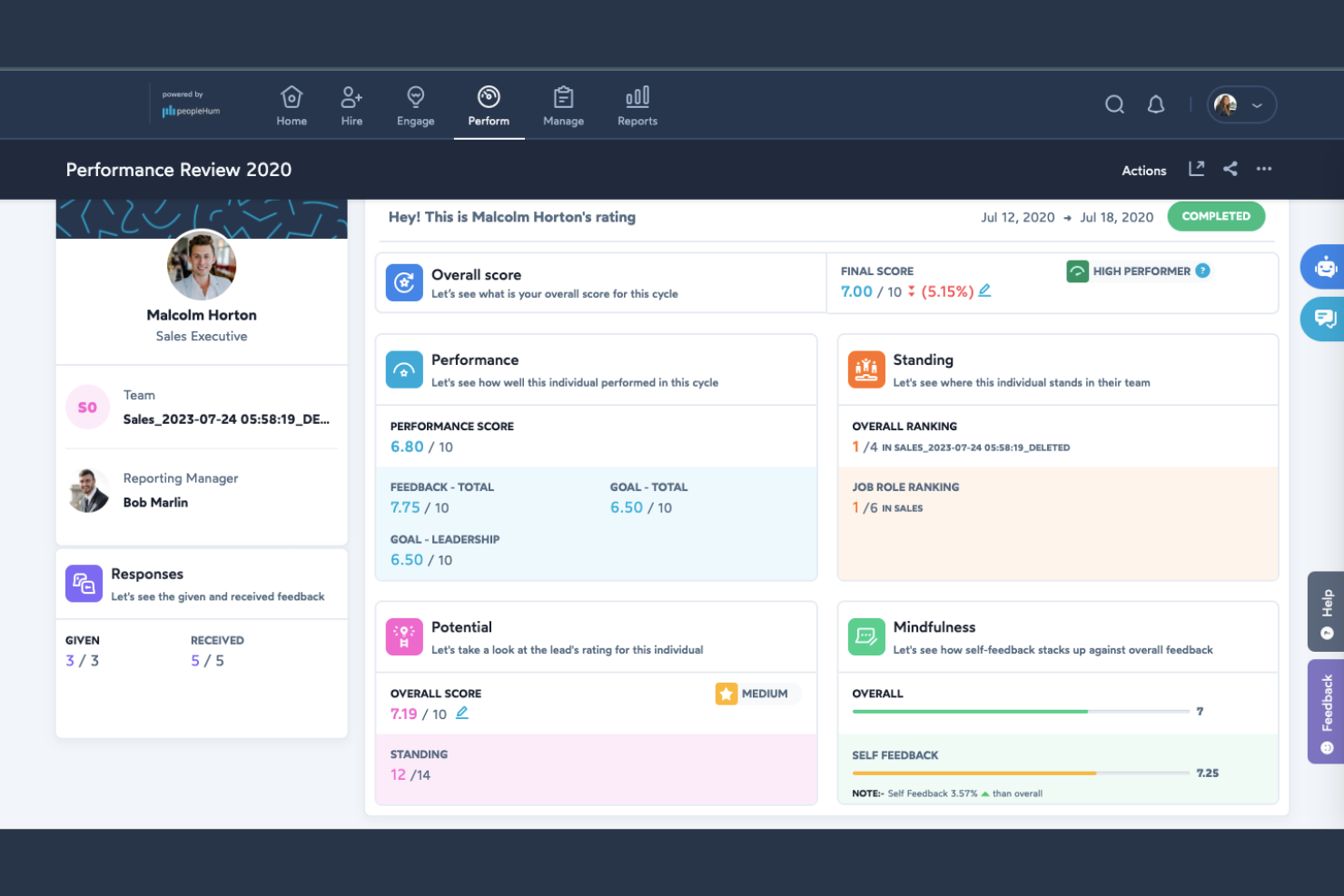
peopleHum è una piattaforma HR dedicata, pensata per le aziende che desiderano gestire la propria forza lavoro a livello globale. Offre funzionalità per il reclutamento, il coinvolgimento dei dipendenti e la gestione delle performance, fornendo un approccio olistico alle risorse umane.
Perché ho scelto peopleHum: È ideale per pratiche HR globali, offrendo strumenti che supportano operazioni e conformità in più paesi. Caratteristiche come flussi di lavoro automatizzati e analisi dettagliate aiutano a gestire compiti HR complessi. L’attenzione della piattaforma all’ambito globale assicura la gestione efficace di una forza lavoro eterogenea.
Funzionalità e integrazioni principali:
Le funzionalità includono flussi di lavoro automatizzati per semplificare i processi HR e ridurre le attività manuali. La piattaforma mette a disposizione analisi dettagliate per aiutarti a prendere decisioni informate sulla tua forza lavoro. Sono inoltre disponibili strumenti per il coinvolgimento dei dipendenti, per mantenere la squadra motivata e produttiva.
Le integrazioni comprendono Microsoft Teams, Slack, Google Workspace e altro ancora.
Pros and Cons
Pros:
- Supporta le operazioni globali
- Flussi di lavoro HR automatizzati
- Analisi dettagliate disponibili
Cons:
- La suite HR più ampia può risultare sovradimensionata per i piccoli team
- I moduli avanzati spesso richiedono piani di livello superiore

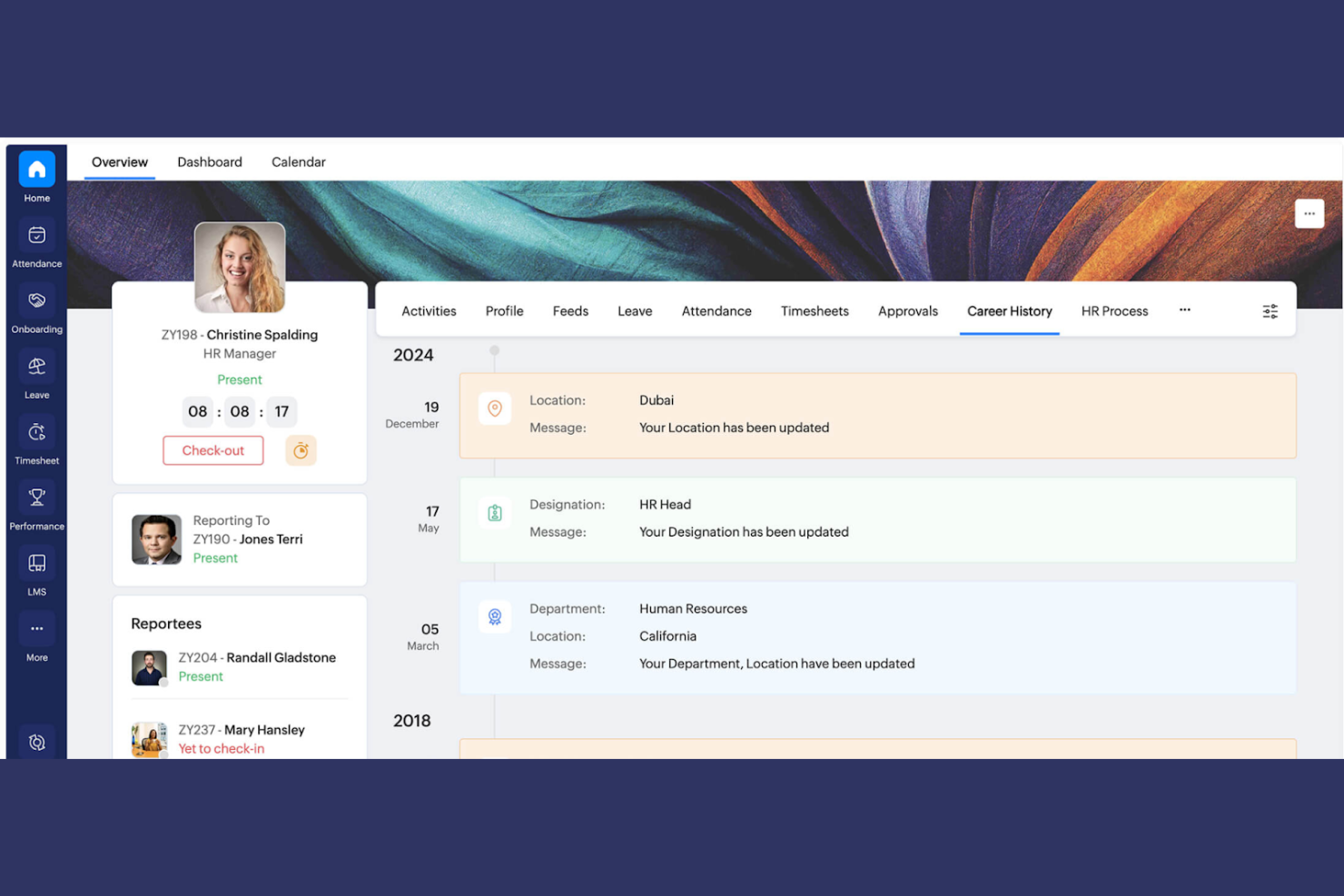
Zoho People è una piattaforma di gestione delle risorse umane progettata per le aziende che desiderano semplificare i processi HR e integrarli con altre funzioni aziendali. Fornisce strumenti per la gestione dell'onboarding dei dipendenti, il monitoraggio del tempo e la valutazione delle prestazioni, facilitando la gestione delle attività HR per il tuo team.
Perché ho scelto Zoho People: L'integrazione con la suite Zoho rappresenta un elemento distintivo, permettendo di collegare le funzioni HR con strumenti come CRM e finanza. Questa capacità di integrazione migliora la produttività complessiva del business.
Caratteristiche e integrazioni principali:
Le funzionalità includono la gestione delle assenze, che ti aiuta a monitorare permessi e approvazioni dei dipendenti in modo efficiente. Gli strumenti di valutazione delle prestazioni consentono di valutare e gestire regolarmente le performance dei collaboratori. La piattaforma offre inoltre automazione per le attività HR di routine, riducendo il lavoro manuale e gli errori.
Le integrazioni comprendono Zoho CRM, Zoho Books, Zoho Payroll, QuickBooks, Microsoft Teams, Slack, Zapier, Xero e altri.
Pros and Cons
Pros:
- Integrazione nativa con i prodotti Zoho
- Gestione delle assenze
- Supporta l'automazione delle attività HR
Cons:
- L'interfaccia può risultare complessa ai primi utenti HR
- Il valore massimo si ottiene utilizzando l'ecosistema completo di Zoho
Altri software per l'inserimento dei dipendenti per piccole imprese
Ecco alcune opzioni aggiuntive di software per l’inserimento dei dipendenti che non sono entrate nel mio elenco ristretto, ma che vale comunque la pena prendere in considerazione:
- Rippling
Ideale per automazione e scalabilità
- Paychex
Ideale per l'integrazione delle buste paga
- Thirst
Ideale per percorsi di apprendimento personalizzabili
- Deel HRIS
Ideale per la conformità internazionale
- TalentHR
Ideale per la gestione dei talenti
- Paylocity
Ideale per strumenti di coinvolgimento dei dipendenti


Come valuto il software di onboarding per piccole imprese
Controllo che ci siano i requisiti base necessari—moduli I-9 digitali, lettere d'offerta firmate elettronicamente e flussi di lavoro per le attività—poi valuto i fattori che differenziano uno strumento dagli altri per capire quale sia più adatto a un team HR snello.
Funzionalità principali (Requisiti imprescindibili per questa lista)
Quando seleziono gli strumenti per la mia lista, valuto ciascuno su una scala da 0 (non offre la funzionalità) a 5 (eccelle in quest'area) per ogni funzionalità principale elencata di seguito. Poi, calcolo il punteggio totale in percentuale. Ogni strumento deve raggiungere un punteggio minimo totale del 65% per essere preso in considerazione.
- Gestione digitale dei documenti: Valuto se i nuovi assunti possono firmare elettronicamente lettere d'offerta, NDA e conferme delle policy direttamente sulla piattaforma, senza stampare, scansionare o dover utilizzare altri strumenti.
- Gestione dei moduli per la conformità: Il supporto integrato per I-9 e W-4 con la validazione dei campi è fondamentale, poiché una firma mancante o un formato SSN errato può ritardare il payroll e creare rischi di audit.
- Flussi di lavoro e checklist per l'onboarding: Valuto se l'HR può creare sequenze di attività specifiche per il ruolo—assignando, ad esempio, all'IT la predisposizione del computer e al nuovo assunto l'attivazione dei benefit—con chiare responsabilità e scadenze.
- Portale self-service per i nuovi assunti: Un portale dedicato dove i nuovi dipendenti possono compilare i moduli, consultare il manuale del dipendente e seguire l'avanzamento delle attività prima del primo giorno evita che l'HR debba intervenire continuamente.
- Integrazione HRIS/Payroll: Verifico la presenza di connessioni native con i fornitori di payroll più diffusi tra le piccole imprese, come Gusto, QuickBooks, ADP Run e Paychex, così che i dati dei dipendenti si trasferiscano automaticamente senza doverli inserire di nuovo.
- Notifiche e promemoria automatici: Lo strumento dovrebbe inviare promemoria puntuali a nuovi assunti, manager e HR—ad esempio, ricordare a un manager di completare la checklist di benvenuto due giorni prima dell'inizio.
Una volta identificati gli strumenti che soddisfano questi criteri, considero ciò che distingue ogni piattaforma.
Fattori di differenziazione (Cosa distingue i fornitori)
Ecco come confronto i diversi fornitori:
Funzionalità distintive
L'engagement nella fase di pre-onboarding è un grande fattore di differenziazione. Cerco strumenti che consentano di inviare video di benvenuto, presentazioni del team e contenuti sulla cultura aziendale tra l'accettazione dell'offerta e il primo giorno: è proprio in questo periodo che si verifica il primo abbandono. L'automazione delle attività a livello aziendale è importante perché l'onboarding non è responsabilità solo dell'HR. Un buon strumento può assegnare la preparazione del laptop all'IT e l'iscrizione ai benefit all'ufficio amministrativo all'interno dello stesso flusso. I moduli di formazione integrati completano il tutto, permettendo di collegare percorsi di apprendimento e quiz sulle policy direttamente al percorso di onboarding.
Oltre le funzionalità
La trasparenza dei prezzi è una delle prime cose che verifico. Una piccola impresa deve sapere quanto paga per ciascun dipendente, senza scoprire costi nascosti per firme elettroniche o moduli di conformità durante l'attivazione. Anche la rapidità di implementazione è fondamentale—se un office manager non riesce a far funzionare lo strumento in pochi giorni utilizzando template preconfigurati e una procedura guidata, probabilmente lo lascerà inutilizzato. Valuto anche la profondità dell'integrazione con i software payroll per piccole imprese, come Gusto, QuickBooks e Paychex, oltre alla connessione con Slack o Google Workspace per le notifiche sulle attività proprio dove lavora il team.
Come scegliere il software per l'inserimento dei dipendenti per piccole imprese
È facile perdersi in lunghi elenchi di funzionalità e strutture tariffarie complesse. Per aiutarti a rimanere concentrato mentre affronti il tuo particolare processo di selezione del software, ecco un elenco di fattori da tenere a mente:
| Fattore | Elementi da considerare |
|---|---|
| Scalabilità | Il software crescerà insieme alla tua azienda? Considera se è in grado di gestire più utenti o dati senza problemi. Cerca soluzioni che supportino l'aumento o la riduzione delle dimensioni in base alle necessità. |
| Integrazioni | Si connette agli strumenti che già utilizzi? Verifica la compatibilità con le piattaforme per le risorse umane o gli strumenti di comunicazione che utilizzi già, come Slack o Google Workspace. |
| Personalizzazione | Puoi adattarlo ai tuoi processi? Cerca software che ti permetta di personalizzare flussi di lavoro e moduli in base alle esigenze della tua azienda. |
| Semplicità d'uso | È facile da usare per tutti i membri del tuo team? Assicurati che l'interfaccia sia intuitiva e non richieda una formazione approfondita per essere utilizzata. |
| Implementazione e inserimento | Quanto è rapida la configurazione? Valuta il tempo e le risorse necessari per implementare il software e consentire al tuo team di acquisire le competenze necessarie. Cerca strumenti con un processo di inserimento fluido. |
| Costo | Rientra nel tuo budget? Confronta i piani tariffari e determina se il costo è proporzionato al valore offerto, comprese eventuali commissioni nascoste. |
| Misure di sicurezza | Quanto sono sicuri i tuoi dati? Assicurati che il software offra una crittografia solida, aggiornamenti di sicurezza regolari e conformità alle normative sulla protezione dei dati. |
| Disponibilità dell'assistenza | Quali opzioni di assistenza vengono offerte? Cerca canali di supporto facilmente accessibili, come chat o telefono, e valuta la disponibilità di assistenza 24 ore su 24, 7 giorni su 7, se necessario. |
Che cos'è il software di inserimento per le piccole imprese?
Il software di inserimento per le piccole imprese è una soluzione digitale che aiuta a gestire e organizzare il processo di integrazione dei nuovi assunti in un'azienda. Utilizzati in genere dai professionisti delle risorse umane e dai responsabili, questi strumenti fanno risparmiare tempo e migliorano l'esperienza di inserimento automatizzando le attività e organizzando le informazioni. L'automazione delle attività, la gestione dei documenti e i moduli di formazione aiutano a rendere più efficienti l'inserimento, la conformità e la soddisfazione dei dipendenti. Nel complesso, questi strumenti migliorano il processo di inserimento, rendendolo più organizzato ed efficiente sia per i datori di lavoro sia per i dipendenti.
Funzionalità
Ecco le funzionalità principali che ogni ottimo software di inserimento per una piccola impresa dovrebbe avere:
- Automazione delle attività: automatizza le attività ripetitive, facendo risparmiare tempo e riducendo gli errori manuali per i team delle risorse umane.
- Gestione dei documenti: organizza e archivia in modo sicuro i documenti dei dipendenti, garantendo un accesso semplice e la conformità.
- Moduli di formazione: fornisce percorsi di apprendimento strutturati per aiutare i nuovi assunti a comprendere le politiche e le procedure aziendali.
- Flussi di lavoro personalizzabili: consente alle aziende di adattare i processi di inserimento alle proprie esigenze e ai propri requisiti specifici.
- Firme digitali: consente di firmare contratti e accordi in modo sicuro e senza carta, accelerando il processo di inserimento.
- Strumenti di valutazione delle prestazioni: aiutano a monitorare e valutare i progressi dei nuovi assunti e la loro integrazione nel team.
- Gestione delle ferie: gestisce in modo efficiente le richieste e le approvazioni dei permessi dei dipendenti, mantenendo i registri organizzati.
- Funzionalità di integrazione: si connette agli strumenti esistenti per le risorse umane e la comunicazione, garantendo un flusso regolare delle informazioni.
- Accesso da dispositivi mobili: offre flessibilità ai team delle risorse umane e ai nuovi assunti, che possono accedere ai materiali di inserimento ovunque si trovino.
- Monitoraggio della conformità: garantisce il rispetto dei requisiti legali e delle normative, riducendo al minimo i rischi per l'azienda.
Vantaggi
L'implementazione di un software di inserimento per le piccole imprese offre diversi vantaggi al tuo team e alla tua azienda. Eccone alcuni di cui potrai beneficiare:
- Risparmio di tempo: automatizza le attività ripetitive, consentendo ai team delle risorse umane di concentrarsi su attività più strategiche.
- Organizzazione migliorata: mantiene organizzati e facilmente accessibili i documenti dei dipendenti e i materiali di inserimento.
- Conformità rafforzata: monitora i requisiti legali e le normative, riducendo il rischio di non conformità.
- Esperienza dei dipendenti migliore: offre una formazione strutturata e indicazioni chiare, aiutando i nuovi assunti a sentirsi supportati e integrati.
- Maggiore efficienza: offre soluzioni digitali come le firme elettroniche e l'accesso da dispositivi mobili, accelerando il processo di inserimento.
- Personalizzazione: consente di adattare i flussi di lavoro dell'inserimento alle esigenze e alla cultura specifiche della tua azienda.
- Informazioni basate sui dati: fornisce analisi sui progressi e sulle prestazioni durante l'inserimento, aiutando a perfezionare i processi per i futuri assunti.
Costi e prezzi
La scelta di un software per l'onboarding per una piccola impresa richiede la comprensione dei vari modelli e piani tariffari disponibili. I costi variano in base alle funzionalità, alle dimensioni del team, ai componenti aggiuntivi e ad altri fattori. La tabella seguente riassume i piani più comuni, i relativi prezzi medi e le funzionalità generalmente incluse nelle soluzioni software per l'onboarding delle piccole imprese:
Tabella comparativa dei piani per i software di onboarding per piccole imprese
| Tipo di piano | Prezzo medio | Funzionalità comuni |
|---|---|---|
| Piano gratuito | $0 | Funzionalità di onboarding di base, spazio di archiviazione limitato per i documenti e supporto minimo. |
| Piano personale | $5-$25/user/month | Automazione delle attività, gestione dei documenti e analisi di base. |
| Piano aziendale | $30-$60/user/month | Flussi di lavoro personalizzabili, firme digitali, funzionalità di integrazione e strumenti avanzati per la conformità. |
| Piano per grandi aziende | $70+/user/month | Analisi avanzate, supporto dedicato, spazio di archiviazione illimitato per i documenti e opzioni di personalizzazione complete. |
Domande frequenti
Ecco alcune risposte alle domande comuni sui software di onboarding per piccole imprese:
Quali tipi di imprese traggono maggiori vantaggi dai software di onboarding?
Le piccole e medie imprese traggono i maggiori vantaggi dai software di onboarding. Questi strumenti aiutano a ottimizzare il processo di integrazione dei nuovi dipendenti, aspetto essenziale quando le risorse sono limitate. Se sei una startup o un’azienda in crescita, un software di onboarding può farti risparmiare tempo e garantire uniformità. Aiuta inoltre a gestire la conformità e la documentazione, riducendo il carico amministrativo del team delle risorse umane. Le imprese con team remoti o distribuiti troveranno questi strumenti particolarmente utili, poiché consentono un’esperienza di onboarding uniforme indipendentemente dalla posizione.
In che modo un software di onboarding può aiutare il mio team a risparmiare tempo durante l'inserimento dei nuovi dipendenti?
Il software di onboarding organizza attività come la gestione dei documenti, il monitoraggio della formazione e la raccolta delle firme elettroniche. Questo consente al tuo team di risparmiare ore rispetto a un onboarding manuale. Puoi automatizzare i promemoria, assegnare attività e condividere risorse in un unico luogo.
Il software di onboarding può integrarsi con i sistemi HR esistenti?
Sì, la maggior parte dei software di onboarding può integrarsi con i sistemi HR esistenti. Questa funzionalità consente di collegare il processo di onboarding agli strumenti che già utilizzi, come i sistemi per la gestione delle retribuzioni o delle prestazioni. Prima dell’acquisto, verifica che il software supporti l’integrazione con gli strumenti attualmente in uso. Questo aiuterà a garantire un flusso continuo di informazioni e a ridurre gli errori di inserimento dei dati. Cerca piattaforme che offrano accesso API o integrazioni predefinite con i sistemi HR più diffusi per rendere più semplice la transizione.
Quanto è sicuro un software di onboarding per l'archiviazione dei dati dei dipendenti?
Il software di onboarding è generalmente sicuro per l’archiviazione dei dati dei dipendenti. La maggior parte dei fornitori offre la crittografia e segue gli standard del settore per proteggere le informazioni sensibili. Quando valuti le opzioni, chiedi informazioni sulle misure di sicurezza adottate, come la crittografia dei dati, i controlli degli accessi e la conformità a normative come il GDPR. È importante assicurarsi che il fornitore del software aggiorni regolarmente i propri protocolli di sicurezza e offra supporto in caso di violazioni dei dati. Scegliere un fornitore affidabile con solide credenziali in materia di sicurezza ti darà maggiore tranquillità.
Quanto è difficile implementare un software di onboarding per un team di piccole dimensioni?
La maggior parte delle opzioni per le piccole imprese è progettata per una configurazione rapida e spesso richiede un supporto IT minimo o nullo. Molte soluzioni offrono modelli e guide dettagliate passo dopo passo, così puoi implementare il processo di onboarding nell’arco di pochi giorni.
È possibile personalizzare i flussi di lavoro dell'onboarding?
Sì, molte soluzioni software per l’onboarding offrono flussi di lavoro personalizzabili. Questa funzionalità consente di adattare il processo di onboarding alle esigenze e alla cultura specifiche della tua azienda. Puoi creare flussi di lavoro diversi per vari ruoli o reparti, garantendo un’esperienza personalizzata per ogni nuovo dipendente. Le opzioni di personalizzazione spesso includono la configurazione di attività automatizzate, la progettazione di moduli di formazione specifici e la modifica dei modelli di comunicazione. Prima di prendere una decisione, verifica il livello di personalizzazione disponibile e la sua facilità d’uso per il tuo team delle risorse umane.