

I 10 migliori software per paghe basati sull’IA recensiti nel 2026

10 Elenco dei migliori software per le paghe con IA


Gestire le paghe può essere un grattacapo per i team delle risorse umane. Devi occuparti di accuratezza, conformità e scadenze, spesso con risorse limitate. È qui che entra in gioco il software per le paghe con IA, offrendo sollievo grazie all'automazione delle attività ripetitive e alla riduzione degli errori.
Nella mia esperienza, scegliere lo strumento giusto può far risparmiare tempo e stress al tuo team. In qualità di recensore indipendente con una conoscenza approfondita dei software per le risorse umane, sono qui per guidarti tra le migliori opzioni di software per le paghe con IA disponibili.
In questo articolo condividerò informazioni imparziali sulle migliori soluzioni, concentrandomi sulle funzionalità più importanti per te. Che tu voglia migliorare l'efficienza o garantire la conformità, esiste una soluzione adatta alle tue esigenze. Scopriamo come questi strumenti possono trasformare il tuo processo di gestione delle paghe.
Perché fidarsi delle nostre recensioni sui software
Il nostro team testa e recensisce software dal 2012. In quanto esperti HR noi stessi, sappiamo quanto sia difficile — e importante — scegliere il software giusto.
Per questa guida, abbiamo valutato gli strumenti attraverso test pratici e ricerche indipendenti, assegnando un punteggio agli strumenti in base ai nostri criteri di selezione. Ci basiamo inoltre sulle competenze di leader di pensiero del settore e di professionisti HR attivi.
Le nostre recensioni riflettono il nostro giudizio editoriale umano, non un discorso di vendita.
Revisori esperti:
Tabella di confronto dei software per le paghe con IA
Questa tabella di confronto riassume i dettagli dei prezzi delle mie migliori selezioni di software per le paghe con IA:
| Tool | Best For | Trial Info | Price | ||
|---|---|---|---|---|---|
| 1 | Ideale per assistenza quotidiana con IA in HR e paghe | Prezzi su richiesta | Website | ||
| 2 | Ideale per l'accesso mobile ai cedolini | Prova gratuita di 30 giorni | Da $44/mese + $6,50/dipendente/mese | Website | |
| 3 | Ideale per la gestione paghe multi-paese basata su intelligenza artificiale | Demo gratuita disponibile | A partire da $29/dipendente/mese | Website | |
| 4 | Ideale per il calcolo delle paghe con trattenute fiscali | Demo gratuita disponibile | Prezzo su richiesta | Website | |
| 5 | Ideale per flussi di lavoro di pianificazione intuitivi | Demo gratuita disponibile | Prezzi su richiesta | Website | |
| 6 | Ideale con rilevamento ore integrato | Demo gratuita disponibile | Da $8/utente/mese + $50/mese di quota base | Website | |
| 7 | Ideale per aziende di medie dimensioni | Demo gratuita disponibile | Prezzo su richiesta | Website | |
| 8 | Ideale per rilevamento errori tramite IA | Demo gratuita disponibile | Prezzo su richiesta | Website | |
| 9 | Ideale per agenti AI integrati | Demo gratuita disponibile | Prezzo su richiesta | Website | |
| 10 | Ideale per la gestione finanziaria | Demo gratuita disponibile | Prezzo su richiesta | Website |


Recensione dei migliori software per le paghe con IA
Di seguito trovi i miei riepiloghi dettagliati dei migliori software per le paghe con IA inclusi nel mio elenco. Le mie recensioni offrono una panoramica dettagliata delle funzionalità principali, dei pro e contro, delle integrazioni e dei casi d’uso ideali di ciascuno strumento, per aiutarti a trovare quello più adatto a te.

Paycom
Ideale per assistenza quotidiana con IA in HR e paghe
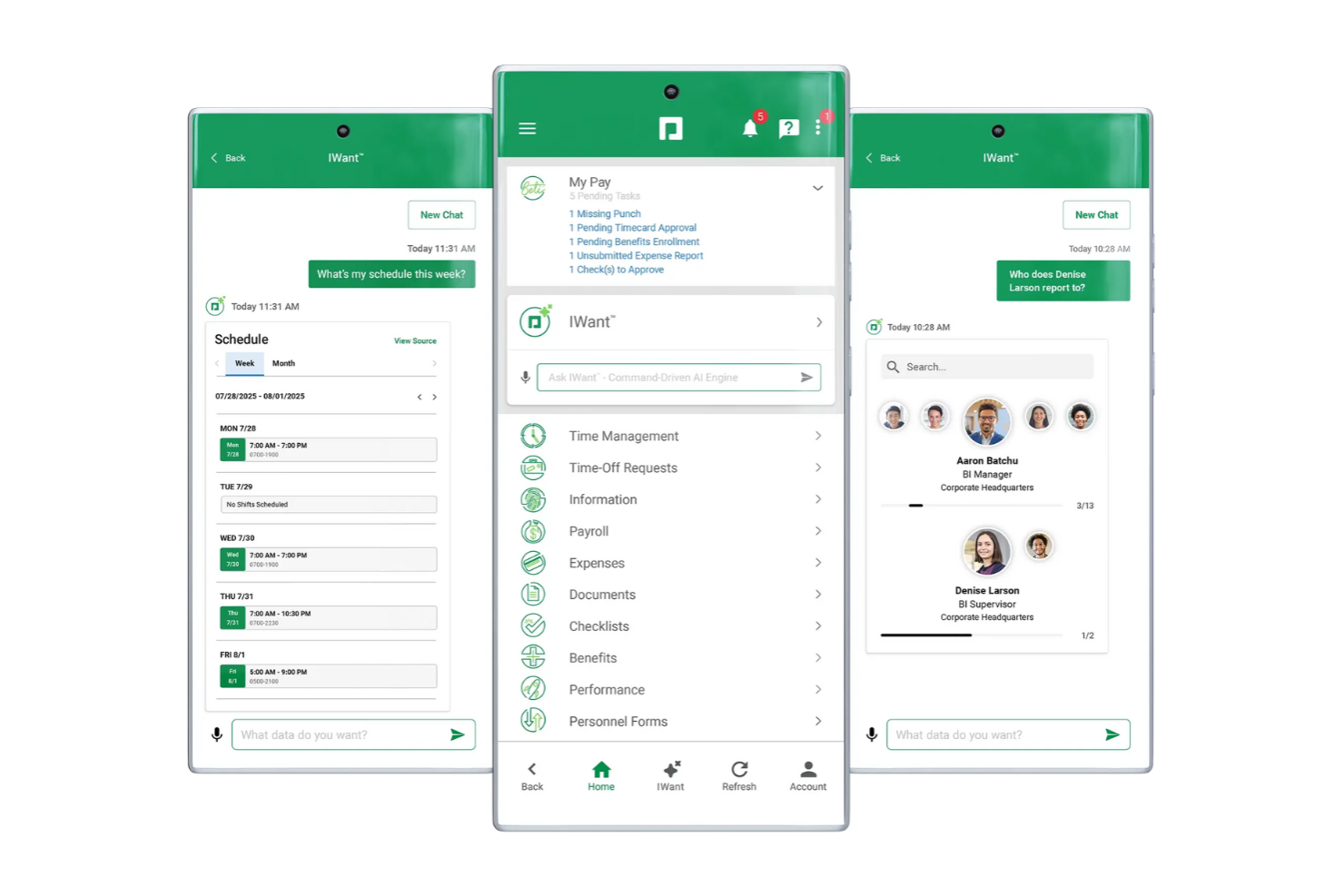
Paycom si guadagna il suo posto per il modo in cui utilizza l’IA integrata per automatizzare e semplificare i processi principali di HR e gestione paghe. Quando vedo team alle prese con tutto, dai pagamenti agli stipendi alle richieste di permesso, i suggerimenti dell’IA di Paycom e i flussi di lavoro automatizzati fanno davvero risparmiare tempo e aiutano a individuare gli errori prima che incidano sulle buste paga.
Quello che apprezzo è che funzionalità come Beti guidano effettivamente i dipendenti nella verifica delle buste paga, così ci sono meno sorprese o correzioni in seguito. Solitamente consiglio Paycom ai team che vogliono strumenti di IA integrati nell’esperienza quotidiana di HR e salari, non come un’aggiunta separata o un ripensamento.
Ideale per
- Team HR che automatizzano attività di payroll e conformità di routine
- Organizzazioni che necessitano di rilevamento degli errori guidato da IA nei cicli di pagamento
Non adatto per
- Aziende con esigenze di payroll altamente specifiche o non standard
- Piccole imprese in cerca di strumenti salariali semplici e senza fronzoli
Cosa distingue Paycom
Paycom è pensato per organizzazioni che desiderano gestire paghe e HR da un unico luogo, dove controlli automatici e self-service potenziati dall’IA fanno parte del flusso di lavoro giornaliero. A differenza di soluzioni come ADP o QuickBooks Payroll, che spesso funzionano solo come processori di stipendi con alcune funzionalità HR aggiuntive, Paycom mette tutto al centro dell’interazione dei dipendenti e della convalida in tempo reale.
Questo funziona al meglio quando si vuole che il personale prenda più responsabilità sulla propria busta paga e sui propri dati HR come parte della routine quotidiana.
Compromessi con Paycom
Paycom è ottimizzato per flussi HR e paghe standardizzati, quindi quando servono calcoli particolari o processi altamente personalizzati, si incontrano dei limiti in termini di personalizzazione e flessibilità.
Pros and Cons
Pros:
- Strumenti IA integrati per automazione HR e paghe
- Semplifica le attività amministrative ripetitive
- Interfaccia intuitiva
Cons:
- Mancano analisi predittive e prescrittive
- Limitato agli insight dai dati esistenti
Ideale per l'accesso mobile ai cedolini

QuickBooks Payroll è una piattaforma di gestione delle paghe completa con un assistente AI che automatizza l'elaborazione delle paghe, la dichiarazione dei tributi, il rilevamento delle presenze e consente ai dipendenti di accedere autonomamente ai cedolini tramite l'app mobile QuickBooks Workforce.
Per chi è pensato QuickBooks Workforce?
QuickBooks Workforce è particolarmente adatto a piccole e medie aziende e studi di contabilità che desiderano gestire paghe, risorse umane, monitoraggio delle presenze, dichiarazione dei tributi e dati dei dipendenti in un unico sistema integrato.
Perché ho scelto QuickBooks Workforce
Ho scelto QuickBooks Workforce perché i dipendenti possono consultare i loro cedolini, moduli fiscali e dettagli delle paghe tramite il portale self-service senza dover contattare le risorse umane. Il tuo team può visualizzare le buste paga precedenti, compresi salario lordo, netto, detrazioni e trattenute fiscali da qualsiasi dispositivo. Inoltre, apprezzo il fatto che i dati di paghe, presenze e dipendenti restino connessi, semplificando la verifica dei dettagli e la risoluzione delle discrepanze.
Caratteristiche principali di QuickBooks Workforce
- Gestione fiscale delle paghe: Calcola, invia e paga le imposte federali e statali sulle paghe per aiutare le aziende nella conformità legale.
- AI per le paghe: Raccoglie i dati paga, prepara la busta paga, invia promemoria e segnala anomalie prima della revisione.
- Rilevamento delle presenze: I dipendenti possono tracciare le ore lavorative tramite QuickBooks Time, con strumenti GPS e geofencing disponibili su determinati piani.
- Gestione dei benefit: Gestisci i benefit dei dipendenti, inclusi assicurazione sanitaria, copertura infortuni sul lavoro e opzioni di piano pensionistico.
Integrazioni di QuickBooks Workforce
Le integrazioni includono QuickBooks Online, QuickBooks Time, QuickBooks Payroll, QuickBooks Online Accountant, QuickBooks Payments, Guideline 401(k), Allstate Health Solutions e Checkr. Integrazioni personalizzate disponibili tramite le API per gli sviluppatori di Intuit.
Pros and Cons
Pros:
- L'intelligenza artificiale segnala anomalie nelle paghe prima dell'approvazione
- La funzione Auto Payroll automatizza le elaborazioni paghe idonee
- Combina strumenti paghe e HR
Cons:
- Strumenti HR avanzati solo nei piani di livello superiore
- Migliore per chi utilizza già QuickBooks

Ideale per la gestione paghe multi-paese basata su intelligenza artificiale
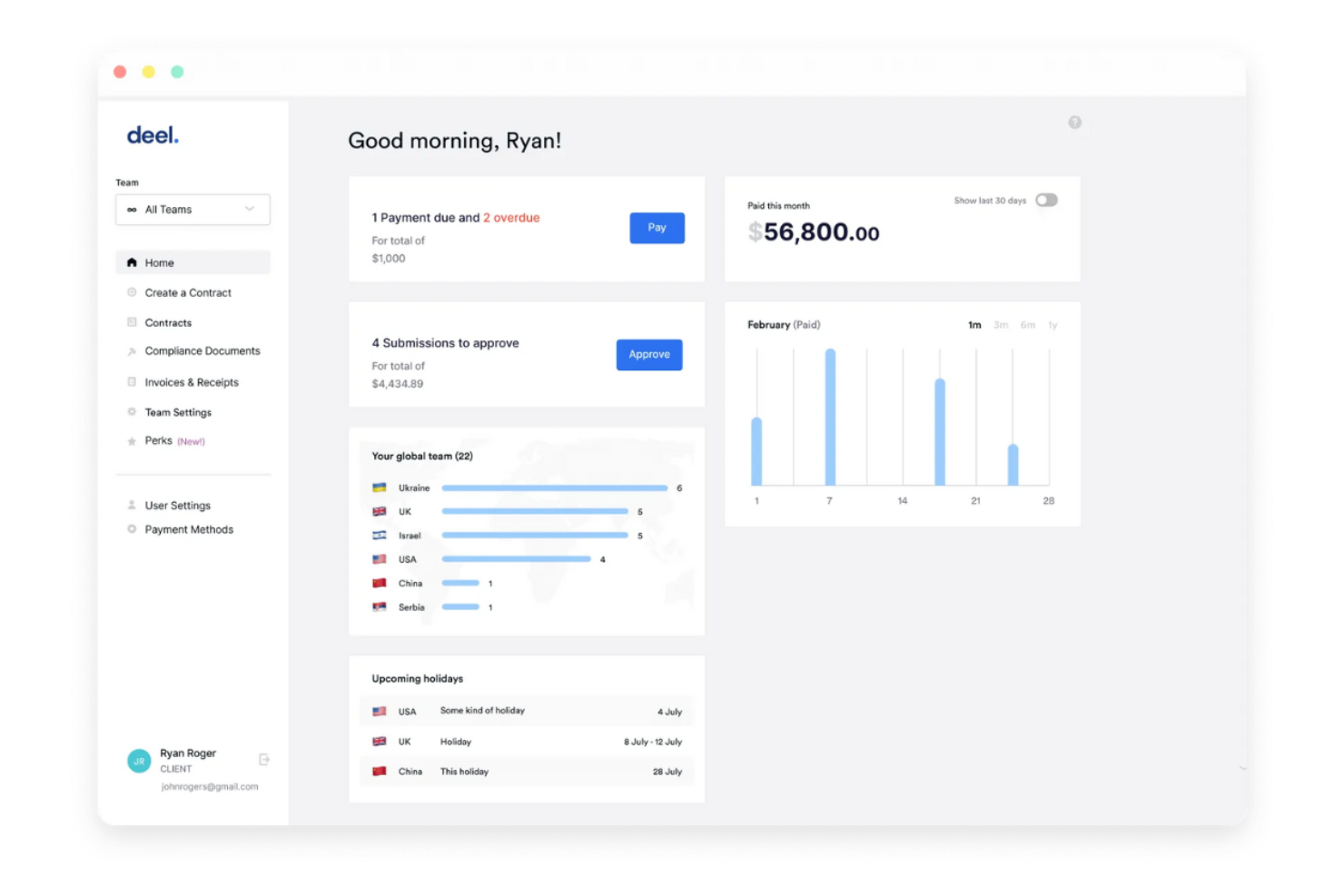
Deel Payroll si guadagna un posto qui per il modo in cui automatizza le buste paga multi-paese utilizzando l'intelligenza artificiale. Quando lavoro con team HR che gestiscono talenti in dozzine di Paesi, questo è il sistema che vedo capace di gestire regole complesse e conformità in modo affidabile.
Apprezzo il fatto che Deel ti permetta di elaborare le buste paga, gestire le trattenute obbligatorie e adempiere ai requisiti locali istantaneamente in oltre 100 paesi, rendendo la gestione delle paghe globali molto meno stressante.
A chi è più adatto Deel Payroll
- Team HR che elaborano buste paga per workforce globali
- Organizzazioni che gestiscono la conformità locale in più di 100 paesi
Quando Deel Payroll non è l'ideale
- Aziende che operano in un solo paese
- Team che necessitano di flussi di lavoro personalizzati nel dettaglio o regole di pagamento di nicchia
Cosa distingue Deel Payroll
Deel Payroll è costruito per garantire conformità e automazione immediata delle buste paga globali, sfruttando l'intelligenza artificiale per ridurre al minimo le impostazioni e la manutenzione manuali mentre ti espandi in nuovi Paesi. Diversamente da piattaforme come QuickBooks Payroll, che gestiscono bene le paghe locali, ritengo che Deel parta dal presupposto che tu gestisca una forza lavoro distribuita in decine di giurisdizioni e voglia che le regole locali siano gestite automaticamente.
In pratica, questo è ideale quando vuoi una soluzione senza pensieri per la gestione delle paghe di dipendenti e collaboratori in tutto il mondo.
Compromessi di Deel Payroll
Deel Payroll punta a una copertura internazionale ampia e all'automazione, ma rinunci alla personalizzazione granulare dei flussi di lavoro e all'adattamento avanzato delle regole di pagamento locali. Questo diventa un limite se il tuo team paghe vuole creare eccezioni personalizzate o routine altamente specifiche.
Pros and Cons
Pros:
- Gestisce oltre 180 valute
- Supporto alla conformità affidabile e verificato grazie all'IA
- Opzioni di pagamento flessibili
Cons:
- Tempo e complessità iniziali di configurazione per i team piccoli
- Alcuni utenti segnalano problemi in fase di prelievo fondi

Rippling
Ideale per il calcolo delle paghe con trattenute fiscali
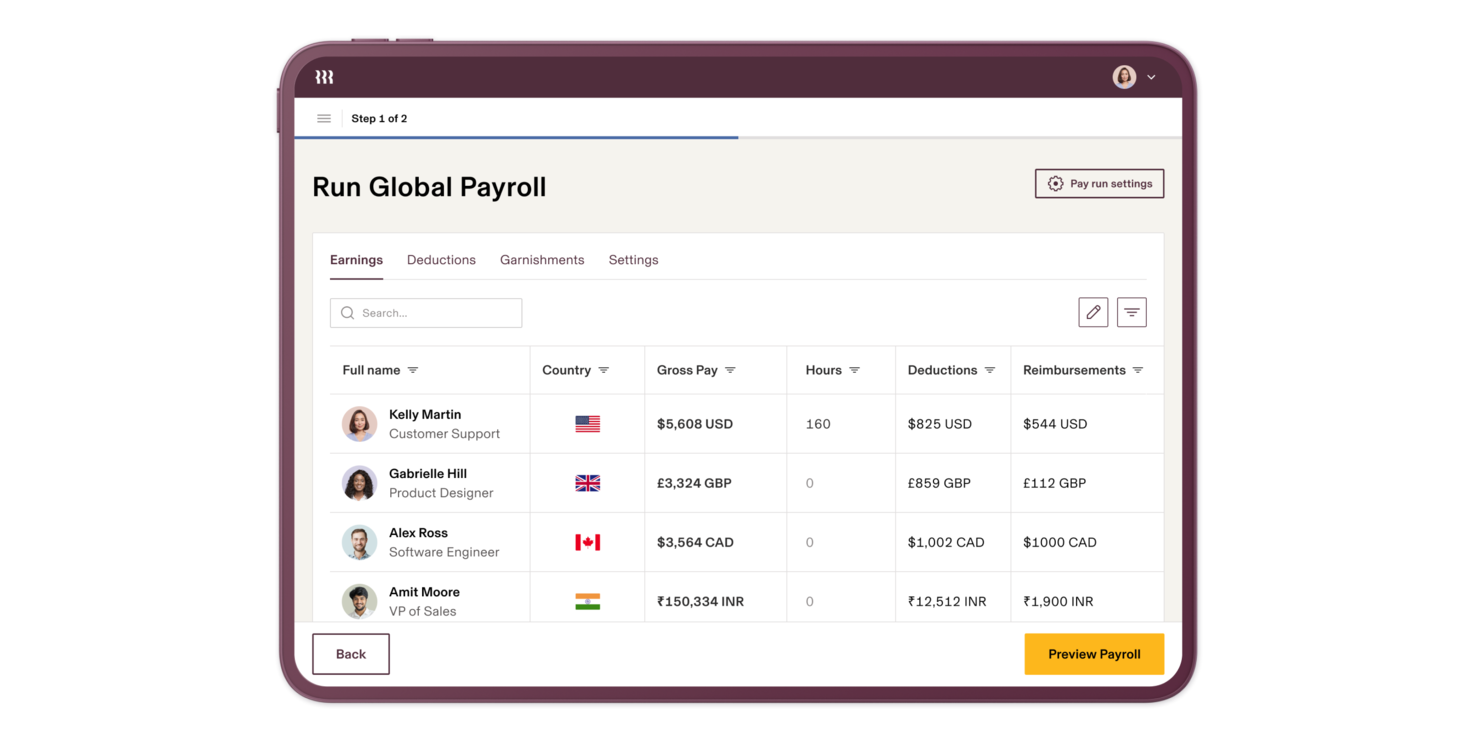
Rippling entra nella mia rosa delle scelte per il modo in cui gestisce calcoli salariali complessi, soprattutto tenendo conto delle trattenute fiscali in tempo reale in diversi stati degli USA. Quando valuto soluzioni di intelligenza artificiale per le paghe di team con personale in diverse località, la conformità fiscale automatizzata di Rippling si distingue.
Ciò che apprezzo è l'accuratezza e la trasparenza che si ottengono nell'elaborazione delle paghe: tasse, detrazioni e variazioni di tariffa vengono visualizzate immediatamente, fino al cedolino paga.
Ideale per
- Organizzazioni statunitensi che gestiscono buste paga e conformità fiscale su più stati
- Aziende che necessitano di calcoli salariali e trattenute automatiche
Non ideale per
- Aziende con principalmente lavoratori internazionali fuori dagli USA
- Team che cercano funzionalità HR o di gestione talenti non specifiche per il payroll
Cosa distingue Rippling
Rippling adotta un approccio automatizzato alla gestione delle buste paga e della conformità, gestendo calcoli fiscali e aggiustamenti dei pagamenti dietro le quinte. Diversamente da Gusto, che si concentra maggiormente sulle basi delle paghe, Rippling si aspetta che tu faccia affidamento sulla sua logica interna per gestire le trattenute fiscali tra diversi stati senza interventi manuali.
In pratica, questo risulta più prezioso quando assumi persone in nuovi stati o hai bisogno di chiarezza immediata su regole fiscali in continua evoluzione.
Compromessi con Rippling
Rippling è ottimizzato per la gestione delle paghe e la conformità negli USA, ma il focus sulle regole specifiche statunitensi rende limitata la gestione internazionale. Se hai team diffusi in tutto il mondo, dovrai ricorrere a una seconda soluzione.
Pros and Cons
Pros:
- Automatizza i calcoli delle buste paga e le trattenute fiscali
- Supporta la conformità alle buste paga in più paesi
- Integra sistemi HR IT e contabilità
Cons:
- La complessità della navigazione influisce sull'esperienza utente
- Nessuna prova gratuita offerta
New Product Updates from Rippling

Rippling Expands Automated Compliance With AI Workflows
Rippling expands Automated Compliance with multi-framework support, AI workflows, an audit portal, and trust centers. These updates help GRC teams manage compliance work and audits. For more information, visit Rippling’s official site.
Paycor
Ideale per flussi di lavoro di pianificazione intuitivi
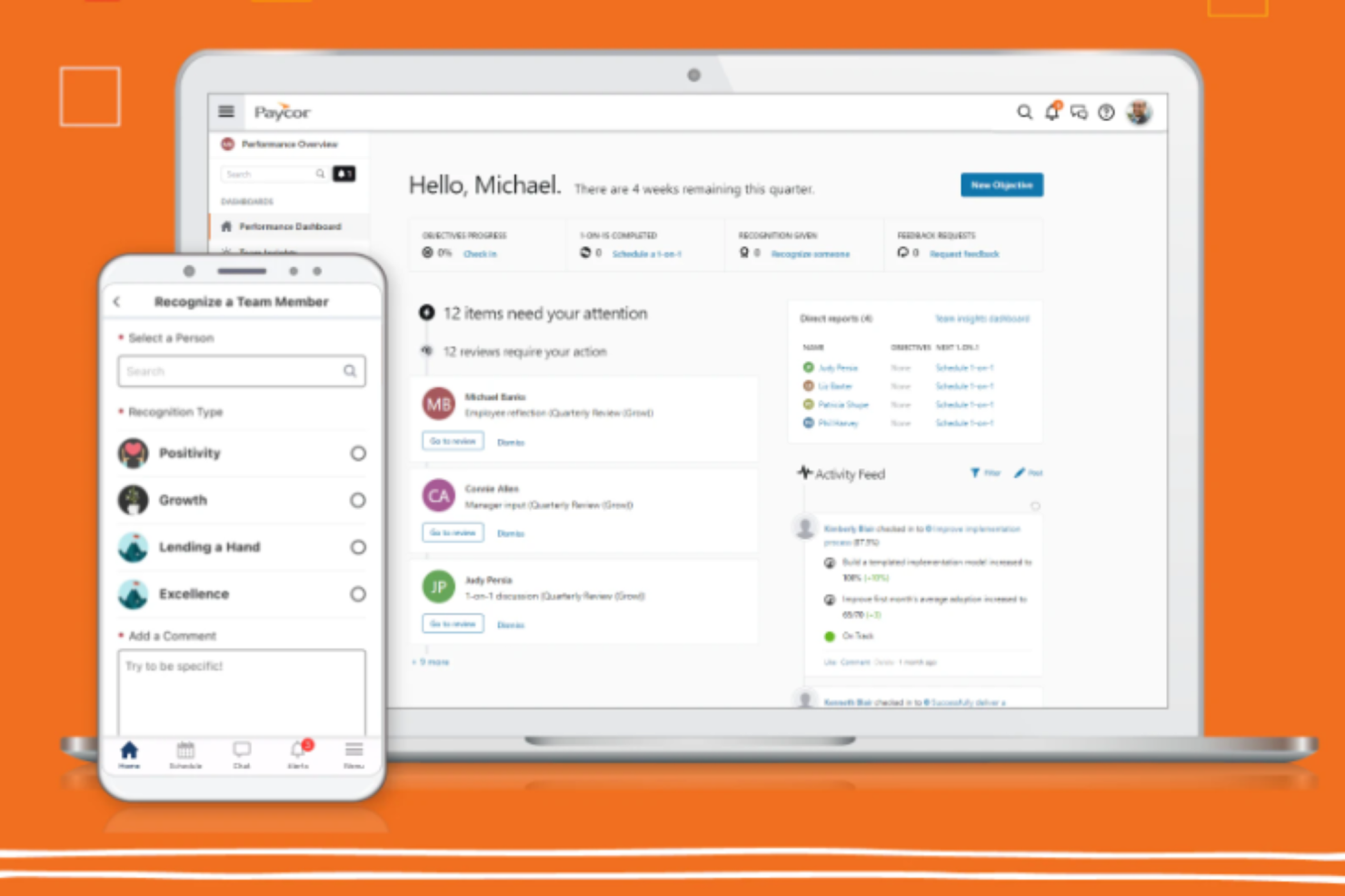
Paycor è una piattaforma HCM potenziata dall'IA che racchiude elaborazione delle paghe, pianificazione dei turni, rilevazione delle presenze, analisi della forza lavoro e gestione delle risorse umane in un unico sistema.
Per chi è più indicato Paycor?
Paycor è particolarmente adatto alle aziende di medie dimensioni che necessitano di una piattaforma HR e paghe unificata, dotata di strumenti AI integrati e funzionalità di gestione della forza lavoro.
Perché ho scelto Paycor
Paycor è tra le mie scelte principali perché adoro come il suo Smart Scheduler elimina la fatica del calcolo manuale nella creazione dei turni di lavoro. L'IA genera automaticamente i programmi rispettando i criteri predefiniti, assegnando i turni ai dipendenti in base a competenze, certificazioni e disponibilità con un solo passaggio. Mi piace anche che la previsione delle ore lavorative si colleghi direttamente al pianificatore, integrando driver di business come dati di vendita o affluenza, così i responsabili costruiscono orari che rispecchiano la reale domanda. E poiché la pianificazione si collega nativamente con paghe e rilevazione presenze, non è necessario reinserire i dati nel momento in cui si elabora la busta paga.
Funzionalità chiave di Paycor
- WISE AI assistant: Un assistente AI per le paghe che si integra in email e chat per segnalare errori e gestire compiti amministrativi prima che si trasformino in problemi.
- Valutazione cartellini presenze: L'IA valuta i cartellini in base agli attributi preconfigurati e approva automaticamente quelli che rispettano le soglie impostate.
- OnDemand Pay: Offre ai dipendenti l'accesso alle retribuzioni maturate prima del giorno di paga programmato, direttamente tramite la piattaforma.
- Calcoli delle paghe in tempo reale: Gli aggiornamenti delle paghe vengono calcolati istantaneamente non appena si apportano modifiche, senza dover attendere la chiusura del ciclo di elaborazione.
Integrazioni di Paycor
Paycor offre oltre 320 connettori preconfigurati tramite il suo marketplace, tra cui QuickBooks, Greenhouse, iCIMS, Okta, Microsoft Entra ID, Google Workspace, ServiceNow, NetSuite, Oracle e Jira. Paycor mette inoltre a disposizione un'API e strumenti per sviluppatori per creare integrazioni personalizzate. Attualmente non è supportato Zapier.
Pros and Cons
Pros:
- L'assistente AI risponde a domande sulle paghe in linguaggio naturale
- Strumenti per i talenti potenziati dall'ATS acquisito
- Griglie di paga e flussi di lavoro configurabili
Cons:
- Supporta solo l'elaborazione paghe negli Stati Uniti
- Tempi di risposta lenti in caso di problemi urgenti sulle paghe

Ideale con rilevamento ore integrato

Justworks è nella mia lista perché rende il rilevamento delle ore una parte centrale del payroll, non un elemento secondario. Ho lavorato con team che hanno bisogno che il payroll sia sempre allineato con le ore tracciate, le ferie e gli straordinari, e questa soluzione mantiene davvero le promesse. Apprezzo il modo in cui Justworks semplifica la sincronizzazione delle ore di lavoro direttamente nei cicli di payroll, così non devi affrontare esportazioni manuali o fogli presenze non corrispondenti.
Per chi è ideale Justworks
- Team che necessitano di integrazione tra rilevamento ore e payroll
- Aziende che gestiscono lavoratori a ore, a turni e salariati insieme
Per chi non è ideale Justworks
- Organizzazioni con esigenze avanzate di automazione del payroll
- Aziende che necessitano di reportistica payroll altamente personalizzata
Cosa distingue Justworks
Justworks è pensato per integrare il rilevamento delle ore direttamente con payroll e risorse umane, così puoi gestire tutto in un unico posto. Ti invita a centralizzare orari, presenze e dettagli di pagamento, evitando di dover gestire più app o fogli di calcolo separati. A differenza di ADP o Paychex, che spesso aggiungono il rilevamento delle ore come funzionalità accessoria, Justworks lo considera una parte fondamentale della gestione del payroll, non solo una casella da spuntare. Questa soluzione funziona particolarmente bene se preferisci un sistema semplice e unificato per mantenere aggiornati orari e retribuzioni.
Compromessi con Justworks
Ottimizzando per la semplicità all-in-one, Justworks offre meno possibilità di personalizzazione e opzioni di automazione avanzate rispetto ad alcuni sistemi di solo payroll più grandi. Questo può risultare limitante se hai bisogno di processi altamente personalizzati o di analisi approfondite.
Pros and Cons
Pros:
- Rilevamento ore integrato per lavoratori a ore
- Versamenti e adempimenti fiscali payroll automatizzati
- Flussi di onboarding semplici per nuovi assunti
Cons:
- Gestione dei benefit disponibile solo negli Stati Uniti
- Nessuna analisi payroll avanzata basata su AI

Ideale per aziende di medie dimensioni
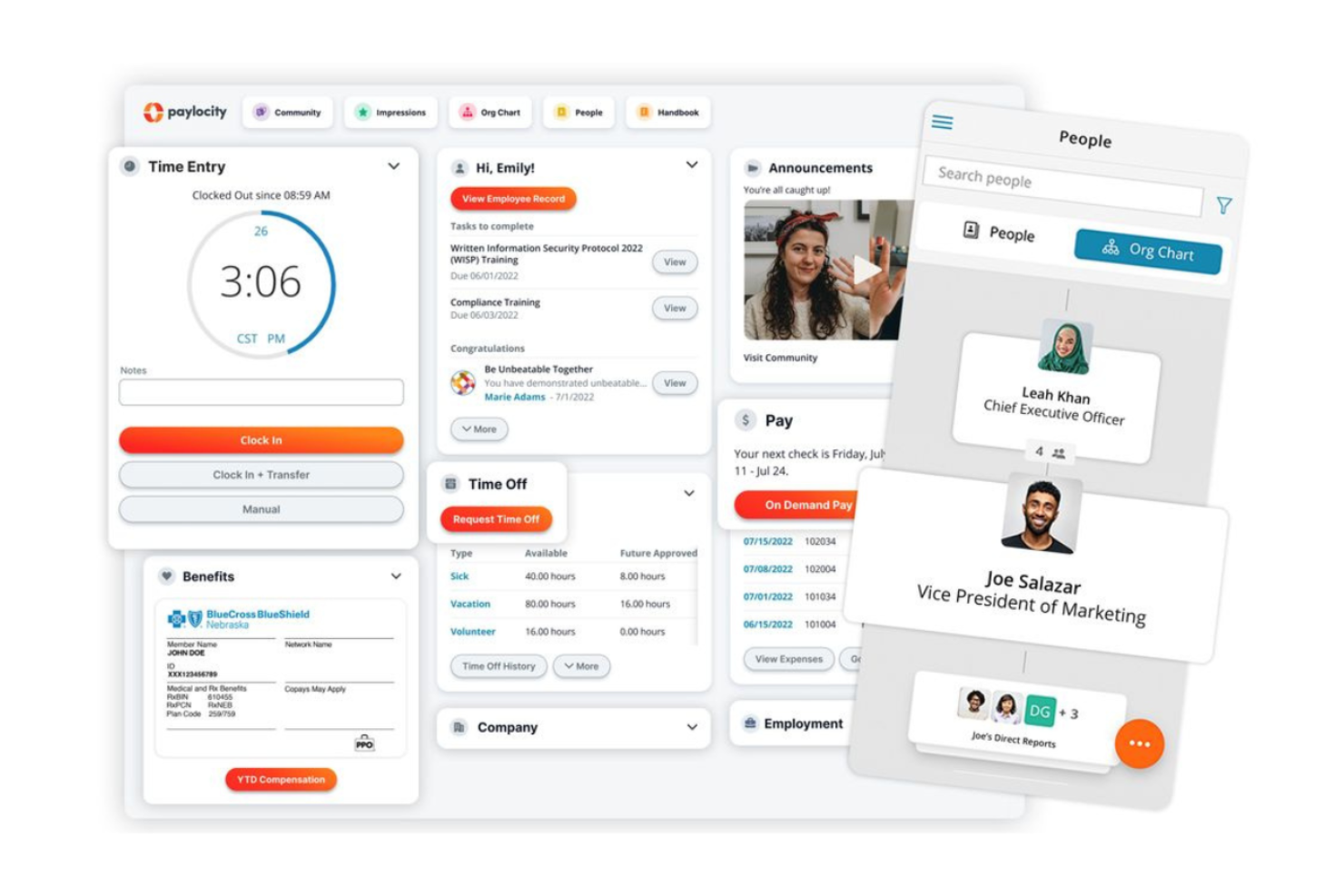
Paylocity è la mia scelta per le aziende di medie dimensioni che desiderano una gestione moderna delle buste paga e un'automazione delle risorse umane con un tocco di intelligenza artificiale. Apprezzo il modo in cui utilizza funzionalità di IA per assistere nei controlli delle buste paga, rilevare anomalie e segnalare automaticamente le aree che richiedono attenzione man mano che la tua azienda cresce. Vedo i maggiori benefici per i team che stanno superando i sistemi base di gestione paghe e hanno bisogno di più automazione, analisi e conformità integrate nelle operazioni quotidiane.
Per chi è ideale Paylocity
- Aziende di medie dimensioni che automatizzano paghe e HR con l'IA
- Team che necessitano di strumenti di rilevamento anomalie e conformità guidati dall'IA
Per chi Paylocity non è l'ideale
- Piccole imprese con esigenze di gestione paghe basilari
- Aziende che cercano una gestione paghe globale o supporto internazionale complesso
Cosa distingue Paylocity
Paylocity si distingue concentrando i suoi flussi di lavoro sull'automazione di buste paga e HR per aziende di medie dimensioni, utilizzando controlli e suggerimenti basati sull'IA. Si concentra sull'aiutarti a individuare problemi prima che diventino costosi, cosa che mi ricorda più gli avvisi proattivi di Rippling rispetto ai report passivi dei fornitori di gestione paghe tradizionali. Nella pratica, questa soluzione funziona meglio quando hai superato gli strumenti per piccole imprese e desideri una gestione più rigorosa della conformità.
Compromessi con Paylocity
Paylocity è ottimizzato per automazione e scalabilità nel mercato medio, ma perde in semplicità e velocità rispetto agli strumenti pensati per esigenze di paghe più semplici e meno complesse.
Pros and Cons
Pros:
- Forte attenzione al coinvolgimento dei dipendenti
- Strumenti avanzati di analisi
- Unifica e automatizza sistemi HR e paghe legacy
Cons:
- Opzioni di personalizzazione complesse
- La configurazione iniziale può richiedere tempo
New Product Updates from Paylocity

Paylocity Expands Expense and Purchase Request Tools
Paylocity adds connected personal cards, smarter expense categorization, and a streamlined purchase request experience. This reduces manual entry and helps finance teams manage expenses and approvals more efficiently. For more information, visit Paylocity’s official site.
 .
.
Ideale per rilevamento errori tramite IA
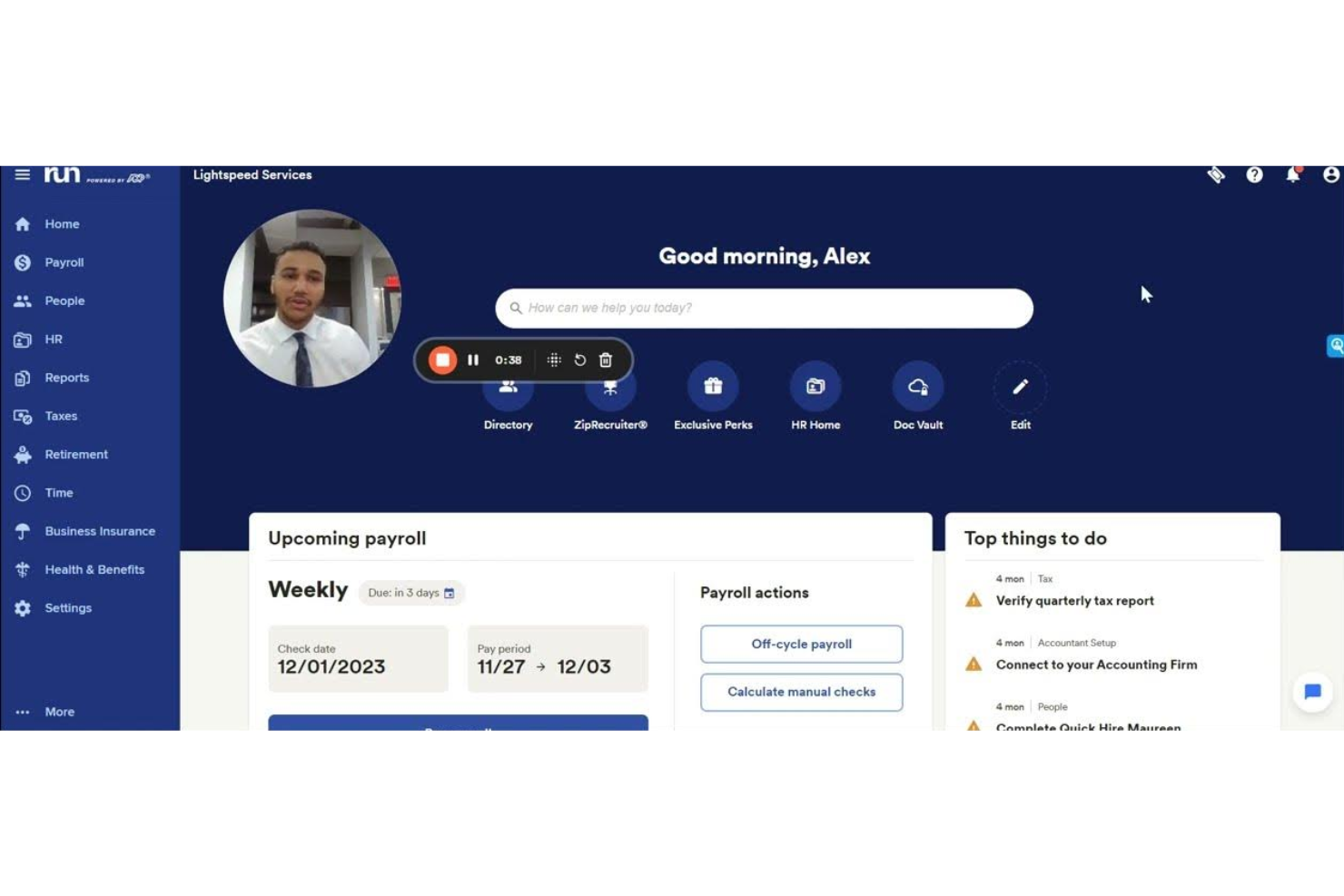
RUN Powered by ADP® entra nella mia lista dei preferiti perché la sua rilevazione di errori basata su intelligenza artificiale è la migliore che abbia testato nei software per le paghe. Il rilevamento automatico individua errori comuni—come voci duplicate e irregolarità nei calcoli—che ti aiuta a rimanere conforme sin dall'inizio.
Apprezzo molto il modo in cui il sistema ti guida attraverso i problemi specifici, rendendo la precisione delle paghe molto meno stressante per i team HR.
RUN Powered by ADP® è ideale per
- Piccole imprese che desiderano un rilevamento automatico degli errori in busta paga
- Responsabili HR focalizzati su conformità e precisione nel calcolo delle paghe
RUN Powered by ADP® non è adatto per
- Aziende con esigenze di busta paga altamente personalizzate
- Grandi imprese che necessitano di funzionalità avanzate per la paga globale
Cosa distingue RUN Powered by ADP®
RUN Powered by ADP® si fa notare per l'integrazione diretta della rilevazione di errori tramite IA nella gestione delle paghe, segnalando e spiegando i problemi in tempo reale. Invece di aspettarsi che tu controlli e ricontrolli le cifre, RUN mette in evidenza i potenziali errori durante l'utilizzo, rendendo più facile individuare i problemi prima che si trasformino in vere e proprie complicazioni. A differenza di QuickBooks Payroll, che lascia maggiore revisione manuale, questo approccio aiuta i responsabili HR a passare meno tempo a dubitare dei calcoli.
Compromessi con RUN Powered by ADP®
RUN è pensato per semplicità e flussi di lavoro guidati, ma ciò significa che si perde una certa flessibilità nella personalizzazione dei processi di busta paga per situazioni uniche o complesse.
Pros and Cons
Pros:
- Forte conformità fiscale nelle paghe
- Si adatta alla crescita aziendale
- Opzioni flessibili di pacchetti di servizi
Cons:
- Costo mensile iniziale più alto
- Personalizzazione dei report limitata

Workday
Ideale per agenti AI integrati
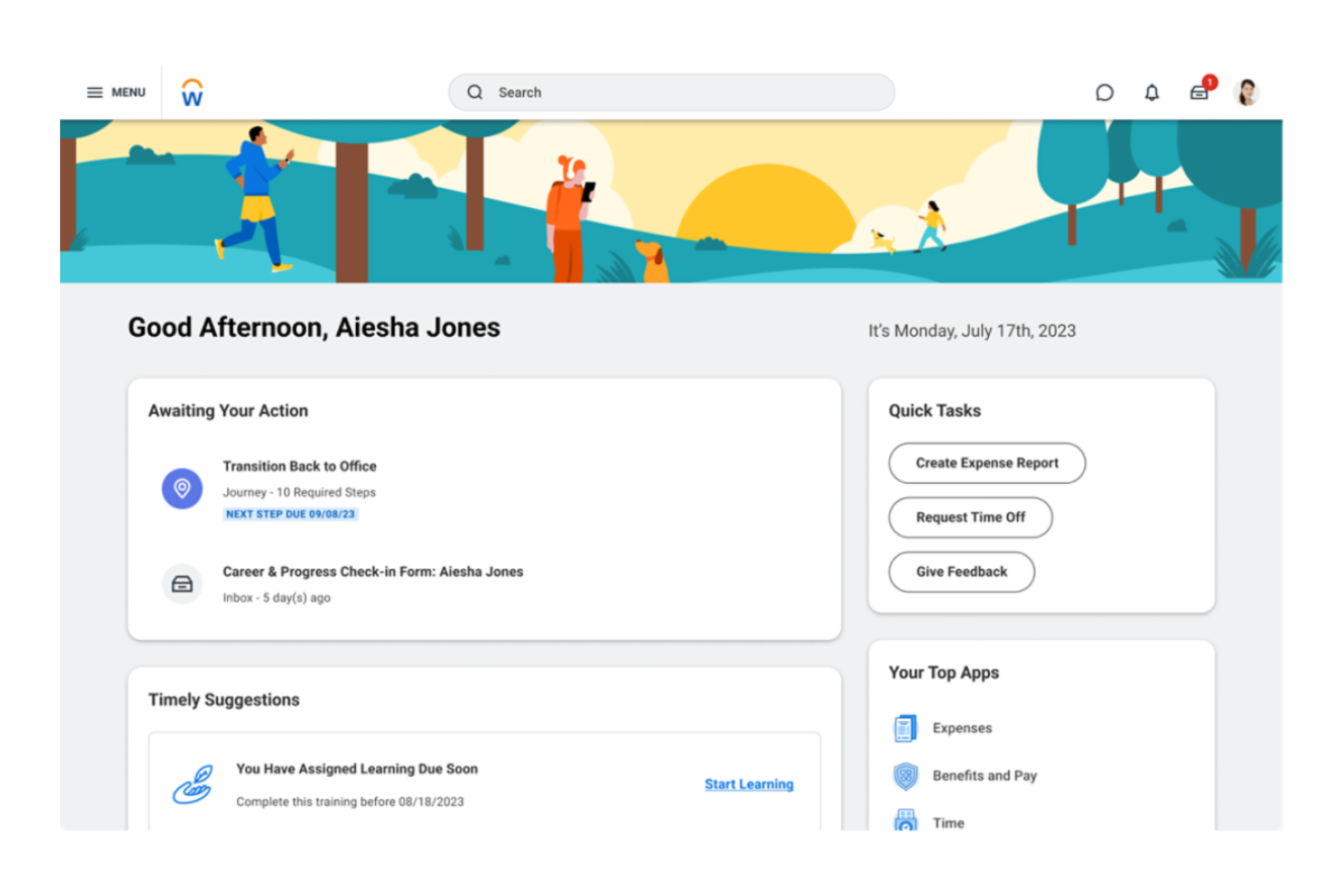
Workday rientra nella mia selezione di soluzioni AI per la gestione delle paghe perché i suoi agenti AI integrati gestiscono automaticamente azioni complesse in materia di payroll. Vedo che i team che gestiscono buste paga in più paesi traggono vantaggio dal lasciare che questi agenti AI monitorino, analizzino e segnalino potenziali errori prima dell'erogazione degli stipendi. Durante il test del suo motore di raccomandazione, ho apprezzato il modo in cui evidenziava schemi di compensazione insoliti e guidava le correzioni in tempo reale.
Workday è ideale per
- Grandi aziende che necessitano di supervisione delle paghe multi-paese guidata dall'IA
- Team HR focalizzati sulla conformità e sul rilevamento tempestivo delle anomalie
Workday non è adatto per
- Piccole imprese con esigenze semplici di gestione delle paghe
- Organizzazioni che evitano piattaforme HR basate sul cloud
Cosa distingue Workday
Workday affronta le paghe progettando tutto intorno ad automazione e conformità su larga scala, invece che su interventi manuali o modelli flessibili come in QuickBooks Payroll. Il sistema si aspetta che tu centralizzi paghe complesse in diversi paesi con agenti AI che monitorano proattivamente errori e cambiamenti normativi. In pratica, questo lo rende adatto alle aziende globali che vogliono rischi sulle paghe segnalati e gestiti in anticipo, non lasciati alla post-elaborazione.
Compromessi con Workday
Workday è ottimizzato per la scala e l'automazione, ma si sacrifica l'agilità nella modifica rapida e personalizzata delle paghe. Questa rigidità può rallentare il processo se hai bisogno di gestire molte eccezioni o piccole personalizzazioni frequenti.
Pros and Cons
Pros:
- Analisi predittive che migliorano il processo decisionale
- Elaborazione del linguaggio naturale che semplifica l'interazione con i dati
- Dashboard personalizzabili per approfondimenti su misura
Cons:
- Richiede alcune conoscenze tecniche per la configurazione
- Opzioni di personalizzazione limitate per i piccoli team

Sage Intacct
Ideale per la gestione finanziaria
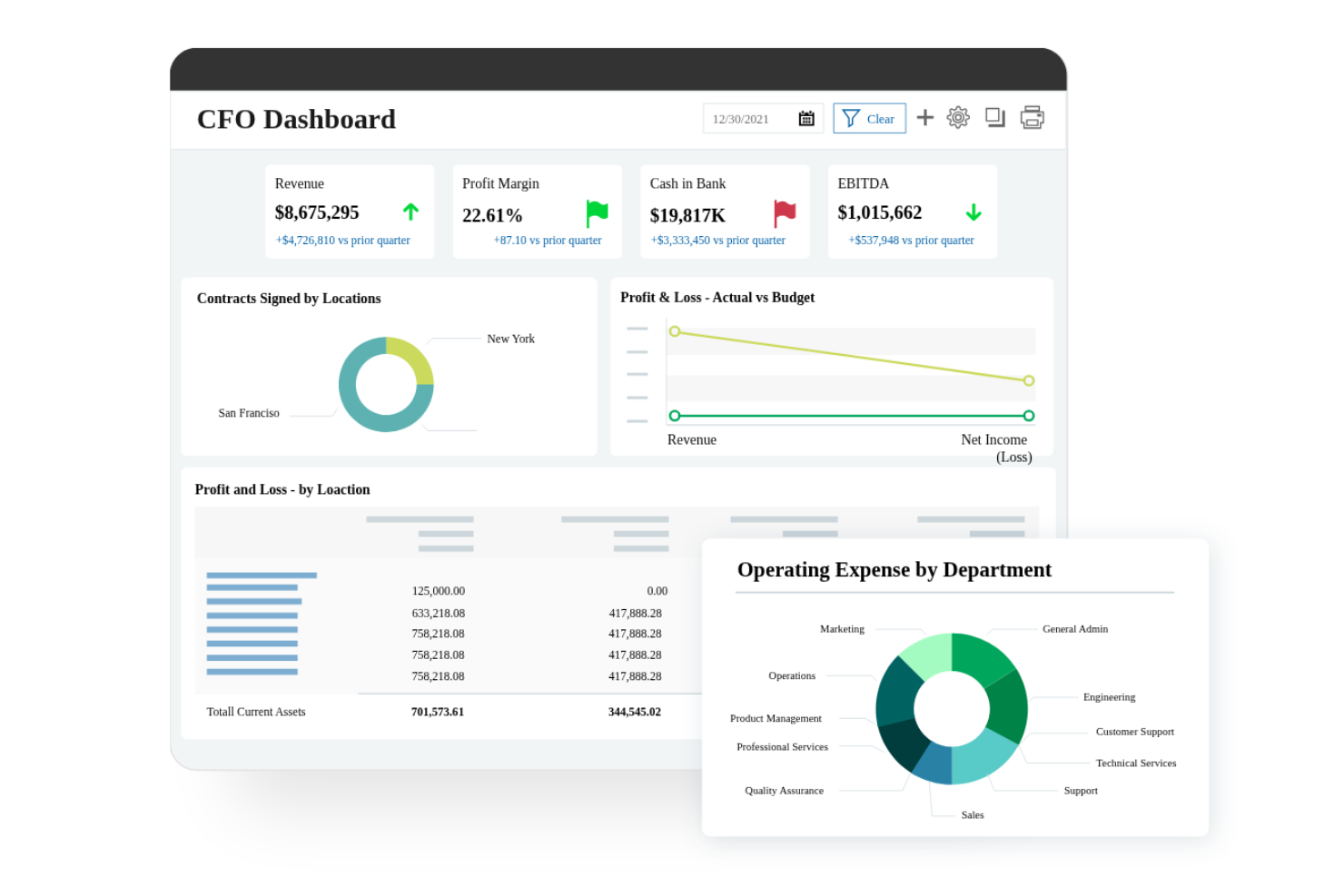
Sage Intacct guadagna un posto qui grazie all'automazione avanzata dei processi finanziari legati alle retribuzioni, particolarmente importante quando i dati salariali confluiscono direttamente nel più ampio ecosistema contabile. Quando le organizzazioni con pagamenti complessi o multi-ente necessitano di precisione e tracciabilità, trovo che le profonde capacità di libro mastro generale di Sage Intacct lo pongano in vantaggio.
Quello che apprezzo particolarmente è come l'allocazione delle spese, la conformità fiscale e la reportistica personalizzata siano tutte connesse ai cicli di pagamento. Questo funziona al meglio per i team finanziari che devono collegare le transazioni delle retribuzioni con controlli finanziari dettagliati e reportistica.
Sage Intacct è ideale per
- Organizzazioni che necessitano di un'integrazione tra gestione delle paghe e gestione finanziaria completa
- Aziende multi-ente che richiedono una contabilità e una reportistica dettagliate delle paghe
Sage Intacct non è ideale per
- Team che desiderano una gestione delle paghe dedicata o strumenti di payroll basati primariamente su AI
- Aziende con esigenze salariali molto semplici o a basso volume
Cosa distingue Sage Intacct
Sage Intacct si distingue per l'approccio che prevede che i team finanziari e delle paghe operino come una singola funzione centralizzata. A differenza di Xero, che è più leggero e transazionale, Intacct indirizza tutto alle organizzazioni che necessitano di libri contabili consolidati, pronti per audit e conformi a strutture complesse. In pratica, funziona bene per chi deve gestire in un unico ambiente paghe, contabilità inter-ente e controllo finanziario.
Compromessi con Sage Intacct
Intacct è ottimizzato per struttura, conformità e rigore finanziario, ma l'elaborazione pratica delle buste paga o la flessibilità nei flussi di lavoro tende ad essere trascurata. I team che cercano payroll guidato dall'intelligenza artificiale o personalizzazione dei processi trovano di solito più adatte piattaforme dedicate alla gestione delle paghe.
Pros and Cons
Pros:
- Funzionalità di analisi multi-dimensionale
- Dashboard finanziari in tempo reale
- Flussi di lavoro finanziari automatizzati
Cons:
- Può richiedere un'implementazione estesa
- Complesso per le piccole imprese
Altri software per le paghe con IA
Ecco alcune ulteriori opzioni di software per le paghe con IA che non sono entrate nel mio elenco, ma che vale comunque la pena prendere in considerazione:
- PayCaptain
Ideale per il self-service degli impiegati nel Regno Unito
- ZellisONE
Ideale per l'integrazione HR nel Regno Unito e in Irlanda
- UKG Bryte AI
Ideale per il supporto alla conformità
- Roll by ADP
Ideale per la gestione delle paghe tramite chat
- Keka HR
Ideale per oltre 100 integrazioni plug-and-play per la gestione delle buste paga
- Papaya Global
Ideale per paghe multinazionali e globali


Come Valuto i Software Paghe con Intelligenza Artificiale
Cerco piattaforme in cui l’IA vada oltre le semplici apparenze: deve rilevare anomalie prima dell’elaborazione paghe, adattarsi automaticamente ai cambiamenti fiscali o fornire previsioni di costo senza necessità di estrazioni manuali. La mia valutazione si sviluppa su due livelli: le funzionalità di base indispensabili e i fattori differenzianti che trasformano una soluzione valida in una eccellente.
Funzionalità di Base (Requisiti Minimi per Questa Lista)
Quando seleziono gli strumenti per la mia lista, valuto ognuno su una scala da 0 (non offre la funzionalità) a 5 (eccelle in quest’area) per ciascuna delle funzionalità di base di seguito. Poi, calcolo il punteggio totale dello strumento in percentuale. Ogni software deve ottenere un punteggio totale minimo del 65% per essere considerato.
- Automazione Paghe basata su IA: Valuto quanto del processo paghe—calcoli, detrazioni, netto, erogazione—la piattaforma gestisce autonomamente rispetto ai passaggi che richiedono ancora revisione manuale.
- Rilevamento Anomalie e Errori: Ogni software dovrebbe segnalare problemi come pagamenti duplicati, discrepanze sugli orari o inserimenti insoliti di bonus prima dell’elaborazione, non dopo.
- Analisi Predittiva delle Paghe: Cerco previsioni generate dall’IA su spese di lavoro, tendenze sugli straordinari e proiezioni dei costi per il personale, andando oltre i report statici e retrospettivi.
- Conformità Fiscale Automatizzata: La piattaforma deve calcolare automaticamente le trattenute, tracciare gli aggiornamenti normativi e gestire le dichiarazioni in più giurisdizioni senza dover caricare manualmente le tabelle fiscali.
- Assistente Conversazionale con IA: Controllo se dipendenti e amministratori possono porre domande su cedolini, trattenute o residui ferie e ricevere risposte accurate e in tempo reale tramite chatbot o copilota IA.
- Integrazione Dati HRIS & Presenze: La sincronizzazione in tempo reale con sistemi come BambooHR, Workday o ADP per dati anagrafici e presenze è fondamentale—le importazioni di file batch non sono sufficienti.
Dopo aver identificato gli strumenti che soddisfano questi criteri, analizzo cosa distingue ciascuna piattaforma.
Fattori Differenzianti (Cosa Distingue i Fornitori)
Ecco come confronto e metto a paragone i diversi fornitori:
Caratteristiche Distintive
Una classificazione intelligente dei compensi è un vero punto di svolta: cerco piattaforme dove l’IA categorizza automaticamente salari, bonus e pagamenti a collaboratori nelle corrette voci fiscali e contabili, eliminando la necessità di mappatura manuale. L’intelligenza paghe globale conta molto per team che operano in più paesi, dove l’IA gestisce conformità locale e conversioni valutarie in un’unica panoramica. Audit trail generati dall’IA, che producono sintesi chiare in linguaggio naturale di ogni operazione, fanno risparmiare ore in fase di controllo.
Oltre le Funzionalità
La fiducia e la trasparenza nell’IA sono aspetti che considero con molta attenzione: controllo se la piattaforma offre controlli umani nel processo e raccomandazioni chiare e spiegabili, in modo che gli amministratori possano comprendere perché l’IA ha segnalato o corretto una voce. La scalabilità è fondamentale, soprattutto per aziende che devono gestire dipendenti, collaboratori e strutture multi-azienda su un’unica piattaforma in crescita. Valuto anche il supporto all’implementazione, visto che la migrazione dei dati storici e i cicli paralleli durante il passaggio a un nuovo sistema possono determinare la fiducia del team nella nuova soluzione.
Come scegliere un software per le paghe con IA
È facile perdersi in lunghi elenchi di funzionalità e strutture tariffarie complesse. Per aiutarti a rimanere concentrato mentre affronti il tuo specifico processo di selezione del software, ecco un elenco di fattori da tenere a mente:
| Fattore | Cosa considerare |
|---|---|
| Scalabilità | Il software può crescere insieme alla tua azienda? Considera se è in grado di gestire un numero crescente di dipendenti e esigenze di gestione delle paghe più complesse con l'espansione dell'azienda. |
| Integrazioni | Verifica se si integra con i sistemi HR e contabili già in uso. Un flusso di dati continuo può far risparmiare tempo e ridurre gli errori. Cerca integrazioni popolari come QuickBooks e SAP. |
| Personalizzazione | Il software ti consente di adattare i flussi di lavoro alle tue esigenze? La personalizzazione può aiutare ad allineare lo strumento ai tuoi processi specifici. |
| Facilità d'uso | Valuta se l'interfaccia è intuitiva e facile da usare. Una curva di apprendimento ripida può ostacolare l'adozione e l'efficienza. |
| Implementazione e onboarding | Valuta il tempo e le risorse necessari per iniziare. Cerca fornitori che offrano formazione completa e assistenza durante la transizione. |
| Costo | Considera il costo totale di proprietà, non solo il canone di abbonamento. Tieni conto dei costi di configurazione, della formazione e degli eventuali componenti aggiuntivi. |
| Misure di sicurezza | Assicurati che il software disponga di solide misure di sicurezza per proteggere i dati sensibili relativi alle paghe. Cerca crittografia, autenticazione a più fattori e controlli di sicurezza periodici. |
| Requisiti di conformità | Verifica che il software soddisfi le esigenze di conformità del tuo settore e della tua area geografica. Il mancato rispetto delle normative può comportare multe e problemi legali. |
Che cos'è un software per le paghe con IA?
Il software per le paghe con IA è uno strumento che automatizza l'elaborazione e la gestione delle paghe utilizzando l'intelligenza artificiale. I professionisti delle risorse umane e gli specialisti delle paghe utilizzano in genere l'IA nella gestione delle paghe per migliorare l'accuratezza, risparmiare tempo e garantire la conformità alle normative.
I calcoli automatizzati, gli avvisi di conformità e le funzionalità di integrazione aiutano a ridurre gli errori e a gestire esigenze complesse in materia di paghe. Nel complesso, questi strumenti garantiscono efficienza e tranquillità nella gestione delle attività relative alle paghe.
Funzionalità del software paghe basato sull'IA
Quando scegli una piattaforma basata sull'IA, presta attenzione alle seguenti principali funzionalità del software per le paghe:
- Calcoli automatizzati: calcola automaticamente retribuzioni, imposte e detrazioni per ridurre gli errori e risparmiare tempo.
- Avvisi di conformità: fornisce notifiche sulle modifiche alle leggi sul lavoro per aiutare a mantenere la conformità.
- Funzionalità di integrazione: si collega ai sistemi esistenti per le risorse umane e la contabilità, garantendo un flusso di dati continuo e maggiore efficienza.
- Funzionalità self-service per i dipendenti: consente ai dipendenti di accedere e gestire autonomamente le proprie informazioni sulle paghe, riducendo il carico di lavoro amministrativo.
- Report personalizzabili: offre report su misura per fornire informazioni sulle tendenze delle paghe e sugli indicatori di performance.
- Supporto per più valute: gestisce le paghe in diverse valute, una funzione fondamentale per le aziende globali.
- Analisi in tempo reale: fornisce informazioni immediate sui dati delle paghe per supportare decisioni consapevoli.
- Misure di sicurezza: protegge le informazioni sensibili relative alle paghe mediante sistemi di crittografia e autenticazione.
- Accesso da dispositivi mobili: consente di gestire le paghe in mobilità tramite dispositivi mobili, aumentando la flessibilità.
- Flussi di lavoro automatizzati: semplifica le attività di routine automatizzando i processi e liberando tempo da dedicare al lavoro strategico.
Vantaggi del software paghe basato sull'IA
L'implementazione di un software paghe basato sull'IA offre diversi vantaggi al tuo team e alla tua azienda. Eccone alcuni:
- Maggiore precisione: i calcoli automatizzati riducono il rischio di errori nell'elaborazione delle paghe.
- Risparmio di tempo: i flussi di lavoro automatizzati e le funzionalità self-service liberano tempo da dedicare ad attività più strategiche.
- Conformità normativa: gli avvisi di conformità aiutano a mantenere l'azienda allineata alle leggi sul lavoro in continua evoluzione.
- Informazioni sui dati più approfondite: le analisi in tempo reale forniscono informazioni preziose sulle tendenze e sulle prestazioni delle paghe.
- Maggiore soddisfazione dei dipendenti: le funzionalità self-service consentono ai dipendenti di gestire autonomamente i propri dati relativi alle paghe.
- Efficienza dei costi: la riduzione delle attività manuali minimizza la necessità di ulteriore personale addetto alle paghe.
- Portata globale: il supporto per più valute consente di gestire senza difficoltà le paghe dei team internazionali.
Costi e prezzi del software paghe basato sull'IA
La scelta di un software paghe basato sull'IA richiede la conoscenza dei diversi modelli e piani tariffari disponibili. I costi variano in base alle funzionalità, alle dimensioni del team, ai componenti aggiuntivi e ad altri fattori. La tabella seguente riassume i piani più comuni, i relativi prezzi medi e le funzionalità tipicamente incluse nelle soluzioni software paghe basate sull'IA:
Tabella comparativa dei piani per il software paghe basato sull'IA
| Tipo di piano | Prezzo medio | Funzionalità comuni |
|---|---|---|
| Piano gratuito | $0 | Elaborazione di base delle paghe, report limitati e assistenza tramite posta elettronica. |
| Piano personale | $5-$25/user/month | Elaborazione delle paghe, calcolo delle imposte e funzionalità self-service per i dipendenti. |
| Piano aziendale | $30-$75/user/month | Report avanzati, avvisi di conformità e funzionalità di integrazione. |
| Piano aziendale avanzato | $80-$150/user/month | Flussi di lavoro personalizzabili, supporto per più valute, analisi in tempo reale e assistenza prioritaria. |