

I 10 migliori software HR open source recensiti per il 2026

Elenco dei migliori software HR open source


I migliori software HR open source offrono flessibilità, controllo e risparmio sui costi, senza vincolarti a rigidi contratti con i fornitori.
Se il tuo attuale sistema HR sembra troppo costoso, limitante o poco flessibile, le soluzioni open source offrono una valida alternativa. Questi strumenti ti consentono di personalizzare e ampliare i processi HR fondamentali, come la gestione dei dati dei dipendenti, il monitoraggio delle ferie, l’inserimento dei nuovi dipendenti e la reportistica, mantenendo al contempo il pieno controllo sui tuoi dati e sulla tua infrastruttura.
Dopo aver analizzato decine di piattaforme HR open source, ho selezionato le migliori opzioni disponibili oggi. In questa guida troverai strumenti che bilanciano personalizzazione, facilità d’uso e scalabilità, aiutandoti a creare un sistema HR realmente adatto alle esigenze e al budget della tua organizzazione.
Perché fidarsi delle nostre recensioni sui software
Il nostro team testa e recensisce software dal 2012. In quanto esperti HR noi stessi, sappiamo quanto sia difficile — e importante — scegliere il software giusto.
Per questa guida, abbiamo valutato gli strumenti attraverso test pratici e ricerche indipendenti, assegnando un punteggio agli strumenti in base ai nostri criteri di selezione. Ci basiamo inoltre sulle competenze di leader di pensiero del settore e di professionisti HR attivi.
Le nostre recensioni riflettono il nostro giudizio editoriale umano, non un discorso di vendita.
Revisori esperti:
Tabella comparativa dei software HR open source
Questa tabella comparativa riassume i dettagli sui prezzi delle mie migliori selezioni di software HR open source:
| Tool | Best For | Trial Info | Price | ||
|---|---|---|---|---|---|
| 1 | Ideale per la visualizzazione dei dati | Prova gratuita di 14 giorni | Da $8/utente/mese | Website | |
| 2 | Ideale per facilità d'uso | Gratuito per l'utilizzo di una sola app | Da $8/modulo/mese | Website | |
| 3 | Migliore gestione delle informazioni sul personale | Prova gratuita di 30 giorni + demo gratuita disponibile | Da $6/utente/mese | Website | |
| 4 | Ideale per le piccole imprese | Prova gratuita di 15 giorni + piano gratuito + demo gratuita disponibile | Piano gratuito per storage illimitato con fino a 5GB di spazio | Website | |
| 5 | Il miglior software HR basato su Wordpress | Utilizzo gratuito | Gratuito | Website | |
| 6 | Ideale per funzionalità integrate ERP e CRM | Prova gratuita di 30 giorni disponibile | Prezzo su richiesta | Website | |
| 7 | Ideale per flussi di lavoro HR personalizzabili | Prova gratuita + download gratuito disponibili | A partire da $50/mese (utenti illimitati) | Website | |
| 8 | Ideale per report e analisi HR approfondite | Demo gratuita disponibile | Gratuito | Website | |
| 9 | Miglior portale per le offerte di lavoro interne | 45 giorni di prova gratuita | A partire da $0.90/utente/mese | Website | |
| 10 | Ideale per il monitoraggio preciso delle presenze | Prova gratuita di 30 giorni + demo gratuita disponibile | Da $50/mese | Website |

Recensioni dei software HR open source
Ecco una breve descrizione di ciascuna delle 15 migliori soluzioni software HR open source, con il principale caso d’uso di ogni strumento, alcune funzionalità degne di nota e schermate che mostrano una panoramica dell’interfaccia. Continua a leggere per scoprire ulteriori opzioni bonus in fondo all’elenco.

Ideale per la visualizzazione dei dati
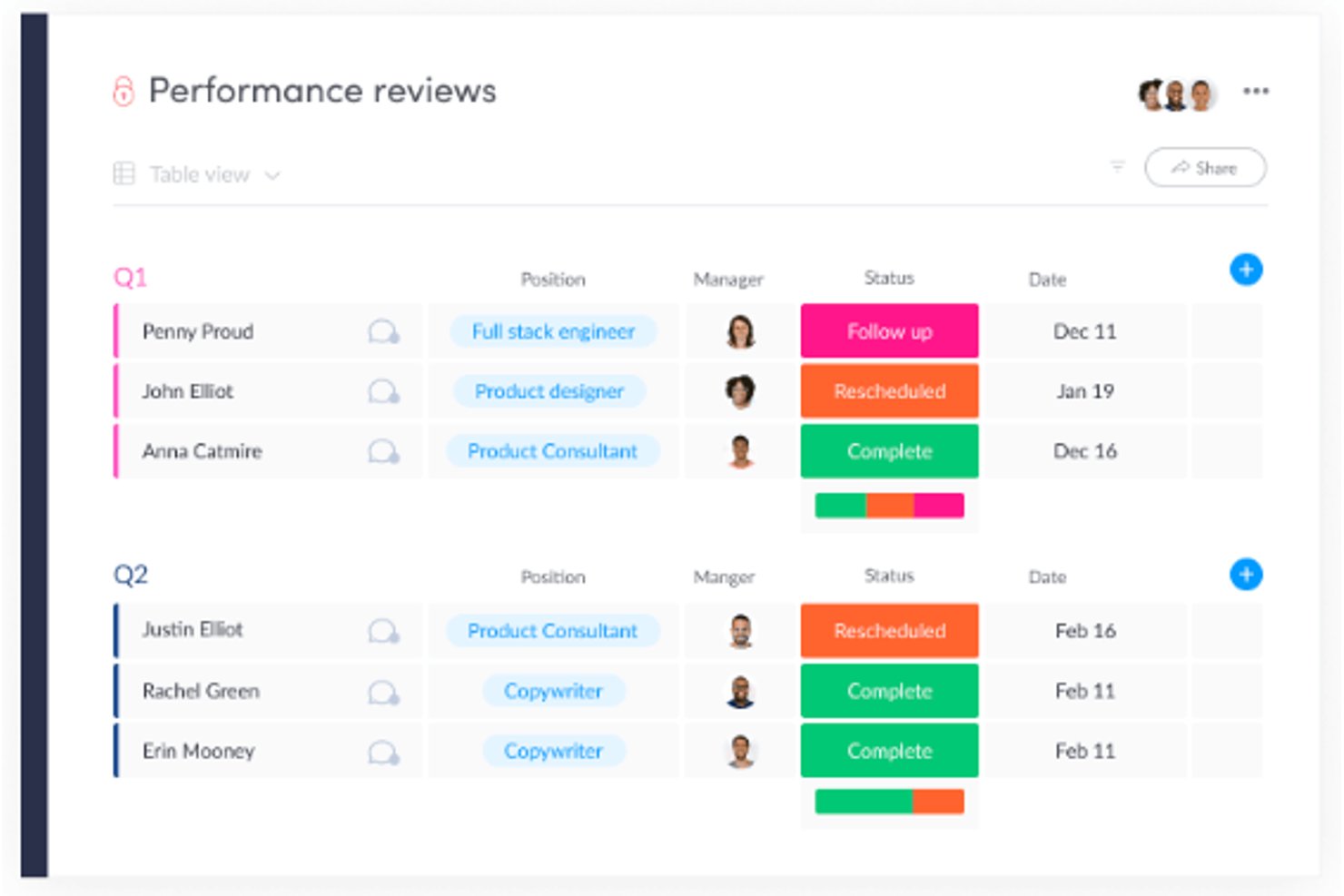
monday AI Workspace è una piattaforma personalizzabile per la gestione del lavoro che unisce pianificazione di progetti potenziata dall’AI, dashboard visive, automazione dei flussi di lavoro e strumenti di collaborazione adattabili ai processi HR come selezione del personale, onboarding e gestione dei dipendenti.
Per chi è più indicato monday AI Workspace?
È particolarmente adatto a team HR e ops di medie dimensioni che desiderano flussi di lavoro flessibili e visivi senza dover investire in un HRIS dedicato.
Perché ho scelto monday AI Workspace
Ho scelto monday AI Workspace per la mia shortlist per come gestisce la visualizzazione dei dati nei flussi HR. Apprezzo soprattutto le dashboard in tempo reale che raccolgono dati da più board, consentendo al mio team di monitorare l’organico, il progresso dell’onboarding e le posizioni aperte in un’unica vista centralizzata. Le colonne di stato colorate e le visualizzazioni della timeline rendono immediatamente evidenti i colli di bottiglia, senza dover scavare tra fogli di calcolo o generare report manuali.
Funzionalità principali di monday AI Workspace
- Costruttore di flussi di lavoro personalizzabile: Interfaccia drag-and-drop per progettare e automatizzare i processi HR come onboarding o valutazioni delle performance.
- Gestione documentale: Carica, archivia e organizza in modo sicuro documenti dei dipendenti e file HR direttamente nelle board.
- Permessi basati sui ruoli: Controlla l’accesso ai dati sensibili HR con ruoli utente e permessi personalizzati.
- Moduli integrati: Crea moduli interni per richieste come ferie, attrezzature e feedback, collegando le risposte direttamente ai flussi di lavoro.
Integrazioni monday AI Workspace
monday AI Workspace offre centinaia di integrazioni native attraverso le integrazioni interne e il marketplace, tra cui Slack, Salesforce, HubSpot, Google Workspace, Microsoft 365, Zoom, DocuSign, GitHub, Jira e Dropbox. Supporta anche Zapier e fornisce una API per integrazioni personalizzate.
Pros and Cons
Pros:
- Dashboard altamente visive per dati HR
- Board flessibili che si adattano a qualsiasi flusso HR
- Le funzionalità AI automatizzano le attività HR ripetitive
Cons:
- Non è open source né auto-ospitabile
- Nessun modulo nativo per paghe o ferie
New Product Updates from monday AI Workspace
monday AI Workspace Adds Human Approval Routing
monday AI Workspace adds a human-in-the-loop approval block to AI Workflows, sending approval requests and routing workflow paths based on responses. For more information, visit monday AI Workspace's official site.

Ideale per facilità d'uso
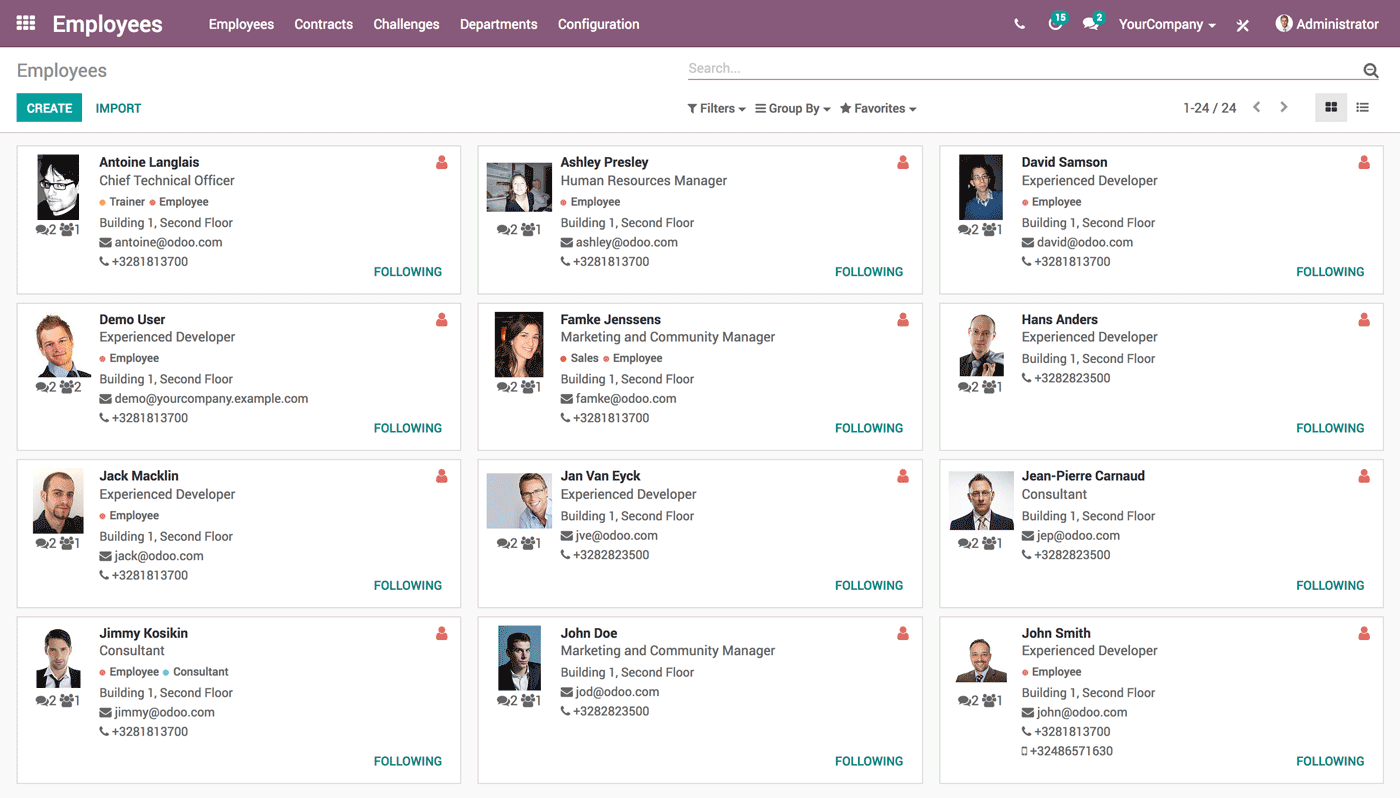
Odoo Employees si distingue per il modo in cui riunisce le principali funzioni HR con dashboard chiare e viste personalizzabili. Ho trovato i moduli per la gestione dei contratti e la tracciatura delle ferie veloci da configurare, il che rende davvero semplice il processo di onboarding e la gestione delle richieste di assenza. Quando i team hanno bisogno di operazioni HR di base e vogliono centralizzare tutte le informazioni dei dipendenti, consiglio Odoo per la rapidità con cui si può iniziare.
Ciò che apprezzo è che dettagli HR difficili da reperire, come lo stato dei contratti o le assenze, sono subito disponibili quando servono. Di solito vedo che i team apprezzano il non dover trascorrere ore a rincorrere la burocrazia, specialmente se sono abituati a usare email o fogli di calcolo.
Odoo Employees è ideale per
- Piccole e medie organizzazioni che hanno bisogno delle basi HR unificate
- Team che gestiscono in modo centralizzato contratti, ferie e presenze
Odoo Employees non è indicato per
- Aziende che necessitano di funzionalità avanzate di gestione dei talenti o di payroll
- Organizzazioni con esigenze di conformità HR altamente specializzate
Cosa distingue Odoo Employees
Odoo Employees è costruito attorno all'idea che dati HR e gestione del personale debbano convivere con il resto dei processi chiave di business. Invece di creare un flusso di lavoro separato come si trova in BambooHR o Gusto, Odoo prevede la gestione di contratti, ferie e anagrafiche dei dipendenti all'interno di un sistema unificato. Questo approccio funziona al meglio quando si desidera un kit HR di base all'interno di una piattaforma tutto-in-uno, con accesso rapido alle informazioni e supervisione semplificata.
Compromessi con Odoo Employees
Odoo Employees è ottimizzato per centralizzare le funzioni HR essenziali, ma il compromesso è una minore profondità in aree come analisi avanzata e gestione dei talenti. In pratica, ciò significa rinunciare a caratteristiche specialistiche che offrono le suite dedicate al solo HR.
Pros and Cons
Pros:
- Interfaccia pulita e coerente su tutti i flussi HR
- Il self-service dei dipendenti riduce le richieste amministrative quotidiane all'HR
- Configurazione semplice per le attività HR principali
Cons:
- La profondità dei report è limitata senza configurazioni aggiuntive
- La localizzazione del payroll dipende dalle configurazioni specifiche per paese
Migliore gestione delle informazioni sul personale
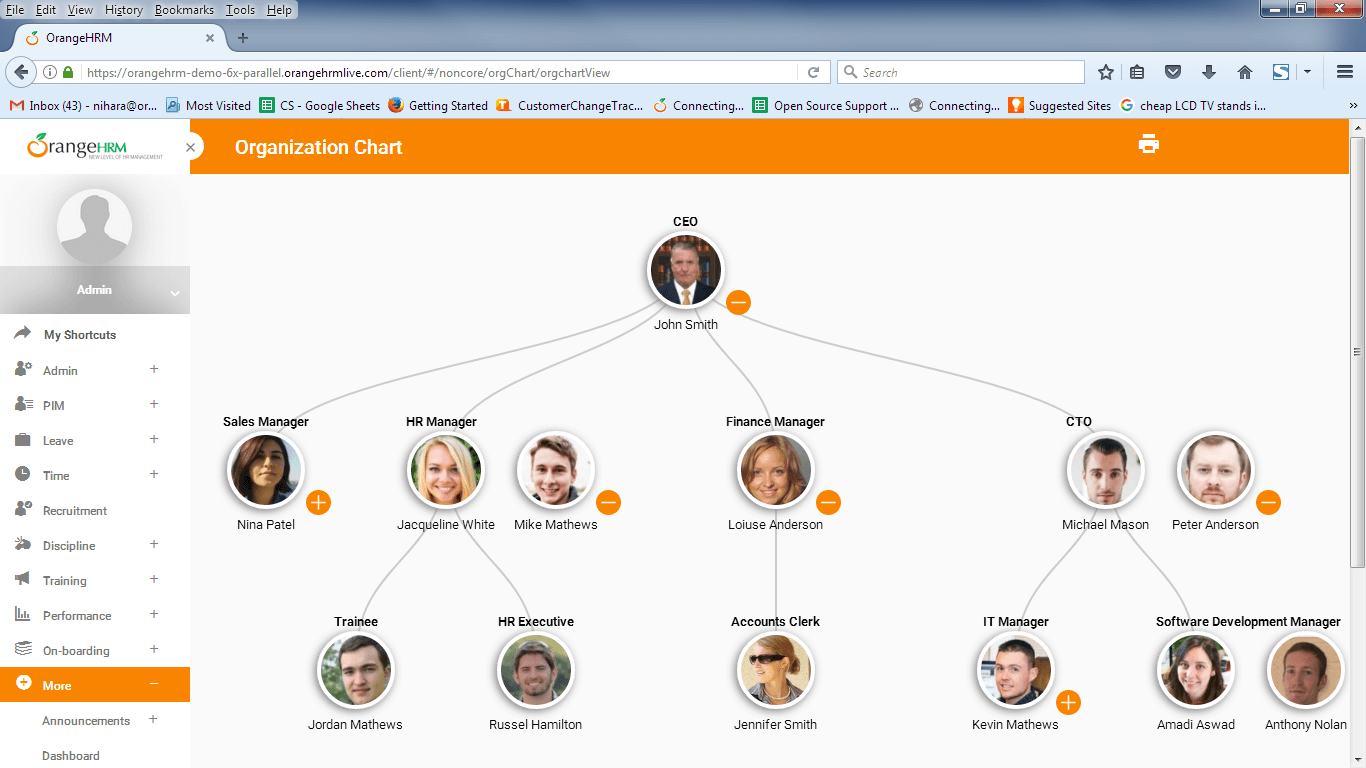
OrangeHRM è nella mia lista ristretta perché è costruito attorno alla gestione delle informazioni sul personale, una caratteristica rara nelle altre piattaforme HR open source. Mi piace come gestisce profili dettagliati dei dipendenti, inclusa la storia lavorativa, stipendio, permessi e contratti, tutto in un'unica posizione.
Quando lavoro con organizzazioni che danno importanza a una solida tenuta dei registri, i campi dati dettagliati e i controlli di accesso di OrangeHRM lo rendono semplice. I team si affidano spesso alle sue funzioni di reportistica e tracciamento delle revisioni per la conformità e la pianificazione della forza lavoro, che è dove credo si ottenga il massimo valore.
Per chi è più adatto OrangeHRM
- Organizzazioni che necessitano di una gestione dettagliata dei dati del personale
- Team HR focalizzati su conformità e tracciabilità degli audit
Per chi non è consigliato OrangeHRM
- Aziende che desiderano moduli integrati per paghe o benefit
- Team che cercano interfacce utente moderne e molto visive
Cosa rende OrangeHRM diverso
OrangeHRM si distingue perché sviluppa i processi HR attorno a registri personali dettagliati, invece che focalizzarsi su paghe, recruiting o benefit già pronti. Rispetto a strumenti come Bitrix24 o ERPNext, OrangeHRM si aspetta che i dati fondamentali dei dipendenti siano la base su cui costruire gli altri flussi di lavoro HR.
Nella pratica, questo funziona particolarmente bene quando le organizzazioni dipendono da registri altamente strutturati per la conformità e il processo decisionale.
Compromessi con OrangeHRM
OrangeHRM è ottimizzato per dati HR strutturati, ma questo significa rinunciare a funzionalità più estese, tutto-in-uno, come la gestione integrata di paghe e benefit. Di conseguenza, sono necessari altri strumenti se desideri queste funzionalità nel tuo stack.
Pros and Cons
Pros:
- La centralizzazione dei dati dei dipendenti riduce duplicati
- Solidi permessi basati sui ruoli proteggono le informazioni sensibili sul personale
- Il core open-source mantiene bassi i costi del sistema HR nel tempo
Cons:
- La gestione paghe richiede integrazione di terze parti invece di strumenti nativi
- Per la reportistica avanzata servono piani a pagamento o personalizzazioni

Bitrix24
Ideale per le piccole imprese
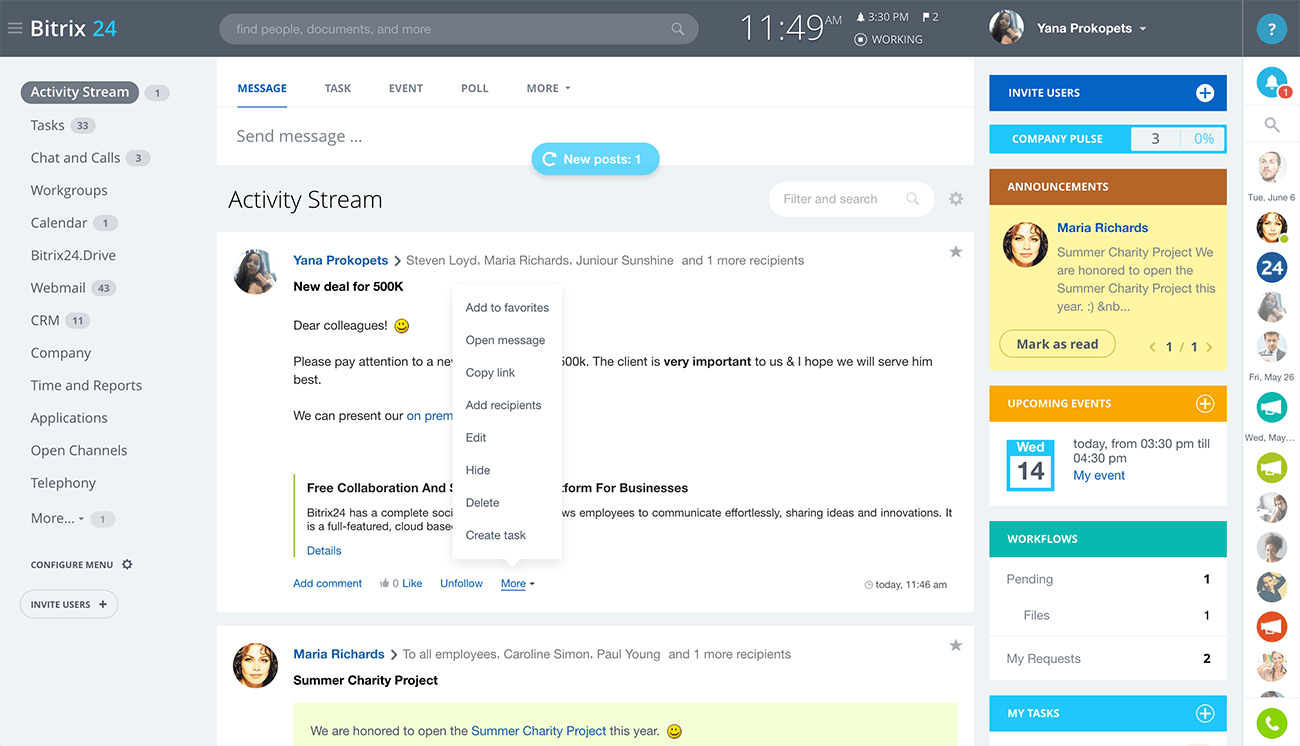
Bitrix24 si distingue per me quando le piccole imprese hanno bisogno di qualcosa di più dei semplici strumenti HR di base. Vedo molto valore nella sua capacità di combinare gestione del tempo, directory dei dipendenti e gestione dei documenti in un unico sistema open source, così i team non devono destreggiarsi tra più applicazioni.
Una cosa che apprezzo è che offre strumenti self-service per richieste di permessi e rilevamento delle presenze, permettendo anche di automatizzare i flussi di approvazione man mano che si cresce. Tendo a consigliare questa soluzione ai piccoli team che necessitano di controlli di accesso e archivi dei dipendenti in un'unica interfaccia, senza dover cambiare stack subito.
A chi è più indicato Bitrix24
- Piccole imprese che necessitano di uno strumento centrale per HR e collaborazione
- Aziende che vogliono gestione documentale integrata e monitoraggio del tempo
Quando Bitrix24 non è la scelta migliore
- Grandi aziende con complesse esigenze HR multi-paese
- Team che desiderano codice open source altamente personalizzabile
Cosa distingue Bitrix24
Bitrix24 si distingue per la sua visione dell'HR come parte di una piattaforma di lavoro più ampia, non solo come uno strumento HR a sé stante come OrangeHRM o Sentrifugo. Si lavora nello stesso spazio in cui si collabora, si gestiscono documenti e si monitora il tempo—così i processi HR si integrano nel flusso lavorativo quotidiano. In pratica, questa modalità funziona al meglio per le piccole aziende che vogliono evitare una proliferazione di strumenti e tenere tutto sotto controllo in un unico ambiente.
Compromessi con Bitrix24
Bitrix24 punta su uno spazio di lavoro unificato, ma questo significa che le funzionalità HR sono meno approfondite e configurabili rispetto a strumenti sviluppati esclusivamente per la gestione HR. Potresti incontrare dei limiti quando le esigenze HR diventano più articolate o specialistiche.
Pros and Cons
Pros:
- Progettato per piccoli team
- Chat e video integrati riducono la necessità di strumenti aggiuntivi
- Cresce gradualmente con l'aumentare del personale e delle esigenze
Cons:
- Configurazione iniziale lunga a causa dell'elevato numero di funzionalità
- Poche integrazioni native al di fuori dei grandi ecosistemi

WP ERP
Il miglior software HR basato su Wordpress
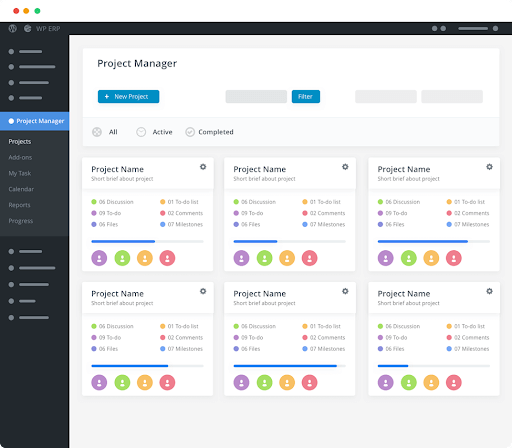
WP ERP entra nella mia lista ristretta perché è uno dei pochi strumenti HR costruiti direttamente per i siti WordPress. Mi piace il fatto che puoi gestire i registri dei dipendenti, le presenze e le politiche di congedo di tutta l’azienda direttamente dalla tua dashboard di WP, con i dati completamente archiviati all'interno del sito esistente. Quello che mi colpisce è la facilità di gestione delle attività HR quotidiane senza dover uscire da WordPress, un aspetto fondamentale per le organizzazioni centrate sul sito.
WP ERP è ideale per
- Proprietari di siti WordPress che gestiscono le risorse umane direttamente dal loro sito
- Piccole imprese che desiderano un controllo HR open source e in locale
WP ERP non è adatto per
- Organizzazioni che non utilizzano siti WordPress
- Grandi aziende che necessitano di analisi HR complesse o strumenti di conformità
Cosa distingue WP ERP
WP ERP tratta il tuo sito WordPress come il centro dell’attività HR, quindi gestisci le attività HR direttamente insieme agli strumenti di amministrazione del sito. A differenza di soluzioni come OrangeHRM, che funzionano come piattaforme indipendenti, WP ERP prevede che gestirai HR, archivi dei dipendenti e gestione delle assenze direttamente dalla dashboard WP. Questo approccio è ideale se lavori principalmente su WordPress e non vuoi passare da un sistema all'altro.
Compromessi di WP ERP
WP ERP è ottimizzato per un flusso di lavoro basato su WP, ma si rinuncia ad analisi HR avanzate e funzionalità di conformità più ampie presenti su piattaforme dedicate. Se la tua azienda cresce oltre l’ambiente WordPress, i limiti diventano evidenti.

Dolibarr
Ideale per funzionalità integrate ERP e CRM
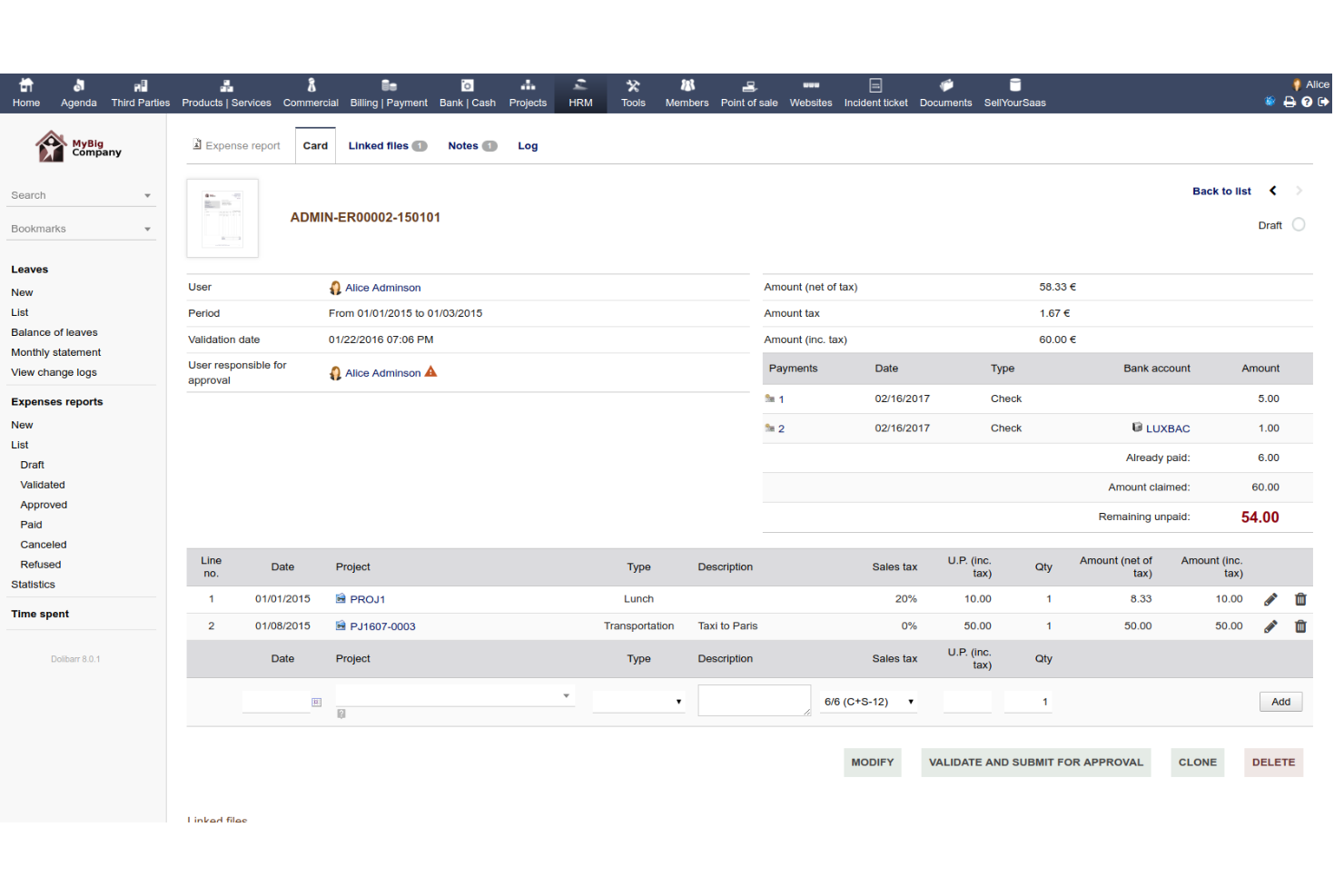
Dolibarr compare nella mia lista perché combina la gestione delle risorse umane con strumenti ERP e CRM in un'unica piattaforma open source. Trovo che sia adatto quando vuoi supportare processi HR come il reclutamento e l'anagrafica dei dipendenti insieme a finanza, gestione dei progetti e flussi di lavoro di vendita dalla stessa interfaccia.
Apprezzo il fatto che sia possibile collegare eventi HR, assenze e contratti direttamente alle operazioni aziendali senza uscire dalla piattaforma. Questo mantiene tutto allineato tra i team che necessitano integrazione, e non solo delle funzioni HR di base.
Dolibarr è ideale per
- Organizzazioni che hanno bisogno sia dell'integrazione HR che dei processi aziendali
- Team che desiderano un ERP open source con moduli HR
Dolibarr non è adatto a
- Aziende che necessitano di funzionalità HR specializzate, come la gestione avanzata delle buste paga
- Team focalizzati esclusivamente su soluzioni HR standalone
Cosa distingue Dolibarr
Dolibarr adotta un approccio ampio e modulare, unendo HR, ERP e CRM in un unico sistema open source. È progettato per permetterti di gestire le attività HR insieme a contabilità o inventario dallo stesso ambiente di lavoro. Rispetto a soluzioni più mirate come OrangeHRM, Dolibarr prevede l'integrazione dell'HR nei processi organizzativi complessivi.
Questa soluzione funziona bene quando desideri che tutto sia tracciato in un unico luogo invece di gestire applicazioni separate.
Compromessi con Dolibarr
Ottimizzando per ampiezza e integrazione, Dolibarr sacrifica la profondità che offrono gli strumenti esclusivamente HR. Se necessiti di funzionalità HR avanzate o report dettagliati, probabilmente troverai alcune lacune.


ERPNext è entrato nella mia lista perché è a codice sorgente aperto e offre piena flessibilità nella strutturazione dei flussi di lavoro delle risorse umane. Quando ho lavorato con organizzazioni che dovevano creare processi HR personalizzati—come approvazioni specifiche, percorsi di onboarding o politiche dipartimentali—ERPNext è una delle poche soluzioni che consente effettivamente di modellare tutto questo con il suo motore dei flussi di lavoro.
Ciò che apprezzo maggiormente è quanto sia accessibile per i team che vogliono automatizzare le attività HR ripetitive senza ricorrere a molto codice o ad aggiunte esterne. È possibile creare moduli, configurare regole o attivare notifiche, evitando così che il reparto HR rimanga bloccato in interminabili conversazioni via email per inseguire la documentazione.
I casi ideali per ERPNext
- Organizzazioni con esigenze di flussi di lavoro HR specifiche o personalizzabili
- Aziende che desiderano un sistema HRM a codice sorgente aperto con automazione integrata
I casi meno adatti a ERPNext
- Team che desiderano un'interfaccia utente moderna e modelli HR pronti all'uso
- Aziende alla ricerca di strumenti preconfigurati per le buste paga o la conformità normativa locale
Ciò che distingue ERPNext
ERPNext è stato progettato pensando alla personalizzazione e consente di modellare i processi HR con i suoi strumenti per i flussi di lavoro, senza essere vincolati da campi preimpostati o modelli rigidi. Mentre una soluzione come OrangeHRM si basa su moduli pronti all'uso, ritengo che ERPNext funzioni meglio quando si desidera creare i propri moduli, percorsi di approvazione o procedure di onboarding utilizzando un editor visivo. In pratica, ciò significa avere maggiore libertà di adattare i sistemi HR esattamente alle politiche locali e alle preferenze aziendali.
Compromessi di ERPNext
ERPNext punta sulla flessibilità e sulla personalizzazione, ma di conseguenza la configurazione può richiedere più tempo e presuppone la presenza di persone che sappiano esattamente cosa vogliono creare. Se desideri un sistema HR operativo fin da subito e con un intervento minimo, questa non è l'opzione più rapida.


ADempiere è tra i miei preferiti perché è uno degli strumenti ERP open source più flessibili, con una solida esperienza nell'analisi e nei report delle risorse umane. Lo consiglio quando hai bisogno di report HR collegati direttamente alle attività del personale in tempo reale, ai dati di payroll e di performance, tutto sulla stessa piattaforma. Sono disponibili dashboard personalizzabili e report dettagliati, e apprezzo quanto sia possibile adattare la visualizzazione dei dati ai propri processi HR.
ADempiere è ideale per
- Organizzazioni che necessitano di report HR su misura con dati in tempo reale
- Aziende che integrano HR con ERP, paghe e contabilità
ADempiere non è adatto per
- Team che desiderano funzionalità HR plug-and-play
- Aziende alla ricerca di un'interfaccia moderna o strumenti HR mobili
Cosa distingue ADempiere
ADempiere è plasmato dalla sua origine come ERP open source, quindi le funzionalità HR sono strettamente collegate a finanza e operazioni. Invece di puntare su un design incentrato sulle risorse umane come OrangeHRM o Sentrifugo, si aspetta che tu colleghi direttamente report e analisi a paghe, rilevazione presenze e processi aziendali. In pratica, questo funziona bene quando vuoi che i dati HR siano sempre collegati a ciò che accade nel resto della tua azienda.
Compromessi di ADempiere
ADempiere è ottimizzato per l'integrazione con i flussi di lavoro ERP più ampi, ma ciò significa che le funzionalità HR sono meno moderne e richiedono una maggiore configurazione. I team focalizzati solo sulle risorse umane troveranno più lenta la creazione di valore.

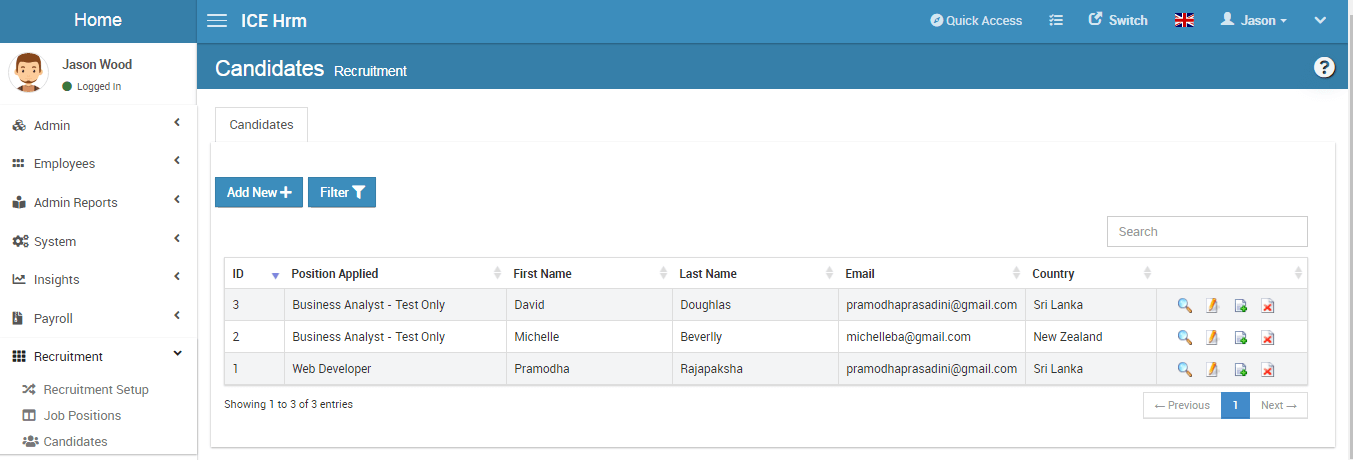
L’edizione a codice sorgente aperto di IceHrm è tra le mie preferite perché è una delle poche suite HR che offre effettivamente strumenti solidi per la pubblicazione interna delle offerte di lavoro già pronti all’uso. Ho visto team utilizzare il suo portale per le offerte di lavoro interne per gestire i trasferimenti tra reparti e favorire l’avanzamento professionale, monitorando al contempo i candidati nello stesso sistema. Mi piace il fatto che renda così semplice promuovere i ruoli tra i dipendenti attuali, senza moduli aggiuntivi o soluzioni alternative.
Ideale per
- Organizzazioni che sviluppano programmi di mobilità interna e promozione
- Team HR che cercano controllo e possibilità di personalizzazione grazie al codice sorgente aperto
Non ideale per
- Aziende che necessitano di una gestione sofisticata delle buste paga o dei benefit
- Team che fanno affidamento sull’approvvigionamento di candidati esterni su larga scala
Ciò che distingue IceHrm
IceHrm adotta un approccio aperto alle attività HR tradizionali, mettendo la mobilità interna in primo piano. A differenza di OrangeHRM o Sentrifugo, che spesso si concentrano sul semplice monitoraggio delle ferie o delle presenze, IceHrm punta sull’utilizzo di un portale per le offerte di lavoro interne a supporto della crescita dei dipendenti. Nella pratica, funziona bene quando si desidera incoraggiare trasferimenti e promozioni all’interno dell’organizzazione, invece di ricorrere automaticamente alle assunzioni esterne.
Compromessi di IceHrm
IceHrm è ottimizzato per la trasparenza e la mobilità dei talenti interni, ma non offre funzionalità avanzate come l’elaborazione automatizzata delle buste paga o i moderni strumenti di coinvolgimento, il che significa che, con l’evolversi delle esigenze, saranno necessarie altre soluzioni.

TimeTrex
Ideale per il monitoraggio preciso delle presenze
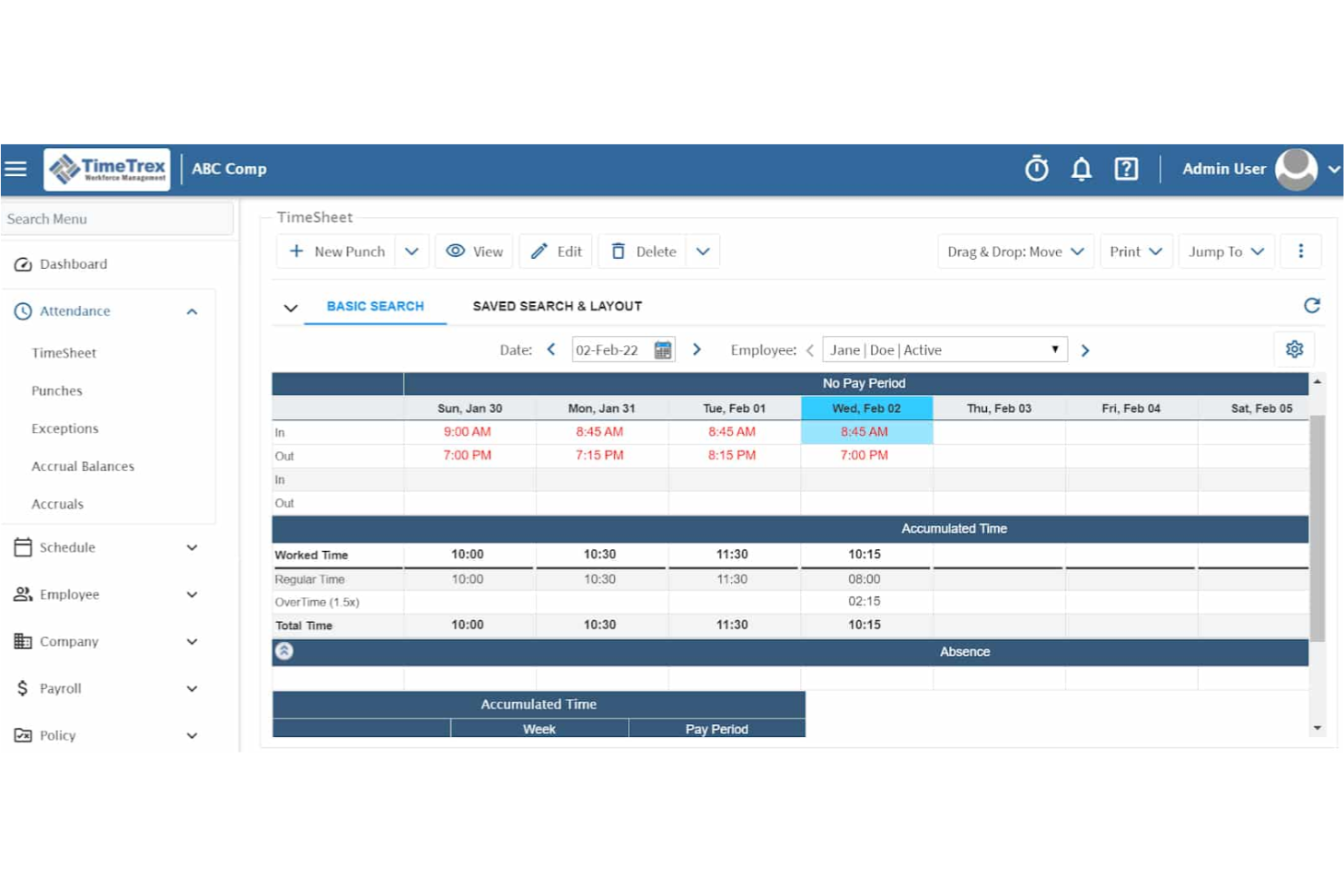
TimeTrex si distingue tra i software HR open source quando hai bisogno di un rilevamento presenze accurato integrato in una piattaforma completa per la gestione della forza lavoro. Ho visto molti team affidarsi alle sue opzioni di timbratura in/uscita, alle schede orarie con geolocalizzazione e alla programmazione automatica, soprattutto nelle aziende con politiche rigorose sulle presenze. Quello che apprezzo di più è la possibilità di elaborare buste paga dettagliate direttamente dallo stesso sistema, con strumenti di conformità e registri di controllo che rendono tutto il processo più sicuro.
Funziona al meglio quando registri accurati non sono utili solo per il payroll, ma anche per la conformità e la trasparenza nelle realtà con forza lavoro a ore.
Ideale per chi
- Aziende che necessitano di un monitoraggio preciso di presenze e orari
- Team HR che gestiscono payroll e conformità in un solo sistema
Non ideale per chi
- Team alla ricerca di funzionalità avanzate di gestione dei talenti
- Organizzazioni che richiedono dashboard moderne e intuitivi
Cosa distingue TimeTrex
TimeTrex adotta un approccio rigoroso al controllo della forza lavoro, ponendo la massima attenzione su rilevazione presenze e conformità degli orari. In pratica, puoi creare turni, gestire schede orarie ed elaborare le buste paga tutto in un unico posto, consentendo allo staff amministrativo di controllare ogni aspetto da un unico hub. Diversamente da piattaforme come OrangeHRM, incentrate più su talenti e performance, TimeTrex rimane focalizzato sulla precisione dei dati e sulle informazioni pronte per il payroll.
Compromessi di TimeTrex
TimeTrex è ottimizzato per la gestione di presenze e conformità, ma questa specializzazione comporta la mancanza di moduli moderni per la gestione dei talenti, quindi i team che cercano strumenti per la crescita e il coinvolgimento devono orientarsi altrove.
New Product Updates from TimeTrex
TimeTrex Adds Quick Punch App With Offline and QR Support
TimeTrex adds a new Quick Punch app, offline punching, QR code scanning, punch images, configurable messages, and punch warnings or lockouts to improve employee clock-ins across browsers and local computers. For more information, visit TimeTrex’s official site.
 .
.Altri software HR open source
Ecco alcuni altri sistemi HR open source che vale la pena considerare, ma che non sono rientrati nella mia lista dei 10 migliori. Non avevo spazio per una recensione completa di ciascuno di questi, ma meritano comunque attenzione:


Recensioni correlate di software HR
Se non hai ancora trovato ciò che cerchi, dai un’occhiata a questi altri strumenti correlati che abbiamo testato e valutato:
- Software HR
- Software per le buste paga
- Software per la selezione del personale
- Servizi di datore di lavoro per conto terzi
- Sistemi di tracciamento dei candidati
- Software per la gestione della forza lavoro
Come Valuto il Software HR Open Source
Valuto gli strumenti HR open source su due livelli: i requisiti fondamentali come self-hosting, licenza OSS e gestione dei dati dei dipendenti, poi i fattori differenzianti come la salute della community e la completezza della funzione payroll.
Funzionalità di Base (Requisiti Indispensabili per Questa Lista)
Quando seleziono gli strumenti per la mia lista, valuto ciascuno su una scala da 0 (non offre la funzionalità) a 5 (eccelle in quest'area) per ogni funzionalità principale elencata di seguito. Poi, calcolo il punteggio totale dello strumento in percentuale. Ogni strumento deve raggiungere un punteggio minimo totale del 65% per essere considerato per l'inclusione.
- Licenza Open Source: Verifico che ci sia una licenza approvata OSI riconosciuta (GPL, MIT, AGPL, Apache) e confermo che il codice sorgente sia pubblicamente disponibile in un repository attivo.
- Possibilità di Self-Hosting: Ogni strumento dovrebbe supportare il deployment on-premise o self-hosted così che il vostro team controlli dove risiedono i dati HR e come viene gestita l'infrastruttura.
- Gestione dei Dati Dipendente: Cerco un database centralizzato dei dipendenti che gestisca profili, gerarchia aziendale, contratti e archiviazione documentale lungo tutto il ciclo di vita del dipendente.
- Gestione Presenze & Permessi: Gli strumenti devono gestire richieste di permesso, workflow di approvazione e rilevazione delle presenze—come la configurazione di calendari festivi regionali o approvazioni su più livelli manageriali.
- Modulo Payroll & Retribuzioni: Valuto se la piattaforma include l'esecuzione di paghe, la generazione dei cedolini e le strutture salariali, oppure offre integrazioni dirette con sistemi payroll.
- Estendibilità & Accesso API: Qui conta una REST API documentata, supporto webhook o una struttura a plugin—soprattutto per i team che collegano dati HR a ERP o sistemi di gestione identità.
Una volta che ho una lista di strumenti che soddisfano questi criteri, considero cosa distingue realmente ogni piattaforma.
Fattori Differenzianti (Cosa Distingue i Fornitori)
Ecco come metto a confronto i diversi vendor:
Funzionalità Distintive
Un portale self-service per i dipendenti è un grande elemento distintivo—permette al personale di inviare richieste di permesso, scaricare cedolini e aggiornare i propri dati personali senza dover aprire ticket con le risorse umane. Valuto anche il supporto multilingua e per la localizzazione, importante per i team distribuiti in più regioni con necessità di formati data, valute e modelli normativi locali. Anche la gestione delle performance è una caratteristica che considero, soprattutto nei tool che collegano direttamente il tracking degli obiettivi e i cicli di valutazione alle anagrafiche dei dipendenti.
Oltre le Funzionalità
La salute della community è una delle prime cose che controllo. Un progetto con commit regolari, forum attivi e rilascio di nuove versioni recenti indica una buona prospettiva nel tempo—repository abbandonati rappresentano un rischio concreto in questo ambito. Analizzo anche con attenzione il modello di licenza, perché una licenza AGPL impone obblighi diversi dalla MIT quando si modificano i sorgenti per uso interno. Compliance e sicurezza dei dati completano la mia valutazione, in particolare controllo su accessi basati su ruoli e audit log per gestire dati sensibili dei dipendenti su infrastruttura self-hosted.
Che cos’è un software HR open source?
Il software HR open source è un tipo di strumento per la gestione delle risorse umane il cui codice sorgente è disponibile per essere utilizzato, modificato e distribuito da chiunque. Consente alle aziende di personalizzare i propri processi HR, tra cui la gestione dei dati dei dipendenti, le buste paga, la selezione del personale e la valutazione delle prestazioni, in base alle proprie esigenze specifiche. Questo software offre generalmente vantaggi in termini di costi e flessibilità, grazie al supporto di una comunità di sviluppatori e utenti.
Funzionalità
Ecco le funzionalità principali che ogni ottimo software HR open source dovrebbe offrire:
- Codice personalizzabile: Modifica il software per adattare flussi di lavoro, moduli e funzionalità alle esigenze specifiche della tua organizzazione. È perfetto se vuoi la libertà di creare esattamente ciò che è più importante per te.
- Gestione del database dei dipendenti: Archivia, organizza e aggiorna facilmente le informazioni sui dipendenti, così puoi trovare rapidamente i dettagli ed evitare di annegare nei fogli di calcolo.
- Controlli degli accessi basati sui ruoli: Imposta le autorizzazioni per utenti diversi, in modo da mantenere privati i dati sensibili delle risorse umane, consentendo al contempo ai dipendenti di accedere a ciò di cui hanno bisogno per le attività quotidiane.
- Monitoraggio di presenze e orari: Registra le presenze dei dipendenti, le richieste di ferie e le ore lavorate, aiutandoti a semplificare l'elaborazione delle buste paga ed evitare i problemi legati al monitoraggio del tempo.
- Strumenti per la gestione delle prestazioni: Gestisci obiettivi, feedback e valutazioni in un unico luogo, così puoi offrire supporto continuo e mantenere i team sulla buona strada.
- Integrazione con le buste paga: Collegati alle soluzioni per l'elaborazione delle buste paga per automatizzare calcoli e pagamenti, riducendo gli oneri amministrativi.
- Selezione e inserimento dei nuovi dipendenti: Pubblica offerte di lavoro, gestisci le candidature e monitora i progressi dal primo colloquio al primo giorno di lavoro, il tutto in modo adattabile al variare dei tuoi processi.
- Gestione dei documenti: Archivia in modo sicuro contratti, policy e altri file importanti, rendendo semplice trovare ciò che ti serve senza dover frugare nei cassetti della scrivania.
- Report e analisi: Genera report dettagliati per ottenere informazioni sull'andamento dei dipendenti, sull'organico, sul turnover e molto altro, senza bisogno di una sfera di cristallo!
Funzionalità comuni dell'intelligenza artificiale nei software HR open source
Oltre alle funzionalità standard dei software HR open source elencate sopra, molte di queste soluzioni stanno integrando l'intelligenza artificiale con funzionalità come:
- Automazione dello screening dei CV: L'intelligenza artificiale analizza le candidature e mette in evidenza i candidati migliori, così puoi evitare la noiosa revisione manuale e concentrarti sui colloqui.
- Analisi predittiva della forza lavoro: Usa l'intelligenza artificiale per prevedere i rischi di turnover e le esigenze della forza lavoro, aiutandoti a individuare schemi ricorrenti e a pianificare in modo più efficace.
- Chatbot per il supporto HR: I chatbot interattivi basati sull'intelligenza artificiale rispondono istantaneamente alle domande dei dipendenti su politiche aziendali o benefici, evitandoti di dover gestire una casella di posta stracolma.
- Valutazioni delle prestazioni basate sull'intelligenza artificiale: Raccogli e valuta automaticamente i feedback per individuare opportunità di sviluppo, eliminando le congetture dal coaching.
- Pianificazione intelligente: L'intelligenza artificiale aiuta a ottimizzare l'assegnazione dei turni e i calendari, assicurandoti di avere le persone giuste nel posto giusto al momento giusto.
Quando utilizzi un software HR open source, hai la libertà di personalizzare il codice. Tuttavia, se la personalizzazione non è la tua priorità, esplora queste piattaforme software HR che offrono funzionalità pronte all'uso.
Vantaggi
Esistono numerosi elenchi di software HR tra cui scegliere; quindi, perché optare per una soluzione open source? I software HR open source offrono numerosi vantaggi agli utenti e alle organizzazioni. Ecco alcuni motivi per cui potresti voler implementare un software HR open source nella tua organizzazione:
- Convenienza economica: Il vantaggio più comune dell'utilizzo di un software open source è che è gratuito. Eliminando gli elevati costi di licenza associati ai sistemi proprietari, un sistema open source riduce i costi operativi complessivi della tua azienda.
- Personalizzazione: Le organizzazioni possono modificare il software HR open source per soddisfare le proprie esigenze specifiche, garantendo una soluzione personalizzata in linea con i processi e i requisiti unici dell'organizzazione.
- Supporto della comunità: I sistemi open source sono generalmente accompagnati da una vivace comunità di sviluppatori e utenti che offre ampio supporto e numerose risorse, fornendo assistenza nella risoluzione dei problemi e aggiornamenti regolari.
- Trasparenza: La natura aperta del software consente agli utenti di visualizzare e comprendere il codice sorgente, garantendo l'assenza di funzionalità nascoste o problemi di sicurezza.
- Innovazione: L'accesso al codice sorgente incoraggia l'innovazione, consentendo alle organizzazioni di implementare rapidamente le funzionalità e i miglioramenti più recenti.
Scegliendo un software HR open source, le aziende possono risparmiare sui costi e ottenere la flessibilità e il controllo necessari per creare un sistema perfettamente adatto alle proprie esigenze. Nel complesso, questi vantaggi contribuiscono a un processo di gestione delle risorse umane più efficiente, sicuro e adattabile, preparando le organizzazioni a un successo duraturo.
Costi e prezzi
A volte tutto si riduce al prezzo e il software open source è generalmente molto conveniente. Infatti, nella maggior parte dei casi, il software è disponibile gratuitamente.
Molti fornitori di software open source offrono inoltre agli utenti la possibilità di passare a una versione a pagamento dello stesso software se desiderano accedere a funzionalità più avanzate. Avere questo tipo di flessibilità è un grande vantaggio per l'utente. Significa poter scaricare il software e dedicare del tempo a familiarizzare con esso prima di prendere una decisione.
E se ti piace davvero e vuoi accedere a più funzionalità, puoi passare a un livello superiore oppure chiedere al tuo reparto IT di provare a personalizzarlo in base alle esigenze specifiche della tua azienda.
Domande frequenti
Ecco alcune risposte alle domande frequenti che sento spesso sul software HR open source:
Cosa significa "open source" in relazione al software?
Il termine open source si riferisce a un modello di sviluppo e distribuzione del software in cui il codice sorgente di un programma per computer è reso disponibile al pubblico. Poiché queste informazioni sono accessibili pubblicamente, altri sviluppatori di software possono modificare il codice sorgente sottostante per personalizzare l’applicazione in base alle proprie esigenze specifiche. Il software open source viene generalmente sviluppato in modo collaborativo all’interno di comunità tecniche di sviluppatori che lavorano al progetto pro bono (ovvero gratuitamente) per portarlo avanti a beneficio dell’intero settore e degli utenti finali.
Qual è la differenza tra HRIS e HRMS?
I sistemi informativi per le risorse umane (HRIS) sono software che offrono funzioni più basilari, come la gestione delle presenze, il monitoraggio delle ore e l’elaborazione delle buste paga. I sistemi di gestione delle risorse umane (HRMS) sono strumenti per la gestione dei dipendenti che ampliano ulteriormente le funzionalità includendo caratteristiche come la reportistica, il coinvolgimento dei dipendenti e la valutazione delle prestazioni.
Quali integrazioni software sono importanti per il software HR open source?
Le integrazioni software possono farti risparmiare molto lavoro manuale ripetitivo, ad esempio evitando di dover trasferire i dati manualmente, oppure tramite importazioni ed esportazioni, da un sistema all’altro. Utilizzando invece un’integrazione software nativa, potrai migliorare la produttività del tuo team e aiutare i professionisti delle risorse umane a lavorare in modo più efficiente.
Le integrazioni specifiche da cercare dipenderanno dal tipo di software HR che stai cercando; tuttavia, le integrazioni con i provider di posta elettronica, i calendari digitali, i software per le buste paga e le piattaforme di lavoro come Google Workspace e Microsoft SharePoint sono sempre utili.