

10 beste Arcoro-alternativer for HR i bygg- og anleggsbransjen i 2026

10 Kortliste over de beste Arcoro-alternativene


Hvis du er lei av å håndtere kompliserte lønnskjøringer, følge opp frister for regelverksetterlevelse og forsøke å administrere en mobil arbeidsstyrke – samtidig som HR-programvaren din gjør arbeidet tregere – er det på tide med en endring.
Arcoro har kanskje hjulpet deg et stykke på vei, men hvis klønete mobiltilgang, rigide arbeidsflyter eller treg kundestøtte står mellom deg og en strømlinjeformet HR-drift, fortjener du bedre.
Jeg har brukt flere år på å vurdere HR-programvare utviklet for krevende bransjer som bygg og anlegg, og jeg vet hva som fungerer. I denne artikkelen viser jeg deg de beste Arcoro-alternativene, slik at du kan slippe unna problemene og gi teamet ditt verktøyene de trenger for å lykkes.
Hva er Arcoro?
Arcoro er et HR-programvaresystem for bygg- og anleggsbransjen, utviklet for å forenkle prosesser for arbeidsstyrkeadministrasjon for fagfolk i bransjen. HR-ledere og lønnsspesialister bruker det ofte i bygg- og anleggsbransjen til å håndtere kompliserte lønnskjøringer, regelverksetterlevelse og sporing av arbeidsstyrken.
Det omfatter funksjoner som tidsregistrering, lønnsadministrasjon og sporing av regelverksetterlevelse, som hjelper team med å holde oversikt over regelverk og daglige behov på en effektiv måte. Alt i alt tilbyr Arcoro verdifulle verktøy for å holde feltbaserte bygg- og anleggsteam organiserte og i samsvar med regelverket.
Hvorfor se etter et Arcoro-alternativ?
Selv om Arcoro er et godt valg av HR-programvare for bygg- og anleggsbransjen, finnes det flere grunner til at noen brukere ser etter alternative løsninger. Det kan hende du ser etter et Arcoro-alternativ fordi …
- Du trenger bedre brukervennlighet på mobil
- Teamet ditt trenger flere tilpasningsmuligheter
- Du utvider til flere lokasjoner
- Du ser etter mer konkurransedyktige priser
- Du trenger raskere kundestøtte
- Virksomheten din trenger AI-drevet innsikt
Hvis du står overfor noen av disse utfordringene med Arcoro, har du kommet til rett sted! Listen min inneholder flere HR-programvareløsninger for bygg- og anleggsbransjen som passer bedre for team på jakt etter alternative løsninger til Arcoro.
Why Trust Our Software Recommendations
Our team has been testing and reviewing software since 2012. As HR experts ourselves, we know how difficult—and important—it is to choose the right software.
For this guide, we evaluated tools using hands-on testing and independent research, scoring tools using our selection criteria. We also draw on insights from industry thought leaders and practicing HR experts.
Our reviews reflect our human editorial judgment, not a sales pitch.
Expert reviewers:
Sammenligningstabell for Arcoro-alternativer
Bruk denne sammenligningstabellen til å sammenligne priser, gratis prøveperioder og tilgjengelighet av demoer for mine beste Arcoro-alternativer.
| Tool | Best For | Trial Info | Price | ||
|---|---|---|---|---|---|
| 1 | Best for custom HR workflows | Free demo available | From $5/employee/month | Website | |
| 2 | Best for employee experience | Free trial + free demo available | Pricing upon request | Website | |
| 3 | Best for AI-driven insights | Free demo available | Pricing upon request | Website | |
| 4 | Best for union payroll needs | Not available | Pricing upon request | Website | |
| 5 | Best for small business HR needs | 30-day free trial | From $1.25/user/month (billed annually) | Website | |
| 6 | Best for construction payroll | Not available | Pricing upon request | Website | |
| 7 | Best for IT and HR solutions | Free demo available | Upon request | Website | |
| 8 | Best for a mobile-first workforce | 14-day free trial | From $29/month (billed annually) | Website | |
| 9 | Best for modern workforce engagement | Free demo available | Pricing upon request | Website | |
| 10 | Best for small business scheduling | Free plan + 14-day free trial available; | From $24/month (billed annually) | Website |

Anmeldelser av de beste Arcoro-alternativene
Nedenfor finner du mine detaljerte sammendrag av de beste Arcoro-alternativene som kom med på kortlisten min. Anmeldelsene mine gir en detaljert gjennomgang av de viktigste funksjonene, fordelene & ulempene, integrasjonene og ideelle bruksområdene for hvert verktøy, slik at du kan finne det som passer best for deg.

GoCo
Best for custom HR workflows

GoCo is an HR software platform that simplifies HR tasks for small and medium-sized businesses. It assists with onboarding, benefits administration, and employee management.
Why it's a good Arcoro alternative: GoCo offers custom HR workflows, allowing your team to tailor processes to fit your needs. Its onboarding feature simplifies bringing new employees on board, while benefits administration ensures your team gets the support they need.
GoCo's employee management tools help you keep track of important information and tasks. Its flexibility in workflow customization makes it a versatile choice for your HR needs.
Standout features & integrations:
Features include document management for easy storage and retrieval of employee files. The time-off tracking feature helps your team manage leave requests efficiently. Compliance management tools ensure your business adheres to relevant regulations.
Integrations include QuickBooks, Slack, Google Workspace, Microsoft 365, Xero, Gusto, BambooHR, Asana, Trello, and Dropbox.
Pros and Cons
Pros:
- Flexible for small businesses
- Efficient benefits administration
- Simplifies onboarding process
Cons:
- Basic reporting capabilities only
- Limited advanced features


BambooHR is a cloud-based HR software designed for small to medium-sized businesses. It helps HR departments, recruiters, and managers automate HR processes and manage employee data efficiently.
Why it's a good Arcoro alternative: BambooHR focuses on enhancing the employee experience through features like employee satisfaction tracking, employee communities, and employee wellbeing tools, coupled with an intuitive user interface and customizable workflows.
BambooHR also offers digital offer letters and efficient onboarding tools that make it easy for your new hires to get up and running quickly.
Overall, it offers a comprehensive suite of tools to manage the full employee lifecycle, making it a strong alternative to Arcoro.
Standout features & integrations:
Features include employee records management, PTO tracking, performance reviews, and an intuitive user interface that simplifies navigation for your team. Customizable workflows let you tailor processes to match your company's needs. PTO tracking helps you manage employee leave efficiently.
Integrations include QuickBooks, Slack, ADP, Xero, Okta, Google Workspace, Microsoft 365, Zoom, DocuSign, and Indeed.
Pros and Cons
Pros:
- Strong focus on employee experience
- Comprehensive employee management
- Efficient onboarding tools
Cons:
- Clunky applicant tracking system
- Limited reporting capabilities

Workday HCM is a comprehensive human capital management software solution for organizations of all sizes. It serves HR departments, managers, and executives by facilitating workforce management, talent acquisition, payroll, and analytics.
Why it's a good Arcoro alternative: Workday HCM offers advanced AI-driven insights that enhance decision-making and workforce management. Its analytics and reporting tools provide deep insights into your organization's HR data.
The platform also supports global payroll and compliance, making it adaptable to diverse business needs. Workday's emphasis on employee experience and engagement aligns with its goal to improve operational agility.
Standout features & integrations:
Features include workforce planning that helps you align your team's goals with business objectives. Talent management tools support recruiting and developing your workforce. HR analytics provide insights into employee engagement and performance.
Integrations include Salesforce, ADP Workforce Now, Slack, ServiceNow, Google Workspace, LinkedIn, Adobe Sign, Okta, Workato, and Zoom.
Pros and Cons
Pros:
- Emphasizes employee engagement
- Supports global payroll
- Comprehensive HR analytics
Cons:
- Pricing details are not transparent
- Complex setup process


Payroll4Construction is a payroll service built specifically for contractors who need to manage union rates, job costing, and certified payroll reporting. It serves construction teams who want payroll tools tailored to the rules and reporting needs of the industry.
Why it's a good Arcoro alternative: Payroll4Construction handles multiple union rates, fringes, and deductions, so your team doesn’t have to enter them manually. It supports certified payroll, multi-state taxes, and prevailing wage tracking across jobs and trades.
You can break down payroll by project to keep your reporting clean and accurate. If you're managing human resources and project management in the field, this setup helps keep everything organized and compliant.
Standout features & integrations:
Features include weekly compliance reports that flag payroll issues, built-in timecard templates for different trades, and support for custom pay rules. You can schedule reports automatically and send them to specific project managers. Payroll data stays tied to job numbers, making it easier to track labor costs by project.
Integrations include QuickBooks, Foundation Software, ComputerEase, Sage 100 Contractor, Sage 300 CRE, Viewpoint Vista, Spectrum, CMiC, Acumatica, and ADP.
Pros and Cons
Pros:
- Works well for multi-state contractors
- Keeps job and employee data separate
- Supports complex job costing
Cons:
- User interface feels outdated
- Lacks general HR features


Zoho People is a cloud-based HR software designed for SMBs. It helps with managing employee data, time tracking, and performance appraisals.
Why it's a good Arcoro alternative: Zoho People offers a user-friendly interface that suits small business HR needs. It provides features like leave management, time tracking, and performance reviews, which streamline HR tasks for your team.
The platform's customization options allow you to tailor workflows to fit your business. Zoho People ensures that even small teams can efficiently manage their HR processes.
Standout features & integrations:
Features include a comprehensive employee database that helps store and manage employee information. The platform's self-service portal empowers employees to manage their own data. Performance appraisal tools support structured feedback and development.
Integrations include Zoho CRM, Zoho Projects, QuickBooks, Zapier, G Suite, Microsoft 365, Slack, Adobe Sign, Mailchimp, and Dropbox.
Pros and Cons
Pros:
- Customizable workflows
- Tailored for small businesses
- User-friendly interface
Cons:
- Payroll features are limited to the USA, India, and the UAE
- Limited advanced features


ConstructionPayroll.com is a payroll software tailored for the construction industry, serving contractors, roofers, and electricians. It focuses on simplifying payroll processing, ensuring compliance, and reducing errors.
Why it's a good Arcoro alternative: ConstructionPayroll.com offers specialized features that cater to the unique needs of construction payroll. It includes secure payment options like direct deposit and pay cards and precise tax calculations based on job locations.
The platform also provides essential reporting tools for job costs and compliance, making it ideal for managing multi-state and multi-rate payroll scenarios. Its dedicated focus on construction payroll challenges sets it apart.
Standout features & integrations:
Features include secure payment options that ensure your team gets paid reliably, plus customer support for complex issues like prevailing wages, union requirements, and special deductions.
Their GPS-based tax calculations help you manage taxes accurately, and automated reporting tools keep your compliance in check and provide insights into job costs.
Integrations include QuickBooks Desktop, QuickBooks Online, Sage 100 Contractor, Sage 300 CRE, CMiC, Xero, Acumatica, Foundation, ADP, NetSuite, and Viewpoint.
Pros and Cons
Pros:
- Exceptional customer support
- Multi-state payroll management
- Tailored for the construction industry
Cons:
- May need integration setup
- Limited to construction use

Rippling
Best for IT and HR solutions

Rippling is an all-in-one HR platform designed for businesses of all sizes. It helps manage employee data, payroll, benefits, and IT from a unified system.
Why it's a good Arcoro alternative: Rippling offers scalable HR solutions that adapt to your company's growth. It combines HR, IT, and finance in one platform, making it versatile for different business needs.
The system's automation capabilities simplify administrative tasks and reduce manual errors. With its focus on scalability, Rippling provides a flexible solution that grows with your business.
Standout features & integrations:
Features include automated employee onboarding that simplifies bringing new hires into your team. The platform's benefits management tools help manage employee benefits efficiently. Payroll processing integrates with time tracking for accurate and timely payroll management.
Integrations include QuickBooks, Slack, Microsoft 365, Google Workspace, Zoom, Salesforce, Dropbox, GitHub, Asana, and DocuSign.
Pros and Cons
Pros:
- Versatile for different needs
- Strong automation capabilities
- Scalable for business growth
Cons:
- Limited customization options
- Initial setup can be complex
New Product Updates from Rippling

Rippling Expands Automated Compliance With AI Workflows
Rippling expands Automated Compliance with multi-framework support, AI workflows, an audit portal, and trust centers. These updates help GRC teams manage compliance work and audits. For more information, visit Rippling’s official site.
Best for a mobile-first workforce
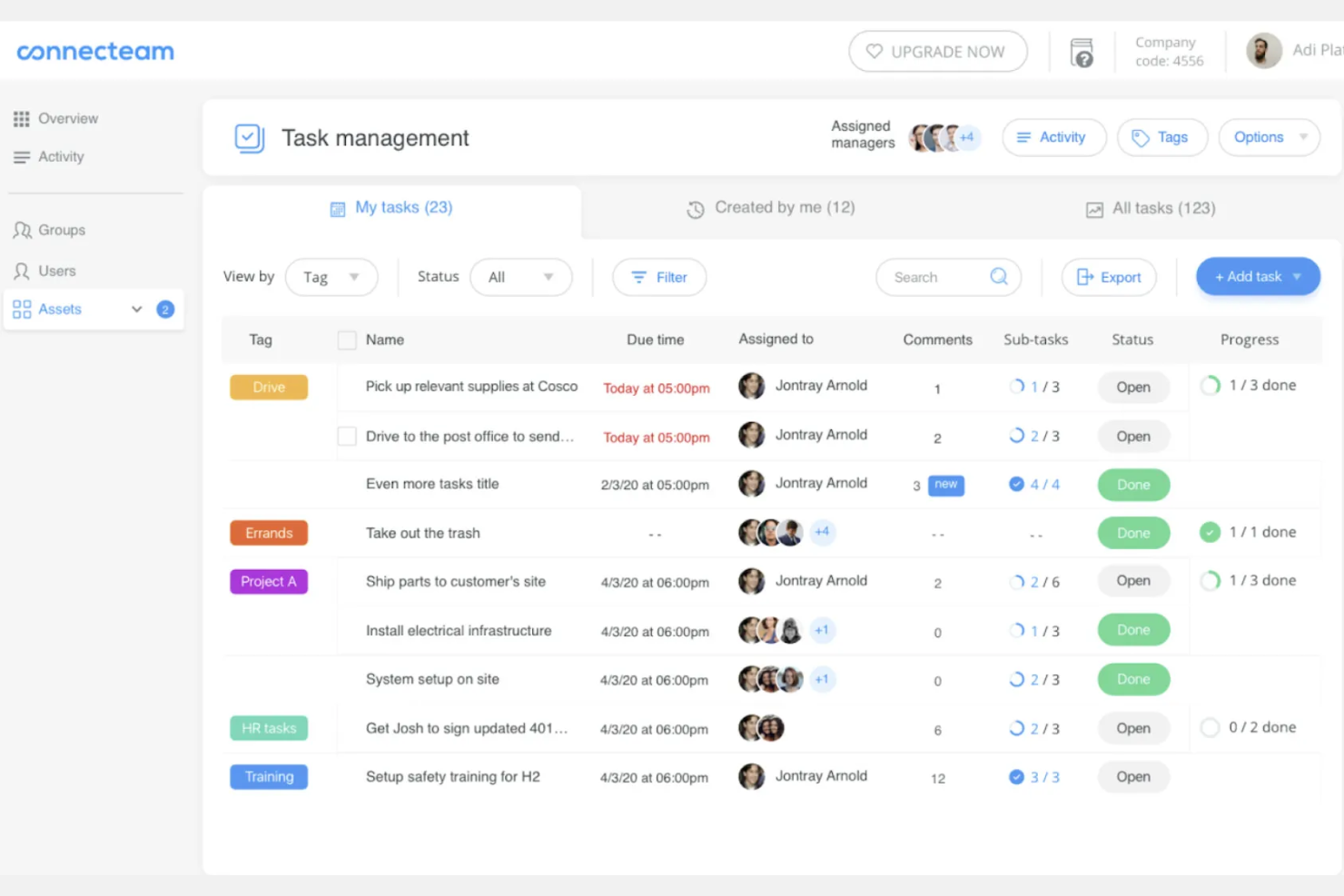
Connecteam is an employee management app designed for deskless teams. It serves industries like construction, retail, healthcare and others by offering tools for scheduling, time tracking, and communication.
Why it's a good Arcoro alternative: Connecteam focuses on mobile accessibility, making it ideal for field-based teams on the go. It offers real-time communication, task management, and employee training, which support its mobile-first approach.
Connecteam's flexibility allows you to manage your team from anywhere, enhancing productivity. Overall, it provides a user-friendly solution for managing mobile workforces effectively.
Standout features & integrations:
Features include time tracking, which helps keep your team accountable, while scheduling tools make it easy to manage shifts. Task management allows you to assign and track tasks easily, and surveys offer a way to gather employee feedback.
Integrations include QuickBooks, Gusto, Xero, Google Calendar, Microsoft Outlook, Dropbox, Google Drive, Square, Zapier, Jira, and Slack.
Pros and Cons
Pros:
- Offers task management
- Supports employee training
- Easy-to-use scheduling tools
Cons:
- No payroll functionalities
- Limited advanced reporting
New Product Updates from Connecteam

Connecteam Expands Break and Timesheet Controls
Connecteam adds flexible break thresholds, personalized policies, auto-end options, a centralized exceptions report, and improved timesheet issue visibility to help teams manage breaks and timesheets more effectively. For more information, visit Connecteam’s official site.
 .
.
Best for modern workforce engagement

Paylocity is a cloud-based HR and payroll software designed for businesses of all sizes. It supports HR teams in managing payroll, benefits, talent, and workforce engagement.
Why it's a good Arcoro alternative: Paylocity offers modern workforce engagement tools that enhance communication and collaboration. Its platform includes features like employee self-service, social collaboration tools, and real-time analytics.
These features foster a connected work environment and help improve employee satisfaction. Paylocity's focus on engagement makes it a versatile option for managing your team's HR needs.
Standout features & integrations:
Features include performance management tools that help you conduct structured reviews and set goals. The platform's learning management system supports employee development and training. Advanced reporting capabilities provide insights into workforce metrics and trends.
Integrations include Microsoft Teams, Slack, QuickBooks, ADP, Xero, Salesforce, Google Workspace, Microsoft 365, Dropbox, and Zoom.
Pros and Cons
Pros:
- Supports employee development
- Encourages team collaboration
- Modern engagement tools
Cons:
- Pricing details are not transparent
- Limited customization options
New Product Updates from Paylocity

Paylocity Expands Expense and Purchase Request Tools
Paylocity adds connected personal cards, smarter expense categorization, and a streamlined purchase request experience. This reduces manual entry and helps finance teams manage expenses and approvals more efficiently. For more information, visit Paylocity’s official site.
 .
.
Homebase
Best for small business scheduling

Homebase is a scheduling and time-tracking software designed for small businesses. It helps managers and employees coordinate schedules, track hours, and manage team communication.
Why it's a good Arcoro alternative: Homebase simplifies scheduling for small businesses, making it easy for your team to manage shifts. Its time-tracking feature ensures accurate payroll calculations and reduces timecard errors.
With its communication tools, it facilitates team coordination and improves workplace efficiency. Homebase's focus on scheduling and time management makes it a practical choice for small teams.
Standout features & integrations:
Features include shift swapping that allows employees to manage their schedules flexibly. The labor cost management feature helps you keep track of expenses and stay within budget. Team messaging tools enhance communication and collaboration among your staff.
Integrations include QuickBooks, Square, Clover, Shopify, Gusto, ADP, Paychex, Toast, Rippling, and Lightspeed.
Pros and Cons
Pros:
- Helps manage labor costs
- Allows shift swapping
- Integrated time-tracking
Cons:
- Payroll function sold as an add-on
- Basic reporting capabilities
Andre Arcoro-alternativer
Her er noen flere Arcoro-alternativer som ikke kom med på kortlisten min, men som likevel er verdt å se nærmere på:
- Paycom
For employee self-service
- Paycor
For compliance automation
- ClockShark
For GPS time tracking
- TimeTrex
For open-source HR solutions
- Construction Clock
For real-time construction time tracking


How I Evaluate Arcoro Alternatives
I evaluate tools on two layers: baseline must-haves—like ATS, field time tracking, and I-9 compliance—and the differentiators that make a platform the right fit for construction HR teams.
Core Functionality (Table Stakes For This List)
When I'm selecting tools for my list, I rank each one on a scale from 0 (does not offer the functionality) to 5 (excels in this area) for each core functionality listed below. Then, I calculate the tool's total score into a percentage. Each tool needs to achieve a minimum total score of 65% to be considered for inclusion.
- Applicant Tracking & Onboarding: I look at whether the ATS handles full recruiting workflows—job posting, candidate pipelines, digital onboarding packets with e-signatures, and compliance forms like I-9s.
- Core HR & Employee Records: A centralized HRIS matters here, so I check for employee self-service portals, org charts, document storage, and role-based access across multiple jobsites or entities.
- Performance & Learning Management: I evaluate whether each platform supports review cycles, goal tracking, and training modules—especially safety and certification courses common in field-based industries.
- Time, Attendance & Scheduling: Field crews need mobile clock-in, geofencing, and shift scheduling, so I look at how well each tool handles time tracking for distributed, on-the-go workers.
- Benefits & Payroll Integration: Whether payroll is built in or connected, I check for benefits enrollment, carrier feeds, and integrations with providers like ADP, Paychex, or similar payroll platforms.
- Compliance & Reporting: Each tool should cover key compliance areas—EEO, ACA, WOTC—and offer configurable reports and dashboards that HR directors can use for audits and workforce planning.
Once I have a list of tools that meet this criteria, I consider what sets each platform apart.
Differentiating Factors (What Sets Vendors Apart)
Here's how I compare and contrast different vendors:
Standout Features
Certification tracking is a big one—I check whether a platform can flag expiring OSHA cards or trade licenses before a worker shows up on-site without valid credentials. Job costing integrations also matter, especially for teams that need labor hours to flow into ERPs like Viewpoint or Sage without manual re-entry. A strong mobile field app rounds things out, since foremen and crew leads need offline-capable tools for clock-ins and document access at remote jobsites.
Beyond Features
Scalability and pricing structure matter a lot when your headcount swings with seasonal project demand—I look at whether a vendor charges per active employee or locks you into a fixed seat count. Implementation support is another key factor, since migrating from Arcoro often means moving years of compliance records, I-9s, and benefits data into a new system. I also evaluate integration ecosystems, checking for pre-built connectors to construction ERPs and accounting tools that field-heavy teams already rely on.
Arcoro – viktige funksjoner
Her er noen av de viktigste funksjonene i Arcoro som kan hjelpe deg med å sammenligne hva alternative løsninger tilbyr:
- Sporing av søkere: Effektiviserer ansettelsesprosessen ved å administrere stillingsannonser og følge opp kandidater.
- Introduksjon av nyansatte: Forenkler integreringen av nyansatte i teamet ditt gjennom automatiserte prosesser.
- Tidsregistrering: Overvåker ansattes arbeidstid og oppmøte for nøyaktig lønnsutbetaling.
- Resultatstyring: Evaluerer de ansattes prestasjoner og setter mål for forbedring.
- Læringsadministrasjon: Tilbyr opplæringsressurser for å forbedre de ansattes ferdigheter.
- Etterfølgerplanlegging: Identifiserer og utvikler fremtidige ledere i organisasjonen din.
- Administrasjon av personalgoder: Håndterer registrering og oppfølging av ansattes personalgoder.
- Etterlevelsesstyring: Sikrer at bransjeregler og -standarder etterleves.
- Selvbetjening for ansatte: Lar ansatte få tilgang til og administrere sine egne HR-opplysninger.
- Analyse av arbeidsstyrken: Gir innsikt i data om arbeidsstyrken for å støtte veloverveide beslutninger.